light AUDI A5 COUPE 2011 Repair Manual
[x] Cancel search | Manufacturer: AUDI, Model Year: 2011, Model line: A5 COUPE, Model: AUDI A5 COUPE 2011Pages: 362, PDF Size: 84.88 MB
Page 131 of 362
____________________________________________ A_ d_ a.._p _t_ i_ v _e_ c_r_u _ i_ s _e_ c_o_ n_ t_r _o _l __ _
@ Display in the instrument cluster
In disp lay area @ information from the navi gation system * and the
tr ip computer is displayed in add it ion to informa tion about adaptive
c ruise contro l.
You can sele ct among the differe nt info rmatio n by repeated b rief
taps on the
I RESET! button on the winds hield w iper lever => page 26,
"Operat io n".
© Status indicator
Th e info rmation i n area © is no t disp layed per manently. Infor mat ion
is d isplayed o nly if yo u set or c hange the speed setting, change the
ti me in terva l, when messages a re displayed or if the ad apt ive cru ise
cont rol is turned off for safety reasons. •
Appli es to vehicles : w ith a daptive cruise c on tro l
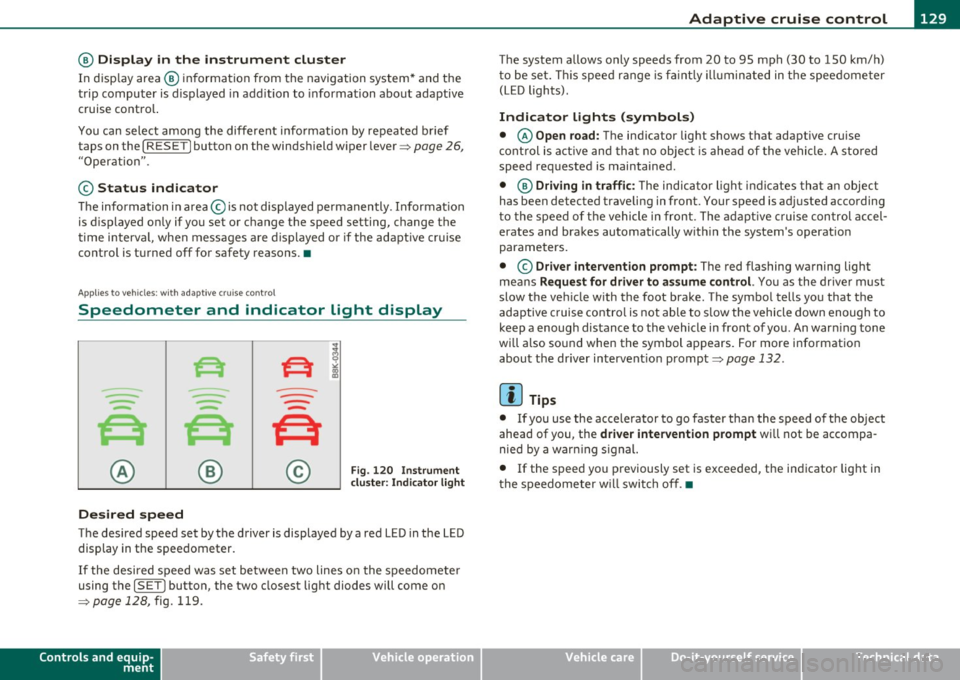
Speedometer and indicator light display
----
- -
- -
@ ®
Desired speed
- -
--
Fig . 120 I nstru ment
cl uste r: Indicator light
T he desired speed set by the driver is displayed by a red LED in the LED
disp lay in the spee dometer.
If the desi red s peed was set be twee n two lines o n the speedo mete r
using the
[ SET J button, the two closest light diodes will come on
=>
page 12 8, fig. 119.
Controls and equip
ment Safety first
T
he system allows only speeds from 20 to 95 mph (30 to 150 km/ h)
t o be se t. T his spee d range is f aint ly ill um inat ed in t he s pee dome ter
(LED lights) .
Indicator lights (symbols)
• © Open road: The indicator light shows t hat adaptive cruise
co ntrol is a ctive and t hat no objec t is ahe ad of the vehi cle. A sto red
speed req uested is maintained.
• @
Driving in traffic : The indicator l igh t ind icates th at an object
has been detected traveling in front . Your speed is ad justed according
t o the spee d of t he vehicle in front. The adaptive c ruise con trol accel
erates and bra kes au tomatically w it hin the system's operat io n
parame ters.
• ©
Driver intervention prompt : The red flashing warning light
me ans
Request for driver to as sume control. You as the drive r m ust
slow t he ve hicle w ith the foot brake . The symbo l tells yo u that the
adaptive cruise contro l is not able to s low the vehicle down enough to
keep a enough distance to the vehicle in front o f you. An war ning tone
wi ll also so und when the symbol ap pears. Fo r more informat ion
abou t the driver intervent ion prompt=>
page 132 .
W Tips
• If you use the ac cele rator to go fa ster than the speed of the object
ahead of you, the
driver intervention prompt will not be accompa
nied by a war ning signal.
• If the speed you p reviously set is exceeded, the ind icator light in
t he s peedometer w ill swit ch off .•
Vehicle care Technical data
Page 133 of 362
Adaptive cruise control -____________ __,:_ __ _
Appli es to ve hicl es: wi th a daptive cruise cont rol
System status indicator
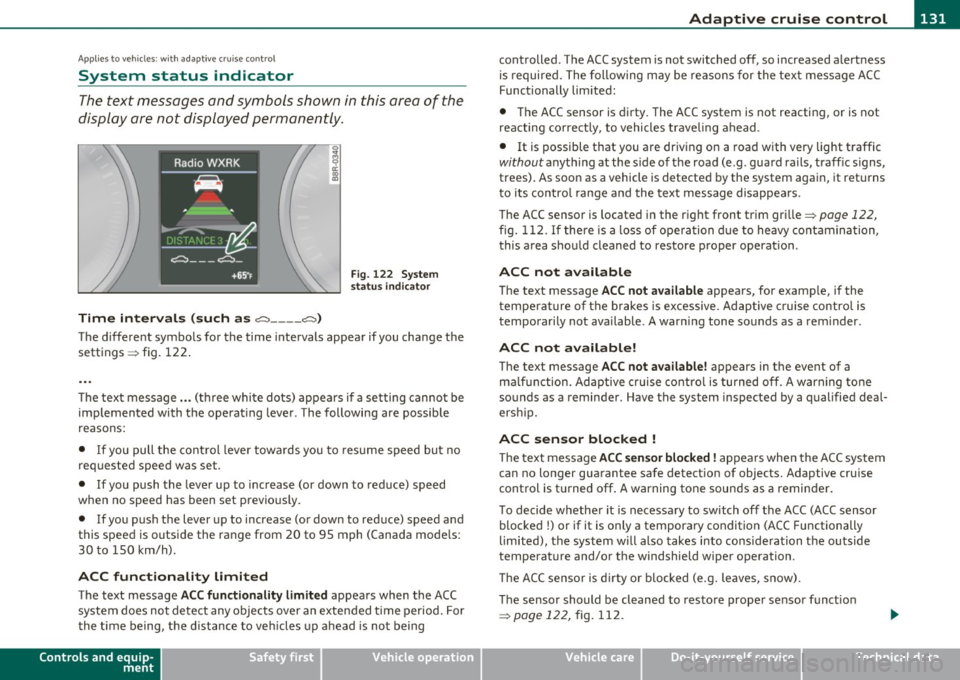
The text messages and symbols shown in this area of the
display are not displayed permanently .
Time intervals (such as e::::, ____ e::::,)
Fig. 122 System
status indicator
The different symbols for the time intervals appear if you change the
sett ings => fig. 122 .
Th e text message ... (three white dots) appears if a setting cannot be
implemented with the operating lever. The following are possible
reasons:
• If you pull the control lever towa rds you to resume speed but no
requested speed was set .
• If you push the lever up to increase (or down to reduce) speed
when no speed has been set previously.
• If you push the lever up to increase (or down to reduce) speed and
this speed is outside the range from 20 to 95 mph (Canada mode ls:
30 to 150 km/h) .
ACC functionality Limited
The text message ACC functionality limited appears when the ACC
system does not detect any objects over an extended time period. For
the time being, the distance to veh icles up ahead is not being
Controls and equip
ment Safety first
controlled
. The ACC system is not switched off, so increased alertness
is required. The following may be reasons for the text message ACC
Functionally limited:
• The ACC sensor is dirty. The ACC system is not reacting, or is not
reacting correctly, to vehicles traveling ahead.
• It is possible that you are driving on a road with very light traffic
without anything at the s ide of the road (e .g . guard rails, traff ic s igns,
trees). As soon as a vehicle is detected by the system again, it returns
t o its contro l range and the text message disappears.
The ACC sensor is located in the r ight front trim grille=>
page 122,
fig. 112. If there is a loss of operation due to heavy contamination,
this area should cleaned to restore proper operat ion .
ACC not available
The text message ACC not available appears, for examp le, if the
t empe rature of the brakes is excessive. Adaptive cruise control is
temporarily not available. A warning tone sounds as a rem inder .
ACC not available!
The text message ACC not available! appears in the event of a
ma lf unct ion. Adaptive cruise control is turned off. A warn ing tone
sounds as a reminder . Have the system inspected by a qualified deal
ersh ip.
ACC sensor blocked !
The text message ACC sensor blocked! appears when the ACC system
can no longer guarantee safe detection of objects. Adaptive cruise
control is turned off. A warning tone sounds as a reminder.
To decide whether it is necessary to switch off the ACC (ACC sensor
blocked
!) or if it is only a temporary condition (ACC Functionally
limited), the system w ill also takes into consideration the outside
temperature and/or the windshield wiper operation .
Th e ACC sensor is d irty or blocked (e.g. leaves, snow).
The sensor should be cleaned to restore prope r sensor funct ion
=>
page 122, fig. 112.
Vehicle care Technical data
Page 135 of 362
Adaptive cruise control ml ____________ __._ __ _
• A red vehicle is shown in the instrument cluster display
=>
page 132, fig. 123.
• The text
DISTANCE! appears in the status line .
• The indicator light in the Instrument cluster blinks red .
• A warning tone sounds.
[I) Tips
• If the adaptive cruise control initiates brak ing, the hydraulic brake
system is under pressure . Therefore, the brake pedal distance is
shorter and the pedal "feels" harder .
• Adaptive cruise control is switched off after press ing the foot
brake . The speed saved up this point can be resumed.
• To resume the saved speed, release the brake pedal and press the
control lever=>
page 126, "Turning adaptive cruise control off
temporarily ".
• If you use the accelerator to go faster than the speed of the object
ahead of you, the
driver intervention prompt will not be accompa
nied by a warn ing signal.
• If the speed you previously set is exceeded, the indicator light in
the speedometer will switch off.•
Applies to ve hicle s: with ad aptive cru ise co ntro l
MMI settings
Individual settings for adaptive cruise control can be
selected in the fv1fv1I*.
Settings for the driving program can be adjusted individually
to the particular user and saved in the MMI*.
- Select: [CAR] function button
> Adaptive Cruise Control >
Driving program .
Controls and equip
ment Safety first
Setting the driving program
In
the driving program menu you can adjust the character istics of
adaptive cru ise control to what you want using
dynamic , standard or
comfort.
Saving settings
Your individual settings are automatica lly saved and assigned to the
remote control key being used (remote key storage) . If the key is
given to another person, the saved settings remain as they are .•
System limitations
App lies to ve hicles : w it h ada ptiv e cr uise cont ro l
General information
Some driving situations which affect the function of the
radar sensor are described below.
When driving, the adaptive cru ise contro l is governed by physical and
system-specified limits. Also, under certain circumstances, the ACC
system may react unexpectedly or late from the driver's point of view.
Therefore, a lways be attentive and intervene, if necessary:
• when driving around curves=>
page 134
• when vehicles in front are not in line with your vehicle=> page 134
• when other ve hicles are changing lanes=> page 134
• when other veh icles are difficult to detect=> page 135.
& WARNING
The radar sensor's vision can be reduced by rain, snow and heavy
spray . This can result in vehicles driving ahead being inadequately
detected or , in some circumstances , not detected at all. If neces
sary, take action yourself!•
Vehicle care Technical data
Page 140 of 362
llffl..__A_ u_ d_ i_ s_ i_ d_ e _ a_ s_s _i_s _t _________________________________________________ _
Audi side assist
Lane change assistant
Applies to veh icles : w ith s ide ass ist
Description
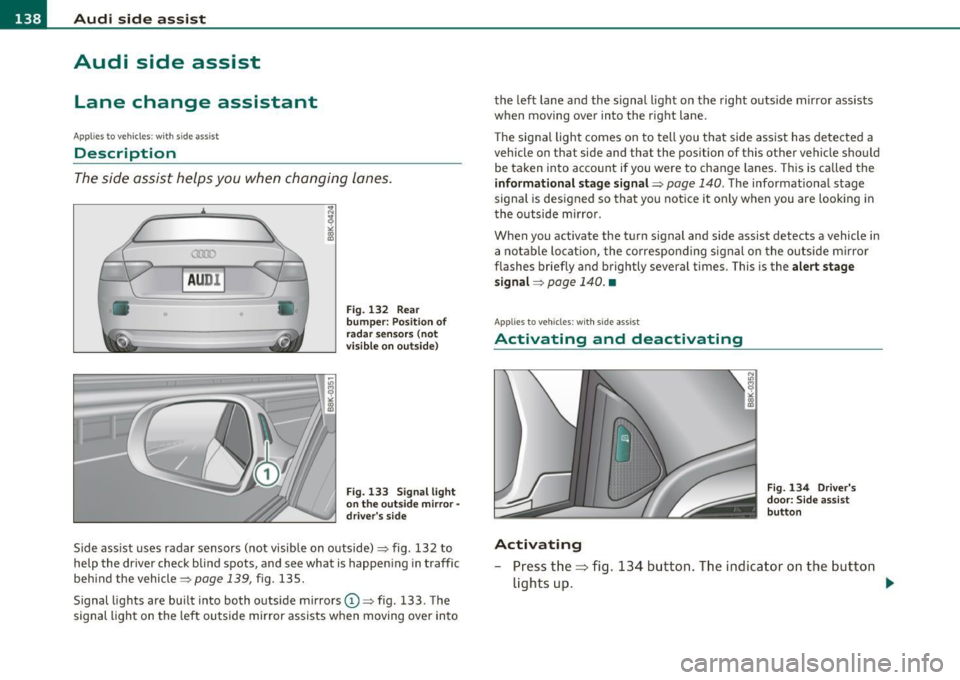
The side assist helps you when changing lanes.
A UD I
0
•
Fig . 1 32 Rear
bu mper: Position of
r a d ar s ensors ( not
v isible on ou ts ide)
Fig. 133 Signal light
o n the out side m ir ror -
driv er's s id e
Side ass ist uses radar sensors (not vi sible on outside)=> fig. 132 to
help the driver check blind spots , and see what is happen ing in traffic
behind the vehicle=>
page 139, fig. 135.
Signal lights are bu ilt into both outside mirrors
(D => fig . 133 . The
signal ligh t on the left ou tside mirror assists when moving over in to the
left lane and the signal light on the right outs ide mirror assists
when moving over into the right lane.
T he sig nal light comes on to tell you that side assist has detected a
vehicle on that side and that the position of this other vehicle should be taken into acco unt if you were to change lanes . This is called the
inf ormational stage signal =>
page 140. The informationa l stage
signal is designed so that you not ice it only when you are looking in
the o utside m irror.
When you activate the turn s ignal and side assist detects a vehicle in
a notable locat io n, the co rrespo nd ing s ignal on the ou tside m irror
flashes briefly and brightly several times. This is the alert stage
s ignal =>
page 140. •
Applies t o vehicle s: wit h sid e ass ist
Activating and deactivating
Activating
Fig. 134 Dr ive r's
do or: S ide assist
bu tto n
- Press the=> fig. 134 button . The indicator on the but ton
lights up . .,_
Page 141 of 362
_________________________________________________ A_ u_d _ i_ s_id _ e_ a_s _s_ i_s _t __ _
Deactivating
- Pre ss th e b utton again . Th e ind icator light on the button
goes o ut.
The system works at speeds faster than 19 mph (30 km/h) .
& WARNING
• Improper reliance on the side assist system can cause collisions
and seriou s per sonal injury:
- Never rely only on side assist when changing lanes.
- Alway s check rear view mirrors to make sure that it is safe to
change lanes.
• Side assist cannot detect all vehicles under all condition s
danger of accident!
• Side a ssist cannot detect vehicle s
in time to alert you when
they approach from behind at very high speed , or fall drop bac;k
very quickly .
• The radar sensor's
vision can be reduced o r entirely blocked by
rain, snow, and heavy spray . Thi s can result in side a ssist not
adequately detecting vehicles o r, in some cases , not detecting
them at all. Always keep an eye on the direction you are traveling
and the relevant area around the vehicle.
• Plea se note that side assi st indi cates there are approaching
veh icles, or vehicles in your blind spot, only after your vehicle has
reached a driving speed of at lea st 19 mph (30 km/h).
• Side assist signal does not work around tight corners (turning
radius le ss than 328 feet or 100 m).
• Side assist is no replacement for the driver's full attention. The
driver alone is respon sible for lane changes and similar driving
maneuvers. Always keep an eye on the direction you are traveling
and the relevant area around the vehicle .
Controls and equip
ment Safety first
0 Note
• T
o ens ure t hat you do not adve rsely affec t side assist, do not blo ck
the area on the rear bumper where the radar sensors are located with
foreign obje cts (s uch as stickers or bicy cle ra cks).
• Make s ure that the s ignal light on the outside mirror is not
blo cked by st ickers or o ther ite ms.
W Tips
• Side assist a utoma tically deact iva tes if it de tects that the rada r
sensors are blocked=>
page 145. The indicator light on the button
goe s out.
• Th e area on the bumpe r w here the ra dar sensors are located must
c o nsistent ly remain free of snow, i ce, a nd heavy soiling so tha t side
assist can funct ion p roper ly. Follow the add itiona l notes on
=>
page 1 45 .
• Additiona l tint ing on the front si de windows can make it ha rder to
see and co rrec tly un ders t and t he sig nal ligh t on the outs ide m irro r.
• F or Declaration of Compliance to United States FC C and Industry
Cana da regulat ions=>
pag e 343. •
Applies to veh icl es: w ith s ide ass ist
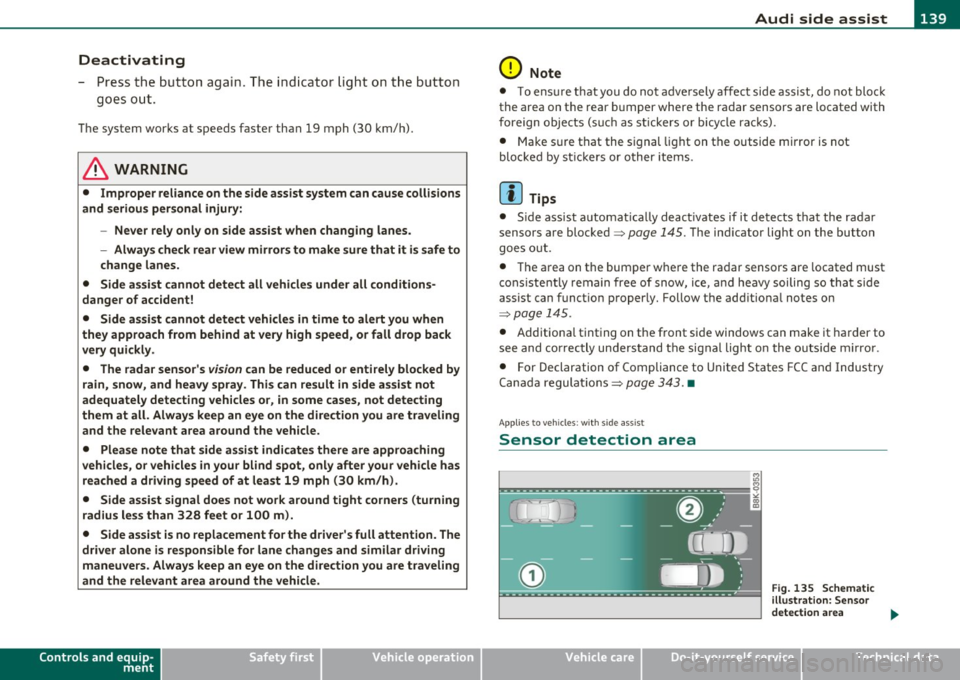
Sensor detection area
Vehicle care
Fig . 135 Schem atic
ill ustration: Se nsor
detectio n area
~
Technical data
Page 142 of 362
1111....__A_ u_ d_i_ s_id _e_ a_s _s_ i_ s _t _________________________________________________ _
The detection~ page 139, fig. 135 of the radar sensor detection
area is made up of :
• the approach area (light green area)
(D, about 230 feet (70 m)
behind the vehicle , and
• the "blind spot" (dark green area)@.
The radar sensors cover the adjacent left and right lanes. Other lanes
are
not covered by the radar sensors .
rn Tips
Side assist does not measure actual lane width. The system assumes
a fixed lane width. Detection in the left and right lanes is based on
this assumed lane width. When driving on narrow roads or when
driving to the left or right of the center of a travel lane, it is possible
that vehicles will be detected that are
not in the lane next to the lane
you are using~
page 144. •
Applie s to vehic les: w ith s ide a ssist
Operation
Side assist compares the distance and difference in speed of detected
vehicles with the speed of your vehicle . Whenever the difference in
speed and distance is registered as notab le if you were to change
lanes , a signa l light appears on the respective mirror .
The signal can light up if you are passed by a vehicle or if you are
passing another vehicle .
If you pass another vehicle slowly (difference in speed less than 9
mph, or 15 km/h), the signa l light will come on as soon as the other
vehicle is in your blind spot and is detected by side ass ist. When the
difference in speed is greater, the signal light will not come on. •
Appli es to vehicles : with si de assist
Informational and alert stage signals
Side ass ist has two signal stages:
• the informational stage signal, and
• the alert stage signal.
Side assist helps you by using the appropr iate signal stage,
depending on whether or not you have activated the turn signal, and
thus have indicated that you are or are not changing lanes.
Informational stage signal
As long as you have not activated the turn signal, s ide assist informs
you of detected vehicles that are reg istered as being in a notable loca
tion if you were to change lanes . Whenever the detected vehicle's
difference in speed and distance is registered by side assist as
notable , the signal light on the respective mirror produces muted
illumination.
Th e brightness of the informat ional stage signal is designed not to be
as intense, so that it does not interfere with your view of the road
when you are driving and have no intention of changing lanes. When
you look in the outs ide mirror, you can clearly see the informational
stage signal.
Alert stage signal
When you act ivate the turn s ignal , and side assist has detected a
vehicle in a notable location on that particular side , the signal light on
this side mirror flashes brightly. The repeated brief and bright
flashing of the alert stage signal reminds you to carefully check
traffic to the rear in the outside mirror and over your shoulder, so that
you can safely complete the lane change~
& in "Safety tips" on
page 145.
rn Tips
The brightness of the signa l light on the outside mirrors can be
adjusted with the MMI*
~ page 143. •
Page 143 of 362
___________________________________________________ A_ u_d_ i_s _ i_d _e_ a_ s _ s_is _ t _ __.1111
A pplie s to vehicles : wi th s ide ass ist
Driving situation: Fast approaching
vehicles
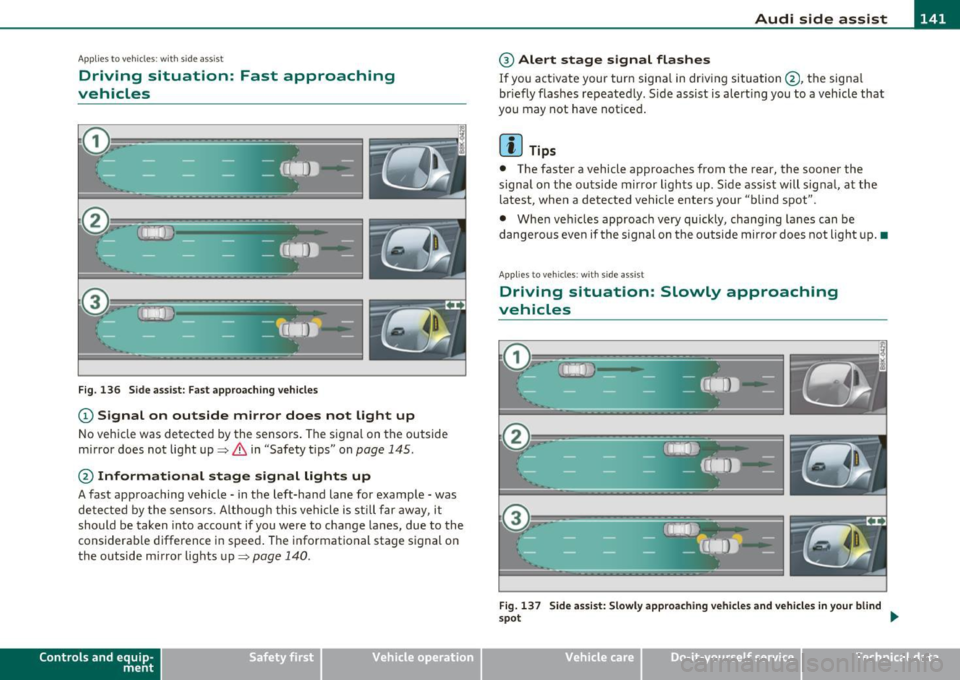
Fig. 136 Side assist: Fast approaching vehicles
(D Signal on outside mirror does not light up
No vehicle was detected by the sensors . The signal on the outside
mirror does not light up~
& in "Safety tips" on page 145.
@ Informational stage signal lights up
A fast approaching vehicle· in the left-hand lane for example· was
detected by the sensors . Although this vehicle is sti ll far away, it
should be taken into account if you were to change lanes, due to the
considerable difference in speed . The informational stage signal on
the outside mirror lights up~
page 140.
Contro ls a nd e quip
m en t Vehicle
OP-eration
® Alert stage signal flashes
If you act ivate your turn signa l in driving situation @, the signa l
br iefly f lashes repeatedly . Side assist is alert ing you to a vehicle that
you may not have noticed .
[I) Tips
• The faster a vehicle approaches from the rear, the sooner the
signal on the outs ide mirror l igh ts up . S ide assist will signal, at the
latest, when a detected vehicle enters your "blind spot".
• Whe n veh icles approach very quickly, chang ing lanes can be
dangerous even if the signal on the outside mirror does not light up. •
App lies to vehicles : with side assis t
Driving situation : Slowly approaching
vehicles
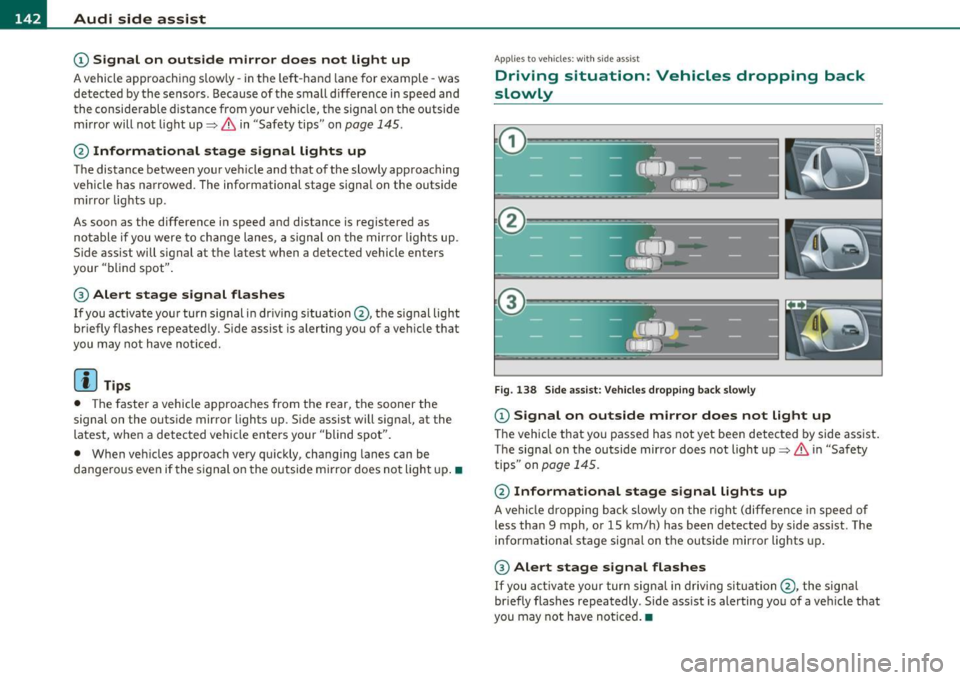
Fig. 137 Side assist: Slowly approach ing vehicles and vehicles in your blind
~ot
~
Vehicle care Do-it-yourselt service iTechnical data
Page 144 of 362
111'..__A_ u_d_ i _s _i_d _e_ a_s_ s_ i_ s_ t _______________________________________________ _
© Signal on outside mirror does not light up
A vehicle approach ing s low ly- in the left-hand lane for example -was
detected by the sensors. Because of the small difference in speed and
the considerable distance from your vehicle, the signal on the outside
mirror will not light up=>
& in "Safety tips" on page 145 .
@ Informational stage signal lights up
The distance between your vehicle and that of the slowly approaching
vehicle has narrowed . The informational stage signal on the outside
m irror lights up.
As soon as the difference in speed and distance is registered as
notable if you were to change lanes, a signal on the mirror lights up.
Side assist will signal at the latest when a detected vehicle enters
your "blind spot" .
@ Alert stage signal flashes
If you activate your turn signal in dr iving s ituation @, the signal light
briefly flashes repeatedly. Side assist is alerting you of a vehicle that
you may not have noticed.
[ i ] Tips
• T he faste r a vehicle approaches from the rear, the sooner the
signal on the outs ide mirror lights up. S ide assist will signal, at the
latest, when a detected vehicle enters your "blind spot".
• When vehicles approach very quickly, changing lanes can be
dangerous even if the signal on the outside mirror does not light up.•
App lies to vehicles : wit h si de assist
Driving situat ion : Vehicles dropping back
slowly
Fig. 138 Side assist: Vehicles dropping back slowly
© Signal on outside mirror does not light up
The vehicle that you passed has not yet been detected by side assist.
The signal on the outside mirror does not light up=>
& in "Safety
tips" on
page 145.
@ Informational stage signal lights up
A vehicle dropping back slowly on the right (differen ce in speed of
less than 9 mph, or 15 km/h) has been detected by side assist. The
informational stage signal on the outside mirror lights up.
@ Alert stage signal flashes
If you activate your turn signa l in driving situa tion @, the signal
br iefly flashes repeatedly . Side ass ist is alerting you of a vehicle that
you may not have noticed. •
Page 145 of 362
_________________________________________________ A_ u _ d_ i_ s_ id_ e_ a _ s_s _ i_s _t _--J_
A pplie s to ve hicles : wi th s id e ass ist
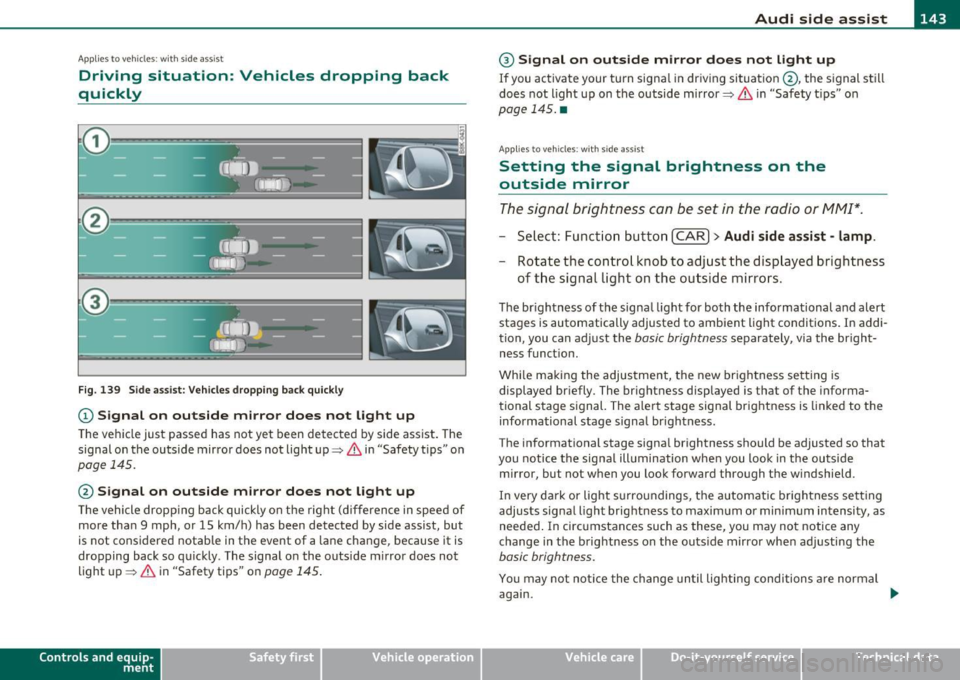
Driving situation: Vehicles dropping back
quickly
@
I
- (OIDJ -
•. _ ...
' I
- Q•n
-~---
Fig. 139 Side assist: Vehicles dropping back quickly
(D Signal on outside mirror does not light up
The vehicle just passed has not yet been detected by side assist. The
signal on the outside mirror does not light up~
& in "Safety tips" on
page 145.
@ Signal on outside mirror does not light up
The vehicle dropping back quickly on the right (difference in speed of
more than 9 mph, or 15 km/h) has been detected by side assist, but
is not considered notable in the event of a lane change, because it is
dropping back so quickly . The signal on the outside mirror does not
light up~
& in "Safety tips" on page 145.
Con tro ls a nd e quip
m en t Vehicle
OP-eration
® Signal on outside mirror does not light up
If you activate your turn signal in driving situation @, the signal still
does not light up on the outside mirror~
& in "Safety tips" on
page 145. •
App lies to ve hicles : with side assis t
Setting the signal brightness on the
outside mirror
The signal brightness con be set in the radio or MM!*.
- Select: Function button [CAR ]> Audi side assist -lamp.
- Rotate the control knob to adjust the displayed brightness
of the signal light on the outside mirrors.
The brightness of the signal light for both the informational and alert
stages is automatically adjusted to ambient light conditions. In addi
tion, you can adjust the
basic brightness separately, via the bright
ness funct ion.
While making the adjustment, the new brightness setting is displayed briefly. The brightness displayed is that of the informa
tional stage signal. The alert stage signal brightness is linked to the
informational stage signal brightness.
The informat ional stage signal brightness should be adjusted so that
you notice the signal illumination when you look in the outside
mirror, but not when you look forward through the windshield.
In very dark or light surroundings, the automatic brightness setting
adjusts signal light brightness to maximum or minimum intensity , as
needed. In circumstances such as these, you may not notice any
change in the brightness on the outside mirror when adjusting the
basic brightness.
You may not notice the change until lighting conditions are normal
again.
Vehicle care Do-it-yourselt service iTechnical data
Page 146 of 362
1111..__A_ u_ d_ i_ s_ i_ d_ e _ a_ s_s _i_s _t _________________________________________________ _
(I) Tips
• Side assist is not act ive when the basic br ightness is adj usted. The
signal light comes on briefly to he lp you make the adjustment .
• Your settings are automatically stored and assigned to the remote
cont rol key being used .•
A ppli es to vehic les : w ith si de assist
General information
Side assist has limits and cannot detect vehicles under all road and
weathe r conditions . Please remember system limitat ions and never
re ly on t he system, espec ially w hen:
• driving t hrough curves =>
page 144,
• lanes a re of differe nt widths => page 144. •
Ap plies to veh icles : w it h side ass ist
When driving through curves
Side assist cannot detect vehicles in curves with a turning radius of
less than 3 28 feet (1 00 m).
When driving through a cu rve, it is possible that side assist may
reg iste r a vehi cle two l anes over, and the sign al on the o utside m irro r
wi ll li ght up .•
A pp lies to vehicles : wi th si de assist
Lane width
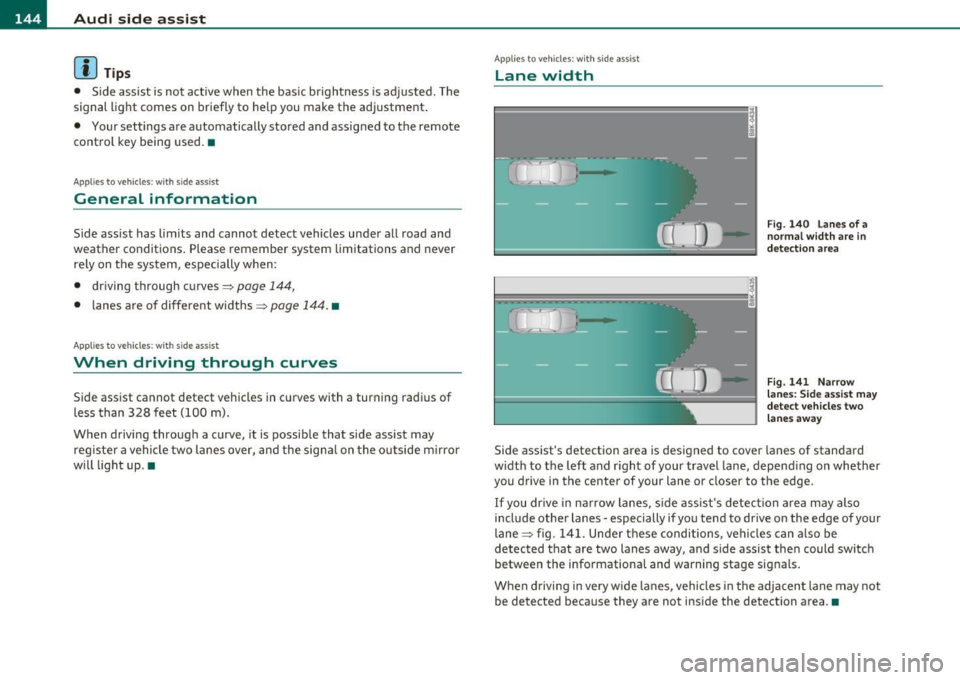
Fig. 14 0 La n es of a
norma l width are in
det ection ar ea
Fig . 141 N arrow
l a n es : Si de assis t may
dete ct ve h icl es tw o
lane s away
Side assist 's detection area is designed to cover lanes of standard
w idt h to the left and r ight of your travel lane, depend ing on whether
you drive in the center of your lane or closer to the edge.
If you dr ive in narrow lanes, s ide ass is t's detec tion area may also
include other la nes -especially if you tend to drive on the edge of your
lane => fig. 141. Unde r th ese condi tions, ve hicl es can a lso be
detected t hat are two lanes away, and s ide assist the n could switc h
between the info rmationa l and warning stage signals.
When drivi ng i n very w ide la n es, vehicles in the adjacent lane may not
be detected because they are not inside the detection a rea .•