ignition AUDI A5 COUPE 2012 User Guide
[x] Cancel search | Manufacturer: AUDI, Model Year: 2012, Model line: A5 COUPE, Model: AUDI A5 COUPE 2012Pages: 316, PDF Size: 78.59 MB
Page 26 of 316
24 Driver in formation d isplay
• To disp lay trip information within a memory
l ev el, pr ess the top or bottom part of the
function selection switch
@ .
The trip computer wi ll not operate unless the
ignition is on. When you turn on the ignition,
the function that was in us e when you last
tu rned the ignition off will be disp layed.
I n addition to information on the trip comput
er (trip computer 1 and 2 and the efficiency program*), the digital speedometer and infor
mation regarding the navigation system* can
also be displayed. To switc h the display be
tween the different information, tap the
I RES ET I button @ briefly .
Setting v alu es to ze ro
To delete on e current value from the trip com
puter, select the desired function and press
the
I R ES ET I button @for at least one second.
The follow ing values can be set to zero
indi
vi dually :
- Average fuel mileage
- Average speed
-Elapsed time
- Distance
All currently displayed values are deleted in
the efficiency program* .
In addition,
all the values in the s ingle-trip or
the total-trip memory can be deleted simulta neously ¢
page 24 .
(Di Tips
All stored values will be lost if the vehicle
battery is disconnected .
Basic Settings for the trip computer
The radio or MMI* operating unit is used for
set ting the trip computer's basic settings.
• Se lect: F unction button ICARI > Instrument
cluster
> On-boa rd compute r 1 or On- boa rd
computer 2 .
The values in the single-trip or the total-trip
memory can a ll be reset to zero at the same
time under
Reset in the menu . In addition, you can determine what
informa
tion from the trip computer should be shown in the instrument cluster d isp lay. If one of the
pieces of driver information is turned
Off , that
driver information will not be shown in the
display . The information w ill continue to be
calculated by the tr ip compute r and can be
turned back
On at any t ime .
(D Tips
The dr iving information in the efficiency
program* is also reset to zero w ith the s in
gle-tr ip memory.
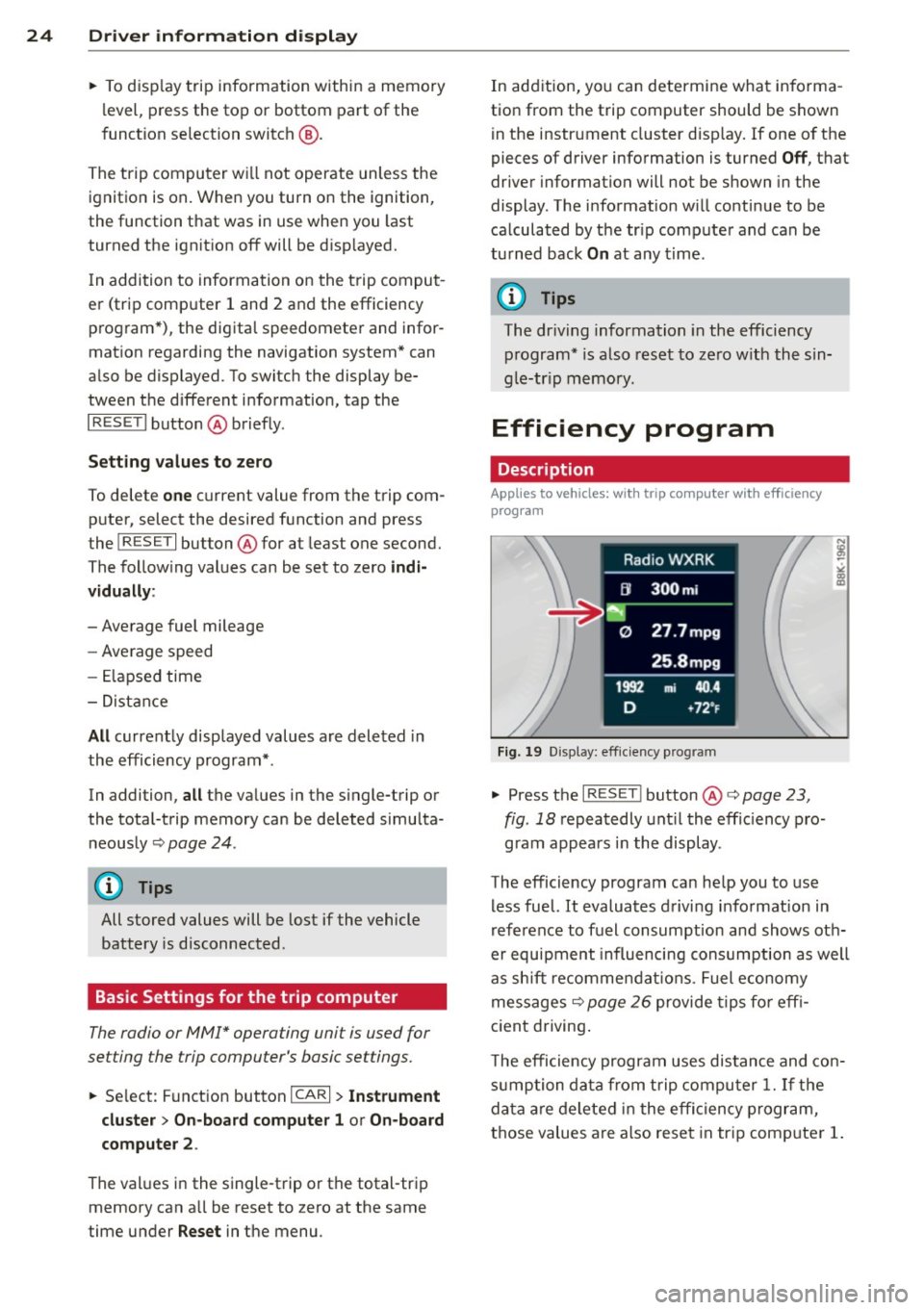
Efficiency program
Description
Applies to vehicles: with trip compute r with efficiency
prog ram
Fi g. 19 D isp lay: eff iciency prog ram
• Press the I RES ET I button @¢ page 23 ,
fig . 18
repeatedly unt il the effic iency p ro
gram appears i n the display.
The efficiency program can he lp you to use
less fuel. It evaluates d riving informat ion in
reference to fuel consumption and shows oth
er equipment influencing consumption as well
as sh ift recommendat ions . Fuel economy
messages ¢
page 26 provide tips fo r eff i
c ient driving .
T he efficiency program uses distance and con
s u mption data from t rip compu ter
1. If the
da ta are deleted in the effi cien cy program,
those values are also reset in tr ip comp uter
1.
Page 28 of 316
26 Driver information d isplay
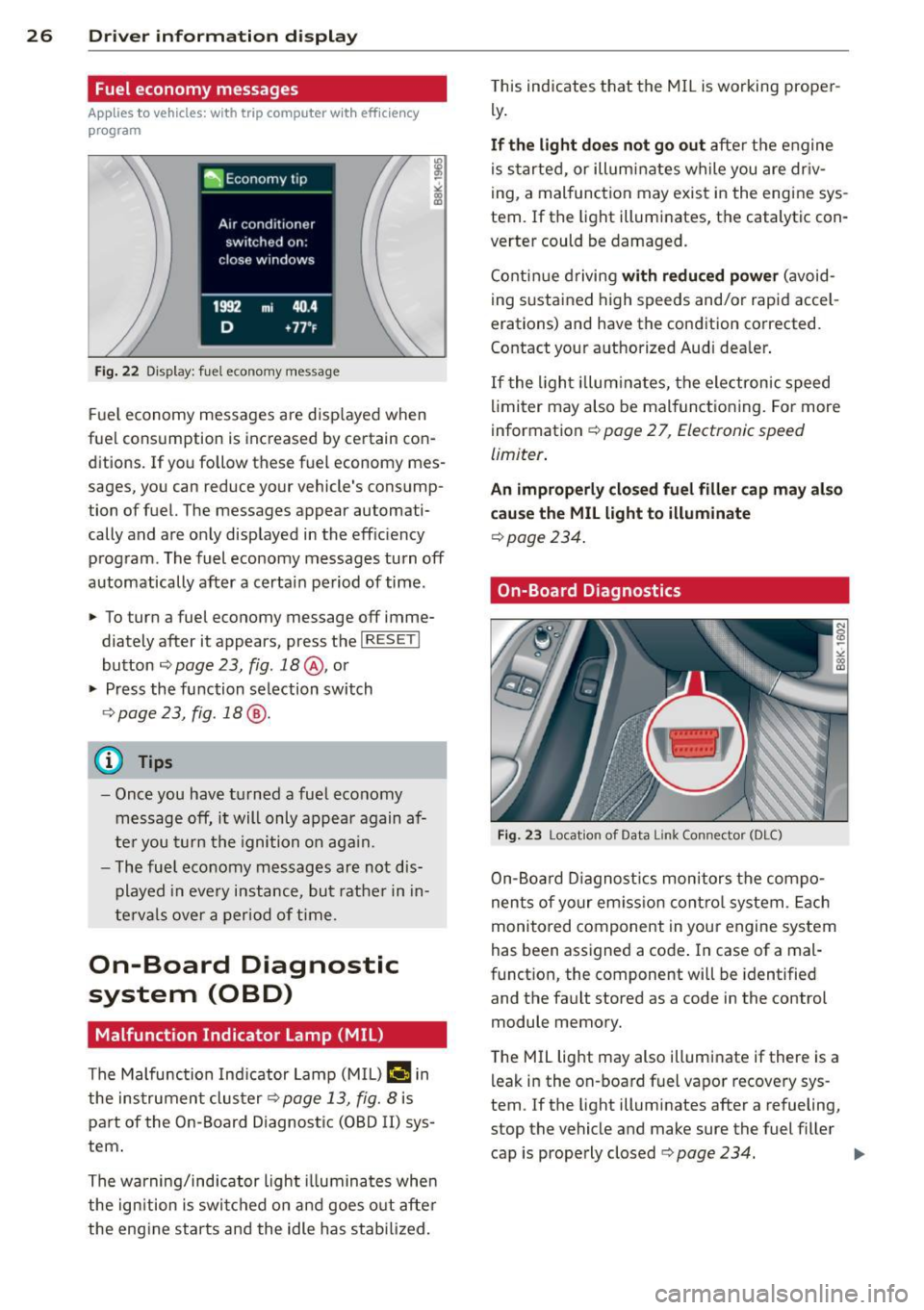
Fuel economy messages
App lies to vehicles: with trip computer w ith eff ic iency
program
Fig. 22 Display: fuel economy message
F ue l economy messages are disp layed when
fuel consumption is increased by certain con ditions. If you follow these fuel economy mes
sages, you can reduce your vehicle's consump
tion of fuel. The messages appear automati
cally and are only displayed in the efficiency program. The fuel economy messages turn
off
automatically after a certain period of time .
~ To turn a fuel economy message off imme-
diately after it appears, press the
I RESETI
button ¢ page 23, fig. 18@, or
~ Press the function selection switch
9page23, fig.18@.
(D Tips
-Once you have turned a fuel economy
message
off, it will only appear again af
ter you turn the ignition on aga in.
- The fuel eco nomy messages are not dis
played in every instance, but rather in in
tervals over a period of time.
On-Board Diagnostic
system (OBD)
Malfunction Indicator Lamp (MIL)
The Malfunction Indicator Lamp (MIL) flllifi in
the instrument clus ter
9 page 13, fig. 8 is
part of the On-Board Diagnostic (OBD II) sys
tem .
The warning/indicator light illuminates whe n
the ign ition is switched on and goes out after
the engine starts and the idle has stabilized. T
his indicates that the MIL is working proper
ly .
If the light does not go out after the engine
is started, or illuminates while you are dr iv
ing, a malfunction may exist in the engine sys
tem. If the light illuminates, the catalytic con
verter could be damaged.
Continue driving
with reduced power (avoid
ing sustained high speeds and/or rapid accel
erations) and have the condition corrected.
Contact your authorized Audi dealer .
If the light illum ina tes, the electronic speed
limiter may also be mal functioning. For more
information ¢
page 2 7, Electronic speed
limiter .
An improperly closed fuel filler cap may also
cause the MIL light to illuminate
¢ page 234.
On-Board Diagnostics
Fig. 23 Location of Data Link Connector (OLC)
On-Board Diagnostics monitors the compo
nents of your em iss ion contro l system . Each
monitored component in your engine system
has been assigned a code . In case of a mal
function, the component will be identified
and the fault stored as a code in the control
module memory.
T he MIL light may also illuminate if there is a
leak in the on-board fuel vapor recovery sys
tem . If the light illuminates after a refueling,
stop the vehicle and make sure the fuel filler cap is properly closed¢
page 234. .,..
Page 31 of 316

Driver information messages
Driver information messages are shown in the
instrument cluster display in addition to sym
bols.
Fig. 25 Instrument cluster: SE T butto n
For example, if the transmission selector lever
is not in the
P position when the engine is
turned
off, the following message appears:
Shift to P, otherwise vehicle can roll away.
Doors do not lock
if lever is not in P.
The ignition key can on ly be removed with the
selector in this position. This and other mes
sages are brought up if a function cannot be
carried out.
Driver messages and red symbols
If a red symbol appears in the display, a dr iver
message is a lso displayed automatica lly.
For example, the. symbol for a problem
with engine oil pressure appears in the dis
play . The message :
Switch off engine and check oil level
The driver message in the display goes out af
ter about
5 seconds . The driver message can
be disp layed again by brief ly pressing the
ISETI button i=> fig. 25.
Driver messages and yellow symbols
If a ye llow symbo l appears in the disp lay, a
driver message is also displayed automatica l
l y.
F or example,
thi- 1-1 symbol appears in the
disp lay, ind icating low windshield washer flu
id level. The following message also appears:
Please top up washer fluid
Driver information display 29
The driver message disappears after a few
seconds. The driver message can be displayed
again by br iefly press ing the
ISE TI button.
Red symbols
A red symbol means DANGER.
Fig. 26 D isp lay: Da nge r sy mb ol
.,. Pull off the road .
.,. Stop the vehicle .
.,. Turn
off the engine .
.,. Check the malfunctioning system. Contact
your authorized Audi dealer or a qualified
workshop for assistance.
Red symbols indicate a prior ity 1 malfunction
- Danger!
With a priority
1 malfunction, a red symbol
appears in the uppe r center area of the dis
play c>
fig. 26 . A driver message appears as
well to explain the ma lfunction in more de
tail. When this symbol appears,
three warning
tones sound in succession . Th e symbol contin
ues to flas h until the fault has been corrected.
If
several priority 1 malfunct ions are present,
the symbols appear in succession and remain
for about
2 seconds.
The driver wa rning goes out after about
5 sec
onds, but it can be brought up again at any
time by pressing the
ISE TI button. c> page 29
Alternator failure
i=>page 30
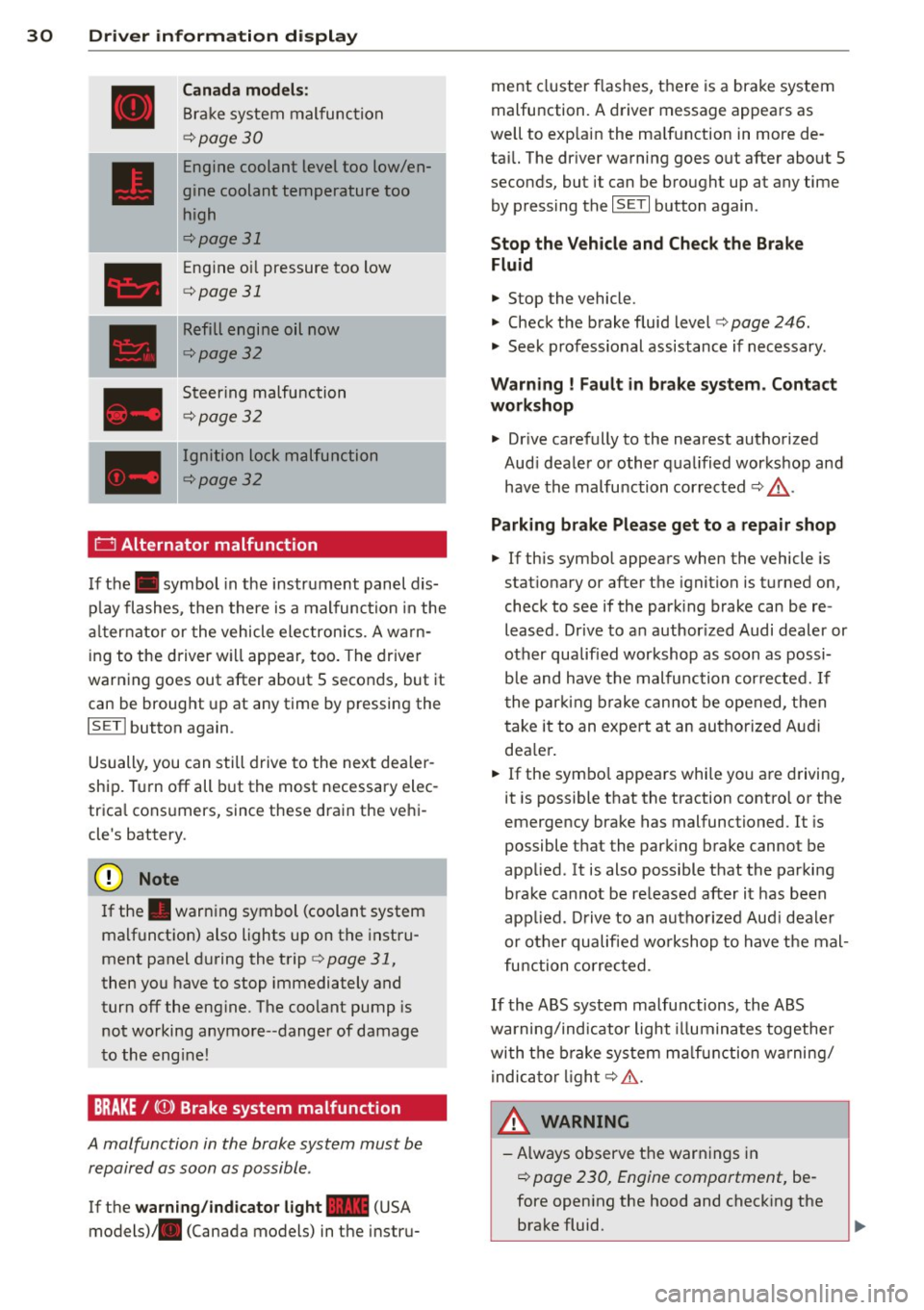
USA models:
Brake system malfunction
i=>page 30
Page 32 of 316
30 Driver in formation d isplay
Canada m odel s:
Bra ke system malfunction
c:>page30
Engine coolant level too low/en
gine coolant temperature too
high
c:>page 31
Engine oi l pressure too low
c:>page 31
Refill engine oil now
c:>page32
Steering malfunction
c:>page 32
Ignition lock malfunction
c:>page32
0 Alternator malfunction
If the . symbol in the instrument panel dis
p lay flashes, the n there is a malfunc tion in the
a lt ernator or the vehicle electron ics. A warn
ing to the driver will appear, too. The driver
warning goes out after about 5 seconds, but it
can be brought up at any time by pressing the
ISETI button again.
Usually, you can still drive to the next dea ler
ship. T urn off all b ut the most necessary elec
tr ica l cons umers, since these dra in the veh i
cle's battery.
(J;) Note
If the . war ning symbol (coolant system
malfunction) also lights up on the instru
ment panel during the trip
c:> page 31,
then you have to stop immediately and
turn off the eng ine. The coolant pump is
not working anymore--danger of damage
to the eng ine!
BRAKE/
A malfunction in the brake system must be
repaired as soon as possible .
If the warn ing /indicator light-(USA
models)/ . (Canada models) in the instru- me
nt cluster flashes, there is a brake system
malfunction. A driver message appears as
we ll to exp la in the ma lfunction in more de
ta il. The dr iver warning goes out after about S
seconds, but it can be brought up at any time by press ing the
ISE TI button again .
Stop the Vehicle and Check the Brake
Fluid
.,. Stop the vehicle .
.,. Check t he brake fluid level
c:> page 246 .
.,. Seek professional assistance if necessary .
Warning ! Fault in br ake system . Contact
workshop
.,. Drive ca refully to the nearest authorized
Aud i dea le r or other q ualified workshop and
have the malfu nction corrected
c:> &_ .
Parking b ra ke Plea se get to a repair shop
.,. If this symbol appears when the vehicle is
stat ionary or after the ignition is t urned on,
check to see if the par king brake can be re
leased. Dr ive to a n author ized Audi dealer or
other qualified workshop as soon as possi
b le and have the malfunc tion cor re ct ed. If
t he par king b rake cannot be opened, t hen
take it to an expe rt at an authorized A udi
dea ler .
.,. If the symbo l appea rs whi le yo u are d riving,
it is possible that the traction contro l or the
emergency brake has malfunctioned. It is
possible that the parking brake cannot be
app lied. It is also possible that the parking
brake cannot be released after it has been
app lied. Drive to an autho rized Aud i deale r
or other qualified workshop to have t he mal
fu nction corrected.
If the ABS system malfu nctions, the ABS
warning/indicator light illuminates togethe r
with the brake system ma lfunction w arning/
i ndica to r li ght
c:> .&..
A WARNING
-A lways observe t he warn ings in
c:> page 230, Engine compartment, be
fore open ing the hood and check ing the
brake fluid.
Page 34 of 316

32 Driver information display
• Co ntac t you r authorized Audi dea ler if nec -
essa ry .
Engine oil level too low
If th e e ngine o il leve l is too l ow, ad d eng ine
oil
<> page 242.
Engine oil level correct
If th e . symbo l flash es even t houg h the en
g ine o il lev el is co rrec t, p lease seek prof essio
na l assis tan ce. Do not cont inu e dr iv in g. Do
no t leave the eng ine run nin g
idle, either .
{O) Tips
- The engine oil pressure symbol. is
not an indicator for a low engine oil lev
el. Do not rely on it. Instead, che ck the
oil level in your engine at regular inter
vals, preferably each time you refuel,
and always before going on a long trip.
- The yellow oil level warning indication
II requires oil refill or workshop serv
ice without delay . Do not wait until the
red oil pressure warning. starts to
flash before you respond to the low oil level warning
II. By then, your engine
may already have suffered serious dam
age .
~ . Fill engine oil now
WARNING: Please add oil immediately
If t he . symbo l lights up, t hen the oil has to
be rep lenished r ight now
c:> page 242 .
Q31-e Steering malfunction
If there is a malfunction in the electronic
steering column lock, th e steering cannot b e
unlocked .
If th e . symbol in the disp lay blinks, there
is a malfunction in the elect ronic steer ing col
u m n lock. A dr iver message app ears as well to
explain the malfunc tion in mo re de ta il. The
dr iver war ning goes out after about 5 sec
on ds, but it can be broug ht up a t any time by
p res sing t he
ISE TI bu tton again .
Stop the vehicle and turn off the engine.
Steering defective
• Obtain profess ional a ssista nc e.
• Do
not tow your ve hicle.
A WARNING
-
Your veh icle must not be towe d in t he
event of a malfunction in the electronic
steering co lumn lock beca use it cannot be
steered due to the locked steering. I f it is
t o we d wit h the steeri ng locked, there is
t h e risk o f an accident.
I
{i) Tips
The symbol's ap pearance might be differ
ent in some mode ls.
© -e Ignition lock malfunction
A malfunction in the ignition lock must be re
paired immediately.
If the . symbol in the display blinks , there
is a ma lf u nction in the e lectronic ignition lock .
A driver message appears as we ll to explain
t h e malfunction in mo re deta il. The dr iver
warning goes out after about 5 seconds, but it can be b rought up a t any time by press ing the
ISE TI bu tton again
Defective ignition switch Get it serviced!
• Do not turn the e ngine off .
• Drive imme diate ly to a n author ized service
facility to have the malfunct io n corrected.
If there is a mal funct ion i n the elect ron ic ign i
tion loc k, the ignition cannot be t urne d off .
D rive immed iate ly to an autho rized serv ice fa
c ili ty to have the cause of the malfunct ion c or
rected.
On vehicles with conve nience key*, the engi ne
sho uld not be switched off us ing the start/
stop button because the engine cannot be
started again afte r the ignit io n h as been
switched off .
Page 35 of 316
(D Tips
The symbol's appearance might be different in some models .
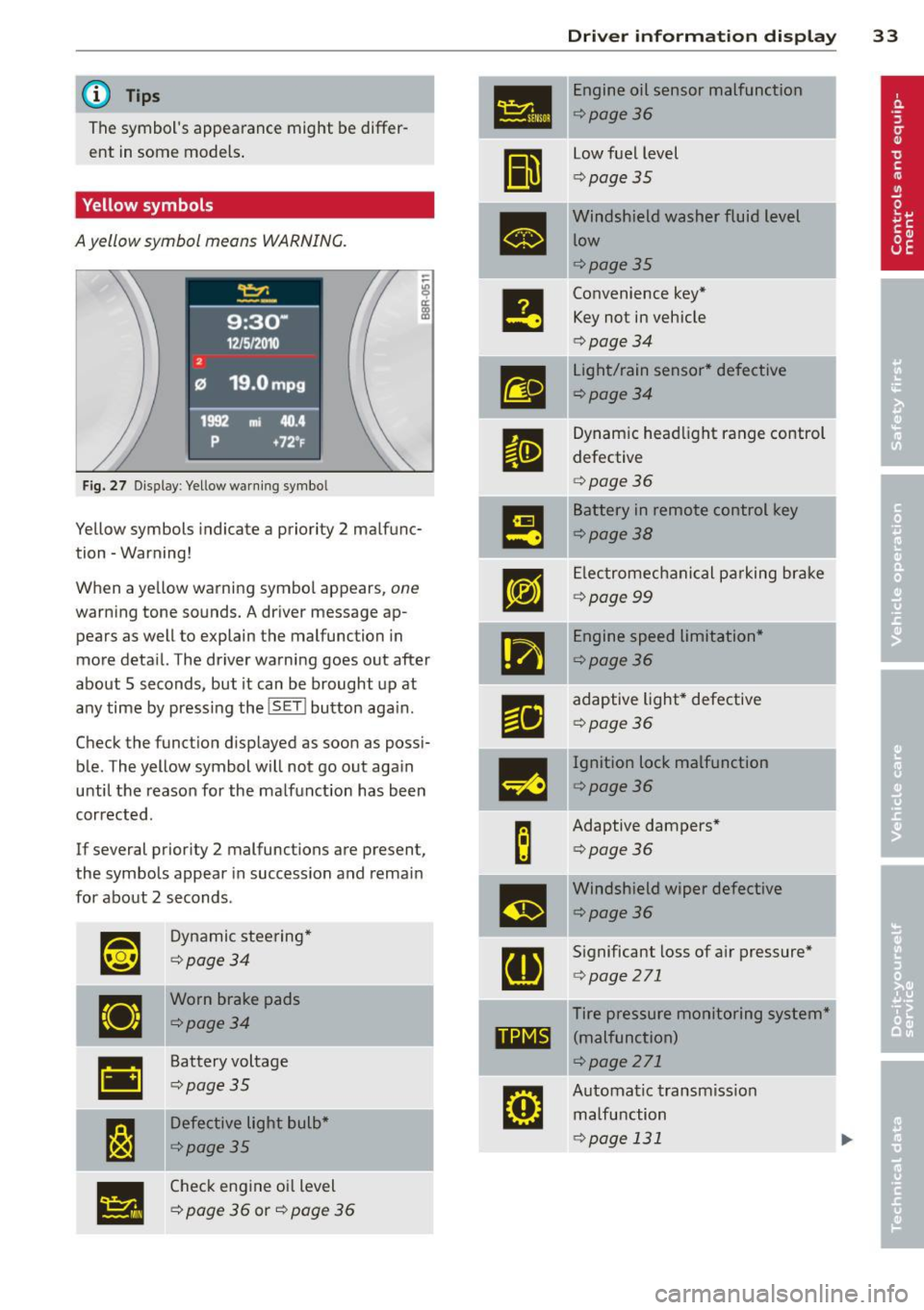
Yellow symbols
A yellow symbol means WARNING.
Fig. 27 Display: Yellow warning symbo l
Yellow symbols indicate a priority 2 malfunc
tion -Warning!
When a yellow warning symbol appears,
one
warning tone sounds. A driver message ap
pears as well to explain the malfunction in
more deta il. The driver warning goes out after
about 5 seconds, but it can be brought up at
any time by pressing the
! SET I button aga in.
Check the funct ion displayed as soon as possi
ble. The yellow symbol will not go out again
until the reason for the malfunction has been
corrected.
If several priority 2 malfunctions are present ,
the symbols appear in succession and remain
for about 2 seconds .
~~
Dynamic steering*
¢page34
•
Worn brake pads
¢page34
•
Battery voltage
¢page35
I:~
Defective light bulb*
¢page35
•
Check engine oil level
¢
page 36 or¢ page 36
Dri ver inform ation di spl ay 33
•
Engine oil sensor malfunction
¢page36
II
low fuel level
¢ page 35
•
Windshield washer fluid level
low
¢page35
e
Convenience key* Key not in vehicle
¢ page 34
m
light/rain sensor* defective
¢page34
II
Dynamic headl ight range control
defective
¢ page 36
m
Battery in remote control key
¢page38
rm
Electromechanical pa rking brake
¢ page 99
•
Engine speed limitation*
¢page36
r1i
adaptive light* defective
¢page 36
-
m
Ignition lock malfunction
¢page36
B
Adaptive dampers*
¢page36
m
Windshield wiper defective
¢page36
[ti
Significant loss of air pressure*
¢page 271
Tire pressure monitoring system*
11111 (malfunction)
¢page 271
rm
Automatic transmiss ion
malfunction
¢page 131
Page 38 of 316

36 Driver in formation d isplay
'l:"::71 , Check engine oil
II Add o il, ma x x qt (l). You may c ontinu e
drivin g
If the ll!I symbol lights up d isplay ing th is
driver message, then add a maximum of
I li
ter at you r earliest oppo rtunity
c:> page 242.
'l:":?J. Engine oil level
II Please c heck oil l evel
When the symbol illuminates, check the en
g ine oil level as soo n as poss ible
c:> page 242.
Top off the oil at yo ur earliest oppo rtunity
c:> page 2 42.
'IY ..,. Engine oil sensor defective
II Oil le vel! Sen sor defecti ve
If the symbol illum inates, contact your au
thor ized Audi dealer and have the o il sensor
inspected . Until you have th is done, check the
oil leve l each time you refuel just to be on the
safe side
¢ page 242.
! ?) Engine speed limitation
Applies to vehicles : with engine speed limi tation
IP,I Do not e xceed ma x. engine spee d of XXXX
rpm
The II! symbo l illuminates when there is an
engine contro l malfunction. The
(m indicator
light in the instrument cluster also illumi
nates. The engine speed is limited to the
speed displayed in the driver information sys
tem . Keep in mind that the eng ine speed will
not exceed the va lue disp layed in the driver in
formation system, fo r example when down
shifting.
Please go to an authorized Aud i dealer or oth
er qualified workshop to have the ma lfunction
repaired.
~(D Headlight range control defective
II Headlight range control d efe cti ve !
If the fl symbo l ill uminates , the dynamic
headlight range contro l is no longer working
properly . Have the system checked and re
paired at your authori zed Audi dealer.
§0 Adaptive light defective
Applies to vehicles: with adaptive light
l/ll adapt ive Light defecti ve
When the l/ll symbol illuminates, it means
that adaptive light is defective. Go to an au
thorized Audi dealer to have the headlights or
the control un it for the adaptive light re
paired .
~ Ignition lock malfunction
I!! Ignition lock def ectiv e
If the I!! symbol in the display comes on,
there is a malfunction in the e lectronic igni
tion lock . Please go to an author ized Audi
dealer or other qualified workshop to have the
malfu nction repa ired.
Q Adaptive dampers
Applies to vehicles: with Audi drive select
E Adapti ve damper s: syste m malfunc tion
If the E symbol in the d isplay comes on, there
is a ma lfunction in the adaptive dampers.
Please go to an authori zed A udi dealer or oth
er qualified workshop to have the mal funct ion
repaired .
~ Windshield wipers faulty
ti Windscreen wipe r defective!
When the fw,j symbol illum inates, it means
that the elect ronics for the winds hield wipers
are defective . Please go to an authorized A udi
dealer or qualified workshop to have the
windshield wiper system repaired.
Page 39 of 316
Opening and closing Keys
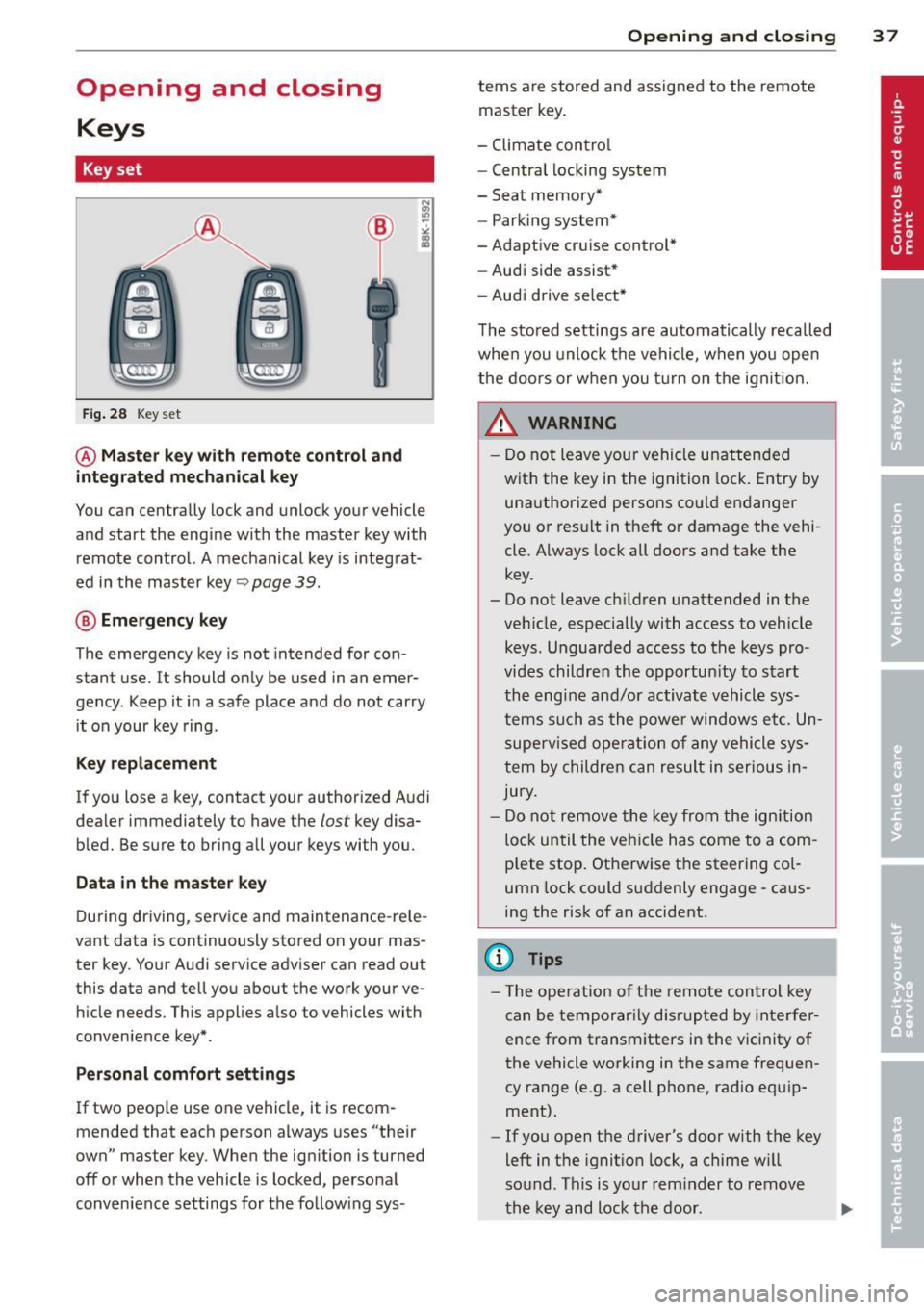
Key set
Fig. 28 Key set
@ Master key with remote control and
integrated mechanical key
You can centrally lock and unlock your vehicle
and start the engine with the master key with
remote control. A mechanical key is integrat
ed in the master key~
page 39.
® Emergency key
The emergency key is not intended for con
stant use.
It should only be used in an emer
gency . Keep it in a safe place and do not carry
it on your key ring .
Key replacement
If you lose a key, contact your authorized Audi
dealer immediately to have the
lost key disa
bled. Be sure to bring all your keys with you.
Data in the master key
During driving, service and maintenance-rele
vant data is continuously stored on your mas
ter key. Your Audi service adviser can read out
this data and tell you about the work your ve hicle needs. This applies a lso to vehicles with
conven ience key*.
Per sonal comfort settings
If two people use one vehicle, it is recom
mended that each person always uses "their
own" master key . When the ign ition is turned
off or when the vehicle is locked, personal
conven ience settings for the follow ing sys-
Opening and closing 3 7
terns are stored and assigned to the remote
master key.
- Climate contro l
- Centra l locking system
- Seat memory*
- Parking system*
-Adaptive cruise control*
- Audi side assist*
- Audi drive se lect*
The stored settings are automatically recalled
when you unlock the vehicle, when you open
the doors or when you turn on the ignit ion.
A WARNING
-
- Do not leave your vehicle unattended
with the key in the ignition lock. Entry by
unauthorized persons could endanger
you or result in theft or damage the vehi
cle . Always lock all doors and take the
key .
- Do not leave ch ildren unattended in the
veh icle, especially with access to vehicle
keys . Unguarded access to the keys pro
vides children the opportun ity to start
the engine and/or activate vehicle sys
tems such as the power windows etc. Un
supervised operation of any vehicle sys
tem by children can result in serious In
jury.
- Do not remove the key from the ignition
lock until the vehicle has come to a com
plete stop. Otherwise the steering col
umn lock could suddenly engage -caus
ing the risk of an accident.
@ Tips
- Th e operation of th e remote control key
can be temporarily disrupted by interfer
ence from transmitters in the vicinity of
the vehicle working in the same frequen
cy range (e .g. a cell phone, radio equ ip
ment).
- If you open the driver's door with the key
left in the ignit ion lock, a chime w ill
sound. Th is is your reminder to remove
the key and lock the door.
Page 41 of 316
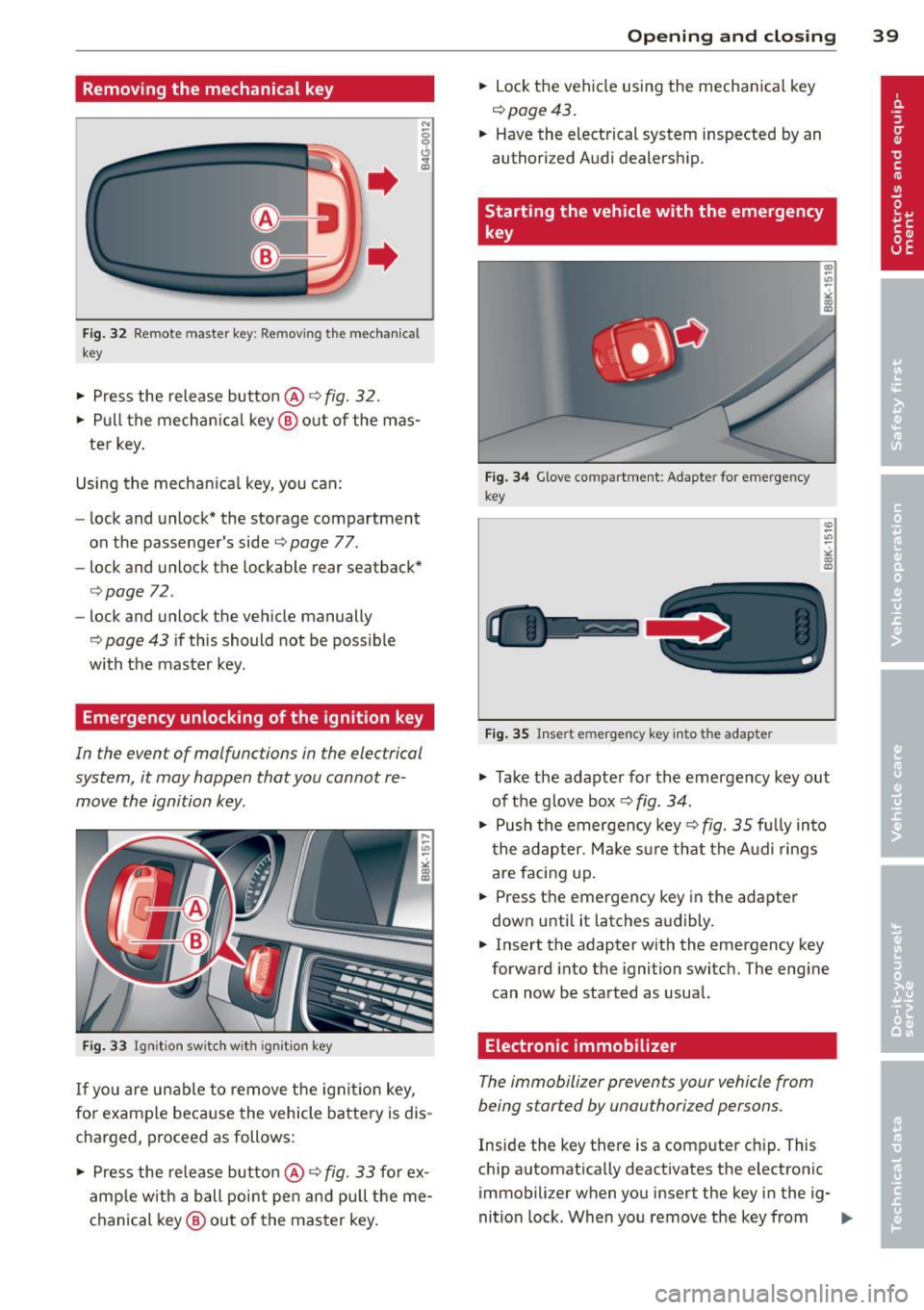
Removing the mechanical key
Fig. 32 R emo te master key: Removing the mechanic al
key
• Press the release butto n@ r=> fig. 32.
• Pull the mechanica l key @ out of the mas
ter key.
Using the mechan ica l key, you can:
- lock and unlock* the storage compartment
on the passenger's side
c::> page 77.
- lock and unlock the lockable rear seatback*
c::>page 72 .
- lock and unlock the vehicle manually
r=> page 43 if this should not be poss ible
with the master key .
Emergency unlocking of the ignition key
In the event of malfunctions in the electrical
system, it may happen that you cannot re move the ignition key .
Fig. 33 Ignition switch with ign ition key
If yo u are unable to remove the ignition key,
for example because the vehicle battery is dis
charged, proceed as follows:
• Press the release butto n@
r=> fig. 33 fo r ex
amp le w ith a ball point pen and pull the me
chanical key@ out of the master key.
Opening and closing 39
• Lock the vehicle using the mechanical key
c::> page 43.
• Have the electrical system inspected by an
authorized Audi dealership.
Starting the vehicle with the emergency
key
Fig. 34 Glove compart ment: Adapte r for emergency
key
Fig. 35 Insert emergency key into the adapter
U)
-.,,
->< co m
"' Take the adapter for the emergency key out
of the g love box
r=> fig. 34.
• Push the emergency key c::> fig. 35 fu lly into
t he adapter. Make s ure that the Audi rings
are facing up.
• Press the emergency key in the adapter
down unti l it latches a udibly.
• Insert the adapter with the emergency key
forward into the ignition switc h. The eng ine
can now be started as usual.
Electronic immobilizer
The immobilizer prevents your vehicle from
being started by unauthorized persons.
Inside the key there is a computer chip. This
chip automatically deactivates the electronic
immobilizer when you insert the key in the ig-
nition lock. When you remove the key from .,..
Page 42 of 316
40 Openin g and clo sing
the ignition lock, the e lectronic immob ilizer is
automatically activated once again.
0) Tips
- The vehicle cannot be s tarted if an unau
thorized key is used. The vehicle may not
start if another radio device such as a key
for another vehicle or a transponder is located on the key ring.
- For Declarat ion of Compliance to United
States FCC and Industry Canada regu la
tions
Q page 296.
Power locking system
General description
The power locking system locks or unlocks all
doors and the rear lid simultaneously.
You can lock and unlock the vehicle centrally.
You have the following choices:
- Remote master key
Q page 41,
-Door handles with convenience key*
c:>page 42,
- Lock cylinder at the driver's door
Q page43, or
- Power locking switc h inside
Q page 43 .
Selective unlocking
When they a re closed, the door and rea r lid
a re locked. When unlocking, you can set in the
radio or MM!* whether
only t he drive r's door
or the entire vehicle shou ld be un locked
Q page 41.
Automatic locking
The automat ic loc king featu re locks all the ve
h icle doors and the rear lid when you drive
faste r than 9 mph ( 15 km/h).
The car is un locked again once the ignition key
is removed. In addition, the veh icle can be un
l ocked if the opening fu nction in the power
l o cki ng system switch or a t one of the door
l evers is act uated . The Auto Lock function can
be turned on and off in the rad io or
MMI*
c:::> page41.
Additionally , in the event of a crash with air
bag dep loyment the doors are automatically
u nlocked to allow access to the vehicle .
Anti-theft alarm warning system
If the an ti- theft alarm warning system de
tects a b reak-in into the vehicle, acoustic and
vis ual warning signals are triggered .
T he anti-theft wa rning system is activated au
tomat ica lly when you lock the vehi cle. It is de
activated when unlocking using the
remot e
k ey,
with the me chanical key , and when you
switch on the ignition.
T he alarm also t urns off when the a larm cy cle
has expired .
Turn signal s
When you unlock the veh icle, the turn s ignals
flash twice, when you lock it once. If they do
not flash, one of the doo rs, the rear lid o r the
hood is not lo cked.
Unintentionally locking yourself out
In the following cases there safeguards to
prevent yo u lock ing your remote master key in
the ve hicle:
- The vehicle does not lock w ith the central
locking switc h
Q page 43 if the driver's
door is open .
- On veh ides w ith convenience key*, if the
most recently used master key is in the lug
gage compa rtment, the rear lid is a utomat i
cally u nlocked again after it is closed.
Do not lock your veh icle w ith the
r e mot e m as
ter key or con ven ienc e ke y*
until all doors
and the rear lid are closed . In this way you
avo id lock ing you rself out a ccidentally.
_& WARNING
-
- W hen you leave the ve hicle, always re
move the ignition key and take it with
you . This will prevent passengers (chil
dren, for example) from acc identally be
ing locked in the vehicle shou ld they acci
dentally press the power locking switch in the front doors.