ignition AUDI A5 COUPE 2012 Owner's Manual
[x] Cancel search | Manufacturer: AUDI, Model Year: 2012, Model line: A5 COUPE, Model: AUDI A5 COUPE 2012Pages: 316, PDF Size: 78.59 MB
Page 45 of 316
convenience functions. It is possible that
you wi ll not be able to unlock your vehi
cle using these convenience funct ions.
- For Declaration of Compliance to United
States FCC and Industry Canada regula
tions ¢
page 296.
Operating locks with the mechanical key
In the event of a failure of the power locking
system, the driver 's door can locked and un
locked with the mechanical key at the lock
cylinder .
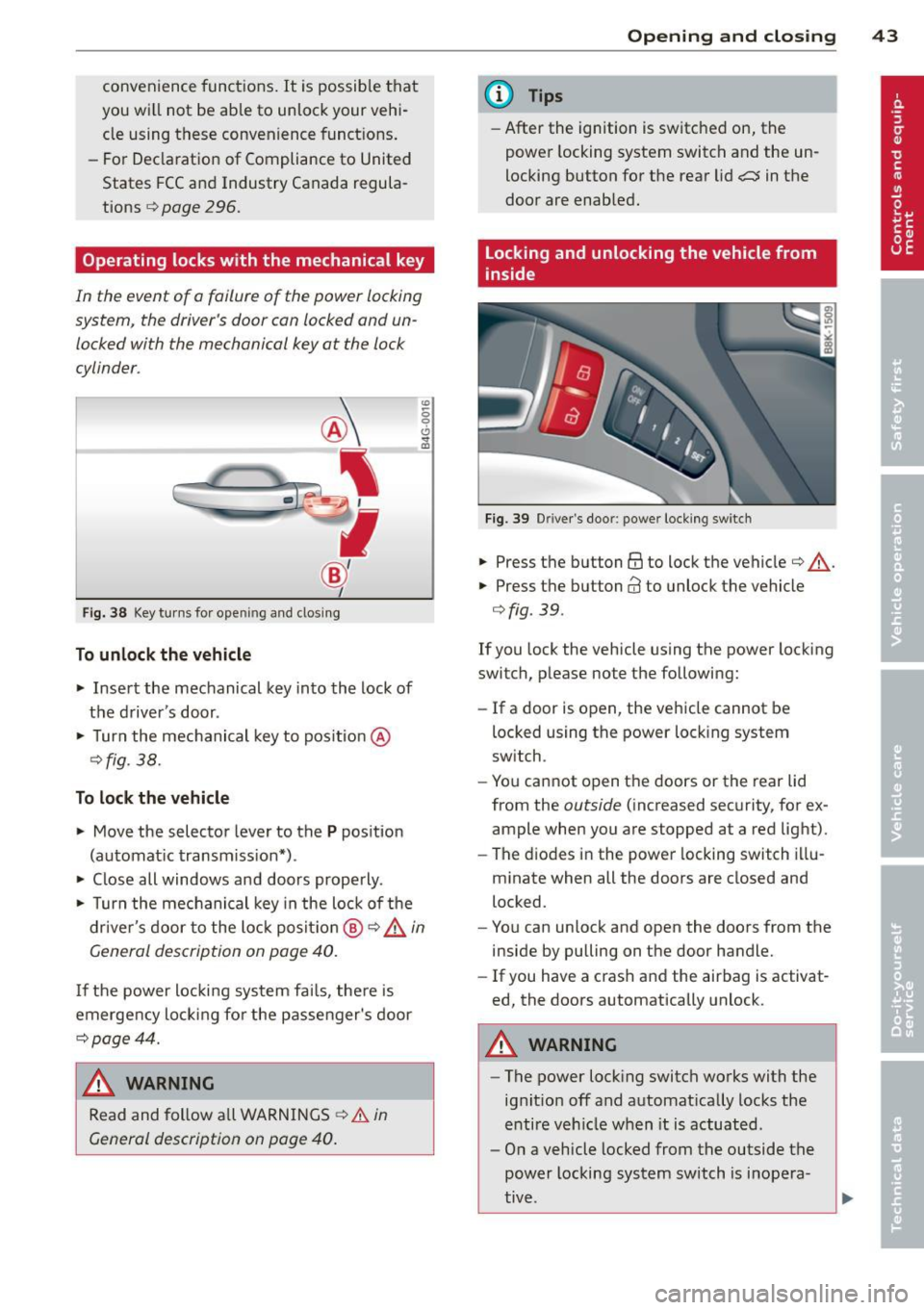
Fig. 38 Key turns for ope ning and clo sin g
To unlock the vehicle
... Insert the mechanical key into the lock of
the driver 's door .
... Turn the mechanical key to pos ition @
¢fig . 38.
To lock the vehicle
... Move the selector lever to the P position
(automat ic transmission*) .
... Close all windows and doors properly .
"' -0 0 0
"' m
... Turn the mechanical key in the lock of the
driver's door to the lock positio n @ ¢ &
in
General description on page
40.
I f the power locking system fai ls, the re is
emergency locking fo r the passenger's door
¢page 44.
A WARNING
Read and follow all WARNINGS ¢.&. in
General description on page
40.
-
Opening and closing 43
@ Tips
-After the ignition is switched on, the
power locking system switch and the un
locking button for the rear lid
a in the
door are enabled.
Locking and unlocking the vehicle from
inside
Fig . 39 D river's door: power locking switch
... Press the button @to lock the vehicle¢ & .
... Press the button@ to unlock the vehicle
¢fig. 39.
If you lock the vehicle using the power locking
switch, please note the following:
- If a door is open, the vehicle cannot be
locked using the power locking system
switch .
- You cannot open the doors or the rear lid
from the
outside (increased security, for ex
ample when you are stopped at a red light) .
- The diodes in the power locking switch illu
minate when all the doors are closed and
locked.
- You can unlock and open the doors from the
inside by pulling on the door handle.
- If you have a crash and the airbag is activat
ed, the doors automatically unlock.
A WARNING
-The power locking switch works with the
ignit ion off and automat ically locks the
entire vehicle when it is actuated.
- On a vehicle locked from the outside the
power locking system switch is inopera
tive .
Page 47 of 316
-To help prevent poisonous exhaust gas
from being drawn into the vehicle, al
ways keep the rear lid closed while driv
ing. Never transport objects larger than
those which fit completely into the lug
gage area, because then the rear lid can
not be fully closed.
- Never leave your vehicle unattended es
pecially with the rear lid left open. A
child could crawl into the ca r through the
luggage compa rtment and pull the lid
shut, becoming trapped and unab le to
get out. To reduce the risk of persona l in
jury, never let children play in or around
your vehicle. A lways keep the rear lid as
well as the vehicle doors closed when not
in use.
- Always ensure that no one is within
range of the rear lid when it is moving, in
particu lar close to the h inges -fingers or
hands can be pinched.
(D Tips
- When the vehicle is locked, the rear lid
can be opened separately by pressing the
button
a on the master key. When you
close the rear lid again, it locks automat
i ca lly.
- If the rear lid is open or not properly
closed when the ignition is turned on,
the door and rear lid warn ing
9 page 21
appears in the instrument cluster dis
play.
Op enin g an d clos ing 45
Trunk escape handle
In case of an emergency, the luggage com
partment lid can be opened from the inside
using the trunk escape handle.
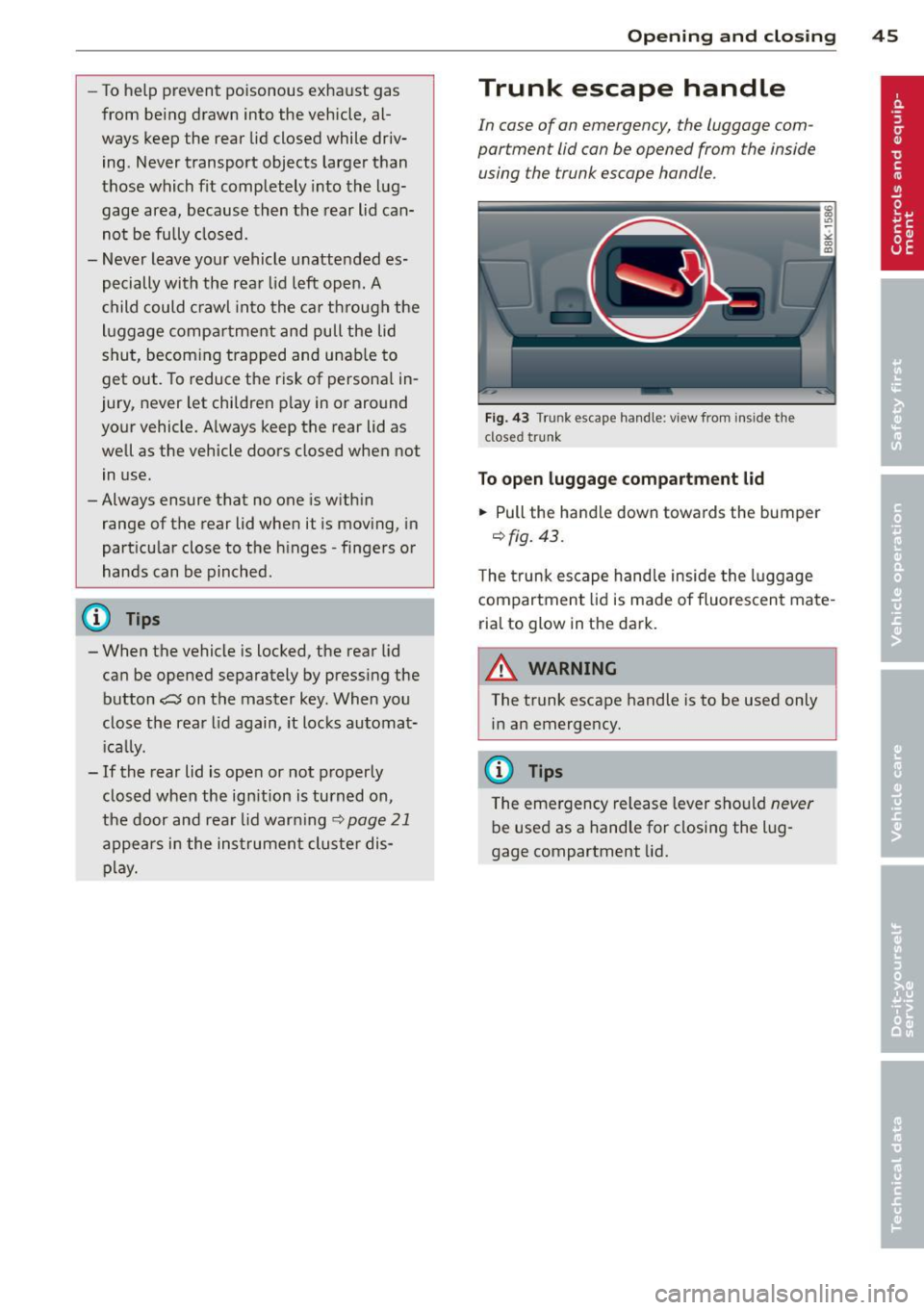
Fig. 43 Trunk escape handle: view from inside the
closed trunk
To open lu ggag e compa rtm ent lid
.,. Pull the handle down towards the bumper
9 fig. 43 .
The trunk escape handle inside the l uggage
compartment lid is made of fluorescent mate
rial to glow in the dark.
.8_ WARNING ~
The trunk escape handle is to be used only in an emergency.
@ Tips
The emergency release lever should never
be used as a handle for closing the lug
gage compartment lid.
Page 48 of 316
46 Opening and clo sing
Power windows
Controls
The driver can operate the window regulator
for the driver's door with the left switch and the window regulator for the passenger's
door with the right switch.
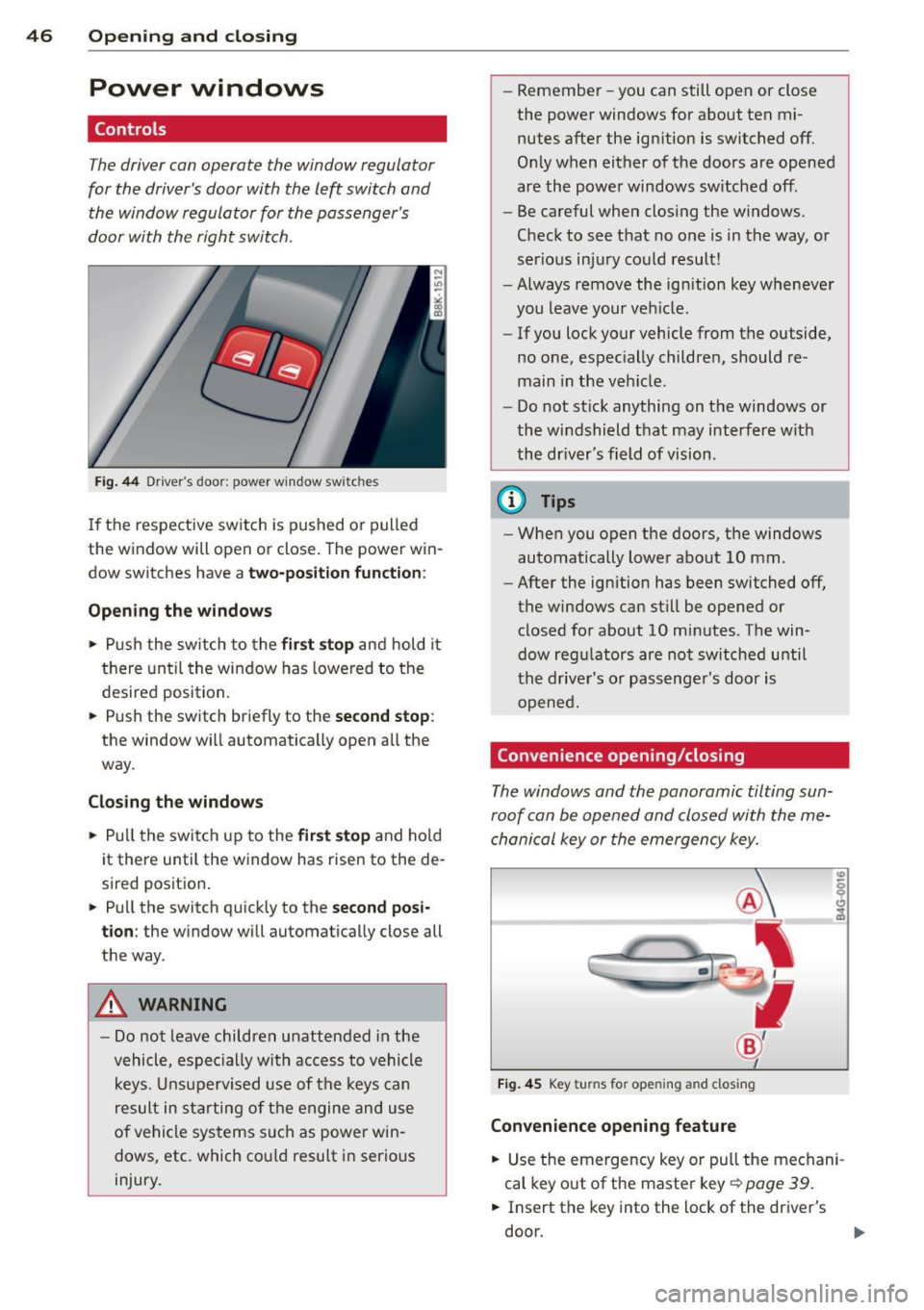
F ig. 44 Dr iver's door: power window switches
If th e respect ive sw itch is pushed o r pulled
the w indow will open or close . The power win
dow switches have a
two-position function :
Opening the windows
• Push the sw itch to the fir st stop and hold it
t h ere unt il t he wi ndow has lowered to the
desired position.
• Push the switch briefly to the
second stop :
the window wi ll automatically open all the
way.
Closing the windows
• Pull t he switch up to the first stop and ho ld
it there until the window has rise n to the de
sired posit ion .
• Pu ll the switch q uick ly to the
second posi
tion :
the window will automat ically close all
t h e way.
A WARNING
- Do not leave children unattended in the
vehicle, espe cially with acc ess to vehicle
k eys. U nsuperv ised use of the keys can
result in st arting of t he engine and u se
of ve hicle sys tems such as power win
dows, etc. which co uld resu lt in serio us
injury. -
Remember -you can still open or close
the powe r windows for about ten mi
nutes after the ign ition is switched off.
O nl y when either of the doors are opened
are the powe r windows sw itched off.
- Be careful when clos ing the windows.
Check to see t hat no o ne is in the way , or
ser io us inj ury co uld result!
- Always remove the ign it ion key wheneve r
you leave your ve hicle .
- If you lock your vehicle from the outside,
no one, espec ial ly childre n, should re
main in the veh icle.
- Do not st ick anything on t he windows or
the w indshield that may interfere w ith
the dr iver's field of vision.
(D Tips
- When you open the do ors, the windows
automatically lowe r abo ut 10 mm.
- After the ignition has been switched off ,
the windows can st ill be opened or
closed for about 10 mi nutes. The win
dow reg ulators are no t sw itche d until
the drive r's or passenge r's door is
o pene d.
Convenience opening/closing
The windows and the panoramic tilting sun
ro of can be ope ned and closed with the me
cha nical key or the emergency key.
Fi g. 4 5 Key turns for opening and closing
Convenience opening feature
• Use the emergency key or pull the me chani
cal key o ut of the maste r key¢
page 39.
• Insert the key into the lock of the driver's
do or.
Page 50 of 316

48 Openin g and clo sing
in the instrument cluster display when you
switch the ignition on .
Panoramic tilting
sunroof
Tilting and closing
"'
" co 00
F ig. 47 Section of headline r: Sw itch fo r panoram ic t ilt ·
ing sunroof
., To tilt the panoramic tilting sunroof, press
the switch briefly .
., To close the panoramic tilting sunroof, pull
the switch briefly .
., To set an intermediate pos ition, press/pull
the switch until the roof reaches the des ired
pos it ion .
After the ignit ion is swi tched off, you can st ill
operate the Panorama for about 10 minutes .
As soon as the driver's or passenger's door is
opened, the sw itch is inoperative .
Sun blind
The sun blind can be opened and closed man
ually in any position.
A WARNING
Pay careful attention when clos ing the
panoramic tilting sunroof - otherwise seri
ous inju ry could result! For this reason, al
ways remove the ignition key when leaving the vehicle.
- Never leave ch ildren o r persons requ iring
assi stan ce a lone in the vehicle, especi ally
when they c ould access the veh icle keys.
Unsupervised use of the keys can res ult
in t he engine being started or use of ve
hicle systems such as the power win -dows, etc. w
hich could res ult in serious
in jury. The doors could be locked with
the remote key, delaying he lp in an
emergency.
- The panoramic tilting sunroof w ill con
tinue to operate until the ign ition key
has bee n removed and one of the front
doors has been opened.
(D Note
A lways close your panoramic t ilting sun
roof when leav ing your vehicle. Sudden
r ain can cause damage to the inte rior
equipment of yo ur vehicle, particular ly the
electronic equipment .
@ Tips
-Information on convenience opening/
closing
~ page 46 .
Emergency closing of the panoramic
tilting sunroof
If the s unroof detects an object in its path
when it is closing, it wi ll open aga in automati
ca lly. In this case, you can close the roof with
the power emergency closing function .
., Within five seconds after the sunroo f opens
automatically, pu ll the switch until the roof
closes.
Page 51 of 316

Clear vision Lights
· r/.· Switching the lights on and off
Fig . 48 Instr ument pane l: Head light control switch
Switching on AUTO - Automatic headlight
control*
• Turn the light switch to AUTO ¢ fig. 48.
Tu rning on th e side ma rker light s
• Turn the head light contro l switch to :oo~.
Switching on low beams
• Turn the head light control sw itch to gD .
Swi tching off the lights
• Turn the head light control switch to 0.
The low beams only illuminate with the igni
tion turned on.
With the s ide marker lights or headlights
switched on, the symbol next to the light
switch illuminates
:oo:.
AUTO -Automatic headlight control*
With the switch in the AUTO position, the low
beams are swi tched on automatically depend
ing on the ambient light, for example in a tun
ne l, at dusk and when it is raining or snowing.
When the low beams are switched on, the
:oo:
symbol comes on. The low beams remain
switched on regardless of the ambient light
when you turn on the fog lights .
When you turn
off the ignition, the low beams
are automatically switched
off.
On vehicles w ith a rain sensor* the headlights
switch on automatica lly after a few wind-
Clear vi sion 49
shield wiper passes. However, the instrument
lighting will not be switched on.
Wi th a utomatic head light cont ro l, you also
have the high-beam function available. How
ever, if you have not switched high beams
back to low beams while driving with auto
matic headlight control, only the low beams
come on the next time yo u turn on automatic
headlight control. In order to return to high
beams aga in, you first have to pull the high
beam lever back to the normal position and
then push the lever forward .
Light sensor* malfunction
In the event of a light sensor* ma lfunction,
the driver is not ified in the instrument cluster
display:
l;I Automat ic d rivi ng light s/automati c wip
ers defect ive
For safety reasons, the low beams are turned
on permanently with the switch in
AUTO.
However, you can continue to turn the lights
on and
off using the light switch . Have the
light sensor checked as soon as possible at an
authorized Aud i dealer or other qualified
workshop.
A WARNING
Automatic h eadlights are only intended to
assist the d river. They do not relieve the
driver of his responsib ility to che ck the
headlights and to turn them on manually
according to the current light and visibility
conditions. For example, fog cannot be de
tected by the light sensors. So a lways
switch on the headlights gD under these
weather conditions and when driving in
the dark.
(D Tips
- The light sensor* for headlight control is
located in the rear view mirror mount.
You should therefore not apply any stick
ers to the windshield in th is area in order
to prevent malfunct ions or fai lures .
- The sensitivity level for the light sensor*
set at t he factory can be changed in the ..,_
Page 52 of 316

50 Clear vis ion
MM I* men u r=> page 50 in the automat
ic driving Lights function .
- When you remove your key from the igni
tion wh ile the vehicle's lights a re turned
on, a buzze r sounds as long as the driv
er's door is open.
- Please obey all laws when using t he
li ghting systems described here .
- The coming home/leaving home func
tion * is availab le only with the sw itch in
the AUTO position.
Fog lights
F ig. 49 F og light sw itch
,. To turn on the fog lights JO, press button @
r=>fig. 49.
,. To turn on the rear fog lights Ot press but-
ton @.
Fog lights
The s ide mar ker Lig hts or low beams must be
switched on. When the fog Lights are switched
on, the g reen check Light at the edge of the
switch comes on .
If autom atic driving light control AUTO is act i
vated, t he low beams are switched on when
the fog l igh ts are turned on .
Rear fog lights
Low beams or side marker Lights with fog
l ight s must be turned on.
When the rear fog lights are turned on, the
yellow check light at the edge of the switch
comes on .
(D Note
The rear fog Lights sho uld only be turned
on in accordance with traff ic regu lation, as
the lights are bright for following traffic .
Adjusting exterior lighting
The functions are selected in the radio or
MM!*.
,. Select: Function b utton ICAR ! > Exterio r
lighting .
Coming home*
T he coming home funct ion ensures tha t after
turning off the ignition and opening the
driver' s door
the veh icle per iphery is illum i
nated in the da rk . I n addition, the front fog
lights, the tai l lights and the License plate
li ght are turned on. The power -on t ime can be
set for a per iod from O (off) to 30 or 60 sec
onds.
Leav ing home*
The leaving home functions ensures that
when unlo cking , the vehicle perip hery is illu
minated in the dark . In add it ion, the front fog
lights, the tail Lights and the license plate
light are turned on. This function can be
tu rned on and off .
Auto headlights*
When the light switch is in the AUTO
r=> page 49 position, the switch-on point of the
lights can be changed in the automatic driving
li ght function.
Daytime running lights
The daytime r unning lights can be turned on
or off using this function* . If the f unction is
active, the dayt ime runn ing lights are turned
on automatically when the ignition is sw itch
ed on .
(D Tips
The coming home/leaving home function*
i s available only with the sw itch in t he AU
TO position .
Page 53 of 316

Daytime running lights
When you turn on the ignition the daytime
ru nning lights will com e on automatically.
USA mode ls
The daytime runni ng lights are activated when
the light switch
c:> page 49, fig. 48 is in the 0
position or the AUTO pos ition (only in daylight
conditions). The daytime running lights func
tion can be turned on and off in the rad io or
M MI* menu
Exterior light ing c:> page 50 .
Canada model s
The daytime run ning lights are activated when
the light switch
c:> page 49, fig. 48 is in the 0
position, oooc position or the AUTO posit io n
(o nly in daylight cond it ions) . T he daytime run
ni ng lig hts fu nction cannot be tu rned off.
_& WARNING
N ever u se day time ru nning ligh ts to see
w here y ou are goin g. They are no t bright
e n oug h an d wi ll not l et yo u see far enou gh
ahead for safety, especia lly at dusk o r
w hen it is dark. Be aware of cha nges in
outs ide light conditions when you are driv
ing and respond by sw itching on your low
beams
jD.
(D Note
Always be aware of changes in outside light conditions while you are driving. Re
spond in time to fading daylight by turn
ing the light switch to position
jD (or
"AUTO")
to turn on your headlights .
-
Clear vision 51
Instrument lighting
The basic brightness of the illumination for
the instruments, the center console and the
display can be adjusted.
Fi g. S O Instrument light ing
.,. Press t he knob to re lease i t.
.. Rotating the kno b to the r ight"+" w ill in
crease t he basic brightness when it is da rk .
.. Rotating the knob to the left"-" will de
crease the basic brightness when it is dark.
.,. Pressing the knob will prevent u nintention
al c hanges .
(D Tips
The ill umination for the instrument cluste r
li ghts up whenever you switc h on the igni
tion w ith th e vehicle headlights off. As the
d ay ligh t fad es, th e inst ru m ent cluste r illu
mina tio n lik ewise dims a utomatic a lly a nd
will g o out comp le tely whe n the o utsi de
ligh t is very low . This feature is me ant to
r emi nd you to switch o n the hea dlights
whe n outs ide lig ht conditions beco me
p oor .
Xenon headlights
App lies to vehicles : wit h xe non head lig hts
After starting the eng ine, the xenon head
li ghts are automatically adjusted to the load
and angle of the veh icle (for example, dur ing
acce lerat io n an d bra ki ng) . Th is prevents on
com ing t raff ic fro m experiencing un necess ary
he ad light glare from y our xe non headli ghts.
If the system is not ope rat ing properly, a
warning symbol in the Auto-Ch eck Control is
displayed
c:> page 36.
Page 54 of 316

52 Clear vis ion
Adaptive light
App lies to vehicles: with adaptive lig ht
When driving around bends, the relevant area
of the road is better illuminated .
Fig. S1 Adaptive light whe n dr iving
The benefit of adaptive l ight is that the c urve
and the edge of the road are better illuminat
ed
c:::> fig . 51. Dynamic adaptive light is con
trolled a utomatica lly, depending on vehicle
speed and steering wheel angle.
When driving around bends, the headlights
are contro lled according to steering wheel an
g le. So that there is no black hole ahead of the
vehicle, the two main beams pivot at different
angles.
(D Tips
The system works above a speed of about
6 mph (10 km/h).
Emergency flashers
The emergency flashers makes other moto
rists aware that you or your vehicle ore in an
emergency situation.
F ig. S2 Eme rgency flasher switc h
.. Press the switch J}. c:::> fig . 52 to turn the
eme rgency flashers on or
off.
When the emergency flashers are on, all four
turn signals blink at the same time. The turn
s ignal indicator lights
RII in the instrument
cluster, as well as the light in the emergency
flasher sw itch
J}. blink likewise. The emergen
cy flashers a lso work when the ignition is
tu rned
off.
The emergency flashers will turn on automat i
cally if you are in an accident where the airbag
has deployed .
@ Tips
You should turn on the emergency f lashers
when:
- you are the last vehicle standing in a traf
fic jam so that any other vehicles coming
can see you, or when
- your vehicle has broken down or you are
in an emergency situation, or when
- your vehicle is be ing towed by a tow
truck or if you are towing another vehicle beh ind you.
Turn signals and high beam lever
The lever on the left side of the steering col
umn is used to operate the turn signals and
the high beam as well as the headlight flash
er .
t
'
Fi g. S3 Tu rn signal and high bea m lever
The turn signa l and hig h beam lever has the
f o llow ing funct ions:
Turn signals ¢ ¢
.. Lift the leve r up a ll the way c:::> fig . 53 (D to
use t he right turn s ignals, or push the lever
down a ll th e way @to use the left tur n sig-
na ls. ..,
Page 55 of 316
Auto-blink
• Move the lever (up or down) just to the
point of resistance to use the turn signa ls
for as long as you need them, for example
when changing lanes .
• Move the lever (up or down) just to the
point of resistance and then release it right
away to make the turn signals blink
three
times .
You can use th is feature for example
when changing lanes on highways .
High beam ~D
• Push the lever forward @ to switch on the
high beam.
• Pull the lever back towards you to switch off
the high beam .
Headlight flasher ~D
• Pull the lever toward the steering wheel@
to use the headlight flasher.
Notes on these features
- The turn signals only work with the ignition
turned on. The indicator lights
R or Bin
the instrument cluster also blink.
- After you have turned a corner, the turn sig
nal switches off automatica lly.
- Th e
high beam works only when the head
lights are on. The indicator light
II in the
instrument cluster illuminates when the
high beams are on.
- The
headlight flasher works only as long as
you hold the lever -even if there are no
lights switched on. The indicator light
II in
the instrument cluster illum inates when you
use the head light flasher.
(D Note
Do not use the high beam or headlight
flasher if you know that these could blind
oncoming traffic.
Clear vision 53
Interior Lights
Front interior lights
The front interior lights also contain reading
lights for the driver and passenger .
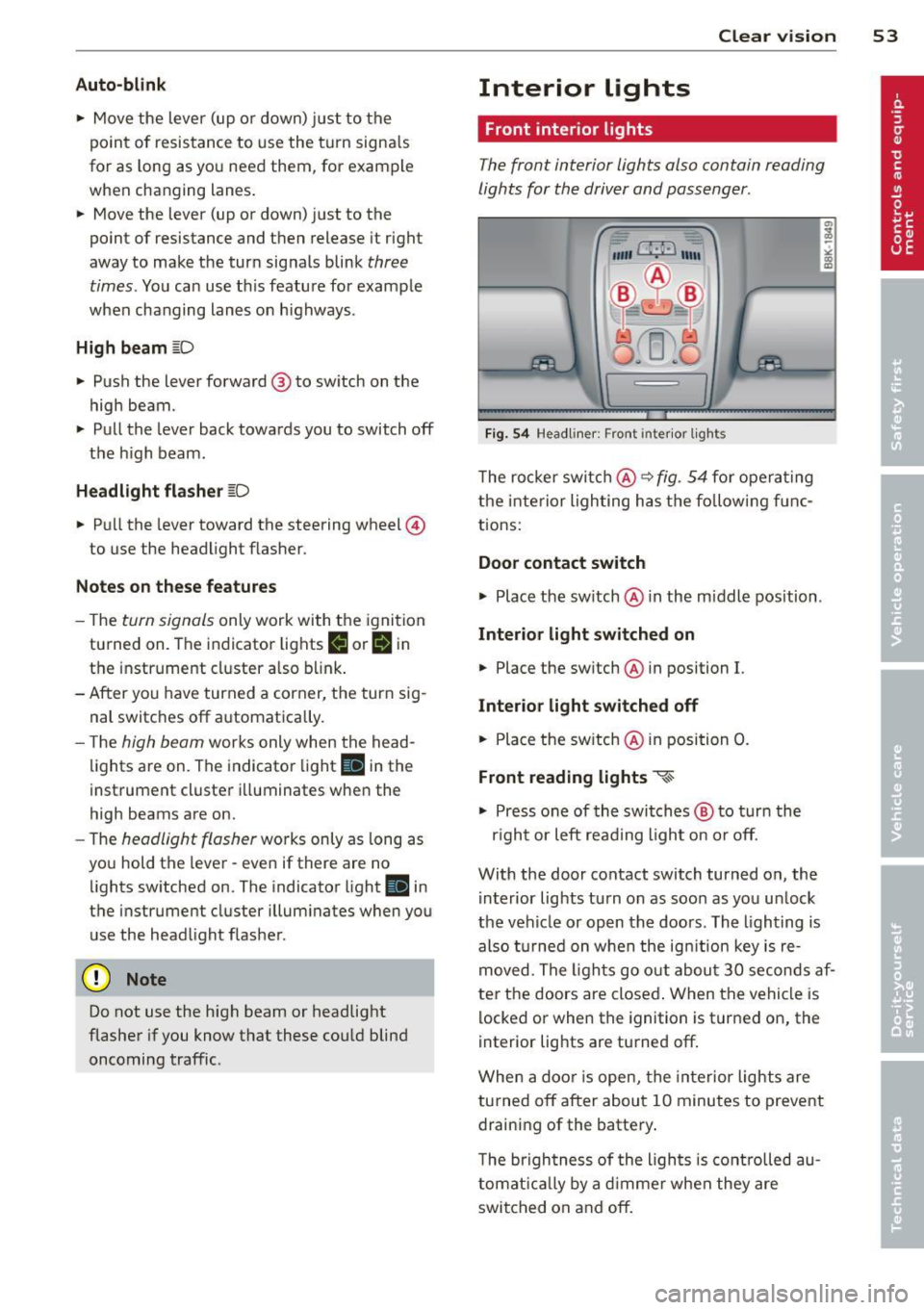
Fig. 54 Headliner: Front inter ior lights
The rocker switch@ ~ fig. 54 for operating
the interior lighting has the follow ing f unc
tions:
Door contact switch
.,.. Place the switch @ in the m iddle position .
Interior light switched on
• Place the sw itch @ in position I.
Interior light switched off
• Place the switch @ in position 0.
Front reading lights ~
.,.. Press one of the switches @ to turn the
r ig ht or left read ing l ight on or off.
With the door contact switch turned on, the i nterior lights tu rn on as soon as you un lock
the vehicle or open the doors. The lighting is
also turned on when the ignit ion key is re
moved. The lights go out about 30 seconds af
ter the doors are closed . When the vehicle is
locked or when the ignition is turned on, the
interior lights are turned off.
When a door is open, the interior lights are
turned off after about 10 minutes to prevent
draining of the battery.
T he brigh tness of the ligh ts is controlled au
tomatically by a dimmer when they are
switched on and off.
Page 56 of 316

54 Clear vis ion
Rear interior lights
There are reading lights in the rear for the
passengers.
Fi g. 55 Headliner: Rear read ing lights
The reading lights are switched on and off us
ing the but tons
~~-
Vision
Sun visors
Using the sun visors makes driving safer.
Fig. 56 Sun viso r
The sun visors for the dr iver and passenger
can be pulled out of the ir brackets in the cen
ter of the vehicle and turned towards the the doors
q fig. 56 (D .
Vanity mirror
The vanity mir rors on the sun visors are cov
e red. When the l id is opened @, the m irror
light in the headline r turns on automa tically.
It tur ns off when the lid is closed and the visor
i s folded up again.
Sun shade
Applies to vehicles: with sun shade
'ii,) ~Clf • -----
Fig . 57 with MMJ: Button for rear window su n s hade
F ig . 58 without MMI: Button for rear window sun
s h ade
"' To extend/retract the rear window sun
shade, press the bu tton
0 ¢ fig. 58 . In ve
hicles with MM I*, the bu tton is l ocated
above the climate c ontrol system¢
fig. 57.
The rea r window sun shade can be set in the
MM I* so that it retracts autom atically when
dr iv ing in reverse. Sele ct
!CAR !> Wind ow >
Rear wind ow sun shade > On
to do this. The
s u n shade is extended again as soon as the ve
hicle is traveling forward at a speed greater
than 9 mph (1S km/h) if the ignition has not
been switched off in the meant ime. The cur
rent setting is automatically stored and as
s igned to the remote key .
@ Tips
-Pressing the button likl severa l times
consecutive ly can trigge r the overload
protect ion . The sun shade can on ly be ex
t ended/retracted agai n after a brief wait
ing period.
- The rear window sun shade only func
tions when the vehicle interior is warmer
t han 14°F (- 10°().