mirror AUDI A5 COUPE 2012 User Guide
[x] Cancel search | Manufacturer: AUDI, Model Year: 2012, Model line: A5 COUPE, Model: AUDI A5 COUPE 2012Pages: 316, PDF Size: 78.59 MB
Page 122 of 316
120 Audi side assist
Driving situation: Vehicles dropping
back slowly
Applies to vehicles: with side assist
i:i N 9 J:
-------::~
®
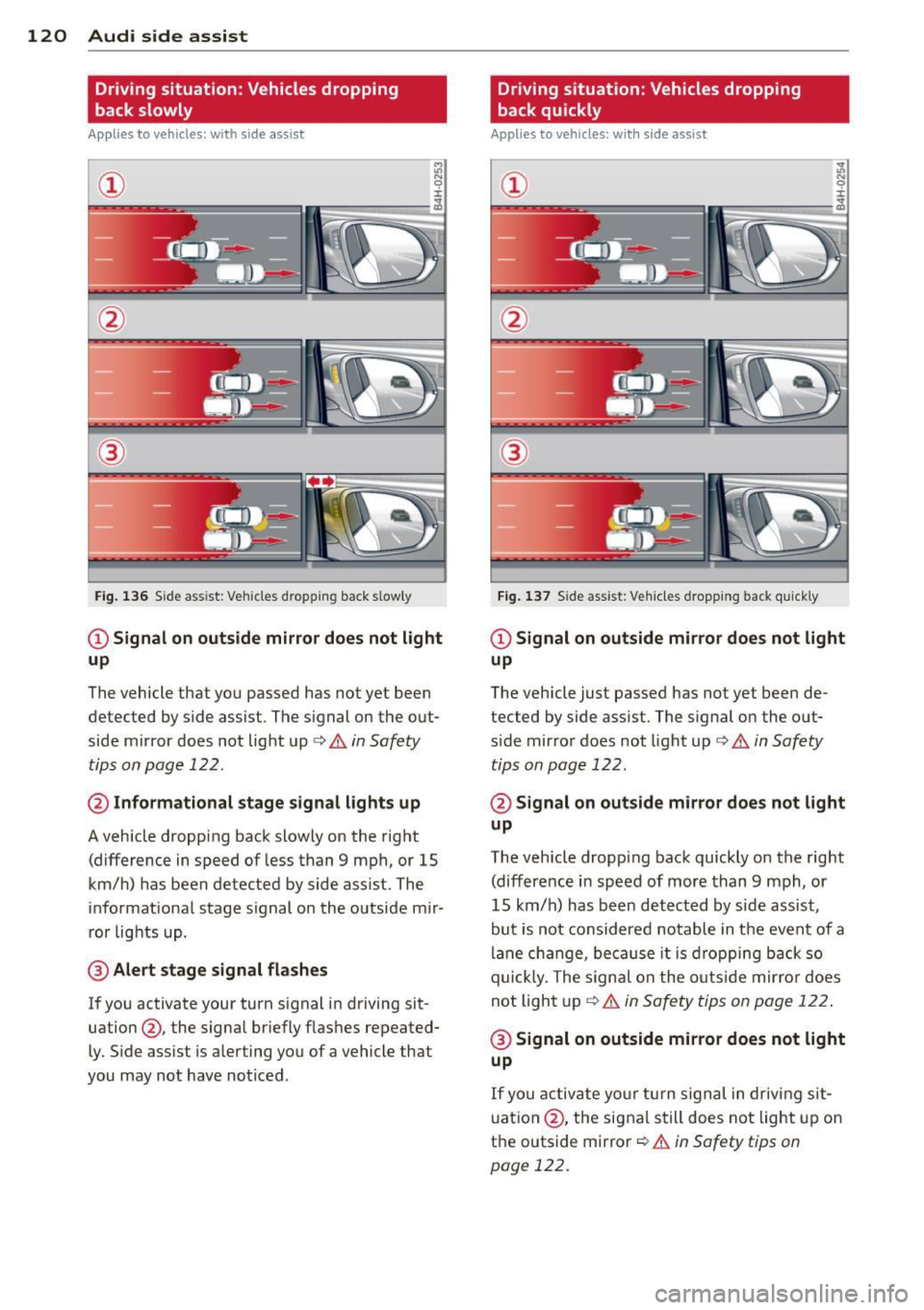
Fig. 136 Side ass ist: Veh icles dropp ing back s low ly
CD Signal on outside mirror does not light
up
The vehicle that you passed has not yet been
detected by side assist . The signal on the out
side mirror does not light up¢
A in Safety
tips on page 122 .
@ Informational stage signal lights up
A vehicle dropping back slowly on the right
(difference in speed of less than 9 mph, or 15
km/h) has been detected by side assist. The
informational stage signal on the outside mir
ror lights up.
@ Alert stage signal flashes
If you activate your turn signal in driving sit
uation@, the signal briefly flashes repeated
ly. Side assist is alerting you of a vehicle that
you may not have noticed .
Driving situation: Vehicles dropping
back quickly
Applies to vehicles: with side assist
®
Fig. 137 Side assist: Ve hicles dropp ing back quickly
CD Signal on outside mirror does not light
up
The vehicle just passed has not yet been de
tected by side assist. The signal on the out
s ide mirror does not light up
Q A in Safety
tips on page 122.
@ Signal on outside mirror does not light
up
The vehicle dropping back quickly on the right
(difference in speed of more than 9 mph, or
15 km/h) has been detected by side assist ,
but is not considered notable in the event of a
lane change, because it is dropping back so
quick ly. The signal on the outs ide mirro r does
not light up¢
A in Safety tips on page 122 .
@ Signal on outside mirror does not light
up
If you activate your turn signal in driving sit
uation @, the signal still does not light up on
the outside mirror ¢
A in Safety tips on
page 122.
Page 123 of 316
Setting the signal brightness on the
outside mirror
Applies to vehicles: with s ide assist
The signal brightness can be set in the radio
orMMI* .
~ Select: Function button ICARI > Audi side
assist -lamp .
~ Rotate the control knob to adjust the dis
played brightness of the signal light on the
outside mirrors.
The brightness of the signal light for both the informational and alert stages is automatical
ly adjusted to ambient light conditions . In ad
dition, you can adjust the
basic brightness
separately, via the brightness function.
While making the adjustment, the new brightness setting is displayed briefly . The
brightness displayed is that of the informa
tional stage signal. The alert stage signal
brightness is linked to the informational stage
signal brightness.
The informational stage signal brightness
should be adjusted so that you notice the sig
nal illumination when you look in the outside
mirror, but not when you look forward
through the windshield .
In very dark or light surroundings , the auto
matic brightness setting adjusts signal light
brightness to maximum or minimum intensi
ty, as needed. In circumstances such as these,
you may not notice any change in the bright
ness on the outside mirror when adjusting the
basic brightness.
You may not notice the change until lighting
conditions are normal again .
@ Tips
-Side assist is not active when the basic
brightness is adjusted . The signal light
comes on briefly to help you make the
adjustment .
- Your settings are automatically stored
and assigned to the remote control key
being used .
Audi side assist 121
General information
Applies to vehicles: with side assist
Side assist has limits and cannot detect vehi
cles under all road and weather conditions.
Please remember system limitations and nev
er rely on the system , especially when :
- driving through curves
~page 121,
-lanes are of different widths ¢ page 121.
When driving through curves
Applies to vehicles: with side assist
Side assist cannot detect vehicles in curves
with a turning radius of less than 328 feet
(100 m).
When driving through a curve, it is possible
that side assist may register a vehicle two
lanes over, and the signal on the outside mir
ror will light up.
Lane width
Applies to vehicles: with side assist
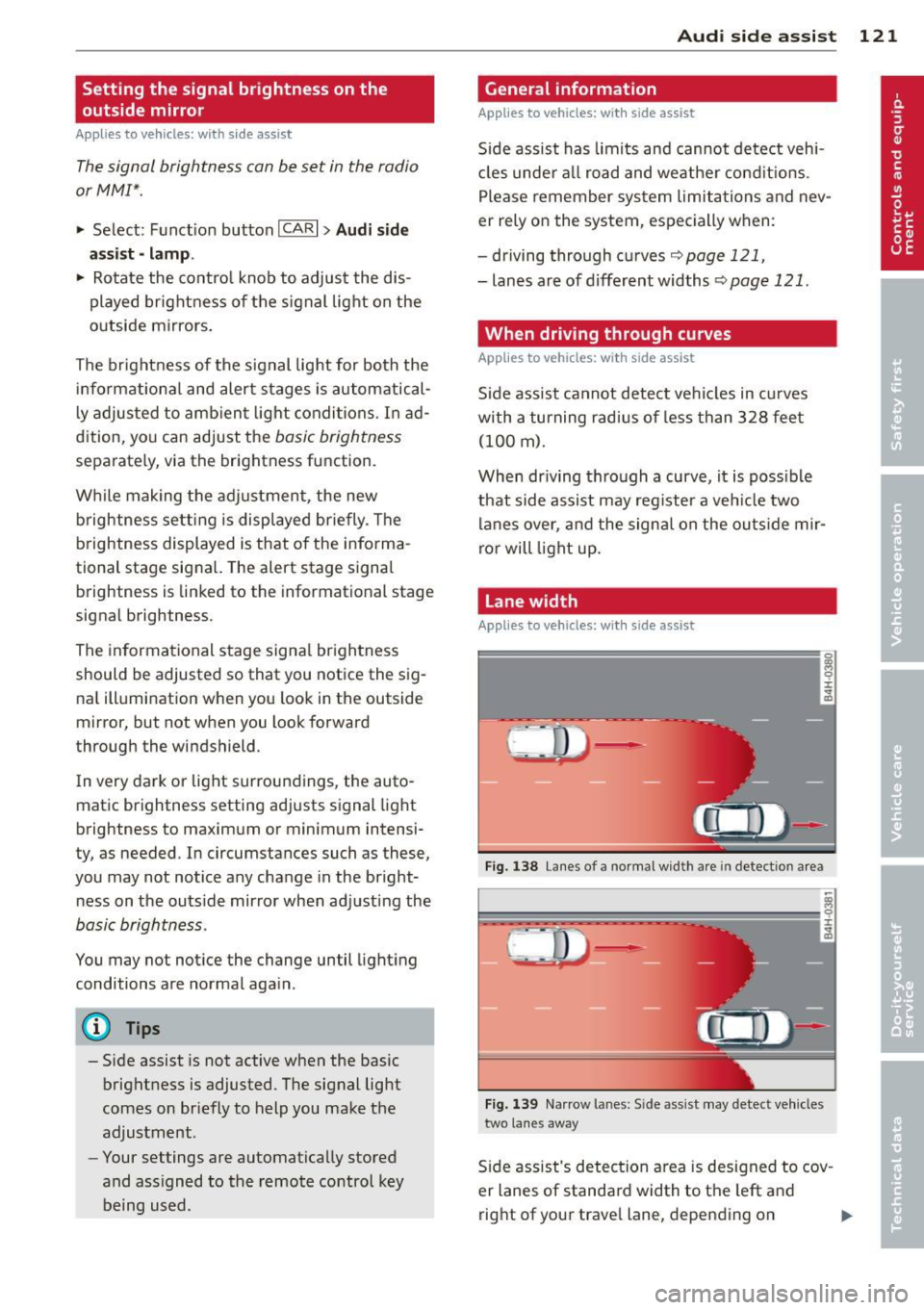
Fig. 138 Lane s of a normal wid th are in detectio n area
Fig. 139 Narrow la n es: S ide assist may detect vehicles
two lanes away
Side assist's detection area is designed to cov
er lanes of standard width to the left and
right of your travel lane, depending on ..,.
Page 124 of 316

122 Audi side assist
whether you drive in the center of your lane or
closer to the edge.
If you d rive in narrow lanes, side assist's de
tection area may also incl ude other lanes -es
pecia lly if you tend to drive on the edge of
your lane¢
fig. 139. Under these conditions,
ve hicles can also be detected that are two
lanes away, and side assist then could switch
between the informat ional and warn ing stage
signals .
When dr iv in g in very w ide lanes, vehicles in
the adjacent lane may not be detected be
cause they are not inside the detection area.
Notes
Messages in instrument cluster display
Applies to vehicles: with side assist
If side assist turns off automatically, the indi
cator light on the button wi ll go out and you
will see a message in the instrument cluster
d isplay:
Audi side assist not available : sensors
blocked
The s ide assist sensors are built into the rear
bumper on the left and right (not visible on
the outside)
¢page 116, fig. 130. To ensure
that you do not adversely affect the way side
assist funct ions, foreign objects (such as st ick
e rs or b icycle racks) should not be attached to
the area on the rear bumper where the sen
sors are located. If side assist functions are
adversely affected, you will see this message
in the instrument cluster display. Remove any
thing that may be blocking the sensors .
If no ve hicl e is detected for a longer period of
time while driving , side assist will also switch
off a utomatica lly.
Audi side assist currently not available
If there is a temporary problem (such as the
vehicle's batte ry charge being low), s ide ass ist
cannot be activated temporarily .
Audi side assist: system fault
Have the system checked by an authorized Au
di dealer or qualified workshop.
Safety tips
Applies to vehicles: with side assist
The side assist detection may be limited when
driving aro und narrow street corners, on hilly
streets, and under poor weather conditions.
It is possible that the radar sensors may a lso
detect other objects, such as high or stag
gered guardrails.
Side assist does not measure actual lane
width. The system assumes a fixed lane width.
Detection in the left and right lanes is based
on this assumed lane width. When driving on
narrow roads or when driv ing to the left or
right of the center of a trave l lane, it is poss i
ble that vehicles will be detected that are
not
in the lane next to the lane you are using.
A WARNING
-
- I mproper reliance on the side assist sys-
tem can cause collis ion s and serio us per
sonal injury:
- Never rely on ly on s ide assist when
changing lanes.
- Always check rear view mirrors to make
sure that it is safe to change lanes.
- Side assist cannot detect all vehicles un
der all conditions- danger of accident!
- Side assist cannot detect vehicles in time
to a lert you when they approach from
behind at very high speed, or fall drop
back very qu ickly.
- The radar sensor's
vision can be reduced
or entire ly blocked by rain, snow, and
heavy spray. This can result in side assist
not adequately detecting vehicles or, in
some cases, not detecting them at all.
Always keep an eye on the direction you
are traveling and the relevant area
around the vehicle.
Page 138 of 316
136 Park assis t
- the rear view camera does not provide a reli
able image, for examp le, in poor visibility
condit ions or if the lens is dirty,
- the image on the screen is not visible due to
sun g lare and reflection .
Caring for th e rear view came ra l ens
The rear view camera is located above the rear
l icense pla te bracket . For the parking assist to
ope rate, the lens
r::!;> fig . 154 must be kept
clean:
- Dampen the lens with a househo ld alcohol
b ased glass cleaner , a nd clean the lens wi th
a dry cloth
¢ CD .
- Remove snow with a hand brush and ice
prefe rably wi th a de-icing sp ray
¢ (D .
_& WARNING
- The pa rking aid cannot replace the driv
er's attention. The driver a lone is respon
sible for parking and similar driving ma
neuvers.
- Always keep your eyes on the veh icle's
surround ings, using the rear view mirror
as well.
- Do not a llow yourse lf to be d istracted
from traffic by the rear view camera pic
tures.
- If the posit ion and the installat ion ang le
of the camera has changed, for example,
after a rea r end collision, do not continue
to use the system for safety reasons .
Have it checked by a qualified dealership.
{[) Note
-Low obstacles already signaled by a
warning can disappear from the system's
detection range as they are approached
and will not contin ue to be signaled . Ob
j ects such as bar rier cha ins, trailer draw
bars, thi n pa inted ve rtical poles or fen
ces may no t be detec ted by t he sys tem ,
pos ing risk of damage.
- Never use warm or hot water to remove
snow or ice from the came ra lens - dan
ger o f crack formation on the lens! - When cleaning the lens, never use prod
ucts that a re abrasive.
Switching on /off
Applies to vehicles: with parking system (rear, with rear
view camera)
The rear view camera switches on automati
cally together with the acoustic park assist when you put the vehicle in reverse.
Switching on
.,. Put the veh icle in reverse gear, the acoust ic
park ing system with rear view camera is ac
tivated automatica lly. Act ivat ion of the
acoust ic par king system is confirmed by a
b rief ac knowledgement sou nd.
Switching off
.,. Drive faster than 6 mph (10 km/h) , or
.,. take the vehicle out of reverse gear . The
acoust ic park ing system is immediate ly d e
ac tiva ted, and the rea r view came ra p icture
is deact ivated a utomat ic all y afte r a period
of about 1 5 seconds , or
.,. sw itch off the ignition.
T he de lay in deac tivat ing the came ra provides
an unin ter rup ted view behind the ve hicle es
pecially when maneuvering in tight par king
spaces and p revents the picture from t urning
off the every time you shift out of reve rse.
If the warning message appears in the display
but not the rear view came ra picture, read and
co nfirm the wa rning message. The acoustic
distance signal is always active.
If you press a function button on the M MI
control console, the rear view came ra p icture
disappea rs . The rear v iew camera picture reap
pears the next t ime yo u park.
F urther informa tion on the warning message
and the MMI control conso le can be fo und in
the MMI instruction boo klet.
(D Tips
- T he rear view camera picture is available
as soon as the M MI Display or the MMI is .,..
Page 139 of 316
switched on, or the start-up phase is
completed.
- Keep the sensors in the rear b umper and
the rear view camera lens clean and free
of snow and ice, so that the parking sys
tem can work properly. Please follow the
additional notes on
c:;, page 139.
Reverse Parking
A ppl ies to vehicles: with parkin g system (rear, with rea r
view ca mera)
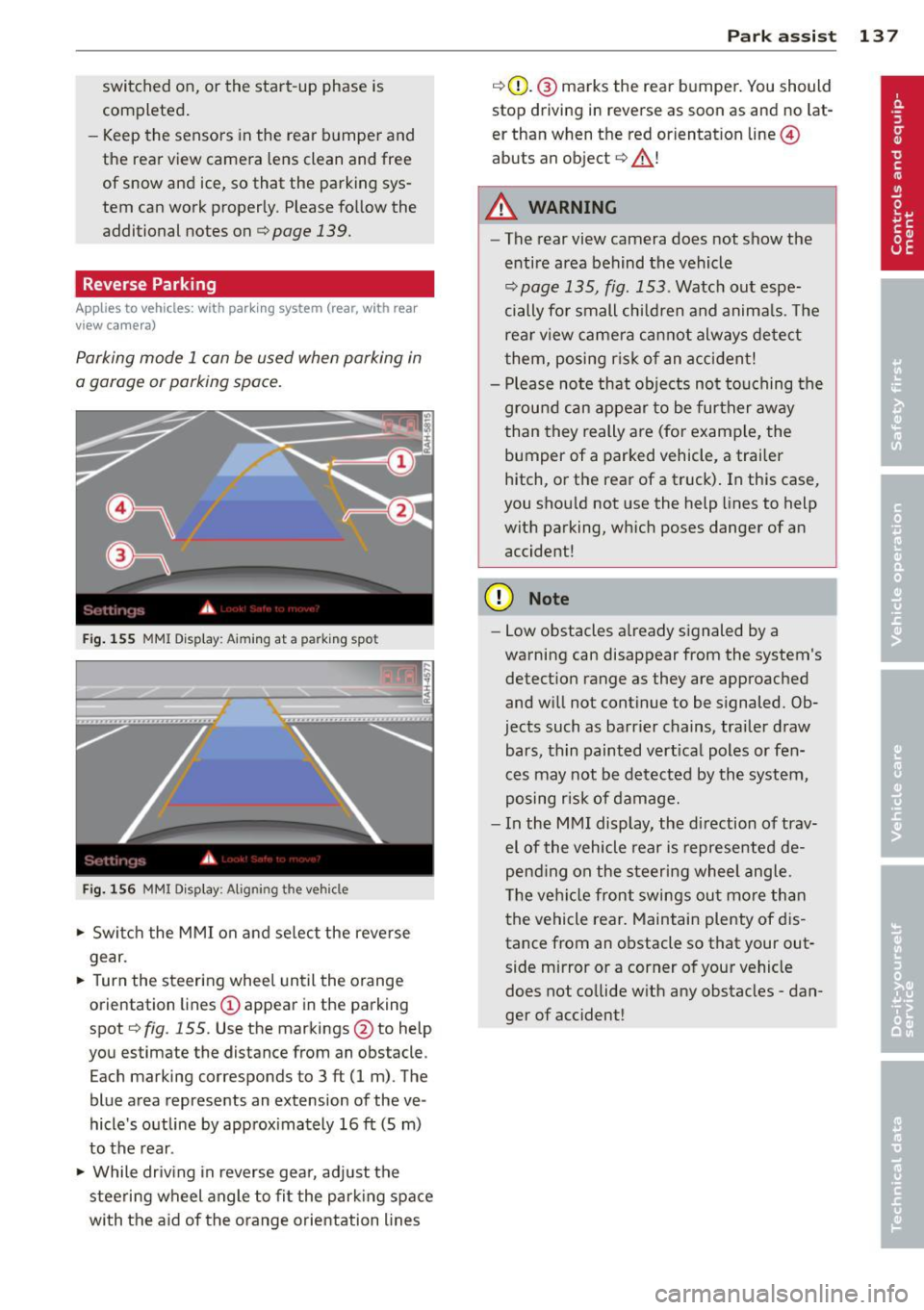
Parking mode 1 can be used when parking in
a garage or parking space.
F ig . 155 MMI Disp lay: Aiming at a parking spot
Fi g. 156 MMI Display: Aligning the vehicle
.,. Switc h the MMI on and se lect the reverse
gear.
.,. Turn the steering wheel until the orange
orientation lines
(D appear in the parking
spot
c:;, fig. 155. Use the markings @to help
you estimate the distance from an obstacle .
Each marking corresponds to 3
ft (1 m). The
blue area represents an extension of the ve
hicle's outline by approx imately 16
ft (5 m)
to the rear.
.,. While driving in reverse gear, adj ust the
steering wheel angle to fi t the park ing space
with the aid of the orange orientation lines
Par k ass ist 137
c:;,G)_ @ marks the rear bumper. You should
stop driving in reverse as soon as and no lat
er than when the red orientat ion line ©
abuts an object
c:;, _&. !
A WARNING
- The rear view camera does not show the
entire area behind the vehicle
c:;, page 135, fig. 153. Watch out espe
cially for small children and anima ls. The
rear view camera ca nnot always detect
them, posing r is k of an accident!
- Please note that objects not touching the
g rou nd can appear to be further away
than they really are (for example, the
bumper of a parked vehicle, a trailer
hitch, or the rear of a truck). In this case,
you shou ld not use the help lines to help
with parking, which poses danger of an accident!
(D Note
- Low obstacles a lready signaled by a
warning can disappear from the system's detection range as they are approached
and w ill not continue to be signaled. Ob
jects such as barrier chains, trailer draw bars, th in painted vert ica l poles or fen
ces may not be detected by the system,
posing risk of damage.
- In the MMI display, the di rection of trav
el of the vehicle rear is represented de
pend ing on the s teering wheel angle.
The vehi cle front swings out mo re than
the vehicle rear. Maintain plenty of dis
tance from an obstacle so that your out
side mirror or a corner of your vehicle
does not co llide w ith any obstacles -dan
ger of accident!
Page 220 of 316

218 Trailer towing
Trailer towing
Driving with a trailer
General information
Your Audi was designed primarily for passen
ger transportation .
If you plan to tow a trailer, p lease remember
that the additional load will affect durability,
economy and performance .
Trailer towing not on ly places more stress on
the vehicle, it also calls for more concentra
tion from the driver.
For this reason, always fo llow the operating
and driving instructions provided and use
common sense.
Technical requirements
Trailer hitch Use a weight-carrying hitch conforming to the
gross trailer weight. The hitch must be suita
ble for your vehicle and trailer and must be
mounted securely on the veh icle's chassis at a
technically sound location. Use only a trailer
hitch with a removable ball mount. Always
check with the trailer hitch manufacturer to
make sure that you are using the correct
hitch.
Do not use a bumper hitch.
The hitch must be installed in such a way that
it does not interfere with the impact-absorb
ing bumper system . No modifications should
be made to the vehicle exhaust and brake sys
tems . From time to time, check that all hitch
mounting bolts remain securely fastened.
When you are not towing a trailer, remove the
trailer hitch ball mount. This prevents the
hitch from causing damage should your vehi
cle be struck from behind
¢ A.
Trailer brakes
If your trailer is equipped with a braking sys
tem, check to be sure that it conforms to all
regulations . The trailer
hydraulic brake system must not be
direct ly connected to the vehicle's hydraulic
brake system
~ A.
Safety chains
Always use safety chains between your vehicle
and the trai le r.
Trailer lights
T railer lights must meet all regulations. Be
sure to check w ith your authorized Audi dealer
for correct wiring, switches, and relays.
Mirrors
If you are unable to see the traffic behind you
using the regular outside mirrors, then you
must install extended mirrors . It is important
that you
always have clear vis ion to the rear.
,8. WARNING
- If a trailer has electrical brakes please
note that these brakes are not activated
by the factory-fitted control unit -risk of
accident!
- Afte r removing the trailer hitch, do not
store it in your vehicle. In case of sudden
braking, the hitch could fly forward and
injure you or your passengers.
Operating instructions
Maximum trailer weight
-
A trailer for your vehicle is limited to a typical
class 1 or class 2 tra iler.
Trailer load distribution Be sure the load in the trailer is held secure ly
in place to prevent it from shifting forward,
backward or sideways.
Never allow a passenger to ride in a trailer
¢ A in Driving instructions on page 219.
Engine cooling system
T owing a trailer makes the engine work hard
er. It is important that the cooling system's
performance is up to the additional load.
Make sure that the cooling system has enough
fluid . .,..
Page 227 of 316
The best way to remove snow from windows
and mirrors is to use a brush. Use a non-abra
sive
plastic ice scraper -better still, a spray
deicer -to remove
ice from windows and mir
rors.
The windows must not be cleaned with insect
remover or wax sin ce these can interfere with
the function of the windshield wiper blades
(chatter).
Oil, grease, or silicone residue can be removed
with
glass cleaner or silicone remover. How
ever, wax residue require s the use of a special
ly formulated solvent. Please contact your au
thor ized Audi dealer for advice on safe prod
ucts for wax removal.
Windows should also be cleaned on the inside
at regular intervals.
Never dry windows with the same chamois
that you use to dry painted surfaces. Wax resi
due on the chamois can impair vision through
the windows.
A WARNING
-Always read and heed all WARNINGS and
other information
r::.> page 221.
- The windshield must not be treated with
water-repellent materials. They can in
crease glare under poor visibility condi
tions such as wetness, darkness, or when
the sun is low on the horizon. In addi
tion, they can cause the windshield wip
ers to chatter.
- Never use warm or hot water to remove
snow and ice from windows and mirrors.
This could cause the glass to crack.
- To prevent damage to the wires of the
rear defogger, do not place any adhesive
stickers on the inside of the rear window
over the wires.
- To help prevent dirt from scratching the
window, always scrape in a forward di
rection -pushing the scraper away from
you -never back and forth.
Cleaning and protection 225
-Water leaking from the inside of the rear
windows may damage sensitive electrical components located either under the
rear parcel shelf or in the rear trunk area.
Always ensure that water never leaks
through the body section of the vehicle.
You can do this by using waterproof pro tection over the vehicle's electrical com
ponents (e.g. when installing window
tinting) .
- Damage or malfunction of electrical
components due to water damage or any
other outside influence is not covered by
the Audi New Vehicle Limited Warranty.
See your Warranty
& Maintenance book
let for additional details about your war
ranty.
Cast (light) alloy wheels
Cast (light) alloy wheels require special care.
.,. Wash the wheels with a sponge or hose
brush every other
week .
.,. For deep cleaning afterwards, use only a
dedicated
acid-free cast alloy wheel cleaner.
.,. Rub a coat of
liquid wax onto the rims every
three month. Be sure to reach and treat all
parts of the rim.
To preserve the decorative appearance of the
cast alloy wheels, some special care is neces
sary. In addition to road dirt and salt, brake
dust is also corrosive . If left on for too long,
brake dust can cause pitting.
Use only special
acid-free cleaners formulated
for alloy rims. Safe products are available at
your authorized Audi dealer. Never leave the
cleaner on the rims longer than specified on
the label. If not rinsed
off promptly, the acid
contained in some cleaners can attack the
threads on the wheel bolts.
Never use abrasive or metal polishing clean
ing agents. If the protective coating has been
chipped, e.g. by kicked up road dirt, touch it up as soon as possible . .,..
•
•
Page 283 of 316

Fuses and bulbs 281
No. Fuse Location, Instrument Panel right
8
Vehicle electrical system control
5
module 1
9 Adaptive Cruise Control
10 Shift gate
11 Heater washer flu id nozzles
12 Climate control
13 Cell phone prep 5
14 Airbag
s
15 Terminal 15 25
16 Terminal 15 engine
40
Fuse panel@ (brown)
1 Automatic dimming
interior s rearview mirror
2 Clutch sensor 5
3 Gasoline fuel pump 25
5 Left seat heating with/without
15/30
seat heating
Fig. 228 Righ t cockpi t: fuse panel wi th pla stic clip
6 Electronic Stabilization Program 10 No. Consumer
7 Horn 25 Fuse panel@ (black)
8
Left door window regulator mo-
30
tor 5
Steering column switch module
5
6 Electronic Stabilization Program 5
9 Wiper motor 30
10 Electronic Stabilization Program
25
7
Terminal 15 diagnostic connec-
5
tor
11 Left doors 15
12 Rain and light sensor 5
8
Gateway (Databus diagnostic in-
5
terface)
Fuse panel © (red)
Fuse panel@ (brown)
3 lumbar support
10
1 C0-/DVD player
5
4 Dynamic steering 35
2 Audi drive select switch module 5
5 Antenna (Avant)
5
3 MMI/Radio
5/20
6
Vehicle electrical system control
35
module
1
7
Vehicle electrical system control
20
module 1 Instrument cluster
5
5 Gateway (instrument cluster
5
control module)
6 Ignition lock 5
8
Vehicle electrical system control
30
module 1
9 sunroof 20
10 Vehicle electrical system control
30
module 1
7 Rotary light switch 5
8 Climate control system blower
40
9 Steering column lock 5
10 Climate control 10
11 sunroof shade (Avant) 20 11 Terminal 30
diagnostic connec-
tor 10
12 Convenience electronics
5
12 Steering column switch module
5
Page 294 of 316
292 Data
Data
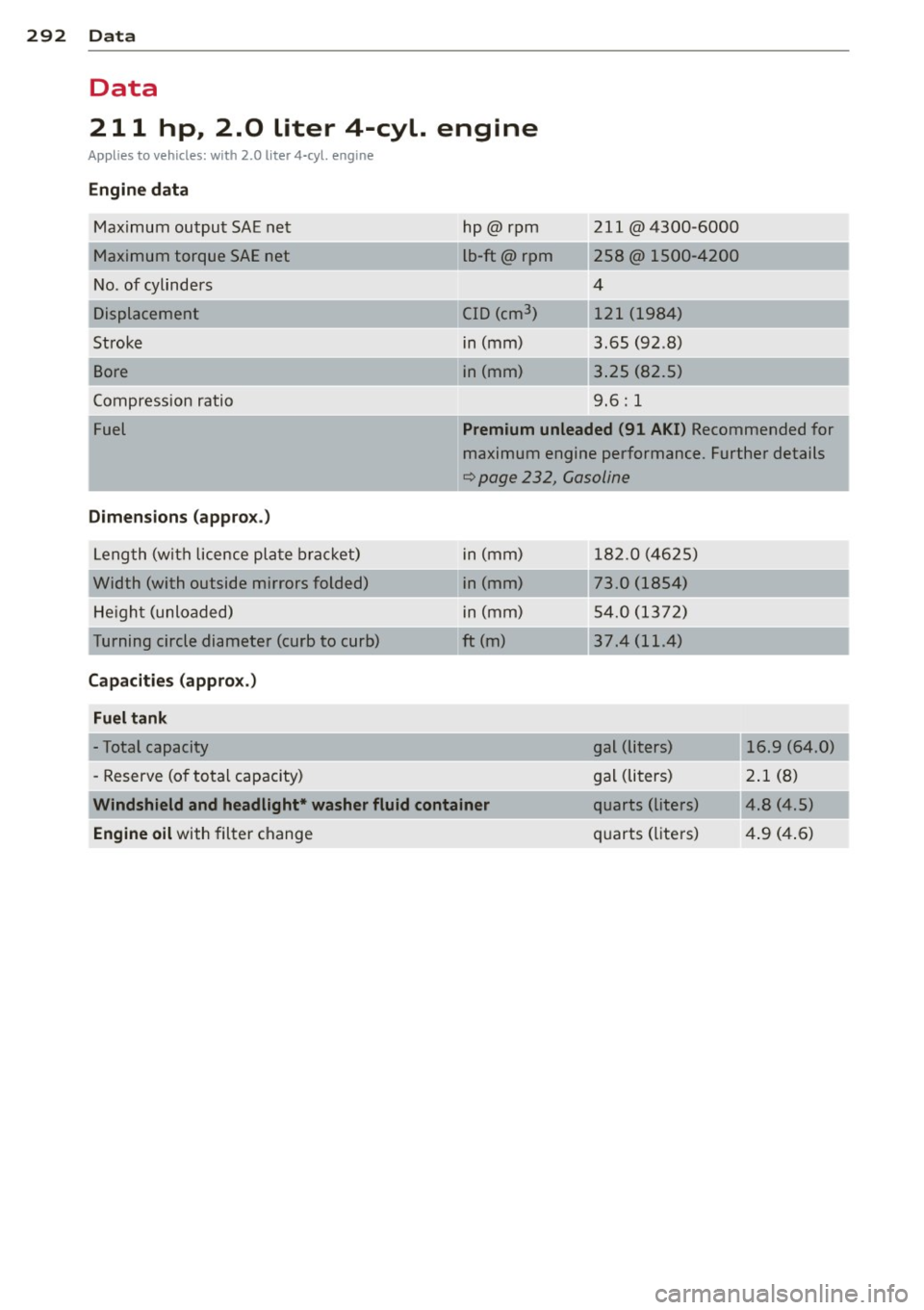
211 hp, 2.0 liter 4-cyl. engine
Applies to vehicles: with 2.0 liter 4-cyl. engine
Engine data
Ma ximum output SAE ne t
M aximum torque SAE net
No . of cylinders
Displacement
Stroke
Bore
C ompress ion ratio
Fuel
Dimensions (approx .)
Leng th (wit h licence pl ate brack et)
Width (with outside mirrors folded) He igh t (unloaded)
T urning circle diameter (curb to curb)
Capacities (appro x.)
Fuel tank
- Total capacity
- Reserve (o f to tal capacity) h
p@rpm
L b-ft@ rpm
C ID (cm
3
)
in (mm)
i n (mm)
-~,
211 @4300-6000
258@ 1500-420 0
4 121 (1984)
3.65 (92 .8 )
3 .25 (82 .5)
9 .6: 1
Premium unleaded (91 AKI) Recommended for
m aximum engine performance . Further details
q page 232, Gasoline
i n (mm) 1 82.0 (4 625)
i n (mm) 73.0 (1854)
i n (mm) 5 4.0 (1 37 2)
ft (m) 37.4 (11.4)
gal (liters) 16.9 (64 .0)
gal (li ters) 2.1
(8 )
Windshield and headlight* washer fluid container quarts (liters) 4.8 (4 .5)
Engine
oil with filter c hange qu
arts (lite rs) 4 .9 (4 .6)
Page 302 of 316
300 Index
Car ca re ... ... .. .. ..... ... .. .. .... . 221
Int erior .... ... . ...... ... .. .. .... . 226
Plastic and v inyl ... .... ... .. .. .... . 224
Ca re of exte rior ... .. ... .. .. .. .. .. .. . 22 1
Cargo area
refer to Luggage compartment 44, 68 , 150
Cargo net .... ... . ...... ... .. .. .... .. 69
Cata lytic conve rter ......... .. .. .... . 214
Center armrest
Adjusting .. ................ ... ... .
68
Storage compartment . . . . . . . . . . . . . . . 68
Certification ... .. ...... ... .. .. .... . 296
Changing a fla t tire ......... .. .. .... . 274
Changing a wheel .......... .. .. .... . 274
Changing engine oi l
Chass is 2 4 3
Unde rcoat ing .......... .. .. .. .. .. . 226
Checking
Eng ine coolant leve l ........ ... .. .. .
244
Checking tire pressure . ... .. .. .... .. . 258
C hi ld restra ints
D anger of using c hild restra ints in the
front sea t .... ............. .. .... .
163
Where can I ge t addit iona l info rmation
about child restra ints and their use? ..
203
C hi ld restra int system anchors . .. .. .. . 199
C hi ld safety ............... .. .. .... . 186
Convertible locking retractor .. .. ..... 195
Important safety instructions fo r us ing
ch ild safety seats .. ....... .. .. .. .. .
189
Important things to know wh en dr iving
wi th child ren ............ .. .. .... .
186
Ins tall ing a chi ld res traint using the
L A TC H sys tem .. .. ..... ... .. .. .... .
200
Lowe r ancho rages ..... ... .. .. .... . 200
Mounti ng and releasing the ancho rage
hook .. .. ................. .. .... .
200
Tether anchors ........... .. .. .... . 201
Tethe r straps . ... ..... ... .... .. .. . 201
C hild safety seats ....... ... .. .. .... . 191
Booste r seats .. .. ..... ... .. .. .... . 194
Conve rtible chi ld seats .... .. .. .. .. . 192
Convertible locking retractor .. .. .. .. . 195
Danger of us ing c hild restra ints in the
front seat .. ................ ... .. .
163
H ow do I properly install a child safety
seat in my vehicle? ........ .. .. .. .. .
189
Infant seats ..... ... .. ..... .... . .. 191
Installing ..... .. .. ... ..... ... .. .. 195
LA TCH system . ... ... .. ..... ... .. .. 200
Safety instr uctions ............. .... 189
C igarette ligh ter . . . . . . . . . . . . . . . . . . . . . 76
Cleaning
Alcanta ra ® (synthetic suede) .........
229
Engine co mpartment ......... .. .. .. 2 30
Exhaus t ta il pipes . ............. .... 22 6
Fabr ics and fab ric coverings ... .. .. .. 22 7
Instr ument pane l ... ... ..... ... .. ..
2 27
In terior ... .... .. .. .... .... ... .. .. 226
Leather ... .... .. ... .. ..... .... . .. 229
MMI control console ........... .. .. 226
MMI display ... .. ............. .... 226
Plastic and vinyl .. ..... ........... . 224
Plastic parts . .. .. ..... ........... . 22 7
Safe ty be lts ..... ................ .
230
Trim strips .. .. .. ... .......... .. .. 22 4
Cleaning and protection .......... .. .. 221
Clock . . . . . . . . . . . . . . . . . . . . . . . . . . . . . . 12
Coat hooks ... .. .. .. ... .. ... ..... .. . 77
Co ld tire inflation pressure ........ .. ..
256
Compac t spa re tire . ............. .. .. 2 73
also refer to Spare ti re ............ .. 2 73
Compass mirror . . . . . . . . . . . . . . . . . . . . . 59
Compliance ..... .. .. ... ..... ... .. .. 296
Cons umer Informa tion . . . . . . . . . . 1 52, 293
Contacting NHTSA . ............... .. 152
Co nvenience closed . . . . . . . . . . . . . . . . . . 4 6
Co nvenience key . . . . . . . . . . . . . . . . . . . . . 42
START E NGIN E STOP butto n . . . . . . 94 , 96
Star ting eng ine .. ............. .. .. . 94
Swi tch ing eng ine off ........... .... . 96
Switching on ignition . .. ..... ... .. .. . 94
U nlocking and locking vehicle . ... .. .. . 42
Co nvenience openi ng ............ .... . 46
Convertib le child safety seats ..... .... 192
Co nvertib le locking retractor
Activati ng ..... .. .. ... ..... ... .. ..
197
Deactivating ..... ... .. ..... ... .. .. 198
Using to secure a child sa fety seat l.95, 197
Coolant system .. .. ............. .. .. 2 4 4
Cooling System
Expans ion tank . .. .......... ...... .
244
Cornering light . . . . . . . . . . . . . . . . . . . . . . 52