engine AUDI A5 COUPE 2013 Service Manual
[x] Cancel search | Manufacturer: AUDI, Model Year: 2013, Model line: A5 COUPE, Model: AUDI A5 COUPE 2013Pages: 294, PDF Size: 73.84 MB
Page 95 of 294
shifts up into the ne xt higher gea r once the
maximum specified engine RPM is reached .
A WARNING
Please note that the wheels could spin on
slick or slippery roads when kick-down is
active.
Launch Control Program
Applies to vehicles: with S tronic transmission
The Launch Control Program provides the
best ac celeration possible when starting from
a s top .
Requirement: The engine must be at operat
i ng temperature and the steering wheel must
not be turned.
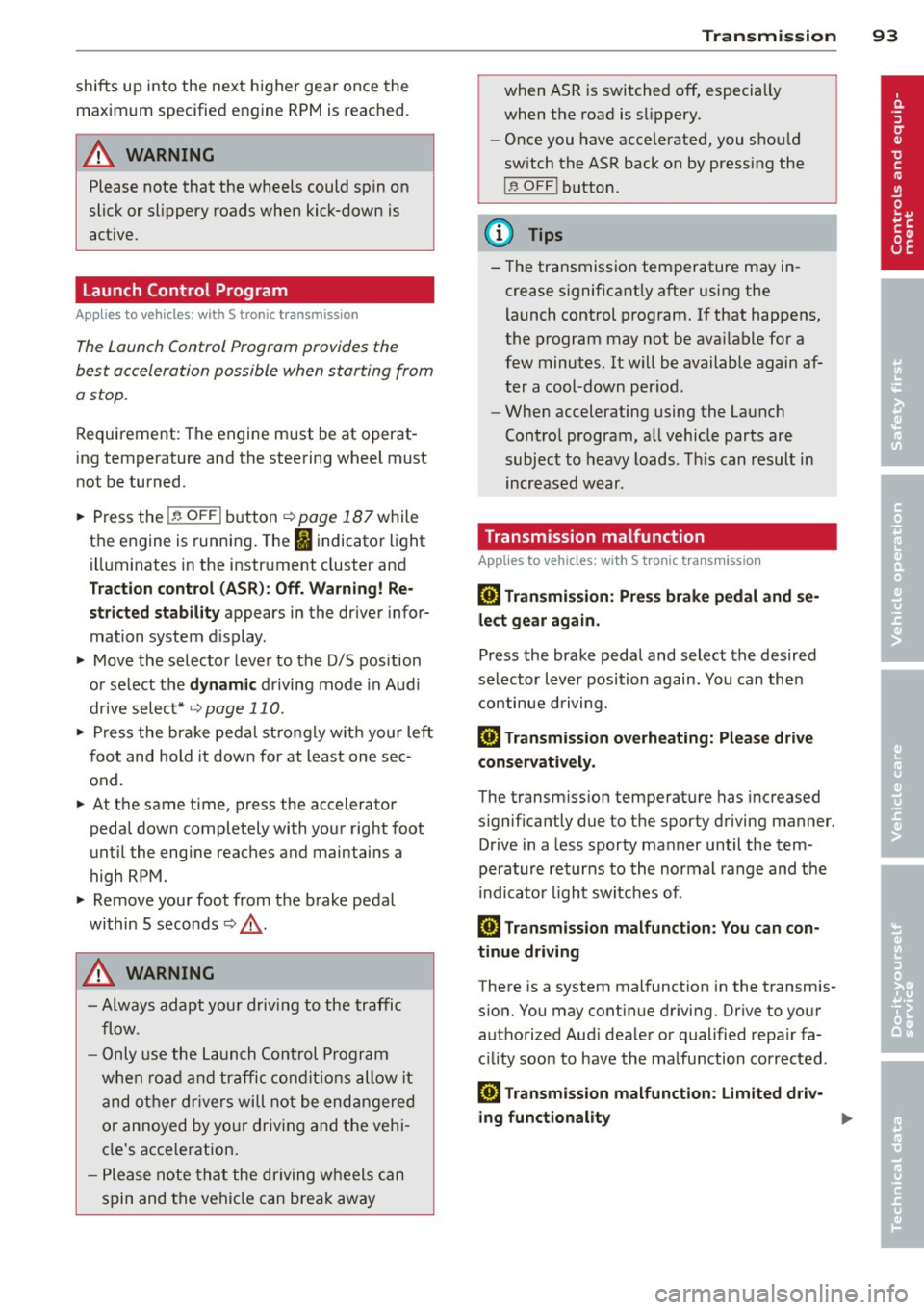
... Press the
I~ OFF I button ¢ page 187 while
the engine is running . The
II indicator light
i ll uminates in the instrument cluster and
T raction control (ASR ): Off. Wa rn ing! Re
stricted stabil it y
appears in the driver infor
mation system d isplay .
... Move the selector lever to the D/S position
o r se lect t he
dynamic d riving mode in Aud i
drive selec t* ¢ page 110 .
... Press the br ake ped al stro ng ly w it h your left
f oot and hold it down for at least one sec
ond.
... At t he same time, press the accelerato r
peda l down completely with your right foot
unti l the engine reaches and maintains a
high RPM.
... Remove your foot from the brake peda l
within 5 seconds¢_&. .
A WARNING
-Always adapt you r d rivi ng to the traffic
flow.
- Only use the Launch Control P rogram
when roa d and tr affic cond it ions allow it
and ot her dr ivers will not be end angered
o r annoyed by yo ur driv ing and the vehi
cl e's acce leration .
- P lease note th at t he driving wheels can
spin and the vehicle can brea k away
-
Tran sm iss ion 93
when ASR is switched off, especially
when t he road is sli ppery .
- Once you have accelerated, you shou ld
sw itch the ASR back on by pressing the
I ~ OFFI button.
(D Tips
- The transmission temperature may in
crease s ignificantly after using the
launch control program. I f that happens,
the program may not be ava ilable for a
few minutes. It w ill be available again af
t er a cool-down per iod .
- When accelerating using the Launch
Cont ro l program, a ll vehicle parts are
subjec t to heavy loads . T his can r esult in
increase d wear .
Transmission malfunction
Applies to vehicles: with S tronic transmission
[O] Tran smission: Press brake pedal and s e
lect gear again.
P ress the brake pedal and select the desire d
selector lever position again. You ca n the n
continue d riving.
[O] Transmis sion overheating: Pleas e driv e
conservatively .
The transmiss ion temperature has increased
s ignificantly due to the sporty driving manner.
D rive in a less sporty ma nner until the tem
perature returns to the normal range and the
i ndicato r light switches of.
[O] Transmission malfunction: You can con
tinue driving
There is a system malfunction in the transmis
s ion. You may cont inue driving. Drive to yo ur
authori zed Aud i dea ler or qualified repa ir fa
c ili ty soon to have the malfunction corrected .
[O] Transmission malfunction : Limited dr iv-
ing functionality
""°
Page 105 of 294
Audi adaptive cruise control and braking guard 103
-If you switch the ASR/ESC off or the off
road mode on (allroad), Audi braking
guard switches off automatically
<=> page 187.
-Switch Audi braking guard off when you
are loading the vehicle onto a vehicle car
rier, train, ship or other type of transpor
tation. This can prevent undesired warn ings from the braking guard system .
Messages
Applies to vehicles: with Audi adaptive cruise co ntrol
Braking guard: Off
This driver message appears if the system is
turned off via the radio/MM I*. Otherwise, if
the system is turned off, the information ap
pears every time shortly after the start of the
trip.
Braking guard: Activated
This driver message appears if sharp brake
pressure was applied due to an acute warning.
•••
Three white dots appear if a setting cannot be
selected with the operating lever. For exam
ple, this happens if you want to raise/lower
the speed even though there was no previous
ly saved speed .
ACC: Deactivation
The driver message appears in vehicles with
manual transmission . If the clutch pedal was
pressed down for too long, the adaptive cruise
control turns off. A chime sounds as a remind
er.
ACC: Sensor blocked
This message appears if the sensor view is ob
structed, for example by leaves, snow, heavy
spray or dirt. Clean the sensor<=>
page 95,
fig. 97.
ACC: not available
The driver message appears if there is a mal
function. The adaptive cruise control turns off.
A chime sounds as a reminder. Have the sys- tern checked by an authorized Audi dealer or
authorized Audi Service
Facility.
ACC: unavailable
The driver message appears if, for example,
the brake temperature is too high . The adap
tive cruise control is temporarily unavailable.
A chime sounds as a reminder.
Engine speed!
This driver message appears in vehicles with
manual transmission if the driver had not up
shifted or downshifted in time while using
adaptive cruise control braking or accelerat ing, causing the vehicle to exceed or not reach
the permitted limit speed. The adaptive cruise
control turns off. A chime sounds as a remind
er .
Shift lever position!
Vehicles with an automatic transmission: the
driver message appears if the selector lever is
shifted to the N position . The adaptive cruise
control is not available while in this position .
Vehicles with manual transmission: the driver message appears for vehicles with manual
transmission if there is no forward gear en
gaged, meaning if the reverse gear or the 1st
gear is engaged or if the selector lever is in
the neutral position. The adaptive cruise con
trol is not available while in this position.
Stabilization control (ESC)
This message appears if the electronic stabili
zation control (ESC) is taking action to stabi
lize the vehicle. The adaptive cruise control
turns off . A chime sounds as a reminder.
Speed too low
This message appears if the current speed is
too low
to set or to maintain the desired
speed .
The speed being saved must be at least
20 mph (30 km/h). The cruise control is
turned off for speeds lower than 12 mph
(20 km/h). The adaptive cruise control re
mains turned on for speeds above 95 mph
(150 km/h) (override).
It will stabilize again at.,..
Page 111 of 294
Audi drive select Driving settings
Introduction
App lies to vehicles: w it h drive se lect
Aud i drive select provides the possibility to ex
perience different types of veh icle sett ings in
one veh icle. For instance, using the three
C o mfort , Au to and Dyna mic modes, the driv
er can switch from a sporty to a comfortab le
driving mode with the press of a button.
Addit ionally, in vehicles with MM I*, the vehi
cle setup for
Indi vidual * mode can be cus
tomized by you. This makes it possib le to
combine settings such as a sporty engine tun
ing with comfortable steering.
A WARNING
Improper use of the Audi drive select can
cause collisions, other acc idents and seri
ous personal injury.
Description
Ap plies to vehicles: w it h drive se lect
The vehicle setup in each mode depends on
the vehicle's features. However, the engine,
automatic t ransmission* and steering are al
ways involved.
.
Engine and automatic transmi ssio n*
Depending on the mode, the engine and the
automatic transmission respond quicker or in
a more ba lanced manner to acce lerator pedal
movements. In the sporty dynamic mode, the
automatic t ransmission shifts at h igher R PMs .
Steering
The steering adapts in terms of steering effort
and steering ratios . Indirect steer ing that
moves eas ily, like the stee ring in comfort
mode, is best su ited to long dr ives on a high
way. In contrast, dynam ic mode prov ides
sporty, di rect steering .
The follow ing applies to vehicles with dynam ic
steer ing*: the stee ring ratio changes based on
ve hicle speed in order to maintain optimum
Aud i dri ve sel ect 109
steering effort for the drive r at all times. This
sets the steering to be less sensitive at higher
speeds in order to provide improved vehicle
control. At reduced speeds, however, steer ing
is more d irect in order to keep the steering ef
fort as minimal as poss ible when the driver is
maneuveri ng the vehicle . At low and average
speeds, dynamic steering addit iona lly pro
vides more responsive stee ring pe rformance.
Adapt ive dampers*
The adaptive dampers* use sensors to record
i nformation regarding steering movements,
braking and acceleration ope rations by the
drive r, road surface, driving speed, and load.
T his makes it possible to adapt damp ing to
the d riving situation v irtually i n rea l time.
Audi drive select also makes it possible to sat isfy the desire for sporty s uspension (Dynam
ic) and comfortable suspension (Comfort)
without giv ing up ba lanced tuning (Auto).
Sport diff ere ntial *
As a component of the all whee l dr ive system
(quattro ®)
q page 190, the sport differential*
distributes the driving power to the rear ax le
depending on the situation . The distribution
of power var ies depending on the mode se
lected. The goal is a high level of agility and
ability to accelerate on curves . The ve hicle is
very respons ive to steering .
Adaptive crui se control *
The behav ior when accelerating can be adjust
ed from comfortab le to sporty, depending on
the drive select mode. Adaptive cru ise control
also responds to the driv ing behavior of the
vehicle ahead in a mo re conservative or spo rty
manner .
Engine sound*
The sound of the eng ine is adapted to the se
lected mode and ranges from subtle to sporty.
0) Tips
- In some models, the maximum vehicle
speed can only be reached in the
Auto
and D ynamic modes.
Page 112 of 294
110 Audi drive select
-For vehicles with an automatic transmis
sion*, se lecting the
Dynamic mode re
su lts in sporty shifting characteristics.
The S gear position engages automati
cally.
- In vehicles that have dynamic steering*,
operating noise is heard when starting or
stopping the eng ine . This does not ind i
cate a problem .
Selecting the driving mode
Applies to vehicles: w ith drive se lect
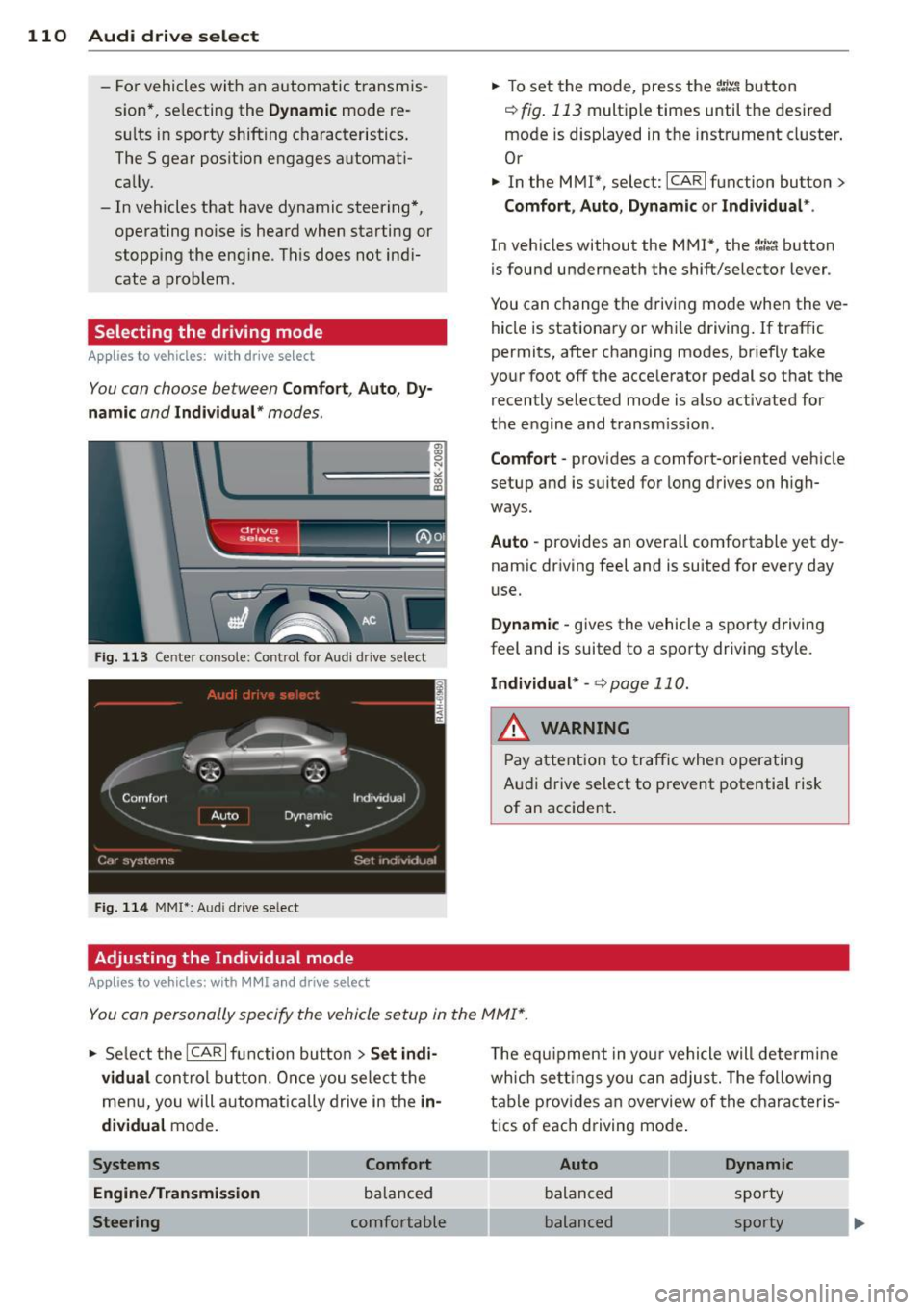
You can choose between Comfort, Auto, Dy
namic
and Individual * modes.
Fig. 113 Center console: Control for Au di dri ve select
Fig. 114 MMI•: Aud i drive select
Adjusting the Individual mode
Applies to vehicles: with MMI a nd drive se lect
.,. To set the mode, press the f:l:-.i button
~ fig. 113 multiple times until the desired
mode is displayed in the instrument cluster .
Or
.,. In the MMI*, select: ICARlfunction button>
Comfort, Auto, Dynamic or Individual *.
In vehicles without the MMI*, the~:/;,~ button
is found underneath the shift/selector lever.
You can change the driving mode when the ve
hicle is stationary or while driving. If traffic
permits, after changing modes, briefly take
your foot off the accelerator pedal so that the recently selected mode is also activated for
the engine and transm ission .
Comfort -provides a comfort-oriented vehicle
setup and is suited for long drives on h igh
ways .
Auto -provides an overall comfortable yet dy
namic driving feel and is suited for every day
use.
Dynamic -gives the vehicle a sporty driving
feel and is suited to a sporty driving style.
Individual * -¢page 110.
& WARNING
Pay atte ntion to traffic when operating
Audi drive select to prevent potential risk
of an accident.
You can personally specify the vehicle setup in the MMI* .
.,. Select the ICAR I function button > Set indi
vidual
control button. Once you select the
menu, you will automatically drive in the
in·
dividual
mode.
Systems Comfort
Engine/Transmission
balanced
Steering comfortable T
he equipment in your vehicle will determine
wh ich sett ings you can adjust. The following
table provides an overview of the characteris
tics of each driving mode .
Auto Dynamic
balanced sporty
balanced sporty
Page 113 of 294
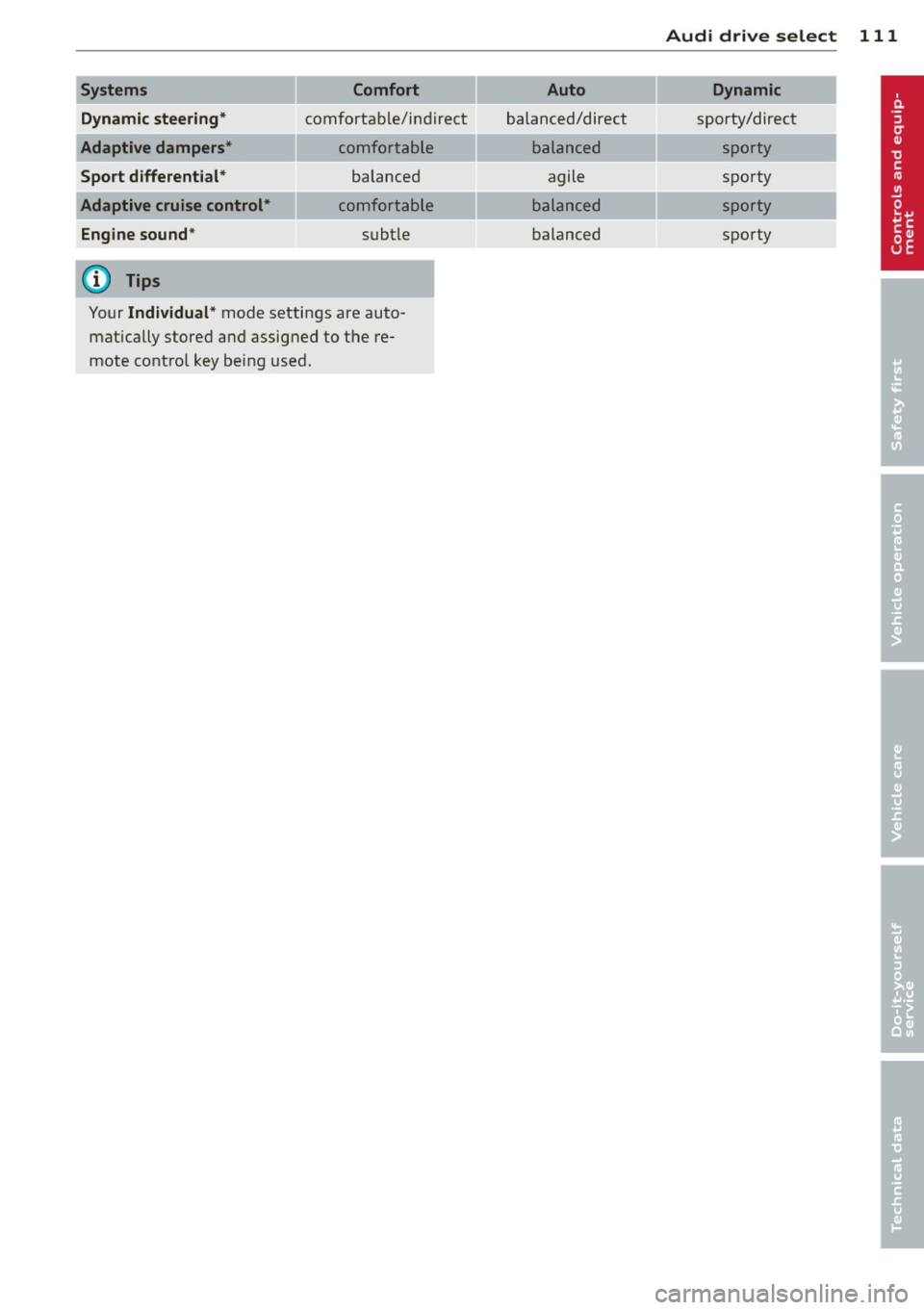
Systems Comfort
Dynamic steering*
comfortable/ind ire ct
Adaptive dampers* comfortable
Sport differential* balanced
Adaptive cruise control* comfortable
Engine sound * subtle
(D) Tips
Your Individual* mode settings are auto
matically stored and assigned to the re
mote control key being used.
Audi drive select 111
Auto Dynamic
balanced/direct sporty/direct
balanced sporty
agile sporty
balanced sporty
balanced sporty
Page 121 of 294
Homelink®
Universal remote
control
Description
Appl ies to vehicles: with Horne Link
The Homelink universal remote control can
be programmed with the remote control for
devices that are already present.
With Home Link, you can control devices such
as the garage door, security systems, house
l ights, etc. comfortab ly from the inside of you
vehicle .
H ome Link makes it possible for you to rep lace
three differen t remote controls from dev ices
in your home with one universal remote. This
feature works for most garage door and exte
rior door motor signals. Programming the in
dividual remote control for your remote con
trol takes p lace near the center of the radiator
grille. There is a control module attached at
this location.
A one-t ime programming of the sensor must
be performed before you are able to use sys
tems with Homelink. If the system does not
activate after performing the one-t ime pro
gramming, check whether the system uses a rolling codec:>
page 122 for veh icles without
the MMI*.
_& WARNING
- Never use the Homelink ® transmitter
with any garage door opener that does
have not the safety stop and reverse fea
ture as requ ired by federa l safety stand
ards. This includes any garage door open
er model manufactured before April 1,
1982.
- A garage door opener which cannot de
tect an object, signaling the door to stop
and reverse does not meet current feder
al safety standards. Us ing a garage door
opener without these features increases
risk of serious injury or death.
Homelink ® 119
-For safety reasons never release the
parking brake or start the engine while
anyone is standing in front of the vehicle.
- A garage door or an estate gate may
sometimes be set in motion when the
Homelink ® remote control is being pro
grammed. If the device is repeatedly ac
tivated, th is can overstrain motor and
damage its e lectrical components -an
overheated motor is a fire hazard!
- To avo id possible injuries or property
damage, please always make abso lutely
certain that no persons or objects are lo
cated in the range of motion of any
equipment being ope rated .
(D Tips
-If you would like more information on
Homelink ®, where to purchase the
Homel ink ® compatible products, or
would like to purchase the Homelink ®
Home Lighting Package, please call to ll
free: 1-800-355-3515.
- For Declaration of Compliance to United
States FCC and Industry Canada regu la
tions c:>
page 276.
Page 123 of 294
-For security reasons, we recommend that
you clear the programmed buttons be
fore se lling the vehicle .
Programming the transmitter (version
B)
Applies to vehicles: with Home Link
,,,,, r ,o :O·,) ,,;;~
®
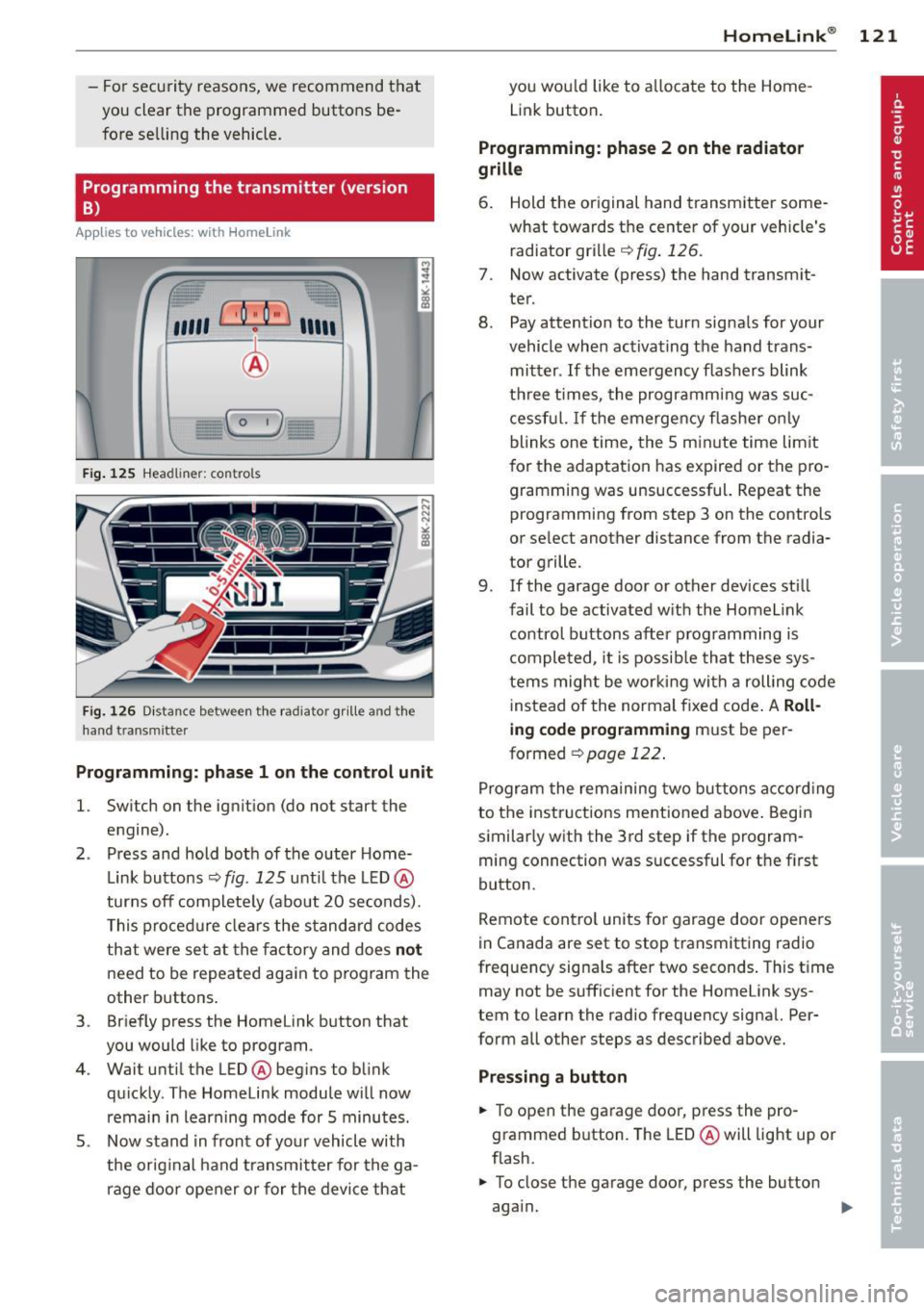
Fig. 125 Hea dli ner: c o n tro ls
Fig. 126 Dis ta n ce betw een th e radiato r gri lle a nd the
hand t rans mitte r
Programming: phase 1 on the control unit
l. Switch on the ignition (do not start the
engine) .
2 . Press and hold both of the outer Home
Link buttons ¢
fig. 125 unti l the LED @
turns off completely (about 20 seconds).
This procedure clears the standard codes
that were set at the factory and does
not
need to be repeated again to program the
other buttons .
3 . Briefly press the Homelink button that
you would like to program .
4. Wait until the LED @beg ins to blink
quickly . The Homelink module will now
remain in learning mode for 5 minutes.
5 . Now stand in front of your vehicle with
the original hand transmitter for the ga
rage door opener or for the device that
Homelink ® 121
you wou ld like to allocate to the Home
Link button .
Programming: phase 2 on the radiator
grille
6. Hold the or iginal hand transmitter some
what towards the center of your vehicle's radiator grille ¢
fig. 126.
7. Now activate (press) the hand transm it
ter.
8. Pay attention to the turn sig nals for your
vehicle when activating the hand trans
mitter .
If the emergency flashers blink
three times, the programm ing was suc
cessful. If the emergency flasher only
blinks one time, the 5 minute time lim it
for the adaptation has expired or the pro
gramming was unsuccessful. Repeat the
programming from step 3 on the controls
or se lect another distance from the radia
tor grille.
9. If the garage door or other devices still
fail to be activated with the Homelink control buttons after programming is
completed, it is possible that these sys
tems might be working with a roll ing code
instead of the normal fixed code . A
Roll
ing code programming must be per
formed
¢ page 122 .
Program the remaining two buttons according
to the instructions ment ioned above . Begin
similarly with the 3rd step if the program
ming connection was successful for the f irst
button .
Remote contro l units for garage door openers
in Canada are set to stop transmitting radio
frequency signa ls after two seconds . This time
may not be sufficient for the Homelink sys
tem to learn the radio frequency sign al. Per
form all other steps as described above.
Pressing a button
.,. To open the garage door, press the pro
grammed b utton. The LED @ will light up or
flash .
.,. To close the garage door, press the button
aga in.
Page 137 of 294
Why safety belts?
Frontal collisions and the law of physics
Frontal crashes create very strong forces for
people riding in vehicles .
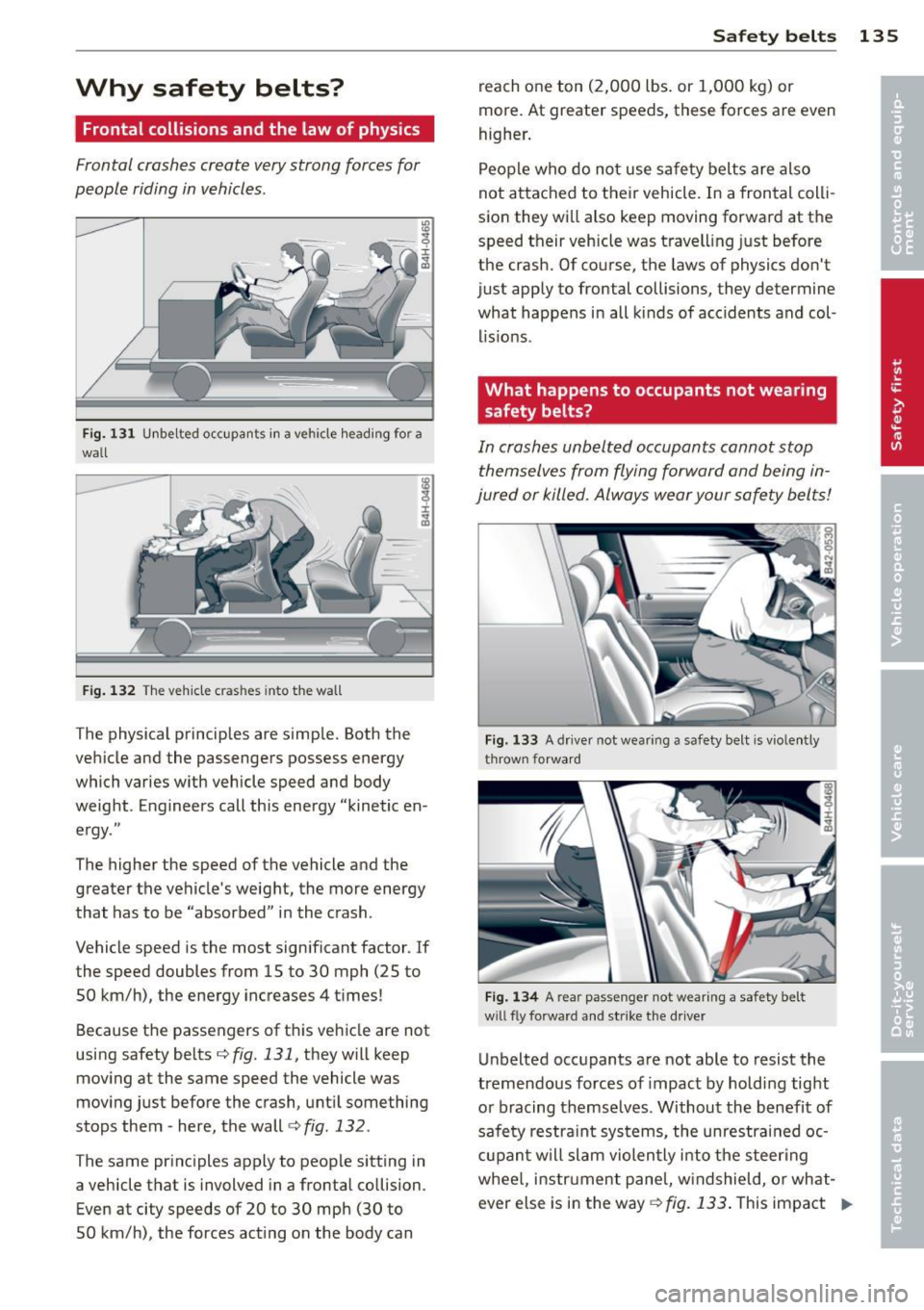
Fig. 131 U nbe lted occupa nts in a ve hicle hea ding for a
wall
F ig. 1 32 The ve hicle c ras hes into t he wall
The physical principles are simp le. Both the
ve hicle and the passengers possess energy
which varies w ith vehicle speed and body
weight . Enginee rs call this energy "kinetic en
e rgy ."
The higher the speed of the vehicle and the greater the vehicle 's weight, the more energy
that has to be "absorbed" i n the crash .
Vehicle speed is the most sign ificant factor . If
the speed doubles from 15 to 30 mph (25 to
50 km/h) , the energy inc reases 4 t imes !
Because t he passengers of t his ve hicle are not
using safety belts
r::;, fig . 131, they w ill keep
moving at the same speed the vehicle was
mov ing just before the crash, unt il something
stops them -here, the wall
c:> fig . 132 .
The same pr inc iples apply to peop le sitting in
a vehicle that is involved in a frontal co llision .
Even at city speeds of 20 to 30 mph (30 to
50 km/h) , the forces act ing on the body can Safety belts
135
reach one ton (2,000 lbs . or 1,000 kg) or
more . At greater speeds, these forces are
even
higher .
People who do not use sa fe ty belts are also
not attached to their vehicle. In a frontal coll i
sio n they wi ll also keep moving forward at the
speed their veh icle was t ravell ing just before
the crash. Of co urse, the laws of physics don't
just app ly to frontal collisions, they determine
what happens in all kinds of acc idents and col
lis ions .
What happens to occupants not wearing
safety belts?
In crashes unbelt ed o ccupants cannot stop
themselves from flying forward and being in
jured or killed. Always wear your safety belts!
Fig. 133 A driver not wear ing a safety belt is vi ole ntl y
thrown forwa rd
Fig. 1 34 A rear passeng er not w ear ing a safety be lt
w ill fly forwar d and s trike the d river
Unbelted occ upants a re not able to resist the
tremendous forces of impact by holdi ng tight
or bracing themselves . Without the benefit of
safe ty restra in t systems, the unrestrained oc
cupan t w ill slam violen tly i nto the s teer ing
whee l, instr ument pane l, w indshield, o r what
ever else is in the way ¢ fig. 133. This impact Ill-
Page 138 of 294
136 Safet y belt s
with the vehicle interior has all the energy
they had just before the crash.
Neve r rely on airbags a lone for p rotec tion.
Even when they deploy, airbags provide only
addit io nal p rotection . Airbags are not sup
posed to deploy in all kinds of accidents. Al
though your Audi is equipped with a irbags, all
vehicle occupants, including the driver, must
wear safety belts correctly in order to min i
mize the risk of severe injury or death in a
crash .
Remember too, that airbags wi ll deploy on ly
once and that your safety belts are always
there to offer protection in those accidents in
which airbags are not supposed to deploy or when they have a lready deployed . Unbelted
occupants can also be thrown out of the vehi
cle whe re even more severe o r fatal in juries
can occu r.
It is also impo rtant for the rear passenge rs to
wear safety belts correctly. Unbelted passen
gers in the re ar seats end anger no t on ly them
selves but a lso the d river a nd other passen
gers ~
fig. 134. In a frontal collision they will
be thrown forward violent ly, where they can
h it and injure the dr iver and/or front seat pas
senger.
Safety belts protect
People think it's possible to use the hands to
brace the body in a minor collision. It's simply
not true!
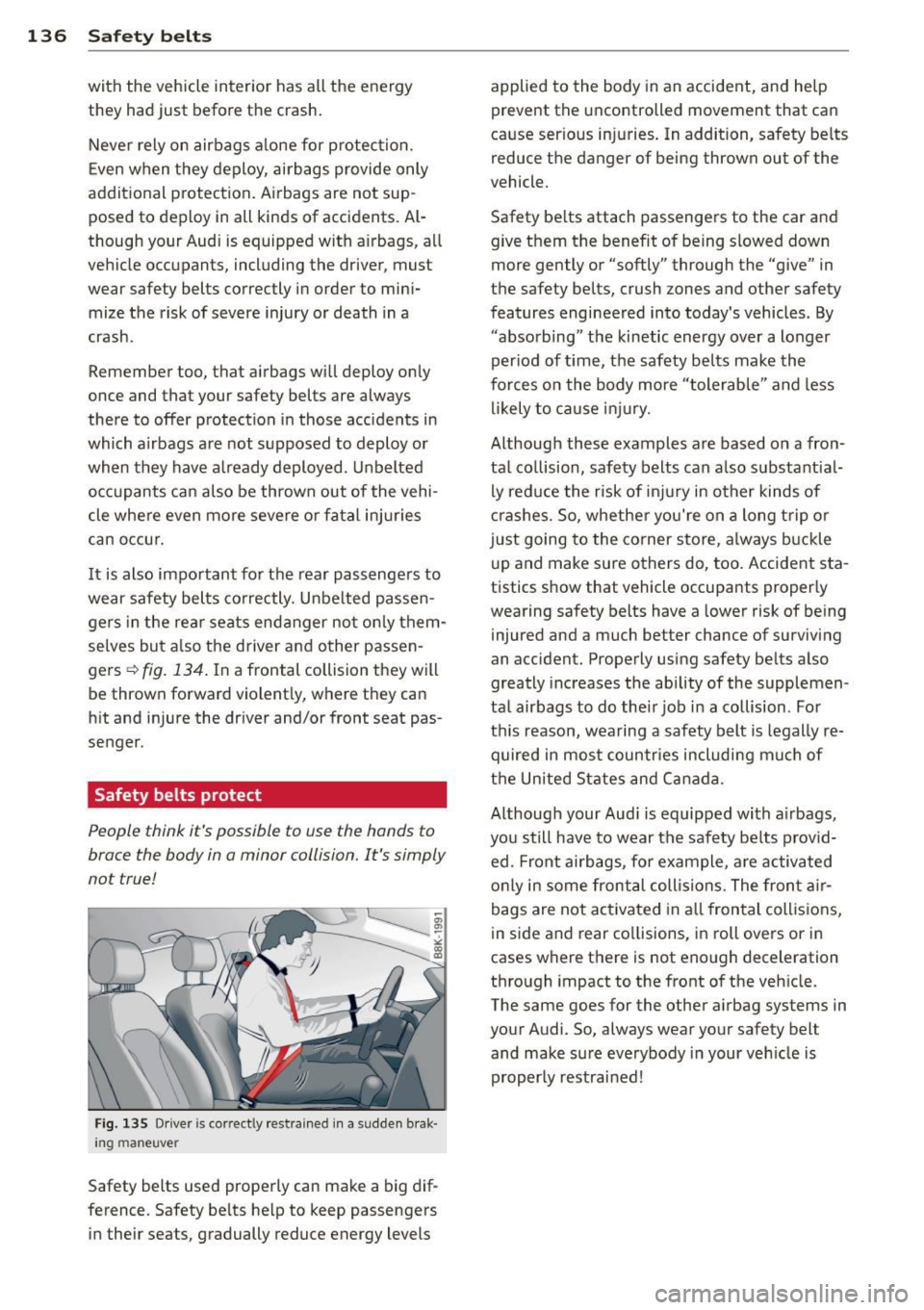
F ig . 135 Driver is co rrectly re st ra ined in a s udden b rak ·
i n g m an euve r
Safety belts used properly can make a big dif
ference . Safety be lts he lp to keep passengers
in their seats, gradually reduce energy levels applied to the body in an accident, and help
prevent the
uncontrolled movement that can
ca use serio us in juries . In addition, safety be lts
reduce the danger of being thrown out of the
vehicle .
Safety be lts attach passengers to the car and
give them the benefit of being slowed down
more gently or "softly" through the "give" in
the safety belts, crush zones and other safety
features engineered into today's vehicles. By
"abso rbing" t he kinetic energy over a longer
per iod of t ime, the safety belts make the
forces o n the body more " tolerable" and less
l ikely to ca u se inju ry.
Although these examples are based on a fron
ta l co llision, saf ety belts can a lso substantia l
ly red uce the r isk of injury in other kinds of
cr ashes. So, whether you're on a long t rip o r
j u st going to the corner store, a lways buckle
u p and make sure others do, too. Accident sta
tistics show that veh icle occupants properly
wearing safety belts have a lower risk of be ing
injured and a much better chance of surviving
an accident. Properly using safety be lts also
greatly increases the ability of the supplemen
tal airbags to do the ir job i n a collision. Fo r
t hi s reason, wea ring a safety belt is legally re
quired in mos t countr ies includi ng mu ch of
t h e Un ited States and C anada .
Althoug h your Aud i is equipped with a irbags,
you still have to wear the safety be lts prov id
ed . F ront ai rbags, fo r example , a re ac tivated
o nly in some front al coll isions. The fron t air
bags are not act ivated in a ll fron tal collis ions,
in side and rear co llisions, in roll overs or in
cases where there is not eno ugh deceleration
through impact to the front o f the veh icle.
The same goes for the other a irbag systems in
your Audi. So, always wear your safety belt and make su re everybody in your veh icle is
properly restrai ned !
Page 187 of 294
Intelligent technology Notice about data
recorded by vehicle
control modules
Your vehicle is not equipped with an Event Da
ta Recorder (EDR), installed by some manu
facturers for the express purpose of capturing
data for retrieval after an accident or crash
event. EDR's are sometimes called "crash re
corders".
Some state laws restrict the retr ieval or down
loading of data stored by EDR's that were in
stalled in a vehicle for the express purpose of
retrieving data after an accident or crash
event without the owner's consent.
Although your vehicle is not equipped with an
EDR, it is equipped with a number of electron
ic control modules for various vehicle systems
such as, for examp le, engine function, emis
sion control, as well as for the airbags and
safety belts.
These electronic control modules also record
vehicle-related data during norma l vehicle op
eration for diagnostic and repair purposes.
The recording capacity of the electronic con
trol modules is limited to data (no sound is re
corded) and only a small amount of data is ac
tually recorded over a very limited period of
time and stored when a system fault or other
condition is sensed by a control unit. Some of
the data then stored may relate to vehicle
speed, direction, braking as we ll as restraint
system use and performance in the event of a
crash or other condition. Stored data can only be read and downloaded with special equip
ment.
Electronic Stabilization
Control (ESC)
Description
ESC helps to improve road holding and vehicle
dynamics to help reduce the probability of
skidding and loss of veh icle control. It works
only when the engine is running. ESC detects
Intelligent technology 185
certain difficult driving situations, including
when the vehicle is beginning to spin (yaw)
out of control and helps you to get the veh icle
back under control by se lectively braking the
wheels, and/or reducing engine power and
providing steering ass istance to help hold the
vehicle on the driver's intended course. The in
dicator light
JjJ in the instrument cluster
blinks when ESC is taking action to help you
control the vehicle.
ESC has limitations .
It is important to remem
ber that ESC cannot overcome the laws of
physics.
It will not always be able to help out
under all conditions you may come up against.
For example, ESC may not always be able to
help you master situations where there is a
sudden change in the coefficient of friction of
the road surface. When there is a section of dry road that is suddenly covered with water,
slush or snow, ESC cannot perform the same
way it would on the dry surface. If the vehicle
hydroplanes (rides on a cushion of water in
stead of the road surface), ESC will not be
able to help you steer the vehicle because con
tact with the pavement has been interrupted
and the vehicle cannot be braked or steered .
During fast cornering, particularly on winding
roads, ESC cannot always deal as effectively
with difficult driving situations than at lower
speeds. When towing a trailer, ESC is not able
to help you regain control as it would if you
were not tow ing a trailer.
A lways adjust your speed and driving style to
road, traffic; and weather conditions. ESC can
not override the vehicle's physical limits, in
crease the available traction, or keep a vehicle
on the road if road departure is a result of
driver inattention. Instead, ESC improves the
poss ibility of keeping the vehicle under con
trol and on the road dur ing extreme maneu
vers by using the driver's steering inputs to
help keep the vehicle going in the intended di
rection. If you are traveling at a speed that
causes you to run off the road before ESC can
provide any assistance, you may not experi
ence the benefits of ESC.
•
•