page 76 AUDI A5 COUPE 2013 Workshop Manual
[x] Cancel search | Manufacturer: AUDI, Model Year: 2013, Model line: A5 COUPE, Model: AUDI A5 COUPE 2013Pages: 294, PDF Size: 73.84 MB
Page 79 of 294
Emergency brake fun ction
An emergency brake ensures that the vehicle
can be slowed down even if the
normal b rakes
fail
c::> page 78, Emergency broking.
Ind icat or light s
-If the par king b rake is closed w ith the igni
t ion
s wit ched on the . (USA models)/
• (Canada models) indicato r lights come
on in the instrument cluster and the switch .
-If the par king brake is closed w ith the igni
tion
s witc hed off the . (USA models)/
• (Canada mode ls) indicator lights come
on in the instrument cluster and the switc h
for about 20 seconds.
A WARNING
If a gear or a drive range (automat ic trans
m ission) is engaged with the vehicle sta
tionary and the engine runn ing, you must
in no instance accelerate or release the
clutch carelessly. Othe rwise the vehicle
w ill sta rt to move immediately- r isk of an
accident.
(D Note
If the . symbol in the display or the
.. (USA models) . (Canada models)
ind icator light in the instr ument cluster
flashes, there is a ma lfunction in the b rake
system. By press ing the
!SETI button, you
can bring up a driver message which ex
plains the malfunction in more detail. If
the driver message
Pa rking brake! ap
pears, there is an operating malfunction in
the parking brake which you should have
repaired immediately by an authorized
Aud i dealer or other q ual ified workshop
c::> poge 15.
(j) Tips
- You can apply the parking brake at any
time -even w ith the ignition switched
off . T he ignit io n must be tu rned on in o r
der to release the parking b rake.
On th e ro ad 77
-Occasional noises when the parking
brake is app lied and released are normal
and are not a cause for concern.
- When the vehicle is pa rked, the park ing
brake goes through a self -test cycle at
regu lar interva ls. Any associated noises
are normal.
Parking
Parking
.,. Press the brake pedal to stop the veh icle .
.,. Pull the button
@ c::> page 76, fig. 78 to set
the parking brake .
.,. Automatic transmission: Move the selector
lever to P.
.,. Tur n the engine off
c::> &_ .
.,. Manual transmiss ion: Shift into 1s t gear.
In addition on inclines and grades
.,. Turn the steering wheel so that your vehicle
w ill roll aga inst the curb in case it shou ld
start to move.
_&. WARNING
- When you leave you r vehicle -even i f on
ly briefly -always remove the ignition
key. This app lies particularly when chil
dren remain in the vehicle. Otherwise the
children could start the eng ine, release
the parking brake or operate electrical
equ ipment (e .g . power windows) . There
is the risk of an acc ident .
- When the veh icle is locked, no one -par
ticularly not childre n should rema in in
the vehicle . Locked doors make it mo re
difficult for emergency wo rke rs to get in
to the vehicle -put ting lives at risk .
Starting from rest
The starting assist function ensures that the
parking broke is released automatically upon starting.
Stopping and applying p arking brake
.,. Pull the switch @ c::> page 76, fig. 78 to ap-
ply the parking brake .
Ill>-
Page 80 of 294
78 On the road
Startin g and automati cally r ele a s ing the
p ark ing b rake
.. When you start to drive as usua l, the park
ing brake is automatically released and your
vehicle begins to move.
When stopping at a traffic signal or stopping
in city traffic on vehicles with an automatic
transmission, the parking brake can be ap
plied. The vehicle does not have to be held
with the footbrake. The park ing brake elimi
nates the tendency to creep with a drive range
engaged. As soon as you dr ive off as usual,
the park ing brake is released automatically
and the veh icle starts to move .
Starting on slopes
When starting on inclines, the start ing ass ist
prevents the vehicle from unintentionally roll
ing back. The braking force of the parking
b rake is not released until sufficient dr iving
fo rce has been bu ilt up at the whee ls.
(D Tips
For safety reasons, the park ing brake is re
leased automatically only when the dr iv
er 's sa fety belt is engaged in the bu ck le.
Starting off with a trailer
To prevent rolling back unintentionally on an
incline, do the following:
.. Keep the switch@c::> page 76, fig. 78
pulled and depress the accelerator . The
parking b rake stays applied and prevents
the vehi cle from rolling backward.
.. You can release the switch @once you are
s u re that yo u are developing enough driving
force at the wheels by depressing the accel
erator.
Depending on the weight o f the rig (vehicle
and trai ler) and the severity of the incline, you
may roll backwards as you start . Yo u can pre
vent roll ing backwards by holding the parking
brake switch @pulled out and accelerating -
just as you would when starting on a hill with
a conventional hand brake.
Emergency braking
In the event that the conventional brake sys
tem fails or locks .
.. In an emergency, pull the switch@
c::> page 76, fig. 78 and continue to pull it to
slow your vehicle down with the parking brake .
.. As soon as you release the switch @or ac-
celerate, t he b ra ki ng pro cess stops.
If you pull the switch @and hold it above a
speed of about 5 mph (8 km/h), the emergen
cy bra king funct ion is initiated. The ve hicl e is
braked at all fou r whee ls by activating the hy
draulic brake sys tem. The brake performance
is similar to making an emergency stop
c::> ,&.
In order not to a ct ivate the eme rgency brak
ing by mis take, an audib le warning tone (buz
zer) so unds when the switch @is pulled. As
soon as the switch @ is released, or the acce l
erator pedal is depressed, emergency braking
stops.
A WARNING ,-
Emergency braking should only be used in
an emergency, when the normal foot brake
has fa iled or the brake pedal is obstructed .
Using the par king brake to pe rform eme r
gency b raking will s low your veh icle down
as if you had made a full brake application.
The laws of phys ics cannot be suspended
even with ESC and its associated compo
nents (ABS, ASR, EDS). In corners and
when road or weathe r cond itions are bad,
a full brake application can cause the vehi
cle to skid or the rear end to break away
risking an accident.
Speed warning system
Overview
The speed warning system helps you to keep
your driving speed below a set speed limit.
T he speed warn ing system warns if the driver
exceeds a p reviously sto red max imum speed.
A warning tone w ill sound as soon as the
Ill-
Page 81 of 294
vehicle speed excee ds the set speed by about
3 mph (3 km/h). At the same time, a wa rning
symbo l appears in the d isp lay . The symbol's
appearance might be different in some mod
e ls.
The speed warning system has two warning thresholds that function independently of
each other and that have somewhat different
pu rposes:
Speed warning 1
You ca n use speed warnin g 1 to set the maxi
mum s peed w hile you are driv ing. Th is sett ing
will remain in effect until you t urn off the igni
tion, assuming that you have not changed or reset the setting.
The . (USA
models) ;a (Canada models)
speed warning symbol in the warning 1 dis
p lay appears when you exceed t he maximum
speed. It goes o ut w hen t he speed fa lls below
the stored max imum speed.
The speed warning symbo l wi ll also go out i f
the speed exceeds the stored maximum speed
by more than about 25 mph (40 km/h) for at
least 10 seconds. The stored maximum speed
i s deleted .
Speed warning 2
Storing warn ing 2 is recommended if you al
ways want to be reminded of a certa in speed ,
for example when you a re traveling in a coun
try that has a general maximum speed limi t,
or if you do not want to exceed a spec ified
speed fo r winter tires.
The . (USA mode ls)/ . (Canada models)
speed war ning 2 symbo l appea rs in the d is
p lay w hen you exceed the stored speed lim it.
Unlike war ning 1, it will not go out u nti l th e
ve hicl e spee d drops be low the stored spee d
limit.
Se tti ng s pee d wa rning 2 <=;>page 79.
@ Tips
Even t hough you r vehicle is equipped with
a speed wa rning system, yo u should st ill
On the road 79
watch the spee dome ter to ma ke sur e yo u
are not dr iv ing faste r th an the speed limit .
Speed warning 1: setting a speed limit
Warning threshold 1 is set by the !SE TI but
ton.
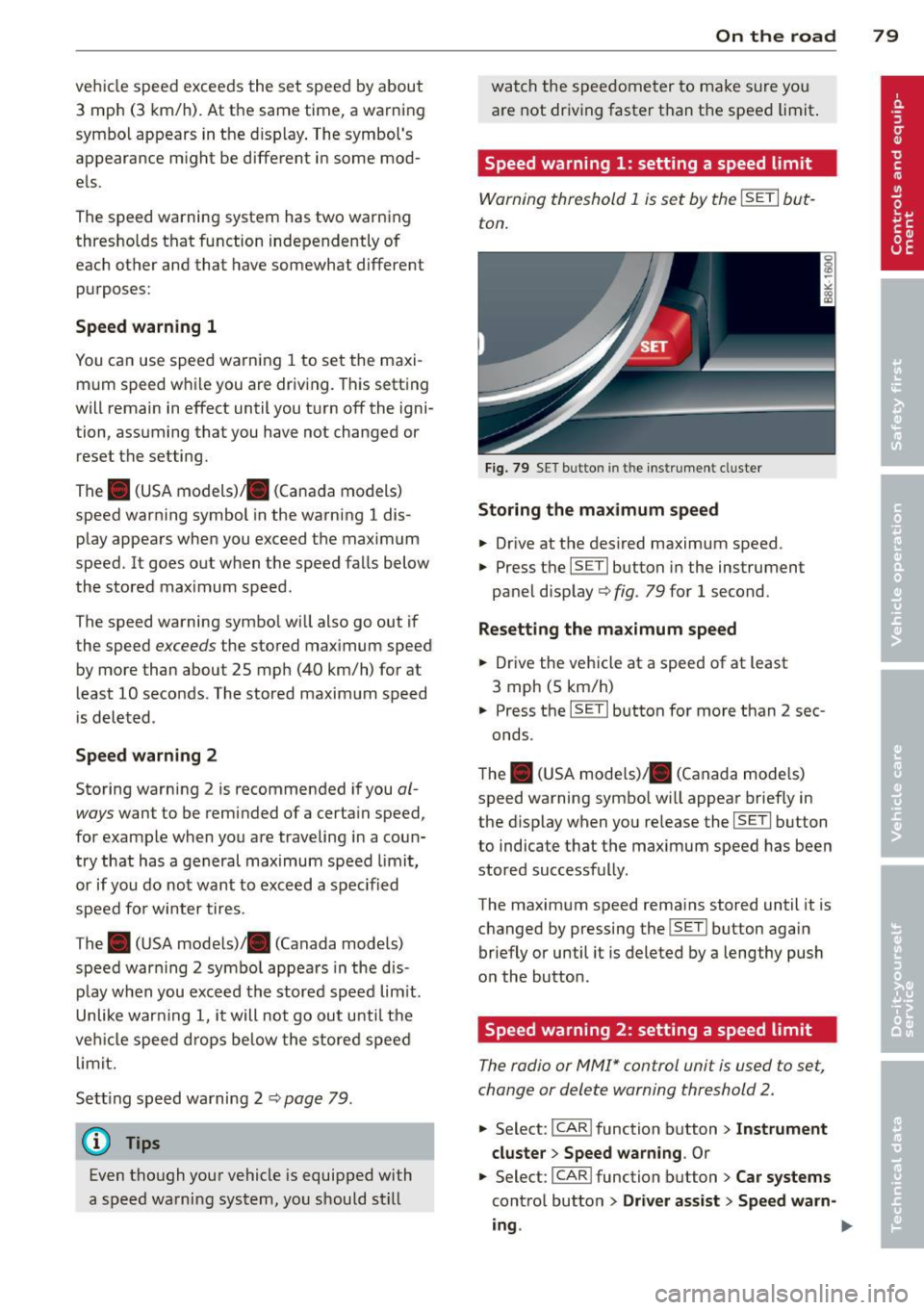
Fig . 79 SE T button in the instr um ent cl uste r
Storing the maximum speed
.. Drive at the des ired maximum speed.
.,. Press the
!SETI button in the instrument
pane l d isp lay ¢ fig . 79 for 1 second .
Resetting the maximum speed
.. Drive the vehicle at a speed of at least
3 mph (5 km/h)
.,. Press the
ISETI button for more than 2 sec-
onds.
T he . (U SA models)/ . (Canada models)
speed warning symbo l wi ll appear brief ly in
the d isplay when you re lease the
!SE TI button
to indicate that the ma ximum speed has been
stored successfully .
The maxim um speed rema ins stored until it is
c h anged by pressing the
!SE TI button again
briefly or until it is deleted by a lengthy push
o n the button.
Speed warning 2: setting a speed limit
The radio or MMI* control unit is used to set,
change or delete warning th reshold 2 .
.,. Select:
I CA R I function b utton> Instrument
cluster > Speed warning .
Or
.,. Select: I CAR I function butt on > Car systems
cont ro l butto n > Driver assist > Speed warn-
ing .
II>
Page 82 of 294
80 On the road
Warning threshold 2 can be set in the speed range starting from 20 mph to 150 mph (30
km/h to 240 km/h). Settings can each be ad
justed in intervals of 6 mph (10 km/h).
Cruise control
Switching on
The cruise control system makes it possible to
drive at a constant speed starting at
20 mph
(30 km/h).
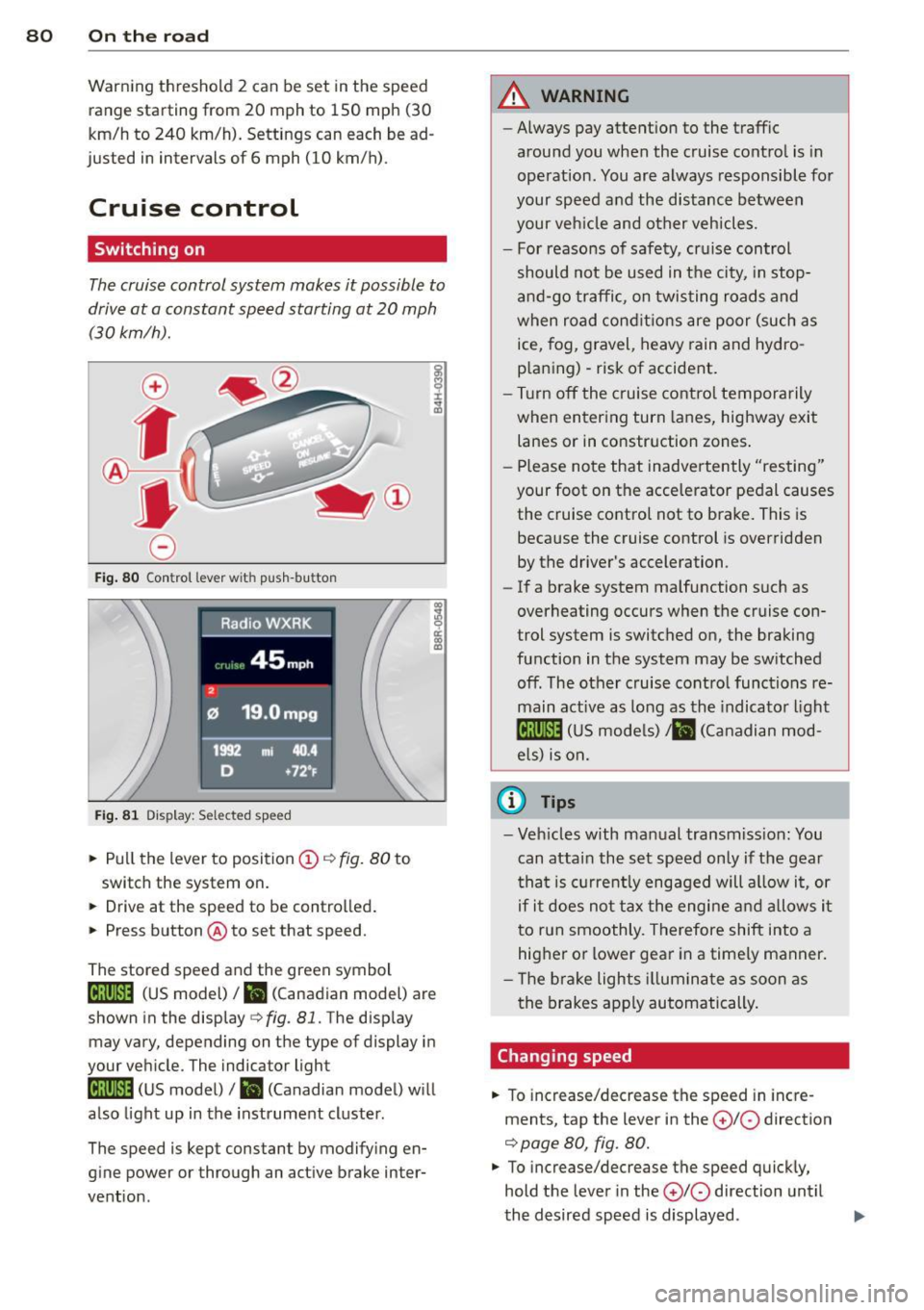
Fig. 80 Control lever w it h push-bu tton
Fig. 81 Dis play : Sel ected speed
.. Pull the lever to position (D i:::> fig. 80 to
switch the system on.
.. Drive at the speed to be controlled .
.. Press button @to set that speed.
co ~ 9 a:
l:l
The stored speed and the green symbol
ll!j(i)~i4 (US model) I ill (Canadian model) are
shown in the display
c::> fig . 81. The display
may vary, depending on the type of display in
your vehicle. The indicator light
ll!;(i)~i4 (US model)/ ii (Canadian model) will
also light up in the instrument cluster .
The speed is kept constant by modifying en
gine power or through an active brake inter
vention.
A WARNING
-- Always pay attent ion to the traffic
around you when the cruise control is in
operation. You are always responsible for
your speed and the distance between
your veh icle and other vehicles.
- For reasons of safety, cruise control
should not be used in t he city, in stop
and-go traffic, on twisting roads and
when road conditions are poor (such as
ice, fog, gravel, heavy rain and hydro
p laning) -risk of accident .
- Turn off the cruise control temporarily
when entering turn lanes, highway exit
lanes or in constr uction zones .
- Please note that inadve rtently "resting"
your foot on the accelerator pedal causes the cruise control not to brake. This is
because the cruise control is overridden
by the driver's acceleration.
- If a brake system malfunction such as
overheating occurs when the cruise con
trol system is switched on, the braking
function in the system may be sw itched
off. The other cruise control functions re
main active as long as the indicator light
lij;(l)~i4 (US models) ;ill (Canadian mod
els) is on.
(D Tips
-Veh icles with manual transmiss ion: You
can attain the set speed only if the gear
th at is cur rently engaged will allow it, or
if it does not tax the engine and allows it
to run smoothly. Therefore shift into a
higher or lower gear in a timely manner.
- Th e brake lights illuminate as soon as
the brakes apply automatically.
Changing speed
.. To increase/decrease the speed in incre
ments, tap the lever in the
0 10 direction
i:::> page 80, fig. 80.
.. To increase/decrease the speed quickly,
hold the lever in the
0 10 direction until
the desired speed is displayed .
Page 83 of 294
You can also p ress the accelerator pedal down
to increase your speed , e .g. if you want to
pass someone. The speed yo u saved earlier
will resume as soon as you let off of the accel
erator pedal.
If, however, you exceed your saved speed by
6 mph (10 km/h) for longer than 5 min utes,
the cruise control will be turned off tempora rily. The green symbol in the display turns
white . The saved speed remains the same .
Presetting your speed
You can preset your desired speed while the
vehicle is not moving.
" Switc h on the ignition.
" Pull lever into pos ition
(D c> page 80,
fig. 80.
" Press the lever in the 0 or O direction to
i ncrease o r decrease yo ur speed .
" Re lease the lever to save that speed .
This funct ion makes it possible, for example,
to save th e speed you want before driving on
the highway . Once on the highway, activate
the c ruise cont ro l by pulling the leve r towa rd
(D .
Switching off
Temporary deactivation
" Press the brake ped al, or
" Manual transmission : Keep the clut ch pedal
pressed down
longer, or
" Press the lever into pos ition @ (not clicked
into p lace)
¢ page 80, fig. 80, or
" Drive for longer than S minutes at more
than 6 mph (10 km/h) above the stored
speed .
Switching off compl ete ly
" Press lever into position @(clicked into
place), or
" Switc h the ignition off.
The speed yo u saved wi ll be retained if the
cru ise control has been switched off tempora
rily. To resume the saved speed, let up on the
On th e ro ad 81
brake or clutch pedal and p ull the lever to po
sition
(I) .
Swi tc hi ng the ignit ion off e rases the saved
speed.
A WARNING ~
You shou ld only ret urn to the saved speed
if it is not too fast for the current traffic
conditions -risk o f an accident!
Page 84 of 294
82 Transmi ssion
Transmission
Manual transmission
Gearshift lever
Applies to vehicles: with manual transmission
The clutch pedal must be depressed all the
way before you can start the engine .
The manual transmission in your Audi is
equipped with an
interlock-feature.
• Depress the clutch pedal a ll the way.
• Start the engine with the gearshift lever in
Neutral and the clutch pedal depressed.
(D Note
Always depress the clutch peda l fully when
changing gears. Do not ho ld the vehicle on
a hill with the clutch pedal partially de
pressed. This may cause premature clutch
wear or damage .
@ Tips
-Resting your hand on the gearsh ift lever
knob while driving will cause premature
wear in the transm ission.
- The back-up lights go on when you sh ift
i nto Reverse w ith the ignition on.
Gearshift pattern (6-speed manual
transmission)
Applies to vehicles: with manual transmission
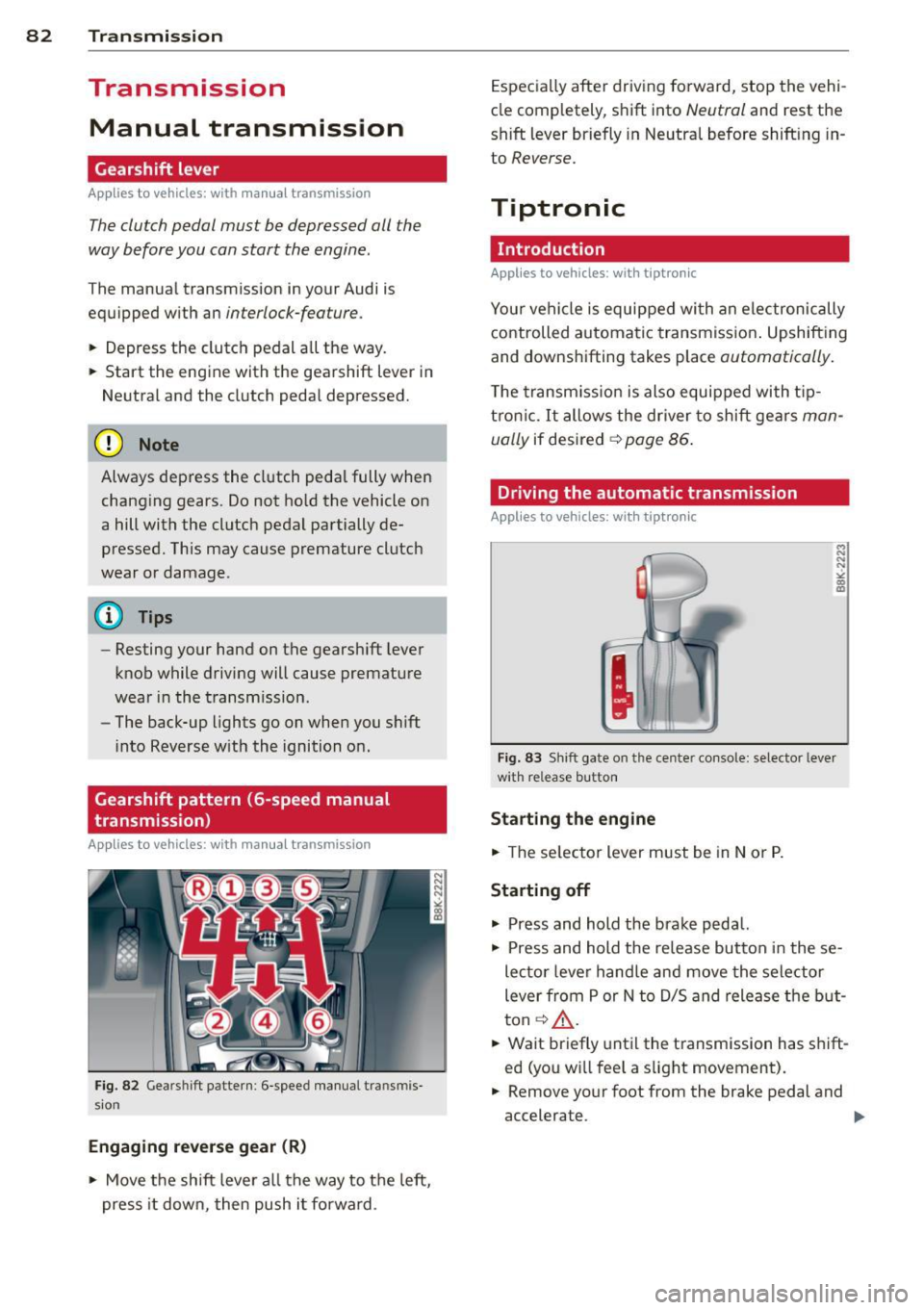
Fig. 82 Gears hi ft patte rn: 6 -speed manual t ransmi s
sio n
Engaging reverse gear (R )
• Move the shift leve r all the way to t he left,
press it down, then push i t fo rward . Especia
lly after driving forward, stop the vehi
cle comp letely, s hift into
Neutral and rest the
shift lever briefly in Neutral before shift ing in
to
Reverse.
Tiptronic
Introduction
Applies to vehicles: with tiptronic
Your vehicle is equipped with an electronically
controlled automatic transmiss ion . Upshift ing
and downshifting takes place
automatically.
T he transm iss io n is also equipped with t ip
tron ic. It allows the driver to shift gears
man
ually
if desired ~ page 86 .
Driving the automatic transmission
Applies to vehicles: with tiptronic
M N
N
J a) ID
Fig. 83 Sh ift gate on t he cente r co nso le: selector lever
w ith re lease button
Sta rting the engine
• The se lecto r lever must be in Nor P.
Starting off
• Press and hold the brake pedal.
• Press and hold the release button in these
lector lever hand le and move the selector
lever from P or N to D/S and release the but
ton ~_& .
• Wait briefly until the transmission has shift
ed (you wi ll feel a slight movement).
• Remove your foot from the brake pedal and
accelerate .
II-
Page 85 of 294
Rocking back and forth to become
un stuck
~ Shi ft on ly between D/S and R when the ve
hicle is at a full stop and the engine is
runn ing at idle speed.
Stopp ing
~ Press and ho ld the brake pedal unti l the ve
hicle has come to a complete stop .
~ Keep the brake pedal depressed so that the
vehicle cannot roll forward or backward
while it is idling¢ .&_.
~ Once stopped, do not depress the accelera-
tor pedal to rev up the engine ¢.&_ .
Pa rking
If the selector lever is not in the P position
when you open the dr iver's door, the vehicle
could ro ll. The message
T ra nsmi ssion: C ar
may roll! Shift to park!
appears.
~ Press and ho ld the brake pedal unti l the ve
hicle has come to a complete stop.
~ Set the parking brake firmly¢ page 77,
Parking.
~ Press and ho ld the release button in these
l ector lever handle, move the selector lever
into P and then let go of the release button
¢ .&_ .
The engine can only be
s tart ed when these
l ecto r lever is in the P o r N posit ions .
On slopes , activate the parking brake first and
the n move the selector lever to the P pos it ion .
This prevents too much stress from being
p laced on the lock ing mecha nism .
_& WARNING
-Unin tended veh icle movement ca n cause
serious injury .
- When the selector lever is in a dr iving
position, the veh icle may creep, even at
id le speed. Therefore do not release
the park ing brake or foo t brake until
you are ready to move, because powe r
is t ransmitted to the whee ls as soon as
a dr iving posit ion is engaged.
Tran sm iss ion 83
-Do not accelerate wh ile selecting a
driv ing position. At this time the en
gine must be at idle speed so that un due stress is not placed on the clutches
i n the transmiss ion.
- Remember: Even when stopped br iefly
with the automatic t ransmission in D/S
o r R, eng ine power is being transmit
ted to the wheels. Your veh icle cou ld
"creep" forward or backwa rd. Whe n
stopped, keep the brake pe dal fu lly de
pressed and use the pa rking brake if
necessary to keep the vehicle from ro ll
ing.
- If the selec to r l ever is unintentionally
moved into N while you are driving, take
your foot off the accelerator peda l and
wait for the eng ine to ret urn to idle
speed before se lecting a dr iv ing pos ition.
- Never sh ift into R or P when the vehicle is
in motion.
- Never get out of the d river's seat when
the eng ine is running.
- If you m ust get out of the vehicle, move
the selector lever secure ly into the P po
sition and apply the parking brake firmly.
- If the engine must remain r unning, neve r
have any driving position engaged when
checking under the hood . Make sure the
selector lever has securely engaged and
is locked in P w it h the par king brake
fi rm ly set¢
page 209, Engine compart
ment.
Othe rwise, any in cr ease in engine
speed may set t he vehi cle in motion,
even with the park ing brake applied .
(D Tips
For safety reasons, the pa rking brake is re
l eased a utomatically o nly when the d riv
er's safety belt is engaged in the buckle.
Page 86 of 294
84 Transmi ssion
Selector lever positions
App lies to vehicles: with tiptronic
This section describes the selector lever posi
tions and driving ranges .
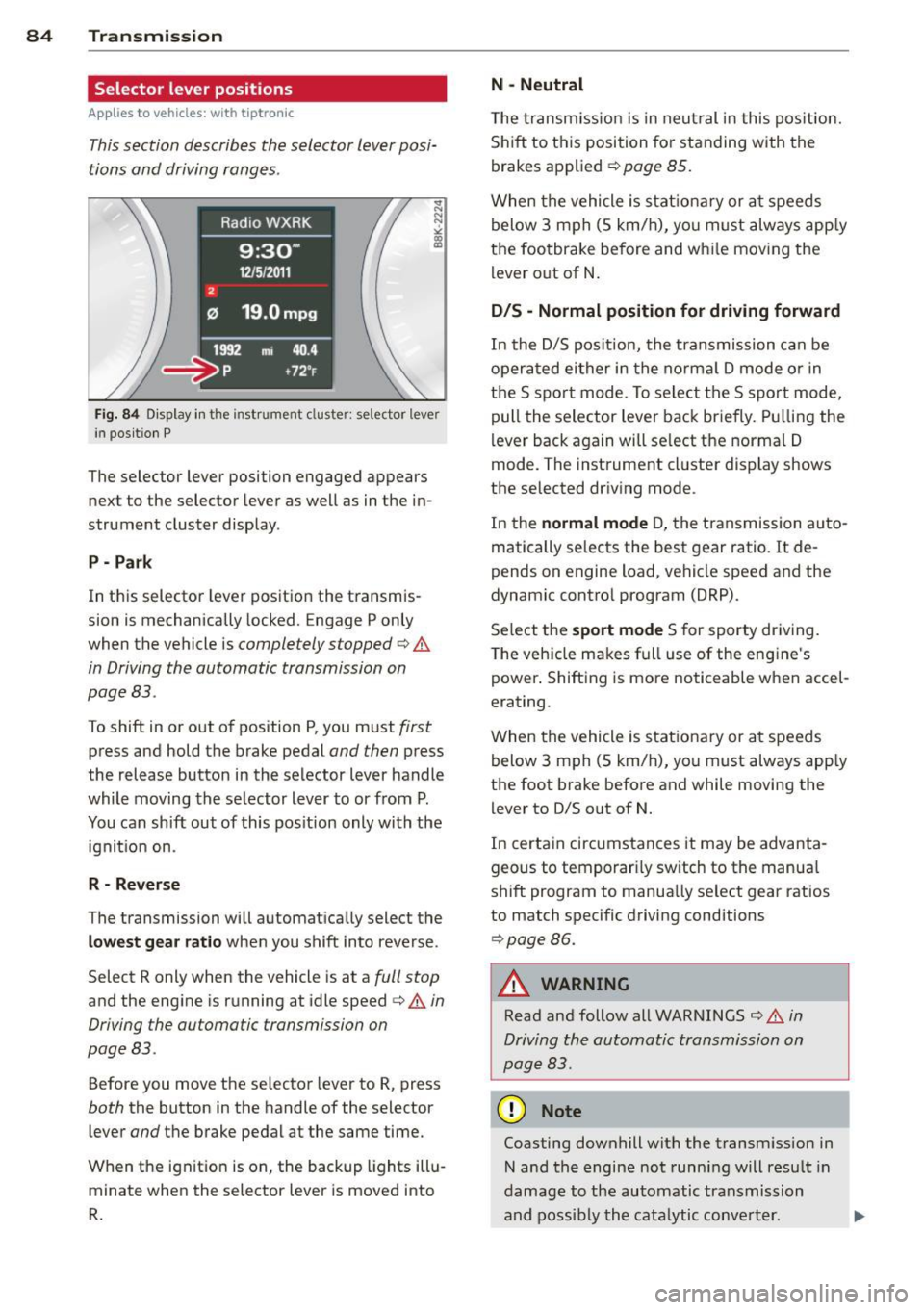
Fig. 84 Display i n the instr ume nt cluste r: se lector leve r
i n posit ion P
The selector lever position engaged appears
next to the selector lever as well as in the in
strument cluster display .
P - Park
In this selector lever position the transmis
sion is mechanically locked. Engage P only
when the vehicle is
completely stopped¢&.
in Driving the automatic transmission on
page 83 .
To shift in or out of position P, you must first
press and hold the brake pedal and then press
the release button in the selector lever handle
while moving the selector lever to or from P.
You can shift out of this pos ition only with the
ignit ion on .
R -Rever se
The transmission will automat ically select the
low est gear ratio when you shift into reverse.
Select R only when the vehicle is at a
full stop
and the eng ine is r unning at idle speed¢&. in
Driving the automatic transmission on
page 83.
Before you move the selector lever to R , press
both the button in the handle of the selector
lever
and the brake pedal at the same time.
When the ignit ion is on, the backup lights illu
minate when the selector lever is moved into
R.
N -Neutral
The transm iss io n is in neutral i n this pos ition.
Sh ift to this position for standing with the
brakes applied ¢
page 85.
When the vehicle is stat ionary or at speeds
below 3 mph (5 km/h), yo u must always app ly
the footbrake before and whi le mov ing the
l ever o ut of N.
D /S - Normal position for driving forward
In the D/S pos it ion, the transmission can be
operated ei ther in the norma l D mode or in
the S spo rt mode . To select the S sport mode,
pull the selector lever back briefly. Pu lling the
lever back again will se lect the norma l D
mode. The instrument cl uster display shows
the selected dr iving mode .
In the
normal mode D, the transmission auto
matically selects the best gear ratio. It de
pends on engine load , vehicle speed and the
dynamic contro l program (DRP).
Se lect the
s port mode S for sporty driving.
T he vehicle makes full use of the engine 's
power . Shift ing is more noticeable when accel
erating.
When the vehicle is stationary or at speeds below 3 mph (5 km/h), you must always app ly
the foot brake before and while moving the
lever to D/S out of
N.
In certain circumstances it may be advanta
geous to temporar ily sw itch to the manua l
shift program to manua lly select gear ratios
to match specific driving conditions
¢ page 86.
_& WARNING
--
Read and follow all WARNINGS ¢&. in
Driving the automatic transmission on
page 83.
(D Note
Coasting downhill with the transmission in
N and the engine not running will resu lt in
damage to the automatic transmission
and poss ibly the cata lytic conve rter. .,._
Page 90 of 294
88 Transmission
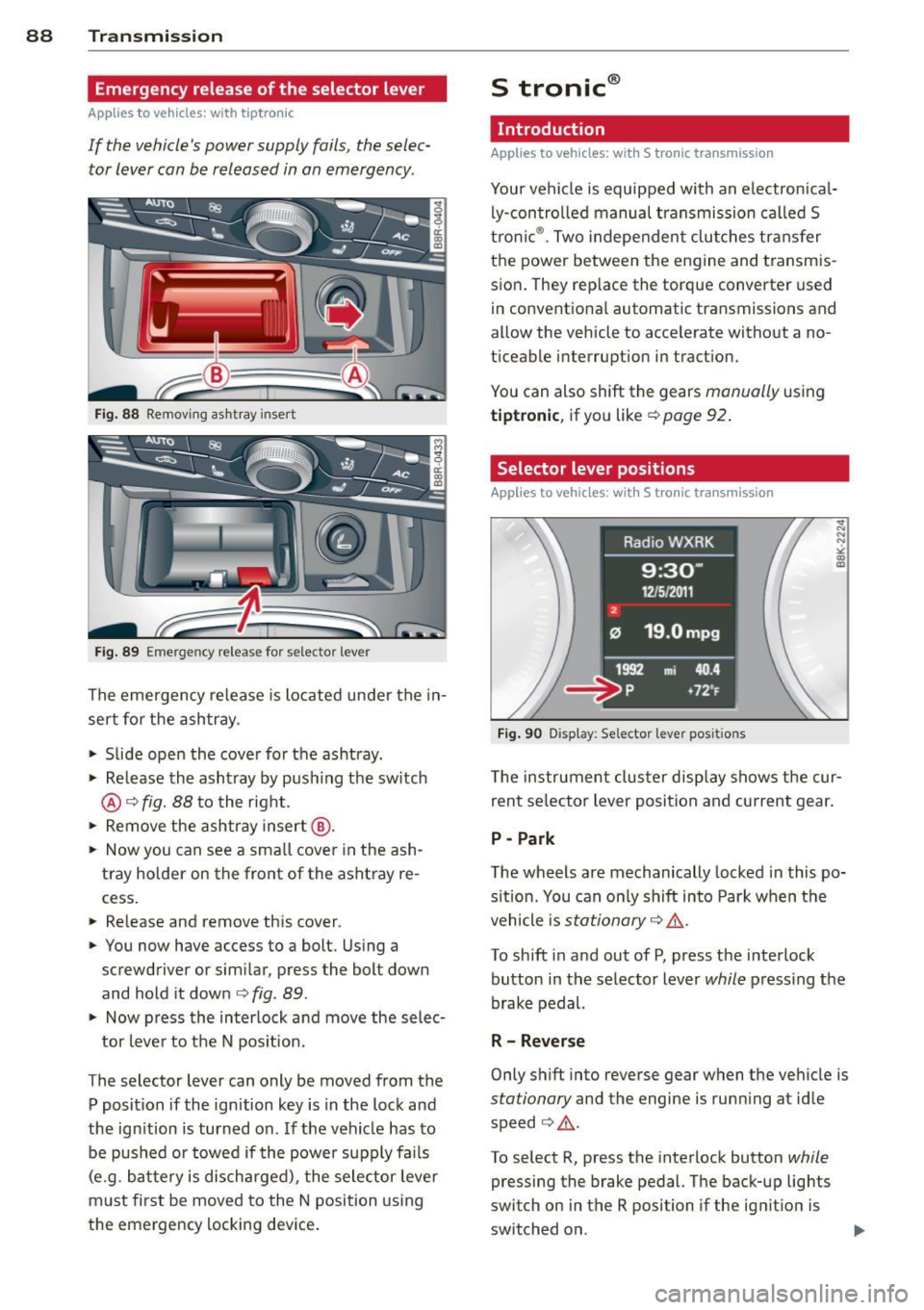
Emergency release of the selector lever
App lies to vehicles: with tiptronic
If the vehicle's power supply foils, the selec
tor lever con be released in on emergency.
Fig. 88 Removing ashtray insert
Fig. 89 Emergency release for selector lever
The emergency release is located under the in
sert for the ashtray.
.. Slide open the cover for the ashtray.
.. Release the ashtray by push ing the switch
@¢fig. 88 to the right.
.. Remove the ashtray insert@.
.. Now you can see a small cover in the ash
tray holder on the front of the ashtray re
cess.
.. Re lease and remove this cover .
.. You now have access to a bolt. Using a
screwdriver or similar, press the bolt down
and hold it down ¢
fig. 89.
.. Now press the interlock and move the selec-
tor lever to the N pos ition .
The selector lever can only be moved from the
P position if the ignition key is in the lock and
the ignition is turned on. If the vehicle has to
be pushed or towed if the power supply fa ils
(e.g. battery is discharged), the selector lever
must first be moved to the N position using
the emergency locking device.
S tronic ®
Introduction
Applies to vehicles: with S tronic transm ission
Your vehicle is equipped with an electronical
ly-controlled manual transmission called S
tronic ®. Two independent clutches transfer
the power between the engine and transmis
sion . They rep lace the torque converter used
in conventional automatic transmissions and
allow the vehicle to accelerate without a no
ticeable interruption in traction.
You can also shift the gears
manually using
tiptronic , if you like ¢ page 92.
Selector lever positions
Applies to vehicles: wit h S t ronic tra nsmi ssio n
Fig. 90 Display: Se lector lever posit ions
The instrument cluster display shows the cur
rent se lector lever position and current gear .
P -Park
The wheels are mechanically locked in this po
sition. You can only shift into Park when the
vehicle is
stationary ¢ /1. .
To shift in and out of P, press the interlock
button in the selector lever
while press ing the
brake pedal.
R - Reverse
Only shift into reverse gear when the vehicle is
stationary and the engine is running at idle
speed ¢
/1..
To select R, press the interlock button while
pressing the brake pedal. The back-up lights
switch on in the R position if the ignition is
switched on .
Page 91 of 294
N -Neutral
The transmission is in idle in this position.
DIS -Normal position for driving forward
In the 0/5 position , the transmission can be
operated either in the normal D mode or in
the 5 sport mode. To select the S sport mode ,
pull the se lector lever back briefly. Pulling the
lever back again will select the normal D
mode. The instrument cluster disp lay shows
the selected driving mode.
I n the
normal mode D, the transmission auto
matica lly selects the best gear ratio . It de
pends on engine load, vehicle speed and the
dynamic control program (DRP).
Select the
sport mode S for sporty driv ing.
The vehicle makes full use of the engine's
power. Shifting is more noticeable when accel
erating.
When the vehicle is stationary or at speeds below 3 mph (5 km/h), you must always apply
the foot brake before and while moving the l ever to D/S out of N.
I n certain circumstances it may be advanta
geous to temporarily switch to the manual
shift program to manually select gear ratios
to match specific driving conditions
~ page 92.
A WARNING
-Never select R or P while driving.
- Power is stil l transmitted to the wheels
when the eng ine is running at idle. To
prevent the vehicle from "creeping", you
must keep your foot on the brake in all
selector lever positions (except P) when
the engine is running. Do not inadver
tent ly press the accelerator pedal when
the vehicle is stopped if a gear is engag
ed . Otherwise the vehicle will start to
move immediately. This could happen
even if the parking brake is activated.
- Before opening the hood and working on
a running engine, select P with the se lec
tor lever and activate the parking brake.
Always read and follow the applicable
Transmission 89
warnings ~ page 209, Engine compart
ment.
@ Tips
- On vehicles with Audi drive select*, you
can adjust the sporty shift characteristics
in the
Dynamic driving mode.Swill ap
pear in the instrument cluster display in
stead of D.
- If you accidentally select N while driving,
take your foot off the accelerator pedal
immediately and wait for the engine to
slow down to idle before selecting D/S.
- If there is a power failure, the selector
lever will not move out of the P position .
The emergency release can be used if
this happens~
page 94.
. Selector lever lock
Applies to vehicles: with S tronic transmission
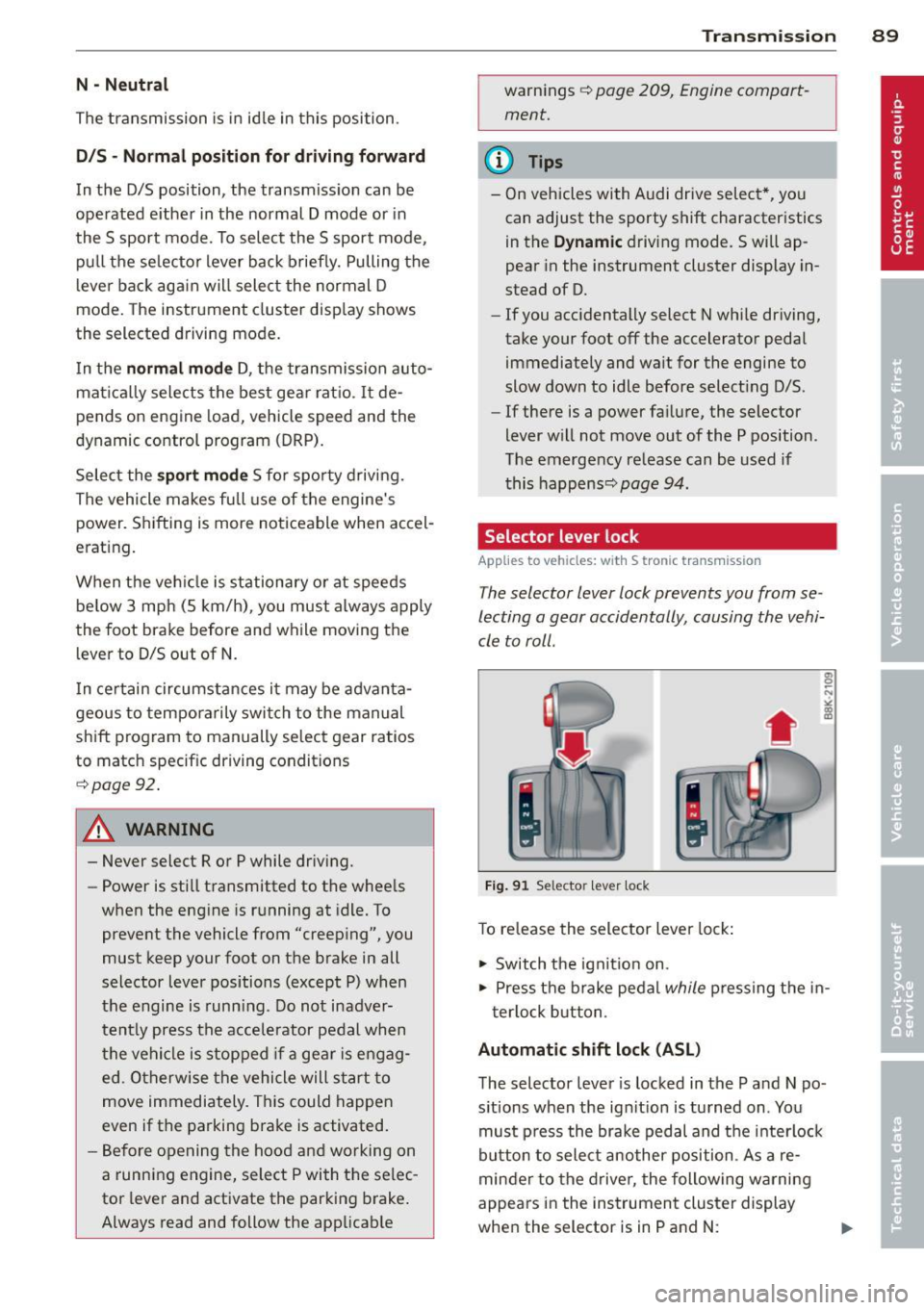
The selector lever lock prevents you from se
lecting a gear accidentally , causing the vehi
cle to roll .
Fig. 91 Selector le ve r lock
To release the selector lever lock :
1-Switch the ignition on.
.. Press the brake pedal
while pressing the in-
terlock button.
Automatic shift lock (ASL)
The selector lever is locked in the P and N po
sitions when the ignition is turned on . You
must press the brake pedal and the interlock
button to select another position. As a re
minder to the driver, the following warning
appears in the instrument cluster display
when the selector is in P and N: