engine AUDI A5 COUPE 2014 User Guide
[x] Cancel search | Manufacturer: AUDI, Model Year: 2014, Model line: A5 COUPE, Model: AUDI A5 COUPE 2014Pages: 286, PDF Size: 70.99 MB
Page 23 of 286
Instruments and warning/indicator lights 21
speed. This ind icates that the MIL is working
properly.
The warning light illuminates when there is a
mal funct ion in the engine e lectronic system.
Contact your authorized Audi dealer and have
the ma lfunction corrected .
An improperly closed fuel filler cap may also
cause the MIL light to illum inate
r:!,> page 204.
For more informat ion r:!,> page 30 .
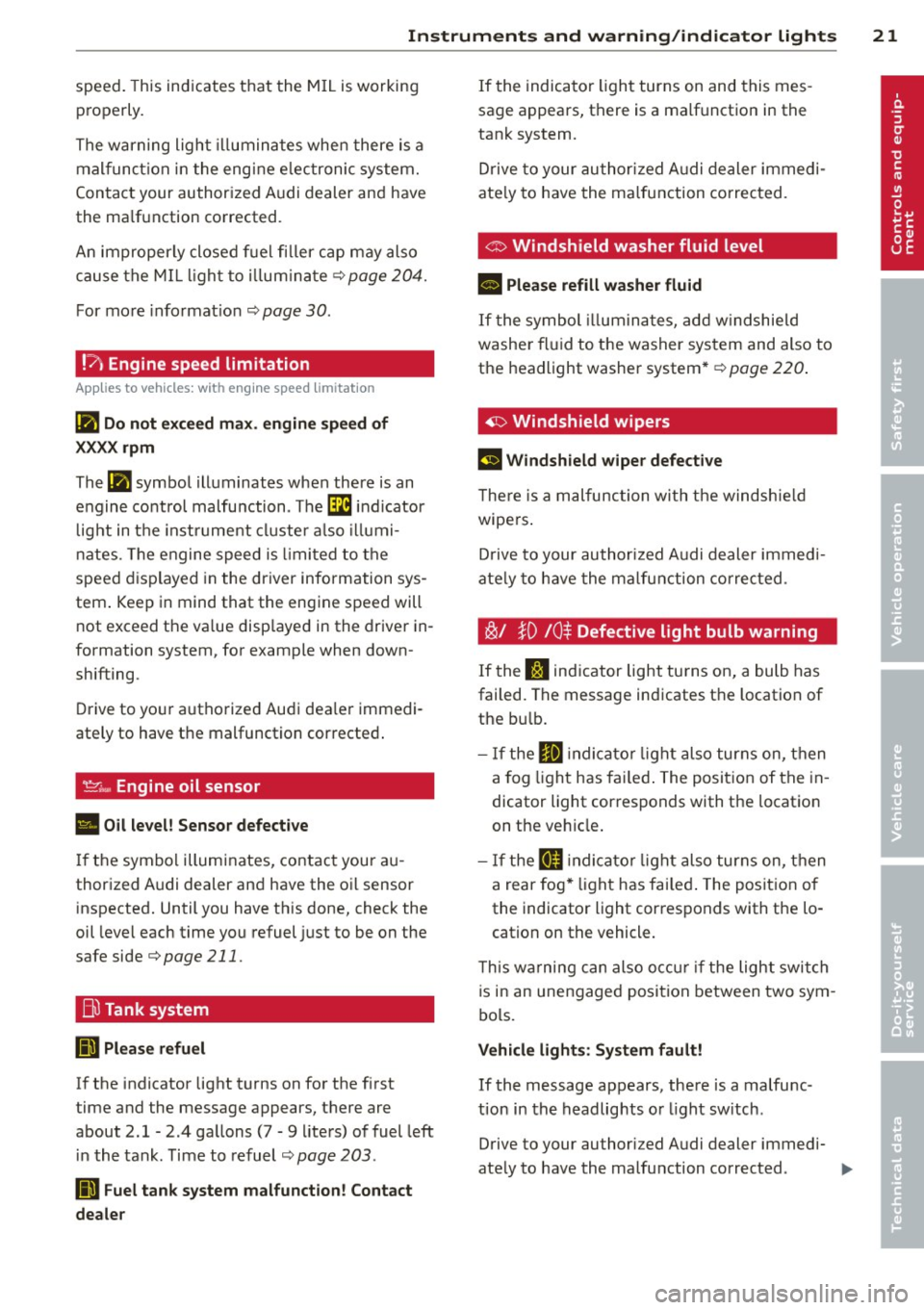
!?) Engine speed limitation
App lies to vehicles: wit h eng ine speed lim itat ion
Ill Do not exceed max. engine speed of
XXXX rpm
The Ill symbol illuminates when there is an
engine control malfunction . The
'3i indicator
l ight in the instrument cluster also illumi
nates. The engine speed is lim ited to the
speed displayed in the driver information sys
tem . Keep in mind that the engine speed will
not exceed the va lue disp layed in the driver in
formation system, for example when down
shifting.
Drive to your authorized Audi dea ler immedi
ately to have the malfunction corrected .
'.!2:;,.,, Engine oil sensor
• Oil level! Sensor defective
If the symbol illuminates, contact your au
thorized Audi dealer and have the oil sensor
inspected. Until you have this done, check the
oil level each time you refuel just to be on the
safe side
r:!,> page 211 .
Bil Tank system
(iD Please refuel
If the indicator light turns on for the f irst
time and the message appears, there are
about 2.1- 2 .4 gallons (7 -9 liters) of fuel left
in the tank. Time to refuel
r:!,> page 203.
DD Fuel tank system malfunction! Contact
dealer
If the indicator light turns on and this mes
sage appears, there is a malfunction in the
tank system.
Drive to your authorized Audi dealer immedi
ate ly to have the malfunction corrected.
C> Windshield washer fluid level
II Please refill washer fluid
If the symbol illum inates, add windshield
washer fluid to the washer system and also to
the headlight washer system*
r:!,> page 220.
~ Windshield wipers
El Windshield wiper defective
The re is a malfunc tion with the windshie ld
wipers .
Drive to your author ized Audi dealer immedi
ate ly to have the malfunction corrected .
~/ }D /0$ Defective light bulb warning
If the S:$ indicator light turns on, a bulb has
failed. The message indicates the location of
the bu lb.
- If the
El indicato r light also turns on, then
a fo g lig ht has failed. The position of the in
dicator light corresponds with the location
on the vehicle .
- If the
II indicato r light also turns on, then
a rear fog * light has failed. The position of
the indicator light corresponds with the lo
cation on the vehicle .
T his wa rning can also occur if the light switch
is in an unengaged position between two sym
bols.
Vehicle lights: System fault!
If the message appears, there is a malfunc
tion in the headlights or light sw itch .
Drive to your authori zed Audi dealer immedi-
ately to have the malfunction corrected .
IJJ,,
Page 26 of 286
24 Driver information d isplay
Driver information
display
Introduction
The Driver information display inside the in
strument cluster provides you, the driver,
with important information.
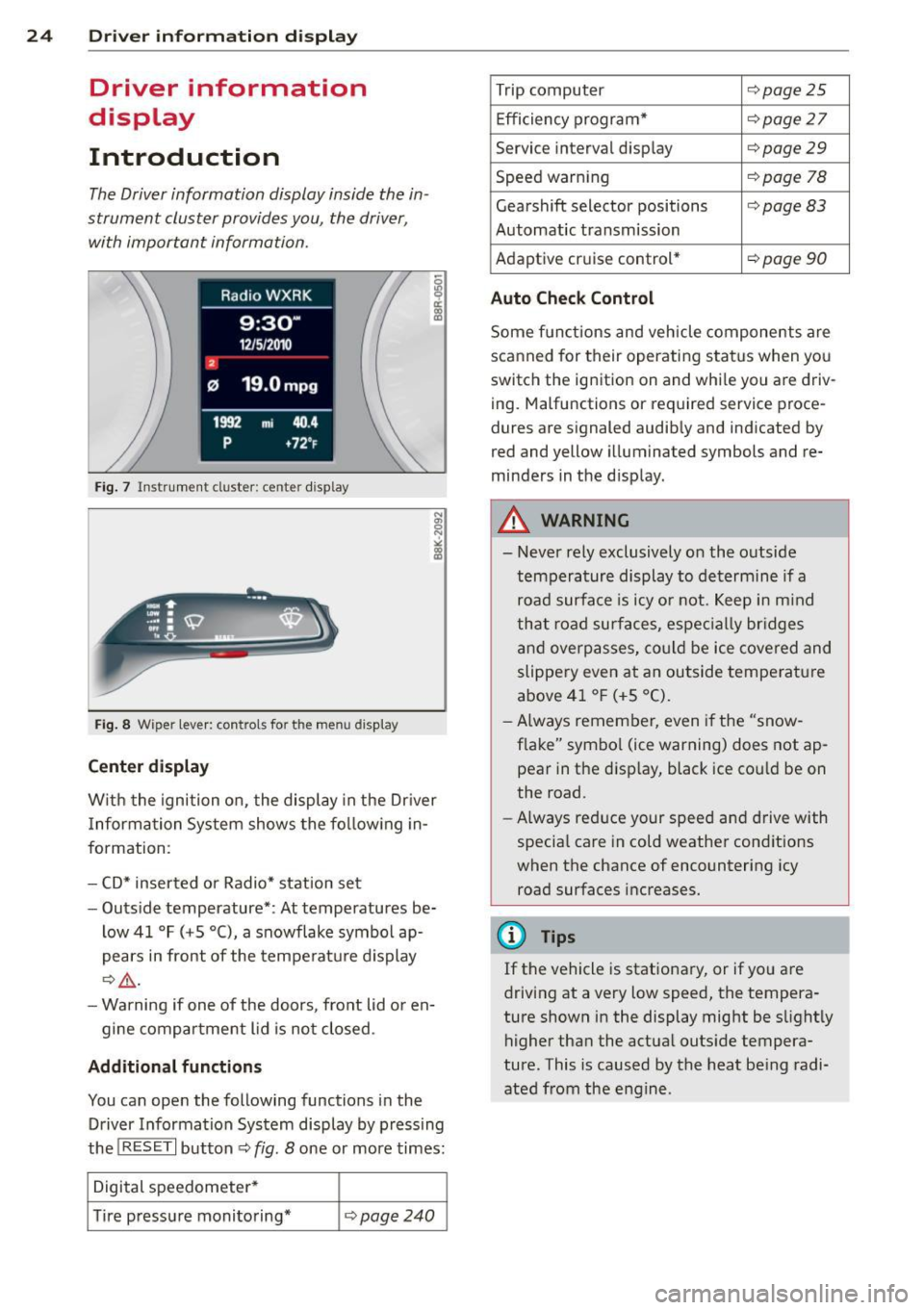
Fig. 7 Instrument cluster: ce nter display
Fig. 8 Wiper lever: controls for the menu display
Center display
With the ignition on, the display in the Dr iver
I nformation System shows the following in
formation:
- CD* inserted or Radio* station set
- Outside temperature*: At temperatures be-
low 41 °F (+S °C), a snowflake symbol ap
pears in front of the temperature display
c::> .&_.
-Warning if one of the doors, front lid or en-
gine compartment lid is not closed.
Additional functions
You can open the following functions in the
Driver Information System display by pressing
the
! RESET I button c::> fig. 8 one or more times:
Digital speedometer*
Tire pressure monitoring*
<::>page240
Trip computer <::>page25
Efficiency program* <::> page 27
Service interval display <::> page 29
Speed warning <::> page 78
Gearshift selector positions <::> page 83
Automatic transmission
Adaptive cr uise control*
<::> page 90
Auto Check Control
Some functions and vehicle components are
scanned for their operating status when you
switch the ignition on and whi le you are driv
ing . Malfunctions or required service proce
dures are signaled audibly and indicated by
red and yellow illuminated symbols and re
minders in the d isplay.
A WARNING
--- Never rely exclusively on the outside
temperature display to determine if a
road surface is icy or not . Keep in mind
that road surfaces , espec ially br idges
and overpasses, could be ice covered and
slippery even at an outside temperature
above 41 °F (+S °C).
- Always remember,
even if the "snow
flake" symbol (ice warning) does not ap
pear in the disp lay, black ice cou ld be on
the road.
- Always reduce your speed and drive with
specia l care in cold weather conditions
when the chance of encountering icy
road surfaces increases.
¢j) Tips
If the vehicle is stationary, or if you are
driving at a very low speed, the tempera
ture shown in the display might be slightly
higher than the actual outside tempera
ture. This i.s caused by the heat being radi
ated from the engine .
Page 32 of 286
30 Driver information display
Resetting the service interval display
Your authorized Audi dealer will reset the cor
responding service schedule after performing
the appropriate service on yo ur vehicle . Yo u
also have the possibility to reset the oil
change schedule after having performed an
oil change according to Audi specifications.
Select
I CAR I function button > Service interval
display > Reset oil change interval
or ICARI
function button> Car systems* control but
ton
> Servicing & checks > Reset oil change
interval.
(D Note
If you disconnect the battery terminals, no
calculations can be made for the serv ice
interval display during this time and no
service rem inder wi ll appear. Remember
that observing the proper service intervals
is vitally important to extend ing the life of
your vehicle, particu larly the eng ine, and
maintaining its value. Even if the mileage
driven is low, the maximum period of one
yea r from one service to the next must not
be exceeded .
@ Tips
-Do not reset the display between oil
changes, otherwise the display will be in
correct.
- The information in the Service Reminder
r ema ins stored even when the vehicle
battery is disconnected.
On-Board Diagnostic
system (OBD)
Malfunction Indicator Lamp (MIL)
The Malfunction Indicator Lamp (MIL) ¢4' i n
the instrument cluster is part of the On-Board
Diagnostic (OBD II) system.
The warning/indicator light illuminates when
the ignition is switched on and goes out after
the engine starts and the idle has stabilized .
This indicates that the MIL is working proper
ly.
If the light does not go out after the engine
is started, or illuminates while you are driv
i ng, a malfunction may exist in the eng ine sys
tem . If the light illuminates, the catalytic con
verter could be damaged .
Continue driving
with reduced power (avoid
ing sustained high speeds and/or rapid accel
erations) and have the cond ition corrected.
Contact your authorized Audi dealer.
If the light il luminates, the electronic speed
limiter may also be malfunct ioning. For more
information
c:> page 31 , Electronic speed
limiter.
An improperly closed fuel filler cap may also
cause the
MIL light to illuminate
c:>page 204.
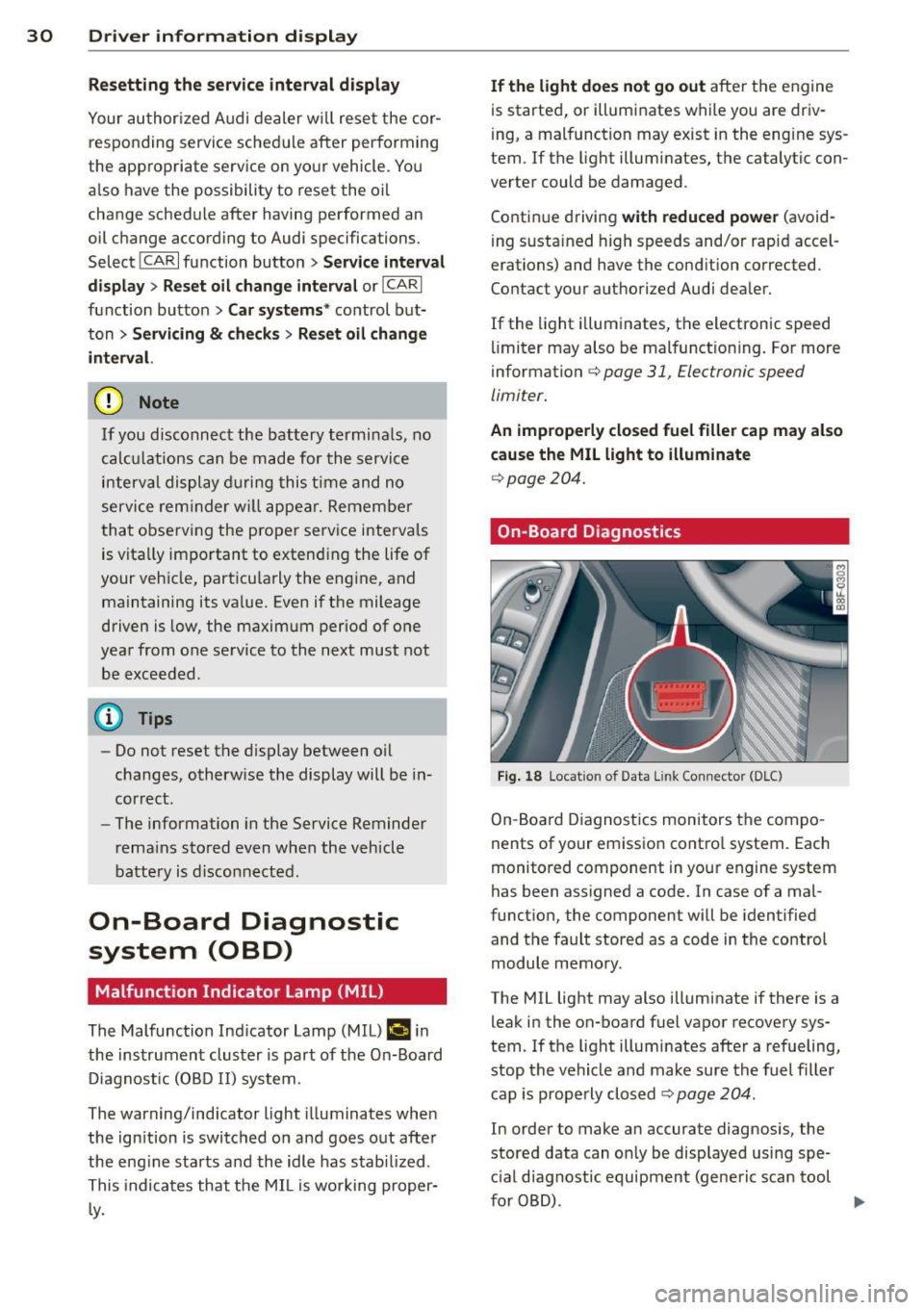
On-Board Diagnostics
Fig . 18 Locat io n of Data Link Con nector (D LC)
On-Board Diagnostics monitors the compo
nents of your emission control system . Each
monitored component in your engine system
has been assigned a code. In case of a mal
function, the component will be identified
and the fault stored as a code in the control
module memory.
The MIL light may also illuminate if there is a leak in the on-board fuel vapor recovery sys
tem. If the light illuminates after a refueling,
stop the vehicle and make sure the fuel filler
cap is properly closed
c:> page 204.
In order to make an accurate diagnosis, the
stored data can on ly be displayed using spe
c ial diagnostic equipment (generic scan tool
furOBD) .
~
Page 33 of 286
In o rder to connect the special diagnostic
equipment, push the plug into the Data Link
Connector (DLC) . The DLC is located to the
right of the hood release ¢
fig. 18.
Your authorized A udi dealer or qualified work
shop can interpret the code and perform the necessary repa ir.
A WARNING
Do not use the diagnostic connector for
personal use. Incorrect usage can cause
malfunctions, which can increase the risk
of a coll is ion!
Electronic speed limiter
-
Your veh icle may be factory equipped with
tires that are rated for a maximum speed of 130 mph (210 km/ h). Thi s is may be less than
the maximum speed of your ve hicle. To red uce
the risk of sudden ti re failure and loss of con
trol if the vehicle is operated at excessive
speeds, your vehicle has an e lectronic speed
limiter. The electronic speed limiter prevents
your veh icle from going faster than the t ire
speed rat ing . For more informat ion
¢ page 233 .
If the engine control unit rece ives fa ulty vehi
cle roadspeed signa ls, the Ma lfunction Indica
tor Light (MIL)
¢4 will illuminate . If this oc
curs, contact the nearest authorized Audi
deale r for assistance.
A WARNING
-
Always observe the posted speed limits
and ad just yo ur speed to suit p revail ing
road, traff ic and weather conditions . Never
drive your vehicle faster than the maxi
mum speed rating of the tires insta lled .
Dri ver information di spla y 31
Page 35 of 286
-If the power lock ing system should ma l
function, you can lock the driver's door
using the mechanical key
~ page 3 7.
- If the power locking system should fail,
you can still open the fue l tank flap in an
emergency <=>
page 205.
-You are well advised not to keep valua
bles inside an unattended vehicle, visible
or not . Even a properly locked vehicle
cannot provide the security of a safe .
- If the LED in the upper edge of the driv
er's door panel comes on for about
30
seconds after the vehicle is locked, there
i s a malfunction in the power locking or
the anti-theft warning system. Have the
malfunction corrected by an author ized
Audi dealersh ip or qua lified repair fac ili
ty.
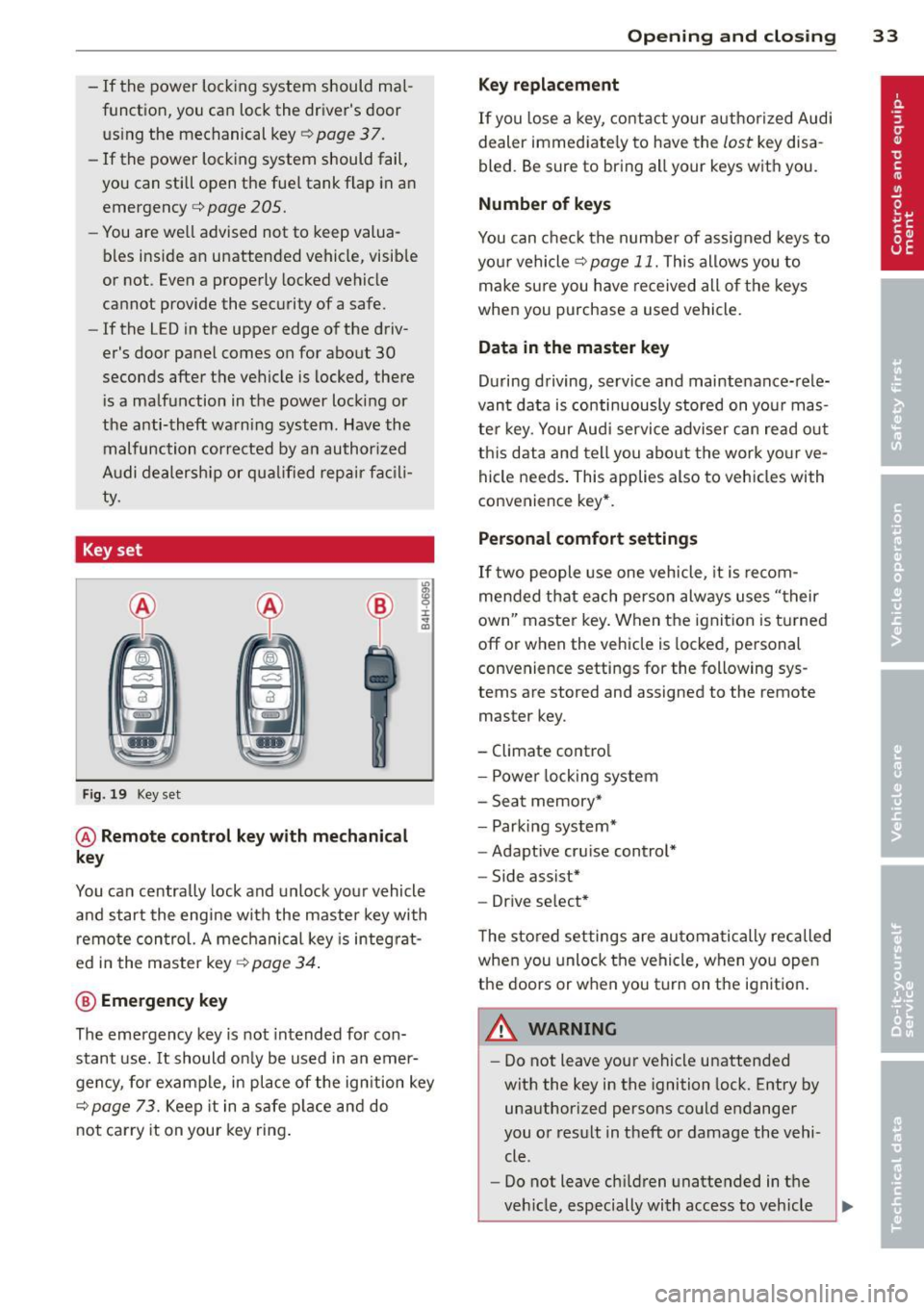
Key set
Fig. 19 Key set
@ Remote cont rol k ey with me chanical
ke y
You can centrally lock and unlock your vehicle
and start the engine with the master key with
remote control. A mechanical key is integrat
ed i n the master key
<=> page 34 .
@ Emerg ency key
The emergency key is not intended for con
stant use.
It should on ly be used in an emer
gency, for example, in place of the ign ition key
<=> page 73. Keep it in a safe p lace and do
not carry it on your key ring .
Openin g an d clos ing 33
Ke y re plac ement
If you lose a key, contact your author ized Audi
dealer immediate ly to have the
lost key disa
bled. Be sure to bring all your keys with you .
Number of keys
You can check the number of assigned keys to
you r vehicle <=>
page 11. This allows you to
make sure you have re ceived all of the keys
when you purchase a used vehicle.
Data in th e mast er ke y
During driving, service and maintenance-rele
vant data is continuously stored on your mas
ter key. Your Audi service adviser can read out
this data and tell you abo ut the work yo ur ve
hicle needs . This applies also to vehicles with
convenience key*.
Person al comf ort settings
If two people use one vehicle, it is recom
mended that each person always uses "their
own'' master key. When the ignition is turned
off or when the vehicle is locked, pe rsonal
convenience settings for the following sys
tems are stored and assigned to the remote
master key.
- Climate control
- Powe r locking system
- Seat memory*
- Parking system*
- Adaptive cruise control*
- Side assist*
- Drive select*
T he sto red settings are automatically recalled
when you unlock the vehicle, when you open
the doors or when you turn on the ignition .
A WARNING
--
-Do not leave your vehicle unattended
with the key in the ignition lock . Entry by
unauthorized persons could endanger
you or result in theft or damage the vehi
cle .
- Do not leave ch ildren unattended in t he
veh icle, especially with access to vehicle
Page 36 of 286
34 Openin g and clo sing
keys. Unguarded access to the keys pro
vides children the opportunity to start the engine and/or act ivate vehicle sys
tems such as the power w indows etc . Un
supervised operation of any veh icle sys
tem by ch ildren can res ult in serious in
Jury.
- Do not remove the key from the ignition
lock until the vehicle has come to a com
plete stop. Otherwise the steering col
um n loc k co uld suddenly e ngage -caus
ing the risk of an accident.
@ Tips
- The operation of the remote contro l key
c a n be tempo rarily disrupted by in terfer
ence from tran smi tters in t he v ici nity of
the veh icle work ing in the same frequen
cy ra nge (e.g . a ce ll phone, radio equip
ment).
- Fo r security reasons, replacement keys
are on ly available from author ized Audi
dealer.
- For Decla ration of Compliance to United
States FCC and Industry Canada regu la
tions
c:> page 267.
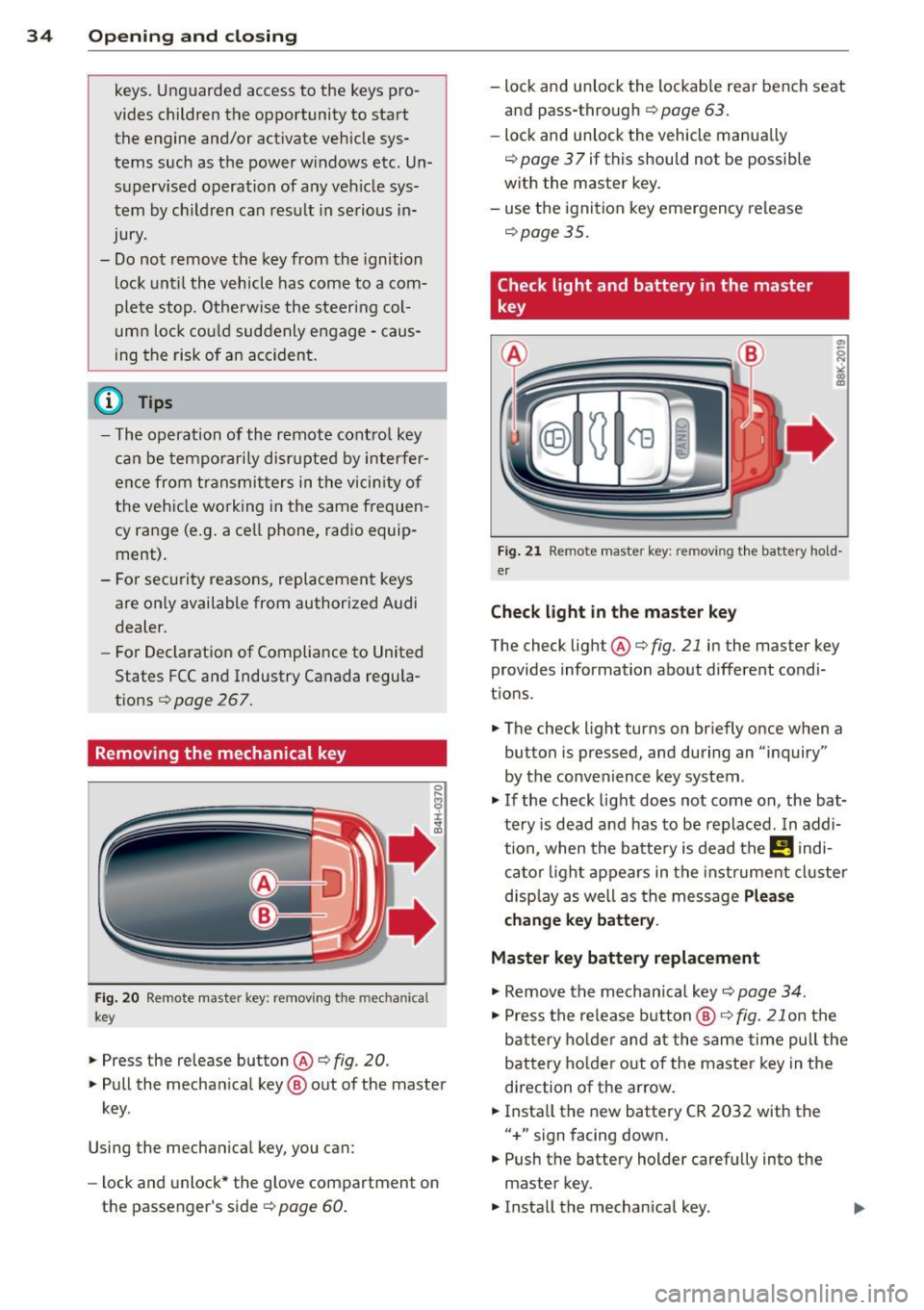
Removing the mechanical key
Fi g. 20 Rem ote ma ste r ke y: remov ing the mec hanic al
key
" Press the release button ® c:> fig. 20 .
"Pull the mecha nica l key @out of the maste r
key .
Using the mechan ica l key , you can :
- lock and unlock* the glove compartment on
the passenger's sid er=>
page 60.
-lock and unlock the lockab le rear bench seat
and pass-through
r=> page 63 .
-lock and unlock the vehicle manua lly
¢ page 3 7 if this should not be possible
w ith the master key.
- use t he ignition key emergency release
r=> page35.
Check light and battery in the master
key
Fig. 21 Re mote mas ter ke y: r em ov ing th e ba ttery h old
e r
Check light in the ma ster key
The check light ®
r=> fig. 21 in the master key
provides information about different condi
t ions.
" The check light turns on br iefly once when a
button is pressed, and during an "inquiry"
by the convenience key system .
"If the check light does not come on, the bat
tery is dead and has to be replaced . In addi
tion, when the ba tte ry is dead the
I! indi
ca to r li ght a ppears in the instrument cl uster
d isp lay as well as the message
Plea se
c hange key battery .
Master key battery replacement
" Remove the mechan ica l key
r=> page 34.
" Press the re lease b utton @ r=> fig. 21 on the
b attery ho lde r and at the same time pull the
battery holde r out o f the master key in the
direction of the arrow.
" Insta ll the new battery CR 2032 with the
"+ " sign facing down.
" Push the battery holder carefully into the
master key .
" Insta ll the mechanical key.
Page 37 of 286
@ For the sake of the environment
Dispose of dead batteries properly so as
not to pollute the environment.
@ Tips
The replacement battery must be the
same specification as the original.
Emergency unlocking of the ignition key
In the event of malfunctions in the electrical
system, it may happen that you cannot re
move the ignition key .
• Remove the mechanical key r::!:> page 34 .
• Lock the vehicle using the mechanical key
r::!:>page 37.
• Have the electrica l system inspected by an
authori zed Audi dealership .
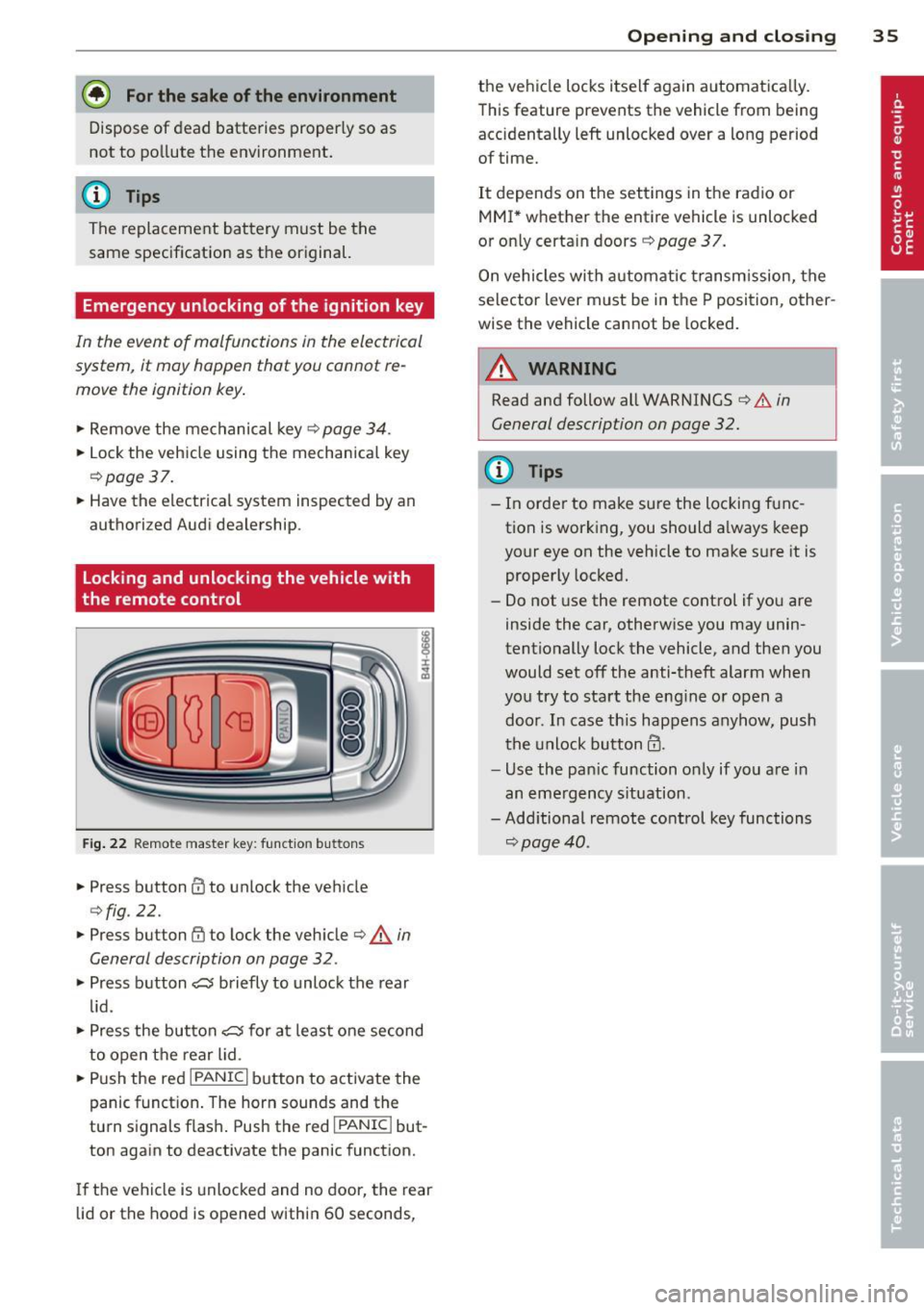
Locking and unlocking the vehicle with
the remote control
Fig. 22 Remote master key: function but tons
• Press button @to unlock the vehicle
r::!:>fig . 22.
• Press button {jj to lock the vehicle r::!:> .& in
General description on page 32 .
• Press button e5 briefly to unlock the rear
lid .
• Press the button
e5 for at least one second
to open the rear lid .
• Push the red
IPANICI button to activate the
panic function. The horn sounds and the
turn s ignals flash . Push the red
I PANIC ! but
ton again to deactivate the panic function.
If the vehicle is unlocked and no door, the rear
lid or the hood is opened within 60 seconds,
Opening and closing 35
the vehicle locks itself again automat ica lly.
This feature prevents the vehicle from being
accidentally left unlocked over a long period of time.
It depends on the settings in the radio or
MMI * whether the entire vehicle is unlocked
or only certain doors
r::!:> page 37.
On vehicles with automatic transmission, the
selector lever must be in the P position, other
wise the vehicle cannot be locked.
A WARNING
Read and follow all WARNINGS r::!:> .&. in
General description on page 32.
(D Tips
- In order to make sure the locking func
tion is working, you should a lways keep
your eye on the vehicle to make sure it is
properly locked.
- Do not use the remote control if you are
inside the car, otherwise you may unin
tentionally lock the vehicle, and then you
would set off the anti-theft alarm when
you try to start the engine or open a door . In case this happens anyhow, push
t he unlock button@.
- Use the pan ic function only if you are in
an emergency s ituation.
-Add itional remote control key functions
r::!:>page40 .
Page 69 of 286
Warm and cold Climate controls
Description
Th e climate control sy stem warms, cools and
adds humidity to the a ir in the veh icle inter io r.
It is the most effect ive when the windows and
sunroof are closed . If the re is a build-up of
h eat inside the vehicle, ventilation can help to
speed up the cooling process .
I n all he ating mode functions except
defrost,
the blower on ly switches to a higher speed
once the engine coolant has reached a certain
temperature.
Condensat ion from the cooling sys tem can
d rip and form a puddle of water under the ve
h icle. This is normal and does not mean there
is a leak .
Pollutant filter
The po llutant filte r removes po llutants such
as dus t and pollen from the air.
The air pollutants filte r must be changed at
the intervals spec ified in you r Wa rra nty
&
M aintenance book let, so tha t the air condi
tioner can prope rly work .
If you drive your vehicle in an area w ith h igh
a ir po llution, the fi lter may need to be
changed more frequent ly than specified in
your Aud i Warranty
& Ma intenance bookle t. If
in doubt, ask your authorized A udi Service Ad
v isor for advice .
Key coded settings
The clima te control sett ings are automat ically
stored and assigned to the remote co ntro l key
that is in use.
WARNING
Reduced vis ibili ty is dangero us and can
cause accidents.
Warm and c old 67
-For safe driving it is very important that
all windows be free of ice, snow and con
densat ion.
- Comp letely fam iliarize yourse lf with the
proper use and funct ion of the heat ing
and ve nti lation system and especially
how to defog and defrost the w indows.
- Never use the windshield wiper/washer
system in freez ing weather unt il you
have warmed the w indshield first, using
the heating and ventilation system. The
washer sol ution may free ze o n the wind
shie ld an d red uce visib ility.
(D Note
- If you suspect that the air conditioner has been damaged, switch the system
off to avoid furt her damage and have it
i n spected by a q ua lified dea lership.
- Repairs to the Audi air condition er re
quire specia l techni cal know ledge and
speci al tools. Contact an autho rized Aud i
dealer fo r ass istance.
@ For the sake of the environment
B y reduci ng the amou nt of f uel you use,
you also re duce the amount of pollu tan ts
emitted in to the a ir.
(D Tips
- Keep the air intake s lo ts ( in fro nt of the
w indshield) free from ice, snow and de
br is in order to maintai n the proper f unc
tion of the climate control system.
- T he energy m anagement system may
switch the seat heating* or rear window
defroster off temporar ily . These systems
are available again as soon as the energy
balance has been restored.
- Air escapes through vents under the rear
window. When placing items of clothing
on the luggage compartment cover, en
sure that the openings are not covered.
Page 71 of 286
switching recirculation mode on when driving
through a tunnel or when sitting in traffic
c::>_& .
The IAU TOI button or I@ F RONT I button
switches recircu lation mode off .
IAUTO I Switching automatic mode on
Automatic mode mainta ins a constant tem
peratu re in side the vehi cle. Air temperature,
airflow and air distribution are controlled au
tomatically.
Adjusting the temperature
Temperatures between 60 °F (+16 °C) and
84
°F (+ 28 °C) can be set. Outside of this
range,
LO or HI will appear in the climate con
trol system display. At both of these settings,
the climate control system runs continuously
at maximum cooling or heating power. There
is no temperature regu lation.
~ Adjusting the airflow
You can adjust the airflow manually to suit
your needs . To have the airflow regulated au
tomatically, press the IAUTO ! button.
~Adjusting the air distribution
You can manually select the vents where the
a ir will flow. To have the air d istr ibution regu
lat ed automatically, press the
IAUTOI button.
~ Adjusting seat heating*
Pressing the button switches the seat heating
on at the highest sett ing (level 3). The LEDs
indicate the temperature leve l. To reduce the
temperature, press the button again. To
switch the seat heating off , press the button
repeatedly until the LE D turns off.
After 10 minutes, the seat heating automati
cally switches from level 3 to level 2.
[ill Adjusting seat ventilation*
Pressing the button switches the seat ventila
tion on at the highest setting (level 3) . The
LE Ds ind icate the ventilat ion level. To reduce
the ventilation leve l, press the button aga in.
To switch the seat ventilat ion off, press the
button repeatedly until the LED turns off.
Warm and cold 69
l F RON T I Switch the defroster on/off
The w indshield and side windows are defrost
ed or cleared of condensation as quickly as
possible. The maximum amount of air flows
main ly from the vents below the windshield.
Recirc ulation mode switches off. The tempera
ture should be set to 72
°F (22 °() or higher.
The temperature is controlled automatically.
The
! AUTO I button switches the defroster off.
lliil R EAR ! Switching rear window heater
on/off
The rear window heater on ly operates when
the engine is running .
It switches off auto
matically after a few minutes, depending on
the outside temperature.
To prevent the rear window heater from
switching off automatically, press and hold
the
l oo REARI button for more than 2 seconds.
This remains stored until the ign ition is
switched off .
Air vents
You can open and close the center and rear air
vents using the thumbwheels . The levers ad
just the direction of the airflow from the
vents.
In vehicles with a 3-zone deluxe automatic cli
mate control system *, yo u can adjust the air
temperature in the rear by turn ing the thumb
whee l toward the red side to make it warmer
or toward the b lue side to make it cooler .
A WARNING
-Do not use the recirculation for extended
periods of time. The windows could fog
up since no fresh air can enter the vehi
cle. If the windows fog up, press the air
recircu lation button again immediately
to switch off the air recirc ulation func
tion or se lect defrost.
- Individuals with reduced sensitivity to
pain or temperature could develop burns
when using the seat heating function. To
reduce the risk of injury, these indiv idu
als should not use seat heating.
Page 72 of 286
70 Warm and cold
To avoid damage to the heating elements
in the seats, do not kneel on the seats or
place heavy loads on a small area of the
seat.
Setup
The basic climate control settings can be ad
justed in the radio or MM!* .
.. Se lect :
I CAR ! function button > A/C control
button. Or
.. Se lect :
I CAR ! function button > Car systems*
control button > AC.
Automatic recirculation*
When switched on, automatic recirculation
controls the recirculation mode automatica lly.
If the windows fog up, press the
I ~ FRONT!
button.
Synchronization*
When synchroniza tion is switched on, the
same settings are applied to both the driver
and front passenger, except for the seat heat
ing/ventilation*. Synchronization switches off
when you ad just the settings on the front pas
senger's side.
You can a lso switch synchronization on by
press ing and ho lding the knob on the driver's
side.
Supplementary heater
The supplementa ry heater warms the interio r
of vehicles with flexib le fue l engines more
quickly. The supplementary heater is control
led automatically in the
Auto setting.