ESP AUDI A5 COUPE 2015 Owner's Manual
[x] Cancel search | Manufacturer: AUDI, Model Year: 2015, Model line: A5 COUPE, Model: AUDI A5 COUPE 2015Pages: 264, PDF Size: 66.83 MB
Page 82 of 264
Driving
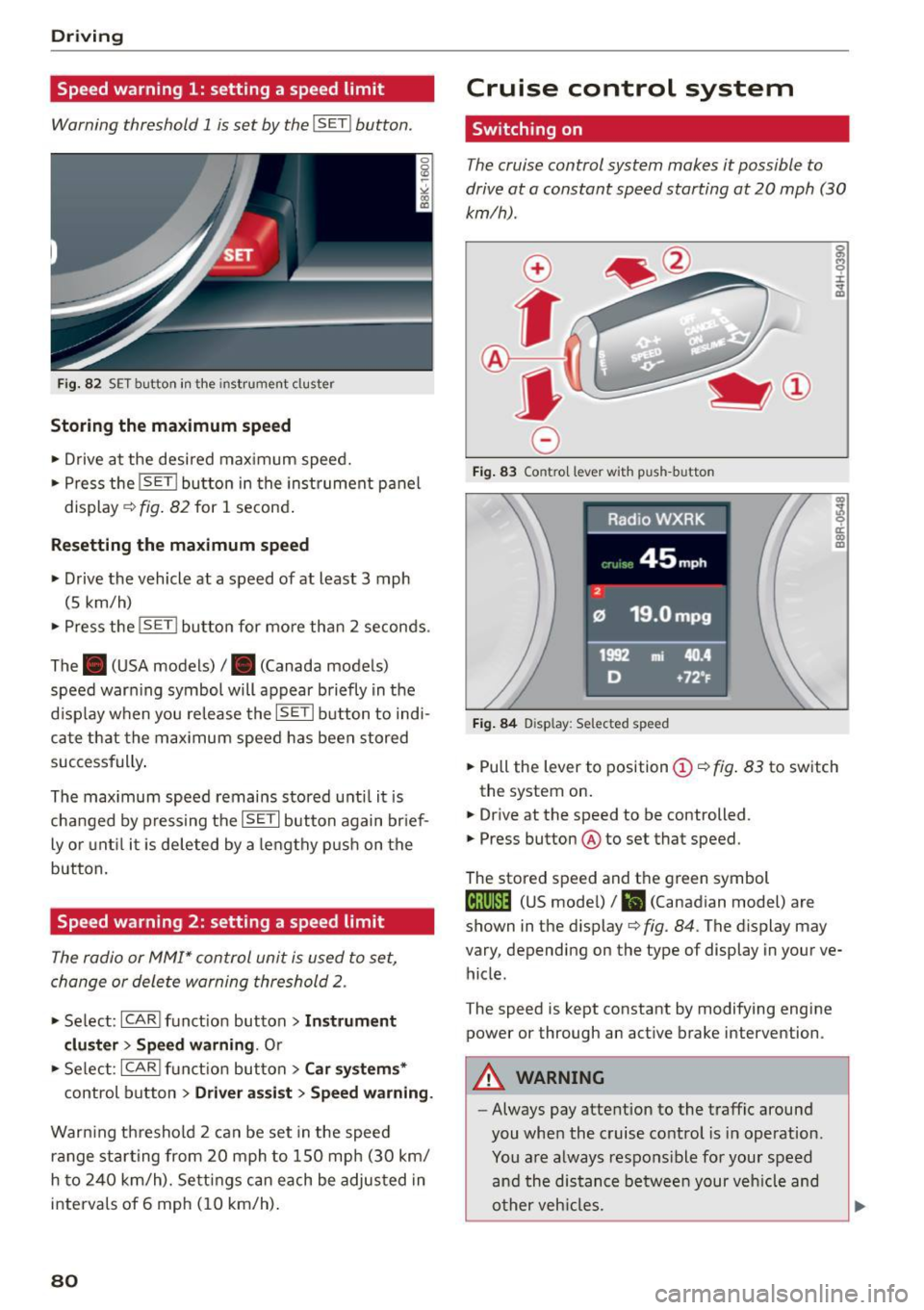
Speed warning 1: setting a speed limit
Warning threshold 1 is set by the I SE TI button.
F ig. 82 SET button in the instrument cluster
Storing the m aximum spe ed
• Drive at the desired maximum speed.
• Press the
!SET I button in the instrument p anel
display
c;, fig. 82 for 1 second .
Resetting the ma ximum speed
• Drive the vehicle at a speed of at least 3 mph
(5 km/h)
• Press the
i~S-ET~ I button for mo re than 2 seconds .
The . (USA models) /. (Canada models)
speed warn ing symbol will appear briefly in the
d isplay when you release the
!SETI button to indi
ca te that the max imum speed has been stored
successfully .
The max imum speed remains stored unti l it is
changed by pressing the
! SET I button again br ief
ly or unt il it is deleted by a lengthy p ush on the
button.
Speed warning 2: setting a speed limit
The radio or MMI* control unit is used to set,
change or delete warning threshold 2.
• Se lect: !CARI funct ion button> Instrum ent
clu ster > Sp eed warning .
Or
• Se lect: !CARI funct ion button> Car syste m s*
control button> Dri ver a ss is t> Speed warning .
Warning th reshold 2 can be set in the speed
r a nge starting from 20 mph to 150 mph (30 km/
h to 240 km/h). Settings can each be adjus ted in
interva ls of 6 mph (10 km/h) .
80
Cruise control system
Switching on
The cruise control system makes it possible to
drive at a constant speed starting at
20 mph (30
km/h).
0
f
®l
0
Fig . 83 Contro l lever with push-button
Fi g. 84 D isplay: Selected speed
g M 0 ±
~
Q)
~ ci: Q) m
• Pull the lever to position (D <::> fig. 83 to sw itch
the system on .
• Drive at the speed to be controlled .
• Press button ® to set that speed.
The stored speed and th e green symbol
til;\IJM4 (US mode l)/ El (Canadian model) are
shown in the display
c;, fig. 84. The display may
vary, depending on the type of display in your ve
hicle.
The speed is kept constant by modifying engine
power or through an act ive brake intervention.
A WARNING
-Always pay atte ntion to the traffic around
you when the cruise control is in operation.
You a re always respons ible for your speed
and the distance between your veh icle and
o ther veh icles.
-
Page 84 of 264
Automatic transmission
Automatic transmission
Manual transmission
Gearshift lever
Applies to vehicles: with manual transmission
The clutch pedal must be depressed all the way
before you can start the engine .
The manual transmission in your Audi is equipped
with an
interlock-feature.
• Depress the clutch pedal all the way.
• Start the engine with the gearshift lever in Neu
tral and the clutch pedal depressed.
(D Note
Always depress the clutch pedal fully when
changing gears . Do not hold the vehicle on a
hill with the clutch pedal partially depressed.
This may cause premature clutch wear or damage.
@ Tips
- Resting your hand on the gearshift lever
knob while driving will cause premature
wear in the transmission.
- The back-up lights go on when you sh ift into
Reverse with the ignit ion on.
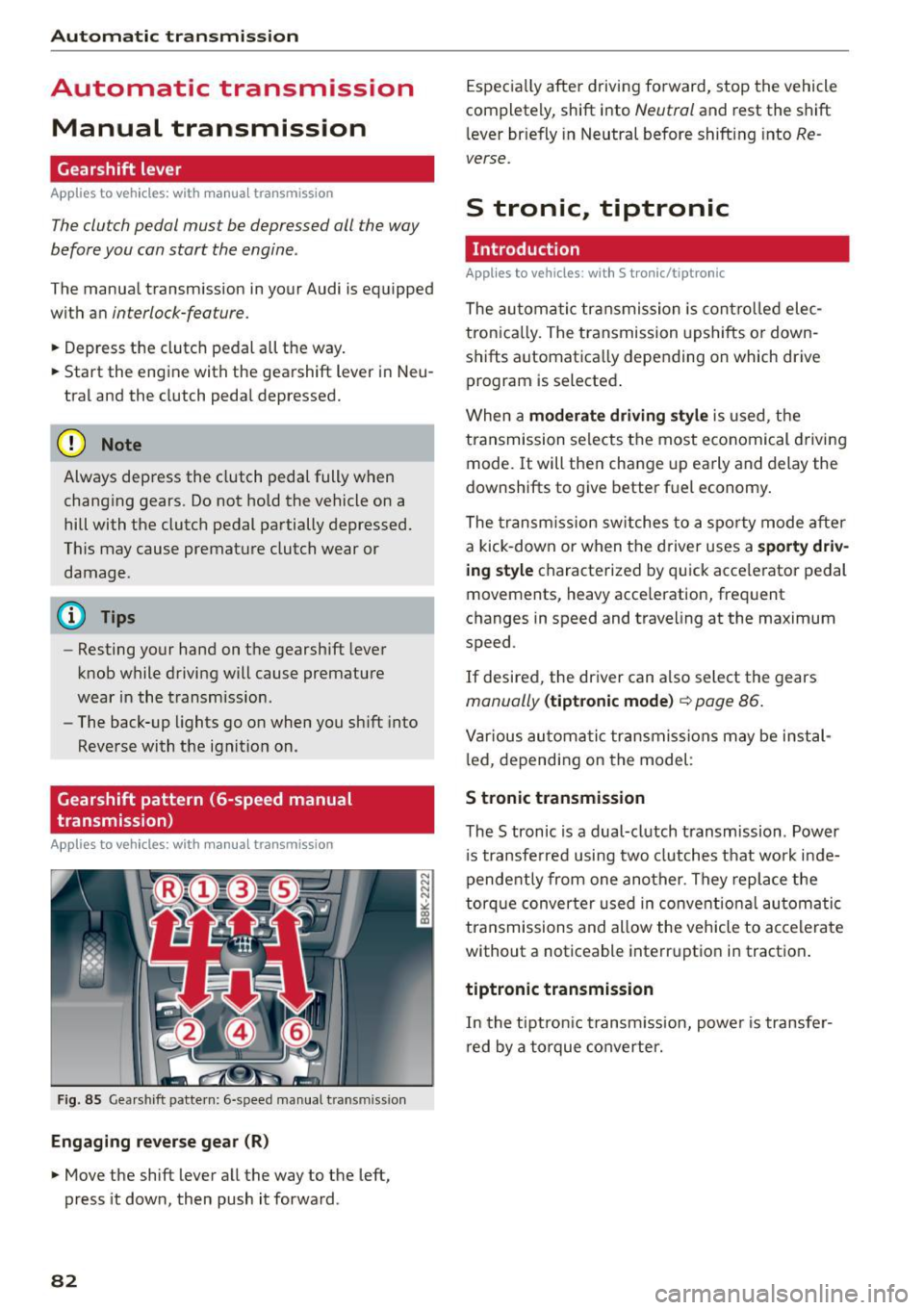
Gearshift pattern (6-speed manual
transmission)
Applies to vehicles: with manual transmission
Fig. 85 Gearshift pattern: 6-speed manual transmiss ion
Engaging reverse gear (R)
• Move the shift lever all the way to the left,
press it down, then push it forward .
82
Especially after driving forward, stop the vehicle
completely, shift into
Neutral and rest the shift
lever briefly in Neutral before shifting into
Re
verse.
S tronic, tiptronic
Introduction
Applies to vehicles: with S tronic/tiptronic
The automatic transmission is controlled elec
tron ically. The transmission upshifts or down
shifts automatica lly depending on which drive
program is selected .
When a
moderate driving style is used, the
transmission selects the most economical driving
mode. It will then change up early and delay the
downshifts to give better fuel economy.
The transmission switches to a sporty mode after
a kick-down or when the driver uses a
sporty driv
ing style
characterized by quick acce lerator pedal
movements, heavy acce leration, frequent
changes in speed and traveling at the maximum
speed .
If desired, the driver can a lso select the gears
manually (tiptronic mode) c::> page 86.
Various automatic transmissions may be instal
l ed, depending on the model :
S tronic transmission
The S tronic is a dual-clutch transmission . Power
i s transferred using two clutches that work inde
pendently from one another . They replace the
torque converter used in conventio nal automatic
transmissions and allow the vehicle to accelerate
without a noticeable interruption in traction .
tiptronic transmission
In the tiptronic t ransm ission, power is transfer
red by a torque converter.
Page 89 of 264
M N
i? co ,...., \!) 1.1'1
N 1.1'1 ,....,
will return to automatic mode. To keep shifting
using the shift paddles, move the s elector lever
to the right out of the 0/5 position.
The t ransmission automatically shifts up o r down
before critica l engine speed is reached.
The transmission only allows manua l shift ing
when the engine speed is within the permitted range .
@ Tips
-When you sh ift into the next lower gear, the
transmission will downshift only when there i s no poss ibility of over -revving the engine.
- When the kick-down comes on, the trans
mission will sh ift down to a lower gear, de
pending on vehicle and engine speeds .
- Tiptronic is inoperat ive when the transmis
s ion is in the fa il-safe mode .
Kick-down
Appl ies to vehicles: with S tro nic/t iptronic
Kick-down enables maximum acceleration.
When you depress the accelerato r pedal beyond
the resistance po int, the automatic transm iss ion
downshifts into a lower gear, depend ing o n ve hi
cle speed and engine speed. The upsh ift into the
nex t higher gear ta kes place once the maximum
specified engine speed is reached .
A WARNING
Please note that the drive wheels can spin if
kick-down is used on a smooth slippery road -
there is a risk of sk idding.
Launch Control Program
App lies to vehicles: with S tro nic
Th e Launch Control Program provides the best
acceleration possible when starting from a stop .
Requirement: The engine must be at operating
temperature and the steering wheel must not be
turn ed .
.,. Press the
1.$ O FF I button ¢ page 171 while the
engine is running. The
II i ndicator light ill umi
nates i n the instrument cluster and
Stabiliza-
Aut omatic transm issio n
tion control (ESC): Sport. W arning! Re stri cted
s tability
appears in the driver information sys
tem display .
.,. Move the sele ctor leve r to the 0/5 position to
select spo rt mode (5) or se lect the
d y namic
driving mode in drive se lect* ¢ page 103 .
.,. Press the brake pedal strongly with your left
foot and ho ld it down fo r at least 1 second.
.,. At the same time, press the accelerator pedal
down comp lete ly with yo ur right foot u nti l th e
eng ine reaches and mainta ins a high R PM .
.,. Remove your foot from the brake pedal within 5
seconds ¢
,A.
A WARNING
-Always adapt your dr iving to the traff ic flow.
- Onl y use the Launch Cont ro l Program when
road and traffic cond itions allow it and oth
er drivers will not be endangered or annoyed by your driving and the vehicle's acce lera
tion .
- Please note that the driving wheels can spin
and the vehicle can break away when sport
mode is switched on, especially when the
road is s lippery .
- Once you have accelerated, you shou ld
sw itch sport mode off by pressing the
l.f3 OFF I button .
(D Tips
-The tra nsmission temperature may increase
signif icant ly after us ing the Launch Contro l
Program. If that happens , the program may
not be availab le for a few minutes.
It wi ll be
available again afte r a cool-down per iod.
- When acc elerating using the Launch Control
program, a ll vehicle parts are subject to
heavy loads. Thi s can resu lt in in creased
wear.
Transmission malfunction
App lies to vehicles : wi th S tronic/tip tro nic
[cjJ Tran smi ssion: Pre ss brake pedal and select
gear again . ..,.
87
Page 91 of 264
M N
0 loo
rl I.O
"' N
"' rl
Audi adapt ive crui se cont rol and bra king gu ard
Audi adaptive cruise
control and braking
guard
Introduction
App lies to vehicles: with Audi adaptive cruise co ntrol
The adaptive cruise control system assists the
driver by regu lating vehi cle speed and helping to
maintain a set distance to the vehicle ahead,
within the limits of the system.
If the system de
tects a moving vehicle up ahead, adaptive cruise
control can brake and then accelerate your vehi
cle. This helps to make driving more comfortable
on long highway stretches.
The braking guard system can warn you about an impend ing collision and initiate braking maneu
vers
¢ page 95.
Adaptive cruise control and braking guard have
technical limitations that you must know, so
p lease read this section carefu lly, understand
how the system works and use them properly at
all times.
General information
General information
A pp lies to vehicles: with Audi adaptive cruise co ntrol
Fig. 93 Fr ont of th e veh icle : Posit ion of radar sensor
The area that contains the radar sensor¢ fig. 93
must never be covered by stickers or other ob
jects or obstructed with dirt, insects, snow or ice
that will inte rfe re with the adapt ive cr uise con
trol system and brak ing guard. For information
on cleaning, refer to ¢
page 184. The same ap
p lies for any mod ificat ions made in the front
area. T
he function of the adaptive cruise cont ro l sys
tem and braking guard is limited under some
condit ions:
- Ob jects can on ly be de tected when they are
with in sensor range¢
page 91, fig. 96.
-The system has a limited ability to de tect ob
jects that are a short distance ahead, off to the
side of your vehicle or moving into your lane .
- Some kinds of veh icles are hard to detect; for
examp le motorcycles, vehicles with high
ground clearance or overhanging loads may be
detected when it is too late or they may not be
detected at all.
- When driving through curves
¢page 90 .
-Stationa ry objects ¢ page 90.
,&_ WARNING
-= -Always pay attention to traffic when adaptive
cruise control is switched on and braking
g uard is active. As the driver, you are still re
sponsib le for start ing and for maintai ning
speed and distance to other objects. Braking
g uard is used to assist you . The drive r must
a lways take action to avo id a col lision . The
d river is always responsible for bra kin g at the
cor re ct t ime.
- I mp roper use of adaptive cruise control can
cau se collisions, o ther accidents and serious
pe rsonal injury.
- Never let the comfort and conve nience that
adapt ive cr uise control and braking guard
offer distrac t you from the need to be alert
to traffic con dit ions and the need to remain
i n full control of your vehicle at all times,
- Always remember that the adaptive cruise
control and braking guard have limits -they
will not slow the vehicle down or maintain
the set distance when you dr ive towards an
obstacle or somethi ng on or near the road
that is not moving, such as vehicles stopped
in a traff ic jam, a sta lled or d isabled vehicle.
If registered by the radar sensor, vehicles or
obstacles that a re not moving can t rigger a
coll is io n warning and if confi rmed by the
video came ra, an acute collision war ning.
~
89
Page 92 of 264
Audi adapt ive cru ise control and brak ing gu ard
- For safety reasons, do not use adaptive
cruise control when driving on roads with
many curves, when the road surface is in
poor condition and/or in bad weather (such
as ice, fog, gravel, heavy rain and hydrop lan
ing). Using the system under these condi
t ions could resu lt in a col lision.
- Switch adaptive cruise control off tempora
rily when driving in turn ing lanes, on ex
pressway exits or in construction zones. This
prevents the vehicle from accelerating to
the set speed when in these situat ions.
- The adapt ive cr uise control sys tem wi ll not
brake by itself if yo u put you r foot on the ac
celerator pedal. Doing so can ove rride the
speed and distance regulation.
- When approach ing stationary objects such
as stopped traffic, adaptive cruise control
will not respond and braking g uard will have
limited function.
- The adapt ive cr uise control system and brak
ing guard do not react to people, animals,
objects cross ing the road or oncoming ob
jects.
- The function of the radar sensor can be af
fected by reflective objects such as guard
rails, the entrance to a tunnel, heavy rain or
ice.
- Never follow a veh icle so closely that you
cannot stop your vehicle safe ly. The adap
t ive cru ise control cannot s low or brake the
vehicle safely when you fo llow another veh i
cl e too close ly. Always remembe r that the
automa tic brak ing funct ion c annot bring the
vehicle to a sud den or emergency stop un
der these conditions.
- To prevent unin tended operation, always
switch ACC off when it is not be ing use d.
(D Note
The sensor can be disp laced by impacts or
damage to the bum per, whee l hou sing and
unde rbody. That could affe ct the adap tive
cruise contro l system and braking guard . Have
your authorized A udi dealer or authorized
Audi Service Facility c heck their function.
90
In curves
App lies to vehicles: wi th Aud i adapt ive cru ise contro l
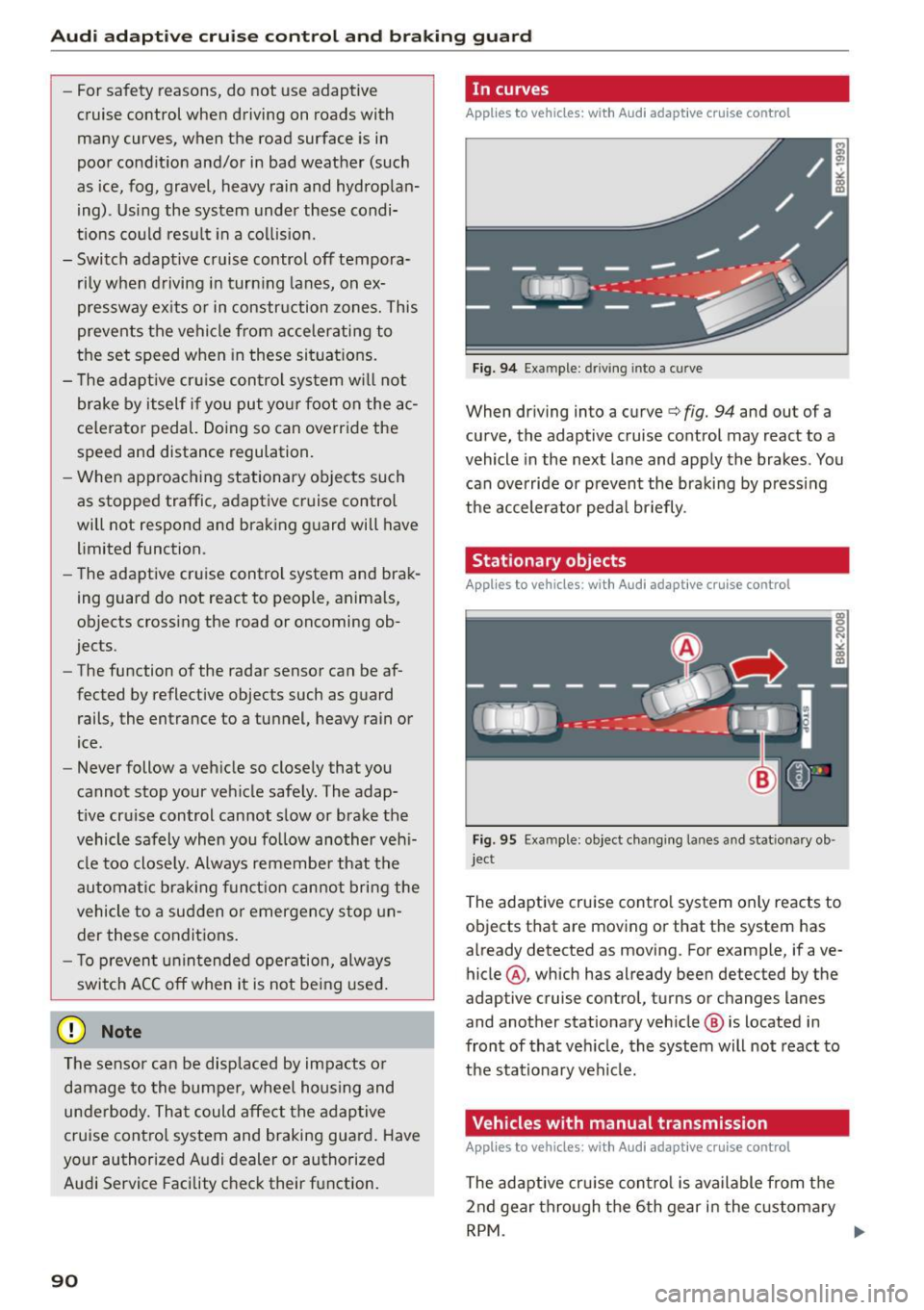
Fig. 94 Example: dr iving into a cu rve
When dr iving into a curve c:::> fig. 94 and out of a
curve, the adaptive cruise control may react to a
vehicle in the next lane and apply the brakes. You
can override or prevent the braking by pressing
the accelerator peda l briefly .
Stationary objects
Applies to vehicles: wi th Aud i adap tive cr uise con tro l
Fig. 95 Example: object chang ing lanes and stationary ob ·
jec t
The adaptive cruise contro l system only reacts to
ob jects that are moving or that the system has
already detected as moving. For example, if ave
hicle @, which has already been detected by the
adaptive cruise control, turns or changes lanes
and another stationary veh icle @ is located in
front of that veh icle, the system will not react to
the stat ionary vehicle.
Vehicles with manual transmission
App lies to vehicles: wi th Aud i adap tive cru ise contro l
The adaptive cru ise con tro l is available from the
2nd gear thro ugh the 6th gear in the c ustomary
RPM . ....
Page 95 of 264
M N
0 loo
rl I.O
"' N
"' rl
Audi adaptive cruise control and braking guard
.. To increase or reduce the speed in increments,
tap the lever up or down .
.. To increase or reduce the speed quickly,
hold
the lever up or down until the red LED ® reach
es the desired speed¢
page 91 , fig . 98.
Following any changes, the new stored speed will
be disp layed briefly in the display@¢ page 91,
fig . 98 .
Interrupting cruise control
Applies to vehicles: with Audi adaptive cruise control
Fig. 100 Selector lever
Requirement : adaptive cruise control must be
switched on
¢ fig. 100 @.
Overriding cruise control
.. To accelerate manually, press the accelerator
pedal. The message
ACC override appears.
.. To resume adaptive cruise control, remove your
foot from the gas pedal. The system returns
again to the speed that was saved before.
.. You can save a new speed at any time by press
ing the
I SET I button ¢ page 11 , fig . 4.
Canceling cruise control while driving
.. Move the lever into position @. The message
ACC standby appears. Or
.. press the brake pedal.
.. To resume the stored speed, move the lever in
to posit ion
@ .
A WARNING
Never resume the stored speed if the speed is
too high for p revailing road, traffic or weather
conditions.
Setting the distance
Applies to vehicles: with Audi adaptive cruise control
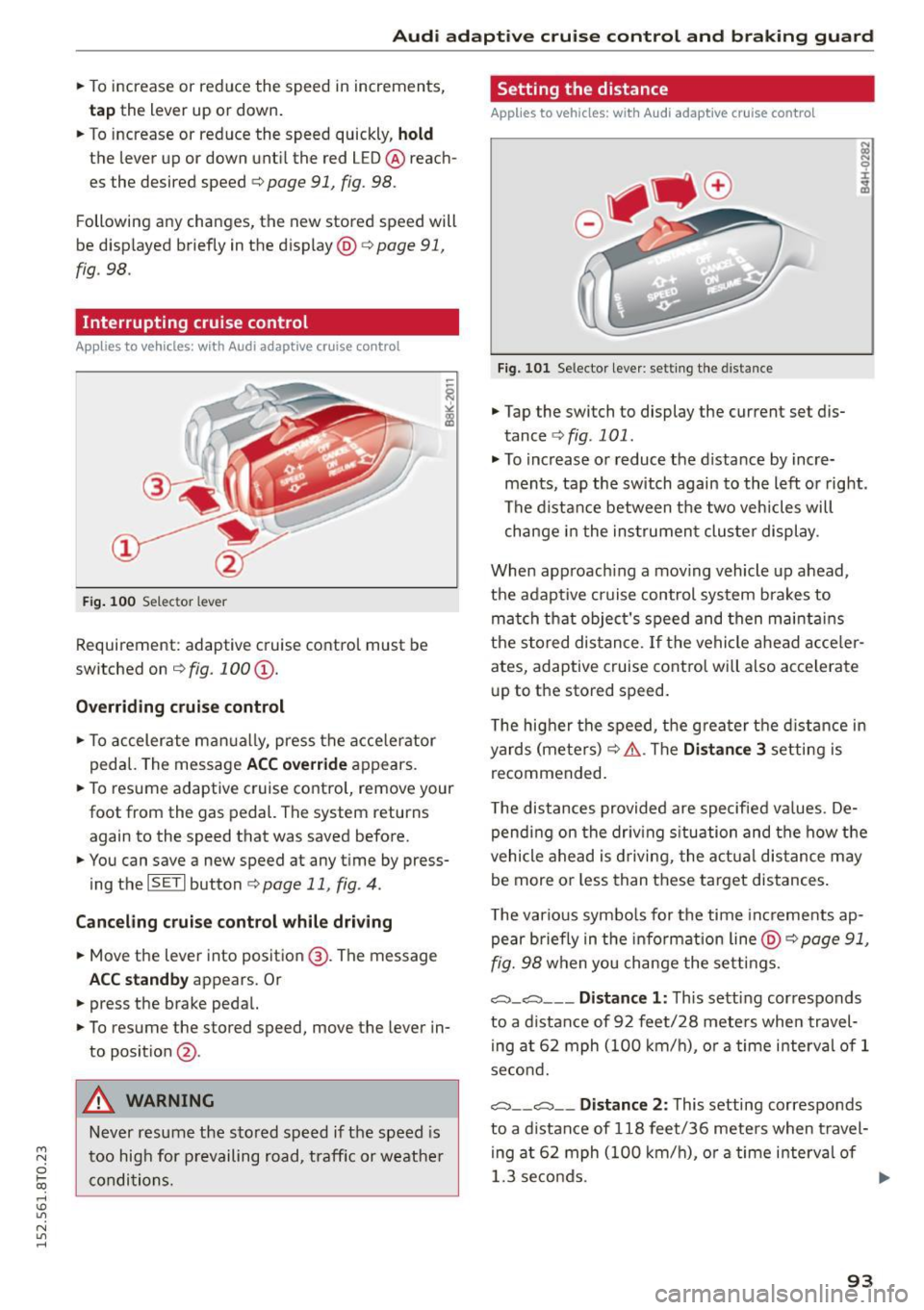
Fig. 101 Selector lever: sett ing the distance
.. Tap the switch to display the current set dis
tance
¢ fig . 101 .
.. To increase or reduce the distance by incre
ments, tap the switch again to the left or right.
The distance between the two veh icles will
change in the instrumen t cluster display .
When approach ing a mov ing vehicle up ahead,
the adaptive cruise control system brakes to
match that object's speed and then maintains
the stor ed distance .
If the vehicle ahead acceler
ates, adaptive cruise control will also accelerate
up to the stored speed.
T he hig her the speed, the greater the distance in
yards (meters) ¢&. .The
Distance 3 setting is
recommended .
T he distances provided are specified values . De
pending on the driving s ituation and the how the
vehicle ahead is driving, the actual distance may
be more or less than these target distances .
T he various symbols for the time increments ap
pear briefly in the information line @¢
page 91,
fig. 98
when you change the settings.
,::::::,_,::::::, ___ Distance 1: This setting corresponds
to a distance of 92 feet/28 meters when travel
ing at 62 mph (100 km/h), or a time interval of 1
second.
,::::::, __ ,:::::, __ Distance 2: This setting corresponds
to a distance of 118 feet/36 meters when travel
in g at 62 mph (100 km/h), or a time interval of
1.3 se conds. ..,.
93
Page 96 of 264
Audi adapt ive cru ise control and brak ing gu ard
c::::, ___ c::::,_ Distan ce 3: This setting corresponds
to a distance of 164 feet/SO meters when travel
ing at 62 mph (100 km/h), or a t ime interval of
1.8 seconds.
c::::, ___ _ c::::, Di stan ce 4: This setting corresponds
to a distance of 210 feet/64 meters when travel
ing at 62 mph (100 km/h), or a t ime interval of
2 .3 seconds.
_&. WARNING
Following other vehicles too closely increases
the risk of collisions and ser ious personal in
jury .
- Setting short distances to the traffic ahead
reduces the time and d istance availab le to
br ing your vehicle to a safe stop and makes
it eve n mo re necessa ry to pay close atten
t ion to traffic.
- Always obey applicable traffic laws, use
good judgment, and select a safe followi ng
dis tance for the traffic, ro ad an d wea ther
cond itio ns.
¢j) Tips
- Distance
3 is set automatically each time
you sw itch the ignit ion on.
- Your standard settings are automatically
stored and assigned to the remote contro l
k ey being used.
Setting the driving program
Applies to veh icles: with Audi adaptive cruise control
Depending on the se lected dr iv ing program and
distance, driving behavior when acce le rat ing will
vary from dynamic to comfortab le .
Setting the driving program for vehicles
w ithout Audi dr ive s elect*
~ In the radio/MM! *, select: I CAR ! function but
ton
> Adapti ve c ru is e control > Dri ving prog. >
comfo rt , stand ard or dyn amic . Or
~ Select : ICARI funct ion button > Car s ystems*
control button > Driver ass ist > Adap tive crui se
control
> Dr iving program * > Comfort , Stand
ard
o r Dynamic .
94
Setting the driving mode for vehicles with
Audi drive se lect*
Refer to r:!> page 103.
(D Tips
Your settings are automat ica lly stored and as
signed to the remote control key being used.
Request for driver intervention
Applies to vehicles: with Audi adapt ive cruise control
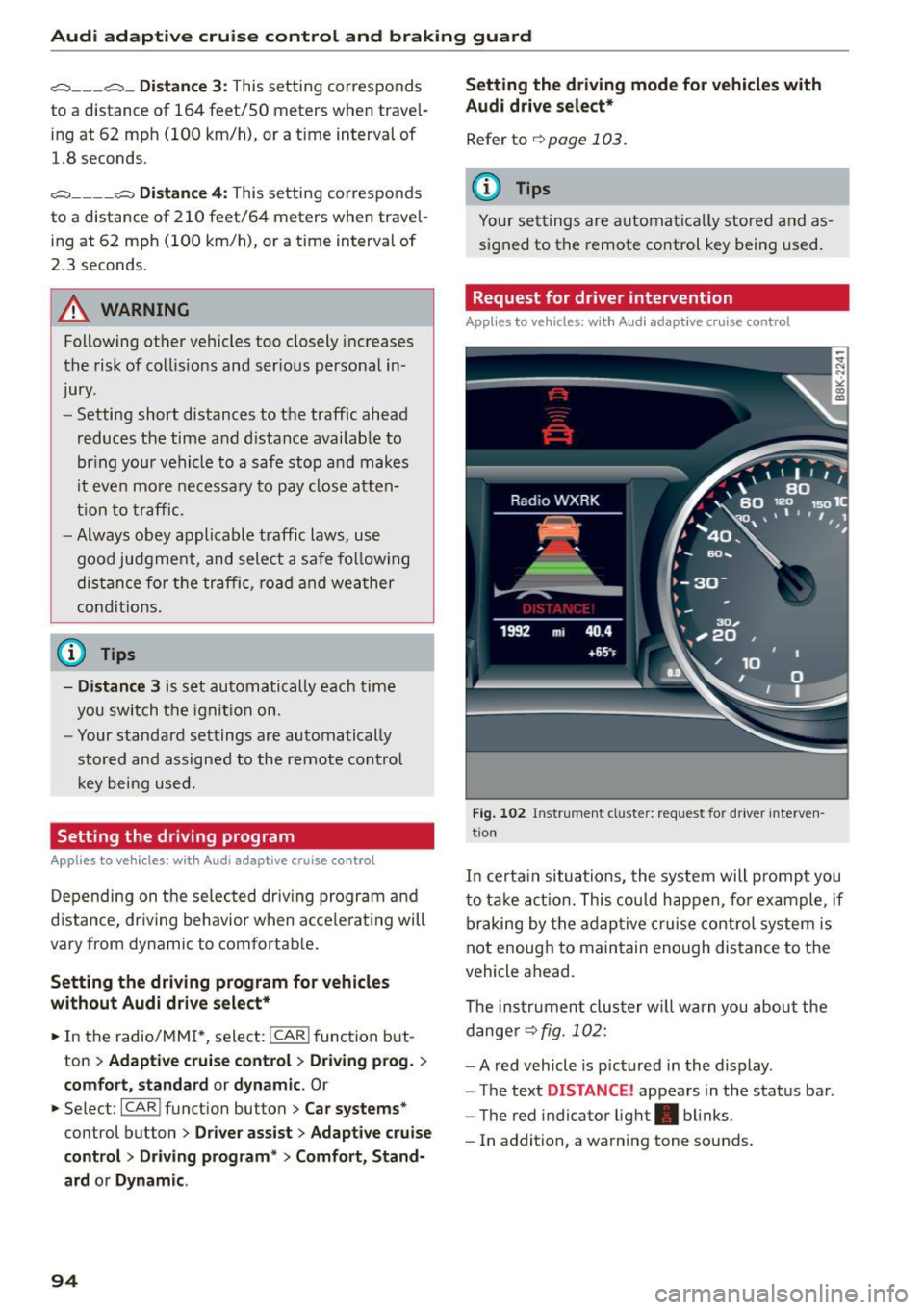
Fig . 102 Instr ument cl uster: request for driver interven
t ion
In certa in situations, the system will p rompt you
to take act ion. This could happen, fo r example, if
braking by the adap tive c ruise control system is
not enough to maintain enough distance to the
vehicle ahead.
The ins trumen t clu ster w ill warn you about the
dange r¢
fig. 102:
- A red vehicle is pictured in the display .
- The text
DISTANCE ! appears in the status bar .
- The red indicator light . blinks.
- In addition, a warning tone sounds.
Page 97 of 264
Audi adaptive cruise control and braking guard
Audi braking guard
Description
Applies to vehicles: with Audi adaptive cruise co ntrol
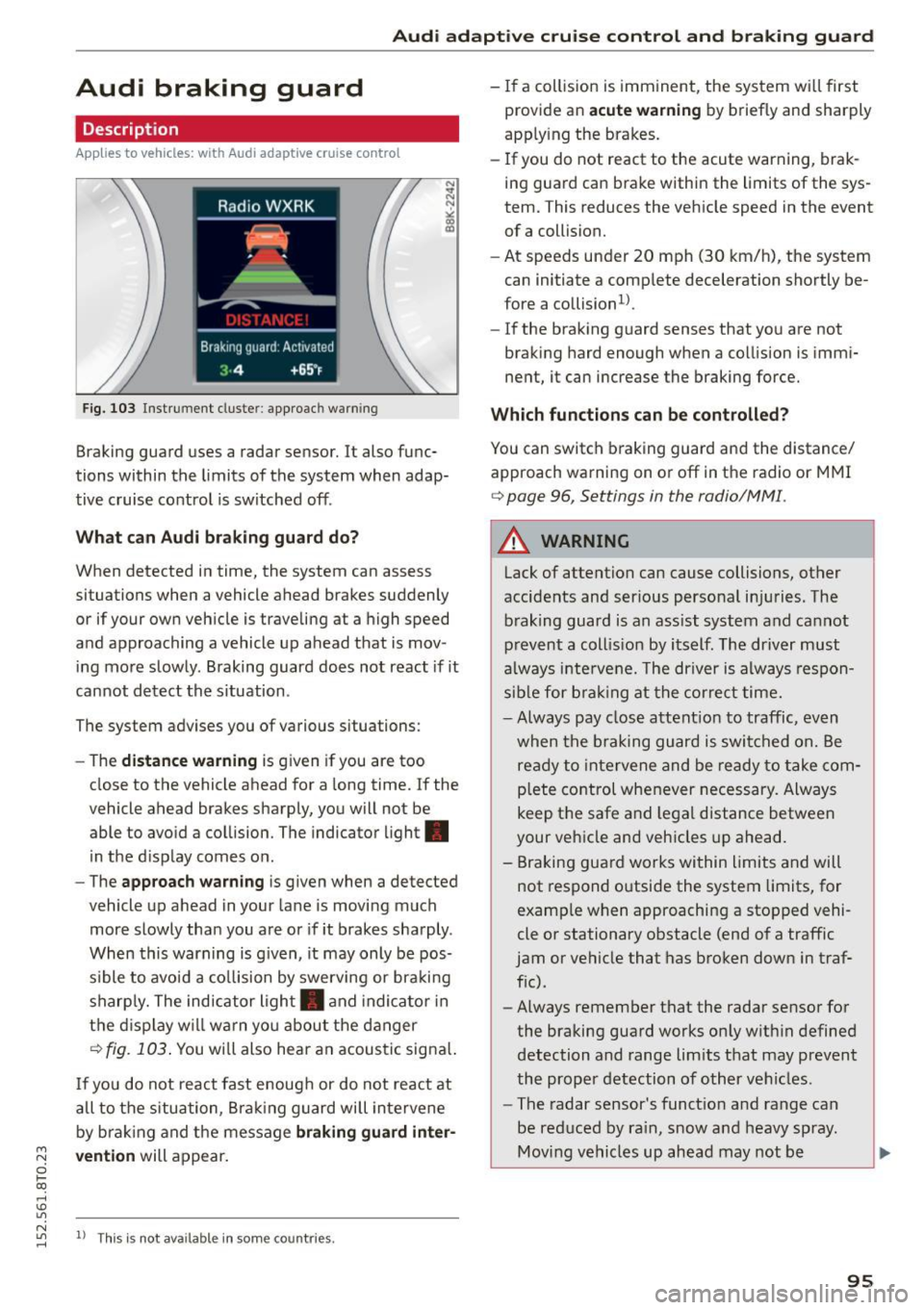
F ig. 103 Instrument cluste r: app roac h warn ing
Braking guard uses a radar sensor. It also func
tions within the limits of the system when adap
tive cruise control is switched off .
What can Audi braking guard do?
When detected in time, the system can assess
situations when a vehicle ahead brakes suddenly
or if your own vehicle is traveling at a high speed
and approaching a vehicle up ahead that is mov
ing more slowly . Braking guard does not react if it
cannot detect the s ituation .
The system advises you of various situations:
- The
distance warning is given if you are too
close to the vehicle ahead for a long time. If the
vehicle ahead brakes sharply, you will not be
able to avoid a collision. The indicator light.
in the d isplay comes on .
- The
approach warning is given when a detected
vehicle up ahead in your lane is moving much
more slowly than you are or if it brakes sharply .
When this warning is g iven, it may only be pos
s ible to avoid a co llision by swerving or braki ng
sharply. The indicator light . and indicator in
the display will warn yo u about the danger
c> fig. 103. You wi ll also hear an acoust ic signa l.
If you do not react fast enough or do not react at
all to the situation, Braking guard will intervene
by braking and the message
braking guard inter-
~ vention will appear.
0 l-oo
rl I.O
"' N "' 11
This is not available in som e count ries. rl
- If a collision is imminent, the system wi ll first
provide an
acute warning by briefly and sharply
app ly ing the brakes.
- If you do not react to the acute warning, brak
ing guard can brake within the limits of the sys
tem. This reduces the vehicle speed in the event
of a collision.
- At speeds under 20 mph (30 km/h), the system
can initiate a complete deceleration shortly be
fore a collisionl).
- If the braking guard senses that you are not
braking hard enough when a collision is immi
nent, it can increase the braking force.
Which functions can be controlled?
You can switch braking guard and the distance/
approach warning on or off in the radio or MMI
c> page 96, Settings in the radio/MM! .
A WARNING
-
Lack of attention can cause collisions, other
accidents and serious personal injuries. The b raking guard is an ass ist system and cannot
prevent a collis ion by itself. The driver must
always intervene. The driver is always respon
sib le for b ra kin g at the correct time.
- Always pay close attent ion to traffic, even
when the braking guard is switched on. Be
ready to intervene and be ready to take com
p lete control whenever necessary. Always
keep t he safe a nd legal distance between
your vehicle and vehicles up ahead.
- Braking guard works within limits and will
not respond outside the system limits, for
examp le when approaching a stopped vehi
cle or stationary obstacle (end of a traffic
jam or vehicle that has broken down in traf
f ic).
- Always remember that the radar sensor for
the braking guard works on ly w ithin defined
detection and range limits that may prevent
the proper detection of other vehicles.
- The radar sensor's funct ion and range can
be reduced by ra in, snow and heavy spray.
Moving vehicles up ahead may not be
,.
95
Page 100 of 264
Audi side assist
Audi side assist
Side assist
Description
Applies to vehicles: with Aud i side ass ist
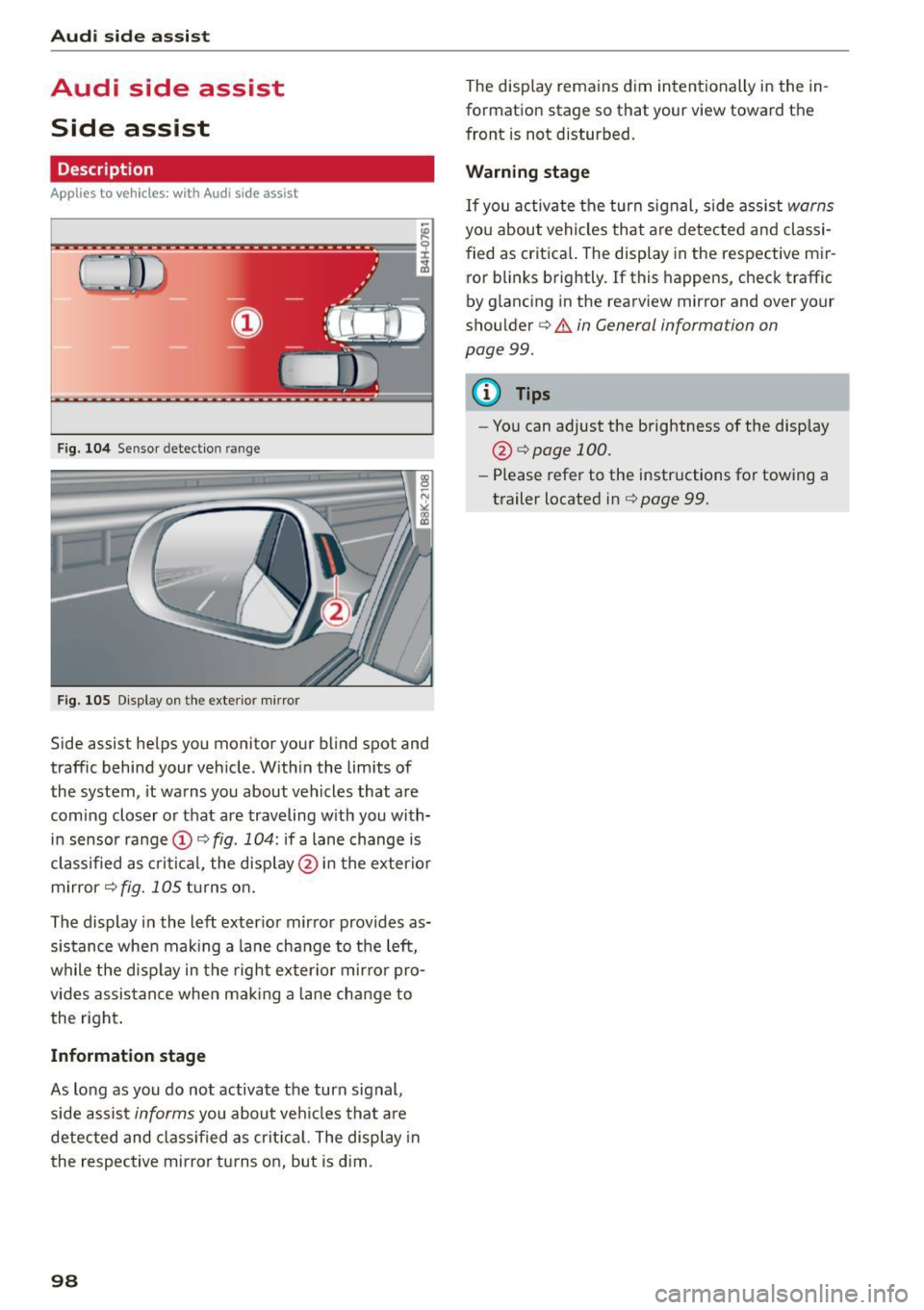
Fig. 104 Sensor detec tion range
F ig . 105 Displa y on the exte rior mirro r
Side assis t helps you monitor your blind spot and
traffic behind your vehicle . Within the limits of
the system , it warns you about vehicles that are
coming closer or that are traveling with you with
in sensor range(!)
c:> fig. 104: if a lane change is
classified as critical, the display @ in the exterior
mirror
c:> fig. 105 turns on.
The display in the left exterior mirror provides as
sistance when mak ing a lane change to the left,
while the disp lay in the right exter ior mirror pro
vides assistance when mak ing a lane change to
the right .
Information stage
As long as you do not activate the turn signal,
side assist
informs you about veh icles that are
detected and classified as critica l. The display in
the respective mirror turns on, but is dim.
98
The display rema ins dim intentionally in the in
formation stage so that your view toward the
front is not distu rbed .
Warning stage
If you activate the turn signal, s ide assist warns
you about vehicles that are detected and classi
fied as critical. The display in the respective mir ror blinks brightly . If this happens , check traffic
by g lancing in the rearview mi rror and over your
shoulder
c:> .&. in General informa tion on
page 99.
{!) Tips
- You can adjust the brightness of the display
@ i=>pagel00.
-Please refer to the instructions for towing a
trailer located in
i=>page 99.
Page 101 of 264
M N
0 loo
rl I.O
"' N
"' rl
General information
Applies to vehicles: with Audi side assist
®
®
©
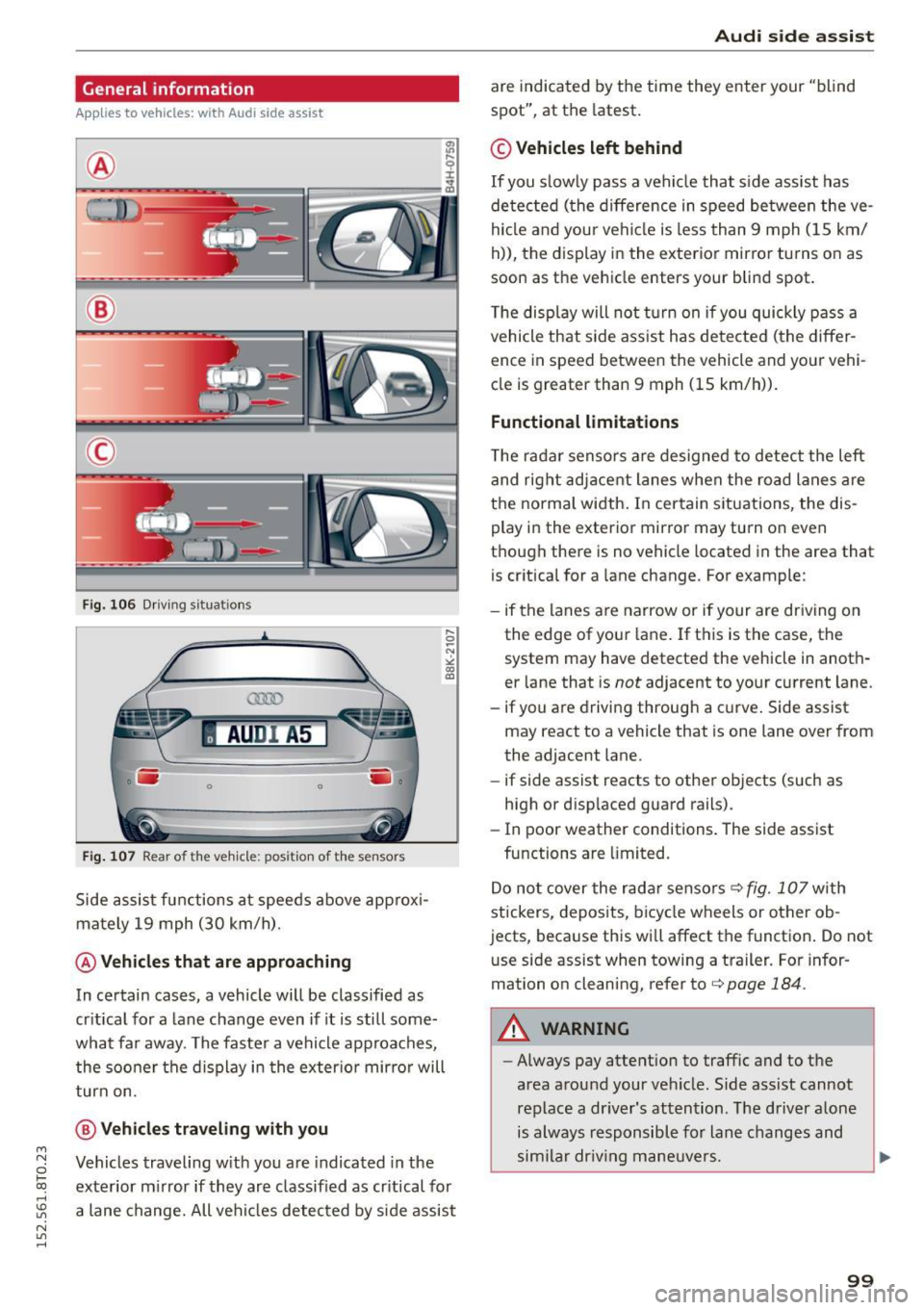
Fig. 106 Driving situat ions
AU DI A5
. .-0 0 iii .
Fig. 107 Rear of the vehicle: positio n of the sensors
Side assist functions at speeds above approxi
mately 19 mph (30 km/h).
@ Vehicles that are approaching
In certain cases, a vehicle will be classified as
critical for a lane change even if it is still some
what far away. The faster a vehicle approaches, the sooner the display in the exterior mirror will
turn on.
@ Vehicles traveling with you
Vehicles traveling with you are indicated in the
exterior mirror if they are classified as critical for
a lane change. All vehicles detected by side assist
Audi side assist
are indicated by the time they enter your "blind
spot", at the latest.
© Vehicles left behind
If you slowly pass a vehicle that side assist has
detected (the difference in speed between the ve
hicle and your vehicle is less than 9 mph (15 km/
h)), the display in the exterior mirror turns on as
soon as the vehicle enters your blind spot.
The display will not turn on if you quickly pass a
vehicle that side assist has detected (the differ
ence in speed between the vehicle and your vehi
cle is greater than 9 mph (15 km/h)).
Functional limitations
The radar sensors are designed to detect the left
and right adjacent lanes when the road lanes are
the normal width. In certain situations, the dis
play in the exterior mirror may turn on even
though there is no vehicle located in the area that is critical for a lane change. For example:
- if the lanes are narrow or if your are driving on
the edge of your lane. If this is the case, the
system may have detected the vehicle in anoth
er lane that is
not adjacent to your current lane.
- if you are driving through a curve. Side assist
may react to a vehicle that is one lane over from
the adjacent lane.
- if side assist reacts to other objects (such as
high or displaced guard rails).
- In poor weather conditions. The side assist
functions are limited.
Do not cover the rada r senso rs¢
fig. 107 with
stickers, deposits, bicycle wheels or other ob
jects, because this will affect the function. Do not
u se side assist when towing a trailer. For infor
mation on cleaning, refer to¢
page 184.
A WARNING
-Always pay attention to traffic and to the
area around your vehicle . Side assist cannot
replace a driver's attention. The driver alone
is always responsible for lane changes and
similar driving maneuvers.
99