ESP AUDI A5 COUPE 2015 Owner's Guide
[x] Cancel search | Manufacturer: AUDI, Model Year: 2015, Model line: A5 COUPE, Model: AUDI A5 COUPE 2015Pages: 264, PDF Size: 66.83 MB
Page 104 of 264
Audi drive select
Audi drive select
Driving settings
Introduction
Applies to veh icles: w ith Audi drive select
Drive select provides the possibility to experience
d ifferent types of vehicle settings in one vehicle.
F or instance, using the three
Comfort, Auto and
Dynamic modes, the driver can switch from a
sporty to a comfortable driving mode with the press of a button.
Addit ionally, in vehicles with MM I*, the vehicle
setup for
Individual* mode can be customized by
you. This makes it possible to combine settings
such as a sporty engine tuning with comfortable
steering .
A WARNING
Improper use of the Audi drive select can
cause collisions, other acc idents and serious
personal injury.
Description
Applies to veh icles: w ith Audi dr ive select
-
The vehicle setup in each mode depends on the
veh icle's features . However, the engine, automat
ic transmission* and steering are always involved.
Engine and automatic transmission*
Depending on the mode, the engine and the au
tomatic transmission respond quicker or in a
more balanced manner to accelerator pedal
movements. In the sporty dynamic mode, the au
tomatic transmission shifts at higher RPMs.
Steering
The steering adapts in terms of steering effort
and steering ratios. Indirect steer ing that moves
easily, like the steering in comfort mode, is best
suited to long drives on a highway. In contrast,
dynamic mode provides sporty, direct stee ring.
The follow ing applies to vehicles with dynam ic
steer ing*: the steering ratio changes based on ve
h icle speed in order to maintain optimum steer
ing effort for the dr iver at all times. This sets the
s teer ing to be less sensitive at higher speeds in
102
order to provide improved vehicle control. At re
duced speeds, however, steering is more direct in
order to keep the steer ing effort as m inima l as
possib le when the driver is maneuver ing the vehi
cle. At low and average speeds, dynam ic steering
additionally provides more responsive steering
performance.
Adaptive dampers*
The adaptive dampers* use sensors to record in
formation regarding steering movements, brak ing and acceleration operations by the driver,
road surface, driving speed, and load. This makes
i t possible to adapt damp ing to the driving situa
tion virtually in real t ime . Drive select also makes
i t possible to sat isfy the desire fo r sporty suspen
s ion (Dynamic) and comfortable suspension
(Comfo rt) without giving up ba lanced tuning (Au
to).
Sport differential*
As a compone nt of the all whee l dr ive system
(quattro)
<> page 174, t he sport differential* dis
tributes the driving power to the rear axle de
pending on the situation. The distribution of
power varies depending on the mode selected.
The goal is a high level of agility and ability to ac
ce lerate on curves. The vehicle is very responsive
to steering.
Audi adaptive cruise control*
The behavior when accelerating can be adjusted
from comfortable to sporty, depending on the drive select mode. Adaptive cruise control a lso
responds to the driving behavior of the vehicle
ahead in a more conservative or sporty manner.
Engine sound*
The sound of the engine is adapted to the select
ed mode and ranges from subtle to sporty.
(D Tips
- In some models, the maximum vehicle
speed can only be reached in the
Auto and
Dynamic modes.
- For vehicles with an automatic transmis-
sion, se lecting the
Dynamic mode results in 1111-
Page 108 of 264
Parking Sy stem
_& WARNING
- Sensors have dead spaces in which objects
cannot be detected. Be especia lly alert for
small chi ldren and animals, s ince they are
not always detected by the sensors .
- The acoustic parking system is not a substi
tute for the dr iver's own caution and alert
ness. Ultimate respons ibility always remains
with the driver during parking and sim ila r
maneuvers. A lways watc h where yo u are
dr iv ing .
- You should always adjust the vo lume and
frequency of the warning tones so that yo u
can eas ily hea r the acoust ic distance wa rn
ing even if the radio is playing, the air-co ndi
ti oner blower is on High or there is a high
level of o utsid e noise.
- Chec k the settings w henever anyone e lse
has driven t he veh icle befo re you.
(D Note
- Remember t hat low o bstacles for wh ich a
warning has already been issued may "dive"
below the system 's sens ing zone if the vehi
cle is being backed up close r. In this case,
the warn ing sound shutting off does
not in
dicate that you have cleared the obstacle .
Instead, impact is imm inent.
- Objects such as trailer h itches, chains , nar
r ow posts o r fences covered by a thin laye r
of pa int may n ot a lways be detec ted by t he
system. They can still damage you r veh icle
wi tho ut warn ing.
@ Tips
Keep the sens ors in the rear bumper clean
a nd free of sn ow and ice so tha t the acou stic
parking a ssi st system can f uncti on prope rly.
Adjusting the warning tones
Applies to vehicles: with park in g system (rea r)
The warning tones can be adjus ted in the MMI*.
• Select : I CARI function button > Parking syst em.
Or
• Se lect :
I CARI funct ion button > Car system s*
control button> Driver assi st > Parking aid .
106
-Rear volume -rear sensor vo lume
- Rear frequency -rear senso r frequency
- Music volume while parking -when the pa rk-
ing sys tem is switched on, the vo lume of the
ac tive a udio source is lowered .
The newly ad justed value is briefly hea rd from
the sig nal ge nerato r. T he settings are a utomat i
ca lly store d and assigned to the master key w ith
remo te con trol.
Rear parking system
with rearview camera
Introduction
Applies to vehicles: with parking system (rear, with rear view
camera)
Fi g. 1 11 Parkin g mode 1: reve rse park in g
Fi g. 11 2 Park in g mode 2: para ll el park ing
.... .... 0
-
"' :8
Vehicles with the parking system are equipped
with a
rear view camera in addit ion to the aco us
tic parking system.
You can choose between two modes to assist you
with parking. For examp le, you can use "parking
mode
l" when parking in a parking space or ga
r age
c> fig . 111. When you want to park parallel
to t he edge of the st reet, select "park ing mod e
2" c::;;, fig . 112. ...
Page 109 of 264
M N
0 loo
rl I.O
"' N
"' rl
The rear acoust ic park assist system is integrated
in the rear of th e vehicle and the rear vi ew cam
era is integ rated in the rear lid¢
pag e 108.
.&_ WARNING
-
- The rear view camera has blind spots, in
which objects cannot be detected. Be espe
c ially carefu l to check for small children and
animals before backing up . Small children
and animals wi ll not a lways be detected by
the sensors.
General Information
Applies to vehicles: with parking system (rear, with rear view
camera)
F ig . 113 Cove red area (!) and uncov ere d ar ea @ of the r ear
v iew ca mera
0
0
Fig. 114 Trunk lid : Location of the rea r view camera
Sensors in th e bumper
Sensors are located in the rear bumpers . If these
detect an obstacle, audible s ignals war n you . The
r ange at whi ch the sensors beg in to measure is
a pproxim ate ly :
To the side
2 ft (0 .60 m)
Center rea r 5.2 ft (1.60 m)
D istance warning when revers ing starts when an
obstacle is detected in the ra nge of the parking
Parking Sy stem
ass ist system. As the distance decreases, the
time int erval be tween the audible tones becomes
shorter.
When the distan ce is less than 1ft (0.30 m), the
tone becomes cont inuous. At this point you
shou ld stop backing up .
If the distance to an obst acle stays the same, the
vo lume of the dis tance s ignal ch ime is gradually
reduced afte r abo ut 4 seconds (does not affect
t h e continuous signal tone) . Approaching anoth
er obstacle w ill cause the distance s ignal to
sound again at the normal volume.
R ea r v iew cam era cov erage area
The M MI display shows the area covered by the
rear view camera ¢
fig. 113 (D. Objects that are
not in the area covered @are not shown on the
MMI display.
We recommend that you pract ice pa rking w ith
the rear view camera in a traffic -free location or
parking lot to become fami liar with the system,
the o rientat ion lines , and their function . When
doing t his, there should be good light and weath
er conditions.
In the MMI display, objects or vehicles appear
close r or furthe r away if:
- you a re d riving in reverse gear from a leve l su r
face onto an incline, o r a downward s lope,
- you are driving in reverse gear tow ard p rotr ud
ing objects,
- the vehicle is car ry ing too mu ch load in the
rea r.
T he acc uracy of the o rientation lines and b lue
su rfaces diminishes if :
- the rear view camera does not provide a reliable
image, fo r example , in poor visib ility condi tions
or if the lens is dirty ,
- the image on the screen is not vis ib le due to
sun glare and reflection .
Caring for the rear view camera len s
The rear v iew camera is located above the rear li
cense p late bracket. For the parking ass ist to op-
erate, the lens ¢
fig. 114 mu st be kept clean : 1111>
107
Page 110 of 264
Parkin g Sys tem
-Dampen the lens with a househo ld alcoho l
based glass cleaner, and clean the lens with a
dry cloth
c:::> 0 .
- Remove snow with a hand brush and ice pref
erably with a de -icing spray
c:::> 0 .
A WARNING
- The parking aid cannot replace the driver's
attention. The dr iver alone is responsib le for
parking and s imilar driving maneuvers.
- Always keep your eyes on the veh icle's sur
roundings, us ing the rear view m irror as
well.
- Do not a llow yourself to be distracted from
traff ic by the rear view camera pictures.
- If the posit ion and the installation ang le of
the camera has changed, for example, after
a rear end collision, do not continue to use
the system for safety reasons. Have it
checked by a qualified dealership.
(D Note
- Low obstacles already signaled by a warning
can d isappear from the system's detection
range as they are approached and will not
continue to be signa led. Objects such as
barrier chains, tra iler draw bars, thin paint
ed vertical po les or fences may not be de
tected by the sys tem, posing risk of dam
age.
- Never use warm or hot water to remove
snow or ice from the rear view camera lens -
danger of crack formation on the lens!
- When cleaning the lens, never use products
that are abrasive .
Switching on/off
A ppl ies to ve hicles: w ith pa rking system (rea r, w ith rea r view
c am era)
The rear view camera switches on automatically
together with the acoustic park assist when you
put the vehicle in reverse.
S w itch ing on
"' Put the vehicle in reverse gear, the acoustic
parking system w ith rear view camera is act ivat
ed automat ically. Act ivat ion of the acoustic
108
parking system is confirmed by a brief acknow l
edgement sound.
Switching off
"' Dr ive faste r than 9 mph ( 15 km/h), or
"' take the vehicle out of reverse gear. The acous
tic parking system is immed iate ly deactivated,
and the rear view camera picture is deactivated
automatically after a period of about 15 sec
onds, or
"' sw itch
off the ignition.
The delay in deactivating the camera provides an uninterrupted view behind the vehicle especia lly
when maneuvering in t ight parking spaces and
prevents the picture from turn ing
off the every
time you shift out of reverse .
If the warning message appears in the display
but not the rear v iew camera p icture, read and
confirm the warning message. The acoustic dis
tance signal is always active.
If you press a function button on the MMI contro l
console, the rear view camera p icture disappears.
The rear v iew camera picture reappears the next
time you park.
Further information on the warning message and
the MMI contro l conso le can be found in the MMI
instruct ion booklet.
A WARNING
- On ly use the rearv iew camera to assist you if
it shows a good, clea r picture. For example,
the image may be affected by the sun shin
ing into the lens, dirt on the lens o r if there
is a de fec t.
- Use the rea rv iew camera only with the rear
lid completely closed. Make sure any objects
you may have moun ted o n the rear lid do
no t block the rearv iew camera .
@ Tips
-The rear view came ra p icture is available as
soon as the MMI Disp lay o r th e MMI is
switched on, or the start-up phase is com
pleted.
- The sensors m ust be kept clean and free of
snow and ice for the park ass ist to operate.
Page 111 of 264
M N
0 loo
rl I.O
"' N
"' rl
-You can change the volume and pitch of the
signals as well as the display ¢
page 111.
-What appears in the display is time-delayed.
Reverse Parking
Applies to vehicles: with parking system (rear, with rear view
camera)
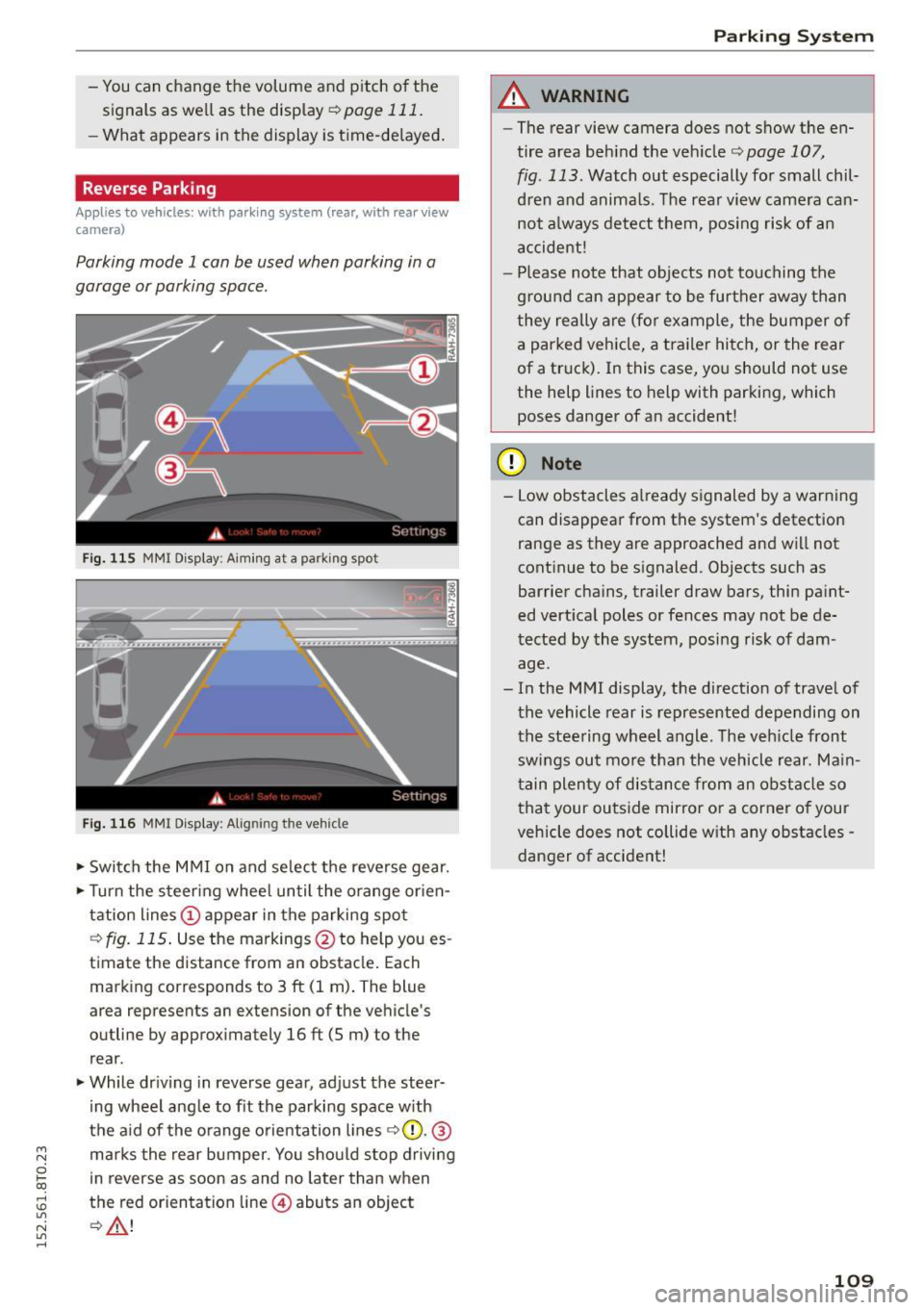
Parking mode 1 can be used when parking in a
garage or parking space.
Fig. 11S MMI Disp lay: A imin g at a parking spot
Fig. 116 MMI Display: Aligning the vehicle
.,. Switch the MMI on and select the reverse gear .
.,. Turn the steering wheel until the orange orien
tation lines
(D appear in the parking spot
¢fig. 115. Use the markings @to help you es
timate the distance from an obstacle. Each
marking corresponds to 3
ft (1 m). The blue
area represents an extension of the vehicle's
outline by approximately
16 ft (5 m) to the
rear .
.,. While driving in reverse gear, adjust the steer
ing wheel angle to fit the parking space with
the aid of the orange orientation lines ¢0 .@
marks the rear bumper. You should stop driving
in reverse as soon as and no later than when
the red orientation line@) abuts an object
¢ ,&. !
Parking System
A WARNING
--The rear view camera does not show the en-
tire area behind the vehicle¢
page 107,
fig . 113.
Watch out especially for small chil
dren and animals. The rear view camera can not always detect them, posing risk of an
accident !
- Please note that objects not touching the
ground can appear to be further away than
they really are (for example, the bumper of a parked vehicle, a trailer hitch, or the rear
of a truck). In this case, you should not use
the help lines to help with parking, which
poses danger of an accident!
(D Note
- Low obstacles already signaled by a warning
can disappear from the system's detection
range as they are approached and will not
continue to be signaled. Objects such as
barrier chains, trailer draw bars, thin paint
ed vertical poles or fences may not be de
tected by the system, posing risk of dam age.
- In the MMI display, the direction of travel of
the vehicle rear is represented depending on
the steering wheel angle. The vehicle front
swings out more than the vehicle rear. Main
tain plenty of distance from an obstacle so
that your outside mirror or a corner of your
vehicle does not collide with any obstacles -
danger of accident!
109
Page 112 of 264
Parking Sy stem
Parallel Parking
App lies to vehicles: with parking system (rear, with rear view
camera)
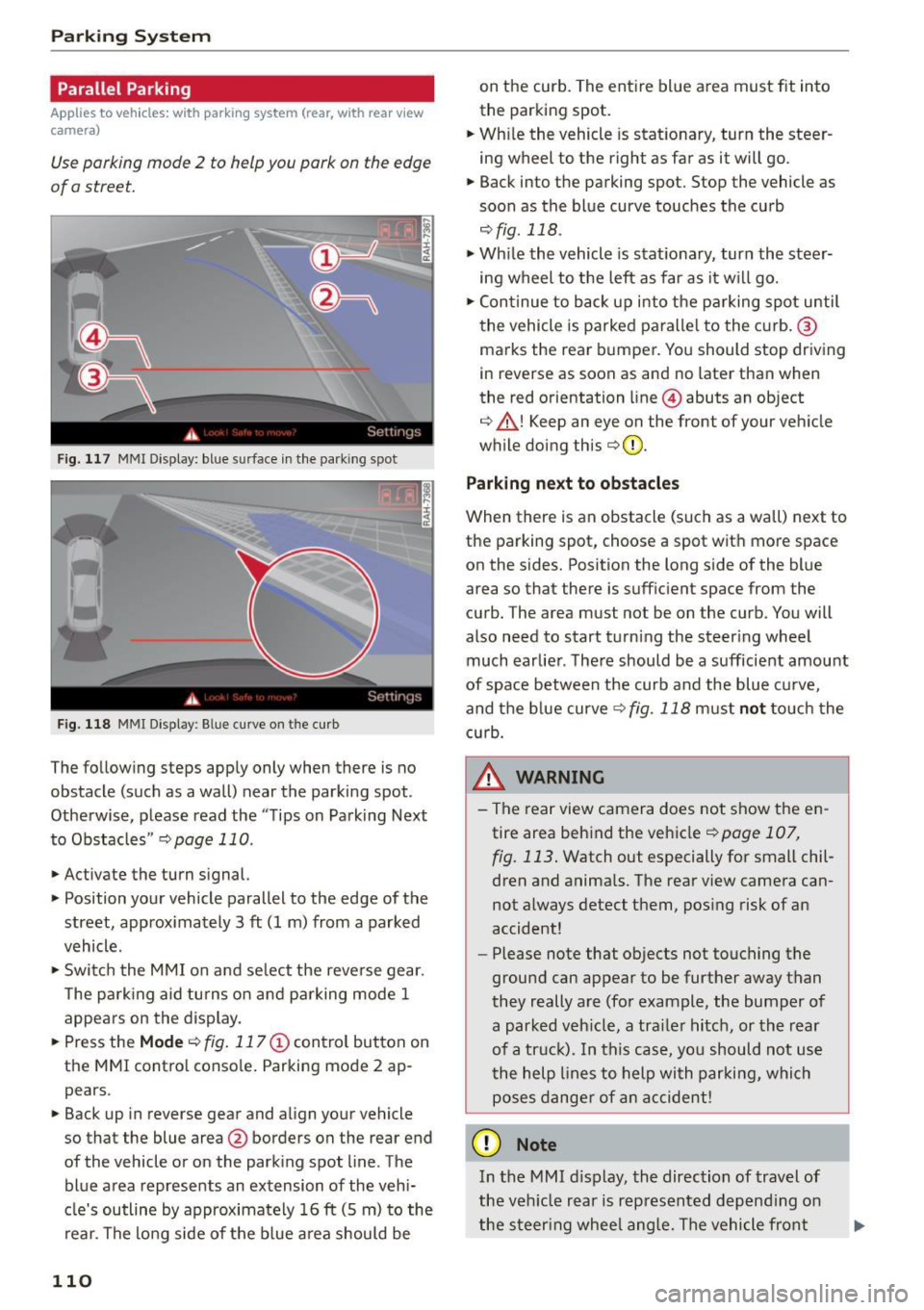
Use parking mode 2 to help you park on the edge
of a street.
F ig. 117 MMI Display: bl ue s urface in the park ing spot
F ig. 118 MMI Display : B lue curve o n th e curb
The following steps apply only when there is no
obstacle (such as a wall) near the parking spot.
Otherwise, please read the "Tips on Parking Next
to Obstacles "
r::;, page 110.
.,. Activate the turn signal.
.,. Position your vehicle parallel to the edge of the
street, approx imately 3
ft (1 m) from a parked
vehicle .
.,. Swi tch the MMI on and se lect the reverse gear.
T he park ing aid tu rns on and parking mode 1
appears on the display.
... Press the
Mode r::;, fig. 117 © control button on
the MMI contro l conso le . Parking mode 2 ap
pears .
... Back up in reverse gear and align your vehicle
so that the blue area@ borders on the rear end
of the vehicle or on the park ing spot line . The
blue a rea represents an extension of the vehi
cle's outline by approximately 16
ft (5 m) to the
rear. The lo ng side of the b lue area should be
110
on the curb. The ent ire blue area must fit into
the parking spot.
... Wh ile the vehicle is stat ionary, turn the steer
ing wheel to the right as far as it will go.
.,. Back into the parking spot. Stop the vehicle as
soon as the blue curve touches the curb
,:;;, fig . 118 .
.,. Wh ile the vehicle is stationary, turn the steer
ing wheel to the left as far as it w ill go .
.,. Con tinue to back up into the p arking spot until
the vehicle is parked paralle l to the curb. ®
ma rks the rea r bumper. You should stop driving
in reverse as soon as and no later than when
the red orientation line @) abuts an object
r::;, _&! Keep an eye on the front of your veh icle
while doing this
r::;, Q) _
Parking ne xt to ob stacles
When there is an obstacle (such as a wall) next to
the parking spot, choose a spot wit h more space
on the sides. Position the long s ide of the blue
area so that there is sufficient space from the
curb. The area must not be on the curb . You will
also need to start turning the steer ing wheel
much earlie r. The re should be a sufficient amount
of space between the curb and the blue c urve,
and the blue curve
r::;, fig. 118 must not touch the
c u rb.
&_ WARNING
- T he rear view camera does not show the en
tire area beh ind the vehicle
r::;, page 107,
fig. 113 . Watch out especially for small chil
dren and anima ls . The rear view camera can
not a lways detect them, pos ing risk of an
accident!
- Please n ote that objects not touching the
ground can appear to be further away than
they really a re (for example, the bumper of
a parked veh icle, a tra iler hitch, or the rear
of a tr uck). In this ca se, yo u sh ould not us e
t he help lines to help with parki ng, which
poses dange r of an accident!
(D Note
In the MMI d isplay, the direction of travel of
the veh icle rear is rep resented depend ing on
the steer ing whee l ang le. The vehicle fron t
Page 114 of 264
Driving safety
Driving safety
Basics
Safe driving habits
Please remember -safe ty first!
This chapter contains important information,
tips, instructions and warnings that you need to
read and observe for your own safety, the safety
of your passengers and others. We have summar ized here what you need to know about safety
belts, airbags, child restraints as well as child
safety. Your safety is for us
priority number 1. Al
ways observe the information and warnings in
this section - for your own safety as well as that
of your passengers .
The information in this section applies to all
model versions of your vehicle . Some of the fea
tures described in this sections may be standard
equipment on some models, or may be optional
equipment on others. If you are not sure, ask
your authorized Audi dealer.
A WARNING
- Always make sure that you follow the in
structions and heed the WARNINGS in this
Manual.
It is in your interest and in the in
terest of your passengers.
- Always keep the complete Owner's Litera
ture in your Audi when you lend or sell your
vehicle so that this important information
will always be available to the driver and
passengers.
-
- Always keep the Owner's literature handy so
that you can find it easily if you have ques
tions .
Safety equipment
The safety features are part of the occupant re
straint system and work together to help reduce
the risk of injury in a wide variety of occident sit
uations.
Your safety and the safety of your passengers
should not be left to chance. Advances in tech
nology have made a variety of features available
to help reduce the risk of injury in an accident.
112
The following is a list of just a few of the safety
features in your Audi:
-sophisticated safety belts for driver and all pas-
senger seating positions,
- belt force limiters for the front seats,
- belt pretensioners for the seats,
- head restraints for each seating position,
- front airbags,
- side airbags in the front seats,
- side curtain airbags,
- special LATCH anchorages for child restraints,
- adjustable steering column.
T hese individual safety features, can work to
gether as a system to help protect you and your
passengers in a wide range of accidents . These
features cannot work as a system if they are not
always correctly adjusted and correctly used.
Safety is everybody's responsibility!
Important things to do before driving
Safety is everybody's job! Vehicle and occupant
safety always depends on the informed and care
ful driver.
For your safety and the safety of your passen
gers,
before driving always:
.,. Make sure that all lights and signals are operat
ing correctly .
.,. Make sure that the tire pressure is correct.
.,. Make sure that all windows are clean and afford
good visibility to the outside .
.,. Secure all luggage and other items carefully
Q page 60.
.,. Make sure that nothing can interfere with the
pedals .
.,. Adjust front seat, head restraint and mirrors
correctly for your height.
.,. Instruct rear seat passengers to adjust the
head restraints according to their height.
.,. Make sure to use the right child restraint cor
rectly to protect ch ildren
c> page 151 , Child
safety .
.,. Sit properly in your seat and make sure that
your passengers do the same
Q page 54, Seats
and storage.
Page 115 of 264
M N
0 loo
rl I.O
"' N
"' rl
.. Fasten your safety belt and wear it properly. Al
so instruct your passengers to fasten their safe
ty belts properly
¢ page 121.
What impairs driving safety?
Safe driving is directly related to the condition of
the vehicle, the driver as well as the driver's abili
ty to concentrate on the road without being dis
tracted .
The driver is responsible for the safety of the ve
hicle and all of its occupants. If your ability to
drive is impaired, safety risks for everybody in the
veh icle increase and you also become a hazard to
everyone else on the road ¢.&, .Therefore:
.. Do not let yourself be distracted by passengers
or by using a cellular te lephone .
.. NEVER drive when your driv ing ability is im
paired (by medicat ions, alcohol, drugs, etc.).
.. Observe all traffic laws, rules of the road and
speed limits and plain common sense .
.. ALWAYS adjust you r speed to road, traff ic and
weather cond itions .
.. Take frequent breaks on long trips. Do not drive
for more than two hours at a stretch .
.. Do NOT drive when you are tired , under pres
sure or when you are stressed.
A WARNING
Impaired driving safety increases the risk of
ser ious personal injury and death whenever a
vehicle is being used.
Driving safety
Correct passenger
seating positions
Proper seating position for the driver
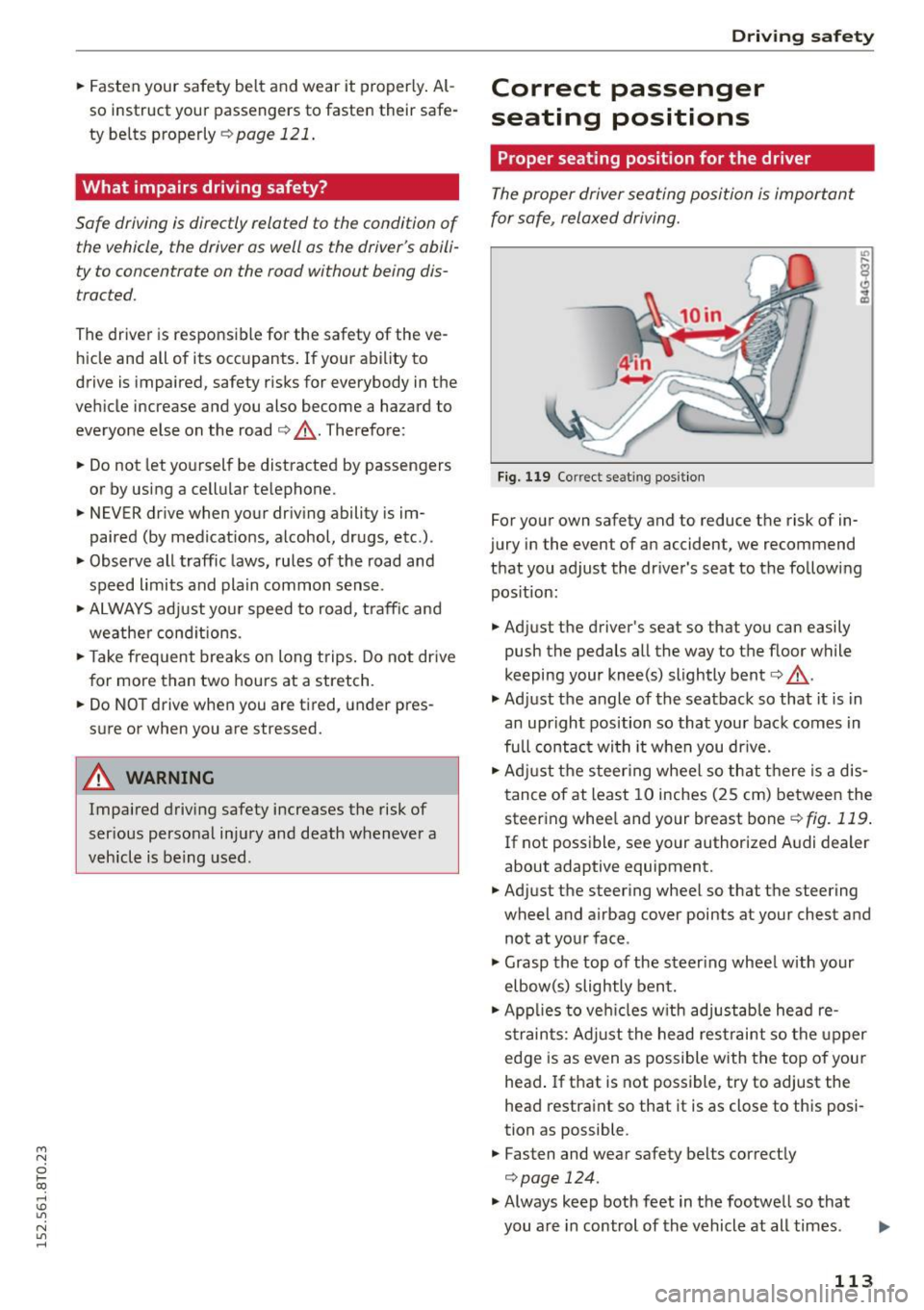
The proper driver seating position is important
for safe, relaxed driving.
Fig. 119 Correct se ating position
For your own safety and to reduce the risk of in
jury in the event of an accident, we recommend
that you adjust the driver's seat to the following pos ition:
.. Adjust the driver's seat so that you can easily
push the pedals all the way to the floor while
keeping your knee(s) slightly bent¢.&, .
.,. Adjust the angle of the seatback so that it is in
an upright position so that your back comes in
fu ll contact wi th it when you dr ive.
.. Adjust the steer ing wheel so that there is a dis
tance of at least 10 inches (25 cm) between the
steering whee l and your breast bone
¢fig. 119 .
If not possible, see your authorized A udi dealer
about adaptive equipment.
.. Adjust the steering wheel so that the steering
wheel and airbag cover points at your chest and
not at your face .
.,. Grasp the top of the steer ing wheel with your
elbow(s) slightly bent.
.. App lies to veh icles w ith adjustable head re
s tra ints: Adjust the head restraint so the upper
edge is as even as possible with the top of your
head . If that is not possible , try to adjust the
head restraint so that it is as close to this posi
tion as possible.
.. Fasten and wear safety belts correctly
¢page 124.
.,. Always keep both feet in the footwell so that
you are in control of the vehicle at all times.
113
Page 118 of 264
Driving safety
-Always drive with the head restraints in
place and properly adjusted.
- Every person in the vehicle must have a
properly adjusted head restraint.
- Always make sure each person in the vehicle
properly adjusts their head restraint. Adjust
the head restraints so the upper edge is as
even as possible with the top of your head.
If that is not possible, try to adjust the head
restraint so that it is as close to this position
as possib le .
- Never attempt to adjust head restraint wh ile driving .
If you have driven off and
must adjust the driver headrest for any rea
son, first stop the vehicle safely before at
tempting to adjust the head restraint.
- Children must always be properly restrained
in a chi ld restraint that is appropriate for
their age and size ~
page 151 .
Examples of improper seat ing positions
The occupant restraint system can only reduce
the risk of injury if vehicle occupants are properly
seated.
Improper seating positions can cause serious in
jury or death . Safety be lts can only work when
they are properly positioned on the body. Im
proper seat ing pos itions reduce the effectiveness
of safety belts and wi ll even increase the risk of
injury and death by moving the safety belt to crit
ical areas of the body. Improper seating positions
also increase the risk of serious injury and death
when an airbag deploys and strikes an occupant
who is not in the proper seating position. A driver
is responsible for the safety of all vehicle occu
pants and especially for children . Therefore:
~ Never allow anyone to assume an incorrect
seating position when the vehicle is being used
~ .&. -
The following bulletins list only some sample po
si tions that will increase the risk of serious injury
and death . Our hope is that these examples will
make you more aware of seating positions that
are dangerous.
116
Therefore, whenever the vehicle is moving:
-never stand up in the vehicle
- never stand on the seats
- never kneel on the seats
- never ride with the seatback reclined
- never lie down on the rear seat
- never lean up against the instrument panel
- never sit on the edge of the seat
- never s it sideways
- never lean out the window
- never put your feet out the window
- never put your feet on the instrument panel
- never rest your feet on the seat cushion or back
of the seat
- never ride in the footwell
- never ride in the cargo area
A WARNING
Improper seating positions increase the risk
of serious personal injury and death whenever
a vehicle is being used.
- Always make sure that all vehicle occupants stay in a proper seating position and are
properly restrained whenever the vehicle is
being used .
Driver's and front
passenger's footwell
' Important safety instructions
Applies to vehicles : wit h knee airbags
A WARNING
Always make sure that the knee airbag can in
flate without interference. Objects between
yourself and the airbag can increase the risk
of injury in an accident by interfering with the
way the airbag deploys or by being pushed in
to you as the airbag deploys.
- No persons (children) or animals should ride
in the footwell in front of the passenger
seat .
If the airbag deploys, this can result in
serious or fatal injuries.
- No objects of any kind should be carried in
the footwell area in front of the driver's or
passenger's seat. Bulky objects (shopping bags, for example) can hamper or prevent
Page 121 of 264
-Never leave your vehicle unattended espe
cially w ith the rear lid left open. A chi ld
could crawl into the vehicle through the lug
gage compartment and close the rear lid be
coming trapped and unable to get out . Be
ing trapped in a vehicle can lead to serious
persona l inju ry.
- Never let children play in or around the vehi
cle.
- Never let passengers r ide in the luggage
compartment . Veh icle occupants m ust al
ways be properly restrained in one of the ve
hicle's seat ing pos itions.
-Air c irculation helps to reduce window fog
ging . Stale air escapes to the outside
th rough vents in the trim pane l. Be su re to
k eep the se slots free and open.
- The t ire pressure must correspond to the
l oad. The t ire pressure is shown o n the tire
pres sure label. T he tire pressure l abe l is lo
cated on the d river 's side B-pi llar . The t ire
pressure label lists the recommended cold
tire inflation pressures for the vehicle at its
max imum capacity weight and the t ires that
were on your vehicle at the time it was man
ufactured. For recommended tire pressures
for normal load cond it ions, please see chap
te r
c:> page 215.
Tie-downs
App lies to vehicles: wit h tie-downs
The luggage compartment is equipped with four
tie-downs to secure luggage and other items .
Use the tie-downs to secure your cargo proper ly
¢ page 118, Loading the luggage compartment.
In a collision, the laws of phys ics mean that even
sma ller items that are loose in the vehicle w ill
become heavy missiles that can cause serious in
jury. Items in the vehicle possess energy which
va ry w ith vehicle speed and the weight of t he
item . Vehicle speed is the most s ignificant factor .
For example, in a frontal collis ion at a speed of
30 mph (48 km/h), the forces acting on a 10-lb
(4 .5 kg) object are about 20 times the normal
Dr ivin g s afet y
weight o f the item . This means that the weight
of the item would sudden ly be about
200 lbs. (90 kg) . You can imagine the injuries
that a 200 lbs. (90 kg) item flying freely through
the passenger compartment co uld cause in a col
li sion like this .
A WARNING
-Weak, damaged or imprope r straps used to
secure it ems to tie-downs can fail d uring ha rd
b raking o r in a coll is ion and cause seriou s per
son al injury .
- Always use s uitable mount ing straps and
p roperly se cu re i tems to the tie-downs in
the l ugg age compa rtment to he lp prevent
items from sh ifting or flying forward as dan
ge rous missi les.
- W hen the rear seat backrest is folded down,
always use s uita ble mo unting straps an d
properly secu re items to the tie-downs in
the l uggage compa rtment to he lp prevent
items from f ly ing forward as dangerous mis
siles into the passenger compartment.
- Never attach a chi ld safety seat tether strap
to a tie-down.
Reporting Safety Defects
Applicable to U.S.A.
If you belie ve that your vehicle
has a defect which could caus e a
crash or could cause injury or
death, you should immediately in
form the National Highway Traffic
Safet y Adm ini stration (NHTSA) in
addition to notifying Audi of
America, Inc.
If NHTSA re ceives simila r com
pl aint s, it may open an inve stig a
tion , and if it find s that a safety
d efe cts e xis ts in a group of ""
119