instrument cluster AUDI A6 2011 User Guide
[x] Cancel search | Manufacturer: AUDI, Model Year: 2011, Model line: A6, Model: AUDI A6 2011Pages: 370, PDF Size: 87.15 MB
Page 33 of 370
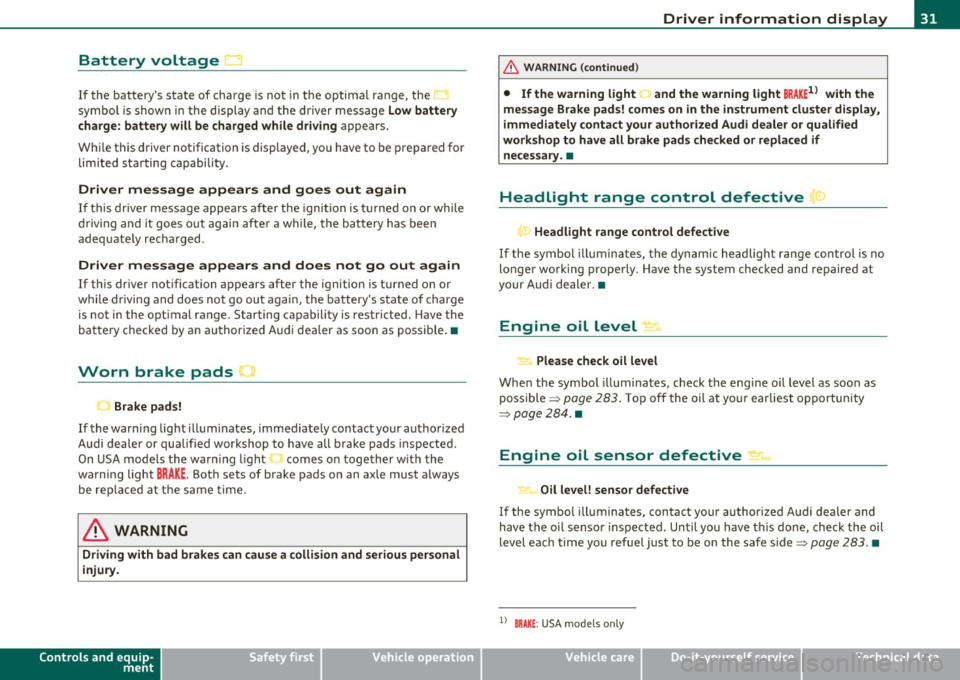
Battery voltage 1• i
If the battery's state of charge is not in the optima l range, the
symbo l is show n in the di splay and the d river me ssage
Low battery
charge: battery will be charged while dri ving
appears.
Whi le this d river notification is displayed, you have to be prepared for
limited starting capability .
Driver message appears and goes out again
If this driver message appears after the ignition is turned on or while
driving and it goes o ut again afte r a while, the ba ttery has been
adequate ly recharged.
Driver me ssage appears and does not go out again
If th is dr iver notification appears after the ignition is turned on or
wh ile driving and does not go ou t aga in, the battery 's state o f charge
is not in the opt imal range . Starting capability is restricted. Have the
bat tery checked by an au thor ized A udi dea le r as soon as possible. •
Worn brake pads U
._ Brake pads!
If the war ning lig ht ill um inates, immediately co ntact your au tho rized
Audi dea ler or qualified wor kshop to have all brake pads inspected.
On USA mode ls the warn ing light comes on together w it h the
warning light
BRAKE . Both sets of brake pads on an axle must a lways
be re placed at th e same time.
& WARNING
Driving with bad brakes can cause a collision and serious personal
injury .
Controls and equip
ment Safety first
Driver information display
& WARNING
(co ntinued )
• If the warning light... and the warning light BRAKE1l with the
mes sage Brake pads! comes on in the instrument cluster di splay,
immediately contact your authorized Audi dealer or qualified
workshop to have all brake pads checked or replaced if necessary. •
Headlight range control defective ((
~ ~ Headlight range control defective
If the symbo l illumina tes, the dynam ic he adlig ht r an ge con tro l is no
longer working properly. Have the system checked and repaired at
your Audi de aler. •
Engine oil Level~
Please che ck oil level
Whe n the symbol i llumina tes, check t he engine o il level as soo n as
poss ible => page 283 . Top off the oil at yo ur earlies t oppor tunity
=>page284 .•
Engine oil sensor defective _t..
Oi l level! sensor defective
If the symbo l illuminates, contact your author ized A udi dealer and
have the oi l senso r inspected. Un til you have t his don e, check the oil
level each time you refue l just to be on the safe side => page 283. •
ll BRAKE : USA mode ls only
Vehicle care Technical data
Page 34 of 370
Driver information display
Applies to veh icles : w ith eng ine s peed limitat ion
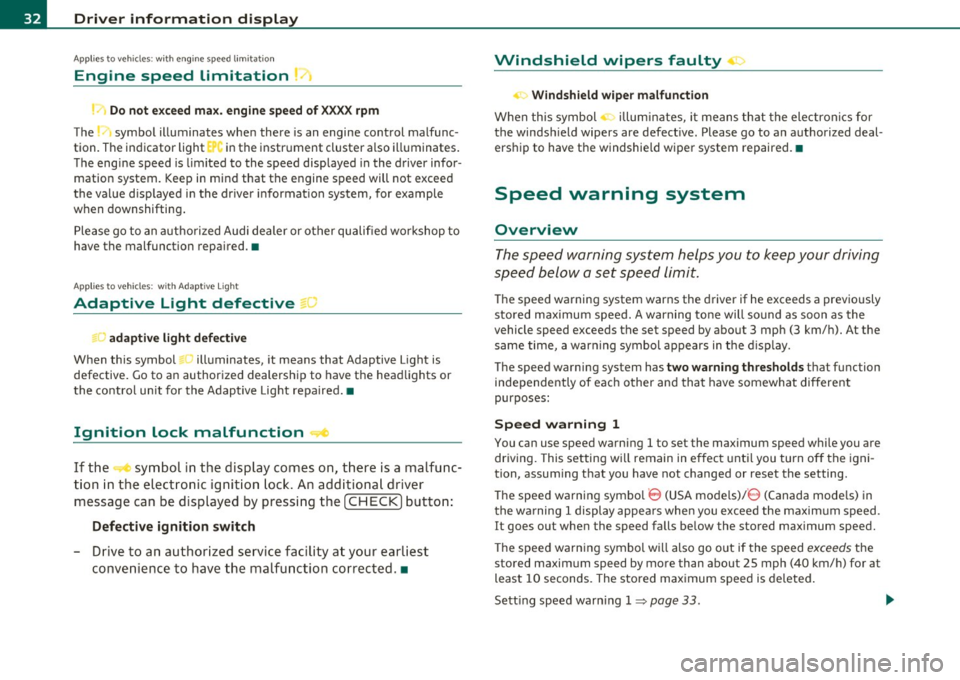
Engine speed limitation .?i
11'1 Do not exceed max. engine speed of XXXX rpm
The -symbol illuminates when there is an engine control malfunc
tion. The indicator light in the instrument cluster also illuminates.
The engine speed is limited to the speed displayed in the driver infor
mation system. Keep in mind that the engine speed will not exceed
the value d isp layed in the drive r informat ion system, for example
when downshifting.
Please go to an authorized Audi dealer or other qualified workshop to
have the malfunction repaired.•
Applies to vehicles: wi th Adap tive Light
Adaptive Light defective
adaptive light defective • r
When this symbol illuminates, it means that Adaptive Light is
defective. Go to an authorized dealership to have the headlights or
the control unit for the Adaptive Light repaired. •
Ignition lock malfunction ..e
If the symbol in the display comes on, there is a malfunc-
t ion in the electronic ignition lock. An additional driver
message can be displayed by pressing the [CHECK] button:
Defective ignition switch
-Drive to an aut horized service facility at your earliest
convenience to have the malfunction corrected.•
Windshield wipers faulty , . .>
.... Windshield wiper malfunction
When this symbol . illuminates, it means that the electronics for
the windshield wipers are defective . Please go to an authorized deal
ership to have the windshield wiper system repaired. •
Speed warning system
Overview
The speed warning system helps you to keep your driving
speed below a set speed limit.
Th e speed warning system warns the driver if he exceeds a previously
stored maximum speed. A warning tone will sound as soon as the
vehicle speed exceeds the set speed by about 3 mph (3 km/h). At the
same time, a warning symbol appears in the display.
The speed warning system has
two warning thresholds that function
independently of each other and that have somewhat different
purposes :
Speed warning 1
You can use speed warning 1 to set the maximum speed while you are
driving. This setting w ill remain in effect until you turn off the igni
tion, assum ing that you have not changed or reset the setting .
Th e speed warning symbo l
'8 (USA models)/ 8 (Canada mode ls) in
the warning 1 display appears when you exceed the maximum speed.
It goes out when the speed falls be low the stored maximum speed.
Th e speed warning symbol will also go out if the speed
exceeds the
stored maximum speed by more than about 25 mph (40 km/h) for at
least 10 seconds. The stored maximum speed is deleted.
Sett ing speed warn ing 1
=> page 33. ~
Page 35 of 370
Speed warning 2
Storing war ning 2 is recommended i f you o/woyswantto be reminded
of a certain speed, fo r example when you are travel ing in a country
that has a genera l maximum speed limit, or if you do not want to
exceed a specified speed fo r winter tires .
The speed warning 2 symbol,
8 , (USA mode ls)/ 8, (Canada models)
appears in the display when you exceed the stored speed limi t. Unlike
warning 1, it will not go out until the vehicle speed drops below the
sto red speed limi t.
Setting speed warn ing 2
=> page 33 .
(I) Tips
Even though your ve hicle is eq uipped with a speed war ning system,
you should st ill watch the speedometer to make sure you are no t
dr iv ing faste r th an the speed lim it. •
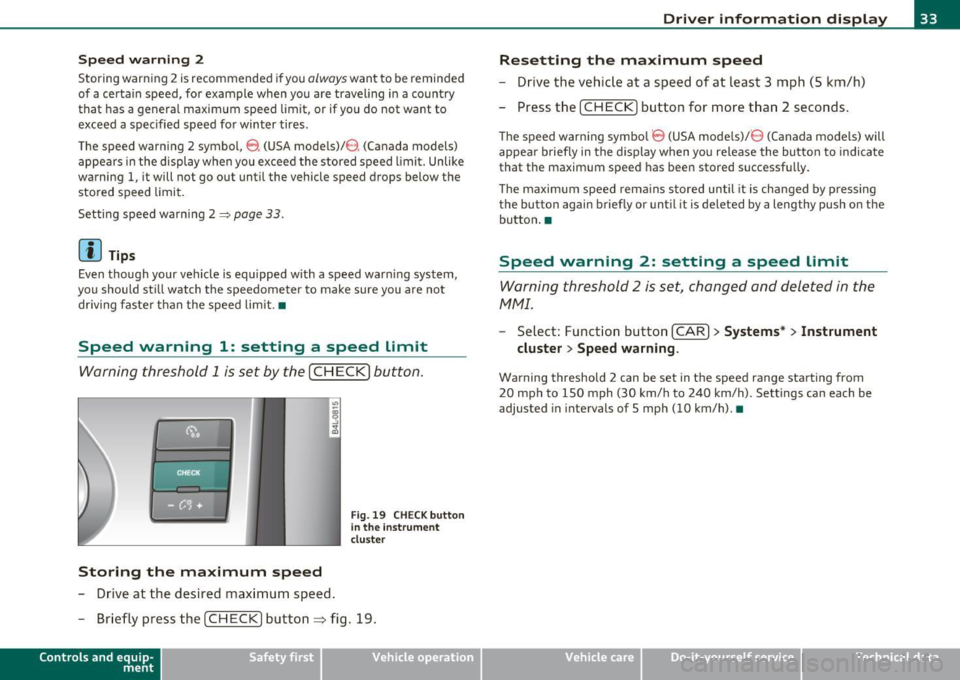
Speed warning 1: setting a speed Limit
Warning threshold 1 is set by the [ CH ECK] button .
Storing the maximum speed
-Drive at the desired max imum speed .
Fig. 19 CHE CK butt on
in the i nstrument
clu ste r
- Briefly pre ss the [CHECK] button ~ fig. 19.
Con tro ls a nd e quip
m en t Vehicle
OP-eration
Driver information display
Resetting the maximum speed
- Drive the vehic le at a speed of at leas t 3 mph (S k m/h)
- Press the [ CH EC K] button for more t han 2 seconds .
The speed warning symbo l 8 (USA models)/ 8 (Canada models) will
appea r briefly in the d ispl ay when you release the bu tton to indica te
that the maximum speed has been stored successf ully.
Th e maximum spee d rema ins s tored until it is cha nged by p ressing
the button again briefly or until it is deleted by a lengthy push o n the
bu tton .•
Speed warning 2: setting a speed Limit
Warning threshold 2 is set, changed and deleted in the
fv1fv1l.
- Select: Funct io n button [CAR ]> Systems* > Instrument
cluster > Speed warning .
Warning threshold 2 can be set in the speed range starting from
20 mph to 150 mph (30 km/ h to 240 km/h). Settings can each be
adjusted in intervals of 5 mph (10 km/h). •
Vehicle care Do-it-yourselt service iTechnical data
Page 38 of 370
![AUDI A6 2011 User Guide Driver information display
In addit io n, all the values in the single -trip or t he total-tr ip memory
c an be delete d sim ultaneously.
[ i ] Tips
All stored values will be lost](/img/6/57593/w960_57593-37.png "AUDI A6 2011 User Guide Driver information display
In addit io n, all the values in the single -trip or t he total-tr ip memory
c an be delete d sim ultaneously.
[ i ] Tips
All stored values will be lost")
Driver information display
In addit io n, all the values in the single -trip or t he total-tr ip memory
c an be delete d sim ultaneously.
[ i ] Tips
All stored values will be lost if the vehicle battery is disco nnected .•
MMI settings
B asic s ettings for the trip computer can b e made in the
MMI.
-Select: Funct ion button I CAR] > Systems *> Instrument
cluster > On-board computer 1 or On-board computer 2 .
The values in the s ingle-trip or the total-tr ip memory can all be reset
t o ze ro at the same t ime u nder
Reset in t he me nu.
In addit ion, you can determine w hat information from t he tr ip
compu ter should be shown in the ins trument cl uste r display. If one
of the p ieces of dr ive r info rmation is tur ned
Off, that dr ive r informa
t ion will not be shown in t he di sp lay . The i nformation w ill contin ue to
be ca lculated by the t rip compu ter and can be tur ned bac k
On at any
time. •
Page 61 of 370
brightness increases again, the low beams are turned off again auto
matically =>& .
In the
AUTO position the low beams are switched off automatically
when the ignition is turned off.
Light Sensor Malfunction
In the event of a light sensor ma lfunct ion, the driver is notified in the
instrument cluster display:
Automatic headlights/automatic wipers defective
For safety reasons the low beams are turned on permanently with t he
switch in
AUTO. However, you can continue to turn the lights on and
off using the light switch. Have the light sensor checked as soon as
possible at a dealership.
& WARNING
• Never use daytime running lights to see where you are going.
They are not bright enough and will not let you see far enough
ahead for safety, especially at dusk or when it is dark. Always
switch on the low beams at dusk or when it is dark.
• Automatic headlights are only intended to assist the driver .
They do not relieve the driver of his responsibility to check the
headlights and to turn them on manually according to the current
light and visibility conditions. For example, fog and rain cannot be
detected by the light sensors. So always switch on the headlights
under these weather conditions and when driving in the dark
io.
• Crashes can happen when you cannot see the road ahead and
when you cannot be seen by other motorists.
- Always turn on the headlights so that you can see ahead and
so that others can see your car from the back.
[ i ) Tips
• With the switch in AUTO front fog lights and rea r fog ligh ts cannot
be turned on in addition .
Controls and equip
ment Safety first
Clear vision
•
The light sensor for headlight control is located in the rear view
mirror mount. Do not apply any stickers to the winds hield in this area
to prevent malfunctions or failures .
• If you remove the ignition from the ignitio n lock w hile the head
lights are still on, a buzzer will sound as long as the dr iver's door is
open to remind you to turn off the lights.
• Always observe the specific loca l regulations for your area as to
when to use your lights .•
Adjusting exterior lighting
The functions are set in the MMI.
-Select: Function button [CAR]> Systems* > Exterior
lighting .
Coming home
The Coming home function ensures tha t after turning off the igni
tion and opening the driver's door
the vehicle per iphery is illum i
nated in the dark. In addition, the front fog lights, the tail lights and
the license plate light are turned on. On-time can be set for a per iod
from O (off) to 60 seconds .
Leaving home
The Leaving home function ensu res that when unlocking the vehicle
per iphery is illuminated in the dark. In addition, the front fog lights,
the tail lights and the license plate light are turned on. This function
can be turned on and off .
Daytime running lights
USA models: On vehicles with xenon lights the daytime running
lights can be turned on or off using this function . On vehicles with
halogen lights there is no daytime running lights function .
Canada models: The function cannot be turned off. It is activated
automatically each time the ignition is tur ned on. This menu item is
shown "greyed out". •
Vehicle care Technical data
Page 64 of 370

Clear vision
-Press the switch /4. => page 61, fig. SO to turn the emer-
gency flashers on or off.
When the emergency flasher is on, all four turn signals blink at the
same time. The turn signal indicator lights¢¢ in the instrument
cluster, as well as the light in the emergency flasher switch~ blink
likewise.
The emergency flashers will turn on automatically if you are in an accident where the airbag has deployed.
(I) Tips
You should turn on the emergency flashers when:
• you are the last vehicle standing in a traffic jam so that any other
vehicles coming can see you, or when
• your vehicle has broken down or you are in an emergency situa
tion, or when
• your vehicle is being towed by a tow truck or if you are towing
another vehicle behind you .•
Turn signal ¢ c> and high beam ~D lever
The lever on the left side of the steering column is used to
operate the turn signals and the high beam as well as the
headlight flasher .
i
'
-to
"' -w
"' cc
Fig. 51 Turn signal
and high beam lever
The turn signal and high beam lever has the following func
tions:
Turn signals ¢ Q
- Lift the lever up all the way=> fig. S 1 © to use the right
turn signals, or push the lever down all the way@to use
the left turn signals.
Auto-blink
-Move the lever (up or down) just to the point of resistance
to use the turn signals for as long as you need them, for
example when changing lanes.
- Move the lever (up or down) just to the point of resistance
and then release it right away to make the turn signals
blink
three times . You can use this feature for example
when changing lanes on highways.
~
Page 65 of 370
High beam l[D
-Push the lever forward ® to switch on the high beam.
- Pull the lever back towards you to switch off the high
beam.
H eadlight flasher l[D
- Pull the lever toward the steering wheel© to use the
headlight flasher.
Notes on the se fea ture s
• The turn signals only work with the ignition turned on. The indi
cato r lights ¢ or¢ in the instrument cluster=>
page 12 also blink.
• After you have turned a corner, the turn signal switches off auto
matically.
• The
high beam works only when the headlights are on. The indi
cato r light [D in the instrument cluster illuminates when the h igh
beams are on.
• T he
headlight flasher works only as long as you ho ld the lever -
even if there are no lights turned on. The indicator light~D in the
instrument cluste r illuminates when yo u use the headlight flasher.
0 Note
Do no t use the high beam or head light flasher if you know that these
could blind oncoming traffic .•
Con tro ls a nd e quip
m en t Vehicle
OP-eration
Clear vision
Interior lights
Front interior lights
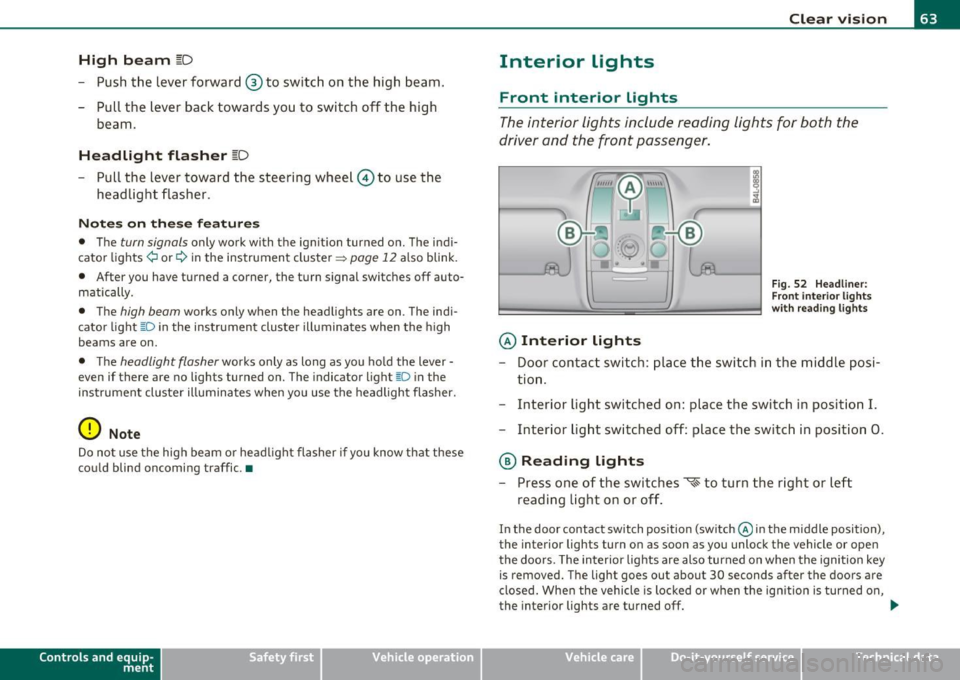
The interior lights include reading lights for both the
driver and the front passenger.
© Interior lights
Fig . 52 Headli ner:
F ron t inte rior lights
wit h rea ding lights
- Door contact switch : place the switch in the middle posi-
tion .
- Interior light switched on: place the switch in position
I.
-Interior light switched off: place the switch in position 0.
® Reading lights
- Press one of the switches '* to turn the right or left
reading light on or off .
In the door contact switch position (switch @in the middle position),
the interior lights turn on as soon as you unlock the vehicle or open
the doors. The interior lights are also turned on when the ignition key is removed. The light goes out about 30 seconds after the doors are
closed . When the vehicle is locked or when the ign ition is turned on,
the interior lights are turned off.
~
Vehicle care Do-it-yourselt service iTechnical data
Page 106 of 370

llll..__w __ a _r _m __ a_n _ d_ c_ o_ ld ________________________________________________ _
Applie s to veh icles : wi th s teering w heel he atin g
Steering wheel heating~
The steering wheel can be heated electrically.
Fig. 97 Stee ring
wheel : button for
st eeri ng wheel heat ing
- Press the(~] button to turn the steering wheel heating on
and off =>fig. 97. The message
Steering whee l heat ing on ! or
S teer ing whee l heat ing off! appears in the instrument
cluster display .
A nearly constant temperature is maintained when the steer ing
wheel heating is switched on.
T he last setting selected for the steering wheel heating (on or off) is
automatically saved when the vehicle is shut off and is assigned to the
remote key.•
Basic settings
General
The basic climate control settings can be adjusted in the
MMI.
- Select: Function button (CAR]> Control button AC.
The following functions can be selected:
• Auto recirculat .
~ page 104
• Synchronizat ion~ page 105
• Center vents~ page 105 •
Automatic recirculation mode
An air quality sensor detects increased concentrations of
pollutants in the outside air and automatically switches
to recirculation mode.
We recommend that you always keep automatic air recirculation ON
to prevent polluted outside air from entering the vehicle interior.
If the air qu alit y sen sor located in the air conditioning system detects
polluted outside air, the sensor decides whether the air pollution can
be reduced by the factory -installed pollutant filter or whethe r it is
necessary to switch to air recirculation. With heavy concentrations of
poll utants, the a ir condit ion ing system is switched automatically to
recirculation mode and the supply of outside air is blocked . As soon
as the concen tration of pollutants in the o utside air drops, fresh air is
supplied to the vehicle in terior again .
In the event that the windows fog up during automatic air recircula
tion, you must press the® button immed iately.
Under certain operating conditions, automatic a ir recirculation is
switched off automatically. With o utside temperatures below about
SO °F ( +10 °(), automatic air recirculation is limited to 30 seconds .
With outside temperatures below about 30 °F (-1 °C) and the cooling
system is switched off, the automatic air recirculation is limited to 15
seconds. •
Page 114 of 370
-On the road .,,, ___________________ _
in. WARNING
• Never turn off th e engine until the vehicle has come to a
c omplete stop .
• The b rake booste r and servotronic only work when the eng ine
is running . With the ignition turned off, you have to apply more
force when stee ring or braking . Since you cannot steer and stop
normally , thi s can lead to accident s and serious in juries.
• For s afety reasons , you should always park your vehicle with
the selector lever in P. Otherwi se, the vehicle could inadvertently
roll away.
• After the engine has been switched off , the radiator fan can
continue to run for up to 10 minutes - even with the ignition
s witched off. It can also switch on again after some time if the
c oolant temper ature rises as the r esult of a heat buildup or if the
engine is hot and the engine compartment is additionally heated
by the sun's rays .
0 Note
If the eng ine has been under heavy load for a n extended per iod, heat
builds up in the engine compartment after the engine is switched
off
- there is a r is k of damaging t he eng ine. Allow the e ngine to run at id le
for about 2 min utes before switc hing it
off. •
Appli es to ve hicles : w it h Conve nience key
Driver messages in the instrument cluster
display
If a function is not present, a driver mess age appea rs .
No key identified
Th is message appears when the ! START ] button is p ressed if there is
no mast er key ins ide the veh icle o r if t he sys tem does not recogn ize
it. For examp le, the master key cannot be recognized if it is covered
by an o bject (e.g . al uminum br ie f c ase) w hich
screens the r adio signal. .Electronic dev
ices such as cell phones can also interfere with
t he radio signal.
Press brake pedal to start engine
Thi s message appea rs if yo u press the !STAR T] butto n to start the
eng ine and do not depress the brake pedal. The engine can on ly be
s t ar ted i f the brake ped al is dep ressed .
Engage N or P to start engine
This message appea rs w he n th e engi ne is started if the sele cto r lever
for the automa tic transmission is not in the P o r N position. The
eng ine can only be s tarted w ith the se lec tor in these pos itions.
? Key not in vehicle
Thi s message appea rs alo ng with the symbol if the master key is
removed from the vehicle with t he engine runn ing. It is intended to
remind you (e.g. w hen c hanging dr ive rs) not to con tinue t he journey
w ithout the master key.
If t he master key is no longe r in the ve hicle, yo u cannot switch of f the
ig nitio n after stopping the engine and you a lso cannot start the
engine again. Moreover, you cannot lock the vehicle from the outside
w ith the key.
Shift to P otherwise vehicle can roll away. Doors do not lock if you
are not in P .
This message appea rs for safety reasons along with a warning buzzer
if the se lector lever for the automatic transmission is not in the P
position when t he ig nition is sw itched
off with t he !STOP] button and
t he d river's door is opened. Move t he selector lever to the P posit io n ,
otherwise the vehicle is not secured against rolling away. You also
c anno t lock the vehicle usi ng the lo cking but ton o n the door hand le
or using the remote key.
To engage steer ing lock, press and hold STOP button
Thi s message appears for safety reasons if the engine and the ignit ion
h ave bee n sw itche d off by p ress ing the
!S T O P) bu tton once, and t hen .,,_
Page 115 of 370

On the road -_______________ __.
the driver's door is opened. In t his instance, the steer ing is not
locked. The s teer ing is locked:
• If you press the
(STOP) button again for more than 1 second .
• If you close the driver 's door and lock yo ur vehicle from the
outs ide .•
Electromechanical parking brake
Operation
The electromechanical parking brake replaces the hand
brake.
Fi g. 104 Cente r
co nsol e: Pa rki ng brak e
- Pull the switch to apply the parking brake ~fig . 104. The
indicator light in the switch will come on.
- Step on the brake pedal or the accelerator pedal and press the switch at the same time to re lease the parking bra ke.
The indicator light in the switch wil l go out .
Your vehicle is equipped with an electromec hanical park ing brake
w hich replaces the handb rake. The parking brake is d esigned to
prevent the vehicle from ro lling unintent iona lly .
Con tro ls a nd e quip
m en t Vehicle
OP-eration
In addit io n to the normal functions of a traditional hand brake, the
ele ct romechan ica l parki ng br ake p rovides various convenience and
safety functions .
Emergency brake
An emergency brake ensures that the vehicle can be slowed even if
t he
normal bra kes fail => page 115, "E merge ncy bra king" .
Indicator lights
• If the pa rking brake is applie d with the ig nition turned on , the
indicator light in the instrument cluster (U.S models:
:'.Ii , Canadian
mode ls: © ) and i n the swi tch
(e)) w ill come o n.
• If the parking brake is applied with the ign ition
turned off , the
indicator light in the in strument cluste r (U.S. models:
::'.l, , Ca nadian
models: ©) and in the switch© will come on for about 30 seconds
and then go out .
& WARNING
If the vehicle is stati onary and the transmi ssion is engaged with
the eng ine running, the e ngine should not be speeded up (e.g.
m anuall y from under th e hood ). Otherwi se the vehicle will st art to
mo ve -you run the risk of an ac cident.
0 Note
If the warning/ind icator light (U.S. models: BRAKE , Canadian mode ls:
(Ci)) ) flashes in the ins trumen t clus ter, t here is a brake sys tem
malfunction. By press ing the [
CHECK) b utton, yo u can bri ng up a
dr iver message which explains the malfu nction in mo re deta il.
If the
message
Parking brake! Please contact workshop appea rs, the re is a
parking brake malfunction which yo u should have repaired immedi-
ately by an au thorized dealership=>
page 26 . ..
Vehicle care Do-it-yourselt service iTechnical data