instrument cluster AUDI A6 2011 Owners Manual
[x] Cancel search | Manufacturer: AUDI, Model Year: 2011, Model line: A6, Model: AUDI A6 2011Pages: 370, PDF Size: 87.15 MB
Page 9 of 370
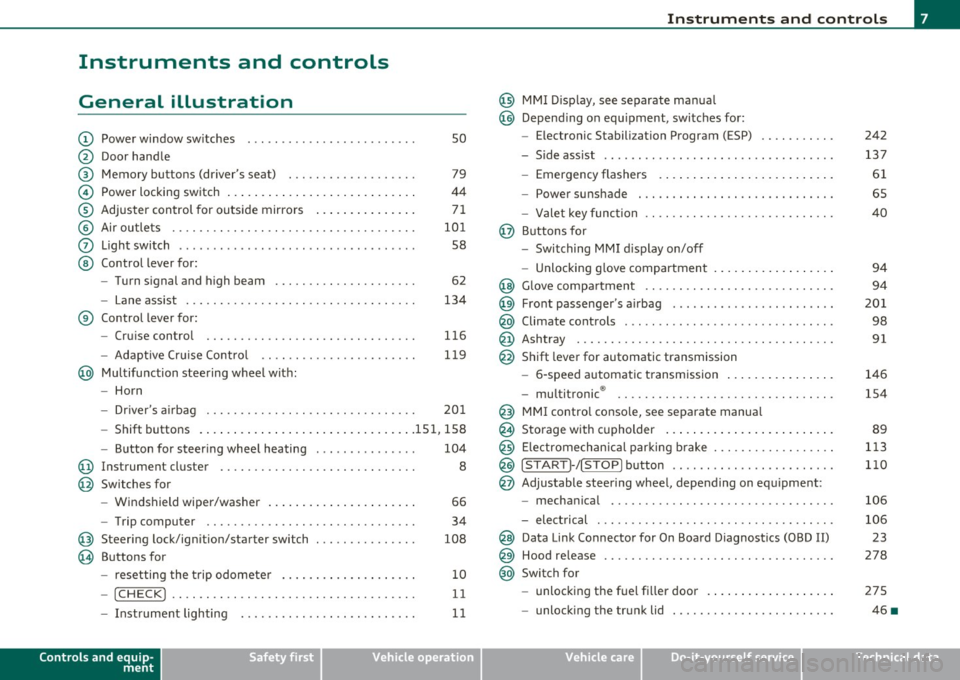
Instruments and controls
General illustration
(D Power window switches . . . . . . . . . . . . . . . . . . . . . . . . . 50
@ Door handle
@ Memory buttons (driver's seat) . . . . . . . . . . . . . . . . . . . 79
© Power locking switch . . . . . . . . . . . . . . . . . . . . . . . . . . . . 44
® Adjuster control for outside mirrors . . . . . . . . . . . . . . . 71
© Air outlets . . . . . . . . . . . . . . . . . . . . . . . . . . . . . . . . . . . . 101
0 Light switch . . . . . . . . . . . . . . . . . . . . . . . . . . . . . . . . . . . 58
@ Control lever for:
- Turn signal and high beam . . . . . . . . . . . . . . . . . . . . . 62
- Lane assist . . . . . . . . . . . . . . . . . . . . . . . . . . . . . . . . . . 134
® Control lever for:
- Cruise control . . . . . . . . . . . . . . . . . . . . . . . . . . . . . . . 116
- Adaptive Cruise Control . . . . . . . . . . . . . . . . . . . . . . . 119
@ Multifunction steering wheel with:
- Horn
- Driver 's airbag . . . . . . . . . . . . . . . . . . . . . . . . . . . . . . . 201
- Shift buttons ...... .. .. .... ........ .......... 151, 158
- Button for steering wheel heating . . . . . . . . . . . . . . . 104
@ Instrument cluster . . . . . . . . . . . . . . . . . . . . . . . . . . . . . 8
@ Switches for
- Windshield wiper/washer . . . . . . . . . . . . . . . . . . . . . . 66
- Trip computer ............... .. .. .. .. ....... .
@ Steering lock/ignition/starter switch ... .. ......... .
@ Buttons for
- resetting the trip odometer .......... .. .. .. ... .
- !CHECK] .... .... .. .... .. .... ............... .
-Instrument lighting . ....... .... .. .. .... .. .. . .
Controls and equip
ment Safety first
34
108
10
11
11
Instruments and controls
@ MMI Display, see separate manua l
@ Depending on equipment, switches for:
- Electronic Stabili zation Program (ESP)
- Side assist .. ... . .... .. .. .. .. .. .... .. .. .. ... .
- Emergency flashers .. .... .. .. .. ............. .
- Power sunshade . ... ... .. .. .. .. .... .. .. ... .. .
- Valet key function .. .. .. .. .... ....... ...... .. .
@ Buttons for
- Switching MMI display on/off
- Unlocking glove compartment
@ Glove compartment ...... .. .. .. .... .. ......... .
@ Front passenger 's airbag ............... ... .. .. . .
@ Climate controls ... .. .. .. .. .. .... .......... ... .
@ Ashtray .............. .. .... .. .. .. .. .... ..... .
@ Shift lever for automatic transmission
- 6-speed automatic transmission ....... .. ... ... .
- multitronic ® ....................... .. .... .. .
@ MMI contro l console, see separate manua l
@ Storage with cupholder ... .. ... .............. .. .
@) Electromechanical parking brake .............. .. . .
@ ISTAR T]-/ISTOP] button ........ .. ... .......... .
@ Adjustable steering wheel, depending on equipment :
- mechanical ............. .. .. .. ............. .
- electrical . ... ... .. .. .. .. .. .. .. .. .. ....... .. .
@ Data Link Connector for On Board Diagnostics (OBD II)
@ Hood release .......... .. .... .. .. .. .. ......... .
@ Switch for
unlocking the fuel fi ller door .............. .... .
- unlocking the trunk lid . .. ........ .. ... .. .. .. . .
Vehicle care
242
137
61
65
40
94
94
201
98
91
146
154
89
113
110
106
106 23
278
275
46 •
Technical data
Page 10 of 370
Instruments and warning /indicator lights
Instruments and warning/indicator lights
Instruments
Instrument cluster and controls
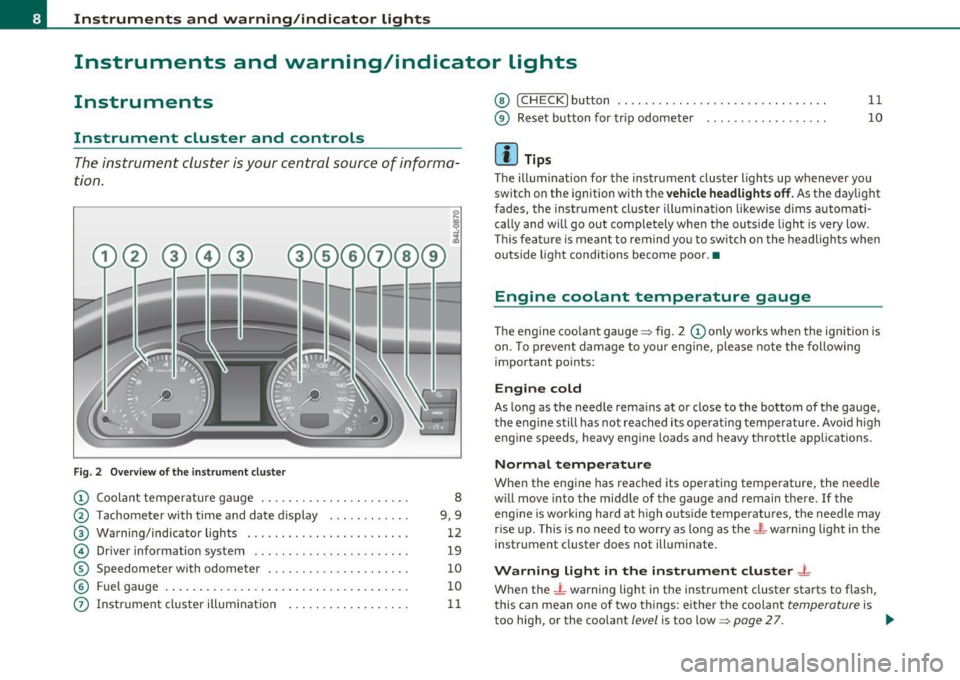
The instrument cluster is your central source of informa
tion.
F ig. 2 Overview of th e ins trument cluste r
CD Coolan t temperature ga uge ..... .. ...... ... .. ... .
@ T achomete r with t ime and da te d isplay . .... .. .. .. .
@ Warning/indica tor lights ....................... .
© Driver information system .................. .. .. .
© Speedometer with odometer .................. .. .
© Fuel gauge . ... ... .. ... ...... . .. .. .. ... ... . ... .
0 Instr ument cluster i llum ination . .. .............. .
8
9,9
12
19
10
10
11
@ !CHECK] button .... ...... ..... ......... ...... .
® Reset button for trip odometer ................. .
(I) Tips
11
10
The illuminat ion for the instrument cluster lights up whenever you
switch on the ignition with the
v ehicle headlight s off. As the daylight
fades, the instrument cluste r illum ination likewise d ims automati
cally and w ill go out completely when the outside light is very low .
T his featu re is mean t to remind you to switch on the headligh ts when
outs ide light conditions become poor. •
Engine coolant temperature gauge
The engine coolant gauge ~ fig . 2 CD only works when the ignition is
on. To p revent damage to yo ur engine, ple ase note the following
important points:
Engine cold
As long as the needle rema ins at or close to the bottom of the gauge,
t he engine s till has not rea ched its operat ing tem perature. Avo id hig h
eng ine speeds, heavy eng ine loads and heavy t hrottle app lications.
Normal temperature
When the eng ine has reached its ope rating temperature, the needle
w ill move into the midd le of the gauge and remain t he re.
If the
eng ine is working hard at high outs ide temperatures, the needle may
r ise up. This is no need to worry as long as the
_t_ warning light in th e
instr ument cluster does not illuminate.
Warning light in the instrument cluster -t
When the _L warning light in the instrument cluster starts to flash,
this can mean one of two things: e ithe r th e coolan t
temperature is
too high, or the coolant
level is too low=> page 27. _,.
Page 11 of 370
If the needle is well in the upper area of the gauge, the coolant
tempe rat ure is too high.
Stop the vehicle , switch the engine off and
allow the engine to cool.
If the warning light comes on again after
driving a short distance, contact an authorized dealer.
& WARNING
• Alway s observe th e warning in => page 271, "Engine comp art
ment ", before opening the hood and checking the engine coolant
level.
• Never open the engine hood if you see or hear steam, or if you
s ee engin e coolant dripping from the engine compartment. You
could burn yourself. Let the engine cool off first so that you cannot
hear or see any steam or engine coolant .
0 Note
• Mounting additiona l lights or accessories in fron t of the a ir inlets
reduces the cooling effect of the radiator . At high outside tempera
t ur es o r high engine load, the engine could overheat.
• The front spo iler has bee n des igned to prope rly d istribute the
coo ling air when the vehicle is moving.
If the spoiler is damaged, this
cou ld reduce the coo ling effect and the eng ine could then overheat .
Ask your author ized A udi dealer for assistance .•
Tachometer (engine rev counter)
The tachometer indicat es th e engine RPM (revolutions
per minutes).
Th e tac home ter @ => page 8, fig. 2 is the left of the two large cloc k
type displays.
Th e engine tu rns at a speed
1,000 times the si ng le dig it in the
display, e.g. if the need le is po int ing at the "2 " the engi ne is t urning
at 2,000 RP M.
Controls and equip
ment Safety first
Instruments and warning
/indicator lights
If e ngine RPM drops below 1,500, you s hould dow nsh ift to t he next
lower ge ar. T he re d area at t he e nd of the s cale i ndic ates m aximum
permissible e ngine RPM after the break-in per iod . Before reaching
this area, move the selector lever to posit ion "D (Drive)" or ease yo ur
foot off the accelerator pedal.
0 Note
T he tachome ter needle s houl d not move into the red range. If it does,
then only fo r a very short period of time . You could damage your
e n g in e by driv ing at h igh RPM .
c£> For the sake of the environment
Upshifting early saves fuel a nd reduces e ngine noise. •
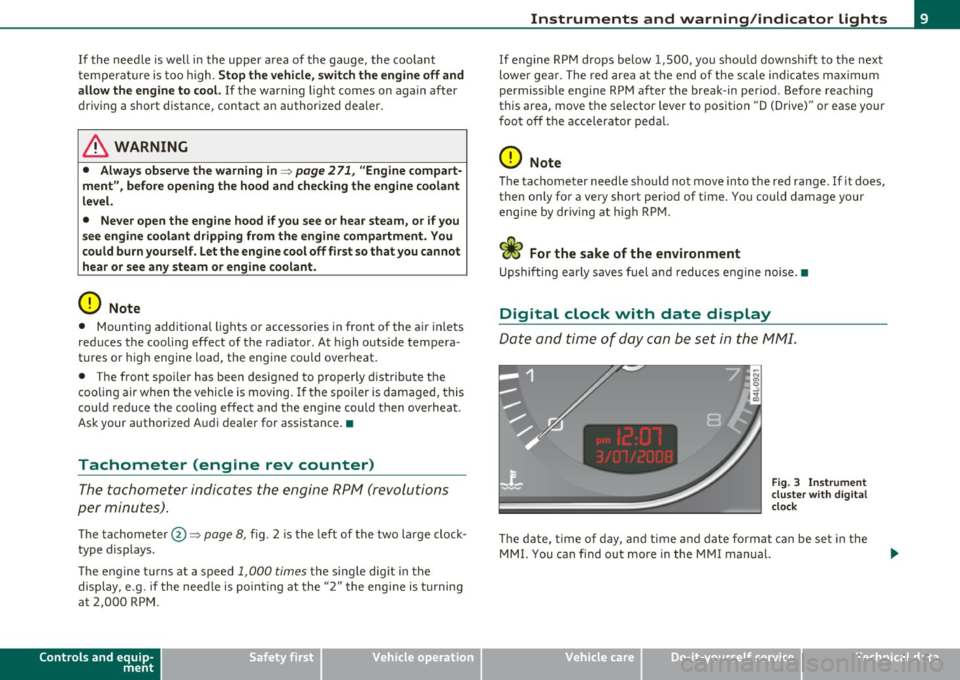
Digital clock with date display
Date and time of day can be set in the MM I.
Fig. 3 Instrumen t
cluster with digital
clock
Th e d ate, t ime o f day, and time and date fo rmat c an be se t in the
MMI. You can find o ut more in the MMI manual.
Vehicle care Technical data
Page 12 of 370

Instruments and warning /indicator lights
(I) Tips
• T he dig ita l clock and the odomete r are t urned on for about 30
seconds when the driver's door is opened .
• When the ign ition is turned off, the odometer read ing and the
digital clock with date disp lay can be switc hed on for about
30 se conds by press ing the
[CH ECK! button~ page 11, fig. 5. •
Speedometer with odometer
The speedometer shows you the vehicle speed, and the
odometer shows you how many miles (kilometers) you
have driven .
Fig. 4 Instrume nt
clu st e r O dom eter a nd
r e se t bu tton
The odometer and tr ip odometer are located inside the speedometer .
• USA models -Miles
• Canada models -Kilometers
You can sw itch the display from miles to kilometers and vice versa via
t he MM I.
Lower odometer
The lowe r odometer shows the total n umber of m iles ( kilometers)
dr iven .
Upper odometer (trip odometer)
The upper odometer shows the total n umber of m iles (k ilometers)
dr iven since you last reset the odometer to zero . You can use th is
odometer when yo u want to keep track of how many m iles (kilome
ters) you have dr iven for a sing le trip or errand. The last d igit indicates
1/10 of a mile (100 meters) .
You can reset t he tr ip odometer to zero by pressi ng t he Rese t bu tto n
~ o.o.
Malfunction message
If there is a malfunction somewhere in the instrument cluster, dEF
w ill appear in the tr ip odomete r and will s tay on . Con tact yo ur autho
r ized Audi dealer to have the problem corrected.
[ i ] Tips
• The d igita l clock and the odometer are turned on for about 30
seconds when the driver 's door is opened .
• When the ignition is turned off, the odometer reading and the
dig it a l cl ock with date d isp lay can be sw itched on for abou t
30 seconds by pressing the [
CHECK! button=> page 11 , fig. 5. •
Fuel gauge
The fuel gauge only works when the ignition is on.
When the need le reaches the rese rve mark, the~
page 30 symbol
appea rs in the instrument cluste r display as we ll as the message
Plea se refuel. T here are approximate ly between 1.8 and 2.4 gallons
(7-9 l ite rs) of fuel left . This message is meant to remind yo u to
refuel.
Th e to tal tank capa city of yo ur vehicle is liste d in ~ page 343.
Page 13 of 370
0 Note
Never run the tan k comp letely d ry . An irregular s upply of f ue l can
cause engine misfiring and fue l cou ld enter the ex ha ust system . T he
c ata lytic co nve rter co ul d the n overhea t and be damaged .•
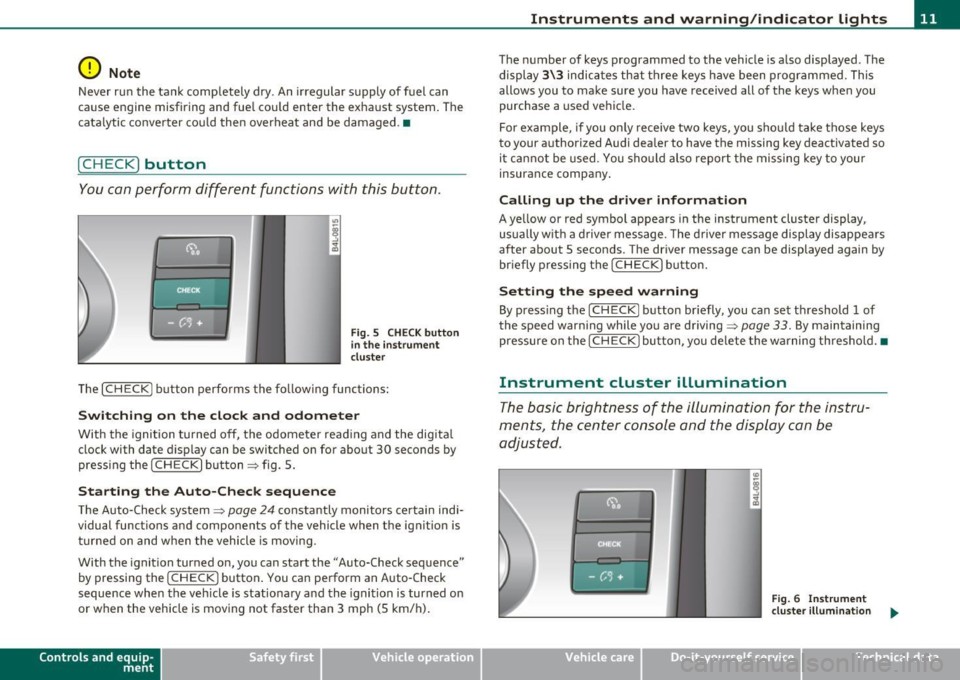
[ C HECK ) button
You can per form differen t functions wi th this button.
Fig . 5 CHE CK button
i n the in strume nt
clu ste r
Th e [ C H ECK] bu tton perfo rms the fo llowing func tions :
Switching on the clock and odometer
With the ignition tu rned off, the odome ter read ing and the dig ita l
clock with date d isplay can be switched on for abo ut 30 seconds by
pressin g the [
CHECK ] button ~ fig . 5.
Starting the Auto-Check sequence
The Auto-Check system~ page 2 4 constantly monitors ce rtain indi
vidual functions and components of the vehicle when the ignit ion is
tur ned on and w hen the vehicle is movi ng.
With the ignition turned on, yo u can sta rt the "A uto-Check sequence"
by pressing the
!CHECK ] button. You can perform an Auto -Check
sequence whe n the veh icle is st ationa ry a nd the ignition is turned on
or when the vehicle is moving not faster than 3 mph (5 km/h) .
Control s and equ ip
m ent Vehicle OP-eration
Instruments and warning /indicator lights
The nu mber of keys programmed to the vehicle is a lso displayed . The
di splay
3\3 indic ates th at three keys have been programmed . T his
allows you to make sure you have received all of the keys w hen you
purc hase a used ve hicle.
For example, if you o nly receive two keys, yo u sho uld ta ke tho se keys
to your a uthorized Audi dealer to have the missing key deactivated so
i t ca nn ot be used. You sh ould also re port the mis sing key to you r
insurance compa ny.
Calling up the driver information
A ye llow or red symbol appears in the instrument cluster display,
us ua lly w it h a dr ive r mes sage . T he driver message display di sappe ars
after about 5 seco nds. The driver message can be displayed again by
br iefly p ressing t he
[CHECK ] but to n.
Setting the speed warning
By press ing t he I CH ECK] button br iefly, you can set t hreshold 1 of
the speed warning while yo u are driving ~
page 33. By maintaining
pressure on the
I CHECK ] button, you de lete the warning th reshol d.•
Instrument cluster illumination
The basic brig htness of the illumination for the inst ru
ments, the center console and the display can be
a dju sted.
Fig. 6 Instrument
clu ste r illum inat ion .,,_
Vehicle care Do-it-yourselt service iTechnical data
Page 14 of 370
Instruments and warning /indicator lights
- Press the"+" button to increase the brightness during the
hours of darkness.
- Press the"-" button to decrease the brightness during the
hours of dark ness.
A light sensor in the instrument cluster contro ls the illumination for
the instrument cluster, the center console and the displays. In a
br ight env ironment, using the buttons to change the br ightness has
no effect .
[ i ] Tips
The illumination for the instrument cluster lights up whenever you
switch on the ig nition with the vehicle head lights off. As the daylight
fades, the instrument cluster illum inat ion likewise d ims automati
cally and w ill go out completely when the outside light is very low.
Th is feature is meant to remind you to sw itch on the headlights when
outside light conditions become poor. •
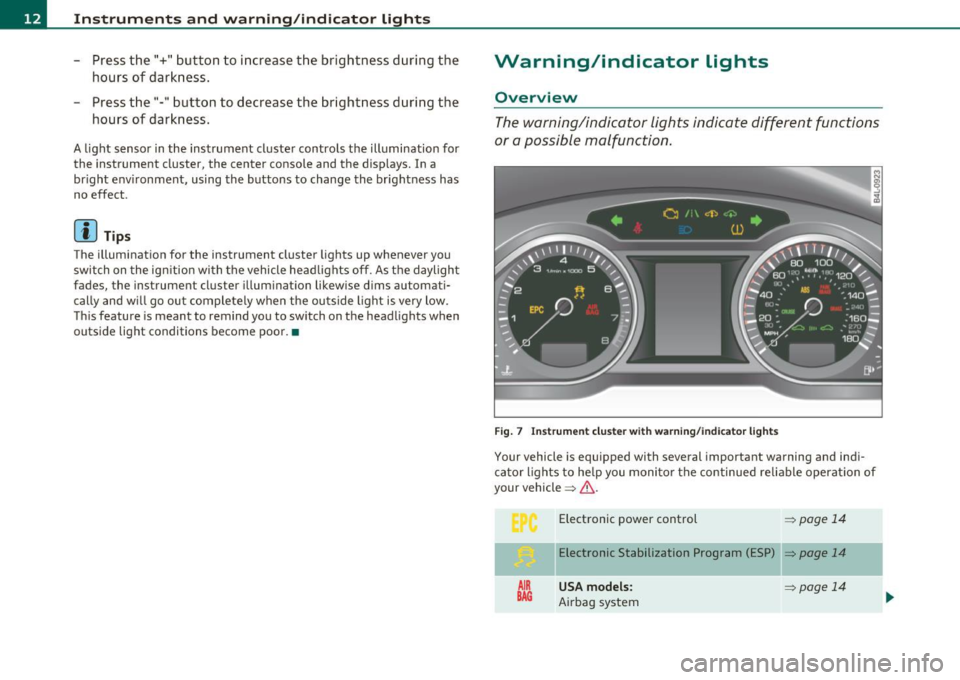
Warning/indicator lights
Overview
The warning/indicator lights indicate different functions
or a possible malfunction .
Fig . 7 Instr um ent cluste r w ith warn in g/ indicato r lig hts
Your vehicle is equipped with several important warning and ind i
ca tor lights to he lp you moni to r the continued re liable operat ion of
your vehicle =>& .
AIR
BAG
Electronic power control => page 14
Elect ronic Stabilization Program (ESP) => page 14
USA models: ~page 14
Airbag system
Page 21 of 370
Driver information display
Introduction
General notes
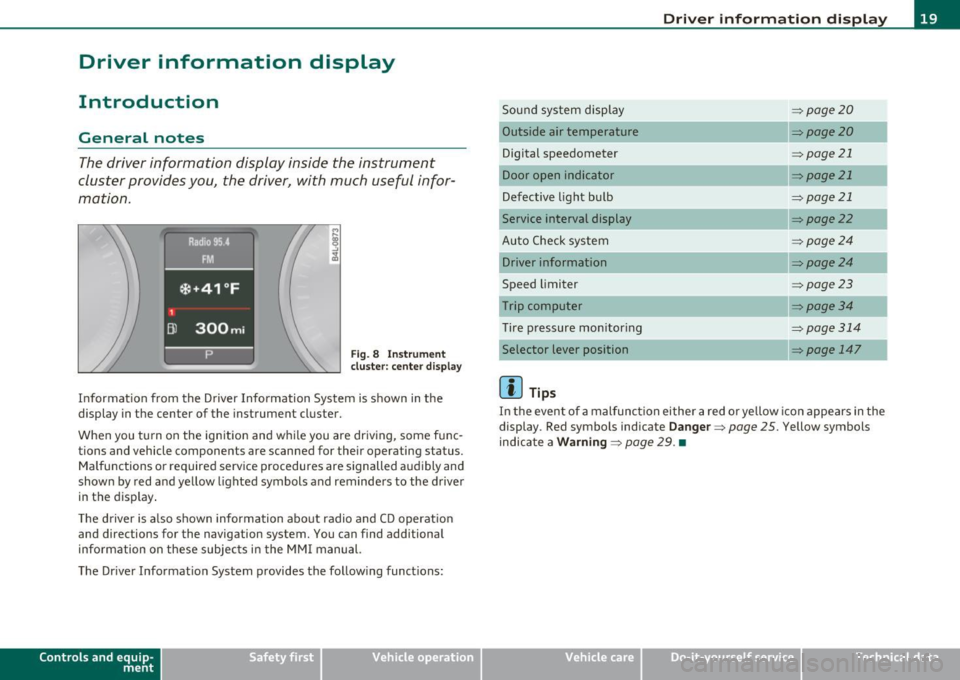
The driver information display inside the instrument
cluster provides you, the driver, with much useful infor
mation .
Fig. 8 Instrument
cluster: center display
Informat ion from the Driver Information System is shown in the
display in the center of the instrument cluster.
When you tu rn on the ignition and while you are driving, some func
tions and vehicle components are scanned for their operating status.
Malfunctions or required service procedures are signalled audibly and
shown by red and yellow lighted symbols and reminders to the driver
in the display .
Th e driver is also shown information about radio and CD operat ion
and directions for the navigation system. You can find additional
information on these subjects in the MMI manual.
The Driver Information System provides the follow ing functions:
Con tro ls a nd e quip
m en t Vehicle
OP-eration
Driver information display
Sound system display ~page20
Outside a ir temperature ~page20
Digital speedometer ~ page21
Door open indicator ~page21
Defective light bulb ~page21
Service interval display ~page22
Auto Check system ~page24
Driver information ~page24
Speed limiter ~page23
Trip computer ~ page3 4
Tire pressure monitoring ~page314
Selector lever position ~ page 147
(I] Tips
In the event of a malfunction either a red or yellow icon appears in the
display . Red symbols indicate
Danger ~ page 25. Yellow symbols
indicate a
Warning ~ page 29. •
Vehicle care Do-it-yourselt service iTechnical data
Page 25 of 370
On-Board Diagnostic system (OBD)
Malfunction Indicator Lamp (MIL)
The Malfunction Indicator Lamp (MIL) in the instrument cluster
~ page 12, fig. 7 is part of the On-Board Diagnostic (OBD II) system.
The warn ing/ind icator light illuminates when the ignition is switched
on and goes out after the engine starts and the idle has stabilized.
This indicat es that the MIL is working properly.
If the light does not go out after the engine is started, or illuminates
while you are driving , a malfunction may exist in the engine system.
If the light illuminates, the catalytic co nverter could be damaged .
Continue driving
with reduced power (avoiding sustained high
speeds and/or rapid accelerations) and have the condition corrected.
Contact your authorized Audi dealer .
If the light illuminates, the electronic speed limiter may also be
malfunctioning. For more information~
page 23, "Electronic speed
limiter".
An improperly closed fuel filler cap may also cause the MIL light to
illuminate ~
page 275. •
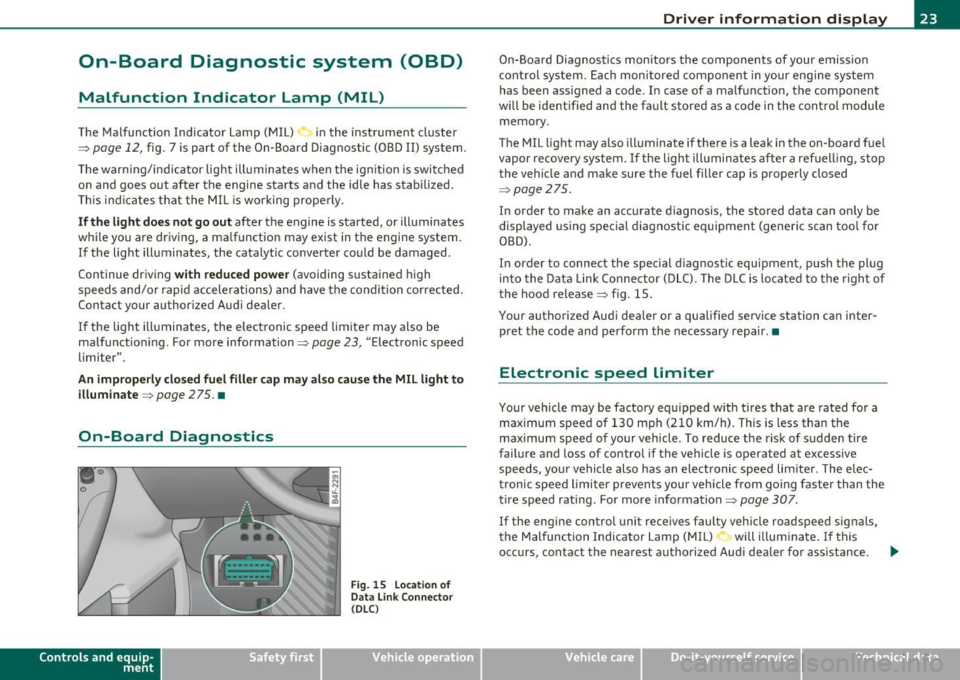
On-Board Diagnostics
Contro ls a nd e quip
m en t
Fig . 15 Locat ion of
Data Link Connector ( DLC )
Vehicle OP-eration
Driver information display
On-Board Diagnostics monitors the components of your emission
control system. Each monitored component in your engine system
has been assigned a code. In case of a malfunction, the component
will be identified and the fault stored as a code in the control module
memory .
The MIL light may also illuminate if there is a leak in the on-board fue l
vapor recovery system. If the light illuminates after a refuelling, stop
the vehicle and make sure the fuel filler cap is properly closed
~ page 275 .
In order to make an accurate diagnosis, the stored data can only be
displayed using specia l diagnostic equipment (generic scan too l for
OBD).
In order to connect the special diagnostic equipment, push the plug
into the Data Link Connector (DLC). The DLC is located to the right of
the hood release~ fig . 15.
Your authorized Audi dealer or a qualified service station can inter
pret the code and perform the necessary repair.•
Electronic speed limiter
Your vehicle may be factory equipped with tires that are rated for a
maximum speed of 130 mph (210 km/h). This is less than the
maximum speed of your vehicle . To reduce the risk of sudden tire
failure and loss of control if the vehicle is operated at excessive
speeds, your vehicle also has an electronic speed limiter. The elec
tronic speed limiter prevents your vehicle from going faster than the
tire speed rating. For more information ~
page 307.
If the engine con trol unit receives faulty vehicle roadspeed signals,
the Malfunction Indicator Lamp (MIL) will illuminate. If this
occurs, contact the nearest authorized Audi dealer for ass istance . .,.
Vehicle care Do-it-yourselt service iTechnical data
Page 27 of 370
Driver m essages and yellow symbols
If a y ellow symbol appears in the display, a dr iver message is a lso
displayed automatically .
For example, the symbo l appears in the display, ind icating low
windshield washer flu id level. The following message also appea rs:
Please refill washer fluid
Th e d river message d isappears after a few seconds . The d rive r
message can be displayed again by briefly press ing the
I CHECK ]
button.•
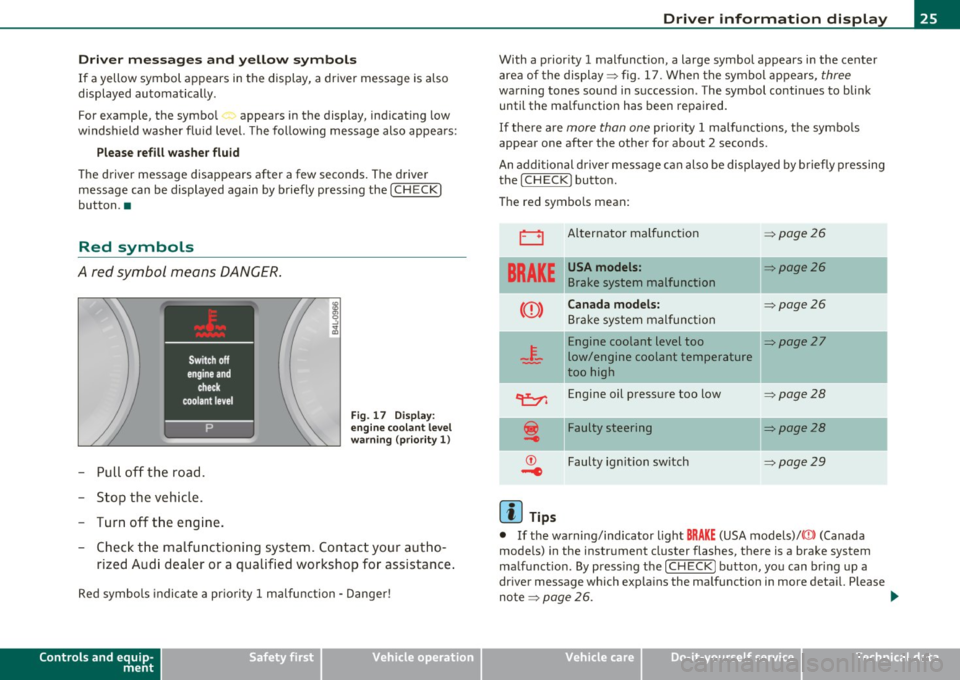
Red symbols
A red symbol means DANGER.
-Pu ll off the road.
- Sto p the veh icle.
- Turn off t he eng ine.
Fi g. 1 7 Disp lay:
e ngine c oolan t le vel
warn in g { priority 1 )
- Check th e ma lfu nct ioning system . Contac t your au tho-
rized A ud i dea ler or a qualified works hop fo r assistance .
Red symbo ls indi ca te a pr io rit y 1 malfu nction - D ange r!
Controls and equip
ment Safety first
Driver information display
With a prior
ity 1 malfunction , a large symbol appears i n the center
area of the display :::> fig . 1 7 . When the symbol app ears,
three
warning tones sound in s uccession . The symbol conti nues to bli nk
until the ma lfunction has been repaired.
If the re a re
more than one pr io rit y 1 ma lf u nctions, t he sy mbols
appear one after the other for about 2 seconds.
An addi tion al dr iver mes sage can also be displayed by b rie fly pressing
the [
CHECK ] button.
T he red symbols mean:
0
BRAKE
Al ternator malf unc tion
USA models:
Brake system malfunction
Canada models:
Bra ke system malfu nction
=:> page 2 6
=:> page 26
=:> page 26
Engine coolant level too I[:::> page 2 7
low/engine coolant temperature
too high
c:e::,, Engine oil press ure too low
Faulty steering
Faulty ignit ion sw itch
(I] Tips
=:> page 28
=:> page 28
=:> page 29
• If the wa rning/ind icator ligh t BRAKE (USA models)/ {(])) (Canada
mode ls) in the instrument cluster flashes, there is a b rake system
ma lfunction . By p ress ing t he
I CHECK] button, yo u can br ing up a
dr iver message which exp la ins the ma lfunction in mo re deta il. Please
no te :::,
page 26. ~
Vehicle care Technical data
Page 28 of 370
Driver info rmation d isplay
• Speed warnings threshold 1 B (USA models)/ 8 (Canada models)
and thresho ld 2
9, (USA mode ls)/ 8, (Canada models) are also shown
as red symbols . The warning is always shown as a small symbol in the
upper area of th e display ~
page 32. •
Alternator malfunction 0
If the D symbol in the instrument panel d isplay flashes, then there
is a malfunction in the alternator or the vehicle electronics . A warning
to the driver will appear, too. The driver warning goes out after about
5 seconds, but it can be brought up at any time by pressing the
[CHECK] button again .
Us ua lly, you can still drive to the next dea lership. Tu rn off all but the
mos t necessary elec trical consumers, since these drain the vehicle 's
battery.
0 Note
If the _ f_ warning symbol (coolant system malfunction) a lso lights up
on the instrument panel during the trip~
page 27, then you have to
stop immediate ly and turn off the engine. The coo lant pump is not
work ing anymore - danger of damage to the engine! •
Brake system malfunction
A malfunction in the brake system must be repaired as
soon as possible.
If the warning /indicator light BRAKE (USA models)/ (©)
(Canada models) in the instrument cluster flashes, there is a
brake system malfunction . By pressing the [CHECK] bu tton,
you can bring up a driver message which expla ins the
malfunct ion in more deta il.
Stop vehicle and check brake fluid level
- Pull off the road .
- Stop the vehicle .
- Turn off the engine .
- Chec k the bra ke fluid level=>
page 289 .
-Contact your nearest authorized repair facility if neces-
sary.
Warning! Fault in brake system. Conta ct
workshop
- Drive carefully to the nearest authorized repair facility and
have the malfunct ion corrected=> &,.
Parking brake! Please contact workshop
-If the warning/indicator light flashes when the vehicle is
statio nary or afte r the ignition is turned on, check to see if
the parking brake can be released. Drive to an authorized
repair facility as soon as possible and have the malfunc
tion corrected . If the parking brake cannot be re leased,
contact your neares t authorized repa ir facility .
If the warning/indicator light flashes while you are
dr iv ing , it is possible that the traction control or the emer
gency brake has malfunctioned. It is poss ible that the
park ing brake cannot be applied . It is also poss ible that
the parking brake cannot be released after it has been
applied . Drive to an authorized Audi dealer to have the
ma lfunction corrected .
If the ABS system malfunctions, th e ABS warn ing/indicator light i llu
m inates together w ith the brake system malfunction warning/indi-
cator light~& . .,_