instrument cluster AUDI A6 2011 Owner's Manual
[x] Cancel search | Manufacturer: AUDI, Model Year: 2011, Model line: A6, Model: AUDI A6 2011Pages: 370, PDF Size: 87.15 MB
Page 117 of 370

On the road Ill
----------------
• Please also exercise exceptional care when you drive up or down
steep ramps or drive over cu rbs or other obstacles, for which the
vehicle is not designed, because components of the vehicle close to
the ground, such as bumper covers, spoilers and suspension and
exhaust system components , may become damaged. •
Starting off with a trailer
To prevent rolling back unintentionally on an incline, do
the following:
- Keep the switch pulled and depress the accelerator . The
parking brake stays applied and prevents the vehicle from
rolling bac kward .
- You can re lease the switch once you are sure tha t you are
deve loping enoug h forward momentum at the wheels as
you depress the accelerator.
Depend ing on the we ight of the rig (vehicle and trailer) and the
sever ity of the incline, you may roll backwards as you start. You can
prevent ro llin g backwards by holding the park ing bra ke sw itch pulled
out and accelera ting - just as you would when starting on a hill with a
conventional hand brake. •
Emergency braking
In the event that the conventional brake system fails or
locks.
- Pull the switch and cont inue to pull it to slow your ve hicle
w ith the parking brake in an emerge ncy.
- As soon as you re lease the sw itch or acce lerate, the
braking process stops .
Controls and equip
ment Safety first
If you pull the switch and hold it above a speed of about 5 mph (8
km/h),
the eme rgency brak ing f unct io n is ini tia ted. The vehicle is
braked at all four wheels by activat ing the hydraulic brake system .
Brake performance is similar to making an emergency stop=>& .
So that emergency b raking is not act ivated by mistake, an aud ible
warning tone (buzzer) sounds when the switch is pulled. As soon as
the swi tch is released, or the accelerator pedal is depressed, eme r
gency braking stops.
& WARNING
Emergency braking should only be u sed in an emergen cy, when
the normal foot brake ha s failed or th e brake pedal i s ob structed.
Us ing the park ing b rake to perf orm emergency braking will slow
your v ehicl e as if you had made a full brak e app lic ation . Th e law s
of physics cannot be suspen ded even w ith ESP and it s associated
c omponent s (AB S, ASR , EDS ). In corn ers and when road or
weather condit ion s are bad , a full brake application can cause the
v eh icle t o skid or the rear end to bre ak awa y- r isking an a ccident. •
Driver messages in the instrument cluster
Caution : V ehi cle park ed too steep
Th is message appears whe n the parking brake is applied on an incline
that exceeds abo ut 30%.
I n this case the b raking power of the parking brake may
not be
adequate
to prevent the vehicle from rolling unintentionally.
Plea se re leas e park ing brak e
This message appears , when a gear is se lected and the accelerator
peda l is dep ressed - release the parking brake . .,
Vehicle care Technical data
Page 118 of 370

lffllL--_O=-:.. n.:.....: t;,:.h .:...:e~ r...::o =-- a=-.:. d;__ ________________________________________________ _
Press brake pedal to release parking brake
This driver message appears when the switch to release the parking
brake was pressed . The parking brake can only be released if you press
the brake or accelerator pedal and press the switch at the same time.
Parking brake malfunction !
This driver message appears together with the yellow symbol
when there is a parking brake malfunction .
0 Note
If the warning/indicator light (U.S . models: BRAKE , Canadian models:
«D>) flashes in the instrument cluster, there is a brake system
malfunction . By pressing the [
CHECK I button, you can bring up a
d river message which explains the malfunction in more detail. If the
message
Parking brake! Please contact workshop appears, there is a
parking brake malfunction which you should have repaired immedi
ately by an authorized dealership~
page 26. •
Cruise control
Applies to veh icles: wit h cruise co ntro l
Switching the system on
The cruise control system makes it possible to drive at a
constant speed starting at 20 mph (30 km/h) .
-"' M
-w ., a,
Fig. 105 Control lever
with set button
Fig. 106 Display:
Selected speed
-Pull the lever to position (D => fig. 105 to switch the
system on .
- Drive at the speed you wish to set.
- Press button
© to set that speed .
Page 119 of 370

_________________________________________________ O_ n_t_ h _ e_ ro_ a_d __ ffl'II
The display=> page 116, fig. 106 will show the set speed. The display
may vary depending on the type of display in your vehicle. T he indi
cator light
CRUISE (US model) I c-f (Canadian model) w ill also light up
in the instrument cluster.
The speed is kept constant via an engine output adjustment or active
brake intervention.
_& WARNING
• Always pay attention to traffic even when the cruise control is
switched on. You are always responsible for your speed and the
distance between your vehicle and other vehicles.
• For safety reasons, the cruise control should not be used in the
city, in stop-and-go traffic, on twisting roads and when road
conditions are poor (such as ice, fog, gravel, heavy rain and hydro
planing ) - risk of accident.
• Turn off the cruise control temporarily when entering turn
lanes, highway exit lanes or in construction zones.
• Please note that inadvertently "resting" your foot on the accel
erator pedal causes the cruise control not to brake . This is because
the cruise control is overridden by the driver's acceleration .
(I] Tips
The brake lights illuminate as soon as the brakes decelerate
automatically . •
A ppli es to ve hicles : w it h cr uise contro l
Changing speed
- Press lever in the G)orQ direction ==> page 116, fig. 105
to increase or decrease your speed.
- Release the lever to save that speed.
Controls and equip
ment Safety first
Change speed
in increments of 1 mph (1 km/h) by lightly pressing the
lever. If you keep the lever pressed down, yo u will alter your speed in
5 mph (10 km/h) increments.
You can also press the accelerator pedal down to increase your speed, e .g . if you want to pass someone. The speed you saved earlier wi ll
resume as soon as you release the accelerator pedal.
If, however, you exceed yo ur saved speed by 5 mph (10 km/h) for
longer than S m inutes, the cruise control will turn off temporarily.
The symbol will go out but the saved speed will be retained .•
App lies to ve hicle s: w it h cr uise c ontro l
Presetting your speed
You can preset your desired speed while the vehicle is not
moving.
- Turn on the ignition.
- Pull lever into position
(i) ==> page 116, fig. 105 .
- Press the lever in the
0 or 0 direction to increase or
decrease your speed.
- Release the lever to save that speed.
This function makes it possible, for example, to save the speed yo u
want before driving on the highway. Once on the highway, act ivate
the cruise contro l by pulling the lever toward
(D. •
A pp lies to ve hicles : wit h cr uise c ontro l
Switching the system off
Temporary deactivation
- Press the brake pedal, or
Vehicle care Technical data
Page 127 of 370

Adaptive Cruise Control -
----------------
App lies to vehicl es: wi th Adaptive Cru ise Con trol
How is the distance (time interval) set?
Distance con be set in four stages.
Incre as ing dist anc e
Fig . 113 Contro l
l ever : Sett ing distance
- Push the slider switch on ce to the r ight 0 ==> fig . 113 . The
distance currently set is shown for 3 seconds in the instru
ment cluster display.
- Push the slider switch
again to the rightG)to increase the
distance by one step.
Symbol
Dynam ics
Distance at 25 mph (40 km /h )
Di sta n ce at 50
mph (80 km /h )
Distance at 75 mph (120 km /h)
Controls and equip
ment Safety first
DISTANCE 1
c::::,
_ c::::, _ - -
1 second
Sporting
36 Feet ( 11 Meters)
_ ...
72 Feet (22 Meters)
108 Feet (33 Meters)
R educing di stance
Push the slider switch onc e to the left Q. The d istance
currently set is shown for 3 seconds in the instrument
cluster display.
Push the slider switch
again to the left Oto decrease the
distance by one step.
Th e d istance at wh ic h the Adaptive Cruise Control fo llows a vehicle in
front is determined by
time intervals. A time interval to a vehicle in
front is established and maintained. This produces a speed-depen
dent interval. The higher the speed, the greater the safety interval in
feet (meters)
=> & .
For example, if the interval DI STA NCE 3 is set, a vehicle in front is
followed at a time interval of 1.8 seconds.
For a speed of 50 mph (80 km /h ) this would be equ ivalent to a
distance of 131 feet (40 m ete rs) to the veh icle in front .
T he distances giv en here are nominal va lues. The vehicle speed may
exceed o r fall short of these target speeds , depending on the driving
situation and the d riving style of the vehicle ahead .
DISTANCE 2
~-- c::::, _ -
1.3 seconds
Standard
95 Feet (29 Meters)
144 Feet (44 Meters)
DISTANCE 3
~ ___ c::::,_
1.8 seconds
Standard
66 Feet (20 Meters)
131 Feet (40 Meters)
197 Feet (60 Meters)
DISTANCE 4
c::::,_ -- _c::::,
2.3 seconds
Comfortable
82 Feet (25 Meters)
16 7 F eet (51 Me ters)
249 Feet (76 Meters)
~
Vehicle care Technical data
Page 129 of 370

__________________________________________ A_ d_a""" p:....- t_iv _ e_ C_ r_ u _is _ e_C_ o_n_ t_ r_ o_ L_....Jfflll
Driver information
Applies to veh icles: with Adaptive C ruise Cont ro l
Displays in the instrument cluster
Depending on the driving situation, driver information is
displayed in the instrument cluster .
@ Speedometer and indicator light display
@ Display in the instrument cluster
Fig. 114 O vervi ew
in strume nt clu ster
@ Speedomet er and indicator light display
Important information concerning vehicle operation with Adaptive
Cru ise Control is shown in display area @. T he desired speed you set
is indicated in the speedometer (L ED lights around the edge).
Th e ind ic ator lig hts show whether the sys tem has detec ted a ve hicle
traveling ahead.
@ Display in the instrument cluster
In d isp lay area @ information from the navigation system * and the
t rip compu ter is displayed in a ddition to info rmation abou t Ad apt ive
Cru ise Control.
You can select among the different information by repeated b rief
taps on the
I RESE T! but ton on the windshield w iper lever~ page 35,
"Operation" .
Contro ls a nd e quip
m en t Vehicle
OP-eration
Certain pieces of in format ion in the bottom part of the display are not
show n perm anent ly . In fo rmat ion is dis played on ly if you set or
change the speed setting, change the t ime interval, when messages
are displayed or if the Adaptive Cr uise Control is tu rned off for safety
reasons .•
App lies to v ehicle s: with Adaptive C ru ise Cont rol
Display in the speedometer
Desired speed
Fig. 1 15 Di spl ay in
th e sp eedometer
The des ired speed set by the driver is displayed by a red LED.
If the desired speed was set between two lines o n the speedometer
using the
[ SET ! button, the two closes t light em itting diodes will
come on~ fig. 115 .
The system allows on ly speeds to be set between 20 to 95 mph (30
to 150 km/h) to be set. This speed range is fa int ly ill umina ted in the
speedometer (L ED lights) .
Indicator lights (symbols)
• ""~ Open ro ad: The indicator light 11 "~ shows that ACC is active
and that no moving veh icle has been detected with in range of the
radar sensor up ahead in your lane of travel. The set speed is main-
tained. .,,_
Vehicle care Do-it-yourselt service iTechnical data
Page 130 of 370

1111....__A_ d_ a_,_ p_t _i_ v _e _ C_r_ u_ i_ s_ e_ C_ o_ n_ t_ r_ o_ l __________________________________________ _
• .::::::,,,,,.::::::, Driving in traffic: The indicator light .::::::,11 .. .::::::, shows that a
veh icle moving in yo ur lane of tr ave l has been de te cte d up fron t in
your lane o f travel. Your speed is adjusted accord ing to the speed of
the vehicle up front. ACC accelerates and brakes automatically within
the system's capabilit ies.
• .::::::,,,,,.::::::, Driver intervention prompt : The red flashing w arning
light
.::::::,11 .. .::::::, means Request for driver to as sume control. You as the
driver must slow the vehicle with the foot brake . The symbo l
.::::::,11 .. .::::::,
tells you that the Adapt ive C ruise Contro l is not able to slow the
vehicle down eno ugh to keep a enough distance to the vehicle in front
of you. A warning to ne w ill a lso sound when the symbol appea rs . For
more info rmation about t he dr iver inte rvention prompt~
page 130.
& WARNING
Improper use of the Adaptive Cruise Control feature s and inatten
tion can lead to an crash and serious personal injury.
• Never allow the closing speed between you and other vehicles
to be so high that the Adaptive Cruise Control may not be able to slow your vehicle safely . If closing speed is too high , you must
apply the brakes yourself to reduce the ri sk of a rear-end crash .
• Always sele ct a greater following dis tance to the vehicle up
ahead on w et roads than on dry road s.
• Always read and heed the information and WARNINGS ~
& in
" Description " on
page 119.
[ i ] Tips
• If you use the accelerator to go faster tha n the speed of the
vehicle ahead of yo u, the drive r intervention prompt will not be
accompanied by a warning to ne.
• If the spee d you previously set is ex ceeded, t he i nd ic ato r light in
the speedometer will sw itch off .•
A pp lies to veh ic les: with Adapt ive Cru ise C ontrol
Display in the instrument cluster
Fig . 116 Di splay in
the instrum ent cluster
Scr oll throug h the available information displays by br iefly tapping
the
I RESE T) button at the end of the windshield w iper leve r. Yo u can
select info rmation from the tr ip comp uter, naviga tion system * or
Adaptive Cr uise Contro l.
© Vehicle symbol
® Distance
© Status
© Vehicle symbol
The ve hicle symbol indi ca tes whether the system h as de te cted an
object trave ling in front.
• Vehicle outline : Open road, no vehicle ahea d.
• White ve hicle: A vehicle is detected ahead.
• Red vehicl e: Request for dr iver to assume control.
® Distance
Us ing the a rrows and scale , you can det ect how fa r it is to the v ehi cle
in front of you.
• Open road : No arrow appea rs when the veh icle is on a n open ro ad
and there is no ve hicle ahead. .,,_
Page 136 of 370
IIIIL_!_A~u~d~i~l!:!a~n~e '...:a~s~s:!:is~t ~--------------------------------------------
Aud i Lane assist
Lane assist
Applies to veh icles : w ith lane assist
Description
Lane assist helps you keep your vehicle in your lane.
Lane assist uses a camera to detect lane boundary lines. If the system
detects that your vehicle is about to leave a lane boundary line, the
steering wheel
vibrates to alert the driver. If lane assist detects
boundary lines on both sides o f the veh icle's lane, the system enters
act ive standby mode, which is indicated by t he gree n indicator light
/: on the instrument cluster .
If the system is in active standby mode and the turn signal is acti
vated before driving over the boundary line , the warning does not
occur sinc e th e system allows for in tention al lane changes.
The system is designed for driving on freeways and expanded high
ways and th us works only at speeds of 40 mph (65 km/h) or more.
& WARNING
• Lane assist will not keep your vehicle in your lane. The system
only warns the driver when the vehicle is leaving the lane. The
driver is always responsible for keeping the vehicle in the lane.
• The camera is not able to detect all lane boundary lines and in
some cases might also detect lane structures or objects as
boundary lines. This can lead to incorrect warnings or warnings
that fail to go off at all.
• The camera's visibility can be impaired by vehicles ahead of
you, for instance, or by rain, snow, heavy spray or light shining
into the camera lens. This can cause lane assist to fail to detect
boundary lines. •
Applies to veh icles: wit h lane assist
Activating and deactivating
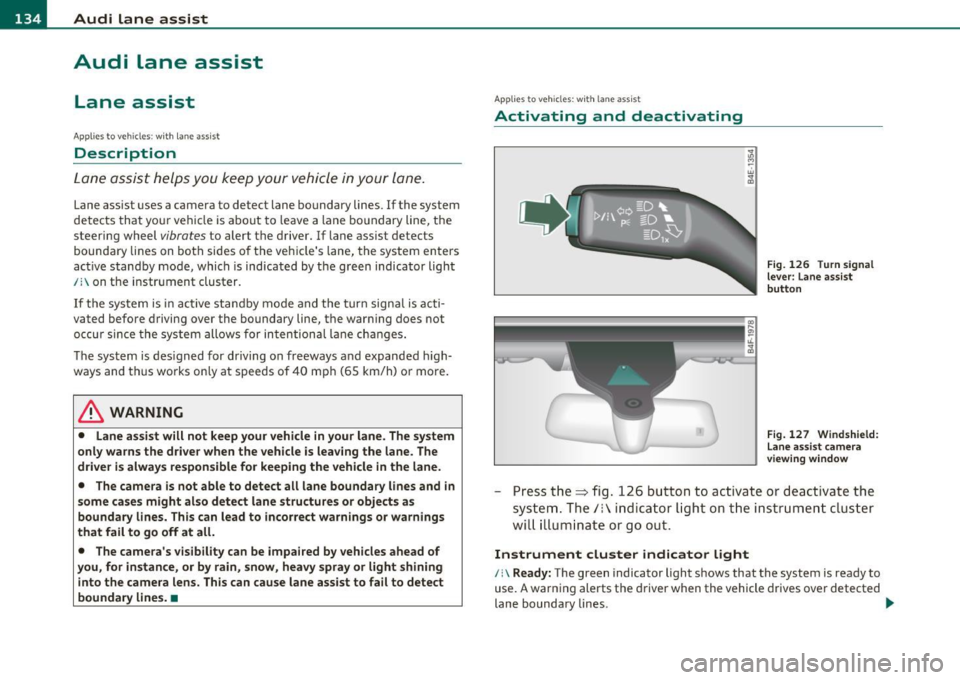
Fig. 126 Turn signal
lever: Lane assist
button
Fig. 127 Windshield:
Lane assist camera
viewing window
-Press the=> fig . 126 button to act ivate or deactivate the
system. The/: ind icator light o n the instrument cluster
will illumi nate or go out.
Instrument cluster indicator light
/:\Ready: The green indicator light shows that the system is ready to
use. A warning alerts the driver when the vehicle drives over detected
lane boundary lines . -.,
Page 137 of 370

Audi lane assist -________________ lff'II
Not ready: The yellow indicator light shows that the system is
turned on but unable to send a warning. This can be due to the
following:
• Th ere are no boundary lines, or there is only one boundary line
present.
• The boundary lines are not detected (e .g . due to snow, dirt, wet
conditions or light shining into the camera lens).
• More than two boundary lines (such as at construction sites) are
located in the vehicle's lane.
• Th e vehicle's speed is below the speed needed to activate it, which
is about 40 mph (65 km/h) .
• Th e lane is narrowe r than about 8
ft. (2.5 m), or wider than about
16 ft. (5 m).
• The curve is too sharp.
Notes on the instrument cluster display
When the lane assist turns off automatically, the instrument cluster
indicator goes out and one of the fo llowing messages appears on the
display:
Audi lane assist not available: currently no sensor vision
Thi s message appears when the camera can no longer function
because it cannot detect the boundary lines. This may be due to the
following:
• Th e exte rior side of the camera viewing window=>
page 134,
fig. 127 is covered with dirt or ice. Clean this part of the windsh ield.
• Th e came ra viewing window is fogged up on the inside. In this
case, wait until the fog disappears before turning lane assist on
again.
• Th e system was unable to detect boundary lines over an extended
period of time due to road conditions (such as snow-cove red lanes).
Do not turn lane assist on aga in until the lines can be more easily
detected.
Audi lane assist currently not available
Controls and equip
ment Safety first A temporary malfunction
is preventing lane assist from operating .
Tr y turning on lane assist again at a lat er time.
Audi lane assist: system fault
The system shou ld be checked by an authorized Audi dealer or other
qualified wo rkshop.
[ i ] Tips
• Make sure that the camera viewing window => page 134, fig. 127
is not covered by stickers or similar objects.
• Always keep the camera viewing w indow clean. This can us ually be
done by operating the windshie ld wipers. •
Applies to vehicles: wi th lane assist
MMI settings
You can use the fv1fv1I to adjust the warning time and
steering wheel vibration.
-Select: Function button [CAR ]> Systems *> Audi lane
assist.
Setting the warning time
Early: This setting warns the driver before a wheel touches the
detected lane boundary line. The warning depends on the vehicle's
angle as it approaches the boundary line. If you approach a boundary
line gradually, the warn ing will occur earlier. If you approach the
boundary line at a very sha rp angle, the warn ing will occur just befo re
a wheel touches the line.
Medium : In this setting, the warning time adjusts to the characteris
tics of the road and the vehicle speed. The wa rning occurs later fo r
curves and occurs earlier for straight stretches of road . The warning
occurs later on narrow roads than on wide ro ads.
Late : This setting warns the driver when a wheel dr ives over the
detected lane boundary line.
Vehicle care Technical data
Page 146 of 370

1111....__A_ u_ d_i_ s_id _e_ a_s _s_ i_ s _t _________________________________________________ _
Notes
Applies to v ehicl es : w it h sid e ass ist
Messages in instrument cluster display
I f si de ass ist tur ns off automatica lly, t he in dicator light on the butto n
w ill go out a nd you w ill s ee a m essag e in t he i nstrumen t cluste r
display:
Audi side assist not available: sensors blocked
Th e side ass is t se nsors ar e built i nto th e rear bump er on th e le ft and
r igh t (no t vis ib le o n the out sid e)=>
pag e 137, fig. 128 . To ensur e
that yo u do not a dve rsely affect t he way si de assist funct ions, foreign
obj ects (such as st ick ers or bicycle rac ks) should not b e atta ch ed t o
the area on t he rear bum per whe re t he sensors are located. If side
assi st funct ions a re adve rse ly aff ected, y ou wi ll see th is m essage in
the inst rument cl uster disp lay. R emove anyth ing that may b e
b locking t he sens ors .
If no ve hicl e is detect ed for a lo nger p eriod of t im e w hile driving , side
assist w ill also sw itc h
off automati ca lly .
Audi side ass ist currently not available
I f the re i s a t empora ry problem (s u ch as the vehicle 's battery char ge
b ein g low), s ide ass ist ca nnot b e act ivated t em porar ily .
Audi side assist: system fault
Have the system checked by an a utho riz ed Aud i dealer or qualified
wo rk shop. •
Applies to ve hicl es : w ith sid e ass is t
Safety tips
T he s ide assist detection may be limited w hen driving aro und narrow
str eet co rn ers, on hill y stree ts, and under p oor we ath er co nditions . It is possib
le that the radar senso rs may also detect other objects,
such a s high or st agg ere d gu ardr ails.
Side assis t does not measure ac tual lane wid th . T he sys tem assumes
a fixe d lane w idth . Detection in the le ft and rig ht lanes is based on
th is ass um ed lan e width . Wh en drivi ng on narrow ro ads or w hen
driv ing to t he left or r ight of t he cente r of a t ravel lane, it is possib le
that vehicles will be de te ct ed th at are
no t in th e lan e nex t to th e lane
you a re us ing.
& WARNING
• Improper reliance on the side assist system can cause collisions
and serious personal injury:
-Never rely only on side assist when changing lanes.
- Always check rear view mirrors to make sure that it is safe to
change lanes.
• Side assist cannot detect all vehicles under all conditions
danger of accident!
• Side assist cannot detect vehicles in time to alert you when
they approach from behind at very high speed , or fall drop back
very quickly.
• The radar sensor's
vision can be reduced or entirely blocked by
rain, snow, and heavy spray. This can result in side assist not
adequately detecting vehicles or, in some cases, not detecting
them at all . Always keep an eye on the direction you are traveling
and the relevant area around the vehicle .
• Please note that side assist indicates there are approaching
vehicles, or vehicles in your blind spot , only after your vehicle has
reached a driving speed of at least 19 mph (30 km/h).
• Side assist signal does not work around tight corners (turning
radius less than 328 feet, or 100 m) .
• Side assist is no replacement for the driver's full attention . The
driver alone is responsible for lane changes and similar driving
maneuvers. Always keep an eye on the direction you are traveling
and the relevant area around the vehicle.
~
Page 149 of 370

______________________________________________ A_ u_ t_ o _ m_ a_ t_ ic_ t_r_a _ n_ s_m_ i_ s _s_ i_ o _ n __ l!'II
The selector lever must be in Nor P. If one of the dr iv ing positions is
eng aged a safety swi tch will p reven t th e e ng ine from be ing s tarte d.
See also=>
page 109.
Before you move t he se lector lever from t he P position, yo u must
always ap ply the b rake peda l befo re and while de press ing the bu tton
in the handle of the selector lever.
_& WARNING
• Unintended vehicle movement can cau se serious injury.
- When the selector lever is in a driving position, the vehicle may creep, even at idle speed. Therefore do not release the
parking brake or foot brake until you are ready to move,
because power is transm itted to the wheels as soon as a driv ing
po sition i s engaged.
- Do not accelerate while selecting a driv ing position . At this
time the engine must be at idle speed so that undue stress i s
not placed on the clutches in the transm iss ion.
- Remember : • even when stopped briefly with the automatic
transmission in "D", "S" or "R" , engine power is being trans
mitted to the wheels . Your vehicle could "creep " forward or
backward. When stopped, keep the brake pedal fully
depre ssed and use the parking brake if neces sary to keep the
vehicle from rolling .
• If the selector lever is unintentionally moved into N while you
are driving, take your foot off the accelerator pedal and wait for
the engine to return to idle speed before selecting a driving posi
tion.
• Never shift into "R " or "P " when the vehicle is in motion .
• Never get out of the d river's seat when the engine is running.
• If you must get out of the vehicle , move the selector lever
securely into the P position and apply the parking brake firmly .
• If the engine must remain running, never have any driving
position engaged when checking under the hood.
Make sure the
selector lever has securely engaged and is locked in "P " with the
Controls and equip
ment Safety first
& WARNING (
co ntinued )
parking brake firmly set=> page 271, "Engine compartment ".
Otherwi se, any increase in engine speed may set the v ehicle in
motion , even with the par king brake applied. •
Applies to vehicles : w ith 6-s peed automatic tran smission
Selector lever positions
T his s ection describ es the selector lever positions and
driving ranges.
Fig . 139 Di splay in
the in strum ent cluster :
se lector le ver In po si
tio n P
Th e selector lever posi tion engaged appe ars next to the se lec tor lever
as well as in the instrument cluster display .
P -Park
In this selector lever position the transmission is mechan ica lly
lo cked. Engage P only when the vehi cle is
comple tely stop ped=> &
in "Driving the automatic transmissio n" on page 146.
T o sh ift in or o ut of position P, yo u must first press an d hold the brake
peda l
and then press t he release button in the se lecto r lever hand le
wh ile moving the selector lever to or from P. Yo u can s hift out of this
posit ion on ly with the ignit ion on . .,,
Vehicle care Technical data