lights AUDI A6 2011 Owner's Manual
[x] Cancel search | Manufacturer: AUDI, Model Year: 2011, Model line: A6, Model: AUDI A6 2011Pages: 370, PDF Size: 87.15 MB
Page 62 of 370

Clear vision
Front fog Lights }O
Fig. 47 Ins trume nt
p an el: li gh t s witch
The light switch must n ot be overtu rn ed past the stops in
either d irect ion .
Switching on the front fog lights }D
Turn the light switch to ~oo: or to iD.
- Pull the light switch to the first stop (D .
When the front fog lights are on , the symbo l }0 next to the ligh t
switch will illum inate.
(I) Tips
With the sw itch in AUTO front fog lights and rear fog lights cannot be
turned on in addition .•
Rear fog Lights 0$
Fi g. 48 Ins tru men t
p an el: light sw itc h
The light switch must not be overtur ned pas t th e stops i n
either d irection .
- Tur n the light switch to
~oo: or t o iD.
- Pull the light switch to the second stop @.
When the rear fog lights are on, both the }D and symbols next to
t he light sw itch will il luminate .
0 Note
The rear fog lights can distract drivers be hind yo u, so, they shou ld be
turned on
only in condit ions of very poor visib ility . A lways observe
loca l reg ulations w hen usin g the rear fog lights .
(I) Tips
With the sw itch in AUTO front fog lights and rear fog lights cannot be
tu rned on in addition .•
Page 64 of 370

Clear vision
-Press the switch /4. => page 61, fig. SO to turn the emer-
gency flashers on or off.
When the emergency flasher is on, all four turn signals blink at the
same time. The turn signal indicator lights¢¢ in the instrument
cluster, as well as the light in the emergency flasher switch~ blink
likewise.
The emergency flashers will turn on automatically if you are in an accident where the airbag has deployed.
(I) Tips
You should turn on the emergency flashers when:
• you are the last vehicle standing in a traffic jam so that any other
vehicles coming can see you, or when
• your vehicle has broken down or you are in an emergency situa
tion, or when
• your vehicle is being towed by a tow truck or if you are towing
another vehicle behind you .•
Turn signal ¢ c> and high beam ~D lever
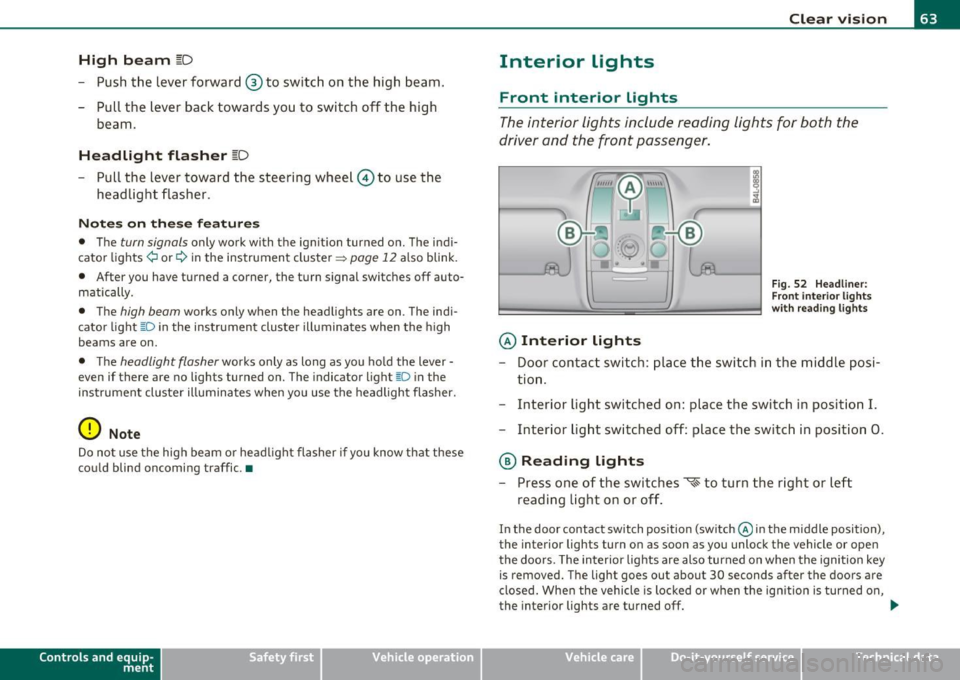
The lever on the left side of the steering column is used to
operate the turn signals and the high beam as well as the
headlight flasher .
i
'
-to
"' -w
"' cc
Fig. 51 Turn signal
and high beam lever
The turn signal and high beam lever has the following func
tions:
Turn signals ¢ Q
- Lift the lever up all the way=> fig. S 1 © to use the right
turn signals, or push the lever down all the way@to use
the left turn signals.
Auto-blink
-Move the lever (up or down) just to the point of resistance
to use the turn signals for as long as you need them, for
example when changing lanes.
- Move the lever (up or down) just to the point of resistance
and then release it right away to make the turn signals
blink
three times . You can use this feature for example
when changing lanes on highways.
~
Page 65 of 370
High beam l[D
-Push the lever forward ® to switch on the high beam.
- Pull the lever back towards you to switch off the high
beam.
H eadlight flasher l[D
- Pull the lever toward the steering wheel© to use the
headlight flasher.
Notes on the se fea ture s
• The turn signals only work with the ignition turned on. The indi
cato r lights ¢ or¢ in the instrument cluster=>
page 12 also blink.
• After you have turned a corner, the turn signal switches off auto
matically.
• The
high beam works only when the headlights are on. The indi
cato r light [D in the instrument cluster illuminates when the h igh
beams are on.
• T he
headlight flasher works only as long as you ho ld the lever -
even if there are no lights turned on. The indicator light~D in the
instrument cluste r illuminates when yo u use the headlight flasher.
0 Note
Do no t use the high beam or head light flasher if you know that these
could blind oncoming traffic .•
Con tro ls a nd e quip
m en t Vehicle
OP-eration
Clear vision
Interior lights
Front interior lights
The interior lights include reading lights for both the
driver and the front passenger.
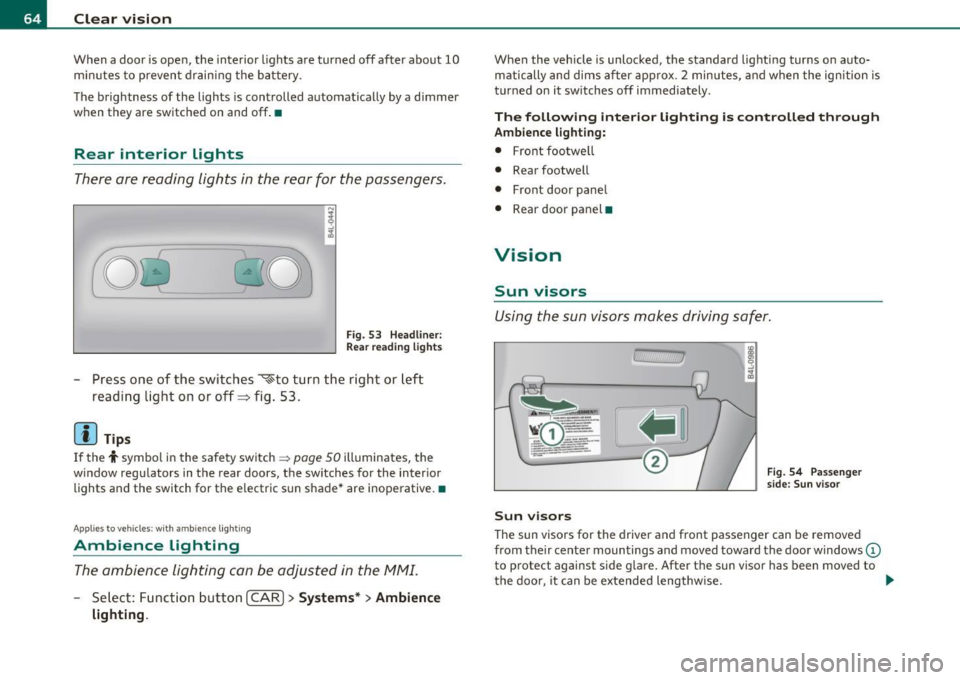
© Interior lights
Fig . 52 Headli ner:
F ron t inte rior lights
wit h rea ding lights
- Door contact switch : place the switch in the middle posi-
tion .
- Interior light switched on: place the switch in position
I.
-Interior light switched off: place the switch in position 0.
® Reading lights
- Press one of the switches '* to turn the right or left
reading light on or off .
In the door contact switch position (switch @in the middle position),
the interior lights turn on as soon as you unlock the vehicle or open
the doors. The interior lights are also turned on when the ignition key is removed. The light goes out about 30 seconds after the doors are
closed . When the vehicle is locked or when the ign ition is turned on,
the interior lights are turned off.
~
Vehicle care Do-it-yourselt service iTechnical data
Page 66 of 370
Clear vision
When a door is open, the interior lights are turned off after about 10
minutes to prevent draining the battery.
The brightness of the lights is controlled automatically by a dimmer
when they a re switched on and off .•
Rear interior Lights
There ore reading lights in the rear for the passengers.
0 '-80
Fig . 53 Headline r:
Rea r read ing lights
Press one of the switches ~to turn the right or left
reading light on or off=> fig . 53 .
[I) Tips
If the t symbol in the safety switch ~ page 50 illuminates, the
w indow regulators in the rear doors, the switches for the interior
lights and the switch for the electric s un shade* are inoperative. •
Applies to ve hic le s: wit h am bien ce ligh tin g
Ambience Lighting
The ambience lighting con be adjusted in the MMI.
-Select: Function button I CAR ]> Systems* > Ambience
lighting.
When the vehicle is unlocked, the standard lighting turns on auto matically and dims after approx . 2 minutes, and when the ignition is
turned on it sw itches off immediately.
The following interior lighting is controlled through
Ambience lighting:
• Front footwe ll
• Rear footwell
• Front door panel
• Rear door panel •
Vision
Sun visors
Using the sun visors makes driving safer.
Sun visors
Fig. 54 Passenger
side: Sun visor
The sun visors for the driver and front passenger can be removed
from the ir center mountings and moved toward the door w indows
(D
to protect against side glare. After the sun visor has been moved to
the door, it can be extended lengthw ise. ..
Page 69 of 370
Rain sensor
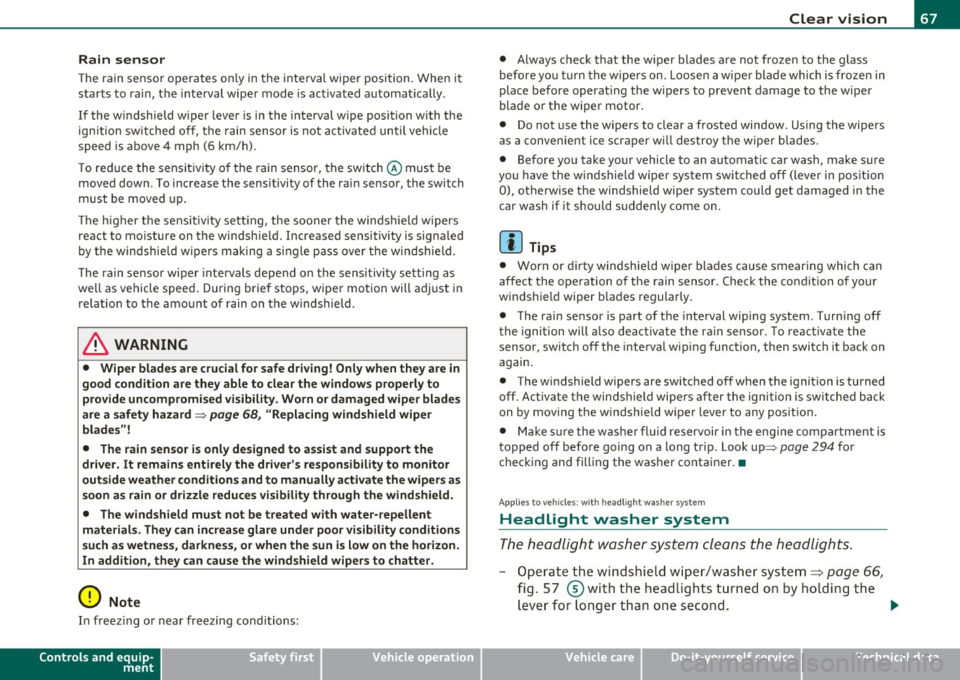
The rain sensor operates on ly in the interval wiper position . When it
starts to rain, the interval wiper mode is activated automat ically .
I f the windshield wiper lever is in the interval wipe position with the
ign ition switched off, the rain sensor is not activated until vehicle
speed is above 4 mph (6 km/h) .
To reduce the sensitivity of the rain sensor, the switch @ must be
moved down . To increase the sensit ivity of the rain sensor, the switch
must be moved up.
The higher the sensitiv ity sett ing, the sooner the windsh ield wipers
react to mo isture on the windshie ld. Increased sensitivity is signa led
by the windshield w ipers making a single pass over the windshie ld.
T he rain sensor wiper intervals depend on the sensitivity setting as
we ll as vehicle speed. During brief stops, wiper motion will adjust in
relation to the amount of rain on the windshield .
& WARNING
• Wiper blades are crucial for safe driving! Only when they are in
good condition are they able to clear the windows properly to
provide uncompromised visibility. Worn or damaged wiper blades
are a safety hazard =>
page 68, "Replacing windshield wiper
blades"!
• The rain sensor is only designed to assist and support the
driver. It remains entirely the driver 's responsibility to monitor
outside weather conditions and to manually activate the wipers as
soon as rain or drizzle reduces visibility through the windshield.
• The windshield must not be treated with water-repellent
materials. They can increase glare under poor visibility conditions
such as wetness, darkness, or when the sun is low on the horizon.
In addition, they can cause the w indshield wipers to chatter.
0 Note
In freez ing or near freezing conditions:
Controls and equip
ment Safety first
Clear vision
•
Always check that the wiper blades are not frozen to the glass
before you turn the wipers on. Loosen a wiper blade which is frozen in
place before operat ing the w ipers to prevent damage to the wiper
blade or the wiper motor.
• Do not use the wipers to clear a frosted window . Us ing the wipers
as a convenient ice scraper will destroy the wiper blades.
• Before you take your vehicle to an automatic car wash, make sure
you have the windshield wipe r system switched off (lever in position
0), otherw ise the windshield wiper system could get damaged in the
car wash if it shou ld suddenly come on.
(I] Tips
• Worn or dirty windshield wiper blades cause smearing which can
affect the operation of the rain sensor . Check the condit ion of your
windshield wiper b lades regularly.
• The rain sensor is part of the interval wiping system . Turn ing off
the ignition will a lso deactivate the rain sensor. To reactivate the
sensor, switch off the interval wip ing function, then switch it back on
again.
• The w indshield wipers are switched off when the ignition is turned
off . Activate the windsh ie ld wipers after the ignition is switched back
on by mov ing the w indshield wiper lever to any pos it ion.
• Make sure the washer fl uid reservoir in the engine compar tment is
topped off before going on a long trip . Look up::::>
page 294 for
checking and filling the washer conta iner. •
App lies to ve hicle s: with headli ght was h er syste m
Headlight washer system
The headlight washer system cleans the headlights.
- Operate the windshield wiper/washer system~ page 66,
fig. 57 ®with the headlights turned on by holding the
lever for longer than one second. _,,,,
Vehicle care Technical data
Page 70 of 370
Clear vision
The washer jets extend forward out of the front bumper driven by
water pressure to spray the front headlights with water .
You should inspect the headlights regularly (for example when refu eling) and clean off any solid d irt or insects from the lenses.
To ensure the system works properly in winte r, keep the washe r jets
free of snow and remove any ice using a de-icing spray .•
Service position
The wiper blades can only be changed in the service posi
tion .
-If the wiper blades are not frozen to the windshield, bring
the windshield wiper lever to the basic position
@
=> page 66, fig. 57 .
-Select: Function button I CAR]> System s*> Windshield
wipers > Service po sition .
• On -changing the windshield wiper blades can only be done if you
bring the wiper arms to the service pos ition. You will a lso avoid paint
damage to the hood when working on the wipers in this position .
• Off -the windshield wipers are moved to their initial position
again.
0 Not e
Never maneuver your vehicle with the front windshield wiper arms
raised since they will automatically be moved b ack to their basic posi
tion above a speed of 3 mph (6 km/h) and can scratch the hood .
[ i J T ip s
• You can also use the service position, for example, if you want to
protect the windshield from icing by using a cover . •
The service position automatically switches to
Off when you
operate the windsh ield wiper lever, or speed exceeds 3 mph (6
km/h). •
Replacing windshield wiper blades
Wiper blades in good condition help keep the windshield
clear .
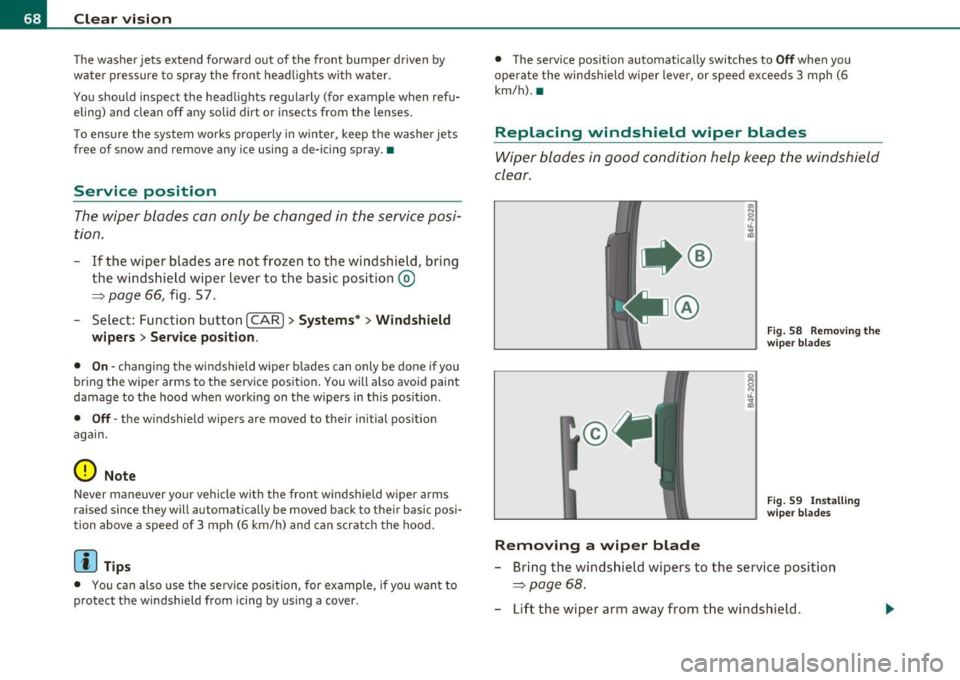
@
Removing a wip er blad e
Fig. 58 Removing th e
wiper blades
Fi g. 59 Insta lling
wi per blades
- Bring the windshield wipers to the service position
=> page 68.
-Lift the wiper arm away from the windshield .
Page 72 of 370
Clear vision
Applies to vehicles : w ith automat ically d imm ing ins ide m ir ror w ith d ig ital compass
Automatically dimming inside mirror
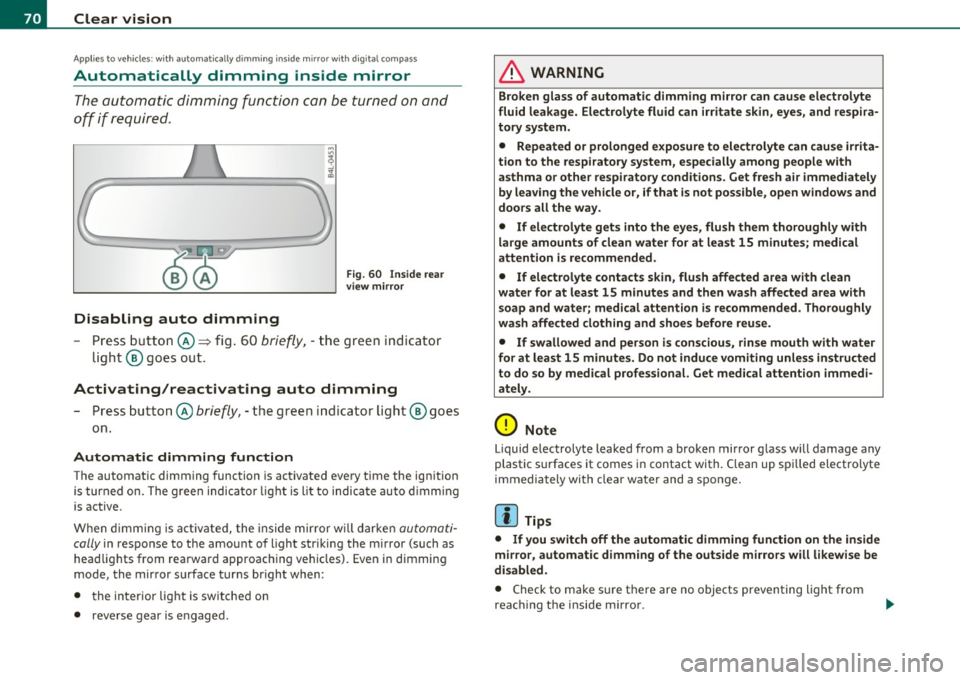
The automatic dimming function can be turned on and
off if required .
Disabling auto dimming
Fig . 60 I nside rea r
v ie w mirror
- Press but ton @ ~ fig . 60 brie fly, -the green ind icator
light ® goes out.
Activating/reactivating auto dimming
- Press button @ briefly, -the green indicator ligh t® goes
on .
Automat ic dimming function
The automatic dimming function is activated every tim e the ignition
is turned on. The g ree n indicator light is lit to indica te auto d imming
is active.
When d imming is act ivated, the inside mir ror w ill darke n
automati
cally
in response to the amou nt of light striking the mirror (such as
head lights from rearward approaching vehicles). Even in d imming
mode, the mirror surface turns br ight when :
• the interio r light is switched on
• reverse gear is engaged .
& WARNING
Broken glass of automatic dimming mirro r can cause electrolyte
fluid leakage . El ec trolyte fluid can irritate skin , eyes, and respira
tory system .
• Repeated or p rolonged expo sur e to ele ctrolyte can cau se irrita
tion to the resp iratory system, esp ecially among p eople with
asthma or other r espiratory condition s. G et fre sh air immediately
by le aving the vehicl e or, if that is not po ssible , open window s and
doors all the wa y.
• If ele ctrolyte g ets into the eye s, flush th em tho roughly with
large am ount s of clean water f or at lea st 15 minute s; medical
attention is re commended .
• If el ectrolyte contacts skin , flu sh affected area with clean
water for at l east 15 minut es and then wash aff ected area with
s oap and wat er; medical attention is rec ommend ed . Thoroughly
wash affected clothing and sho es before reu se.
• If swallowed and per son is c on sciou s, rinse mouth with water
fo r at le ast 15 minut es. Do not indu ce vomit ing unle ss instru cted
to do so by medical profe ssional. Get medical attenti on imm edi
ate ly .
0 Note
Liquid e lectrolyte leaked from a broken mirror g lass will damage any
plastic surfaces it comes in contact with. Clean up spi lled electrolyte
immediately with clear water and a sponge.
[I) Tips
• If you switch off the automatic dimming function on th e in side
mir ro r, automatic dimming of the outside mirrors will l ikewise be
di sabled .
• Check to make sure there are no objects preventing light from
reac hing t he i nside m irro r.
Page 73 of 370
• Do not attach any st ickers to the w indshield in front of the light
sensor, as this would inte rfe re with the a utomat ic operat ion of the
headlights and the automat ic dimming of the ins ide mir ror.
• Be aware that a utomatic dimming o f the in si de mir ror can on ly
operate proper ly if the rear w indow s un b lin d* is retracted . •
Outside mirrors
The outside mirrors are elec trically ad jus ted.
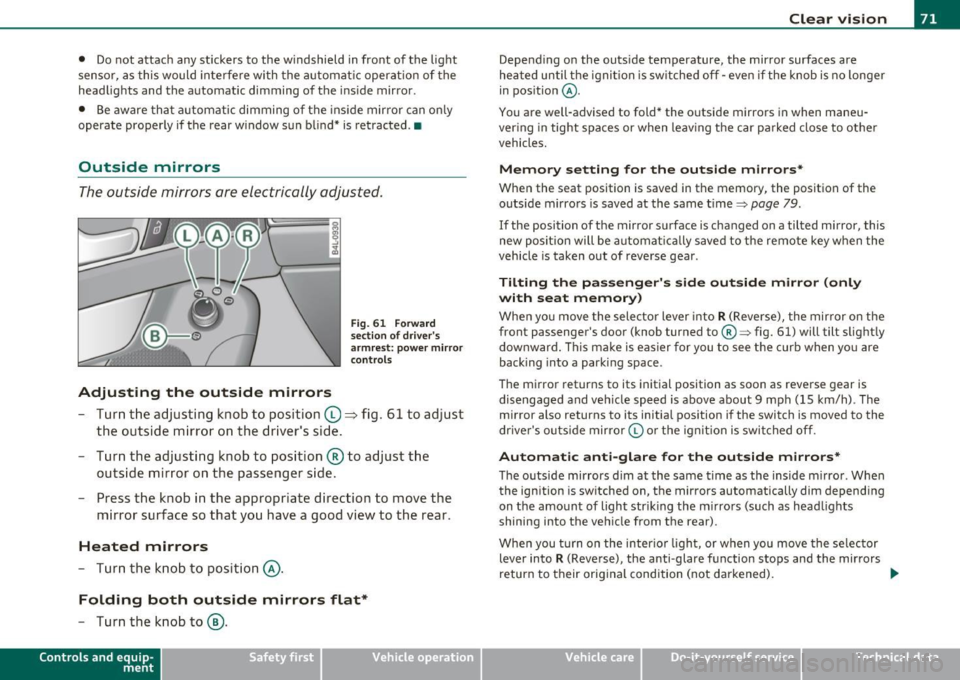
Adjusting the outside mirrors
F ig . 6 1 Forward
sec tion of dri ve r's
a rmr est: p ow er mirr or
con tro ls
- Tur n th e adjus ting k no b to position (0 ~ fig. 61 to ad just
the outsi de mi rror on the drive r's sid e.
- Turn the adjusting knob to position ® to adjust the
outside mir ror on the passenger side .
- Press the knob in the appropriate direction to move the
mirror surface so that you have a good view to the rear .
Heated mirrors
- Turn the knob to position @.
Folding both outside mirrors flat*
-Turn the knob to@ .
Con tro ls a nd e quip
m en t Vehicle
OP-eration
Clear vision
Depend ing on the outs ide temperature, the mirror surfaces are
heated un til t he ignit ion is sw itched off -eve n if the knob is no longe r
in pos ition
@ .
You are well-advised to fold* the o utside mirrors in when maneu
ver ing in tight spa ces or when leav ing t he car parked close to ot her
vehicles.
Memory setting for the outside mirrors *
When the seat position is saved in the memory, the position of the
outs ide mirro rs is saved at the same time~ page 79.
If the position of the mirro r su rface is changed on a tilted mirror, this
new posit io n wi ll be automat ically saved to the rem ote key w hen the
vehicle is taken out of reverse gear .
Tilting the passenger's side outside mirror (only
with seat memory )
When yo u move the selector lever into R (Reverse), the mir ror on t he
front passenger 's door (knob turned to@ ~ fig. 61) will tilt slight ly
downward . Th is ma ke is eas ier for you to see t he curb when you are
back ing into a parki ng space .
T he mirror returns to its initial position as soon as reverse gear is
disengaged and ve hicle speed is above about 9 mph (15 km/h) . The
mirro r also returns to its initia l position if the switch is moved to the
dr ive r's o uts ide mirro r© or th e ig ni tion is swit ched off .
Automatic anti-glare for the outside mirrors*
The o utside mirrors dim at the same t ime as the inside m irro r. When
the ign it ion is sw itched on, the mirrors automatically dim depend ing
on the amo unt of light str iking the m irro rs (su ch as head lights
shining into the vehicle from the rear).
When you turn on the inter io r li ght, or w hen you move the se lec tor
lever into
R (Reverse), the anti-glare f unction stops and the mirrors
return to their orig inal condition (not darkened).
~
Vehicle care Do-it-yourselt service iTechnical data
Page 74 of 370
Clear vision
0 Note
• Curved ( i.e. co nvex) mir ror s urfaces increase your field of view.
Remember that vehicles or other objects will ap pear smaller and
f art her away th an whe n seen in a fla t mi rror. If you use th is mi rro r to
estimate distances of follow ing ve hicles when chang ing lanes, you
could estimate i nco rre ct ly and ca u se an a cci dent .
• If the mir ror ho using is moved un inte ntionally (for examp le, whi le
par king yo ur veh icle), then you m ust fir st f old the mir ror ele ctrically.
Do not read just the mirro r hous ing manually. You could damage the
mot or w hic h con trols the mi rror .
[ i ] Tips
If the re should be a m alfu nction in the ele ct ric al sys tem, you can st ill
adjust the outs ide mirrors by pressing the edge of the m irror. •
App lies to ve hicles : w ith auto mat ic dimm ing fo r outs ide m ir ro rs
Automatic dimming for outside mirrors
T he ou tside mir rors are dimmed toge ther w it h t he a utoma tic
dimming of the ins ide mirror . When the ignition is sw itched on, t he
m irrors da rken a utomat ica lly depend ing on the light stri king them
(e .g . headlights from the r ea r) .
When the interio r light ing is sw itched on and when reverse gear is
engaged , the mi rrors are switche d back to their or ig inal b rightness
(not d immed).
& WARNING
Broken glass of automatic dimming mirror can cause electrolyte
fluid leakage. Electrolyte fluid can irritate skin, eyes, and respira tory system.
• Repeated or prolonged exposure to electrolyte can cause irrita
tion to the respiratory system, especially among people w ith
& WARNING (co ntinued )
asthma o r other respiratory conditions . Get fresh air immediately
by leaving the vehicle or, if that is not po ssible, open window s and
doors all the way.
• If electrolyte gets into the eyes, flush them thoroughly with
large amounts of clean water fo r at least 15 minutes; medical
attention i s recommended.
• If electrolyte contacts skin , flush affected area with clean
water for at least 15 minutes and then wash affected area w ith
soap and water; medical attention is recommended. Thoroughly
wash affected clothing and shoes before reuse.
• If swallowed and person is conscious, rinse mouth with water
for at least 15 minutes. Do not induce vomiting unle ss instructed
to do so by medical professional. Get medical attention immedi·
ately.
0 Note
El ectro ly te lea king from a br oke n m irro r g lass a ttack s th e veh icle
pa int and plast ic surfaces. Clean up sp illed electrolyte immed iate ly
w ith clear w ater and a s ponge.
[ i ] Tips
• If automatic dimming for the inside mirror is switched off , the
outside mirrors are also not dimmed automatically.
• Automat ic di mmin g for t he mir ro r only oper ates p roperly if the
sunshade * fo r th e rear w indow is retracted, o r the light strik ing t he
inside mi rror is not hindere d by other objects .•
Page 115 of 370

On the road -_______________ __.
the driver's door is opened. In t his instance, the steer ing is not
locked. The s teer ing is locked:
• If you press the
(STOP) button again for more than 1 second .
• If you close the driver 's door and lock yo ur vehicle from the
outs ide .•
Electromechanical parking brake
Operation
The electromechanical parking brake replaces the hand
brake.
Fi g. 104 Cente r
co nsol e: Pa rki ng brak e
- Pull the switch to apply the parking brake ~fig . 104. The
indicator light in the switch will come on.
- Step on the brake pedal or the accelerator pedal and press the switch at the same time to re lease the parking bra ke.
The indicator light in the switch wil l go out .
Your vehicle is equipped with an electromec hanical park ing brake
w hich replaces the handb rake. The parking brake is d esigned to
prevent the vehicle from ro lling unintent iona lly .
Con tro ls a nd e quip
m en t Vehicle
OP-eration
In addit io n to the normal functions of a traditional hand brake, the
ele ct romechan ica l parki ng br ake p rovides various convenience and
safety functions .
Emergency brake
An emergency brake ensures that the vehicle can be slowed even if
t he
normal bra kes fail => page 115, "E merge ncy bra king" .
Indicator lights
• If the pa rking brake is applie d with the ig nition turned on , the
indicator light in the instrument cluster (U.S models:
:'.Ii , Canadian
mode ls: © ) and i n the swi tch
(e)) w ill come o n.
• If the parking brake is applied with the ign ition
turned off , the
indicator light in the in strument cluste r (U.S. models:
::'.l, , Ca nadian
models: ©) and in the switch© will come on for about 30 seconds
and then go out .
& WARNING
If the vehicle is stati onary and the transmi ssion is engaged with
the eng ine running, the e ngine should not be speeded up (e.g.
m anuall y from under th e hood ). Otherwi se the vehicle will st art to
mo ve -you run the risk of an ac cident.
0 Note
If the warning/ind icator light (U.S. models: BRAKE , Canadian mode ls:
(Ci)) ) flashes in the ins trumen t clus ter, t here is a brake sys tem
malfunction. By press ing the [
CHECK) b utton, yo u can bri ng up a
dr iver message which explains the malfu nction in mo re deta il.
If the
message
Parking brake! Please contact workshop appea rs, the re is a
parking brake malfunction which yo u should have repaired immedi-
ately by an au thorized dealership=>
page 26 . ..
Vehicle care Do-it-yourselt service iTechnical data