service AUDI A6 2011 Owner's Manual
[x] Cancel search | Manufacturer: AUDI, Model Year: 2011, Model line: A6, Model: AUDI A6 2011Pages: 370, PDF Size: 87.15 MB
Page 71 of 370

- Press on both sides of the loc king spring @ on the wiper
blade~
page 68, fig. 58 . Hold t he wiper blade firm ly .
- Remove the wiper blade @.
Installing wiper blade
- Install the new wiper blade in the retainer on the wiper
arm ©~
page 68, fig . 59 u nti l it clicks into place on t he
w iper arm.
- Place the w iper arm bac k against the wi ndsh ield .
Clean yo ur wiper blades regularly with a windshie ld washe r so lution
to prevent streaking . If the blades are very dirty, for example with
insects, caref ully clean the blades with a sponge or a so ft brush.
If the w iper blades begin to st reak the windshield, this could be
caused by res idue left on the windsh ie ld by automatic car washes.
Fill the windshie ld washe r con tainer w it h a specia l solu tion ava ilab le
at your authori zed Audi dealer to remove the residue .
& WARNING
Be sure to inspect the condition of your w iper blades regularly. See
your authorized Audi d ealer f or r epla cement blade s.
0 Note
To preven t da mage to the wipe r system:
• To help prevent damage to the wiper system, always loosen
blades which are frozen to the wi nds hield before operati ng wipers.
• T o help prevent damage to w iper blades, do not use gasoline,
kerosene, paint thinner, or other solvents on or near the wipe r
blades .
• T o help prevent damage to wipe r arms or other components, do
not attempt to move the wipers by hand.
Controls and equip
ment Safety first
Clear v
ision
• The windshield wiper blades must only be replaced when in the
service positio n =>
page 68! Otherw ise, you risk dam ag ing the pain t
on the hood or the windshie ld w iper motor .
(I) Tips
Commercial hot waxes applied by automatic car washes affect the
cleanability of the win dsh ield. •
Mirrors
Manual anti-glare adjustment
Standard setting
-Move the small lever (located on t he bottom edge of the
mirror) to t he front.
Anti-glare setting
- Move th e small lever (locate d on t he bo ttom edge of the
m irror) to the rear .•
Vehicle care Technical data
Page 73 of 370
• Do not attach any st ickers to the w indshield in front of the light
sensor, as this would inte rfe re with the a utomat ic operat ion of the
headlights and the automat ic dimming of the ins ide mir ror.
• Be aware that a utomatic dimming o f the in si de mir ror can on ly
operate proper ly if the rear w indow s un b lin d* is retracted . •
Outside mirrors
The outside mirrors are elec trically ad jus ted.
Adjusting the outside mirrors
F ig . 6 1 Forward
sec tion of dri ve r's
a rmr est: p ow er mirr or
con tro ls
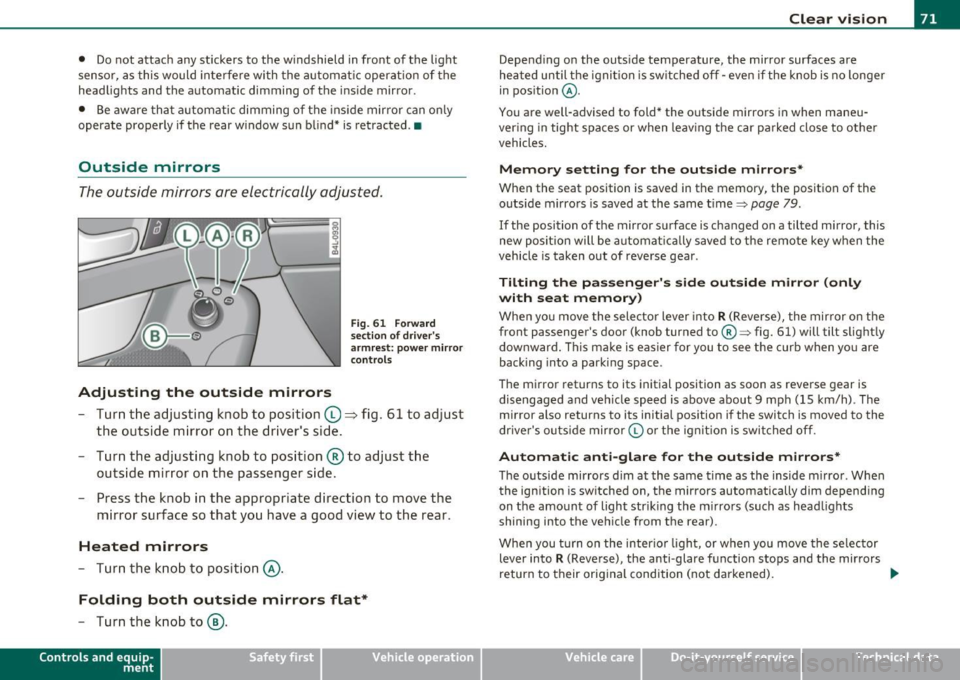
- Tur n th e adjus ting k no b to position (0 ~ fig. 61 to ad just
the outsi de mi rror on the drive r's sid e.
- Turn the adjusting knob to position ® to adjust the
outside mir ror on the passenger side .
- Press the knob in the appropriate direction to move the
mirror surface so that you have a good view to the rear .
Heated mirrors
- Turn the knob to position @.
Folding both outside mirrors flat*
-Turn the knob to@ .
Con tro ls a nd e quip
m en t Vehicle
OP-eration
Clear vision
Depend ing on the outs ide temperature, the mirror surfaces are
heated un til t he ignit ion is sw itched off -eve n if the knob is no longe r
in pos ition
@ .
You are well-advised to fold* the o utside mirrors in when maneu
ver ing in tight spa ces or when leav ing t he car parked close to ot her
vehicles.
Memory setting for the outside mirrors *
When the seat position is saved in the memory, the position of the
outs ide mirro rs is saved at the same time~ page 79.
If the position of the mirro r su rface is changed on a tilted mirror, this
new posit io n wi ll be automat ically saved to the rem ote key w hen the
vehicle is taken out of reverse gear .
Tilting the passenger's side outside mirror (only
with seat memory )
When yo u move the selector lever into R (Reverse), the mir ror on t he
front passenger 's door (knob turned to@ ~ fig. 61) will tilt slight ly
downward . Th is ma ke is eas ier for you to see t he curb when you are
back ing into a parki ng space .
T he mirror returns to its initial position as soon as reverse gear is
disengaged and ve hicle speed is above about 9 mph (15 km/h) . The
mirro r also returns to its initia l position if the switch is moved to the
dr ive r's o uts ide mirro r© or th e ig ni tion is swit ched off .
Automatic anti-glare for the outside mirrors*
The o utside mirrors dim at the same t ime as the inside m irro r. When
the ign it ion is sw itched on, the mirrors automatically dim depend ing
on the amo unt of light str iking the m irro rs (su ch as head lights
shining into the vehicle from the rear).
When you turn on the inter io r li ght, or w hen you move the se lec tor
lever into
R (Reverse), the anti-glare f unction stops and the mirrors
return to their orig inal condition (not darkened).
~
Vehicle care Do-it-yourselt service iTechnical data
Page 75 of 370

Digital compass
Applies to veh icles: wit h digita l co mp ass
Activating or deactivating the compass
The direction is displayed on the interior rear view mirror.
Fig. 62 Inside rear
view mirror: digital
compass activated
To activate or deactivate, hold the@ button down until
the red display appears or disappears .
The digital compass only works with the ignition turned on. The direc
tions are displayed as initials:
N (North), NE (Northeast), E (East), SE
(Southeast), S (South) , SW (Southwest), W (West), NW (Northwest).
(I) Tips
To avoid inaccurate directions, do not allow any remote controls ,
electr ical systems, or metal parts close to the mirr or.•
Con tro ls a nd e quip
m en t Vehicle
OP-eration
Clear vision
Applies to veh icles : w ith d ig ita l compass
Setting the magnetic deflection zone
The correct magnetic deflection zone must be set in order
to display the directions correctly .
.
,_ ,;=.~a,, I I
I I
I I
I ' I I
I I
1 ! ©
l 4
l
l
I ' I ,,
l ----
'
'
'
®
\, ,, ...... _______ ,.,.
©
@
Fig. 63 North America: magnetic deflection zone boundaries
-Hold the@=> fig . 62 button down until the number of
the set magnetic deflection zone appears on the interior rear view mirror .
- Adjust the magnetic deflection zone by repeatedly pressing on the@ button . The set mode automatically
deactivates after a few seconds. •
Vehicle care Do-it-yourselt service iTechnical data
Page 79 of 370

& WARNING (co ntinued )
• Be careful when adjusting the seat height. Check to see that no
one is in the way, or serious injury could re sult!
• Becau se the seats can be ele ctrically adjusted with the ignition
key removed, never leave children unattended in the v ehicle.
Unsupervised use of the electric seat adjustments may cau se
serious injury .•
Seat adjustment
Fi g. 65 P ower s ea t:
Swit ch f or sea t adjust·
ment
Moving the seat forward and backward ©
- Press th e switc h forwa rd or backward horizonta lly=>& .
Adjusting the seat height@ and ® together
-Pull the switch evenly at both ends to raise th e seat=> &.
-Push the switch evenly at both ends to lower the seat
=> & .
Angling the seat cushion up and down@ or®
-To a ngle t he seat c ushio n up, pull the switch at the front
only =>& .
Cont rols a nd e quip
m en t Vehicle
OP-eration
Seats and storage
-Alternative ly, push the sw itch at the rear only=>& .
-To angle t he seat cushion down, push the switch at the
front only=>& .
-Alternative ly, pull the sw itch at the rear only=>& .
& WARNING
• Never adjust the driver' s or front passenger's seat while the
vehicle is moving . If you do this while the vehicle is moving , you
will be out of position. Always adjust the dri ver's or front
pa ssenger 's seat when the vehicle is not moving.
• Be careful when adjusting the seat he ight. Check to see that no
one i s in the way , or seriou s injury could result!
• Be cause the seats can be ele ctrically ad justed with the ignition
key removed, never leave children unattended in the veh icle.
Unsupervised use of the electric seat adjustments may cause
serious injury. •
Adjusting the seatback
,.._
----:-:----:--=-=-=-=-1~ jg
Fig. 66 Power s eat:
Sw itch for sea t bac k
an gle
- Push the switch => fig . 66 forward or to the rear i n the
direction of the arrow to adjust the angle of the seat back
=> & . ...
Vehicle care Do-it-yourselt service iTechnical data
Page 83 of 370

Head restraints
Front head restraints
Head restraints that are adjusted according to body size,
along with the seat belt, offer effective protection.
Fig. 69 Fro nt seat:
Adjus tin g the head
r est rai nt
The head restraints on the front seats can be adjusted to
provide safe support to head and neck at the optimum
height. When optimally adjusted, the top of the restraint
should be level with the top of the head=>
page 181, "Proper
adjustment of head restra ints".
R ai sing the head restr aint
- Grasp the sides of the head restraint with both hands.
- Lift the head restraint.
Lowering the head restraint
- With one hand push down on the middle of the head
restraint .
- With the other hand press the release knob:::;, fig. 69 and
push the head restraint down .
Contro ls a nd e quip
m en t Vehicle
OP-eration
Seats and storage
Refer to::::;, page 181, "Proper adjustment of head restraints" for
guidelines on how to adj ust the height of the front head restraints to
suit the occupant's body size .
& WARNING
• Drivin g w ith out hea d res traints or w ith hea d r estra ints th at a re
n ot prop erl y a dju st e d inc reases the risk of seri ou s o r fa tal nec k
i n ju ry dram atically.
• Rea d an d h eed all W ARNINGS ::::;,
page 1 8 1 .
(I] Tip s
Correctly adjusted head restraints and safety belts are an extremely
effective combination of safety features. •
Rear head restraints
Passengers may only be carried if the head restraints has
been raised to its uppermost position.
Fig. 70 Rear seats:
h ead res train ts
The rear head restraints mus t be raised fully upward when
passengers ride in the rear seats . _,,
Vehicle care Do-it-yourselt service iTechnical data
Page 85 of 370
Luggage compartment
Increasing Luggage compartment space
You can create additional space for loading luggage by
folding do wn either or both of the rear seatback
segments to form a deck .
Folding backrest down
Fig. 72 Rear backr es t:
rele ase lever
Fig. 73 Rea r ba ckr est:
l o cki ng t he b ackre st
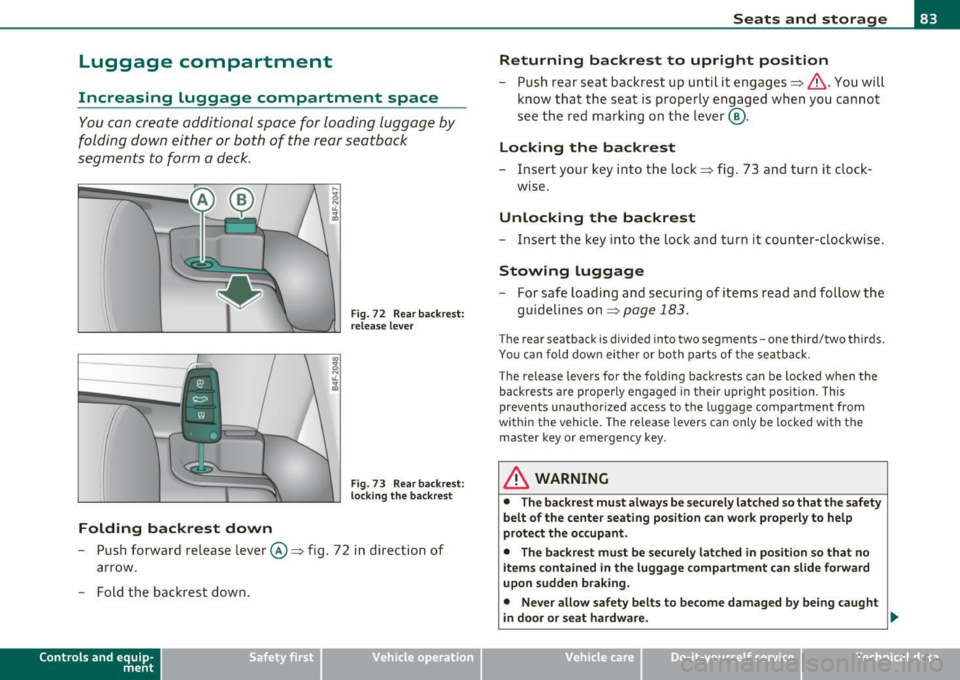
- Push forwa rd release lever ©~ fig. 72 i n direction of
arrow.
- Fold the backrest down .
Contro ls a nd e quip
m en t Vehicle
OP-eration
Seats and storage
Returning backrest to upright position
- Push rear seat backrest up unti l it engages~ &. You will
know that the seat is properly engaged when you canno t
se e t he red marking on the lever @.
Locking the backrest
- Insert your key into t he lock ~ fig . 73 and turn it clock
w ise.
Unlocking the backrest
- Ins ert the key in to the lock and turn it count er-clockwise .
Stowing luggage
-For safe loading and securing of items read an d follow the
guidelines on~
page 183.
The rear seatback is divided into two segments -one third/two thirds.
You can fold down ei ther or bo th parts of t he sea tback.
T he release levers for the fo lding backrests can be loc ked when the
back rests are properly engaged in their upr ight position. This
prevents unauthor ized access to the luggage compartment from
withi n the vehicle. The release levers can only be locked with the
master key o r emergency key.
& WARNING
• The backr est must always be s ecurely latched so that the sa fety
belt of the center seating position can work properly to help
prote ct the occupant .
• The backrest must be securely latched in position so that no
items contained in the luggage compartm ent can s lide forward
upon sudden b raking.
• Never allow safety belts to become damag ed by being caught
in d oor or seat hardware. _,.
Vehicle care Do-it-yourselt service iTechnical data
Page 87 of 370

App lies to veh icles : with ca rgo net
Elastic cargo net
The cargo net prevents light objects from sliding around
in the luggage compartment.
Fig. 75 Luggage
compartme nt cargo
ne t
Fig. 76 Luggage
compar tment car go
net attach ed to
mounting hooks*
Securing objects to the luggage
compartment floor with the net
-Lay out the cargo net in the luggage compartment .
- Engage all four hooks into the fasten ing eyelets => fig. 75.
- Place objects to be secured under the net.
Con tro ls a nd e quip
m en t Vehicle
OP-eration
Seats and storage
Configuring the net to restrain small objects
- Lay out the cargo net in the luggage compartment .
- Engage the hooks on the cargo net in the fastening eyelets
in the floor at the rear of the luggage compartment
=> fig . 76.
- Pull down the mounting hooks -arrows- located below the
base of the rear window.
- Connect each loop on the net to the corresponding hook as illustrated .
- Place items inside the net.
Mounting hooks*
There are two mounting hooks under the base of the rear window
inside the luggage compartme nt. You can attach the cargo net as well
as
light objects to these hooks.
The mounting hooks are spring-loaded and will return to their normal
position when not in use .
& WARNING
For strength-related reasons, the mounting hooks can only be
used to secure objects weighing
up to 10 lb. (5 kg). Heavier
objects will not be adequately secured -there is a risk of injury. •
Vehicle care Do-it-yourselt service iTechnical data
Page 91 of 370

The maxim um permiss ible roof we ight is 220 lb (100 kg). T he roof
we ight is mad e up of the wei ght of th e ro of ra ck sy stem and the
we ight of the ob ject b eing trans ported .
Wh en usin g a roof rack system whic h has a lower load carry ing
capac it y, you mus t not use up the t otal ma ximum permi ssible load
carrying ca pac ity spe cified above. Instead, you s hould lo ad t he roof
r ack s yst em o nly to t he ma ximum c apacity speci fied by the man ufa c
turer of the roof rack system.
& WARNING
Weak, damaged or improper straps used to secure items to the
roof rack can fail during hard braking or in a collision and cause
serious personal injury.
• Make
sure the roof rack is installed exactly as specified above
=> page 88.
• Always use suitable mounting straps for securing items to the
roof rack to help prevent items from shifting or flying forward.
• Items on the roof rack must always be securely mounted.
• The use of a roof rack can negatively affect the way a vehicle
handles . Cargo that is large, heavy, bulky , long or flat will have a
greater negative influence on the vehicle's aerodynamics , center
of gravity and overall handling. Always drive slowly, avoid sudden
braking and maneuvers when transporting cargo on the roof of
your vehicle.
• Never exceed the maximum permissible load carrying capacity
of the roof of your vehicle, the permissible axle weights and the
permissible total weight of your vehicle=>
page 341, "Weights ".
• Always drive slowly, avoid sudden braking and maneuvers
when transporting cargo on the roof of your vehicle.
'£> For the sake of the environment
Some times i t may be eas ie r t o le ave a roof ra ck in sta lled even though
you a re not using i t. Due to th e increased air resistanc e your veh icle
Con trol s and equ ip
m ent Vehicle
OP-eration
Seats and storage
will unnecessa rily use more f ue l. Remove t he roo f rack if you a re not
g oing to use it. •
Cupholder
Cupholder in center console
The c up hold er is located un der a co ve r.
.. .. . .
' .
' '
' .
. . . . ' '
'
' . '
'
'
' . ' '
' '
.. . ' . ' ' . ..
'• N ' • Lil : : ~ : : tL : : ~ ' • a,
.. . .
' . "' '. 0 : : ~ : : tL '' ... : : G:l
' ' . '
'
. . ' ..
Fig. 82 Center
co nso le: (upholder
Fig . 83 Cente r
c on sole: Adap ter for
c upholder
- To open the c upholde r, p re ss the fo rward e dge of th e
cove r.
- Ins ert or re mov e the ada pter in to th e cu phold er, a s ne ces-
s ar y. .,
Vehicle care Do-it-yourselt service iTechnical data
Page 93 of 370

Ashtray
Front ashtray
To open ashtray
- Tap the edge of the ashtray =>& .
To close ashtray
Fig. 85 Center
conso le: front asht ray
- Tap the lid to close the ashtray automatically .
Removing ashtray ins ert
- Grasp the ashtray insert => fig . 85 by th e recesses on both
sides and pull it upward and out -Arrow -.
To reinstall ashtray
-Press the ashtray insert back into its holder.
& WARNING
Never put waste pap er in the a sht ray. Hot ashe s or o ther hot
obj ects in th e ashtra y could set w ast e pape r on fire. •
Cont rols a nd e quip
m en t Vehicle
OP-eration
Seats and storage
Rear ashtray
-
F ig. 86 Rea r asht ray
To open asht ray
- Touch the lid to open the ashtray .
Removing ashtray insert
-Press the front of the open lid downward in the direction
of the arrow => fig . 86 -the ashtray insert pops out
slightly .
- Lift the ashtray insert up and out.
Reinstalling ashtray insert
-Open the lid on the ashtray insert and press the insert into
the housing as far it can go.
& WARNING
N ev er pu t waste paper in th e ashtray . Hot ashes or othe r ho t
obj ects in the a shtr ay c ould set w aste pap er on fire .•
Vehicle care Do-it-yourselt service iTechnical data
Page 95 of 370
Outlet
The outlet in the front and rear center console may be
used for 12-volt appli ances .
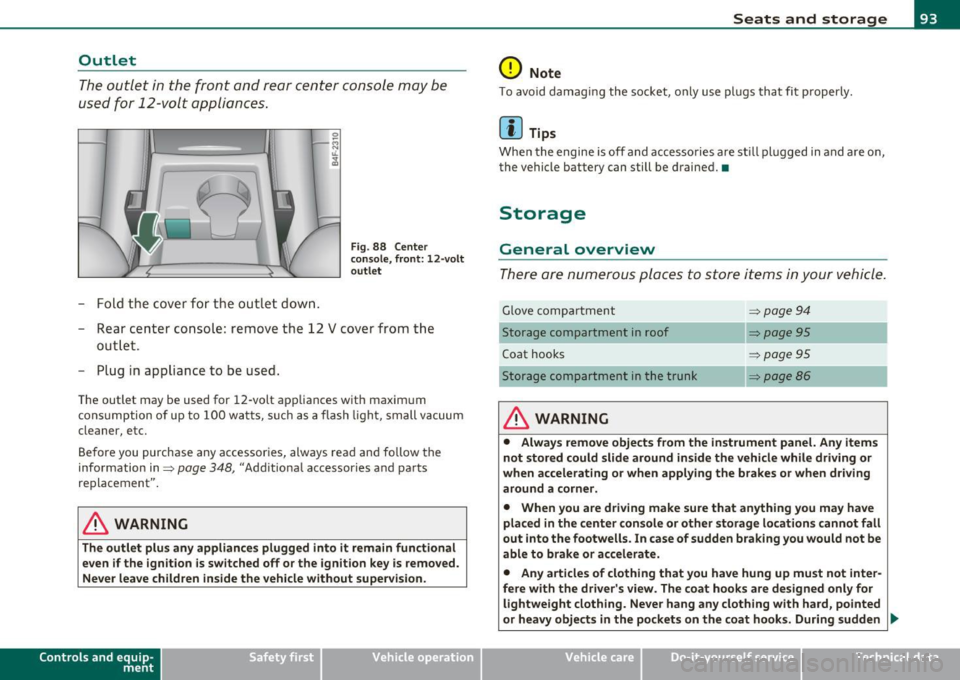
- Fold the cover fo r the outlet down .
Fig. 88 Center
c on sole , fr ont: 12 -vol t
ou tlet
- Rear center console: remove the 12 V cover from the
out le t.
- Plug in appliance to be used.
The outlet may be used for 12-volt appliances with maxim um
consumption of up to 100 wat ts, su ch as a flash light, small vacuum
cleaner, etc.
Be fore you purchase any accessories, always read and fo llow the
information in:::::,
page 348, "Additional accessories and parts
replacement".
& WARNING
The outlet plus any applianc es plugged into it r emain functional
even if the ign ition is switched off or th e ign itio n key is remo ved.
Ne ver leave children in side the vehicle without supervi sion.
Cont rols a nd e quip
m en t Vehicle
OP-eration
Seats and storage
0 Note
To avo id damaging the socket, only use p lugs that fit p roperly.
[ i ] Tips
Whe n the engine is off and accesso ries a re st ill plugged in and a re on,
the vehicle battery can still be drained. •
Storage
General overview
There are numerous places to store items in your vehicle .
Glove compa rtment :::::, page 94
Storage compartment in roof :::::, page 95
Coat hooks :::::, page 95
Storage compartment in the trunk :::::, page 86
& WARNING
• Alwa ys rem ove objects from the in strument panel. Any items
not stor ed could slid e around in side the v ehicle while driv ing or
when a ccelerating o r whe n applying t he br ake s or whe n driv ing
around a corn er.
• When you are dri ving make sure that an ything you ma y have
placed in the center con so le or other sto rage locat ion s cannot fall
out into the footwells . In case of sudden br aking you would not be
able to b rake or acc ele rate.
• An y article s of clothing that you ha ve hung up mu st not inter
f e re with th e driver's view . The co at hooks are d esigne d only for
lightweight clothing. Ne ver ha ng any clothing with ha rd, pointed
or heavy obj ects in the pockets on th e co at hooks . During sudden
~
Vehicle care Do-it-yourselt service iTechnical data