service AUDI A6 2011 User Guide
[x] Cancel search | Manufacturer: AUDI, Model Year: 2011, Model line: A6, Model: AUDI A6 2011Pages: 370, PDF Size: 87.15 MB
Page 35 of 370
Speed warning 2
Storing war ning 2 is recommended i f you o/woyswantto be reminded
of a certain speed, fo r example when you are travel ing in a country
that has a genera l maximum speed limit, or if you do not want to
exceed a specified speed fo r winter tires .
The speed warning 2 symbol,
8 , (USA mode ls)/ 8, (Canada models)
appears in the display when you exceed the stored speed limi t. Unlike
warning 1, it will not go out until the vehicle speed drops below the
sto red speed limi t.
Setting speed warn ing 2
=> page 33 .
(I) Tips
Even though your ve hicle is eq uipped with a speed war ning system,
you should st ill watch the speedometer to make sure you are no t
dr iv ing faste r th an the speed lim it. •
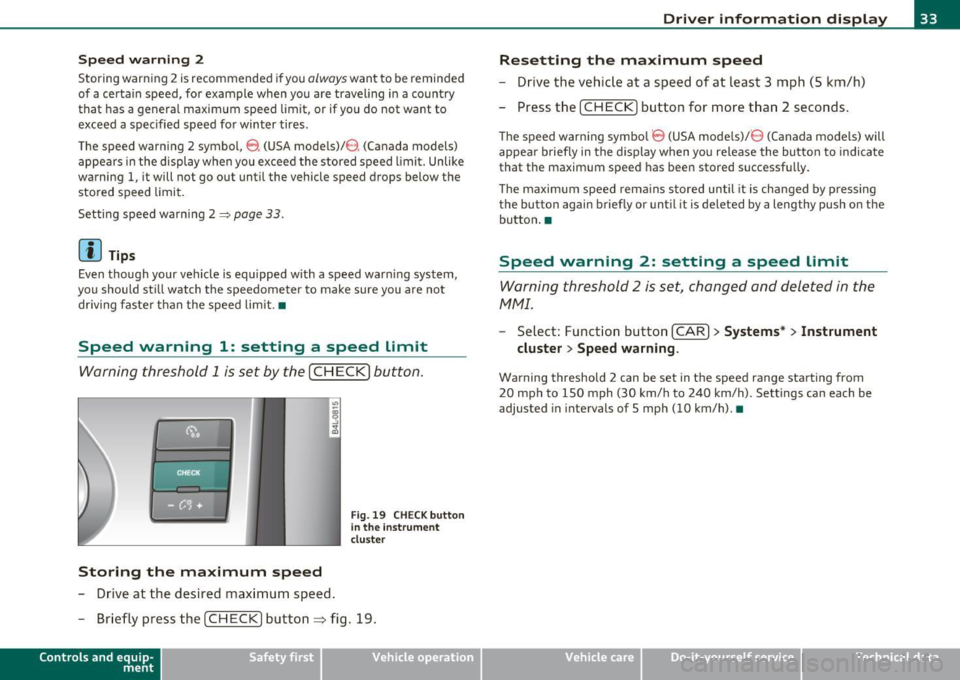
Speed warning 1: setting a speed Limit
Warning threshold 1 is set by the [ CH ECK] button .
Storing the maximum speed
-Drive at the desired max imum speed .
Fig. 19 CHE CK butt on
in the i nstrument
clu ste r
- Briefly pre ss the [CHECK] button ~ fig. 19.
Con tro ls a nd e quip
m en t Vehicle
OP-eration
Driver information display
Resetting the maximum speed
- Drive the vehic le at a speed of at leas t 3 mph (S k m/h)
- Press the [ CH EC K] button for more t han 2 seconds .
The speed warning symbo l 8 (USA models)/ 8 (Canada models) will
appea r briefly in the d ispl ay when you release the bu tton to indica te
that the maximum speed has been stored successf ully.
Th e maximum spee d rema ins s tored until it is cha nged by p ressing
the button again briefly or until it is deleted by a lengthy push o n the
bu tton .•
Speed warning 2: setting a speed Limit
Warning threshold 2 is set, changed and deleted in the
fv1fv1l.
- Select: Funct io n button [CAR ]> Systems* > Instrument
cluster > Speed warning .
Warning threshold 2 can be set in the speed range starting from
20 mph to 150 mph (30 km/ h to 240 km/h). Settings can each be
adjusted in intervals of 5 mph (10 km/h). •
Vehicle care Do-it-yourselt service iTechnical data
Page 37 of 370
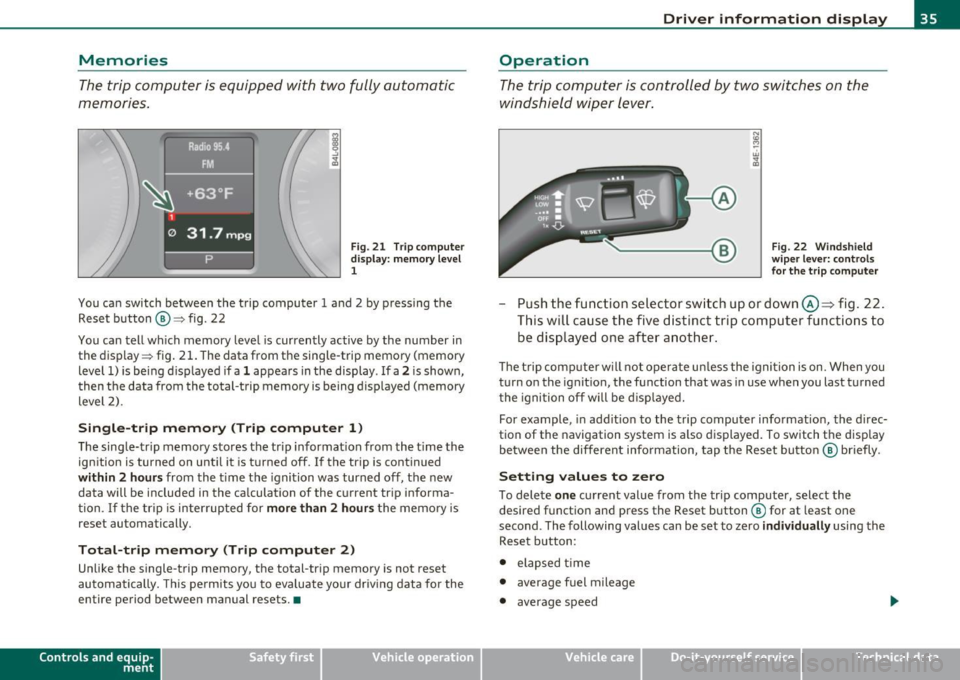
Memories
The trip computer is equipped with two fully automatic
memories .
Fig. 21 T rip c omput er
di spl ay : m emory l evel
1
You ca n switch be twee n the t rip computer 1 a nd 2 by p ressing the
Rese t button @=> fig. 22
You can tell wh ich memory level is currently active by the number in
the display => fig . 21 . The data from t he single-trip memory (memory
level 1) is be ing d isp layed if a
1 appea rs in the display . If a 2 is shown,
then t he data from the total-trip memory is being displayed (memory
level 2) .
Single-trip memory (Trip computer 1 )
The sing le-tr ip memory sto res the trip informat ion from the t ime the
ign ition is turned on unt il it is t urned off .
If the trip is cont inued
within 2 hour s from the time the ignition was turned off, the new
data will be included in the ca lculation of the current tr ip informa
tion .
If the tri p is interrup ted for more than 2 hours t he memory is
reset automatically.
Total-trip memory (Trip computer 2)
Unlike the single-trip memory, the total-tr ip memory is not reset
au tomatically. This pe rmit s you to eva luate yo ur driv ing data fo r the
entire period between manual resets. •
Contro ls a nd e quip
m en t Vehicle
OP-eration
Driver information display
Operation
The trip comp uter is controlle d by two swit che s on the
w ind shield wi per lev er.
Fig . 22 W indsh ield
w ipe r lev er: co nt rol s
fo r the trip compute r
-Push the fu nctio n se le ctor sw itch up or down @~ fig . 22 .
Thi s will cause th e five d ist inc t trip c om puter func tion s to
be dis played o ne aft er anoth er.
The trip com puter w ill not oper ate u nless the igni tion is on. When you
turn o n the ignit ion, the function that was in use when you last turned
t he igni tion off w ill be dis played.
For example , in add it ion to the trip compu ter informat io n, the direc
tion of the navigation system is a lso d is p layed . To switch t he display
be tween the different info rmation, tap the Reset butt on @ briefly .
Setting values to zero
To dele te one c ur rent value from the tr ip computer, select the
desired f unct io n an d press the Reset b utton ® for at least one
second . The following values can be set to zero
individually using the
Reset b utton :
• elapsed time
• average fuel mileage
• average speed
Vehicle care Do-it-yourselt service iTechnical data
Page 41 of 370
Check Light in the master key
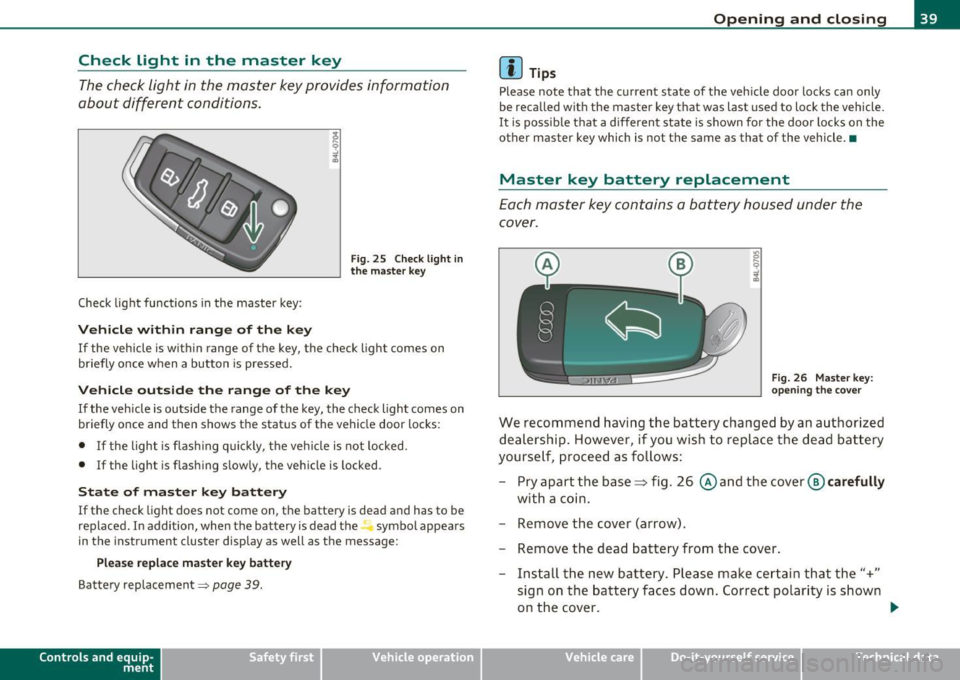
The check light in the master key provides information
about different conditions.
Check light functions in the master key :
Vehicle within range of the key
Fig . 25 C heck lig ht in
the m aster k ey
If the vehicle is w ith in range of the key, the check light comes on
briefly once w hen a button is pressed.
Vehicle outside the range of the key
If the veh icle is outside t he range of the key, the c hec k light comes on
briefly once and then shows the status of the vehicle door locks:
• If the light is fl as hi ng q uickly, the veh icle is not locked.
• If the light is f lashing slow ly, the vehicle is locked .
State of master key battery
If the check light does not come on, the battery is dea d and has to be
replaced . I n addition, when the battery is dead the symbol appea rs
i n the instrument cluste r display as well as the message :
Please replace ma ster ke y battery
Battery replacement~ page 39.
Con tro ls a nd e quip
m en t Vehicle
OP-eration
Opening and closing
(I) Tips
Please note that the c urrent state of the vehicle doo r locks can only
be recalled wit h the master key t hat was last used to lock the vehicle.
It is poss ib le tha t a d ifferen t state is shown fo r the door lo cks on the
other master key which is not the same as that of the vehicle .•
Master key battery replacement
Each mas ter key contains a battery hous ed under th e
cover.
Fi g. 26 Master key:
o pe ning the c ove r
We reco mmend having the ba ttery chang ed by an au thori zed
dealer ship . However , if you wi sh to replace th e dead b atte ry
yourse lf, proc eed as follows :
- Pry apart the base~ fig. 26 @and the
cover @carefully
with a c oin.
- Remove the cover (arrow).
- Remove the dead battery from the cover .
- Install th e new ba ttery . Please make c ertain that the"+"
sign on t he ba ttery faces down . Correct po lar ity is shown
o n the cover. .,,.
Vehicle care Do-it-yourselt service iTechnical data
Page 47 of 370

How to unlock each door separately using the
door handle (front doors)
- Pull the handle to open t he door .
How to unlock each door separately using the
door handle (rear doors)
- Pull the door handle once to release the loc k.
- Pull t he handl e
twice to open th e door.
You will find a power locking sw itch in ea ch door. You c an lock and
unlock the vehicle using the switches in the dr iver's or passenger's
door =>
page 44, fig. 30. Yo u can only lock the vehicle using the
switches in the rear doors =>
page 44, fig. 31. If you lock the vehicle
using t he
power locking switch , please note the following :
• You can not op en the doors or the rea r lid from the
outside
(increased secur ity, for example when you are sto pped at a red light).
• The d iodes in the power lock ing switches illuminate whe n all the
doors and the rear lid are closed and loc ked .
• All d iodes turn dark as soon as one of the doors has bee n
unlocked .
• You can unlock and open the doors from the inside by pulling on
t he doo r handle .
• If the driver's door is opened (after you have locked the vehicle
from the inside using the power locking switch), the door will rema in
unlocked to preve nt you from locking yourself out of your vehicle .
After you close t he door, you have to lo ck the drive r's door ag ain.
• If you have a crash and the airbag is activated, the doors automat
i c ally unlo ck.
& WARNING
• If you use the power locking switch with the doors closed,
remember th at all the vehicle doo rs will lock.
Con tro ls a nd e quip
m en t Vehicle
OP-eration
Opening and closing
& WARNI NG (continued )
• Locking doors from the inside can help p revent inadvertent
door opening during an accident and can also prevent unwanted
entry from the outside. Locked doo rs can, however , delay assis
tance to vehicle occupants and hold up rescue efforts from the outside in an accident or other emergency .•
Emergency Locking
If the central locking system fails (power sup ply), each
d oor has to be locked separately .
5 0 N tL ;g
Fig. 32 E mergen cy
l o ck ing o f the front
p ass eng er's door
An e mergency lock ing mechan is m is i nte gra ted i n the edg e of
th e pass enge r's door a nd in the rear doo rs ( on ly v isibl e wh en
t h e door is open) .
- Turn the cover with t he ignit ion key and then ti lt the cover
downward=> fig. 32.
- Insert the key into the inner slot and tur n it to the right
( r ight-side doors) or the left (left-side door) as far as it can
g o.
After you close the door, you w ill no longer be ab le to open it from the
o uts ide. _.,
Vehicle care Do-it-yourselt service iTechnical data
Page 49 of 370

• If the central locking system fails (power supply), you can also
open the rear lid using the trunk escape handle from the inside
~page318. a
Child safety lock
Power child safety lock for the rear doors t
The power child safety lock prevents the rear doors from
being opened from the inside.
Fig. 35 Section from
driver's door: controls
The rear doors are equipped with a power child safety lock. It
is operated with the two safety buttons(!) in the driver's door
~ fig. 35.
- Press the left and/or right safety button to disable the
rear power window(s) and prevent the respective rear door
from being opened from the inside. The LED in the button
will light up when the child safety lock is turned
on.
- Press the illuminated button again to turn the child safety
features
off.
When the child safety lock is activated, the interior door opening
lever is inope rative; the door can only be opened from the outside. In
Contro ls a nd e quip
m en t Vehicle
OP-eration
Opening and closing
addition, the window regulator for that door is also inoperative when
the child safety lock is activated.
[ i] Tips
• In order to activate the child safety lock on the left and the right
side, you have to press the two safety buttons in succession.
• Make certain that the check light comes on in the corresponding
safety switch when the child safety lock is activated. •
Convenience key
Ap plies to v ehicles: w ith Con ven ience key
Description
Access and vehicle operation based on: Master key
remains in driver's pocket.
Th e Convenience key vehicle authorization system allows keyless
unlocking, locking and starting of the vehicle . You only have to carry
the master key on your person.
It makes nod ifference whether the master key is in your jacket pocket
or in your brief case. As soon as you approach your vehicle, the Conve
nience key recognizes the request for access , checks for authorization
and enables the following functions:
• Unlocking the vehicle~
page 48.
• Locking the vehicle~ page 49.
• Switching on ignition and starting the engine by pressing the
[START ) button; the master key does not have to be in the ignition
switch ~
page 110.
& WARNING
• When you lock your vehicle from outside, nobody -especially
children -should remain inside the vehicle. Remember, when you .,_
Vehicle care Do-it-yourselt service iTechnical data
Page 55 of 370

-Turn and hold the k ey in the lock posit ion®~ page 52,
fig. 40 until t he windows and th e power roof * are
comple tely closed .
Opening windows
-Inse rt the key into the lock o f th e driver's door.
Turn and hold the key in t he open posit ion @.
The a utomat ic close/open fu nction will cease if the key is returned to
i t s or iginal pos it io n.
& WARNING
• Be careful when closing the windows . Check to see that no one
is in the way, or serious injury could re sult!
• Always read and heed WARNING=>
& in "General des cription "
on
page 41 . •
Reactivating the system after battery
disconnection
If the vehicle battery is disco nnected and t hen reconnected ,
the automatic closing and opening function will not work
u nti l it is reactivated. To reactivate th is featu re, perform the
fo llowing steps:
Reactivating close /open feature
- Pull and hol d th e power w indow sw itc h until t he window is
comp letely closed .
- Release the switch.
- Pull the swi tch again for one second. The automat ic
closi ng/opening is now reactivated. •
Contro ls a nd e quip
m en t Vehicle
OP-eration
Opening and closing
Sliding/tilting power sunroof
Applies to veh icles: with slid ing/t ilting powe r sunroof
How the power sunroof works
Fig . 41 Section of th e
h eadliner : su nroo f
s wit ch pos itio ns
The roof will slide open or ti lt up at the rear as required. When the
ignition is on, yo u can slide the roof open or close it to the des ired
position by turning the rotary control sw itch located overhead next to
the inte rior light. The roof is tilted open o r closed by p ressing or
pulling the control switch at posit ion ®=>fig. 41.
You can s till close or open the sunroof for up to ten minutes after you
have switched off the ignition with the key remaining in the ignition
lock. If either door is opened, powe red operation of the sun roo f will
be deact ivated.
Solar protection with sliding glass sun roof*
The sliding glass sun roof is equipped with an ad justable sunshade to
reduce the effects of strong sunlight. The so lar protection can be
moved at the recessed hand le to open and close it. To p revent the
vehicle interior f rom heat ing up, you should close the solar protection
when you park yo ur vehicle in the s un .
When the roof is
slid open , the sunshade is opened automat ica lly.
Whe n the roof is closed, the sunshade can be closed man ua lly. .,
Vehicle care Do-it-yourselt service iTechnical data
Page 63 of 370

Applies to veh icles : w ith Adaptive Light
Adaptive Light
When making a turn or driving around tight corners, the
relevant area of the rood is better illuminated .
Adaptive Light (making turns)
Fig. 49 Adaptive Light
when turning and
driving through curves
An additional bulb in the headlight provides a cornering light@ in
addition to the low beam ©~ fig. 49. Adaptive Light is switched on
and off automatically depending on driving conditions.
When you activate the turn signal lever, the Adaptive Light for the
same side is switched on. Please note that the turn signal lever must
engage.
Adaptive Light is not switched on if you only move the turn signal
lever to the point of resistance to signal a lane change~
page 62,
"Turn signal
¢i c:> and high beam ~o lever".
When driving around bends, Adaptive Light is controlled according to steering wheel angle.
• It is switched on in tight corners.
• It is not switched on in long, open bends .
Adaptive Light (in curves)
When driving through curves, the low beams © are automatica lly
controlled depending on driving speed and the steering wheel angle.
Con tro ls a nd e quip
m en t Vehicle
OP-eration
Clear vision
The two main beams pivot at different angles so that there is no unil
luminated area in front of the vehicle .
[ i] Tips
• The system works up to a speed of about 43 mph (70 km/h). If the
speed is higher, it is not activated .
• Adaptive Light (in curves) functions at a speed of about 6 mph
(10 km/h) and is deactivated at speeds below about 4 mph
(6 km/h). •
Applies to vehicles : w ith ligh t package
Perimeter lighting in the mirror housing
LEDs in the exterior mirror housing illuminate the ground
during entry.
This function ensures that when unlocking, the vehicle periphery is
ill uminated in the dark. LEDs in the exterior mirror housing are
switched on . The function cannot be turned off separately. •
Emergency flasher A
The emergency flasher makes other motorists aware that
you or your vehicle are in an emergency situation.
Vehicle care
Fig. 50 Center
console: emergency
flasher switch .,
Do-it-yourselt service iTechnical data
Page 65 of 370
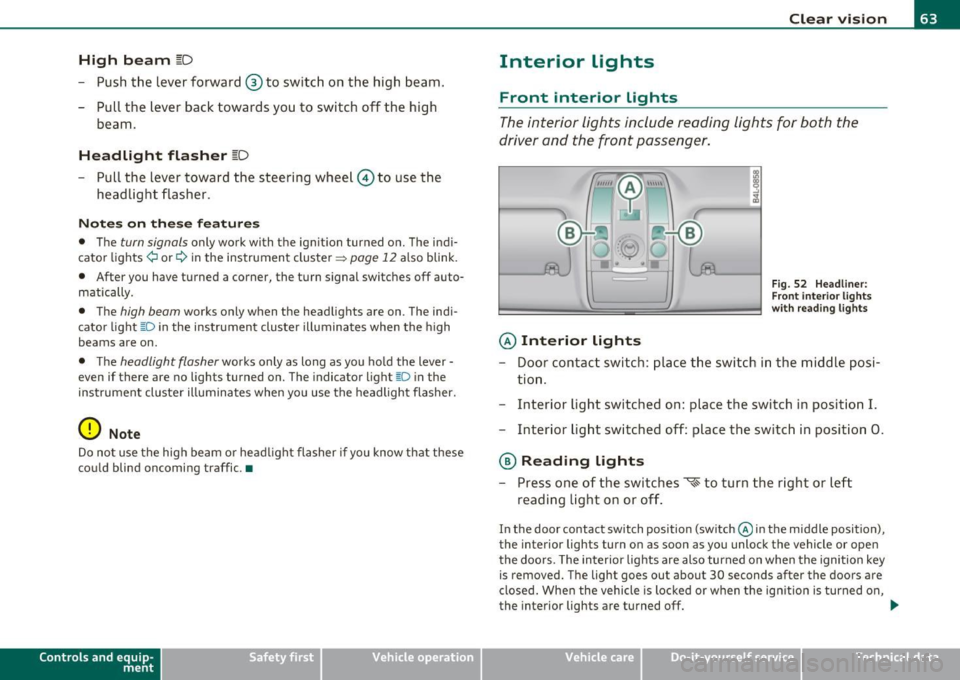
High beam l[D
-Push the lever forward ® to switch on the high beam.
- Pull the lever back towards you to switch off the high
beam.
H eadlight flasher l[D
- Pull the lever toward the steering wheel© to use the
headlight flasher.
Notes on the se fea ture s
• The turn signals only work with the ignition turned on. The indi
cato r lights ¢ or¢ in the instrument cluster=>
page 12 also blink.
• After you have turned a corner, the turn signal switches off auto
matically.
• The
high beam works only when the headlights are on. The indi
cato r light [D in the instrument cluster illuminates when the h igh
beams are on.
• T he
headlight flasher works only as long as you ho ld the lever -
even if there are no lights turned on. The indicator light~D in the
instrument cluste r illuminates when yo u use the headlight flasher.
0 Note
Do no t use the high beam or head light flasher if you know that these
could blind oncoming traffic .•
Con tro ls a nd e quip
m en t Vehicle
OP-eration
Clear vision
Interior lights
Front interior lights
The interior lights include reading lights for both the
driver and the front passenger.
© Interior lights
Fig . 52 Headli ner:
F ron t inte rior lights
wit h rea ding lights
- Door contact switch : place the switch in the middle posi-
tion .
- Interior light switched on: place the switch in position
I.
-Interior light switched off: place the switch in position 0.
® Reading lights
- Press one of the switches '* to turn the right or left
reading light on or off .
In the door contact switch position (switch @in the middle position),
the interior lights turn on as soon as you unlock the vehicle or open
the doors. The interior lights are also turned on when the ignition key is removed. The light goes out about 30 seconds after the doors are
closed . When the vehicle is locked or when the ign ition is turned on,
the interior lights are turned off.
~
Vehicle care Do-it-yourselt service iTechnical data
Page 67 of 370
Make-up mirrors
The vani ty m irrors in the sun visors are equ ipped with lids . When the
lid is open end@, the mirror light in the roof lin ing tu rns on au toma t
ically . It t urns off when the lid is closed or the visor is folded up
agai n.•
App lies to vehicles: wit h sun sha de
Sun shade
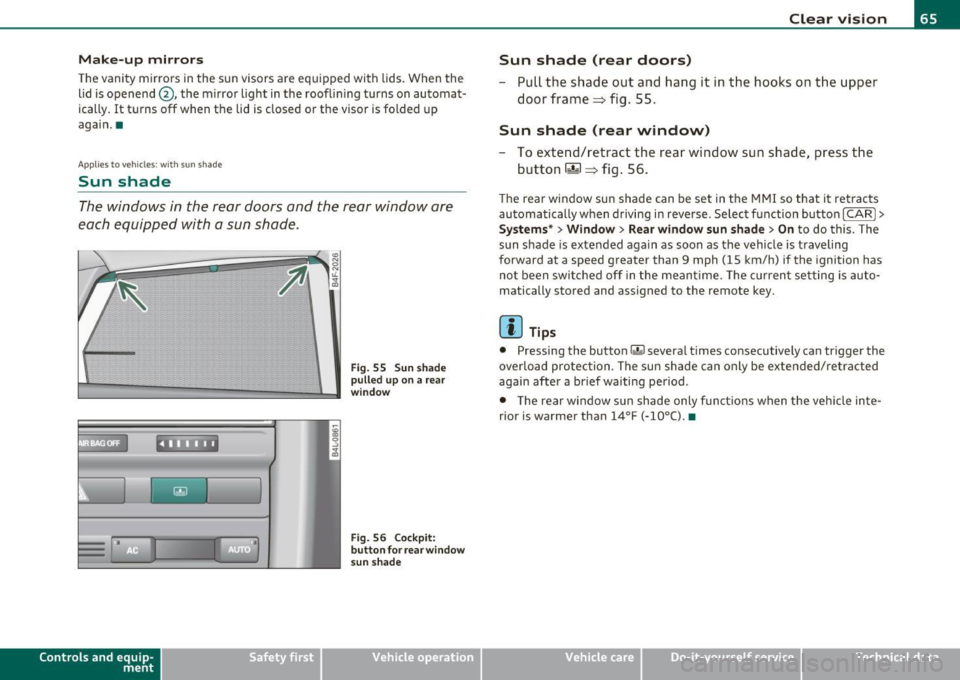
The windows in the rear doors and the rea r window are
each equipped with a sun shade.
Con tro ls a nd e quip
m en t
. l
F ig . 55 S un sh ad e
p ulled up on a rear
w in dow
Fi g. 56 Co ckpit:
b utt on f or rea r wind ow
s un sh a de
Vehicle OP-eration
Clear vision
Sun shade (rear doors)
- Pull the shade out and hang it in the hooks on the upper
doo r frame=> fig. 55.
Sun shade (rear window)
-To extend/retract the rear window sun shade, press the
button
rn => fig. 56.
T he rear window sun shade can be set in t he M MI so that it retracts
au tomatically w hen driving in reve rse . Selec t fu nction bu tton
[CARI >
Systems* > Window > Rear window sun shade > On to do this. The
s u n shade is extended again as soon as the vehi cle is traveling
forward at a speed greater than 9 mph (15 km/h) if the ignition has
no t b een swi tched off in the meant ime . T he c urren t se tting is auto
matically stored and assigned to the remote key.
[ i ] Tips
• Pressing the button r.&I severa l times co nsecutive ly can tr igger the
overlo ad protec tion. The su n shade can only be exte nded/ re tra cted
again after a brief waiting period .
• T he rear window sun sh ade only fun ct io ns when t he ve hicle in te
rior is warmer than
14°F (-10°() . •
Vehicle care Do-it-yourselt service iTechnical data
Page 70 of 370
Clear vision
The washer jets extend forward out of the front bumper driven by
water pressure to spray the front headlights with water .
You should inspect the headlights regularly (for example when refu eling) and clean off any solid d irt or insects from the lenses.
To ensure the system works properly in winte r, keep the washe r jets
free of snow and remove any ice using a de-icing spray .•
Service position
The wiper blades can only be changed in the service posi
tion .
-If the wiper blades are not frozen to the windshield, bring
the windshield wiper lever to the basic position
@
=> page 66, fig. 57 .
-Select: Function button I CAR]> System s*> Windshield
wipers > Service po sition .
• On -changing the windshield wiper blades can only be done if you
bring the wiper arms to the service pos ition. You will a lso avoid paint
damage to the hood when working on the wipers in this position .
• Off -the windshield wipers are moved to their initial position
again.
0 Not e
Never maneuver your vehicle with the front windshield wiper arms
raised since they will automatically be moved b ack to their basic posi
tion above a speed of 3 mph (6 km/h) and can scratch the hood .
[ i J T ip s
• You can also use the service position, for example, if you want to
protect the windshield from icing by using a cover . •
The service position automatically switches to
Off when you
operate the windsh ield wiper lever, or speed exceeds 3 mph (6
km/h). •
Replacing windshield wiper blades
Wiper blades in good condition help keep the windshield
clear .
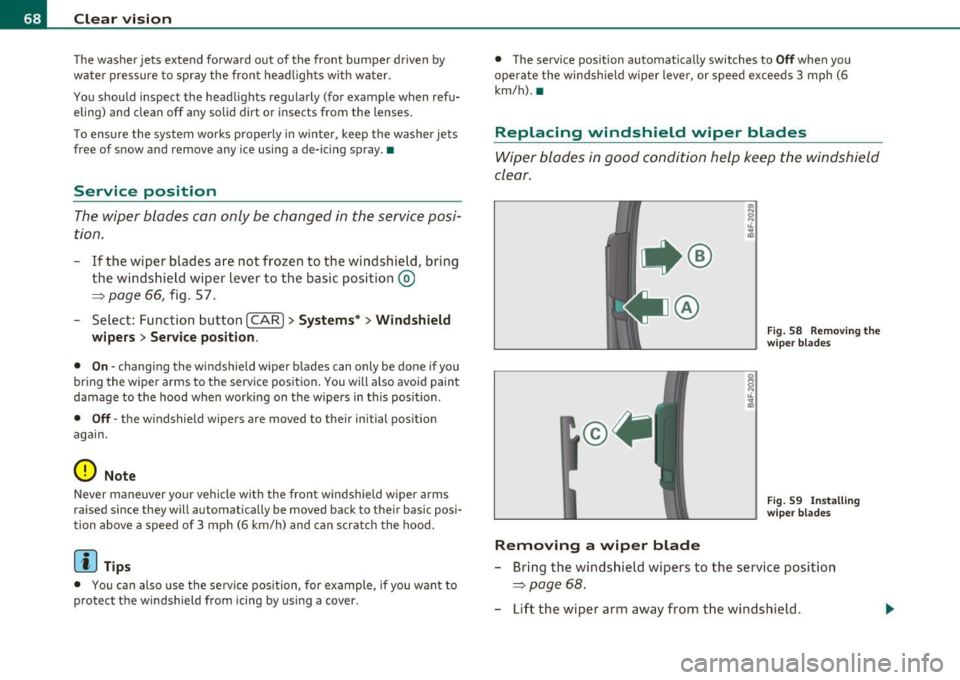
@
Removing a wip er blad e
Fig. 58 Removing th e
wiper blades
Fi g. 59 Insta lling
wi per blades
- Bring the windshield wipers to the service position
=> page 68.
-Lift the wiper arm away from the windshield .