wheel AUDI A6 2011 Owner's Manual
[x] Cancel search | Manufacturer: AUDI, Model Year: 2011, Model line: A6, Model: AUDI A6 2011Pages: 370, PDF Size: 87.15 MB
Page 135 of 370

Adaptive Cruise Control IJI ____________ ___,__ __ ____.
Vehicles moving up ahead but offset in the lane cannot be detected
by ACC until they are in sensor range.•
Appli es to vehi cles : wit h Adap tive Cru ise Cont rol
Lane changes by other vehicles
Fig. 122 A vehicle
changes lanes
Vehicles that cut into your lane a short distance in front of you cannot
be detected by ACC until they are in sensor range. •
Appli es to vehi cles : wit h Adap tive Cru ise Cont rol
Vehicles that are difficult to detect
Con tro ls a nd e quip
m en t
Fig.123 Two-wheeled
vehicle driving ahead
Vehicle OP-eration
Some vehicles moving up ahead in your lane of travel are difficult to
detect, for example two-wheeled vehicles, vehicles with high ground
clearance, loads sticking out the back . Vehicles like this are often
detected late or in some situations not at all. •
App lies to ve hicle s: w ith Ad aptive Crui se Contro l
Stationary vehicles
Fig. 124 Turning and
stationary vehicle
Fig. 125 Sheering out
and stationary vehicle
If a vehicle that has been detected by ACC exits the highway or sheers
out into the neighboring travel lane, and there is a stationary vehicle
ahead of that vehicle, ACC will not detect or react to that stationary
vehicle~ fig. 124 and~ fig. 125 . •
Vehicle care Do-it-yourselt service iTechnical data
Page 136 of 370
IIIIL_!_A~u~d~i~l!:!a~n~e '...:a~s~s:!:is~t ~--------------------------------------------
Aud i Lane assist
Lane assist
Applies to veh icles : w ith lane assist
Description
Lane assist helps you keep your vehicle in your lane.
Lane assist uses a camera to detect lane boundary lines. If the system
detects that your vehicle is about to leave a lane boundary line, the
steering wheel
vibrates to alert the driver. If lane assist detects
boundary lines on both sides o f the veh icle's lane, the system enters
act ive standby mode, which is indicated by t he gree n indicator light
/: on the instrument cluster .
If the system is in active standby mode and the turn signal is acti
vated before driving over the boundary line , the warning does not
occur sinc e th e system allows for in tention al lane changes.
The system is designed for driving on freeways and expanded high
ways and th us works only at speeds of 40 mph (65 km/h) or more.
& WARNING
• Lane assist will not keep your vehicle in your lane. The system
only warns the driver when the vehicle is leaving the lane. The
driver is always responsible for keeping the vehicle in the lane.
• The camera is not able to detect all lane boundary lines and in
some cases might also detect lane structures or objects as
boundary lines. This can lead to incorrect warnings or warnings
that fail to go off at all.
• The camera's visibility can be impaired by vehicles ahead of
you, for instance, or by rain, snow, heavy spray or light shining
into the camera lens. This can cause lane assist to fail to detect
boundary lines. •
Applies to veh icles: wit h lane assist
Activating and deactivating
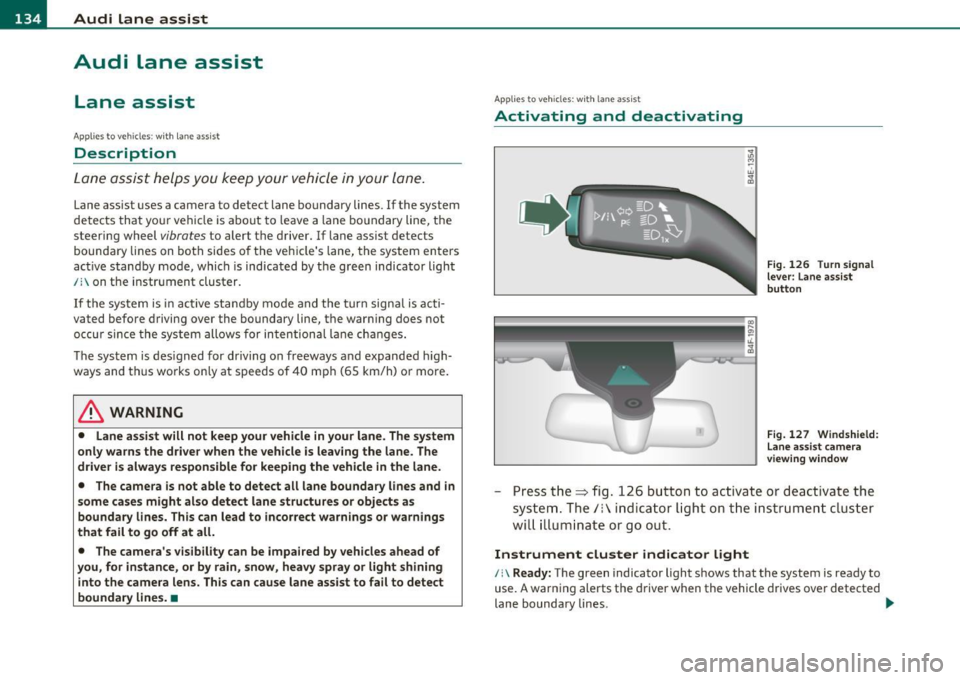
Fig. 126 Turn signal
lever: Lane assist
button
Fig. 127 Windshield:
Lane assist camera
viewing window
-Press the=> fig . 126 button to act ivate or deactivate the
system. The/: ind icator light o n the instrument cluster
will illumi nate or go out.
Instrument cluster indicator light
/:\Ready: The green indicator light shows that the system is ready to
use. A warning alerts the driver when the vehicle drives over detected
lane boundary lines . -.,
Page 137 of 370

Audi lane assist -________________ lff'II
Not ready: The yellow indicator light shows that the system is
turned on but unable to send a warning. This can be due to the
following:
• Th ere are no boundary lines, or there is only one boundary line
present.
• The boundary lines are not detected (e .g . due to snow, dirt, wet
conditions or light shining into the camera lens).
• More than two boundary lines (such as at construction sites) are
located in the vehicle's lane.
• Th e vehicle's speed is below the speed needed to activate it, which
is about 40 mph (65 km/h) .
• Th e lane is narrowe r than about 8
ft. (2.5 m), or wider than about
16 ft. (5 m).
• The curve is too sharp.
Notes on the instrument cluster display
When the lane assist turns off automatically, the instrument cluster
indicator goes out and one of the fo llowing messages appears on the
display:
Audi lane assist not available: currently no sensor vision
Thi s message appears when the camera can no longer function
because it cannot detect the boundary lines. This may be due to the
following:
• Th e exte rior side of the camera viewing window=>
page 134,
fig. 127 is covered with dirt or ice. Clean this part of the windsh ield.
• Th e came ra viewing window is fogged up on the inside. In this
case, wait until the fog disappears before turning lane assist on
again.
• Th e system was unable to detect boundary lines over an extended
period of time due to road conditions (such as snow-cove red lanes).
Do not turn lane assist on aga in until the lines can be more easily
detected.
Audi lane assist currently not available
Controls and equip
ment Safety first A temporary malfunction
is preventing lane assist from operating .
Tr y turning on lane assist again at a lat er time.
Audi lane assist: system fault
The system shou ld be checked by an authorized Audi dealer or other
qualified wo rkshop.
[ i ] Tips
• Make sure that the camera viewing window => page 134, fig. 127
is not covered by stickers or similar objects.
• Always keep the camera viewing w indow clean. This can us ually be
done by operating the windshie ld wipers. •
Applies to vehicles: wi th lane assist
MMI settings
You can use the fv1fv1I to adjust the warning time and
steering wheel vibration.
-Select: Function button [CAR ]> Systems *> Audi lane
assist.
Setting the warning time
Early: This setting warns the driver before a wheel touches the
detected lane boundary line. The warning depends on the vehicle's
angle as it approaches the boundary line. If you approach a boundary
line gradually, the warn ing will occur earlier. If you approach the
boundary line at a very sha rp angle, the warn ing will occur just befo re
a wheel touches the line.
Medium : In this setting, the warning time adjusts to the characteris
tics of the road and the vehicle speed. The wa rning occurs later fo r
curves and occurs earlier for straight stretches of road . The warning
occurs later on narrow roads than on wide ro ads.
Late : This setting warns the driver when a wheel dr ives over the
detected lane boundary line.
Vehicle care Technical data
Page 138 of 370
1111....__A_ u_ d_i_ l_ a_ n_ e_ a_s_ s_ is_t _________________________________________________ _
Setting the steering wheel vibration
When ad justing the steering wheel v ibration, the s teer ing whee l
vibrates so that you can check the in tensity you have set.
Cl] Tips
• When mak ing t he ad justment, lane assist is not act ivated . The
steering wheel vibrates briefly only to ass ist you in chang ing the
sett ing.
• Your settings a re automatically stored and assigned to the remote
cont rol key being used .•
Page 149 of 370

______________________________________________ A_ u_ t_ o _ m_ a_ t_ ic_ t_r_a _ n_ s_m_ i_ s _s_ i_ o _ n __ l!'II
The selector lever must be in Nor P. If one of the dr iv ing positions is
eng aged a safety swi tch will p reven t th e e ng ine from be ing s tarte d.
See also=>
page 109.
Before you move t he se lector lever from t he P position, yo u must
always ap ply the b rake peda l befo re and while de press ing the bu tton
in the handle of the selector lever.
_& WARNING
• Unintended vehicle movement can cau se serious injury.
- When the selector lever is in a driving position, the vehicle may creep, even at idle speed. Therefore do not release the
parking brake or foot brake until you are ready to move,
because power is transm itted to the wheels as soon as a driv ing
po sition i s engaged.
- Do not accelerate while selecting a driv ing position . At this
time the engine must be at idle speed so that undue stress i s
not placed on the clutches in the transm iss ion.
- Remember : • even when stopped briefly with the automatic
transmission in "D", "S" or "R" , engine power is being trans
mitted to the wheels . Your vehicle could "creep " forward or
backward. When stopped, keep the brake pedal fully
depre ssed and use the parking brake if neces sary to keep the
vehicle from rolling .
• If the selector lever is unintentionally moved into N while you
are driving, take your foot off the accelerator pedal and wait for
the engine to return to idle speed before selecting a driving posi
tion.
• Never shift into "R " or "P " when the vehicle is in motion .
• Never get out of the d river's seat when the engine is running.
• If you must get out of the vehicle , move the selector lever
securely into the P position and apply the parking brake firmly .
• If the engine must remain running, never have any driving
position engaged when checking under the hood.
Make sure the
selector lever has securely engaged and is locked in "P " with the
Controls and equip
ment Safety first
& WARNING (
co ntinued )
parking brake firmly set=> page 271, "Engine compartment ".
Otherwi se, any increase in engine speed may set the v ehicle in
motion , even with the par king brake applied. •
Applies to vehicles : w ith 6-s peed automatic tran smission
Selector lever positions
T his s ection describ es the selector lever positions and
driving ranges.
Fig . 139 Di splay in
the in strum ent cluster :
se lector le ver In po si
tio n P
Th e selector lever posi tion engaged appe ars next to the se lec tor lever
as well as in the instrument cluster display .
P -Park
In this selector lever position the transmission is mechan ica lly
lo cked. Engage P only when the vehi cle is
comple tely stop ped=> &
in "Driving the automatic transmissio n" on page 146.
T o sh ift in or o ut of position P, yo u must first press an d hold the brake
peda l
and then press t he release button in the se lecto r lever hand le
wh ile moving the selector lever to or from P. Yo u can s hift out of this
posit ion on ly with the ignit ion on . .,,
Vehicle care Technical data
Page 153 of 370
![AUDI A6 2011 Owners Manual Automatic transmission -_______________ ____.
(]] Tips
• When you shift into the next lower gea r, the tra nsmission w ill
downs hift o nly when there is no possibi lity of ov er](/img/6/57593/w960_57593-152.png "AUDI A6 2011 Owners Manual Automatic transmission -_______________ ____.
(]] Tips
• When you shift into the next lower gea r, the tra nsmission w ill
downs hift o nly when there is no possibi lity of ov er")
Automatic transmission -_______________ ____.
(]] Tips
• When you shift into the next lower gea r, the tra nsmission w ill
downs hift o nly when there is no possibi lity of ov er-revving the
eng ine.
• When the kickdown comes on, the transmission will s hift down to
a lower gear, depending on vehicle a nd e ng ine speeds.
• tiptronic ® is inoperative when the transm ission is in the fai l-safe
mode .•
Ap plies to veh icl es: wit h 6-spee d auto matic t ransmiss io n
Steering wheel with tiptronic ®
The shift buttons on the steering wheel allo w the driver to
shift gears manually.
Fi g. 143 Stee ring
wheel : Sh ift butt ons
- To downs hif t, touch the bu tton on the le ft 0-
- To upshift , touc h the button on the right G) .
The sh ift buttons are activated when the sel ector lever is in D, Sor in
t he m anual shift pr ogram (ti ptroni c).
Of course, you can cont inue to use the manual sh ift program with the
sele ctor lever o n the cente r console. •
Contro ls a nd e quip
m en t Vehicle
OP-eration
Applies to vehicles : w ith 6 -s p eed a utomatic transm ission
Automatic transmission malfunction 0
I n the event of a sys tem malfu nction, the automatic transm issio n
switches to emergency ope ra tion mode .
Gearbox malfunction: you can continue driving
Yo u ca n cont inue to dr ive the vehicle. See an a uth o rized Audi dealer
or other qualified workshop at the next opportunity .
Gearbox malfunction: you can continue driving (limited
fun ct ionality )
There is a ser ious system malfunction:
• T he progr am shif ts only int o c ertain gea rs.
• T he engine may sta ll.
• It is not poss ible to restart the engine if it has bee n sw itched off .
• C ontinuing to d rive cou ld resu lt in subsequent d amage.
0 Note
If the transmission switc hes to fa il-s afe mo de, you sho uld take the
veh icle to an autho rized Audi dealers hip as soon as poss ible to have
the con dition corrected .•
Vehicle care Do-it-yourselt service iTechnical data
Page 156 of 370
IIJIL___!A~u~t~o~m~a~t~i~c ~t~ra~n~s~m~i~s~s~i~o~n~ -------------------------------------------
& WARNING (conti nu ed )
-When the selector le ver is in a driving position, the vehicle
may creep, even at idle speed. Therefore do not relea se the
parking brake or foot brake until you are ready to mov e,
becau se power is transmitted to the wheel s as soon a s a driving
po sition i s engaged .
- Do not a ccelerate while selecting a driving position . At this
time th e engine must be at idle sp eed so that undue stres s is
not placed on the clutche s in the tran smis sion .
- Remember: -even when stopped b riefly with the automatic
tran smi ssion in "D ", "S " or "R ", engine power is being tran s
mitted to the wheels . Your vehicle could "creep " forward or
ba ckward. When stopped , keep the brake pedal fully
depre ssed and use the parking brake if necessary to keep the
vehicle from roll ing.
- If the selector lever is unintentionally moved into N while
you are driving, take your foot off the accelerator pedal and
wait for the engine to return to idle speed before s electing a
driving pos ition .
- Never shift into "R " or "P " when the vehicle i s in motion .
- Never get out of the driver 's seat when the engine i s running.
- If you must get out of the vehicle , move the selector leve r
s ecurely into the P position and apply the parking brake firmly .
-If the engine must remain running , never have any driving
po sition engaged when checking und er the hood . Make sure
the selector leve r has securely engaged and is locked in "P"
with the parking brake firmly set=>
page 271, "Engine
compartment ". Otherwise , any increase in engine speed may
set the vehicle in motion, even with the parking brake
applied. a
Applies to vehicles: with mu lt itron ic® Continu ous ly Vari able Transmission (CVT)
Selector Lever positions
This section descri bes the selector lever positions and
driving r ang es .
Fig . 14 7 Displ ay in
the in strume nt clu ster :
selecto r leve r in posi
ti on P
Th e sele cto r lever posi tio n engaged appears nex t to the se lec tor lever
as well as in the i nstr ument clus ter disp lay .
P - Park
In this selector lever position t he transmission is mechan ically
lo ck ed.
Engage P only wh en the vehicle is completely stopped=>
& in
" Dr iving the mult itronic ®" on page 153
T o shift into or out of position P, yo u mus t first press an d hold the
brake pedal and then press the release b utton in the selector lever
h andl e wh ile mov ing the sele cto r leve r to P.
R - Reverse
Th e tran smi ssion will a utoma tica lly selec t the lowest gear ratio when
you sh ift into reve rse.
Select R only when t he veh icle is at a full stop and the eng ine is
running at idle speed=>
& in "Driving the multitronic®" on
page 153.
~
Page 160 of 370
llffl..__A_ u_ t_ o_ m_ a_ t _ ic_ t_r_a _ n_ s_m _ i_ s _s_ i_ o _ n _____________________________________________ _
(I) Tips
• When you sh ift into t he next lower gea r, the engine will downshift
only when there is no possibility of over-revving.
• When the kick-down comes on, the transm ission will shift down to
a lower gear depending on vehicle and engine speeds.
• The tiptron ic ® is inoperative when the transm ission is in the fail
safe mode .•
Applies to vehic les : w ith multitronic ® Continuously Variable Transm ission (CVT)
Steering wheel with tiptronic ®
The shift buttons on the steering wheel allow the driver to
shift gears manually.
F ig. 15 1 Ste eri ng
whe el: Shift butt ons
- To downshift, touc h the bu tton on t he l eft Q .
- To upshift, touch the button on t he right G).
The shift buttons a re activated when the selector lever is in D, Sor in
the manua l shift program (tiptronic).
Of co urse, yo u can cont in ue to use t he manual sh ift p rogr am with t he
selector lever on the center console .•
Applies to veh icles: w ith multitron ic® Conti nuously Variable Transmission (CVT)
Automatic transmission malfunction :)
In the event of a system malfunction, the automat ic tra nsm iss ion
switches to emergency operation mode.
Ge arbox malfunction: you can continue driving
You ca n con tinue to dr ive the vehicle. See an autho rized Audi dealer
or other qualified workshop at the next opportunity.
Gearbox malfunction : you can c ontinue dr iving (limited
functionality)
There is a serious system malfunction:
• T he program sh if ts only into certa in ge ars.
• T he engine may sta ll.
• It is not poss ible to restart the engine if it has been switched off.
• Con tinuing to d rive cou ld res ult in subseq uen t damage.
0 Note
If the transmission switches to fail-safe mode, you sho uld take t he
vehicle to an authorized Aud i dealership as soon as poss ible to have
the cond ition corrected .•
Page 167 of 370

___________________________________________________ P_ a _ r_k :...:.; a..::s ...:s...: i..::s ...:t _ ___,Jfflll
Fig. 159 MMI D isplay:
al igni ng the veh icle
- Switch the MMI on and se lect the reverse gear .
- Turn the steering wheel until the orange orientation lines
(D appear in the parking spot=> page 164, fig. 158 . Use
the markings @to help you estimate the distance from an
obstacle. Each marking presents to 3 f t (1 m) . The blue
area represen ts a n extension of the vehi cle's o utline by
approximately 16 ft (5 m) to the rear .
- While driving in reverse gear, adjust the steering wheel ang le to fit the parking space with the aid of the orange
orientation lines =>
0. ® marks the rear bumper . You
should stop driving in reverse as soon as and no la ter than
when the red orientation line© abuts an object=>& !
& WARNING
• The rear view came ra does not show the enti re area beh ind the
v ehicle =>
page 162, fi g. 156. Watch out e spe cially fo r s mall chil ·
dren and animal s. The rear v iew cam era cannot alwa ys dete ct
them , posing ri sk of an accident!
• Plea se note that obje ct s not tou ching the groun d can appear to
be further awa y than th ey reall y are (for example , th e bumpe r of
a parked vehi cle, a trailer hit ch , or the r ear of a truck) . In thi s case ,
Con tro ls a nd e quip ·
m en t Vehicle
OP-eration
& WARNING (con tin ued)
you sh o uld not use the help lin es to help with p arking , whic h
po se s dang er of an accident!
0 Note
• Low obstacles a lready signaled by a wa rning c an disappear from
the sys tem's de te ct ion range as they are app roached and will no t
conti nue to be signaled . Objects such as barrier cha ins, trailer draw
bars, thin painted ve rtica l poles or fences may not be detected by the
system , posing risk of damage.
• In the MMI display , the direc tion o f travel o f the vehicle rear is
represen ted depend ing on the steering whee l angle. The vehicle front
swings out more than the veh icle rear . Maintain plenty of distance
from an obstacle so that your outside mirror or a corner of your
vehicle does not collide with any obstacles -danger of accident !•
Ap plie s to veh icle s: with pa rk ing syst e m (r ea r, wi th rear vie w cam era)
Parallel P arking
Use parking mode 2 to help you park on the edge of a
street.
Vehicle care
Fig. 160 MM I Displ ay :
blue surface In the
p arking s pot
~
Do-it-yourselt service iTechnical data
Page 168 of 370

lffll.___P_ a_r_ k_ a_s_ s_ i_ s _t __________________________________________________ _
Fig.161 MMI Display:
Blue curve on the curb
The following steps apply only when there is no obstacle
(such as a wall) near the parking spot. Otherwise, please read
the "Tips on Parking Next to Obstacles".
- Activate the turn signal.
- Switch the MMI on and select the reverse gear. The
parking aid turns on and parking mode 1 appea rs on the
display.
- Position your vehicle parallel to the edge of the street,
approximately 3 ft (1 m) from a parked vehicle.
- Press the control button
(D => page 165, fig. 160 on the
MMI control console. Parking mode 2 appears.
- Back up in reverse gear and align your vehicle so that the
blue area ® borders on the rear end of the vehicle or on
the parking spot line. The blue area represents an exten
sion of the vehicle's outline by approximately 16 ft (5 m)
to the rear. The long side of the blue area should be on the
curb. The entire blue area must fit into the parking spot.
- While the vehicle is stationary, turn the steering wheel to
the right as far as it will go. -
Back into the parking spot until the blue curve touches the
curb => fig. 161. Stop the vehicle.
- While the vehicle is stationary , turn the steering wheel to
the left as far as it will go .
- Continue to back up into the parking spot until the vehicle
is parked parallel to the curb .® marks the rear bumper .
You should stop driving in reverse as soon as and no later
than when the red orientation line© abuts an object
=> & !Keep an eye on the front of your vehicle while doing
this =>
0.
Parking next to obstacles
When there is an obstacle (such as a wall) next to the parking spot,
choose a spot with more space on the sides. Position the long side of
the blue a rea so that the re is sufficient space from the curb. The area
must not be on the curb. You will also need to start turning the
steering wheel much earlier. There should be a sufficient amount of
space between the curb and the blue curve, and the blue curve
=> fig . 161 must not touch the curb.
& WARNING
• The rear view camera does not show the entire area behind the
vehicle => page
162, fig. 156. Watch out especially for small chil
dren and animals. The rear view camera cannot always detect
them, posing risk of an accident!
• Please note that objects not touching the ground can appear to
be further away than they really are (for example, the bumper of
a parked vehicle, a trailer hitch, or the rear of a truck). In this case,
you should not use the help lines to help with parking, which
poses danger of an accident! _,,,