ignition AUDI A6 2014 User Guide
[x] Cancel search | Manufacturer: AUDI, Model Year: 2014, Model line: A6, Model: AUDI A6 2014Pages: 304, PDF Size: 76.32 MB
Page 27 of 304
Instruments and warning/indicator lights 25
For some vehicle functions, you can access the
trip information from the temporary memory
¢
page 26 in the line CD¢ fig. 5.
.&_ WARNING
-
- Never rely exclusively on the outside
temperature display to determine if a
road surface is icy or not . Keep in mind
that road surfaces, especially bridges
and overpasses, could be ice covered and
slippery even at an outside temperature above
41 °F (+5 °().
- Always remember, even if the "snow
flake" symbol (ice warning) does not ap
pear in the display, black ice could be on
the road.
- Always reduce your speed and drive with
special care in cold weather conditions
when the chance of encountering icy
road surfaces increases.
@ Tips
- At temperatures below 14 °F (+ 5 °C) a
snowflake symbol appears ahead of the
temperature display. It is intended to re
mind the driver to pay special attention
to
ice on the road ¢ ,&. . If the vehicle is
stationary, or if you are driving at a very
low speed, the temperature shown in the
display might be slightly higher than the
actual outside temperature . This is
caused by the heat being radiated from
the engine .
- You can select the units used for temper
ature, speed and other measurements in
the MMI.
- For information on the audio/video and
navigation* functions, refer to the sepa
rate MMI owner's manual.
Operation
The driver information system is operated us
ing the buttons on the multifunction steering
wheel.
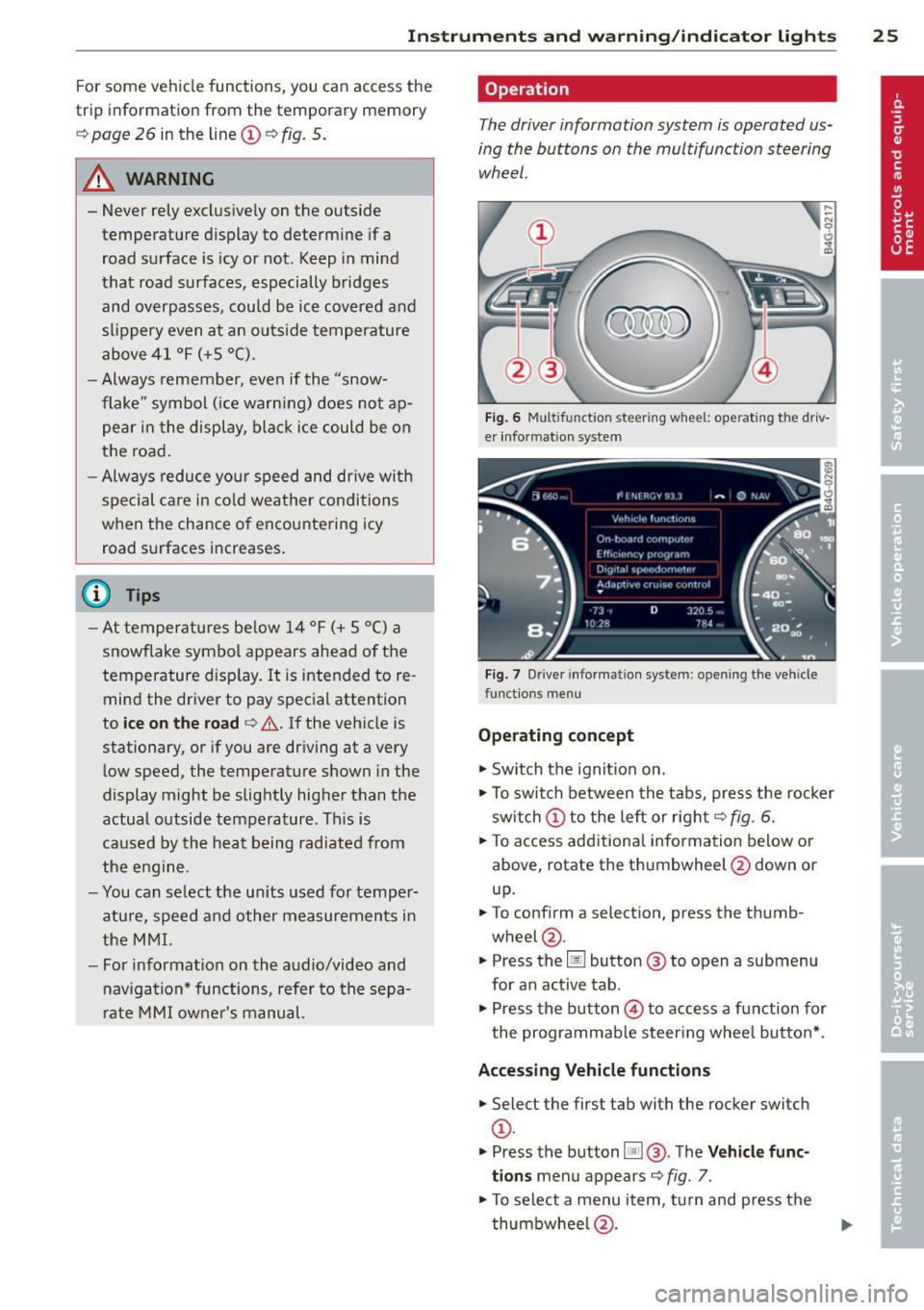
Fig. 6 Multif unctio n steerin g wh eel: operat in g th e driv
er informat ion sys te m
Fig . 7 Dr iver informat ion syste m: o penin g the ve hicle
fu nctio ns me nu
Operating concept
"'Switch the ignition on .
"'To switch between the tabs, press the rocker
switch CD to the left or right ¢
fig. 6.
"'To access additional information below or
above, rotate the thumbwheel @down or
up.
"' To confirm a selection, press the thumb
wheel @.
"' Press the
Iii button @ to open a sub menu
for an active tab .
"'Press the button @ to access a function for
the programmable steering wheel button* .
Accessing Vehicle functions
"'Select the first tab with the rocker switch
CD -
.. Press the button
liJ@. The Vehicle func
tions
menu appears ¢ fig. 7.
"'To select a menu item, turn and press the
thumbwheel @.
Page 28 of 304
26 Instruments and warning /indicator lights
Resetting values to zero
.,. Se lect t he on -board computer / Efficien cy
program
men u item in the Vehicle func
tions
menu.
.,. You can now select between the long-term
memory and short -term memory .
.,. To reset the values i n a memory, press and
ho ld the thumbwhee l@ for one second .
Assigning a function to the
programmable steering wheel button*
.,. Se lect : ICAR !funct io n button> (Car )* sys-
tems
control button > Vehicle settings >
Ste ering wh eel button .
The last function se lected displays when y ou
switch the ignition on.
On-board computer
You can call up the following information in the on -board computer:
- D ate
- Drivi ng time ( h) from t he s ho rt- term memo-
ry
- Ave rag e consumption in MPG (l/ 100 km)
from the sho rt-term memo ry
- Ave rag e speed in mph (km/h) from the
s h ort-term memo ry
- Distance d riven in m iles (km) from the
sho rt-term me mory
- C urrent fuel co nsumption in MPG (l/100
k m)
- Sho rt-term memo ry overview
- Long-term memory overview
The s ho rt-term memo ry co llects driving i nfo r
mat io n from the time the ignit ion is switched
on until it is switched off. If yo u continue dr iv
ing within two hours after switching the igni
tion off, the new val ues a re i ncluded when cal
culating the cu rrent trip informa tion .
Unlike the short-term memory, the long-term
memory is not erased automatica lly. You can
select the time period for evaluat ing trip in
formation yo urse lf.
For some veh icle functions, you can access the
tr ip i nformat io n from the tempora ry memory
i n the line
(D ¢ page 24 , fig. 5.
The current fue l cons umption can be d is
played using a ba r
¢page 27, fig . 10. The
average cons umption (mpg) stored in the
short-term memo ry is also displayed. E lectri
ca l energy can be sto red in the battery when
t h e vehicle is coasting or dr iving dow nhill (re
c u pera tion) . The bar w ill move toward
Cl .
Efficiency program
The efficiency program can he lp y ou to use
less fuel.
It evaluates driving information in
reference to f uel consumption and shows ot h
er equipment influencing consumption as well
as shift recomme ndat ions .
¢ page 26. Fu el
eco nomy m essages
<=:> page 2 7 provide t ips
f o r efficient d riving. The effi ciency program
u ses d ist ance and cons umpti on d ata from trip
c om puter
1.
T o d is pl ay th e eff ic ien cy p rogram, call up Ve
hicle functions
and se le ct t he menu o ptio n
Efficiency program. If the d ata are dele ted in
t h e eff icien cy prog ram, th ose values a re a lso
reset in tri p com puter .
@ Tips
-All s tored v alu e s will be los t if th e ve hi
cl e battery is dis con nected .
- Fue l consum ptio ns (a ver age an d cu r
ren t), range an d s pee d ar e disp laye d in
metric un its on Canadian mode ls.
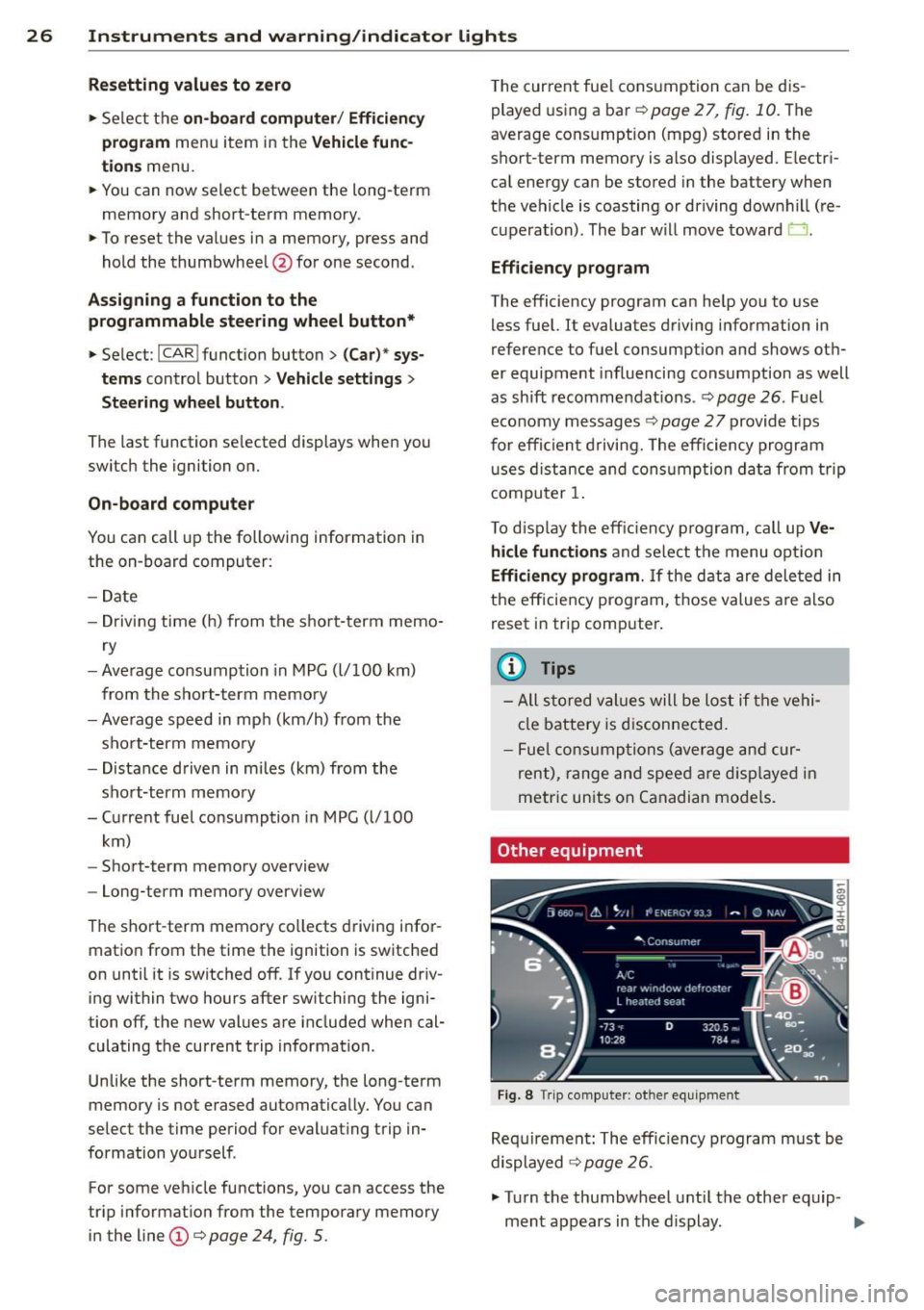
Other equipment
Fi g. 8 Tri p comp uter: ot her equi pm en t
Req uire ment: T he e fficiency p rogram m ust be
displayed
<=:> page 26 .
.,. Turn the thumbwheel u ntil the other eq uip-
ment appears in the d isplay . .,.
Page 29 of 304
Instrument s and warning /indicator lights 2 7
Other equipment that is currently affecting
fuel consumption is listed in the efficiency
program. The display shows up to three other
items of equipment @. The equipment using
the most fuel is listed first. If more than three items using fue l are switched on, the equ ip
ment that is currently using the most f uel is
d isplayed .
A scale @ also shows the current total con
sumpt ion of all other equ ipment .
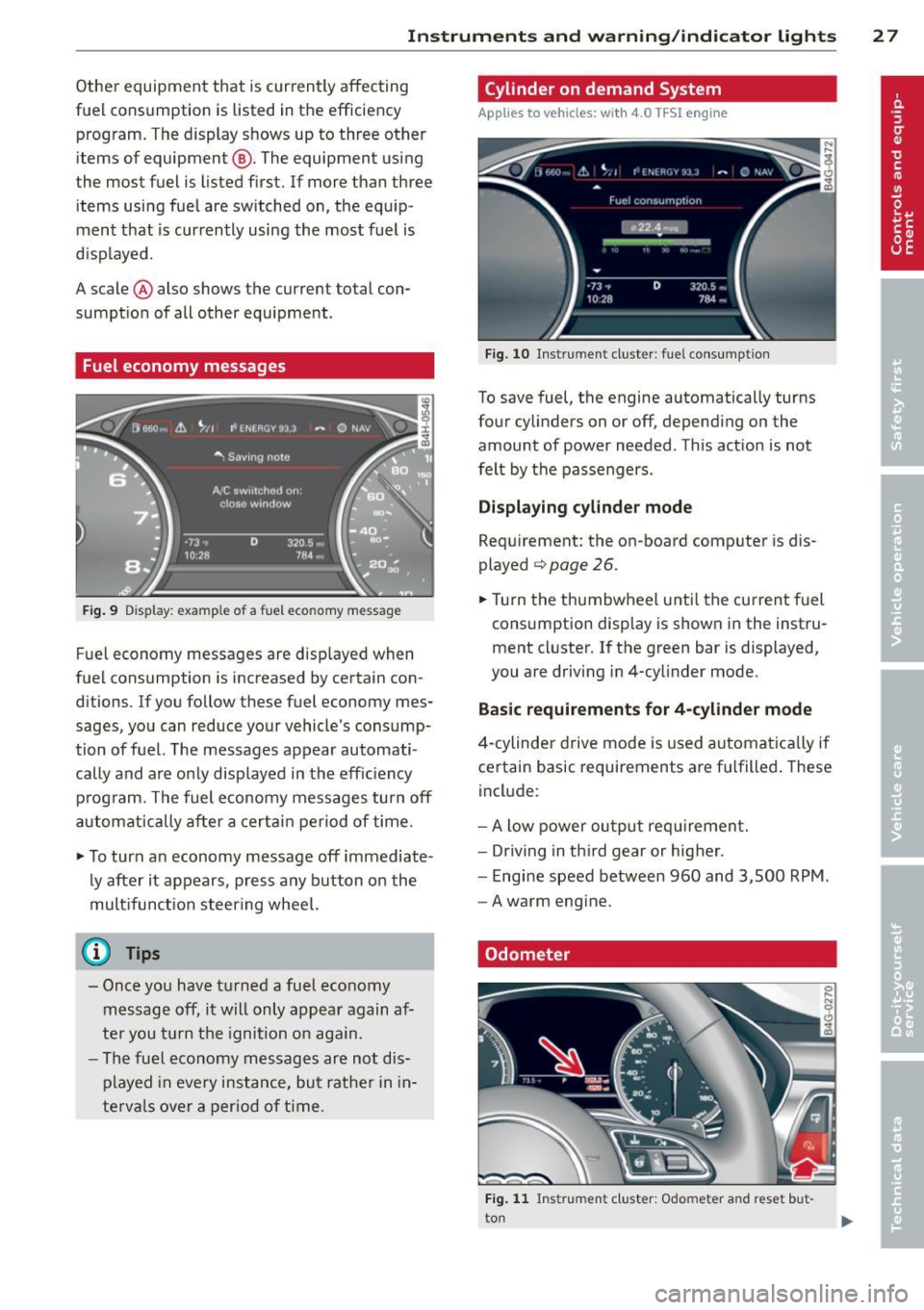
Fuel economy messages
Fig. 9 Dis p lay: exa mple of a fue l eco no m y m essage
F ue l economy messages are disp layed when
fuel consumption is increased by certain con
ditions. If you follow these fuel economy mes
sages, you can reduce your vehicle's consump
tion of fuel. The messages appear automati
cally and are only disp layed in the eff ic iency
p rog ram. The fuel economy messages turn off
au tom atically after a certa in period of time.
~ T o turn a n economy message off immediate
ly after it appears, p ress any b utton o n the
mult ifunct ion steer ing whee l.
@ Tips
-Once you have t urne d a fuel economy
m essage off, it will only appear again af
te r you turn the ignition o n aga in.
- The fuel economy messages ar e not dis
p layed in
every insta nce, but rat her i n in
t e rva ls
ove r a period of t ime .
Cylinder on demand System
Applies to veh icles: w ith 4.0 TFSI engine
Fi g. 10 Inst rumen t cl us ter : fu el cons umption
To save fuel, the engine automatically turns
fo ur cy linders on or off, depend ing on the
amount of power needed . Th is act io n is not
felt by the passengers .
Displaying cylinder mode
Requirement: the on -board comp ute r is d is
played ¢
page 26.
~ Turn the thumbwheel u nti l the current fuel
cons umption display is shown in the instru
ment cluste r.
If the green bar is displayed,
y o u are driving in 4-cy linder mode.
Basic requir ements for 4 -cylinder mode
4 -cylinder drive mode is used a utomat ica lly if
certain basic requirements a re f ulfille d. These
incl ude :
-A low power ou tpu t re qui rement.
- Dr iving in t hird gear or hig her.
- Engi ne speed between 960 and 3,500 RPM .
-A warm eng ine.
Odometer
Fig. 1 1 Instrumen t cluste r: Odo mete r and rese t but
to n
Page 30 of 304
28 Instruments and warning/indicator lights
The odometer shows you how many miles
(kilometers) you have driven. You can switch
the display from miles to kilometers and vice
versa via the MMI.
Upper odometer
The trip odometer shows the distance driven
since it was last reset. It can be used to meas
ure short distances. The last digit indicates
1/10 of a mile (100 meters).
You can reset the trip odometer to zero by
pressing the Reset button~-
Lower odometer
The lower odometer shows the total number
of miles (kilometers) driven.
Malfunction message
If there is a malfunction in the instrument
cluster,
DEF will appear in the trip odometer
display area. Contact your authorized Audi
dealer to have the problem corrected .
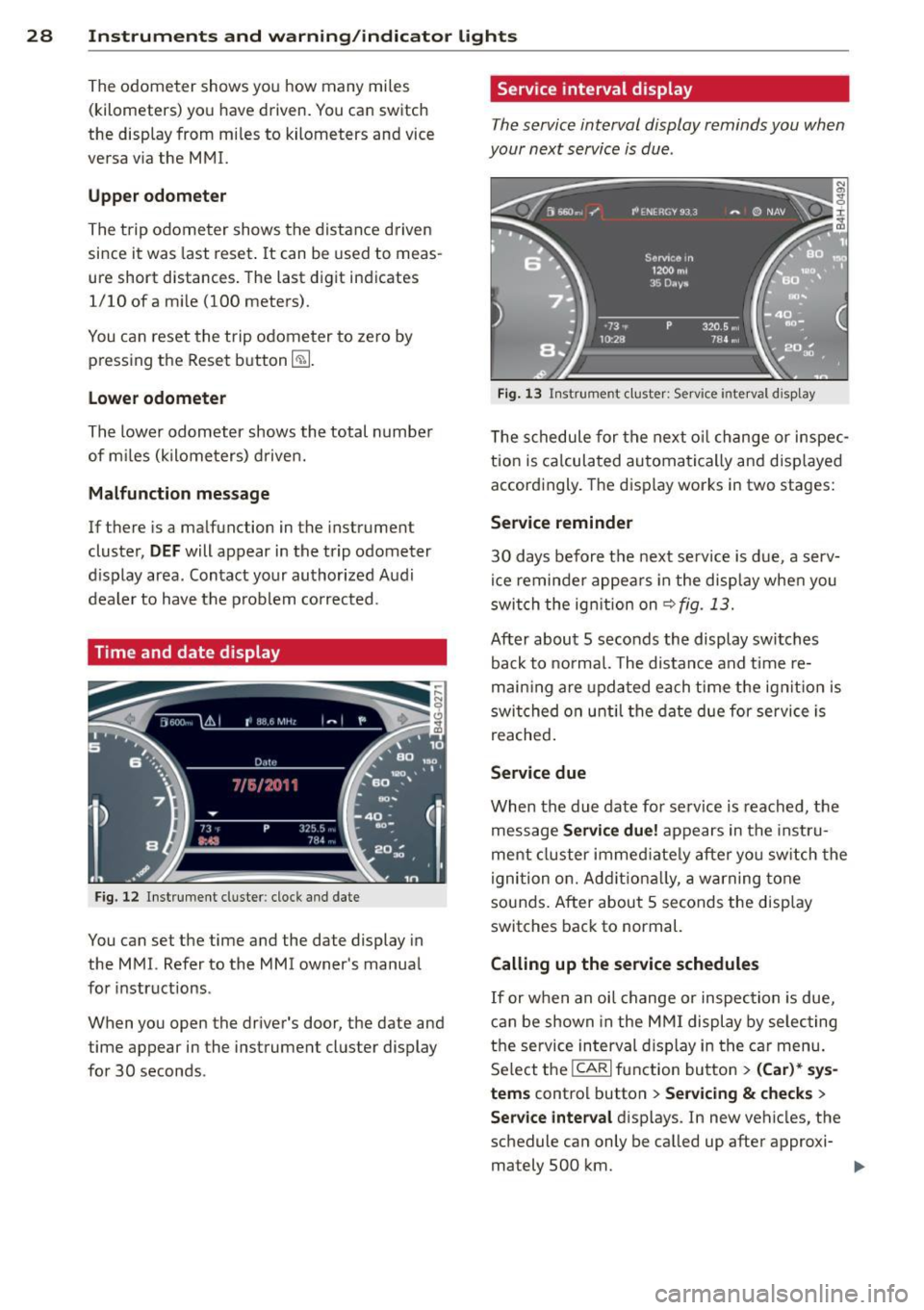
Time and date display
Fig. 12 Instrument cluster : cloc k and date
You can set the time and the date display in
the MMI. Refer to the MMI owner's manual
for instructions .
When you open the driver's door, the date and
time appear in the instrument cluster display
for 30 seconds .
Service interval display
The service interval display reminds you when
your next service is due .
Fig. 13 Instrument cluster: Serv ice interval display
The schedule for the next oil change or inspec
tion is calculated automatically and displayed
accordingly. The display works in two stages:
Service reminder
30 days before the next service is due, a serv
ice reminder appears in the display when you
switch the ignition on~
fig. 13.
After about 5 seconds the display switches
back to normal. The distance and time re
maining are updated each time the ignition is
switched on until the date due for service is
reached.
Service due
When the due date for service is reached, the
message
Service due! appears in the instru
ment cluster immediately after you switch the
ignition on. Additionally, a warning tone
sounds. After about 5 seconds the display
switches back to normal.
Calling up the service schedules
If or when an oil change or inspection is due,
can be shown in the MMI display by selecting
the service interval display in the car menu.
Select the
ICARI function button > (Car)* sys
tems
control button > Servicing & checks >
Service interval displays. In new vehicles, the
schedule can only be called up after approxi- mately 500 km. ..,.
Page 32 of 304
30 Instruments and warning/indicator lights
Display brightness
You can adjust the display brightness in the
MMI. The display brightness decreases auto
matica lly as the amo unt of light decreases.
The basic leve l of brightness is adjusted with
the instrument illumination
c:> page 46.
(D Note
To prevent scratches on the glass covering
the Head-up Disp lay, do not place any ob
jects in the projection opening.
@ Tips
- Sunglasses with polarization fi lters and
unfavorable lighting conditions can af
fect the display.
- A specia l windshield is needed for the
Head-up Display function.
- For information on cleaning, refer to
c:> table on poge 212.
On-Board Diagnostic
system (OBD)
Malfunction Indicator Lamp (MIL)
The Malfunction Indicator Lamp (MIL) II! in
the instrument cluster is part of the On-Board
Diagnostic (OBD II) system.
The warning/indicator light illuminates when
the ignition is switched on and goes o ut after
the engine starts and the idle has stabilized.
This indicates that the MIL is working proper
ly .
If the light does not go out after the engine
is started, or illuminates while you are driv
ing, a ma lfunction may exist in the engine sys
tem. If the light illuminates, the catalytic con
verter could be damaged.
Continue driving
with reduced power (avoid
ing sustained high speeds and/or rapid accel
erations) and have the condition corrected.
Contact your authorized Audi dealer .
If the light illuminates, the electronic speed
limiter may also be malfunctioning. For more information
r=.> page 31,
Electronic speed
limiter .
An improperly closed fuel filler cap may also
cause the MIL light to illuminate
c:>page 218.
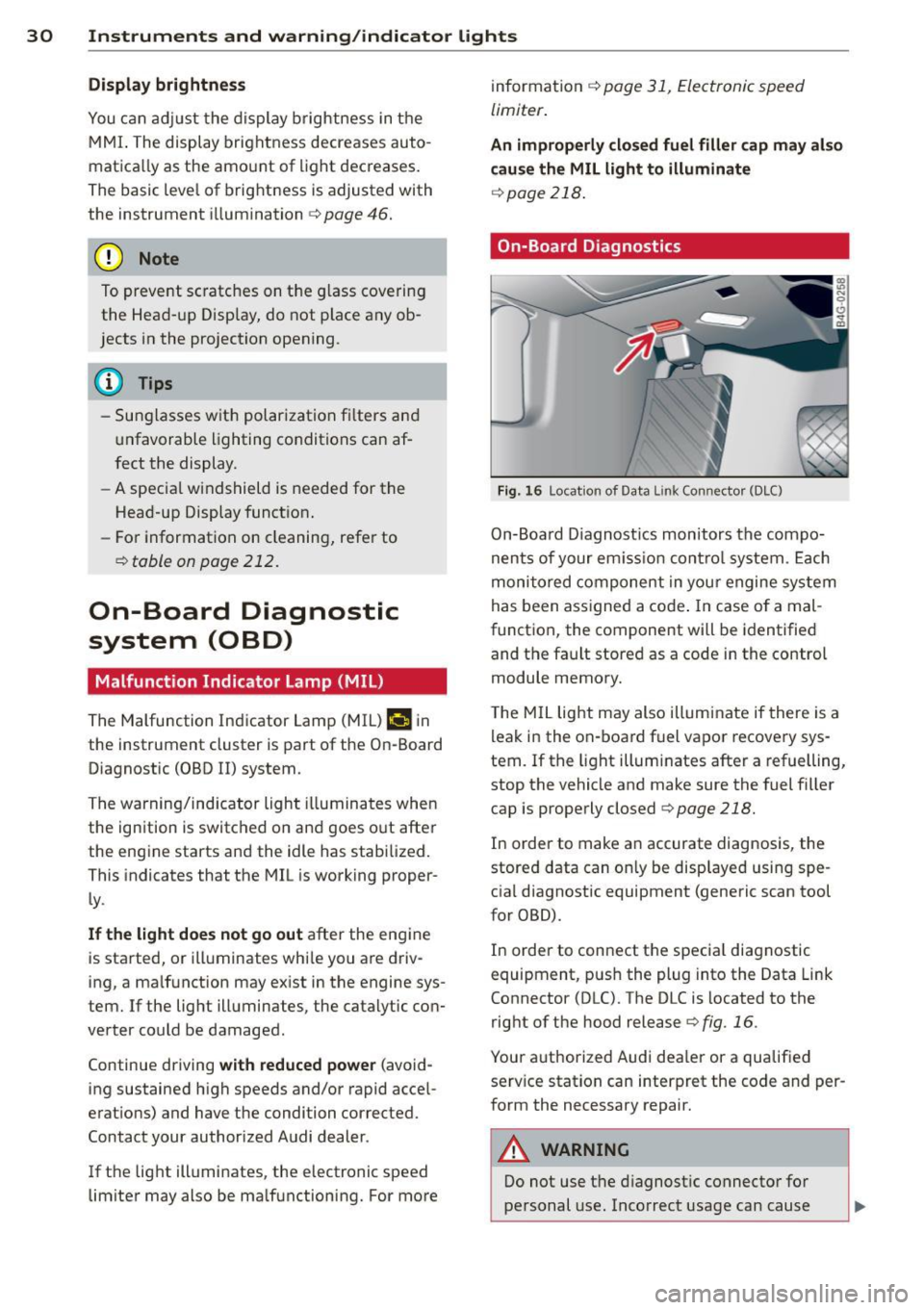
On-Board Diagnostics
Fig. 16 Locat ion of Data L ink Con nector (DLC)
On-Board D iagnost ics monitors the compo
nents of your em iss ion control system . Each
monitored component in your engine system
has been assigned a code . In case of a mal
function, the component will be identified
and the fault stored as a code in the control
module memory.
T he MIL light may also illuminate if there is a
leak in the on-board fuel vapor recovery sys
tem.
If the light illum inates after a refuelling,
stop the vehicle and make sure the fuel filler
cap is properly closed
c:> page 218.
In order to make an accurate diagnosis, the
stored data can only be displayed using spe
cial diagnostic equipment (generic scan tool
for OBD).
In order to connect the special diagnostic
equipment, push the plug into the Data Link
Connector (DLC). The DLC is located to the
right of the hood release
r=.> fig . 16 .
Your authorized Audi dea ler or a qualified
serv ice station can interpret the code and per
form the necessary repair.
A WARNING
Do not use the diagnostic connector for
personal use. Incorrect usage can cause
Page 34 of 304
32 Opening and clo sing
Opening and closing
Keys
Key set
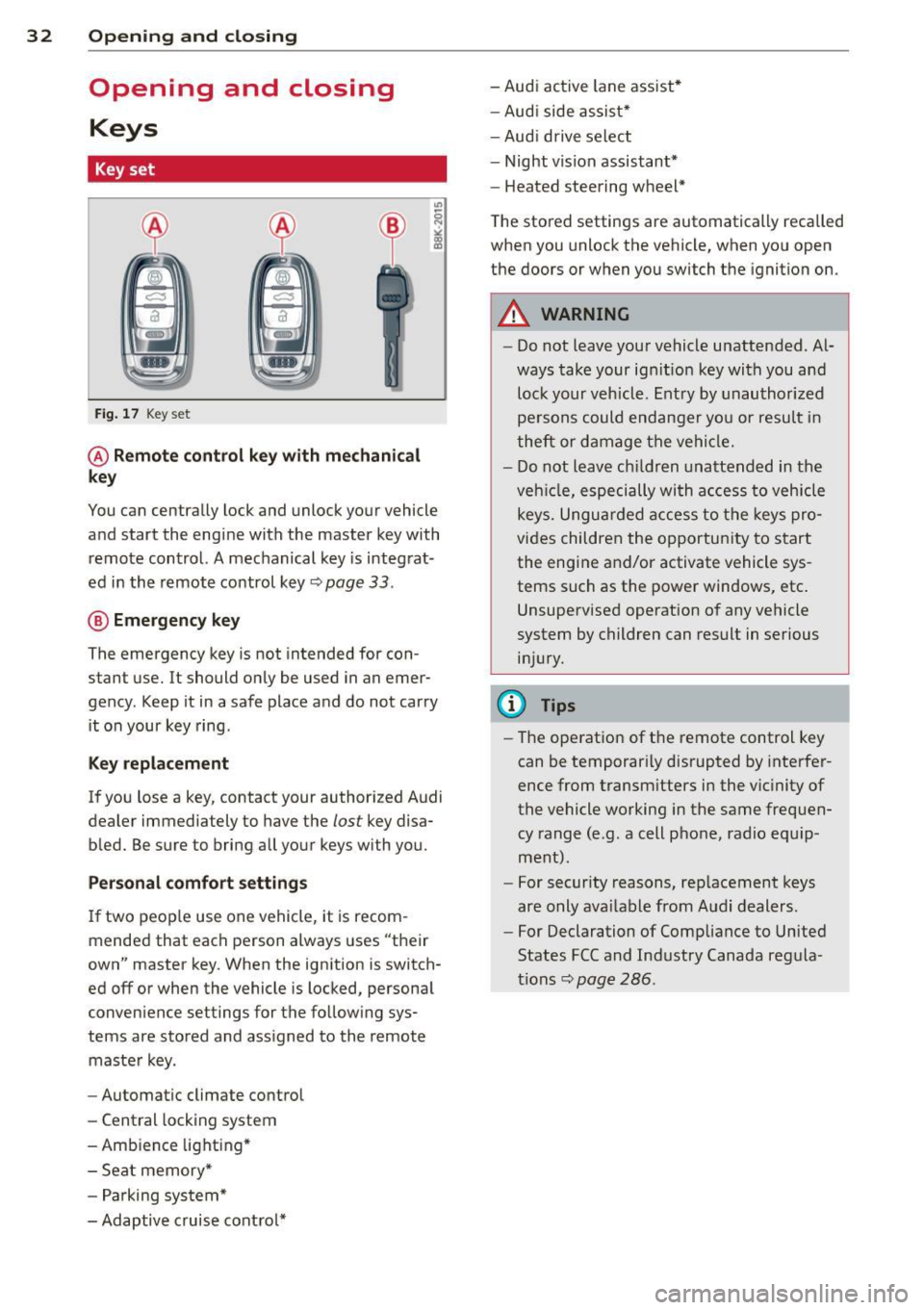
Fig . 17 Key set
@ Remot e control k ey w ith m echan ical
ke y
You can centrally lock and unlock your vehicle
and start the engine with the master key with
remote control. A mechanical key is integrat
ed in the remote control key
r:::;, page 33 .
@ Eme rgenc y ke y
The emergency key is not intended for con
stant use.
It should only be used in an emer
gency. Keep it in a safe place and do not carry it on your key ring .
Key replac em ent
If you lose a key, contact your authorized Audi
dealer immediately to have the
lost key disa
bled. Be sure to bring all your keys with you.
P er sonal c omfo rt se ttin gs
If two peop le use one vehicle, it is recom
mended that each person always uses "their
own" master key . When the ignition is switch
ed off or when the vehicle is locked, personal
convenience settings for the follow ing sys
tems are stored and assigned to the remote master key .
- Automatic climate control
- Central locking system
- Amb ience light ing*
- Seat memory*
- Parking system*
- Adaptive cruise control* - Audi active
lane assist *
- Aud i side assist*
- Aud i drive select
- Night vision assistant*
- Heated steering wheel*
The stored settings are automatically recalled
when you unlock the vehicle, when you open
the doors or when you switch the ignition on.
A WARNING
-- Do not leave your vehicle unattended . Al-
ways take your ignit ion key with you and
lock your vehicle . Entry by unauthorized
persons could endanger yo u or resu lt in
theft or damage the vehicle.
- Do not leave ch ildren unattended in the
veh icle, especially with access to vehicle
keys. Unguarded access to the keys pro
vides children the opportunity to start the engine and/or activate vehicle sys
tems such as the power windows, etc .
Unsupervised operation of any vehicle
system by children can result in serious
injury.
(1) Tips
- The operation of the remote control key
can be temporar ily disrupted by interfer
ence from transm itters in the vic inity of
the vehicle working in the same frequen
cy range (e.g. a cell phone, radio equip
ment).
- For security reasons, rep lacement keys
are only ava ilable from Audi dealers.
- For Declaration of Compliance to United
States FCC and Industry Canada regula
tions
r:::;, page 286.
Page 36 of 304
34 Opening and closing
for another vehicle or a transponder is
located on the key ring.
- For Declaration of Compliance to United
States FCC and Industry Canada regula
tions ¢
page 286.
Power locking system
General description
The power locking system locks or unlocks all
doors and the rear lid simultaneously.
You can lock and unlock the vehicle centrally.
You have the following choices:
- Remote master key¢
page 35,
-Door handles with convenience key*
¢page 36,
-Lock cylinder at the driver's door
<=?page 37, or
- Power locking switch inside
<=? page 37.
Selective unlocking
When you lock the vehicle, the power locking
system w ill lock the doors and the rear lid .
When unlocking, you can set in the MMI
whether only the driver's door or the entire
vehicle should be unlocked <=?
page 35.
Automatic locking
The automat ic locking feature locks all the ve
h icle doors and the rear lid when you drive
faster tha n 9 mph (15 km/h).
The car is unlocked again, when the opening
function in the power locking system sw itch
or at one of the door levers is actuated .
Anti-theft alarm warning system
If the anti-theft alarm warning system de
tects a break- in into the vehicle, acoust ic and
visual warning signals are triggered .
The anti-theft warning system is activated au
tomatically when you lock the vehicle . It is de
activated when u nlocking using the remote
key, with the mechanical key, and when you
switch the ignition on.
The alarm also turns off when the alarm cycle has expired.
Turn signals
When you unlock the vehicle, the turn s ignals
flash twice. When you lock the vehicle the
turn signals flash once. If they do not flash ,
one of the doors, the rear lid or the hood is
not locked .
Unintentionally locking yourself out
In the follow ing cases there safeguards to
prevent you locking your remote master key in
the vehicle:
- The vehicle does not lock w ith the central
locking switch <=?
page 37 if the driver's
door is open.
- On veh icles with convenience key*, if the
most recently used master key is in the lug
gage compartment, the rear lid is automati
cally un locked again after it is closed.
Do not lock your veh icle w ith the
remote mas
ter key or convenience key*
unti l all doors
and the rear lid are closed. In this way you
avoid locking yourself out accidentally .
Power side door closer*
The veh icle doors are equipped with a power
s ide door closer . When closing a door, you on
ly have to let it fall light ly into the latch . The
door will then automatically close by itself
¢& .
A WARNING
-- When you lock your vehicle from outside,
nobody - especially children -should re
main inside the vehicle. Remember,
when you lock the vehicle from the out
side the windows cannot be opened from
the inside.
- When you leave the vehicle, always take
the ignition key with you . This will pre
vent passengers (children, for example)
from accidentally being locked in the ve
hicle should they accidentally press the
power locking switch in the doors.
- Do not leave children inside the vehicle
unsupervised. In an emergency it would
be impossible to open the doors from
the o utside without the key.
Page 39 of 304
-For Declaration of Compliance to United
States FCC and Industry Canada regula
tions ¢
page 286.
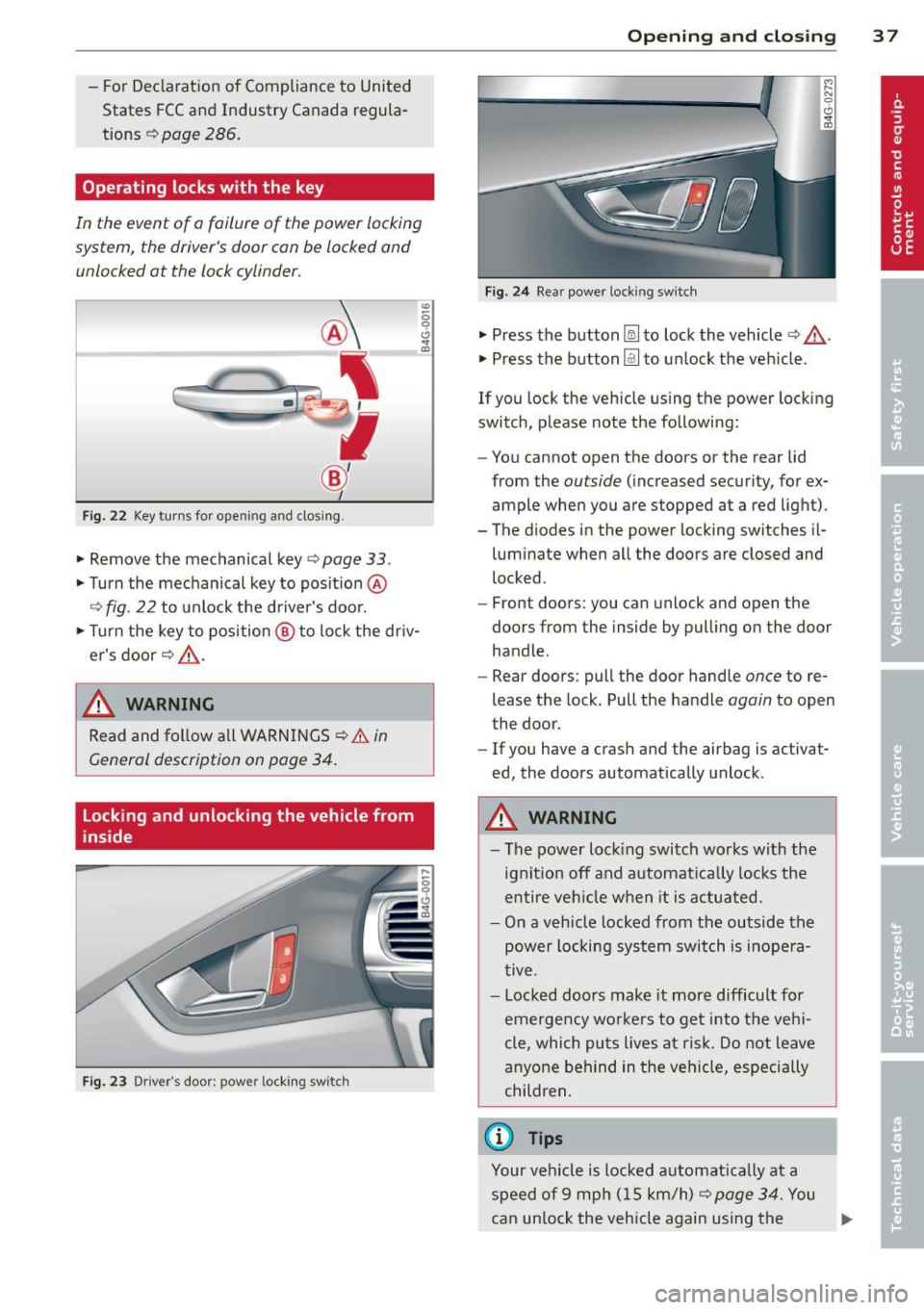
Operating locks with the key
In the event of a failure of the power locking
system, the driver's door can be locked and
unlocked at the lock cylinder.
Fig . 22 Key tur ns for open ing and dosing .
• Remove the mechanical key <::> page 33 .
• Turn the mechanical key to posit ion @
9fig . 22 to unlock the d river's door.
• Turn the key to position ® to lock the dr iv
er's door
r:::> .&_ .
A WARNING
"' :; 0 0 .., a,
-
Read and follow a ll WARNINGS ¢.& in
General description on poge 34.
Locking and unlocking the vehicle from
inside
Fig . 23 Driver' s door: power lockin g swi tc h
Op enin g an d clos ing 3 7
Fig . 24 Rea r powe r lock ing switch
• Press the button~ to lock the vehicle Q .&_ .
• Press the button Im to un lock the veh icle .
If you lock the vehicle using the power locking
switch, please note the following:
- You cannot open the doors or the rear lid
from the
outside (increased security, for ex
ample when you are stopped at a red light).
- The diodes in the power locking switches il- luminate when all the doors are closed and
locked .
- Front doors: you can unlock and open the
doors from the inside by pulling on the door
handle.
- Rear doors: pull the door handle
once to re
lease the lock. Pull the handle
again to open
the door .
- If you have a crash and the airbag is activat
ed, the doors automatically unlock .
A WARNING
-The power locking switch wo rks with the
ignition off and automat ica lly locks the
entire veh icle when it is actuated.
- On a vehicle locked from the outside the
power locking sys tem switch is inope ra
tive .
- Locked doors make it more difficult for
emergency wo rke rs to get into the veh i
cle, which puts lives at risk. Do not leave
anyone behind in the vehicle, especially
children .
(D Tips
Your vehicle is locked a utomat ica lly at a
speed of 9 mph ( 15 km/h)
r:::> page 34. You
can un lock the vehicle again using the .,..
Page 41 of 304
-Always ensure that no one is with in
range of the rear lid when it is mov ing, in
particular close to the hinges -fingers or
hands can be pinched.
(D Tips
When the vehicle is locked, the rear lid can
be opened separately by pressing the but
ton
l a ! on the master key. When you close
the rear lid again, it locks automatically.
Luggage compartment with movement
activated opening
Applies to vehicles : with convenience key and sensor-con
trolled luggage compartment lid
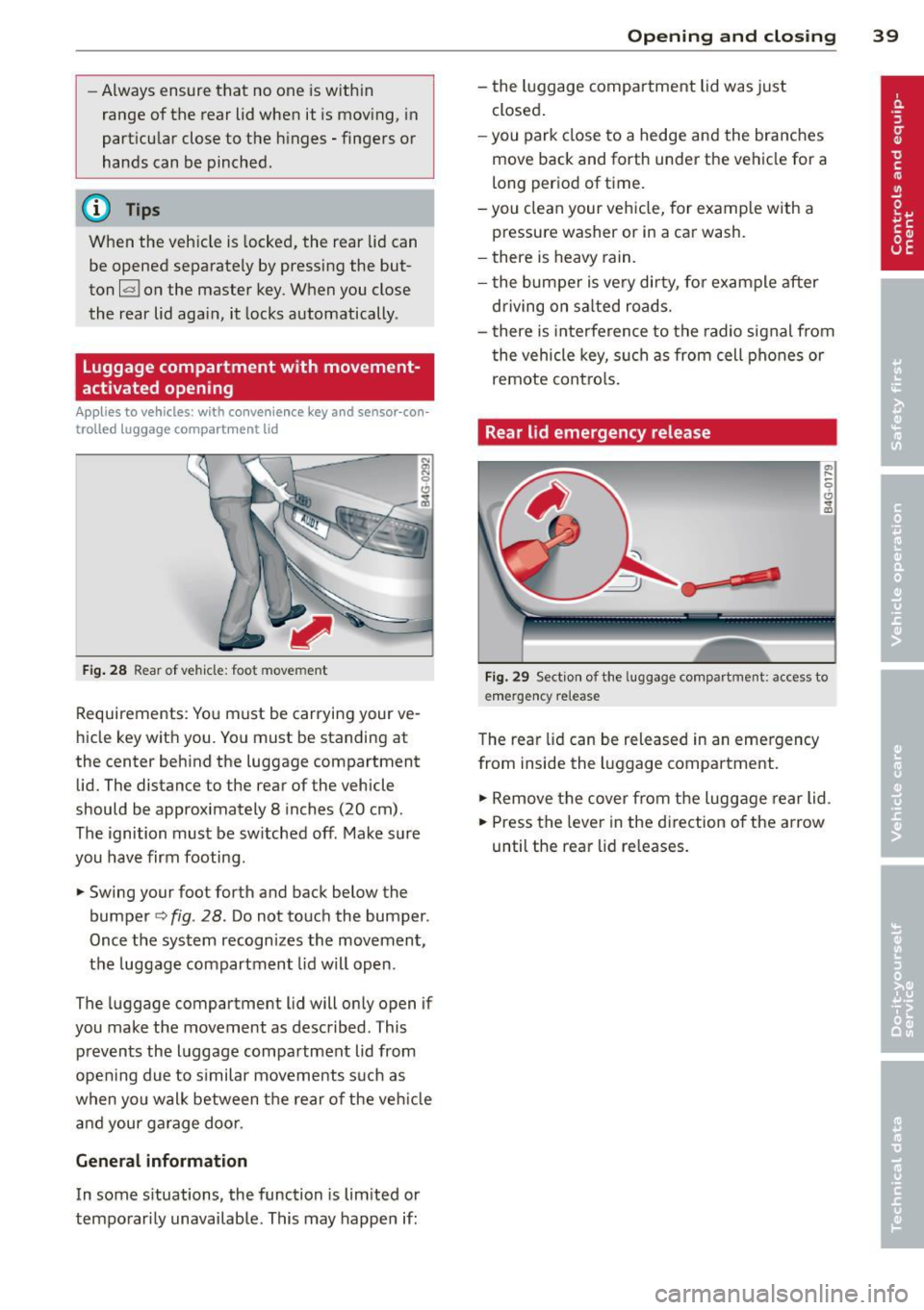
Fig . 28 Rear of vehicle: foot movement
Requirements: You must be carrying your ve
hicle key with you . You must be standing at
the center beh ind the luggage compartment
lid. The distance to the rear of the vehicle
should be approximately 8 inches (20 cm).
The ignition must be sw itched off. Make sure
you have firm footing .
.. Swing your foot forth and back below the
bumpe r<=>
fig . 28. Do not touch the bumper.
Once the system recognizes the movement,
the luggage compartment lid wil l open.
The luggage compartment l id will only open if
you make the movement as described. This prevents the luggage compartment lid from
opening due to s imilar movements such as
when yo u walk between the rear o f the ve hicle
and your ga rage doo r.
General information
In some s ituations, the function is limited or
temporarily unavailable. This may happen if:
Opening and closing 39
- the luggage compartment lid was just
closed.
-you park close to a hedge and the branches
move back and forth under the vehicle for a
long period of time.
-you clean your vehicle, for example with a
pressure washer or in a car wash.
- there is heavy rain.
- the bumper is very dirty, fo r example after
driving on sa lted roads.
- there is interference to the radio signal from
the vehicle key, such as from cell phones or
remote contro ls.
Rear lid emergency release
Fig. 29 Section of the luggage compartment: access to
emerge ncy release
The rear lid can be released in an emergency
from inside the luggage compartment.
.. Remove the cover from the luggage rear lid.
.. Press the leve r in the direction of the arrow
until the rear lid releases.
Page 42 of 304
40 Opening and clo sing
Child safety lock for
the rear doors
The power child safety lock locks the rear win
dows and prevent the rear doors from being
opened from the inside.
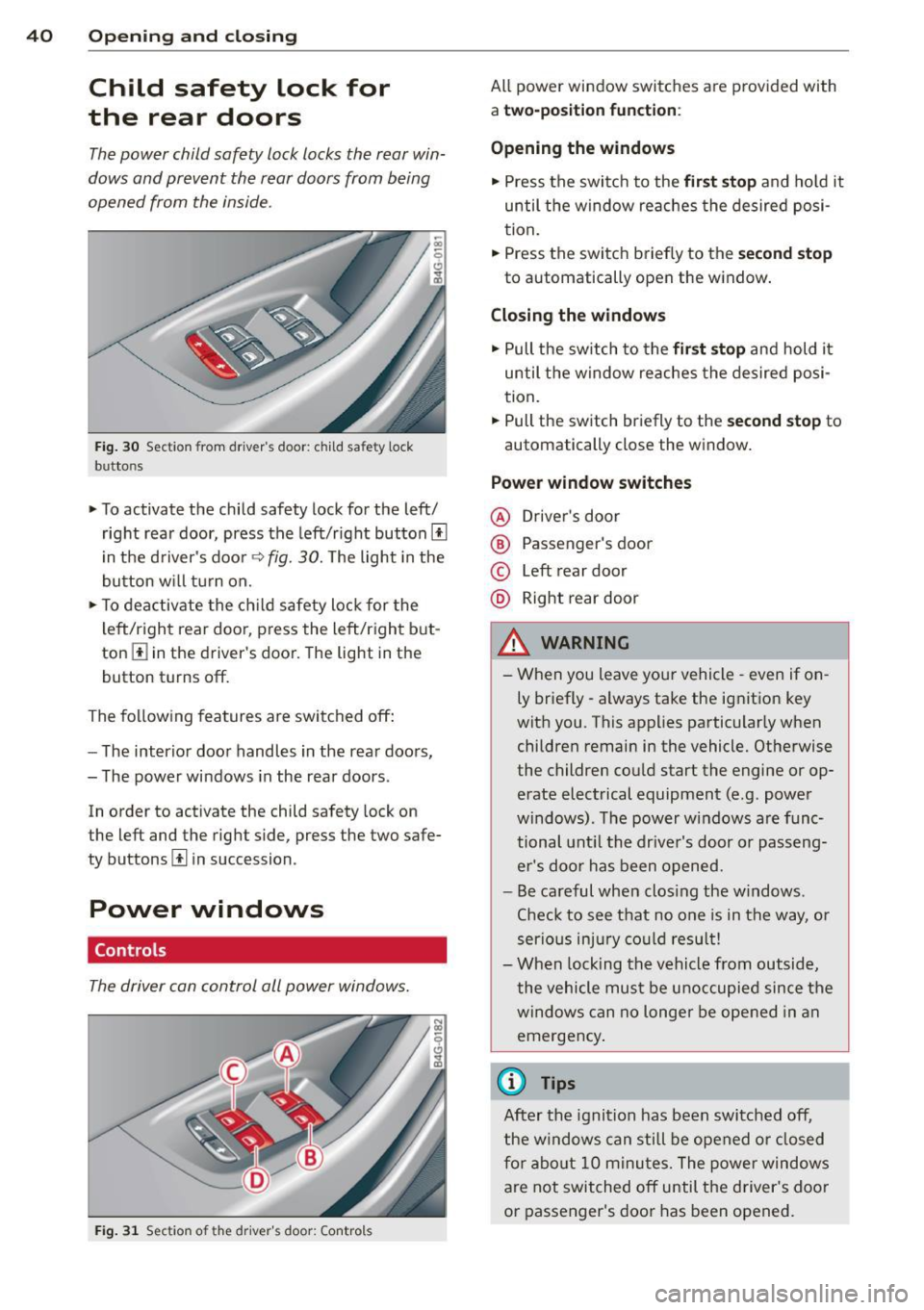
Fig. 30 Section from driver's door: child safety lock
buttons
• To activate the child safety lock for the left/
right rear door, press the left/right button[!]
i n the d river's door
q fig. 30. The light in the
button w ill turn on.
• To deactivate the ch ild safety lock for the
l eft/right rear door, press the left/right b ut
ton
III in the driver's door. The light in the
button turns off.
The following features are switched off:
- The interior door handles in the rear doors,
- The power windows in the rear doors .
In order to activate the child safety lock on
the left and the right side, press the two safe
ty buttons[!] in succession.
Power windows
Controls
The driver can control all power windows.
Fig . 31 Section of the driver's door: Controls
All power window switches are provided with
a two-po sition function :
Opening the windows
• Press the switc h to the fir st sto p and hold it
until the window re aches the desired posi
tion.
• Press the switch briefly to the
second stop
to automatically open the window .
Closing the windows
• Pull the sw itch to the fir st stop and hold it
until the window reaches the desired posi
tion .
.. Pull the switch br iefly to the
s e cond stop to
automatically close the window.
Power window switches
@ Drive r's door
® Passenger's door
© Left rear door
@ Right rear door
& WARNING
- When you leave you r vehicle -even if on
ly briefly -always take the ignition key
wit h you . This applies particularly when
children remain in the vehicle. Otherwise
the children could start the engine or op
erate electrical equipment (e.g. power
windows). The power windows are func
tional unt il the drive r's door or passeng
er 's doo r ha s been opened.
- Be careful when clos ing the w indows .
Chec k to see that no o ne is in the way, or
serio us inju ry co uld resu lt!
- When lock ing the vehicle from outside,
the vehicle mu st be u noccupied since the
windows can no longer be opened in an
emergency .
{1) Tips
After the ignition has been switched off,
the windows can still be opened o r closed
fo r a bout 10 m inu tes. The power windows
are not switched off until the driver 's doo r
or passenger 's door has been opened.