ignition AUDI A6 2014 Owner's Manual
[x] Cancel search | Manufacturer: AUDI, Model Year: 2014, Model line: A6, Model: AUDI A6 2014Pages: 304, PDF Size: 76.32 MB
Page 43 of 304
What to do after a malfunction
The one-touch open and close function must
be reactivated if the battery has been discon
nected.
.,. Pull and hold the power window switch until
the window is fully closed.
.,. Release the switch and then pull it again for
at least one second.
Valet parking
The valet parking feature protects the lug
gage compartment from unauthorized ac cess.
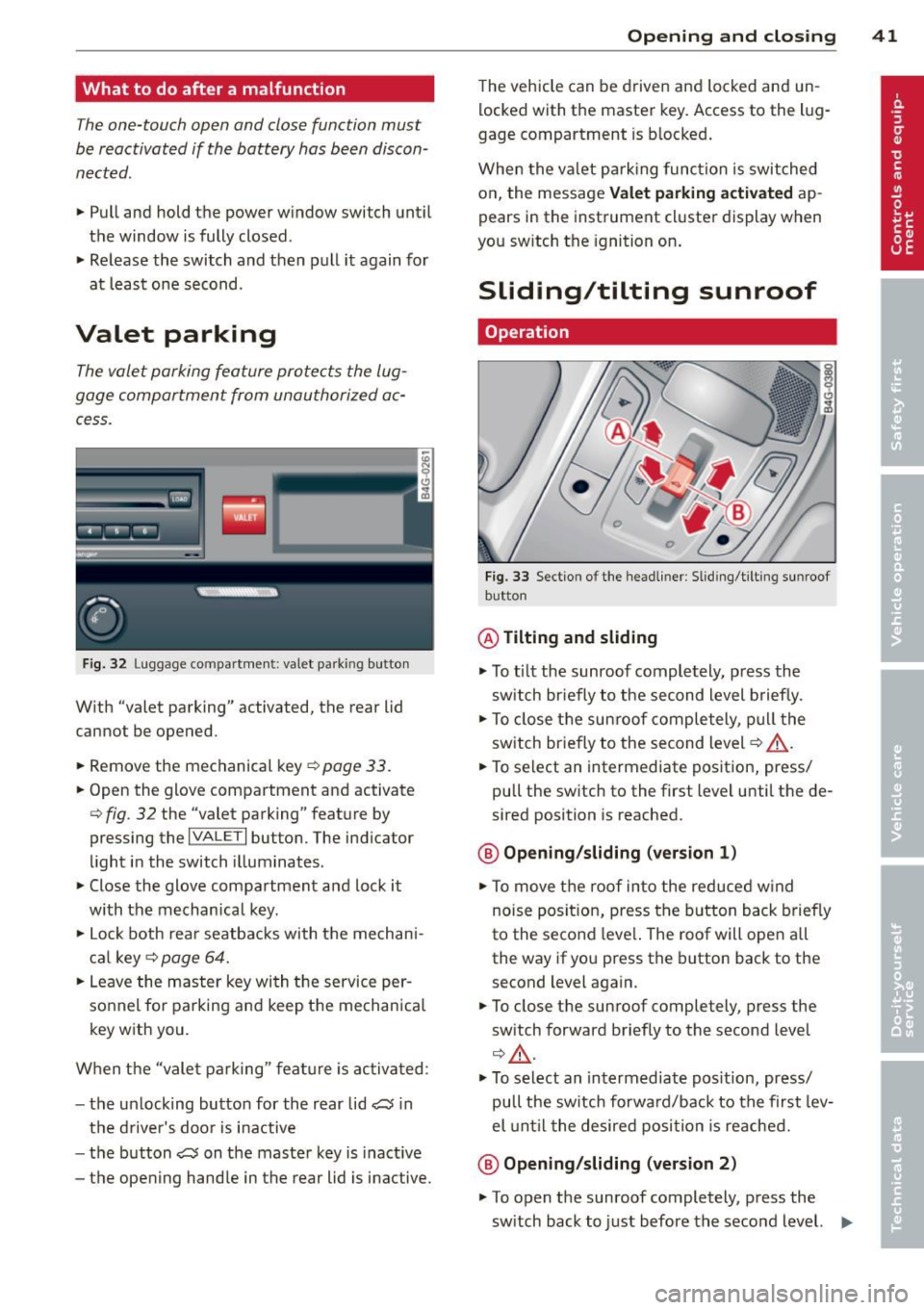
Fig. 32 Lugg age compartment: valet parking button
With "valet parking" activated, the rear lid
cannot be opened.
.,. Remove the mechanical key
¢ page 33.
.,. Open the glove compartment and activate
¢ fig . 32 the "valet parking" feature by
pressing the
I VALET I button. The indicator
light in the switch illuminates .
.,. Close the glove compartment and lock it
with the mechanical key.
.,. Lock both rear seatbacks with the mechan i
cal key ¢
page 64.
.,. Leave the master key with the service per
sonnel for parking and keep the mechanical
key with you.
When the "vale t parking" feature is activated :
- the un locking button for the rear lid
a in
the driver's door is inactive
- the button
a on the master key is inactive
- the opening handle in the rear lid is inactive.
Opening and closing 41
The vehicle can be driven and locked and un
locked with the master key. Access to the l ug
gage compartment is blocked.
When the valet park ing function is switched
on, the message Valet parking activated ap
pears in the instrument cluster display when
you sw itch the ignition on .
Sliding/tilting sunroof
Operation
Fig. 33 Section of the headliner: Sliding/ti lting sunroof
button
@ Tilting and sliding
.,. To tilt the sunroof completely, p ress the
sw itch briefly to the second level briefly.
.,. To close the sunroof completely , pull the
switch briefly to the second level¢_&. .
.,. To select an intermediate position, press/
pull the switch to the first level until the de
sired position is reached.
@ Opening /sliding (version 1)
.,. To move the roof into the reduced w ind
noise posit ion, press the button back briefly
to the second leve l. The roof will open all
the way if you press the button back to the
second level again.
.,. To close the sunroof completely, press the
sw itch forward briefly to the second level
¢,&. .
.,. To select an intermediate position, press/
pull the sw itch forwa rd/back to the first lev
el until the desired posi tion is reached.
@ Opening/sliding (version 2)
.,. To open the sunroof completely, press the
sw itch back to just before the second level. .,.
Page 45 of 304
Clear vision Lights
Switching the headlights on and off
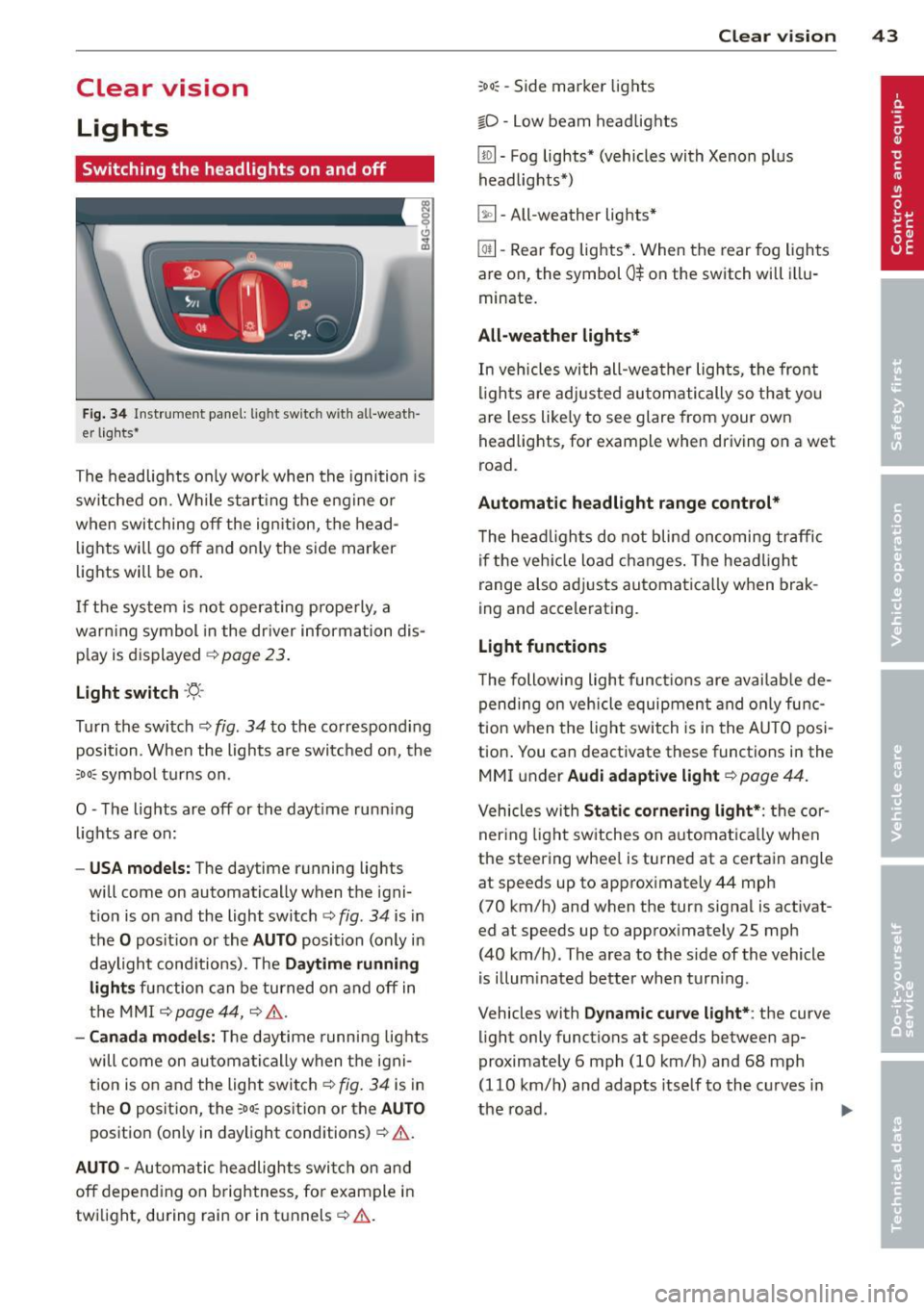
Fig . 34 Instrument pane l: lig ht sw itc h wit h all -weath
er lights•
The headlights only wo rk when the ignition is
switched on. Wh ile start ing the eng ine o r
when switching off the ign ition, the head
lights will go off and on ly the side marker
lights will be on .
If the system is not operating p rope rly, a
war ning symbol in the dr iver information dis
p lay is d isplayed
c::> page 23 .
Light switch -'tj_ -
Tu rn the switch c::> fig . 34 to the correspond ing
position . When the lights a re switched on, the
oD o: symbo l tu rns on .
0 -The lig hts are off or the dayt ime runn ing
lights are on:
- USA models: The day time running lights
will come on automatically when the igni
t ion is on and the light switch
c::> fig . 34 is in
the
O posit ion or the AUTO position (only in
daylight cond itions). The
Daytime running
light s
function can be turned on and off in
the MMI
c::> page44, c::>A .
-Ca nada model s: The daytime running lig hts
will come on automa tically when the igni
t ion is on and the light switch
c::> fig . 34 is in
the
O position, the : Do: pos ition or the AUTO
position (only in daylight conditions) c::> A .
AUTO -Automatic headlights swi tch on and
off depend ing o n brightness, for example i n
tw ilight, during rain or in tunnels
c::> &. .
:Do: -Side marker lights
io -Low beam headlights
Clear vi sion 43
lm -Fog lights* (vehicles with Xenon p lus
headlights *)
~ -All-weather lights *
@il-Rear fog lights* . When the rear fog lights
are on, the symbol
0$ on the switch will i llu
minate.
All-weather lights*
In vehicles with all-wea ther lights , the front
ligh ts are ad justed au tomatically so that yo u
are less like ly to see glare from your own
head lights , for example when driving on a wet
road.
Automatic h eadl ight range control*
T he head lights do not blind oncoming traffic
i f the veh icle load changes . The headligh t
range also adj usts automatically when brak
ing and accelerating .
Light functions
The following light funct io ns are availab le de
pend ing on vehicle equipment and o nly func
tion when t he lig ht switch is in the AUTO posi
tion . You can deactivate these functions in the
MMI under
Audi adaptive light c::> page 44.
Vehicles with St atic corn ering light* : the cor
ner ing ligh t sw itches on a utomat ically when
the steering whee l is turned at a certain angle
at speeds up to approximately 44 mph
( 7 0 km/h) and when the turn signa l is activat
ed at speeds up to approximately 25 mph
(40 km/h) . The area to the side of the vehicle
is illum inated better when turn ing .
Vehicles with
Dynamic cu rve light* : the curve
light only functions at speeds between ap
proximately 6 mph (10 km/h) and 68 mph
(110 km/h) and adapts itself to the curves in
the road .
~
Page 46 of 304
44 Clear vision
& WARNING
-Automatic headlights are only intended
to assist the driver . They do not relieve
the driver of his responsibility to check
the headlights and to turn them on man
ually according to the current light and
visibility conditions. For example, fog
cannot be detected by the light sensors.
So always switch on the headlights
io
under these weather conditions and
when driving in the dark.
- Crashes can happen when you cannot see
the road ahead and when you cannot be
seen by other motorists. Always turn on
theheadlightssothatyoucanseeahead and so that others can see your car from
the back .
- Please observe legal regulations when
using the lighting systems described .
(D Note
The rear fog lights should only be turned
on in accordance with traffic regulation, as
the lights are bright for following traffic.
{D) Tips
- The light sensor* for automatic head
light range control* is located in the rear
view mirror mount . You should therefore
not apply any stickers to the windshield
in this area in order to prevent malfunc
tions or failures .
- In the event of a light sensor malfunc
tion, the driver is notified in the instru
ment cluster display ~
page 23 .
-You will hear a warning tone if you open
the driver door when the exterior lights
are switched on.
- In cool or damp weather, the inside of
the headlights, turn signals and tail lights can fog over due to the tempera
ture difference between the inside and
outside. They will clear shortly after
switching them on. This does not affect
the service life of the lighting.
Emergency flasher
The emergency flasher makes other motorists
aware that you or your vehicle are in an emer
gency situation .
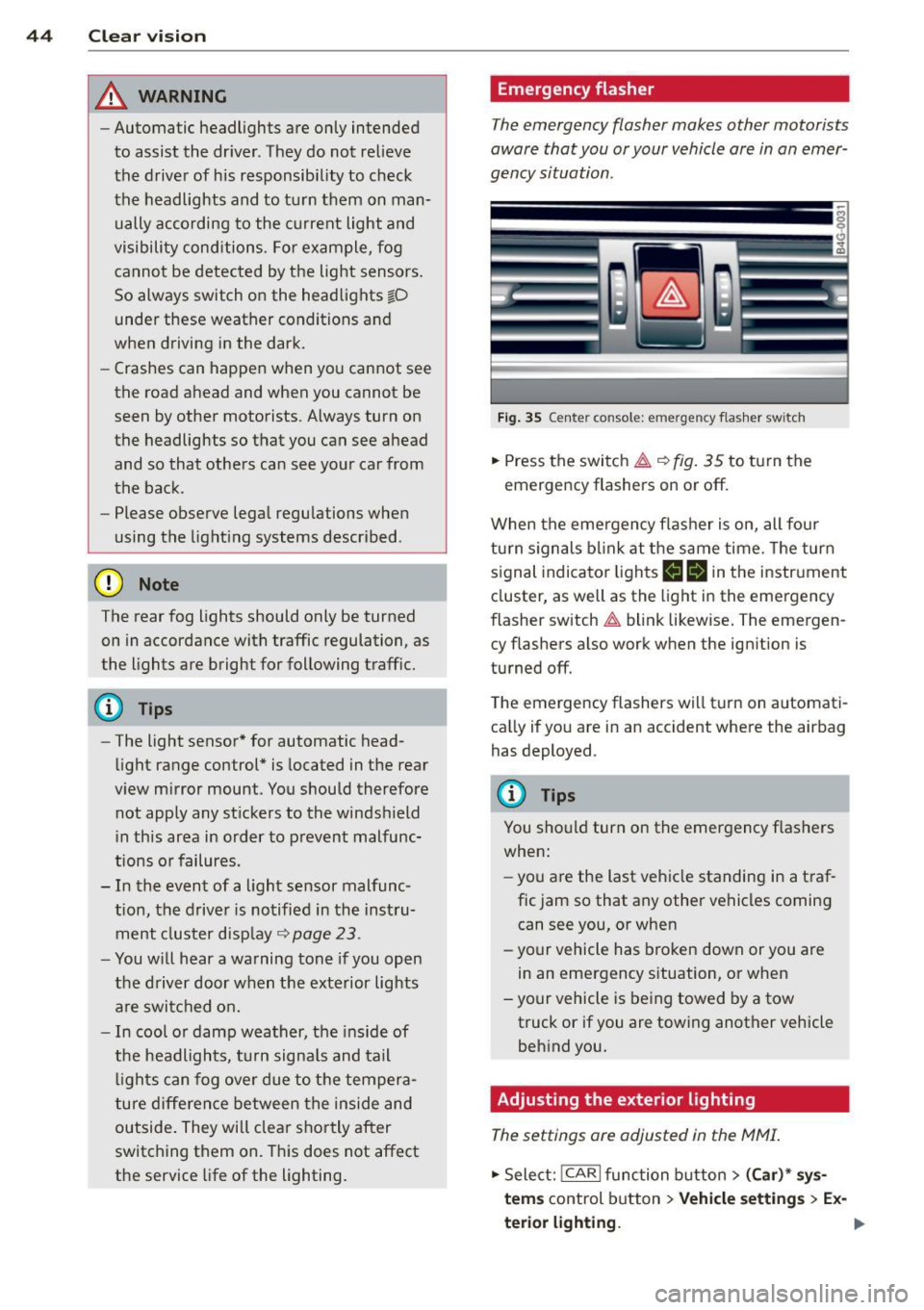
Fig. 35 Ce nte r co nso le: em erg en cy flash er sw itc h
.. Press the switch~~ fig. 35 to turn the
emergency flashers on or off.
When the emergency flasher is on, all four
turn signals blink at the same time. The turn
signal indicator lights
B Nin the instrument
cluster, as well as the light in the emergency
flasher switch
~ blink likewise. The emergen
cy flashers also work when the ignition is
turned off.
The emergency flashers will turn on automati
cally if you are in an accident where the airbag
has deployed.
@ Tips
You should turn on the emergency flashers
when:
- you are the last vehicle standing in a traf
fic jam so that any other vehicles coming
can see you, or when
- your vehicle has broken down or you are
in an emergency situation, or when
-your vehicle is being towed by a tow
truck or if you are towing another vehicle
behind you.
Adjusting the exterior lighting
The settings ore adjusted in the MMI.
.. Select: !CARI function button> (Car)* sys
tems
control button > Vehicle settings > Ex-
terior lighting.
Ill>
Page 47 of 304
Automatic headlights
You can adjust the following settings in the
Automatic headlights menu:
Headlights activation time -You can adjust if
the headlights switch on
Early, Med . or Late
according to the sensitivity of the ligh t sensor.
Audi adaptive light* -You can switch adaptive
light
On and Off.
Daytime running lights
USA models:
You can switch the dayt ime run
n ing lights
on and off .
Canada models :
The function cannot be
turned off . It is activated automatically each
time the ignition is switched on. This menu
item is shown "greyed out" .
Coming home, Leaving home
The coming home function illuminates the
area outside the vehicle when you switch the
ignition off and open the driver's door. To turn
the function on, select
Lights when leaving
car > On .
The leaving home function illuminates the
area outside the vehicle when you un lock the
vehicle. To turn the funct ion on, select
Lights
when unlocking car > On .
The coming home and leaving home functions
only operate when it is dark and the light
switch is in the
AUTO position. Clear
vision 45
Turn signals and high beam lever
The lever on the left side of the steering col
umn is used to operate the turn signals and
the high beam as well as
the headlight flash
er.
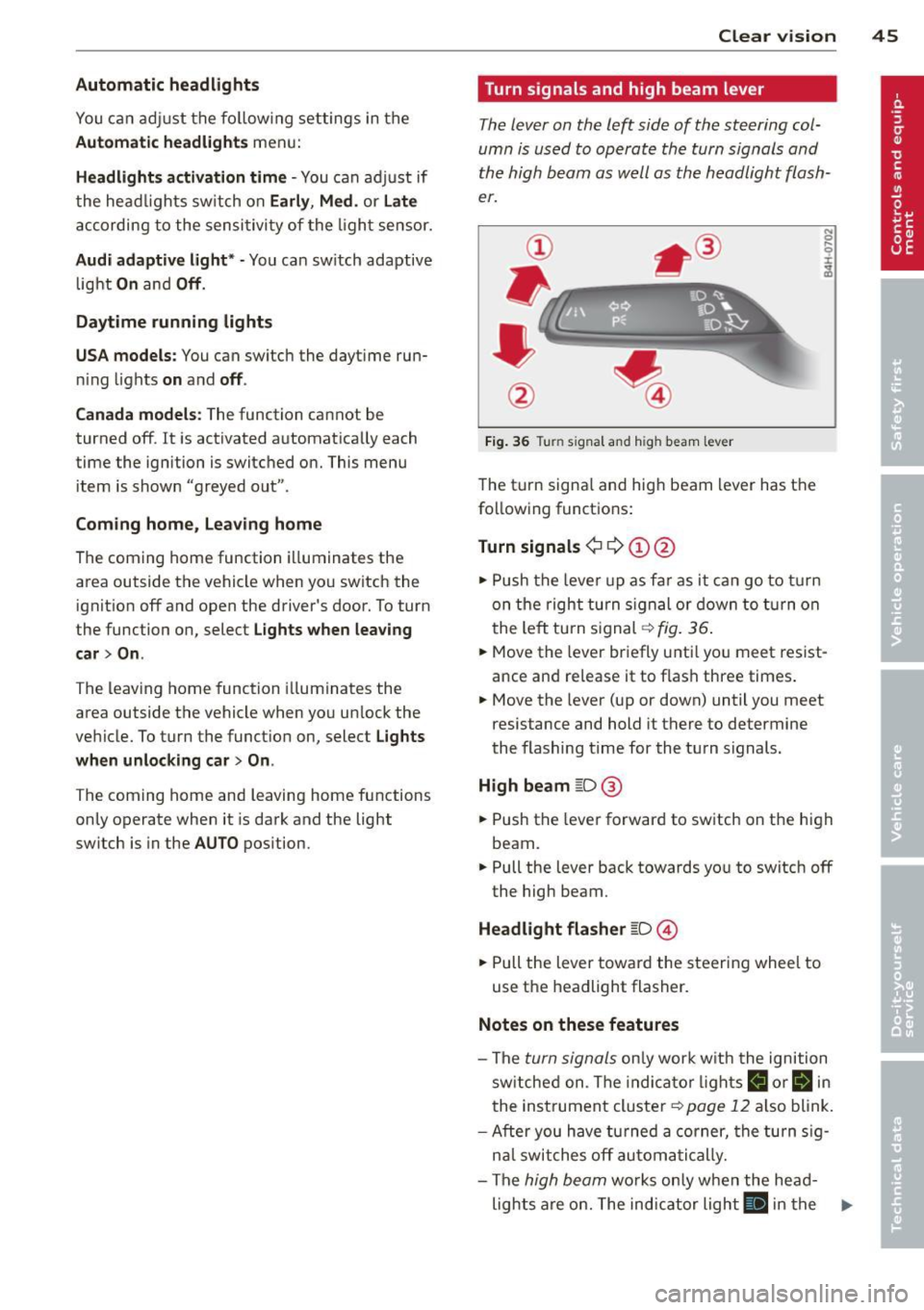
Fig. 36 Tu rn signal and high beam lever
The turn signal and high beam lever has the
following functions:
Turn signals ¢ 9 ©@
.,. Push the lever up as fa r as it can go to turn
on the right turn signa l or down to turn on
the left tu rn s ignal ¢
fig. 36.
.. 0 ....
~
... Move the lever briefly unti l you meet resist
ance and re lease it to flash three times.
.,. Move the lever (up or down) until you meet
resistance and hold it there to determine
the flashing time for the turn signals.
High beam ~D @
... Push the lever forward to switch on the high
beam .
.,. Pull the lever back towards you to switch off
the high beam.
Headlight flasher ~D ©
... Pull the lever toward the steering wheel to
use the headlight flasher.
Notes on these features
-The turn signals on ly work w ith the ignition
sw itched on. The indicator l ights
B or Bin
the instrument cluster¢ page 12 also blink.
-After you have turned a corner, the turn sig-
n al switches off automatically.
- The
high beam works only when the head-
lights are on. The indicator light
El in the .,.
Page 48 of 304
46 Clear vis ion
instrument cluste r illuminates when the
high beams are on.
- T he
headlight flash er works only as long as
yo u hold the lever - even if there are no
l ights turned on. The indicator light
II in
the instrument cluster il luminates when you
use the headlight flasher.
A WARNING
Do not use the high beam or headlight
flasher if you know that these could blind
oncoming traffic.
Interior lights
Front and rear interior lighting
Fi g. 37 Headliner: Front interior ligh ts
Fig . 38 Re ar headli ne r: Readi ng light
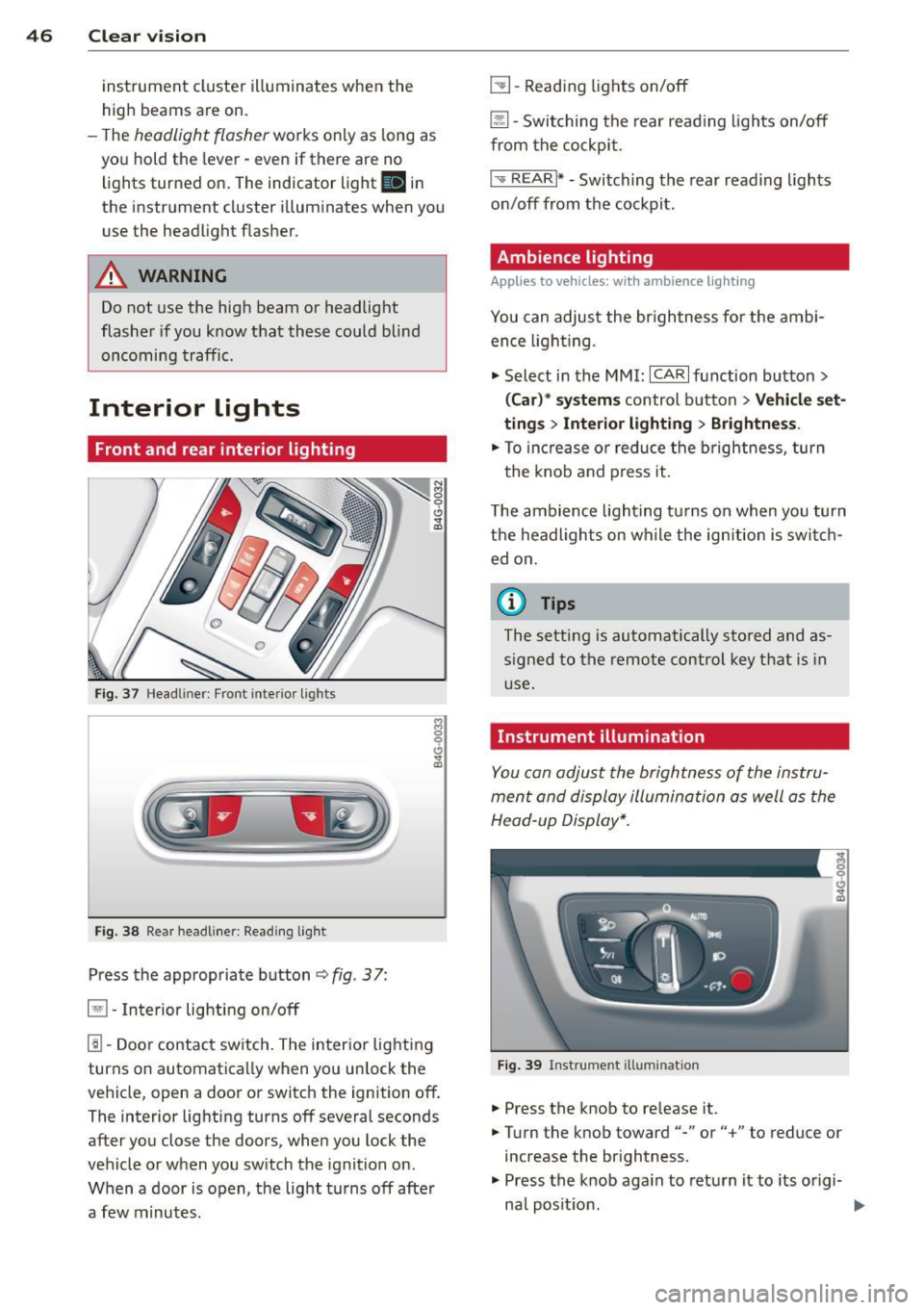
Press the appropriate button q fig . 3 7:
El -Interior lighting on/off
I]]-Door contac t sw itch . The inter ior lighting
turns on automatica lly when you unlock the
vehicle, open a door or switch the ignition off.
The interior lighting turns off several seconds
after you close the doors, when you lock the
vehicle or when you sw itch the ignition on.
When a door is open, the light t urns off afte r
a few minutes.
L:!l -Read ing lights on/off
~ - Switching the rear read ing lights on/off
from the cockpi t.
I" REARI * -Switching the rear reading lights
o n/off from the cockpit.
Ambience lighting
Applies to vehicles: w ith amb ience lighting
You can adjust the br ightness for the ambi
ence ligh tin g.
.. Select in the MMI:
ICA RI function button>
(Car )* sys tem s control button > Vehicle set
ting s
> Interi or lighting > Brightne ss.
.. To increase or reduce the b rightness, turn
t he knob and press it .
T he ambience light ing tu rns on when you turn
the headlights on wh ile the ign ition is swi tc h
ed on.
(D Tips
The setti ng is automati cally sto red and as
s igned to the remo te contr ol key t hat i s in
u se.
Instrument illumination
You can adjust the brightness of the instru
men t and di splay illumination a s well as the
Head-up Display*.
Fi g. 39 Instrume nt illumina tion
... Press the knob to release it.
.. Turn the knob toward"-" or"+" to reduce or
increase the br ightness .
.. Press the knob aga in to return it to its o rigi-
na l posit ion . ...
Page 51 of 304

rain sensor function. Check your
windshield wiper b lades regularly.
- The washer fluid nozzles of the wind
sh ield washer system are heated at low
temperatures when the ignit ion is on .
- When stopping temporarily, e .g . at a
traffic light , the set speed of the wind
shield wipers is automatically red uced by
one speed.
Cleaning windshield wiper blades
Clean the wind shield wiper bl ades when they
begin to leafe streaks .
~ Place the windshield wiper arms in the serv
ice position . Re fer to
q page 49 .
~ Use a soft clo th and gl ass cleaner to clean
the windsh ield w iper blades .
A WARNING
Dirty windshie ld w iper blades can impa ir
your view. This can lead to a cc idents.
Replacing windshield wiper blades
F ig. 44 Removing wi nds hield w ipe r blades
-
-
-
~
I
Wiper se rvice po sition /blade replac ement
po sit ion
~ Switch the ign ition off and move the w ind
shield wiper lever to posit ion ©
q page 48,
fig. 43 . The windshield wipers move into the
serv ice position .
~ To bring the wipe rs back into the orig inal
pos ition, switch the ignition on and press
the windshie ld wiper lever .
You ca n also turn the service pos it ion on o r off
in the
MM I:
Clear v is ion 49
~ Switch the windshie ld wipers off (position
@ ¢page 48, fig. 43) .
~ Select: !CAR ! function button > (Car)* s ys
tems
cont rol button > Se rvicing & checks >
Wiper ser vice position > On .
Remo ving the wiper blade
~ Lift the windshield wiper arm up from the
windshie ld.
~ Press the locking knob@ q fig. 44 on the
wiper blade. Hold the wiper blade firmly.
~ Remove the wiper bl ade in the direction of
the arrow .
Attaching the w iper blade
~ Insta ll the new wiper blade in the retainer
on the wiper arm @unti l you hear it click in
to place on the w iper a rm .
~ Place the wiper arm back on the windshield.
~ Turn the service position off .
A WARNING
-
For your safety, you should rep lace the
wiper b lades once o r twice a yea r. See your
a uthorized Audi de aler fo r repla cement
b lades .
(D Note
- The windshie ld w iper blades must on ly
be folded away when i n the service posi
t ion! Otherwise, yo u ris k damaging the
paint on the hood o r the windshie ld wip
er motor.
- Yo u should not move your vehicle or
press the windsh ield wiper lever when
the wiper arms are folded away from the
windshield. The windshield wipers wou ld
move back into their original position
and could damage the hood and wind
shield.
- To help prevent damage to the w iper sys
tem, always loosen blades wh ich are fro
zen to the windshield before operating
w ipers .
- To help prevent damage to wiper blades,
do not use gasoline, kerosene, paint
thinne r, or other solvents on o r near the
w iper blades.
Page 52 of 304
50 Clear vis ion
- To he lp prevent damage to the wiper
arms or other components, do not at
tempt to move the wipers by hand .
@ Tips
-Commercial hot waxes applied by auto
matic car washes affect the cleanability
of the windshield .
- You can a lso use the service position, for
example, if you want to protect the
windshield from icing by using a cover .
- You cannot activate the service position
when the hood is open.
Mirrors
Adjusting the exterior mirrors
Fig. 45 Fo rwa rd section of driver's a rmrest: powe r mir
ror controls
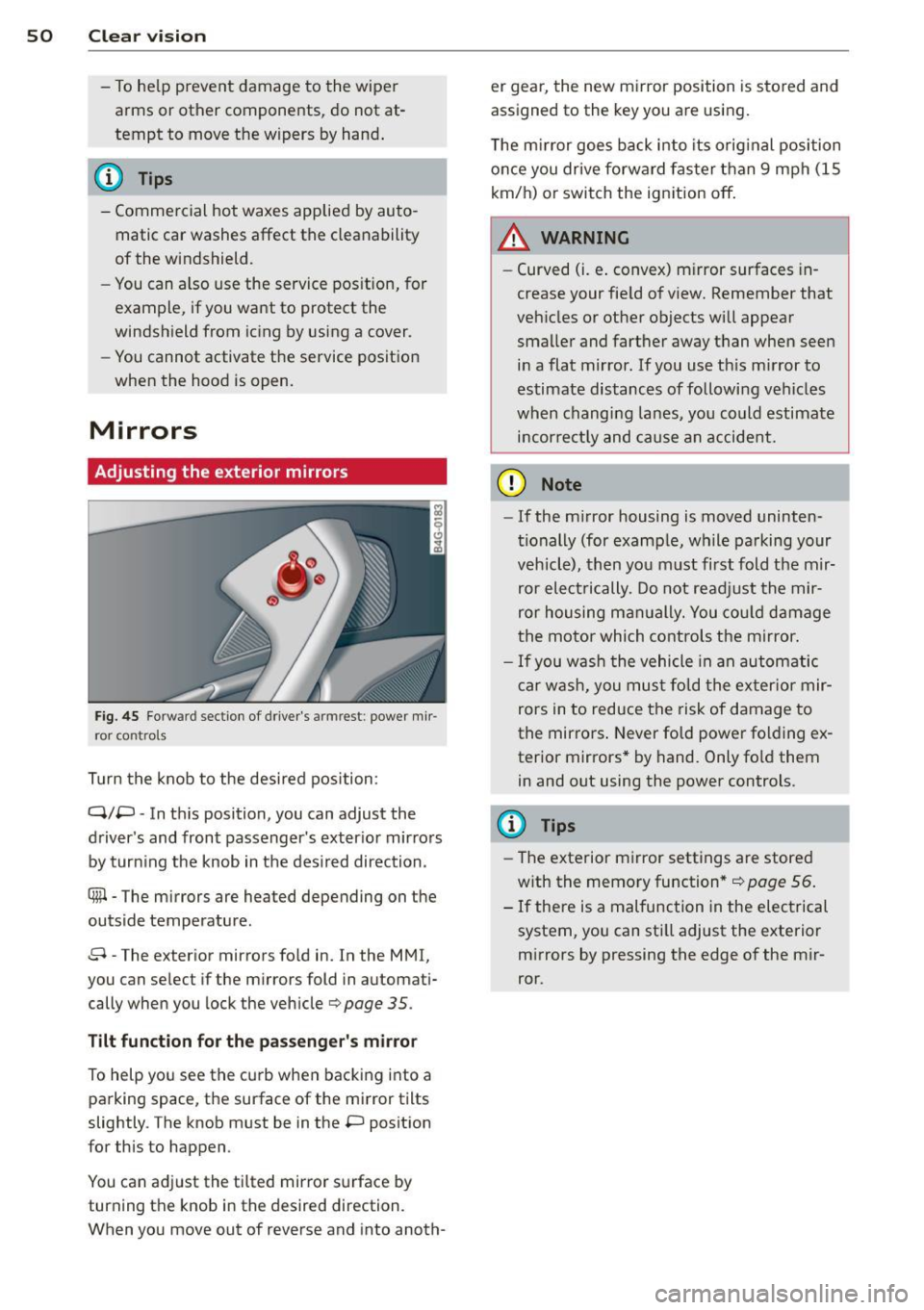
Turn the knob to the desired position :
Q/P -In t his position, you can adjust the
driver's and front passenger's exter ior mirrors
by turning the knob in the des ired direction.
Ciiil-The mirrors are heated depending on the
outside temperature.
8 -The exterior mirrors fo ld in. In the MMI,
you can select if the mirrors fold in automati cally when you lock the vehicle
c> page 35 .
Tilt function for the passenger's mirror
To help you see the curb when backing into a
parking space, the surface of the mirror tilts
slightly . The knob must be in the P position
for this to happen .
You can adjust the tilted mirror surface by turning the knob in the desired direction .
When you move out of reverse and into anoth- er gear,
the new mirror position is sto red and
assigned to the key you are using.
T he m irror goes back into its orig inal position
once you drive forward fas ter than 9 mph (15
km/h) or switch the ignition off.
A WARNING
-Curved (i.e . convex) m irror surfaces in
crease your fie ld of view. Remember that
vehicles or other objects will appear smaller and farther away t han when seen
in a flat mirror . If you use th is m irror to
estimate distances of following vehicles
when changing lanes, you could estimate
incor rectly and cause an accident.
(D Note
-
-If the m irror housing is moved uninten
tionally (for examp le, while parking your
vehicle), then you must first fold the mir ror electrically. Do not readjust the mir
ror housing manually. You could damage
the motor which controls the mirror.
-If you wash the vehicle in an automatic
car was h, you must fold the exter ior mir
rors in to reduce the risk of damage to
the mir rors . Never fold power folding ex
terior mirrors * by hand. Only fo ld them
in and out using the power controls.
@ Tips
- The exterior mirror settings are stored
w ith the memory function* ¢page
56.
-If there is a malfunction in the electrical
system, you can sti ll adjust the exterior
mirrors by pressing the edge of the mir
ror.
Page 55 of 304
Front passenger's seat
Always move the front passenger seat into the rearmost position .
To avoid contact with the airbag while it is de
ploying, do not sit any closer to the instru
ment panel than necessary and always wear
the three-point safety belt provided adjusted
correctly . We recommend that you adjust the
passenger's seat in the following manner:
.. Bring the backrest up to an (almost) upright
pos it ion .
Do not ride with the seat reclined .
.. Adjust the head restraint so the upper edge
is as even as possible with the top of you r
head.
If that is not possible, try to adjust
the head restraint so that it is as close to
this position as possible ¢
page 55. Move
the head restraint so that it is as close to the
back of the head as possible.
.. Place your feet on the floor in front of the
passenger's seat.
Front seats
Controls
Moving the seat forward or back and adjust
ing the height, backrest angle and seat an
gle.
F ig . 47 Front seat: adjusting the seat
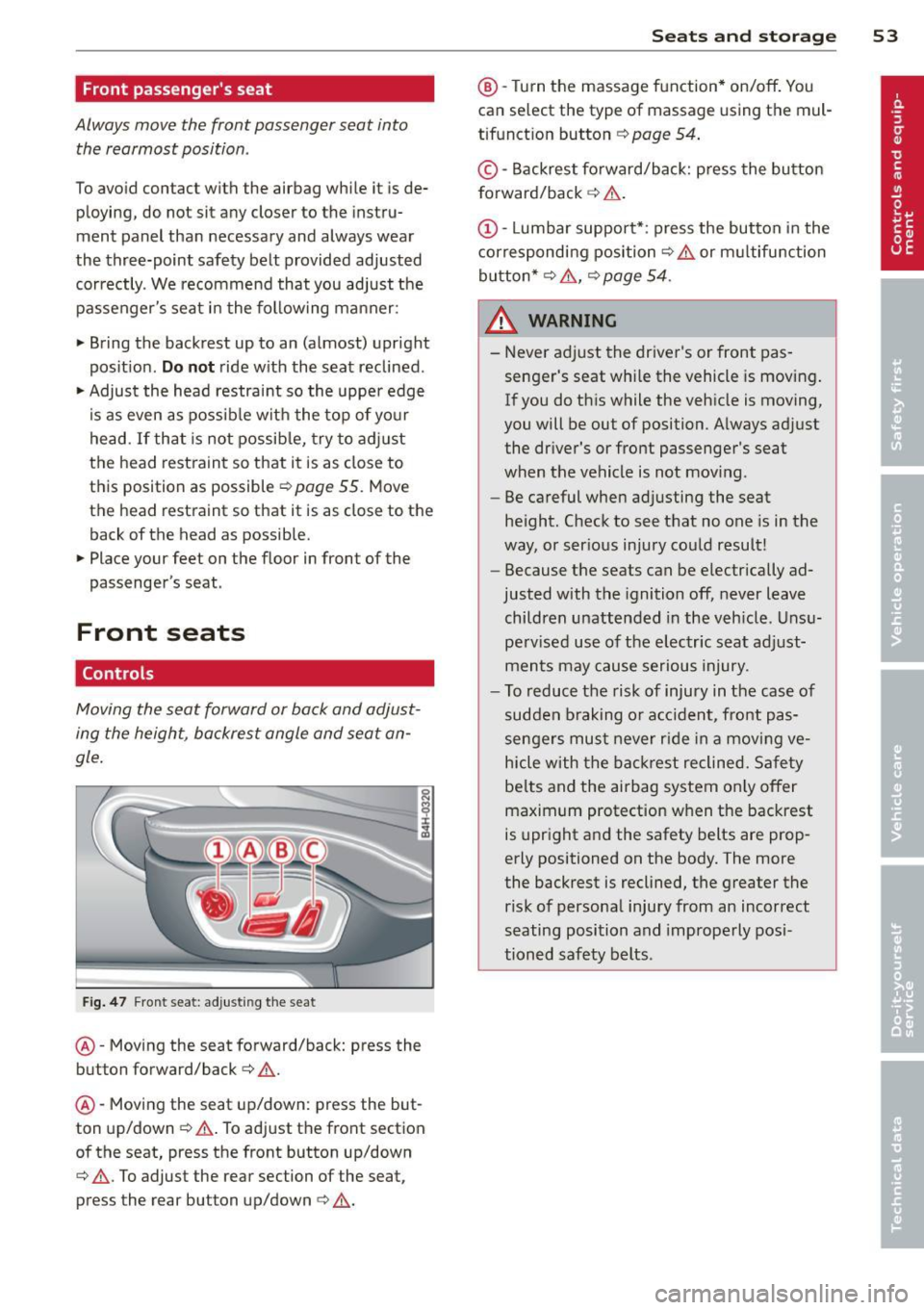
@-Moving the seat forward/back: press the
button forward/back ¢ ,&. .
@ -Moving the seat up/down: press the but
ton up/down ~,&. . To adjust the front section
of the seat, press the front button up/down
¢ ,&. .To adjust the rear section of the seat ,
press the rear button up/down¢,&. .
Seats and storage 53
@-Tur n the massage function* on/off . You
can select the type of massage using the mul
tifunct ion button ¢
page 54.
© -Backrest forward/back: press the button
forward/back ¢ .&. .
(D-Lumbar support* : press the button in the
corresponding position¢.&. or multifunction
button*¢ .&., ¢
page 54 .
8_ WARNING ~ -
-Never adjust the driver's or front pas-
senger's seat whi le the vehicle is moving .
If you do this while the veh icle is moving,
you will be out of position. Always adj ust
the dr iver's or front passenger's seat
when the vehicle is not mov ing.
- Be careful when adjusting the seat
height. Check to see that no one is in the
way, or ser ious injury could result!
- Because the seats can be electrically ad
justed with the ignition off, never leave
children unattended in the veh icle. Unsu
pe rvised use of the electric seat adjust
ments may cause serious injury.
- To reduce the risk of injury in the case of
sudden braking or accident, front pas
sengers must never rid e in a moving ve
hicle with the backrest reclined. Safety
belts and the airbag system on ly offer
maximum protection when the backrest
is upright and the safety belts are prop
erly positioned on the body. The more
the backrest is reclined, the greater the
risk of personal injury from an incorrect
seating position and improperly posi
tioned safety belts.
Page 61 of 304
12-volt sockets
Applies to vehicles: with 12-volt sockets
Fig. 57 Section of the trim panel of the luggage com ·
partment: 12-volt socket
Fig . 58 Rear center console: 12-volt socket
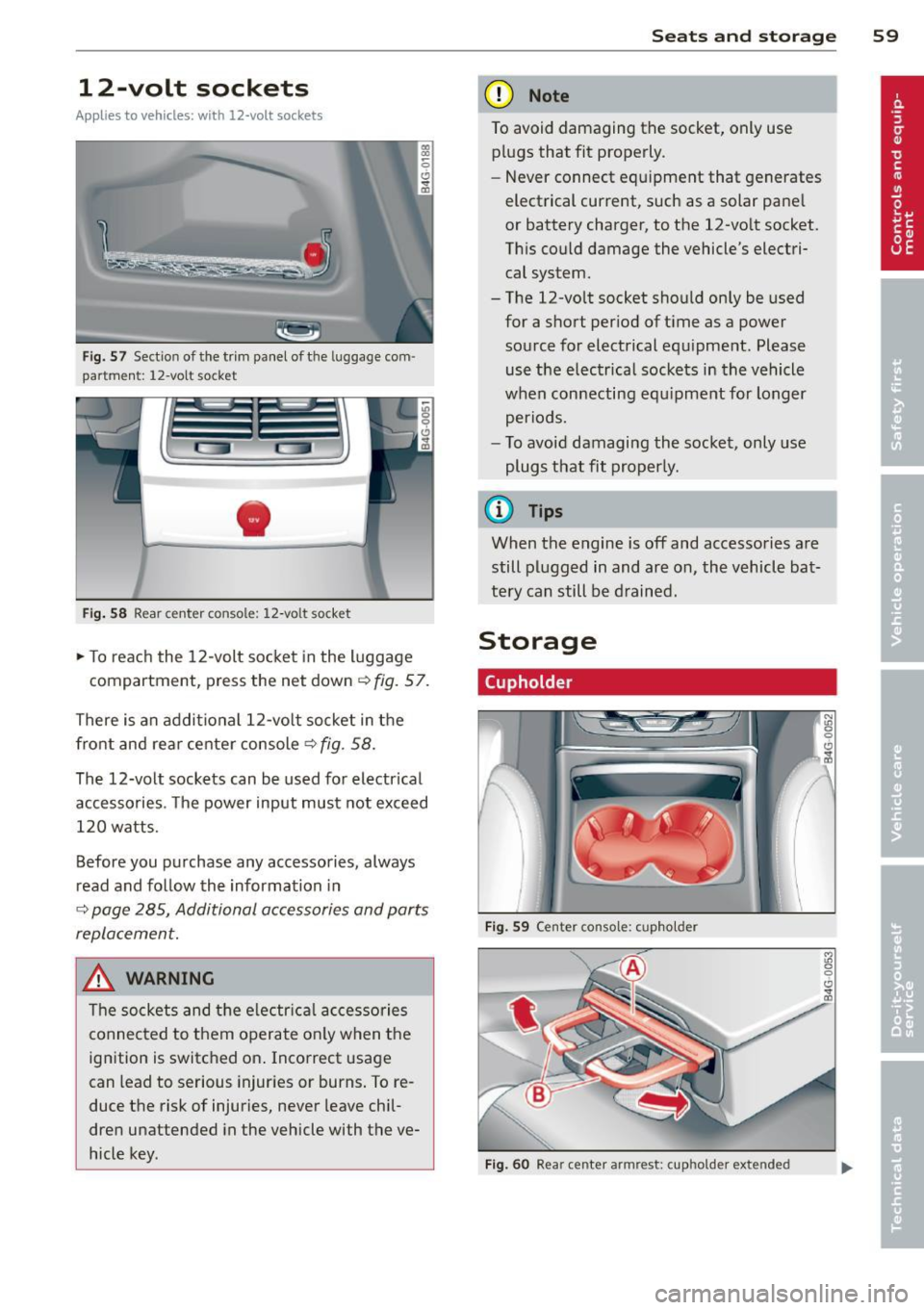
~ To reach the 12-volt socket in the luggage
compartment, press the net down<=>
fig. 57.
There is an additional 12-volt socket in the
front and rear center console
c:> fig. 58.
The 12-volt sockets can be used for electrical
accessories . T he power input must not exceed
120 watts.
Before you purchase any accessories, always
read and fo llow the information in
c:> page 285, Additional accessories and parts
replacement.
_& WARNING
The sockets and the electr ical accessories
connected to them operate on ly when the
ignition is switched on . Incorrect usage
can lead to serious injuries or burns. To re
duce the risk of injuries, never leave chil·
dren unattended in the vehicle with the ve
hicle key.
S ea ts a nd s to rage 59
(D Note
To avoid damaging the socket, only use
plugs that fit properly.
- Never connect equipment that generates
electrical current, such as a solar pane l
or battery charger, to the 12-vo lt socket.
This could damage the vehicle's electri cal system.
- The 12-vo lt socket should only be used
for a short period of ti me as a power
source for electrical equ ipment. Please
use the electr ical sockets in the vehicle
when con necting equ ipment for longer
periods.
- To avoid damaging the socket, only use
plugs that fit properly.
(D Tips
When the engine is off and accessories are
still plugged in and are on, the vehicle ba t
tery can still be d rained.
Storage
(upholder
Fi g. 59 Ce nter console: cupholder
Fig. 60 Rear center armrest: cupholde r extended
Page 71 of 304
l
ed or cleared of condensation as quickly as
possib le. The maximum amount of air flows
mainly from the vents be low the windshield.
Recirculation mode switches off. The tempera
ture should be set to 72 °F (22 °C) or higher.
The
IAU TOI button switches the defroster off.
l(lii) REAR I Switching rear window heater
on/off
The rear window heater on ly operates when
the engine is running.
It switches off auto
matica lly after a few minutes, depending on
the outside temperature.
To prevent the rear window heater from
switching off automatically, press and hold
the
lil button for more than 2 seconds. This
remains stored unti l the ignition is switched
off.
[ii Adjusting seat heating
Pressing the button switches the seat heating
on at the highest setting ( leve l 3). The LEDs
indicate the temperature level. To reduce the
temperature, press the button again. To
switch the seat heating off, press the button
repeatedly unt il the LED turns off .
After 10 minutes, the seat heating automati
cally switches from leve l 3 to level 2.
The seat heating for both outer rear seats* is
adjusted using the buttons in the center con
sole.
Warm and cold 69
Air vents
You can open or close the center and outer
vents in the cockpit and the vents in the rear
center console using the ridged thumbwheels.
The levers adjust the direction of the airflow
from the vents.
The air temperature in the rear can be adjust
ed so that it is warmer or co lder by turning
the knob to the red or blue area.
A WARNING
- Do not use the recirc ulation for extended
periods of time. The windows could fog
up since no fresh a ir can enter the vehi
cle. If the windows fog up, press the air
recirc ulat ion button aga in immed iately
to switch off the air recirculation func
tion or select defrost.
- I ndividuals w ith reduced sensitivity to
pa in or temperature could develop burns
when using the seat heating function. To
red uce the risk of injury, these individu
als sho uld not use seat heating.
(D Note
To avoid damage to the heating elements
in the seats, do not kneel on the seats or
place heavy loads on a small area of the
seat.