recommend AUDI A6 2017 User Guide
[x] Cancel search | Manufacturer: AUDI, Model Year: 2017, Model line: A6, Model: AUDI A6 2017Pages: 280, PDF Size: 70.24 MB
Page 65 of 280
co
co
.... N
" N .... 0 0 <.:l '
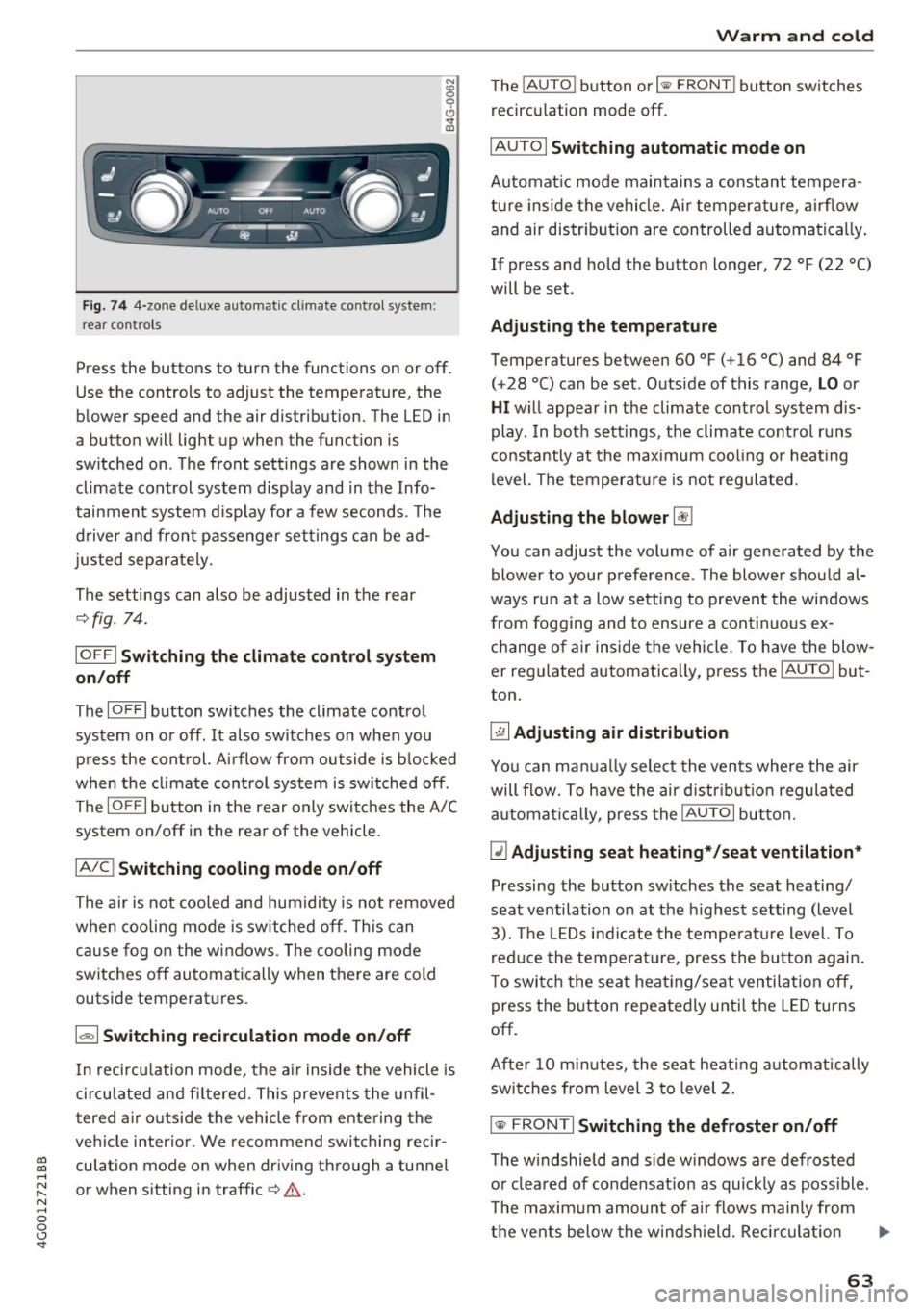
re ar con tro ls
Press the buttons to turn the functions on or off .
Use the controls to adjust the temperature, the
blower speed and the air distribution. The LED in
a button will light up when the function is
sw itched on . T he front settings are shown in the
climate control system display and in the Info
tainment system d isp lay for a few seconds. The
d river and front passenger settings can be ad
justed separately.
The settings can also be adjusted in the rear
~ fig. 74.
IO FF I Sw itchin g the clim ate cont rol s ystem
on /off
The IO FFI button switches the climate control
system on or off.
It also sw itches on when you
press the control. Ai rflow from outside is b locked
when the climate control system is switched off .
The
IO FF I button in the rear only switc hes the A/C
system on/off in the rear of the vehicle .
IA/Cl Switching cooling mod e on /off
The air is not cooled and humidity is not removed
when cooling mode is switched off. This can
cause fog o n the windows . The cooling mode
switches off automatically when there are cold
outside temperatures.
1 6<) 1 Sw itching recirculation m ode on /off
In recircu lation mode, the a ir inside the vehicle is
circu lated and fi ltered. This prevents the unfil
tered a ir o utside the vehicle from entering the
vehicle interior. We recommend switching recir
culation mode on when driving through a tunnel
or when sitting in traffic~&. .
Warm and c old
The !AU TO I button or lllill F RON TI button switches
recircu lation mode off.
I AUTO I Switching automatic mode on
Automat ic mode main tains a cons tant tempera
ture inside the vehicle. Air temperatu re , airf low
and air distr ib ution are controlled automatically.
If press and hold the button longer, 72 °F (22 °C)
will be set .
Adju stin g the temperature
Temperatures between 60 °F ( +16 °() and 84 °F
(+28 °() ca n be set . Outside of this range,
LO or
HI w ill appear in the climate control system dis
play . In both settings, the climate control runs
constantly at the max imum cool ing or heat ing
level. The temperature is not regu lated.
Ad ju sting the blower~
You can adjust the volume of a ir generated by the
blower to your preference . The blower shou ld al
ways run at a low sett ing to prevent the windows
from fogging and to ensure a cont inuo us ex
change of air inside the vehicle , To have the blow
er regu lated automatically , press the
IAU TO ! but
ton .
~ Adju sting air distribution
You can ma nually select the vents where the air
will flow. To h ave the air d istr ibut ion regulated
a utomat ica lly, press the
IAUTOI but ton.
~ Adjusting seat he ating* /seat v entilation *
Pressing the button sw itches the seat heating/
seat ventilation on at the h ighest setting (level
3). The LEDs indicate the tempe rature level. To
reduce the temperat ure, press the b utton again.
To switc h the seat heat ing/seat ventilation off,
press the button repeatedly until the LED turns
off.
After 10 m inutes, the seat heat ing a utomatically
swi tches from level 3 to level 2.
l
The w indshield and side windows a re defrosted
or clea red of condensat ion as quickly as poss ible.
T he maxim um amount of air flows mainly from
the vents below the windsh ield. Reci rc u lat ion
Ill>-
63
Page 70 of 280
Driving
lead to greater tire wear and will affect driving
behavior.
Do not drive on
winter tires year-round, as this
will consume up to 10% more fuel.
Eliminate unnecessary weight
Since every kilogram of extra
weight increases
fuel consumption, a quick inspection of the lug
gage compartment may be worth it to avoid un
necessary weight.
When not being used, a roof rack should be re moved to decrease the wind resistance of the ve
hicle. You will save approximately 12% of your
fuel when at speeds from 62- 7 5 mph (100-120 km/h) .
Save energy
The engine drives the generator, which generates
electricity; the fuel consumption also increases
with the demand for electricity. Therefore, switch electrical equipment off when you no longer
need it. Examples of equipment that uses a lot of
energy are air blowers at a high setting, the rear
window defogger and seat heating*.
CD Note
Do not leave engine idling unattended after
starting.
If warning lights should come on to
indicate improper operation, they would go
unheeded. Extended idling also produces
heat, which could result in overheating or
other damage to the vehicle or other proper
ty .
CD Note
- Have your vehicle maintained properly and
in accordance with the service recommenda
tions in your Warranty
& Maintenance book
let . Lack of proper maintenance as well as
improper use of the vehicle will impair the
function of the emission control system and
could lead to damage.
- Do not alter or
remove any component of
the Emission Control System unless ap
proved by the manufacturer.
- Do not alter or remove any device, such as
heat shields, switches, ignition wires,
68
valves, which are designed to protect your
vehicle's Emission Control System and other
important vehicle components.
(D Tips
The consumption estimates as published by
ENVIRONMENTAL PROTECTION AGENCY
(EPA) and Transport Canada may not corre
spond to your actual consumption on the
road, which will vary depending upon vehicle
load and speed, road and weather conditions,
trip length, etc.
Steering
Manual steering wheel position adjustment
Applies to: vehicles with manual steering wheel adjustment
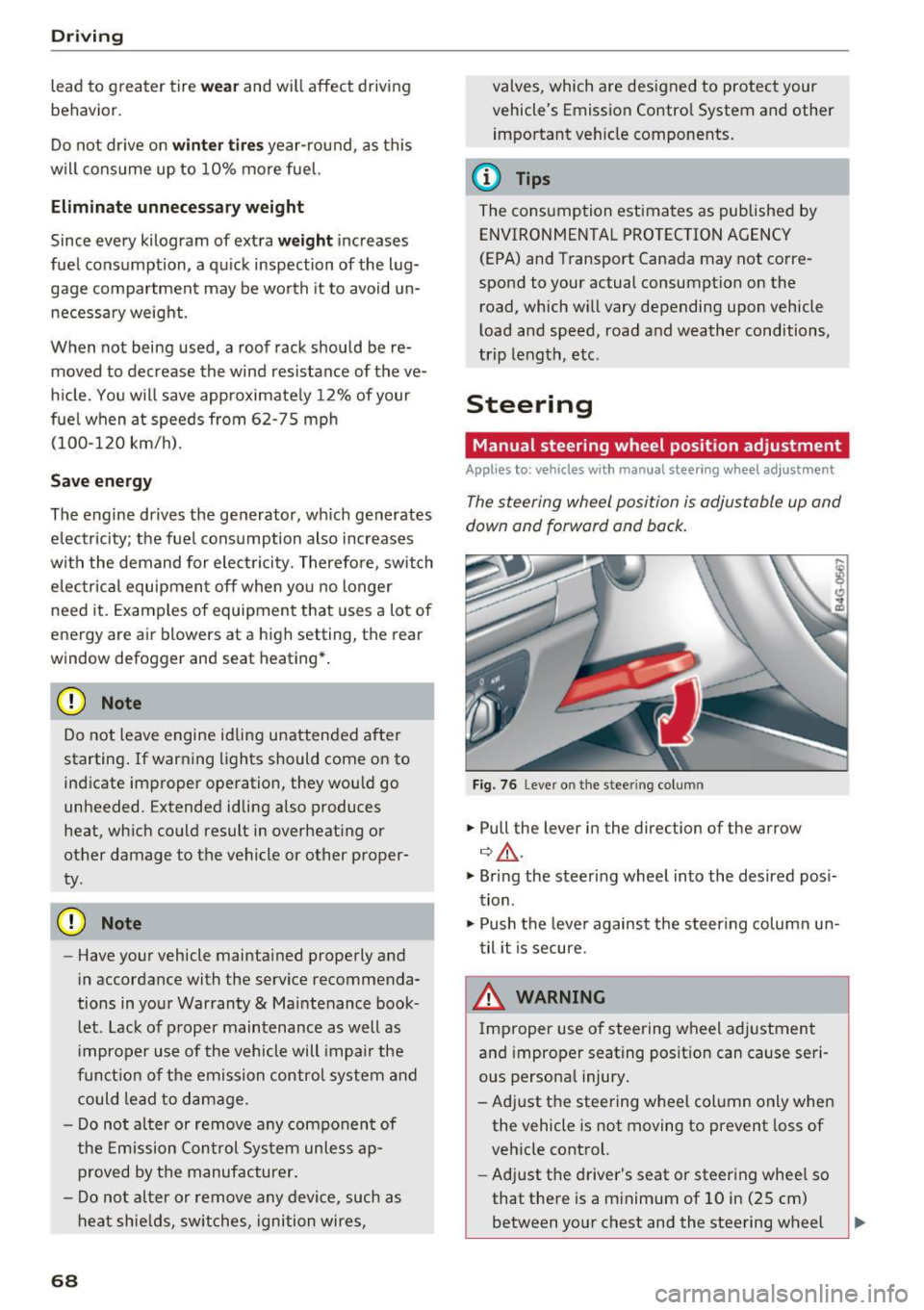
The steering wheel position is adjustable up and
down and forward and back.
Fig. 76 Lever o n the stee ring col umn
.,. Pull the lever in the direction of the arrow
¢ ,&. .
.,. Bring the steering wheel into the desired posi
tion .
.,. Push the lever against the steering column un
til it is secure.
& WARNING
Improper use of steering wheel adjustment
and improper seating position can cause seri
ous personal injury.
- Adjust the steering wheel column only when the vehicle is not moving to prevent loss of
vehicle control.
- Adjust the driver's seat or steering wheel so
that there is a minimum of 10 in (25 cm)
between your chest and the steering wheel -
Page 88 of 280
Assist
Assist Speed warning system
Applies to: vehicles with speed warning system
The speed warning system helps you to stay un
der a specified maximum speed.
The speed warning system warns you if you are
exceeding the maximum speed that you have set.
A warning tone will sound as soon as your speed
exceeds the stored value slightly.
The . (USA models)/ . (Canada models) indi
cator light and a message appear in the instru
ment cluster display at the same time. The •
• indicator light and the message turn off if the
speed falls back below the stored maximum
speed .
Setting a threshold is recommended if you would
like to be reminded when you reach a certain
maximum speed. Situations where you may want
to do so include driving in a country with a gener
al speed limit or if there is a specified maximum
speed for winter tires.
Setting the warning threshold
The warning threshold is set in the Infotainment
system.
.. Select: the
ICARI function button > (Car)* Sys
tems
control button > Driver assistance >
Speed warning.
(D Tips
Regardless of the speed warning system, you
should always monitor your speed using the
speedometer and make sure you are following
the legal speed limit.
86
Cruise control system
Switching on
Applies to: vehicles with cruise control system
The cruise control system makes it possible to
drive at a constant speed starting at 20 mph (30
km/h) .
0
f
~
0
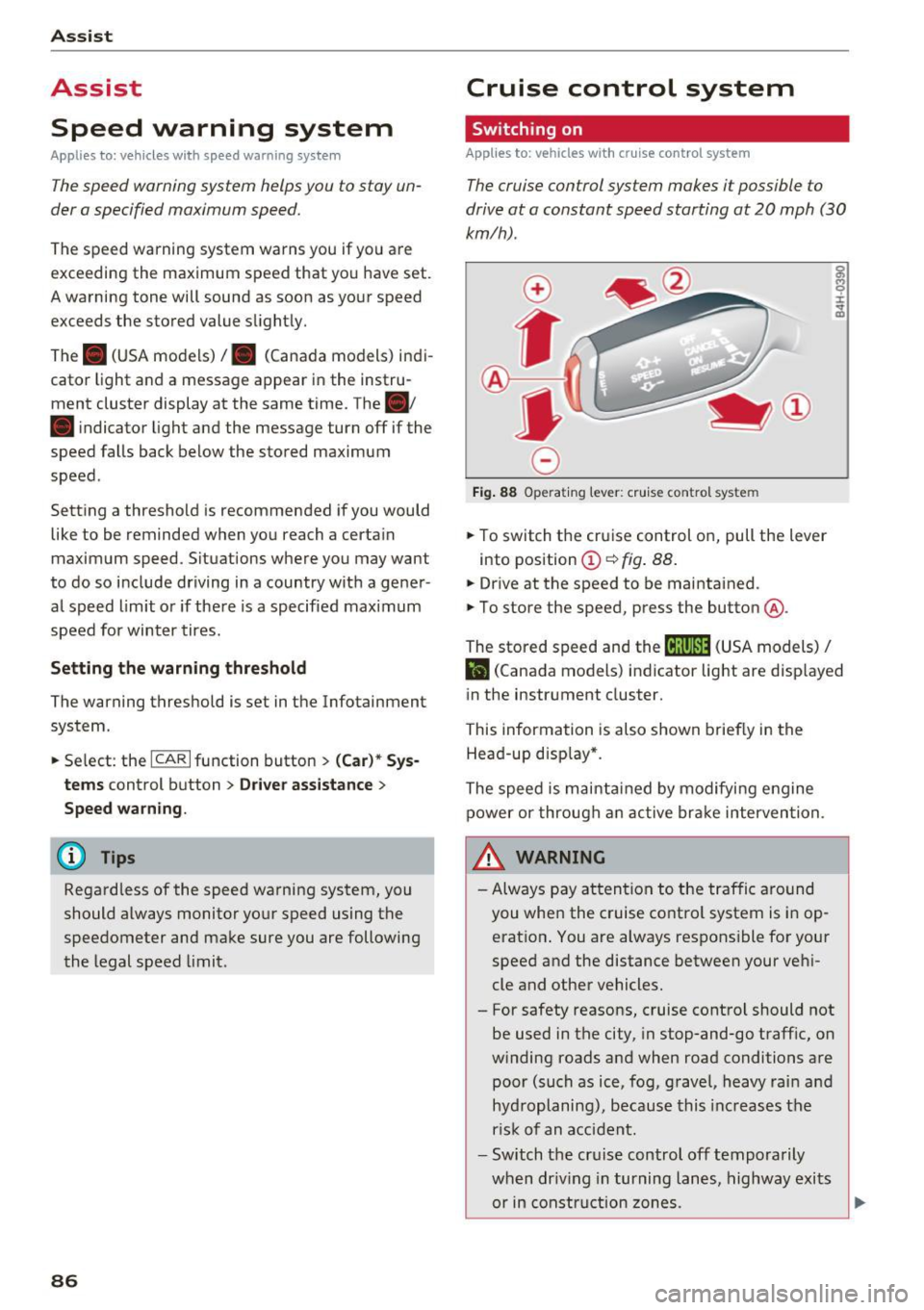
Fig. 88 Operat ing lever: cruise co ntro l syste m
.,. To switch the cruise control on, pull the lever
into posit ion
(D ~ fig . 88.
.,. Drive at the speed to be maintained .
.,. To store the speed, press the button @.
~ M 0 :i:
;;i;
The stored speed and the (ij;\1)~14 (USA models) /
l'I (Canada models) indicator light are disp layed
in the instrument cluster.
This information is also shown briefly in the
Head-up disp lay* .
The speed is maintained by modifying engine
power or through an active brake intervention.
~ WARNING
-Always pay attention to the traffic around
you when the cruise control system is in op
eration . You are always responsible for your
speed and the distance between your vehi
cle and other vehicles.
- For safety reasons, cruise control should not be used in the city, in stop-and-go traffic, on
winding roads and when road conditions are poor (such as ice, fog, gravel, heavy rain and
hydroplaning), because this increases the
r isk of an accident.
- Switch the cruise control off temporarily
when dr iv in g in turning lanes, highway exits
or in construction zones.
-
Page 110 of 280
Parking systems
Parking systems
General information
Applies to: vehicles with parking system plus/rearview cam
era/peripheral camera
Depending on your vehicle's equipment , various
parking aids will help you when parking and ma
neuvering.
The
parking system plus assists you when park
ing by audibly and visually indicating objects de
tected
in front of and behind the vehicle
¢page 109.
The
rearview camera shows the area behind the
vehicle in the Infotainment system display. This
display assists you when you are cross or parallel parking
¢ page 110. The parking system plus
functions are also available
¢ page 109.
The
peripheral cameras assist you with parking
and maneuvering. You are aided by various cam
eras depending on the vehicle equipment level
¢ page 113. The parking system plus functions
are also available
¢ page 109.
A WARNING
-Always look for traffic and check the area
around your vehicle by looking at it directly
as well. The parking system cannot replace
the driver's attention. The driver is always responsible when entering or leaving a park
ing space and during similar maneuvers.
- Please note that some surfaces, such as
clothing, are not detected by the system .
-
-Sensors and cameras have blind spots in
which people and objects cannot be detect ed . Be especially cautious of small children
and animals.
- The sensors can be displaced by impacts or
damage to the radiator grille, bumper,
wheel housing and the underbody . The park
ing system may be impaired as a result.
Have an authorized Audi dealer or author
ized Audi Service Facility check their func
tion .
- Make sure the sensors are not obstructed by stickers, deposits or other materials. If they
are, the sensor function could be impaired.
108
For additional information on cleaning, see
¢page 231.
(D Note
-Some objects are not detected or displayed
by the system under certain circumstances:
- Objects such as barrier chains, trailer draw
bars, vertical poles or fences
- Objects above the sensors such as wall ex
tensions
- Objects with certain surfaces or structures
such as chain link fences or powder snow
- If you continue driving closer to a low ob
ject, it may disappear from the sensor range. Note that you will no longer be
warned about th is obstacle .
- Keep enough distance from the curb to re
duce the risk of damage to the rims .
(D Tips
-The system may provide a warning even
though there are no obstacles in the cover
age area in some situations, such as :
- certa in road surfaces or when there is tall
grass.
- external ultrasonic sources such as from
cleaning vehicles .
- in heavy rain, snow, or thick vehicle ex
haust.
- We recommend that you practice parking in
a traffic-free location or parking lot to be
come familiar with the system . When doing
this, there should be good light and weath
er conditions.
- You can change the volume and pitch of the
signals as well as the display
¢ page 118.
- Please refer to the instructions for towing a
trailer located in
¢page 118.
- What appears in the infotainment d isplay is
somewhat time-delayed.
- Th e sensors must be kept clean and free of
snow and ice for park aid to operate .
Page 122 of 280
Intelligent Technology
Intelligent Technology
Electronic Stabilization
Control (ESC)
Description
Elect ronic Stabilization Control (ESC) suppo rts
driver safety.
It red uces the risk of slipping and
improves dr iving stability. ESC detects crit ica l sit
uations such as the veh icle oversteering and un
dersteering or the wheels are sp inning. The vehi
cle is stabilized by app lying the brakes or reduc
ing engine torque. As soon as the ESC is active ly
regulat ing, the
D.1 indicato r light blin ks in the in
s trumen t clus ter.
The fo llow ing systems are integrated in the ESC :
Ant i-lock braking system (ABS)
ABS p revents the whee ls from locking whe n brak
ing. The vehicle can sti ll be steered even during
hard brak ing. Apply steady press ure to the brake
pedal. Do not pump the pedal. A puls ing in t he
b rake pedal indicates that the system is acting to
s tabilize the vehicle .
Br ake assist system
The brake assist system can decrease brak ing dis
tance . It increases brak ing power when the driver
presses the brake pedal q uick ly in emergency sit
uations . You must press and hold t he b rake pedal
until the dangerous sit uat io n is over . In veh icles
with adapt ive c ruise control*, the bra ke as sist
sy stem is more sensitive if t he di sta nce detec ted
t o the vehicle dr iv ing ahead is too small. On
ve hicl es with act ivated and f unct io ni ng night vi
sion assist*, the brake assist system can respond mo re sensit ively if there is a warning .
Anti-slip regulation (ASR)
ASR red uces eng ine power when the drive w heels
be gin sp inning an d adapts the force to the road
conditions. This makes it easie r to sta rt, acceler
ate and dr ive up h ills.
Electronic differential lock (EDL)
T he EDL applies the b rakes to a whee l t h at s tarts
sp inning and tra nsfe rs t he dr ive powe r to t he
o ther driving wheel or wheels (if the veh icle is
120
equipped with a ll w hee l drive*) . T h is f unction is
not avai lab le at higher speeds .
I n extreme cases , EDL automat ic al ly swi tches off
to keep t he b rake o n the br aked wheel from ove r
heating. The ve hicle is still working correct ly. ED L
will switc h on again automatically when condi
tions have returned to normal.
Steering recommendation
The ESC he lps to s tabili ze th e vehicle by ch ang ing
t h e s teer ing torque.
I n veh icles with dynamic s teer ing*, ESC a lso
helps to stab ilize the s teeri ng in cr it ic al situ a
tions.
Selective wheel torque control
Se lective wheel to rque control is used when d riv
i ng on curves . The front whee l on the ins ide of
t h e curve or both whe els on the i nside of th e
cu rve are braked se lectively as needed. This al
l ows mo re pre cise driving in curves .
Automatic post -collision braking system
The "a utomat ic post -coll is io n braking system"
can help to reduce the risk of sl iding and of addi
tiona l co llisions after an acc iden t. If the a irbag
c on tro l modu le dete cts a collision above a cer tain
vehicle speed, the veh icle is braked by t he ESC.
The veh icle does not brake automatically if:
- the drive r presses the accelerator pedal, or
- the bra king force generate d by the pressed
brake pedal is greater than the b raking force
that would be in itiated by the system, or
- the ESC, the bra ke system or the vehicle elect ri
cal system are not functioning.
A WARNING
- The ESC and its integ rated systems can not
overcome the lim its imposed by natura l
p hys ica l laws. Th is is es pec ially i mpo rtan t
on s lippery or we t roads. If the system s be
g in a cting to s tabili ze yo ur vehicle, you
should immedi ately alte r your speed to
match the road and tra ffi c conditions. Do
not let the inc reased safety provided tempt
Page 124 of 280
Intelligent Technology
Braking
New brake p ads
New b rake pads do no t achieve the ir full b raking
effect during the firs t 250 mi (400 km) . They
m ust be "broken in" first .
Wear
Brake pad wear depends largely o n the way the
ve hicl e is driven and on operat ing cond it ions.
This is especi ally true if you are d riving frequently
in the c ity and on c urves or with a sporty driving
style.
Operating noise
Noises may occur when bra king depend ing on the
speed, b raking force and outs ide cond it ions s uch
as temperature and humidity.
Effect of water and road salt
In ce rtain s ituations, for example after driving
through water, in heavy ra in, afte r ove rnight con
densat ion or after washing your car, the b raking
effect can be red uce d by mo isture or ice on the
b rake rotors and brake pads. The brakes must be
"dried" first with a few careful brake applica
tions.
At highe r speeds and with t he windshie ld wipers
turned on, the brake pads press against the bra ke
rotors for a short amount of time . This action,
which is not felt by the driver, happens at regular
intervals and ens ures a better reaction time for
the brakes in wet weathe r.
The braking effect can also be reduced if you are
driving on sa lted roads and you do not apply t he
brakes for long periods of time. The layer of salt
on the brake rotors and pads must be worn off
first when the brakes are applied.
Corrosi on
Leaving the vehicle parked for long periods of
time, low mi leage and avo iding heavy brak ing
can contribute to corrosion on the brake rotors
and to d irty brake pads.
If you usually avoid heavy b raking or if there is
corros ion present, occasional heavy braking at
122
high speeds is recommended to clean the brake
rotors and pads¢.&. .
Brake system malfunction
if you not ice that the b rake peda l t ravel has sud
denly increased, then a br ake circuit in the du al
c irc uit b rake system may have malfunctioned.
Drive to an authorized A udi dealer or authorized
A udi Se rvice Facility immediate ly to have the
problem corrected. On the way there, drive w ith
reduced speed and keep in m ind t hat you will
need a longer distance to stop and you will need
to press the brake peda l harder .
lo w b rake fluid level
When the brake fluid level is low, malfunctions in
the brake system may occur. The brake fluid level
i s electronically monitored.
Brake booster
The brake boos ter amp lifies the pressure you ap
ply to the brake pedal. It only works when the en
gine is running .
A WARNING
- Only app ly the brakes for the purpose o f
cleaning the brake system when road and
traffic conditions permit. You must not en
danger other road users. This i ncreases the
r is k of an accident .
-
- Never let the ve hicle roll while the engine is
s topped because this i ncreases the ris k of an
accident .
- New brake pads do no t ach ieve the ir full
braking effect dur ing the first 250 m i
( 4 00 km). They m ust be "b roken in" fi rst.
However, you can compensa te fo r the
slightly reduced brak ing force by pressing
firm ly on the brake pedal. Avo id heavy brak
ing during the break-in period.
- Ce rtain weather and operating condi tions
such as d riving through water, dr iv ing in
heavy rain o r driv ing after washi ng your ve
hicle can impai r the effectiveness of the
brakes. In the winter, ice may build up on
the brake pads, rotors and dr ums. Check
Page 126 of 280
Intelligent Technology
- For addi tional in format ion on dynamic
steering, refer to
c:> page 104.
ALL wheel drive (quattro)
Applies to: vehicles with all wheel drive
In oil wheel drive, all four wheels ore powered.
General information
In a ll wheel d rive, the d rivi ng power is divided be
t ween a ll four wheels. Th is happens au tomatical
ly depending on your driving behavior as well as
the current road cond itions. Also see
c::> page 120, Electronic Stabilization Control
(ESC) .
A center differentia l distrib utes the driv ing power
variably to the front and rear axle. It works to
gethe r with selective wheel torq ue control, which
activates when driving through curves
c::> page 120. With the sport differentia l", power
d istr ibut ion to the rear wheels is variable and can
be ad justed w ith drive select
c::> page 104.
The a ll wheel drive concept is designed for h igh
engine power. Your ve hicle is exceptionally pow
erful and has excellent driving characterist ics
both under normal dr iv ing condit ions and on
snow a nd ice . Always read and fo llow safety pre
cautions
c::> ,& .
Winter tires
By us ing a ll wheel drive, your vehicle has good
forward mot io n with standard t ires in winter con
d itions . However, in winter we recommend using
w inter or all season t ires on all fo ur wheels, be
cause th is w ill improve the b raking effe ct.
Snow chains
If there are snow chain laws, snow chains must
also be used on vehicles with all wheel drive
c::> page 226, Snow chains .
Replacing tires
For vehicles w ith all wheel dr ive, only whee ls with
the same rolling circumference should be used .
Avoid using t ires with different tread depths
c::> page 217, New tires or wheels .
124 Offroad vehicle?
You
r A udi is no t an off road vehicle -there is not
eno ugh ground clearan ce . F or this reason, avoid
difficult terra in .
_&. WARNING
- Also, in veh icles with all wheel drive, adapt
your driving sty le to the current road and
traffic conditions. Do not let the increased
safety provided tempt you into taking r isks,
because this inc reases the risk of an acc i
dent .
- The b raking ab ility of your vehicle is limited
to the t raction of the whee ls . In this way, i t
is not different from a two wheel d rive vehi
cle. Do not be tempte d to accelerate to a
hig h speed when the ro ad i s slip pery, be
cause th is increases the r is k of an accident .
- Note that on wet s treets, the front wheels
c a n " hyd ropla ne" if driv ing a t spee ds tha t
are too h igh. Unlike front wheel drive
veh icles, t he engine does not rev higher sud
de nly when t he vehicle begins hydroplan ing.
For this reason, adapt yo ur speed to the
road conditions to reduce the risk of an acci
de nt.
Energy management
The starting ability is optimized
The energy management system manages the
elec trical energy distribution and optimi zes the
availability of electri cal energy for starting the
engine .
When a vehicle wi th a conventiona l energy sys
tem is no t driven for a l ong time , the veh icle ba t
te ry is d raine d by equ ipment ( fo r example, the
immo biliz er). In certa in circ umstances, there
could may not be enough energy to start the en
gine.
Yo ur vehicle is equipped with an inte lligen t ener
gy management system fo r dist ributing elec trici
ty. This significantly improves the starting ability
and increases the vehicle battery life . .,.
Page 131 of 280
co
co
.... N
" N .... 0 0 <.,;) 'SI"
.. Make sure to use the right chi ld restraint cor
rectly to protect children
~ page 171 , Child
safety .
.. Sit properly in your seat and make sure that
your passengers do the same¢
page SO, Seats
and storage .
.. Fasten your safety belt and wear it properly . Al
so instruct your passengers to fasten their safe
ty be lts properly ¢
page 139 .
What impairs driving safety?
Safe driving is directly related to the condition of
the vehicle, the driver as well as the driver's abili
ty to concentrate on the road without being dis
tracted.
The driver is responsible for the safety of the ve
h icle and all of its occupants. If you r ability to
d rive is impaired, safety risks for eve rybody in the
veh icle increase and you also become a hazard to
everyone else on the road ¢A -Therefore :
.. Do not let you rself be dist racted by passengers
or by us ing a cellular te lephone .
.. NEVER dr ive when your dr iv ing ability is im
paired (by medications, alcohol, drugs, etc.).
.. Observe all traff ic laws, rules of the road and
speed limits and plain common sense.
.. ALWAYS adjust your speed to road, traffic and
weather cond itions.
.. Take frequent breaks on long trips. Do not drive
for more than two ho urs at a stretch .
.. Do NOT drive when you are tired, under pres
s ur e o r when you are st ressed.
_& WARNING
Impaired dr iv ing safe ty inc reases the risk of
ser ious personal inju ry and death whenever a
vehicle is being used.
.
Dr iving safety
Correct passenger
seating positions
Proper seating position for the driver
The proper driver seating position is important
for safe, relaxed driving .
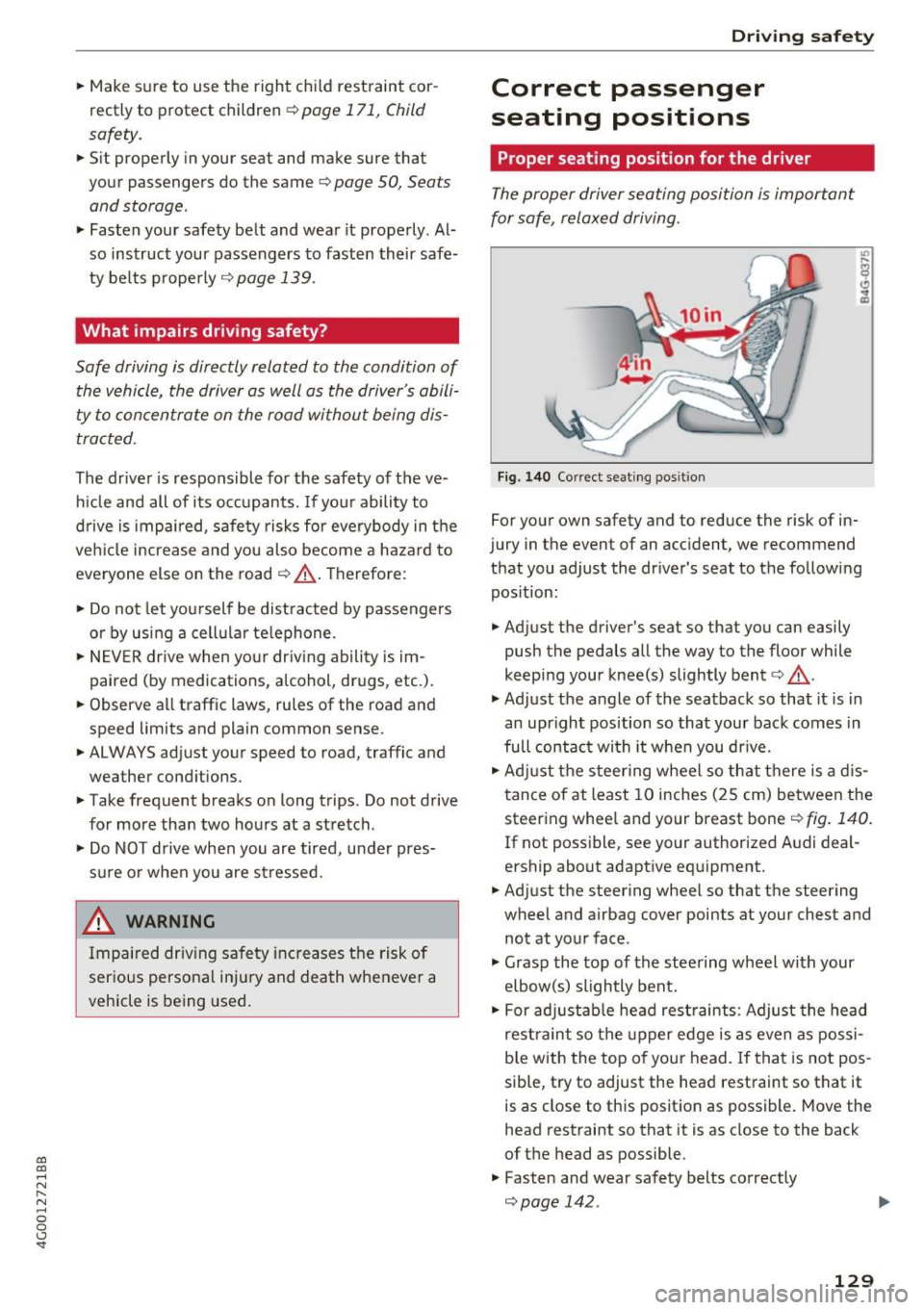
F ig. 140 Correct seat ing pos it io n
For your own safety and to reduce the risk of in
jury in the event of an accident, we recommend
that you adjust the dr iver 's seat to the fo llowing
pos ition:
.. Adjust the driver's seat so that you can easily
push the pedals all the way to the floor while
keep ing your knee(s) slightly bent¢&. -
.,. Adjust the angle of the seatback so that it is in
an upright position so that your back comes in
full contac t wi th it when you dr ive .
.. Adj ust the steer ing wheel so that there is a d is
tance of at least 10 inches (25 cm) between the steering whee l and your breast bone¢
fig. 140.
If not poss ible, see your author ized A udi deal
ership about adapt ive equipment.
.. Adjust the steering wheel so that the steering
wheel and airbag cover points at your chest and
not at your face .
.,. Grasp the top of the steering wheel with your
elbow(s) slightly bent.
.. For adjustab le head rest raints: Adjust the head
rest raint so the upper edge is as even as possi
b le with the top of your head. If that is not pos
sible, t ry to adjust the head restraint so that it
is as close to this posit ion as possible. Move the
head restraint so that it is as close to the back
of t he head as possible.
.. Fasten and wear safety belts correctly
Qpage 142. ..,.
129
Page 132 of 280
Driving safety
"' Always keep both feet in the footwell so that
you are in control of the vehicle at all times.
For detailed information on how to adjust the
driver's seat, see
c;, page SO.
A WARNING
Drivers who are unbelted, out of position or
too close to the airbag can be seriously in
jured by an airbag as it unfolds . To help re
duce the risk of serious personal injury:
- Always adjust the driver's seat and the
steering wheel so that there are at least
10 inches (25 cm) between your breastbone
and the steering wheel.
- Always adjust the driver's seat and the
steering wheel so that there are at least
4 inches (10 cm) between the knees and the
lower part of the instrument panel.
- Always hold the steering wheel on the out
side of the steering wheel rim with your
hands at the 9 o'clock and 3 o'clock posi
tions to help reduce the risk of personal in
jury if the driver's airbag inflates.
- Never hold the steering wheel at the
12 o'clock position or with your hands at
other positions inside the steering wheel
rim or on the steering wheel hub. Holding
the steering wheel the wrong way can cause
serious injuries to the hands, arms and head if the driver's airbag inflates.
- Pointing the steering wheel toward your
face decreases the ability of the su pplemen
tal driver's airbag to protect you in a colli
sion.
- Always sit in an upright position and never lean against or place any part of your body
too close to the area where the airbags are
located .
- Before driving, always adjust the front seats
properly and make sure that all passengers
are properly restrained .
- For adjustable head restraints: before driv
ing, always also adjust the head restraints
properly .
- Never adjust the seats while the vehicle is
moving. Your seat may move unexpectedly
and you could lose control of the vehicle.
130
-
-Never drive with the backrest reclined or
tilted far back! The farther the backrests are
tilted back, the greater the risk of injury due
to incorrect positioning of the safety belt
and improper seating position .
- Children must always ride in child seats
c;,page 171. Special precautions apply
when installing a child seat on the front
passenger seat
c:;, page 147.
Proper seating position for the front
passenger
The proper front passenger seating position is
important for safe, relaxed driving.
For your own safety and to reduce the risk of in
jury in the event of an accident , we recommend
that you adjust the seat for the front passenger
to the following position:
"'Adjust the angle of the seatback so that it is in
an upright position and your back comes in full
contact with it whenever the vehicle is moving.
"'For adjustable head restraints: adjust the head
restraint so the upper edge is as even as possi
ble with the top of your head. If that is not pos
sible, try to adjust the head restraint so that it
is as close to this position as possible
c:;, page 131 . Move the head restraint so that it
is as close to the back of the head as possible.
"' Keep both feet flat on the floor in front of the
front passenger seat .
"' Fasten and wear safety belts correctly
c;,page 142.
For detailed information on how to adjust the
front passenger's seat, see
c:;, page SO .
A WARNING
Front seat passengers who are unbelted, out
of position or too close to the airbag can be
seriously injured or killed by the airbag as it
unfolds. To help reduce the risk of serious
personal injury:
- Passengers must always sit in an upright po
sition and never lean against or place any part of their body too close to the area
where the airbags are located.
Ill-
Page 137 of 280
co
co
.... N
" N .... 0 0 <..:l '
cially with the rear lid left open. A child
could crawl into the vehicle through the lug
gage compartment and close the rear lid be
coming trapped and unable to get out . Be
ing trapped in a vehicle can lead to serious
personal injury.
- Never let children play in or around the vehi
cle.
- Never let passengers ride in the luggage
compartment. Vehicle occupants must al
ways be properly restrained in one of the ve
hicle's seating positions.
-Air circulation helps to reduce window fog
ging . Stale air escapes to the outside
through vents in the trim panel. Be sure to
keep these slots free and open.
- The tire pressure must correspond to the
load. The tire pressure is shown on the tire
pressure label. The tire pressure label is lo
cated on the driver's side B-pillar. The tire
pressure label lists the recommended cold
tire inflation pressures for the vehicle at its
maximum capacity weight and the tires that
were on your vehicle at the time it was man
ufactured. For recommended tire pressures
for normal load conditions, please see chap
ter
c:> page 221.
Tie-downs
The luggage compartment is equipped with four
tie-downs to secure luggage and other items.
Use the tie-downs to secure your cargo properly
c:> page 134, Loading the luggage compartment.
In a collision, the laws of physics mean that even
smaller items that are loose in the vehicle will
become heavy missiles that can cause serious in
jury . Items in the vehicle possess energy which
vary with vehicle speed and the weight of the
item. Vehicle speed is the most significant factor .
For example, in a frontal collision at a speed of
30 mph (48 km/h) , the forces acting on a 10-lb
(4 .5 kg) object are about 20 times the normal
weight of the item. This means that the weight
Driving safety
of the item would suddenly be about
200 lbs. (90 kg) . You can imagine the injuries
that a 200 lbs. (90 kg) item flying freely through
the passenger compartment could cause in a col
lision like this.
A WARNING
= -
Weak, damaged or improper straps used to
secure items to tie-downs can fail during hard
braking or in a collision and cause serious per
sonal injury.
- Always use suitable mounting straps and
properly secure items to the tie-downs in
the luggage compartment to help prevent
items from shifting or flying forward as dan
gerous missiles.
- When the rear seat backrest is folded down,
always use suitable mounting straps and
properly secure items to the tie-downs in
the luggage compartment to help prevent items from flying forward as dangerous
missiles into the passenger compartment.
- Never attach a child safety seat tether strap
to a tie-down.
Reporting Safety Defects
Applicable to U.S.A.
If you believe that your vehicle
has a defect which could cause a
crash or could cause injury or
death, you should immediately in
form the National Highway Traffic Safety Administration (NHTSA) in
addition to notifying Audi of
America, Inc.
If NHTSA receives similar com
plaints, it may open an investiga
tion, and if it finds that a safety
defects exists in a group of
vehicles, it may order a recall and ""'
135