recommend AUDI A6 2017 Owners Manual
[x] Cancel search | Manufacturer: AUDI, Model Year: 2017, Model line: A6, Model: AUDI A6 2017Pages: 280, PDF Size: 70.24 MB
Page 3 of 280
co
co
.... N
" N .... 0 0 <..:l '
Thank you for choosing an Audi -we value your trust in us.
Your new Audi will allow you to experience the best in groundbreaking technolo
gy and premium quality equipment a vehicle has to offer. We recommend that
you read your Owner's Manual thoroug hly so that you quickly become acquaint
ed with your Audi and make use of all of its featu res .
In addition to expla ining how the different features work, we provide many use
ful tips and information concerning your safety, how to care for your vehicle and how to mainta in your veh icle's va lue. We also g ive you useful tips and informa
tion on how to dr ive your veh icle more efficiently and in an e nvironmentally
frie ndly manner .
We hope you enjoy driv ing your Audi and we wish you safe and pleasant motor
i ng.
AUDIAG
Page 20 of 280
Instruments and indicator lights
The indicator light can also turn on if t he fuel fill
er cap is not closed correct ly ¢
page 192.
~ Diesel particulate filter
App lies to: veh icles w ith diesel engine and diesel particulate
filter
II Particul ate filter: System fault See owner' s
manual
The diesel pa rticulate fi lter requires regene ra
tion . To suppo rt the fil ter's se lf-cleaning f un c
tion :
D rive fo r approximate ly 15 m in utes at 37 mph
(60 km/h) o r above in the S se lector lever posi
tion . Keep the eng ine s peed around 2 ,00 0 RPM .
The temperature increase tha t will result from
this can b urn o ff the soot in the filter. The indica
tor light will turn off when the cleaning has com
p leted successf ully.
I f t he i ndicator lig ht does
not tur n o ff, drive im
mediately to an a utho rized Audi dea ler or a uth or
ized A udi Service Faci lity to have the malfunction
corrected.
A WARNING
Always adapt your speed to the cu rrent
weather, road and traffic conditions . You
should never disobey traffic laws in order to
follow driving recommenda tions.
(D Tips
For add it iona l information on the diese l par
tic ulate fi lter, see
¢ page 198.
!'7 Engine speed limitation
Applies to: veh icles with engine speed limitation
Ill Maximum engine speed: XXXX rpm
The engine speed is automatica lly lim ited to the
speed d isplayed in the instrument cluster. T his
protects the eng ine from overheating .
The engine speed limitation deactivates once the
engine is no longer in the critica l temperature
range and you have released the acce lerato r ped
a l once .
18
If the engine spee d limitation was activa ted by
an engine cont rol malfunct ion, the ~ indicator
li ght a lso turns on. Ma ke sure that the speed
does not go above the speed displayed. Dr ive to
an a uthorized Audi dea ler or authori zed Audi
Service Facility immed iate ly to have the ma lfunc
t ion corrected .
(D Tips
Applies to: S models
The engine speed is lim ite d w hen t he engine
i s cold -the fu ll engine ou tput is no t av aila
b le . When the eng ine is at o perating tem per
ature, the red area in the tachometer moves
to a h igher R PM range .
~c, Engine oil sensor
• Oil level sensor: system fault!
The sensor to check the eng ine o il level has
f ailed. Drive to an au thori zed A udi dealer or au
thorized Audi Serv ice Facility immediately to have
the malfunct ion corrected .
f Engine warm -up request
0 Please warm up engine
Fuel has entered the engine oil, eithe r from low
outside temperatures or frequent short d rives.
D rive until the eng ine is warm so that the fuel in
the engine o il w ill evaporate. Avoid hig h engine
speeds, full accelerating a nd heavy engine loads
whe n doing this .
rn Tank system
II) Please refuel
If the indicato r light turns on for the first time
and t he message appears , there are about 2 .6
gallons ( 10 li ters) of f uel left in t he tank .
II) Fuel tank system malfunct ion! Please con
tact dealer
There is a ma lf u nction in the f uel tank system .
D rive to an au thor ized A udi dealer or au thoriz ed
A udi Se rvice Fac ility immed iate ly to h ave the
malfunction cor rec ted.
Page 30 of 280
Opening and clo sin g
@ Tips
- Do not leave valuables unattended in the ve
hicle . A locked vehicle is not a safe!
- The LED in the driver 's door rail blinks when
you lock the vehicle . If the LED lights up for
approximately 30 seconds after locking,
there is a ma lfunction in the central locking
system. Have the problem corrected by an
authorized Audi dealer or authorized Audi Service Fac ility.
Key set
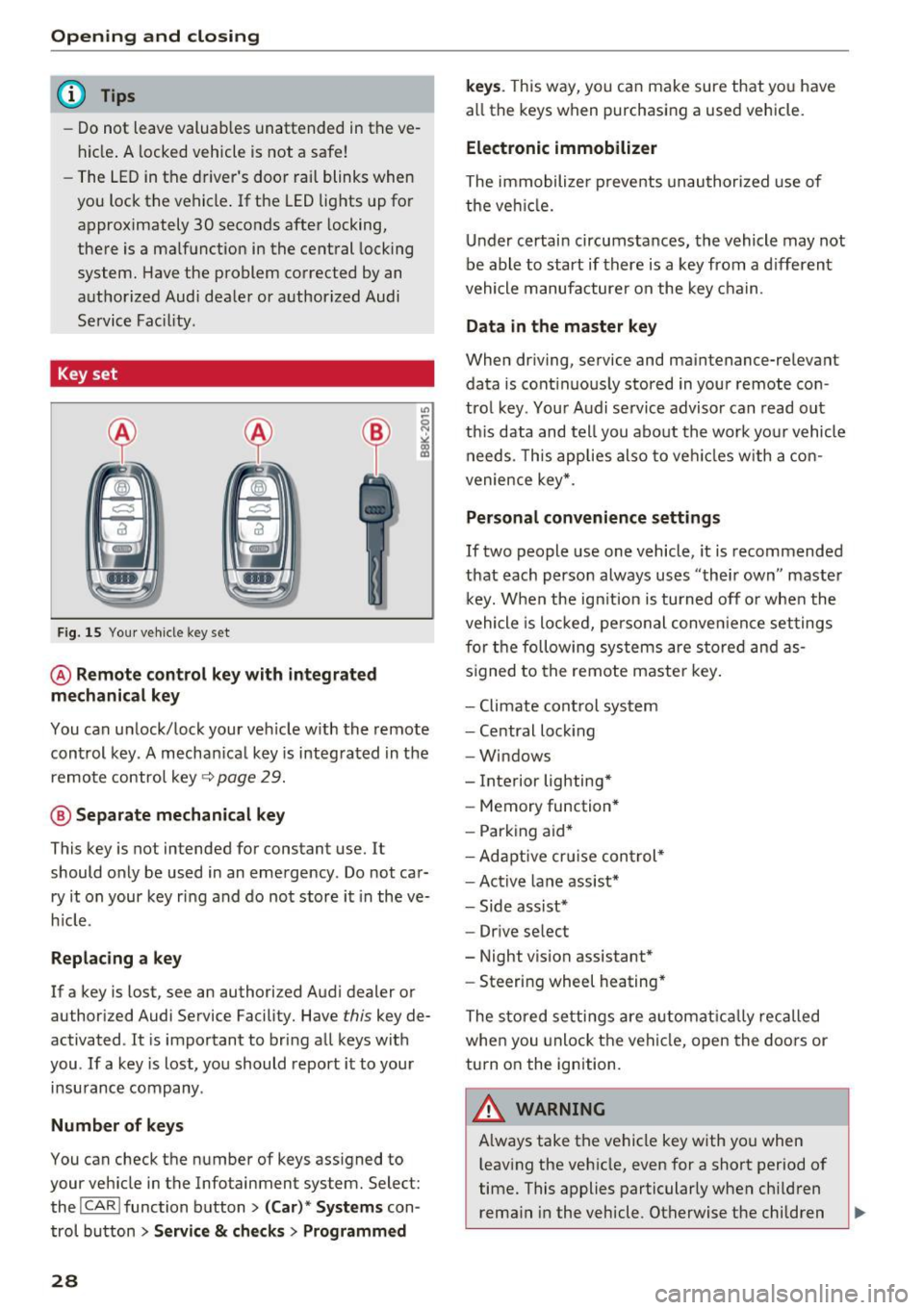
Fig. 15 You r veh icle key set
@ Remote control ke y with integr ated
mechanica l key
You can unlock/lock your veh icle w ith the remote
control key . A mechan ical key is integrated in the
remote control key~
page 29.
@ Separate mechanical ke y
This key is not intended for constant use. It
should only be used in an emergency . Do not car
ry it on your key ring and do not store it in the ve
h icle.
Replacing a ke y
If a key is lost, see an authorized Audi dealer or
authorized Audi Service Facility. Have
this key de
activated . It is important to bring all keys with
you . If a key is lost, you should report it to your
insurance company.
Number of key s
You can check the number of keys ass igned to
your veh icle in the Infotainment system. Select:
the !CAR !function button>
(C ar )* S yst e m s con
trol button
> Service & che cks > Programmed
28
k ey s. T his way, you can make sure that you have
all the keys when purchasing a used vehicle.
El ectronic immobiliz er
The immobilizer p revents unauthorized use of
the ve hicle.
Under certain circumstances, the vehicle may not
be able to start if there is a key from a d ifferent
vehicle manufacturer on the key chain.
Da ta in th e master key
When dr iving, service and maintenance-relevant
data is cont inuous ly stored in your remote con
trol key. Your A udi se rvice advisor can read out
th is data and tell you about the work yo ur vehicle
needs . This applies also to veh icles with a con
venience key *.
Personal convenience sett ings
If two people use one vehicle, it is recommended
that each person always uses "their own" master k ey. When the ign ition is turned off o r whe n the
vehicle is locked, personal conve nience set tings
for the following systems are stored and as
s igned to the remote maste r key .
- Climate cont rol system
- Central lock ing
- Windows
- Interior lighting*
- Memory function*
- Park ing aid*
- Ad aptive cru ise con trol *
- Ac tive lane assist*
- Side ass ist*
- Drive select
- Night vision assistant*
- Steering wheel heating *
The stored settings a re a utomat ica lly recalled
whe n you unlock t he vehi cle, open the doors or
turn on the ignition.
A WARNING
A lways take the vehicle key with you when
leaving the vehicle, even for a short period of
time. This applies particularly when child ren
rema in in the vehicle . Otherwise the children
-
Page 42 of 280
Opening and closing
@ Tips
-For security reasons, we recommend that
you clear the programmed buttons before
selling the vehicle.
- For additional information about Homelin k,
vis it www.homelink.com.
- For an explanation on conformity with the
FCC regulations in the United States and the
Industry Canada regulations, see
¢page 262.
Programming buttons
App lies to : vehicles with garage door opener (Homelin k)
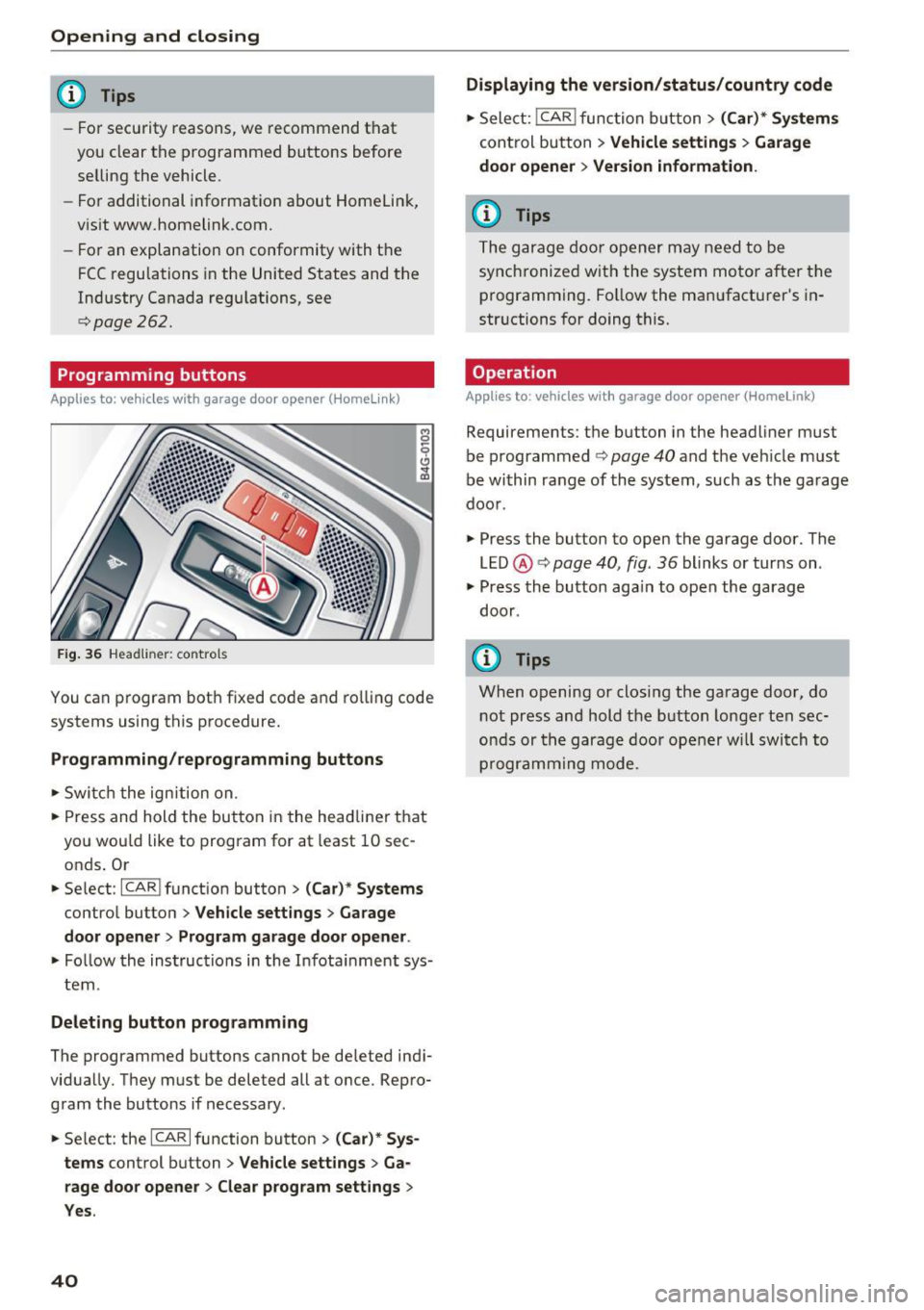
Fig. 36 Headli ner: co ntrols
You can program both fixed code and rolling code
systems using this procedure.
Programming/reprogramming buttons
,.. Switch the ignition on.
,.. Press and hold the button in the headliner that
you wou ld like to program for at least 10 sec
onds . Or
,.. Select:
-I C_A _R_I function button > (Car)* Systems
control button > Vehicle settings > Garage
door opener > Program garage door opener .
,.. Fo llow the instructions in the Infota inment sys
tem .
Deleting button programming
The programmed buttons cannot be de leted indi
vidually. They must be deleted all at once. Repro
gram the buttons if necessary.
,.. Se lect : the
ICARI function button > (Car)* Sys
tems
control button > Vehicle settings > Ga
rage door opener
> Clear program settings >
Yes.
40
Displaying the version/status/country code
,.. Select: !CAR I func tion button > (Car)* Systems
control button > Vehicle settings > Garage
door opener > Version information.
(D Tips
The garage door opener may need to be
synchronized with the system motor after the
programming. Follow the manufacturer's in
str uctions for doing this.
Operation
Applies to : vehicles with garage door opener (Homelink)
Requirements: the button in the headliner must
be programmed
¢ page 40 and the veh icle must
be within range of the system, such as the ga rage
door .
.,. Press the button to open the garage door. The
LED @¢
page 40, fig. 36 blinks or turns on .
.,. Press the button aga in to open the garage
door .
(D Tips
When opening or closing the garage door, do
not press and hold the button longer ten sec
onds or the garage door opener will switch to
programming mode.
Page 48 of 280
Lights and Vision
Automatic dimming rearview mirror*
.. Press the button@~ fig. 44. The indicator
light @ turns on. Interior and exterior mirrors*
will dim when there is incoming light (such as h eadlights from the rear).
A WARNING
If the glass on an automatic dimming mirror
breaks, electrolyte can leak out . This liquid
can irritate the skin, eyes and respiratory sys
tem .
If there is contact with the fluid, flush
immediately with plenty of water . Consult a
physician if necessary.
- Repeated or long-term exposure to electro
lyte fluid can lead to irritation of the air
ways, especially in people with asthma or
other respiratory conditions. Take deep
breaths immediately after leaving the vehi
cle or, if this is not possible, open all of the doors and windows as wide as possible.
- If electrolyte fluid enters the eyes, flush
them thoroughly with a large amount of
clean water for at least 15 minutes and then
seek medical attention.
- If electrolyte fluid comes into contact with
the skin, flush the affected area with clean
water for at least 15 minutes and then clean
with soap and water and seek medical at
tention. Clean affected clothing and shoes
thoroughly before wearing again .
- If the fluid was swallowed and the person is conscious, flush the mouth with water for at
least 15 minutes. Do not induce vomiting
unless this is recommended by medical pro
fessionals. Seek medical attention immedi
ately.
(D Note
If the glass on an automatic dimming mirror
breaks, electrolyte can leak out. This liquid
damages plastic surfaces and paint. Clean
this liquid as quickly as possible, for example
with a wet sponge.
46
@ Tips
- If the light reaching the rearview mirror is
obstructed, the automatic dimming mirror
will not function correctly,
- The automatic dimming mirrors do not dim
when the interior lighting is turned on or
the reverse gear is selected.
Sun visors
[ __ ____,}
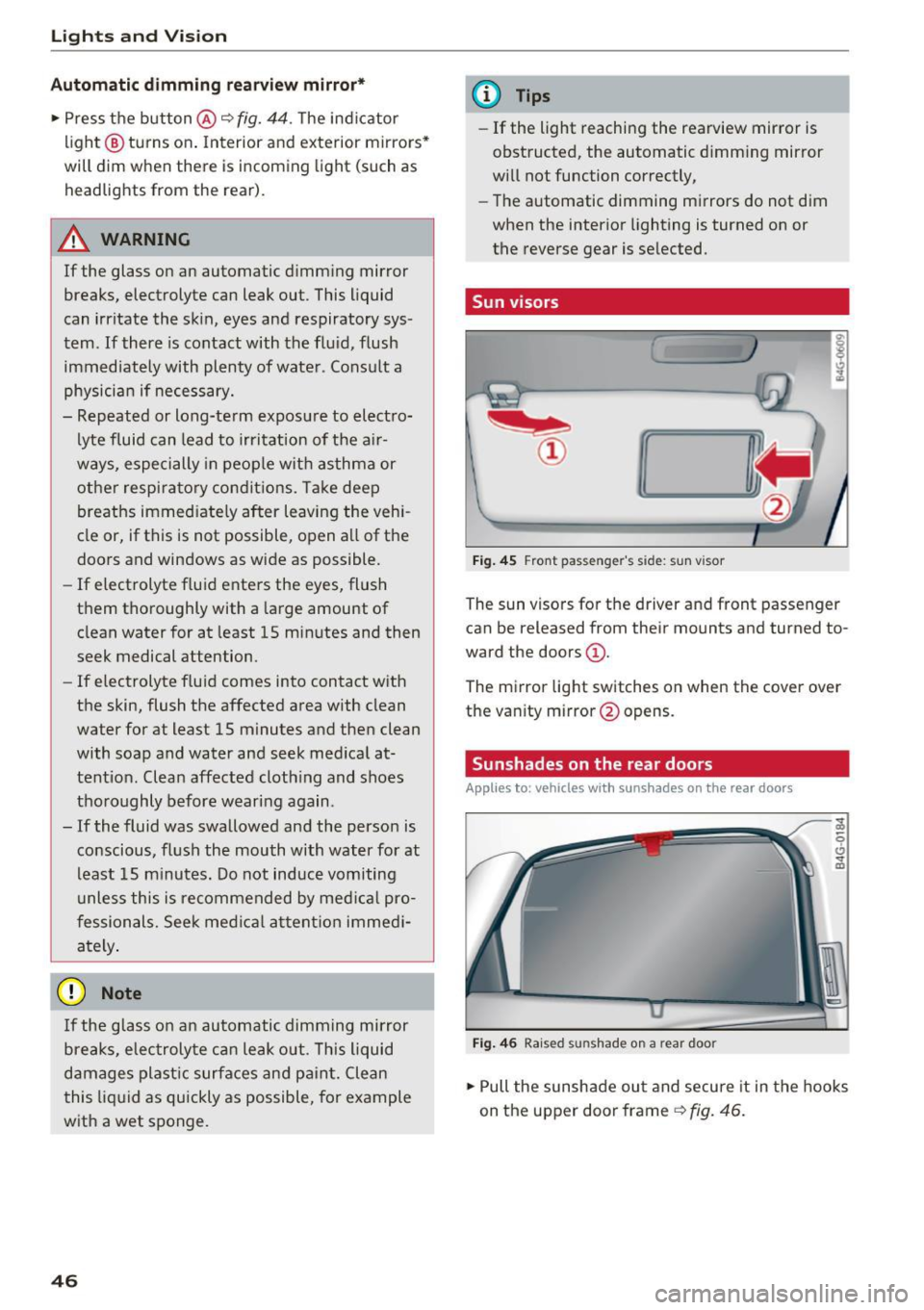
Fig. 45 Front pas seng er's side: sun vis or
The sun visors for the driv er and front passenger
can be released from their mounts and tu rned to
ward the doors
(D .
The mirror light switches on when the cover over
the vanity mirror @opens .
Sunshades on the rear doors
Applies to : vehicles with sunshades on the rear doors
Fig. 46 Rai sed sunshade on a rear doo r
.. Pull the sunshade out and secure it in the hooks
on the upper door frame
~ fig. 46.
Page 54 of 280
Sea ts and stor age
Rear head restraints
Applies to: ve hicles w ith adj ustable head restra ints
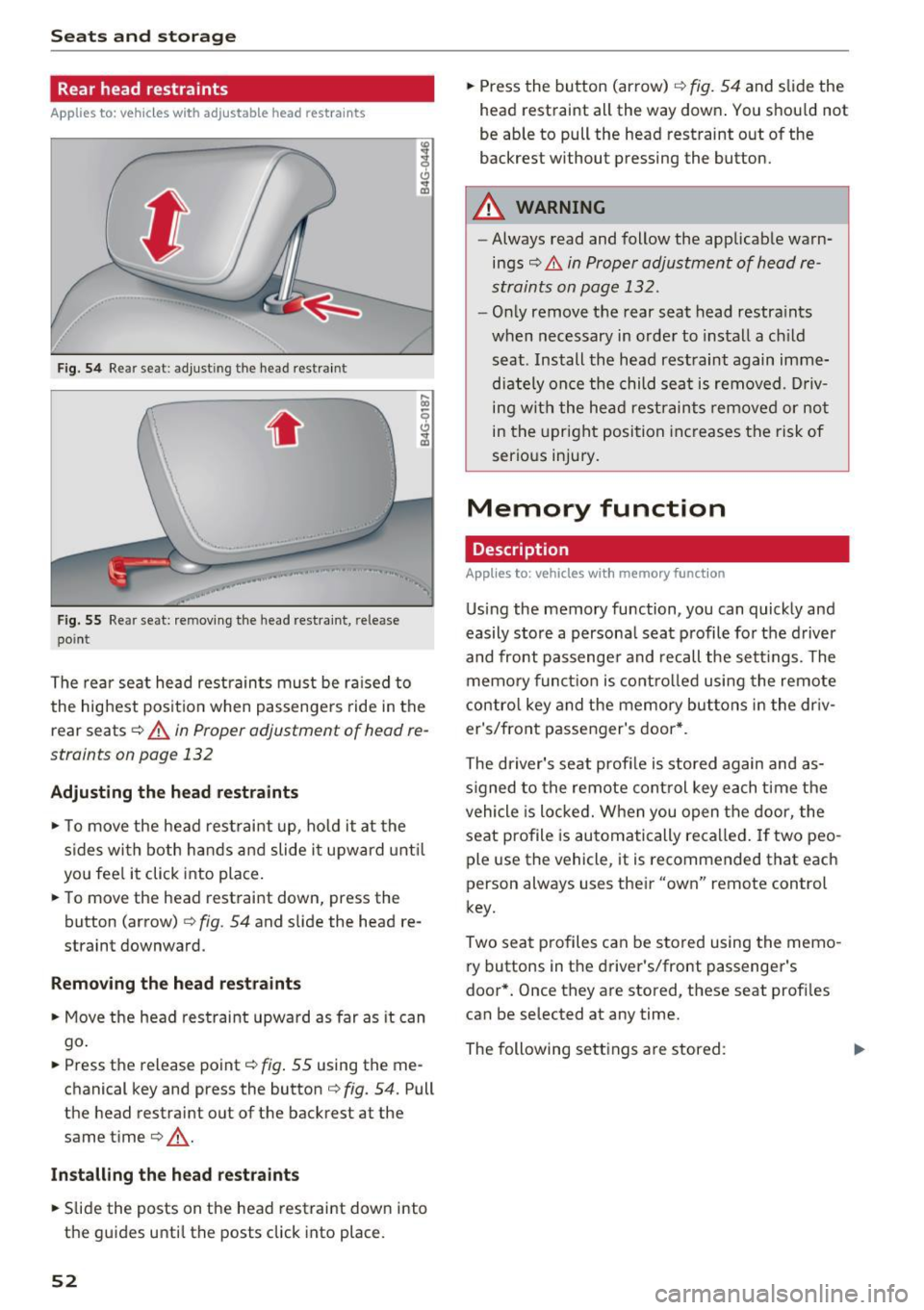
Fig. 54 Re ar seat: adju stin g th e head restra int
.. , ,.
F ig . 5 5 Re ar seat: remov ing the head res traint , rele ase
poin t
The rea r seat head restraints must be ra ised to
the highest posit io n when passenge rs ride in the
r e ar seats ¢
A in Proper adjustment of h ead re
straints on page 132
Adjusting the head rest raints
"' To move the head rest rai nt up, ho ld it at the
s ides wi th both hands a nd slide i t upward unt il
yo u fee l it click into place.
"' To move the head restraint down, press the
button (a rrow)
¢ fig . 54 and slide the head re
straint downward.
Remov ing th e head re st ra ints
"' Move the head restraint upward as far as it can
go .
"' Press the release point¢
fig. 55 using the me
chanical key and p ress the button ¢
fig. 54. Pull
the he ad restraint out of the ba ckrest at the
same time¢,&. .
Install ing the head restra ints
"' Slide the posts on the head restraint dow n into
the guides unti l the posts click into place.
52
"' Press the button (arrow) ¢ fig . 54 and slide the
head restra int all the way down . You should not
be able to pull the head restraint out of the
backres t wi thout pressing the button.
A WARNING
- Always read and follow the applicab le warn
ings
¢ .&. in Proper adjustment of head re
straints on page 132.
- Only remove t he rear seat head restra ints
when necessary in order to install a ch ild
seat . Install the head restraint again imme
dia tely once the child sea t is removed . D riv
ing with the he ad restraints remove d or no t
in the upright posi tion increases the risk of
serious injury.
Memory function
Description
App lies to: vehicles with memory funct ion
Using the memory function, you can quick ly and
easily store a persona l seat profile fo r the d river
and front passenge r and recall the sett ings. The
memory funct ion is contro lled using the remote
contro l key and the memory but tons in the dr iv
er's/front passenger's door *.
The driver's seat profi le is stored again and as
s igned to the remote cont rol key each time the
vehicle is locked. W hen you open the door, the
seat profile is automatically recalled. If two peo
ple use the vehicl e, it is recommend ed that each
person always uses the ir "own" remote control
key.
Two sea t profiles can be s tored using the memo
ry buttons in t he driver's/front passenge r's
door *. Once they are stored, these seat profi les
can be selected at any time.
The following se ttings are stored :
Iii>
Page 58 of 280
Seats and storage
_& WARNING
-Do not put any hot beverages in the cup
holder while the vehicle is moving. Hot bev
erages could spill, which can cause injury.
- Do not use any breakable beverage contain
ers (for example, made out of glass or por
celain) . You could be injured by them in the
event of an accident.
0 Note
Beverage containers in the cup holders should
always have a lid . If not, beverages could spill
and cause damage to vehicle equipment, such
electronics or seat covers .
Cooled glove compartment
Applies to: veh icles with cooled glove compartment
The cooled glove compartment only functions
when the
AIC system is switched on.
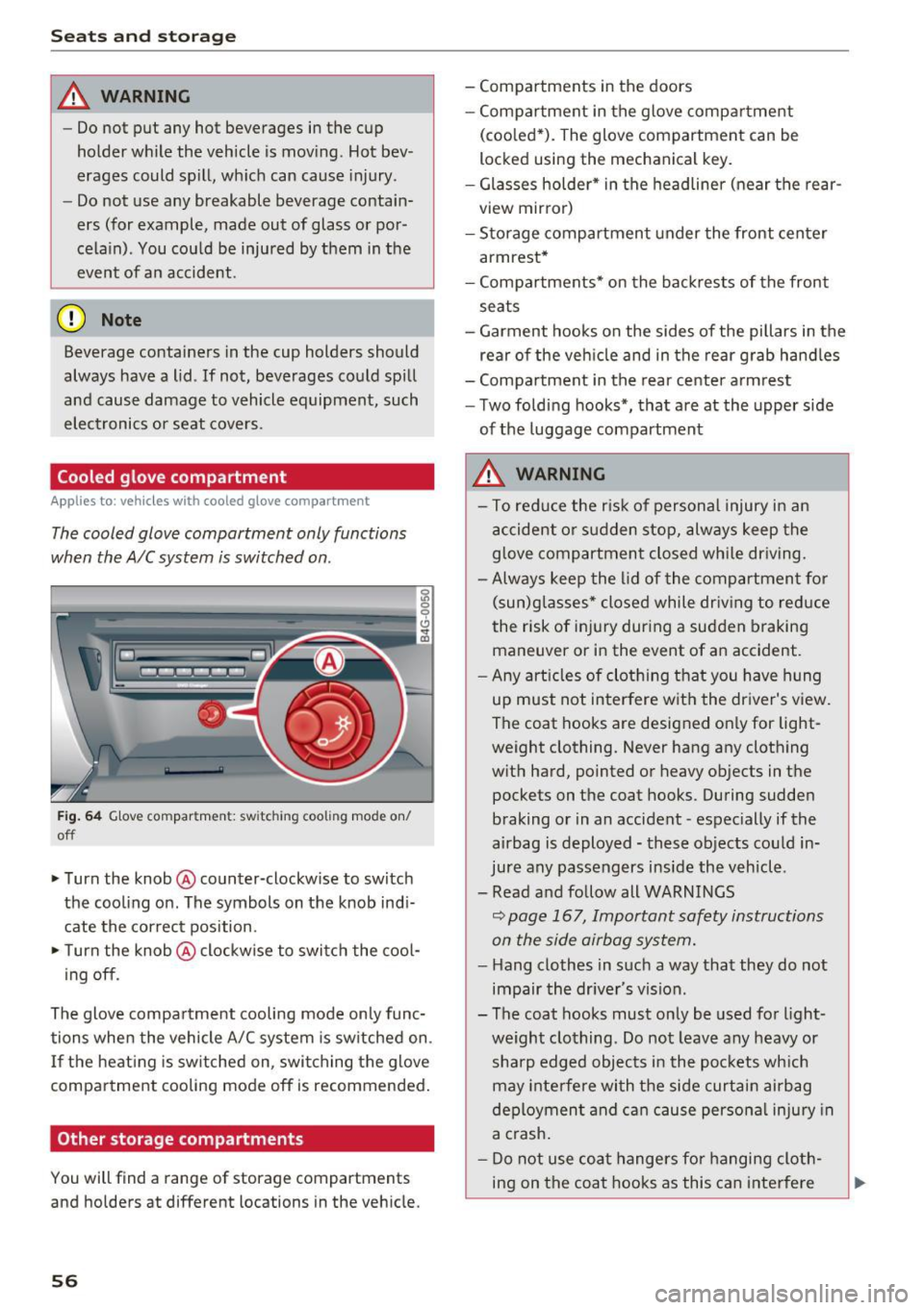
Fig. 64 Glove compar tm ent: s witch in g coo ling mode on/
off
~ Turn the knob@ counter-clockwise to switch
the cooling on . The symbols on the knob indi
cate the correct position.
~ Turn the knob @ clockwise to switch the cool-
ing off .
The glove compartment cooling mode only func
tions when the vehicle A/C system is switched on .
If the heating is switched on, switching the glove
compartment cooling mode off is recommended.
Other storage compartments
You will find a range of storage compartments
and holders at different locations in the vehicle.
56
- Compartments in the doors
-Compartment in the glove compartment
(cooled*) . The glove compartment can be
locked using the mechanical key.
- Glasses holder* in the headliner (near the rear
view mirror)
- Storage compartment under the front center
armrest*
- Compartments* on the backrests of the front
seats
- Garment hooks on the sides of the pillars in the
rear of the vehicle and in the rear grab handles
- Compartment in the rear center armrest
- Two folding hooks*, that are at the upper side
of the luggage compartment
_& WARNING
- To reduce the risk of personal injury in an
accident or sudden stop, always keep the
glove compartment closed while driving.
- Always keep the lid of the compartment for
(sun)glasses* closed while driving to reduce
the risk of injury during a sudden braking
maneuver or in the event of an accident .
- Any articles of clothing that you have hung
up must not interfere with the driver's view.
The coat hooks are designed only for light
weight clothing. Never hang any clothing
with hard, pointed or heavy objects in the pockets on the coat hooks. During sudden
braking or in an accident -especially if the
airbag is deployed - these objects could in
jure any passengers inside the vehicle .
- Read and follow all WARNINGS
c::> page 167, Important safety instructions
on the side airbag system.
- Hang clothes in such a way that they do not
impair the driver 's vision .
-
- The coat hooks must only be used for light
weight clothing . Do not leave any heavy or
sharp edged objects in the pockets which
may interfere with the side curtain airbag
deployment and can cause personal injury in
a crash.
- Do not use coat hangers for hanging cloth
ing on the coat hooks as this can interfere
Page 59 of 280
co
co
.... N
" N .... 0 0 <..:l 'SI"
with proper deployment of the side curtain
airbags in an accident.
- Do not hang heavy objects on the coat
hooks, as they could cause personal injury in
a sudden stop.
CD Note
Objects on the rear shelf that rub against the
rear window can damage the rear window
heating wires.
Roof rack
App lies to: ve hicles with roof rac k
~
------~~ ~
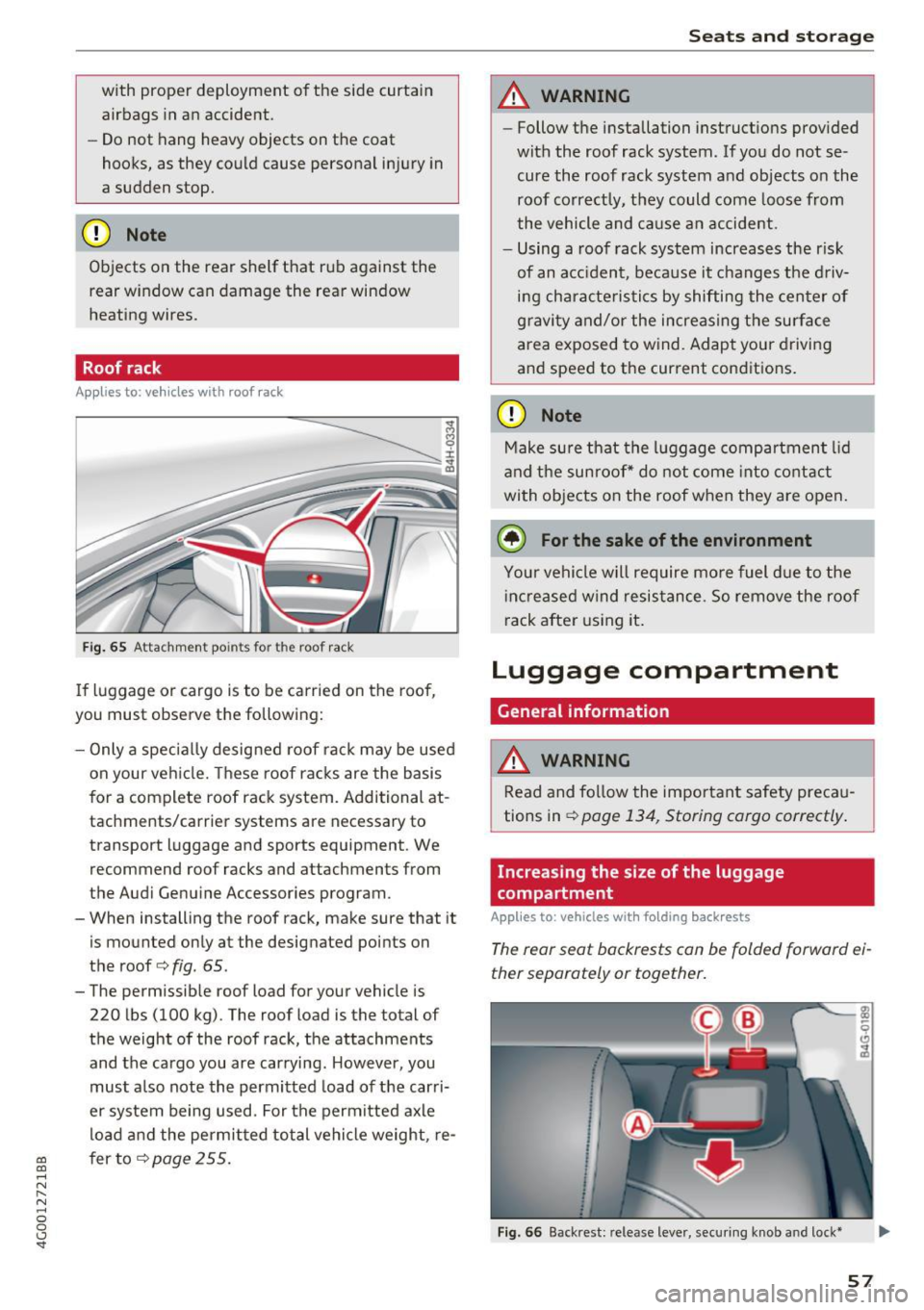
Fig. 65 Attachm ent points for the roof rack
If luggage or cargo is to be carried on the roof,
you must observe the following:
- Only a specially designed roof rack may be used
on your vehicle. These roof racks are the basis
for a complete roof rack system. Additional at
tachments/carrier systems are necessary to
transport luggage and sports equipment . We
recommend roof racks and attachments from
the Audi Genuine Accessories program.
- When installing the roof rack, make sure that it
is mounted only at the designated points on
the roof
c> fig . 65 .
- The permissible roof load for your vehicle is
220 lbs (100 kg). The roof load is the total of
the weight of the roof rack, the attachments
and the cargo you are carrying . However, you
must also note the permitted load of the carri
er system being used. For the permitted axle
load and the permitted total vehicle weight, re
fer to
c> page 255.
Seats and storage
A WARNING
--Follow the installation instructions provided
with the roof rack system. If you do not se cure the roof rack system and objects on the
roof correctly, they could come loose from
the vehicle and cause an accident.
- Using a roof rack system increases the r isk
of an accident, because it changes the driv
ing characteristics by shifting the center of
gravity and/or the increasing the surface
area exposed to wind. Adapt your driving
and speed to the current cond itions.
CD Note
Make sure that the luggage compartment lid
and the sunroof* do not come into contact
with objects on the roof when they are open.
(,® For the sake of the environment
Your vehicle will require more fuel due to the
increased wind resistance. So remove the roof
rack after using it.
Luggage compartment
General information
A WARNING ~
Read and follow the important safety precau-
tions in
c> page 134, Storing cargo correctly .
Increasing the size of the luggage
compartment
Applies to : vehicles wit h folding back rests
The rear seat backrests can be folded forward ei
ther separately or together.
Fig. 66 Backrest: re lease lever, securing knob a nd lock*
57
Page 63 of 280
co
co
.... N
" N .... 0 0 <.,;) 'SI"
Warm and cold
Automatic climate control
Applies to: vehicles with deluxe automatic climate contro l
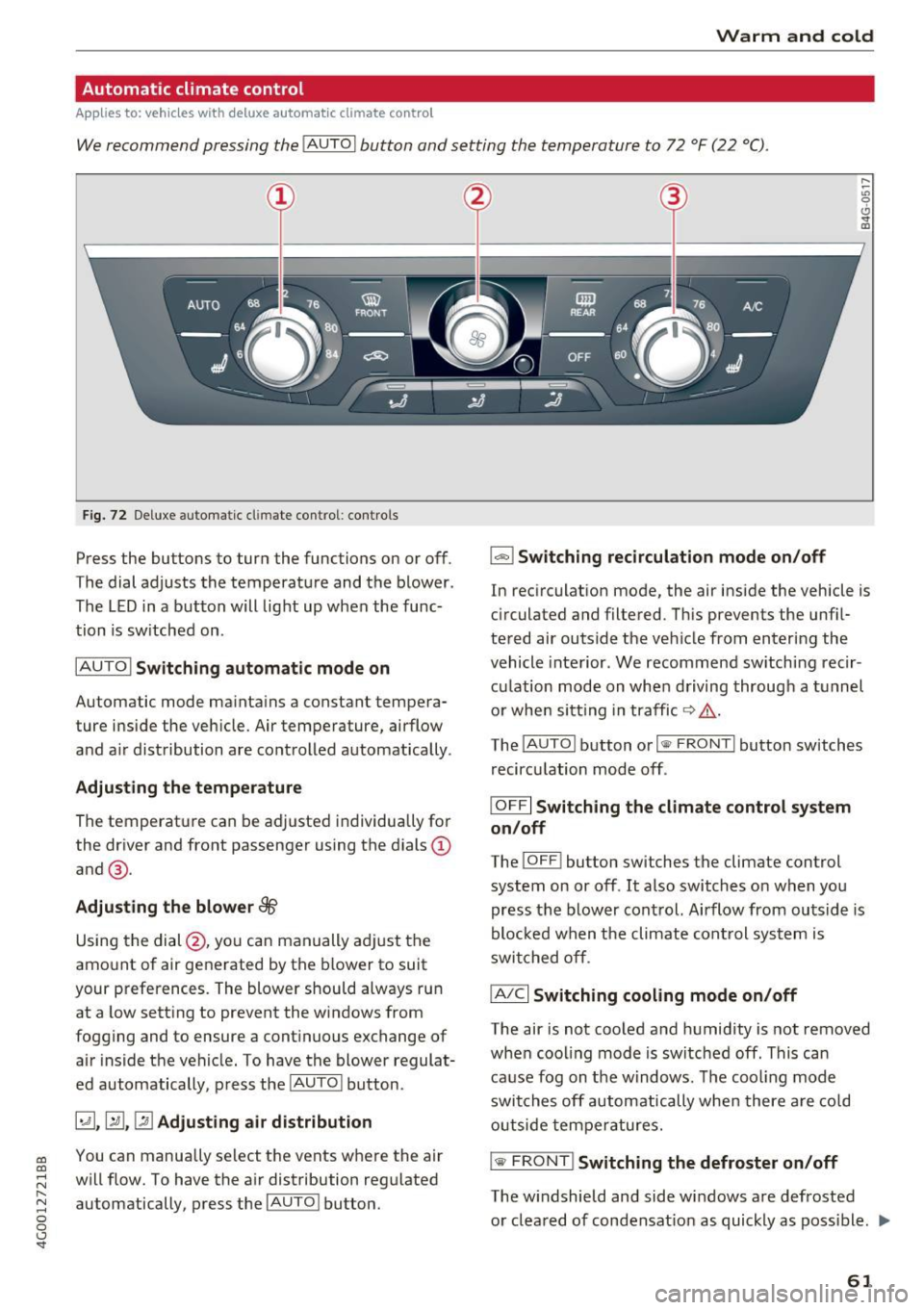
We recommend pressing the !AUTO I button and setting the temperature to 72 °F (22 °C) .
Fig. 72 Deluxe automatic cl imate con trol: contro ls
Press the buttons to turn the functions on or off .
The dial adjusts the temperature and the blower .
The LED in a button will light up when the func
tion is sw itched on .
IAUTOI Switching automatic mode on
Automatic mode maintains a constant tempera
ture inside the vehicle. Air temperature, airflow
and air distribution are controlled automatically .
Adjusting the temperature
The temperat ure can be adjusted individually for
the driver and front passenger using the dials@
and @.
Adjusting the blower~
Using the dial @, you can manually adjust the
amount of air generated by the blower to suit
your preferences. The blower should always run
at a low setting to prevent the windows from
fogging and to ensure a continuous exchange of air inside the vehicle. To have the blower regulat
ed automatically, press the
IAUTO I button.
~. [m , ~ Adjusting air distribution
You can manua lly se lect the vents where the air
will flow. To have the air distribution regulated
automatically, press the
IAUTO ! button.
1-1 Switching recirculation mode on/off
In recirculation mode, the air inside the vehicle is
cir culated and filtered . This prevents the unf il
tered air outside the vehicle from entering the
vehicle interior . We recommend sw itching recir
culation mode on when driving through a tunnel
or when sitting in traffic ~&_ .
The
! AUTO I button or I
recirculation mode off .
IOFFI Switching the climate control system
on/off
The ! OF F! button sw itches the climate control
system on or off .
It also switches on when you
press the blower control. Airflow from outside is
blocked when the climate cont rol system is
switched off.
IA/Cl Switching cooling mode on/off
The air is not cooled and humidity is not removed
when cooling mode is switched off. This can
cause fog on the windows . The cooling mode
switches off automatically when there are cold
outside temperatures.
is;,i, FRONT I Switching the defroster on/off
The w indshield and side windows are defrosted
or cleared of condensat ion as quickly as poss ible . .,,_
61
Page 64 of 280
Warm and cold
The maximum amo unt of air flows mainly from
the vents below the windshield. Recircu lat ion
mode switches off . The temperature should be
set to approximately 72
°F (22 °() .
The IAUTO I button switches the defroster off .
IClill REAR I Switching the rear window defogger
on/off
The rear window heater on ly operates when the
engine is running . It switches off automatica lly
after a few minutes, depending on the outs ide
temperature .
To prevent the rear w indow heater from switch
ing off automatically, press and ho ld the
IQijl REARI
button for more than 2 seconds . This is stored
until the ignit ion is switched off.
G'.l Adjusting seat heating*
Pressing the button switches the seat hea ting on
at the highest setting (level 3). The LEDs indicate
the tempera ture level. To reduce the tempera
ture, press the button again. To switch the seat heating off, press the button repeatedly until the
LED turns off.
After 10 minutes, the seat heating automatically
switches from level 3 to level 2 .
4-zone deluxe automatic climate control
A ppl ies to: ve hicles with 4-zo ne deluxe auto matic cl imate cont rol
Air vents
You can open or close the center and rear vents in
the cockpit and the vents in the rear center con
sole using the ridged thumbwheels . The levers
adjust the direction of the airflow from the vents.
A WARNING
- You shou ld not use the recirculation mode
for an extended period of time since no
fresh air is drawn in . W ith the air-condition
ing sw itched off, the windows can fog up,
which increases the risk of an acc ident.
- Individ uals with reduced sensit iv ity to pa in
or temperature could develop burns when
using the seat heating function. To red uce
the risk of injury, these individuals should
not use seat heating.
(D Note
To avoid damage to the heating elements in
the s eats , do not knee l on the seats or place
heavy loads on a small area of the seat.
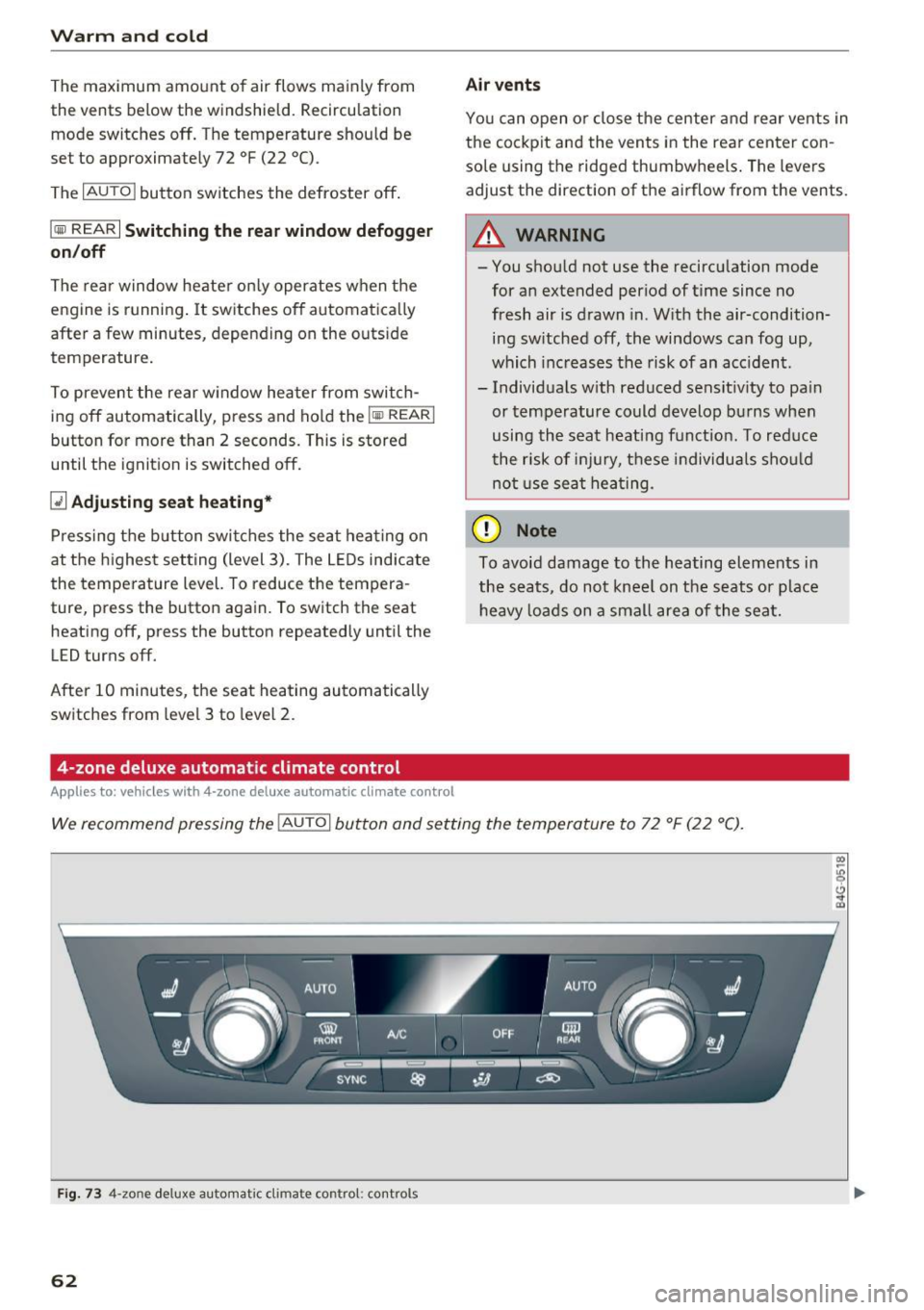
We recommend pressing the IAU TO I button and setting the temperature to 72 °F (22 °C).
Fig. 73 4-zo ne deluxe automat ic climate contro l: controls
62