park assist AUDI A6 2018 User Guide
[x] Cancel search | Manufacturer: AUDI, Model Year: 2018, Model line: A6, Model: AUDI A6 2018Pages: 266, PDF Size: 41.38 MB
Page 109 of 266
a co .... N
" N .... 0 0 \.J '
General information
A pp lies to: ve hicles with pa rk in g system p lus/rearview cam
era/peripheral camera
Depending on your vehicle 's equipment, various
pa rking aids wi ll help you when parking and ma
ne uvering.
The
p arki ng sys tem plu s assists you when park
ing by aud ibly and visua lly indicating objects de
tected
in front of and behind the ve hicle
¢page 108.
The re arv ie w ca mer a shows the area beh ind the
veh icle in the Infotainment system d isplay. The
lines in the rearview came ra image help you to
pa rk or maneuver
¢ page 109.
The peripher al c amer as assist you with parking
and maneuvering . You are aided by var ious cam
eras depend ing on the vehicle equipment leve l
¢page 112. The pa rking system pl us functions
are also availab le
¢ pag e 108.
& WARNING
-Always look for traffic and check the area
around your vehicle by looking at it direct ly
as well. The parking system cannot replace
the driver's attent ion. The driver is always
responsible when enter ing or leav ing a park
ing space and during similar maneuvers .
- Please note that some surfaces, such as
clothing, are not detected by the system .
-
-Sensors and cameras have blind spots in
wh ich people and objects cannot be detect
ed . Be especially caut ious of small children
and animals .
- The sensors can be displaced by impacts or
damage to the radiator gr ille, bumper,
wheel housing and the underbody . The park
ing system may be impa ired as a result.
Have a n author ized A udi dealer or author
ized Audi Serv ice Facility check their func
tion .
- Make s ure the senso rs a re not obstructed by
stickers, deposits o r other materia ls. If they
are, the sensor function could be impaired.
For additiona l information on cleaning, see
¢ page 221. Parking
syste m s
@ Note
-Some objects are not detected or disp layed
by the system under certain circumstances:
- objects such as barrier cha ins, tra iler draw
ba rs, vertical po les o r fences
- objects above the sensors such as wall ex
tensions
- objects with certain surfaces or structures
such as cha in l ink fences or powder snow
- If you continue driving closer to a low ob
ject, it may disappear from the sensor range . Note that you will no longer be
wa rned about t his obstacle.
- Keep enough distance from the curb to re
duce the risk of damage to the rims .
(D Tips
-The system may provide a warning even
though there are no obstacles in the cover
age area in some situat ions, such as:
- certain road surfaces or when there is tall grass
- externa l ultrasonic sources such as from
cleaning vehicles
- in heavy rain, snow, o r th ick vehicle ex
h aust
- We recommend tha t you practice par king in
a traff ic-free location or parking lot to be
come fami liar with the system . W hen doing
this, there shou ld be good light and weath
er conditions.
- You can change the volume and pitch of the
signa ls as well as the
d isplay ¢ page 117.
-Please refer to the instructions for towing a
trai ler located in
¢ page 117 .
-What appea rs in the infotainment display is
somewhat time -delayed .
- Th e sensors m ust be kep t clean and free of
snow and ice for the parking aid to operate .
107
Page 113 of 266

a co ,...,
N
" N ,...,
0 0 \,;J '
¢ A in General information on page 109, ¢(D
in General information on page 110 .@ repre
sents the rear bumper . At the very latest, stop
the vehicle when the red orientation
line @
borders an object .
Parallel parking
Applies to: veh icles with rearview camera
This view may be used when parallel parking
along the side of a stree t.
Fig . 122 In fota inment : blue surfaces alig ned in the pa rk ·
i ng space
Fi g. 123 In fo ta inm ent: c onta ct of the blue curv ed li ne with
the curb
Parking on the r ight is described here. It is identi
cal when parking on the left .
If there is an obstacle next to the parking space (such as a wall), refer to "Information for park ing
next to obstacles" ¢
page 111.
.. Activate the turn signal.
.. Position your vehicle next to a parked veh icle in
front of the desired parking space. The d istance
to this vehicle should be approximately 3 ft . (1
m) .
Parking systems
.. T urn the Infotainment system on and shift into
reverse gear. The parking system is turned on
and the
C ros s parking view is d isp layed .
.. Press the contro l button on the Infotainment
unit @¢ fig. 122 . The Parallel parking view is
disp layed .
.. Back up and alig n your veh icle so the blue area
@ bo rders on the rear end of the vehicle be
hind you o r on the park ing spa ce
line ¢&_ in
General information on page 109,
¢ (Din Gen
eral information on page 110.
The blue area
represents an extension o f the vehicle's outline
by approximate ly 16 ft (5 meters) to the rear.
T he long side of the b lue area s hou ld be on the
curb. The entire blue area must fit into the
parking space .
.,. With the vehicle stopped, turn the steering
wheel to t he right as far as it will go .
.,. Back up into the parking spot . Whe n the blue
curve ¢
fig. 123 is nea r the curb ¢&_ in Gener
al information on page 109,
stop the vehicle
¢ Ci) in General information on pag e 110 .
.. With the vehicle stopped, t urn the steering
wheel to the left as far as it will go .
.. Continue to back into the parking space until
the vehicle is parked para llel to the curb ¢
A
in General informa tion on page 109, ¢ @ in
General information on page 110 .@ repre ·
sents the rear bumper. At the very latest, stop
the vehicle when the red or ien tat io n line
@
borders an object. Keep an eye o n the front of
your veh icle w hile doing this.
Parking next to obstacles
If there is an obstacle (such as a wall) next to the
parking space, position the veh icle so there is
more space on that side . Position the long side of
the b lue surfa ce so t hat there is sufficient spa ce
from the obstacle . T he su rface must not be
touchi ng . You will a lso need to s tart tu rning the
steering wheel earlier . The blue curve
¢ fig . 123
must not touch the obstacl e, b ut rather there
should be enough d istance .
(D Note
Keep enough distance from t he curb to re -
duce the risk of damage to the r ims.
111
Page 116 of 266
Parking systems
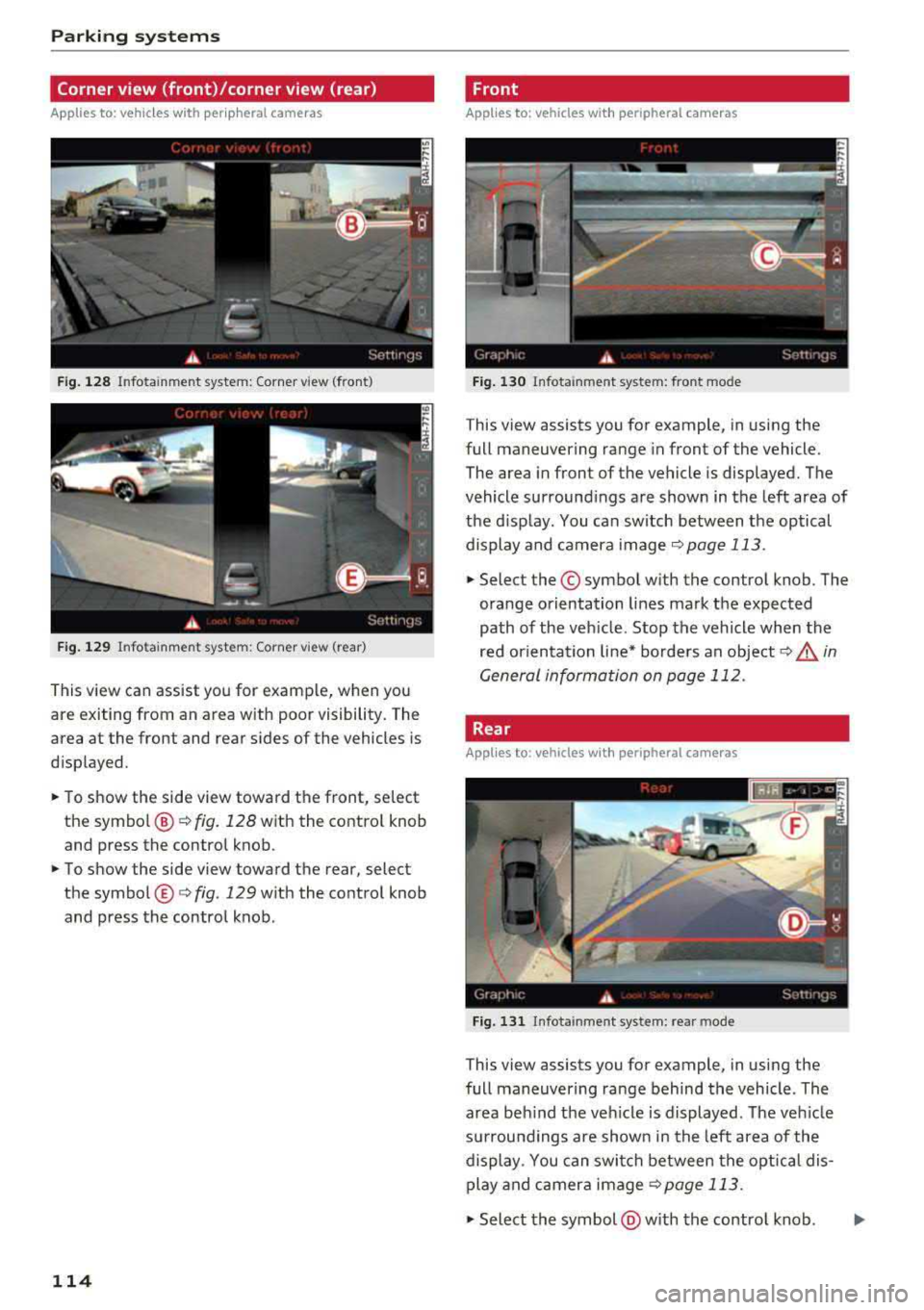
Corner view (front)/corner view (rear)
Applies to: vehicles with peripheral cameras
Fig. 128 Infotainment system: Corner view (front)
Fig. 129 Infotainment system: Corner view (rear)
This view can assist you for example, when you
are exiting from an area with poor visibility. The
area at the front and rear sides of the vehicles is
displayed .
.,. To show the side view toward the front, select
the symbol @¢
fig. 128 with the control knob
and press the control knob .
.,. To show the side view toward the rear, select
the symbol ®¢
fig. 129 with the control knob
and press the control knob.
114
Front
Applies to: vehicles with peripheral cameras
Fig. 130 Infotainment system: front mode
This view assists you for example, in using the
full maneuvering range in front of the vehicle.
The area in front of the vehicle is displayed. The
vehicle surroundings are shown in the left area of
the display . You can switch between the optical
display and camera image
¢page 113 .
.,. Select the© symbol with the control knob. The
orange orientation lines mark the expected
path of the vehicle. Stop the vehicle when the
red orientation line* borders an
object¢ ,& in
General information on page 112.
Rear
Applies to: vehicles with peripheral cameras
Fig. 131 Infota inmen t system: rear mode
This view assists you for example, in using the
full maneuvering range behind the vehicle. The
area behind the vehicle is displayed. The vehicle
surroundings are shown in the left area of the
display . You can switch between the optical dis
play and camera image
¢page 113 .
.,. Select the symbol @with the control knob. ..,.
Page 117 of 266

a co ,...,
N
" N ,...,
0 0 <..:l '
this mode.
.,. To cross park, parallel park or position the vehi
cle in front of a tra iler*, press the control but
ton ® on the control panel repeatedly until the
symbol for the des ired mode is selected.
Perpendicular parking
App lies to: vehicles with peripheral cameras
This view may be used when parking in a garage
or in a parking space.
F ig . 132 Infotainment system: aiming at a parking space
Fig. 133 Infotainment system: aligning the vehicle
Requirement: cross parking must be selected
qpage 114 .
.,. The orange orientation lines (I) show the vehi
cle's direction of travel. Turn the steering wheel
until the orange or ientat io n lines appear in t he
parking space
q fig. 132 . Use the mark ings @
to help yo u estimate the distance to an obsta
cl e. Each marking represen ts approximately 3
ft (1 m) . The blue area represents an extens ion
of the vehicle's outl ine by approximately 16 ft
(S meters) to the rear.
.,. While driv ing in reverse gear, adjust the steer
ing wheel ang le to fit the parking space using
Parking systems
the orange orientat ion lines for assistance
q &. in General information on page 112, q(D
in General information on page 112.@repre
sents the rear bumper. You should stop revers
ing at the latest when the red orientation line
@ borders an object¢&. in General informa
tion on page 109.
Parallel parking
Applies to: vehicles with peripheral cameras
This view may be used when parallel parking
along the side of a street.
Fig . 134 In fotainment: blue surfaces al ig ned i n the park ·
in g space
Fig. 135 In fotainme nt: contact of the blue curved line w ith
the curb
Parking on the right is described here. It is identi·
cal when parking on the left.
If there is an obstacle next to the parking space
(such as a wall), refer to Information for parking
next to obstacles
q page 116.
.,. Activate the turn signal.
.,. Position your vehicle next to a parked vehicle in
front of the desired parking space. The distance
to this vehicle shou ld be approximately 3 ft. ( 1
m). ..,.
115
Page 118 of 266

Parking systems
,.. Turn the Infotainment system on and shift into
reverse gear. The parking system must be
turned on and the
Cross parking view must be
displayed .
,.. Press the control button on the Infotainment
unit(D ¢page 111, fig . 122 . The Parallel park
ing
view is displayed.
,.. Back up and align your vehicle so the b lue area
@ borders on the rear end of the vehicle be
hind you or on the parking space line
¢_& in
General information on page 112, ¢(D in Gen
eral information on page 112.
The blue area
represents an extension of the vehicle's outline
by approximately 16 ft (5 meters) to the rear .
The long side of the blue area should be on the
curb . The entire blue area must fit into the
parking space.
,.. With the veh icle stopped, turn the steer ing
wheel to the right as far as it w ill go .
,.. Back into the parking space until the blue curve
¢ page 111, fig . 123 to uch es the curb¢ _& in
General information on page 112,
¢ (D in Gen
eral information on page 112 .
Stop the vehicle.
,.. With the vehicle stopped, turn the steering
whee l to the left as far as it will go.
,.. Continue to back into the parking space until
the vehicle is parked parallel to the
curb¢ .&.
in General information on page 112, ¢(D in
General information on page 112. @ repre
sents the rear bumper. At the very latest, stop
the vehicle when the red orientation line ©
borders an object . Keep an eye on the front of
your vehicle while doing this .
Parking next to obstacles
If there is an obstacle (such as a wall) next to the
parking space, position the vehicle so there is
mo re space on that side. Position the long side of
the blue area so that there is sufficient space
from the object. The area must not be on the
curb . You will a lso need to start turning the
steer ing whee l earlier. The blue curve
¢ page 111, fig. 123 must not touch the obsta
cle, but rather there should be enough distance.
116
@ Tips
The left or right orientation lines and surfaces
will be disp layed, depending on the turn s ig
nal being used.
Trailer mode
Applies to: vehicles wit h peripheral ca meras a nd tra iler hitch
This view assists you in positioning the vehicle in
front of a trailer .
Fig. 136 Infotainment system: rea r m ode
Requirement: the trailer mode must be selected
¢page 114.
,.. Now you can posit ion your veh icle in front of
the trailer
¢ .&. in General information on
page 112,
¢ @ in General information on
page 112.
The orange orientation line indicates
the expected path toward the trailer h itch. Use
the blue lines to help you estimate the d istance
to the trailer h itch .
Setting the mode
App lies to: vehicles with peripheral ca meras
,.. Select: !CAR ! function button > (Car)* Systems
control button > Driver assistance > Parking
aid
> Change to front/rear > Auto or Manual.
Auto
-this view behind the vehicle (Rear mode) is
displayed automatically when you shift into re
verse. This view in front of the vehicle
( Front
mode) is displayed automatically when you shift
into the forward gears.
Manual -When you switch the system on, the
view behind the vehicle
( Rear mode) is always
displayed and it does not switch to the
Front
mode when a forward gear is selected.
Page 119 of 266
a co .... N
" N .... 0 0 \.J '
A ppl ies to : ve hicles w ith parkin g system plus/rearv iew cam
era/peripheral ca mera
The display and warning tones can be adjusted in
the Infotainment.
~ Se lect: the ICARI fu nction button > (Car)* Sys
tems
control b utton > Driver assistance > Park
ing aid .
Display
On * -
an op tical d isp lay is shown for the par kin g
system plus, a rearv iew camera image is s hown
for the rearview camera *.
Off -when the p arking sys tem is sw itche d off,
on ly audib le sign als are give n.
Signal tones
Front volume -
volume for the front area
Rear volume -volume for the rear area
Front frequency -frequency for the front area
Rear frequency -frequen cy fo r the rea r area
Music volume during nav . prompts -the volume
of the a udio/video so urce is lowe red when t he
pa rking system is turned o n
The new value is g iven briefly during the adjust
ment.
(D Tips
- The wa rning tones ca n also be ad justed d i
r ectly by the vis ual d isp lay or the pictu re
from the camera. Simply p ress the
Settings
co ntro l bu tton.
- Changed set tings are ac tivated whe n the
parking system is swi tched o n aga in.
- The settings for volume and frequency are
a utomat ica lly saved and ass igned to the re
mo te con trol key be ing used.
Error messages
A pp lies to: ve hicles with parking system plus/rearview cam
era/per ipheral ca mera
There is an erro r in the system if the LED in the
Pw , button is b link ing and yo u hear a continuous
Parking systems
alarm for a few seconds after sw itch ing on the
par king system or w hen the pa rking system is a l
r eady activated. If the erro r is not cor rected be
fo re you switch off the ignition, the
LED in the Pw ,
button w ill blink the next time you switch on the
park ing system by shifting into reverse.
Parking system plus*
If a senso r is fa ulty, the~ symbo l will appear i n
front of/beh ind the vehicle in the Infotainment
display. If a rear sensor is faulty, on ly obstacles
t h at are i n areas @and @ are shown
<=> page 108, fig . 114 . If a front se nsor is faulty,
o n ly obs tacles tha t are in a reas © and @are
shown. The re is a lso a sys tem ma lf u nct ion if all
seg ments arou nd the veh icle are red or if no seg
me nts are disp laye d.
Peripheral cameras*
The re is a system malfu nction if t he 00 • symbol
appea rs and the co rresponding d isp lay area is
s h own in bl ue. The camera is not wo rking in t his
are a.
Drive to an authorized A udi dealer or authorized
Audi Se rvice Facility immed iate ly to have the
malfu nction corrected.
Trailer hitch
App lies to: vehicles wit h parking system pl us/rea rv iew cam
e ra/peri phe ra l cameras an d tra ile r hitc h
When the trailer socket is in use, the par king sys
tem rear sensors are not act ivated when you sh ift
into reverse gear or when yo u press t he
p,,1A but
ton. This res ults in the following rest rict ions.
Parking system plus*
The re is no distance warning for the rear. The
front senso rs remain activated. T he v isua l disp lay
switches to trailer mode.
Rearview camera*/peripheral cameras*
T he re is no distance warning for the rea r. The
front senso rs remain activated . The visua l disp lay
switches to trailer mode. The rearview came ra
i mage will not s how the orie ntation lines and t he
bl ue surfaces.
.,..
117
Page 199 of 266
a co ,...,
N
" N ,...,
0 0 <..:l '
N N ~
~ co al
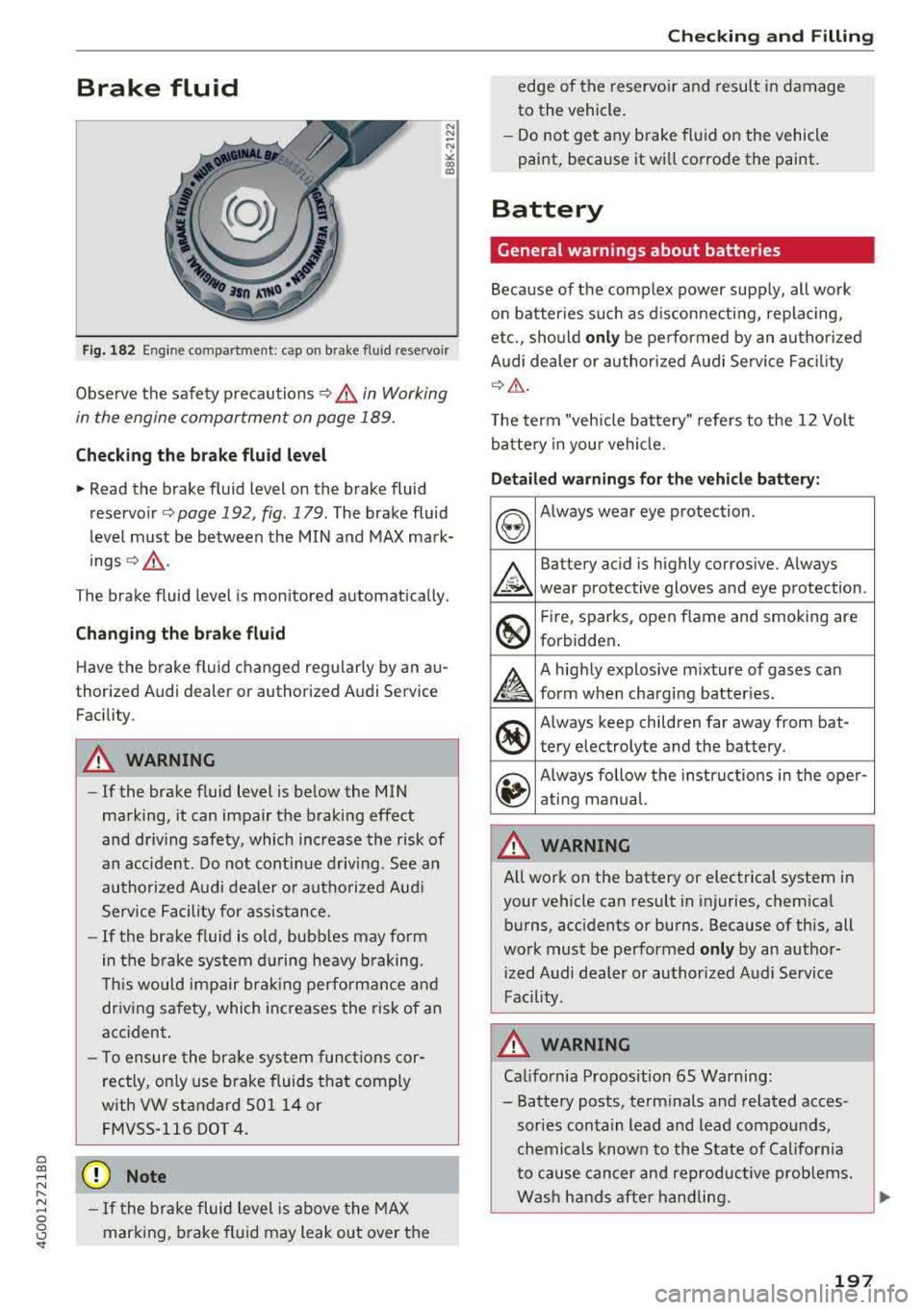
Fig. 182 Eng ine compartment: cap on brake fluid reservoir
Observe the safety precautions ~.&. in Working
in the engine comportment on page 189.
Checking th e brake fluid level
• Read the brake fluid level on the brake fluid
reservo ir
<=) page 192, fig. 179. The brake fluid
level must be between the MIN and MAX mark
ings ~,&. .
The brake fluid level is mon itored automat ically.
Changing the bra ke flu id
Have the brake fluid changed regularly by an au
thorized Audi dealer or authorized Audi Service
Facility .
A WARNING
-If the brake fluid level is be low the MIN
marking, it can impair the braking effect
and dr iving safety, which increase the risk of
an acc ident. Do not cont inue driv ing . See an
au thorized Audi deale r or autho rized Aud i
Service Facility for assist ance .
-If the brake f luid is o ld, bubbles may form
in the b rake system d uring heavy b raking.
T his would impair bra king perfo rman ce an d
driving safety, which increases the risk of an
accident.
- T o ensure the bra ke system functions cor
rectly, only use brake fluids that comply
with VW standard 50114 or FMVSS-116 DOT 4 .
(D Note
-If the brake fluid level is above the MAX
mar king, brake fluid may leak out over the
Chec king and Filling
edge of the reservo ir and result in damage
to the vehicle.
- Do not get any b rake fl uid on the vehicle
paint, because it wi ll co rrode the paint .
Battery
General warnings about batteries
Because of the complex power supp ly, alt work
o n batter ies such as d isconnecting, replacing,
etc., sho uld
onl y be performed by an au tho riz ed
Audi dealer or au thori zed A udi Se rvice Fac ility
Q A .
The term "vehicle battery" refe rs to the 12 Volt
batte ry in you r vehicle.
Detail ed warnings for the vehicle battery :
&
Battery acid is highly corrosive. A lways
wear protective gloves and eye protection .
.
®
Fire, sparks, open flame and smoking are
forbidden .
A
A highly explosive mixture of gases can
form w hen cha rging bat ter ies.
®
Always keep children far away from bat-
tery electrolyte and the battery.
~
Always follow the ins tructio ns in the ope r-
ating manual.
A WARNING ~
A ll work on the battery or electrical system in
your vehicle can result in injuries, chemica l
bu rns, acc idents or burns. Because of this, all
work must be performed
only by an author
i zed Audi dealer or authorized Audi Service
Fac ility .
A WARNING
-Ca lifo rnia Proposition 65 Warning:
- Battery posts, term inals and related acces
sories contain le ad and lead com pou nds,
ch emi cals known to the Sta te of Californ ia
to cause cancer and reproductive prob lems.
Was h hands after handling.
197
Page 228 of 266

Emergency assistance
Emergency assistance
General information
.,. Park the vehicle as far as possible from moving
traffic in the event of a breakdown. In the event
of a flat tire, park the vehicle on a level surface .
It you are on a steep hill, be especially careful.
.,. Set the parking brake .
.,. Switch the emergency flashers on .
.,. Set up the warning triangle r=;,page 226 .
.,. Have the passengers exit the vehicle . They
should move to a safe place, for example be
hind a guard rail.
A WARNING
Follow the steps given above. This is for your
protection and the for the safety of other driv
ers.
Equipment
Warning triangle
A pplies to: ve hicles w ith warning triangle
Fig. 190 Luggage compa rtment lid : wa rnin g triangle
The warning triangle placed in the vehicle at the
factory is located in the luggage compartment.
.,. To remove the warning triangle, press the re-
tainer in the direction of the arrow
r:;, fig . 190
and fold the holder down.
The luggage compartment lid is only designed to
hold the warning triangle offered by the Audi
Genuine Accessories program.
226
Vehicle tool kit
Fig. 191 Luggage compartment: vehicle tool kit
The vehicle tools and vehicle jack* are stored in
the luggage compartment under the floor cover.
.,. Lift the cargo floor by the plastic handle.
.,. Hook the handle into the luggage compartment
weather strip.
.,. Turn the handle counter-clockwise and remove
the cover or the spare tire* .
.,. Unhook the cargo floor before clos ing the lug
gage compartment lid.
A WARNING
I mproper use of the veh icle jack can cause se
rious personal injuries.
- Never use the screw driver hex head to
tighten wheel bolts, since the bolts cannot
attain the necessary tightening torque if yo u
use the hex head, potentially causing an ac
cident.
- The factory-supplied jack is intended only
for your vehicle model. Under no circum
stances should it be used to lift heavy
vehicles or other loads; you risk injuring
yourself.
- Never start the engine when the vehicle is
raised, which could cause an accident .
- Support the vehicle securely with appropri ate stands if work is to be performed under
neath the vehicle; otherwise, there is a po
tential risk for injury .
- Never use the jack supplied with your Audi
on another vehicle, particularly on a heavier
one. The jack is only suitable for use on the
vehicle it came with.
Page 239 of 266
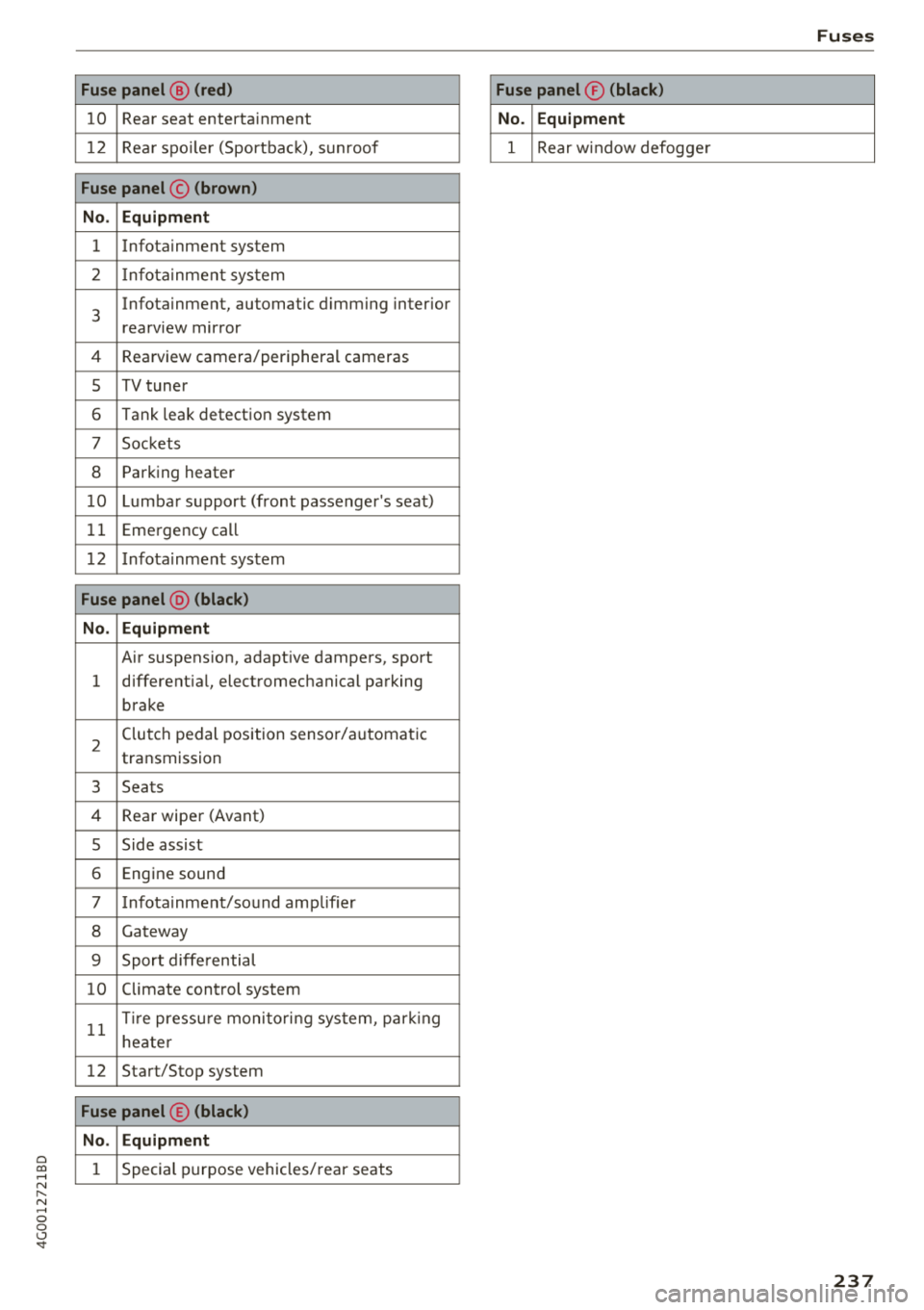
a co .... N
" N .... 0 0 \,;J '
10 Rear seat entertainment
1 2 Rea r spo ile r (Sportbac k), sunroof
Fuse panel © (brown )
N o. Equipm ent
1 Infotainment system
2 Infota inment system
3
Infotainment, automatic dimming interior
rearview mirror
4 Rearview camera/peripheral cameras
5 TV tuner
6 Tank leak detection system
7 Sockets
8 Parking heater
1 0 Lumbar support (front passenger's seat)
11 Emergency
call
1 2 Infotainment system
Fuse panel @ (black )
N o. Equipm ent
Air suspension, adaptive dampers, sport
1 different
ial, electromechanical parking
brake
2 Clutch pedal position sensor/automatic
transmission
3 Seats
4 Rear wiper (Avant)
5 Side assist
6 Engine sound
7 Infotainment/sound amplifier
8 Gateway
9 Sport diffe rential
10 Climate control
system
11 T
ir e pressu re monito ring system, park ing
heate r
12 Start/Stop
system
Fuse panel © (black )
N o. E quipm ent
1 Special purpose vehicles/ rear seats
Fuses
Fuse panel ® (blac k)
N o. Equipm en t
1 Rear w indow defogge r
237
Page 254 of 266
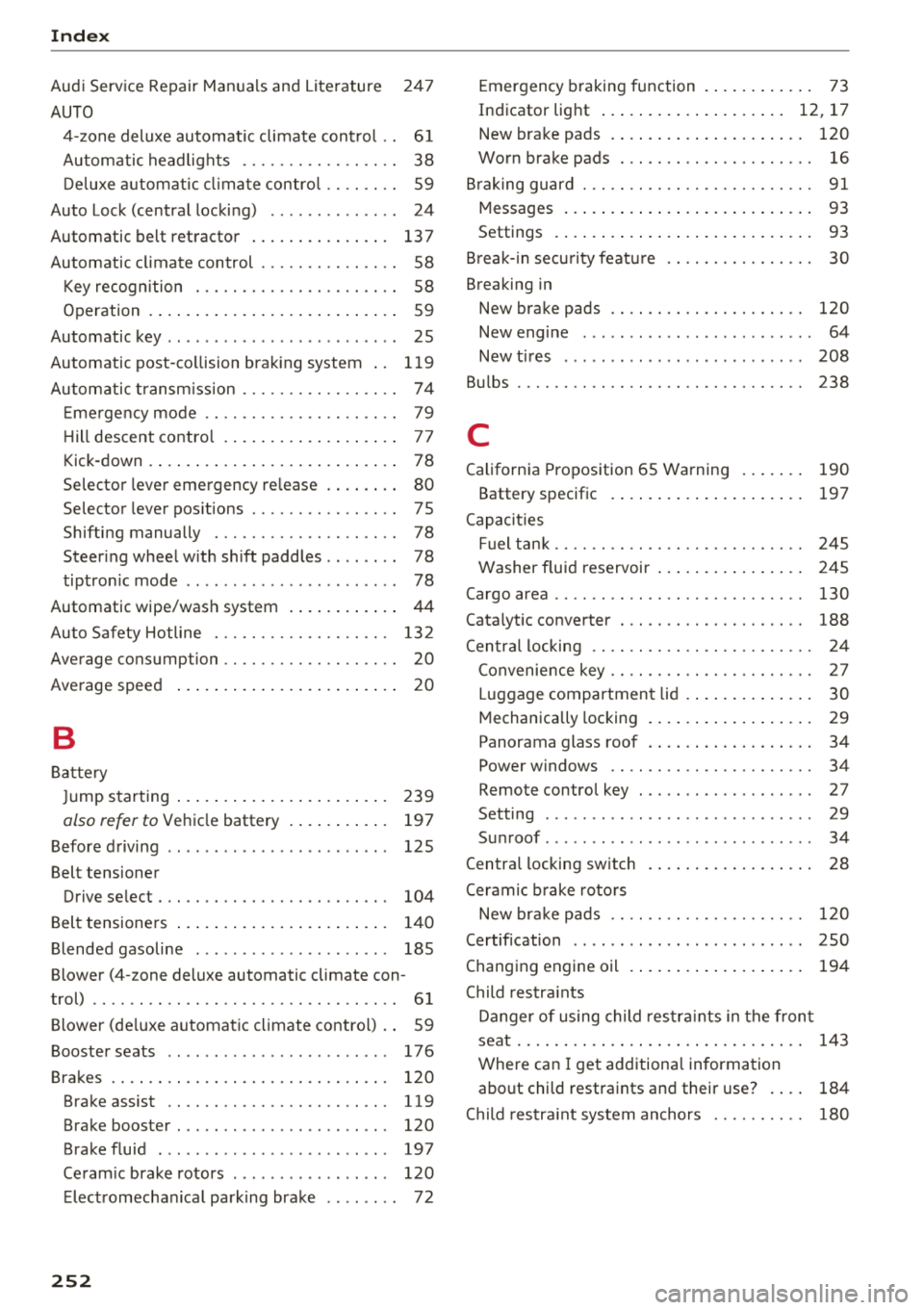
Index
Audi Service Repair Manuals and Literature 24 7
AUTO 4-zone deluxe automatic climate cont rol . . 61
Automatic headlights . . . . . . . . . . . . . . . . . 38
D eluxe automatic climate control . . . . . . . . 59
Auto Lock (central locking) . . . . . . . . . . . . . . 24
Automatic belt retractor . . . . . . . . . . . . . . . 13 7
Automatic climate control . . . . . . . . . . . . . . . 58
Key recogn ition . . . . . . . . . . . . . . . . . . . . . . 58
Operation . . . . . . . . . . . . . . . . . . . . . . . . . . . 59
Automatic key . . . . . . . . . . . . . . . . . . . . . . . . . 25
Automatic post-collision braking system . . 119
Autom atic transmission . . . . . . . . . . . . . . . . . 74
Em ergency mode . . . . . . . . . . . . . . . . . . . . . 79
H ill descent control . . . . . . . . . . . . . . . . . . . 77
Kick-down . . . . . . . . . . . . . . . . . . . . . . . . . . . 78
Selector lever emergency re lease . . . . . . . . 80
Selector lever pos itions . . . . . . . . . . . . . . . . 7 5
Shifting manually . . . . . . . . . . . . . . . . . . . . 78
Steer ing whee l with shift paddles . . . . . . . . 78
tiptronic mode . . . . . . . . . . . . . . . . . . . . . . . 78
Automatic wipe/wash system . . . . . . . . . . . .
44
Auto Safety Hotline . . . . . . . . . . . . . . . . . . . 132
Average consumption . . . . . . . . . . . . . . . . . . .
20
Average speed . . . . . . . . . . . . . . . . . . . . . . . . 20
B
Battery
Ju mp starting ...... .......... .. .. .. .
also refer to Vehicl e battery .......... .
Before driving
Belt tensioner 239
19 7
125
Drive select . . . . . . . . . . . . . . . . . . . . . . . . . 104
Belt tensioners . . . . . . . . . . . . . . . . . . . . . . . 140
Blended gasoline . . . . . . . . . . . . . . . . . . . . . 185
Blower (4-zone deluxe automatic climate con-
trol) . . . . . . . . . . . . . . . . . . . . . . . . . . . . . . . . . 61
Blower (deluxe automatic climate control) . . 59
Booster seats . . . . . . . . . . . . . . . . . . . . . . . . 176
Brakes . . . . . . . . . . . . . . . . . . . . . . . . . . . . . . 120
Brake assist .. .. ............. .... .. . 119
Brake booster . . . . . . . . . . . . . . . . . . . . . . . 120
Brake fluid . . . . . . . . . . . . . . . . . . . . . . . . . 197
Ceram ic brake rotors . . . . . . . . . . . . . . . . . 120
E lect romechan ical park ing brake . . . . . . . . 72
252
Emergency braking function . . . . . . . . . . . . 73
Indicator light . . . . . . . . . . . . . . . . . . . . 12, 17
New brake pads . . . . . . . . . . . . . . . . . . . . . 120
Worn brake pads . . . . . . . . . . . . . . . . . . . . . 16
Braking guard ..... .. .. ............. ... 91
93
Messages
Settings ............................ 93
Break-in security featu re . . . . . . . . . . . . . . . . 30
Breaking in New brake pads . . . . . . . . . . . . . . . . . . . . . 120
N . ew engine . . . . . . . . . . . . . . . . . . . . . . . . . 64
New tires . . . . . . . . . . . . . . . . . . . . . . . . . . 208
Bu lbs . . . . . . . . . . . . . . . . . . . . . . . . . . . . . . . 238
C
California Proposition 65 Warning . . . . . . . 190
Battery specific . . . . . . . . . . . . . . . . . . . . . 197
Capacities Fuel tank. . . . . . . . . . . . . . . . . . . . . . . . . . . 245
Washer fluid reservoir . . . . . . . . . . . . . . . . 245
Cargo area . . . . . . . . . . . . . . . . . . . . . . . . . . . 130
Cata lytic converter . . . . . . . . . . . . . . . . . . . . 188
Central locking . . . . . . . . . . . . . . . . . . . . . . . . 24
C . k onvernence ey . . . . . . . . . . . . . . . . . . . . . . 2 7
Luggage compartment lid . . . . . . . . . . . . . . 30
Mechanically locking . . . . . . . . . . . . . . . . . . 29
Panorama glass roof . . . . . . . . . . . . . . . . . . 34
Power windows . . . . . . . . . . . . . . . . . . . . . . 34
Remote control key . . . . . . . . . . . . . . . . . . . 2 7
Setting . . . . . . . . . . . . . . . . . . . . . . . . . . . . . 29
Su nroof . . . . . . . . . . . . . . . . . . . . . . . . . . . . . 34
C entra l locking switch . . . . . . . . . . . . . . . . . . 28
Ceramic brake rotors
New brake pads . . . . . . . . . . . . . . . . . . . . . 1 20
Certification . . . . . . . . . . . . . . . . . . . . . . . . . 250
Changing engine oil . . . . . . . . . . . . . . . . . . . 194
Child res tra ints
Danger of using child res traints in the front
seat............................... 143
Where can I get additiona l information
abo ut child restraints and their use? . . . . 184
Child res traint system anchors . . . . . . . . . . 180