brake AUDI A6 2018 Owner's Guide
[x] Cancel search | Manufacturer: AUDI, Model Year: 2018, Model line: A6, Model: AUDI A6 2018Pages: 266, PDF Size: 41.38 MB
Page 92 of 266

Ass is tance sy stem s
Driving manually
.,. Tap the acce lerato r pedal, o r
.,. pull the lever toward you into position @.
(D Tips
If an obstacle is detected whe n your veh icle
starts moving, the driver intervention request
appears
¢ page 91. Your vehicle will drive
more s low ly when starting. This may also
happen in some situations when there is no
apparent obstacle.
Interrupting cruise control
App lies to: veh icles with Audi adaptive cruise control
Fig . 95 S ele ctor leve r
Req uirement: adaptiv e cruis e control must be
sw itched on.
Overriding cruise control
.,. T o accelerate manually , p ull the lever toward
you into position @and ho ld it the re . T he mes
sage
ACC : over ride appears. Or
.,. Press the accelerator pedal.
.,. T o resume cru ise control, release the lever or
take your foot off the accelerator pedal.
Canceling c ruise contr ol while driving
.,. Move the lever into posit ion @. The message
AC C: standby appears . Or
.,. Press the brake pedal.
.,. T o resume the stored speed, move the lever in
to position
@ .
Canceling crui se contr ol when stopped
.,. Push the lever away from you into position @.
The message
ACC: standby appea rs.
90
.,. To resume c ruise contro l, press the brake peda l
and pull the lever toward you into position @ .
A WARNING
It is dangerous to activate cruise control and
resume the stored speed when the current
road , traffic or weather conditions do not per
mit this . This increases the risk of an accident .
· Setting the distance
Applies to: vehicles with Audi adapt ive c ruise control
Fig. 96 Operat ing lever: settin g th e d ista nce
.,. T ap the switch to display the current set dis
tance
c> fig . 96.
N a, N 9 ::c
~
.,. To increase or reduce the dis tance in incre
ments, tap the sw itch again to the r ight or left .
The d istance between the two vehicles will
change in the instrumen t cluster display .
When app roaching an object ahead, the adaptive
c ruise contro l system brakes to match that speed
and then adjusts to the set distance . If the object
ahead ac celerates, adaptive c ruise co ntro l w ill al
so ac ce lerate up to the stored speed .
The higher the speed, the greater the distance in meters
c> ,&. . The Distance 3 setting is recom
mended. That is equa l to the general recommen
da tion of
" hal f the speed shown on the speedom
ete r" .
The distances provided a re spec ified values . De
pending on the driv ing s ituation and the way the
ob je ct ahe ad is dr iv ing, the actual dist ance may
be more or less than these ta rget distan ces .
The var ious symbols for the time inc rements ap
pears briefly in the info rmation line @
¢ page 88, fig . 93 when you change the settings. II>
Page 93 of 266

a co ,...,
N
" N ,...,
0 0 <..:l '
to a distance of
92 ft (28 m) when traveling at 62
mph (100 km/h), for examp le (time between: 1
second).
~ --~--Distance 2: this setting corresponds
to a distance of 118
ft (36 m) when traveling at
62 mph (100 km/h), for examp le (time between:
1.3 seconds).
~ -- -~ -Distance 3: this setting corresponds
to a distance of 164
ft (SO m) when traveling at
62 mph (100 km/h), for examp le (time between:
1.8 seconds).
~ -- --~ Distance 4: This setting corresponds
to a distance of 210
ft (64 m) when traveling at
62 mph (100 km/h), (time distance of 2.3 sec
onds).
A WARNING
Following other vehicles too closely increases
the risk of collisions and ser ious perso nal in
jury.
- Setting short distances to the traffic ahead
reduces the t ime and distance available to
br ing your vehicle to a safe stop and makes
it even mo re necessary to pay close atten
t ion to traffic.
- Always obey applicable traff ic laws, use
good judgment, and select a safe following
dis tance fo r the traffic, road and weathe r
condit ions .
{]) Tips
-Distance 3 is set automatically each time
you switch the igni tion on.
- You r settings are automatically stored and
assigned to the remote control key being
u sed.
Selecting the driving mode
A pplies to: ve hicles with Audi adaptive cruise co ntro l
.. Select the des ired driving mode in dr ive se lect
¢ page 104.
Assi st a nce systems
(D Tips
Your settings are automatically stored and as
s igned to the remote control key being used.
Request for driver intervention
Applies to : vehicles wi th Audi ada ptive c ruise control
Fig. 97 Instrument cluster: request for driver intervention
In certain si tuations, the system will request you
to take action:
- I f the brak ing from the ad apt ive cru ise con trol
sys tem is not enough to ma intain eno ugh dis
tance to the object ahead .
T he da nger is indica ted by
the . indica tor light
¢ fig. 97. A n aud io signa l wi ll also so u nd .
- Press the brake pedal to slow your vehicle down.
Audi braking guard
App lies to : vehicles with A udi ada ptive cr uise control
Fig. 98 Inst rume nt cluste r: approach warnin g
The braking guard uses radar sensors and a video
camera . It also functions w ith in the limits of the
system when adaptive cru ise control is switched
~ ~
91
Page 94 of 266

Ass is tanc e system s
What can the braking guard do?
When detected in t ime, the system can assess
dangerous situations where an object ahead
brakes suddenly or if your own vehicle is traveling
at a high speed and approaching an object that is moving more slowly. The braking guard does not
react if it cannot detect the s ituation.
The system advises you of various dangerous sit uations :
- T he
dista nce warning occurs if you d rive too
closely to the object ahead for a long period of
time. If the object ahead brakes strongly, you
would not be able to avoid a collision .
The.
indicator light appears as an indication for this.
- The
app ro ach warning occurs when an object
ahead is traveling more slow ly or brakes
strongly. When th is warning occurs, it may only
be possible to avoid a co llision by swerv ing or
braking strongly . The danger is indicated by the
• ind icator light ¢ fig . 98 . An aud io signal w ill
also sound .
If you do not react early enough or at all to a dan
ge rous situation, the braking guard suppo rts you
with a brak ing intervention .
- If a collision is imminent, the system will f irst
provide an
a cut e warn ing by braking sharply.
- If you do not react to the acute warning, the braking guard can increase the braking force
within the limits of the system
ll . Th is reduces
the vehicle speed in the event of a collision .
- The system can init iate comp lete deceleration
shortly before a collision
ll _ Full deceleration at
high speeds occurs only in vehicles with adap
tive cru ise control and s ide ass ist (pre sense
pl us).
- If the braking gua rd determines that you are
not brak ing strongly enough whe n there is an
im pending co llision, it can increase the bra king
force .
- T he pre sense functions also engage whe n
t h ere is an impend ing collision ¢
page 94.
l) Th is is not ava ilab le in some co untri es .
92
Which fun ction s can be controlled?
Yo u can swi tch the braking guard and the d is
tance/approach warning on or
off in the Infotain
ment system ¢
page 93, Settings in the Info
tainment system .
A WARNING
Lack of attention can cause collisions, other
accidents and ser ious personal injuries . The
braking guard is an assist system and cannot
prevent a collis ion by itself . The dr iver must
a lways intervene. The d river is always respon
sib le for braking at the co rrect t ime.
- Always pay close attention to traffic, even
when the b raking guard is sw itched on. Be
ready to intervene and be ready to take
co mplete co ntro l whenever necessa ry . Al
ways keep the sa fe and legal distance be
tween your vehicle and ve hicles up ahead .
- Br aki ng g uard wo rks w ithin limits and w ill
no t respond outside the system limits, for
examp le when approaching a stopped vehi
cle or stationary obstacle (end of a traffic
jam or ve hicle that has broken down in traf
fic).
- Always remember that the radar sensor for
the brak ing guard works only within defined
detection and range limits that may prevent
the proper detection of other vehicles .
- The radar sensor's function and range can
be reduced by rain, snow and heavy spray.
Mov ing veh icles up ahead may not be
promptly detected or may not be detected
at al l.
- Reflective surfaces including crash ba rr iers
or tunne l entra nces may impair the function
of the rada r senso r.
(D Tips
- You can cancel the braking with increas ing
force that is initiated by the system by brak ing yourse lf, by acce le rating not iceably or
by swerv ing.
- Keep in mind that b raking gua rd can b rake
unexpectedly. A lways secure a ny cargo or
Page 95 of 266

a co .... N
" N .... 0 0 \.J '
the ris k of damage or i njury.
Settings in the Infotainment system
Applies to: vehicles with Audi adaptive cruise control
~ Select : the ICARI function button > ( Car )* Sys
tems
control button > Driver assistance > Audi
braking guard .
System -
switch the brak ing guard On /Off. When
you switch the ign it ion on, the message
B raking
guard: Off
appears if the sys tem is switched off .
Early warning -the distance and approach warn
ings in the display can be switched
On /Off .
(D Tips
-You r settings are automatically stored and
assigned to the remote contro l key being
u sed .
-If yo u rest rict or sw itch off the ESC, t he
bra king gua rd also sw itches itself off
c> page 120.
-Switc h braking guard off w hen yo u are load
i ng t he ve hicle onto a vehicle ca rr ier, t rain,
s hi p or other type o f transportation . This
ca n prevent undesired warnings from the
braking guard system .
Messages
Applies to: vehicles with Audi adaptive cruise control
Braking guard: Off
This message appears if the system is switched
off through the Infota inme nt system . Otherwise,
if the system is turned off, the information ap
pea rs every time shortly after the start of the
tr ip.
The message also appears if the system is not
ava ilable d ue to a malfunct io n or if the ESC is
sw itched off
c> page 120 . If this is the case, the
sys tem w ill not prov ide warnings about a possi
b le co llision.
Braking guard: engaged
This message appea rs if a sharp brake press ure
was applied due to an acute wa rning.
A ss istance systems
ACC: Unavailable!
ACC and Audi braking guard: Unavailable
The system cannot guarantee that it will detect objects correctly and is sw itched off . The sensors
have been moved or are faulty . Th e p re sense
funct ions may a lso be affec ted . D rive to an au
tho riz ed Au di dealer or author ized Audi Serv ice
F aci lity immed iate ly to have the ma lfunction co r
r ected .
ACC: Currently unavailable. No sensor vision
A CC and Audi braking guard: Currently unavail
able. No sensor vision
This message appears if the sensor v iew is ob
structed, for examp le by leaves, snow, heavy
spray or dirt . Clean the sensors
c> page 86 ,
fig . 89 .
AC C: Currently unavailable . Gradient too steep
T he road exceeds the maxim um poss ible angle
fo r safe adaptive c ruise contro l operation . Adap
tive cruise control is switched off.
ACC : Only available in D , Sor M
Select t he "D/S" or "M" se lecto r lever position .
ACC: Currently unavailable . Parking brake ap
plied
T he adaptive cr uise cont rol system switches off
automat ica lly if the parking brake is set.
ACC: Currently unavailable . Stability control
( ESC ) input.
This message appears if the e lectro nic s tabiliza
t io n c ontrol ( ES C) is tak ing a ct ion to s tabili ze the
vehicle. In t his case, adaptive cruise contro l
switches off automatically.
ACC off : Manual control!
Th is message appears when adaptive c ruise co n
t rol cannot set the parking brake . P ress the brake
peda l to prevent the veh icle from ro lling.
• ••
T hree white dots appear if a setting cannot be se
l ected w ith the operating lever. For example, this
happens if adapt ive cru ise control cannot sta rt
driv ing automat ica lly in stop-and-go traff ic
93
Page 121 of 266

a co .... N
" N .... 0 0 \,;J '
control (ESC)
Description
Electronic stabilization control (ESC) supports
driver safety. It reduces the risk of slipping and
improves driving stability. ESC detects critica l sit
uations such as the vehicle oversteering and un
dersteering or the wheels are spinning. The vehi
cle is stabilized by applying the brakes or reduc ing engine torque. As soon as the ESC is actively
regulating, the
If] indicator light b links in the in
strument cluster.
The following systems are integrated in the ESC:
Anti-lock braking system (ABS)
ABS prevents the wheels from locking when brak
ing. The vehicle can still be steered even during
hard braking. Apply steady pressure to the brake
pedal. Do not pump the pedal. A pulsing in the
brake pedal indicates that the system is act ing to
stabilize the vehicle .
Brake assist system
The brake assist system can decrease braking dis
tance. It increases braking power when the driver
presses the brake pedal quickly in emergency sit
uations . You must press and hold the brake pedal
until the dangerous situat ion is over . In veh icles
with adaptive cruise contro l*, the brake assist
system is more sensitive if the distance detected
to the vehicle dr iv ing ahead is too small. On
vehicles with activated and functioning night vi
sion assist*, the brake assist system can respond more sensitively if there is a warning .
Anti-Slip Regulation (ASR)
ASR reduces eng ine power when the drive wheels
begin spinning and adapts the force to the road
conditions. This makes it easier to start, acceler
ate and drive up hills.
Electronic differential lock (EDL)
The EDL applies the brakes to a whee l that starts
spinning and transfers the drive power to the
other driving wheel or wheels (if the vehicle is
Intelligent Technology
equipped with a ll wheel drive*). This function is
not avai lab le at higher speeds.
In extreme cases , EDL automatically switches off
to keep t he brake on the braked whee l from over
heating. The vehicle is still working correctly. EDL
will switch on again automatically when condi
tions have returned to normal.
Power steering
The ESC can also support veh icle stability
through steering .
Selective wheel torque control
Selective wheel torque control is used when driv
i ng on curves. The front whee l on the ins ide of
the curve or both wheels on the ins ide of the
curve are braked selectively as needed. This al
lows more precise driving in curves.
Automatic post-collision braking system
The "automat ic post-collis ion braking system"
can help to reduce the risk of sliding and of addi
tional collisions after an accident. If the airbag
contro l module
detects a co llision above a certa in
vehicle speed, the vehicle is braked by the ESC.
T he vehicle does not brake automatically if:
- the driver presses the accelerator pedal, or
- the braking force generated by the pressed brake pedal is greater than the braking force
that would be initiated by the system, or
- the ESC, the brake system or the vehicle electri
cal system are not functioning.
A WARNING
-
- The ESC and its integrated systems cannot
overcome the lim its imposed by natura l
p hys ica l laws. This is especially impo rtant
on slippery or wet roads. If the systems be
g in acting to stabilize yo ur vehicle, you
should immediately alter your speed to
match the road and traffic conditions. Do
not let the increased safety provided tempt
you into taking risks. This could increase
your r isk of a coll is ion.
- Please note the risk of a coll ision increases
when dr iv ing fast, especially through curves
and on slippery or wet roads, and when
IIJ,,
119
Page 122 of 266
Intelligent Technology
driving too close to objects ahead . The ESC
and its integrated systems cannot always prevent coll isions
-there is still a risk of ac
cidents!
- Press the accelerator pedal carefully when
accelerating on even, slippery surfaces such as ice and snow . The drive wheels can spin
even when these control systems are instal-
Switching on /off
led and this can affect driving stability and
increase the risk of a collision.
(D Tips
-ABS and ASR only function correctly when
all four wheels are equipped with identical
tires. Different tire sizes can lead to a reduc
tion in engine power.
- You may hear noises when the systems de
scribed are working.
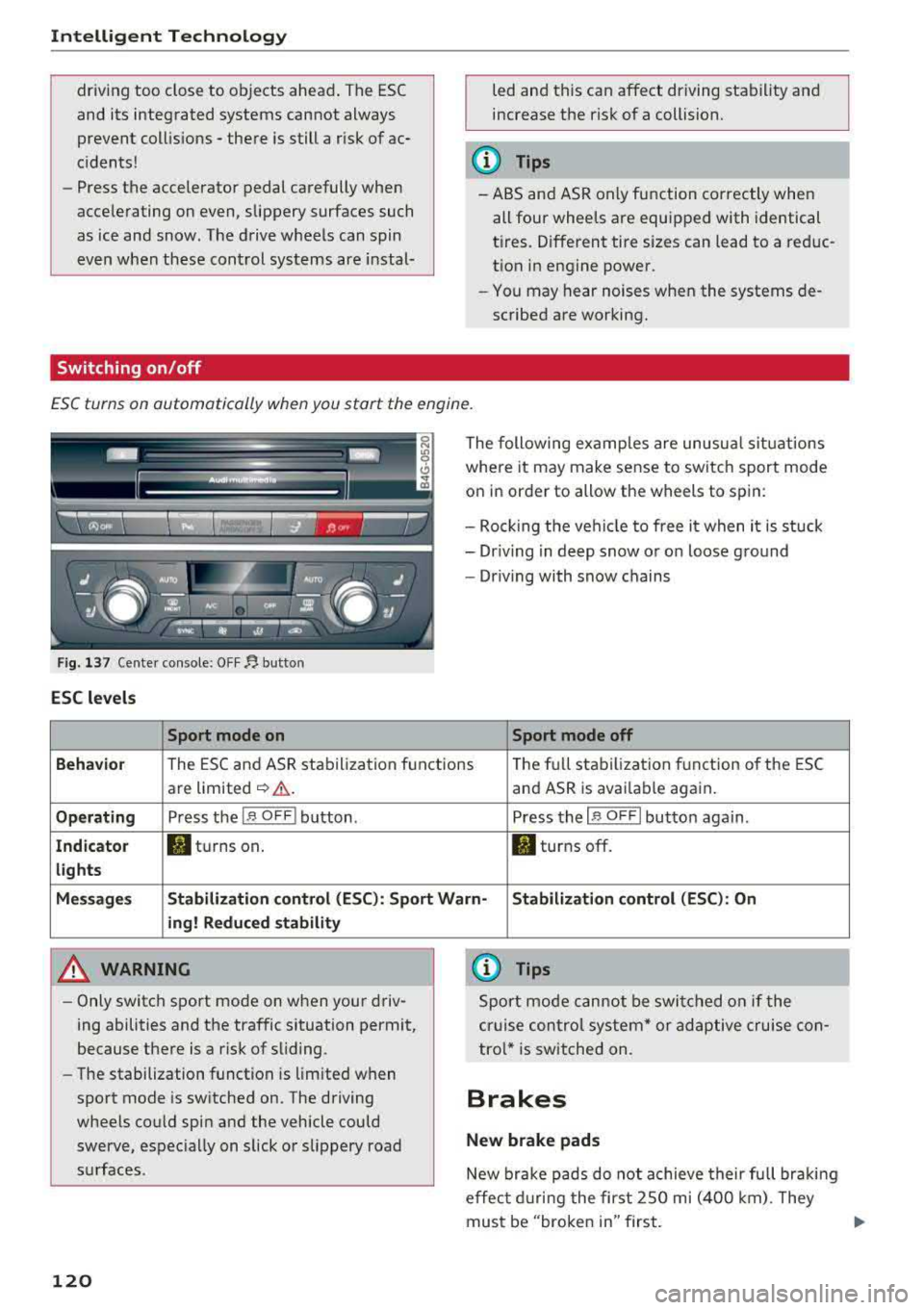
ESC turns on automatically when you start the engine .
Fig. 137 Ce nter con sole: OF F~ button
ESC levels
Sport mode on
The following examples are unusual situations
where it may make sense to switch sport mode
on in order to allow the wheels to spin:
- Rock ing the vehicle to free it when it is stuck
- Dr iving in deep snow or on loose ground
- Driving with snow chains
Sport mode off
Behavior
The ESC and ASR stabilization f unctions Th
e fu ll stabilization f unction of the ESC
are limited
~ &. . and ASR is avai lab le again.
Operating Press the I~ O FF I button . Press the I~ OF F! button again .
Indicator filturns on. . turns off.
lights
Messages Stabilization control (ESC): Sport Warn-Stabilization control (ESC): On
ing! Reduced stability
A WARNING
-Only switch sport mode on when your driv
ing abilities and the traffic situation permit,
because there is a risk of sliding .
- The stabilization function is limited when
sport mode is switched on. The driving
wheels could spin and the vehicle could
swerve, espec ially on slick or slippery road
surfaces .
120
-
{l) Tips
Sport mode cannot be switched on if the
cruise control system* or adaptive cruise con
tro l* is switched on .
Brakes
New brake pads
New brake pads do not achieve their full braki ng
effec t during the first 2SO mi (400 km). They
must be "broken in" first.
Page 123 of 266
a co .... N
" N .... 0 0 \,;J '
wear depends largely on the way the
vehicle is driven and on operating conditions.
This is especially true if you are driving frequently
in the city and on curves or with a sporty driving
style.
Operating noise
Noises may occur when braking depending on the
speed, braking force and outside conditions such
as temperature and humidity.
Effect of water and road salt
In certain situations, for example after driving
through water, in heavy ra in, after overnight con
densat ion or after washing your car, the braking
effect can be reduced by moisture or ice on the
brake rotors and brake pads. The brakes must be
"dried" first with a few careful brake applica
tions.
At higher speeds and with the windshie ld wipers
turned on, the brake pads press against the brake rotors for a short amount of time. This action,
which is not felt by the driver, happens at regular
intervals and ensures a better reaction time for
the brakes in wet weather .
The braking effect can also be reduced if you are
driving on salted roads and you do not apply the brakes for long periods of time. The layer of salt
on the brake rotors and pads must be worn off
f ir st when the brakes are applied.
Corrosion
Leaving the vehicle parked for long periods of
time, low mileage and avo iding heavy brak ing
can contribute to corrosion on the brake rotors
and to d irty brake pads .
If you usually avoid heavy braking or if there is
corros ion present, occasional heavy braking at
high speeds is recommended to clean the brake
rotors and
pads¢ &..
Brake system malfunction
If you notice that the brake pedal travel has sud
denly
increased, then a brake circuit in the dual
circu it brake system may have malfunct ioned.
Drive to an authorized Aud i dealer or authorized
Intelligent Technology
Audi Service Facility immediately to have the
problem corrected. On the way there, drive with
reduced speed and keep in mind that you will
need a longer distance to stop and you will need
to press the brake peda l harder.
Low brake fluid level
When the brake fluid level is low, malfunctions in
the brake system may occur . The brake fluid level
is e lectronically monitored.
Brake booster
T he brake booster amplifies the press ure you ap
ply to the brake pedal. It on ly works w hen the en
gine is running.
A WARNING
-
-Only apply the brakes for the purpose of
cleaning the brake system when road and
traffic cond itions permit. You must not en
danger other road users. This increases the
risk of an accident .
- Never let the vehicle roll while the engine is
stopped because this increases the risk of an
accident .
- New brake pads do not ach ieve the ir full
braking effect dur ing the first 250 m i
(400 km). They must be "broken in" first .
However, you can compensate fo r the
slightly reduced braking force by pressing
firmly on the brake pedal. Avoid heavy b rak
ing during the break -in period.
- Ce rtain weather and operating conditions
such as driving through water, dr iv ing in
heavy rain or driving after washing your ve
hicle can impair the effectiveness of the
brakes. In the winter, ice may build up on
the brake pads, rotors and drums. Check
these components by braking carefully. Ap
plying the brakes carefully several times
dries the brakes and removes ice build-up .
- The efficiency of the brakes can also be im
pa ired by dr iv ing for long stretches on roads
covered with salt without using the brakes.
You can remove salt deposits from the
brake rotors and pads by carefully applying
the brakes several times.
121
Page 124 of 266

Intellig ent T echn olo gy
- If the front spoiler is damaged or you insta ll
another spoiler, make sure the front wheel
brakes are venti lated properly. Otherwise,
the brake system could overheat, wh ich re
duces the ir effectiveness .
- Failure of a brake circuit impairs braking
performance, which increases brak ing dis
tance. Avoid driving the vehicle and have it
towed it to the nearest author ized Audi
dealer or author ized A udi Se rvice Fac il ity.
- If the brake booster is not working, you will
have to press muc h ha rde r on the bra ke
peda l to compe nsate for the lack of the
booste r.
0 Note
- Neve r let the brakes "rub" by press ing the
pedal light ly when bra kin g is not actually
ne cessa ry. Th is ca u ses the brakes to over
hea t an d increases bra king d istance and
causes wear.
- B efo re dr iv ing downh ill a long distance on a
steep hi ll, de crease your speed and se lec t a
l ower gear . This makes use of the engine
braking effect and relieves the brakes . If
you need to brake additionally, brake in in
tervals and not continuously.
(D Tips
- If the brake booster is not working, you
must press the brake pedal with much more
force than normal.
- If you retrofit your vehicle with a front spoil
er, whee l covers or s imilar items, make sure
that the a ir flow to the front whee ls is not
i nterrupted. Otherw ise the brake system
can become too hot .
Electromechanical
steering, dynamic
steering
The electromechanical steering supports the
driver's steering movements.
Power steering adapts electronically based on
the vehicle speed.
122
Indicator lights and me ssag es
• Do n ot driv e vehi cle: Ste ering d efe ctiv e
If this indicator light turns on and stays on and
t hi s message appears, the power steering may
have failed.
Stop the veh icle in a safe location as soon as pos
s ible. Do
n o t continue driving . See an authorized
Audi dealer or author ized Audi Service Fac ility for
ass ista nce.
kr-D S te ering: System fault You can cont inu e
dri ving
If the indicator light turns on and the message
appears, the steering wheel may be more d iffi
cult to move or more sensitive than usual. The
steering wheel may also be at an angle when
driv ing stra ight.
Drive slowly to an authorized Audi dealer or au
thorized Aud i Serv ice Facility to have the mal
funct ion corrected.
l;rfl D ynamic steer ing: Init ializing
If the indicator light is blinking and this message
appears, dynamic steering* is being initialized.
The steering wheel will be easy to move after
start ing the engine. Re-initialization might be
necessary if the steering wheel was moved hard
to the left and r ight while the veh icle was not
moving. T he d isplay turns off if the in it ial izat ion
was successful.
(D Tips
- If the . or ':r,y indicator l ight only stays on
for a sho rt time, you may cont inue d riv ing.
- The dynamic steering stability systems
~page 119 are not ava ilable in the event of
a system malfunct ion.
- For add itional information o n dynamic
steering,
see~ page 104 .
Page 126 of 266

Intelligent Technology
Notice about data
recorded by the Event
Data Recorder and
vehicle control modules
Event Data Recorder
This vehicle is equipped with an Event Data Re
corder (EDR). The main purpose of an EDR is to
record, in certain crash or near crash-like situa
tions, such as an airbag deployment or hitting a road obstacle, data that will assist in understand
ing how a vehicle's systems performed. The EDR
is designed to record data related to vehicle dy
namics and safety systems for a short period of
time, typically 30 seconds or less . The EDR in this
veh icle is designed to record such data as :
-How various systems in your vehicle were oper
at ing;
-Whether or not the driver and passenger safety
belts were buckled/fastened;
-How far (if at all) the driver was depressing the
accelerator and/or brake pedal; and,
-How fast the vehicle was traveling.
These data can help provide a better understand ing of the circumstances in which crashes and in
juries occur. NOTE : EDR data are recorded by your
vehicle only if a non-trivial crash situation occurs;
no data are recorded by the EDR under normal
driving conditions and no personal data (e .g .,
name, gender, age, and crash location) are re
corded. However, other pa rties , such as law en
forcement, could combine the EDR data wit h the
type of persona lly identifying data routine ly ac
quired during a crash investigation.
To read data recorded by an EDR, specia l equip
ment is required, and access to the veh icle or the
EDR is needed. In add it ion to the vehicle manu
facturer, other parties, such as law enforcement,
that have the specia l equipment, can read the in
formation if they have access to the vehicle or the
E DR .
Some state laws restrict the retrieval or down
loading of data stored by ED Rs installed in a vehi
cle for the express purpose of retrieving data af
ter an accident or crash event without the own
er's consent.
124
Audi will not access the EDR and/or simi lar data
or give it to others
-
-un less t he ve hicle owne r (or lessee if the vehi
cle has been leased) agrees; or
-upon the offic ial request by the police; or
-upon the order of a court of law or a govern-
ment agency; or
-for the defense of a lawsuit through the jud icial
discovery process .
-Audi may also use the data for research about
veh icle operat ion and safety performance or
prov ide t he data to a third party for research
purposes without identify ing t he specific vehi
cle or information about the identity of its own
er or lessee and only after the recorded vehicle
data has been accessed.
Vehicle control modules
Your vehicle is also equ ipped with a numbe r of
electronic cont rol modules for various vehicle
systems, such as engine management, em iss ion
contro l, airbags, and safety be lts.
These elect ronic control modules record data
during normal vehicle operation t hat may be
needed by trained technic ia ns for diagnostic and
repair purposes. The recording capability of these
modules is limited to data (no sound is record
ed). Only a sma ll amount of data is actually re
corded over a very limited period of time, or stor
ed when a system fault is detected by a control
module . Some of the data stored may relate to
vehicle speed, d irection, or braking, as well as re
straint system use and performance in the event
of a crash. Stored data can also only be read a nd
down loaded w ith specia l equipment that is di
rectly connected to the vehicle.
(D Tips
Your vehicle may be equipped w ith Aud i con
nect. Your use of certain Audi connect fea
tures requires wire less services that are pro
vided by a third party wireless telecommuni
cations provider. For details regarding how in
formation obtained through Audi connect is
collected, processed, transmitted, used, and
shared, please see your contract with the
wireless telecommun ications provider .
Page 132 of 266
Drivin g saf ety
the airbag deploys and injure you or your
passengers.
Pedal area
Pedals
The pedals must always be free to move and
must never be interfered with by a floor mat or
any other object.
Make sure that all pedals move freely without in
terference and that noth ing prevents them from
returning to the ir original positions .
Only use floor mats that leave the pedal area free
and can be secured with floor mat fasteners.
If a brake circuit fails, increased brake peda l trav
el is required to bring the vehicle to a full stop.
A WARNING
Peda ls that cannot move free ly can cause loss
of vehicle control and increase the risk of seri
ous injury .
- Never place any objects in the driver's foot
well. An object could get into the pedal area
and interfere w ith pedal function . In case of
sudden brak ing or an accident, you would
not be able to brake or accelerate!
- Always make sure that nothing can fa ll or
move into the dr iver's footwell.
Floor mats on the driver side
Always use floor mats that can be securely at
tached to the floor mat fasteners and do not in
terfere with the free movement of the pedals .
"'Make sure that the floor mats are properly se-
cured and cannot move and interfere with the
peda ls ~ ,& .
Use only floor mats that leave the pedal area un
obstructed and that are firmly secured so that
they cannot slip out of pos ition . You can obtain
suitable floor mats from your authorized Aud i
Dea le r.
Floor mat fasteners are installed in your Audi.
130
Floor mats used in your vehicle must be attached
to thes e fasten ers. Properly securing the floor
mats will prevent them from sliding into posi
tions that could interfere with the pedals or im pair safe operation of your vehicle in o ther ways.
A WARNING
Pedals that cannot move freely can result in a
loss of vehicle control and increase the r isk of
serious pe rsonal injury .
- Always make sure that floor mats are prop erly secured .
- Never place or install floor mats or other
floor coverings in the vehicle that cannot be
properly secured in place to prevent them
from s lipping and interfer ing with the ped
als or the ab ility to cont rol the vehicle.
- Never p lace or install floor mats o r other
floor coverings on top of al ready installed
floor mats . Addi tion al floor mats and other
cover ings will reduce the size o f the pedal
area and interfere with the pedals.
- Always properly re install and secure floo r
mats that have been taken out for cleaning.
- Always make sure that objects canno t fall
into the driver footwell while the vehicle is
moving. Objects can become trapped under
the brake pedal and accelerator pedal caus ing a loss of vehicle control.
Storing cargo correctly
Loading the luggage compartment
All luggage and other objects must be properly stowed and secured in the luggage compart
ment.
Loose items in the luggage compartment can
shift suddenly , changing vehicle handling charac
te rist ics . Loose items can also inc rease the risk of
se rious persona l injury in a sudden veh icle ma
neuver or in a collision .
"' Distribute the load evenly in the luggage com
partment .
"'Always place and prope rly secure heavy items in
the l uggage compa rtment as fa r fo rwa rd as
possible .
.,.