brake AUDI A6 2018 Workshop Manual
[x] Cancel search | Manufacturer: AUDI, Model Year: 2018, Model line: A6, Model: AUDI A6 2018Pages: 266, PDF Size: 41.38 MB
Page 229 of 266
a co .... N
" N .... 0 0 \.J '
The vehicle jack* in your vehicle is mainte
na nee-free.
Replacing wheels
Before changing a wheel
Observe the following precautions for your own
and your passenger's safety when changing a
wheel .
'"After you experience a tire failure, pull the car
well away from moving traff ic and try to reach
le ve l ground before you stop ¢,&. .
'"All passe ngers should le ave the car and move
to a safe location (for instance, be hind the
guardra il) ¢ ,&. .
.. Engage the parkin g brake to p revent your vehi
cle from rolling
unintentionally ¢,&. .
'"Move selecto r lev er to p osition P ¢ ,&. .
'"If you are towing a trailer, unh itch the trailer
from your veh icle.
'" Take the jac k and the sp are tir e* out of the lug
gage compartment
i::> page 226 .
A WARNING
You or your passengers cou ld be inju red w hile
chang ing a wheel if you do not follow these
safety precautions :
- If you have a flat t ire, move a safe distance
off t he road. Tur n off the engine, t urn the
emergency flashers on and use other warn
ing devices to alert other motorists .
- Make s ure tha t pa ssengers w ait in a sa fe
place away from the vehicle and we ll away
from the road and traffic.
- T o help prevent the vehicle from moving
sudden ly and possibly slipping o ff th e jack,
always fully set the parking brake and b lock
the front and back of the wheel diagonally opposite the wheel be ing changed. When
one front whee l is lifted off the ground,
placing the Automatic Transm ission in P
(Park) w ill
not prevent the veh icle from
moving.
Em ergenc y ass is tanc e
-Before you change a whee l, be sure the
ground is level and firm . If necessary, use a
sturdy board under the jack.
- Always store the vehicle too l kit, the jack
and the replaced tire in the luggage com
partment
¢ page 130.
(D Tips
Before changing the wheel, you must activate
the jacking mode, so that the automatic con
tro ls for the Adaptive Air Suspension* do not
make it more difficult to lift the vehicle with
the
jack ¢ page 229 .
Changing a wheel
When you change a wheel , follow the sequence
described below step-by-step and in exactly that
order .
l. Activate the vehicle jack mode* ¢ page 229.
2. Remove the deco rati ve wheel co ver* or the
wheel bolt c aps *. For more details see also
¢ page 228, Decorative wheel covers or
¢ page 228, Wheels with wheel bolt caps .
3. Loosen the wheel bolt s ¢page 229.
4. Locate t he p roper mount ing point for the
jack and align the jack be low that poin t
¢page 229 .
S. R ais e the car with the jack ¢ page 229 .
6. Remove the wheel with the fl at tir e and then
install
the spare ¢ page 231.
7. Tig hte n all wheel bolts lightly .
8 .
Lower the vehicle with the jack .
9 . Use the wheel bolt wrench and
firml y tighten
all wheel
bo lts ¢ page 229.
10. Replace t he decorat ive wh eel cover * or the
wheel bolt cap s*.
11. Deactivate the vehicle jack mode* in t he
MMI :
ICAR I function button > (Car )* sys tem s
contro l button > Ser vicing & che cks > Air
s usp.: jack mod e> Off.
The vehicle jack mode * switches off automatica l-
ly at speeds abov e 6 mph (10 km/h).
.,.
227
Page 231 of 266
a co ,...,
N
" N ,...,
0 0 \,;J '
The wheel bolts must be loosened before raising
the vehicle.
Fi g. 194 Changing a wheel: loosening the wheel bo lts
Loosening
.... ..,.
5
CJ ..,. ID
.,. S lide the wheel wr ench onto the wheel bol t as
far as it wi ll go.
... Take tight hold of the end of the wrench handle
and turn the wheel bolts
counte r-cloc kwi se
about one single turn in the direction of arrow
Qfig. 194.
Tighten ing
.,. Slide the wheel wrench onto the wheel bol t as
far as it will go .
... Take tight hold of the end of the wrench handle
and turn each whee l bolt
cl oc kw ise until it is
seated.
A WARNING
- Do not use force or hurry when changing a
wheel - you can ca use the vehicle to slip off
the jack and cause se rious personal injur ies.
- Do not loosen the wheel bolts more than
one turn
before you raise the vehicle with
the jack. -You risk an injury.
(D Tips
- Never use the hexagonal socket in the han
dle of the screwdriver to loosen or tighten
the wheel bo lts.
- If a whee l bolt is very tight, you may find it
easier to loosen by carefully pus hing down
on the end of the wheel bo lt wrench with
one foot only. As you do so, hold on to the
Em ergen cy as sis tanc e
car to keep your balance and take care not
to slip.
Raising the vehicle
The vehicle must be lifted with the jack first be
fore the wheel can be removed .
Fig . 1 95 Sill panels: mark ings
"' ..
-0
-~~~:'"'""".:i-~
Fi g. 196 Sill: pos it ion ing t he veh icle jack
.,. Activate the veh icle jack mode* in the MMI:
iCARI function button> ( Car )* sys tems control
button >
S ervi cing & che cks > Air su sp .: jack
mo de > On .
.,. Engage the parking brake to prevent your veh i
cle from rolling unintent iona lly.
... Move the select or le ver to position P.
... Find the marking (imprint) on the sill that is
nearest the wheel that will be changed
Qfig. 195. Behind the marking, there is a lift
ing point on the sill for the veh icle jack .
.,. Applies to: vehicles with a s ill: Remove the cov
er from the s ill before lifting the vehicle with a
veh icle jack
Q page 230.
.,. Turn the v e hicle ja ck located under the lift ing
point o n the sill to raise the jack unti l its
arm @
Q fig. 196 is located under the designated plas
tic mo unt
Q A Q(D .
... Align the jack so that its arm @¢ fig. 196 en
gages in the designated lifting point in the
door..,.
229
Page 233 of 266

a co ,...,
N
" N ,...,
0 0 \,;J '
Follow these instructions step-by-step for chang
ing the wheel .
Fig. 198 Changing a wheel: us ing the screwdriver hahd le
(with the blade removed} to turn the bolts
F ig. 199 C h ang ing a whee l: alig nme nt pin ins ide the top
hole
Afte r you have loosened all wheel bolts and
raised the vehicle off the ground, remove and re
p lace the whee l as follows:
Removing th e wheel
.,. Use the hexagon al so cket in the screwdri ver
handle
to completely remove the topmost
whee l bolt and set it aside on a
clean surface
¢ fig. 198 .
... Screw the threaded end of the alignment pin
from the tool k it hand-tight into the empty bolt
hole¢ fig. 199 .
... Then remove the other wheel bolts as described
above .
... Take off the wheel leaving the a lignment pin in
the bolt ho le
¢ 0.
Putting on the spa re wh eel
... Lift the spare wheel and carefully slide it over
the alignment pin to guide it in place
¢ 0 .
Em ergen cy as sis tanc e
... Use the hexagonal socket in the screwdr iver
handle to screw in and tighten all wheel bolts
slightly.
... Remove the alignment pin and insert and t ight
en the remaining wheel bo lt slight ly like the
rest .
.,. Turn the jack handle counter-clockw ise to lower
the vehicle unt il the jack is fully released .
.,. Use the wheel bolt wrench to tighten a ll wheel
bolts
firmly¢ page 229. Tighten them cross
wise,
from one bo lt to the (approx imately) op
posite one, to keep the wheel centered.
(D Note
When removing o r installing the wheel, the
rim could h it the brake rotor and damage t he
rotor . Work carefully and have a second per
son help you .
(D Tips
Never use the hexagonal socket in the hand le
of the screwdrive r to loosen or t ighten the
whee l bolts.
- Pull the reversible blade from the screwdriv
er before you use the hexagona l socket in
the handle to turn the whee l bolts.
- When mounting tires with
unidirect ional
tread de sign
make sure the tread pattern is
pointed the right
way ¢ page 231 .
-The wheel bolts shou ld be clean and easy to
t u rn. Check for dirt and corrosion on the
mating surfaces of both the wheel and the
hub. Remove all dirt from these surfaces be
fore remounting the wheel.
Tires with unidirectional tread design
Tires with unidirectional tread design must be
mounted with their tread pattern pointed in the
right direction .
Using a spare t ire w ith a tread patte rn
in tended for u se in a specific direction
When using a spare tire w ith a tread pattern in
tended for use in a specific direction, please note
the following:
- The direction of rotation is marked by an arrow
on the side of the tire.
""
2 31
Page 237 of 266
a co ,...,
N
" N ,...,
0 0 \,;J '
assignment
F ig. 202 Drive r side cockp it : fuse panel w it h plastic bracket
Fuse panel @ ( black)
No . Equipment
Electromechan ica l powe r stee ring, trailer
1 hitch, ionizer, switch st
rip, seat heating
(rear), electromechan ica l park ing brake
Ho rn, climate con trol system, Gateway,
2 au
tomati c dimm ing in ter ior rearv iew m ir-
ro r, On -Board Unit
4 Park ing aid, headlight range adjustment
5
Dynamic steering, electronic stabilization
control (ESC)
6 Headlights
7 Adapt ive cru ise control
8 Front passenger's seat senso rs, a irbag
9 Gateway
10 Engine sound, nig
ht vision ass ist, garage
door opene r (H ome link), parki ng aid
11 Video camera
image processi ng
12 Headlights
13 Steering column sw
itch module
Fuses
Fuse panel @ (black)
14 Termina l 15 (luggage compartment)
1 5 Starte r
Fuse panel @ (brown)
No . Equipment
1 Infotainment system
2 Infot ainment system
3 Front passenger's seat
5
A
ir bag, e lec tronic sta bi liz ation con trol
( E SC)
6 Ant
i- theft alarm system
7 E lectromec ha nical pa rking brake
8 Inter io r li ghts
9
Windshie ld video came ra heating, light/
r ain sensor
10 Lumbar support (dr iver's se at)
11 Driver
's seat
12 Electronic stab ilizati on con trol
13 Horn
1 4 Head lights
lS Front seat heating
16 Dynamic s tee ring
Fuse panel © (red)
No . Equipment
1 Clutch peda l
2 Fuel p ump
3 Brake
light sensor
4 Engine acoustics
5 Rear door
6 Fr
ont door
7 Elec tronic stab iliza tion control
8 Windshie ld wiper motor
9 H ead light washer system
10 Interio
r light ing, climate control system
1 1 Head lights
12 Sunroof
235
Page 238 of 266
Fuses
Front passenger side
cockpit fuse assignment
F ig . 203 Front passenger side cockpit: fuse pane l with
plastic bracket
Fuse panel @ (red )
No. Equipm ent
1 Infotainment, CD changer
2 I
nfotainment (display)
Fuse panel@ (brown)
No . Equipm ent
1 Climate control system
2 Climate
control sys tem (blowe r)
3 Diagnostic interface
4 Ele ct ric al ignit ion lock
5 Electronic steer ing column lock
6 Steering column sw itch module
7 Power stee ring co lumn adjustment
8 Light switch
9 Head-up display
10 I
nstrument cl uste r
11 Infota inment, DVD changer
236
Luggage compartment
fuse assignment
F ig . 2 04 L uggage compartment: fuse panel with plast ic
b racket
Fuse panel @ (black)
No . Equipment
1 Tra
iler hitch/220 volt socket
2 Tra ile r hitc h/climatized cup holder
3
Trailer hitch/adjusting front passenger's
seat from the rear
4 E lec tromechani cal pa rking brake
5 Electromechanical parking brake
6 Fr on t door (front passenger's side)
7 Rear exterior lighting
8 Central locking, closing aid
9 Seat heating (fro nt)
11 Seat
heating (rear), climate control system
(rear)
12 Tra ile r hitch, gateway (e-tron)
Fuse panel @ (red)
No . Equipment
1 Left safety
belt tensioner
2 R ight safety be lt tens ioner
3 Fuel pump
4 Eng ine moun t
5
Sensor-controlled luggage compartment
l id
6 Air s uspension, adaptive dampers
7 Rear door (front passenger's side)
8 Tail lights
9 Luggage compartmen t lid
Page 239 of 266
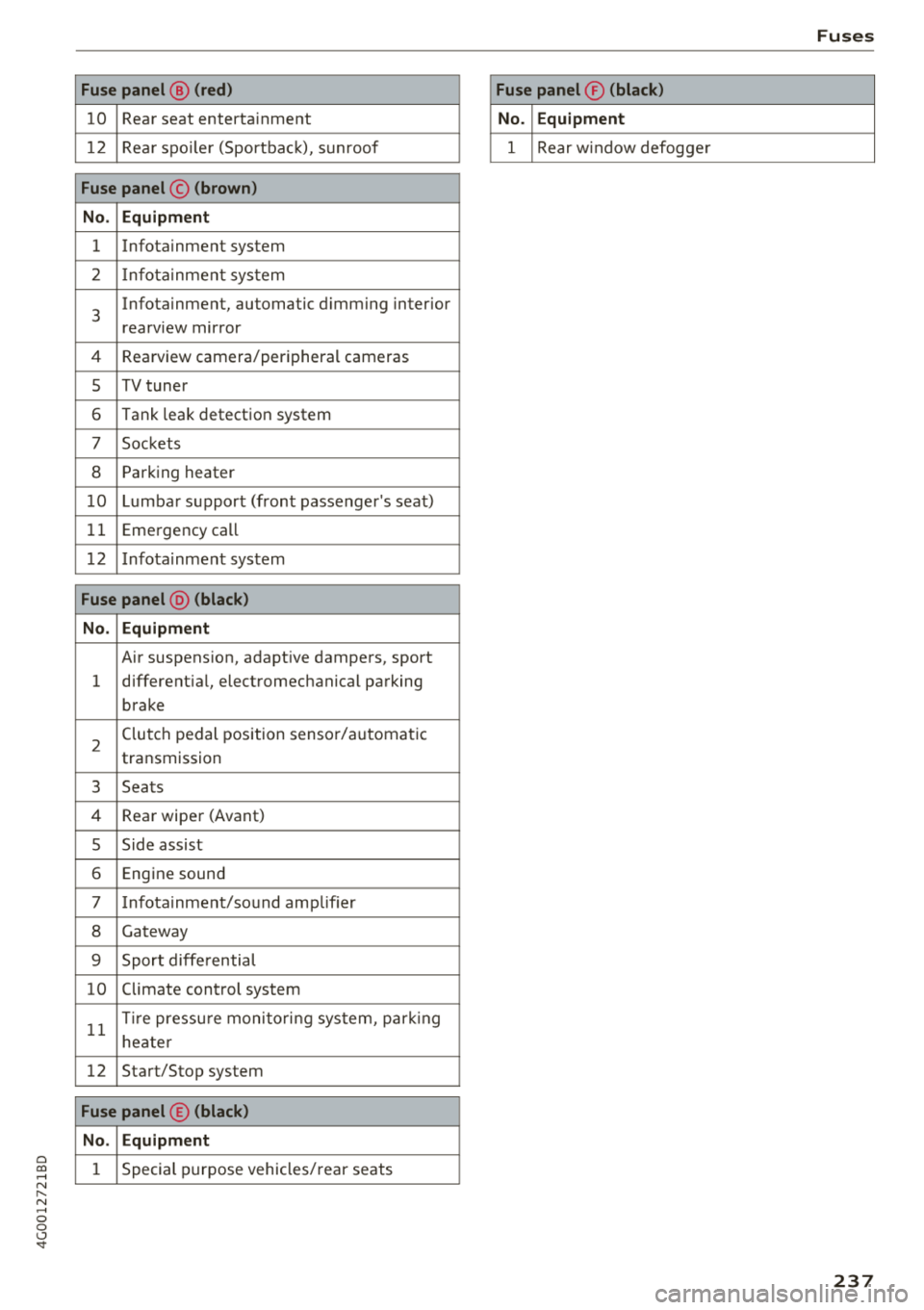
a co .... N
" N .... 0 0 \,;J '
10 Rear seat entertainment
1 2 Rea r spo ile r (Sportbac k), sunroof
Fuse panel © (brown )
N o. Equipm ent
1 Infotainment system
2 Infota inment system
3
Infotainment, automatic dimming interior
rearview mirror
4 Rearview camera/peripheral cameras
5 TV tuner
6 Tank leak detection system
7 Sockets
8 Parking heater
1 0 Lumbar support (front passenger's seat)
11 Emergency
call
1 2 Infotainment system
Fuse panel @ (black )
N o. Equipm ent
Air suspension, adaptive dampers, sport
1 different
ial, electromechanical parking
brake
2 Clutch pedal position sensor/automatic
transmission
3 Seats
4 Rear wiper (Avant)
5 Side assist
6 Engine sound
7 Infotainment/sound amplifier
8 Gateway
9 Sport diffe rential
10 Climate control
system
11 T
ir e pressu re monito ring system, park ing
heate r
12 Start/Stop
system
Fuse panel © (black )
N o. E quipm ent
1 Special purpose vehicles/ rear seats
Fuses
Fuse panel ® (blac k)
N o. Equipm en t
1 Rear w indow defogge r
237
Page 242 of 266
Emergency situations
@ Tips
The discharged battery must be properly con
nected to the vehicle's electrical system .
When jump starting or charging the battery,
never connect the negative ground cable to
the battery negative post because the battery
manager system must be able to detect the
battery's state of charge. Always connect the
negat ive g round cable to the negative ground
post of the battery manager control unit.
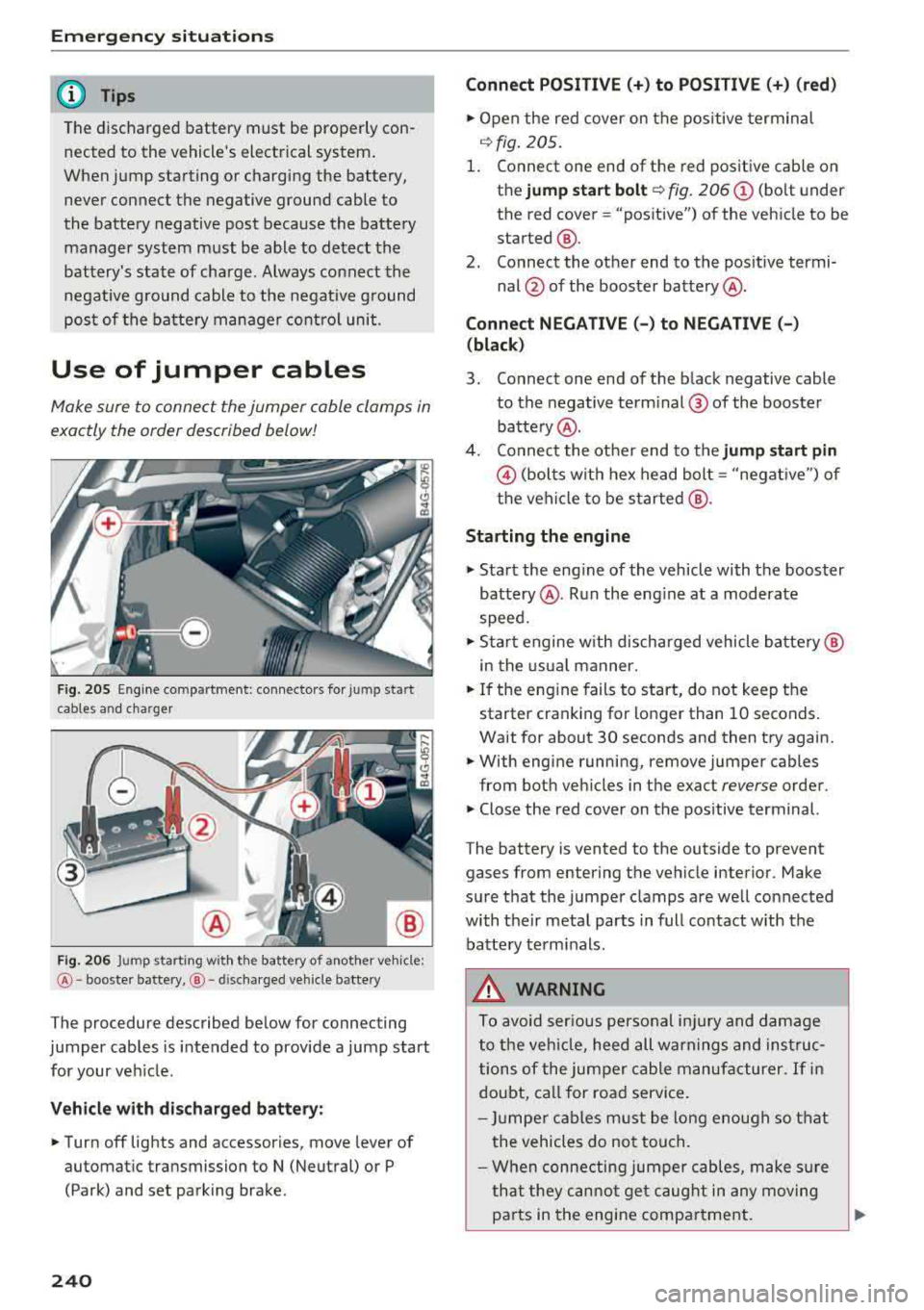
Use of jumper cables
Make sure to connect the jumper cable clamps in
exactly the order described below!
Fig . 205 Engine compartmen t: connecto rs for jump start
cables and charger
@
F ig . 206 Jump starting w it h the battery of anot her vehicle :
@-booster battery, @- discha rged vehicle battery
The procedure described below for connecting
jumper cables is intended to provide a jump start
for your veh icle.
Vehicle with discharged battery:
• Turn off lights and accessories, move lever of
automatic transmission to N (Neutral) or P (Park) and set park ing brake.
240
Connect POSITIVE(+) to POSITIVE(+) (red)
• Open the red cover on the positive terminal
i:!.> fig. 205.
1. Connect one end of the red positive cable on
the
jump start bolt ~ fig. 206@ (bolt under
the red cover= "positive") of the vehicle to be
started @.
2. Connect the other end to the positive termi-
nal @of the booster battery @.
Connect NEGATIVE(-) to NEGATIVE(-)
(black)
3. Connect one end of the black negative cable
to the negative terminal @ of the booster
battery @.
4. Connec t the other end to the
jump start pin
@ (bolts with hex head bolt= "negative") of
the vehicle to be started @.
Starting the engine
• Start the eng ine of the vehicle with the booster
battery @. Run the eng ine at a moderate
speed.
• Sta rt engine w ith discharged vehicle battery@
in the usual manner.
• If the engine fails to start, do not keep the
starter cranking for longer than 10 seconds.
Wait for about 30 seconds and then try again.
• With engine running, remove jumper cables
from both veh icles in the exact
reverse order.
• Close the red cover on the pos itive terminal.
The battery is vented to the outside to prevent
gases from entering the vehicle interior . Make
sure that the jumper clamps are well connected
with their metal parts in full contact w ith the
battery terminals.
A WARNING
To avoid serious personal injury and damage
to the vehicle, heed all warnings and instruc
tions of the jumper cable manufacturer. If in
doubt, call for road service .
- Jumper cables must be long enough so that
the vehicles do not touch.
- When connecting jumper cables, make sur e
that they cannot get caug ht in any moving
pa rts in the engine compartment.
.,.
Page 243 of 266
-Be fore yo u chec k any thing in the engine
compartment, a lways read and heed a ll
WARNINGS
c:::> page 189 .
(D Note
Impro per hook-u p of jum per cables c an r uin
the gene rato r.
-Always connect P OSITIVE( +) to POS ITIV E
( + ), and NEG ATIVE( -) to NEGATI VE( -)
g round post of t he battery manage r contro l
unit.
- Check that a ll sc rew p lugs on t he battery
ce lls are screwed in f irmly . If not, t ighten
plugs p rior to connecting clamp on negative
b attery termi nal.
- Please note t hat the procedure fo r con nect
i ng a jumper cab le as desc ribed above ap
pli es specifica lly to the case of yo ur vehicle
b eing jump starte d. W hen you are giv ing a
ju mp s ta rt to ano ther vehicle , d o
no t con
ne ct t he negative( -) cable to the neg ative
(-) t ermin al on the disch arged b attery @
c:::> fig . 20 6. In stead , securely connec t the
n egative ( -) cable to either a solid metal
com ponent that is firm ly bolted to the e n
gine block or to the engine bloc k itsel f. If
the battery that is be ing charged does not
vent to the outs ide, escap ing battery gas
could ignite and ex plode!
Towing with a tow truck
General hints
Your Audi requires special handling for towing .
The follow ing informa tion is to be used by com
mercia l tow tr uck operators who know how to op
e rate the ir equip men t sa fely.
- Never tow your Audi. Towing will cause dam
age to the engine and transmission .
- Never wrap the safety chains or winch cables
around the brake line s.
- To prevent unnecessary damage, your Audi
must be transported with a flatbed tru ck .
a co -To load the vehicle on to the flatbed , use the ,...,
~ towing loop found in the vehicle tools and at-N ,...,
0 0 \,;J '
tach to the front or rear anchorage
c:::> pag e241 and c:::> page242 .
A WARNING
-
A vehicle bei ng towed is not safe for passen-
gers . N ever allow anyone to ride in a vehicle
being towed, for any reason.
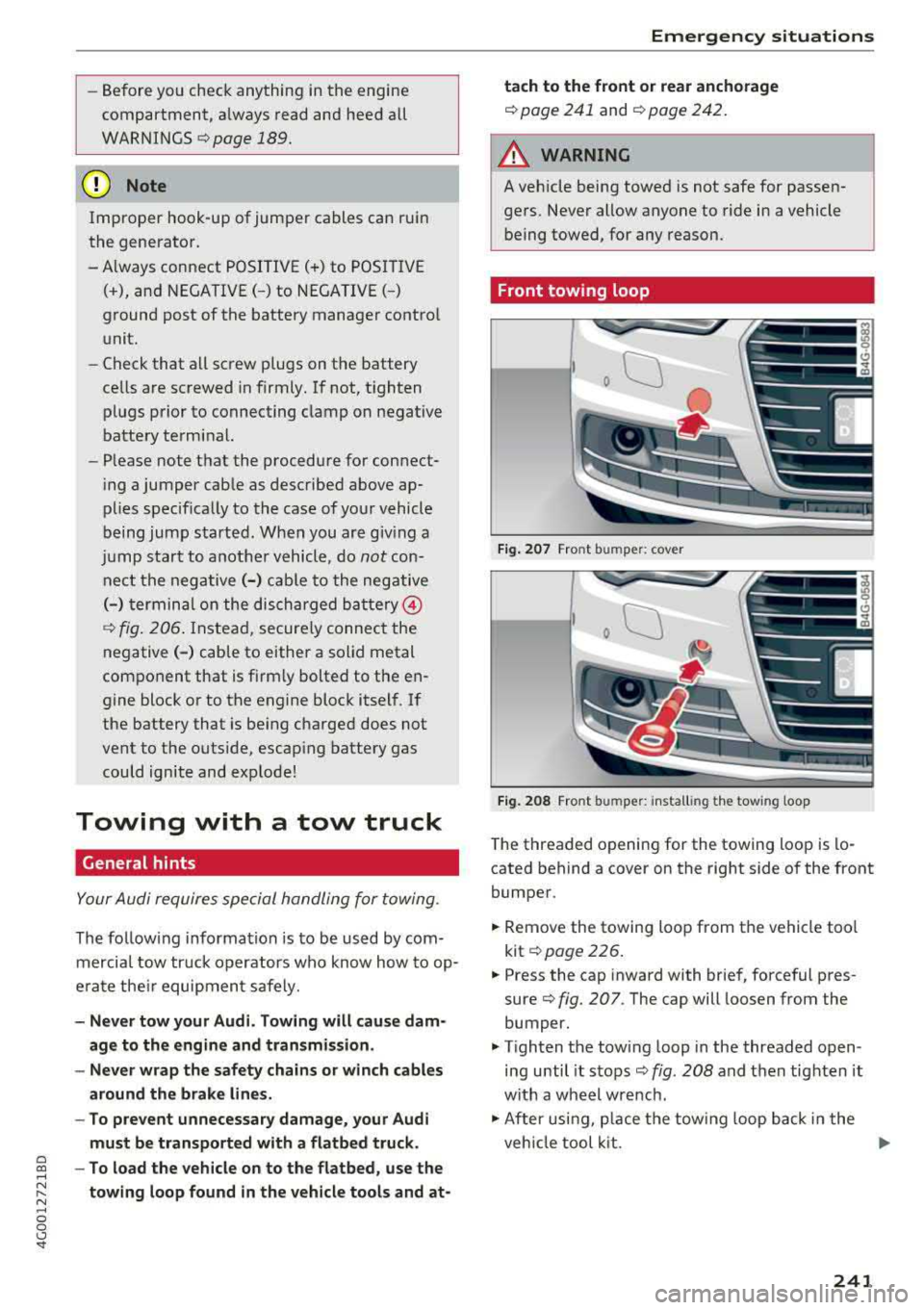
Front towing loop
Fig. 207 Front bu mpe r: co ve r
Fig. 208 Front bu mper: i nst all ing the tow ing loop
T he t hreaded o pen ing for th e towing loop is lo
cated be hind a cover on the r ight side of the front
bumper .
.,. Remove the towing loo p from the vehi cle too l
k it
c:::> page 226 .
.,. Press the cap inward with brief, force ful p res
su re
c:::> fig. 207 . The cap will loosen from the
bumper.
.,. T ighten the towing loop in the threaded open
ing until it sto ps
c:::> fig . 208 and then tighten it
w ith a wheel w re nch .
.,. After usi ng, p lace the tow ing loop back i n the
veh icle tool kit.
..,.
241
Page 251 of 266
a co .... N
" N .... 0 0 \.J '
-Changing the engine settings wi ll adversely
affect emission leve ls. Th is is detrimental to
the env ironment and increases fuel con
sumption.
- A lways observe environmenta l regu lations
when disposing of old engine o il, used brake
flu id, d irty engine coolant, spent batteries
or worn out tires.
- Undeployed airbag modules and pretension
ers might be classified as Perchlorate Mate
rial -spec ial handl ing may apply, see
www .dtsc.ca .gov/hazardouswaste/perch lo
r ate. When the vehicle or pa rts of t he re
stra int system includi ng a irbag mod ules
s af ety be lts with pretens ioners a re scrap
ped, a ll applicab le laws and regulations
must be observed. Your a uthorized Audi
dealer is fam iliar with these requirements
and we recommend that you have your dea l
er perform this service for you.
Accessories and
technical changes
Additional accessories and parts
replacement
Always consult on authorized Audi dealer before
purchasing accessories.
Audi ve hicles that are constructed with advanced
materials like Steel/Aluminum (Hybrid construc
tion), Aluminum (Aud i Space Frame), and/or Alu
minum/Carbon Fiber (Ultra Advanced Light
We ight Materials) are as unique as the ir dr ivers .
Therefo re, the ava ilability of certain parts needed
for repa ir , restorat ion, or reconstruction w ill be
rest ricted , or pa rts will be unava ilable, if the ve
hicl e is not repa ired at an a uthorized Aud i co lli
sion repair facility . This includes but is not limi t
ed to structura l parts which require specia lized
training and equipment to restore their crash
worthiness back to the original NHTSA and IIHS performance.
Your vehicle incorporates the latest safety design
features ensuring a high standard of active and passive safety.
Con sum er In form ation
This safety could be compromised by non -ap
proved changes to the vehicle. For t his reason, if
parts have to be rep laced, p lease observe the fol
lowing points when install ing additional accesso
ries:
Approved Audi accessories and genuine Audi parts are avai lab le from authorized Aud i dea lers.
T hese dea le rs a lso have t he necessa ry fa cilit ies,
tools and trained specialists to install the pa rts
and accessories proper ly .
A WARNING
--
Using the wrong spare parts or using non -ap
p roved accessories can cause damage to the
vehicle and serious personal injury.
- Use on ly accessories expressly approved by
Aud i and genuine Audi spare parts
- These parts and accessor ies have been spe
cially designed to be used on your vehicle.
- Do not use license p late brac kets in the
front area that are d ifferent from the one
installed at the factory, or add additional
li
cense plate brackets.
- Never install accessor ies such as telephone
cradles or beverage holders on airbag covers
or w ith in the airbag deployment zones. Do
ing so will increase the risk of injury if a ir
bags a re tr iggered in an accident!
- Before you check anyth ing in the eng ine
compa rtment, always read and heed all
WARN INGS
~page 189.
@ Note
- If items other than genu ine Audi spare
parts, add-on equipment and accessory
items are used or if repa ir work is not per
form ed according to specified methods, th is
c an result in seve re damage to you r vehi
cle's eng ine and body (s uch as cor rosion)
and adve rsely affec t your ve hicle's warranty.
- If emergency repa irs m ust be pe rformed
elsew here, have the vehicle ex am ined by an
authorized A udi dealer as soon as possib le .
- Th e manufac ture r ca nnot be he ld liable fo r
damage wh ic h occur s d ue to fail ure to com
ply with these stipulations.
249
Page 254 of 266
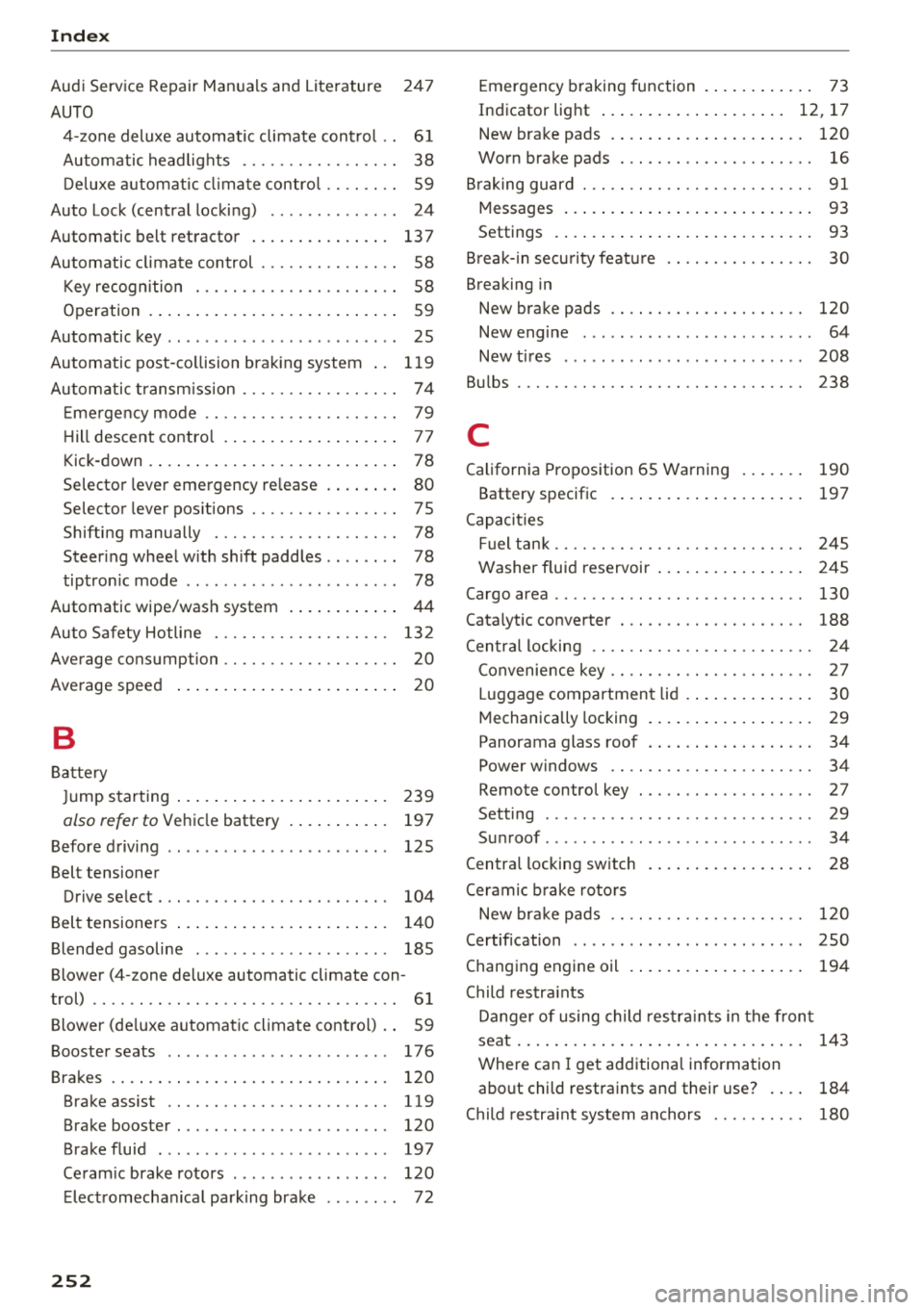
Index
Audi Service Repair Manuals and Literature 24 7
AUTO 4-zone deluxe automatic climate cont rol . . 61
Automatic headlights . . . . . . . . . . . . . . . . . 38
D eluxe automatic climate control . . . . . . . . 59
Auto Lock (central locking) . . . . . . . . . . . . . . 24
Automatic belt retractor . . . . . . . . . . . . . . . 13 7
Automatic climate control . . . . . . . . . . . . . . . 58
Key recogn ition . . . . . . . . . . . . . . . . . . . . . . 58
Operation . . . . . . . . . . . . . . . . . . . . . . . . . . . 59
Automatic key . . . . . . . . . . . . . . . . . . . . . . . . . 25
Automatic post-collision braking system . . 119
Autom atic transmission . . . . . . . . . . . . . . . . . 74
Em ergency mode . . . . . . . . . . . . . . . . . . . . . 79
H ill descent control . . . . . . . . . . . . . . . . . . . 77
Kick-down . . . . . . . . . . . . . . . . . . . . . . . . . . . 78
Selector lever emergency re lease . . . . . . . . 80
Selector lever pos itions . . . . . . . . . . . . . . . . 7 5
Shifting manually . . . . . . . . . . . . . . . . . . . . 78
Steer ing whee l with shift paddles . . . . . . . . 78
tiptronic mode . . . . . . . . . . . . . . . . . . . . . . . 78
Automatic wipe/wash system . . . . . . . . . . . .
44
Auto Safety Hotline . . . . . . . . . . . . . . . . . . . 132
Average consumption . . . . . . . . . . . . . . . . . . .
20
Average speed . . . . . . . . . . . . . . . . . . . . . . . . 20
B
Battery
Ju mp starting ...... .......... .. .. .. .
also refer to Vehicl e battery .......... .
Before driving
Belt tensioner 239
19 7
125
Drive select . . . . . . . . . . . . . . . . . . . . . . . . . 104
Belt tensioners . . . . . . . . . . . . . . . . . . . . . . . 140
Blended gasoline . . . . . . . . . . . . . . . . . . . . . 185
Blower (4-zone deluxe automatic climate con-
trol) . . . . . . . . . . . . . . . . . . . . . . . . . . . . . . . . . 61
Blower (deluxe automatic climate control) . . 59
Booster seats . . . . . . . . . . . . . . . . . . . . . . . . 176
Brakes . . . . . . . . . . . . . . . . . . . . . . . . . . . . . . 120
Brake assist .. .. ............. .... .. . 119
Brake booster . . . . . . . . . . . . . . . . . . . . . . . 120
Brake fluid . . . . . . . . . . . . . . . . . . . . . . . . . 197
Ceram ic brake rotors . . . . . . . . . . . . . . . . . 120
E lect romechan ical park ing brake . . . . . . . . 72
252
Emergency braking function . . . . . . . . . . . . 73
Indicator light . . . . . . . . . . . . . . . . . . . . 12, 17
New brake pads . . . . . . . . . . . . . . . . . . . . . 120
Worn brake pads . . . . . . . . . . . . . . . . . . . . . 16
Braking guard ..... .. .. ............. ... 91
93
Messages
Settings ............................ 93
Break-in security featu re . . . . . . . . . . . . . . . . 30
Breaking in New brake pads . . . . . . . . . . . . . . . . . . . . . 120
N . ew engine . . . . . . . . . . . . . . . . . . . . . . . . . 64
New tires . . . . . . . . . . . . . . . . . . . . . . . . . . 208
Bu lbs . . . . . . . . . . . . . . . . . . . . . . . . . . . . . . . 238
C
California Proposition 65 Warning . . . . . . . 190
Battery specific . . . . . . . . . . . . . . . . . . . . . 197
Capacities Fuel tank. . . . . . . . . . . . . . . . . . . . . . . . . . . 245
Washer fluid reservoir . . . . . . . . . . . . . . . . 245
Cargo area . . . . . . . . . . . . . . . . . . . . . . . . . . . 130
Cata lytic converter . . . . . . . . . . . . . . . . . . . . 188
Central locking . . . . . . . . . . . . . . . . . . . . . . . . 24
C . k onvernence ey . . . . . . . . . . . . . . . . . . . . . . 2 7
Luggage compartment lid . . . . . . . . . . . . . . 30
Mechanically locking . . . . . . . . . . . . . . . . . . 29
Panorama glass roof . . . . . . . . . . . . . . . . . . 34
Power windows . . . . . . . . . . . . . . . . . . . . . . 34
Remote control key . . . . . . . . . . . . . . . . . . . 2 7
Setting . . . . . . . . . . . . . . . . . . . . . . . . . . . . . 29
Su nroof . . . . . . . . . . . . . . . . . . . . . . . . . . . . . 34
C entra l locking switch . . . . . . . . . . . . . . . . . . 28
Ceramic brake rotors
New brake pads . . . . . . . . . . . . . . . . . . . . . 1 20
Certification . . . . . . . . . . . . . . . . . . . . . . . . . 250
Changing engine oil . . . . . . . . . . . . . . . . . . . 194
Child res tra ints
Danger of using child res traints in the front
seat............................... 143
Where can I get additiona l information
abo ut child restraints and their use? . . . . 184
Child res traint system anchors . . . . . . . . . . 180