door lock AUDI A7 2012 User Guide
[x] Cancel search | Manufacturer: AUDI, Model Year: 2012, Model line: A7, Model: AUDI A7 2012Pages: 294, PDF Size: 73.33 MB
Page 38 of 294
36 Openin g and clo sing
Cl os ing th e rea r lid
.. Press the lc:::, 1 button in the rear lid ¢ fig. 26.
T he rear lid moves to the closed position by
itse lf and soft close locks it automatically
¢ _& .Or
.. Switch the ignition on and pull and hold the
button
!c:::, I in the driver 's door until the rear
lid is closed ¢
_A.
Setting th e rear lid op en po siti on
.. Bring the rear lid into the desired open posi
tion ¢(D. The position can be stored at only
one specif ic height.
.. Press and hold the button
!c:::, I for at least
four seconds to store the new open pos ition.
A v isual and aud io signal will follow .
The settings in the MMI determine if the rear lid can be opened using the handle ¢
page 32.
Opening will be stopped immediately when :
- You press the b utton
lc:::, I on the remote con -
tro l master key, or
- You press the button
la l in the rear lid, or
- You push the handle in the rear lid , or
- You pull the button
l a! in the driver's door,
or
- When something blocks the rear lid or
makes it difficult for the lid to move.
If you press one of the buttons ~now, the
rear lid will either open or close, depending on
its angle .
Closing will be stopped immediate ly when:
- You press the button
lc:::, I in the rear lid, or
- You push the handle in the rear lid , or
- You release the button
la l on the driver's
door , or
- When something blocks the rear lid or
makes it difficult for the lid to move .
If you press one of the buttons ~now, the
rear lid will either close or open, depending on
its angle .
You can manually stop the automatic open ing/closing of the rear lid. The automatic clos
ing process begins if you push down on the
rear lid .
A WARNING
-After closing the rear lid, always pull up
on it to make sure that it is properly
closed . Otherwise it could ope n suddenly
when the vehicle is moving .
- To help prevent poisonous exhaust gas from being drawn into the vehicle, al
ways keep the rear lid closed wh ile driv
ing. Never transpo rt objects la rger than
those which fit complete ly into the lug
gage area, beca use then the rear lid can
not be fu lly closed .
- Never leave your veh icle unattended es
pecia lly with the rear lid left open. A
child cou ld craw l into the car through the
luggage compartment and pu ll the lid
shut, becoming trapped and unable to
get out. To reduce the risk of personal in
jury, never let c hildren play in or around
your ve hicle. Always keep the rear lid as
well as the vehicle doors closed when not i n use .
- Never close the rear lid inattentively o r
without check ing first . Although the
clos ing force of the rear lid is limited,
you can still serious ly injure yourself or
others.
- Always ensure that no one is within
range of the rear lid when it is moving, in
particular close to the hinges and the up
per and lower edges -fingers or hands
can be pinched.
- Never try to interfere with the rear lid or
he lp it when it is be ing opened or closed
automatically.
(D Note
The rear lid can bump into ob jects such as
the garage ceiling when opening and be
come damaged .
(D Tips
-Audio signals a re given when you close
the rear lid using the
l a! button in the
driver's door .
- If there is a mechanica l problem with au
tomatic closing for the rear lid or there is .,..
Page 39 of 294
an obstruction, it opens again immedi
ate ly. Check to see why the rear lid cou ld
not be closed before attempting to close
it again.
- The following applies to vehicles equip
ped with the Convenience key* feature: if
the remote control key is left in the lug
gage compartment, luggage compart
ment will automat ically unlock itself af
ter you lock the vehicle. This prevents
you from un intent ionally locking your
key in the luggage compartment.
- When the vehicle is locked, the rear lid
can be unlocked separately by pressing
the button
l=I on the master key. When
the rear lid is closed again, it locks auto
matically .
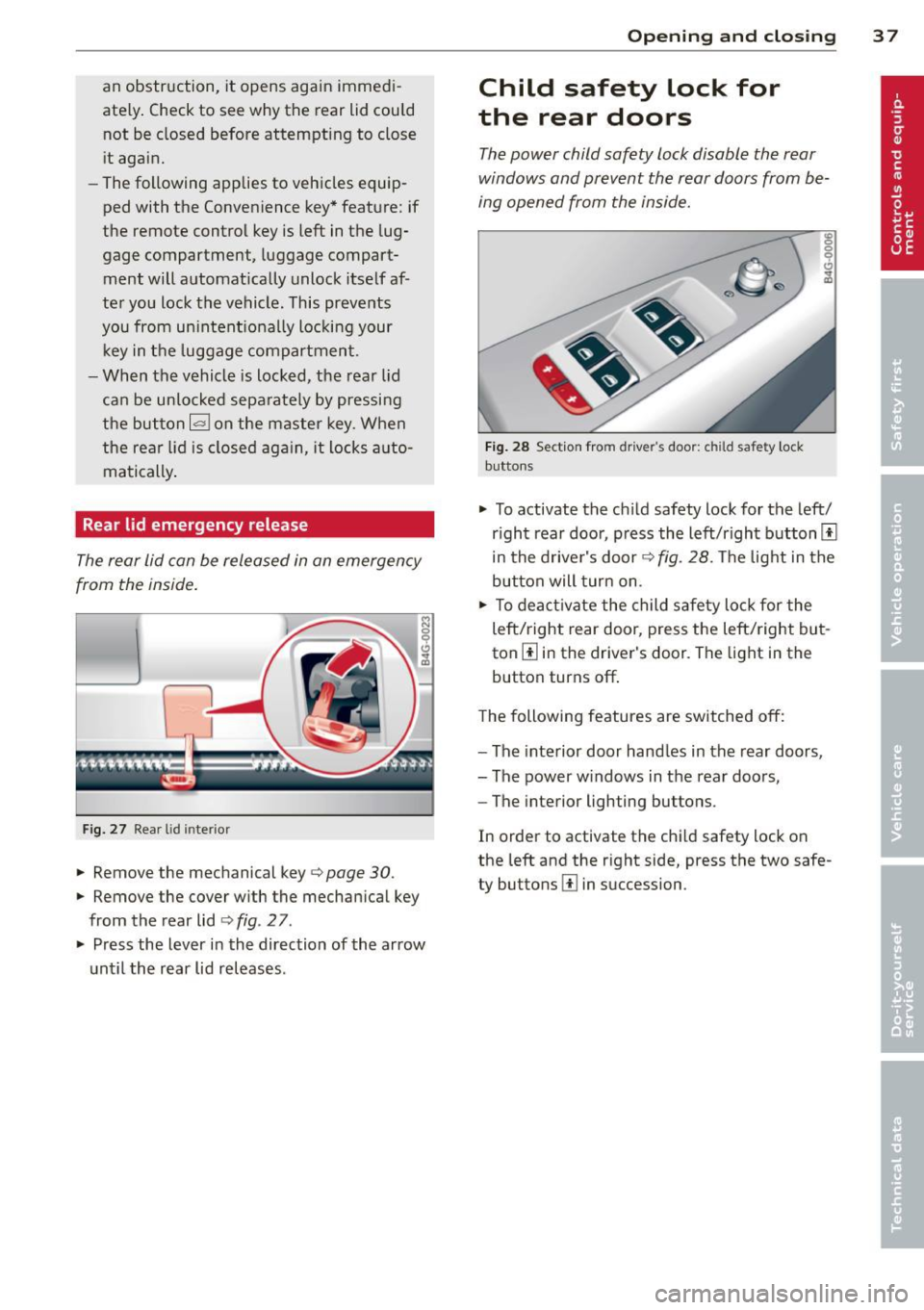
Rear lid emergency release
The rear lid can be released in an emergency
from the inside .
Fig. 27 Rear lid inte rio r
.,. Remove the mechanical key¢ page 30.
.,. Remove the cover with the mechanical key
from the rear lid ¢
fig. 2 7 .
.,. Press the lever in the direction of the arrow
until the rear lid releases.
Opening and closing 3 7
Child safety lock for
the rear doors
The power child safety lock disable the rear
windows and prevent the rear doors from be
ing opened from the inside.
Fig. 28 Section fro m drive r's door: c hild safet y lock
buttons
.,. To activate the ch ild safety lock for the left/
r ight rear door, p ress the left/right button[!]
in the driver's door¢
fig. 28. The light in the
button will turn on.
.,. To deactivate the child safety lock for the
left/right rear door, press the left/ right but
ton[!] in the driver's door. The light in the
button turns off .
The following features are switched
off:
-The interior door handles in the rear doors,
- The power windows in the rear doors,
- The interior lighting buttons.
In order to activate the chi ld safety lock on
the left and the r ight side, press the two safe
ty buttons [!] in succession .
Page 40 of 294
38 Opening and closing
Power windows
Controls
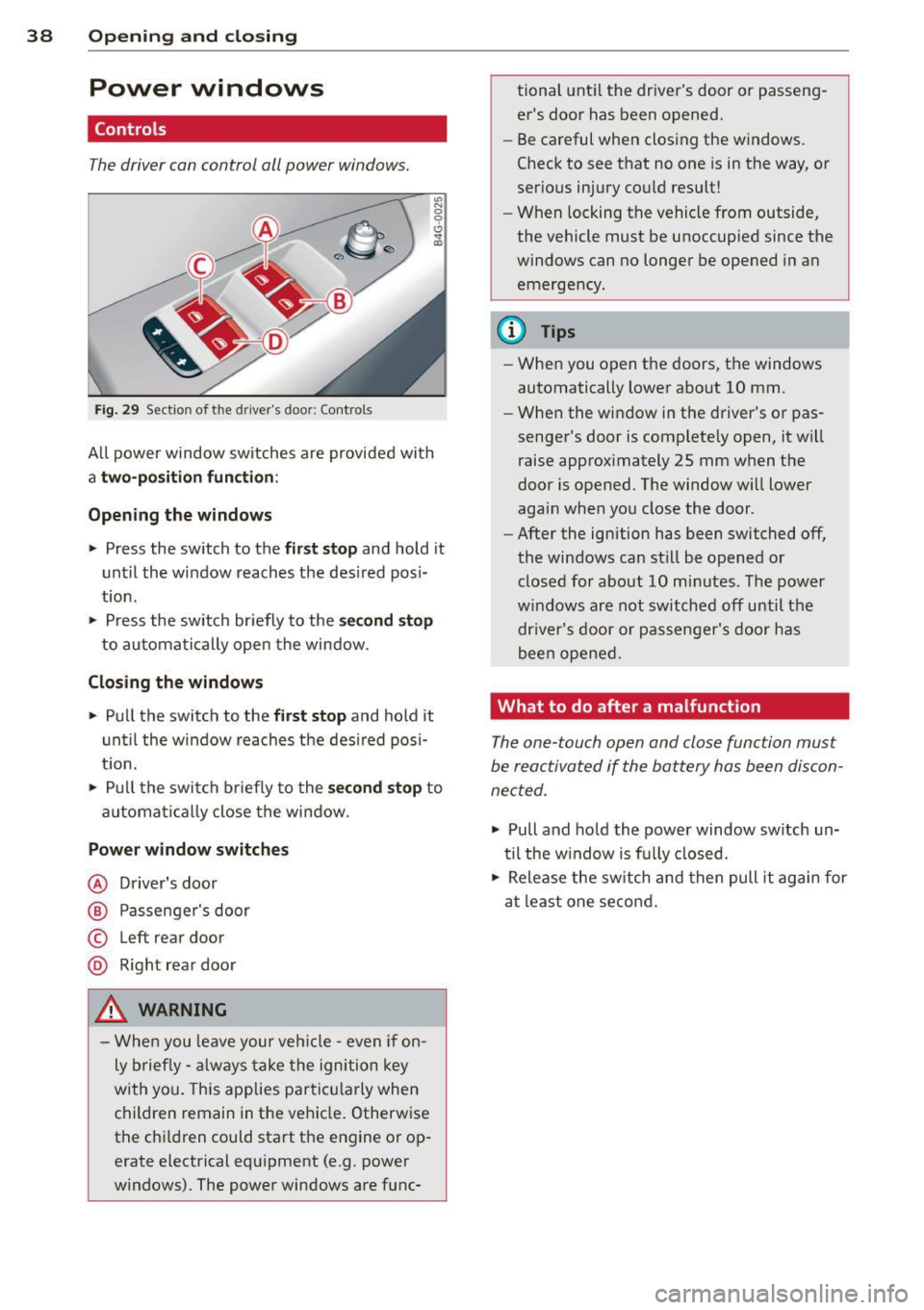
The driver can con trol all power windows.
"' N 0 0 6
Fig . 29 Sect io n of the drive r's d oor : Contro ls
"' m
All power window sw itches are provided with
a two -pos ition function:
Opening the windows
.. Press the switch to the first stop and ho ld it
until the window reaches the desired posi
tion .
.. Press the switch briefly to the
second stop
to automatically open the window .
Closing the windows
.. Pull the switch to the first stop and hold it
until the window reaches the desired pos i
t ion.
.. Pull the switch briefly to the
second stop to
automa tically close the window .
Power window switches
@ Driver's door
@ Passenger's door
© Left r ear door
@ Right rear door
_& WARNING
- When you leave your veh icle -even if on
ly brief ly -always take the ignition key
with you. This applies particu larly when
children remain in the veh icle. Otherwise
the chi ldren could start the engine or op
erate electrical equipment (e.g . power
windows). The power windows are func- tional
until the driver's door or passeng
er's door has been opened.
- Be careful when closing the windows.
Check to see that no one is in the way, or
serious injury could result!
- When locking the vehicle from outside,
the vehicle must be unoccupied since the
windows can no longer be opened in an
emergency.
@ Tips
- When you open the doors, the windows
automatically lower about 10 mm .
- When the window in the driver's or pas
senger's door is complete ly open, it wi ll
raise approximately 25 mm when the
door is opened . The window will lower
again when you close the door .
- After the ignition has been switched off,
the windows can still be opened or closed for about 10 minutes . The power
w indows are not switched off until the
dr iver's door or passenger's door has
been opened.
What to do after a malfunction
The one-touch open and close function must
be reactivated if the battery has been discon
nected .
.. Pull and hold the power window switch un
til the w indow is fully closed .
.. Release the switch and then pull it again for
at least one second.
Page 41 of 294
Valet parking
The valet parking feature protects the lug
gage comportment from unauthorized ac
cess.
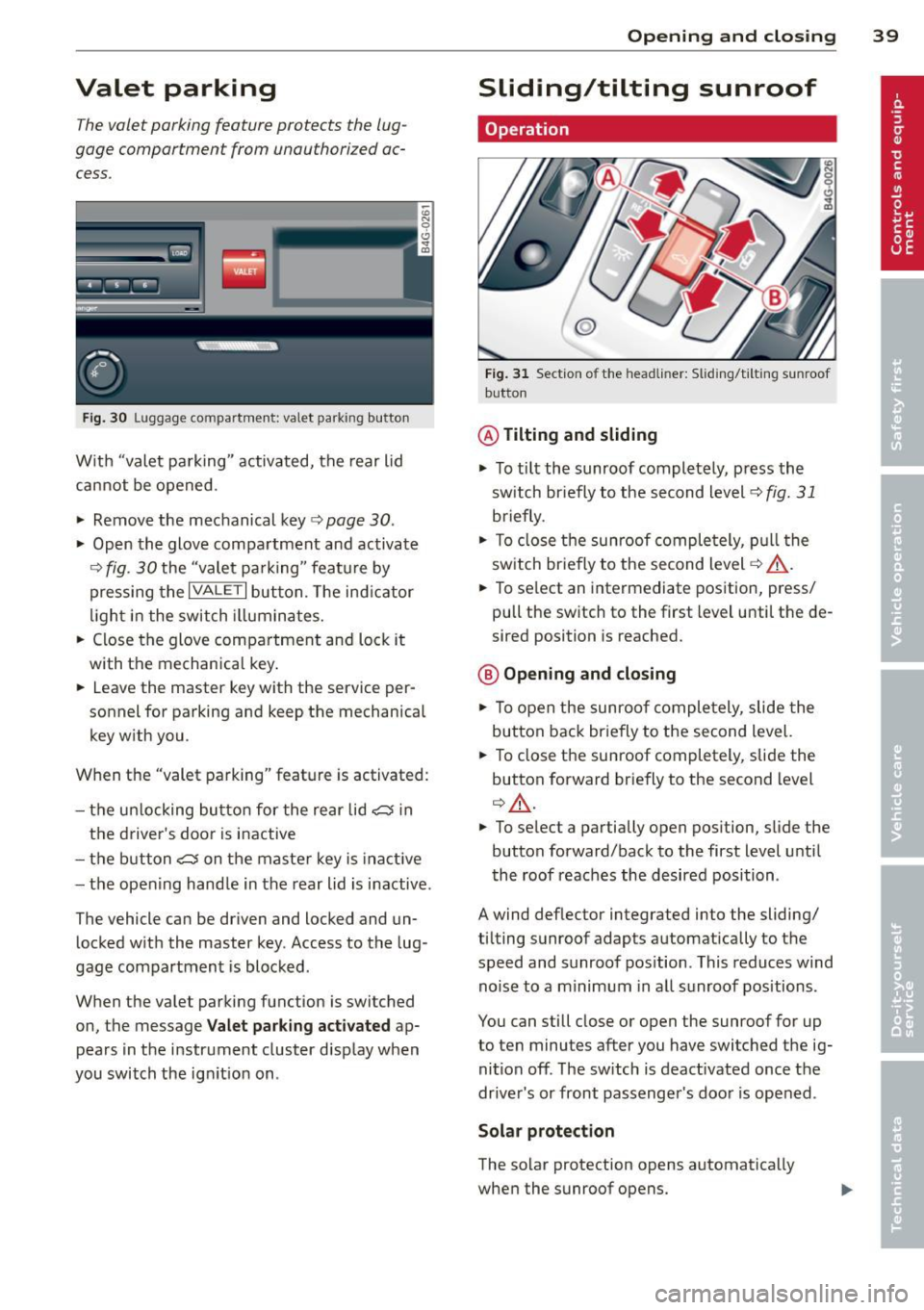
Fig. 30 Luggage compartment: valet parking button
With "valet parking" activated, the rear lid
cannot be opened.
~ Remove the mechanical key¢ page 30 .
~ Open the glove compartment and activate
¢
fig. 30 the "valet parking" feature by
pressing the
I VALET I button. The indicator
light in the switch illuminates.
~ Close the glove compartment and lock it
with the mechanical key.
~ Leave the master key with the service per
sonnel for parking and keep the mechanical
key with you .
When the "valet parking" feature is activated:
- the un locking button for the rear lid
c:s in
the driver's door is inactive
- the button
c:s on the master key is inact ive
- the opening hand le in the rear lid is inactive .
The vehicle can be driven and locked and un locked with the master key. Access to the lug
gage compartment is blocked.
When the valet parking function is switched
on, the message Valet parking activated ap
pears in the instrument cluster display when
you switch the ignition on .
Opening and closing 39
Sliding/tilting sunroof
Operation
@
Fig. 31 Section of the headliner: Sliding/ti lting sunroof
button
@ Tilting and sliding
~ To tilt the sunroof completely, press the
sw itch br iefly to the second level¢
fig. 31
briefly .
~ To close the sunroof completely, pull the
switch br iefly to the second level¢.&_ .
~ To select an intermediate position, press/
pull the switch to the first level until the de
sired position is reached.
@ Opening and closing
~ To open the sunroof completely, slide the
button back briefly to the second level.
~ To close the sunroof completely, slide the
button forward briefly to the second level
¢ .&_ .
~ To select a partially open position, slide the
button forward/back to the first level until
the roof reaches the desired position .
A wind deflector integrated into the sliding/
tilting sunroof adapts automatically to the
speed and sunroof pos ition . This reduces wind
noise to a minimum in all sunroof positions.
You can still close or open the sunroof for up
to ten minutes after you have switched the ig
nition
off . The switch is deactivated once the
driver's or front passenger's door is opened .
Solar protection
The solar protection opens automatically
when the sunroof opens.
Page 45 of 294
Coming home , Leav ing home
The coming home function il luminates the
area outside the vehicle when you switch the
ignition off and open the driver 's door . To turn
the function on, select
Light s when le aving
c a r > On .
The leav ing home function illuminates the
area outside the vehicle when yo u un lock the
veh icle . To turn the function on, select
Li gh ts
when unloc kin g ca r> On.
The coming home and leaving home functions
only operate when it is dark and the light
switch is in the
AUTO pos ition.
Turn signals and high beam lever
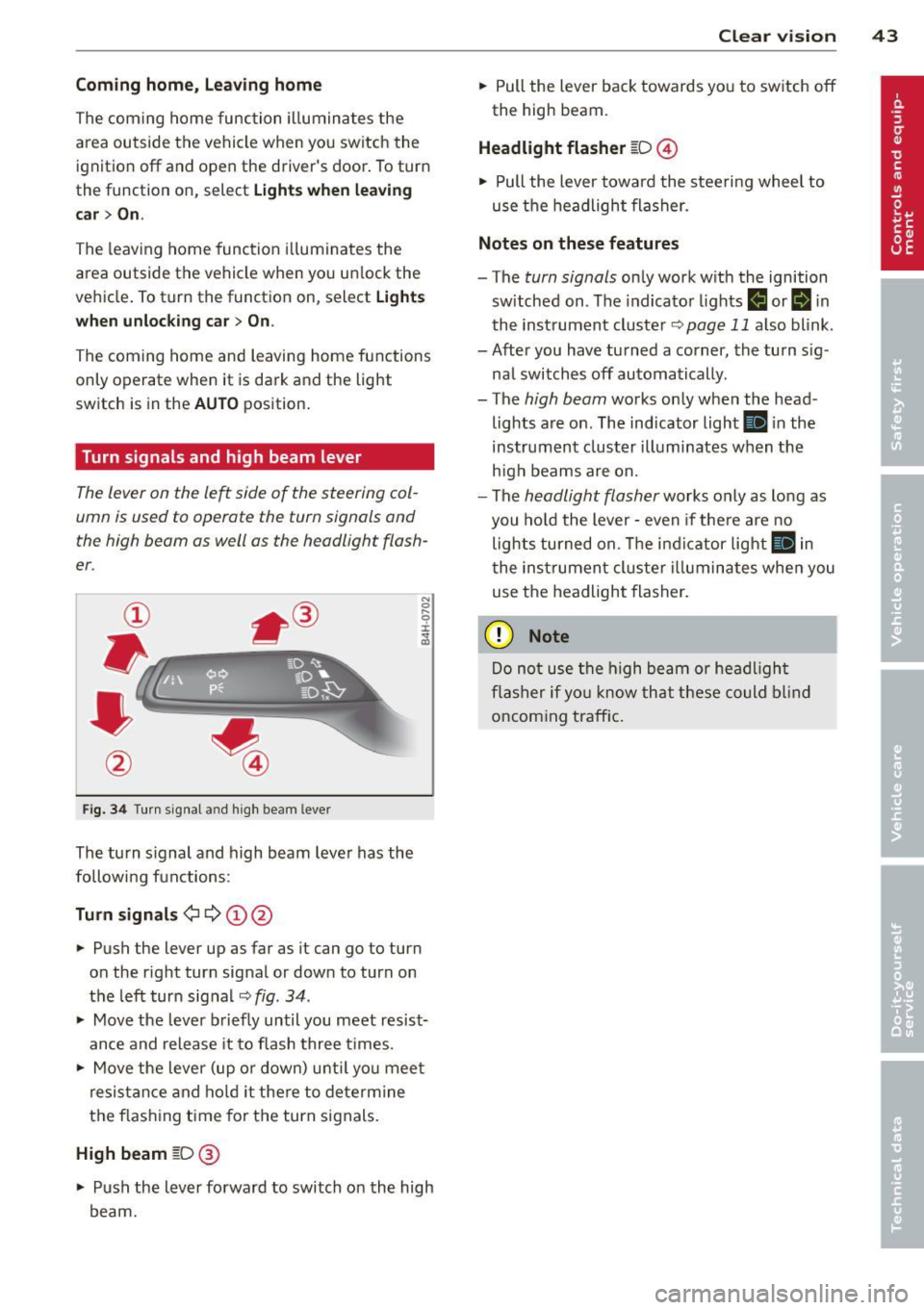
The lever on the le~ side of the steering col
umn is used to operate the turn signals and
the high beam as well as the headlight flash
er .
Fig. 3 4 Tu rn signal a nd h igh beam lever
The turn s ignal and high beam lever has the
followi ng functions:
Tu rn sign als ¢ ¢ @@
.. Push the lever up as far as it can go to turn
on the r ight turn signal or down to turn on
the left turn sig nal
c:::;, fig . 34 .
.. Move the lever b riefly until you meet resist
ance and release it to flash three times .
.. Move the lever (up or down) unti l you mee t
resistance and ho ld it there to dete rmine
the f las hing t ime for the turn signals.
High beam [D @
.. Push the lever forward to switch on the high
beam.
Clear vi sion 43
.. Pull the lever back towards you to switch off
the high beam.
Headlight fla sher [D ©
.. Pull the lever towa rd the stee ring wheel to
use the headlight flasher.
Note s on these features
- The turn signals on ly work with the ignition
sw itched on . The indicator lights
f,j or II in
the inst rument cluste r
~page 11 also blink.
- After you have turned a corner, the turn s ig -
nal switches off automatically .
- The
high beam works only when the head
lights are on . The indicator light
Ill in the
instrument cluster illuminates when the
h igh beams are on.
- The
headlight flasher works only as long as
you hold the lever -even if the re a re no
lights turned on. The indicator light
Ill in
the inst rument cluster i lluminates whe n you
use the headlight flasher.
(D Note
Do no t use the high beam or headligh t
flasher if yo u know that these could blind
oncoming traffic.
Page 46 of 294
44 Clear vis ion
Interior lights
Front and rear interior lighting
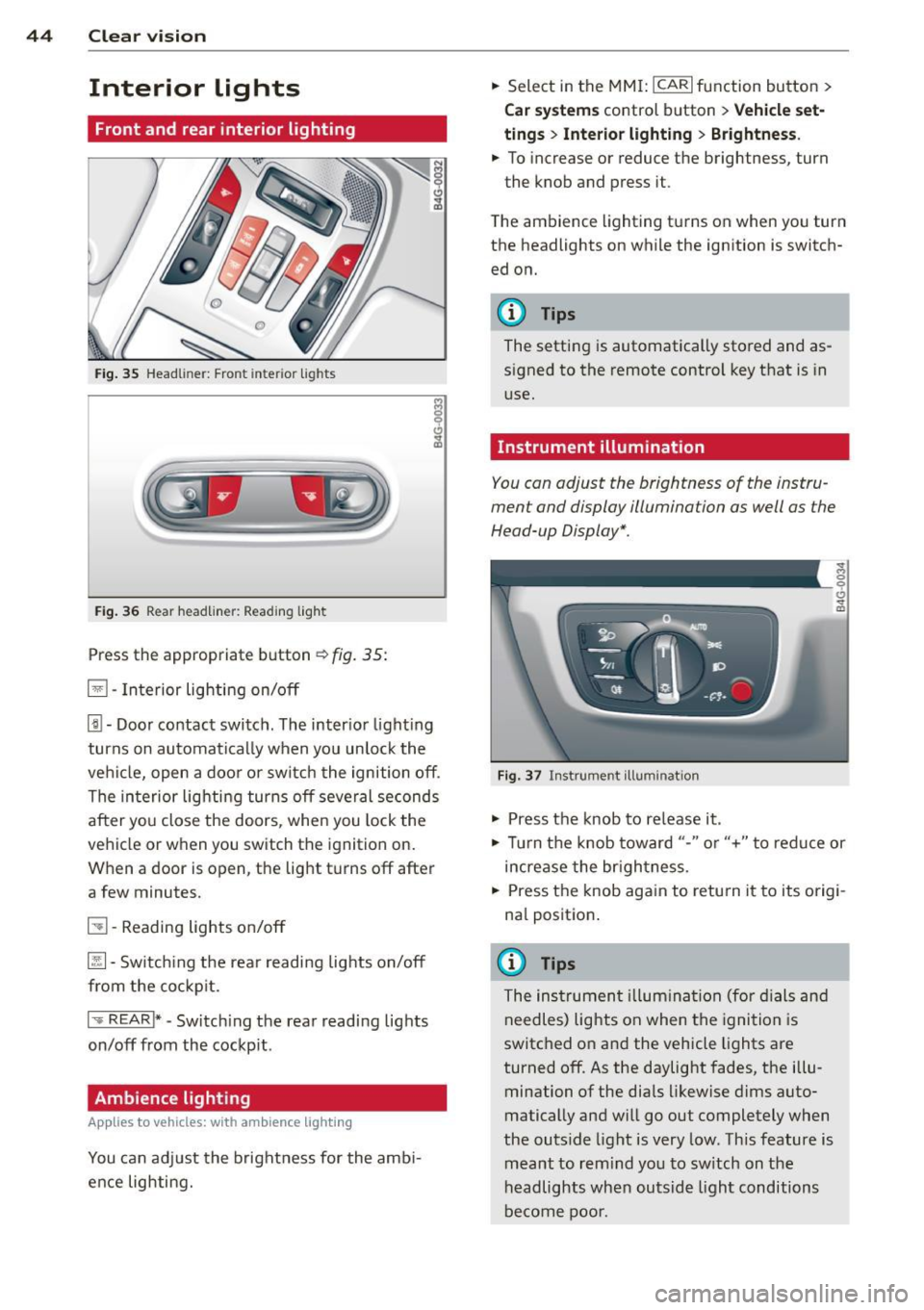
Fig. 35 Head liner: Fron t int eri or ligh ts
Fig. 36 Rear headlin er: R ead in g light
Press the appropriate b utton ~ fig. 35:
El -Interior lighting on/off
[j) -Door contact switch . The inter io r l ight ing
turns on automatically when you unlock the
vehi cle, open a doo r or switch the ignition off .
The interior lighting turns off several seconds
after you close the doors , when you lock the
vehicle or when you switch the ignition on.
When a door is open, the light t urns off after
a few minutes.
51 -Reading lights o n/off
~ -Sw itch ing the rear readi ng lights on/off
from the co ckpit.
I .,.. REAR !* -Switch ing the rear reading lights
on/off from the cockp it .
Ambience lighting
Appl ies to vehicles: wit h ambience lighting
You can adj ust the brightness for the amb i
ence lighting. .,.
Select in the MM I: ICARlfunction button>
C ar sys tem s control button > Vehicle set
ting s
> Interio r light ing > Brightne ss .
.,. To increase or reduce the brightness, turn
the knob and press it .
T he ambience lighting turns on when you turn
the headlights on while the ignition is switch ed on.
@ Tips
The setting is automatically stored and as
signed to the remote control key that is in
use.
Instrument illumination
You can adjust the brightness of the instru
ment and display illumination as well as the
Head-up Display *.
F ig. 37 In strume nt ill umin ation
.,. Press the knob to re lease it .
~ 0
"'
.,. Tur n the knob toward "-" or"+" to redu ce or
increase the br ightness.
.,. Press the knob aga in to retu rn it to its origi
na l position .
(I} Tips
The instrumen t illum ina tion (for dials and
needles) lights on when the ignition is
switc hed o n and the vehicle lights are
turned off . As the daylight fades, the illu
mination of the dia ls likewise d ims auto
matically and will g o out completely when
the outs ide light is very low. This feature is
meant to rem ind yo u to sw itch on the
headlights when outsid e light conditions
be come poo r.
Page 55 of 294
Removing the head restraints
• Fo ld the backrest fo rward c:> page 60.
• Move the head restraint upward as far as it
can go.
• Press the release
c:> fig. 48 with the me
chanical key
c:> page 30 and the button
-arrow-
c:> fig . 47. Pull the head restraint out
of the backrest at the same time
c:> _&. .
Install ing the head restraints
• Slide the posts on the head restraint down
into the guides until you feel the posts lock
into place .
• Press the button -arrow-
c:> fig. 47 and slide
t h e head restraint all the way down . You
should not be able to pull the head restraint
out of the backrest .
So that the driver can have a better view to
the rear, the head restraints should be pushed
down completely when the rear seats are not
occupied .
_& WARNING
-Only remove the rear seat head restraints
when necessary in order to install a chi ld
seat . Install the head restraint again im
mediately once the child seat is removed.
Driving without head restraints or with
head restraints that are not properly ad
justed increases the risk of serious or fa
tal neck injury dramatically .
- Read and heed all WARNINGS
<=> page 122.
Seat memory
Description
Applies to vehicles: with memory functio n
The memory function allows you to quickly
and easi ly store and recall personal seating
profiles for the driver . The memory function is
operated through the master key and the
memory buttons in the driver's door.
The driver's seating profi le is stored and as
signed to the master key each time the vehicle is locked. The seating profile is recalled auto-
Seats and storage 53
matically when the vehicle is unlocked. If two
people use one vehicle, it is recommended
that each person always uses "their own" master key.
Two seating profiles can be stored in each of
the driver's door. Once stored, these seating
profiles can be recalled at any time.
The following sett ings are stored:
- Dr iver's seat
- Steering wheel*
- Both exterior rearview mirrors*
Remote control key
Applies to vehicles: with memory function
To assign the driver's seat settings to the re
mote control key when locking the veh icle, the
funct io n must be switched on .
• Select: ICAR ifunction button>
Car systems
control button > Vehicle settings> Seats>
Driver seat> Remote control key> On .
(D Tips
If you do not want another driver's set
tings to be assigned to the remote control
key, switch off the memory function using
the MMI or the IOFF i button
c:> page 53.
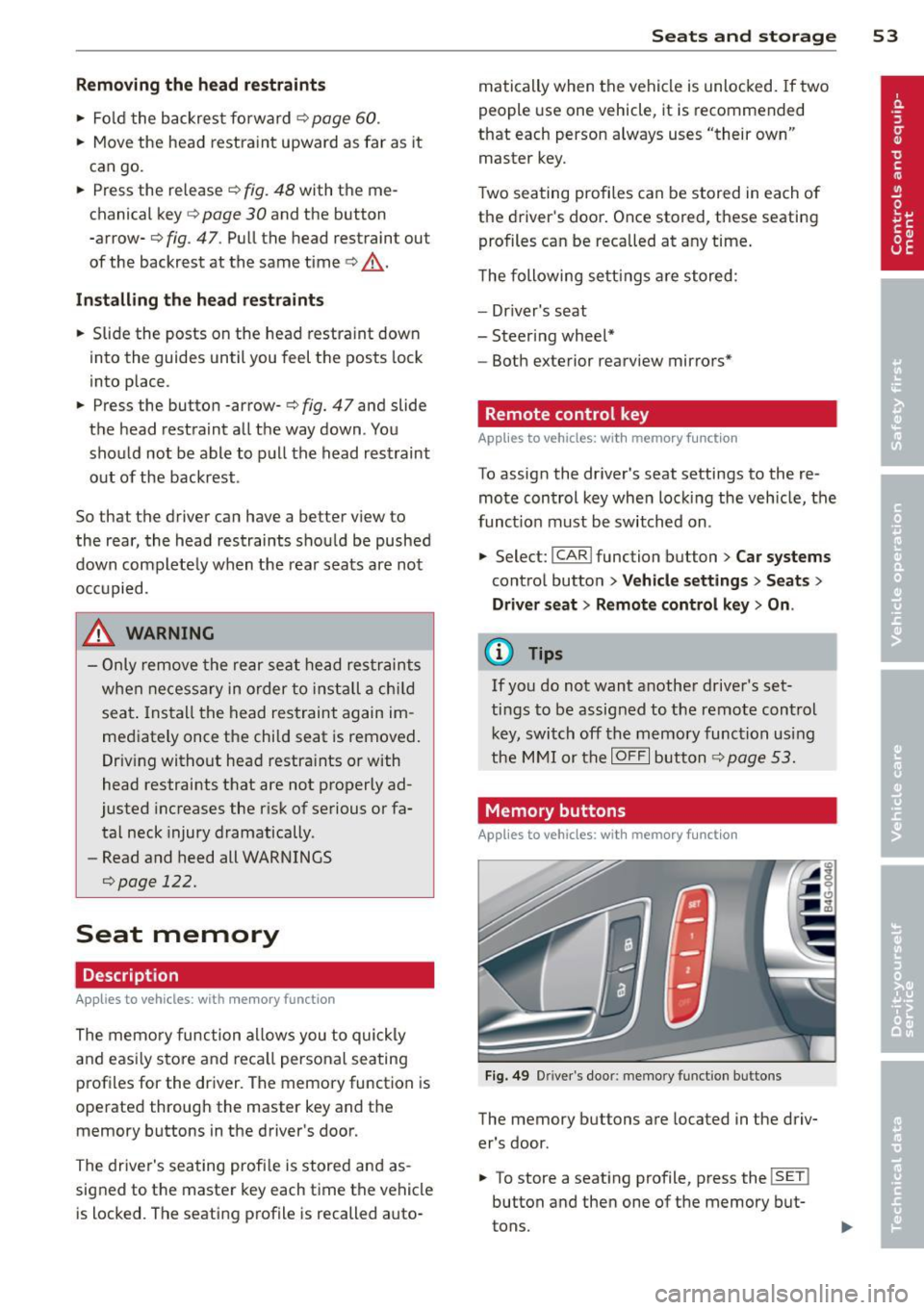
Memory buttons
Applies to vehicles: with memory function
Fig. 49 Driver 's doo r: memo ry fun ction b uttons
The memory buttons are located in the driv
er's door.
• To store a seating profile , press the
!SE T!
button and then one of the memory but
tons.
Page 58 of 294
56 Seats and storage
Front cuphold er
.,. To open the c upholder, tap the cover
~ fig. 55.
Rear cuphold er
.,. Press on the symbol 'i@ ~ fig . 56 .
.,. To adjust the a rm @ , swing it in the direc
t ion of the a rrow .
.,. Place the beverage in the holder and release
the arm . The arm swings back by itself and
automatically secures the beverage .
.,. Press on the center section between the
two arms and push the cup holder in the
slot as far as it will go.
_& WARNING
Spilled hot liquid can cause an accident
and personal inj ury .
-
- Never carry any beverage containers with
hot liquids, such as hot coffee or hot tea,
in the vehicle while it is mov ing . In case
of an accident, sudden b ra ki ng o r other
vehicle movement, hot liq uid could spill,
causing sca ld ing burns. Sp illed hot liq ui d
can also ca use an accident and personal
injury.
- Use only soft cups in the cupholder . Hard
cups and g lasses can ca use inj ury in an
accident.
- Never use the cupho lder or adapter as an
ashtray- r isk of f ire.
(D Note
On ly drink containers wi th lids should be
carried in the cupho lder. Liqu id could spi ll
ou t and damage your vehicle's e lectronic
equ ipment or stain the upholstery, etc.
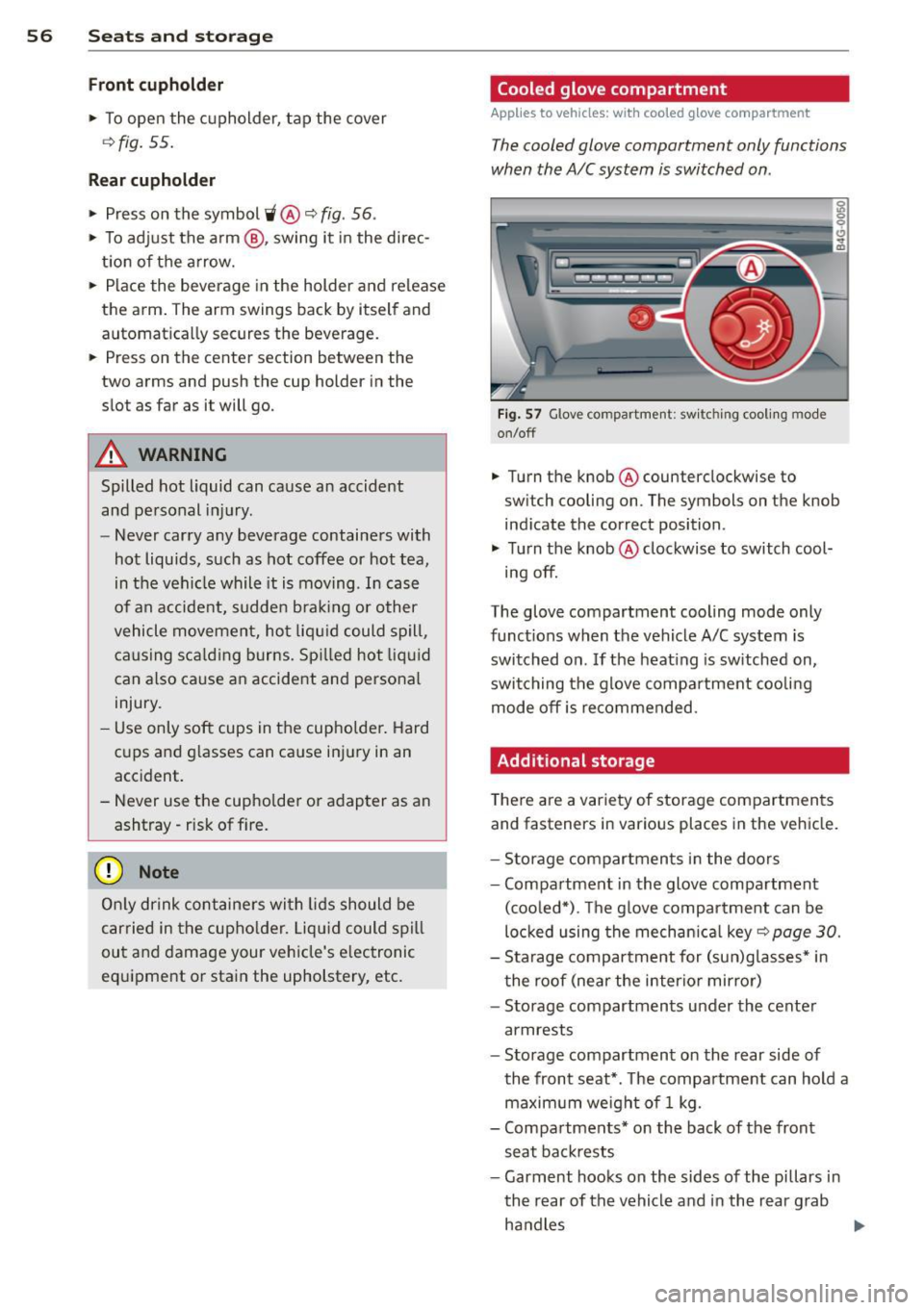
Cooled glove compartment
Applies to vehicles: with coo led g love compartment
The cooled glove compartment only functions
when the A/C system is switched on .
Fig . 57 G love compartme nt: sw it c hin g cooli ng m ode
on/off
.,. Turn the knob @counterclockwise to
sw itch cooling on . The symbols on the knob
ind icate the correct position .
.,. Turn the knob @clockwise to switch cool-
ing off.
The glove compartment cooling mode only
funct ions when the vehicle A/C system is
switched on . If the heating is sw itched on,
switching the g love compa rtment coo lin g
mode off is recommended.
Additional storage
T here a re a var iety of storage compartments
and fasteners in various places in the vehicle.
- S torage compartments in the doors
- Compartment in the glove compartment
(coo led*) . T he g love compar tment can be
loc ked using the mechan ica l
key ~ page 30.
-Sta rage compartment for (su n)g lasses* in
t he roof (near the interio r mirror)
- Storage compartments under the center
armrests
- Storage compartment on the rear side of
the front seat *. T he compa rtment can hold a
maximum weigh t of 1 kg.
- Compa rtments* on the back of the front
seat ba ckrests
- Garment hooks on the sides of the pi llars in
th e rear of the vehicle and in the rear g rab
ha ndles
lllJ,,
Page 74 of 294

72 On the road
By pressing the I STAR T ENGINE S TOP I button
without depressing the brake peda l, the igni
tion is on and switched
off by pressing it
again .
After a cold engine is started, the re may be a
brief period of increased noise because oil
pressure must first bu ild up in the hydraulic
va lve adjusters. This is normal and not a cause
f or concern.
If the engine should not start immediately,
the starting process is automatically stopped
after a short time . Repeat starting procedure.
Driver m essag e in th e in strum ent clu ster
d is pl ay
P re ss brake pedal to sta rt engi ne
This message appears if you press the
I START ENGINE STOP ! button to start the en
gine and do not depress the brake peda l. The
engine can on ly be started if the brake pedal
is depressed.
B C o nve nience ke y: Is ke y not in th e vehi
cle?
This message appears a long with the B sym
bol i f the master key is removed from the ve
hicle with the engine r unning . It is intended
to remind you (e .g . when changing drivers)
not to continue the journey without the mas
te r key .
If the master key is no longer in the vehicle,
you cannot switch on the ignit ion after stop
ping the engine and yo u also cannot start the
engine again. Moreover, you cannot lock the
vehicle from the outs ide with the key.
S hift to P , o ther wise v ehicl e can roll away.
Doors do not lock if le ver i s not i n P.
This message appears for sa fe ty reasons
a long w ith an audib le warning tone if the
P
selector lever posit ion is not engaged when
stopping the eng ine with the
I STAR T ENGINE S TOP ! button. Select the P se
lector lever posit ion. Otherwise the veh icle
could roll and it cannot be locked .
Key not recogni sed . H old bac k of ke y against
ma rked are a. See o wner' s manual.
If the indicator l ight turns on and this mes
sage appears, there is a malf unct ion
¢ page 73.
Steering lock
The steering locks when you turn the eng ine
off using the I STAR T ENGINE S TOP I butto n
and open t he driver's doo r. T he loc ked s teer
i ng helps prevent vehicle theft.
& WARNING ~
- Never a llow the engine to run in confined
spaces -danger of asphyx iat ion .
- Never turn
off the engine until the vehi
cle has come to a complete stop .
- The brake booster and powe r steering
only work when the engine is running . If
the engine is
off, you have to use more
force when steering or brak ing . Because
you cannot steer and brake as you usual ly would, th is cou ld lead to crashes and
serious injuries .
(Q) Note
-Avo id h igh engine rpm, full thrott le and
heavy eng ine loads until the eng ine has
reached operating temperature -other
wise you risk engine damage .
- The engine cannot be started by pushing
or towing the vehicle.
- If the eng ine has been under heavy load
for an extended per iod, heat builds up in
the engine compartment after the en
gine is switched
off -there is a risk of
damaging th e engine. Allow the engine
to run at idle for about 2 minutes before
switching it
off .
@ Tips
-If you open the driver's doo r with the ig
nition on, a buzzer sou nds and the mes
sage
Ignition i s on appears in the instru
ment cl uste r display . Sw itch the ignition
off . ll-
Page 77 of 294
Parking
Various rules apply to prevent the parked ve
hicle from rolling away accidentally .
Pa rkin g
.. Stop the vehicle with the foot brake .
.. Pu ll the switch(®) to apply the park ing
brake.
.. Select the
P selector lever position
~page 102 .
.. Turn the eng ine off ~,&. .
In addition on inclines and grade s
.. Turn the steering wheel so that your vehicle
will roll against the curb in case it should
start to move .
A WARNING
-When you leave your veh icle - even if on
ly b riefly - always take the ignition key
with you. This applies particu la rly when
children remain in the veh icle . Otherw ise
the chi ldren could start the engine, re
lease the parking brake or operate elec
trical equipment (e.g. power windows) .
There is the risk of an accident .
- When the vehicle is locked, no one - par
ticularly not children sho uld remain in
the vehicle. Locked doors make it more
difficult for emergency workers to get in
to the vehicle - putting lives at risk.
Starting from rest
The star ting assis t func tion ensures tha t the
parking brake is released automatically upon
starting .
Stopp ing and appl ying park ing b rake
.. Pull the switch<®) to apply the park ing
brake.
Startin g and automatically relea sing the
pa rking br ake
.. When you start to drive as usua l, the park
ing brake is automatically re leased and your
vehicle begins to move.
On th e ro ad 75
When stopping at a traffic signal or s topping
in city traffic, the parking brake can be ap
plied. The vehicle does not have to be he ld
with the footbrake . The parking brake elimi
nates the tendency to creep w ith a dr ive range
engaged. As soon as you drive off as usual,
the parking brake is released automatically
and the veh icle starts to move .
Starting on slope s
When starting on inclines, the starting assist
prevents the vehicle from un intent ionally roll
i ng back. The braki ng force of the parking
brake is not released unti l suff ic ient driving
fo rce has been built up at the wheels .
(D Tips
For safety reasons, the parking brake is re
leased automatically only when the d riv
er's safety belt is engaged in the buckle.
Starting off with a trailer
To prevent rolling back unintentionally on an
incline, do the following:
.. Keep the switch<®> pulled and depress the
accelerato r. The parking brake stays applied
and prevents the vehicle from roll ing back
ward .
.. You can release the switch<®) once you are
sure that you are developing enough for
wa rd momentum at the whee ls as you de
press the acce lerator .
Depend ing on the weight of the rig (veh icle
and t ra iler) and the severity of the incline, yo u
may ro ll backwards as yo u start . You can pre
vent rolling backwards by holding the parking
brake switch (®) pulled out and accelerating -
just as you would when starting on a hill with
a conventiona l hand brake.