vent AUDI A7 2012 Service Manual
[x] Cancel search | Manufacturer: AUDI, Model Year: 2012, Model line: A7, Model: AUDI A7 2012Pages: 294, PDF Size: 73.33 MB
Page 88 of 294

86 Adapti ve crui se co ntrol a nd bra king guard
& WARNING
The Audi braking guard is an assist system
and cannot prevent a collision by itself.
The driver must always intervene . The driv
er is always responsible for braking at the
correct time.
- Always pay close attention to traffic, even when the Audi braking guard is
switched on. Be ready to intervene and
be ready to take comp lete control when
ever necessary. Always keep the safe and
legal distance between your vehicle and
vehicles up ahead.
- Audi braking guard works within limits
and w ill not respond outs ide the system
limits, for examp le when approaching a
stopped vehicle or stationary obstacle
(end of a traffic jam or vehicle that has
broken down in traffic).
- Always remember that the radar sensor
for the Audi braking guard works only
within defined detection and range limits
that may prevent the proper detection of
other vehicles.
- The radar sensor's function and range
can be reduced by rain, snow and heavy
spray. moving vehicles up ahead may not
be promptly detected or may not be de
tected at all.
- Reflective surfaces includ ing crash barr i
ers or tunnel entrances may impair the
function of the radar sensor .
(D Tips
Lack of attention can cause coll is ions, oth
er accidents and ser ious personal injuries.
- You can stop the Audi braking guard in- tervention w ith increas ing braking force
by applying the brakes yourself or by ac
celerat ing rapidly .
- Audi braking guard error messages
.:> page 86.
Settings in the MMI
Applies to vehicles: wit h adaptive cruise contro l
., Sele ct: I CAR I function button > Car system s
contro l button > Driv er a ssis t> Audi brak
in g gu ard .
S ys tem -
Switch Audi braking guard On and
Off. When you switch the ignit io n on, the
message
Audi brakin g gu ard off appears in
the instr ument cluster disp lay if the system is
switched off.
Earl y wa rnin g -The distan ce and approach
warnings in the d isplay can be switched
On /
Off .
(D Tips
-Yo ur settings are automatically stored
and assigned to the remote contro l key
being used at the times the settings are
made.
- If you switch the ESP to sport mode, A u
di braking guard switches off a utomati
cally¢
page 186.
Messages
Applies to vehicles: wi th adaptive c ruise control
ACC unav ailable
ACC and braking guard: unavailabl e
The system cannot detect moving vehicles up
ahead co rrectly and is sw itched off . The sen
sors have been displaced or a re not working
properly. The Audi pre sense functions may a l
so be affected.
ACC: unava ilable at this time. No sensor vi
sion
A CC and b raking gu ide: un available at this
time . No sensor vision
This message appears if the sensor view is ob
structed, for examp le by leaves, snow, heavy
spray or d irt. Clean the sensors¢
page 79,
fig. 81.
ACC: un availabl e at this time. Incline too
steep
Page 94 of 294
92 Audi side assist
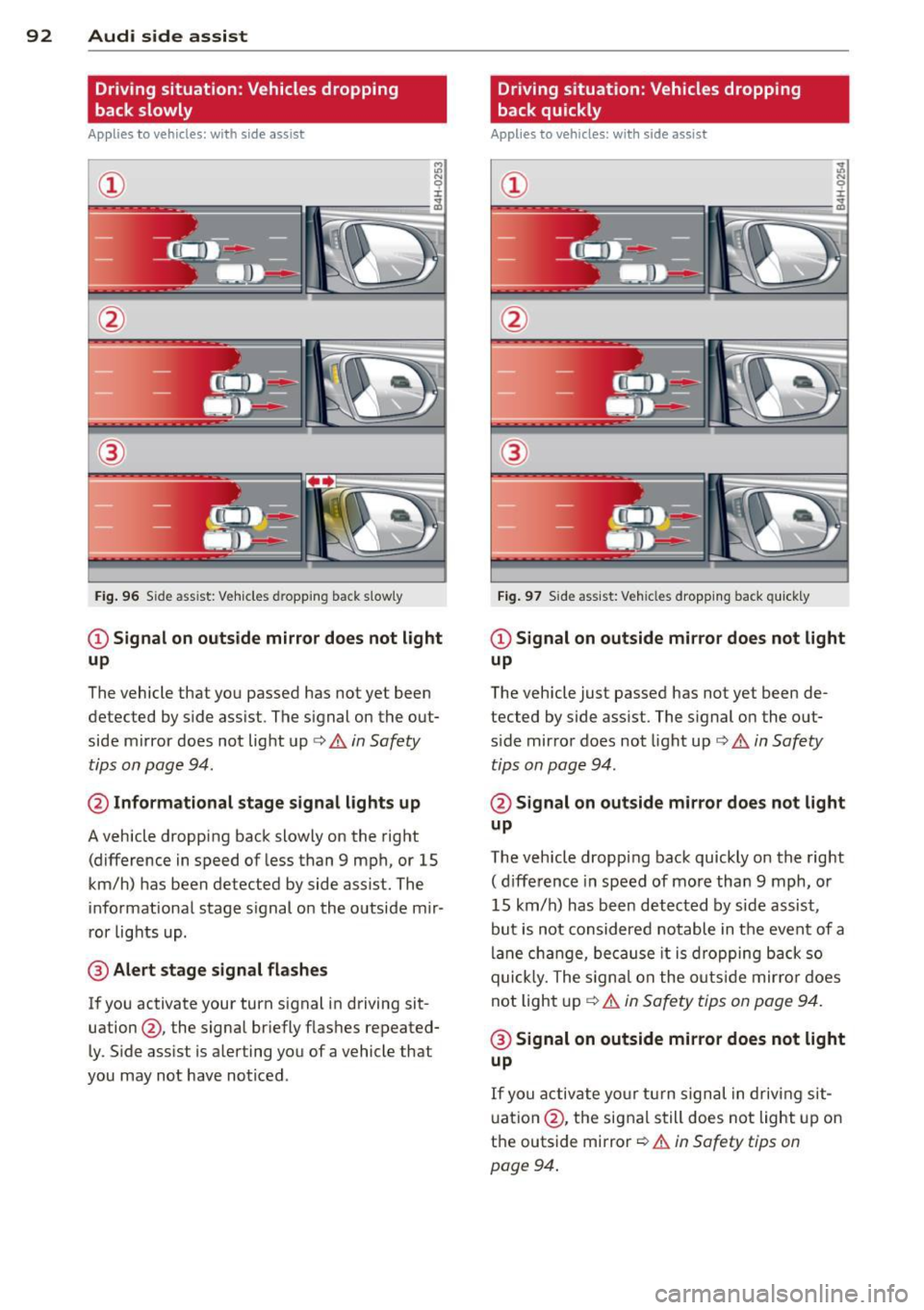
Driving situation: Vehicles dropping
back slowly
Applies to vehicles: with side assist
i:i N 9 J:
-------::~
®
Fig. 96 Side ass ist: Veh icles d ropping back slow ly
CD Signal on outside mirror does not light
up
The vehicle that you passed has not yet been
detected by side assist . The signal on the out
side mirror does not light up¢
A in Safety
tips on page 94.
@ Informational stage signal lights up
A vehicle dropping back slowly on the right
(difference in speed of less than 9 mph, or 15
km/h) has been detected by side assist. The
informational stage signal on the outside mir
ror lights up.
@ Alert stage signal flashes
If you activate your turn signal in driving sit
uation@, the signal briefly flashes repeated
ly. Side assist is alerting you of a vehicle that
you may not have noticed .
Driving situation: Vehicles dropping
back quickly
Applies to vehicles: with side assist
®
Fig. 97 Side ass ist: Vehicles dropping ba ck quickly
CD Signal on outside mirror does not light
up
The vehicle just passed has not yet been de
tected by side assist. The signal on the out
s ide mirror doe s not light up¢
A in Safety
tips on page 94 .
@Signal on outside mirror does not light
up
The vehicle dropping back quickly on the right
( d ifference in speed of more than 9 mph, or
15 km/h) has been detected by side assist ,
but is not considered notable in the event of a
lane change, because it is dropping back so
quick ly. The signal on the outs ide mirro r does
not light up¢
A in Safety tips on page 94.
@ Signal on outside mirror does not light
up
If you activate your turn signal in driving sit
uation @, the signal still does not light up on
the outside mirror ¢
A in Safety tips on
page 94 .
Page 99 of 294

Individual-¢page 97.
Adjusting the Individual mode
Audi drive select 97
A WARNING
Pay attention to traffic when operating Au
d i drive select to prevent potential risk of
an accident.
You can adjust the vehicle settings to your personal preferences.
~ Se lect: ICARI function button > Set individ
ual
control button. You can now adjust the
individual systems.
The
Individual driving mode will automatica l
ly be activated when you have finished config-
uring the settings.
Systems Comfort
Engine/Transmission
balanced
Steering comfortable
Cornering light* comfortable
Belt tensioner* Standard
II
(D Tips
Your Individual mode settings are auto
matically stored and assigned to the re
mote contro l key being used. T
he equipment in your vehicle will determine
which settings you can adjust. The following
table provides an overview of the characteris
tics of each driving mode.
Auto Dynamic
balanced sporty
balanced sporty
ba lanced sporty
Standard Deployment time
adapted
-
Page 101 of 294

Pedestrian warning
Applies to vehicles: with nig ht v ision assistant
F ig. 104 Display : pedestri an w arning
Fig . 105 D isp lay: pedestr ian warning w it h an ot her di s
p lay
I f a pedestrian is detected in a n area in front
of the vehicle that the system considers criti
cal, the pedestrian is high lighted in red
¢ fig . 104 and a warning tone sounds. This
area is based on the vehicle speed and steer
ing angle. The pedestrian warning prompts
you to pay even close r attention to the area in
front of the vehicle and to watch out for pe
destrians.
If another display such as the trip computer replaces the image from the night vision as
sistant, the indicator light turns red when
there is a pedestrian warning
I ¢ fig. 105.
The pedestrian warn ing I appears in the
Head-up Display* .
(D Tips
The pedestrian marking and warn ing tone
can be adjusted in the MMI
¢ page 100.
N ig ht visi on ass is ta n t 99
General information
Applies to vehicles: with night vision assistant
...
-. . .--:::: ====::;;; ::;;;::;;;=== ==--......._ --~
Fig. 106 Fro nt o f th e ve hicle : n ight vis ion ass istant
camera
il!,
T he following situations may affect the func
tion of the nigh t vision assis tant system:
- poor visibility such as snow, rain, fog or
heavy road spray
- dirty lens on the n ight vision assistant cam -
era
Make sure the night vision assistant camera
¢ fig . 106 is not covered by stickers, depos its
or any other obstructions because that can
prevent the camera from work ing properly .
For information on cleaning the lens, refer to
¢ page 202.
Pedestrian detection depends on the differ
ence in temperature between the person and
the background. Pedestr ians may not be de
tected if the temperature difference is too small . T he pedestrian high ligh ting feature is
deactivated at temperatures above 77 °F (25
°C) and when it is light outs ide.
A WARNING
-
Night vision assistant has limits and can
not always detect pedestrians. Always pay
close attention to traffic and the area
around your vehicle even when night vision
assistant is sw itched on .
- Night vision assistant can only warn
about people located within the visual
range of the infrared camera. The visual
range corresponds to the image in the in
strument cluster display.
- Night vision assistant may not detect
peop le and highlight them if
Page 104 of 294

102 Automatic Transmission
Automatic
Transmission
tiptronic®
Introduction
Applies to vehicles: with tiptro nic
Your vehicle is equipped with an electronically
controlled automatic transmission. Upshifting
and downshifting takes place
automatically.
The transmission is also equipped with tip
tronic ®.
It allows the driver to shift gears
manually if desired ¢ page 105.
Driving the automatic transmission
Applies to vehicles: with tiptronic
Fig. 109 Shift gate o n the center console: selecto r lev ·
er w ith release button
Starting the engine
• The selector lever must be in P or N.
Starting off
• Press and hold the brake pedal.
• Press and hold the release button in these
lector lever handle and move the selector
lever from
P or N to 0/5 and re lease the but·
ton¢ .&_.
• Wait briefly until the transmission has shift·
ed (you will feel a slight movement).
• Remove your foot from the brake pedal and
accelerate.
Rocking back and forth to become
unstuck
• Shift only between D/5 and R when the ve·
hicle is at a full stop and the engine is run
ning at idle speed.
Stopping
• Press and hold the brake peda l until the ve
hicle has come to a comp lete stop.
• Keep the brake peda l depressed so that the
vehicle cannot roll forward or backward
while it is idling
c:> .&_ .
.,. Once stopped,
do not depress the accelera
tor pedal to rev up the engine
c:> .&_ .
Parking
• Press and hold the brake pedal until the ve
hicle has come to a complete stop.
• Set the parking brake firm ly
c:> page 75 ,
Parking .
.,. Press and hold the release button in these
lector lever handle, move the selector lever
into
P and then let go of the release button
Q .&_.
The selector lever must be in
P or N. If one of
the driving positions is engaged a safety
switch will prevent the engine from being
sta rted . See also
c:>p age 71.
Before you move the selector lever from the P
posit ion, you must always apply the brake
peda l before and while depressing the button
in the handle of the selector lever.
_&. WARNING
- Unintended vehicle movement can cause
serious injury .
- When the selector lever is in a driving
pos ition, the vehicle may creep, even at
idle speed. Therefore do not release
the parking brake or foot brake unti l
you are ready to move, because power
is transmitted to the wheels as soon as
a driving position is engaged.
- Do not accelerate while selecting a
driving position. At this time the en
gine must be at idle speed so that un
due stress is not placed on the clutches
in the transmission .
- Remember: Even when stopped briefly with the automatic transmission in D/S
or R, engine power is being transmit·
ted to the wheels. Your veh icle cou ld
Page 106 of 294

104 Automatic Transmission
In the normal mode D , the transmission auto
matica lly selects the best gear ratio. It de
pends on eng ine load, veh icle speed and the
dynamic control program (DRP).
Select the
sport mode S for sporty driving .
The vehicle makes full use of the engine's
power. Shifting is more not iceable when accel
erating.
When the vehicle is stationary or at speeds
be low 3 mph (5 km/h), you must always apply
the foot brake before and while mov ing the
lever to
D/S out of N.
In certain circumstances it may be advanta
geous to temporarily switch to the manual
shift program to manually se lect gear ratios
to match specific driving conditions
¢page 105.
A WARNING
Read and follow all WARNINGS c> .&. in
Driving the automatic transmission on
page
102.
Q) Note
-
Coasting downh ill with the transmission in
N and the engine not running will result in
damage to the automatic transmission
and possibly the catalytic converter.
Automatic Shift Lock (ASL)
Applies to vehicles: with tiptronic
The Automatic Shift Lock safeguards you
against accidentally shifting into a forward or the reverse gear and causing the vehicle to
move unintentionally.
')
I
Fig. 111 Shift gate: se lector lever lock positions and
interlock button highl ighted
T he selector lever lock is released as follows:
., Tur n the ignition on.
., Step on the brake pedal.
At the same time
press and hold the interlock button on the
side o f the gear selector knob
¢ fig. 111
with your thumb until you have moved the
selector lever to the des ired posit ion .
Automatic selector lever lock
The selector lever is locked in the P and N po
s iti ons when the ig nition is turned on. To
move the lever from these positions the driver
must depress the brake peda l. As a reminder
to the driver, the following warning appears in
the instrument cluster disp lay when the selec
tor is in
P and N :
When stationary apply footbrake while se
lecting gear
A time delay element prevents the selector
lever from locking when it is moved through
the
N position (going from R to D/S ). The
locking element will lock the se lector lever if
the lever is left in N (Neutral) for more than
approximately 1 second, without the brake
pedal being pressed .
At speeds above about 3 mph (5 km/h) the
Automatic Shift Lock is automatically deacti
vated in the
N position.
Interlock button
The lock button on the selector lever prevents
the lever from being accidentally shifted into
certain positions. Pressing this button deacti
vates the selector lever lock. Depending on
the direction of the sh ift, the selector lever
locks at different posit ions . The pos itions are
highlighted i n the illustration
¢fig . 111 .
Kick-down
Applies to veh icles: w ith tiptron ic
The kick-down feature allows the vehicle to
generate maximum acceleration .
When you press the accelerator pedal beyond
the resistance point that is reached at full
throttle, the transm iss ion w ill select a lower
Ill>
Page 121 of 294
.. Make sure to use the right child restraint
correct ly to protect children
Q page 163,
Child Safety.
.. Sit properly in your seat and make sure that
your passengers do the same¢
page SO,
General recommendations .
.. Faste n your safety belt and wear it properly.
Also instruct your passengers to fasten their
safety belts properly ¢
page 128.
What impairs driving safety?
Safe driving is directly related to the condi
tion of the vehicle, the driver as well as the
driver 's ability to concentrate on the road
without being distracted.
The driver is respons ible for the safety of the
veh icle and all of its occupants.
If your ability
to drive is impai red, safety r isks for everybody
in the vehicle increase and you also become a
hazard to everyone else on the road ¢ _&. .
Therefore:
.. Do not let yourself be dist racted by passen
gers or by using a cellular telephone.
.. NEVER drive when your driving ability is im
paired (by medications, alcohol, drugs, etc.).
.. Observe all traffic laws, rules of the road
and speed limits and plain common sense .
.. ALWAYS adjust your speed to road, traffic
and weather conditions .
.,. Take frequent breaks on long trips . Do not
drive for more than two hours at a stretch.
.. Do NOT drive when you are tired, under
pressure or when you are stressed.
A WARNING
Impaired driving safety increases the risk
of serious personal injury and death when
ever a vehicle is being used.
Driving Safely 119
Proper occupant
seating positions
Proper seating position for the driver
The proper driver seating position is impor
tant for safe, relaxed driving .
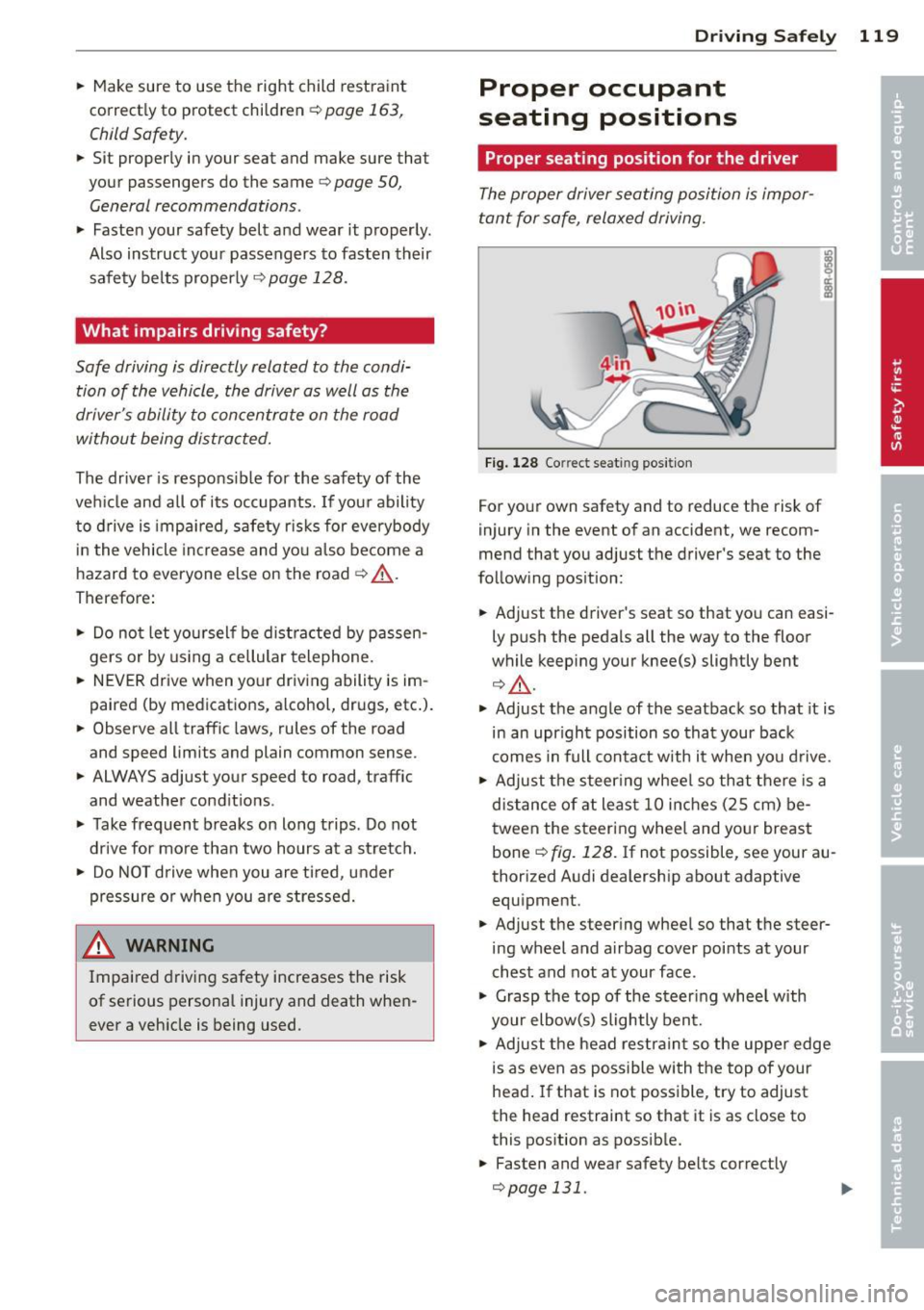
Fig. 128 Correct seat ing pos it ion
For your own safety and to reduce the risk of
injury in the event of an accident, we recom
mend that you adjust the driver's seat to the
follow ing pos ition:
.. Adjust the driver's seat so that you can easi
ly push the pedals all the way to the floor
wh ile keeping your knee(s) slightly bent
¢ _&. .
.. Adjust the angle of the seatback so that it is
in an upr ight position so that your back
comes in full contact w ith it when you drive.
.. Adjust the steering wheel so that there is a
distance of at least 10 inches (25 cm) be
tween the steering wheel and yo ur breast
bone
Q fig. 128. If not possible, see your au
thorized Audi dealership about adaptive
equipment .
.. Adjust the steer ing wheel so that the steer
ing wheel and airbag cover points at your
chest and not at your face.
.,. Grasp the top of the steering whee l with
your elbow(s) slightly bent.
.. Adjust the head restraint so the upper edge
is as even as possible with the top of your
head. If that is not poss ible, try to adjust
the head restraint so that it is as close to
this position as possible .
.. Fasten and wear safety belts correctly
¢page 131.
Page 122 of 294
120 Driving Safely
• Always keep both feet in the footwell so
that you are in control of the vehicle at all
times.
For detailed information on how to adjust the
driver's seat, see
¢ page 51.
A WARNING
Drivers who are unbelted, out of position
or too close to the airbag can be seriously
injured by an airbag as it unfolds. To help
reduce the risk of serious personal injury:
- Always adjust the driver's seat and the
steering wheel so that there are at least
10 inches (25 cm) between your breast
bone and the steering wheel.
- Always adjust the driver's seat and the
steering wheel so that there are at least
4 inches (10 cm) between the knees and
the lower part of the instrument panel.
- Always hold the steering wheel on the
outside of the steering wheel rim with
your hands at the 9 o'clock and 3 o'clock positions to help reduce the risk of per
sonal injury if the driver's airbag inflates.
- Never hold the steering wheel at the
12 o'clock position or with your hands at
other positions inside the steering wheel
rim or on the steering wheel hub. Hold
ing the steering wheel the wrong way
can cause serious injuries to the hands,
arms and head if the driver's airbag in
flates.
- Pointing the steering wheel toward your
face decreases the ability of the supple
mental driver's airbag to protect you in a
collision.
- Always sit in an upright position and nev
er lean against or place any part of your
body too close to the area where the air
bags are located.
- Before driving, always adjust the front
seats and head restraints properly and
make sure that all passengers are prop
erly restrained.
- Never adjust the seats while the vehicle
is moving. Your seat may move unexpect- edly and you could lose control of the ve
hicle .
- Never drive with the backrest reclined or
tilted far back! The farther the backrests
are tilted back, the greater the risk of in
jury due to incorrect positioning of the safety belt and improper seating posi
tion .
- Children must always ride in child seats
¢
page 163. Special precautions apply
when installing a child seat on the front passenger seat¢
page 137.
Proper seating position for the front
passenger
The proper front passenger seating position
is important for safe, relaxed driving .
For your own safety and to reduce the risk of
injury in the event of an accident, we recom
mend that you adjust the seat for the front
passenger to the following position :
• Adjust the angle of the seatback so that it is
in an upright position and your back comes in full contact with it whenever the vehicle is
moving.
• Adjust the head restraint so the upper edge
is as even as possible with the top of your
head. If that is not possibl e, try to adjust
the head restraint so that it is as close to
this position as possible
¢page 122.
• Keep both feet flat on the floor in front of
the front passenger seat .
• Fasten and wear safety belts correctly
¢page 131.
For detailed information on how to adjust the
front passenger's seat, see
¢ page 50 .
A WARNING
-
Front seat passengers who are unbelted,
out of position or too close to the airbag
can be seriously injured or killed by the air
bag as it unfolds. To help reduce the risk of
serious personal injury:
Page 123 of 294
-Passengers must always sit in an upright
position and never lean against or place
any part of their body too close to the
area where the airbags are located.
- Passengers who are unbelted, out of po
sition or too close to the airbag can be
seriously injured by an airbag as it un
folds with great force in the blink of an
eye.
- Always make sure that there are at least
10 inches (25 cm) between the front
passenger's breastbone and the instru
ment panel.
- Always make sure that there are at least
4 inches (10 cm) between the front pas
senger's knees and the lower part of the
instrument panel.
- Each passenger must always sit on a seat
of their own and properly fasten and
wear the safety belt belonging to that
seat.
- Before driving, always adjust the front
passenger seat and head restraint prop
er ly.
- Always keep your feet on the floor in
front of the seat. Never rest them on the
seat, instrument panel, out of the win
dow, etc. The airbag system and safety
belt will not be able to protect you prop
erly and can even increase the risk of in
jury in a crash .
- Never drive with the backrest reclined or
tilted far back! The farther the backrests are tilted back, the greater the risk of in
jury due to incorrect positioning of the
safety belt and improper seating posi
tion.
- Children must always ride in child seats
¢ page 163. Special precautions apply
when installing a child seat on the front
passenger seat
¢ page 13 7.
Driving Safely 121
Proper seating positions for passengers
in rear seats
Rear seat passengers must sit upright with
both feet on the floor consistent with their
physical size and be properly restrained
whenever the vehicle is in use.
To reduce the risk of injury caused by an incor
rect seating position in the event of a sudden
braking maneuver or an accident, your pas
sengers on the rear bench seat must always
observe the following:
.,. Adjust the head restraint so the upper edge
is as even as possible with the top of your
head. If that is not possible, try to adjust
the head restraint so that it is as close to
this position as possible
¢page 122 .
.,. Keep both feet flat in the footwell in front
of the rear seat.
.,. Fasten and wear safety belts properly
¢page 131.
.,. Make sure that children are always properly
restrained in a child restraint that is appro
priate for their size and age
r::, page 163.
,& WARNING
..-
Passengers who are improperly seated on
the rear seat can be seriously injured in a
crash.
- Each passenger must always sit on a seat
of their own and properly fasten and
wear the safety belt belonging to that seat.
- Safety belts only offer maximum protec
tion when the safety belts are properly
positioned on the body and securely
latched . By not sitting upright, a rear
seat passenger increases the risk of per
sonal injury from improperly positioned
safety belts!
- Always adjust the head restraint properly
so that it can give maximum protection.
•
•
Page 125 of 294
-never put you r feet out the window
- never put your feet on the instrument panel
- never rest your feet on the seat cushion o r
back of the seat
- never ride in the footwe ll
- never ride in the cargo area
A WARNING
Imprope r seat ing positions increase the
r is k of se rious personal injury and death
whenever a veh icle is being used .
- Always make sure that all vehicle occu
pants stay in a proper seating pos it ion
and are properly restra ined whenever the
vehicle is be ing used .
Driver and passenger
side footwell
Important safety instructions
App lies to vehicles: wit h knee airbags
A WARNING
Always make sure that the knee airbag can
inflate without interference. Objects be
tween yourse lf and the airbag can increase
the risk of in jury in an acc ident by interfer
ing w ith the way the a irbag deploys or by
being p ushed into you as the airbag de
ploys.
- No persons (ch ildren) or animals should
ride in the footwell in front of the pas
senger seat. If the airbag deploys, this c an res ult in serious or fat al injuries.
- No objects of any k ind sho uld be car ried
in the footwe ll area in front of the driv
er's or passenger's seat. Bul ky objects
(shopping bags, for example) can ham
per or prevent proper deployment of the
airbag. Small objects can be thrown
thro ugh the vehicle if the airbag deploys
and injure you or your passengers.
-
Dr iving Safel y 123
Pedal area
Pedals
The pedals must always be free to move and
must never be interfered with by a floor mat
or any other object.
Make sure that a ll peda ls move free ly without
interfe rence and that nothing prevents them
from return ing to their orig inal positions .
Only use floor mats t hat Leave t he pedal area
free and can be secured with floor mat fasten ers .
If a brake circ uit fai ls, increased brake pedal
trave l is required to b ring the vehicle to a f ull
stop.
A WARNING
Pedals that cannot move free ly can cause
Loss of vehicle control and increase the risk
of ser ious injury.
- Never p lace any objects in the driver's
footwell. An ob ject cou ld get into the
pe dal area and inte rfe re with pedal func
tion. In case of sudden brak ing o r an ac
cident, yo u wo uld not be able to b rake or
accelerate!
- Always ma ke sure tha t no thing can f all
or move into the driver's footwel l.
Floor mats on the driver side
Always use floor mats that can be securely
attached to the floor ma t fasteners and do
not in terfere with the free movement of the
pedals.
"' Ma ke s ure that the floor mats are prope rly
secured and cannot move and in terfere with
t he peda ls ¢ ..&_ .
U se only floor mats that leave the peda l area
u nobst ructed and th at are firmly secu re d so
that they c annot slip o ut o f posi tion. You c an
obta in suitab le floor mats from yo ur aut ho r
ized Audi Dealer.
Floor mat fastene rs a re in stall ed in your Aud i.
1111>
•
•