brake light AUDI A7 2013 User Guide
[x] Cancel search | Manufacturer: AUDI, Model Year: 2013, Model line: A7, Model: AUDI A7 2013Pages: 310, PDF Size: 77.45 MB
Page 62 of 310
60 Seats and st o rage
vehicle movement, hot liqu id could spill,
causing scalding burns. Spilled hot liqu id
can also cause an accident and personal
injury .
- Use only soft cups in the cupholder. Hard
cups and glasses can cause inju ry in an
acc ident .
- Never use the cupholder or adapter as an
ashtray- risk of fire.
([) Note
Only drink containers with lids should be
carried in the cupho lder. Liqu id could spill
out and damage your veh icle's e lectronic
equ ipment or stain the upholste ry, etc.
Cooled glove compartment
Ap plies to vehicles: with coole d glove compa rtm ent
The cooled glove compartment only functions
when the AIC system is switched on.
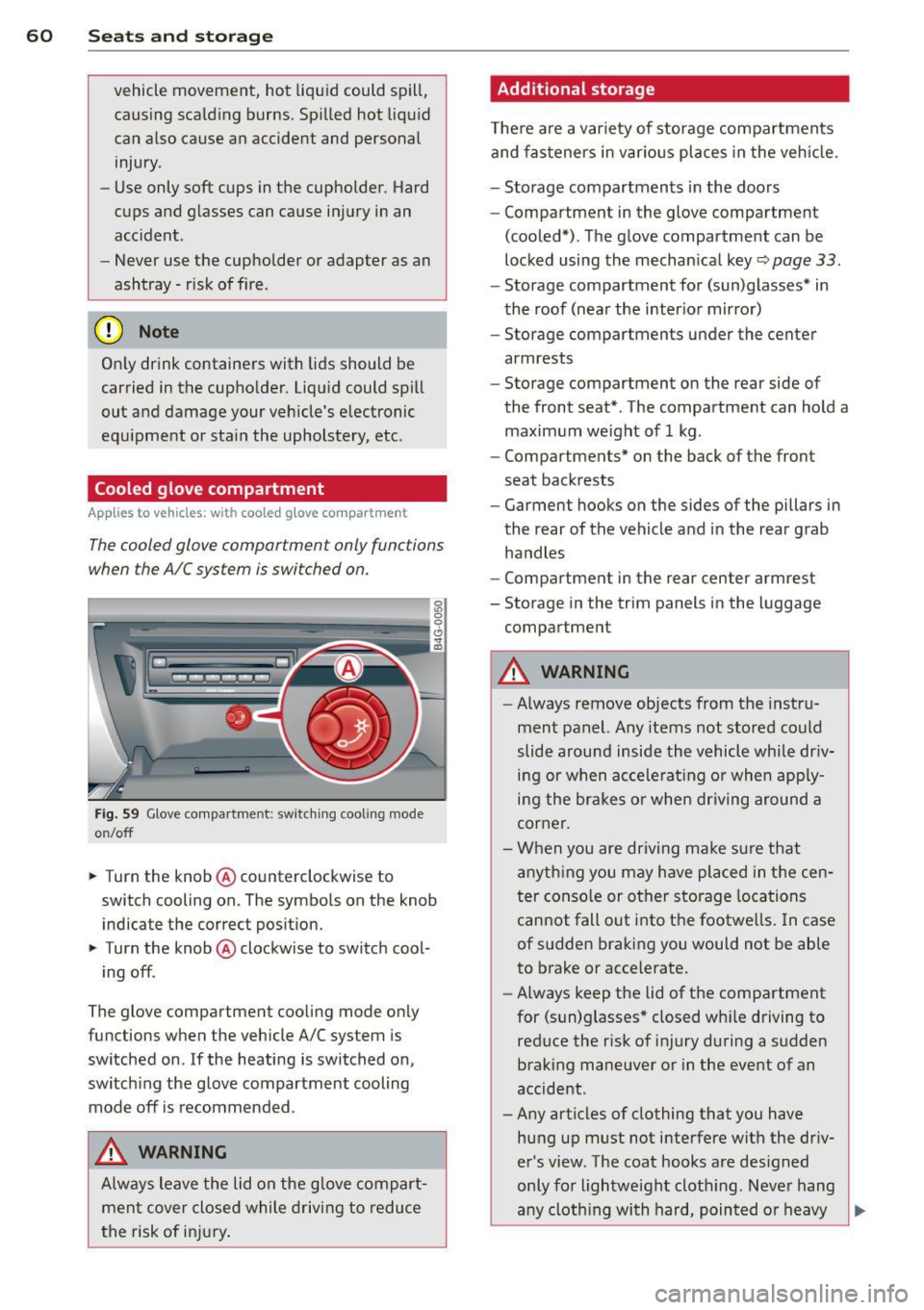
Fig. 59 Glove compa rtment: switc hin g cooling mode
o n/off
~ Turn the knob@ counterclockwise to
switch cooling on. The symbols on the knob
indicate the correct pos ition.
~ Turn the knob @ clockwise to switch cool-
ing off .
The glove compartment cooli ng mode only
functions when the vehicle A/C system is
switched on .
If the heating is switched on,
switch ing the glove compartment cooling
mode off is recommended .
_& WARNING
Always leave the lid on the glove compart
men t cover close d while driving to reduce
t he risk of in jury.
Additional storage
The re are a var iety of storage compartmen ts
and fas teners in various pl aces in the veh icle.
- Storage compartments in the doors
- Compartment in the glove compartment
(coo led*) . The glove compartment can be
locked using the mechan ical key
r::;, page 33.
- Storage compartment for (sun)glasses* in
the roof (near the interior mirro r)
- Storage compartments under the center
armrests
- Storage compartment on the rear side of
the front seat* . The compartment can hold a
maximum weight of 1 kg .
- Compartments* on the back of the front
seat backrests
- Garment hooks on the sides of the pillars in
the rear of the vehicle and in the rear grab
handles
- Compartment in the rear center armrest
- Storage in the trim panels in the luggage
compartment
_& WARNING
-
- Always remove objects from the instru
ment panel. Any items not stored could
slide around inside the vehicle while dr iv
ing or when acce le rat ing or whe n app ly
ing the brakes o r when driving around a
corne r.
- When you are driving make su re that
anyth ing you may have placed in the cen
t er conso le or other storage locations
cannot fall out into the footwe lls . I n case
of sudden braki ng you would not be able
to brake or accelerate.
- Always keep the lid of the compartment
for (sun)glasses" closed wh ile driving to
reduce the risk of i njury during a su dden
braking maneuver or in the event of an
accident .
- Any articles of clothing that you have
hung up must not interfere with the driv
er's view. The coat hooks are des igned
only for lightwe ight cloth ing. Neve r hang
-
any cloth ing with hard, pointed or heavy ..,_
Page 78 of 310

76 On the road
By pressing the I STAR T ENGINE ST OP I button
without depressing the brake peda l, the igni
tion is on and switched
off by pressing it
again .
After a cold engine is started, the re may be a
brief period of increased noise because oil
pressure must first bu ild up in the hydraulic
va lve adjusters. This is normal and not a cause
f or concern.
If the engine should not start immediately,
the starting process is automatically stopped
after a short time . Repeat starting procedure.
Start-Stop-S ystem *:
When you stop and the Start-Stop-System*
turns
off the engine, the ignition still remains
switched on.
- If you press the I STAR T ENGINE STOPI but
ton now, the ignition wi ll be switched
off.
T he engine will not start ¢ page 82 .
-Make sure tha t th e ig nit ion is swi tched off
before ex iting the vehicle.
Sw itching the ignition /engine off
automat icall y*
The fo llow ing applies to vehicles with Start
Stop -System*: to prevent the battery from
draining, the ignition and the engine wi ll
switch
off automatically under the following
conditions :
- T he vehicle has already been dr iven.
- T he d river's door is opened.
- T he driver's seat be lt is removed.
- The brake pedal is not pressed down .
- The veh icle is sta tionary.
In t his case, the activated low beam w ill be re
p laced by the side marker lights. The side
marker lights will switch
off after a certain pe
riod of time or when you lock the vehicle.
Driver m essage in the in strument clu ster
di spl ay
P ress b rake pedal to start engine
This message appears i f you press the
I S TAR T ENGINE STOP ! button to start the en
gine and do not depress the brake peda l. The engine can only be started if the brake pedal
is depressed.
!I C
o nveni ence key: I s ke y not in th e vehi
cle?
T h is message appears along with the !I sym
bol if the master key is removed from the ve
hicle with the eng ine runn ing.
It is in tended
to rem ind yo u (e.g . when chang ing dr ivers)
not to continue the journey without the mas
ter key.
If the master key is no longe r in t he ve hicl e,
yo u canno t swi tch on the igni tion after stop
ping the engine and you also cannot start the
engine again. Moreover, you cannot lock the
vehicle from the outside with the key.
Tu rn off ignition before leav ing car
This message appears if the drive r's door is
opened wh ile the ign ition is switched on. Al
ways swi tch
off the ignit io n if you a re leav ing
the vehi cle. See also ¢
page 76.
Shift to P, otherwi se vehicle can roll away.
Doors do not lock if lever is not in P .
This message appears for safety reasons
along with an audible warning tone if the P
selector lever position is not engaged when
stopp ing the eng ine with t he
I S TAR T ENGI NE ST OP I but ton. Select the P se
l ector lever posi tion. Otherwise the vehicle
could roll and it cannot be locked.
Ke y not r ecogni sed . Hold back of ke y again st
marked ar ea . See owner' s manual.
If the indicato r light turns on and this mes
sage appears, there is a malfunct ion
~ page 78.
Turn off ignition b efore leaving car
This message appears if the driver's door is
opened wh ile the ignition is switched on. Al
ways switch
off the ignit ion if you a re leav ing
the vehicle. See also ¢
page 76.
Shift to P and turn off ignition before leav-
ing car, otherwise vehicle can roll awa y
This message appears if the drive r's door is
opened while the ignition is switched on and
jll,,
Page 79 of 310
the sel ector lever is not in the P position. Shift
the s ele ctor lever into th e P position and
sw itch
off the ign ition when you ex it the vehi
cle . Otherwise the vehicle could ro ll. See a lso
¢page 76.
St eeri ng lock
The steering locks when you turn the engine
off using the I S TAR T ENGINE STOP I button
and open the d river 's door. The locked steer
ing helps prevent vehicle theft.
A WARNING
- Never allow the engine to run in confined
spaces -dange r of asphyxiation .
- Never turn
off the eng ine until the vehi
cle has come to a complete stop .
- The brake booster and power steer ing
only work when the engine is running . If
the engine is
off, you have to use more
force when steering or braking . Because
you cannot stee r and brake as you usua l
ly wou ld, this could lead to crashes and
serious injur ies.
(IT),) Note
- Avoid high eng ine rpm , full th rottle and
heavy engine loads unti l the engine has
r eached operating temperat ure -other
wise yo u risk eng ine damage.
- The eng ine cannot be sta rted by pushing
or tow ing the veh icle.
-If the engine has been under heavy load
fo r an ex tended pe riod, hea t builds up in
the engine compartment after the en
gine is switched
off -there is a risk of
damaging the engine. Allow the engine
to run at idle for about 2 m inutes befo re
switching it
off.
@ Tips
- If you open the driver's door with the ig
nitio n on, a buzzer sounds and the mes
sage
Ignition is on appears in the instru
ment cluster disp lay. Switch the ign it ion
off .
- If you leave the vehicle with t he ignit ion
switched on, the igniti on will switch
off
On th e ro ad 77
after a cer tain per iod of t ime. P lease
note that electrical eq uipment such as
exterior lights will sw itch
off as well
when that happens.
Stopping the engine
... Bri ng your ve hicle to a complete stop.
... Move the se lector lever to the P or N posi
tion .
... Press the
I STA RT ENGINE ST OP ! button
¢fig. 78 .
Emergency off
If necessary, the engine can be switched off
with the selector lever in the R or D/S posi
tion . The eng ine stops if you press the
I S TAR T ENG INE S T OPI button at speeds below
6 mph (10 km/h) and press the b rake peda l.
A WARNING
-Never turn off the en gine until the vehi
cle has come to a complete stop .
- The brake booster and p owe r stee ring
only work when the eng ine is r unning .
If
the engine is off, you have to use more
force when steering or braking. Because
you cannot steer and bra ke as you usual
ly would, this cou ld lead to crashes and
serious injuries.
- For safety reasons, you sho uld a lways
park your vehicle w it h the selector lever
in P. Otherwise, the vehicle could inad
vertently roll away .
- After the eng ine has been switched
off,
the radiator fa n can cont in ue to run for
up to 10 minutes - even with the ignition
sw itc hed
off. It can also sw itch on again
afte r some t ime if the coo lant tempera
ture rises as the resu lt of a hea t buildu p
or if the engine is hot and the engine
compa rtment is additionally heated by
the s un's rays .
(D Note
Do no t stop the eng ine immedia tely after
hard o r extended driving . Keep the engine
.
Page 80 of 310

78 On the road
running for approximately two minutes to
prevent excessive heat build-up .
Starting the engine if there is a
malfunction
It may not b e possible to start the engine un
der cer tain circumstances , for example if the
battery in the vehicle key is drained , if inter
ference is affected the key or if there is a sys
tem malfunction.
Fig. 79 C en ter console/ma ster key: startin g th e eng ine
if th ere is a mal function
Requirement : The message Key not recog
nized. Hold back of key against marked area.
See owner's manual.
must appear and the in
dicator light
II must switch on .
.,. Hold the master key vertically in the loca
tion indicated
f>l) ¢ fig . 79 .
.,. Press the brake pedal~.& in Starting the
engine on page 77.
.. Press the !~ S_ T_A_R_ T_E _N_G_I_N_ E_S_ T_O_P~I button.
T he eng ine will start.
.,. Drive to your authorized Audi dealer imme
diately to have the malfunction corrected.
{D) Tips
You can view the message again by press
ing the
!S TAR T ENGINE STOP I button.
Electromechanical
parking brake
Operation
The electromechanical parking brake replaces
the hand brake.
Fig. 80 Center co nsole: Parking b ra ke
.,. Pull on the switch (V) ¢ fig. 80 to apply the
parking brake . The indicator light in the
switch illuminates.
.,. Step on the brake pedal or the accelerator
pedal and press the switch
© at the same
time to release the parking brake. The indi
cator light in the switch goes out.
Your vehicle is equipped with an electrome
chanical parking brake . The parking brake is
designed to prevent the vehicle from rolling
unintentionally and replaces the hand brake .
In addition to the normal functions of a tradi
tional hand brake, the electromechanical
parking brake provides various convenience
and safety functions .
When starting from rest
-The integral starting assist helps you when
driving by automatically releasing the park
ing brake
~ page 79, Starting from rest .
-When starting on inclines, the starting as
sist prevents the vehicle from unintentional
ly rolling back. The braking force of the
park ing brake is not released until sufficient
driving force has been built up at the
wheels. .,,_
Page 81 of 310

Emergency brake fun ction
An emergency brake ensures that the vehicle
can be slowed down even if the
normal b rakes
fail
c::> pag e 80 , Emergency broking .
Indicat or light s
-If the par king b rake is closed w ith the igni
t ion
s wit ched on the indicator lights come
on - (USA models)/ . (Canada models)
in the instrument cluster and in the switch.
- If the par king brake is closed w ith the igni
tion
s witc hed off the indicator lights come
on - (USA models)/ . (Canada models)
in the instr ument cluster and in the switch
for about 20 seconds.
A WARNING
Do not press the accelerator peda l inadver
tently if the vehicle is stat ionary but the
eng ine is running and a gear is selected .
Otherw ise the vehicle will start to move
immediately and cou ld result in a crash .
(D Note
If the symbol . in the display or the ind i
cato r light
1111 (USA models) . (Cana
da models) in the instrument cluster flash
es , the re is a malfunction in the bra ke sys
tem. Please refer to the detai led descr ip
tion of the indicator lights ¢
page 15.
- If the indicato r light - (USA mod-
els) . (Canada mode ls) or
IIJ tu rns
on, there may be a malfunction in the
parking brake
r=> page 16.
@ Tips
-You can apply the pa rking brake at any
time -even w ith the ignition swi tched
off. The ignition must be on in order to
release the parking brake.
- Occasiona l noises when the parking
brake is applied and re leased are norma l
and are not a ca use for concern .
- When the vehicle is parked, the parking brake goes thro ugh a se lf-test cycle at
r egular intervals . Any assoc iated noises
are norma l.
On the ro ad 79
Parking
Parking
~ Stop the vehicle with the foot brake .
~ Pull the switch(®) to apply t he pa rking
bra ke .
~ Select the P se lec to r lever posit ion
r=> poge 109.
~ Turn the engine off c::> &_.
In addition on inclines and grades
~ Tu rn the steering wheel so that your vehicle
w il l roll aga inst the c urb in c ase it shou ld
s tart to move .
T he park ing brake activates automat ica lly
when you swit ch the ign ition off. This does not
happe n if you select the N selector lever posi
tion or switch the parking off with the~ but
ton before switching the ignition off .
A WARNING
-When you leave your vehicle -even if on
ly briefly -always take the ign it ion key
with you . This applies particularly when
children remain in the vehicle . Othe rwise
the children could start the engine, re lease the parking brake or operate elec
trica l equipment (e.g. power wi ndows).
There is the r is k of an accident.
- When the veh icle is locked, no one -par
ticularly not childre n should rema in in
the vehicle . Locked doors ma ke it mo re
difficult for emergency wo rke rs to ge t in
to the vehicle -putting lives at risk .
Starting from rest
The starting assist function ensures that the
parking broke is released automatically upon
starting .
Stopping and applying parking brake
~ Pull the switch(®) to apply the pa rking
bra ke .
Page 82 of 310

80 On the road
Starting and automatically releasing the
par king brake
.. When you sta rt to drive as usua l, the park
ing brake is automatically re leased and your
vehicle begins to move.
When stopping at a traffic signa l or stopping
in city traffic, the parking brake can be ap
plied. The veh icle does not have to be held
with the footbrake. The parking brake elimi nates the tendency to creep with a drive range
engaged . As soon as you dr ive off as usual,
the park ing brake is released automatically
and the veh icle sta rts to move .
Starting on slopes
When starting on inclines, the starting assist
prevents the vehicle from unintentionally roll
ing back . The braking force of the parking
brake is not released until sufficient dr iving
fo rce has been bu ilt up at the whee ls.
(D Tips
For safety reasons, the park ing brake is re
leased automatically only when the dr iv
er 's safety belt is engaged in the buck le.
Starting off with a trailer
To prevent rolling back unintentionally on an
incline, do the following:
.. Keep the switch
accelerator. The park ing brake stays applied
and prevents the vehicle from rolling back
ward.
.. You can release the switch
C®l once you are
sure that you a re developing enough for
ward momentum at the wheels as you de
press the accelerator .
Depending on the weight of the rig (vehicle
and trai ler) and the seve rity of the incline, you
may roll backwards as you start. You can pre
vent rolling backwards by holding the parking brake switch(®) pulled out and accelerating -
just as you would when starting on a hill with a conventional hand brake .
Emergency braking
In the event that the conventional brake sys
tem fails or locks .
.. In an emergency, pull the switch C®l and
con tinue to pull it to slow your vehicle down
w ith the park ing brake.
.. As soon as you release the switch (®) or ac-
celerate, the brak ing process stops.
If you pull the switch C®l and hold it above a
speed of about 5 mph (8 km/h), the emergen
cy brak ing funct ion is initiated . T he vehicle is
braked at all fou r whee ls by activating the hy
draulic brake system. The brake performance
is similar to making an emergency stop~&. .
In order not to act ivate the emergency brak
ing by mis take, an audib le warning tone (buz
zer) sounds whe n the switch(®) is pulled . As
soon as the sw itch C®l is released , or the accel
erator pedal is depressed, emergency braking
stops.
_& WARNING
-Emergency braking should only be used in
an emergency, when the normal foot brake
has failed or the brake pedal is obstructed.
Using the parking brake to perform emer
gency braking will slow your veh icle down
as if you had made a full brake application .
The laws of physics cannot be suspended
even with ESC and its associated compo
nents (ABS, ASR, EDL) . In corners and
when road or weather conditions are bad,
a full brake application can cause the vehi
cle to skid or the rear end to break away -
risking an accident.
Start-Stop-System
Description
Applies to vehicles: with Start -Stop -System
T he Start -Stop-System can help increase fuel
economy and reduce CO 2 emissions.
In the Start-Stop-mode, the engine shuts off
automat ically when the veh icle is stopped,
such as at a traffic light. The ignition remains .,.
Page 83 of 310

switched on during this stop phase. The en
gine will be automatically restarted when
needed.
The last Start-Stop-System setting (on/off us
ing the button
I CAJ ,.I) will be restored when the
ignition is turned on. The LED in the
l@ "'I but
ton turns on when the Start -Stop-System is
switched off manually.
Basic requirements for the Start-Stop
mode
- The driver's door is closed .
- The driver' seat belt is latched.
- T he hood is closed.
- The vehicle must have been driven faster
than 2.5 mph (4 km/h) since the last stop .
- A tra iler is not hitched to the vehicle.
_&, WARNING
-Never let the vehicle roll with the engine
switched off. You could lose contro l over
the vehicle . This can lead to a collision
and serious injuries .
- The brake booster and the steering sup
port do not work wh ile the engine is
switched off. More force is required to
stop and to steer the vehicle .
- To reduce the risk of injuries, make sure
that the Start-Stop-System is turned off
when working in the engine compart
ment c:>page
82.
(D Note
Always switch off the Start-Stop -System
when driving through water¢ page
82.
On the road 81
Starting/stopping the engine
Applies to veh icles: w it h Sta rt-Stop -System
Fig. 81 Inst rument cluster: en g in e sw itched off (stop
p hase)
~ Slow the veh icle to a stop using the brake
and keep pressing the brake pedal. The en
gine w ill switch off. The
[I] i ndicato r light
appears in the information line in the instru
ment cluster display.
~ When you take your foot off the brake ped
al, the engine restarts . The indicator light
turns off.
Additional information
The eng ine will switch off in the P, D, N and S
positions as well as in manua l mode. In the P
position, the engine will also remain off if you
take your foot off the brake pedal. The engine
starts again when you select another selector
lever position and take your foot off the brake
pedal.
If you select the R position during a Stop
phase, the engine will start again .
Shift from D to P quickly to prevent the engine
from starting unintentionally when shifting
through R.
You can determine for yourself if the engine
will stop or not by reducing or increasing the
amount of force you use to press the brake
pedal. For example, if you only lightly press
on the brake pedal in stop-and and-go traffic
or when turn ing, the engine will not switch off
whe n the vehicle is stationary. As soon as you
press the brake down ha rder, the engine will
switch off.
lill>
Page 84 of 310

82 On the road
@ Tips
When you stop and the start-stop-system
turns the engine off, the ignition remains
on. Make sure that the ignition is switched
off before exiting the vehicle.
General information
Applies to vehicles: with S tart-Stop -System
The standard Start-Stop-mode can be cancel
led for different system-related reasons .
Fig. 82 Instrument cluster: eng ine-Stop tempo rar ily
unavai lable
Engine will not switch off
Before each stop phase, the system checks if
certain conditions have been met. For exam
p le, the engine will
not be switched off in the
following situations:
- The engine has not reached the minimum
r equired temperature for Start-Stop -mode .
- T he interior temperature selected by the A/C
system has not been reached .
- T he outs ide temperature is extremely h igh/
low .
- T he w indshield is being defrosted
9page 70, 9page 72.
- The pa rking system* is switched on.
- The battery charge level is too low .
- The steering wheel is sharply turned or there is a steering movement.
- After engaging the reverse gear.
- On sharp inclines .
The
r,J indicator light appears in the informa
tion line in the instrument cluster disp lay
9 fig. 82.
Engine automatically restarts
The stop phase is interrupted in the following
situations, for example. The engine restarts
without any action by the driver.
- The inte rior temperature varies from the
temperature selected in the A/C system.
- The windsh ield is being defrosted
9 page 70, 9page 72.
-The brake pedal is pressed severa l times in a
row.
- The battery charge level becomes too low .
- High power consumption .
@ Tips
If you shift into the D, Nor S posit ions af
ter shifting into reverse, the vehicle must
be driven faster than 6 mph (10 km/h) in
o rd er for the engine to switch off aga in.
Switching the Start-Stop-System on/off
manually
Appl ies to vehicles : wi th Start-S top-Sys te m
If you do not wish to use the system, you can
switch it off manually.
Fig. 83 Center console: Start-Stop-System button
.,. To switch the Start-Stop -System off/on
manually, press the
! iiil ~·I button. The LED in
the button turns on when the system is
switched off.
(D Tips
If you switch the system off during a stop
phase, the engine will start again auto
matically.
Page 86 of 310
84 On th e road
The stored speed and the ind icator light
A;(l)~i~ (US mo dels) 1,'I (Canadian mode ls) a p
pea r in the instrument cluster d isp lay
c::> fig. 85. The display may vary, depending on
the type of d isplay in your vehicle .
This informat ion is also shown briefly in t he
Head -up Display*.
The speed is kept constant v ia an engine o ut
put adjustment or active b rake intervention.
A WARNING
- Always pay attention to traffic even when
the cruise control is switched on. You are
always responsible for your speed and
the distance between your vehicle and
other vehicles .
- For safety reasons, the cruise control
should not be used in the city, in stop
and-go traff ic, on twist ing roads and
when road conditions are poor (such as ice , fog, gravel, heavy ra in and hydro
planing) -risk of accident.
- Turn
off the cruise control temporar ily
when entering turn lanes, highway exit lanes or in construc tion zones.
- Please note that inadvertently "rest ing"
yo ur foot on the accelerator peda l causes
the cruise control not to brake . T his is
because the cr uise control is overridden
by the d river's acce leration .
- If a brake system malfunction such as
overheating occurs when the cruise con
tro l system is switched on, the braking
function in the system may be switched
off. The other cruise control functions re
ma in active as long as the indicator light
[~;rn~i~ (US models) !Ill (Canad ian mod
els) is on .
(j) Tips
The brake lights illuminate as soon as the
brakes decelerate automat ica lly.
Changing speed
Applies to veh icles: w ith cru ise control
., To increase/decrease the speed in inc re
ments, tap the lever in the
0 10 direction
c::> fig . 84
., To increase/decrease the speed quick ly,
hold t he lever in the
0 10 direction until
the desired speed is displayed.
You can also press the accelerator pedal down
to increase your speed, e.g . if you want to
pass someone . The speed you saved earlier
will res ume as soon as you release the acceler
ator pedal.
If, however, you exceed your saved speed by
6 mph (10 km/h) for longer than 5 m inutes,
the cr uise control wi ll turn
off temporari ly.
The green symbol
A;(l)~i~ (US mode ls) 1,'I
(Canadian mode ls) in the display will go out
but the saved speed rema ins the same .
Presetting your speed
Applies to veh icles : w ith cru ise control
You can preset your desired speed while the
vehicle is not moving.
., Switch on the ignition.
., Pull lever into position
(D c::> fig . 84.
., Press the lever in the 0 or 0 direction to
increase or decrease your speed .
., Release the lever to save that speed .
This function makes it possible, for examp le,
to save the speed you want before dr iving on
the h ighway. Once on the h ighway, act ivate
the cru ise control by pulling the lever toward
(D .
Switching the system off
Applies to veh icles: w ith cruise control
Temporary deactivation
., Press the b rake pedal, or
., Press the leve r into posi tion @(n ot clicked
into place)
c::> fig. 84, or
... Drive for longer t han 5 min utes at more
than 5 mph (10 km/h) above the stored
speed.
Page 91 of 310
Audi adaptive cruise control and braking guard 89
the tachometer @and is also shown briefly
in the display @¢
fig. 91 .
.. You must also press the brake peda l when
the vehicle is stopped.
Switching adaptive cruise control off
.. Push the lever away from you into position
@ until it clicks into place. The message
ACC off appears.
@ Indicator lights
ra 1 -Adaptive cruise control is switched on. No
vehicles are detected up ahead . The stored
speed is ma intained.
I -A moving vehicle is detected up ahead .
The adaptive cruise control system regulates
the speed and distance to the moving vehicle
ahead and acce lerates/brakes automatical ly.
fa) -Adaptive cruise control is switched on. A
moving vehicle up ahead was detected. Your
ve hicl e remains stopped.
I -When automat ic braking is not able to
keep enough distance to a previously detected
moving vehicle up ahead, you must take con
trol and brake¢
page 91, Prompt for driver
intervention.
© Display
If adaptive cruise control is not shown in the
disp lay, you can call it up with the multifunc
tion steering wheel buttons ¢
page 23.
Based on the symbols in the d isplay, you can
determine if the system is maintaining a dis
tance to the vehicle ahead and what that d is
tance is.
No vehicle -No veh icle ahead was detected .
White vehicle -A vehicle ahead was detected.
Red vehicle -Prompt for the driver to take ac
tion ¢
page 91.
Both arrow s on the scale© indicate the dis
tance to the vehicle ahead. No arrow appears
when the vehicle is on an open road and there
is no object ahead . If an object is detected
ahead, the arrow moves on the scale . The
green zone on the scale shows the stored
distance. For information on changing the
stored distance, refer to ¢
page 90 . If the
distance selected is too close or may soon be
come too close, the arrows move into the red
zone on the sca le .
A WARNING
Improper use of the adaptive cruise con
trol can cause collisions, other accidents
and serious personal injur ies .
- Pressing the
!SET ! button when driv ing at
speeds below
20 mph (30 km/h), will au
tomatically accelerate the vehicle to
20
mph (30 km/h), which is the minimum
speed that can be set.
(D Tips
-If you switch the ignit ion or the adaptive
cruise control off, the set speed is erased
from the system memory.
- You cannot switch the Electronic Stabili
zation Control (ESC) to the SPORT mode
when adaptive cruise control is switched
on.
Changing the speed
Applies to vehicles: with Aud i adapt ive crui se control
0
f
• 0
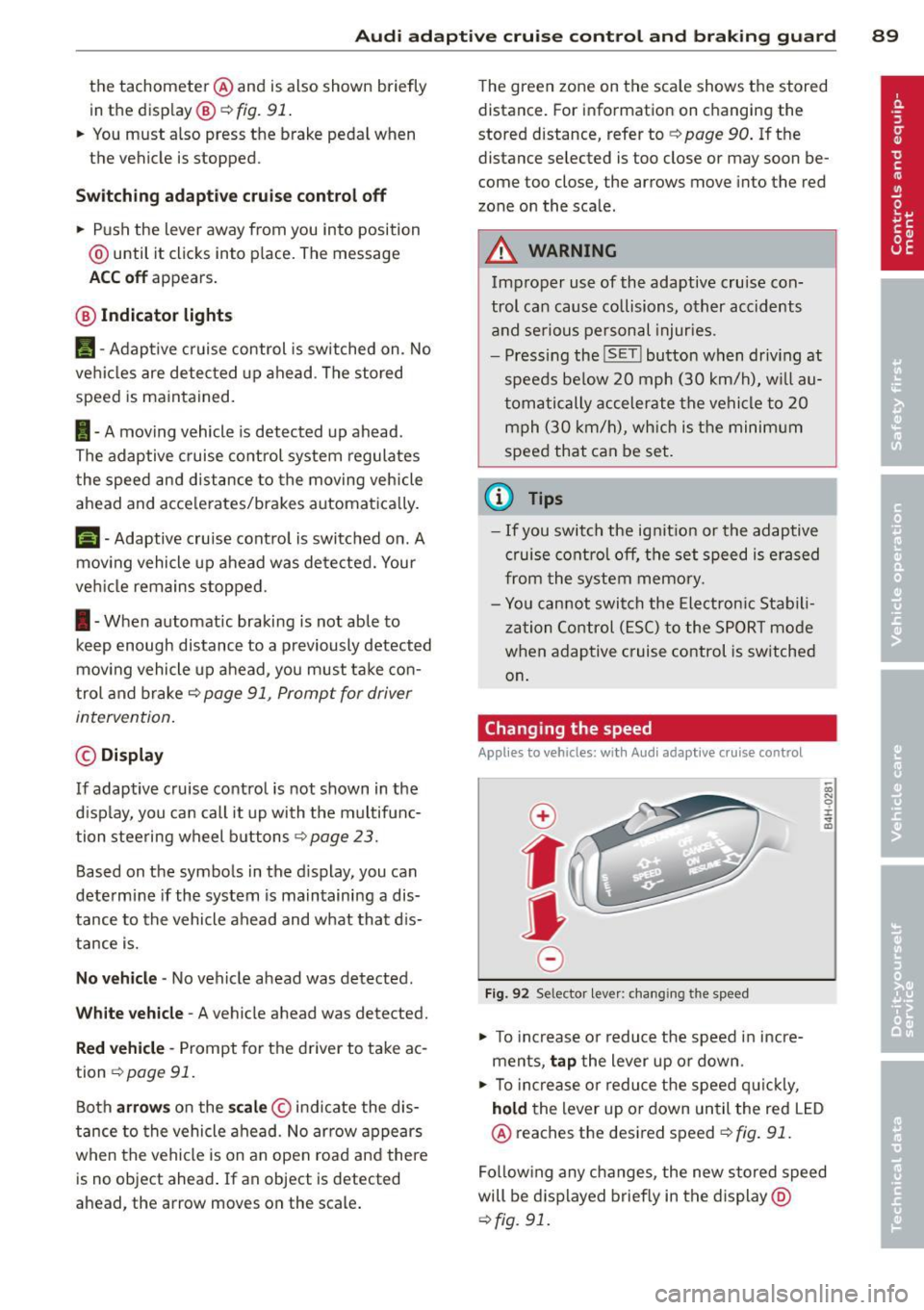
Fig. 92 Selector lever: changing the speed
.. To increase o r reduce the speed in incre
ments,
tap the lever up or down.
-0:, N 0 ± ... a)
.. To incr ease o r reduce the speed quickly,
hold the lever up or down until the red LED
@ reaches the desired speed
¢fig. 91.
Following any changes, the new stored speed
will be displayed briefly in the display @
¢fig. 91.