service AUDI A7 2016 Owner's Manual
[x] Cancel search | Manufacturer: AUDI, Model Year: 2016, Model line: A7, Model: AUDI A7 2016Pages: 294, PDF Size: 73.82 MB
Page 101 of 294

M N <( I.J "". rl I.O
"' N I.O rl
-Improper reliance on the side assist system
can cause collisions and serious personal in
jury:
- Never rely only on side assist when chang
ing lanes .
- Always check rear view mirrors to make
sure that it is safe to change lanes.
- Sid e assist cannot detect a ll vehicles under
all conditions- danger of accident!
- Please note that side assist indicates there
are approaching vehicles, or vehicles in your
blind spot, only after your vehicle has
reached a driving speed of at least 19 mph
(30 km/h).
- In certain situations, the system may not
function or its function may be limited. For
example:
- if vehicles are approaching or being left
behind very quickly. The display may not
turn on in time.
- in poor weather conditions such as heavy
rain, snow or heavy m ist .
- on very wide lanes, in tight curves or if
there is a rise in the road surface . Vehicles
in the adjacent lane may not be detected
because they are outside of the sensor
range.
(D Note
The sensors can be displaced by impacts or damage to the bumper, wheel housing and
underbody. This can affect the system . Have
your authorized Audi dealer or authorized
Audi Service Facility check their function.
(D Tips
-If the window g lass in the driver's door or
front passenger's door has been tinted, the
display in the exterior mirror may be misin
terpreted.
- For Declarat ion of Compliance to United
States FCC and Industry Canada regulations
c:>page277 .
Audi side assist
Switching on and off
Applies to vehicles: wit h Audi side ass ist
Fig. 108 Driver 's door : side assist button
" Press the c:> A in General information on
page 98
button to switch the system on and
off. The LED in the button turns on when side
assist is switched on .
Adjusting the display brightness
Applies to vehicles: wit h Audi side ass ist
The display brightness can be adjusted in the In
fotainment system .
.,. Select: the I CAR I function button > (Car)* Sys
tems
control button > Driver assistance > Audi
side assist .
The display brightness adjusts automatically to
the brightness of the surroundings, both in the
information and in the warning stage. In very
dark or very bright surroundings, the display is al
ready set to the m inimum or maximum level by
the automatic adjustment. In such cases, you
may not ice no change when adjusting the bright
ness, or the change may only be noticeable once
the surroundings change.
Adjust the br ightness to a level where the display
in the info rmation stage will not disrupt your
view forward. If you change the brightness, the
display in the exterior mirror will briefly show the
brightness level in the information stage . The
brightness of the warning stage is linked to the
brightness in the information stage and is adjust
ed along with the information stage adjustment.
Ill>
99
Page 108 of 294

Night visio n ass is t
- Night vision assist may not detect people or
wild animals and mark them if
- they are not in an upright position, for ex
ample if they are sitt ing or ly in g down
and/or
- the silhouette in the display appears in
comp lete or interrupted, for example be
cause the person is pa rtially covere d by a
veh icle or an animal by tall grass. This
could increase the risk of an accident.
- Never try to swerve around an imals if do ing
so wi ll endanger you or other road users, be
cause this increases the risk of an acc ident.
- E ven though the system eva lu ates the
shape and hea t given off by all detec ted ob
j ects, there are lim its to the system . There
may be false warnings .
- F or technica l reasons, the image pauses in
sp lit second interva ls.
Switching on/off
Applies to veh icles: w ith night vision assist
F ig. 11 5 Area arou nd t he ligh t switc h: n ig ht vis ion assist
butto n
Requirement : Switc h the ignition on and turn the
light switch to the
AUTO posit ion or .
.,. Press the~ button ¢
fig. 115. The heat image
from the night v is ion camera appears in the in
strument cluster d isplay .
.,. Press the~ button again to sw itch night vision
ass ist off .
If cond it ions are br ight enough, night v ision as
sist can be sw itched on without mov ing the light
switch to the
AUTO position . Pedestrian and w ild
106
anima l highl ighting and wa rnings are only active
whe n it is dark outside and the headlights are
switched on .
Adjusting the contrast
Applies to vehicles: with night vision assist
.,. Select: the I CARI function button > (Car )* Sy s
tem s
control button > Driver ass istan ce >
Night vi sion ass ist contrast .
When the night vis ion assist is switched on and
the image is v is ible in the instrument cluster dis
play, you can adjust the contrast in the image
from
Min to Ma x.
Driver messages
Applies to vehicles: with night vision assist
Night vision a ssis t: Sy stem fault
The system cannot guarantee cor rect function
and is switched off . See an authorized Audi dealer
or a uthorized Audi Service Facility for ass istance.
Night vis ion a ssist: Currentl y una vailable
The system cannot gua rantee cor rect function
temporar ily and is switched off .
Night vision a ssis t: Only available at night with
lights tu rned on
Night vision assist only works when it is da rk out
s ide and the headlights a re on.
Night vi sion a ssi st: Ped estrian marking current
l y unavailab le
The pedestrian and wild animal h ighlighting was
switched off by the system.
Page 114 of 294
Automatic transmi ssion
DYNAMIC driving mode in drive select
¢page 102 .
• Press the brake pedal firmly with your left food
and hold it all the way down for at le ast 1 sec
ond.
• At the same time, press the gas peda l all the
way down w ith your r ight foot u ntil the engine
reaches and stays at a high R PM level.
• Remove your foot from t he b rake pedal w it hi n 5
seconds ¢,& .
A WARNING
-Always adapt you r driving to the traffic f low.
- Only use the La unch control program when
road and t raff ic condi tions a llow i t and oth
er drivers wi ll not be endangered or both
ered by yo ur driving and t he ve hicle's acce l
eration.
- Please note that the dr ive whee ls can sp in
and the vehicle can brea k away w hen spo rt
mode is switched on, especially when the
road is slippery.
- Once the vehicle has started moving, press
the
I .$ O FF l button briefly to turn the sport
mode off.
(D Tips
- The t ransmission tempe ratu re may inc rease
significantly after using the launch control
program. If that happens, the program may
not be available for a few minutes. It will be
ava ilable again after a coo l-down period .
- When accelerat ing using the launch contro l
program, all vehicle pa rts a re subject to
heavy loads. This can lead to increased wear .
Transmission malfunction
DD Transmission : Please press brake pedal and
s el ect gear again .
Press the brake pedal and se lect the desired se
lecto r leve r posit io n aga in . Yo u can then continue
d riving.
[O] Transmiss ion overhe ating: Please drive con
servativ ely.
112
The transm ission temperat ure has inc reased s ig
nificantly d ue to the sporty driving manner. Drive
i n a less sporty manne r until the temperature re
turns to the normal range and the indicator light
switches of.
DD Transmission malfunction: you can continue
driving
The re is a system mal func tion in the t ransm is
s ion . You may contin ue driving . Drive to yo ur au
thorized Audi dea ler or a uthorized Audi Se rvice
Fac ility soon to have the ma lfunction corrected.
DD Trans mission malfun ction : You can continue
driving with limited functionality
There is a system malfunct ion in the t ransm is
s io n. The t ransm ission is swi tching to eme rgency
mode. This mode on ly shifts in to cer tain gears or
will no longer shift at al l. The engine may stall.
D rive to an authorized A udi dealer o r authorized
Audi Service Facility immed iate ly to have the
malfunction corrected.
DD m Trans mission malfunction: No reverse
gear. You can continue driving
S tronic tra nsmission: The re is a system malfunc
tion in the tr ansmission . Th e transmission is
swi tching to emergency mode. This mode on ly
shifts into certain gears or will no longer shift at
a ll. The eng ine may stall. Yo u cannot engage the
r everse gea r. Drive to an aut hori zed Aud i dea ler
or a uthori zed Audi Service Facility immedia tely to
have the malfunct ion corrected .
DD Transmission malfunction: Stop veh icle and
shift to park.
Do not con tinue driving . Se lect the P selector lev
e r position and see an authorized A udi dealer or
a utho riz ed Aud i service facility for assistance .
([) Note
If the transmission has switched to eme rgen
cy mode, drive to you r aut ho rize d Aud i dea le r
i mmediately to have the ma lf u nction co rrect
ed.
Page 118 of 294

Parking systems
Rearview camera
Introduction
Applies to vehicles: with rearview camera
, I
F ig. 123 Illustration: cross parking
Fig. 124 Illustrat ion: parallel park ing
The rearview camera gives you two views : You can
use
cross parking for examp le, to park in a park
ing space or in a garage
r::;, fig . 123. You can use
parallel parking if you would like to park on the
side of the road
r::;, fig. 124 .
General information
Appl ies to vehicles : with rearview camera
F ig. 125 Area covered (D and area not covered @by the
rearv iew camera.
116
Fig. 126 Luggage compartment lid: Locat ion of the rear
view came ra
N Cl)
"' 9 CJ ... m
The rearview camera is located above the rear li
cense p late bracket. Make sure that the lens for
the parking system
¢ fig . 126 is not covered by
deposits or any other obstructions because this
can affect the function of the parking system. For
information on cleaning, refer to
r::;, page 205.
The rearview camera coverage area includes ©
r::;, fig. 125. Only this area is shown in the Info
ta inment display . Objects that are outside of th is
area @are not displayed .
The accuracy of the orientation lines and the blue
surfaces is reduced if the adaptive air suspen
s ion* is faulty, if the veh icle is lifted or if the
Dy
namic mode is activated r::;, page 101.
&_ WARNING
-Always read and follow the applicable warn
ings
c::> .& in General information on
page 114.
-If the position and the installation angle of
th e rearview camera was changed, for exam
ple, after a collis ion , do not continue to use
the system for safety reasons. Have it
checked by your Audi dealer or authorized
Aud i Service Facility.
- Only use the rearv iew camera to assist you if
it shows a good, clear picture. For example,
the image may be affected by the sun shin
ing into the lens, dirt on the lens or if there
is a defect.
- Use the rearv iew camera only if the luggage
compartment lid is comp letely closed. Make
sure any objects you may have mounted on
the luggage compartment lid do not block
the rearview camera.
Page 143 of 294
M N <( (.J
'SI: ,...., \!) ..,.,
N \!) ,....,
~ Push the loop-aro und fittings up ¢ fig. 156 @,
or
~ squeeze together the (D button, and push the
loop-around fittings
do wn@ .
~ Pull the belt to make sure that the upper at
tachment is properly engaged.
A WARNING
Always read and heed all WARNINGS and oth
er important information
¢ page 137.
With the front seats, the height adjustment
of the seat can also be used to adjust the po
sition of the safety belts.
Improperly worn safety belts
Incorrectly positioned safety belts can cause se
vere injuries .
Wearing safety be lts improperly can cause seri
ous injury or death. Safety belts can on ly work
when they are correct ly posit ioned on the body .
Imp roper seat ing posit ions reduce the effective
n ess of safety belts and will even inc rease the risk
of inju ry and death by moving the sa fety be lt to
cr it ica l areas of the body. Improper seat ing posi
tions also increase the risk of ser ious injury and
deat h when an airbag deploys and stri kes an oc
cupant who is not in t he cor rect seating posit ion .
A driver is responsible for the safety of all veh icle
occupants and espec ially for children. Therefore :
~ Never permit anyone to ass ume an inco rrect sit-
t ing position in the vehicle while trave ling
¢ ,& .
A WARNING
Imprope rly worn safety belts increase the risk
of serious personal injury and death whe never
a vehicle is be ing used.
- Always make sure that al l vehicle occupants
are co rrectly restrained and stay in a cor rect
sea ting pos it ion whenever the veh icle is be
ing used.
- Always read and heed all WARNI NGS and
ot her important i nfo rmat ion
¢page 137 .
Safety bel ts
Belt tensioners
How safety belt pretensioners work
In front, side and rear-end collisions above a
particular severity and in a rollover, safety belts
are tensioned automatically.
Reversible safety belt tensioners
The safety belts on the front seats are eq uipped
with power reversib le tensioners. The fo llow ing
funct ions are availab le when the driver's/front
passenge r's safety belts are fastened:
- Automatic tens ioners : at the start of a drive,
the safety belts automat ica lly adjust to the
passenger after a certain time per iod or vehicle
speed. To sw itch the automat ic tensioners off,
s e lect the following in the MMI:
!CA RI fu nction
button
> (Car )* systems > Vehicle s etting s >
Seats > Driver's seat or Pass enger' s seat > Au
tomatic belt ten sioner
> Off .
- In ce rtai n dr iv ing s ituations, the safety belts
may tighten w ith a revers ible tens ion ing f unc
t ion
¢ page 185.
-The s afety be lt s may also t igh ten wi th th is re-
versible tens ion ing funct ion in m inor collisions.
Pyrotechnic safety belt pretensioners
The safety belts are equ ipped with safe ty belt
pretensioners . The system is act ivated by se nsors
i n front, side and rea r-e nd coll is ions of great se
ver ity and in a ro llover. This tig htens the belt and
ta kes up belt slack¢ .&.
in Service and disposal of
safety belt pre tensioner on page 14 2.
Taking up
t h e slack he lps to reduce forward occupa nt
movement during a collision.
A WARNING
- It is poss ible for the pretens ioners to deploy
incorrectly.
- The pyrotechnic system can only provide protection for one coll is ion. If the pyrotech
n ic pretensioners deploy, the pretens ion ing
sys tem must be replaced .
(1) Tips
The pyrotechnic safety be lt pretensioners can
o nl y dep loy once . .,.
141
Page 144 of 294
Safe ty belt s
- The safety belt pretensioners do not deploy
in minor frontal and side collisions, in rear
end collisions, in rollovers and in collis ions
invo lv ing very little impact force.
- A fine dust is released when the pyrotechnic
safety be lt pretensioners dep loy. This is nor
mal and is not caused by a fire in the vehi
cle.
- The relevant safety requirements must be observed when the vehicle or components
of the system are scrapped . A qualified
dealersh ip is familiar with these regulations
and will be p leased to pass on the informa
tion to you.
- Be sure to observe all safety, environmental
and othe r regulations if the vehicle or indi
v idual parts of the system, particularly the
safety be lt or a irbag, are to be disposed. We
r ecommend you have your autho rized Aud i
dealer perform this service for you .
Service and disposal of safety belt preten
sioner
The safety be lt pretensioners are parts of the
safety belts on your Audi . Installing, removing ,
servicing or repa iring of belt pretens ioners can
damage the safety belt system and prevent it
from working correctly in a co llision.
There are some important things you have to know to make sure that the effect iveness of the
system w ill not be impaired and that d isca rded
components do not cause injury or pollute the
env ironment.
_& WARNING
-
Imprope r care, servicing and repair proce
dures can increase the risk of personal injury
and death by preventing a safety belt preten
sioner from activating w hen needed or acti
vating it unexpectedly :
- The be lt pretensioner system can be activat
ed only once .
If belt pretensioners have
been act ivated, the system must be re
placed .
- Never repa ir, adjust, or change any parts of
the safety be lt system .
142
-Safety belt systems including safety belt
pretens ioners cannot be repa ired. Spec ial
procedures are required for remova l, instal
lation and disposal of this system.
- For any work on the safety belt system, we
strongly recommend that you see your au
thorized Audi dealer or qualified technician
who has an Audi approved repair manual, train ing and spec ial equ ipment necessary .
@ For the sake of the environment
Undeployed airbag modules and pretension
e rs might be classified as Perchlorate Material
-special handling may apply, see
www .dtsc.ca.gov/hazardouswaste/perchlo
r ate. When the vehicle or pa rts of the re
straint system incl uding airbag modules safe
ty belts w ith pretens ioners are scrapped, all
applicable laws and regulations must be ob
served . Your a uthorized Audi dealer is familiar
with these requirements and we recommend
that you have your dea ler perform this serv ice
for you.
Page 161 of 294
M N <( I.J "". rl I.O
"' N I.O rl
@ For the sake of the environment
Undeployed airbag modu les and pretension
ers might be classified as Perchlorate Mater ial
- special handling may apply, see
www.dtsc.ca.gov/hazardouswaste/perchlo
rate. When the vehicle or parts of the re
straint system including airbag modules and
safety belts w ith pretens ioners are scrapped,
all applicable laws and regulations must be
observed. Your authorized Audi dealer is fa
miliar with these requirements and we recom
mend that you have your dealer perform this
service for yo u.
Other things that can affect Advanced
Airbag performance
Changing the vehicle's suspension system can
change the way that the Advanced A irbag System
performs in a crash. For example, using tire-rim
comb inat ions not approved by Audi, lowering the
vehicle, changing the stiffness of the su spension,
including the springs, suspension struts, shock
absorbers etc . can change the forces that are
measured by the airbag sensors and sent to the
e lectronic control un it. Some suspension changes
can, for example, increase the force levels meas
ured by the sensors and make the airbag system
deploy in crashes in which it would not deploy if
the changes had not been made . Other kinds of
changes may reduce the force levels measured by
the sensors and prevent the airbag from deploy
ing when it should.
_& WARNING
Changing the vehicle's suspension including
use of unapproved tire-rim combinations can
change Advanced Airbag performance and in
crease the risk of ser ious personal injury in a
crash.
- Never install suspens ion components that
do not have the same performance charac
teristics as the components originally instal
led on your veh icle.
- Never use tire-rim combinations that have
not been approved by Audi.
Airbag system
Knee airbags
Description of knee a irbags
Applies to vehicles: with knee airbags
The knee airbag system can provide supplemen
tal protection to properly restrained front seat
occupants .
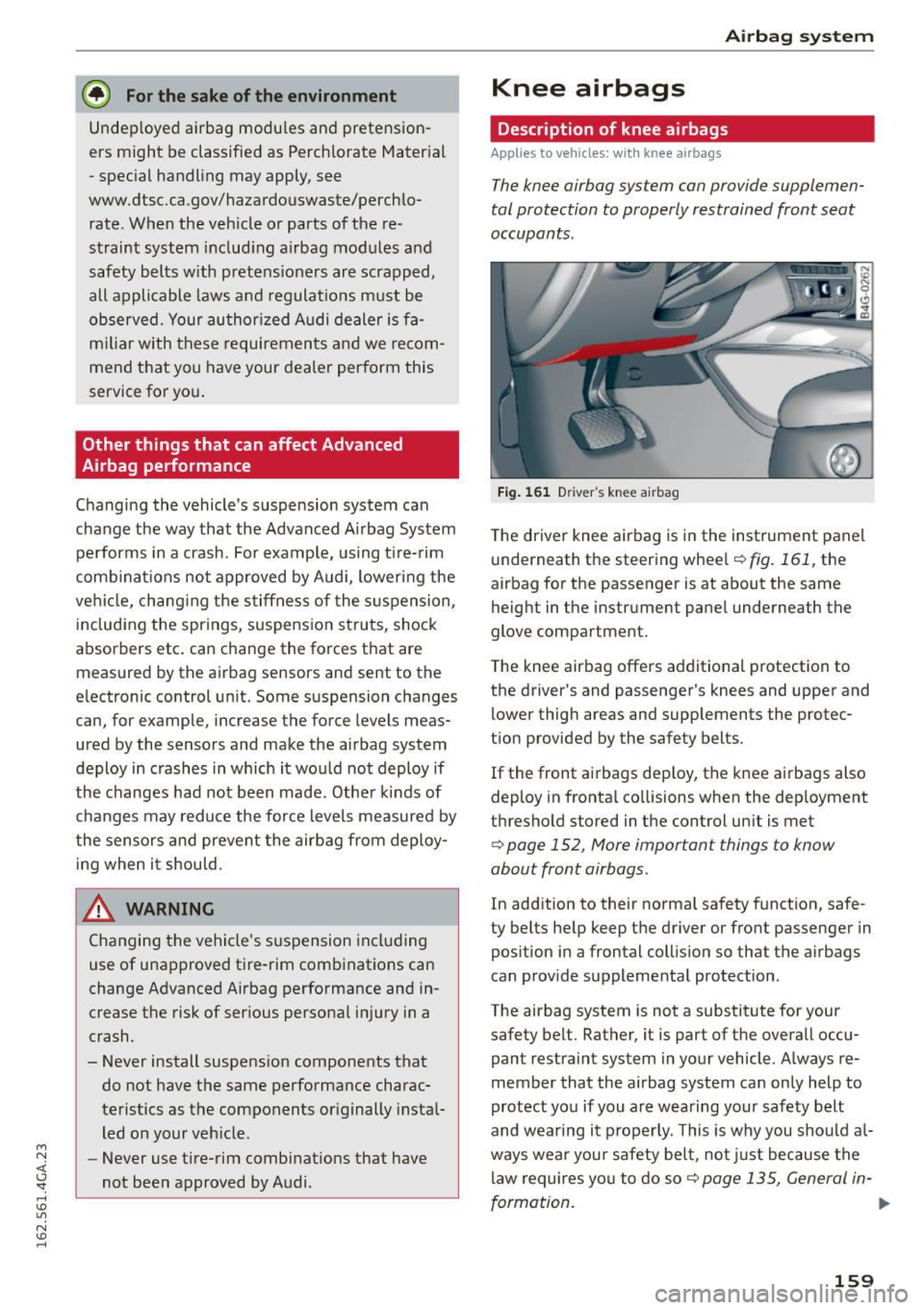
Fig. 161 D river 's knee a irbag
T he driver knee airbag is in the instrument panel
underneath the steering wheel
¢fig.161, the
airbag for the passenger is at about the same
height in the instrument panel underneath the
glove compartment.
The knee airbag offers additional protection to
the driver's and passenger's knees and upper and
lower thigh areas and supplements the protec
tion provided by the safety belts.
If the front airbags dep loy, the knee airbags also
deploy in frontal collisions when the dep loyment
threshold stored in the control unit is met
¢ page 152 , More important things to know
about front airbags .
In addition to their normal safety function, safe
ty belts help keep the driver or front passenger in
position in a frontal collision so that the airbags
can provide supplemental protection .
The airbag system is not a substitute for your
safety belt . Rather, it is part of the overall occu
pant restraint system in your vehicle. Always re
member that the airbag system can only help to
protect you if you are wearing your safety belt
and wearing it properly. This is why you should a l
ways wear your safety belt, not just because the
law requires you to do so¢
page 135, General in-
formation .
IJI>
159
Page 187 of 294
M N <( (.J
'SI: ,...., \!) 1.1'1
N \!) ,....,
Audi pre sense Preventative passenger
protection
App lies to veh icles: with Audi p re se nse
Pre sense can initiate steps to protect veh icle oc
cupa nts in certain dangerous situations. The
functions descr ibed a re ava ilable depending on
ve hicle equ ipme nt:
Pre sense ba sic*
The fo llow ing funct ions can be triggered in cer
tain driving situations:
- Tensioning of the safety be lts (for example,
during heavy b raking) : The front safety belts
have revers ib le be lt pretensioners. If a collision
does not occur, the safety belts loosen sli ght ly
and are ready to trigger aga in.
- Clos ing the windows and the sunroof* (for ex
amp le, when over- or understeering): The door
windows and the sunroof* are closed almost
completely until o nly a sma ll gap is open .
Audi pre sense basic functions can be triggered at
speeds above 20 mph (30 km/h).
Drive se lect: The deployment time is adapted in
Dynamic mode .
Pre sense front (vehicles with adaptive cruise
control* }
Pre sense front contains the functions of pre
sense basic . In add ition, the likelihood of a rear
end collis ion with the vehicle ahead is also calcu
lated, within the limits of the system. If the risk
of a collision is detected, the following functions
can trigger:
- Brak ing guard
¢ page 91
-Tensioning of the safety be lts
- Closing the w indows and the sun roof*
Pre sense rear (v ehicles with side assist* }
Pre sense rea r contains the funct ions of pre sense
bas ic. I n addit io n, the li kelihood of a rea r-end
coll is ion from the veh icle behi nd is also calc ulat
ed, w it hi n the lim its of the system. If the risk of a
collision is de tected, the following functions can
trigger :
Audi pre sense
-Tens ion ing of the sa fe ty belts
- Clos ing the windows an d the s unroo f*
Pre sense plus*
P re sense p lus conta ins the functions of pre
sense front and p re se nse rea r.
Error mes sage
Aud i pre sense: Unavailable
Preventative passenge r protection is not availa
ble. Drive to yo ur autho rized Audi deale r immedi
ately to have the ma lfunction corrected.
A WARNING
-
Pre sense cannot overcome natural physical
l aws. It is a system designed to assist and it
ca nnot prevent a collision. Do not let the in
creased safety prov ided temp t you into taking
risks . This could incr eas e yo ur risk of a co lli
s ion.
- The system can deploy incorrectly .
- Please note that t he sensors do not always
detect a ll objects . This inc reases the r isk of a
coll is io n.
- Pre sense does not react to people or a ni
mals or objec ts that are crossi ng the vehi
cle 's path o r are difficult to det ect
¢ page 85.
-Reflec tive ob jects s uch as guard rai ls o r the
entrance to a tunne l, heavy rai n and ice can
a ffec t the fu nction of the rada r senso rs and
t he system's ability to de te ct a co llision risk.
(D Note
The sensors can be d isplaced by impacts or
d amage to the bumper, w heel housing a nd
u nder body. Pre se nse can be impa ired by th is .
H ave an a utho riz e d Aud i de aler o r au th orized
A udi Service Facility check the ir func tion .
(D Tips
-Certa in p re sense fro nt functions swi tch off
w he n sp o rt mode is sw itche d off or w hen
dr iving in reverse .
- T he p re sense fun ctions m ay not be av aila
b le i f th ere is a m alfu nction in t he ES C sys
tem or t he a irbag con tro l mod ule.
185
Page 189 of 294

M N <( (.J
'SI: ,...., \!) 1.1'1
N \!) ,....,
Intelligent Technology Notice about data
recorded by the Event
Data Recorder and
vehicle control modules
Event Data Recorder
This vehicle is equipped with an Event Data Re
corder (EDR). The main purpose of an EDR is to
record, in certain crash or near crash-like situa
tions, such as an a irbag deployment or hitting a
road obstacle, data that will assist in understand
ing how a vehicle's systems performed. The EDR
is designed to record data related to vehicle dy
namics and safety systems for a short period of
time, typically 30 seconds or less. The EDR in this
vehicle is designed to record such data as:
- How various systems in your vehicle were oper
ating;
- Whether or not the driver and passenger safety
belts were buckled/fastened;
- How far (if at all) the driver was depressing the
accelerator and/or brake pedal; and,
- How fast the vehicle was traveling.
These data can he lp provide a better understand
ing of the circumstances in which crashes and in
juries occur. NOTE: EDR data are recorded by your
vehicle only if a non-trivial crash situation occurs;
no data are recorded by the EDR under normal
driving conditions and no personal data (e .g.,
name, gender, age, and crash location) are re
corded. However, other parties, such as law en
forcement, could combine the EDR data with the
type of personally identifying data routinely ac
quired during a crash investigation.
To read data recorded by an EDR, special equip
ment is requ ired, and access to the vehicle or the
E DR is needed. In addition to the vehicle manu
facturer, other parties, such as law enforcement,
that have the special equipment , can read the in
formation if they have access to the vehicle or the
EDR.
Some state laws restrict the retr ieval or down
l oading of data stored by EDRs installed in a vehi
cle for the express purpose of retrieving data af-
Intelligent Technology
ter an accident or crash event without the own
er's consent.
A udi will not access the EDR and/or similar data
o r give it to others -
- unless the vehicle owner (or lessee if the vehi
cle has been leased) agrees; or
- upon the official request by the police; or
- upon the order of a court of law or a govern-
ment agency; or
- for the defense of a lawsuit through the judicial
discovery process .
- Audi may also use the data for research about
veh icle operation and safety performance or
provide the data to a third party for research
purposes without identifying the specific vehi
cle or information about the ident ity of its own
er or lessee and only after the recorded vehicle
data has been accessed.
Vehicle control modules
Your vehicle is also equipped with a number of
electron ic control modules for various vehicle
systems, such as eng ine management, emission
control, airbags, and safety belts.
These electronic control modules record data during norma l vehicle operation that may be
needed by trained technicians for diagnostic and
repair purposes. The recording capabil ity of these
modules is lim ited to data (no sound is reco rded).
Only a small amount of data is actua lly recorded
over a very limited period of time, or stored when
a system fau lt is detected by a contro l module.
Some of the data stored may relate to vehicle
speed, direction, or braking, as well as restraint
system use and performance in the event of a
crash . Stored data can also only be read and
downloaded w ith specia l equipment that is di
rectly connected to the vehicle.
(D Tips
Your vehicle may be equipped with Audi con
nect. Your use of certain Audi connect fea
tures requires wireless services that are pro
v id ed by a third party wire less telecommuni
cations provider . For detai ls regard ing how in
formation obtained through Audi connect is
collected, processed, transmitted, used, and ..,.
187
Page 194 of 294
Intelligent Technology
Electromechanical
steering, dynamic
steering
The electromechanical steering supports the
driver's steering movements .
Powe r stee ring adapts electroni cally based o n
the vehicle speed.
Indicator lights and messages
• Do not dr ive v ehicle: steering d efecti ve
If th is ind icator light turns on and stays on and
this message appears, the power steering may have fa iled.
Stop the vehicle in a safe locatio n as soon as pos
sib le. Do
not continue driving. See an author iz ed
Aud i dealer or authori zed Aud i Service Facility for
assistance.
,Ton Steering: Sy stem fault You can continue
driving
If the indicator lig ht t urns on and the message
appears, t he steering may be more diffic ult to
move or more sensitive than usual. The steering
wheel may a lso be at an ang le when dr iv ing
straight.
D rive s low ly to your authorized A udi dealer or
qualified wor kshop to have the malfunction cor
rected.
,Ton Dynamic steering: Initializing
If the indi cator lig ht ls b linki ng and th is message
appears, dynam ic s teeri ng* is being ini tialized.
Once you st art the eng ine a fter this is finished,
the steering wheel will be easy to move . Re -initi
alization might be necessary if the steering whee l
was moved hard to the left and right wh ile the
veh icle was not moving . The display turns off if
the initiali zation was successfu l.
(D Tips
-If th e . or ,Ton indicator light only stays on
for a short time, you may continue driving.
- The dynamic steering sta bility systems
r=> page 188 are not ava ila ble in the event of
a system ma lf u nction.
192
- For add itiona l information on dynamic
steerin g, refer to
r=> page 101.
All wheel drive (quattro)
App lies to vehicles : with all wheel drive
In all wheel drive, all four wheels are powered .
General information
In all whee l dr ive, the dr iv ing power is divide d be
tween all four whee ls. Th is happens automat ic al
l y depending on yo ur driv ing behavior as well as
the cur rent roa d conditions . Refer to r=>
page 188,
Electronic Stabilization Control (ESC).
A cente r d iff eren tial distribu tes the d riving power
variably to the fron t and rear ax le . I t works to
gether w it h select ive whee l torq ue control, which
activates when driving throug h curves
<=> page 189. With the sport differential*, power
distribution to the rear wheels is variable a nd can
be adjusted with drive select<=>
page 101 .
The all whee l drive concept is designed for high
engine power . Yo ur vehicle is exceptionally pow
erfu l and has excellent driving characterist ics
bot h under normal driving conditions and on
snow and ice . Always read a nd follow safety pre
ca utions
<=> ,& .
Winter tires
By using all whee l dr ive, your ve hicle has good
forward motion with sta ndard t ires in winter con
dit ions . However, in winter we recommend usi ng
winter or all seaso n tires on a ll fou r wheels, be
cause this will improve the braking eff ect.
Snow chains
If there are snow chain laws, snow chai ns m ust
also be used o n ve hicles with all wheel drive
r=> page 248 , Snow chains .
Replacing tires
For vehicles with a ll wheel drive, o nly wheels with
the same rolling circum ference should be used.
Avoid w heels with d ifferent tread dept hs
<=> page 240, New tires or wheels. ..,.