227 AUDI A7 2020 User Guide
[x] Cancel search | Manufacturer: AUDI, Model Year: 2020, Model line: A7, Model: AUDI A7 2020Pages: 310, PDF Size: 81.29 MB
Page 241 of 310
4K8012721BC
Checking and Filling
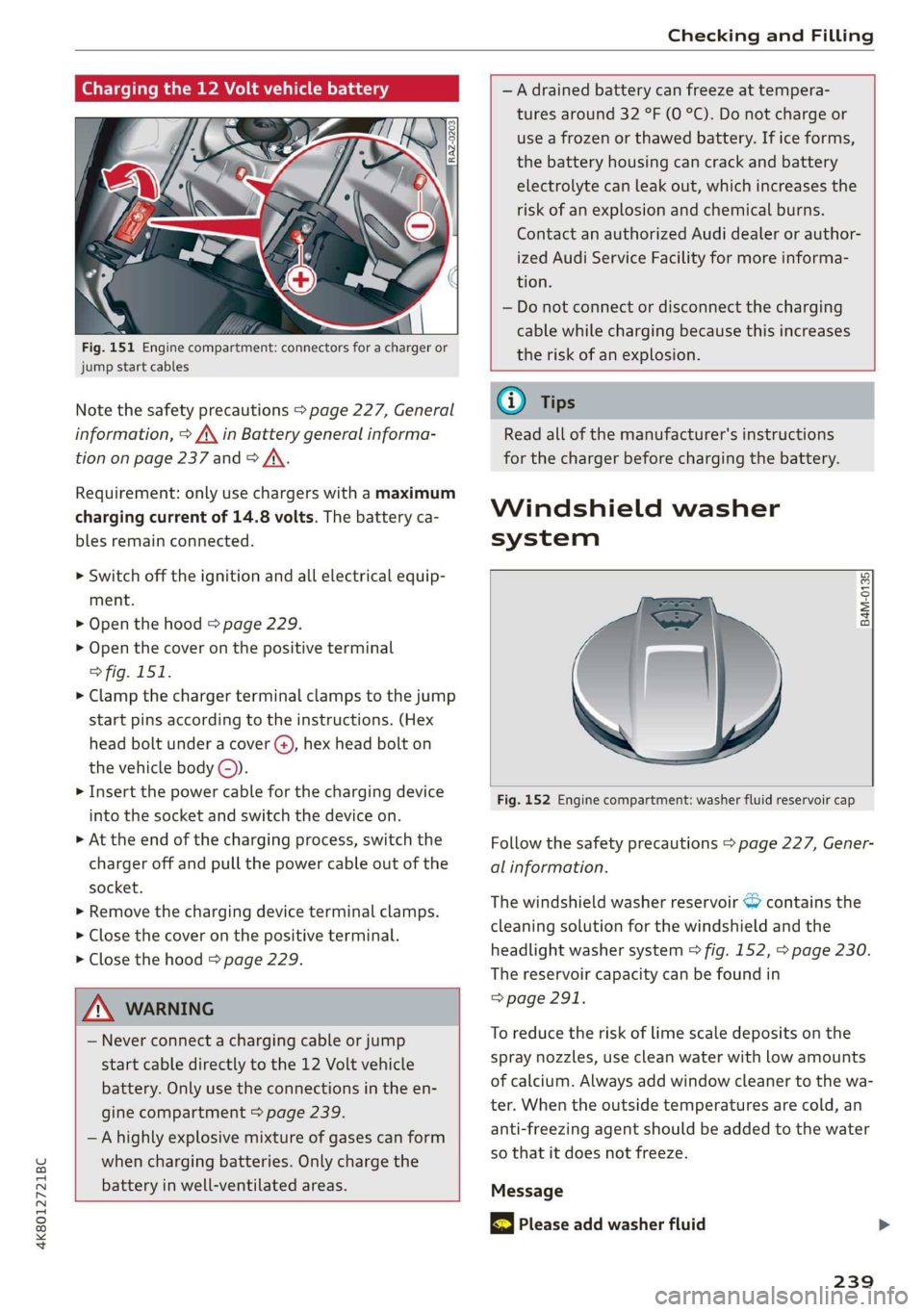
Charging the 12 Volt vehicle battery
Fig. 151 Engine compartment: connectors for a charger or
jump start cables
Note the safety precautions > page 227, General
information, > A\ in Battery general informa-
tion on page 237 and > /\.
Requirement: only use chargers with a maximum
charging current of 14.8 volts. The battery ca-
bles remain connected.
> Switch off the ignition and all electrical equip-
ment.
> Open the hood > page 229.
> Open the cover on the positive terminal
> fig. 151.
> Clamp the charger terminal clamps to the jump
start pins according to the instructions. (Hex
head bolt under a cover ©, hex head bolt on
the vehicle body ©).
> Insert the power cable for the charging device
into the socket and switch the device on.
> At the end of the charging process, switch the
charger off and pull the power cable out of the
socket.
> Remove the charging device terminal clamps.
> Close the cover on the positive terminal.
> Close the hood > page 229.
Z\ WARNING
— Never connect a charging cable or jump
start cable directly to the 12 Volt vehicle
battery. Only use the connections in the en-
gine compartment > page 239.
— Ahighly explosive mixture of gases can form
when charging batteries. Only charge the
battery in well-ventilated areas.
—A drained battery can freeze at tempera-
tures around 32 °F (0 °C). Do not charge or
use a frozen or thawed battery. If ice forms,
the battery housing can crack and battery
electrolyte can leak out, which increases the
risk of an explosion and chemical burns.
Contact an authorized Audi dealer or author-
ized Audi Service Facility for more informa-
tion.
— Do not connect or disconnect the charging
cable while charging because this increases
the risk of an explosion.
G) Tips
Read all of the manufacturer's instructions
for the charger before charging the battery.
Windshield washer
system
B4M-0135)
Fig. 152 Engine compartment: washer fluid reservoir cap
Follow the safety precautions > page 227, Gener-
al information.
The windshield washer reservoir © contains the
cleaning solution for the windshield and the
headlight washer system > fig. 152, > page 230.
The reservoir capacity can be found in
=> page 291.
To reduce the risk of lime scale deposits on the
spray nozzles, use clean water with low amounts
of calcium. Always add window cleaner to the wa-
ter. When the outside temperatures are cold, an
anti-freezing agent should be added to the water
so that it does not freeze.
Message
& Please add washer fluid
239
Page 276 of 310
Emergency assistance
— Read the warnings when working in the en-
gine compartment > page 227.
— Handling the jump start cables incorrectly
may cause the vehicle battery to explode
and lead to serious injuries.
C) Note
Jump start cables can cause considerable
damage to the vehicle electrical system if
they are connected incorrectly.
G) Tips
— There must be no contact between the
vehicles, or else voltage could flow when
connecting the positive terminal and drain
the vehicle battery of the vehicle providing
the jump start.
— The drained vehicle battery must be con-
nected correctly to the electrical system.
— Switch off electrical equipment that is not
needed.
aT telat tle)
Both jump start cables must be connected in the
correct order.
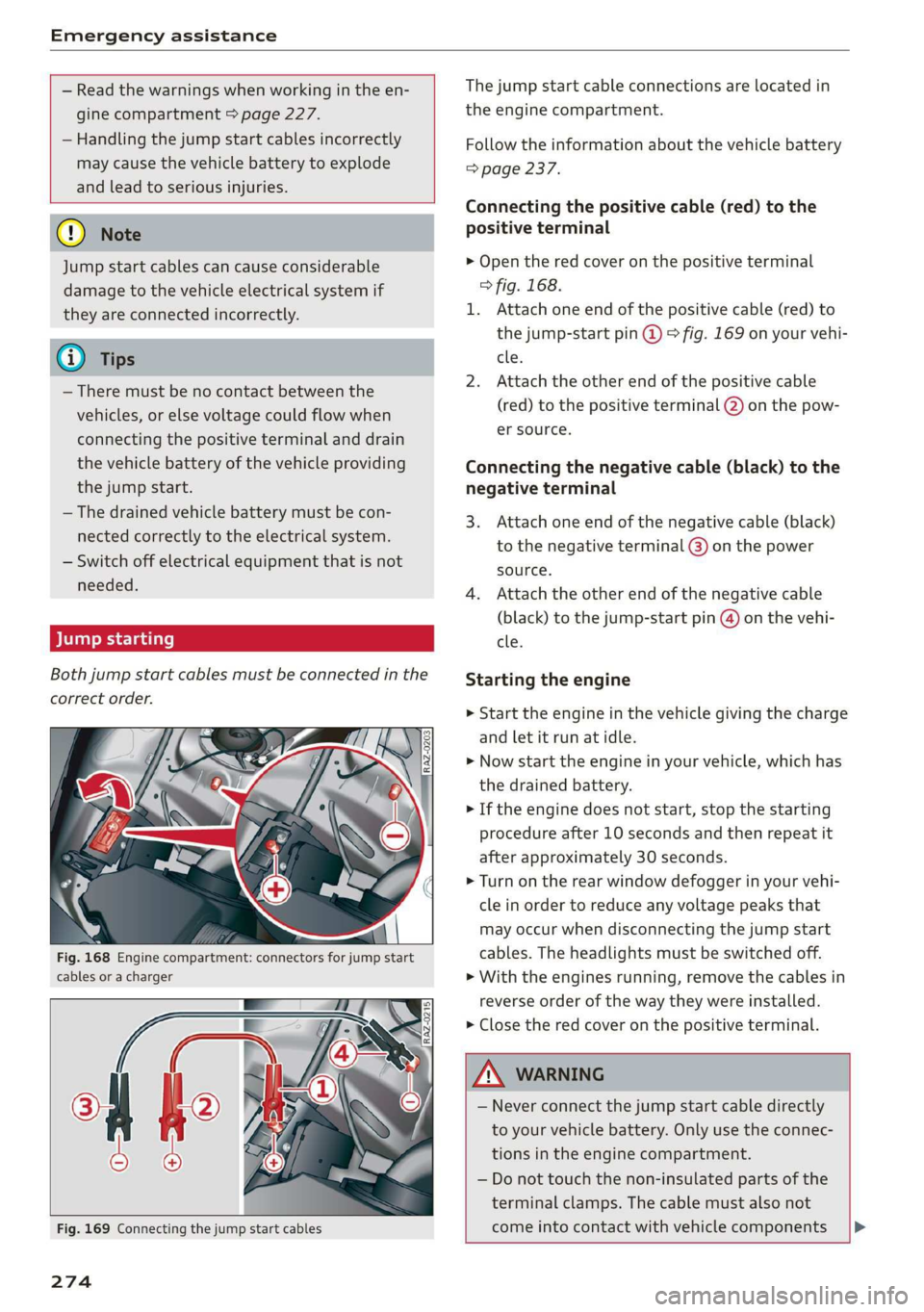
Fig. 168 Engine compartment: connectors for jump start
cables or a charger
The jump start cable connections are located in
the engine compartment.
Follow the information about the vehicle battery
=> page 237.
Connecting the positive cable (red) to the
positive terminal
> Open the red cover on the positive terminal
> fig. 168.
1. Attach one end of the positive cable (red) to
the jump-start pin @ © fig. 169 on your vehi-
cle.
2. Attach the other end of the positive cable
(red) to the positive terminal @) on the pow-
er source.
Connecting the negative cable (black) to the
negative terminal
3. Attach one end of the negative cable (black)
to the negative terminal @) on the power
source.
4. Attach the other end of the negative cable
(black) to the jump-start pin @) on the vehi-
cle.
Starting the engine
> Start the engine in the vehicle giving the charge
and let it run at idle.
> Now start the engine in your vehicle, which has
the drained battery.
> If the engine does not start, stop the starting
procedure after 10 seconds and then repeat it
after approximately 30 seconds.
> Turn on the rear window defogger in your vehi-
cle in order to reduce any voltage peaks that
may occur when disconnecting the jump start
cables. The headlights must be switched off.
> With the engines running, remove the cables in
reverse order of the way they were installed.
> Close the red cover on the positive terminal.
Fig. 169 Connecting the jump start cables
274
Z\ WARNING
— Never connect the jump start cable directly
to your vehicle battery. Only use the connec-
tions in the engine compartment.
— Do not touch the non-insulated parts of the
terminal clamps. The cable must also not
come into contact with vehicle components |»
Page 288 of 310
Accessories and technical changes
Accessories and
technical changes
Warranty
Your vehicle is covered by various warranties:
— New Vehicle Limited Warranty
— Limited Warranty Against Corrosion Perforation
— Emissions Control System Warranties: Federal
Emissions Control System Defect Warranty,
Federal Emissions Performance Warranty
— Applies to: USA models: Kansas Safety Belt
Limited Warranty
— Applies to: USA models: California Emissions
Control Warranties: Short-term Emissions De-
fects Warranty, Long-term Emissions Defects
Warranty, TZEV models Emissions Defects
Warranty, California Emissions Performance
Warranty
You can find detailed information in your Warran-
ty & Maintenance Booklet and in the California
Emissions Booklet*.
Audi Literature Shop
Service information is made available as soon as
possible after a model is introduced and can be
ordered in the Audi Literature Shop: http://
literature.audiusa.com
Driving in other
countries
Government regulations in the United States and
Canada require motor vehicles to comply with
emissions regulations and safety standards.
Therefore, vehicles that were produced for the
U.S. and Canadian markets are different from
vehicles produced for other countries.
If you plan to use your vehicle outside of the
United States or Canada, it is possible that:
— Fuel may have a significantly lower octane rat-
ing. Unsuitable fuels can cause engine damage.
— Proper maintenance and repair work may not
be possible because special service equipment,
tools, or measuring devices needed for your ve-
hicle may not be available.
286
— Replacement parts may not always be availa-
ble.
— Navigation systems for vehicles built for the
U.S.A. and Canada will not necessarily work in
Europe, and may not work in other countries.
() Note
Audi is not liable for damage to the vehicle re-
sulting from these country-specific differen-
ces.
Maintenance, repairs,
and technical modifi-
cations
Note the safety precautions > page 227, General
information and > page 271, Raising the vehicle.
General information
Due to the increasing complexity of technology in
these vehicles, as well as the safety and environ-
mental standards that apply, you can only per-
form a very limited amount of repairs and modifi-
cations to the vehicle yourself.
Proof of maintenance work may be required to
submit a claim within the warranty period.
We recommend that you have your vehicle serv-
iced by an authorized Audi dealer or authorized
Audi Service Facility and that Audi Genuine Parts
and Audi Genuine Accessories are used. This
helps to ensure that your vehicle's functionality,
performance, and safety are not impaired.
Maintenance and repairs
Your vehicle was designed to help keep mainte-
nance requirements to a minimum. Some regular
maintenance is required to help ensure that your
vehicle runs in a safe, economical, and reliable
manner. Please refer to your Warranty & Mainte-
nance Booklet for more detailed information
about vehicle maintenance.
When operating the vehicle under more extreme
operating conditions, for example when outside
temperatures are very low or in very dusty envi-
ronments, certain maintenance should be per-
formed between the specified intervals.
Page 296 of 310
Index
Bluetooth
Audio player... . 2... cece eee eee eee eee 206
Connecting acellphone............... 161
Deleting adevice...............00000- 221
Device overview............--0-0 0 eee 220
Disconnecting a device................ 221,
Displaying profiles. « cies 2 save «2 owen ae 221,
Searching fora device................. 221
Selecting a device : seas ss seg ts ees so: 221
Specifying a favorite.................. 221
BoOStss « « cosy: ¢ ¢ eyes 5 © sees § o Rewn ¢ a ees ¢ e 16
Boost pressure indicator................. 16
Brake fluid
New brake pads..............---000-- 100
Break-in security feature..............0.. 35
Breaking in
New brake pads..............-..00005 100
New tires « ¢ cvs + sie +e ctees ss ees es 248
Browser
refer to Mediacenter................0. 210
Bulb replacement...............000-005 281
Business. address): « s scx ¢ < swaw « x ome gee 191,
C
California Proposition 65 Warning........ 228
Batteryspecificie. «swine s vaaney o ownc oes 237
Galllist « cosas « s sess = i secu = 2 am = a8 165, 167
CaM@raS css « = ees 5 2 cee + & otters os ees es 116
LOGCALIONS sa, «+ veces oe 5 consents » x aamsens © 5 eewens 117
Capacities
Fueltank............ 20. 291
Washer fluid reservoir...............0 291
Cargonet........... 0... eee eee eee eee 83
Car key... eee eee eee 36
Car phone
Serial number (IMEI) .............0.006 172
SWItChING OMfessc <6 weww = awe a 2 mire «2 171
Capwashls « oaws 2 ¢ eau « 2 mame «x eee & 2 cee 261
Catalytic converter’; esos << weg ee ees se ee 227
294
Cell phone
refer to Telephone.............e eee eee 161
Cell phone compartment
refer to Audi phone box............... 163
Central
locking ...... 0. cece eee eee eee 32
AUTO LOCK: » geese + sunems 2 seene & 3 donee & = Be 32
Convenience key « sscsu © cvenesie © erase wo vnscem 37,
Convenience opening and closing......... 43
Luggage compartment lid............... 39
Mechanically unlocking and locking....... 35
Messages... 1.6... ce eee cece eee eee 34
Remote control keys: ss esas ss eves os ees 37
SettN's 6 e wanes a a saws «wo ones vo meen + 8 o8TH 33
Vehicle key... 6... ccc ee eee eee eee 37
Central locking switch................0-. 34
Ceramic brakesicicns x + sxcceie +o nessa 3 0 eres ¥ 6 « 100
Certificationies « 6 evar se enare a ears +e ewe 289
Changing light bulbs................... 281
Charging
refer to Power SOUrCES ...... eee eee eee 79
Charging the battery (mobile devices) . 163, 208
Child safety lock
Climate control system controls in the rear. 42
Power windows.........---00 eee eee eee 42
Rear doorSies 5 « aecw sa cams 3 cam 4 x ae a 42
Child safetyis@ats): se cous ye sews x 2 wren av we 73
Securing to the top tether anchor........ 77
Securing with a safety belt.............. 76
Securing with LATCH............-.-+--- 7
CIGSNING « sacze & s aes & s dae +e Sees te ee 261
Cleaning Alcantara...............00000. 264
Cleaning artificial leather............... 264
Cleaning carbon components........ 263, 264
Cleaning COMmtrols®. « scsi « x sro < « onmvess #6 vie 264
Cleaning decorative parts/trim........... 263
Cleaning exhaust tail pipes.............. 263
Cleaning plastic parts.................. 264
Cleaning textiles.................20005 264
Climate control system...........--..0-- 85
Climate control system controls in the rear
Child safety lok « seyoic 2 x ewe + saree 2 meee 2 42
Closing
Automatic luggage compartment lid...... 40
Convenience closing..............-.05. 43
HOG s « 2 seve y 5 meen ¢ 2 etme § eee OE ree 229
Luggage compartment lid............... 39
Page 298 of 310
Index
DriversySteim 5 cscs «x sevens © 5 eswanes 6 ¥ wumees 97,99
Audi drive select.............0 eee eee 104
Driving down hills.............2--0000- 102
DrivingprogKraims. » « swewcs + + snes oo mtmsen @ 93,139.
Driving through water................0. 103
DriVING TIMes + 3 secur so ceswen + wees s aaaeER a oo 16
Driving tips
Driving through water................. 103
Efficient driving. ..........00..ee eee eee 97
Uphill and downhill................... 102
Driving up hills: =z sees ¢ 2 sees ae ewan es es 102
Dust filter
refer to Pollutant filter..............0.. 88
DVD drive (media drives)................ 206
Dynamic all-wheel steering.............. 106
E
E-mail
Message options «. 2 6 cs. s seven se ees e 170
SettingS 0... . 0... c eee eee eee eee 170
EDL
refer to Electronic Differential Lock...... 108
EDR
Event Data Recorder wi .2 os ecce se eecee es 282
Efficiency assist... 0... eee eee 128
Electrical system. .........-.0 0 eee ee eee 236
Electromechanical parking brake......... 101
Electronic Differential Lock.............. 109
Electronicimmobilizetiiec:. . 2 sive «6 cess «2 one 37
Electronic Stabilization Control........... 108
Embedded SIM Gard « savers « « sways x 2 cawa 9 oa 175
EM@rgency assist sans « x asas 5 aaven ss news s L51,
Emergency assistance..............+-0. 267
Emergency braking function............. 102
Emergency call............200005. 167, 180
Emergency flashers..............--0000- 52
Emergency fueling.............--..000- 226
Emergency: Mode viic = + saree 2 waren oo tere 2 96
Emergency operation
Doors... 2... ee eee 35)
Fueltilledoor's « + saws & 3 naan & s aes a § me 226
Luggage compartment lid............... 41
Panoramic glass roof.............000005 44
Emissions control system.............. 227
Energy COMSUMERS! 5 sia oo wend 6 saan ao ave 17
296
Energy Managements os sce 6 eevee wo wise so 97
Engine
Breakingin.......... 0... cee eee eee eee 97
GCOOlSNE + acas 3 < seam Blais 2 a eae,8 © Game 234
Emergency Sto piss: os sess oo scons 2 susan @ 2 one 90
Jump starting ........ cece eee eee 273
Start/Stop system.............-00 ee eee 98
Starting/Stopping)=. +s mces ss sees s eres s 90
Engine compartment
Opening and closing the hood.......... 229
Overview... 22.2... eee eee eee 230
Safety precautions.............eee sees 227
Engine oil
ACAING « scr © 2 seems 2 o ewe a 2 even & eee 230
CHANGING ns + vsnnas ov ensues « & enetane ww venues © 233
Checking oillevel.............2--000-- 230
CONSUMPTION is x sas oe caw oo wees oo we 230
Indicator light...........-...2.0000 02 231
Replacement interval..............00. 240
Temperature display................0-5 16
Engine sound
Audi drivesselectis « wcsne ss seinen a esawew ¥ ive 104
Enginesstartisystem ecco s aco 6 2 eases 6 & weve 91
Engine stop
refer to Start/Stop system.............. 98
Entry/exitilightingjen: « «cence m 2 owas a a amnion a 51
Enithy aSSistance:: + 2 sowie so sew 6 © eee oo coe 61
also refer to Exit assistance............. 61
Environment
Unleaded gasoline................2.0. 223
eSIM
refer to Embedded SIM card............ 175
Event Data Recorder (EDR).............. 282
Exit assistance... 0.6... eee eee 61
Exit warning ................00 000 eee 149
Exterior lighting.................02.-005 48
EXteriOn MIPKONS scisane os serene oo vemos wanes 4 @ 53
Folding settings...............-.000005 33
External voice operation................. 28
F
Factory default settings
Multi Media Interface................. 220
Fast forwarding and rewinding (media file). 209
Fast forwarding (media files)............ 209
FaStrOute’s « cocces 2s swan 2 0 aren © 9 sane © rans 183
Page 301 of 310
4K8012721BC
Index
Locking and unlocking
By remote control. ...... 0... eee ee 37
Using the lock cylinder...............0. 35
With the convenience key............... 37
Low beam headlights .................... 48
Luggage compartment................5. 80
COVED s x © nmsees wv mame = « censome » & sameine § @ nono 82
Increasing the size.............--.000-- 82
also refer to Luggage compartment...... 80
Luggage compartment lid
Closing DUttON:. « & sie 5 a onsen ¥ wees oe aren 40
Generalinformation................... 39
Mechanically unlocking..............+-. 4l
Opening and closing................... 39
Opening and closing with foot motion..... Al
Power opening and closing.............. 40
Lumbar support...............000 2-0 eee 60
M
Maintenance... 1... 00... cece ee eee 286
Maintenance intervals.............2.00. 240
Malfunction Indicator Lamp (MIL)........ 227
Manualishifting®: « sucesso sven v2 owas @ ere 94
Map
Changing the scale................00. 187
Display.... 2... 2... eee eee eee 189
OPEratiNg s = esau < y mows 2 2 new 6 wae 2 ee 188
Setting the destination................ 187
MAP
refer to Message Access Profile......... 169
Map preview..................0 0000005 186
Map update................020-0 00 eee 193
Online... 2... eee eee 193
SD card/USB connection............... 193
Massage functions « secs «i sees + seers so ore 60
PRONE 2 sesnees « a onesies wo omsmes oS smote 6b emeHON Yo 61
Matrix LED headlights................... 49
Mechanical key:: s ¢ sacs = s eens ts mews s bees 36
Média scx « = seeu « = meen = § sem 2 ee 205, 209
DEIVGS!s ¢ 2 socom ox seen @ 2 eee 2 2 ee + we 205
Supported formats..............00005 215
Mediascenter’. «. ccuse sv scoes 0 0 acazace eo annzein 2 210
Memory card
SD card reader (MMI)...........-...4. 205
Supported types and formats........... 215
Memory TUNCtIOn in: « 2 sews x = wre xc eames ee 67
Menu language
refer to Setting the language........... 219
Message Access Profile................. 169
MeSSagesi: » « essen « «ween + 0 were 4 0 eer 6 Bo 169
Mild hybrid drive system................- 97
MitrorcoMpass’s « ssw so sve 6 4 some 6 o ene 5 57
Mirrors
Adjusting exterior mirrors............... 53
Dimming ......... 00.00 eee e eee eee 54
Vanityimirtor’s sews 2 » sews sy aeons & 2 wees ge 55
MMI
refer to Multi Media Interface........... 20
Mobile device
refer to Telephone.............000000 161
Mobile phone network
Connection settings................2. 172
Mountain passes...................00. 102
Mounitainnoadss. «succes < + css» » ceseine © x a0 102
Multifunction steering wheel
Buttons... .. 0.0... eee eee eee 13,29
OPCKAtING’s « = sais s wane woo eee BOs ReveD oo me 13
Programming buttons.................. 29
Voice recognition system............... 27
Multi Media Interface..............00005 20
Menus and symbols..............2+--4- 21
Operating’: « » ews + wyen ss woes os eaeE 2 18,21
Switching the displays on or off.......... 20
MUI MG; (MUTE) asics a i ctsesiss «a annose so aunwane ow te 29
MYAUGL + « snesens os & sivas wo owes ov nate «wee 30
myAudi navigation................. 182, 186
N
Narrow area « = sag so ces g s eee ee sea ee 139
Natural leather care and cleaning......... 264
Navigation..................0-00-000. 182
BGttGrTOUtG cues ¢ & mews + 2 new on nes = oR 194
Calling. ..... 0... eee eee eee eee 186
Changing the scale................0-5 186
also'refer'to Maps « seo ie cee4 i pew ee ve 188
Navigation database
Version information................04. 221
Navigation (instrument cluster) .......... 189
NH DSA: « susos « = gene = 2 cae 2 2 see ¢ 2 cee 2 288
Night vision assist................0000- 124
Cleaning the camera...........000000 262
Notification'centeér’: « sso ss sei yo sone 2 wen 22
Page 302 of 310
Index
O
Octane rating (gasoline)................ 223
Odometer..... 0... cece eee eee eee 15
RESGCUINGics ¢ 2 sem 5 = sees 5 e eeeS eH Rei 15
Office address
refer to Business address.............. 191
OFF (climate control system) .............. 86
Oil
referto Engineoil..................4. 230
On-board computer. ........-.5-00 005 eee 16
On Board Diagnostic System (OBD)... 227, 282
Online destination
refer to Online Points of Interest........ 185
Online map
refer to Satellite map......... eee eee 192
OnlimeimMed ides x 2 cco sv wenn sv ones @ 2 oe 207
Online Points of Interest................ 185
ONUGEPAGIO « sews s » sees ao news gy ewe gee 201
also refer to Online radio.............. 201
Online roadside assistance.............. 181
Online services
refer toconnect.............-00e sees 174
Online system update................0. 220
Online traffic information............... 195
Opening: « « sess ¢ x eww + 2 eee 9 x eee 5 eae 32
Automatic luggage compartment lid...... 40
Convenience opening..........ee essen es 43
Fueltillerdoor:« = suey « s sense « = owe s 2 a 224
FOO « & sasxses a vamcawe oo seem 9 6 commun © a mean 3 229
Luggage compartment lid............... 39
Luggage compartment lid with foot motion . 41
Panoramic glass roof..............00005 44
Sunshade (roof) ..........0.0 ec ee eee 44
WINGOWS's « wes § 5 aaeae aE Row 8 meH 4 YES 42
Opening and closing
refer to Unlocking and locking........ 32,37
Operating
Head=up displays: « = wma x + wasew © « eonaes » cam 26
Instrument cluster............000000 ee 13
Multifunction steering wheel............ 13
Multi Media Interface............... 18,21
Textinput.............. 0.000000. 0000. 24
Totich displays « scsn ss wawe # ¢ weee 3 a ewes 18
Voice recognition system............... 27
Optional equipment number............. 291
300
Options
Media... ... eee eee eee eee ee 213
NaVigatiOlitcns + muses + mews ss meee s ¢ Reem 195
RAGIO coos a cosas w x onowone x x ceomaue vo ama Ho 203
Overview: (COCKPID) ie « some xs orem sw ieewew owe 6
P
Paint: damage ws x « sees + os eeee oy eae 2 vers 263
PaintNOMmber’: « x eawe x s gam 4 ¢ eee 2 2 ee 291
Pahic BUTCOM + sansa » x sees 3 a meme 4 a aR FE KOR 36
PANIC button. ..............0.000 eee ee 36
Panic function... ... 2... cee eee eee eee 36
Panoramic glass roof...............00005 44
Convenience opening and closing......... 43
Emergency closing............-...ee00- 44
Quick
opening and closing............-5 44
Parental control
DVD... 0... eee ee 214
Parking aid... ...... eee eee eee eee 153
Cleaning the sensors and camera........ 262
Peripheral cameras..............00005 155
Rearview camera........2--. 00 eee eee 155
Parking and maneuvering..............- 153
Parking
brake
refer to Electromechanical parking brake. 101
Parking lights. ....... 0. eee eee ee eee 48
Parking lock emergency release........... 95
Parking system
Adjusting the volume..............00 154
Automatic activation.................. 153
Deactivating rear cross-traffic assist... . . 159
Parking systems
Parking system plus...............00. 153
Pass*through « saves « aensuov « wreseos % # ancinie we eee 82
Paths ss ineone oo mains © eration w 6 wos wo aM we 19
Pause(Media TILES) iis secu 4s wanes a s ween ss 209
PedalS cuss = = swig sx seeuee ¢ enous xe RUE 3 oe 94
Pedestrian detection................005 124
Perchlorate
....................0000005 286
Peripheral camerasS............---000-5 155
Personal route assistance............... 190
Phone
Answering/ending acall............... 167
Connecting a second mobile device...... 162
Disconnecting a mobile device.......... 163
Settings 0.0.0... cece eee eee eee 171