instrument cluster AUDI A8 2017 User Guide
[x] Cancel search | Manufacturer: AUDI, Model Year: 2017, Model line: A8, Model: AUDI A8 2017Pages: 354, PDF Size: 88.68 MB
Page 47 of 354
on the position of vehicles driving ahead and on
coming vehicles, the vehicle speed and other en
vironmental and traffic conditions.
Activating high beam assistant
Requirement: the light switch must be set to the
AUTO position and the high beam assistant must
be switched on in the Infotainment system
¢page 45.
.,. To activate the high beam assistant , tap the
lever forward @. T he
II indicator light ap
pears in the instrument cluster display and the
high beam assistant is switched on/off auto
matically. The
Ill indicator light also turns on if
the high beams are switched on.
Switching the high beams on/off manually
If the high beams did not switch on/off automat
ically as expected, you may switch them on or off
manually instead:
.,. To switch the high beams on manually, tap the
lever forward @. T he indicator light
Ill turns
on .
.,. To switch the high beams off manually, pu ll the
lever back@. The h igh beam assistant is deac
tivated.
Operating the headlight flasher
.,. To operate the headlight flasher when the high
beam assistant is activated and high beams are
switched off, pu ll the lever back @. The high
beam assistant rema ins active.
Messages in the instrument cluster display
Headlight assist: System fault!
Drive to an authorized Aud i dea le r or authorized
Aud i Service Facility immediately to have the
malfunction corrected. You can still switch the
high beams on or off manually.
Headlight assist: Unavailable No camera view
The camera view is blocked, for example by a
sticker or debris.
o The sensor is located between the interior rearco
~ view mirror and the windshield. Do not place any ,..._
~ stickers in this area on the windshield.
0 0 :c '
A WARNING
High beam assistant is only intended to assist
the driver. The driver is still respons ible for
controlling the headlights and switching
them manua lly depending on light and visibi l
it y conditions. It may be necessary to operate
them manually in situations such as:
- I n adverse weather conditions such as fog,
heavy rain, blowing snow or spraying water.
- On roads where oncoming traffic may be
pa rtia lly obscured, such as expressways.
- When there are road users that do not have
sufficient lighting, such as bicyclers or
vehicles with dirty tail lamps .
- I n tight curves and on steep hills.
- In poorly lit areas.
- W ith strong reflectors, such as signs.
- If the area of the w indshield near the sensor
is fogged over, dirty, icy or covered with a
sticker .
Adjusting the exterior lighting
The functions ore adjusted in the Infotainment
system .
.,. Select: !CAR ! function button > Car systems
control button > Vehicle settings > Exterior
lighting .
Automatic headlights
You can adjus t the following settings in the Au
tomatic headlights
menu:
Headlights activation time -you can adjust if the
headlights switch on
Early, Medium or Late ac
cording to the sensitivity of the light sensor.
Headlight assist* -you can switch the h igh beam
ass istant*
On and Off .
Daytime running lights*
USA models :
the daytime running lights can be
switched on/off. Select
On or Off.
Canada models:
this function cannot be switched
off. They activate automatically each time the ig -
nition is switched on .
ll>
45
Page 74 of 354

Warm and cold
(D Note
To avoid damage to the heat ing e lements in
the seats, d o not kneel o n the seats or place
heavy loads o n a small a rea of t he seat.
Basic settings
The climate control system basic settings ore ac
cessed in the Infotainment system .
.,. Se lect: the ICARI fun cti on bu tto n > Car systems
contro l button > AC .
Rear seat settings*
Wh en th is func tion is selec ted, a ll se tt in gs for
t he rea r can b e adju ste d t hroug h the cli mate co n
t rol system in the cockpit. The cli mate con trol
sys tem sett in gs cannot be adjus ted in the rear
seat at the same time. This fu nction switches off
after a certa in period of time or when one of the
d ia ls in the cockpit is pressed.
Auto recirculation*
T he sensit iv ity level of the au toma tic r ecircula
tion mode can be set at various levels from
Off to
Max. Whe n recirculation mode la> I is switched on,
the air rec irculat io n is contro lled automatically.
If the w indows fog up, press t he
I@ FRON T I but
ton .
Footwell temperature
You can a dju st the footwell temperature so that
it is coo le r or warmer .
Solar roof*
Parking ven tila tion i s co nt rolled a utoma tically in
t he
Auto settin g.
W hen the ig nitio n is swi tched o ff, solar-powered
p ark ing ventil ation may swi tch on, as long as
- there is sufficient sunlight,
- the outside temperature is not too low,
- the sunroof is closed or tilted and
-Auto (I nfo tainment system) is set
72
Steering wheel heating
Applies to: vehicles with steering wheel heating
The steering wheel rim con be heated .
Fig. 88 Steering co lumn : steeri ng w hee l heati ng b utto n
.,. Pres s the [i] butt on to sw itch st eering w heel
he atin g on/o ff. The mess age
Steering wheel
heating on /Steering wheel heating off
ap
pears in the instrument cluster disp lay .
The tempe rature is m ainta ined at a constant lev
e l when s tee ring wheel hea ting is switc hed on .
The steer ing whee l hea ting sett ings are stored
a utom atically and assig ned t o the rem ote c ontro l
k ey th at is in use.
Page 79 of 354

0 co .... N ,..._
N .... 0 0 :c '
-Some noise after starting the engine is nor
mal and is no cause for concern.
- If you leave the vehicle with the ignition
switched on, the ignition will switch off af
ter a certain amount of time. Make sure that
electrical equipment such as the exterior
lights are switched off.
Stopping the engine
"'Bring the vehicle to a full stop.
"'Select the P or N selector lever position.
"'Press the
I START ENGINE STOPI button
r::?v page 76, fig. 90.
Steering lock
The steering locks when you turn the engine off
using the
I START ENGINE STOPI button and
open the driver's door. The locked steering helps
prevent vehicle theft.
Emergency off function
If it is absolutely necessary, the engine can also
be turned off while driving in the R, Dor S selec
tor lever position at speeds below 6 mph (10 km/
h). To stop the engine, press and hold the
I START ENGINE STOPI button and also press the
brake pedal.
& WARNING
-Never turn off the engine before the vehicle
has come to a complete stop. The full func
tion of the brake booster and the power
steering is not guaranteed. You must use
more force to turn or brake. Because you
cannot steer and brake as you usually
would, this could lead to accidents and seri
ous injuries .
- Always take the key with you whenever you
leave your vehicle. Otherwise, the engine
could be started or electrical equipment
such as the power windows could be operat
ed. This can lead to serious injury.
- For safety reasons, always park the vehicle
with the selector lever in the P position.
Driving
Otherwise, there is the risk that the vehicle
could roll unintentionally.
@ Note
If the engine has been under heavy load for
an extended period of time, heat builds up in
the engine compartment after the engine is
switched off and there is a risk of damaging
the engine. For this reason, let the engine run
at idle for approximately two minutes before
shutting it off.
(D Tips
After the engine has been switched off, the
radiator fan can continue to run for up to 10
minutes -even with the ignition switched off .
It can also switch on again after some time if
the coolant temperature rises as the result of
heat buildup or if the engine is already warm
and the engine compartment is also heated
by the sun's rays.
Messages in the instrument cluster display
Turn off ignition before leaving car
This message appears and a warning tone sounds
if you open the driver's door when the ignition is
switched on.
Press brake pedal to start engine
This message appears when you press the
I START ENGIN E STOP ! button to start the engine
and do not press the brake pedal while doing so .
The engine can only be started when the brake
pedal is pressed.
= Key not in vehicle?
This indicator light turns on and this message ap
pears if the ignition key was removed from the
vehicle when the engine was running. If the igni
tion key is no longer in the vehicle, you cannot switch on the ignition or start the engine once
you stop it. You also cannot lock the vehicle from
the outside.
Shift to P, otherwise vehicle can roll away.
Doors do not lock if lever is not in P.
77
Page 81 of 354

C) C0 ....
"' ,....
"' .... 0 0 :r
serious injuries.
- To reduce the risk of injuries, make s ure that
the Start/Stop system is turned
off when
working in the eng ine compartment
c:>page80.
(D Note
Always sw itch off the Start/Stop system when
driving through water
c:> page 80.
Starting /stopping the engine
App lies to: ve hicles with Sta rt/Stop system
Fi g. 92 Instrument cluster: eng ine switched off (stop
p h ase)
~ S low the vehicle to a stop us ing the b rake and
keep pressing the brake pedal. The engine w ill
switch off. The
rt] indicator light appears in the
infor mation li ne in the ins trumen t cluster dis
play.
~ When you take your foot off the b rake peda l,
t h e engine restarts. The ind icator light turns
off.
Additional information
The engine w ill swi tch off in the P, D, N and S po
sitions as we ll as in manu al mode. I n the P pos i
tion, the engine will also remain o ff if you take
your foot
off the brake pedal. The engine starts
again when you se lect another selector lever po
sition and take your foot
off the brake pedal.
If yo u select the R pos ition dur ing a Stop phase,
the eng ine will start agai n.
Shift from D to P quickly to p revent t he engine
from sta rting unintentionally whe n shifti ng
through R .
Drivi ng
You can de termine for yourse lf if the engine w ill
stop or not by red ucing or increasing the amount
of force you use to press the brake pedal. For ex
amp le, if you only lightly press on the brake ped
al in stop-and-go traffic or when turning, the en
gine will not switch off when the vehicle is sta
t io nary . As soon as you press the b rake down
harder, the engine w ill switch off.
(0 Tips
-Press the brake pedal during a Stop phase
t o keep the vehicle from rolling.
- The ignit ion w ill tur n
off if you press the
!S T ART ENGINE STOPI button d uring a stop
phase.
General information
Applies to: vehicles w ith Start/Stop system
The standard Start/Stop mode con be canceled
for various system-related reasons.
Eng ine does not sw itch off
Befo re each stop phase, the system checks if cer
ta in conditions have been met. If the
r,J indica
tor light appears in the instrument cluster dis
play, the eng ine will not be stopped, for examp le
i n t he following situat ions :
- The engine has not reached the minim um re
quired tempe rature for Start/Stop mode .
- The interior temperature selected by the A/C
system has not been reached.
- The outside temperature is extremely high/low.
-The winds hield is being defrosted
c:> poge 71.
-The pa rking sys tem* is be switched on.
- The ve hicl e battery cha rge level is too low.
- The steering wheel is t urned at a sha rp angle or
is moving.
- After engaging the reve rse gear .
- On sharp inclines.
Engine automat ically restarts
T he standard Start/Stop mode wi ll be canceled
during a stop phase in the following sit uat ions .
The engine restarts without any action by the driver .
79
Page 82 of 354

Driving
-The interior temperature differs from the tem
perature se lected in the A/C system.
- The windshield is being defrosted~
page 71.
-The brake pedal is pressed seve ral t imes in a
row.
- The vehicle ba tte ry charge leve l is too low.
- Power consumption is high .
Ignition is switched off automaticall y
To prevent the veh icle battery from drain ing, the
ignit ion will switch off
automatically under the
following conditions:
- The vehicle must have already been driven.
- The Start/Stop system has stopped the engine.
- T he driver's door must be open .
- T he driver's safety be lt mus t be unb uck led.
- The brake pedal must not be p ressed .
- The vehicle must be stationary .
In this case, the activated low beam is replaced
by the parking light. The parking lights will
sw itch off after app roximately 30 minutes or
when you lock the vehicle .
If the Start/Stop system has not turned off the
engine or if you have sw itched the Start/Stop sys
tem off manually, the ignition will not be auto mat ically switched off and the engine w ill conti n
ue to ru n ~ & .
A WARNING
To red uce the risk of poisoning, neve r allow
t he engine to r un i n confined s paces.
(D Tips
If you select the D, N or S selector lever posi
tion after shifting into reverse, the vehicle
m ust be driven faste r than 6 mph (10 km/h)
in orde r fo r the engine to switch off again.
80
-
Manually switching the Start /Stop system
off /on
Appl ies to : vehicles wi th Start/Stop sys te m
If you do not wish to us e th e system, you con
switch i t off manually.
Fig . 93 Ce nte r console: Start/Stop system butto n
.,. To switch the Start/Stop-System off/on man
ually, press the
l (A) ~I button. The LED in the but
ton turns on when the system is switched off.
0) Tips
If yo u switch the system off d uring a stop
phase, the engine will start aga in automati
cally .
Messages in the instrument cluster display
Applies to : vehicles wit h Start/Stop syste m
Start-stop system deactivated: Please restart
engine manually
This message appears w hen spec ific cond itions
are not me t during a stop phase. The S tart/S top
system will
not b e a ble to re sta rt the eng ine. If
the D or R se lector lever positions were engaged,
P will be selected a utomat ically . The eng ine must
be started with the
I START ENGI NE STOPI but
ton.
Start -stop system: System fault! Currently
unavailable
There is a ma lfunction in the Start/Stop system.
Drive the vehicle to an authorized Audi dealer or
aut horized Serv ice Facility as soon as possible to
have the malfunction corrected .
Page 83 of 354

C) C0 ....
"' " "' .... 0 0 :r
parking brake
Fig . 94 Center conso le: park ing brake
Your vehicle is equipped with an e lectromechani
cal parking brake@~
fig. 94. The parking brake
is designed to prevent the vehicle from rolling
un intentionally and replaces the hand brake.
Setting/manually releasing the parking
brake
.. Pull the<®> switch to set the parking brake. The
LED in the switch illuminates. The -(USA
models)/ . (Canada models) indicator light al
so turns on in the instrument cluster display .
.. To release the parking brake manually, press
the brake or acce lerator pedal while the igni
t ion is switched on and press the© switch at
the same time. The LED in the button and the
indicator light in the display turn off.
Releasing the parking brake automatically
Requirement: the driver's door must be closed,
the dr iver's safety belt must be latched and the
parking brake must be set.
.,. To start driving and release the park ing brake
automatically, press the acce lerator peda l as
usual.
In addition to releasing the parking brake auto mat ically, other convenience and safety funct ions
are available when you start driving~
page 82,
Starting from a stop.
Preventing the automatic parking brake
release
The vehicle could begin rolling unintentionally,
depending on the hill or if towing a trailer.
Driving
.. To prevent the parking brake from releasing au
tomatically, pull and hold the(®) switch and press the accelerator peda l. The parking brake
remains set and prevents the vehicle from roll
ing backward .
.,. You can release the<®> switch again once you
are sure that you are giving enough driving
force to the wheels by press ing the accelerator
pedal.
Emergency braking function
You can use the emergency braking function in an
emergency situation, or if the standard brake op
eration malfunctions or is disabled.
.. Pull and hold the(®) switch.
.. As soon as you release the <®> switch or acceler-
ate, the braking stops.
Pulling and ho lding the© switch wh ile driving
the vehicle activates the emergency braking func
tion. The vehicle is braked at all four wheels by
activating the hydraulic brake system. The brak
ing effect is sim ilar to heavy braking ~_& .
To reduce the risk of activating the emergency
braking by mistake, a warning tone (buzzer)
sounds when the© switch is pulled . Emergency
braking stops as soon as the© switch is released
or the accelerator pedal is pressed.
Parking
.. Press the brake pedal to stop the veh icle.
.,. Pull the(®) switch to set the parking brake.
.,. Select the P selector lever position .
.,. Tu rn the engine off~_& .
.,. Turn the steering w heel when parking o n in
clines so that the wheels w ill roll into the curb
if the vehicle starts moving.
& WARNING
-
-Do not press the acce lerator peda l inadver
tently if a gear is selected when the vehicle
is stationary and the engine is running. Oth
erwise, the vehicle will start to move imme
diately and this could result in an accide nt.
- Eme rgency braking should only be used in
an emergency, when the normal brake pedal
has failed or the brake pedal is obstructed . ..,.
81
Page 88 of 354

Driving
-Do not inadvertent ly press the acce lerator
pedal when the vehicle is stationary. Other
wise the vehicle will start to move immedi
ately, eve n if the parking brake is set. This
cou ld resu lt in a crash .
(D Tips
For safety reasons, the parking brake is re
leased automatically only when the dr iver's
safety belt is engaged in the buckle .
Hill descent control
The hill descent control system assists the driver
when driving down hills .
Hill descent control activates when the transmis
sion is in the Dor S pos ition and you press the
brake pedal. The transmiss ion automatically se
lects a gear that is suitable for the hill . H ill de
scent control tries to mainta in the speed ach
ieved at the time of braking, within phys ical and
technical limi tations. If may sti ll be necessary to
adj ust the speed with the b rake pedal.
H ill descent contro l switches off o nce the hill lev
e ls out o r you press the accelerator peda l.
When operating the cruise contro l system
i::> page 92, hill descent control is also activated
when the speed is set.
A WARNING
H ill descent control cannot overcome phys ica l
lim itations, so it may not be able to maintain
a constant speed under all condit ions. Always
be ready to apply the brakes .
86
Manual shifting
The shi~ paddles allow the driver to shift the
gears manually .
Fig. 98 Steer ing whee l: s hifting man ually
.., To shift to a higher or lowe r gear temporari ly,
tap the
0 or 0 shift padd le i::> fig . 98 .
.., To switch manua l mode on , press the~ but
ton. Mand the gear that is currently engaged
@ appear in the instrument cluster display
i::>page 83, fig. 95.
I :i: .. m
.., To shift up one gear, tap the right shift paddle
G) c::>fig . 98.
.., To shift down one gear, tap the left shift pad
dle
Q .
.., To switch manua l mode off, press the ~ but-
ton again, or
.., Move the se lector lever back and re lease it.
When yo u accelerate or reduce the speed, the
transmission au tomatically shifts into the correct
gear shortly before reaching the RPM limit. If yo u
select a lower gear than the one currently shown
in the disp lay, the automatic transmission will
only shift down once there is no dang .er of ex
ceeding the maximum RPM.
The eng ine braking effect increases when you
downshift when going downh ill.
Kick-down
Kick-down enables maximum acceleration.
When yo u press the accelerator pedal down be
yond the res istance point, the automatic trans
mission downshifts into a lower gear and the en
gine ut ilizes its full power, depending on vehicle
speed and engine RPM. It shifts up into the next .,,_
Page 94 of 354

Ass is t
Assist
Speed warning system
The speed warning system helps you to stay un
der a specified maximum speed.
The speed warning system warns you if you are
exceeding the maximum speed that you have set.
A warning tone will sound as soon as your speed
exceeds the stored value slightly.
The . (USA models)
I. (Canada models) indi
cator light and a message appear in the instru
ment cluster display at the same time. The./
• indicator light and the message turn off if the
speed falls back below the stored maximum
speed.
Setting a threshold is recommended if you would
like to be reminded when you reach a certain
maximum speed. Situations where you may want
to do so include driving in a country with a ge ner
al speed limit or if the re is a specified max imum
speed for winter tires.
Setting the warning threshold
The warning threshold is set in the Infotainment
system .
.,. Se lect :
!CAR I function button > Car s ystems
control button > Dri ver assi st > Speed warning .
(D Tips
Regardless of the speed wa rning system, you
should always monitor yo ur speed using the
speedometer and make sure you are following
the legal speed limit.
92
Cruise control system
Switching on
The cruise control system makes it possible to
drive at a constant speed starting at 20 mph (30
km/h) .
0
f
®l
0
Fig. 102 Ope rat ing leve r: cru ise co ntrol sys tem
g M 0 ±
~
.,. To switch the cr uise control on, pull the lever
into position
(D ¢ fig . 102.
.,. Drive at the speed to be maintained.
.,. To store the speed, press the button @.
The stored speed and the
[t!jl!)~i~ (USA models) I
&I (Canada models) ind icator light are d isp layed
in the instrument cluster.
This information is also shown briefly in the Head-up d isp lay* .
The speed is mainta ined by modifying engine
power or through a n active brake interven tion.
_& WARNING
-Always pay atten tion to the traffic around
you when the cruise contro l system is in op
erat ion. You are always respons ible for your
speed and the distance between your ve hi
cle and other vehicles.
- For safety reasons, cruise control should not
be used in the city, in stop-and-go traff ic, on
w inding roads and when road conditions are
poor (such as ice, fog, gravel, heavy rain and
hydroplaning), because this increases the
r is k of an a ccident.
- Switch t he cruise control off temporarily
when dr iving in turning lanes, highway exits
or in construction zones.
...
Page 98 of 354
Ass is t
When driving into a curve ¢ fig. 105 and out of a
curve, the adaptive cruise control may react to an
object in the neighbor ing lane and apply the
brakes. You can prevent that by pressing the ac
celerator pedal brief ly .
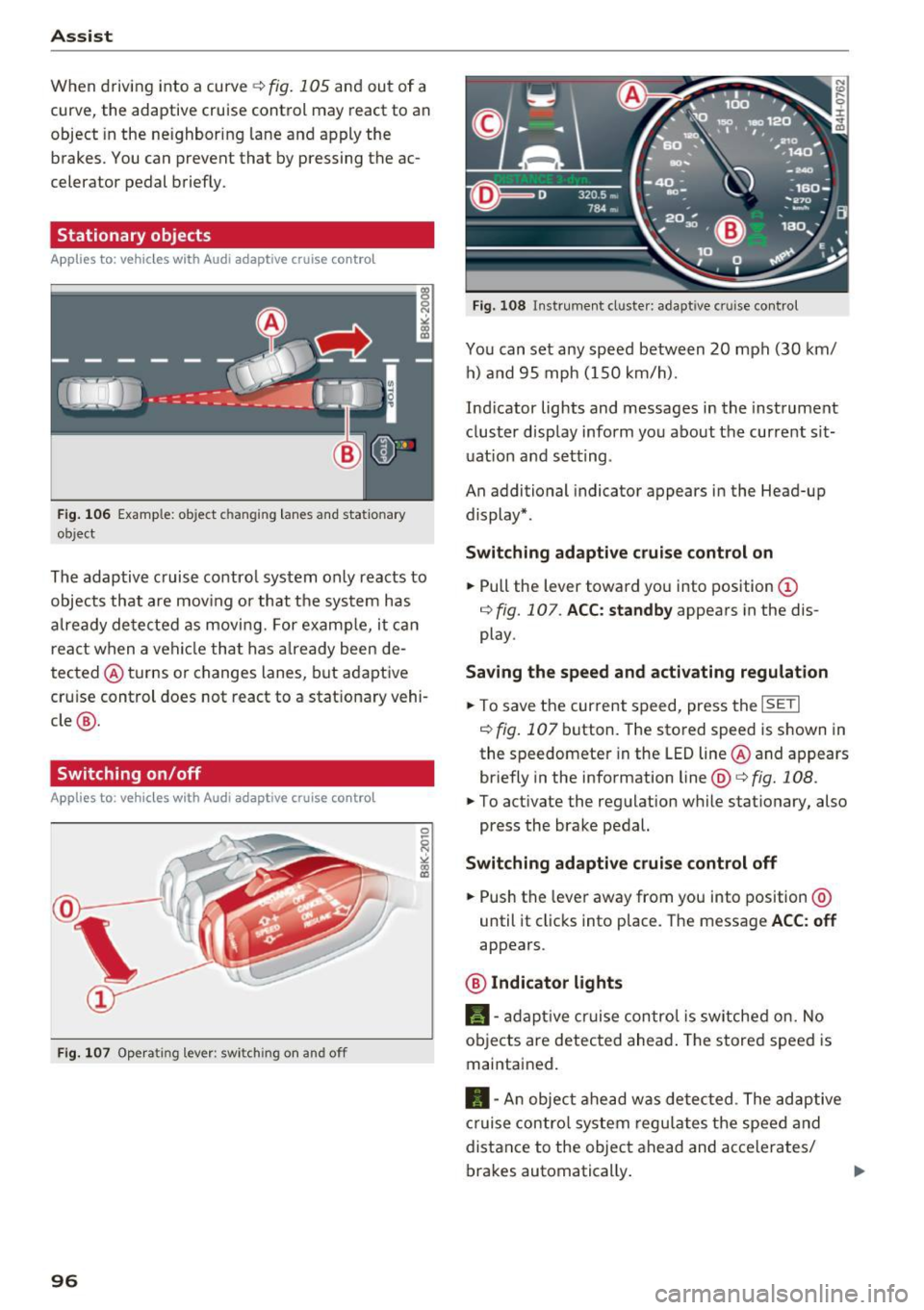
Stationary objects
App lies to: vehicles with Audi adaptive cruise contro l
Fig . 1 06 Example: ob ject c hangin g lanes and stat ionary
object
The adaptive cruise contro l system only reacts to
objects that are mov ing or that the system has
a lready detected as movi ng. For examp le, it can
react when a vehicle that has a lready been de
tected @turns or changes lanes, but adaptive
cru ise control does not react to a stat ionary vehi
cle @.
Switching on /off
Applies to: vehicles with Audi adaptive cruise control
Fig. 1 07 Opera ting lev er: sw itch ing on a nd o ff
96
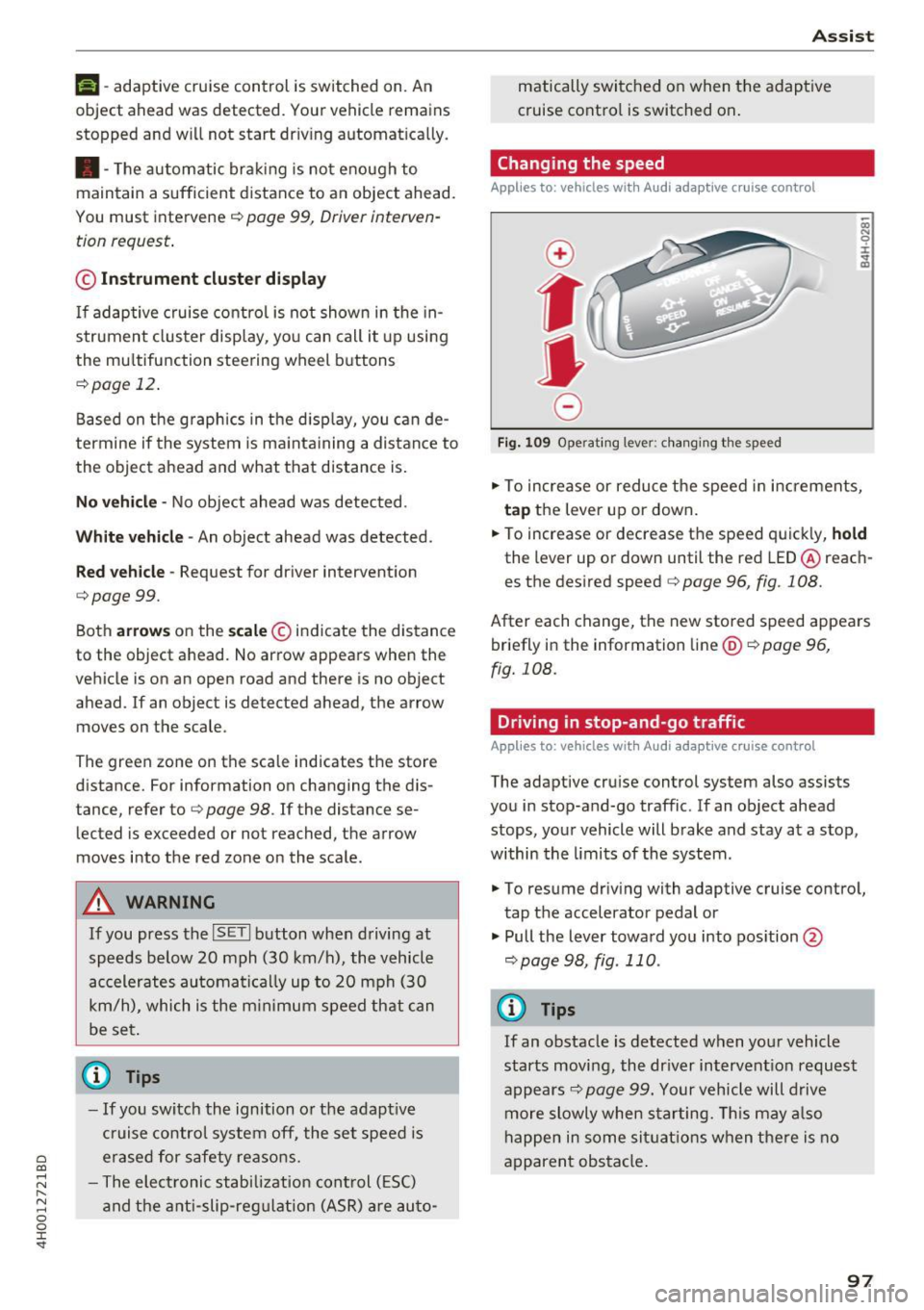
Fig. 108 In strument cl uste r: adapt ive c ruise control
You can set any speed between 20 mph (30 km/
h) a nd 95 mph ( 150 km/h).
Ind icator lights and messages in the instrument
cluster display inform you about the current sit
uat ion and setting .
An additional indicator appears in the Head-up display* .
Switching adapti ve cruise contr ol on
.,. Pull the lever toward you into position (D
¢ fig. 107 . ACC: standby appears in the dis
play .
Saving the speed and acti vating regulation
.,. To save the current speed, press the ISETI
¢ fig . 107 button. The sto red speed is shown in
the speedomete r in the LED line @and appears
briefly in the information line@¢
fig. 108 .
.,. To act ivate the regulation w hile stationary, also
press the brake pedal.
Switching adaptiv e cruise contr ol off
.,. Push the lever away from you into position @
until it cl icks into place . The message ACC : off
appears .
@ Indicator lights
II-adap tive c ruise control is switched on. No
ob jects are detected ahead . The stored speed is
maintained.
• -An object ahead w as de tected . The adaptive
cruise contro l sys tem regu lates the speed and
distance to the object ahead and accelerates/
brakes automatically .
IJ>
Page 99 of 354
C) C0 ....
"' " "' .... 0 0 :r
object ahead was detected. Your vehicle remains
stopped and will not start dr iv ing automat ically.
• -T he automatic braking is not enough to
maintain a sufficient distance to an object ahead.
You must intervene
c:> page 99, Driver interven
tion request .
© Instrument clu ster di spla y
If adaptive cruise control is not shown in the in
strument cluster display, yo u can call it up using
the mu ltifunction stee ring wheel buttons
<=:> page 12.
Based on the graphics in the d isplay, you can de
termine if the system is ma inta ining a distance to
the object ahead and what that distance is.
No v ehi cle -No object ahead was detected.
Whit e ve hicle -An object ahead was detected .
Red vehicl e -Request for driver intervention
c:>page 99.
Both arrows on the s cale © indicate the distance
to the object ahead. No arrow appears when the
vehicle is on an open road and there is no object
ahead. If an object is detected ahead, the arrow
moves on the scale.
The green zone on the scale indicates the store
distance. For information on changing the dis
tance, refer to
c:> page 98. If the distance se
lected is exceeded or not reached, the arrow
moves into the red zone on the scale.
A WARNING
~=-:---
If you press the ISETI b utton when driving at
speeds be low 20 mph (30 km/h), the vehicle
accelerates automatica lly up to 20 mph (30
km/h), which is the m in imum speed that can
be set .
(D Tips
-If you switch the ignition o r the adapt ive
cruise contro l system off, the set speed is
erased for safety reasons.
- The elect ronic stab ilization cont rol (ESC)
and the a nti -slip-reg ulation (ASR) a re au to-
A ss ist
matically switched on when the adaptive
cruise control is switched on .
Changing the speed
Applies to: vehicles with Audi adaptive cruise control
0
f
•
0
Fig . 1 09 Operat ing lever : c h an gi ng the speed
co N 0 :i: ~ m
.. To increase or reduce the speed in increments,
ta p the lever up or down .
.. To increase or decrease the speed quickly,
h o ld
the lever up or down until the red LED@reach
es the desired speed
c:> page 96, fig. 108.
After each change, the new stored speed appears
briefly in the information line@
c:> page 96,
fig. 108.
Driving in stop-and-go traffic
Applies to: vehicles with Audi adaptive cruise control
The adaptive cruise control system also assists
you in stop-and-go traffic . If an ob ject ahead
stops, your vehicle will brake and stay at a stop,
within the limits of the system.
.. To resume driving with adaptive cruise control,
tap the accelerator pedal or
.,. Pull the lever toward you into pos ition @
c:> page 98, fig . 110 .
a) Tips
If an obstacle is detected when your vehicle
starts moving, the dr iver intervent ion request
appears
c:> page 99. Your vehicle will drive
more slowly when starting. This may a lso
happen in some si tuatio ns when the re is no
apparent obstacle .
97