instrument cluster AUDI A8 2017 Owner's Manual
[x] Cancel search | Manufacturer: AUDI, Model Year: 2017, Model line: A8, Model: AUDI A8 2017Pages: 354, PDF Size: 88.68 MB
Page 100 of 354
Assist Interrupting cruise control
Applies to: vehicles with Audi adaptive cruise contro l
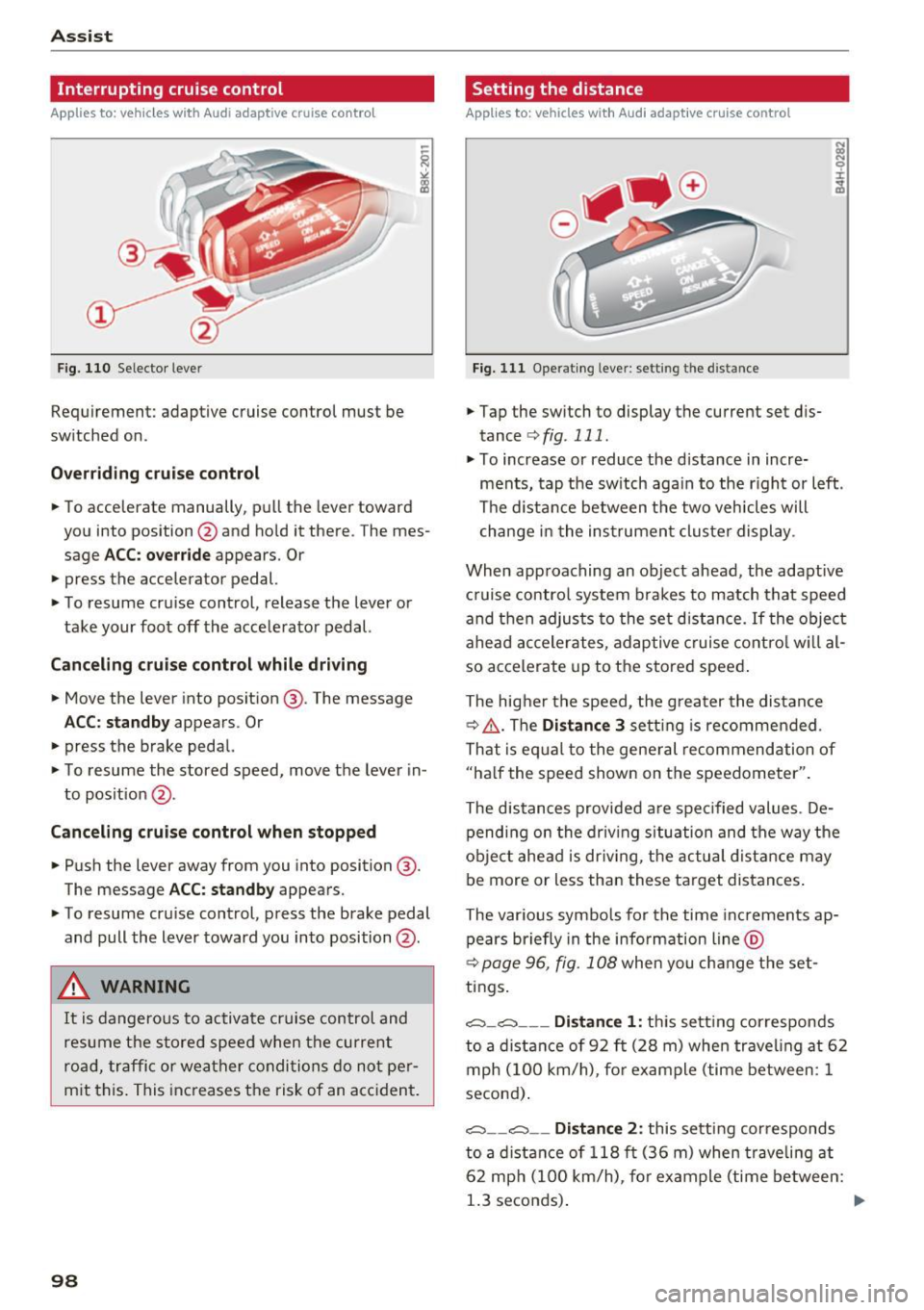
Fig. 110 Selector leve r
Requirement: adaptive cruise control mus t be
sw itched on .
Overriding cruise control
• To accelerate manually , pull the lever toward
you into position @and hold it there . T he mes
sage
ACC: override appears . Or
• press the accelera tor pedal.
• To resume cruise control , release the lever or
take your foot off the accelerator pedal.
Canceling cruise control while driving
• Move the lever into position @. The message
ACC: standby appears . Or
• press the brake pedal.
• To resume the stored speed, move the lever in
to posit ion @.
Canceling cruise control when stopped
• Push the lever away from you into position @.
The message
ACC : standby appears.
• To resume cruise control, press the brake pedal
and pull the lever toward you into position @.
.&, WARNING
It is dangerous to activate cruise control and
resume the stored speed when the current
road, traffic or weather conditions do not per
mit this. This increases the risk of an accident.
98
Setting the distance
Applies to: vehicles with Audi adaptive cruise control
Fig. 111 Ope rating leve r: sett ing th e dis tan ce
• Tap the switch to display the current set dis
tance
¢ fig . 111 .
• To increase or reduce the distance in incre
ments, tap the switch again to the right or left .
The distance between the two veh icles will
change in the instrument cluster display .
When approaching an object ahead, the adaptive
cruise contro l system brakes to match that speed
and then adjusts to the set distance.
If the object
ahead accelerates, adaptive cruise control will al
so accelerate up to the stored speed .
The higher the speed, the greater the distance
¢ ,&. .The
Distance 3 setting is recommended .
That is equal to the general recommendation of
"half the speed shown on the speedometer".
The distances provided are spec ified values . De
pending on the driving situation and the way the
object ahead is dr iving, the actual distance may
be more or less than these target distances .
The var ious symbo ls for the time increments ap
pears briefly in the information line @
¢
page 96 , fig . 108 when you change the set
tings .
c::::,_c::::, ___ Distance 1 : this setting corresponds
to a distance of 92 ft (28 m) when traveling at 62
mph (100 km/h), for example (time between: 1
second) .
c::::, __ c::::, __ Distance 2: this setting cor responds
to a distance of 118 ft (36 m) when traveling at
62 mph (100 km/h) , for example (time between:
1.3 seconds) . ""
Page 101 of 354
C) C0 ....
"' " "' .... 0 0 :r
to a distance of 164
ft (SO m) when traveling at
62 mph (100 km/h), for examp le (time between :
1.8 seconds).
~-- --~ Dist a nce 4: This setting corresponds
to a distance of 210
ft (64 m) when traveling at
62 mph (100 km/h), (time distance of 2.3 sec
onds).
A WARNING
Following other vehicles too closely increases
the risk of coll isions and ser ious personal in
jury.
- Setting short distances to the traffic ahead
reduces the t ime and distance available to
br ing your vehicle to a safe stop and makes
it even mo re necessary to pay close atten
t ion to traffic.
- Always obey applicable traffic laws, use
good j udgment, and select a safe following
distance for the traffic, road and weather
condit ions .
@ Tips
- Di stance 3
is set automatically each time
you switch the ignition on.
- Your settings are automatically stored and
assigned to the remote control key being
used.
Selecting the driving mode
A pp lies to: ve hicles with Audi adaptive cruise co ntrol
.,. Se lect the des ired driving mode in dr ive se lect
c> page 110 .
@ Tips
Your se ttings a re au toma tical ly s to red and as
signed to the remote control key being used.
A ss ist
Driver intervention request
App lies to : vehicles wit h Aud i ada ptive cr uise control
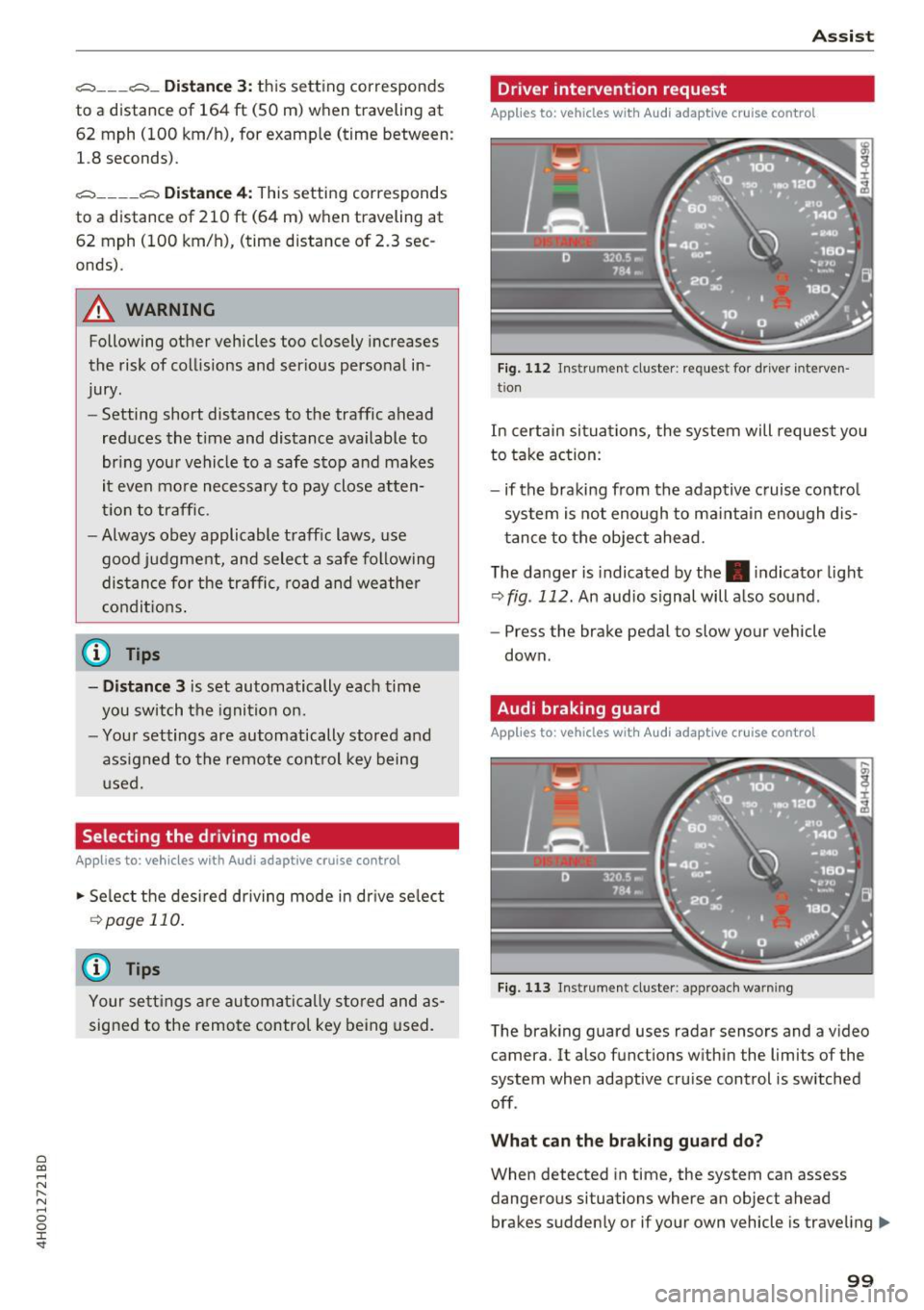
Fig. 112 Instrume nt cl uster : request fo r drive r in terven
tio n
In certain situa tions, the system will request you
to take action:
- if the braking from the adap tive cruise contro l
system is not enough to ma intain eno ugh dis
t ance to the object ahead.
The da nger is indicated by the. indicator light
r:!> fig . 112. An audio signal will a lso sound .
- Press the brake pedal to slow your vehicle
down.
Audi braking guard
Appl ies to: vehicles wit h Audi ada ptive cr uise control
Fig. 113 Instrument cluster : approach wa rnin g
The braking guard uses radar sensors and a v ideo
camera. It also functions within the limits of the
system when adaptive cru ise control is switched
off .
Wh at can the b raking guard do?
When detected in time, the system can assess
dangerous situations where an object ahead
brakes suddenly or if your own vehicle is traveling .,..
99
Page 105 of 354
C)
Switching on/off
A ppl ies to: ve hicles with Audi active lane assist
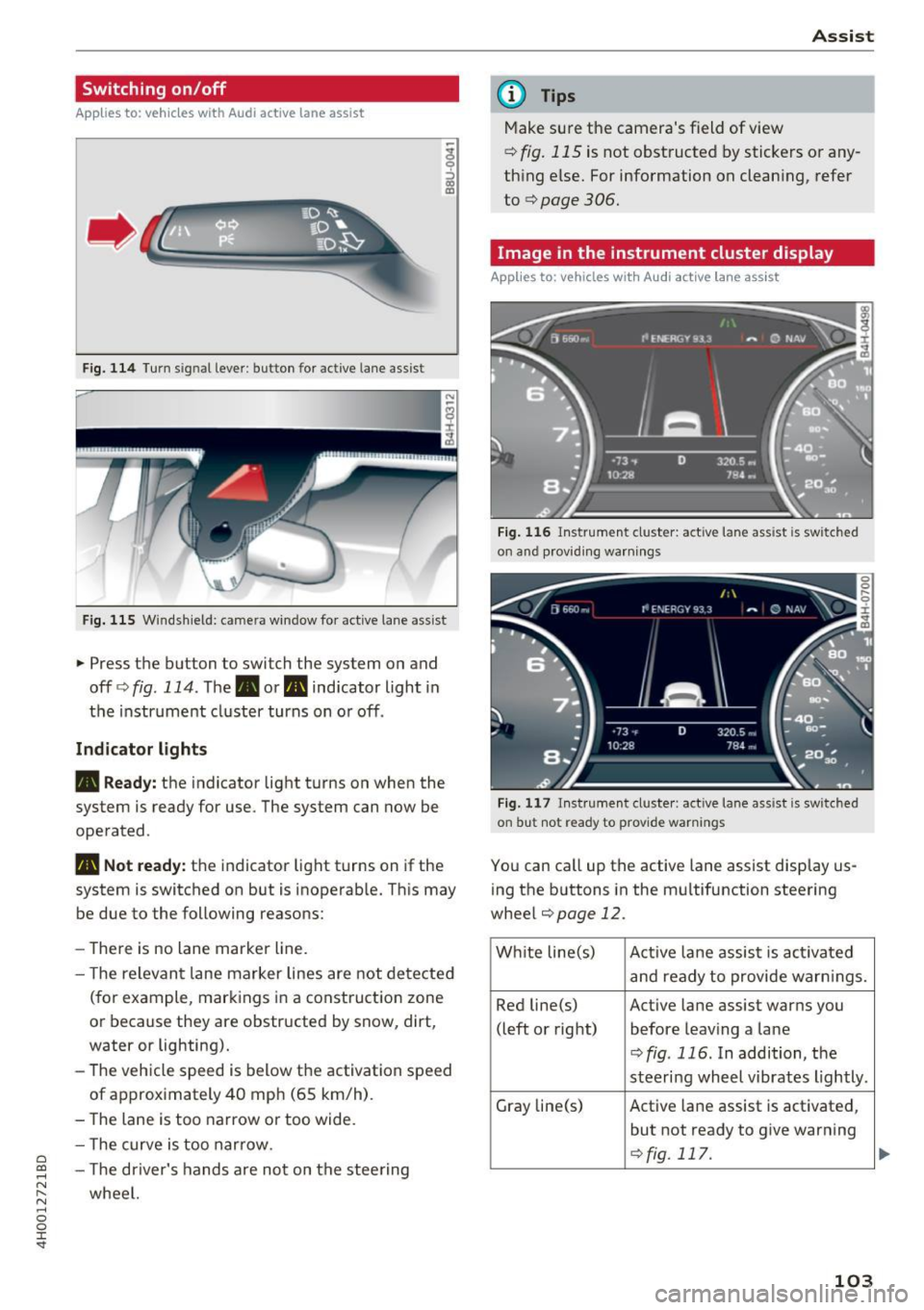
Fig. 114 Turn s ig n al lever: button for active lane ass ist
F ig. 115 Windsh ield: camera window fo r ac tive lane assist
... Press the button to switch the system on and
off ¢
fig. 114 . The. or. indicator light in
the instrument cluster turns on o r off .
Indicator lights
• Ready:
the indicator light turns on when the
system is ready for use. The system can now be
operated .
., Not ready: the indicator light turns on if the
system is switched on but is inoperab le. Th is may
be due to the following reasons:
- The re is no lane marker line.
- T he relevan t lane marker lines are not detected
(for example, mark ings in a construction zone
or because they are obstructed by snow, dirt,
water or lighting).
- The vehicle speed is below the activation speed
of approx imately 40 mph (65 km/h) .
- The lane is too narrow or too wide.
- The curve is too narrow.
~ - The driver's hands are not on the stee ring
"' ,.... wheel.
"' ...... 0 0 :r
(D Tips
Make sure the camera's field of view
¢
fig. 115 is not obstructed by stickers or any
thing else. For information on clean ing, refer
to
¢ page 306.
Image in the instrument cluster display
App lies to: vehicles with Audi active la ne ass ist
Fig. 116 Instrument cluster: active lane ass ist is sw itc hed
on and providing warnings
Fig. 117 Instrument cluste r: act ive lane ass ist is sw itc hed
on b ut not ready to provide warnings
You can call up the active lane assist display us
ing the b uttons in the mu ltifunction steering
wheel
¢page 12 .
White line(s)
Active lane assist is activated
and ready to provide warn ings.
Red line(s) Active lane assist warns you
(left or right) before leav ing a lane
¢fig . 116. In addition, the
steeri ng wheel vibrates lightly.
Gray line(s)
Active lane assist is activated,
but not ready to give warning
¢fig. 117.
103
...
Page 106 of 354
Ass is t
Messag es in the instrument cluster display
If the active lane ass ist switches off automatica l
ly, the indicator lig ht in the display turns off and
one of the following messages appears:
Audi acti ve lan e ass ist : Cur rently un availabl e.
No camera vie w
This message appears if the camera is unable to
detect the lines. This co uld happen if :
- The camera field of view
9page 103, fig . 115 is
dirty or cove red in ice . Clean this area on the
windshield .
- The camera field of v iew is fogged over . Wait
unt il the fog has cleared before sw itch ing the
active lane assist on again .
- The system has been unable to detect the lanes for an extended period of time d ue to road con
ditions. Switch a ctive lane assist back on when
the lines are mo re visible .
Audi acti ve lan e ass ist : Cu rrently un available
There is a temporary active lane assist ma lf u nc
tion . Try sw itching the act ive lane assist on aga in
later.
Audi active lane a ssist : System fault!
Dr ive to an a utho rized Aud i dea le r or a uthorized
Aud i Serv ice Facility immediately to have t he
malfunction corrected.
Audi active lane a ssist : Please take over steering
This message appea rs if you are not steering by
yourself . If th is is the case, active lane assist does
no t swi tch off, but it is "not ready" to provide a
warn ing . The system ca n he lp you keep the veh i
cle in the lane. However, yo u are responsib le for
d riving the vehicle and must steer it yo ursel f.
Setting the vibration warning
Applies to: ve hicles with Audi active lane assist
.,. Se lect : the ICARI function button > Car systems
contro l button > Driver a ssist > Audi acti ve
lane ass ist .
V ibration warning
You can switch the additional vibration wa rni ng
in the steering wheel o n or off.
104
@ Tips
Your settings are automatically stored and as
signed to the remote contro l key being used.
Audi side assist
Description
App lies to: vehicles with A udi side ass ist
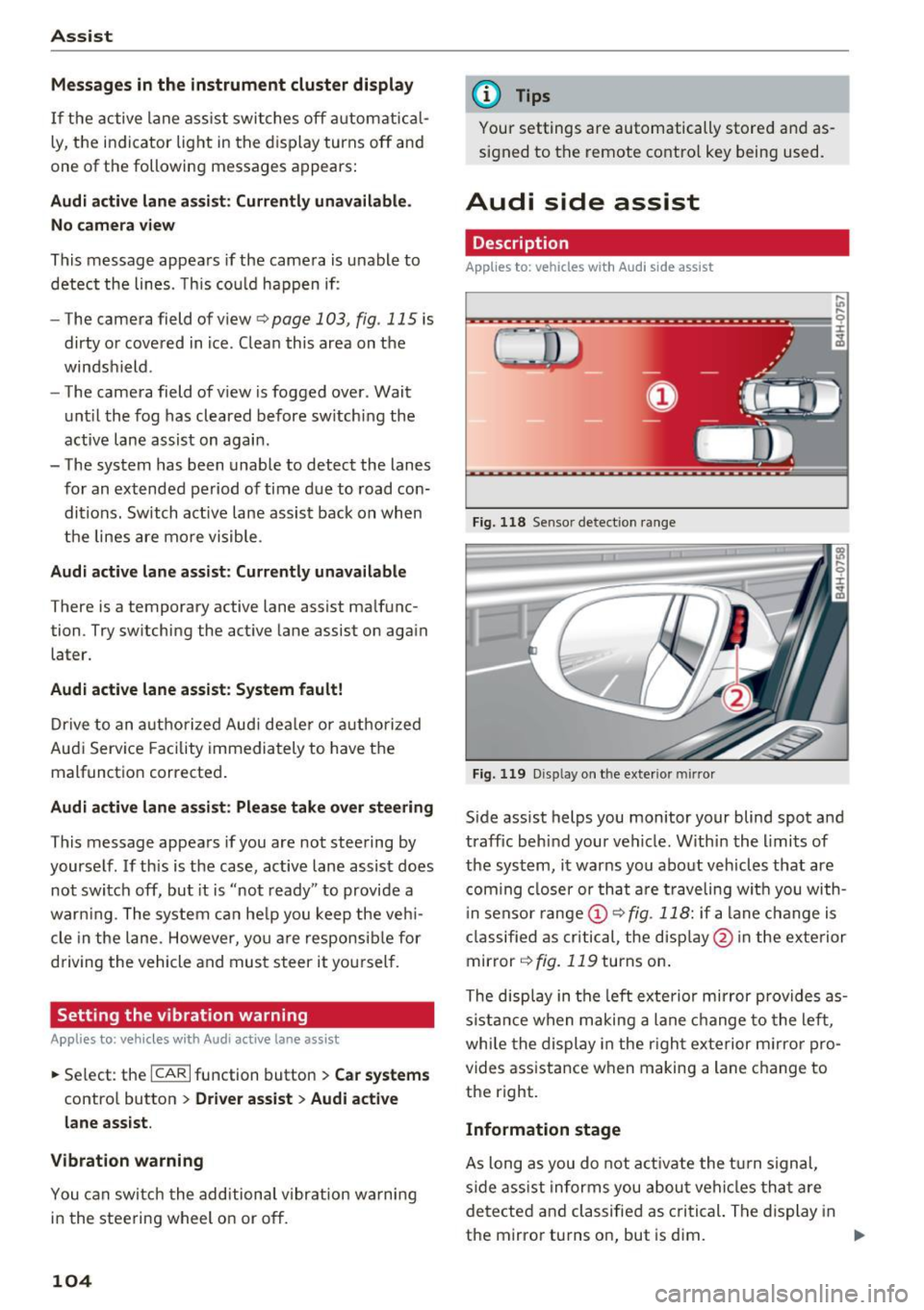
Fi g. 118 Senso r detect ion ra nge
Fig. 119 D isp lay on t he exterio r mirr or
Side assist helps you monitor your blind spot and
traffic behind your vehicle. W ithin the limits of
the system, it warns you abo ut vehicles that are
coming closer or th at a re t raveling wit h you with
i n senso r range @
9 fig. 118: if a lane c hange is
classified as cri tical, the disp lay @ in the exte rior
mirror
9 fig. 119 turns on .
The disp lay in the left exte rio r mirror prov ides as
s ista nce when making a lane change to the left,
whi le the display in the r igh t exterior m irror pro
vides assistance w hen making a lane c hange to
the right.
Information stage
As long as you do not a ct iva te the t urn signal,
side ass ist informs you abou t vehi cles tha t are
detected a nd classified as c rit ical. The di splay in
the mirror turns on, but is dim. ""
Page 110 of 354

Ass is t
Highlighting detected pedestrians and wild
animals
A pplies to: ve hicles w ith night vi sion ass ist
F ig. 123 Instrument cluster: yellow highl ighted pedes
trians
F ig. 124 Instrument cluster: symbol when the infrared im
age is not vi sible
With in the limits of the system, the night vision
assist can detect pedestria ns and w ild an imals
that are between approximately 32 ft (10 m) and 295
ft (90 m) in front of the vehicle and within
the detection zone . Within the limits of the sys
tem
q poge 109, a pedestrian or wild an imal de
tected when the low beams are switched on is
highlighted in yellow
q fig. 123. Animal recogni
tion is not active with in h ighly developed areas.
The system only detects large wild animals such
as deer.
@ Tips
If another display such as navigation replaces
the night vision assist image, the~,, symbol
appears in a tab
q fig . 124 . You can access
night vision ass ist using the mult ifunct ion
steer ing whee l buttons
q page 11.
108
Pedestrian and wild animal warning
App lies to : vehicles wit h night vision assis t
Fig. 125 Instrument cluster: @ pedest rian warning, @
wild anim al warn ing
Fig . 126 Instr ument clus ter: @pedestria n warning/ @
wild animal warning, when the nigh t vision ass ist im age is
not selected in the instru ment cluster display
Image in the instrument cluster /Head-up
di spl ay *
If there are pedestrians or wild an imals in an
area in front of your vehicle that is classified as
cr itical, the system will direct your attention to
th is:
- Pedestrians or wild anima ls are highlighted in
red and the corresponding symbol. or.
turns on~
fig. 125 .
- There is also an audible signal.
The area classified as c ritical is based on the veh i
cle speed and the steeri ng wheel angle . Pedes
trian and wild animal warning enco urages you to
pay more attention.
If the night vision assist image is rep laced by an
othe r d isplay (such as the on-board compute r),
the red. or. in dicator light~
fig. 126 will
appear if there is a pedestrian or wild anima l
warning.
Page 111 of 354
C) C0 ....
"' ,....
"' .... 0 0 :r
night vision assist content is activated,. or.
will appear in the Head-up display".
Marking light*
To direct the driver's attention to a pedestrian,
the headlights can flash on the pedestrian three
times in a row when there is a pedestrian warn
ing.
This occurs at speeds above approximately 35 mph (60 km/h) if you are outside of illuminat
ed areas and no detected vehicles are shown. The
high beam assistant* controls the marking light*
c::> page 44, High beam assistant .
The marking light is not used for wild animals.
General information
Applies to: vehicles with night vision assist
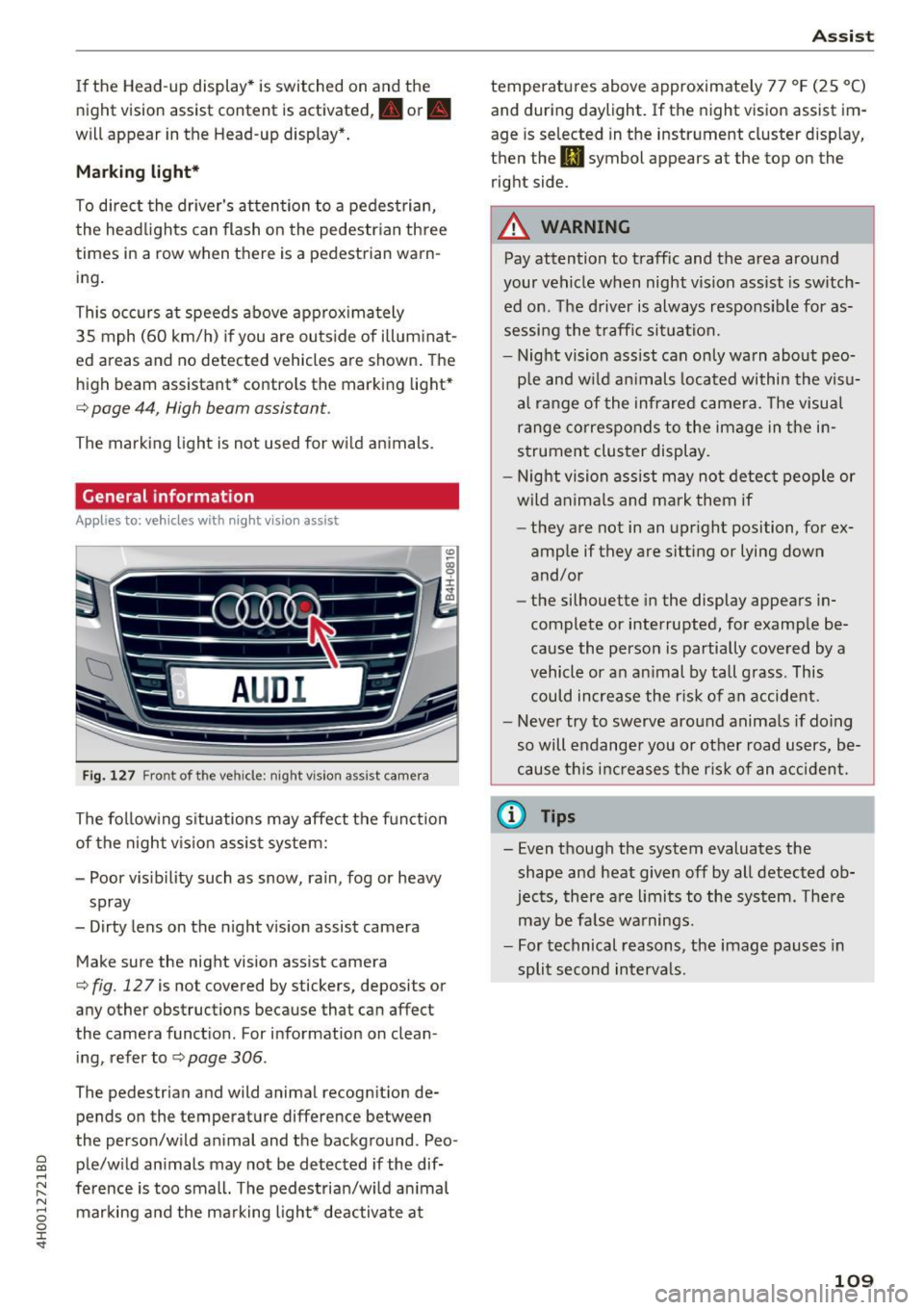
Fig. 127 Front of the vehicle: night vision ass ist came ra
The following situations may affect the function
of the night vision assist system:
- Poor visibility such as snow, rain, fog or heavy
spray
- Dirty lens on the night vision assist camera
Make sure the night vision assist camera
c::>fig. 127 is not covered by stickers, deposits or
any other obstructions because that can affect
the camera function . For information on clean
ing , refer to
c::> page 306 .
The pedestrian and wild anima l recogn it ion de
pends on the temperature difference between
the person/wild anima l and the background . Peo
ple/wild animals may not be detected if the dif
ference is too small. The pedestrian/wild animal marking and the marking light* deactivate at
Assist
temperatures above approximately 77 °F (25 °C)
and during daylight. If the night vision assist im
age is selected in the instrument cluster display,
then the
II symbol appears at the top on the
right side.
A WARNING
-Pay attention to traffic and the area around
your vehicle when night vision assist is switch
ed on. The driver is always responsible for as
sessing the traffic situation.
- Night vision assist can only warn about peo
ple and wild animals located within the visu
al range of the infrared camera. The visual
range corresponds to the image in the in
strument cluster display.
- Night vision assist may not detect people or
wild animals and mark them if
- they are not in an upright position, for ex
amp le if they are sitting or lying down
and/or
- the silhouette in the display appears in
complete or interrupted, for example be
cause the person is partially covered by a
vehicle or an animal by tall grass. This
could increase the risk of an accident.
- Never try to swerve around animals if doing
so will endanger you or other road users, be
cause this increases the risk of an accident.
(l'} Tips
- Even though the system evaluates the
shape and heat given off by all detected ob
jects, there are limits to the system . There
may be false warnings.
- For technical reasons, the image pauses in
split second intervals.
-
109
Page 112 of 354
Ass is t
Switching on /off
Applies to: vehicles with night vision assist
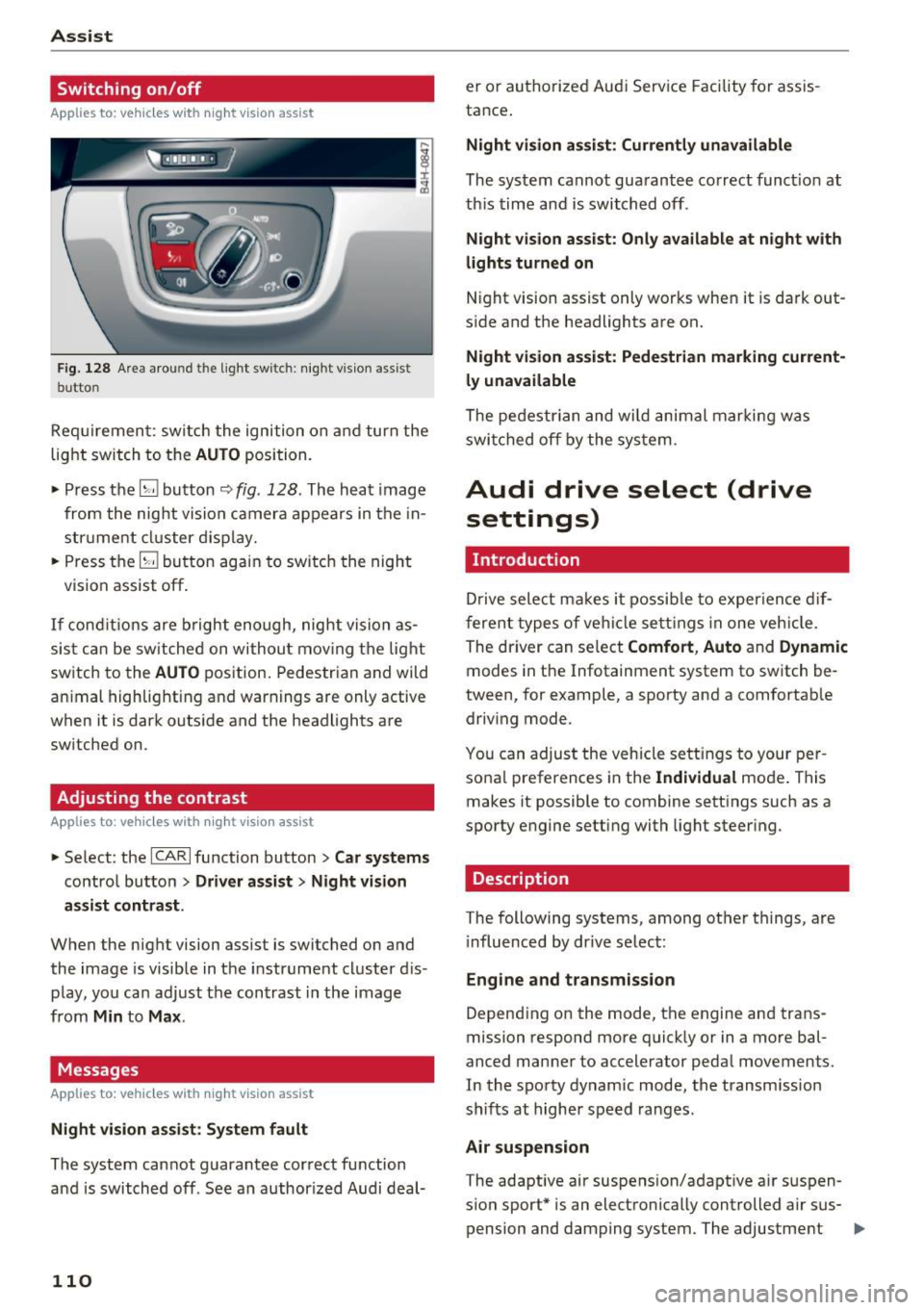
Fig. 128 Area aro und th e light sw itc h: n ight v is ion assist
butto n
Requirement: sw itch the ignition on and turn the
light switch to the
AUTO position.
• Press the
[g button 9 fig . 128 . The heat image
from the nig ht vision camera appears in the in
s t ru me nt cluster d isplay.
• Press the
(g button again to switch the night
vision assist off .
If condit io ns are b right enough, night vision as
sis t can be sw itched on withou t mov ing the light
switch to the
AUTO position. Pedestrian and wild
an imal highlighting and warnings are only active
when it is da rk outs ide and the headlights are
sw itched on .
Adjusting the contrast
Applies to: vehicles with night vision assist
• Select : the ICARI function button > Car systems
contro l button > Driver a ssist > Night vision
a ssi st cont rast .
When the night vision assist is switched on and
the image is visible in the instrument cluster d is
p lay, you can adjust the contrast in the image
from
Min to Ma x.
Messages
Applies to: vehicles with night vision assist
Ni ght vision assist : System fau lt
The system cannot guarantee correct function
and is switched off . See an author ized Audi deal-
110
er or authori zed Aud i Service Facility for assis
tance .
Night vi sion a ssis t: Current ly unavailable
The system cannot guarantee correct funct io n at
th is time and is switched off .
Night vision assist: O nly a vailabl e a t n ight with
lights turned on
N ight vision assist only works whe n it is dark out
s ide and the headlights are on.
Night vis ion a ssist: Pede stri an marking current
l y unavailab le
The pedestrian and wi ld animal marki ng was
swi tched off by the system .
Audi drive select (drive
settings)
Introduction
D rive select makes it possib le to exper ience dif
f erent types of ve hicle settings in one veh icle .
The dr iver can se lect
Comfort , Auto and Dynamic
modes in the Infotainment system to switch be
tween, for example, a sporty and a comfortab le
driv ing mode .
You can adjust the vehicle settings to your per
sona l preferences in the
Ind ividual mode . This
makes it possible to comb ine sett ings su ch as a
sporty engine setting with light steer ing .
Description
The following systems, among ot her things, are
i nfluenced by dr ive select:
Eng ine and tr an smis sion
Depend ing on the mode, th e engine and trans
mission respond more q uick ly or in a more bal
a nced manner to accelerator pedal movements.
In the sporty dynamic mode, the transm ission
shifts at higher speed ranges.
Air suspen sion
T he adaptive air suspens ion/adapt ive a ir suspen
sion sport* is an electronically controlled air sus- pension and damping system . The adjustment ..,
Page 220 of 354
Safety belt s
Safety belts
General information
Always wear safety belts!
Wearing safety belts correctly saves lives!
This chapter explains why safety be lts are neces
sary, how they work and how to adjust and wear
them correctly.
.. Read all the information that follows and heed
all of the instructions and WARNINGS.
&_ WARNING
Not wearing safety belts or wearing them im
properly increases the risk of serious personal
injury and death.
- Safety belts are the s ingle most effective
means ava ilable to reduce the risk of serious
injury and death in automobile accidents.
For your protect ion and that of your passen
gers, always co rrectly wear safety be lts
when the vehicle is moving .
- Pregnant women, injured, o r physically im
paired persons must a lso use safety belts.
L ik e all vehicle occ upants, they are mo re
likely to be serio usly injured i f they do not
wea r safety be lts. The best way to protect a
fetus is to protect the mother -throughout
the ent ire pregnancy .
Number of seats
Your Audi has a total of five seating positions:
two in the front and three in the rear. In some
veh icles, there are four seating positions: two in
the front and two in the rear . Each seating posi
tion has a safety belt .
&_ WARNING
Not wea ring safety belts or wearing them im
properly incre ases the risk of ser io us personal
injury and dea th.
- Never st rap more tha n one person, includ
ing small ch ild ren, into any be lt .
It is espe
c ia lly da ngerous to place a safety belt over a
child sitting on your lap .
218
-Never let more people ride in the vehicle
than there are safety be lts available .
- Be s ure everyone riding in the vehicle is
properly restrained with a separate safety
be lt or ch ild restraint.
~ Safety belt warning light
Your vehicle has a warning system for the driver
and front seat passenger to remind you about the importance of buckling-up .
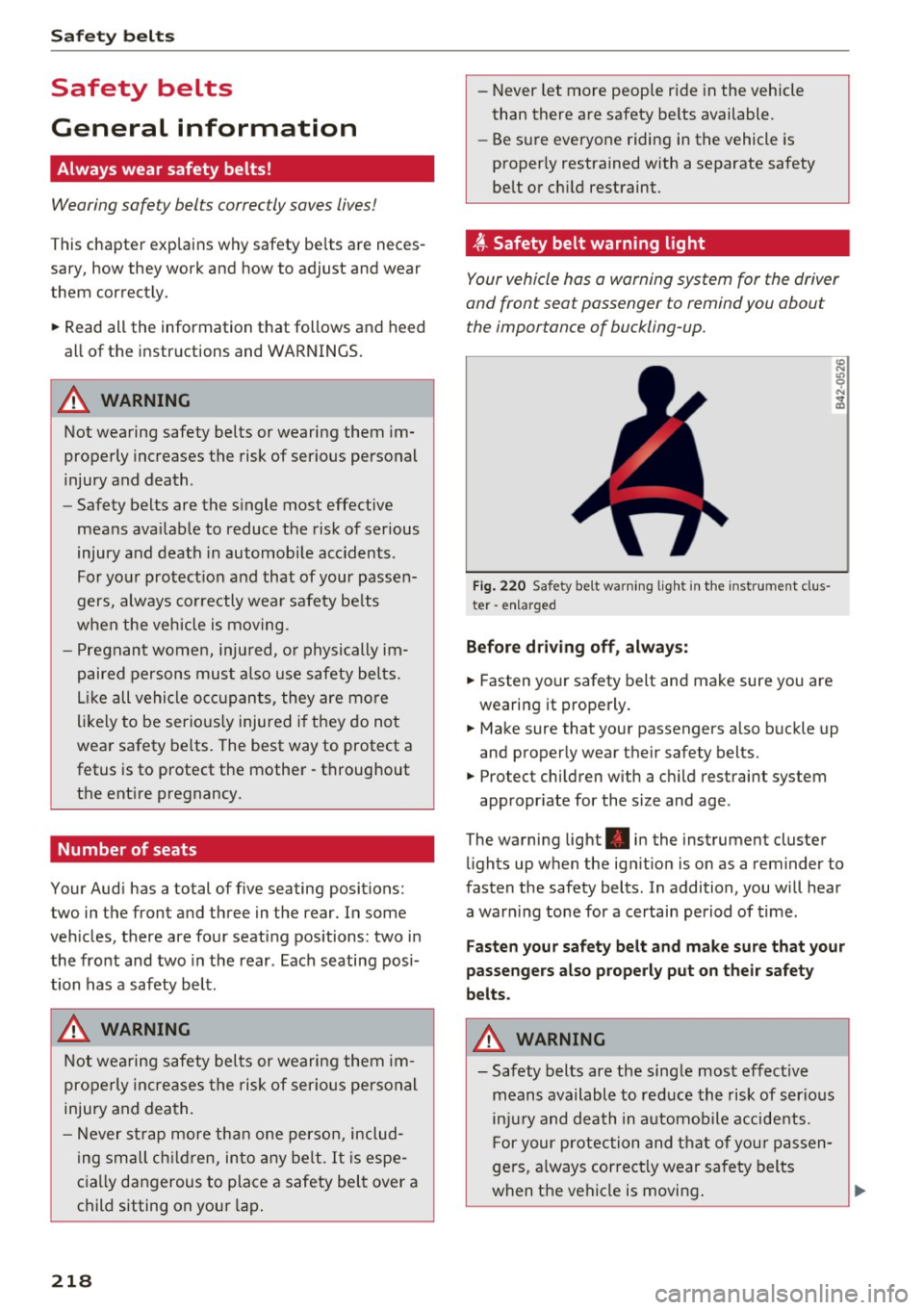
F ig. 220 Safety belt wa rning lig ht in the instrument clus·
ter -en larged
Befor e dri ving off , alway s;
.. Fasten your safety belt and make sure you are
wearing it properly.
"' N .,, 0
"' .. m
.. Make sure that your passengers a lso buckle up
and properly wear the ir safety belts.
.. Protect chi ldren with a c hild restraint system
appropr iate for the size and age.
The warning light . in the instrument cluster
lights up when the ign ition is on as a reminder to
fasten the safety belts. In addition, you will hear
a war ning tone for a certain period of time.
Faste n your safety belt and make su re that your
passenge rs al so properl y put on thei r safety
b e lts .
&_ WARNING
-
-Safety belts are the single most effective
means available to red uce the risk of ser io us
inj ury and death in a utomobile accidents.
For your protection and that of yo ur passen
gers, a lways correct ly wear safety belts
when t he vehicle is moving . ..,.
Page 235 of 354
control unit when the ignition is on. The control
unit monitors the Advanced Airbag System and
turns the airbag indicator light on when a ma l
function in the system components is detected. The funct ion of the a irbag indicator light is de
scr ibed in greater deta il below . Because the front
passenger seat contains important parts of the
Advanced Airbag System, you must take care to p revent it from being damaged. Damage to the
seat may preven t the Advanced A irbag for the
fron t passenger seat from doing its job in a
crash .
The front Advanced Airbag System consists
of the follo wing :
-Crash sensors in the front of the vehicle that
measure vehicle acceleration/deceleration to
provide information to the Advanced Airbag
System a bout the severity of the crash.
- An e lectronic control unit, with integrated
crash sensors for front and side impacts. The
control unit "decides" whether to fire the front
airbags based on the information received from
the crash sensors. The control unit also "de
c ides" whether the safety belt pretens ioners
should be activated .
- An Advanced Airbag with gas generator and
control valve for the driver ins ide the steer ing
wheel hub .
- An Advanced Airbag with gas generator and control valve inside the instrument pa nel for
the front passenger.
- A weig ht-sensing mat under the upholstery
padd ing of the front passenger seat cushion
that meas ures the total weight on the seat. The
i nformation registered is sent continuously to
the e lectron ic cont rol unit to reg ulate dep loy
ment of the front Adv a need Airbag on the pas
senger side .
- An airbag monitoring system and indicator
light in the instrument cluster
¢ page 236.
-A sensor in eac h front seat registers the dis
tance between the respective seat and the steering wheel or instrument pane l. The infor
mation registered is sent contin uously to the
0 co electronic control unit to regulate deployment ....
~ of the front Adva need A irbags. N .... 0 0 :c '
- The PASSENGER AIR BAG OFF light comes on
and stays on in the center of the instrument
pane l¢
page 237, fig . 233 and te lls yo u when
the front Advanced Airbag on the passenger side has been turned off.
- A sensor below the safety be lt latch for the
front seat passenger to measure the tension on the safety belt. The tension on the safety belt
and the we ight registered by the weight -sens
ing mat help the contro l unit "decide" whether
the front airbag fo r the front passenger seat
should be tu rned off o r not ¢
page 22 7, Child
restraints on the front seat -some important
things to know.
- A sensor in the safety belt latch for the driver
and for the front seat passenger that senses
whether that safety be lt is latched o r not and
transmits this information to the electronic control unit.
A WARNING ,-
Damage to the front passenger seat can pre-
vent the front airbag from working properly.
- Improper repair or disassembly of the front passenger and driver seat will prevent the
Advanced Airbag System from funct ion ing
properly .
- Repairs to the front passenger seat must be
performed by qualified and properly trained
workshop personnel.
- Never remove the front passenger or driver
seat from the vehicle.
- Never remove the upholstery from the front
passenger seat.
- Never d isassemble or remove parts from the
seat or disconnect w ires from it.
- Never carry sharp objects in your pockets or
p lace them on the seat. If the weight-sens
ing mat in the passenger seat is punctured
it cannot work properly .
- Never carry things on your lap or carry ob
jects on the passenger seat . Such items can
increase the weight reg istered by the
weight-sensing mat and send the wrong in
formation to the a irbag con trol u nit.
- Never store items under the front passenger
seat. Parts of the Advanced Airbag System
under the passenger seat cou ld be
~
233
Page 284 of 354

Checking and Filling
Service interval display
The service interval display detects when your ve
hicle is due for service.
The service interval display works in two stages:
-Inspection or oil change reminder: after a cer-
tain distance driven, a message appears in the
instrument cluster display each time the igni
tion is switched on or off . The remaining dis
tance or time is displayed briefly.
- Inspection or oil change due: if yo ur vehicle
has reached an inspection or oi l change interval
or both intervals at the same time, the mes
sage
Inspection due! or Oil change due! or Oil
change and inspection due!
appears briefly af
ter switching the ignition on/off .
Checking service intervals
You can check the remaining distance or time un
til the next oil change or next inspection in the
Car menu. To do this, select : the
ICARI function
but ton
> Car systems control button > Servicing
& checks > Service intervals .
Resetting the indicator
Your authorized Audi dealer or authorized Audi
Serv ice Facility will reset the serv ice interval dis
p lay after performing serv ice.
If you have changed the oil yourself, you must re
set the oil change interva l.
To reset the indicator, select : the
ICARI function
button
> Car systems contro l button > Servicing
& checks > Service intervals. Turn the control
knob downward to
Reset oil change interval and
press the control knob.
([) Note
-Only reset the oil change indicator if the oil
was changed .
- Following the service intervals is critical to
maintain ing the service life and va lue of
your vehicle, especially the engine. Even if
the m ileage on the vehicle is low, do not ex
ceed the time for the next service.
282