warning lights AUDI A8 2017 Owners Manual
[x] Cancel search | Manufacturer: AUDI, Model Year: 2017, Model line: A8, Model: AUDI A8 2017Pages: 354, PDF Size: 88.68 MB
Page 4 of 354
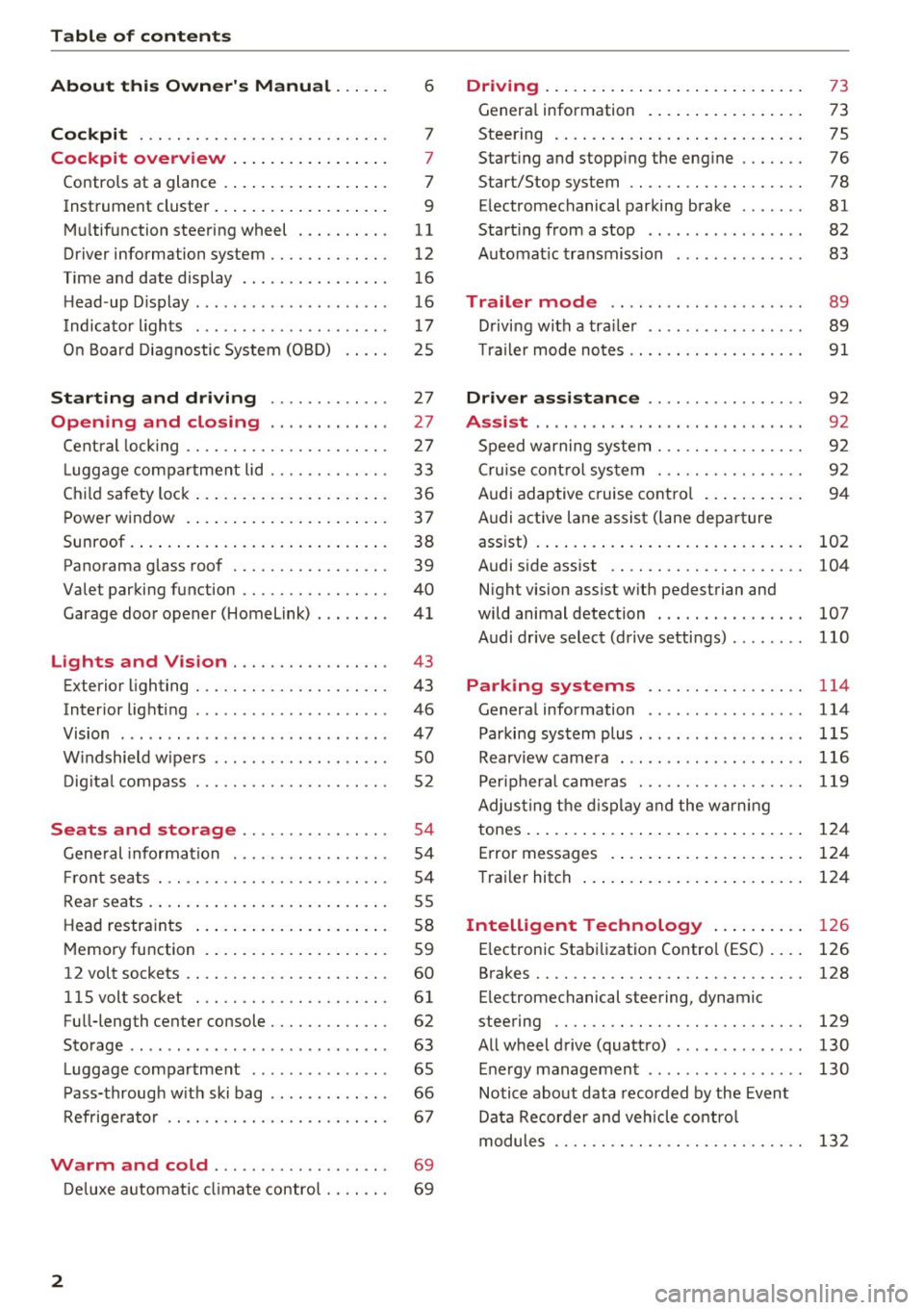
Table of contents
About this Owner's Manual ... .. .
Cockpit ... .. ............... .... .. .
Cockpit overview ................ .
Controls at a glance ... .......... .. .. .
Instrument cluster .. .......... .. .. .. .
Multifunction steering wheel ... .. .. .. .
Driver information system ............ .
Time and date display ...... ... .. .... .
H ead-up Display .... .. .. ..... ... .. .. .
Indicato r lights . ................ ... .
On Board Diagnostic System (OBD) .... .
Starting and driving ............ .
Opening and closing .. .... .... .. .
Central locking .... ........... .... .. .
L uggage compartment lid ...... .... .. .
Child safety lock ........... ..... .. .. . 6
7
7
7
9
11
12
16
16
17
25
27
27
27
33
36
Power
window . . . . . . . . . . . . . . . . . . . . . . 37
Sunroof. .. ... ... .. .......... .. .. .. . 38
Panorama glass roof . . . . . . . . . . . . . . . . . 39
Valet parking function . . . . . . . . . . . . . . . .
40
Garage door opener (Homelink) . . . . . . . . 41
L ights and Vision . . . . . . . . . . . . . . . . . 43
Exterior lighting . . . . . . . . . . . . . . . . . . . . . 43
Interior lighting . . . . . . . . . . . . . . . . . . . . . 46
V1s1on . . . . . . . . . . . . . . . . . . . . . . . . . . . . . 47
Windshield wipers . . . . . . . . . . . . . . . . . . . SO
Digital compass . . . . . . . . . . . . . . . . . . . . . 52
Seats and storage . . . . . . . . . . . . . . . . 54
General information . . . . . . . . . . . . . . . . . 54
Front seats . . . . . . . . . . . . . . . . . . . . . . . . . 54
Rear seats . . . . . . . . . . . . . . . . . . . . . . . . . . 55
Head restraints . . . . . . . . . . . . . . . . . . . . .
58
Memory function . . . . . . . . . . . . . . . . . . . . 59
12 volt sockets . . . . . . . . . . . . . . . . . . . . . . 60
llSvoltsocket .............. .... ... 61
Full-length center console. . . . . . . . . . . . . 62
Sto rage . . . . . . . . . . . . . . . . . . . . . . . . . . . . 63
Luggage compartment . . . . . . . . . . . . . . . 65
Pass-through with ski bag . . . . . . . . . . . . . 66
Refrigerator . . . . . . . . . . . . . . . . . . . . . . . . 67
Warm and cold . . . . . . . . . . . . . . . . . . . 69
Deluxe automatic climate control . . . . . . . 69
2
Driving ..... .. .. .. .. ... .......... . .
General information . .... .......... . .
Steering .......... .. .. . .......... . .
Start ing and stopping the eng ine ..... . .
Start/Stop system .. .. ............. . .
E le ctromechanical parking brake ...... .
Start ing from a stop .. ........ ..... . .
Automat ic transmission
Trailer mode .. .. .. ........ ..... . .
D rivin g with a trailer .. .............. .
T raile r mode notes .. .. ............. . .
Driver assistance .. .............. .
Assist .... .. .. .. .. .. ... .. ... ... .. . .
Speed warning system ... ........... . .
Cruise control system .... .......... . .
Audi adaptive cruise control .......... .
Audi active lane assist (lane departure 73
73
75
76
78
81
82
83
89
89
91
92
92
92
92
94
assist) . . . . . . . . . . . . . . . . . . . . . . . . . . . . . 102
Audi side assist . . . . . . . . . . . . . . . . . . . . . 104
N ight vision assist w ith pedestrian and
wild animal detection . . . . . . . . . . . . . . . .
107
Audi drive select (drive settings) . . . . . . . . 110
Parking systems . . . . . . . . . . . . . . . . . 114
General information . . . . . . . . . . . . . . . . . 114
Parking system plus ........ ....... ... 115
Rearv iew camera . . . . . . . . . . . . . . . . . . . . 116
Peripheral cameras . . . . . . . . . . . . . . . . . . 119
Adjus ting the display and the warning
tones. . . . . . . . . . . . . . . . . . . . . . . . . . . . . .
124
Error messages . . . . . . . . . . . . . . . . . . . . . 124
T railer hitch . . . . . . . . . . . . . . . . . . . . . . . . 124
Intelligent Technology . . . . . . . . . . 126
E lectronic Stabilization Control (ESC) . . . . 126
Brakes . . . . . . . . . . . . . . . . . . . . . . . . . . . . . 128
E lectromechanical steering, dynamic
steering . . . . . . . . . . . . . . . . . . . . . . . . . . .
129
All wheel drive (quattro) . . . . . . . . . . . . . . 130
Energy management . . . . . . . . . . . . . . . . . 130
Notice about data recorded by the Event
Data Recorder and vehicle control
modules . . . . . . . . . . . . . . . . . . . . . . . . . . .
132
Page 18 of 354

Cockpit overview
_& WARNING
The route calculated by the navigation system
is a recommendation for reaching your desti
nation. Obey traffic lights, stopping restric
tions, one-way streets, lane change restric
tions, etc.
An asterisk
" *" in front of the street name in
dicates that the information about this street
or this section of the route is not complete in
the navigation data that the MMI contains .
Obey traffic laws in one-way streets and pe
destr ian zones.
Time and date display
Fig. 16 Center conso le: analog clock
The date and time are shown in the instrument
cluster display . There is also an ana log clock in
the center console
<=:> fig. 16 .
When you open the driver's door, the date and
time appear in the display for 30 seconds . When
the ignition is switched on, the time is always dis
played in the status line © regardless of the cur
rent d isplay.
You can set the time on both clocks and the date (disp lay) in the Infotainment system
<=:> page 204.
16
Head-up Display
Appl ies to: vehicles with Head-up D isplay
Fig. 17 Examp le : i ndicators in the Head-up Display
Fig. 18 Instrument panel: knob for th e head-up display
The Head-up Display pro jects certain warnings or
selected information from the assist systems* or
navigation* on the windshield. The display ap
pears within the driver's field of vision.
Switching on/off
.,. To switch the Head-up Display on or off, press
the knob~ ¢
fig. 18.
Adjusting the height
The height of the display can be adjusted to the
i ndivid ual driver .
.,. Make sure you are seated correctly
<=:>page 208.
.,. Turn the knob~ to adjust the d isplay.
Settings in the Infotainment system
.,. Select: the I CARI function button > (Car)* Sys
tems
contro l button > Driver assist > Head-up
display
> Head-up display contents or Display
brightness .
Page 20 of 354
Cockpit over view
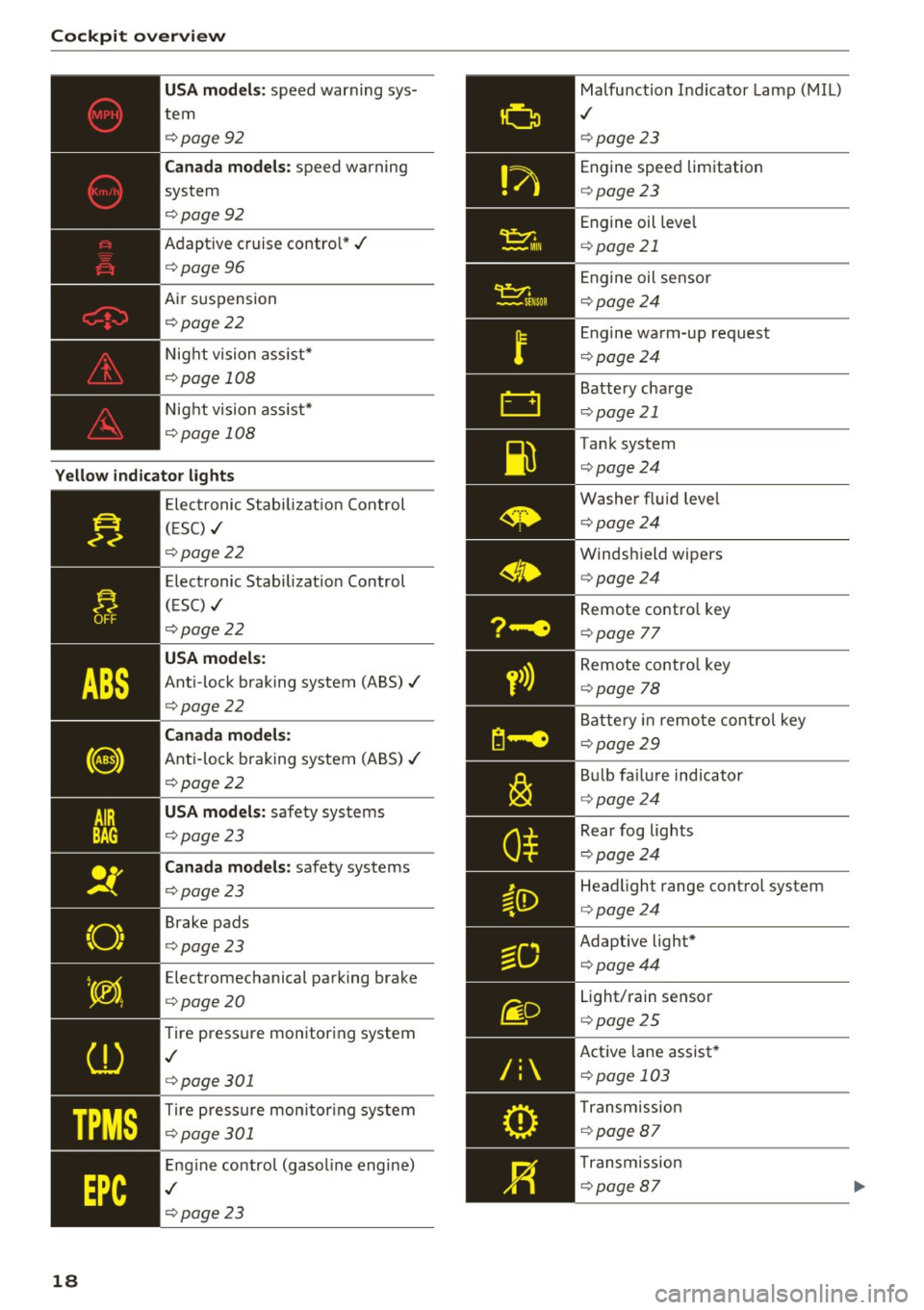
US A mode ls: speed warning sys
tem
¢ page92
Can ada m odels: speed warning
system
¢ page92
Adaptive cruise control*../
¢page 96
Air suspension
¢ page22
Night vision ass ist*
¢ page 108
Night vision ass ist*
¢ page 108
Yello w indic ator light s
TPMS
18
-------------Elec tronic Stab ilizat ion Control
( E SC) ../
¢page22
Electronic Stabilizat ion Control
(ESC) ../
¢page22
USA models :
Anti-lock braking system (ABS)../
¢page22
Canada mod els:
Anti-lock braking system (ABS) ../
¢page22
USA models: safety systems
¢ page23
Can ad a mod els : safety systems
¢ page23
Brake pads
¢ page23
Electromechanical parking brake
¢ page20
Tire pressure monitoring system
,I
¢page 301
Tire press ure mon itor ing system
¢ page 301
Engine control (gasol ine engine)
,I
¢ page 23
Malfunction Indicator Lamp (MIL)
,I
¢page 23
Engine speed limitation
¢page23
Engine oil leve l
¢page 21
Engine oil sensor
¢page24
Engine wa rm-up request
¢ page24
Battery charge
¢page 21
Tank system
¢page24
Washer flu id leve l
¢page24
Windshield wipers
¢page24
Remote contro l key
¢ page 77
Remote contro l key
¢ page 78
Battery in remo te control key
¢page29
B ul b fa ilu re indicator
¢ page24
Rear fog lights
¢page24
Headlight range control system
¢page24
Adaptive light*
¢page44
Light/rain sensor
¢page 25
Active lane assist *
¢page 103
Transm ission
¢ page 87
Transmission
¢page 87
Page 21 of 354
0 co .... N ,..... N .... 0 0 :c '
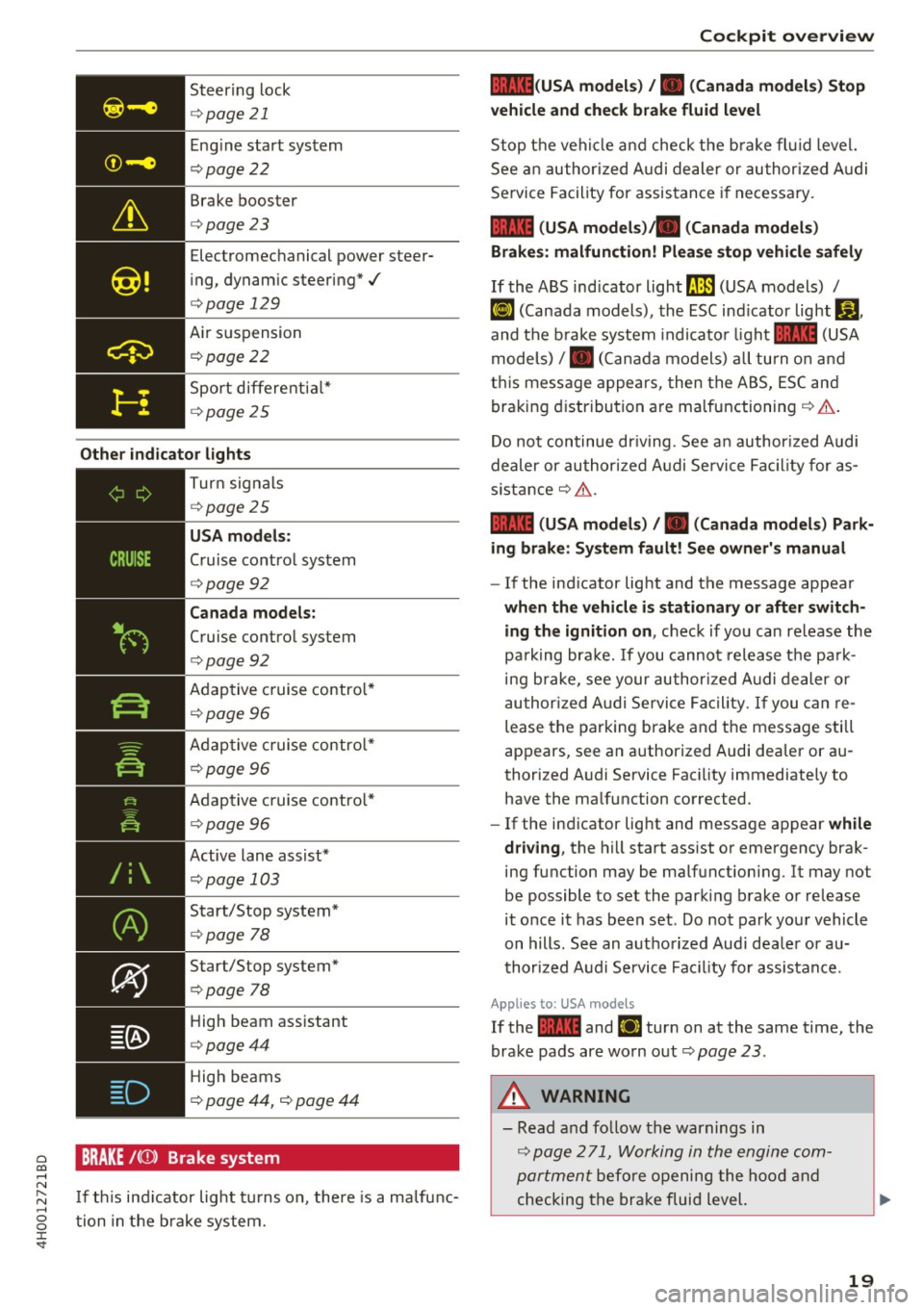
¢page 21
Eng ine start system
¢ page22
Brake booster
<=>page23
Electromechanical power steer
i ng, dynam ic steering*./
<=> page 129
Air suspension
¢ poge22
Sport differe ntia l*
¢ poge 25
Other indi cator lights
-------------
Turn sig na ls
¢ poge25
USA mod els :
Cruise contro l system
<=>page 92
Can ada model s:
Cruise control system
<=>page 92
Adaptive c ruise contro l*
¢ page 96
Adaptive c ruise contro l*
¢ page 96
Adaptive c ruise contro l*
¢page 96
Active lane assist*
¢page 103
Start/Stop system*
¢page 78
Start/Stop system*
<=>page 78
High beam ass istant
<=> poge44
High beams
¢ page 44, <=> page 44
BRAKE /((J)) Brake system
I f th is ind icator light tu rns on, there is a malfunc
tion in the brake system.
Coc kpit o ve rv iew
llll (USA model s) /. (Canada model s) Stop
v ehicle and che ck brake fl uid le vel
Stop t he veh icle a nd check t he b rake fl uid level.
See an author ized A udi dealer or author ized A udi
Service Facility for assistance if necessary.
1111 (USA mod els) ta (Canada model s)
Brakes : malfunction! Plea se sto p vehi cle safel y
If the ABS ind icator light ll.JJJ (USA models) /
~ (Canada models), the ESC ind icator light Bl ,
and the b rake system indicato r light 1111 (USA
models) /. (Can ada models) all turn o n and
t hi s message appea rs, then the ABS, ESC and
braking d istribution are malfunctioning ¢&. .
Do not continue dr iv ing. See a n author ized Audi
dealer or authori zed A udi Se rvice Fac il ity for as
s istance ¢&. .
1111 (USA mod els) /. (Canada mod els) Park
ing brake : S ys tem fault! See owner' s manual
- If the ind icator light and the message appear
when the vehicle is stationary or after switch
ing the ignition on ,
check if you can re lease the
pa rk ing bra ke. If you cannot release the pa rk
ing brake , see your author ized Audi dealer or
au thor ized Audi Se rvice Fa cil ity. I f you can re
lease the parking brake and the message still
appears, see an authorized Audi dealer or au
thorized Audi Service Faci lity immediately to
have the malfunction corrected.
- If the indicator light and message appear
while
dri ving ,
the hill start ass ist or emergency brak
ing function may be malfunctioning. It may not
be possible to set the parking brake or release
it once it has been set . Do not park you r vehicle
on hills. See an authorized Audi dea le r or a u
thori zed A udi Service Fac ility for assistance.
App lies to: USA mode ls
If the 1111 and Ei1 tur n on at the same time, the
brake pads are worn out
¢ page 2 3 .
.&, WARNING
-Read and fo llow the warnings in
¢ page 2 71, Working in the engine com
portment
befo re opening the hood and
checking the brake fluid level.
19
Page 26 of 354
Cockpit over view
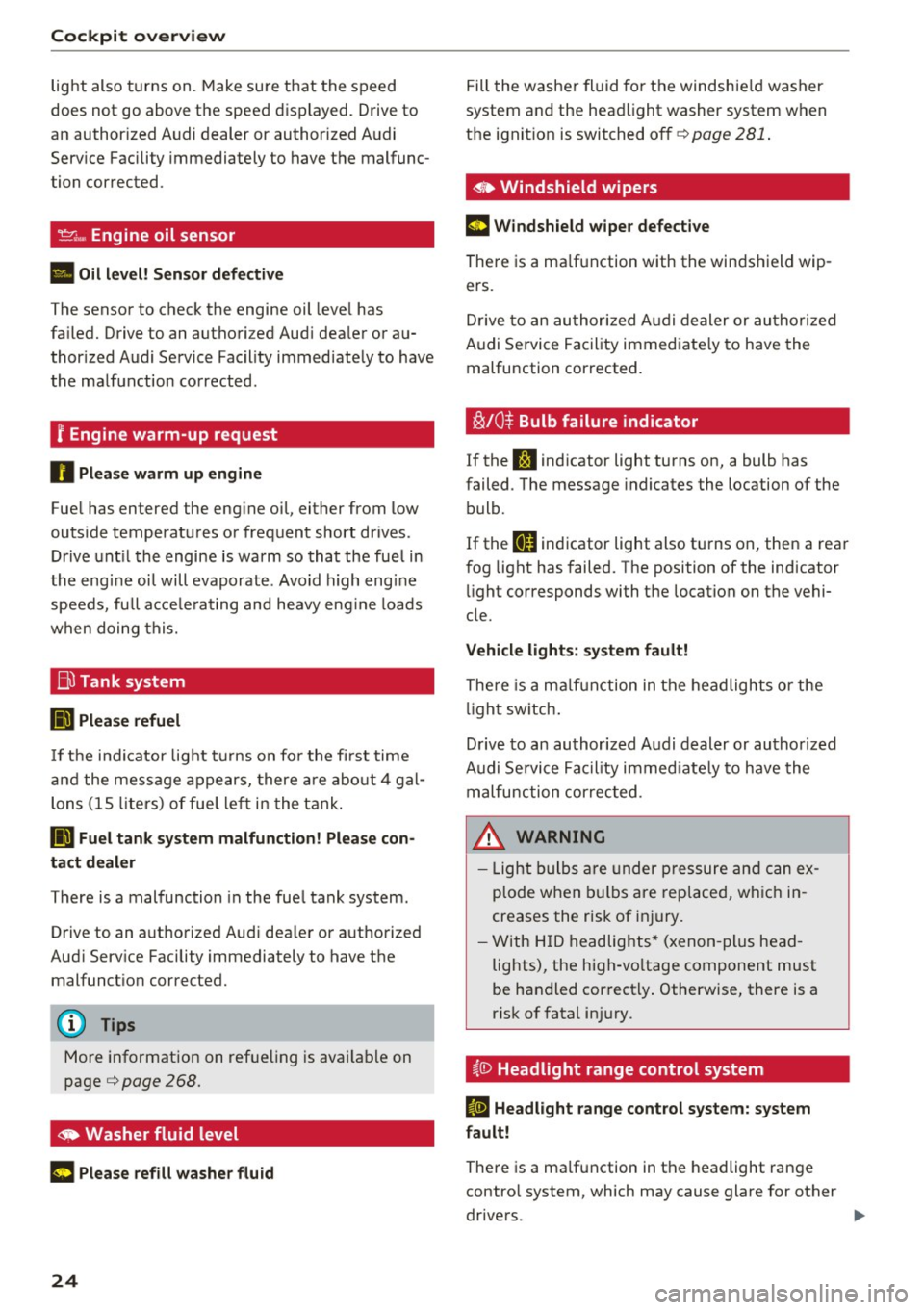
light also turns on. Make sure t hat the speed
does not go above the speed displayed. Drive to
an author ized Audi dealer or authorized A udi
Serv ice Facility immediately to have the malfunc
tion corrected .
_,.,. Engine oil sensor
• Oil l eve l! Se nsor def ectiv e
The sensor to check the engine oil leve l has
fa iled. Drive to an authori zed Aud i dea ler or au
thor ized Audi Service Facility immediate ly to have
the malfunction corrected .
r Engine warm-up request
n Plea se warm up eng ine
F uel has entered the engine oil, either from low
outside temperatures or frequent short drives .
Drive unt il the engine is warm so that the fuel in
the eng ine oi l will evaporate . Avo id high engine
speeds, full acce le rating and heavy eng ine loads
when doing this.
Bil Tank system
liD Plea se refuel
If the indicator lig ht t urns on for the fi rst time
and the mess age appears, there are abo ut 4 gal
lons (15 lite rs) of fue l le ft in the tank.
II] Fuel tank s ystem malfunction! Pl ea se con
tact dealer
There is a malfunction in the fue l tank system .
Drive to an authorized Audi dea ler or authorized
Aud i Serv ice Facility immediately to have the
malfunct ion corrected.
(D Tips
More information on ref ue ling is avai lab le on
page
c:> page 268.
~ Washer fluid level
C Please refill washer flu id
24
Fill the washer fluid fo r the windshie ld washer
system and the headlight washer system when
the ignit ion is switched off
c:> page 281 .
• Windshield wipers
m Windshield wiper defecti ve
There is a ma lf u nction with the winds hield wip
ers .
D rive to an authori zed A udi dealer or au tho riz ed
Audi Se rvice Facility immediate ly to have the
malfunction corrected.
~ /0~ Bulb failure indicator
If the S:i indicator light turns on, a bulb has
failed . The message indicates the location of the
bulb.
If the
II indicator light also t urns on, then a rear
fog light has failed. The position of the indicator
li ght corresponds with the location on the vehi
cle.
Vehicle light s: system fault!
There is a m alfu n ction in the headlights o r the
li ght sw itch .
D rive to an author ized A udi dealer or authorized
Audi Se rvice Fac ility immediate ly to have the
malfunction correc ted .
_& WARNING
-Light bulbs a re under pressure and can ex
plode when b ulbs are replaced, whic h in
creases the risk of inj ury.
- With H ID headlights * (xenon -plus head
lights), the high-vo ltage component must
be handled correct ly . Otherwise, there is a
risk of fatal in jury.
~(i) Headlight range control system
II He adlight ra nge cont rol system: system
f a ult!
There is a ma lfunction in the headlight range
contro l system, which may cause glare for other
drivers.
-
Page 27 of 354
0 co .... N ,..._
N .... 0 0 :c '
Audi Service Facility immediately to have the
malfunct ion corrected.
fi. D Light/rain sensor
El Automatic headl ights / automatic wipers :
System fault
The light/ra in sensor is malfunction ing.
The low beams remain switched on at all times
for safety reasons when the light switch is in the
AU TO position. You can continue to turn the
lights on and
off using the light switch . You can
still control all functions that are independent of
the ra in sensor through the windshield w iper lev
er .
Drive to an authori zed Aud i dea ler or authorized
Audi Service Facility immediately to have the malfunct ion corrected.
!-: Sport differential
A ppl ies to: ve hicles with sport differential
Ill Sport differential : System fault
There is a malfunction with the spo rt differentia l.
Dr ive to an authorized Aud i dea le r o r a uthorized
Aud i Service Facility immediately to have the
malfunct ion corrected.
Ill Sport differential : Overheating
The transm ission temperature has increased s ig
ni ficantly due to the sporty driving manne r. D rive
in a less sporty manner until the temperature re
turns to the normal range and the indic ator light
switches of .
& WARNING
-
Contact your authori zed A udi dealer or a
qualified workshop if the sport differentia l is
faulty or malfunctioning. The repair must be
performed by trained personnel using the cor
rect o il in order to ensure safety.
Coc kpit o ve rv iew
¢ Q Turn signals
If the . or B indicator light blinks , the turn
s ignals a re act ivated. If bot h ind icator lights are
blinking, the emergency flashers are activated.
If an ind icator light blinks tw ice as fast as usual,
a turn signal bu lb has fai led. Carefully d rive to an
autho riz e d Aud i dea le r or authorized Aud i Serv ice
F acility immed iate ly to have the ma lfunction co r
rected . The indicator light does not indicate a
malfunction if a turn signal on the trailer or on
the vehicle fa ils in trailer towing mode.
(D Tips
Fo r more information on the turn signa ls, re
fer to<=>
page 44.
On Board Diagnostic
System (OBD)
Malfunction Indicator Lamp (MIL)
The Ma lfunction Indicator Lamp (MI L) ¢,ij in the
inst rument cluster is part of the On-Boa rd Diag
nostic (OBD II) system .
T he wa rning/indicator light ill uminates when the
ignition is sw itched on and goes out after the en
gine starts and the idle has stabilized. This indi
cates that the MIL is working properly.
If the li ght do es not go out after the eng ine is
sta rted, or i lluminates while you are driving, a
malfunction may exist in the engine system. If
the lig ht illuminates, the catalytic converter
could be damaged.
Cont inue driving
with reduced power (avoiding
s ustained high speeds and/o r rapid accelera
tions) and have the condit ion corrected. Contact
your authori zed Aud i dea ler .
If the light i llum inates, the elect ronic speed lim
iter may also be malf unct ion ing. For more infor
mation
c> page 26, Electronic speed limiter .
An improperly closed fue l filler cap may also
ca use the MIL light to illuminate ¢
page 269.
25
Page 43 of 354
C) C0 ....
"' " "' .... 0 0 :r
va let parking function is sw itched on :
-l'-"' I but ton in the dr iver's door
- I""' I button on the remote cont ro l key
- Hand le in the rear lid
When the valet parking f unction is switched on,
the message
Valet parking activated appears in
the instrument cluster display when you switch
the ign ition on.
Garage door opener
(Homelink)
Description
Ap plies to: ve hicles with ga rage door opener (Homelink)
Fig. 42 Garage door o pen er: examples o f usage fo r di ffer
ent systems
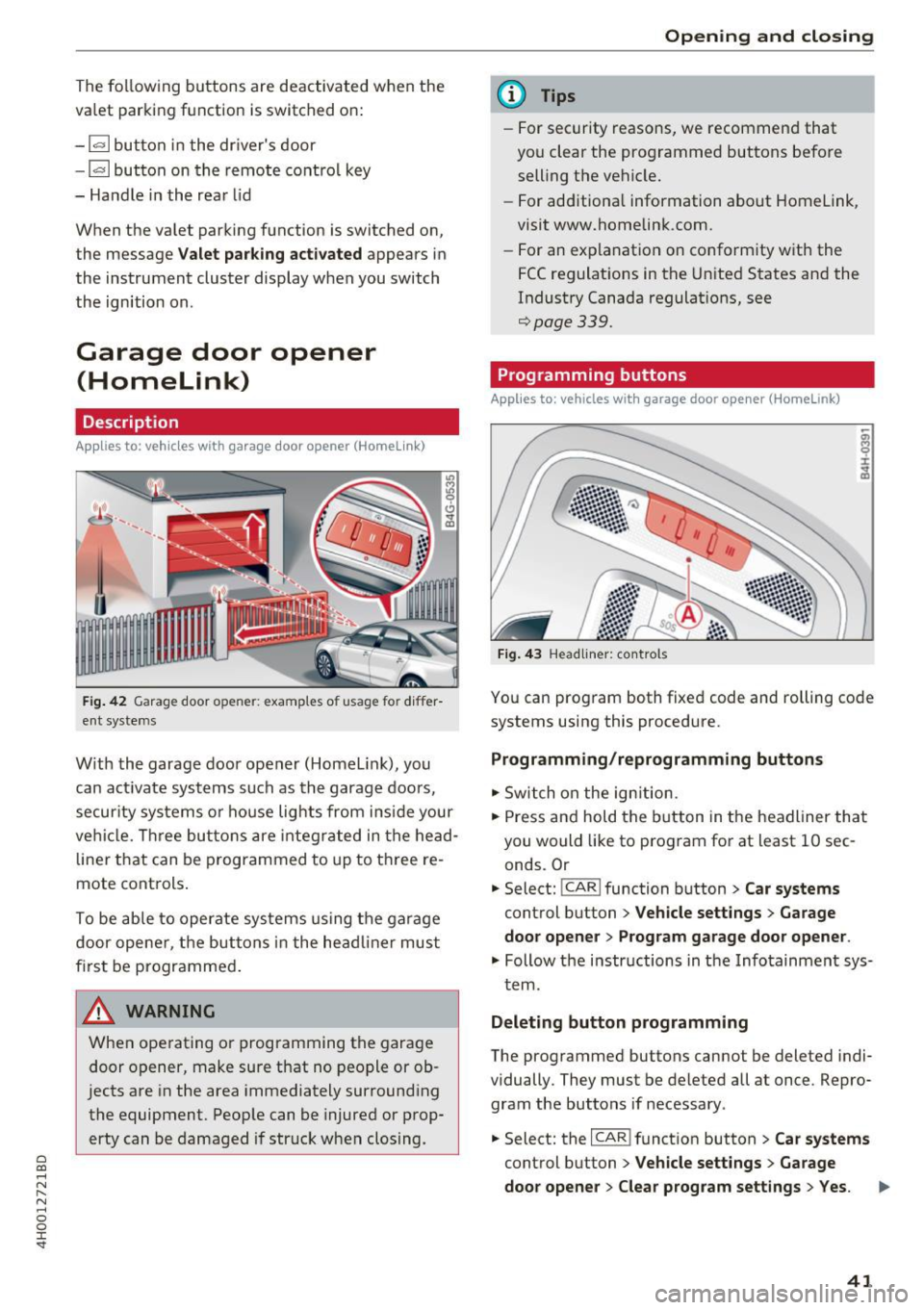
W ith the garage door opener (Homelin k), you
can act ivate sys tems su ch as th e garage doors,
secur ity systems o r house lights from i nsid e your
ve hicl e. Thr ee bu tto ns are integr ated in t he head
line r th at can be programmed to up to t hree re
mote cont rols .
To be able to operate sys tems using the ga rage
d oor ope ne r, t he but tons in the he adline r mu st
f ir st b e programme d.
A WARNING
When operating or programming t he gara ge
door o pener, make sure that n o people or ob
jects are in the area immedia tely sur round ing
the equipment. Peop le can be injured or p rop
erty can be damaged if str uck w hen clos ing.
Open ing and closing
(D Tips
- For security reasons , we recommen d that
you clear the programmed buttons befo re
selling t he ve hicle.
- For ad ditiona l information about Homelink,
visit www.homelink.com.
- For an ex planat ion on conform ity wit h the
FCC reg ulat io ns in t he Unite d States an d the
Indust ry Canada regulat ions, see
¢ page
339.
Programming buttons
Applies to: vehicles with garage door opener (Home link)
Fig. 43 Headliner: co ntrols
You can prog ram both fixe d code and rolling co de
systems using this procedure .
Programming/reprogramming buttons
"'S witch on the ign iti on.
"' Press and hold the b utton in t he headliner that
you would like to program for at least 10 sec
onds. Or
"' Select:
!CAR ! function button> Car systems
cont rol button > Vehicle settings > Garage
door opener > Program garage door opener .
"' Follow the i nstr uctions in t he Info tainment sys-
t em .
Deleting button programming
The programmed buttons cannot be deleted indi
vidually. They must be deleted all at once . Repro
gram the buttons if necessary .
"' Select: the
I CARI funct io n button> Car systems
cont rol button > Vehicle settings > Garage
door opener > Clear program settings > Yes .
41
Page 45 of 354

C) C0 ....
"' ,....
"' .... 0 0 :r
Exterior Lighting
Switching the headlights on and off
Fig. 44 I nstrument pane l: l ig ht sw itc h w ith all -weather
li g hts
The headlights only wo rk when the ignition is
sw itche d on. While sta rting the engine or when
switching off the ignition, the headlights will go
off and only the side marker lig hts will be on .
I f the sys tem is not operati ng p roperly, a warning
symbol in the dr ive r informa tion d ispl ay is dis
p layed
.::> page 24 .
Light switch --r;..-
T u rn the swi tch ~ fig . 44 to the co rresponding
position . When the lights are switched on, the
:o o:
symbol turns on .
0 - The lights a re off or the daytime runni ng
l ights are on :
-USA models: The daytime running lig hts will
come on automatically when the ignition is on
and the light sw itch
c:> fig . 44 is in the O posi
t ion or the
AUTO position (only i n day light con
di tions). The
Daytime running lights function
can be turned o n and off i n the MM I
c:> page 45, i=> .&,.
-Canada models : The dayt ime runn ing lights
will come on au toma tically when t he igni tion is
on a nd the light swi tch
c:> fig . 44 is in the O po
s ition, the
:oo : pos ition or the AUTO position
(o nly in daylig ht conditions)
c::> &. .
AUTO -Automat ic he ad lights sw itch on and off
de pend ing on br igh tness, for example in tw ilight,
d uring rain or in tunne ls
c:> &. .
Lights and V ision
:oo: -Side ma rker ligh ts
iD -Low beam hea dlights
~ -All-weather lig hts
l2!l -Rear fog lights*. When the rear fog lights are
on, the symbol
O* on the sw itch will i lluminate .
All-weather lights
The front lights a re adjus ted au toma tic a lly so
that you are less likely to see g lare from your ow n
head lig hts, for example when d riving on a wet
road.
Automatic dynamic headlight range control*
Yo ur vehicle is equ ipped wi th a headlight r ange
contro l system so tha t the head lig hts do not
blind oncoming t raffic if the vehicle load
c h anges . The hea dlight range also ad justs auto
matically when brak ing and acce lerating .
Light functions
The following light funct ions are available de
p ending on veh icle equipment and o nly fu nction
whe n the light switch is in t he AUTO position.
You can deactivate these functions in the MMI under
Audi adaptive light c:> page 45 .
Static cornering light* -the cornering light
switches on automatically when the steering
whee l is turned at a certai n angle at s peeds up to
app roximately 44 mph (70 km/h) and when the
turn s ignal is activated at speeds up to approxi
mately 25 mph (40 km/h) . The area to t he side of
t h e ve hicle is illuminated better w hen turning.
Dynamic curve light * -the curve lig ht adapts it
self to the curves in the road .
Highway l ight function* -this function adapts
the lig hting for highway driving based on vehicle
speed .
A WARNING
---Automatic headlights are only int ended to
assist the driver. They do no t relieve the
driver of his responsib ility to check the
headligh ts and to turn them on manually
ac co rdi ng to t he cur rent light a nd v is ib ili ty
condi tio ns . Fo r example, fog c annot be
43
Page 46 of 354
Lights and Vision
detected by the light sensors. So always
switch on the headlights gD under these
weather conditions and when driving in the
dark .
- Crashes can happen when you cannot see
the road ahead and when you cannot be
seen by other motorists . Always turn on the
headlights so that you can see ahead and so
that others can see your car from the back.
- The rear fog lights should only be turned on in accordance with traffic regulation, as the
lights are bright for following traffic.
- Please observe legal regulations when using
the lighting systems described .
(D Tips
-The light sensor* for automatic dynamic
headlight range control* is located in the
rear view mirror mount . You should there
fore not apply any stickers to the windshield
in this area in order to prevent malfunctions
or failures .
- In the event of a light sensor malfunction,
the driver is notified in the instrument clus
ter display~
page 25.
- You will hear a warning tone if you open the
driver door when the exterior lights are
switched on.
- In cool or damp weather, the inside of the
headlights, turn signals and tail lights can
fog over due to the temperature difference
between the inside and outside. They will
clear shortly after switching them on. This
does not affect the service life of the light ing .
44
Turn signal and high beam lever
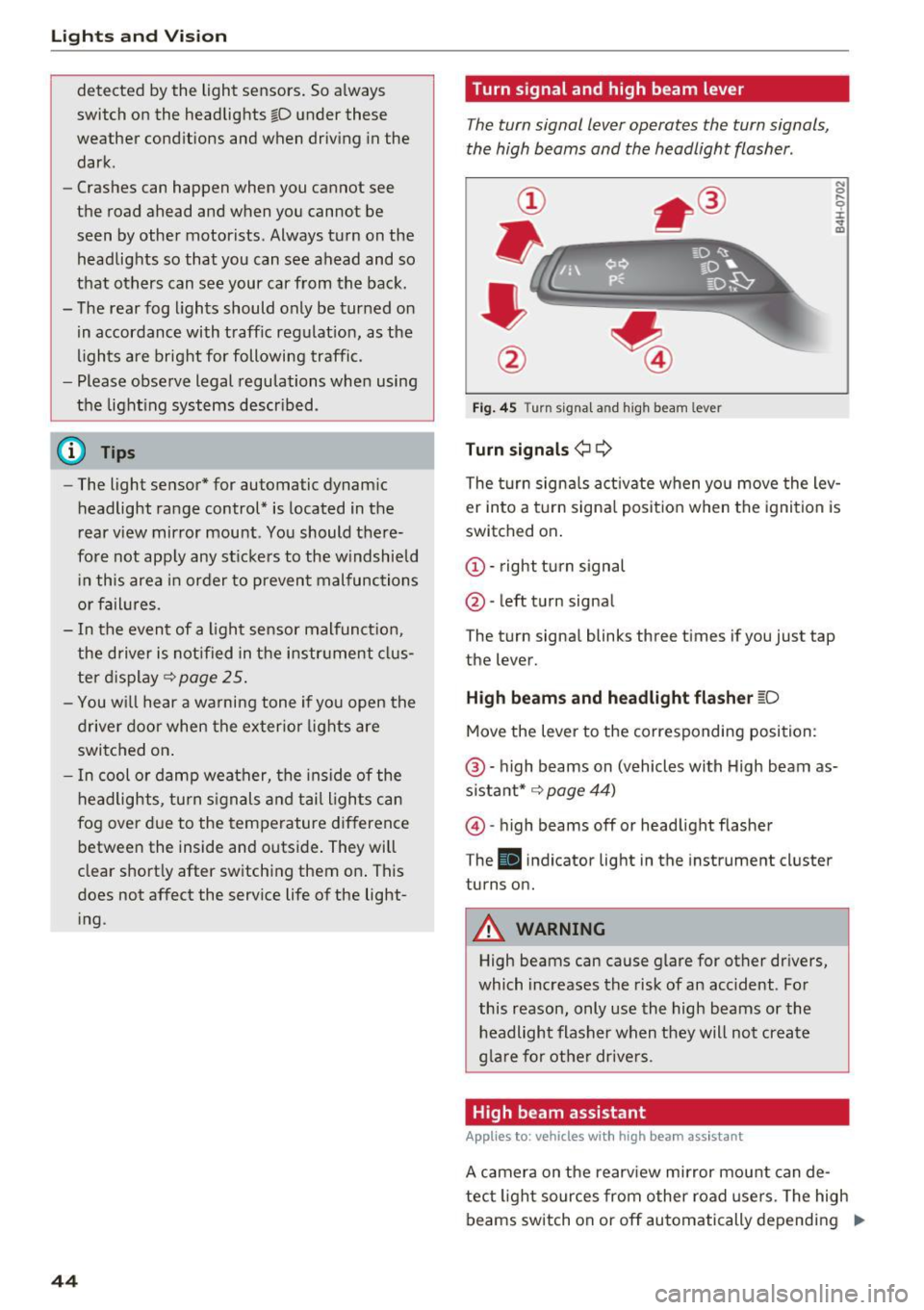
The turn signal lever operates the turn signals,
the high beams and the headlight flasher .
Fig. 45 Turn signal an d high beam leve r
Turn signals¢ Q
N 0 .... 0 :i: .. m
The turn signals activate when you move the lev
er into a turn signal position when the ignition is
switched on.
© -right turn signal
@-left turn signal
The turn signal blinks three times if you just tap
the lever.
High beams and headlight flasher ~D
Move the lever to the corresponding position:
@ -high beams on (vehicles with High beam as
sistant* ~
page 44)
@)-high beams off or headlight flasher
T he
Iii indicator light in the instrument cluster
turns on.
A WARNING
High beams can cause glare for other drivers,
which increases the risk of an accident . For
this reason, only use the high beams or the
headlight flasher when they will not create
glare for other drivers .
High beam assistant
Applies to: vehicles with high beam assistant
A camera on the rearview mirror mount can de-
tect light sources from other road users. The high
beams switch on or off automatically depending
ll>
Page 47 of 354
on the position of vehicles driving ahead and on
coming vehicles, the vehicle speed and other en
vironmental and traffic conditions.
Activating high beam assistant
Requirement: the light switch must be set to the
AUTO position and the high beam assistant must
be switched on in the Infotainment system
¢page 45.
.,. To activate the high beam assistant , tap the
lever forward @. T he
II indicator light ap
pears in the instrument cluster display and the
high beam assistant is switched on/off auto
matically. The
Ill indicator light also turns on if
the high beams are switched on.
Switching the high beams on/off manually
If the high beams did not switch on/off automat
ically as expected, you may switch them on or off
manually instead:
.,. To switch the high beams on manually, tap the
lever forward @. T he indicator light
Ill turns
on .
.,. To switch the high beams off manually, pu ll the
lever back@. The h igh beam assistant is deac
tivated.
Operating the headlight flasher
.,. To operate the headlight flasher when the high
beam assistant is activated and high beams are
switched off, pu ll the lever back @. The high
beam assistant rema ins active.
Messages in the instrument cluster display
Headlight assist: System fault!
Drive to an authorized Aud i dea le r or authorized
Aud i Service Facility immediately to have the
malfunction corrected. You can still switch the
high beams on or off manually.
Headlight assist: Unavailable No camera view
The camera view is blocked, for example by a
sticker or debris.
o The sensor is located between the interior rearco
~ view mirror and the windshield. Do not place any ,..._
~ stickers in this area on the windshield.
0 0 :c '
A WARNING
High beam assistant is only intended to assist
the driver. The driver is still respons ible for
controlling the headlights and switching
them manua lly depending on light and visibi l
it y conditions. It may be necessary to operate
them manually in situations such as:
- I n adverse weather conditions such as fog,
heavy rain, blowing snow or spraying water.
- On roads where oncoming traffic may be
pa rtia lly obscured, such as expressways.
- When there are road users that do not have
sufficient lighting, such as bicyclers or
vehicles with dirty tail lamps .
- I n tight curves and on steep hills.
- In poorly lit areas.
- W ith strong reflectors, such as signs.
- If the area of the w indshield near the sensor
is fogged over, dirty, icy or covered with a
sticker .
Adjusting the exterior lighting
The functions ore adjusted in the Infotainment
system .
.,. Select: !CAR ! function button > Car systems
control button > Vehicle settings > Exterior
lighting .
Automatic headlights
You can adjus t the following settings in the Au
tomatic headlights
menu:
Headlights activation time -you can adjust if the
headlights switch on
Early, Medium or Late ac
cording to the sensitivity of the light sensor.
Headlight assist* -you can switch the h igh beam
ass istant*
On and Off .
Daytime running lights*
USA models :
the daytime running lights can be
switched on/off. Select
On or Off.
Canada models:
this function cannot be switched
off. They activate automatically each time the ig -
nition is switched on .
ll>
45