infotainment AUDI A8 2017 Workshop Manual
[x] Cancel search | Manufacturer: AUDI, Model Year: 2017, Model line: A8, Model: AUDI A8 2017Pages: 354, PDF Size: 88.68 MB
Page 208 of 354

System settings
Voice recognition volume: you ca n adjust the vol
ume of the announcements by t urning the con
trol knob.
Individual speech training (onl y when the ve hi
cle is s tat io nary): yo u ca n ada pt the voice recog
n ition system to yo ur voice or pro nunciat io n in
or der to im prove the system's ability to reco gnize
your speech. Individua l train ing is comprised of
40 speech e ntries that cons ist of commands and
sequences of numbers . Yo u can delete t he p ro
g ra m med voice tra ining using
Reset speech
training .
Delete all name tags :
all of the name tags that
you have stored (spoke n na mes) a re deleted .
Display brightness
You can a djust the Infotainment display bright
ness by t urning the co ntro l knob .
Factory settings
Yo u can r ese t t he followi ng func tion s to t he fa c
t ory defa ult settin gs:
- Sound settings
- Radio
- Media settings
- Jukebox
- Directory*
- Telephone *
- Bluetooth *
- Navigation settings*
- Navigation and online memory *
- Voice recognition system
You can se lect the des ired functions individua lly
or all at once with the
Select all entries option.
Select an d confirm
Restore factory default set
tings .
If you reset the Jukebox to facto ry setti ngs, all of
the music/video files are deleted and the
Media
settings
are reset.
System update
T he MMI softwa re, s uch a s the navig ation d ata*,
ca n be updated by DV D, USB or S D card usin g t he
system update feature .
206
Fo r more info rmation abou t the System update ,
visit www.audiusa.com/bluetooth or contact an
a uth orize d Aud i dea le r or authorized Aud i Serv ice
Facility.
Data encryption
Yo u can prote ct your pe rsonal dat a, su ch as con
tac ts in the dire ctory, destina tions in navigation*
and name tags with a persona l passwor d. If the
u nit is rep lace d, you can on ly t ransfe r yo ur per
sona l data to t he new MMI unit using your pass
w ord . T he default passwo rd "M MI3G" is valid un
ti l yo u assig n a perso nal passwo rd .
Version information
Info rmation on the software ve rsion of the MMI
and t he nav igation database * is displayed.
Page 304 of 354

Wheels
the recommended tire pressure for your vehicle
¢page 293, fig. 268.
Tire tread circumference and vibration character
istics can change and cause a tire pressure warn
ing if:
- the tire pressure in one or more tires is too low.
- the tire has structural damage .
- the tire was replaced or the tire pressure was
changed and it was not stored¢
page 302.
-the spare tire* is installed.
Indicator lights
IE Loss of pressure in at least one tire¢&. .
Check the tires and replace or repair if necessary.
Check/correct the pressures of all four tires and
store the pressure again in the Infotainment sys
tem ¢
page 302 .
mm (Tire Pressure Monitoring System) Tire
pressure: System malfunction!.
Ifmm appears
after switching the ignition on or while driving
and the
IE indicator light in the instrument clus
ter blinks for approximately one minute and then
stays on , there is system malfunction . Try to
store the correct tire pressures¢
page 302. If
the indicator light does turn off or turns on again
after a short period of time, drive to an author
ized Audi dealer or authorized Audi Service Facili
ty immediately to have the malfunction correct
ed .
A WARNING
- If the tire pressure indicator appears in the
display, reduce your speed immediately and
avoid any hard steer ing or braking maneu
vers . Stop as soon as possible and check the
t ir es and their pressure .
- The driver is responsible for maintaining the
correct tire pressure. You must check the
t ire pressure regularly.
- Under certain conditions (such as a sporty
dr iv ing style, winter cond itions or unpaved
roads), the tire pressure monitoring system
indicator may be delayed.
- Do not use run-flat tires on your vehicle. Us
ing them when not permitted can lead to
vehicle damage or accidents .
302
(D Tips
-The tire pressure monitoring system can al
so stop working when there is an ESC mal
function.
- Using snow chains may result in a system
malfunction.
- The tires with the identification "AO" or
"RO" ¢
page 290 have been matched with
your Audi tire pressure monitoring system.
We recommend that you use these tires.
Storing tire pressures
App lies to: AB, 58
If the tire pressure changes or a tire is replaced ,
it must be confirmed in the Infotainment sys
tem.
... Make sure before storing that the tire pressur es
of all four tires meet the specified values and
are adapted to the load ¢
page 291.
... Switch the ignition on.
... Select: the
ICARI funct ion button> Car Systems
control button > Servicing & checks > Tire
pressure monitoring
> Store tire pressure >
Yes, store now.
(D Tips
Do not store the tire pressures if snow chains
are installed. Othe rw ise the system could
malfunction.
Tire Pressure Monitoring System (S8 plus)
(l) General notes
App lies to : 58 plus
Each tire, including the spare (if provided),
sho uld be checked monthly when cold and inflat
ed to the inflation pressure recommended by the
vehicle manufacturer on the vehicle placard or
tire inflation pressure label. (If your vehicle has
tires of a different size than the size indicated on
the vehicle placard or tire inflation pressure la
bel, you should determ ine the proper t ire infla-
tion pressure for those tires). .,.
Page 305 of 354

0 co .... N ,..._
N .... 0 0 :c '
equipped with a tire pressure monitoring system (TPMS) that illuminates a low tire pressure tell
tale when one or more of your tires is significant ly under-inflated. Accordingly, when the low tire
pressure telltale illuminates, you should stop and
check your tires as soon as possible, and inflate
them to the proper pressure. Driving on a signifi
cantly under-inflated tire causes the tire to over
heat and can lead to tire failure. Under-inflation
also reduces fuel efficiency and tire tread life,
and may affect the vehicle's handling and stop
ping ability.
Please note that the TPMS is not a substitute for
proper tire maintenance, and it is the driver's re
sponsibility to maintain correct tire pressure,
even if under-inflation has not reached the level
to trigger illumination of the TPMS low tire pres
sure telltale.
Your vehicle has also been equipped with a TPMS
malfunction indicator to indicate when the sys
tem is not operating properly. The TPMS mal
function indicator is combined with the low tire
pressure telltale. When the system detects a
malfunction, the telltale will flash for approxi
mately one minute and then remain continuously
illuminated. This sequence will continue upon
subsequent vehicle start-ups as long as the mal
function exists .
When the malfunction indicator is illuminated,
the system may not be able to detect or signal
low tire pressure as intended. TPMS malfunctions
may occur for a variety of reasons, including the
installation of replacement or alternate tires or
wheels on the vehicle that prevent the TPMS
from functioning properly. Always check the
TPMS malfunction telltale after replacing one or
more tires or wheels on your vehicle to ensure
that the replacement or alternate tires and
wheels allow the TPMS to continue to function
properly.
Wheels
Description
App lies to : 58 plus
The tire pressure monitoring system monitors
the pressure in the four tires when driving .
The system uses sensors that measure the tem
perature and pressure in the tires. The data is
sent from these sensors to the control module by
radio frequency.
The Tire Pressure Monitoring System shows the current pressures and temperatures of the tires
in the Infotainment system
o page 304. It also
compares the current tire pressures with the
stored tire pressures and gives a warning in the
driver information system if the tire pressure is
different from what is stored
o page 304.
The system does not detect if the stored tire
pressures match the recommended tire pres
sures.
- Every time the tire pressures change, for exam-
ple when the load in the vehicle changes,
- after replacing a tire, or
- if wheels with new wheel sensors are used,
you must store the tire pressures again
opage 305.
A WARNING
--The tire pressure monitoring system assists
the driver in monitoring tire pressures. The
driver is responsible for having the tires in
flated to the correct pressure.
- Do not change the tire pressure when the
temperature of the tire is high. This could
result in serious damage to the tire and
even cause the tire to burst, increasing the
risk of an accident.
- A tire with low pressure flexes more. This
heats the tire up too much. This could cause
the tread to separate and even cause the
tire to burst, increasing the risk of an acci
dent.
- The Tire Pressure Monitoring System does
not warn you of damage or defects in the
tire construction that could cause the tire to
burst, for example. Inspect your tires regu
larly.
303
Page 306 of 354

Wheels
@ For the sake of the environment
Low tire pressure inc reases fuel consumption
and tire wear.
@ Tips
- The pressure of the spare tire * is not moni
tored.
- If t ires are re pla ced, the sensors/valves do
not need to be removed or rep laced . Ju st re
placed the valve stem and, if necessary, the
valve and the wheel e lectron ics . If you have
quest ions, see your autho riz ed Aud i dea ler
or authorized Audi Service Facility.
Displaying tire pressures/temperatures
App lies to : 58 plus
Req uirement: the ign ition must be switched on .
.,. Select : the
ICARI function button > C ar s ystems
> Serv icing & checks > Tire pressure mon itor
ing
> Display tire pressures.
The current tire pressures are shown in green and
yellow numbers in the Infotainment system:
- Green : the current tire pressure and the speci
fied tire pressure are approximately the same .
-Yellow: the c urrent tire press ure is too low
compared to the specified tire pressure.
The spe cified t ire press ure is the la st tire pres
sure th at was s tored
c::> page 305.
No te that the tire pressure also depends on the
t emperature of the ti re . The ti re pressu re in
creases as the engine becomes wa rmer wh ile
d riving.
& WARNING
R ea d and follow t he important information
and notes
c::> page 303 .
@ Tips
The tire pressure or tem per ature are not dis
pl ayed in ada ptation mode. D ashe s·-.·- are
shown i n place of the press ure and tempera
ture .
304
-
Tire pressure loss
Applies to: 58 plus
Fig. 2 70 Dis pla y: ind icator light w it h a mess age
If the [I] ind icator light turns on, the pressure in
at least one tire is too low or new sensors were
not adapted:
RE indicator light s turn s on after turning the
ignition on
The tire pressure is too low compared to the
spec ified press ure .
.. Check and store the tire press ure(s) the next
time it is possible
c::> page 305.
RE indicator light turns on while dr iving
Wheels with new sensors we re not adapted or
the tire p ressure has reached a critica l level com
pared to the specif ied pressure.
.. Avoid unnecessary s teering and brak ing maneu-
vers .
.. Adapt your driving sty le to the s ituation.
.. Stop as soon as possib le and check the tire(s).
.. If it is possib le to cont inue dr iv ing, see an au-
thorized Audi dealer or authorized Audi Service
Facility immediately and have your tire(s) re
pai red or rep laced .
& WARNING
Read and f ollow the impo rtant inform ation
and notes
c::>p age 303.
-
Page 307 of 354

Storing new tire pressures
Applies to: S8 plus
Correctly stored tire pressure specifications are
necessary for reliable tire pressure monitoring .
.. Check the tire pressures in all wheels.
1> If necessary, correct the tire pressure according
to the spec ificat ions on the sticker on the driv
er's door ~
page 291 . Only correct the press ure
in tires whose tempera tu re is approx imately
the same as the amb ient temperature.
If the
tempera ture of the tire is highe r than the ambi
ent a ir temperat ure, the tire pressure must be
increased approximately 3 PSI (0,2 bar) above
the va lue on the sticker.
.. Switch the ignition on.
.. Se lect :
I CARI funct ion button > Car systems >
T ire pr essure monitoring > Store tire pres
s ure s.
After stor ing, the tire pressure mon itor
ing system measures the c urrent tire pressures
and stores them as the new specified p res
s ur es .
.. If the changed tire press ures are not displayed
in t he Infotainment system, dr ive the veh icle
for approximate ly 10 minutes so that the sen
sor signal from the whee ls is received again .
During this adap tat ion phase, --,-- is disp layed
for pressure and temperature and the Tire Pres
sure Monitoring System is only partially availa
b le: it only warns you if one or more of the tire
pressures is/are under the m inimum permitted
va lue. If this is the case, the
It] indicator light
appears w ith a message .
A WARNING
Read and follow the important information
and notes
~ page 303.
Malfunctions
Applies to: S8 plus
-
I f t he Tire Pressu re Monito ring System is not
av ail able,
the m ind icator light appe ars in the
driver informat ion system. The
HJ] indi cator light
o a lso blinks for approx imately one m inutes each co
~ time the ignition is switched on . The tire pressure ,.....
~ monitoring system cannot be selected in the In-o 0 :c '
fota inment system. The following are examp les
of situations that cou ld cause a malfunction:
- I f the message appears at t he e nd of the adap
t ation phase, the system cannot detec t the
wheels installed on the veh icle. This may result
from one or more whee ls being installed with
out wheel senso rs or with incompatible whee l
sensors.
- A wheel sensor or another component has
fa iled.
- Using snow chains can affect the function of
the system beca use of the shielding effect of
the chains .
- The tire pressure monitoring system is not
avai lab le due to a ma lf u nction .
- Transmitters with the same frequency, such as
headphones or remote-cont rolled devices, may
cause a temporary system malfunct ion due to
the strong electromagnetic field.
The
fim indicator light t urns off once the Tire
Pressure Monitoring System is availab le aga in . If
you cannot correct the ma lf u nction and
the m
indicator light stays on, drive immediately to an
authorized Aud i dealer or a uthorized Audi Serv ice
Facility to have the malf unct ion repaired .
305
Page 327 of 354
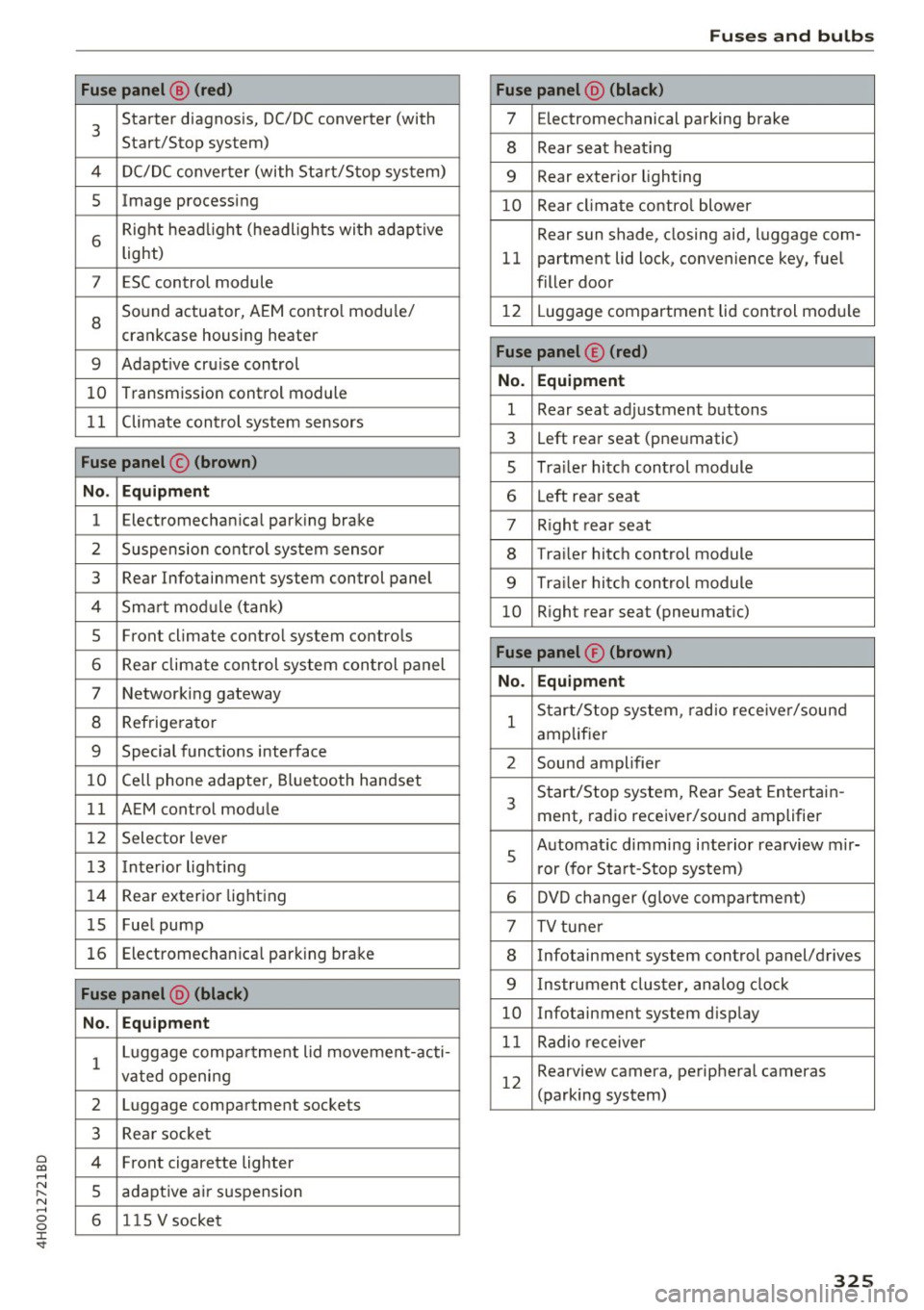
0 co .... N ,..... N .... 0 0 :c '
3
Starter diagnosis, DC/DC converter (with
Start/Stop system)
4 DC/DC converter (with Start/Stop system)
5 Image processing
6
Right headl ight (headlights with adaptive
light)
7 ESC control module
8
Sound actuator, AEM contro l modu le/
crankcase housing heater
9 Adapt ive cru ise control
10 Transmission control module
11 Climate control system sensors
Fuse panel © (brown)
No . Equipment
1 Electromechanical parking brake
2 Suspension control system sensor
3 Rear Infotainment system control panel
4 Smart mod ule (tank)
5 Front climate control system controls
6 Rear climate control system control panel
7 Networking gateway
8 Refrigerator
9 Special functions interface
10 Cell phone adapter, Bluetooth handset
11 AEM control module
12 Selector lever
13 Interior lighting
14 Rear exter ior light ing
15 Fue l pump
16 Electromechan ica l parking brake
Fuse panel @ (black)
No . Equipment
1 Luggage compa
rtment lid movement-acti-
vated opening
2 Luggage compartment sockets
3 Rea r socket
4 Front cigarette lighter
5 adaptive air suspension
6 1 lS V socket
Fuses and bulbs
Fuse panel @ (black)
7 Electromechanical parking brake
8 Rear seat heating
9 Rear exterior lighting
10 Rear climate control blower
Rear sun shade, closing aid, luggage com-
11 partment lid lock, convenience key, fuel
filler door
12 L uggage compartment lid control module
Fuse panel © (red)
No. Equipment
1 Rear seat adjustment buttons
3 Left rear seat (pneumatic)
s Trailer hitch control module
6 Left rear seat
7 R ight rear seat
8 Trailer hitch control module
9 Tra ile r hitch control module
10 Right rear seat (pneumatic)
Fuse panel® (brown)
No. Equipment
1
Start/Stop system, radio receiver/sound
amplifier
2 Sound amplifier
3
Start/Stop system, Rear Seat Entertain-
ment, radio receiver/sound amplifier
s
Automat ic dimming interior rearview mir-
r or (for Start-Stop system)
6 DVD changer (glove compartment)
7 TV tuner
8 Infotainment system control panel/drives
9 Instrument cluster, analog clock
10 Infotainment system display
11 Radio receiver
12
Rearview camera, peripheral cameras
(parking system)
325
Page 335 of 354

C) C0 ....
"' ,-...
"' .... 0 0 :r
Vehicle specifications
XXXXX XX · X · XXXX XXX XX
CD-+ :::::: XXXXXX XX XX X XX XXX XXX
IYP IT'il'! XXX XXX
xx xxxxxxx xx xx xx
XXX KW XXX
a.;. C1lll /TRANS. CIIOE xxxx XXX XXX ®i 11)10Al<8 ./lil'IR.k8.
©+ I.AO OIR. / IN NENAllSSl.
XXXX I XXXX XXX I XX PAI NT IIO. / ffl£ml
II. • AIJSlit / OPTIONS
EOA 70 5 4U B 6XM SSG SRW
2 EH JO Z 1LB 1AS l BA
3FC S MU 7Xl
F O A 9G3 OG7 OYH OJF
TL 6 3 KA 8EH UlA X 9B OZ7
lXW 803 908 8Z4 020
7T6 CV7 7KO 4X3 2K 2
3 L4 4KC 3YO 413 50 2
lS A 7GB 01A 4GO
XX. X XX X XX X xxxx
Fig. 299 Vehicle identifica tion labe l
Vehicle Identification Number (VIN)
The VIN number is located in the following pla
ces :
0
0
11:l :x: .,. al
-In the Infotainment system: se lect: the !CARI
func tion button > Car systems control button >
Servicing & checks > VIN number .
-on the vehicle identification label
- under the windshield on the driver's side
Vehicle identification label
The vehicle identification label ¢ fig. 299 is locat
ed in the luggage compartment under the cargo
floor cover in the spare wheel well.
The information of the vehicle identification label
can also be found in your Warranty
& Mainte
nance booklet.
Technical data
T he sticker contains the following vehicle data:
(D Vehicle Identification Number (VIN)
@ Vehicle type, engine output, transm ission
@ Engine and transmission codes
@ Paint and interior codes
® Optional equipment numbers
Safety compliance sticker
The safety compliance sticker is yo ur ass urance
that your new veh icle complies w ith all applicable
Federal Motor Vehicle Safety Standards which
were in effect at the time the vehicle was manu
factured. You can find this sticker on the door
jamb on the driver's side. It shows the month and
year of production and the vehicle identification
number of your vehicle (perforation) as well as
the Gross Vehicle Weight Rat ing (GVWR) and the
Gross Axle Weight Rating (GAWR).
High voltage warning label
The high voltage warning label is located in the
engine compartment next to the engine hood re
lease. The spark ignition system complies with
the Canadian standard ICES-002 .
Notes about technical
data
The values may differ for some markets depend
ing on equ ipment installed in certain markets
and the measuring methods.
Please note that the specifications listed in the
vehicle documentation always take precedence.
(0 Tips
Missing technical data was not available at
the time of print ing.
333
Page 346 of 354
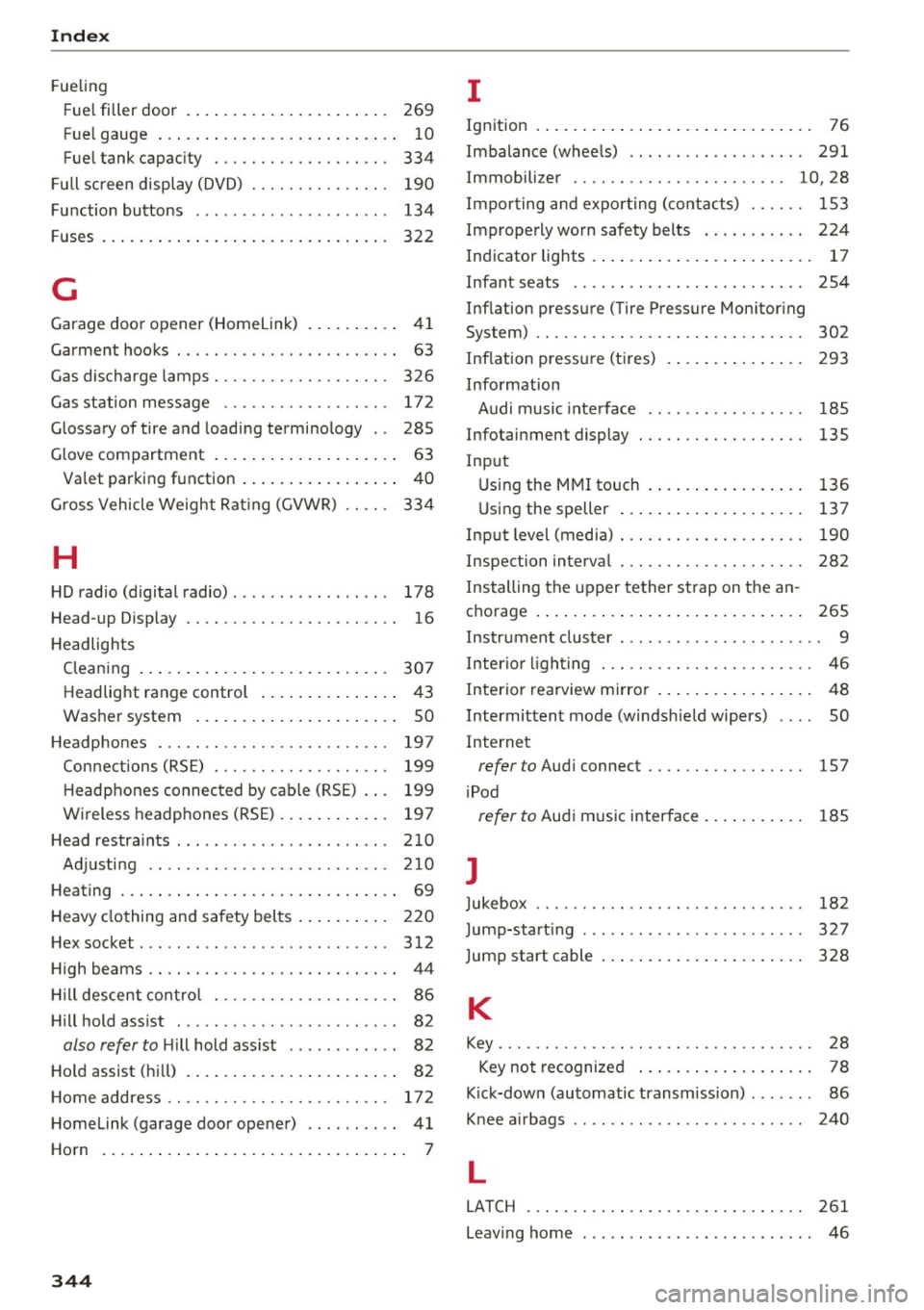
Index
Fue ling
F ue l filler door . . . . . . . . . . . . . . . . . . . . . . 269
Fue l gauge . . . . . . . . . . . . . . . . . . . . . . . . . . 1 0
Fue l tank capac ity . . . . . . . . . . . . . . . . . . . 334
F ull screen displ ay (DVD) . . . . . . . . . . . . . . . 190
Function buttons . . . . . . . . . . . . . . . . . . . . . 134
F uses . . . . . . . . . . . . . . . . . . . . . . . . . . . . . . . 322
G
Garage doo r opener (Home link) . . . . . . . . . . 41
Garment hooks . . . . . . . . . . . . . . . . . . . . . . . . 63
Gas discharge lamps . . . . . . . . . . . . . . . . . . . 326
Gas statio n mes sage . . . . . . . . . . . . . . . . . . 172
Glossary of tire and loading terminology . . 285
Glove compartment . . . . . . . . . . . . . . . . . . . . 63
Va let parking function . . . . . . . . . . . . . . . . . 40
Gross Vehicle Weight Rat ing (GVWR) . . . . . 334
H
H D radio (digital radio) . . . . . . . . . . . . . . . . . 178
Head -up Display . . . . . . . . . . . . . . . . . . . . . . . 16
H eadlights
Clean ing . . . . . . . . . . . . . . . . . . . . . . . . . . . 307
Headlig ht range contro l . . . . . . . . . . . . . . . 4 3
Washer system . . . . . . . . . . . . . . . . . . . . . . 50
H eadpho nes . . . . . . . . . . . . . . . . . . . . . . . . . 197
Conn ections (RS E) . . . . . . . . . . . . . . . . . . . 199
H eadphones connected by ca ble (RSE) . . . 199
W ireless headp hones (RSE) . . . . . . . . . . . . 197
H ead restra ints . . . . . . . . . . . . . . . . . . . . . . . 210
Ad justi ng .. .. .. .. . .......... .. .. .. . 210
H eating . . . . . . . . . . . . . . . . . . . . . . . . . . . . . . 69
H eavy clo thing and safety bel ts . . . . . . . . . . 220
H ex socket. .. .. .. .. . .. .. .... .. .. .. .. . 312
High beams . . . . . . . . . . . . . . . . . . . . . . . . . . . 44
Hi ll descent contro l . . . . . . . . . . . . . . . . . . . . 86
H ill hold ass ist . . . . . . . . . . . . . . . . . . . . . . . . 82
also refer to Hill hold ass ist . . . . . . . . . . . . 82
Ho ld assist (hi ll) . . . . . . . . . . . . . . . . . . . . . . . 82
H ome address . . . . . . . . . . . . . . . . . . . . . . . . 17 2
H omelink (garage door opener) . . . . . . . . . . 41
Horn . . . . . . . . . . . . . . . . . . . . . . . . . . . . . . . . . 7
344
I
Ign ition . . . . . . . . . . . . . . . . . . . . . . . . . . . . . . 76
Imbalance (whee ls) . . . . . . . . . . . . . . . . . . . 291
Immobilizer . . . . . . . . . . . . . . . . . . . . . . . 10, 28
I mpo rting and expo rting (cont acts ) . . . . . . 153
Improperly worn safety belts . . . . . . . . . . . 224
Indicator lights . . . . . . . . . . . . . . . . . . . . . . . . 17
Infan t seats . . . . . . . . . . . . . . . . . . . . . . . . . 254
Inflation pressure (Tire Pressure Mon itor ing
System) ........ .. .. .. ............. . .
I nflation press ure (t ires)
Info rmation 302
293
Audi music inte rface . . . . . . . . . . . . . . . . . 185
Infotainment display . . . . . . . . . . . . . . . . . . 135
Inp ut
U sing the M MI touch . . . . . . . . . . . . . . . . . 136
U sing the speller . . . . . . . . . . . . . . . . . . . . 137
I n pu t level (media) . . . . . . . . . . . . . . . . . . . . 190
Inspection interva l . . . . . . . . . . . . . . . . . . . . 282
I nstalling the upper tether st rap on t he an -
cho rage . . . . . . . . . . . . . . . . . . . . . . . . . . . . . 265
I nstr ument clus ter . . . . . . . . . . . . . . . . . . . . . . 9
Interior light ing . . . . . . . . . . . . . . . . . . . . . . . 46
I nterior re arview mirro r . . . . . . . . . . . . . . . . . 48
Intermitten t mode (winds hield wipers) . . . . SO
Internet
refer to Aud i connect . . . . . . . . . . . . . . . . . 157
i Pod
refer to Au di music interface . . . . . . . . . . . 185
J
Jukebox . . . . . . . . . . . . . . . . . . . . . . . . . . . . . 182
Jump-start ing ..... ... ...... ....... ... 327
Jump start cable 328
K
Key.............. .. .. .. ........... ... 28
Key not recognized . . . . . . . . . . . . . . . . . . . 78
K ick-down (au tomatic transm ission) . . . . . . . 86
Knee a irbags . . . . . . . . . . . . . . . . . . . . . . . . . 240
L
LAT CH . . . . . . . . . . . . . . . . . . . . . . . . . . . . . . 261
Leav ing home . . . . . . . . . . . . . . . . . . . . . . . . . 46