battery AUDI A8 2018 User Guide
[x] Cancel search | Manufacturer: AUDI, Model Year: 2018, Model line: A8, Model: AUDI A8 2018Pages: 356, PDF Size: 54.71 MB
Page 82 of 356
Driving
-The inter ior temperature differs from the tem
perature se lected in the A/C system.
-The windshield is being defrosted q page 71 .
-The brake pedal is pressed seve ral t imes in a
r ow.
-T he vehicle ba tte ry charge Leve l is too Low.
-Power consumption is high .
Ignition is switched off automatically
To prevent the veh icle battery from drain ing, the
ignit ion w ill switch off
automatically under the
following conditions:
-The vehicle has already been driven .
-The Start/Stop system has stopped the e ngine.
- T he driver's door is opened.
- T he dr iver's safety be lt is unb uckled.
- The brake pedal is not p ressed .
-The vehicle is stationary .
In this case, the activated low beam is replaced
by the parking Light. The parking Lights will
sw itch off after app roximately 30 minutes or
when you Lock the vehicle .
If the Start/Stop system has not turned off the
engine o r if you have sw itched the Start/Stop sys
tem off manually, the ignition will not be auto mat ically switched off and the engine w ill contin
ue to r un
q I!::::,. .
.&_ WARNING
To re duce the risk of poisoni ng, neve r allow
t he engine to r un in confined s paces.
(D Tips
If you select the D, N or S selector Lever posi
tion after shifting into reverse, the vehicle
m ust be driven faster than 6 mph (10 km/h)
in orde r for the engine to switch off again.
80
-
Manually switching the Start/Stop system
off/on
Appl ies to : vehicles wi th Start/Stop sys te m
If you do not wish to use th e system, you con
switch i t off manually.
------------ ~
:i:
~
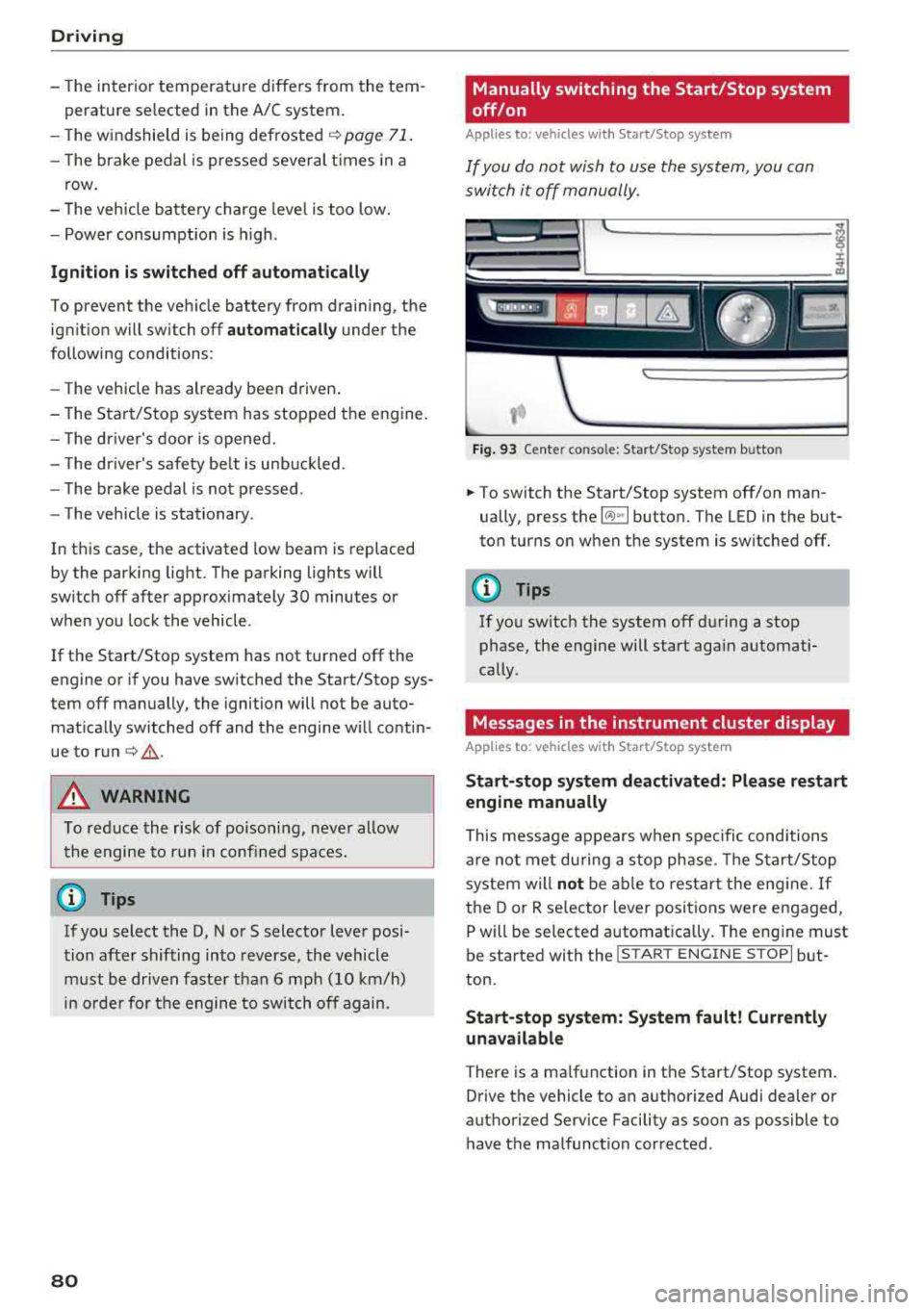
Fig . 93 Ce nte r conso le: Start/Stop system b utto n
.. To switch the Start/Stop system off/on man
ually, press the
l (A) ~I button. The LED in the but
ton turns on when the system is switched off.
(D Tips
If you switch the system off d uring a stop
phase, the engine will start aga in automati
cally .
Messages in the instrument cluster display
Applies to: vehicles wit h Start/Stop syste m
Start-stop system deactivated: Please restart
engine manually
This message appears w hen spec ific conditions
are not me t du ring a stop phase. The S tart/S top
system will
not b e abl e to re st art the eng ine. If
the D or R se lector Lever positions were engaged,
P will be selected a utomat ically . The eng ine must
be started with the
I START ENGI NE STOPI but
ton.
Start -stop system: System fault! Currently
unavailable
There is a ma lfunction in the Start/Stop system.
Drive the vehicle to an authorized Audi dea ler or
authorized Serv ice Facility as soon as possible to
have t he malfunction corrected .
Page 110 of 356
Assistance systems
Switching on/off
Applies to: ve hicles w ith Aud i side ass ist
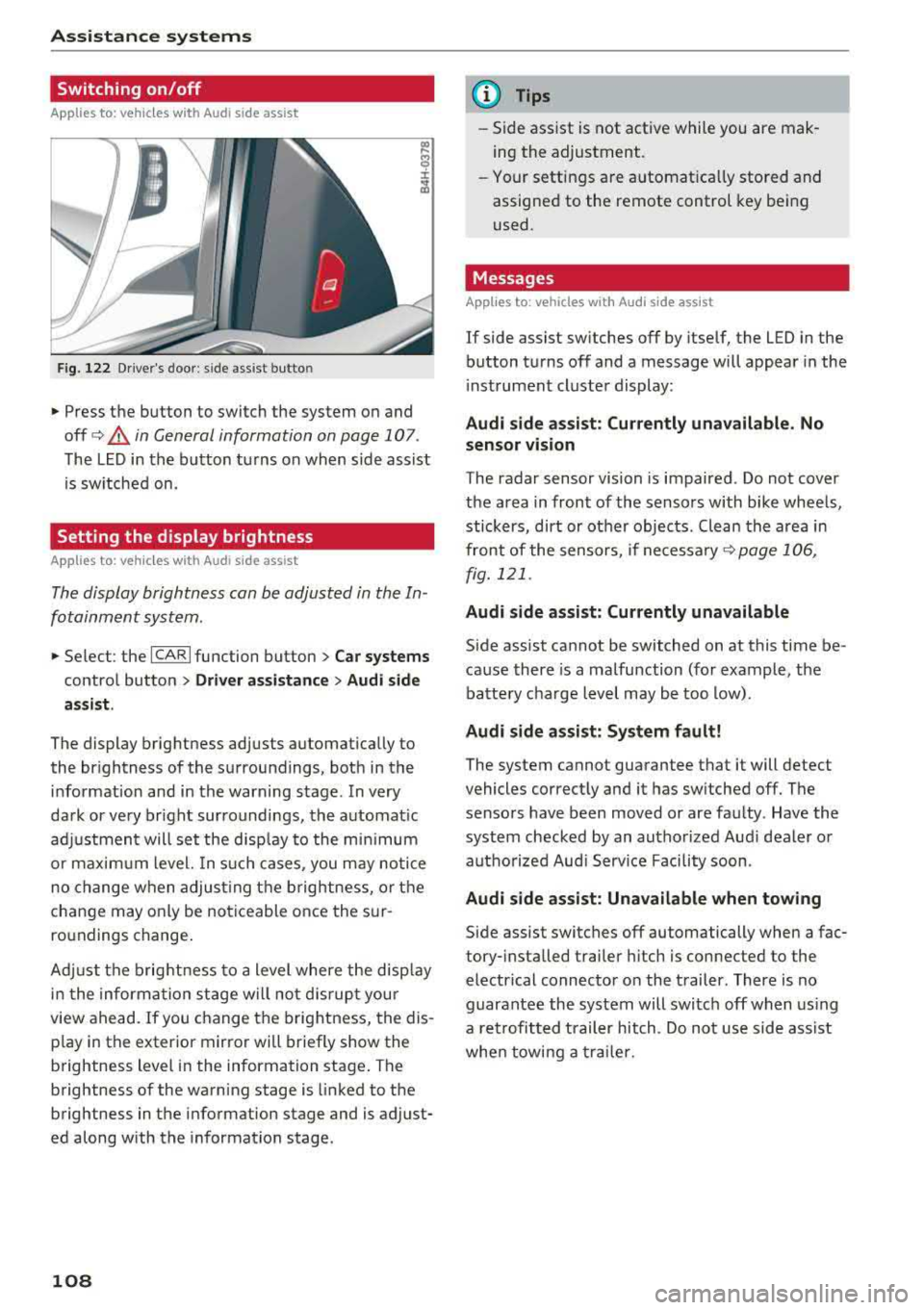
F ig. 122 Driver's door : side ass ist butto n
• Press the button to switch the system on and
off
c> .&, in General information on page 107 .
The LED in the button turns on when side assist
is sw itched on.
Setting the display brightness
App lies to: ve hicles with Aud i side ass is t
The display brightness can be adjusted in the In
fotainment system .
• Select : the ICARI function button > Car systems
control button > Driver assistance > Audi side
assist .
The display brightness adjusts automatically to
the br ightness of the surroundings, both in the
information and in the warning stage . In very
dark or very br ight surroundings, the automat ic
adj ustment will set the disp lay to the minim um
or maximum level. In such cases , you may notic e
no change when adjust ing the brightness, or the
change may only be noticeable once the sur
ro undings change .
Adj ust the brightness to a level where the disp lay
i n the information stage will no t disrupt your
view ahead.
If you change the brightness, the dis
p lay in the exter ior mirror wi ll briefly show the
brightness lev el in the information stage . T he
brightness of the warning stage is linked to the
brightness in the information stage and is adjust
ed along with the information stage.
108
@ Tips
-Side assist is not active while you are mak
ing the adjustment .
- Your settings are automat ica lly stored and
assigned to the remote control key being
used .
Messages
Applies to : vehicles wi th Audi side ass ist
If side assist switches off by itself, the LED in the
button turns off and a message will appear in the
i nstrument cluster display:
Audi side assist: Currently unavailable. No
sensor vision
The radar sensor vision is impaired . Do not cover
the area in front of the sensors with bike wheels,
stickers, dirt or ot her objects . Clean the area in
front of the sensors, if
necessary ¢ page 106,
fig. 121 .
Audi side assist: Currently unavailable
Side assist cannot be switched on at this time be
cause there is a malfunction (for example, the
battery charge level may be too low).
Audi side assist: System fault!
The system cannot guarantee that it will detect
vehicles correctly and it has switched off. The
sensors have been moved or are faulty . Have the
system checked by an authorized Audi dealer or
autho rized Aud i Serv ice Facility soon.
Audi side assist: Unavailable when towing
Side assist switches off automatically when a fac
tory- installed trailer hitch is connected to the
electrical connector on the trailer. There is no
guarantee the system will switch off when using
a retrofitted trailer hitch. Do not use side ass ist
when towing a trailer.
Page 134 of 356
Intelligent Technology
Your vehicle is equipped with an intelligent ener
gy management system for distributing electrici
ty. This significantly improves the starting ability
and increases the vehicle battery life.
The energy management system Is made up of
battery diagnosis, idling current management,
and dynamic energy management.
Battery diagnosis
The battery diagnosis determines the vehicle bat
tery charge level. The sensors determine the bat
tery voltage, the battery current, and the battery
temperature. The current charge level and the
performance of the vehicle battery are deter
mined based on this.
Idling current management
The idling current management decreases the
energy used while parked. With the engine
switched off, it manages the energy distribution
to the different electrical components. Data from
the battery diagnosis is taken into account for
this .
Depending on the vehicle battery charge level,
electrical equipment is switched off one item af
ter the other to prevent the vehicle battery from
draining and to maintain the starting ability.
Dynamic energy management
While driving, dynamic energy management dis
tributes the appropriate amount of energy to the
electrical equipment. It controls the battery
charge level so that the amount of energy is not
greater than the amount being generated in or
der to maintain an optimal vehicle battery charge level.
(D Tips
- Energy management cannot overcome the
laws of physics . Note that the charge level
and length of the vehicle battery life are
limited.
- When the starting ability is endangered, the
(•) indicator light turns on ~ page 21.
132
What you should know
Maintaining the starting ability is the highest
priority.
A lot of stress is placed on the vehicle battery
when driving short distances, during city driving,
and at cold times of the year . A lot of energy is
used but little is generated. It is also critical
when the engine is not running but electrical
equipment is switched on. In this case, energy is
used but none is generated.
In situations like this, energy management will
actively regulate the distribution of energy.
Long periods without use
If you do not drive your vehicle for several days or
weeks, electrical equipment is gradually scaled
back or switched off . This reduces energy use and
ensures the vehicle will be able to start after long
periods of time . Some convenience functions,
such as interior lighting or power seat adjust
ment, may not be available under certain circum
stances. These convenience functions will be
available again once you switch the ignition on
and start the engine.
With the engine switched off
The vehicle battery will drain if you use Infotain
ment functions such as listening to the radio
while the engine is switched off.
If the starting ability is impaired by the energy
use, the following message will appear in the In
fotainment system display:
Please start the engine, otherwise the system
will turn off shortly.
This message indicates that the system will
switch off automatically after 3 minutes. If you
would like to continue using the functions, you
must start the engine.
With the engine running
Although electrical energy is generated while
driving, the vehicle battery can drain. This can
happen if little energy is generated but much is
used, and the charge level of the vehicle battery
is not optimal.
...
Page 135 of 356
u. co .... N
" N .... 0 0 :c '
that require large amounts of energy are tempo
rari ly scaled back or switched
off. Heating sys
tems in particular require a great deal of energy .
If you notice, for example, that the seat heating*
or rear window defogger is not working, then it
has been temporar ily reduced or switched
off .
These systems are available again as soon as the
e n ergy supp ly has been restored.
In addition, you may notice that the idle speed
has slightly increased. That is normal and no
cause for concern . By increasing the idling speed,
the add itiona l required e ne rgy w ill be generated
and the vehicle battery w ill be charged.
Notice about data
recorded by the Event
Data Recorder and
vehicle control modules
Event Data Recorder
This vehicle is equipped with an Event Data Re
corde r (EDR). The main purpose of an EDR is to
record, in certain crash or near crash-like situa
tions, such as an airbag deployment or hitting a
road obstacle, data that will assist in understand
ing how a vehicle 's systems performed. The EDR
is designed to record data re lated to vehicle dy
namics and safety systems for a short period of
time, typically 30 seconds or less. The EDR in this
vehicle is designed to record such data as :
- How various systems in your vehicle were oper
ating;
- Whether or not the driver and passenger safety
belts were buckled/fastened;
- How far (if at all) the driver was depressing the
acce lerator and/or brake pedal; and,
- How fast the vehicle was traveling.
These data can he lp prov ide a better understand
ing of the circumstances in which crashes and in
ju ries occur. NOTE: EDR data are recorded by your
vehicle only if a non-trivia l crash situation occurs;
no data are recorded by the EDR under normal
driving conditions and no personal data (e.g.,
name, gender, age, and crash location) are re
corded. However, other parties, such as law en-
Intelligent Technology
forcement, could combine the EDR data with the
type of personally identifying data routinely ac
quired during a crash investigation.
T o read data recorded by an EDR, special equip
ment is required, and access to the vehicle or the
EDR is needed. In addition to the vehicle manu
facturer, other parties, such as law enforcement,
that have the special equipment, can read the in
formation if they have access to the vehicle or the
EDR .
Some state laws restrict the retrieval or down
loading of data stored by ED Rs installed in a vehi
cle for the express purpose of retrieving data af
ter an accident or crash event without the own
er's consent .
Audi will not access the EDR and/or simi lar data
or give it to others -
- un less the vehicle owner (or lessee if the vehi
cle has been leased) agrees; or
- upon the official request by the police; or
- upon the order of a court of law o r a govern-
ment agency; or
- for the defense of a lawsuit through the judicial
discovery process.
- Aud i may also use the data for resea rch about
veh icle operation and safety performance or
provide the data to a third party for research
purposes without identifying the specific vehi
cle or information about the identity of its own
er or lessee and only after the recorded vehicle
data has been accessed.
Vehicle control modules
Your vehicle is also equipped with a number of
electronic control modules for various vehicle
systems, such as engine management, emission
control, airbags, and safety belts .
These electronic control modu les record data
during normal vehicle operation that may be
needed by trained technicians for diagnostic and
repair purposes. The recording capability of these
modules is limited to data (no sound is record
ed) . Only a small amount of data is actually re
corded over a very lim ited period of time, or stor
ed when a system fault is detected by a control
module . Some of the data stored may relate to
.,.
133
Page 186 of 356
Media drive s and conn ection s
Cl earing the Juk ebo x
Req uirement: the J ukebox must con tain audio/
video fi les.
- Sele ctin g fil es/ fo ld ers: se lect the S ettings con
trol button
> Clear Juk ebo x > individual files or
folders.
Press the All control b utton to sele ct
all fi les or folders.
O r: se lect and confirm a
fo lder and press and hold the contro l knob . All
files in the folder are se lected for de leting .
-Delet ing file s and folder s: select the Start de
leting
control b utton > Ye s. The status of the
deleting process is shown in the Infotainment
display. Jukebox playback stops dur ing the de
leting process and starts again automatically
once the deletion is complete .
Showing memo ry cap acit y
Select : Settings control button > Jukebo x memo
r y.
The used/free Jukebox memory as well as the
number of stored tracks appear in the Infotain
ment d isplay.
The Jukebox is started and operated through the MMI
c>poge 190.
@ Note
Do not import audio/video files when the en
gine is turned off because this will drain the
veh icle battery.
(D Tips
- Tracks from audio CDs cannot be imported
to the J ukebox for legal reasons.
- Fil es a lready imported a re recognized and
will be grayed out when setting up a new
import.
- It is no t possib le to play audio/video fi les in
the DVD drive while importing them.
- The Jukebox does no t provide an export
function due to lega l reasons.
- F il es or tracks without s tored information
are listed as
Unknown . Audi recommends
adding additiona l information (s uch as 1D3
tags) to aud io files.
- Reset the Jukebox to the factory defau lt set
tings when sel ling your
vehicle¢ page 207.
184
Bluetooth audio player
App lies to : vehicles wi th Blue toot h int erface
You con ploy music wirelessly from your cell
phone through the
MMI using the Bluetooth au
dio player.
Requirement: the vehicle must be stationary. The
B luetooth function on the portab le aud io player
and the MMI
A ud io player must be switched on
c> poge 156.
.,. Select the I MEDIAi button > Source control but
ton
> Bluetooth audio player > Connect new
Bluetooth audio playe r.
The available Blue
tooth audio players are d isplayed.
.,. Select and confirm the des ired Bluetooth audio
player from the l ist .
.,. Sele ct and confirm Audio pla yer. Th e M MI gen
erates a PIN for the con nection.
.,. Sele ct and confirm Ye s.
.,. Enter the PIN for connecting on your cell
phone .
Or: if the PIN is already displayed on
your cell phone, confirm it in the ce ll phone and
in the MMI. The t ime allowed for entering the
PIN is limited to approximate ly 30 seconds.
The media are started and operated through the
portable device or the M MI, depending on the de
vice be ing used
¢ page 190.
(D Tips
-Be sure to pay attention to any possible con
nection prompts on your Bluetooth audio
player.
- You on ly have to pair your device one time .
Bluetooth devices that are already paired
are automatically connected to the MMI as
soon as they are in range.
- Severa l Bluetooth audio p layers can be con
nected to the MMI, but only one portab le
device can be active.
- Bluetooth A2DP and AVRCP (1.0/1.3) are
supported .
- The supported media functions depend on
the B luetooth aud io player be ing used.
- For more informat ion on the supported de
vices, v isit
www.audiusa .com/bluetooth or
contact an a uthorized Aud i dea ler or author
ized Aud i Serv ice Facility.
Page 191 of 356
u. co .... N
" N .... 0 0 :c '
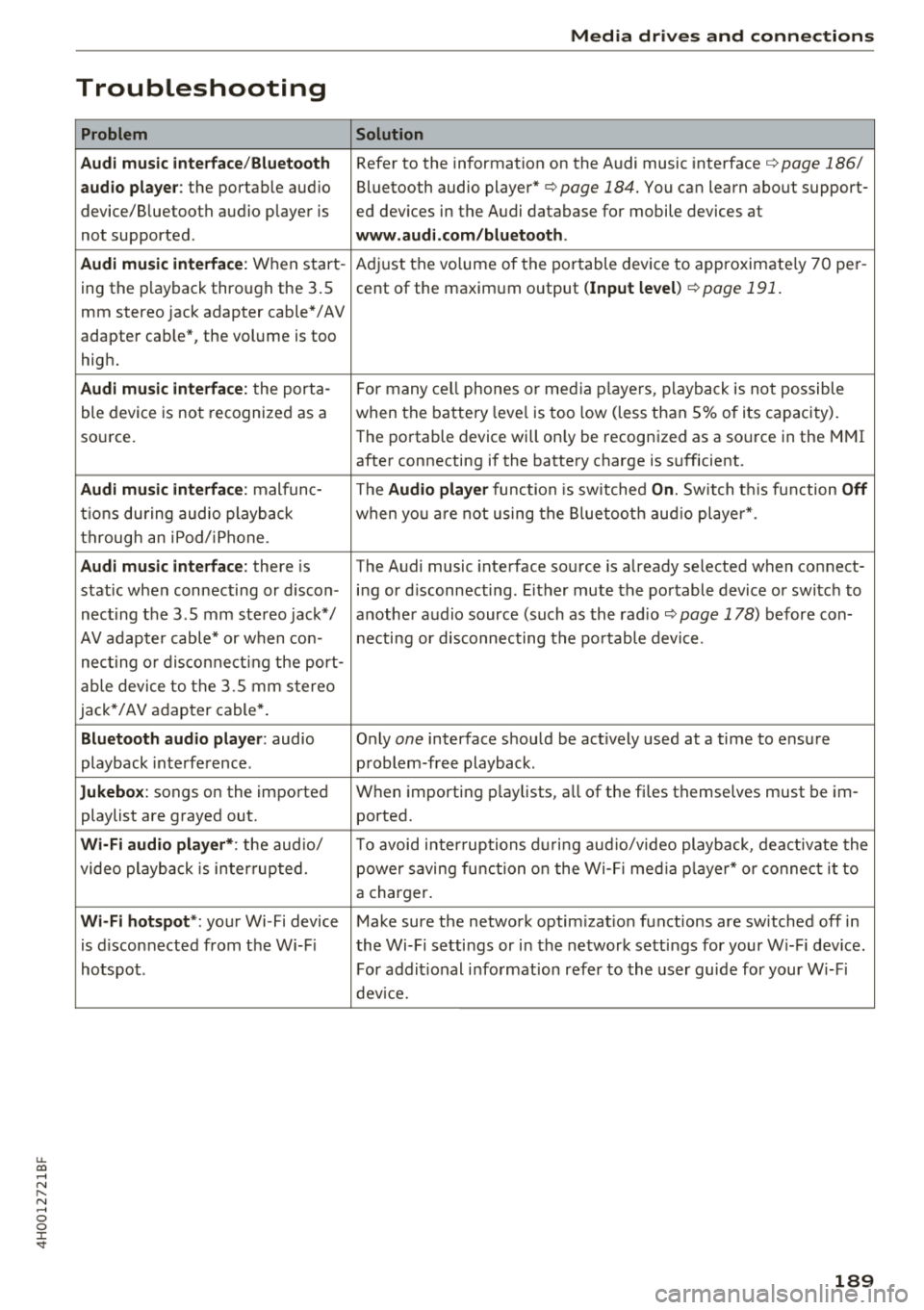
Problem
Audi music interface /Bluetooth
audio player :
the portable aud io
device/Bluetooth audio player is
not supported.
Audi music interface : When start-
ing the playback through the 3.5
mm stereo jack adapter cable*/ AV
adapter cab le", the volume is too
high.
Audi music interface : the porta-
ble device is not recognized as a
source.
Audi music interface : malfunc-
tions during audio playback
through an iPod/iPhone .
Audi music interface : there is
stat ic when connecting or discon -
necting the 3 .5 mm stereo jack*/
AV adapter cable* or when con-
nect ing or disconnecting the port-
able device to the 3.5 mm stereo
jack*/ AV adapter cable*.
Bluetooth audio player : audio
playback interference .
Jukebox: songs on the imported
playlist are grayed out.
Wi-Fi audio player* : the audio/
video playback is inter ru pted.
Wi-Fi hotspot *: your Wi-Fi device
is d isconnected from the Wi-Fi
hotspot .
Media drives and connections
Solution
Refer to the information on the Audi music interface ¢ page 186/
Bluetooth audio
player" ¢ page 184. You can learn about support-
ed dev ices in the Audi database for mobile devices at
www.audi.com/bluetooth .
Adjust the volume of the portable device to approximate ly 70 per-
cent of the maximum output
( Input level )¢ page 191 .
F or many cell phones or media players, playback is not possible
when the battery leve l is too low (less than 5% of its capacity).
The portable device will on ly be recognized as a source in the
MMI
after connecting if the battery charge is sufficient.
The
Audio player function is sw itched On. Switch this function Off
when you are not using the Bluetooth audio player*.
The Audi music interface source is already selected when connect-
ing or disconnecting. Either mute the portable device or switch to
another audio source (such as the
radio¢ page 178) before con-
necting or disconnecting the portable device.
Only
one interface should be act ively used at a time to ensure
problem-free playback.
When importing playlists, all of the fi les themse lves must be im-
ported.
To avoid intenuptions during audio/video playback, deactivate the
power saving func tion on the Wi-Fi media player* or connect it to
a charger.
Make sure the network optim izat ion functions are sw itched off in
the Wi-Fi sett ings or in the network sett ings for your W i-F i dev ice .
For addit ional information refer to the user guide for your Wi-Fi
device.
189
Page 200 of 356
Rear Seat Entertainment
If you reset the Jukeb ox to factory settings, all of
the music/video files are deleted and the
Media
setting s
are reset.
Resetting the funct ions to the facto ry defau lt
settings does not a ffect the MMI.
S ystem update
The RSE software can be updated by DVD, USB or
SD ca rd us ing the system update feature.
Contact an author ized Audi dealer or authorized
Aud i Serv ice Facility fo r additional information
about the
System updat e.
Data encryption
You can protect the list of destinations with a
personal password. If the unit is replaced, you
can only transfer your personal data to the new
RSE unit using your password . If you do not as
sign a persona l passwo rd, "MMI3G" is stored in
the RS E automatically as the password.
Version information
Information on the software version of the RSE
and the nav igat ion database is displayed.
Headphones
Wireless headphones
Applies to: vehicles with Rear Seat E nterta inment
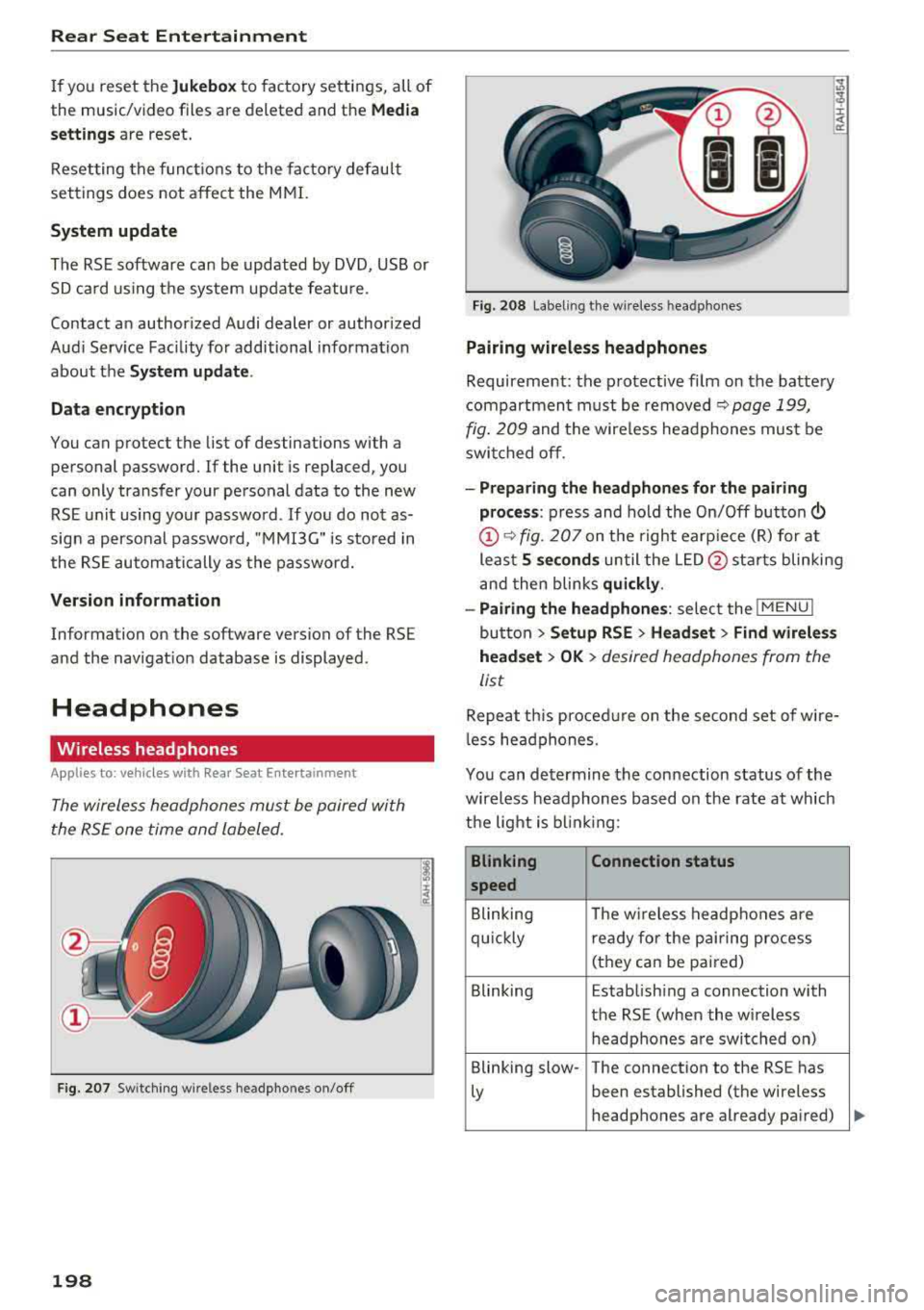
T he wireless headphones must be paired with
the RSE one time and labeled.
F ig . 207 Sw itc hi ng w ire less headpho nes on/off
198
F ig. 208 Label ing t he w ireless hea dpho nes
Pairing wireless headphones
Requirement: the protective fi lm on the battery
compartment must be removed
~ page 199,
fig. 209
and the wire less headphones mus t be
swit ched off .
-Preparing the headphones for th e pairing
pro ce ss :
press and hold the On/Off button
@~ fig. 207 on the right earp ie ce (R) for at
least
5 second s until the L ED @ starts blinking
and then blinks
qui ckly .
-Pairing the headphones : select the !MENUI
button > Setup RSE > Headset > Find wirele ss
head set
> OK > desired headphones from the
list
Repeat th is proced ure on the second set of wire
l ess he adphones.
You can de termine the con nection status of the
wireless headphones based on the rate at which
the light is b lin ki ng :
Blinking Connection status
speed
Blinking The w ireless headphones are
qu ickly rea dy for the p air ing process
(they can be pai red)
Blinking Establish ing a connection with
the RSE (when the wireless h eadphones a re switched on)
Blinking slow- The connection to the RS E has
Ly been established (the wire less
headphones are already pa ired)
Page 201 of 356
lL t:0 ....
"' ......
"' .... 0 0 :c '
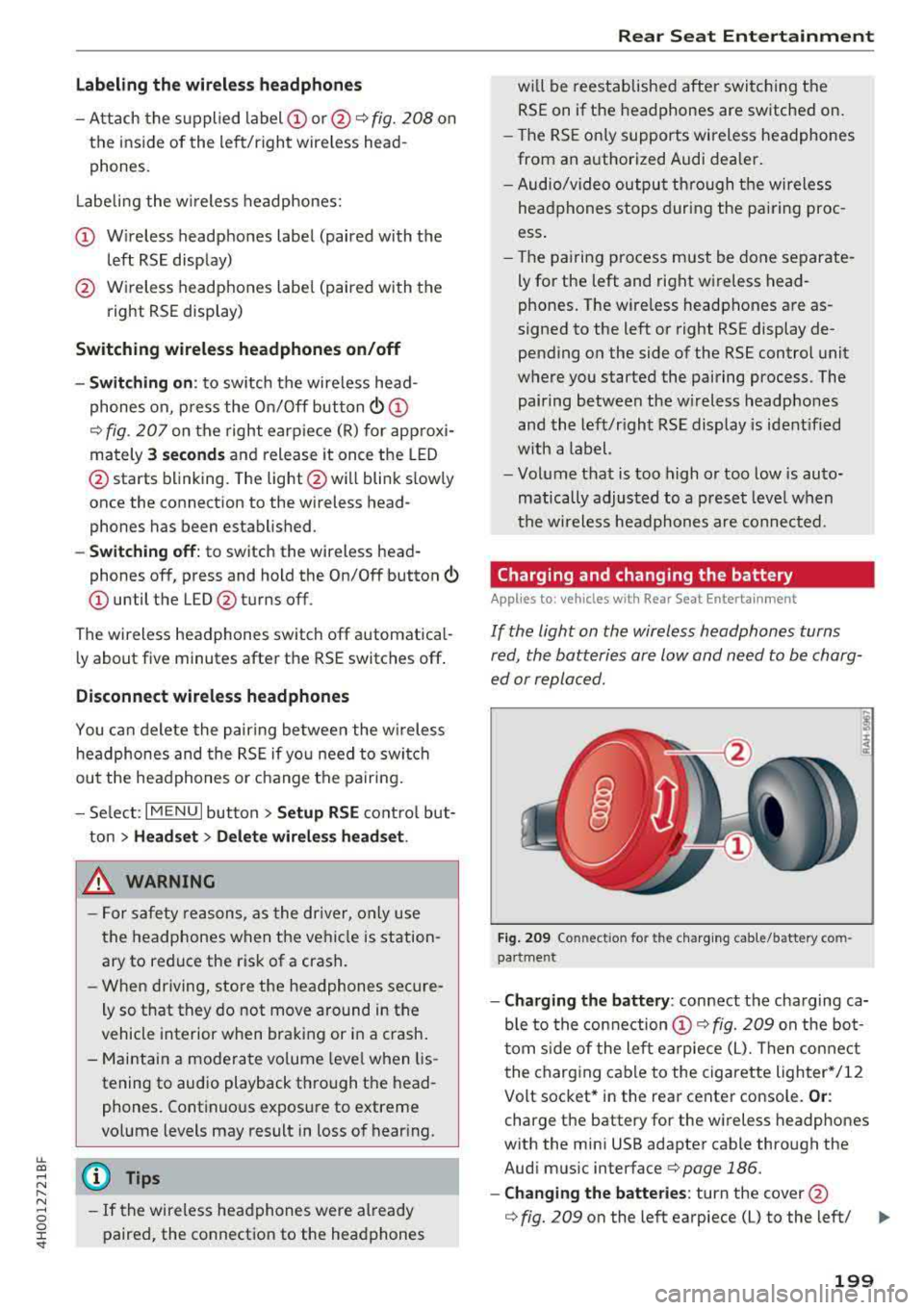
-Attach the supplied label CD or @ ¢ fig. 208 on
the inside of the lef t/right wire less head
phones .
L abeling the w ireless headphones:
CD W ireless headphones label (paired with the
left RSE disp lay)
@ Wireless headphones labe l (paired with the
right RSE display)
Switching w irel ess headphones on /off
- Swit ching on : to switch the wireless head
phones on, p ress the On/ Off
button
¢ fig. 207 on the right earp iece (R) for approxi
mately
3 sec ond s and release it once the LED
@ starts blinking. The light @will blink s lowly
once the connection to the wireless head phones has been established .
-Sw itching off : to switch the wireless head
phones off, press and hold the On/Off button
CD until the LED @turns off.
The wireless headphones switch off automatical ly about five minutes after the RSE switches off .
Disconnect wireless headphones
You can delete the pairing between the w ireless
h eadphones and the RS E if yo u need to switch
out the headphones o r change the pairing.
- Se lect :
IM ENU I button > Setup RSE cont rol but
ton
> Head set > Delet e wirele ss heads et.
& WARNING
- F or safety reasons, as the dr iver, only use
the headphones when the vehicle is station ary to reduce the risk of a crash.
- When driving, store the headphones secure
ly so that they do not move around in the
vehicle interior when bra king or in a crash .
- Maintai n a mode rate vo lume leve l when lis
tening to audio playback through the head
phones. Continuo us expos ure to extreme
volume levels may result in loss of hear ing.
(D Tips
- If the wireless headphones were already
paired, the connection to the headphones
-
Rear Seat Entertainment
wi ll be reestablished after switc hing the
RSE on if the headphones are switched on.
- The RSE on ly supports wireless headphones
from an authorized Audi dealer .
- Audio/video output through the wire less
headphones stops during the pai ring proc
ess.
- The pairing process must be done separate
ly for the left and right wireless head
phones. The wire less headphones are as
signed to the left or right RSE display de
pending on the side of the RSE control unit
where you started the pairing process . The
pairing between the w ireless headp hones
and the left/right RSE display is ident ified
w ith a label.
- Volume that is too high or too low is auto
matically adjusted to a p reset leve l when
the wireless headphones are connected .
Charging and changing the battery
Applies to: vehicles with Rear Seat Entertainment
If the light on the wireless headphones turns
red, the batteries are low and need to be charg
ed or replaced.
F ig . 209 Co nn ectio n fo r th e charg ing cab le /battery co m
pa rt me nt
- Charging the battery : connect the charging ca
ble to the connection
CD ¢ fig. 209 on the bo t
t om s ide of the left ea rpiece (L). Then con nect
the charging cable to the cigarette lighter */12
Volt socket* in the rear center console.
Or :
charge the battery for the wireless headp hones
w ith the min i USB adapter cable th rough the
Aud i mus ic interface
¢ page 186.
- Ch anging th e batterie s: turn the cover@
¢ fig. 209 on the left earpiece (L) to the left/ IJI,,-
199
Page 202 of 356
Rear Seat Ent ertainm ent
right and change the batteries as labeled in the
battery compartm ent . Then attach the cover
back on to the left earpiece
(L).
You can ident ify t he charge status of the battery
q table on page 200 based on the blinking
speed of the LED in the charging cable conn ec
tion
CD q fig. 209.
Blinking fre- Charge status
quency
Blinking The batteries are cha rging.
Rema ins on The batte ries are charged .
Blinking An error occurred while charg-
quickly ing.
A WARNING
- Do not use damaged rechargeable batteries .
T his increases the r isk of an explos ion.
- The headphones can become warm when
the batteries a re charg ing and increase the
risk of injury .
- Do not charge standard batteries with the
charg ing cable. This increases t he risk of an
exp losion .
- Be careful when using the c igarette lighter .
I n attentive or unsupe rvised use of the c iga
rette lighte r can cause burns.
- T he ciga rette lighter/sockets and any elec
t rical accessor ies connected to t hem func
t ion only whe n the ign ition is sw itched on.
U sing the ciga rette lighter/sockets o r elec
trical accessories incorrect ly can lead to se
rious injuries or cause a fire. To reduce the
risk of in juries, never leave children unat
tended in the vehicle with the vehicle key.
@ Note
- Do not charge the batteries in the wireless headphones when the engine is not run
ning . This will dra in the vehicle battery .
- For wireless headphones, on ly use batteries
that are approved for that type of device,
for example NiMH batteries with a mini
mum capacity of 550 mAh in AAA size that
are suitable for quick charging .
200
@ For the sake of the environment
Batteries contain polluting substances. They
must be disposed of us ing methods that w ill
not harm the env ironment. Do not dispose of
them in househo ld trash.
(D Tips
The charging time for t he included rechargea
ble batter ies is approximate ly three to four
hours and may increase by approximately 25
percent if the batter ies are in use while charg
ing .
Headphones connected by cable
App lies to: vehicles with Rear Seat Entertainment
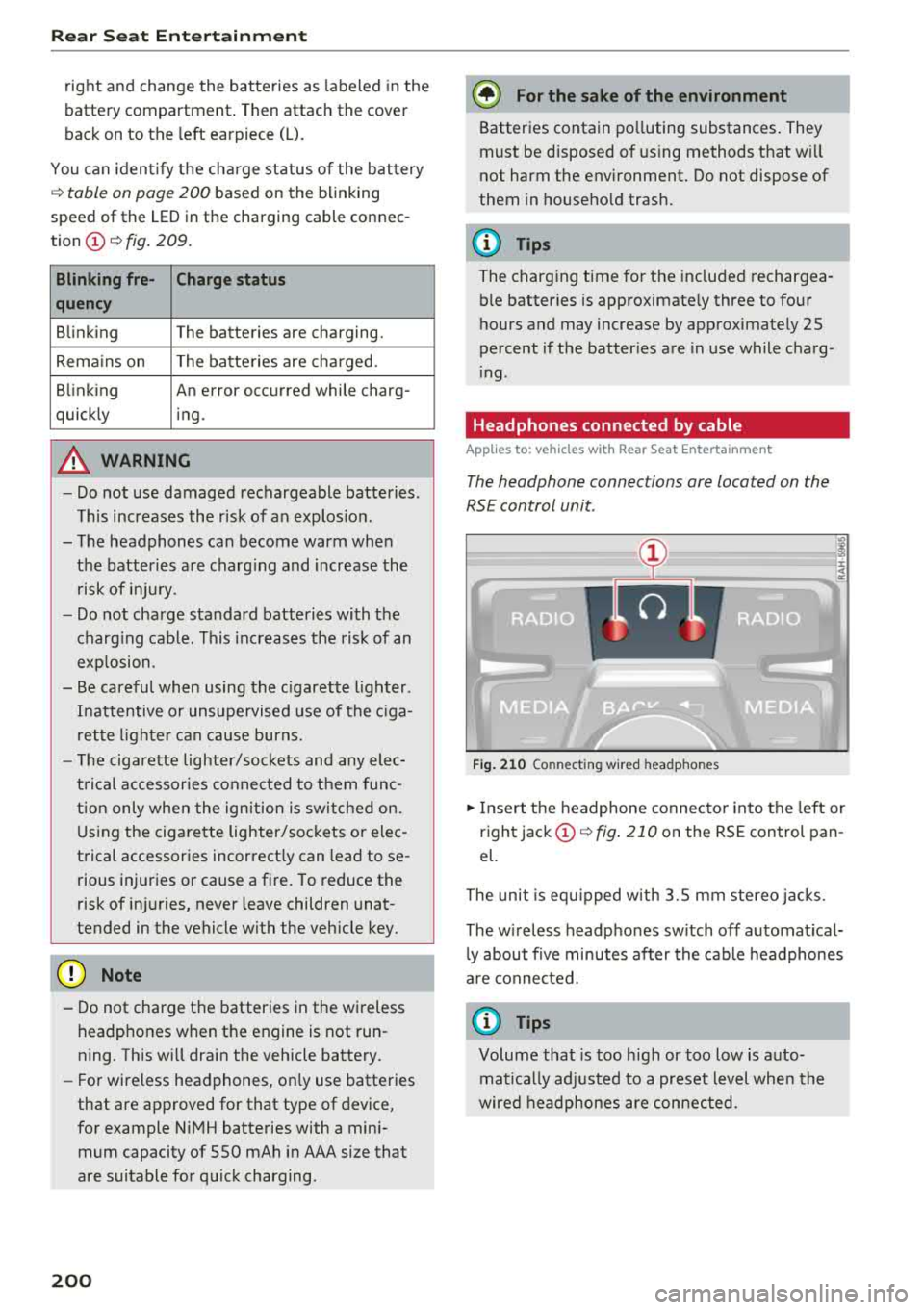
The headphone connec tions are located on the
RS E control unit.
Fig . 21 0 Co nn ect in g wir ed h eadpho nes
.,. Insert t he headphone connecto r into the left or
right jack
CD q fig . 210 on the RSE control pan
el.
The unit is eq uipped w ith 3.5 mm stereo jacks .
The w ireless headphones sw itch off automat ical
l y about f ive minutes after the cable headphones
a re connected.
(D Tips
Volume that is too h igh or too low is auto
mat ica lly adjusted to a preset level whe n the
wired headphones are connected.
Page 242 of 356
Airbag syste m
(D Tips
If the weight-sensing mat in the front passen
ger seat detects an empty seat, the front air
bag on the passenger side w ill be turned off,
and the
PASSEN GER AIR BAG OFF light will
stay on.
Repair, care and disposal of the airbags
Parts of the a irbag system are installed at many
d ifferent p laces on your Aud i. Install ing, remov
i n g, servic ing o r repa iring a part in an area of the
ve hicle can damage a pa rt of an airbag system
and prevent that system from working properly
in a co llision .
There are some important t hings yo u have to
know to make sure th at the effect iveness of the
system wi ll not be impaired and that dis carded
components do not cause injury or pollute the
environment .
A WARNING
Improper care, serv icing and repair proce
dures can increase the r isk of personal injury
and death by preventing an airbag from de
ploying when needed or deploying an airbag
unexpectedly:
-
-Never cover, obstruct, or change the steer
i ng wheel horn pad or a irbag cover or the in
strument pa ne l or mod ify them in any way.
-Never attach any objects such as cup holders
o r te lephone mount ings to the surfaces cov
er ing the ai rbag units.
-For cleaning the horn pad or instrument
pane l, use on ly a soft, dry cloth or one mois
tened with plain water. Solvents or cleaners cou ld damage the airbag cover or change
the stiffness or st rengt h of the materia l so
t h at the airbag cannot dep loy and protect
properly.
-Never repair, adjust, or change any parts of
the airbag system.
-All work on the stee ring wheel, i nstr ument
pane l, front seats or electrical system (in
cluding the installation of audio equipment,
ce llular telephones and CB rad ios, etc.)
must be performed by a qualified technician
240
who has the training and specia l equipment
necessary.
-F or any work on the airbag system, we
strong ly recommend that you see yo ur au
thorized Audi dealer or qualified workshop.
-Never modify the front b umper or parts of
the vehicle body.
- Always make sure that the side airbag can
inflate w ithout interference:
-Never install seat covers or replaceme nt
upholstery ove r the front seatbacks that
have not bee n specific ally app roved by
A udi.
-Neve r use additional seat c ushi ons that
cover the areas where the side airbags in
flate.
-Damage to the orig inal seat cove rs o r to
t h e seam in the area of the s ide airb ag
module mus t always be repai red immedi
ate ly by an authorized Audi dealer.
-The airb ag sys tem can be act iv a ted only
once . A fter an airbag has in flated, it must
be replaced by an authorized Audi dealer or
qua lified tech nic ian who has the technical
information, train ing and spec ial equ ipment
necessary.
-The airbag system can be deployed only
once. After an airbag has been deployed, it
must be replaced with new rep lacement
parts des igned and approved espec ially for
your Aud i model version. Replacement of
comp lete airbag systems or airbag compo
nents must be perfo rmed by qualified work
shops only. M ake sure that any a irb ag se rv
ice act ion is entered in your Audi Warranty
& Maintenance booklet under AIRBAG RE
PLACEMENT RECORD.
-For safety reasons in severe accidents, the
a lter nator and starter a re separated from
the vehicle battery with a pyrotechnic circu it
interrupter.
-Wo rk on the pyrotechnic c ircuit inte rrupt
e r must o nly be perfo rmed by a qua lified
dealer
-r isk of an a cciden t!
-If the vehicle or the c ircuit inte rr u pte r is
sc rapped, all appli cable safety p recau tions
mus t be followed.
..,.