phone AUDI A8 2018 User Guide
[x] Cancel search | Manufacturer: AUDI, Model Year: 2018, Model line: A8, Model: AUDI A8 2018Pages: 356, PDF Size: 54.71 MB
Page 139 of 356
lL t:0 ....
"" ......
"" .... 0 0 :c '
Selecting the previous /next function (for exam
ple, a radio st a tion/track) :
briefly press the On/
Off knob @
c::> page 135, fig . 153 toward the left
l
Fast forw arding/rewinding (for example
songs ):
press and hold the On/Off knob @
c::> page 135, fig. 153 toward the left l
MMI touch
Applies to: vehicles with MMI touch control pad
The MMI touch allows you to enter data on the
MMI touch control pad using handwriting recog
nition.
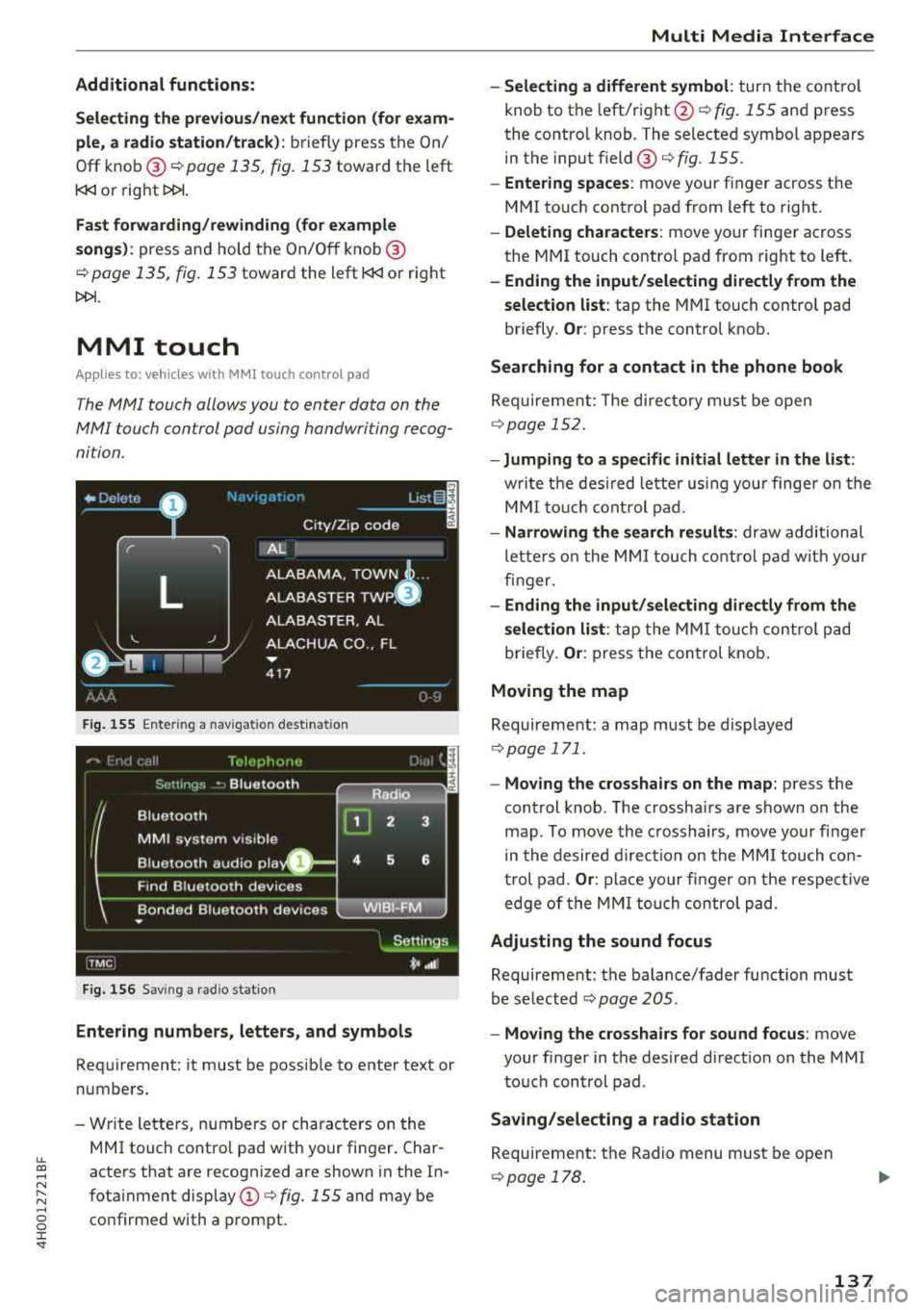
F ig. 155 Ente ring a nav igat ion dest inat io n
Fig. 156 Sav ing a rad io stat io n
Entering numbers, letters, and symbol s
Requirement: it must be possib le to enter text or
numbers .
- Wr ite lette rs, numbers or characte rs on the
MMI touch co ntro l pad with your finger. Char
acters that are recognized are shown i n the In
fota inment display
(D <=> fig. 155 and may be
co nfirmed with a prompt.
Multi Media Inte rface
- Selecting a different symbol : turn the co ntro l
knob to the left/right @<=>
fig. 155 and press
the contro l knob. The selected symbol appears
in the input field @<=>
fig. 155.
-Entering spaces : move your finger across t he
MMI touch control pad from left to right .
-Delet ing characters : move your finger across
the MMI touch contro l pad from right to left.
- Ending the input /selecting directl y from the
selection list :
tap the MMI touch contro l pad
briefly.
Or : press the control knob.
Searching for a contact in the phone book
Requireme nt: The d irecto ry must be open
c::> page 152 .
-Jumping to a specifi c initial letter in the list :
writ e t he des ired lette r using your finge r on the
M MI to uch cont rol pad.
- Narrowing the search results : draw additional
le tte rs o n the MMI touch co ntro l pad w it h your
fin ger.
- Ending the input /sele cting directl y from the
selection list :
ta p the MM I tou ch co ntrol pad
briefly.
Or : press the con trol knob .
Moving the map
Requireme nt: a map must be d isplayed
c::> page 171.
- Moving the crosshairs on the map: press the
cont rol knob . T he crossha irs are shown on the
map . To move the crosshairs, move your fi nger
in the desired d irec tion on the MM I touch con
t rol pad .
Or : place your fi nger o n the respec tive
edge of the MM I tou ch contro l pad.
Adjusting the sound focus
Requireme nt: the balance/fader fu nction must
be se lected
c::> page 205.
- Moving the crosshairs for sound focus : move
your finger in the desired direct io n on the MMI
to uch con trol pad .
Saving /selecting a radio station
Requirement: the Radio menu must be open
c::> page 178 .
137
Page 142 of 356
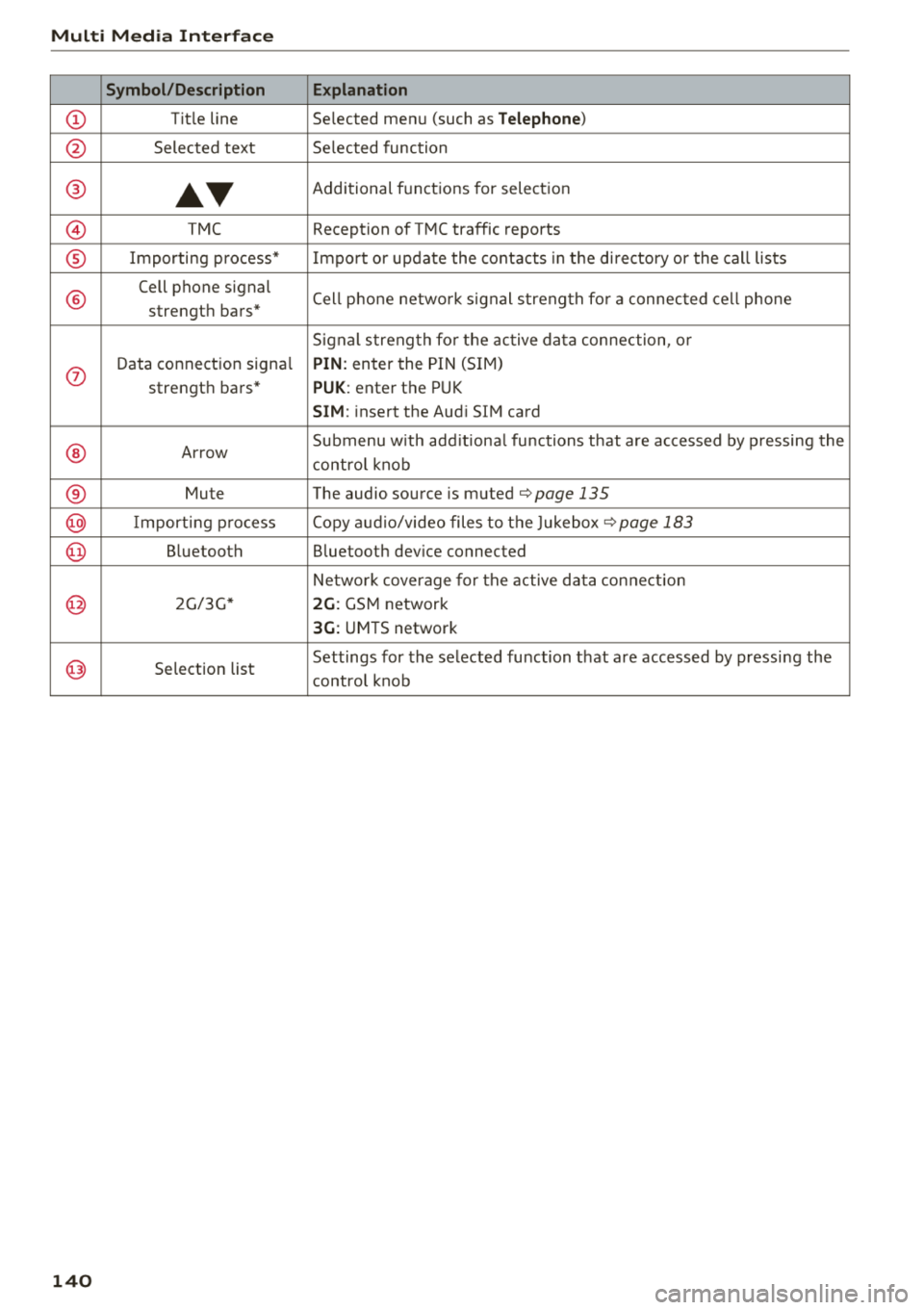
Multi Media Interface
Symbol/Description Explanation
CD Tit le line Se lected menu (such as Telephone)
@ Selected text Se lected function
@
•T
Additional functions for selection
@ TMC Reception of TMC traffic reports
® Importing process* Impo rt or update the contacts in the directory or the call lists
®
Cell phone signal
Cell phone netwo rk s ign al strength fo r a connected cell phone
strength bars*
Signal strength for the active data connection, or
0
Data connection signal PIN: enter the PIN (SIM )
strength bars*
PUK : enter the PUK
SIM: insert the Audi S IM card
® Arrow Submenu
with additional functions that are accessed by pressing the
control knob
® Mute The audio source is muted¢ page 135
@ Im port ing process Copy audio/video files to the Jukebox¢ page 183
@ Bluetooth Bluetooth dev ice connected
Network coverage for the active data connection
@ 2G/3G* 2G: GSM network
3G: UMTS network
@ Sele ction list Settings for
the selected function that are accessed by pressing the
control knob
140
Page 143 of 356
LL
"' .... N ,.._ N .... g :r st
• TELEPHONE
• NAVIGATION
• INFO
• RADIO
• MEDIA
• HELP
•
HELP VOICE RECOGNmON
• HELP TELEPHONE
• HELP NAVIGATION
• HELP MAP
• HELP INFO
•
HELP RADIO
• HELP MEDIA
TELE ~HONE
• ENTER NUMBER
• DIAL
• REPEAT
• CORRECTION
• DELETE NUMBER
• REDIAL
• CALL (XV)
(BUSINESS/ PRIVATE/ LANO LINE/ CELL)
NAVI GAT:ION
• ENTER ADDRESS
• ENTER COUNTRY
• ENTER ZIP CODE/ CITY
• ENTER STREET
• ENTER HOUSE NUMBER
• ENTER DOWNTOWN
• START/ CANCEL ROUTE GUIDANCE
• NAVIGATE TO
(XV)
• LAST DESTINATIONS
• FAVORITES
• HOME ADDRESS
• SHORT / FAST/ ECONOMY ROUTE
• DYNAMIC ROUTE ON/ OFF
• ROUTE UST
• VOICE GU I DANCE ON/ OFF
• ROUTE INFO ON/ OFF
• SCALE (XV) MILES / VAROS
• READ TRAFFIC REPORTS
RADIO
• SET STATION
• STATION (XY)
• SET FREQUENCY
• SET BAND
• FM/ AM/ SIRIUS
• STATION LIST
• READ STA
TYON LIST
• PRESETS
• READ PRESETS
• UPDATE STATION LIST
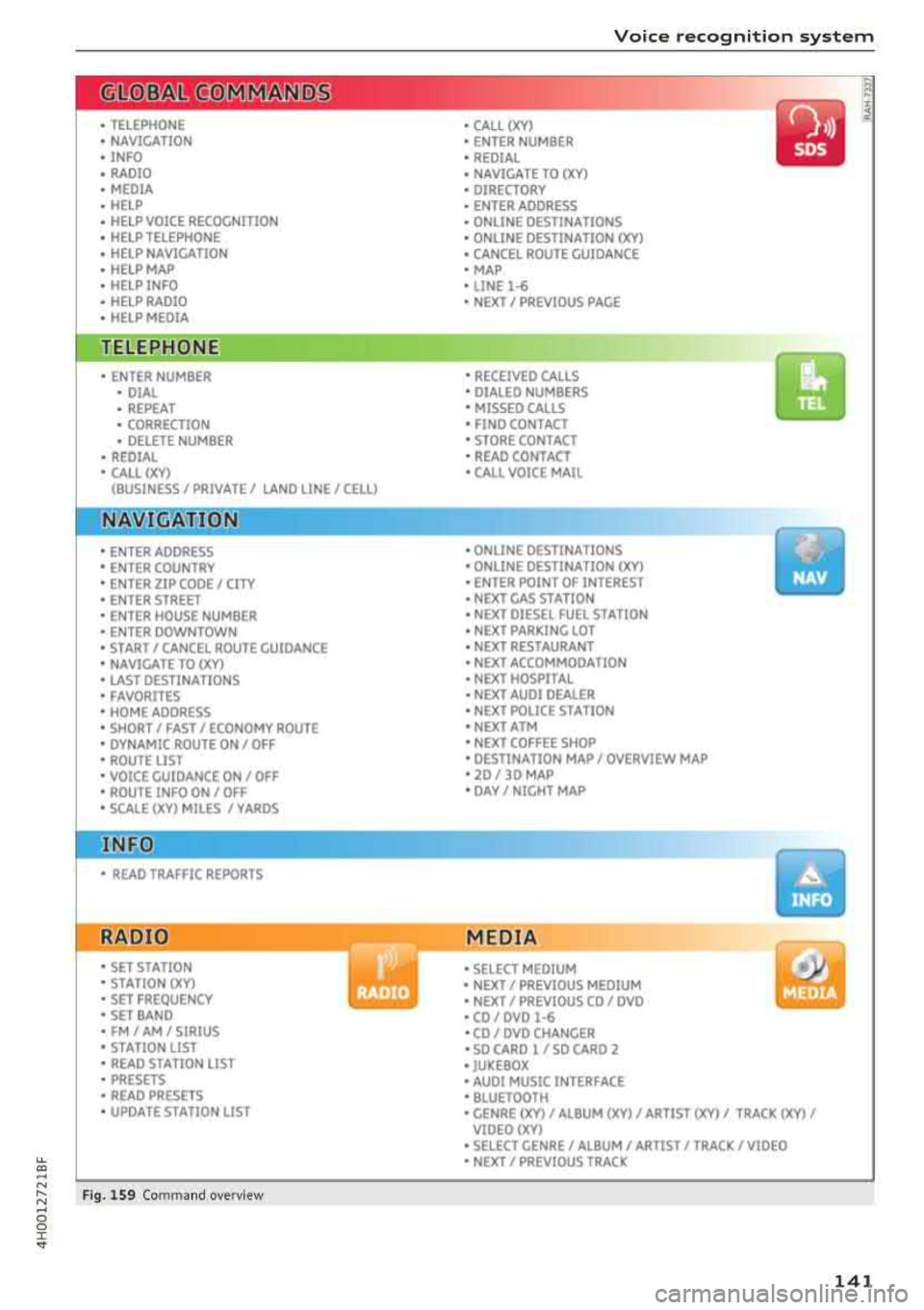
Fig. 1S9 Com mand o verv iew
Voice recognition system
• CALL (XV)
• ENTER NUMBER
• REDIAL
• NAVIGATE TO
(XV)
• DIRECTORY
• ENTER ADDRESS
• ONLINE DESTINATIONS
• ONLINE DESTINATION
(XV)
• CANCEL ROUTE GUIDANCE
• MAP
• LINE
1·6
• NEXT/ PREVIOUS PAGE
•
RECEIVED CALLS
• DIALED NUMBERS
• MISSED CAll5
• FINO CONTACT
• STORE CONTACT
• READ CONTACT
•
CALL VOICE MAIL
• ONLINE DESTINATIONS
• ONLINE DESTINATION (XV)
• ENTER POINT OF INTEREST
• NEXT GAS STATION
• NEXT DIESEL FUEL STATION
• NEXT PARKING LOT
• NEXT RESTAURANT
• NEXT ACCOMMOOA TION
• NEXT HOSPITAL
• NEXT AUDI DEALER
• NEXT POLICE ST A TION
• NEXT ATM
• NEXT COFFEE SHOP
• DESTINATION MAP/ OVERVIEW MAP
• 20 / 30 MAP
• DAY/ NIGHT MAP
MEDIA
• SELECT MEDIUM
• NEXT/ PREVIOUS MEDIUM
• NEXT/ PREVIOUS CO/ DVD
• CO/ DVD
1·6
•CO/ DVD CHANGER
• SO CARO l / SO CARO 2
• JUKEBOX
• AUDI MUSIC INTERFACE
• BLUETOOTH
y
• GENRE (XV)/ ALBUM (XV)/ ARTIST (XV)/ TRACK (XV)/
VIOEO()(Y)
• SELECT GENRE/ ALBUM/ ARTIST/ TRACK/ VIDEO
• NEXT/ PREVIOUS TRACK
141
Page 144 of 356
Voice recognition s ystem
Voice recognition system
Operating
A pplies to: ve hicles w ith vo ice recognition system
You con operate many Infotainment functions
conveniently by speaking.
R equirement: the ignition and the MM I must be
switched
on <=> page 135, there must be no phone
call in progress and the parking system m ust not
be active .
~ Switching on : briefly press th e ~ button @
<=> page 11, fig. 7 on the multifunction steering
whee l* and say the desired command after the
Beep .
~ Sw itching off : press and hold the~ button.
Or: press any button on the MMI control panel.
~ Canceling : press the~ button a nd say a new
command.
Or: say the command Cancel.
Input assis tance
The system gu ides you through the input with
visual and audio feedback .
-Vi sual inpu t as sistan ce : after t urning on voice
recognition, a d isp lay with a select ion of possi
ble commands appears in the Infotainment dis
play . The command d isplay can be turned on or
off in the ma in menu using the
MMI setup con
trol button .
-Audio input a ssistance : to have the poss ible
comma nds read, turn the voice recogn ition sys
tem on and say
Help.
For the s ystem to understand you:
Speak clearly and dist inct ly at a normal volume.
Speak louder when driving faster.
Emphasize the words in the commands even ly
and do not leave long pauses.
Do not speak a command when t he voice recogni
tion system is making an anno uncement.
C lose t he doors, the windows a nd the sunroof* to
reduce bac kg round noise . Make s ure t hat passen
gers a re not speaking when yo u are giving a voice
command.
142
Do not d irect the air vents toward the hands -free
microp hone, which is on the roof headliner nea r
t h e front interior lights .
Only use the system from the dr ive r's seat be
ca use the hands -free microphone is directed to
ward that seat .
Additional settings
Additional settings, s uch as individual speech
training
based on yo ur voice, Display sp eech
command s
or the prompt volume , can be adjust
ed in the main menu using the
MMI setup con
tro l button
<=> page 206.
A WARNING
- Direct your full attention to dr iv ing. As the
driver, you have complete responsibility for
safety in traff ic. On ly use the functions in
such a way that you a lways maintain com
p lete co ntro l over your veh icle in all traff ic
situat ions.
- Do not use the voice recognition system in
emergencies beca use your voice may change
in st ressfu l situ at ions.
It may t ake longe r to
d ial t he number or th e sys tem m ay no t be
a bl e to d ial it a t all. Dia l th e emer gen cy
number manually.
© Tips
- Th e dia log pauses w hen the re is a n in com
ing pho ne call and will con tinue if you ig
nore the call. T he dialog en ds if yo u answer
t h e ca ll.
- Yo u ca n sele ct an i tem in the list using ei
ther the vo ice recognit ion sys tem o r the
cont ro l knob .
Command overview
information
App lies to: vehicles wit h voice recog nitio n syste m
The following overv iews describe the commands
that can be used to operate the MMI using the
vo ice recog nition system .
A lternative commands are separated by a
" I" , for
example, say:
Telephone I (or) Na vigation I (or)
R adio .
Page 145 of 356
u. co .... N
" N .... 0 0 :c '
Sequences of commands used to perform an ac
tion are identified with
a" >", for examp le say: es
. Fo r examp le, for
business address, you can
also say
business , work, office or job.
Enter destination
> (then) Enter country .
The majority shown are main commands. This
system also recognizes synonyms in certain cas-
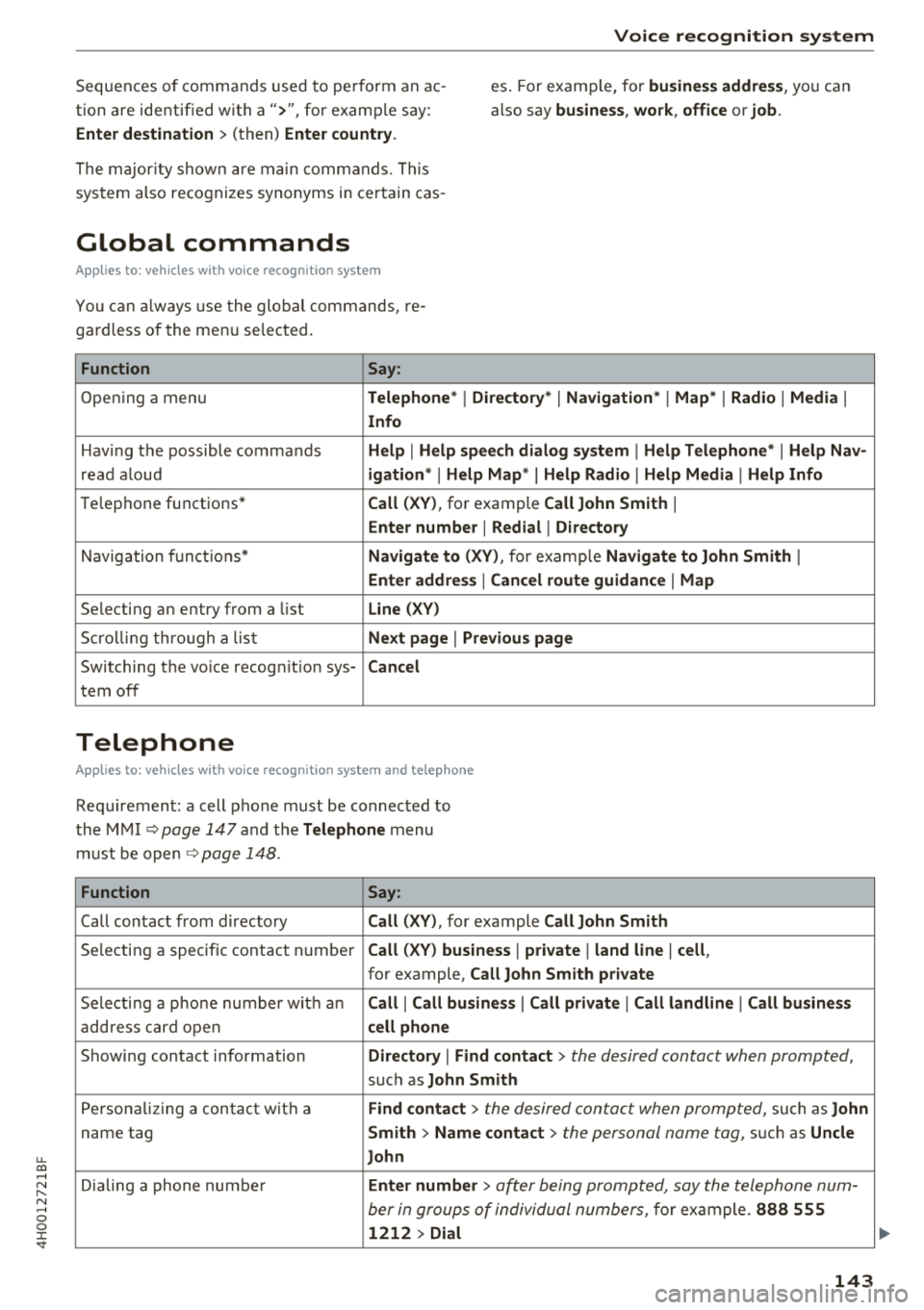
Global commands
App lies to: ve hicles with vo ice recogni tion sys te m
You can always use th e global commands, re
gardless of the menu selected.
Function Say:
Opening a menu Telephone* I Directory* I Navigation* I Map* I Radio I Media I
Info
Having the possible commands Help I Help speech dialog system I Help Telephone* I Help Nav-
read aloud igation* I Help Map * I Help Radio I Help Media I Help Info
Telephone functions* Call (XV), for example Call John Smith I
Enter number I Redial I Directory
Navigation functions* Navigate to (XV), for examp le Navigate to John Smith I
Enter address I Cancel route guidance I Map
Selecting an entry from a list Line (XV)
Scrolling through a list Next page I Previous page
Switching the voice recognition sys-Cancel
tern off
Telephone
App lies to: ve hicles with vo ice recognition system and telep hone
Requirement: a cell phone must be connected to
the MMI
~ page 147 and the Telephone menu
must be open
~ page 148.
Function Say:
Call contact from directory Call (XV), for example Call John Smith
Selecting a specific contact number Call (XV) business I private I land line I cell,
for example, Call John Smith private
Selecting a phone number with an Call I Call business I Call private I Call landline I Call business
address card open cell phone
Showing contact information Directory I Find contact > the desired contact when prompted,
such as John Smith
Personalizing a contact with a Find contact> the desired contact when prompted, such as John
name tag Smith > Name contact> the personal name tog, su ch as Uncle
John
Dialing a phone number Enter number > after being prompted, say the telephone num-
ber in groups of individual numbers,
for example. 888 555
1212 > Dial
143
Page 146 of 356
Voice recognition system Function
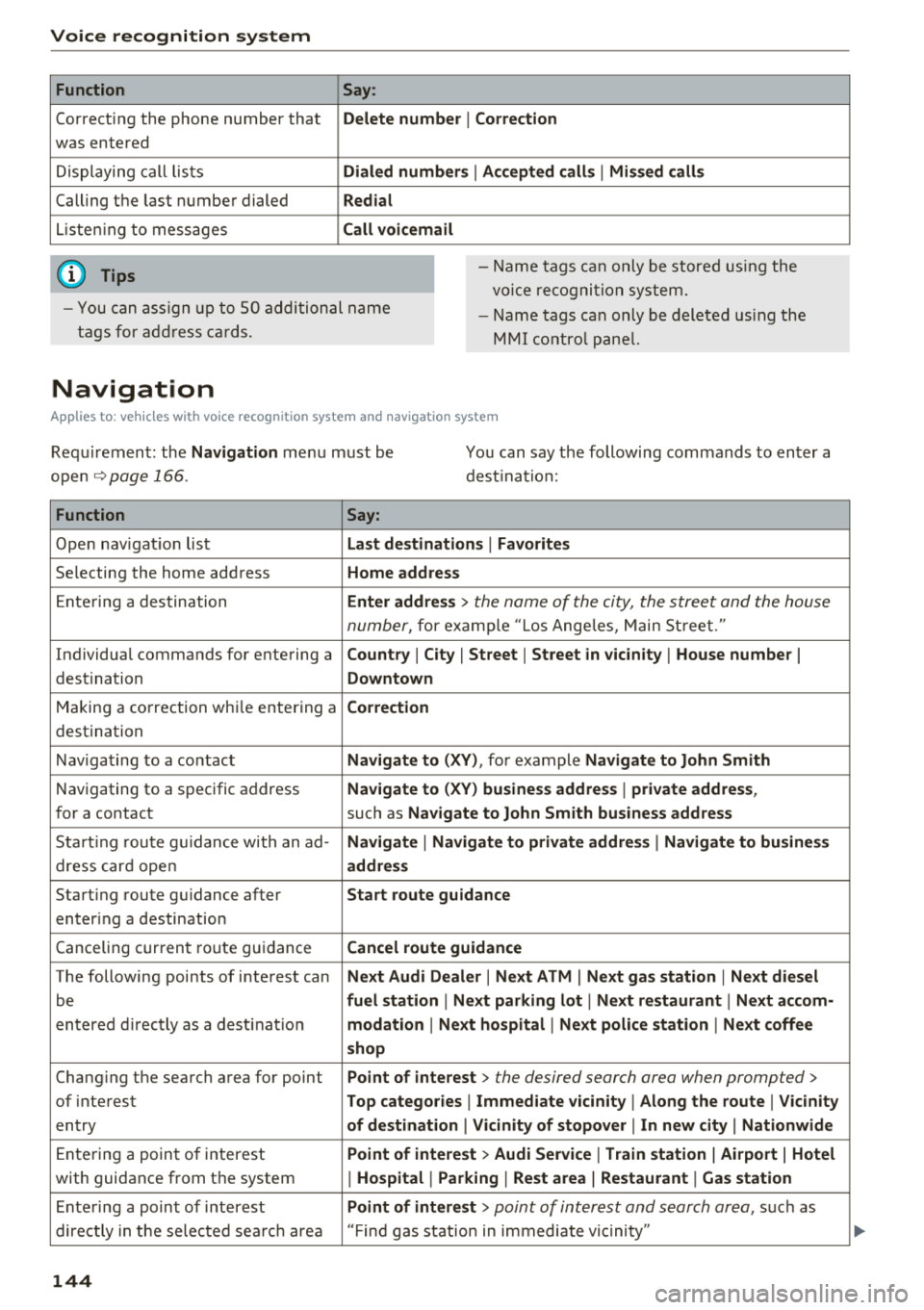
Correcting the phone number that
was entered
Displaying call lists
Calling the last number dialed
Listening to messages
(D Tips Say
:
Delete number
I Correction
Dialed numbers
I Accepted calls I Missed calls
Redial
Call voicemail
- Name tags can only be stored using the
voice recogni tion system.
- You can assign up to SO additional name
tags for address cards. -
Name tags can only be deleted using the
MMI control panel.
Navigation
Applies to: vehicles with voice recognition system and navigation system
Requirement: the Navigation menu must be
ope n
.!)page 166 .
You can say the following commands to enter a
dest ination:
Function Say:
Open navigation list Last destinations I Favorites
Selecting the home address Home address
Entering a destination Enter address > the name of the city, the street and the house
number,
for examp le "Los Angeles, Main Street."
Individual commands for entering a
Country I City I Street I Street in vicinity I House number I
destination Downtown
Making a correction while entering a Correction
destination
Navigating to a contact
Navigate to (XY), for example Navigate to John Smith
Navigating to a specific address Navigate to (XY) business address I private address,
for a contact such as Navigate to John Smith business address
Starting route guidance with an ad-Navigate I Navigate to private address I Navigate to business
dress card open address
Starting route guidance after Start route guidance
entering a destination
C anceling current route gu idance
Cancel route guidance
The following points of interest can Next Audi Dealer I Next ATM I Next gas station I Next diesel
be fuel station I Next parking lot I Next restaurant I Next accom-
entered directly as a destinat io n modation I Next hospital I Next police station I Next coffee
shop
Chang ing the search area for point Point of interest > the desired search area when prompted>
of interest Top categories I Immediate vicinity I Along the route I Vicinity
entry of destination I Vicinity of stopover I In new city I Nationwide
Entering a point of interest Point of interest > Audi Service I Train station I Airport I Hotel
with guidance from the system I Hospital I Parking I Rest area I Restaurant I Gas station
Ente ring a point of interest Point of interest > point of interest and search area, suc h as
directly in the selected search area "Find gas station in immediate vic inity"
144
Page 149 of 356
lL t:0 ....
'"" ......
'"" .... 0 0 :c '
A pp lies to: ve hicles with telep hone
To make phone coils in your vehicle using the
MMI, connect your cell phone to the MMI via
Bluetooth.
Hand sfre e
W ith this connection, you use the handsfree sys
tem and operate telephone f unctions throug h
the MMI. Phone ca lls are transmitted thro ugh
the antenna on yo ur ce ll phone.
A WARNING
- Med ica l experts warn that ce ll phones can
interfere w ith the function of pacemakers.
Always ma inta in a m inimum distance of
abou t 8 inches (20 cm) between the ce ll
phone antenna a nd the pacemake r.
- Do not carry the cell p hone i n a pocket di
rectly over the pacemaker when the phone
is switched on.
- Sw itch the cell phone off immediately if
you suspect it may be inte rfering with the
pacemaker.
- Do not use the voice recognition system
Q page 142 in emergencies because your
voice may change in stressful situations. It
may take longer to dial the number or the
system may not be able to dial it at all. Dial
the emergency numbe r manua lly.
- Switch your cell phone off in a reas where
there is a risk of an exp losion . These loca
t ions are not always clearly mar ked. This
may include gas stations, fuel and chemic al
storage f acilit ies or tra nspo rt vehi cles, or lo
cat io ns w here fuel vapors ( such as propane
o r gasoline vapor in vehicles or bui ld ings),
chemicals or large quantities of dust parti
cles (such as flour, sawd ust or metal) may
be present in the air. Th is also applies to all
other locations where you would normally
turn yo ur vehicle engine off.
- The demands of traffic require your full at
tent io n. Read a nd follow the guidelines pro
vided in
Qpoge 135 .
Telephone
(D Note
Always fo llow the information found in Q @ in
Wi-Fi hotspot on page 161.
@ Tips
The Bluetooth connection range is lim ited to
inside the vehicle . It can also be affected by
l ocal cond itions and interference with other
devices.
Setup
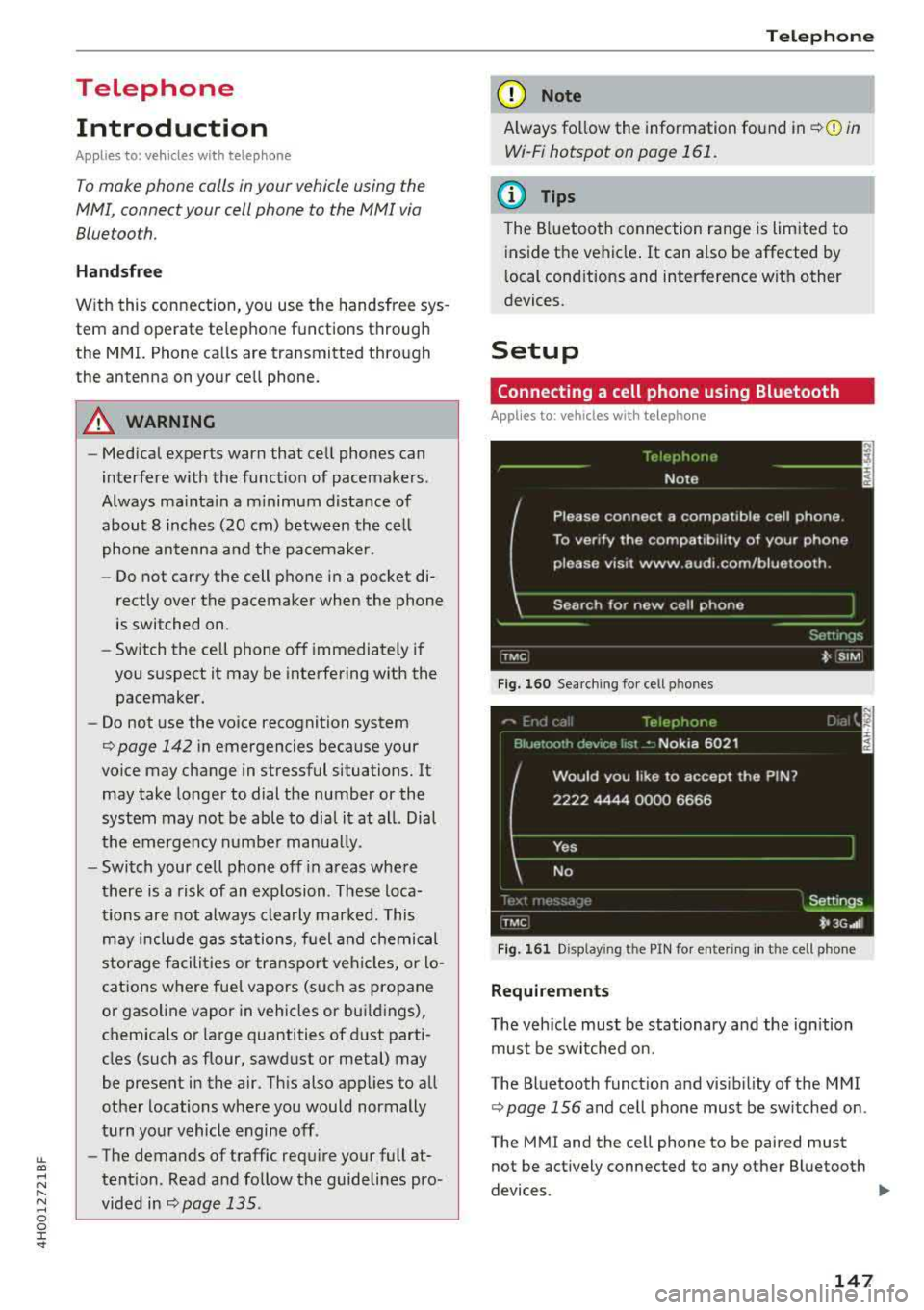
Connecting a cell phone using Bluetooth
Applies to: vehicles wi th telepho ne
Fig . 1 60 Searc hin g fo r ce ll phones
Fig . 161 D isp lay ing t he PIN for ente rin g in th e cell phone
Requirements
T he vehicle must be stationary a nd the ign ition
must be switched on.
The Bluetooth funct io n and visib ili ty o f the MMI
Q page 156 and cell phone must be sw itched on .
The MMI and the cell phone to be paired must
not be act ively connected to any other B luetooth
devices .
..,.
147
Page 150 of 356
Telephone
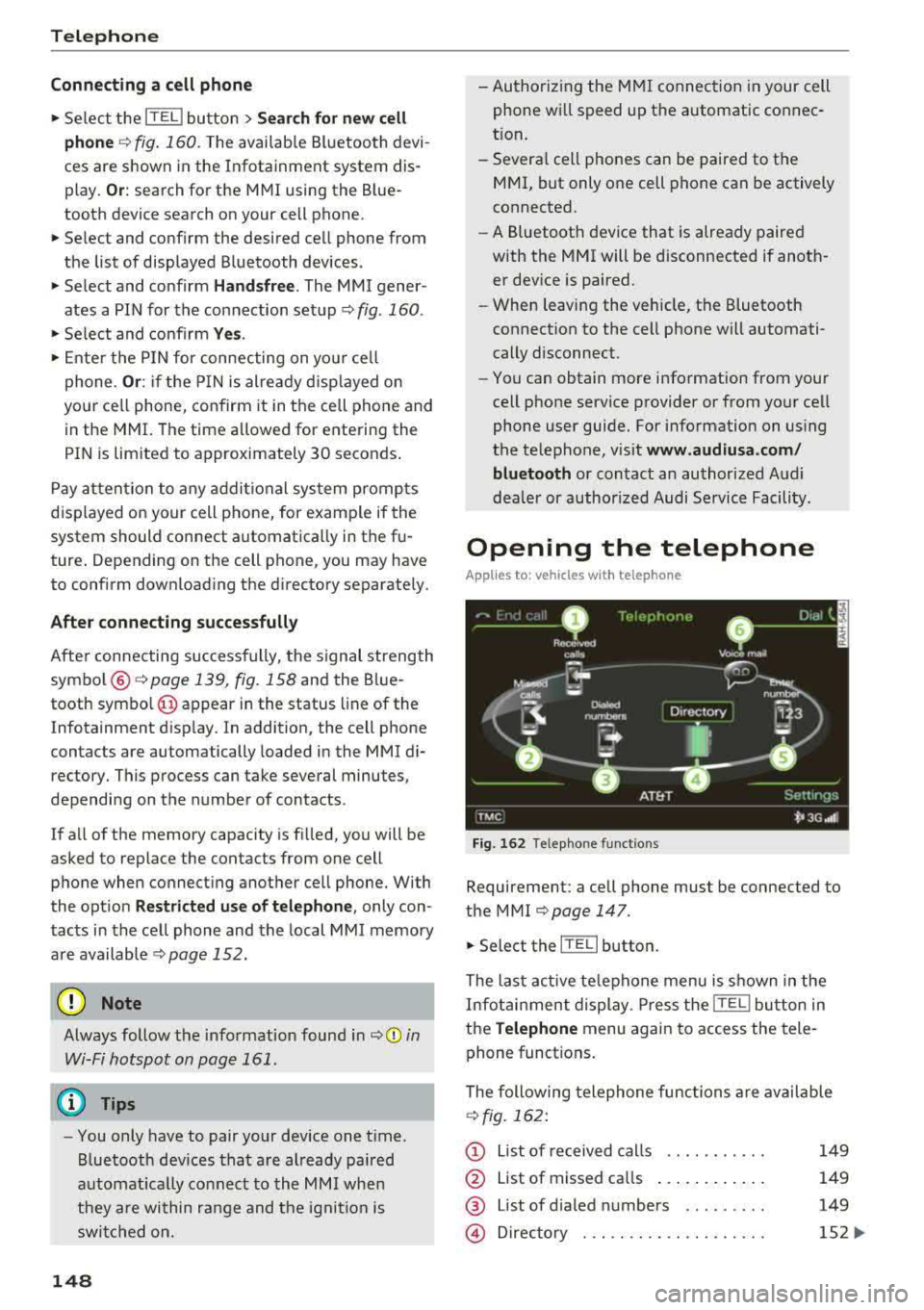
Connecting a cell phone
• Select the ITEL I button > Search for new cell
phone
r=> fig. 160 . The availab le Bluetooth devi
ces are shown in the Infotainment system dis
play.
Or : search for the MMI using the Blue
tooth device search on your cell phone.
• Select and confirm the desired cell phone from
the list of displayed Bluetooth devices .
• Select and confirm Handsfree. The MMI gener
ates a PIN for the connection setup
r=> fig . 160 .
• Select and confirm Yes.
• Enter the PIN for connecting on you r cell
phone .
Or: if the PIN is already disp layed on
your ce ll phone, confirm it in the cell phone and
in the MMI. The time a llowed for entering the
PIN is limited to approximately 30 seconds .
Pay attention to any additional system prompts
dis played on your cell phone, for example if the
system should connect automatica lly in the fu
ture . Depending on the cell phone, you may have
to confirm download ing the d irectory separately .
After connecting successfully
After connecting successfully, the signal strength
symbo l®
r=> page 139, fig. 158 and the Blue
tooth symbo l@ appear in the status line of the
Infotainment disp lay. In addition, the cell phone
contacts are automatically loaded in the MMI di
rectory. This process can take several minutes,
depending on the number of contacts.
If a ll of the memory capacity is fi lled, you will be
asked to replace the contacts from one cell phone when connecting another cell phone. With
the opt ion
Restricted use of telephone , only con
tacts in the cell phone and the local
MMI memory
are available
r=> page 152.
(D Note
Always follow the information found in r=> (D in
Wi-Fi hotspot on page 161 .
(D Tips
-You only have to pair your device one t ime .
Bluetooth devices that are already pa ired
automat ica lly connect to the
MMI when
they are within range and the ignition is
switched on.
148
- Authorizing the MMI connection in your cell
phone will speed up the automatic connec
t ion .
- Several cell phones can be paired to the
MMI, but only one cell phone can be actively
connected.
- A Bluetooth device that is already paired
with the MMI will be disconnected if anoth
er device is paired.
- When leaving the vehicle, the Bluetooth
connect ion to the cell phone will automati
cally disconnect.
- You can obtain more information from your
cell phone service provider or from yo ur cell
phone user guide. For information on using
the te lephone, visit
www.audiusa .com/
bluetooth
or contact an authorized Audi
dea ler or author ized Audi Service Facility.
Opening the telephone
App lies to: vehicles wit h telepho ne
Fig. 162 Telephone functions
Requirement: a cell phone must be connected to
the MMI
r=>page 147 .
• Select the IT ELI button.
The last active telephone menu is shown in the
Infotainment display. Press the
[fEI) button in
the
Telephone menu again to access the tele
phone functions .
The following telephone func tions are available
r=>fig. 162:
(D List of received calls .... .. .... .
@ List of missed ca lls ...... .... . .
@ List of d ialed numbers ... ..... .
@ Directory ... ... . .. ...... .... .
149
149
149
152 ...
Page 151 of 356
lL t:0 ....
"" ......
"" .... 0 0 :c '
® Assigning a voicemail number or
calling voicema il .. ...... ... .. .
Dialing a telephone
number
From the directory
Applies to: vehicles with telephone
14 9
156
You can se lect a pho ne number d irectly from t he
d irec to ry
¢ page 152.
From a list
Applies to: vehicles with telephone
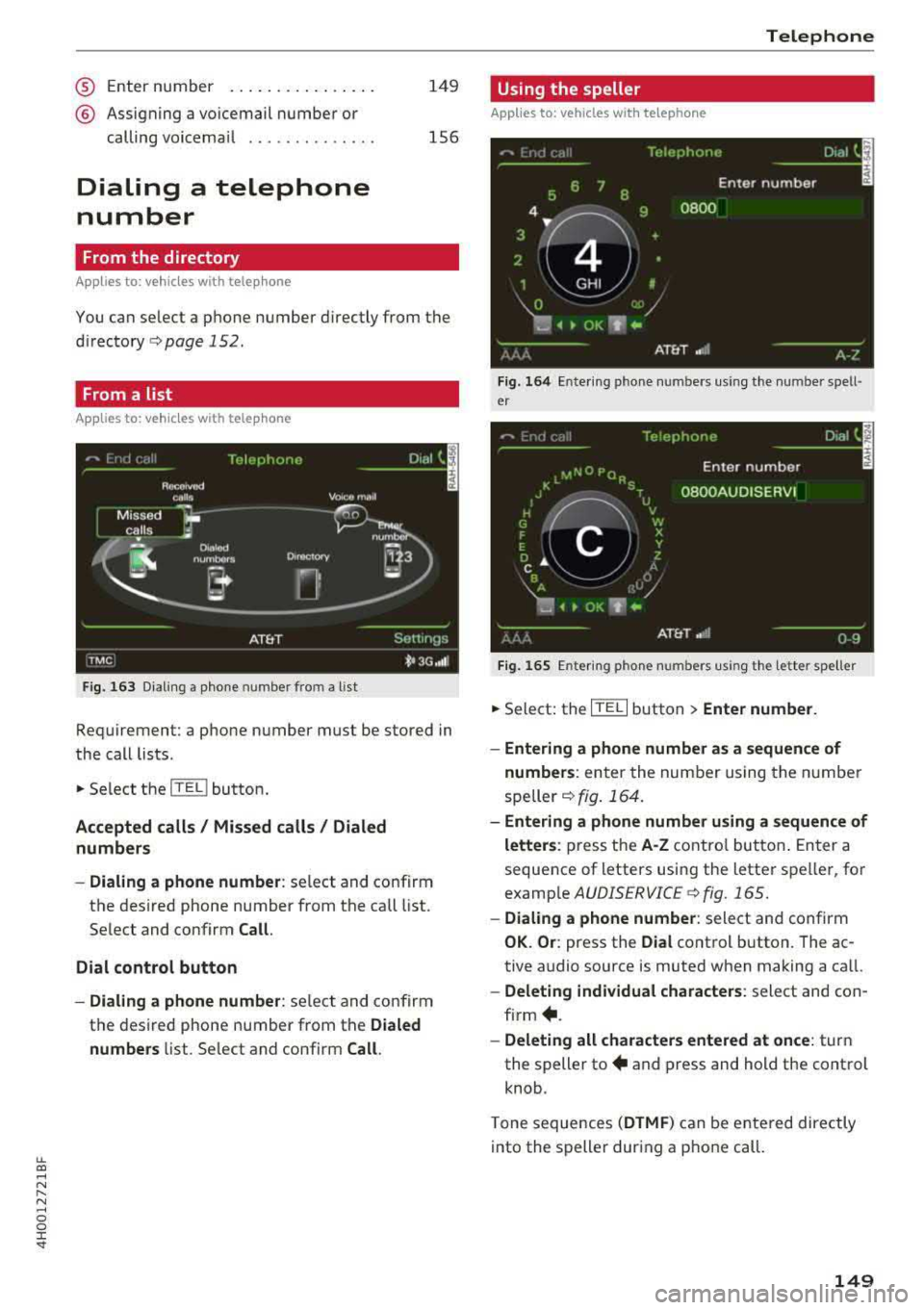
Fig . 163 D iali ng a phone number from a list
Req uirement: a pho ne number must be stored in
the call lists .
... Select the ITEL ! button .
Accepted calls / Missed calls / Dialed
numbers
- Dialing a phone number :
select and confirm
the des ired phone number from the call list.
Se lect and confirm
Call .
Dial control button
- Dialing a phone number :
select an d co nfirm
t h e des ired phone number from t he
Dialed
numbers
li st. Se lect and confirm Call.
Telephone
Using the speller
Applies to: vehicles with telephone
Fig. 164 Ente rin g pho ne numbers using th e number spell
e r
Fig. 16 S Ente ring pho ne numbers using th e letter s peller
... Select: the ITE L! button> Enter number.
- Entering a phone number as a sequence of
numbers :
enter the num ber using the n umbe r
spe ller¢
fig . 164.
-Entering a phone number using a sequence of
letters :
press the A·Z co ntro l bu tton. E nter a
sequence of letters usin g the lette r spe ller, fo r
e xamp le
AUDISERVICE ¢ fig. 165.
- Dialing a phone number : select and confirm
OK. Or: press the Dial control button . The ac
tive a udio source is muted when making a ca ll.
-Deleting individual characters : select and con
firm +.
-Deleting all characters entered at once : turn
the s peller
to + and press and hold the control
knob .
T one sequences
(DTMF ) can be e nte red direc tly
into the s peller dur ing a pho ne call.
149
Page 152 of 356
Telephone
Storing a phone number
Storing a new phone number
Applies to: vehicles with telephone
You can store a new phone number as a contact
i n the directory
~page 154.
Storing from the call lists
Applies to: vehicles with telephone
You can store a phone number from the call lists
in the directory.
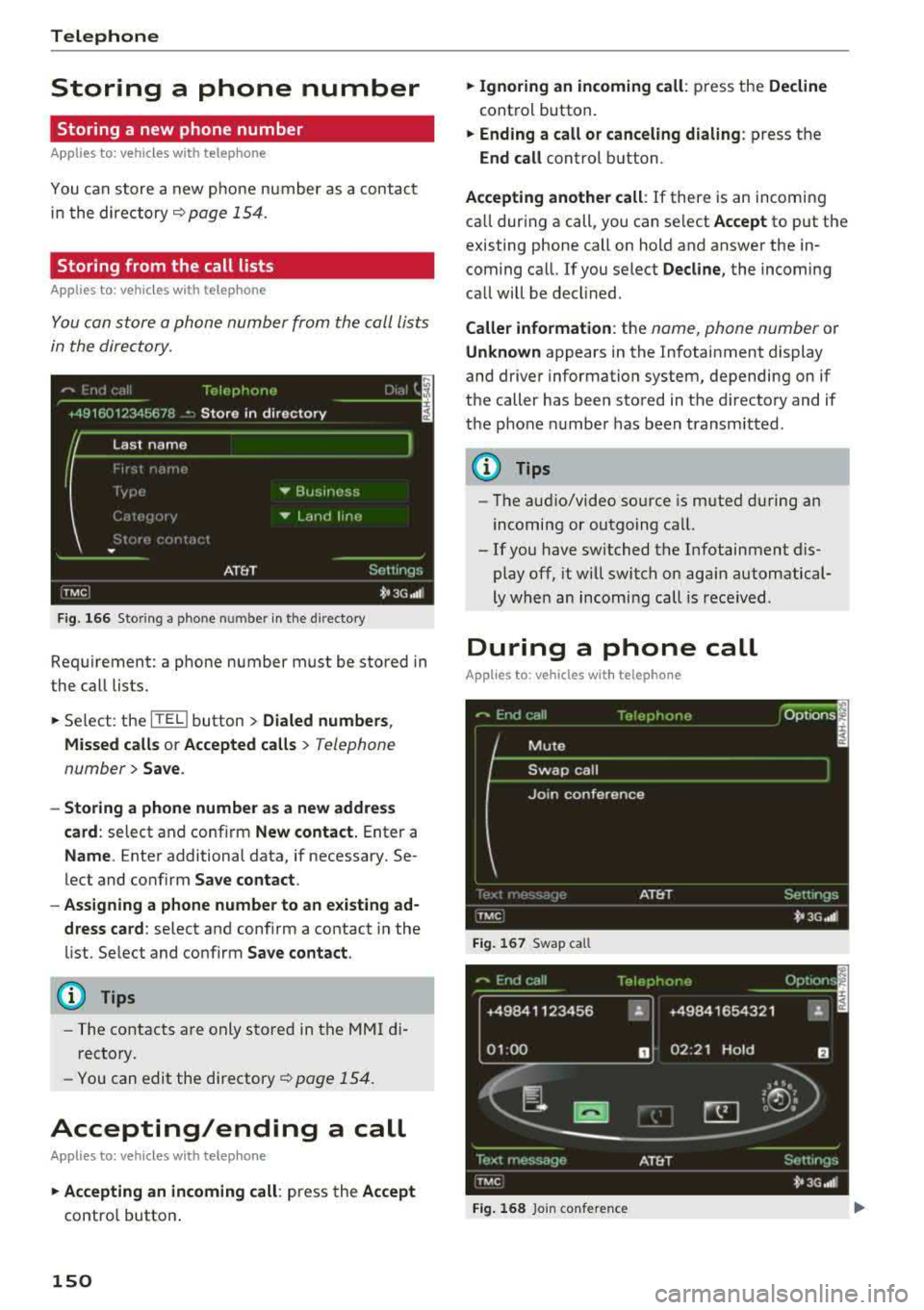
F ig . 16 6 Stor ing a phone number in the directory
Requirement: a phone number must be stored in
the call lists .
.,. Select: the ITITI button > Dialed number s,
M issed call s or Accepted calls
> Telephone
number
> Save .
-Storing a phone number as a new addres s
card :
select and conf irm New contact. Enter a
Name . Enter additional data, if necessary. Se
lect and confirm
Save contact .
- Assigning a phone number to an existing ad
dress card :
select and confirm a contact in the
list. Se lect and confirm
Sa ve contact .
(D Tips
-The contacts are only stored in the MMI di
rectory.
- You
can edit the directory~ page 154.
Accepting/ending a call
Applies to: vehicles with telephone
.,. Ac cepting an incoming call : press the Accept
control button .
150
.,. Ignoring an in coming call : press the Decline
control button.
.,. Ending a call or canceling dialing : press the
End call control button.
Accepting another call : If there is an incoming
ca ll dur ing a call, you can se lect
Accept to put the
existing phone call on hold and answer the in coming call. If you select
Decline , the incoming
call will be decl ined.
Caller information : the name, phone number or
Unknown appears in the Infotainment display
and driver information system, depending on if
the caller has been sto red in the d irecto ry and if
the pho ne n umber has been transmitted .
(D Tips
-The aud io/video source is m uted during an
incomi ng or outgoing call.
- If you have switched t he Infotainment dis
play off, it will switch on aga in automatical
ly when an incoming call is rece ived .
During a phone call
Applies to: vehicles with telephone
Fi g. 16 7 Swap call
+49841123 456 "
01 :00 D
Fig. 16 8 Join co nfere nce