change time AUDI A8 2018 Owner's Manual
[x] Cancel search | Manufacturer: AUDI, Model Year: 2018, Model line: A8, Model: AUDI A8 2018Pages: 356, PDF Size: 54.71 MB
Page 202 of 356
Rear Seat Ent ertainm ent
right and change the batteries as labeled in the
battery compartm ent . Then attach the cover
back on to the left earpiece
(L).
You can ident ify t he charge status of the battery
q table on page 200 based on the blinking
speed of the LED in the charging cable conn ec
tion
CD q fig. 209.
Blinking fre- Charge status
quency
Blinking The batteries are cha rging.
Rema ins on The batte ries are charged .
Blinking An error occurred while charg-
quickly ing.
A WARNING
- Do not use damaged rechargeable batteries .
T his increases the r isk of an explos ion.
- The headphones can become warm when
the batteries a re charg ing and increase the
risk of injury .
- Do not charge standard batteries with the
charg ing cable. This increases t he risk of an
exp losion .
- Be careful when using the c igarette lighter .
I n attentive or unsupe rvised use of the c iga
rette lighte r can cause burns.
- T he ciga rette lighter/sockets and any elec
t rical accessor ies connected to t hem func
t ion only whe n the ign ition is sw itched on.
U sing the ciga rette lighter/sockets o r elec
trical accessories incorrect ly can lead to se
rious injuries or cause a fire. To reduce the
risk of in juries, never leave children unat
tended in the vehicle with the vehicle key.
@ Note
- Do not charge the batteries in the wireless headphones when the engine is not run
ning . This will dra in the vehicle battery .
- For wireless headphones, on ly use batteries
that are approved for that type of device,
for example NiMH batteries with a mini
mum capacity of 550 mAh in AAA size that
are suitable for quick charging .
200
@ For the sake of the environment
Batteries contain polluting substances. They
must be disposed of us ing methods that w ill
not harm the env ironment. Do not dispose of
them in househo ld trash.
(D Tips
The charging time for t he included rechargea
ble batter ies is approximate ly three to four
hours and may increase by approximately 25
percent if the batter ies are in use while charg
ing .
Headphones connected by cable
App lies to: vehicles with Rear Seat Entertainment
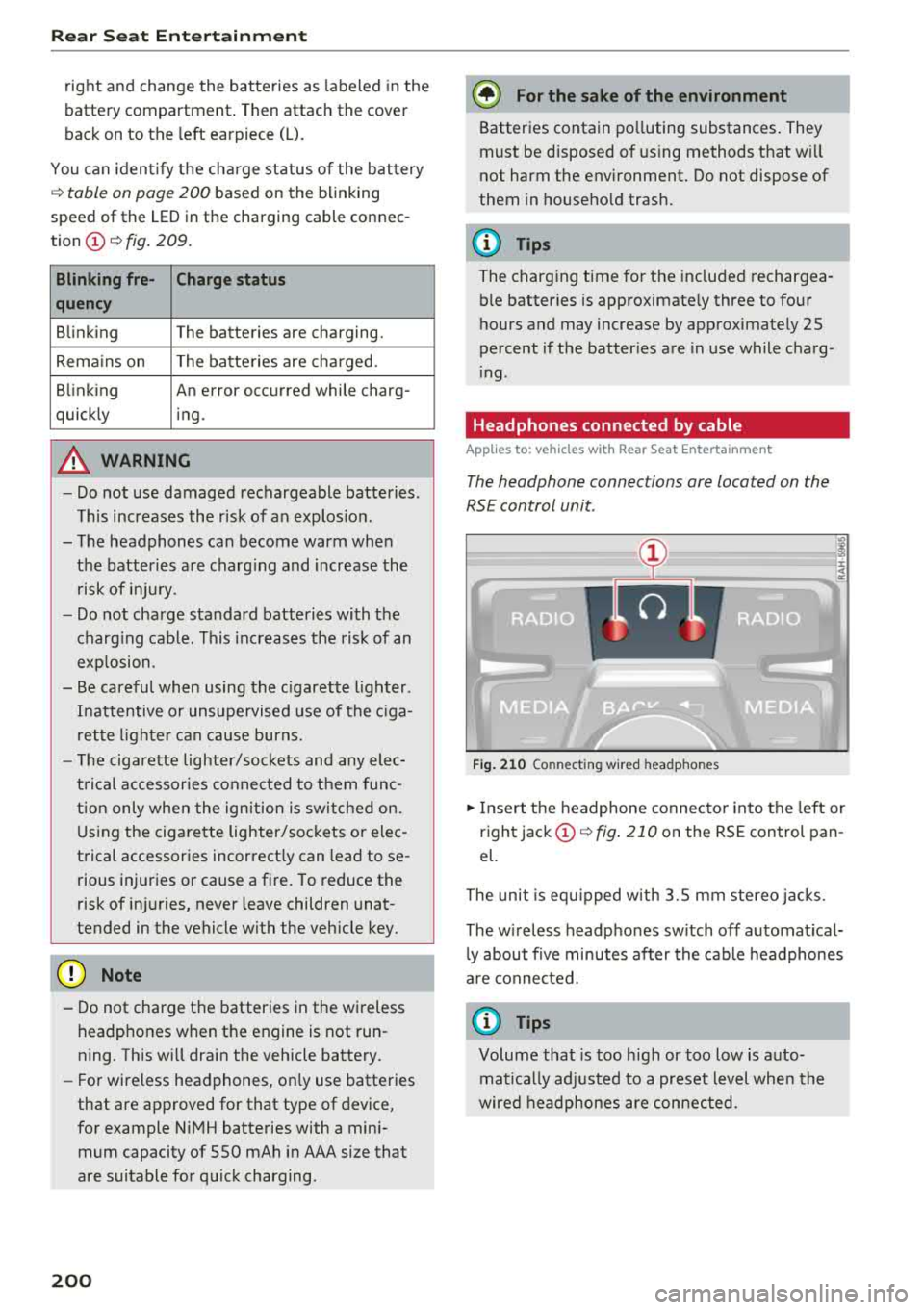
The headphone connec tions are located on the
RS E control unit.
Fig . 21 0 Co nn ect in g wir ed h eadpho nes
.,. Insert t he headphone connecto r into the left or
right jack
CD q fig . 210 on the RSE control pan
el.
The unit is eq uipped w ith 3.5 mm stereo jacks .
The w ireless headphones sw itch off automat ical
l y about f ive minutes after the cable headphones
a re connected.
(D Tips
Volume that is too h igh or too low is auto
mat ica lly adjusted to a preset level whe n the
wired headphones are connected.
Page 205 of 356
u. co .... N
" N .... 0 0 :c '
more information on the
Radio menu, refer to
¢ page 178.
You can store a separate presets list in the RSE
that may contain up to 50 stations from all fre
quency bands. You can a lso display the station
name for the se lected radio station or change the
station sorting separately in both RSE disp lays.
Playing media
Applies to: vehicles with Rear Seat Entertainment
"'Select : I MEDIAi button .
The med ia functions match those in the MMI to a
large extent. For more information on the
Media
menu, refer to Q page 190.
Possible sources are:
(D Jukebox
@ SD card reader
@ DVD drive
© DVD changer*
® Audi music interface (such as iPod, USB or ex
ternal audio/video input)
Different functions are availab le depending on
the active source and the medium inserted.
(D Tips
- The Album browser function is not available
in the RSE .
- The copy and delete process cannot be
started simultaneous ly when accessing the
Jukebox from both systems at the same
time.
Video playback information
Playback combinations
Applies to: vehicles with Rear Seat Entertainment
When se lecting the same video source, both
sound and picture w ill play through both RSE dis
plays.
Rear Seat Entertainment
If different video sources are started on both RSE
displays, on ly certain picture/sound playback
combinations are possible and they depend on
the selected video sources.
Complete output format (sound and video
image) on both RSE displays
Select a video DVD as the first video source in the
DVD drive and then the following source:
- DVD changer*
- Aud i music interface with AV adapter cable*/
iPod adapter cab le plus*
Playing only sound on the second RSE
display
T he re is only sound output fo r the second video
source if you :
- Start a video DVD in the DVD drive as the first
source and select a video file from the Jukebox
or the SD card as the second source .
- Sta rt a video fi le from the Jukebox as the first
source, and select a video file from the SD card
or from the Aud i music interface using an AV
adapter cable* /USB adapter cable" /iPod adapt
er cab le plus* as the second source and vice
versa .
- Start a video DVD/video file in the DVD chang
er * as the first source, and select a video file
from the Jukebox, SD card or from the Audi mu
sic interface using an AV adapter cable*/USB
adapter cable*/iPod adapter cable plus* as the
second source .
No picture/sound playback on the second
RSE display
If a video file from the Jukebox, from an SD card
or from the Audi music interface w ith the USB
adapter cable* is already playing on one RSE d is
play, p layback of a v ideo DVD in the DVD drive on
the other RSE display is not possible.
203
Page 216 of 356
Drivin g saf ety
A WARNING
Improperly stored luggage or other items can
fly through the vehicle causing serious per sonal injury in the event of hard braking or an
accident. To help reduce the risk of serious
personal injury:
- Always put objects, for example, luggage or other heavy items in the luggage compart
ment.
- Always secure objects in the luggage com
partment using the tie-down hooks and
suitable straps .
A WARNING
Heavy loads will influence the way your vehi
cle handles. To help reduce the r isk of a loss
of control leading to serious pe rsonal injury:
- Always keep in mind when transporting heavy objects, that a change in the center of
grav ity can also cause changes in vehicle
hand ling:
- Always distribute the load as even ly as
possible.
- Place heavy objects as far forward in the
luggage compartment as poss ible.
- Never exceed the Gross Axle Weight Rating
o r the Gross Vehicle Weight Rating specified
on the safety compliance sticker on the left
doo r jamb. Exceed ing permissible weight
standards can cause the vehicle to slide and
hand le differently .
- Please observe information on safe driving
c> page 208.
A WARNING
To help prevent poisonous exhaust gas from
being d rawn into the vehicle, always keep the
rear lid closed whi le driving.
- Never transport objec ts larger than those
fi tt ing complete ly into the luggage a rea be
ca use the rear l id cannot be fully closed.
- If you absolutely mus t drive w ith the rea r lid
open, obse rve the follow ing notes to reduce
t h e risk of poisoning:
- Close all windows,
- Close the power roof,
214
-
- Open all a ir outlets in the instrument pan
el,
- Switch off the air reci rculat ion
'
- Set the fresh air fan to the highest speed .
A WARNING -
Always make su re that the doo rs, all win
dows, the powe r roof and the rear lid are se
curely closed and locked to re duce the risk of
in jury when the veh icle is not being used.
- After closing the rear lid, always ma ke sure
that it is properly closed and locked.
- Never leave your veh icle unattended espe
cially with the rear lid left open . A child
could crawl into the vehicle through the lug
gage compartment and close the rea r lid be
coming trapped and unab le to get o ut. Be
ing trapped in a vehicle can lead to ser ious
pe rsonal injury.
- Never let ch ildren play in o r around the vehi
cle.
- Never let passengers ride in the luggage
compa rtment . Vehicle occupants mus t al
ways be properly restrained in one of the ve hicle's seat ing pos itions.
(D Tips
- Air circulation helps to reduce w indow fog
ging . Stale ai r esca pes to the outs ide
through vents in the trim panel, on the left
side of the luggage compartment. Be sure
to keep t hese s lo ts free and open.
- T he tire p ressure must correspond to the
load. The t ire pressure is shown on t he tire
press ure label. The ti re pre ssure label is lo
c ated on the drive r's side B- pilla r. The tire
pressu re label lists the recommen ded cold
t ire inflation pressures fo r the veh icle at its
maximum capac ity we ight and the tires that
we re on your veh icle at the time it was man
ufactured . For recommended t ire pressures
for normal load conditions, p lease see chap
ter
c> page 294.
Page 219 of 356
Audi pre sense Preventative passenger
protection
Applies to: ve hicles with Audi pre sense
Pre sense can initiate steps to protect vehicle oc
cupants in certain dangerous situations. The
functions descr ibed are available depending on
veh icle equ ipment:
Audi pre sense ba sic
The fo llowing functions can be triggered in cer
tain driving situat ions:
- Tightening of the safety belts (for examp le,
during heavy braking) : the front safety belts
have reversible belt tensioners. If a collision
does not occur, the safety belts loosen slightly
and are ready to trigger again.
- Closing the w indows and the sunroof*
The function of the pre sense basic is activated at
a speed of 20 mph (30 km/h) or hig her . The de
p loyment time is adapted in the drive select dy
namic mode .
Audi pre se ns e front ( vehicl es with adapti ve
cruise contr ol* }
Pre sense front contains the f unctions of pre
sense basic. In add ition, the likelihood of a rear
end collis ion with the vehicle ahead is also calcu
lated, within the limits of the system . If the risk
of a collision is detected, t he following functions
can t rigger:
- Audi braking guard
¢page 100
-Tensioning of the safety belts
- Closing the windows and the sunroof *
Audi pre sense rear (vehicles with side
a ss is t*)
Pre sense rear contains t he functions of pre sense
basic. In addition, the like lihood of a rear-end
col lision from t he vehicle behind is a lso ca lculat
ed, w ith in the lim its of the system. If the risk of a
collis ion is detected, the following functions can
~ tr igger :
.... N
~ -Tensioning of the safety belts
g -Closing the windows and the sunroof *
:c '
-Adjusting the seats : the settings for the powe r
head restrains, the upper sections of the backr
ests and the pne umatic side bolsters* change
on the front seats and the outer rear seats*. If
a co llision does not occur, the seat sett ings
that were previously used are restored .
Audi pre sen se plus
Pre sense plus contains the f unctions of pre
sense front and pre sense rear .
Error messag e
Audi pre sens e: Unavailable
Preventative passenger protect ion is not ava ila
ble. Drive to an autho rized Aud i deale r or author
ized Audi Se rvice Facility immed iately to have the
malfunction corrected.
& WARNING
--
Pr e sense cannot overcome natural p hys ica l
l aws .
It is a system designed to assist and it
cannot prevent a co llision. Do not let the in
creased safety provided tempt you into tak ing
risks. This could inc rease your r isk of a colli
sion.
- The system can dep loy incorrectly.
- Please note that t he sensors do not a lways
detect a ll objects. T his increases the r isk of
a co llision.
- Pre sense does not react to peop le or ani
mals or objects that are cross ing the vehi
cle's path or are difficu lt to detect
¢page 95.
- Reflective objects such as gua rd ra ils or the
entrance to a tunnel, heavy ra in and ice can
affect the funct io n of the radar sensors and
the system's ab ility to detect a collision risk.
@ Note
The sensors can be d isplaced by impacts or
damage to the bumper, wheel housi ng and
underbody. Pre sense can be impaired by this .
Have an autho rized Aud i deale r or au tho rized
A udi Se rvice Fac ility check the ir funct io n.
.,.
217
Page 227 of 356
u. co .... N
" N .... 0 0 :c '
Always read and heed all WARNINGS and other important
i nformation¢ page 221.
(D Tips
You can a lso adjust the height of the front
seats to change the position of the safety
be lts.
Improperly worn safety belts
Incorrectly positioned safety belts can cause se
vere injuries.
Wearing safety be lts improperly can cause seri
ous injury or death. Safety belts can on ly work
when they are correctly pos itioned on the body.
Improper seating positions reduce the effect ive
ness of safety belts and will even increase the
risk of injury and death by mov ing the safety belt
to cr it ica l areas of the body. Improper seating
positions also increase the r isk of serious i njur y
a n d death when an airbag deploys a nd str ikes an
occupant who is not in the correct seating pos i
tion . A driver is responsible for the safety of a ll
ve hicle occupants and especia lly for children.
Therefore:
.. Never permit anyone to ass ume an incorrect
sitting position in the vehicle w hil e trave ling
¢A .
A WARNING
Improperly worn safety be lts increase the risk
of serious personal injury and death whenever
a vehicle is be ing used.
- Always ma ke sure that a ll vehicle occupants
are correctly restra ined and stay i n a correct
sea ting pos it ion whenever the ve hicle is be
ing used .
- Always read and heed all WARNINGS and
ot her important information
¢ page 221.
Safet y be lts
Belt tensioners
How safety belt pretensioners work
Rev ersible safety belt tension ers
T he following fu nctions a re available when safety
belts w it h reversib le safety belt tensione rs a re
faste ned:
- Automatic tens ioners: at the start of a drive,
the safety belts automatically ad just to the
passenger after a certain time period or veh icle
speed. To switch the a utomat ic tens ioners off,
select the following in t he M MI:
!CARI fu nction
button
> Car systems > Vehicle settings >
Seat s > Driver 's seat or Passenger 's seat > Au
tomatic belt tensioner
> Off .
- In ce rtain driving situations, the safety belts
may tighten wit h a reve rsib le tensioning func
tion
r=;, page 217.
- The safety be lts may also tighten with this re -
versible tensioning function in minor collisions.
Pyrotechnic safety belt pretensioners
Seat be lts wi th py ro technic s afety be lt preten
s io ners are tensioned au toma tically i n seve re col
li sions, depending on t he circumstances . This
helps to reduce the forward motion of the occu
pants .
A WARNING
= -
- It is poss ib le for the pretensioners to dep loy
incor rectly.
- Any work on the tens ioner system or remov
al and installation of system components
for other repairs m ust be performed by a
qualified workshop.
- The pyrotechnic system can only p rovide
protection fo r one collision. If the py rotech
n ic pretens ioners deploy, the pretensioning
system must be rep laced.
(D Tips
- A fine dust is re leased when the pyrotechnic
safety belt pretensioners dep loy. Th is is no r
ma l and is not caused by a f ire in t he ve hi
cle.
- The relevant safety requirements must be
observed when the vehicle or componen ts
225
Page 277 of 356
u. co ..... N
" N ..... 0 0 :c '
Read and follow all WARNINGS before check
ing anything in the engine
compartment~ .&.
in Working in the engine compartment on
page 272.
Engine oil
If the engine oil level is too low
If you need to add engine oil, use an oil that is listed on the sticker.
The sticker is located at the
front of the engine
compartment ~ page 274,
fig.
258.
If the recommended engine oil is not available,
in an emergency you may add a maximum of 1
quart
(I liter) of ACEA C3 or API SN engine oil
one time until the next oil change.
For more information on the correct engine oil
for your vehicle, contact an authorized Audi deal
er or authorized Audi Service Facility. Have the oil
changed by an authorized Audi dealer or author ized Service Facility.
Audi recommends
«;;castrol I /g@@g PrtfTr.:!\.7.Tri,'lAl.
Audi recommends using the Longlife high-per·
formance engine oil from Audi Genuine Parts.
Checking the engine oil level
The engine oil level can be checked in the Info
tainment system
Observe the safety precautions ~ A in Working
in the engine compartment on page 2 72.
~ Park your vehicle on a level surface.
~ Shut the engine off when it is warm.
~ Switch only the ignition back on.
~ Wait approximately two minutes.
~ Select: the ICARI function button> (Car)* Sys
tems
control button > Service & control > Oil
level.
~ Read the oil level in the Infotainment system .
Add engine oil if the bar in the oil level indica
tor is just before
"min"~ page 2 76.
Checking and Filling
@ Note
The engine oil level must not be under the
"min" marking, as this will increase the risk of
engine damage.
(D Tips
The oil level indicator in the display is only an
informational display.
If the oil level is too
low, a minimum oil warning appears in the in
strument cluster. Add oil and close the hood.
The current oil level is displayed in the Info
tainment system the next time the ignition is
switched on.
(D Tips
The engine oil consumption may be up to
0.5 quart/600 miles (0 .5 liter/1,000 km), de
pending on driving style and operating condi
tions. Consumption may be higher during the
first 3,000 miles (5,000 km). Because of this,
the engine oil level must be checked regular
ly. It is best to check each time you refuel
your vehicle and before long drives.
- In order to provide effective lubrication and
cooling of internal engine components, all
internal combustion engines consume acer
tain amount of oil. Oil consumption varies
from engine to engine and may change sig
nificantly over the life of the engine. Typi
cally, engines with a specified break-in peri
od consume more oil during the break-in pe
riod than they consume after oil consump
tion has stabilized.
- Under normal conditions, the rate of oil
consumption depends on the quality and
viscosity of the oil, the RPM (revolutions per
minute) at which the engine is operated, the
ambient temperature and road conditions.
Further factors are the amount of oil dilu
tion from water condensation or fuel resi
due and the oxidation level of the oil. As any
engine is subject to wear as mileage builds
up, the oil consumption may increase over
time until replacement of worn components
may become necessary.
.,.
275
Page 284 of 356
Checking and Filling
instrument cluster display each time the ign i
tion is switched on or off . The rema ining
distance or time is displayed br iefly.
- Inspection or oil change due: if yo ur vehicle
h as reached an inspection o r oi l change interval
o r both intervals at t he same time, the mes
sage
Inspection due! or Oil change due! or Oil
change and inspection due!
appears br iefly af
te r switch ing the igni tion on/off .
Checking service intervals
You can check t he rema ining distance o r time un
til the next oil change o r next inspec tion i n the
Ca r menu. To do this, select: the
IC ARI function
button
> Car systems contro l bu tton > Service &
control > Service intervals .
Resetting the indicator
A n author ized A udi dealer or authorized A udi
Serv ice Facility will reset the serv ice interval d is
p lay after pe rforming serv ice .
I f yo u have chan ged t he oil you rself, you must re
set t he oil change interva l.
To reset the in dic ator, se le ct : th e
ICAR I fu nc tion
but ton
> Car system s control button > Service &
control > Service intervals. T urn t he control knob
downwa rd to
Reset oil change interval an d press
the co ntro l knob.
{QJ Note
- On ly reset the oil ch ange in dicato r if the oil
was c han ge d.
- Fo llow ing the service i nte rvals is cr itical to
maintai ning the service life a nd value o f
your ve hicl e, especia lly t he engine. Even if
the m ileage on the veh icle is low, do not ex
c e ed th e tim e fo r th e ne xt serv ic e .
282
Page 290 of 356
Wheels
"XL" "xl" "EXTRA LOAD" or "RF" I I I
on the sidewall.
Rim
means a metal support for a tire
or a tire and tube assembly upon
which the tire beads are seated.
Rim diameter
means nominal diameter of the
bead seat . If you change your
wheel size, you will have to pur
chase new tires to match the new rim diameter .
Rim size designation
means rim diameter and width .
Rim width
means nominal distance between
rim flanges.
Sidewall
means that portion of a tire be
tween the tread and bead .
Speed rating (letter code)
means the speed at which a tire is
designed to be driven for extend
ed periods of time. The ratings range from 93 mph (150 km/h)
to 186 mph (298
km/h)¢ table
on page 284 .
You may not find
this information on all tires be
cause it is not required by law .
288
The speed rating letter code,
where applicable, is molded on the tire sidewall and indicates the maximum permissible vehicle
speeds
¢ .1,. in Winter tires on
page 298 .
Tire pressure monitoring
system*
means a system that detects
when one or mo re of a vehicle 's
tires are underinflated and illumi
nates a low tire pressure warning
telltale .
Tread
means that portion of a tire that
comes into contact with the road .
Tread separation
means pulling away of the tread
from the tire carcass .
Treadwear indicators (TWI )
means the projections within the
principal grooves designed to give
a visual indication of the degrees
of wear of the tread. See
¢ page 292, Treadwear indicator
for more information on measur- ing tire wear.
.,.
Page 296 of 356
Wheels
&,. WARNING
Always adapt the tire pressure
to your driving style and vehicle
load .
-Overloading can lead to loss of
vehicle control and increase
the risk of an accident. Read and follow the important safe
ty precautions
inc:::> page 295,
Tires and vehicle load limits.
-The tire must flex more if the
tire pressure is too low or if
the vehicle speed or load are
too high . This heats the tire up
too much. This increases the
risk of an accident because it
can cause the tire to burst and
result in loss of vehicle con
trol.
-Incorrect tire pressure in creases tire wear and has a
Tire pressure table
Please note that the information
contained in the following table
was correct at the time of print
ing, and the information is sub
ject to change. If there are differ ences between this information
and the tire pressures specified
on the label on the driver's side B pillar, always follow the specifica-
294
negative effect on driving and
braking behavior, which in
creases the risk of an accident.
@ Note
Replace lost valve caps to re
duce the risk of damage to the
tire valves.
@ For the sake of the environment
Tire pressure that is too low in
creases fuel consumption.
(D Tips
Audi recommends using the
tire pressure specified for a normal load
c:::> table on
page 295
or for a full load
when the vehicle is partially loaded.
tion on the B-pillar label
c:::> page 293, fig. 266.
Make sure that the tire designa
tion on your tire matches the des ignation on the tire pressure label
and the tire pressure table.
The following table lists recom- mended tire pressures in cold
.,..
Page 303 of 356
lL t:0 ....
"" ......
"" .... 0 0 :c '
malfunction indicator to indicate when the sys
tem is not operating properly. The TPMS mal
function indicator is combined with the low tire
pressure telltale. When the system detects a
malfunction, the telltale will flash for approxi
mately one minute and then remain cont inuously
illuminated . This sequence will continue upon
subsequent vehicle start-ups as long as the mal
function ex ists.
When the malfunction indicator is illuminated,
the system may not be ab le to detect or signal
low tire pressure as intended . TPM S malfunctions
may occur for a var iety of reasons, including the
installation of replacement or alternate tires or
wheels on the vehicle that prevent the TPMS
from functioning properly. Always check the
TPMS malfunction telltale after replacing one or
more tires or wheels on your vehicle to ensure
that the replacement or alternate tires and
wheels allow the TPMS to continue to function
properly.
If the Tire Pressure Monitoring System
indicator appears
Applies to: AS, 58
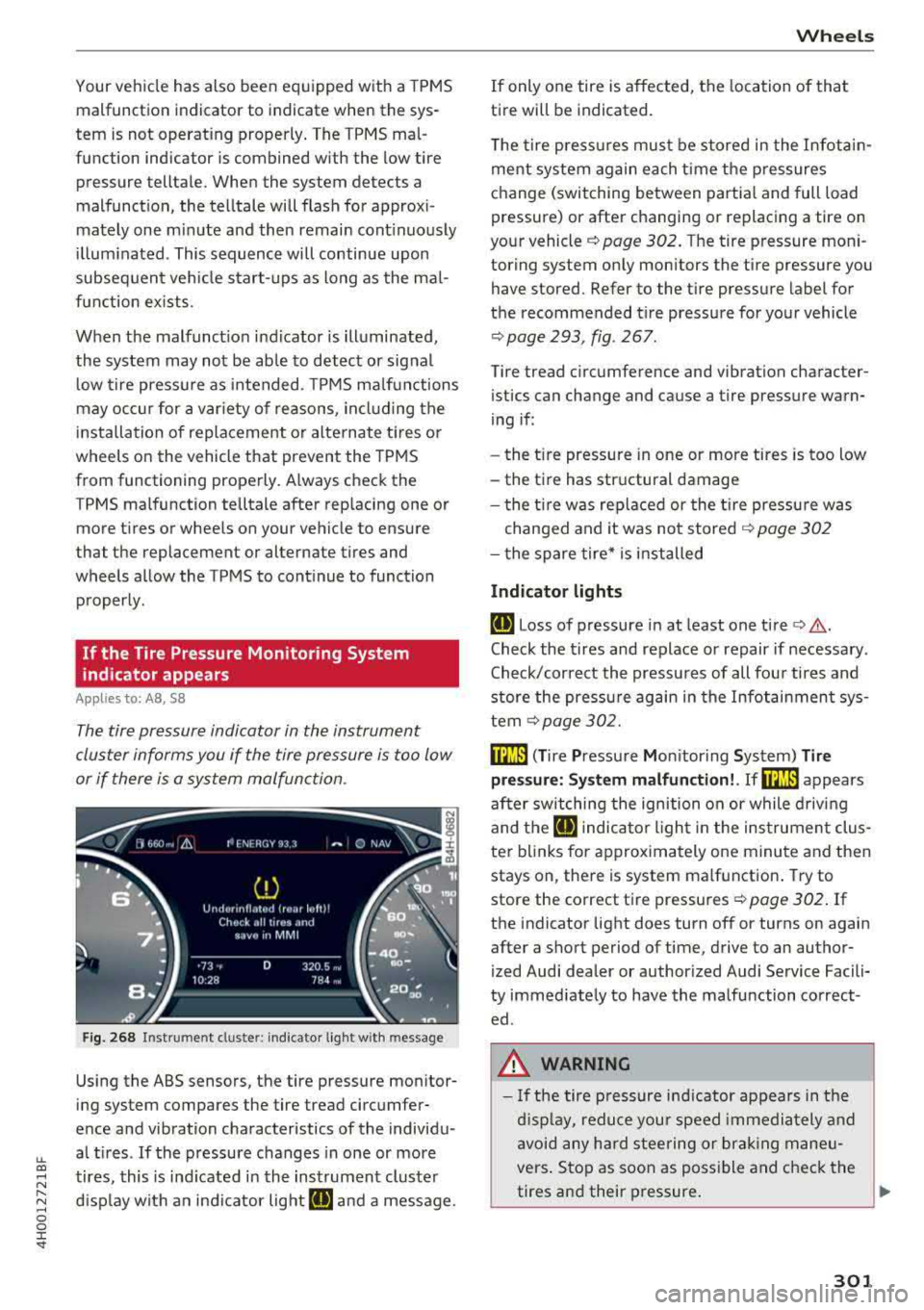
The tire pressure indicator in the instrument
cluster informs you if the tire pressure is too low
or if there is a system malfunction .
Fig. 268 Instrument clus ter: indicator light with message
Using the ABS sensors, the tire pressure monitor
ing system compares the tire tread circumfer
ence and vibration characteristics of the individu
al tires . If the pressure changes in one or more
tires, this is ind icated in the instrument cluster
display with an indicator light
ti] and a message .
Wheels
If only one tire is affected, the location of that
tire will be indicated.
The tire pressures must be stored in the Infotain
ment system again each time the pressures
change (switching between partial and full load
pressure) or after changing or replacing a tire on
your vehicle
c:> page 302. The tire pressure mon i
toring system only monitors the tire pressure you
have stored. Refer to the tire pressure label for
the recommended tire pressure for your vehicle
c:> page 293, fig . 267 .
Tire tread circumference and vibration character
istics can change and cause a tire pressure warn
ing if :
- the t ire pressure in one or more tires is too low
- the tire has structural damage
- the tire was replaced or the tire pressure was
changed and it was not stored
c:> page 302
- the spare tire* is installed
Indicator lights
ti] Loss of pressure in at least one tire c:> ,&..
Check the tires and replace or repair if necessary.
Check/correct the pressures of all four tires and
store the pressure again in the Infotainment sys
tem
c:>page 302.
mm ( T ire Pressure Monitor ing System) Tire
pressure: System malfunction!. Ifm:m appears
after switching the ignition on or while driving
and the
ti] indicator light in the instrument clus
ter blinks for approximately one minute and then
stays on, there is system malfunction. Try to
store the correct tire pressures
c:> page 302. If
the indicator light does turn off or turns on again
after a short period of time, drive to an author
ized Audi dealer or authorized Audi Service Facili
ty immediately to have the malfunction correct ed .
.&, WARNING
- If the tire pressure ind icator appears in the
display, reduce your speed immediately and
avoid any hard steering or braking maneu
vers. Stop as soon as possible and check the
tires and their pressure.
..,.
301