service AUDI A8 2018 Owner's Manual
[x] Cancel search | Manufacturer: AUDI, Model Year: 2018, Model line: A8, Model: AUDI A8 2018Pages: 356, PDF Size: 54.71 MB
Page 84 of 356
Drivin g
During emergency braking, your vehicle will
brake sim ilar to heavy brak ing. ESC and the
associated components (ABS, ASR, EDL)
cannot overcome the laws of physics . In cor
ners and when road or weather cond it ions
are bad, a full b rake applicat ion ca n cause
the vehicle to skid o r the rear end to swerve,
wh ic h increases the r is k of an accident.
- If the powe r supply fa ils, you cannot set the
par king b rake if it is re leased. In th is case,
par k the vehicle on level ground and secure
it by placing the selector lever in the P posi
tion . See an authorized Audi dea ler or a u
thorized Audi Service Facility for assistance .
- Always take the vehicle key with you when
leaving your vehicle, even fo r a short period
of time . This applies particular ly w hen ch il
dren rema in in the vehicle. Otherwise ch il
dren could start the engine, release the
park ing brake or operate electrical eq uip
ment such as powe r windows, which in
c reases the risk of an acc ident.
- No one sho uld rema in in the vehicle when it
is locked - especially ch ild ren. Locked doo rs
make it mo re diff icu lt fo r eme rgency wor k
ers to get into the vehicle, which puts lives
at r is k .
0) Tips
When stopping at a traffic s ignal or stopping
in c ity traffic, you can set the parking b rake
manually. The vehicle does no t have to be
he ld w it h t he br ake peda l. The parking b rake
elim ina tes the tendency to creep when a se
lecto r lever position is engaged . As soon as
you p ress t he accelerator pedal, the parking
brake releases automat ica lly and your vehicle
starts to move
c::, page 82.
(D Tips
- Occasiona l noises when the parking brake is
set and re leased a re normal and a re not a
cause for concer n.
- The park ing bra ke goes thro ugh a se lf-test
cycle at regular intervals when the ve hicle is
stopped. Any noises associated w ith this a re
normal.
82
- If there is a powe r fail ure, the par king b rake
wi ll not set if it is released, and it wi ll not
re lease if it is
set ~.&. . See an a uth orized
Audi dealer or author ized Audi Se rvice Fa
cility for assistance.
Starting to drive
Various convenience and safety f unct ions may be
available when the vehicle begins dr iving, de
pendi ng on vehicle equipment .
Starting on hills with th e pa rking brake set
Requirement: the driver's door must be closed
and the driver's safety belt must be fastened.
.,. To sta rt driving comfortably when on a h ill, set
the parking brake and begin driving as usu a l.
The braking force of the parking brake does not
release automatically unt il the whee ls build up
enoug h driving force.
Starting on hills with hill hold assist
Hill hold assis t makes it easier to start on hills.
Requireme nt: the d rive r's doo r must be closed
and t he engine must be runn ing.
.,. To activate h ill hold assist, press and hold the
brake pedal for several seco nds . The vehicle
m ust be in an uphill d irect io n of t ravel.
After re leas ing the brake pedal, the brak ing pow
er is maintained for a brief moment
c::, &. to pre
vent the veh icle from rolli ng back w hen starting.
Du ring this t ime, you can easily begin to move
yo ur vehicle.
_8. WARNING
Applies to: vehicles with hill hold assist
-If you do not beg in d riving immed iate ly or
the engine stalls after releasing the bra ke
pedal, your veh icle may beg in to roll back
ward. Press the brake pedal or set the park
ing brake immedia tely.
- The inte lligent technology of hill ho ld assist
cannot ove rcome the limitat ions imposed by
natural p hys ica l laws. The increased comfort
offe red by hill ho ld assist should not cause
you to t ake safety r is ks.
Page 89 of 356
u. co .... N
" N .... 0 0 :c '
Kick-down enables maximum acceleration.
When you press the accelerator pedal down be
yond the resistance point, the automatic trans miss ion downshifts into a lower gear and the en
g ine utilizes its full power, depend ing on veh icle
speed and engine RPM . It shifts up into the next
h igher gea r once the maximum spec ified eng ine
RP M i s reached .
A WARNING
Please note tha t the wheels could sp in o n
slick or slippery roads when kick -down is ac
tive.
Overboost
Applies to: S8 plus
-
The maximum engine torque is temporarily in
creased in overboost. Overboost is activated
when nearing full throttle in the S position and
when the engine is at operat ing temperature .
A WARNING
Please note that the wheels could spin o n
slick or sl ippery roads when overboost is ac
t ive.
Transmission malfunction
Tran sm iss ion : selector l eve r in drive!
-
If the selector lever is not in the P position when
you open the driver's door, the vehicle could roll.
Select the P se lector lever position .
rm Transm issio n: Please p res s bra ke pedal and
s e lect ge ar aga in
Press the brake pedal and se lect the desired se
lector lever posit ion aga in. You can then continue
driving.
rm T ransmi ssion o verh ea ting : Ple ase d rive con
servat ively
The t ransm iss ion tempera ture h as increased s ig
nificantly due to the sporty driving manner. Drive
in a less sporty manner until the temperature re -
Driving
turns to the normal range and t he indicator light
switches of .
rm Transmi ssion malfunction : You can continue
driving
T here is a system malfu nction in the transmis
s io n. You may cont inue d riving. Dr ive to an au
thorized Aud i dea le r or a uthorized Audi Serv ice
F ac ility soon to have t he malfunct io n cor rected.
[O] liJ Transmission malfunc tion: You can con
tinu e driving in D un til engine i s off
There is a system malfunction in the transmis
s ion . The transm ission is switch ing to emergency
mode .
If you turn the engine off, you w ill not be
able to select any othe r se lector lever positions
after sta rting the engine ag ain. Drive to an a u
tho rized Aud i de aler or authorized Audi Serv ice
F acility immediate ly to have the ma lfunction cor
rected .
rm Transmi ssion malfunction : You can continue
driving with limited functionalit y
There is a system malfu nction in the transmis
s io n. The transm ission is switc hing to eme rge ncy
mode. This mode only sh ifts i nto ce rtain gears or
will no longer sh ift a t all. T he eng ine may sta ll.
Drive to an authorized A udi dealer or authorized
Audi Service Facility immediate ly to have the
malfunction corrected.
[O] liJ Tran smi ssio n malfunction : No rev ers e
g ear. You can c ontinue dri ving
T he re is a system malfu nction in t he transmis
s io n. The transm ission is switc hing to eme rge ncy
mode. This mode only sh ifts into ce rtain gears or
will no longer shift at a ll. The engine may sta ll.
You cannot engage the reverse gear . Drive to an
authorized Audi dea ler or authorized Audi Service
Facility immed iate ly to have the malfunction cor
rected .
[O] Vehicle ma y roll! Cannot sh ift to P. Please
appl y par king brake
-The parking loc k was released using the emer -
gency
re lease ¢ page 88 . Or ..,.
87
Page 90 of 356
Driving
-The park ing lock can no longer be engaged.
Drive to an authorized Audi dealer or author
ized Audi Service Facility immed iately to have
the malfunction corrected.
rm Transmission malfunction: Stop vehicle and
shift to park.
Do not continue driving. Select the P selec tor lev
er position and contact an authorized Audi dea ler
or authorized Audi Service Facility for assistance.
Parking lock emergency release
The parking lock must be released using the
emergency release before towing the vehicle.
®
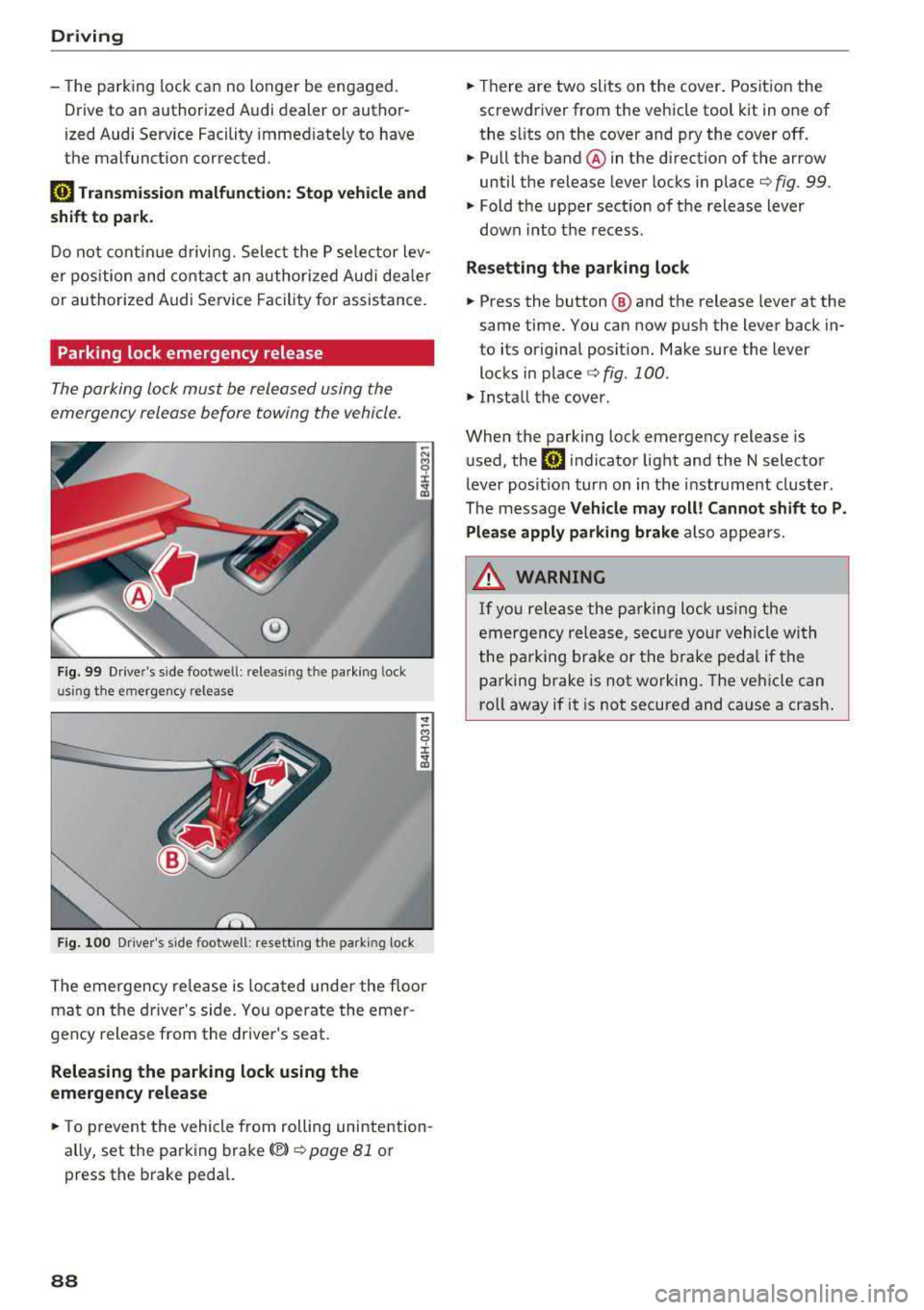
Fig. 99 Drive r's side footwe ll: releasin g t he parking lock
u sin g th e emergency release
Fig . 100 Dr iver's s ide footwell: resett ing the park ing lock
The emergency re lease is located under the floor
mat on the driver 's side. You operate the emer
gency release from the driver's seat.
Releasing the parking lock using the
emergency release
.,. To prevent the vehicle from rolling unintention
ally, set the parking brake(®)
¢ page 81 or
press the brake pedal.
88
.,. Th ere are two slits on the cover. Position the
screwdriver from the vehicle tool kit in one of
the s lits on the cover and pry the cover off.
.,. Pull the band ® in the direction of the arrow
until the release lever locks in place
¢ fig. 99 .
.,. Fold the upper sect ion of the release lever
down into th e recess.
Resetting the parking lock
.,. Press the button @ and the release lever at the
same time. You can now push the lever back in
to its original posit ion. Make sure the lever
locks in
place ¢ fig. 100 .
.,. Install the cover .
When the parking lock emergency release is
used, the
rm indicator light and the N selector
lever posit ion turn on in the instrument cluster.
The message
Vehicle may roll! Cannot shift to P.
Please apply parking brake
also appears .
.&, WARNING
-
If you release the parking lock using the
emergency release, secure your vehicle with
the pa rking brake or the brake pedal if the
parking brake is not working. The vehicle can
ro ll away if it is not secured and cause a crash.
Page 98 of 356
Assistance systems
-With stationary objects ¢ page 97.
A WARNING
Always pay attention to traffic when adaptive
cruise control is switched on and braking
guard is active. As the driver, you are still re
sponsible for starting and for maintaining
speed and distance to other objects. Braking
guard is used to assist you . The driver must
always take action to avoid a collision. The
driver is always responsible for braking at the
correct time.
- For safety reasons, do not use adaptive
cruise control when driving on roads with
many curves, when the road surface is in
poor condition and/or in bad weather (such
as ice, fog, gravel, heavy rain and hydroplan
ing). Using the system under these condi
tions increases the risk of an accident.
- Switch adaptive cruise control off tempora
rily when driving in turning lanes, on ex
pressway exits or in construction zones. This
prevents the vehicle from accelerating to
the stored speed when in these situations .
- The adaptive cruise control system will not
brake by itself if you put your foot on the ac
celerator pedal. Doing so can override the
speed and distance regulation.
- When approaching stationary objects such
as stopped traffic, adaptive cruise control
will not respond and braking guard will have limited function.
- The adaptive cruise control system and
braking guard do not react to people, ani
mals, objects crossing the road or oncoming
objects.
- The function of the radar sensors can be af
fected by reflective objects such as guard
rails, the entrance to a tunnel, heavy rain or
ice.
A WARNING
- Improper use of adaptive cruise control can
cause collisions, other accidents and serious
personal injury.
- Never let the comfort and convenience that
adaptive cruise control and braking guard
96
offer distract you from the need to be alert
to traffic conditions and the need to remain
in full control of your vehicle at all times,
- Always remember that the adaptive cruise
control and braking guard have limits -they
will not slow the vehicle down or maintain the set distance when you drive towards an
obstacle or something on or near the road
that is not moving, such as vehicles stopped
in a traffic jam, a stalled or disabled vehicle.
If registered by the radar sensors, vehicles
or obstacles that are not moving can trigger
a collision warning and if confirmed by the
video camera, an acute collision warning.
- Never follow a vehicle so closely that you
cannot stop your vehicle safely. The adap
tive cruise control cannot slow or brake the
vehicle safely when you follow another vehi cle too closely. Always remember that the
automatic braking function cannot bring the
vehicle to a sudden or emergency stop un
der these conditions .
- To prevent unintended operation, always
switch ACC off when it is not being used .
@ Note
The sensors can be displaced by impacts or
damage to the bumper, wheel housing and
underbody. That could affect the adaptive
cruise control system and braking guard .
Have an authorized Audi dealer or authorized
Audi Service Facility check their function.
© Tips
For an explanation on conformity with the
FCC regulations in the United States and the
Industry Canada regulations, see
¢page 339.
Page 107 of 356
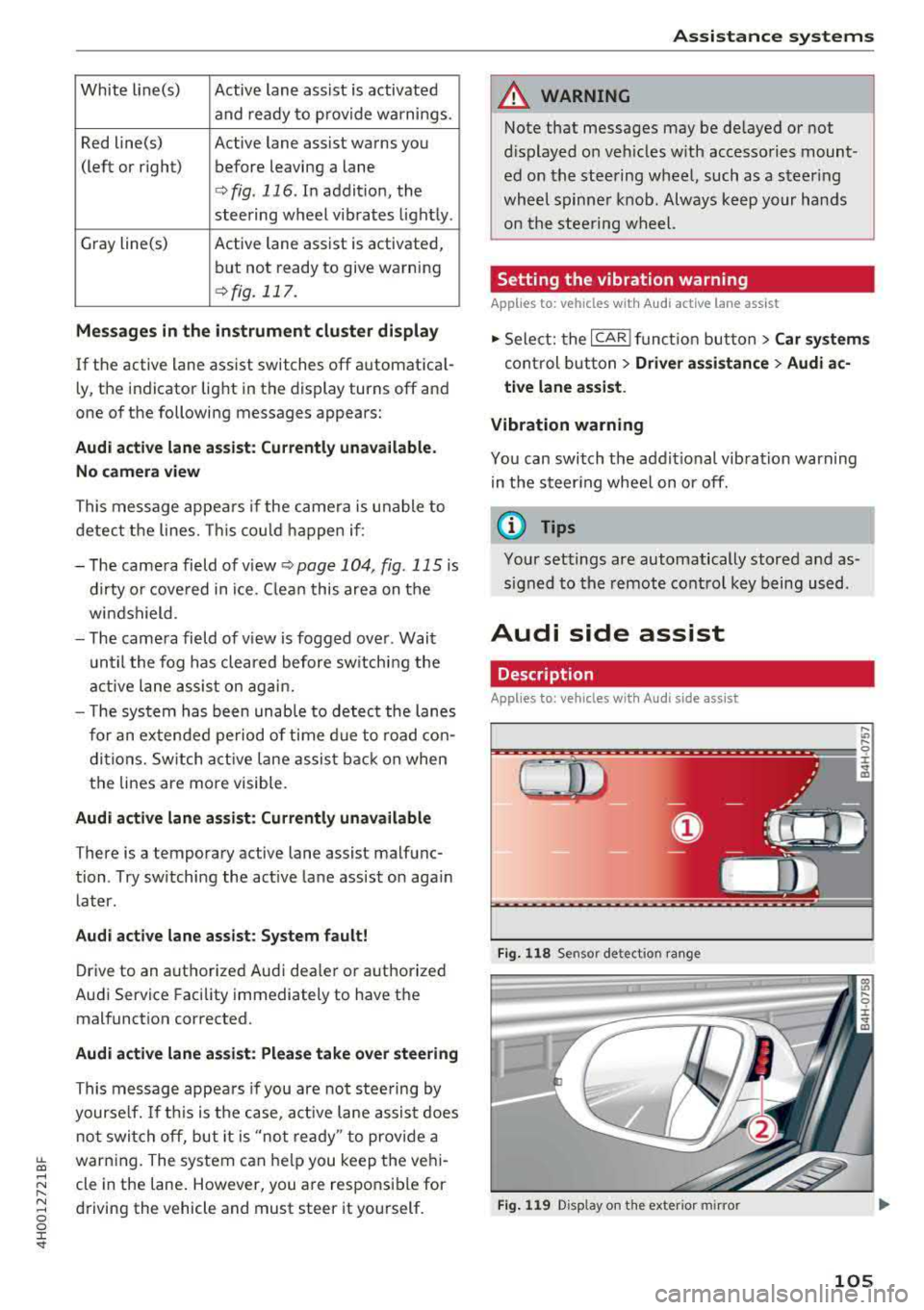
White line(s) Active lane assist is activated
and ready to provide warnings.
Red line(s) Active lane assist warns you
(left or right) before leaving a lane
¢ fig. 116. In addit ion, the
steering wheel vibrates light ly .
Gray line(s) Active lane assist is activated,
but not ready to give warning
¢ fig. 117.
Me ssages in the in strum ent clu ster di splay
If the active lane ass ist switches off automat ica l
l y, the indicator light in the display turns off and
one of the following messages appears:
Audi active lane a ssist: Cu rrentl y un available.
N o ca mera view
This message appea rs if the came ra is u nable to
detect the lines. This co uld happen if :
- The came ra field of v iew
<;;) page 104, fig. 115 is
dirty o r cove red in ice. C lean this area on the
wi ndshield .
- The came ra field of v iew is fogged over . Wait
u ntil the fog has cleared before sw itching the
active lane assis t on agai n.
- T he system has been unab le to detec t the lanes
for an extended period of time d ue to road con
di tions. Sw itch act ive lane assis t back on when
the lines are more visible.
Audi active lane a ssis t: Currently una vailabl e
There is a temporary active lane assist malfunc
tion . Try sw itch ing the active la ne assist on aga in
later.
Audi acti ve lane assist : Syste m f ault!
Drive to an authorized Audi dealer or a uthorized
Audi Service Facility immediately to have the
malfunct ion corrected.
Audi acti ve lane a ssis t: Pl ease take over steering
This message appea rs if you are not stee ring by
yourse lf. If th is is the case, act ive lane assis t does
not switch off, but it is
"not ready " to provide a
~ warn ing. The system can he lp you keep the veh i-...,
~ cle in the lane . However, you a re responsible for
~ driving the vehicle and must steer it yourself . 0 0 :c "
A WARNING
Note that messages may be de layed or not
d isplayed o n veh icles w ith accesso ries mount
ed on the stee ring wheel, such as a steer ing
whee l spinne r knob. Always keep your hands
on the s tee ring wheel.
Setting the vibration warning
App lies to : veh icles w ith Aud i act ive lane ass ist
11> Select: the ICAR I func tion but ton> C ar sy stem s
control b utt on > Driver assi stance > Audi a c
ti ve lane as sist .
Vibration warning
You can switch the addit io nal vibration warn ing
in the steer ing wheel on or off.
(D Tips
Your settings are automatically stored and as
s igned to the remote control key being used.
Audi side assist
Description
Applies to: vehicles w ith Audi s ide ass ist
Fi g. 1 18 Sensor detect ion ra n ge
F ig . 119 Disp lay on the exterio r m irror
,... .,,
9 ::c
"' co
105
Page 109 of 356
u. co .... N
" N .... 0 0 :c '
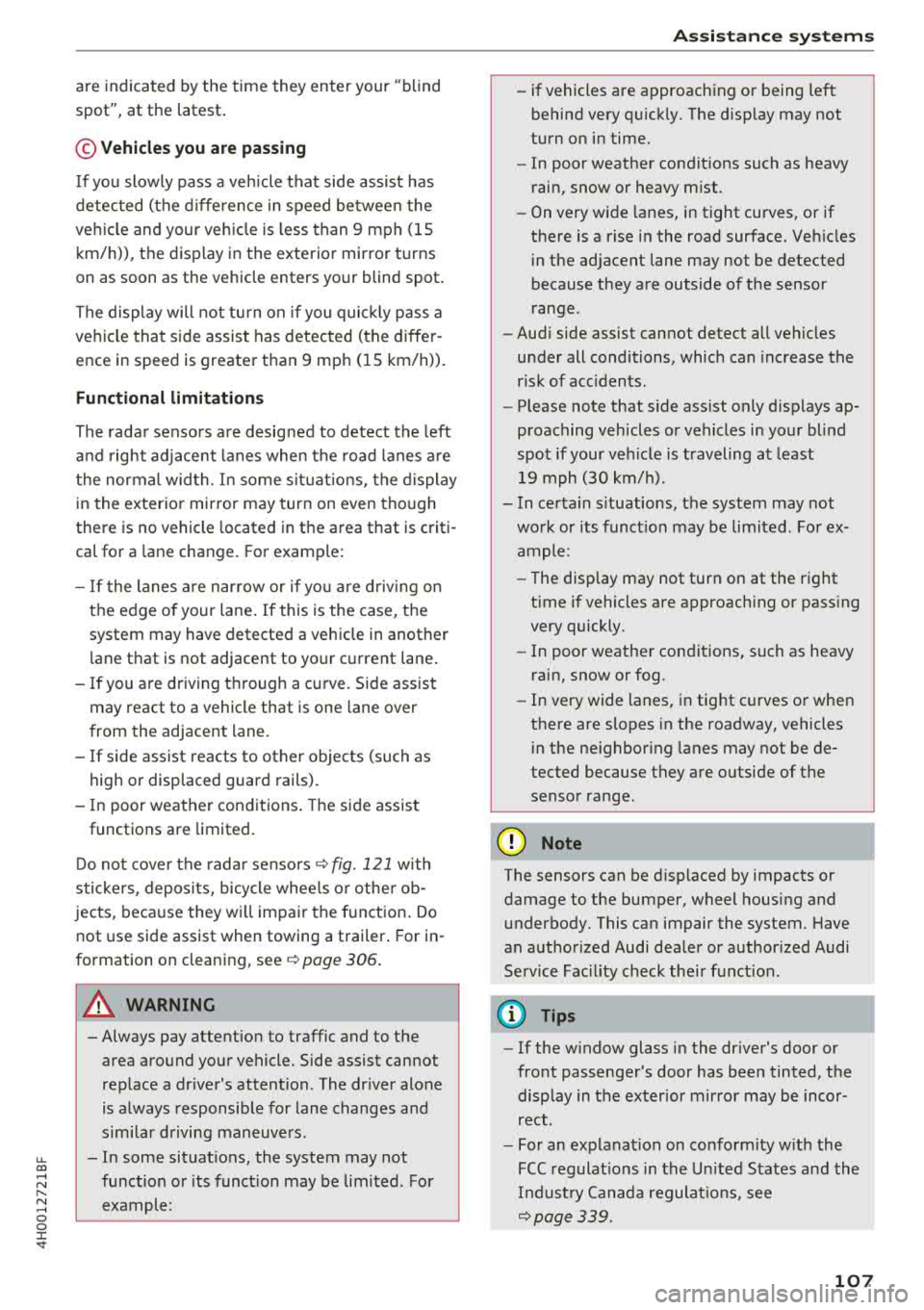
spot", at the latest .
© Vehicles you are passing
If you slowly pass a veh icle that side assist has
detected (the d ifference in speed be twee n the
ve hicle and your ve hicle is less than 9 mph (15
km/h)), the disp lay in the exterior mirror turns
on as soon as the vehicle enters your blind spot .
The display will not tu rn on if you quic kly pass a
ve hicl e that side assist has detected (the diffe r
ence in speed is greater t han 9 mp h (1 5 km/h)).
Functional limitations
The rada r senso rs a re desig ned to detect the left
a n d right adjacent lanes when the road lanes a re
the normal wid th . In some s ituat ions, the d isplay
i n the exterior mir ror may turn on even tho ugh
there is no vehicle located in the area that is criti
cal for a lane change. For example:
- If the lanes a re n arrow o r if yo u are driv ing on
the edge of your lane . If this is the case, the
system may have detected a vehicle in another
l ane that is no t adjacent to your c urrent lane .
- If you are dr iving through a cu rve . Side assist
may react to a vehicle that is one lane over
from the adjacent lane .
-If side assist reacts to other objects (such as
high or displaced guard rails) .
- In poor weat her condit ions . The side assis t
functions are limited.
D o not cove r the rada r
senso rs ~ fig. 121 with
s tickers, deposi ts, bicycle whee ls o r othe r ob
jects , beca use they w ill impair the f unct ion . Do
not use side assist when towing a trailer . For in
formation on clean ing,
see ~ page 306 .
A WARNING
- Always pay atte ntion to traffic and to the
area around yo ur vehicle. Side assist cannot
replace a dr iver's attention . The dr iver alone
is a lways responsible for lane changes and
s imi lar d riving maneuvers .
- In some situat ions, the system may not
func tion or its funct io n may be lim ited . For
example:
-
A ss istance systems
- if vehicles are approach ing or being left
behind very q uick ly. The disp lay may not
turn o n in time.
- In poor weat her condit ions such as heavy
r ain, snow or heavy m ist .
- On very w ide lanes, in tight curves, or if
the re is a rise i n the road surface. Veh icles
i n the ad jacent lane may not be detected
because they are outside of the sensor
range.
- Aud i side assist cannot detect all vehicles
under all conditions, which can increase the
r isk of acc idents .
- Please note that s ide ass ist only d isp lays ap
proaching vehicles or vehicles in yo ur blind
spo t if your ve hicle is traveling a t least
19 mph (30 km/h).
- In ce rtain s ituations, the system may not
wo rk or its f unct io n may be lim ited . For ex
a m ple:
- The display may not turn on at the r ight
time if vehicles are approach ing or pass ing
very quickly.
- In poor weat he r con dit ions, such as heavy
rain, snow or fog .
- In very wide lanes, in tig ht c urves or whe n
there are slopes in the roadway, vehicles
i n the ne ighbor ing lanes may not be de
tected because they are o utside of the
senso r range.
@ Note
The sensors can be d isp laced by impacts or
damage to the bumper, wheel housing and u nderbody. This ca n impair the system. Have
an a uth or ized Audi dea ler or author ized Audi
Service Fac il ity check the ir fu nct io n.
(D Tips
- If the w indow glass i n the dr iver's door or
fro nt passenger's door has bee n tinted, the
disp lay in the ex ter ior m irro r may be inco r
rect .
- For an ex plana tion on co nform ity w ith the
FCC reg ulat io ns in the U nited S ta tes and the
Indus try Cana da regulat io ns, see
~page 339.
107
Page 113 of 356
lL t:0 ....
"' ......
"' .... 0 0 :c '
-Even though the system evaluates the
shape and heat given off by a ll detected ob·
j ects, there are limits to the system. The re
may be false warn ings.
- For technica l reasons, the image pa uses in
sp lit second intervals.
Switching on/off
Applies to: veh icle s with night vision assist
Fig. 128 A rea aro und th e light sw itc h: n ig h t vis ion ass ist
bu tton
Req uirement: switch the ignition on and turn the
light switch to the
AUTO position .
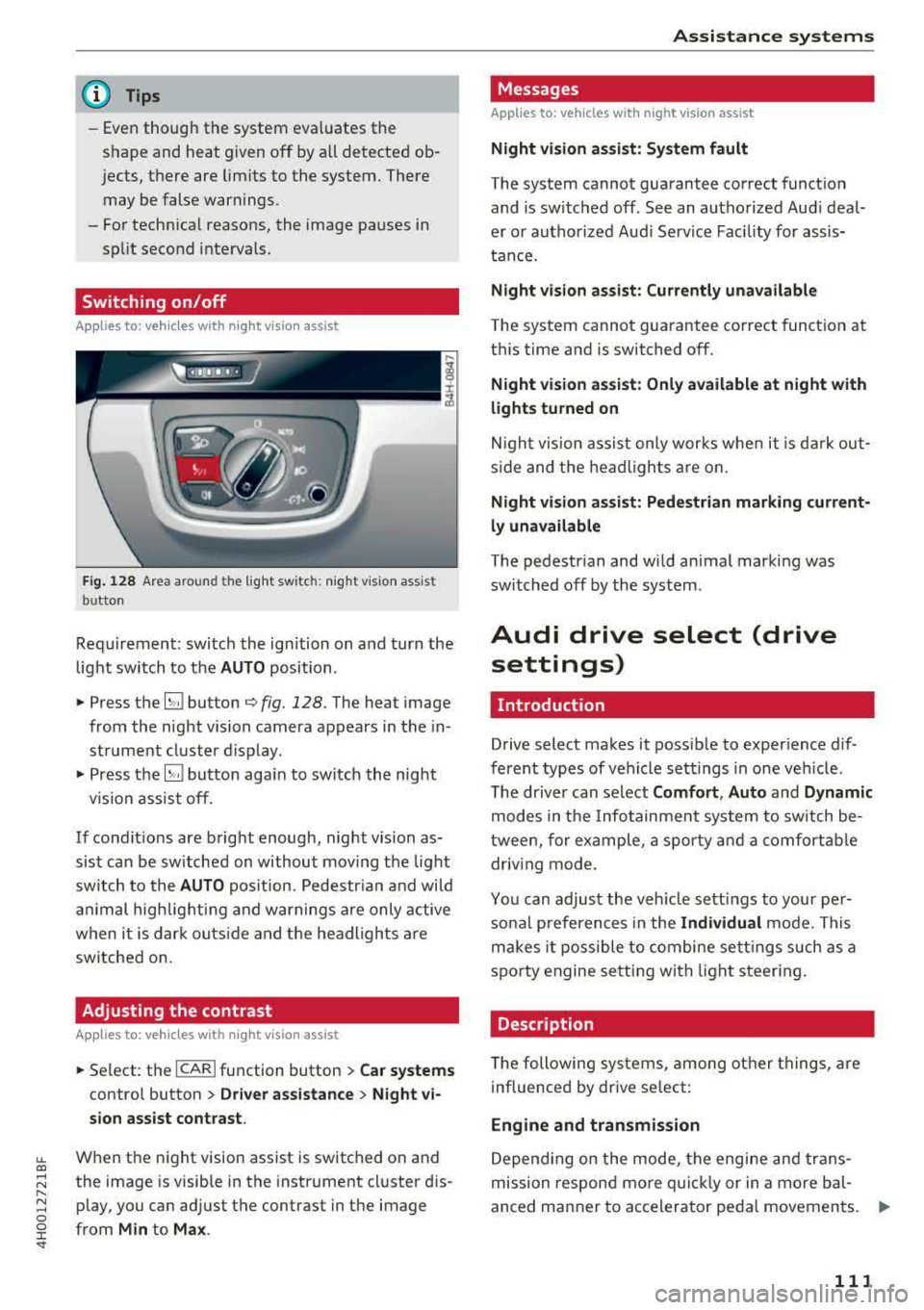
• Press the~ button q fig. 128. The hea t image
from the night vision camera appears in the in
str ument cluster d isplay .
• Press the~ button aga in to switch the night
v ision assist off.
If condit ions are bright enough, night vision as
sist can be sw itched on without moving the light
sw itch to the
AUTO pos it ion. Pedestr ian and wild
a ni mal highlig hting and warnings are only active
when i t is dar k ou tside and t he headlights are
switched on.
Adjusting the contrast
Applies to: vehicles with night vision assist
• Se lect: the I CAR I function button > Car systems
contro l button > Driver a ssistance > Night vi
sion assist contrast .
When the night vision assist is switched on and
the image is visible in the instrument cl uster d is
p lay, you can adjust the contrast in the image
from
Min to Ma x.
Assi st a nce systems
Messages
Applies to: vehicles with night vision assist
Night vi sion as sist : System fault
T he system cannot guarantee correct funct ion
and is switched off . See an authorized Aud i deal
er or autho rized Aud i Service Fac ility fo r assis
tance.
Night vision assist: Currently unavailable
The system cannot gua rantee co rrect function at
th is time and is switched off .
Night vision as sist: Only available at night with
lights turned on
N igh t vision assist only works whe n it is da rk out
s ide and the headlights a re on.
Night visi on a ssist: Pedestrian marking current
ly unavailable
T he pedestrian and wi ld animal marking was
swi tched off by the sys tem .
Audi drive select (drive
settings)
Introduction
Drive select makes it possib le to exper ience dif
ferent types of vehicle sett ings in one veh icle .
T he driver can select
Comfort , Auto and Dynamic
modes in the Infotainment system to sw itch be
tween, for example, a sporty a nd a comfortab le
driv ing mode .
Yo u can adjust the veh icle sett ings to your per
so nal preferences in the
Individual mode. This
makes i t possible to combine se ttings such as a
spo rty engine se tt in g with light s teer ing.
Description
T he following systems, among other things, are
influenced by drive se lect:
Engine and transmission
D epend ing on the mode, the engi ne and trans
mission respon d mo re qu ickl y or in a more bal
anced manner to accelerator peda l movements.
ll>
111
Page 119 of 356
lL t:0 ....
'"" " '"" .... 0 0 :c '
Introduction
Applies to: vehicles with rearv iew camera
t --...
...
~
Fig. 131 Illustration: cross parking
Fig. 132 Illustrat ion: parallel parking
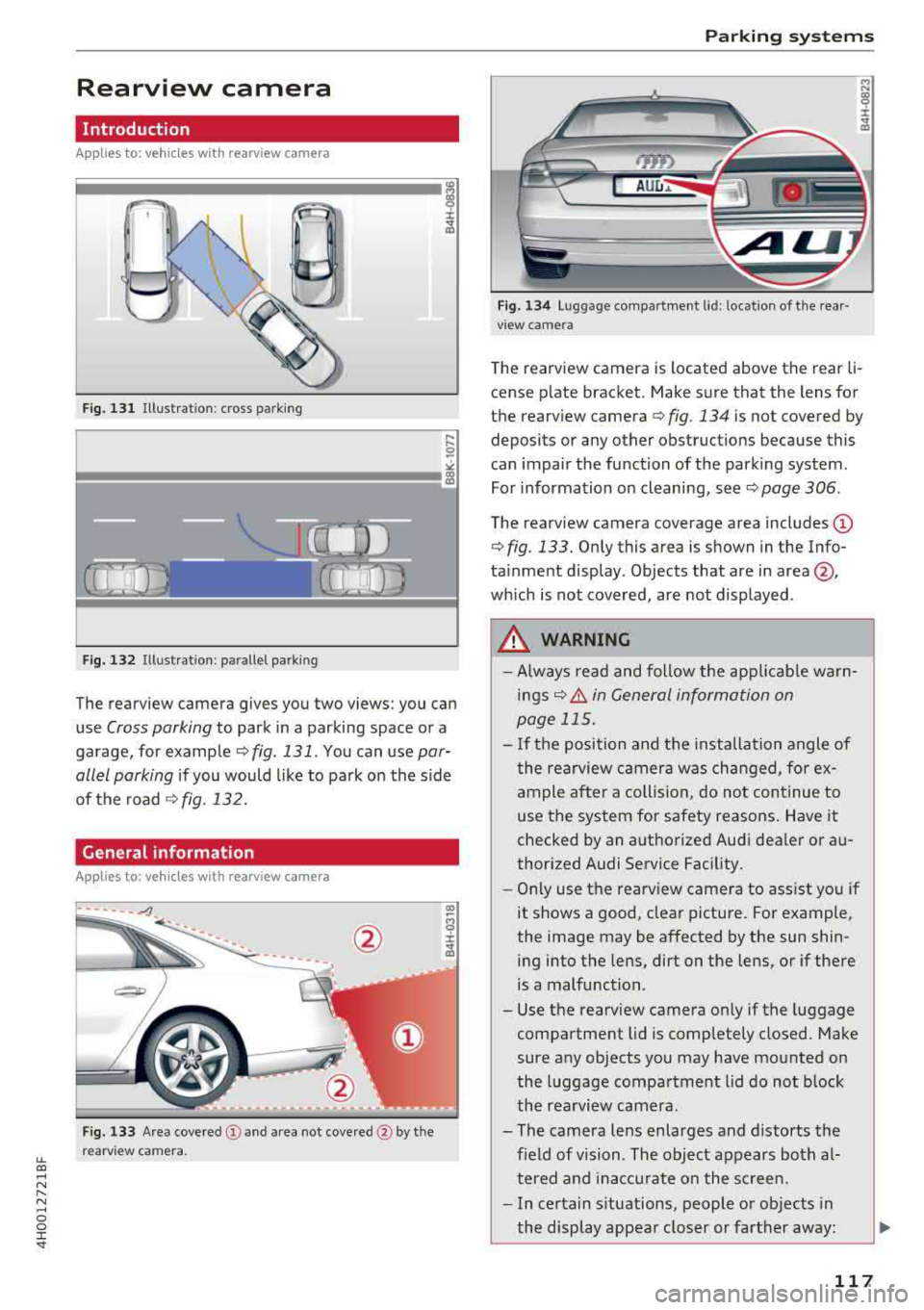
The rearview camera gives you two views: you can
use
Cross parking to park in a parking space or a
garage, for example
qfig . 131. You can use par
allel parking
if you would like to park on the side
of the road
¢fig. 132.
General information
Appl ies to : vehicles wit h rearv iew camera
Fig. 133 Area covered @ and area not covered @by the
rearv iew camera.
Parking systems
'YID
AUu ..
Fig. 134 Luggage compartment lid: location of the rear·
view camera
"' N
~
:i: .. Q)
Th e rearview camera is located above the rear li·
cense plate bracket. Make sure that the lens for
the rearview camera¢
fig. 134 is not covered by
deposits or any other obstructions because this
can impai r the function of the parking system.
For information on cleaning, see
q page 306.
The rearview camera coverage area includes @
¢ fig. 133. Only this area is shown in the Info
tainment display. Objects that are in
area @,
which is not covered, are not displayed.
A WARNING
--Always read and follow the applicable warn-
ings
q .& in General information on
page 115.
- If the position and the installation angle of
the rearview camera was changed, for ex ample after a collision, do not continue to
use the system for safety reasons . Have it
checked by an authorized Audi dealer or au
thorized Audi Service Facility.
- Only use the rearview camera to assist you if
it shows a good, clear picture. For example,
the image may be affected by the sun shin·
ing into the lens, dirt on the lens, or if there
is a malfunction.
- Use the rearview camera only if the luggage
compartment lid is completely closed. Make
sure any objects you may have mounted on
the luggage compartment lid do not block
the rearview camera.
- The camera lens enlarges and distorts the field of vision. The object appears both al·
tered and inaccurate on the screen .
- In certain situations, people or objects in
the display appear closer or farther away:
117
Page 122 of 356
Parking systems
Peripheral cameras
Introduction
Applies to: ve hicles with per ipheral cameras
W ith this equipment, the parking system plus*
¢ page 116 is supplemented w ith vario us periph
eral cameras.
The four cameras g ive you the following views:
area around the vehicle, front corner view and rear corner v iew, view in front of the veh icle and
behind the vehicle.
General information
Applies to: ve hicles w ith pe ripheral cameras
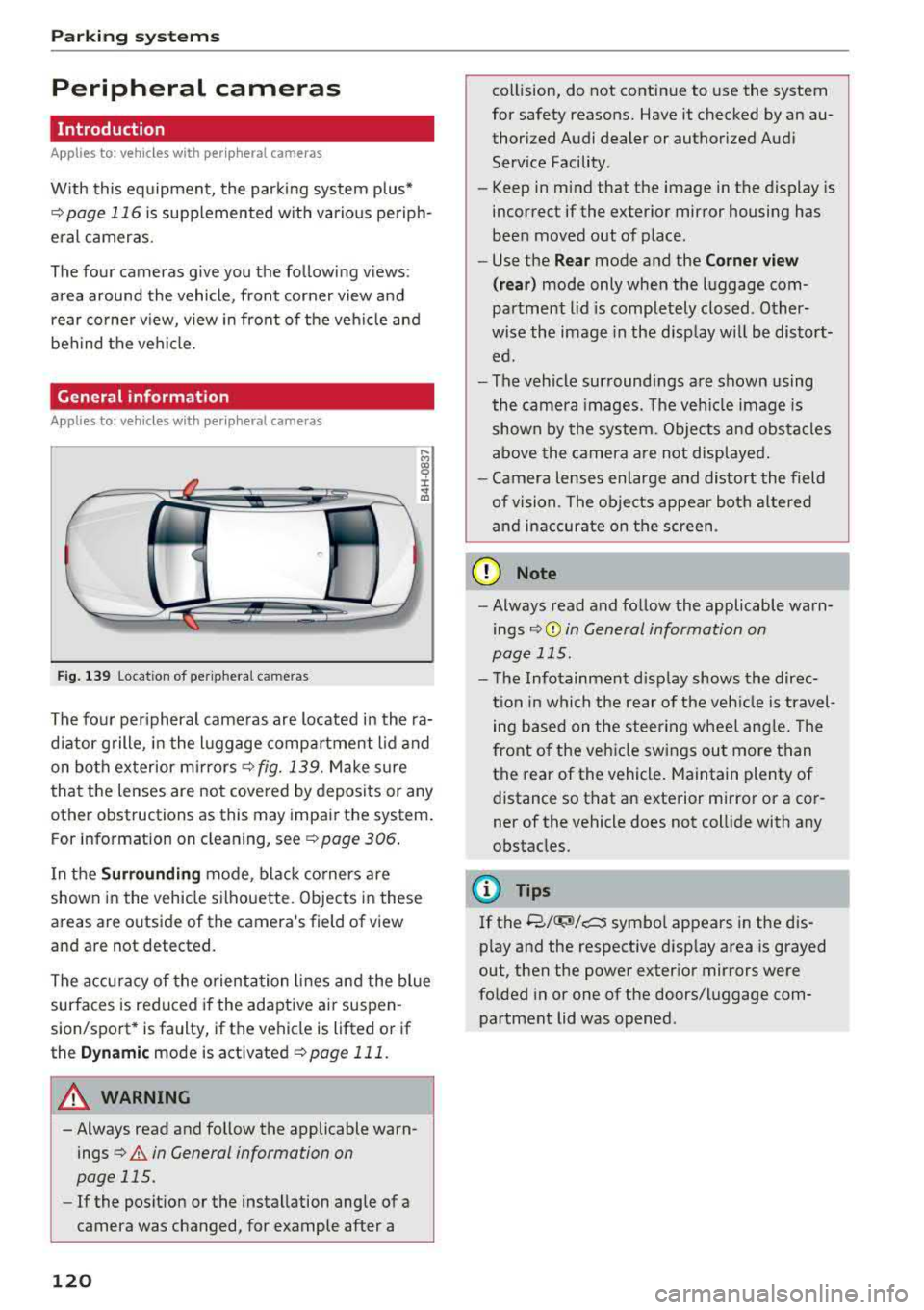
F ig. 139 Location of peripheral cameras
....
"' gg
± ., a,
The four peripheral cameras are located in the ra
d iator grille, in the luggage compartment lid and
on both exterior mirrors¢
fig. 139. Make sure
that the lenses are not covered by deposits or any
other obstructions as this may impair the system.
For information on cleaning, see ¢
page 306.
In the Surrounding mode, black corners are
shown in the vehicle silhouette. Objects in these
areas are outside of the camera's field of view
and are not detected.
The accuracy of the orientation lines and the blue
surfaces is reduced if the adaptive ai r suspen
sion/sport* is faulty, if the vehicle is lifted or if
the
Dynamic mode is activated ¢ page 111.
A WARNING
-Always read and follow the applicable warn
ings
¢&. in General information on
page 115.
-If the position or the installation angle of a
camera was changed, for example after a
120
collision, do not continue to use the system
for safety reasons. Have it checked by an au thorized Audi dealer or authorized Audi
Service Facility .
- Keep in mind that the image in the display is
incorrect if the exterior mirror housing has
been moved out of place.
- Use the
Rear mode and the Corner view
( rear)
mode only when the luggage com
partment lid is completely closed . Other
wise the image in the disp lay w ill be distort
ed.
- The vehicle surroundings are shown using
the camera images. The vehicle image is
shown by the system. Objects and obstacles
above the camera are not displayed .
- Camera lenses enlarge and distort the field
of vision. The objects appear both altered
and inaccurate on the screen.
(D Note
-Always read and follow the applicable warn
ings
¢ (Din General information on
page 115.
-The Infotainment disp lay shows the direc
tion in which the rear of the veh icle is travel
ing based on the steer ing wheel angle. The
front of the veh icle swings out more than
the rear of the vehicle. Maintain plenty of
distance so that an exterior mirror or a cor
ner of the vehicle does not collide with any
obstacles.
@ Tips
If
the 8/IT;M/c:5 symbol appears in the dis
play and the respective disp lay area is grayed
out, then the power exterior mirrors were
folded in or one of the doors/luggage com
partment lid was opened .
Page 132 of 356
Intellig ent T echn olo gy
- New brake pads do not achieve their full
braking effect during the first 250 mi
(400 km). They must be "broken in" first.
However, you can compensate for the
sl ightly reduced brak ing force by pressing
firmly on the brake pedal. Avoid heavy brak
i ng dur ing t he break- in per iod.
- Certa in weather and operat ing cond it ions
such as dr iv ing through water, driving in
heavy ra in or driving after washing your ve
hicle can impair the effectiveness of the
brakes . In the winter, ice may build up on
the brake pads, rotors and drums . Check
these components by braking carefu lly. Ap
plying the brakes carefully severa l times
dr ies the brakes and removes ice bu ild-up.
- The effic iency of the brakes can also be im
paired by driving for long stretches on roads
covered w ith salt w ithout using the brakes.
You can remove salt deposits from the brake rotors and pads by carefully applying
the b rakes severa l t imes .
- If the front spo iler is damaged or you install
another spoiler, make sure the front wheel
bra kes are vent ilated properly. Otherwise,
the brake system could ove rheat, w hich re
duces the ir effectiveness.
- Failure of a b rake circuit impa irs b raking
perfo rmance, which inc reases brak ing dis
tance . Avoid driving the vehicle and have it
towed it to the nearest authorized Audi
dealer or authorized Audi Service Facility .
- If the brake booster is not working, you will
have to press m uch harder on the brake
peda l to compensate for the lack of the
booster.
@ Note
- Never let the brakes " rub" by pressing the
pedal light ly when braking is not actually
necessary. This causes the brakes to over
heat and increases braking distance and
causes wear.
- Before driving downhill a long distance on a
steep hill, decrease your speed and select a l ower gear. This makes use of the engine
braking effect and relieves the brakes. If
130
you need to brake add itiona lly, brake in in
terva ls and not continuous ly .
(D Tips
- If the bra ke boos ter is not wor king, you
must press the brake peda l with much more
force than normal.
- If you retrof it your vehicle with a front spoi l
er, wheel covers or simi lar items, make sure
that the air flow to the front wheels is not interrupted. Otherwise the brake system
can become too hot.
Electromechanical
steering, dynamic
steering
The electromechonicol steering supports the
driver's steering movements.
Power steering adapts electronically based on
the vehicle speed .
Indicator lights and messages
• Do not drive vehi cle: S tee rin g defect ive
If this indicator light turns on and stays on and
th is message appears, the power steering may
have failed .
Stop the vehicle in a safe location as soon as pos
s ible. Do
not conti nue driving. See an authorized
Audi dealer or authorized Audi Service Fac il ity for
ass istance.
l;rfl St ee ring: System faul t You ca n cont inue
dr ivi ng
If the indicator light turns on and the message
appears, the steering wheel may be more diffi
cu lt to move or more sensitive than usual. The
steering wheel may also be at an angle when driv ing stra ight .
Drive slowly to an authorized Audi dea ler or au
thori zed Audi Serv ice Facility to have the mal
funct io n corrected.
'-r-ij Dynamic stee ring: Init ializing
If the indicato r light is blinking and this message
appears, dynamic steering* is being initialized.
IJ>-