infotainment AUDI A8 2018 Owner's Guide
[x] Cancel search | Manufacturer: AUDI, Model Year: 2018, Model line: A8, Model: AUDI A8 2018Pages: 356, PDF Size: 54.71 MB
Page 126 of 356
Parking systems
,.. Turn the Infotainment system on and shift into
reverse gear. The parking system is turned on
and the
Cross parking view is displayed.
,.. Press the control button on the Infotainment
unit @ Q page 119, fig . 13 7. The Parallel park
ing
view is displayed .
,.. Back up and align your vehicle so the blue area
@ borders on the rear end of the vehicle be
hind yo u or on the parking space line
Q .&. in
General information on page 120,
Q (Q) in Gen
eral information on page 120 .
The blue area
rep resents an extension of the vehicle's out line
by approximately 16 ft (5 meters) to the rear.
The long s ide of the blue area should be on the
curb . The entire blue area must f it into the
parking space.
,.. With the vehicle stopped, turn the steering
wheel to the right as far as it w ill go .
,.. Back into the parking space until the b lue curve
Q fig. 150 touches the curb-=?.&. in General in
formation on page 120, ¢@ in General infor
mation on page 120.
Stop the vehicle .
,.. With the vehicle stopped, turn the steering
whee l to the left as far as it will go.
,.. Continue to back into the parking space until
the vehicle is parked parallel to the
curb¢ &.
in General information on page 120, ¢@ in
General information on page 120 .
® repre
sents the rear bumper. At the very latest, stop
the vehicle when the red orientation
line ©
borde rs an object . Keep an eye on the front of
your vehicle while doing this.
Parking next to obstacles
If there is an obstacle (such as a wall) next to the
parking space, position the vehicle so there is
mo re space on that side. Position the long side of
the blue area so that there is sufficient space
from the object. The area must not be on the
ob
stacle. You will a lso need to start turning the
steering whee l earlier. The blue curve
¢ page 119, fig . 138 must not touch the obsta
cle , but rather there should be enough distance.
@ Tips
The left or right orientation lines and surfaces
will be displayed, depending on the turn
sig
nal being used.
124
Trailer mode
Applies to: vehicles with peripheral cameras and trailer hitch
This view assists you in positioning the vehicle in
front of a trailer .
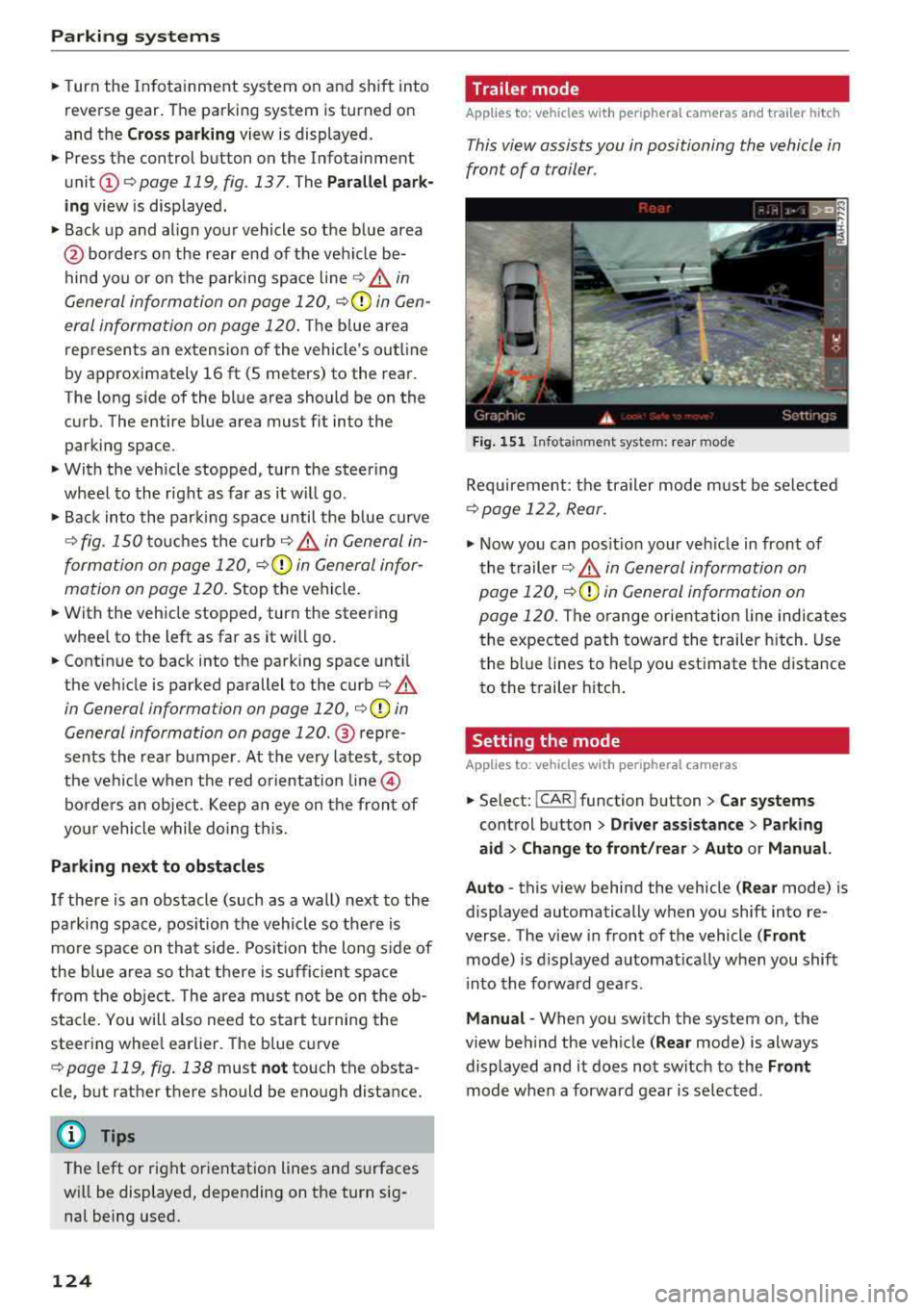
Fig. 151 In fota inment system: rear mode
Requirement: the trailer mode must be selected
¢ page 122, Rear.
.,. Now you can posit ion your veh icle in front of
the trailer
c::;, .&. in General information on
page 120,
c::;, (Q) in General information on
page 120.
The orange or ientation line indicates
the expected path toward the trailer hitch. Use
the blue lines to help you estimate the d istance
to the trailer hitch.
Setting the mode
Applies to : vehicles with peripheral cameras
,.. Select: !CAR ! function button> Car systems
control button > Driver assistance > Parking
aid > Change to front/rear > Auto or Manual.
Auto
-this view behind the vehicle ( Rear mode) is
displayed automatically when you shift into re
verse. The view in front of the vehicle
(Front
mode) is d isplayed automat ically when you shift
i nto the forward gears .
Manual -When you switch the system on, the
view beh ind the veh icle
( Rear mode) is always
displayed and it does not switch to the
Front
mode when a forward gear is se lected.
Page 127 of 356
u. co .... N
" N .... 0 0 :c '
A ppl ies to : ve hicles w ith parkin g system plus/rearv iew cam
era/peripheral ca mera
The display and warning tones can be adjusted in
the Infotainment.
~ Se lect : the ICARI fu nction button > Car systems
contro l button > Driver assistance > Parking
aid .
Display
On * -
an op tical d isp lay is shown for the par kin g
system plus, a rearv iew camera image is s hown
for the rearview camera *.
Off -when the p arking sys tem is sw itche d off,
on ly audib le sign als are give n.
Signal tones
Front volume -
volume for the front area
Rear volume -volume for the rear area
Front frequency -frequency for the front area
Rear frequency -frequen cy fo r the rea r area
Music volume during nav . prompts -the volume
of the a udio/video so urce is lowe red when t he
pa rking system is turned o n
The new ly selected leve l is demonstrated briefly
by the sound generator .
(D Tips
-The wa rning tones ca n also be ad justed d i
r ectly by the vis ual d isp lay or the pictu re
from the camera. Simply p ress the
Settings
control bu tton.
- Changed sett ings are ac tivated whe n the
p arking system is switched o n aga in.
- The settings for volume and frequency are
a utomat ica lly saved and ass igned to the re
mo te con trol key be ing used.
Error messages
A pp lies to: ve hicles with parking system plus/rearview cam
era/per ipheral ca mera
There is an erro r in the system if the LED in the
Pw , button is b link ing and yo u hear a continuous
Parking systems
alarm for a few seconds after sw itch ing on the
par king system or w hen the pa rking system is a l
r eady activated. If the erro r is not cor rected be
fo re you switch off the ignition, the
LED in the Pw ,
button w ill blink the next time you switch on the
park ing system by shifting into reverse.
Parking system plus*
If a senso r is fa ulty, the~ symbo l will appear i n
front of/beh ind the vehicle in the Infotainment
display. If a rear sensor is faulty, on ly obstacles
t h at are i n areas @and @ are shown
Q page 116, fig . 129 . If a front se nsor is faulty,
o n ly obs tacles tha t are in a reas © and @are
shown. The re is a lso a sys tem ma lf u nct ion if all
seg ments arou nd the veh icle are red or if no seg
me nts are disp laye d.
Peripheral cameras*
The re is a system malfu nction if t he 00 • symbol
appea rs and the co rresponding d isp lay area is
s h own in bl ue. The camera is not wo rking in t his
are a.
Drive to an authorized A udi dealer or authorized
Audi Se rvice Facility immed iate ly to have the
malfu nction corrected.
Trailer hitch
App lies to: vehicles wit h parking system pl us/rea rv iew cam
e ra/peri phe ra l cameras an d tra ile r hitc h
When the trailer socket is in use, the par king sys
tem rear sensors are not act ivated when you sh ift
into reverse gear or when yo u press t he
p, ,1 A but
ton. This res ults in the following rest rict ions.
Parking system plus*
The re is no distance warning for the rear. The
front senso rs remain activated. T he v isua l disp lay
switches to trailer mode.
Rearview camera*/peripheral cameras*
T he re is no distance warning for the rea r. The
front senso rs remain activated . The visua l disp lay
switches to trailer mode. The rearview came ra
i mage will not s how the orie ntation lines and t he
bl ue surfaces.
IJJ,-
125
Page 137 of 356
lL t:0 ....
"" ......
"" .... 0 0 :c '
Traffic safety information
Audi recommend s performing certain Infotain
ment system fun ctions, such as entering a desti
nation, only when the vehicle is stationary . Al
ways be prepared to stop operating the Infotain
ment system in the interest of your safety and
the safety of other road users.
_& WARNING
Only use the Infotainment system when traf
fic conditions permit and always in a way that
allows you to maintain complete control over
your vehicle.
Introduction
T he Multi Media Interface , or MMI for short ,
combines various systems for communication,
naviga tion and entertainmen t in your Audi. You
can operate the MMI using the MMI control pan
el, the multifunction steering wheel or the voice
recognition system* .
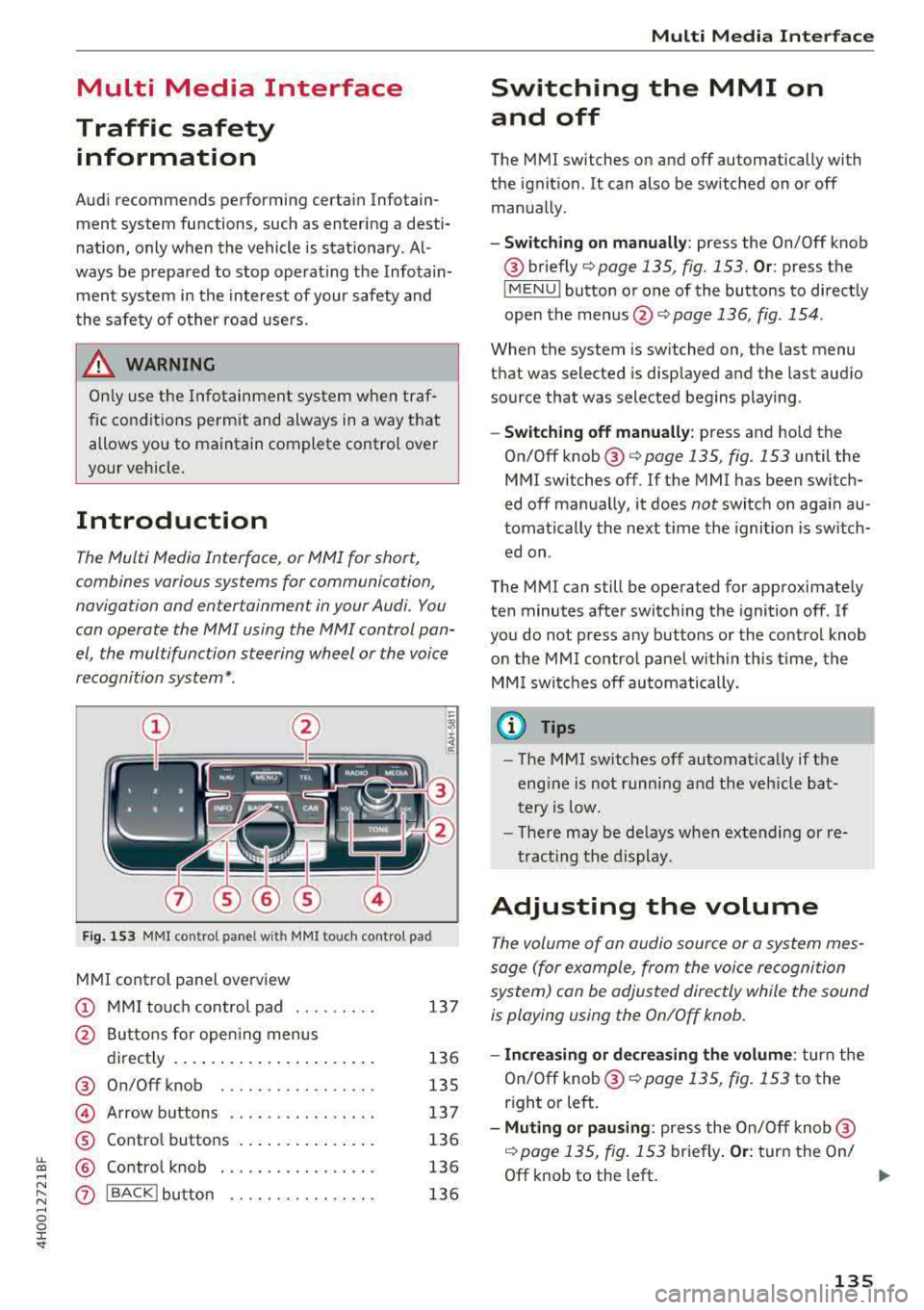
Fig. 153 MMI control pa nel wi th MMI touc h control pad
MMI control panel overview
(D MMI touch control pad . . . . . . . . . 137
@ Buttons for open ing menus
directly . . . . . . . . . . . . . . . . . . . . . . 136
® On/Off knob . . . . . . . . . . . . . . . . . 135
@ Arrow buttons . . . . . . . . . . . . . . . . 137
® Control buttons . . . . . . . . . . . . . . . 136
@ Control knob . . . . . . . . . . . . . . . . . 136
0 IBACKlbutton . . . . . . . . . . . . . . . . 136
Multi Media Inte rface
Switching the MMI on
and off
The MMI switches on and off automatically with
the ignition. It can also be switched on or off
manually .
-Switching on manually: press the On/Off knob
® briefly c::;, page 135, fig. 153 . Or: press the
IM ENU I button or one of the buttons to directly
open the
menus @,:::;, page 136, fig . 154 .
When the system is switched on, the last menu
that was selected is displayed and the last audio
source that was selected begins playing .
-Switching off manually: press and hold the
On/Off
knob ® c::;, page 135, fig. 153 until the
MMI switches off.
If the MMI has been switch
ed off manually, it does
not switch on again au
tomatically the next time the ignition is switch
ed on.
The MMI can still be operated for approximately
ten minutes after switching the ignition
off. If
you do not press any buttons or the control knob
on the MMI control panel with in this time, the
MM I switches
off automatically.
a) Tips
-The MMI switches off automatically if the
engine is not running and the veh icle bat
tery is low.
-There may be delays when extending or re
tracting the display.
Adjusting the volume
The volume of an audio source or a system mes
sage (for example, from the voice recognition
system) con be adjusted directly while the sound
is playing using the On/Off knob.
-Increasing or decreasing the volume: turn the
On/Off
knob ® c::;, page 135, fig. 153 to the
right or left.
- Muting or pausing : press the On/Off knob@
,:::;,page 135, fig. 153 briefly . Or: turn the On/
Off knob to the left . ..,.
135
Page 138 of 356
Multi Media Interface
-Unmuting or resuming: press the On/Off knob
@ r=>page 135, fig . 153 briefly. Or: turn the
On/Off knob to the right.
@ Tips
Volumes that are too high or too low are au
tomatically adjusted to a set leve l when the
MMI is switched on .
Infotainment display
The Infotainment display extends automatically
when the MMI is switched on. It retracts auto
mat ically when the system is switched off.
Extending/retracting the Infotainment system
display manually:
press the ~ button @
r=:> page 7, fig. 1 .
Adjusting the Infotainment display brightness :
see r=:>page 207.
(D Tips
-If the vehicle has a cell phone p rep*, the In
fotainment system display will automatical
l y extend whenever there is an incoming
phone call.
- Use the
arrow buttons to switch stations,
for example, when listening to the radio, af
ter the disp lay has retracted in .
136
MMI operation
(---·
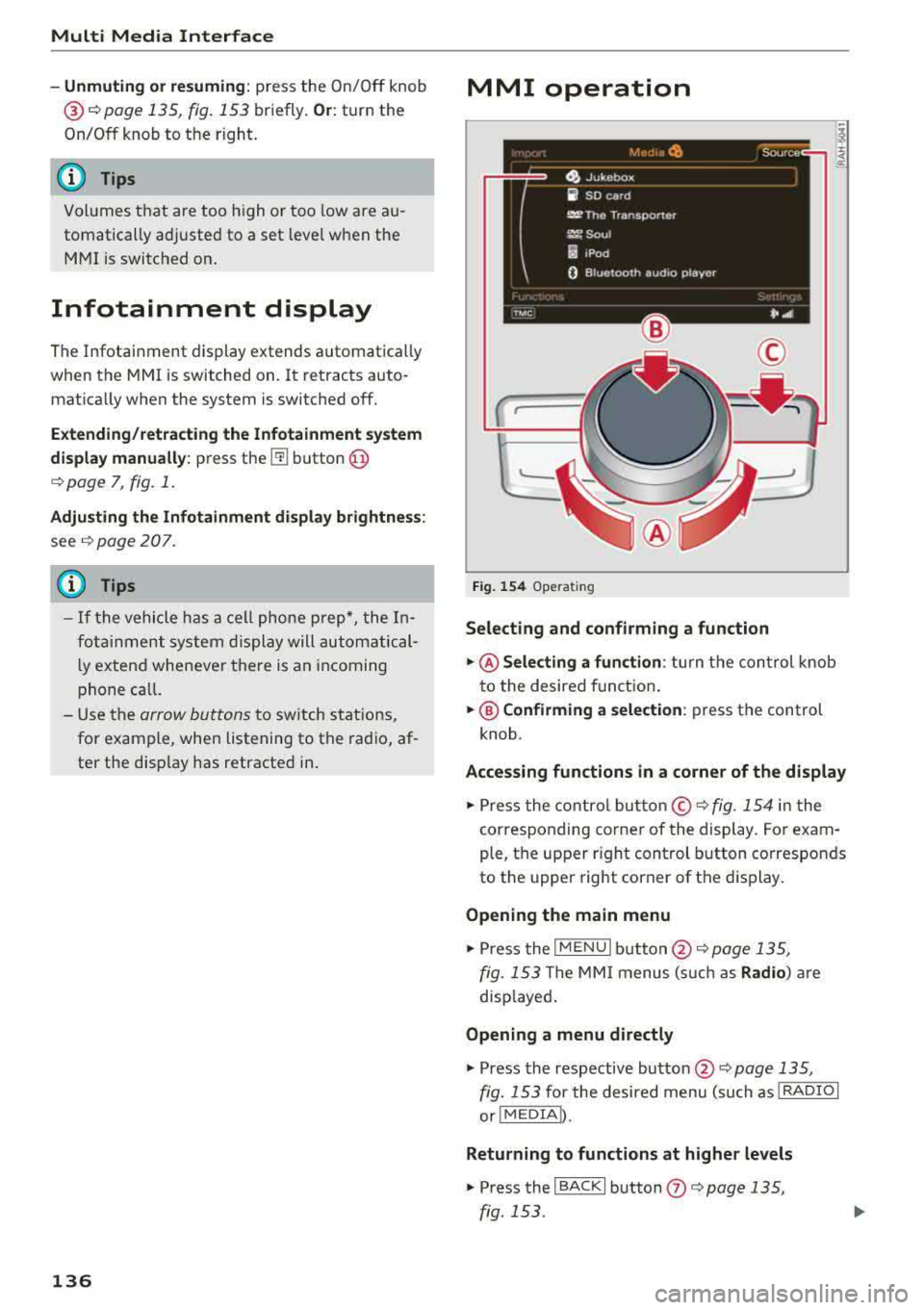
Fig. 154 Operating
Selecting and confirming a function
.,. @ Selecting a function : turn the control knob
to the desired f unction .
.,. @ Confirming a selection: press the control
knob .
Accessing functions in a corner of the display
.,. Press the control button© r=;, fig. 154 in the
corresponding corner of the display . For exam
ple, the upper r ight control button corresponds
to the upper right corner of the display.
Opening the main menu
.,. Press the I MENU I button @ r=;, page 135,
fig. 153 The MMI menus (such as Radio) are
disp layed .
Opening a menu directly
.,. Press the respective button @ r=;, page 135,
fig. 153 for the desired menu (such as I RADIO I
or!MEDIA D.
Returning to functions at higher levels
.,. Press the I BACKI button (J) r=;, page 135,
fig. 153 .
Page 140 of 356
Multi Media Interface
-Storing the radio station currently set: hold
your finger on a number (1 to 6) on the MMI
touch contro l pane l until you hear a signal
tone. The radio station will be stored on these
lected number in the list .
-Selecting a stored radio station: tap a number
(1 to 6) on the MMI touch control pad briefly.
The preset buttons (1-6) appear in the Infotain ment
display @¢ fig. 156 .
-Moving a stored radio station: move your fin
ger on the MMI touch control pad to the left/
right until the preset buttons (1-6) appear in
the Infotainment
d isplay @.
Browsing/selecting album covers
Requirement: the Media menu must be open and
a source must be
selected ¢ page 190.
-Browsing through album cove rs: move your
finger across the MMI touch contro l pad from
Letter/number speller
Fig. 157 Spe ller
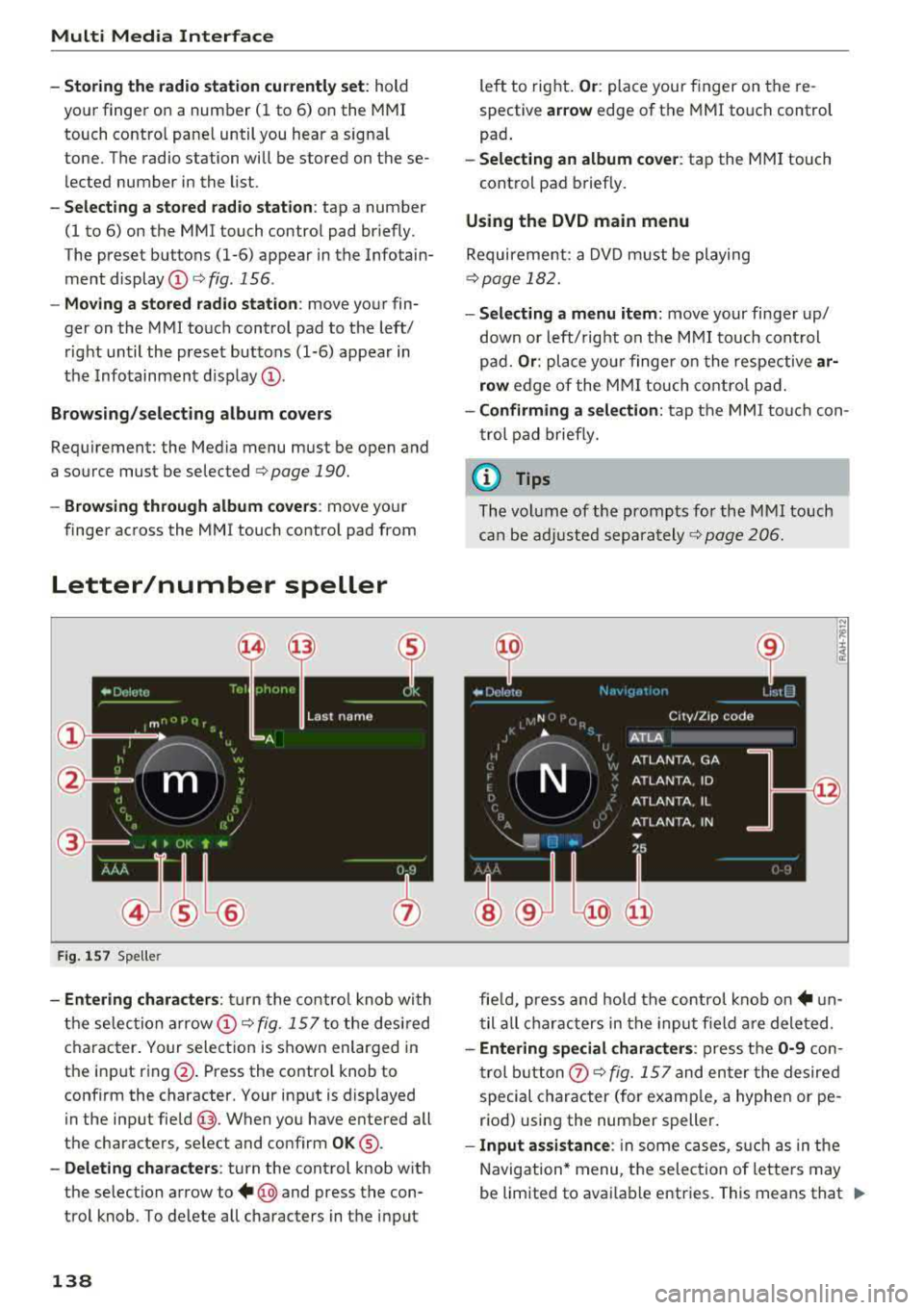
-Entering characters : turn the control knob with
the selec tion
arrow @¢ fig. 157 to the desired
character. Your selection is shown enlarged in
the input ring @. Press the contro l knob to
confirm the character. Your input is displayed
in the input
field @. When you have entered all
the characters, select and confirm
OK ®·
-Deleting characters: turn the control knob with
the selection arrow to
+ @ and press the con
trol knob . To delete all characters in the input
138
left to right. Or: place your finger on the re
spective
ar row edge of the MMI touch control
pad .
-Selecting an album cover: tap the MMI touch
cont rol pad briefly.
Using the DVD main menu
Requirement: a DVD must be playing
¢page 182.
- Selecting a menu item: move your finger up/
down or left/ right on the MMI touch control
pad.
Or : place your finge r on the respective ar
row
edge of the MMI touch control pad.
-Confirming a selection: tap the MMI touch con
trol pad briefly.
(D Tips
The volume of the prompts for the M MI touch
can be adjusted
separately ¢ page 206.
fie ld, press and hold the control knob
on+ un
til all characters in the input f ield are deleted.
-Entering special characters : press the 0-9 con
trol button
0 ¢ fig. 157 and enter the desired
special character (for examp le, a hyphen or pe
riod) using the number speller.
- Input assistance : in some cases, such as in the
Navigation* menu, the selection of letters may
be limited to avai lable entries. This means that
.,..
Page 144 of 356
Voice recognition s ystem
Voice recognition system
Operating
A pplies to: ve hicles w ith vo ice recognition system
You con operate many Infotainment functions
conveniently by speaking.
R equirement: the ignition and the MM I must be
switched
on <=> page 135, there must be no phone
call in progress and the parking system m ust not
be active .
~ Switching on : briefly press th e ~ button @
<=> page 11, fig. 7 on the multifunction steering
whee l* and say the desired command after the
Beep .
~ Sw itching off : press and hold the~ button.
Or: press any button on the MMI control panel.
~ Canceling : press the~ button a nd say a new
command.
Or: say the command Cancel.
Input assis tance
The system gu ides you through the input with
visual and audio feedback .
-Vi sual inpu t as sistan ce : after t urning on voice
recognition, a d isp lay with a select ion of possi
ble commands appears in the Infotainment dis
play . The command d isplay can be turned on or
off in the ma in menu using the
MMI setup con
trol button .
-Audio input a ssistance : to have the poss ible
comma nds read, turn the voice recogn ition sys
tem on and say
Help.
For the s ystem to understand you:
Speak clearly and dist inct ly at a normal volume.
Speak louder when driving faster.
Emphasize the words in the commands even ly
and do not leave long pauses.
Do not speak a command when t he voice recogni
tion system is making an anno uncement.
C lose t he doors, the windows a nd the sunroof* to
reduce bac kg round noise . Make s ure t hat passen
gers a re not speaking when yo u are giving a voice
command.
142
Do not d irect the air vents toward the hands -free
microp hone, which is on the roof headliner nea r
t h e front interior lights .
Only use the system from the dr ive r's seat be
ca use the hands -free microphone is directed to
ward that seat .
Additional settings
Additional settings, s uch as individual speech
training
based on yo ur voice, Display sp eech
command s
or the prompt volume , can be adjust
ed in the main menu using the
MMI setup con
tro l button
<=> page 206.
A WARNING
- Direct your full attention to dr iv ing. As the
driver, you have complete responsibility for
safety in traff ic. On ly use the functions in
such a way that you a lways maintain com
p lete co ntro l over your veh icle in all traff ic
situat ions.
- Do not use the voice recognition system in
emergencies beca use your voice may change
in st ressfu l situ at ions.
It may t ake longe r to
d ial t he number or th e sys tem m ay no t be
a bl e to d ial it a t all. Dia l th e emer gen cy
number manually.
© Tips
- Th e dia log pauses w hen the re is a n in com
ing pho ne call and will con tinue if you ig
nore the call. T he dialog en ds if yo u answer
t h e ca ll.
- Yo u ca n sele ct an i tem in the list using ei
ther the vo ice recognit ion sys tem o r the
cont ro l knob .
Command overview
information
App lies to: vehicles wit h voice recog nitio n syste m
The following overv iews describe the commands
that can be used to operate the MMI using the
vo ice recog nition system .
A lternative commands are separated by a
" I" , for
example, say:
Telephone I (or) Na vigation I (or)
R adio .
Page 150 of 356
Telephone
Connecting a cell phone
• Select the ITEL I button > Search for new cell
phone
r=> fig. 160 . The availab le Bluetooth devi
ces are shown in the Infotainment system dis
play.
Or : search for the MMI using the Blue
tooth device search on your cell phone.
• Select and confirm the desired cell phone from
the list of displayed Bluetooth devices .
• Select and confirm Handsfree. The MMI gener
ates a PIN for the connection setup
r=> fig . 160 .
• Select and confirm Yes.
• Enter the PIN for connecting on you r cell
phone .
Or: if the PIN is already disp layed on
your ce ll phone, confirm it in the cell phone and
in the MMI. The time a llowed for entering the
PIN is limited to approximately 30 seconds .
Pay attention to any additional system prompts
dis played on your cell phone, for example if the
system should connect automatica lly in the fu
ture . Depending on the cell phone, you may have
to confirm download ing the d irectory separately .
After connecting successfully
After connecting successfully, the signal strength
symbo l®
r=> page 139, fig. 158 and the Blue
tooth symbo l@ appear in the status line of the
Infotainment disp lay. In addition, the cell phone
contacts are automatically loaded in the MMI di
rectory. This process can take several minutes,
depending on the number of contacts.
If a ll of the memory capacity is fi lled, you will be
asked to replace the contacts from one cell phone when connecting another cell phone. With
the opt ion
Restricted use of telephone , only con
tacts in the cell phone and the local
MMI memory
are available
r=> page 152.
(D Note
Always follow the information found in r=> (D in
Wi-Fi hotspot on page 161 .
(D Tips
-You only have to pair your device one t ime .
Bluetooth devices that are already pa ired
automat ica lly connect to the
MMI when
they are within range and the ignition is
switched on.
148
- Authorizing the MMI connection in your cell
phone will speed up the automatic connec
t ion .
- Several cell phones can be paired to the
MMI, but only one cell phone can be actively
connected.
- A Bluetooth device that is already paired
with the MMI will be disconnected if anoth
er device is paired.
- When leaving the vehicle, the Bluetooth
connect ion to the cell phone will automati
cally disconnect.
- You can obtain more information from your
cell phone service provider or from yo ur cell
phone user guide. For information on using
the te lephone, visit
www.audiusa .com/
bluetooth
or contact an authorized Audi
dea ler or author ized Audi Service Facility.
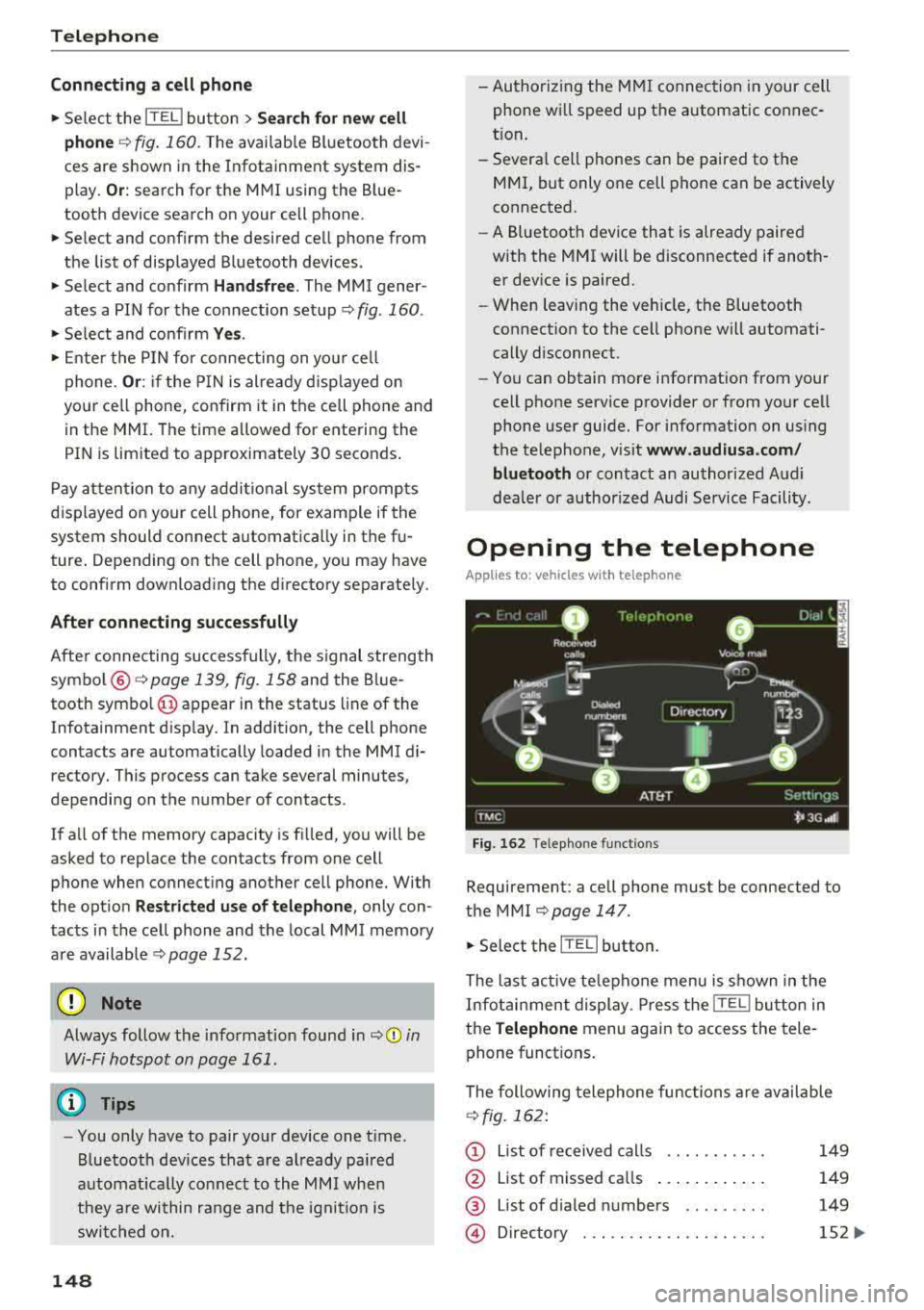
Opening the telephone
App lies to: vehicles wit h telepho ne
Fig. 162 Telephone functions
Requirement: a cell phone must be connected to
the MMI
r=>page 147 .
• Select the IT ELI button.
The last active telephone menu is shown in the
Infotainment display. Press the
[fEI) button in
the
Telephone menu again to access the tele
phone functions .
The following telephone func tions are available
r=>fig. 162:
(D List of received calls .... .. .... .
@ List of missed ca lls ...... .... . .
@ List of d ialed numbers ... ..... .
@ Directory ... ... . .. ...... .... .
149
149
149
152 ...
Page 152 of 356
Telephone
Storing a phone number
Storing a new phone number
Applies to: vehicles with telephone
You can store a new phone number as a contact
i n the directory
~page 154.
Storing from the call lists
Applies to: vehicles with telephone
You can store a phone number from the call lists
in the directory.
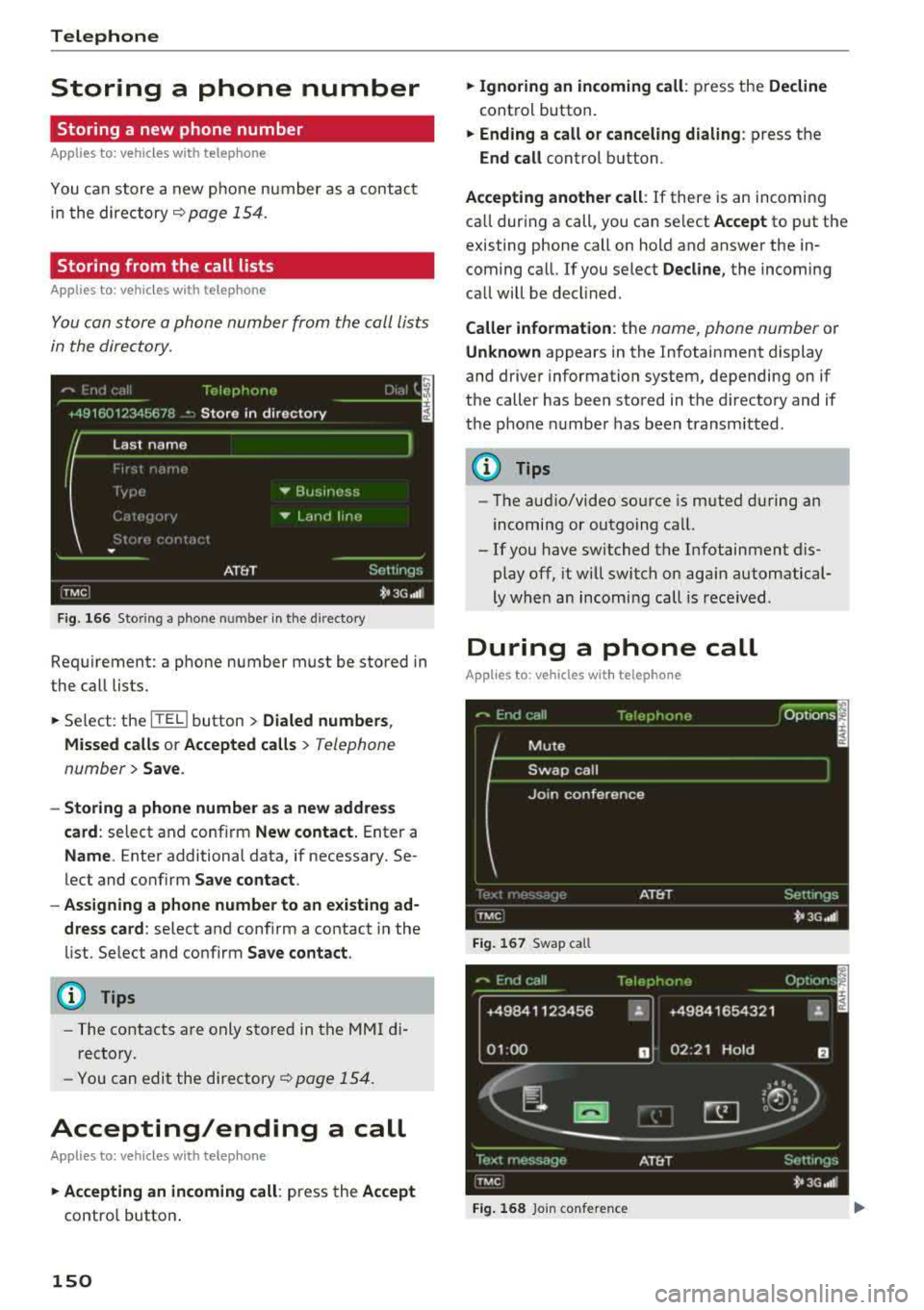
F ig . 16 6 Stor ing a phone number in the directory
Requirement: a phone number must be stored in
the call lists .
.,. Select: the ITITI button > Dialed number s,
M issed call s or Accepted calls
> Telephone
number
> Save .
-Storing a phone number as a new addres s
card :
select and conf irm New contact. Enter a
Name . Enter additional data, if necessary. Se
lect and confirm
Save contact .
- Assigning a phone number to an existing ad
dress card :
select and confirm a contact in the
list. Se lect and confirm
Sa ve contact .
(D Tips
-The contacts are only stored in the MMI di
rectory.
- You
can edit the directory~ page 154.
Accepting/ending a call
Applies to: vehicles with telephone
.,. Ac cepting an incoming call : press the Accept
control button .
150
.,. Ignoring an in coming call : press the Decline
control button.
.,. Ending a call or canceling dialing : press the
End call control button.
Accepting another call : If there is an incoming
ca ll dur ing a call, you can se lect
Accept to put the
existing phone call on hold and answer the in coming call. If you select
Decline , the incoming
call will be decl ined.
Caller information : the name, phone number or
Unknown appears in the Infotainment display
and driver information system, depending on if
the caller has been sto red in the d irecto ry and if
the pho ne n umber has been transmitted .
(D Tips
-The aud io/video source is m uted during an
incomi ng or outgoing call.
- If you have switched t he Infotainment dis
play off, it will switch on aga in automatical
ly when an incoming call is rece ived .
During a phone call
Applies to: vehicles with telephone
Fi g. 16 7 Swap call
+49841123 456 "
01 :00 D
Fig. 16 8 Join co nfere nce
Page 153 of 356
u. co .... N
" N .... 0 0 :c '
.,. Select t he Options contro l button.
-Making an additional call : select Additional
call > Directory
or a call list> an entry in th e
list.
-Accepting an incoming call when there is an
active call and a call on hold :
select Accept.
T he act ive ca ll is replaced with the incoming
call.
Addit ional functions incl ude:
Mute : if you se lect and confirm this function, the
other person on the phone cannot hea r you. You
can hear the other person .
Hold call/Resume on-hold call : you can put an
active phone call on ho ld and resume it.
On hold
a n d the durat io n of the phone ca ll is shown in the
Infotainment d isp lay .
Swap call : you can alte rnate betwee n two phone
calls at the same time . One of the calls w ill be on
h o ld.
End call ends the active phone call. A phone
call that is on hold stays on ho ld and can be re
sumed using t he
Options control button and Re
sume on-hold call .
Join conference :
a party on hold and up to five ac
tive parties (depending on t he network) ca n be
added to a confe re nce cal l. To make an add itiona l
call , put all pa rticipan ts in the c urren t confe rence
call on hold using
Hold conference . Press the Op ·
tions
con trol butt on. Se lec t a nd confi rm Addi·
tional call
and sele ct a phone numbe r from the
Call list or the Directory , or selec t Enter number.
To add this party to the confe re nce call, select
Join conference . With Resume , all pa rtic ipants
a re ta ke n off hold .
Show conference members
shows all participants .
(D Tips
-To be notified of an incoming call during a
phone ca ll, the Call waiting function in y our
cell phone must be switched on when us ing
the handsfree p rofile
( Handsfree ).
- The display of an incoming phone call in the
Infotainment system d isp lay may still be
v is ibl e fo r a few seconds de pending on the
cell phone in use. I f you use the
Replace or
Telephone
Decline fu nctions in the MMI while the dis
play is still visib le, the active phone call may
end .
Emergency call functions
Applies to: vehicles with telephone
Requirement: a cell phone must be connected to
t h e M MI
¢ page 147.
.,. Sele ct: !T EL! bu tton > Enter number > En ter
emergency call number (for example, 911)
>
OK.
.,. Setting an automatic emergency call* : select
the
!TEL! button> Settings cont rol button >
Telephone settings > Automatic emergency
call .
A WARNING
-
-Becaus e you r phone wor ks with radio sig
n al s, a con nection cannot be gua ranteed un
de r all circumst ances. Do not rely o n only
your ph one when i t co me s to e ssen tia l com
m unicat ion (such as a medi cal emergen cy) .
- Always f ollow t he in stru ctions given by the
emergen cy personnel dur ing an emergency
call and on ly end the ca ll when they instruct
you to do so .
{D Tips
Emer gen cy n umb ers are not the same every
where . Find out wh ich emer gen cy number is
used in your cur rent loca tion .
151
Page 160 of 356
Audi connect
Audi connect Introduction
A pp lies to: ve hicles w ith Audi co nnect
With Audi connect services, online information is
transmitted and integrated directly in the vehi
cle.
A mobi le end dev ice can be used to access the In
ternet through a Wi-Fi hotspot, either when the
vehicle is stationary or from the rear seat when
the vehicle is in motion.
A separate Aud i connect SIM card provided by
Audi connect is used to access Audi connect se rv
ices .
A WARNING
- To reduce the risk of an accident, on ly use
Audi connect serv ices when road and traff ic
condit ions permit. Read and follow the
guidelines prov ided
in c:> page 135 .
-Use the Audi connect serv ices w ith a Wi-Fi
hotspot o nly in the rear seat when the veh i
cle is in mot ion or only when the vehicle is
stationary to reduce the risk of an accident .
@ Note
Audi connect is designed for use only with the
prov ided Audi SIM card. Audi AG is not liable
for the consequences of using other SIM
cards.
(D Tips
Read and follow the notes about Audi con
nect before starting it
c:>page 163 .
Setup
Requirements for Audi connect
An Internet connection is required to use Audi
connect. The following requirements must be
met to establish a connection:
- You must be in an area that is covered by your
provider.
- Your Audi S IM card must be inserted in the
MM I SIM card reader
c:>page 158.
158
-
-A data connection must be configured for Audi
connect services
c:> page 162.
Using the SIM card reader
App lies to: vehicles wit h Audi connect
Audi multimedia
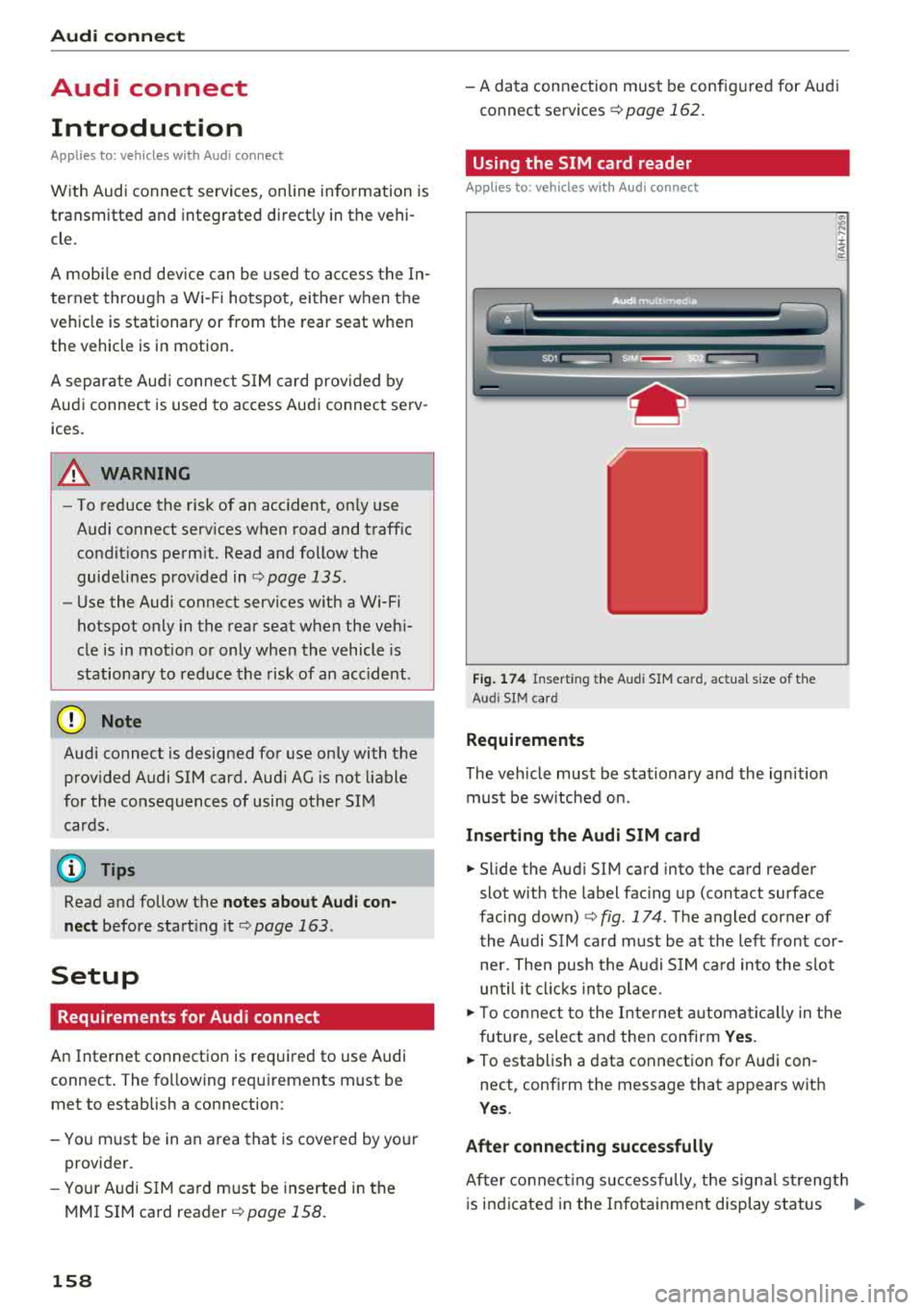
Fig. 174 Insert ing the Aud i SIM ca rd, actua l size of t he
Aud i SIM card
Requirements
The vehicle must be stationary and the ignition
must be switched on.
Inserting the Audi SIM card
~ .... :c .. a:
.,. Slide the Aud i SIM card into the card reader
slot with the label facing up (contact surface
facing down)
c:> fig . 174 . The angled corner of
the Audi SIM card must be at the left front cor
ner. Then push the Audi SIM card into the slot
until it clicks into place .
.,. To connect to the Internet automatically in the
future, select and then confirm Yes.
.,. To establish a data connection for Audi con
nect, confirm the message that appears wit h
Yes .
After connecting successfully
After co nn ectin g successfully, the signa l strength
is indicated in the Infotainment display status
..,.