wheel AUDI A8 2020 Owners Manual
[x] Cancel search | Manufacturer: AUDI, Model Year: 2020, Model line: A8, Model: AUDI A8 2020Pages: 360, PDF Size: 95.38 MB
Page 321 of 360
4N0012721BD
Emergency assistance
Replacing wheels
You must complete the preparation before
changing a tire.
> Read and follow the important safety precau-
tions > page 316.
> Set the parking brake.
> Select the “P” position.
> When towing a trailer: disconnect the trailer
from your vehicle.
> Lay out the vehicle tool kit > page 316 and the
spare tire > page 322.
> Applies to: MMI: Select on the home screen:
VEHICLE > Settings & Service > Air suspen-
sion: wheel change.
> Switch the ignition off.
Z\ WARNING
The vehicle must also be secured to prevent it
from rolling when using the vehicle jack”. Use
suitable objects to block the front and back of
the wheel that is diagonal from the wheel
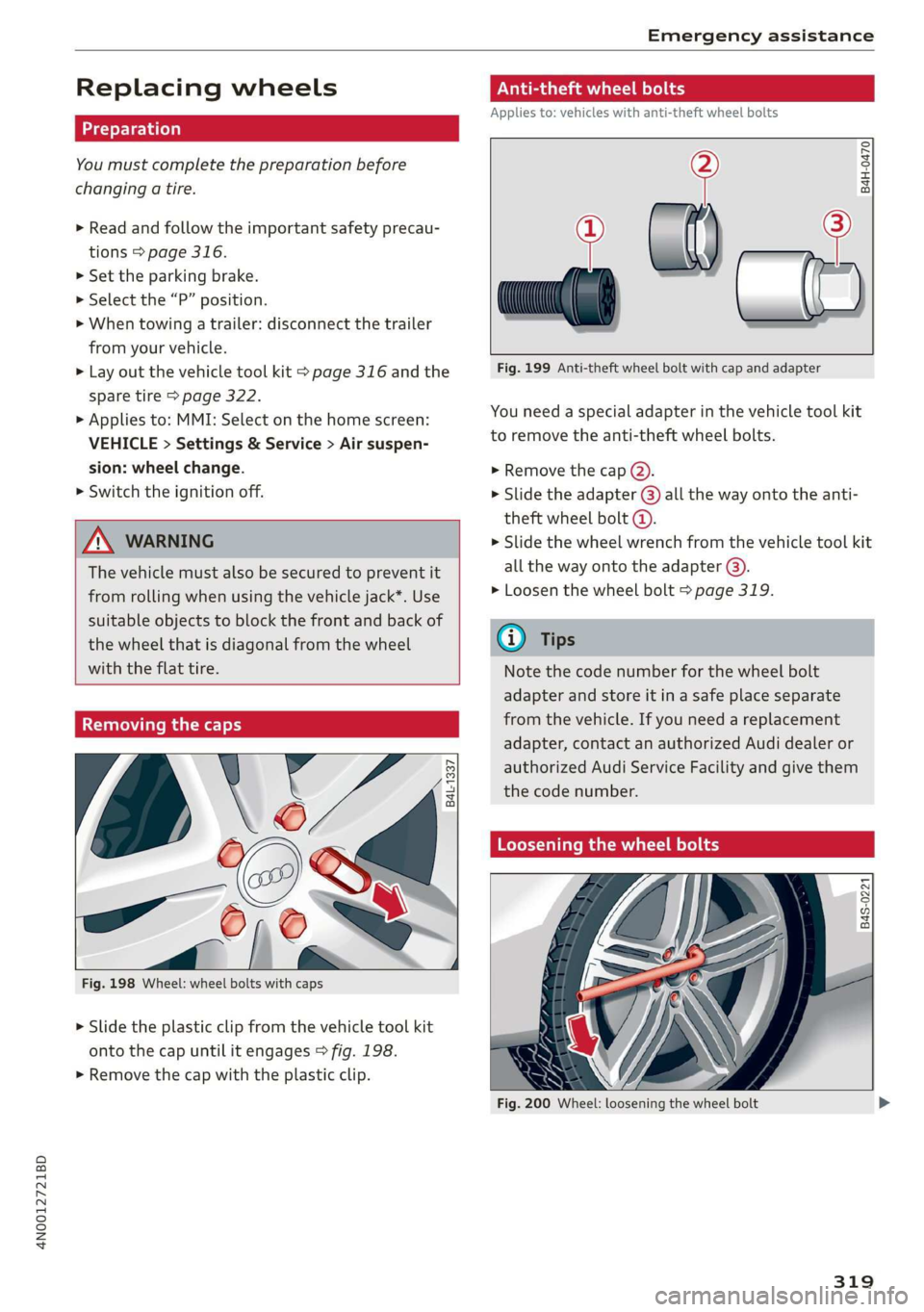
Removing the caps
with the flat tire.
B4L-1337
&
[
Fig. 198 Wheel: wheel bolts with caps
> Slide the plastic clip from the vehicle tool kit
onto the cap until it engages > fig. 198.
> Remove the cap with the plastic clip.
Anti-theft wheel bolts
Applies to: vehicles with anti-theft wheel bolts
i
> all
Fig. 199 Anti-theft wheel bolt with cap and adapter
B4H-0470
v
You need a special adapter in the vehicle tool kit
to remove the anti-theft wheel bolts.
>» Remove the cap @).
> Slide the adapter @) all the way onto the anti-
theft wheel bolt @.
» Slide the wheel wrench from the vehicle tool kit
all the way onto the adapter @).
> Loosen the wheel bolt > page 319.
@) Tips
Note the code number for the wheel bolt
adapter and store it in a safe place separate
from the vehicle. If you need a replacement
adapter, contact an authorized Audi dealer or
authorized Audi Service Facility and give them
the code number.
Loosening the wheel bolts
B4S-0221
Fig. 200 Wheel: loosening the wheel bolt
319
Page 322 of 360

Emergency assistance
>» Slide the wheel wrench from the vehicle tool kit
all the way onto the wheel bolt).
> Turn the wheel bolt approximately one turn to
the left. To achieve the required torque, hold
the end of the wheel wrench. If the wheel bolt
will not loosen, press carefully on the wheel
wrench with your foot. Hold onto the vehicle se-
curely while doing this and make sure your foot-
ing is stable.
ZA WARNING
To reduce the risk of an accident, only loosen
the wheel bolts gently one turn before raising
the vehicle with the vehicle jack*.
Raising the vehicle
Applies to: vehicles with vehicle jack
> Find the marking on the sill that is closest to
the tire that will be changed > fig. 201. Behind
the marking, there is a lifting point on the side
sill for the vehicle jack.
> Turn the vehicle jack located under the lifting
point on the sill to raise the jack until its arm @
=> fig. 202 is located under the designated plas-
tic mount.
> Align the vehicle jack so the arm (@) engages in
the designated Lifting point in the door sill and
the movable base (2) lies flat on the ground.
The base @) must be directly under the mount-
ing point @.
> Continue raising the vehicle jack until the wheel
lifts off the ground slightly.
RAZ-0257,
Fig. 202 Sill: positioning the vehicle jack
> Place the vehicle jack from the vehicle tool kit
ona firm surface. Use a flat, stable support if
necessary. On a slippery surface such as tile,
you should use a non-slip pad such as a rubber
mat > /A\.
D_ You need the matching adapter in order to loosen and
tighten anti-theft wheel bolts* > page 319.
320
Z\ WARNING
—To reduce the risk of injury, make sure no
one is in the vehicle before raising it.
— Make sure the vehicle jack is stable. The risk
of injury is increased when the ground is
slippery or soft, because the vehicle jack
could slide or sink.
— Only raise your vehicle with the vehicle jack
provided by the factory. If you use a vehicle
jack designed for another vehicle, your vehi-
cle could slip and cause injury.
— Position the vehicle jack only at the desig-
nated mounting points on the side sill and
align the jack. Otherwise, the vehicle jack
could slip and cause an injury if it does not
have sufficient hold on the vehicle.
—To reduce the risk of injury, do not raise any
other vehicles or other loads using the vehi-
cle jack provided by the factory.
— Changes in temperature or load can affect
the height of the vehicle.
— To reduce the risk of an accident, never start
the engine when the vehicle is raised.
—To reduce the risk of injury, no work should
be performed under the vehicle while it is
raised.
Page 323 of 360
4N0012721BD
Emergency assistance
@) Note
Do not Lift the vehicle by the sill. Position the
vehicle jack only at the designated mounting
points on the side sill. Otherwise, your vehicle
could be damaged.
Removing and installing a wheel
@ g + “
0 oO
B8K-1477
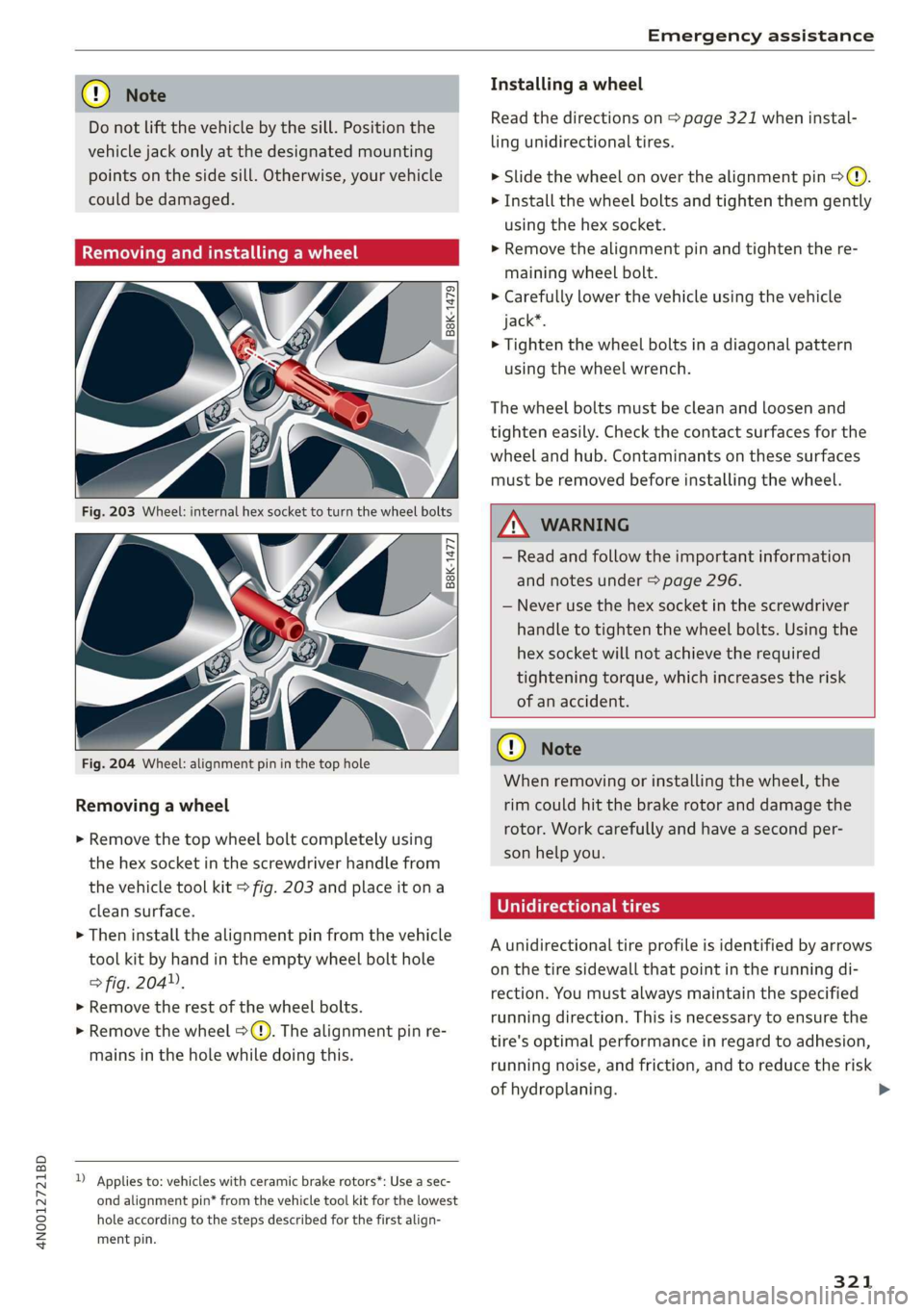
Fig. 204 Wheel: alignment pin in the top hole
Removing a wheel
> Remove the top wheel bolt completely using
the hex socket in the screwdriver handle from
the vehicle tool kit > fig. 203 and place it ona
clean surface.
> Then install the alignment pin from the vehicle
tool kit by hand in the empty wheel bolt hole
> fig. 204”,
> Remove the rest of the wheel bolts.
> Remove the wheel >(). The alignment pin re-
mains in the hole while doing this.
D Applies to: vehicles with ceramic brake rotors*: Use a sec-
ond alignment pin* from the vehicle tool kit for the lowest
hole according to the steps described for the first align-
ment pin.
Installing a wheel
Read the directions on > page 321 when instal-
ling unidirectional tires.
> Slide the wheel on over the alignment pin >@.
> Install the wheel bolts and tighten them gently
using the hex socket.
> Remove the alignment pin and tighten the re-
maining wheel bolt.
> Carefully lower the vehicle using the vehicle
jack*.
> Tighten the wheel bolts in a diagonal pattern
using the wheel wrench.
The wheel bolts must be clean and loosen and
tighten easily. Check the contact surfaces for the
wheel and hub. Contaminants on these surfaces
must be removed before installing the wheel.
Z\ WARNING
— Read and follow the important information
and notes under > page 296.
— Never use the hex socket in the screwdriver
handle to tighten the wheel bolts. Using the
hex
socket will not achieve the required
tightening torque, which increases the risk
of an accident.
@) Note
When removing or installing the wheel, the
rim could hit the brake rotor and damage the
rotor. Work carefully and have a second per-
son help you.
Unidirectional tires
A unidirectional tire profile is identified by arrows
on the tire sidewall that point in the running di-
rection. You must always maintain the specified
running direction. This is necessary to ensure the
tire's optimal performance in regard to adhesion,
running noise, and friction, and to reduce the risk
of hydroplaning. >
321
Page 324 of 360

Emergency assistance
To benefit fully from the advantages of the uni-
directional tire design, you should replace faulty
tires as soon as possible and restore the correct
running direction on all of the tires.
> Reinstall the caps on the wheel bolts if necessa-
ry.
> Store the vehicle tool kit in its designated
place.
> If the removed wheel does not fit in the spare
wheel well, store it securely in the luggage
compartment > page 100.
> Check the tire pressure on the installed wheel
as soon as possible.
> Correct the tire pressure and store it in the MMI
=> page 308.
> The wheel bolt tightening specification must be
90 ft lbs (120 Nm). Have it checked as soon as
possible with a torque wrench. Drive carefully
until then.
> Have the faulty wheel replaced as quickly as
possible.
Space-saving spare tire
Applies to: vehicles with space-saving spare tire (compact
spare tire)
The spare tire is intended for short-term use only.
Have the damaged tire checked and replaced if
necessary by an authorized Audi dealer or author-
ized Audi Service Facility as soon as possible.
There are some restrictions on the use of the
compact spare tire. The compact spare tire has
been designed specifically for your type of vehi-
cle. Do not replace it with the spare tire from an-
other type of vehicle.
The compact spare tire is located in the luggage
compartment under the cargo floor cover
> page 316.
The tire pressure must be 61 PSI (420 kPA).
Snow chains
For technical reasons, the use of snow chains on
the compact spare tire is not permitted.
322
If you have to drive with snow chains and a front
tire fails, mount the spare tire in place of a rear
tire. Install the snow chains on the rear tire that
you removed, and install that in place of the
front tire that failed.
ZA\ WARNING
— After installing a spare tire, the tire pressure
must be checked as soon as possible.
— Do not drive faster than 50 mph (80 km/h)
with a compact spare tire. Driving faster
than that increases the risk of an accident.
— To reduce the risk of an accident, avoid hard
acceleration or braking and driving fast
around curves with the compact spare tire.
— To reduce the risk of an accident, never drive
with more than one compact spare tire.
— Normal summer or winter tires must not be
mounted on the compact spare wheel rim.
Jump starting
You should only perform the steps that follow if
you have the necessary tools and technical ex-
pertise.
If the engine does not start because the vehicle
battery is drained, you can jump start your vehi-
cle using another vehicle. Jump start cables are
needed to do this.
Both vehicle batteries must have 12 V nominal
voltage. The voltage capacity (Ah) of the vehicle
battery that is giving power must not be less
than the capacity of the drained vehicle battery.
Jump start cable
Only use a jump start cable with a large enough
diameter. Note the manufacturer's specifica-
tions.
Only use a jump start cable with insulated termi-
nal clamps.
Positive cable - usually red.
Negative cable - usually black.
Page 327 of 360

4N0012721BD
Emergency assistance
bar is not available. Use a towing cable made of
synthetic elastic cable similar elastic material.
Z\ WARNING
— Towing highly increases the risk of an acci-
dent, for example from colliding with the
towing vehicle.
— To reduce the risk of an accident, do not al-
low anyone to remain inside the vehicle
when it is being transported by a tow truck
or a special transporter.
@) Note
— If normal towing is not possible, for exam-
ple if the transmission is faulty or if the
towing distance is greater than 30 miles
(50 km), then transport the vehicle on a
special carrier.
— If the vehicle is towed by a tow truck at the
axle that is not permitted, this can cause se-
vere damage to the transmission.
— The vehicle must not be tow started for
technical reasons.
@ Tips
— If the power supply is interrupted, then it
will not be possible to move the selector
lever out of the "P" position. The parking
lock must be released using the emergency
release before towing the vehicle
=> page 116.
— Switch Audi pre sense* off > page 185 when
loading the vehicle onto a vehicle carrier,
train, ship, or other type of transportation,
or when towing the vehicle. This can prevent
an undesired intervention from the pre
sense* system.
— Follow the local legal regulations for tow-
ing.
Read and follow the important information under
=> page 324.
Preparations
> Only secure the towing cable or tow bar at the
designated towing loops > page 325,
=> page 326.
> Make sure the towing cable is not twisted. Oth-
erwise it could disconnect from the towing loop
while towing.
> Switch the emergency flashers on in both
vehicles > page 64. However, do not do this if it
prohibited by law.
Towing vehicle (front)
> Only start to drive when the towing cable is
taut.
> Press the brake pedal very carefully.
> Avoid sudden braking or driving maneuvers.
Vehicle being towed (rear)
> Make sure the ignition is switched on so that
the steering wheel is not locked and so that you
can use the turn signals, the horn, and the
windshield wipers if needed > A\.
> Switching it off before the vehicle has stopped
may impair the function of the brake booster
and power steering. You would then need to
use more force to steer and brake the vehicle.
> Release the parking brake > page 124.
> Select the “N” selector lever position.
> Make sure the towing cable is always taut.
ZA WARNING
Never tow a vehicle using a tow bar or towing
cable if the vehicle does not have electrical
power.
Front towing loop
BFV-0305
Fig. 207 Front bumper: installing the towing loop
325
Page 328 of 360
Emergency assistance
The threaded opening for the towing loop is lo-
cated on the right side of the front bumper.
> Remove the towing loop from the vehicle tool
kit > page 316.
> Press the cap inward with brief, strong pressure
=> fig. 207. The cap will loosen from the bump-
er.
> Tighten the towing loop in the threaded open-
ing until it stops and then tighten it with a
wheel wrench.
>» After using, place the towing loop back in the
vehicle tool kit.
Z\ WARNING
If the towing loop is not tightened until it
stops when installing, the threads may be
pulled out when towing the vehicle and result
in an accident.
@) Tips
Depending on the model, the shape of the
cover can vary.
Rear towing loop
BFV-0306
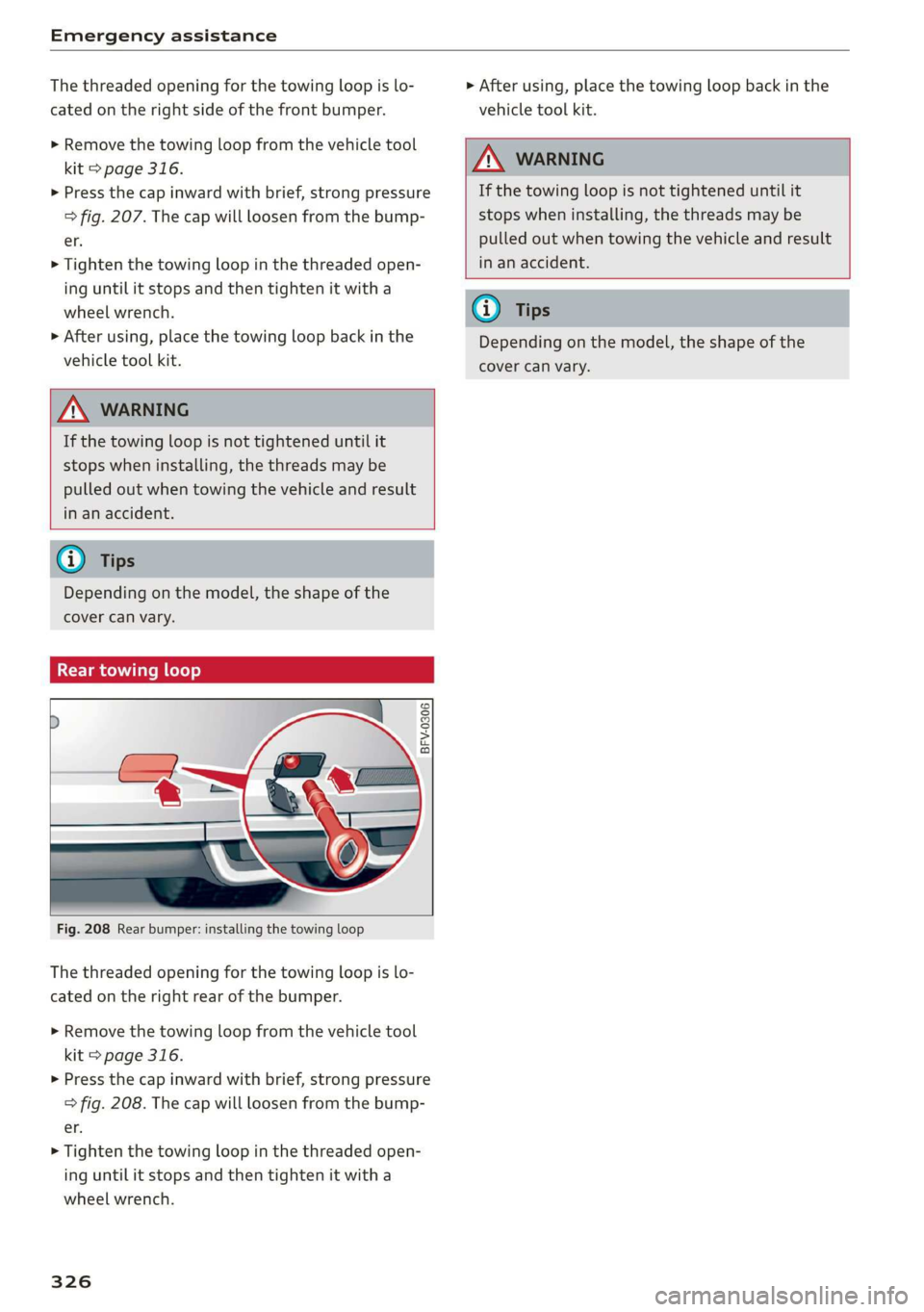
Fig. 208 Rear bumper: installing the towing loop
The threaded opening for the towing loop is lo-
cated on the right rear of the bumper.
> Remove the towing loop from the vehicle tool
kit > page 316.
> Press the cap inward with brief, strong pressure
=> fig. 208. The cap will loosen from the bump-
er.
> Tighten the towing loop in the threaded open-
ing until it stops and then tighten it with a
wheel wrench.
326
> After using, place the towing loop back in the
vehicle tool kit.
ZA WARNING
If the towing loop is not tightened until it
stops when installing, the threads may be
pulled out when towing the vehicle and result
in an accident.
G) Tips
Depending on the model, the shape of the
cover can vary.
Page 330 of 360
Fuses and bulbs
This can cause damage to the electrical sys-
tem and increases the risk of fire.
(G) Note
If a new fuse burns out again shortly after you
have installed it, have the electrical system
checked as soon as possible by an authorized
Audi dealer or authorized Audi Service Facili-
- The following table does not list fuse loca-
tions that are not used.
— Some of the equipment listed in the follow-
ing tables applies only to certain model ver-
sions or certain optional equipment.
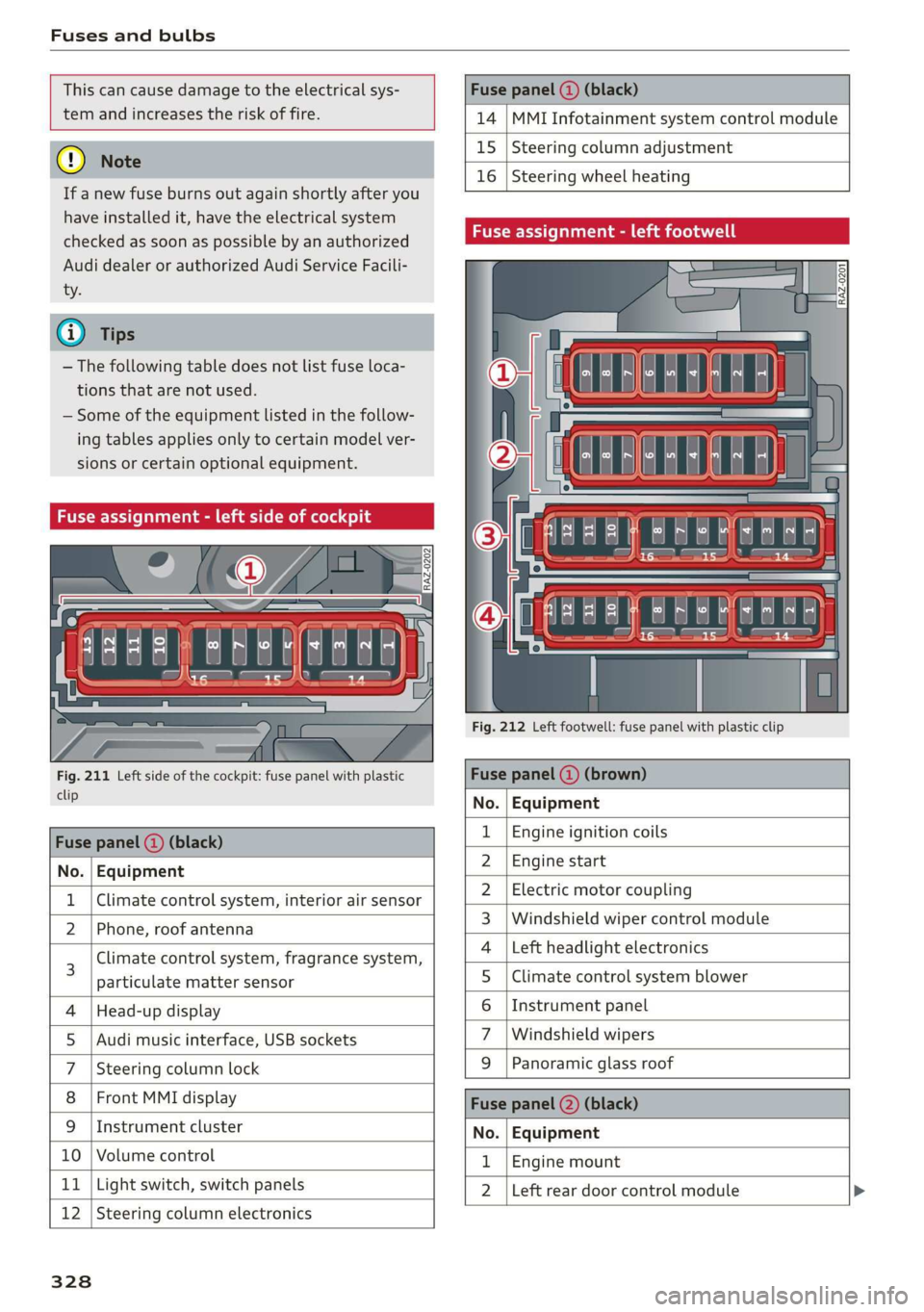
Fuse assignment - left side of cockpit
Fig. 211 Left side of the cockpit: fuse panel with plastic
clip
Fuse panel (2) (black)
No. | Equipment
Climate control system, interior air sensor
N Phone, roof antenna
Climate control system, fragrance system,
particulate matter sensor
Head-up display
Audi music interface, USB sockets
Steering column lock
Front MMI display
Instrument cluster
Ol/aOIN/uys
10 | Volume control
11 | Light switch, switch panels
12 | Steering column electronics
328
Fuse panel (@ (black)
14 MMI Infotainment system control module
15 Steering column adjustment
16
Steering wheel heating
Fuse assignment - left footwell
lo} | He
ia i, L
. | Equipment
Engine ignition coils
Engine start
Electric motor coupling
Windshield wiper control module
Left headlight electronics
Climate control system blower
Instrument panel
Windshield wipers
OND)
OMA)
WININI]
eR
Panoramic glass roof
Fuse panel (2) (black)
No. Equipment
Engine mount
Left rear door control module
Page 345 of 360
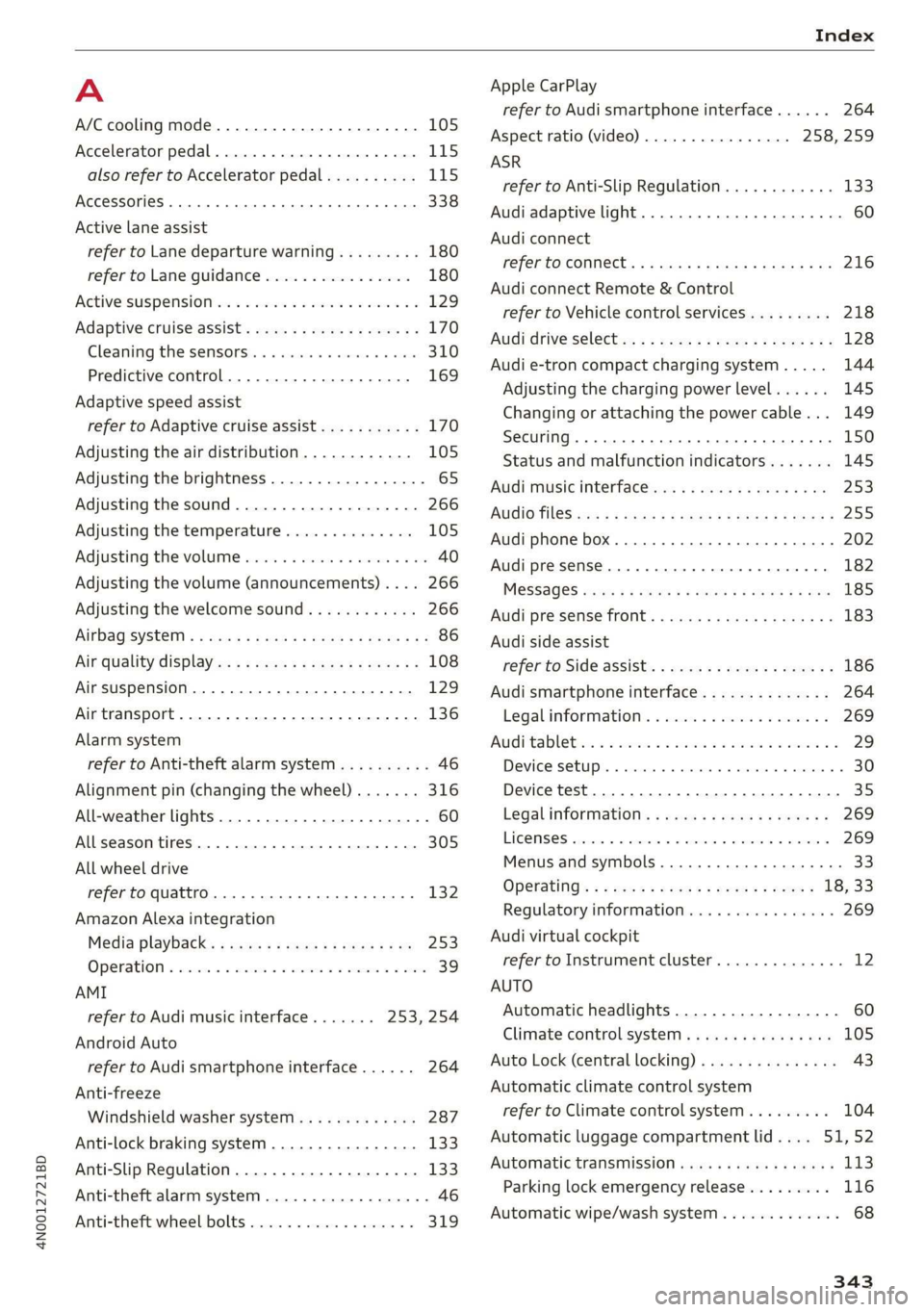
4N0012721BD
Index
A
A/C cooling mode.............. eee eee ee 105
Accelerator pedal..............--000005 115
also refer to Accelerator pedal.......... 115
AccessorieS .. 0.00... cece eee eee ee 338
Active lane assist
refer to Lane departure warning......... 180
refer to Lane guidance................ 180
Active suspensioniicss + « sss so sasusia vs ssuen s o 129
Adaptive cruise assist................00. 170
Cleaning the sensors..............000- 310
Predictive control.................... 169
Adaptive speed assist
refer to Adaptive cruise assist........... 170
Adjusting the air distribution............ 105
Adjusting the brightness................. 65
Adjusting the sound..............-...0- 266
Adjusting the temperature.............. 105
Adjusting the volume..............000005 40
Adjusting the volume (announcements) .... 266
Adjusting the welcome sound............ 266
AirbagisySteM « + aims x eaen 3 = seme se OE a Zs 86
Ait GUality displayie. sy ees x s eeu 5 e wee a 108
Airsuspension...........2...0.00.0005 129
Airtransport................0.00.00005 136
Alarm system
refer to Anti-theft alarm system.......... 46
Alignment pin (changing the wheel)....... 316
All-weather lights...............-.00000. 60
Allseason tires... 2.2.00... 22020 305
All wheel drive
refer to quattro... 2... eee eee eee 132
Amazon Alexa integration
Média playback’: ¢ sos s ¢ wees ¢ 4 orem b eae 253
Operation « sion ss aac sv rere © omen wa ar 39
AMI
refer to Audi music interface....... 253,254
Android Auto
refer to Audi smartphone interface...... 264
Anti-freeze
Windshield washer system............. 287
Anti-lock braking system. ........-....-. 133
Anti-Slip Regulation.................0.. 133
Anti-theft alarm system...........-..00-- 46
Anti-theft wheel bolts................0. 319
Apple CarPlay
refer to Audi smartphone interface...... 264
Aspect ratio (video) ..........-..00. 258, 259
ASR
refer to Anti-Slip Regulation............ 133
Audi adaptive light.................0005. 60
Audi connect
refer to CONNECt:. « s ccascs seas ieeeee oe 216
Audi connect Remote & Control
refer to Vehicle control services......... 218
Audirdrive seletticy: « + sven « x cee x ¢ neem ¢ 2 2 128
Audi e-tron compact charging system..... 144
Adjusting the charging power level...... 145
Changing or attaching the power cable... 149
S@CUTING . 6... eee eee eee eee 150
Status and malfunction indicators....... 145
Audi music interface ioc. . ies. een ea ee 253
AUGIO TINGS crx = ¢ ces & ¢ cee £ & aeee Fc eS 25S
Audi phone box...........0.-. cee eee eee 202
Audi presense.... 6.6... 0. cece ee eee eee 182
MESSAGES vcr « 5 wey § 2 eee Fs eee 8 6 Ree 185
Audi pre sense front.............-..000- 183
Audi side assist
refer to Side assist............-..20--5 186
Audi smartphone interface.............. 264
Legal information: ¢ css os vei se owen oe 269
Auditableties « «cei + 2 some a 2 awa 3 eee ¢ 29
Device setup... 2.0... cece eee eee eee 30
Device test... 2.2... cece cece eee 35
Legal information's swe ss eae se eee oa 269
LIGENSES: scsi 6 0 cites 6 o veces © eeemeni © aperetne 269
Menus and symbols.............02+-00- 33
Operating’: « « wss6 s secu ss see ss eee s 18, 33
Regulatory information................ 269
Audi virtual cockpit
refer to Instrument cluster.............. 12
AUTO
Automatic headlights.................- 60
Climate control system ............005- 105
Auto Lock (central locking) ............... 43
Automatic climate control system
refer to Climate control system......... 104
Automatic luggage compartment lid.... 51,52
Automatic transmission............-.455 113
Parking lock emergency release......... 116
Automatic wipe/wash system............. 68
343
Page 348 of 360

Index
Demo mode
refer to Presentation mode............. 239
Destination onthe map................. 230
Details. « ence ox sens © 0 weenwe 0 seme © m omnoes 230
Determining correct load limit........... 303
Digital COMPASS swiss cs veces oo owas eS ee 70
Dime@nSiOnS's « « ssw » s sows x & awe ¥ o awe 3 341
Dimming the exterior mirrors............. 67
Dimming the rearview mirror............. 67
Directory
S@LUINGS cus s seve « & wen © x Bee & o ewe E 2d
also refer to ContactS.............0005 205
Display
Cleaning. .... 2... cee eee eee eee 312
Disposal... 02.0... c cece eee eee eee 336
DiStaMCO bwin
Doors
Child safety lock......... 0.0.0 eee eee 53
Door contact switch. ............0.0000. 64
Mechanically unlocking and locking....... 46
Power closing/closing aid............... 43
Driver information system................ 13
Drives
refer to Media.............000005 250, 255
Drive select
refer to Audi drive select............... 128
Drive systeM.... cece eee ee eee 118, 122
Audi GIVE SELECE’s see 2s came ye een ss 128
Driving down hills.............2--0000- 126
Driving program..............0005 114,178
Driving through water...............005 126
Driving time... .. 2... eee eee eee eee 16
Driving tips
Driving through water................. 126
EMiCienyCrivinig
« ews « « sews 4 x cows oo ew 124,
Uphilland downhill................... 126
Drivingup hills. + & seis 6 sre @ 6 aera & 0 sees 126
Dust filter
refer to Pollutant filter..............0. 108
DVD changer (media drives)............. 251
DVD drive (media drives) ............0.05 251
Dynamic all-wheel steering.............. 131
346
E
E-mail
Message options...........0eee evens 209
SOECIAGS secsses x wssne © ¥ owes +H emcunte 6 a oeeuone 209
SECON MOTO rien & anion a = amuev wo w mnsome 2 2 eI 119
EDL
refer to Electronic Differential Lock...... 133
EDR
Event Data Recorder...............0.. 332
Efficiency assist... 1... eee eee 167
Electricalisystenmiss « snes » seven 2 > eveano «2 284
Electric FAN ge wwe. + sswas + x sone 2 0 arate o seen 236
Electromechanical parking brake......... 124
Electronic Differential Lock.............. 133
Electronic immobilizer 2x: 2 s wes sy ewes 9 es 48
Electronic Stabilization Control........... 133
Embedded SIM card............000000ee 217
Emergency assist...........00-.00 eee ee 190
Emergency assistance..............000. 316
Emergency braking function............. 125
Emergencyi¢allscin oa miwew 6 wamen @ 0 ivacs 207, 223
Emergency flashersii: + woos « 2 wows as ween s 64
Emergency mode.............---0e eee 117
Emergency operation
DOOMSic + wens 2 6 wed 2 same ao wa ao wie Do 46
Fuel filler door............0 000000000 273
Luggage compartment lid............... 52
Panoramic glass roof................... 56
Emissions control system.............05 274
Energy CONSUMETSina + wasewa + neue oy Me eee 17
Energy flow display..............0000ee 119
Energy management................05 121
Energy recovery ..... 0.2... .e eee e eee ee 118
Engine
BréakiniGiins = xsay ¢ > scree % 5 coms 7 e Hees ee 118
GOOLENE «sess 3 a wee ox ese wo seme ¥ eaWoR 281
EMMeNnGeney SEOPLens » 0 wissen « 6 cesnnie s meses a 6 6 TL
Jump starting.....................0. 322
Start/StOpisysteM « ceo « 2 waves x s aus g es 121
Starting/stopping.................04. ary
Engine braking effect
refer to Recuperation..............005 118
Page 350 of 360

Index
Glossary of tire and loading terminology... 292
Glove compartment.............0000 98,99
Valet parking........... 02. eee e eee eee 56
Gross Axle Weight Rating (GAWR)........ 342
Gross Vehicle Weight Rating (GVWR)...... 342
GVWR
refer to Gross Vehicle Weight
Ratifig (GVWR) « sas ¢ suene ¢ ¢ eet 8 o nee 342
H
Handset
refer to Rear Seat Remote............... 25
Handstrees « seve x s wasn a ¢ wom § ze oe A ee 201
Hands Free) Profile... sc.ua cine aaiean es 201
Head-up display
AGJUStING aes = s gee = e eee s berg e wees as 37
Adjusting the brightness................ 65
Operating...............0.. 2.00 eee eee 37
Headlight range control..............0005 60
Headlights
Cleaning......... 06. e eee eee eee 310
Headlight range control................ 60
Washer system.......... 0.0.00 eee eee 68
Head restraints
Adjusting ............ 2c cece e eee 81
Removing and installing................ 81
Heated rear window.............-..005- 106
Heated steering wheel...............0-. 108
Heating... . 0. cece eee cece 104
HFP
refer to Hands Free Profile............. 200
High-voltage battery................05. 136
Audi e-tron compact charging system.... 144
CHarginGiicns so sessive oo arene ow amen © 137,139,
Charging display on the vehicle......... 140
Charging equipment.............ee08- 143
Charging methods.................... 137
Charging ports on the vehicle........... 137
Charging times: = x sees ss eees se ewes ee 137
Connecting the charging cable.......... 139
Messages while driving
Not running for long periods of time..... 138
Opening the charging port door......... 139
Quick charging...............002 eee 137
Setting the timer............0. ee eeaee 141
Transporting charging equipment....... 144
348
High-voltage system............-..00-- 136
High beams
High beam assistant................... 61
Highway lights..................000000. 60
Hill.descent:control... . «ese se ese ve eee « 126
HilLHold:assistss scccww + acon ee mason oo eves & 113
Home
refer to Home address................ 234
Home. address: «ssc a wenn ¥ 0 een ov one 234
HomeLink
refer to Garage door opener............. 57
HOMESGRCE isn « « sxeriw + comune + ormmnes a 5 wana © 19
HOMME: « cece w x sneer 2 eames we meReD Ze HONE GH ae 6
Hotspot
refer to Wi-Fi.... 0.0... cece eee eee ee 221
I
Ignition
Switching on and off...............06- iT
Imbalance (wheels) ............0 eee eee 298
Immobilizer
refer to Electronic immobilizer........... 47
Indicator lights... 2... 0. . eee eee 7
Inspection interval..............000000e 287
Instrument cluster............00 00 eee ee 12
Adjusting the layout................... 13
GLEAMING is: ¢ + mw 3 v new s wows oe mame do 312
Engine code.......... 20... eee eee eee 269
Failure... 2... ee eee eee 12
On-board computer .........2.+e0eee eee 16
Operating’: = = sere © = swans + x cuenise n coven «© 13
Personal profile................0000005 12
Service interval display...............- 287
Software information..............005 269
Switching tabs..................000005 13
Switching the VieWs. + ecw. se ees ce ees se 13
Vehicle functions. « sii xo evan +o amen +e ae 16
Version information..............000- 269
Instrument illumination................. 65
Integrated assistance................0-. 20
Intelligent search
Navigation........ 0.0.0 c eee eee eee eee 227
Interference-Causing Equipment Standard
(ICES)... eee eee eee eee 340
Interior lighting..................00- 64,65
Interior monitoring.............-.0-005- 46