park assist AUDI A8 2020 Owners Manual
[x] Cancel search | Manufacturer: AUDI, Model Year: 2020, Model line: A8, Model: AUDI A8 2020Pages: 360, PDF Size: 95.38 MB
Page 5 of 360
4N0012721BD
Table of contents
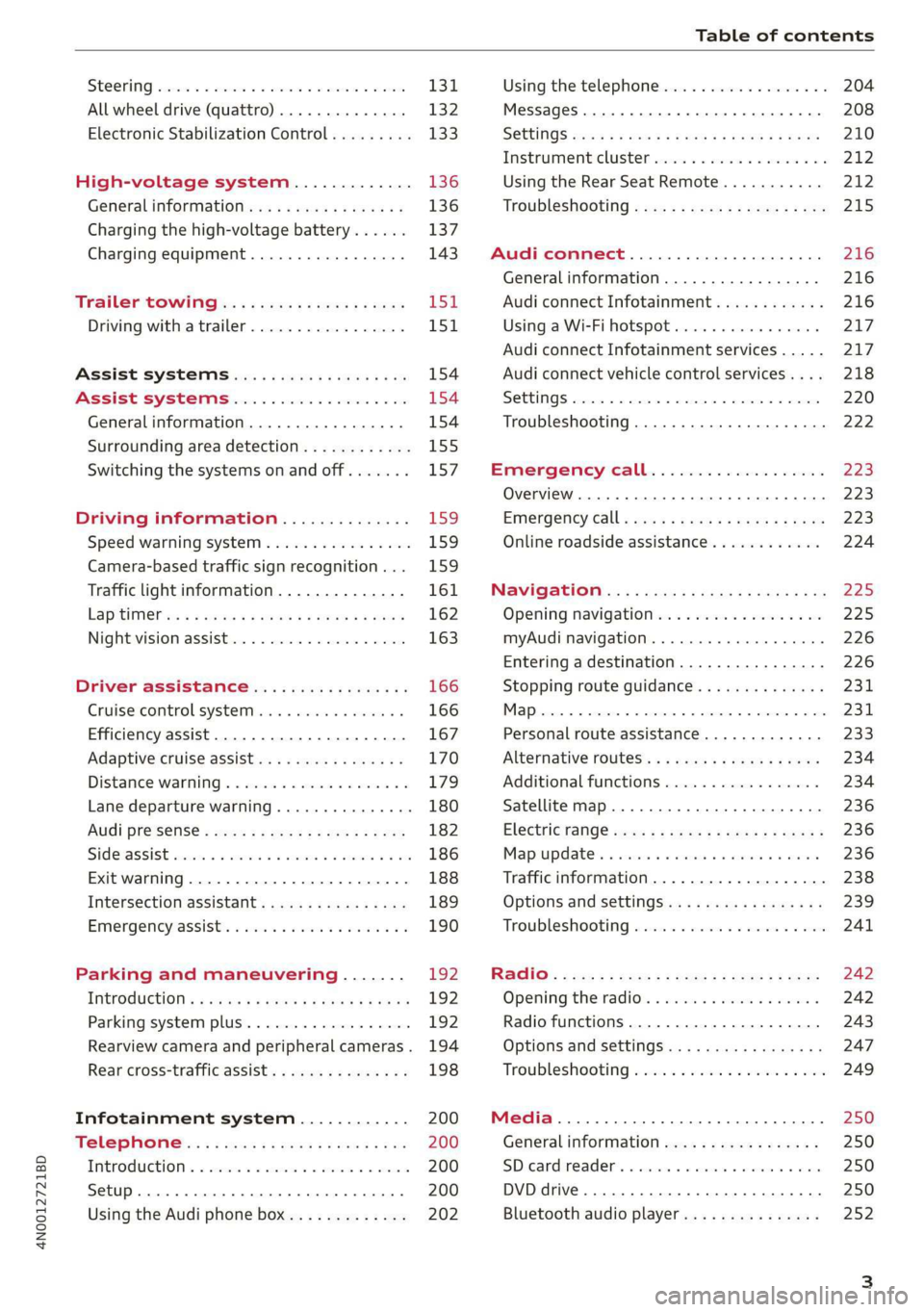
SEOOKING assess © & secwens + + anes ww ceawien Hewes 131
All wheel drive (quattro).............. 132
Electronic Stabilization Control......... 133
High-voltage system............. 136
General information...........0..5.5 136
Charging the high-voltage battery...... 137
Charging equipment................. 143
TANS COWINIG ss 5 & cews 4c ous ce ewe LSL
Driving with atrailer................. 151
Assist systems.................0. 154
Assist systems................... 154
Generalinformation................. 154
Surrounding area detection............ 155
Switching the systems on and off....... 157
Driving information.............. 159
Speed warning system................ 159
Camera-based traffic sign recognition... 159
Traffic light information.............. 161
LAP Mer as « 2 eons x = nevos ¢ 6 aus ¢ 8 em 162
Night vision assist..............-.04. 163
Driver assistance................. 166
Cruise control system.............0-5 166
Efficiency assist.............02--004. 167
Adaptive cruise assist............00-. 170
Distance Warning « « wse« 6 3 sone se eee oa LID:
Lane departure warning.............4. 180
Audi presense............-.22+--05- 182
Side@rassist esses: sv vows © v ememe © 2 suman 2 eae 186
Exit warning ...........-.....2.0000. 188
Intersection assistant................ 189
Emergeneyassists. «ican & wacen 3 3 woes ¥ 5 190
Parking and maneuvering....... 192
INEFODUCKION « » sey: x « caus 4 2 wasn 4 & Rees 192
Parking system plus...............00. 192
Rearview camera and peripheral cameras. 194
Rear cross-traffic assist... 2.2.2.0... 198
Infotainment system............ 200
TELEBNOMEs: 5 «ees & Cees 4 e oeew eee 200
IMtrOdUGEION « 2 asaces < a asomee x a wma Sewanee 200
Setup... eee eee ee eee 200
Using the Audi phone box............. 202
Using the telephone.................. 204
MessageS ... 0... cece cece eee eee 208
SOCtinGS eva 3 x espa o Kae 5s BER Bo ee 210
Instrument:cluster css vo evn ee ween eae 212
Using the Rear Seat Remote........... 212
Troubleshooting «<< <= eccn ss yews sp es 215
Audi connect..................0.. 216
Generalinformation................. 216
Audi connect Infotainment............ 216
Using a Wi-Fi hotspot................ 217
Audi connect Infotainment services..... 217
Audi connect vehicle control services.... 218
SCttINGS come
EMe@ngency CALL. « «ccc 6 i cs 6 vee « 223
Overview... ... 0. eee eee eee 223
Emergency Call « cas « wean s + gee os pee 223
Online roadside assistance............ 224
Navigation....................005- 225
Opening navigation.................. 225
myAudi navigation...............000% 226
Entering adestination................ 226
Stopping route guidance.............. 231
MapPinceins i + cxanees i ¥ scree © sammee @ =m ommeae #0 oe 2231.
Personal route assistance............. 233
Alternative routes...............000- 234
Additional functions................. 234
Satellite map......... 0... eee eee eee 236
Eleetric'rangeé acc sv sees 5 ¢ eee se Hews: 236
Mapiupdater, « sss + a cssmee + & nen «5 enaens 236
Traffic information................00- 238
Options aNd 'SEtNGS is « x see s x sews 4 vs 239
Troubleshooting wees «= wer = o wees ov eee 241
Ragios: sce ¢ = nae ¢ ¢ seuss 2 2 eeu 2 2 eee 242
Opening the radio...............000. 242
Radio functions.................0-4. 243
Options and settings...............0. 247
Troubleshooting esc 2 2 wee ts wie oo wee 249
Media............ cc eee eee 250
Generalinformation................. 250
SD card reader... ..... cc eee eee eee 250
DVD drive... 2... eee eee eee 250
Bluetooth audio player............... 252
Page 8 of 360
Quick access
Quick access
Cockpit
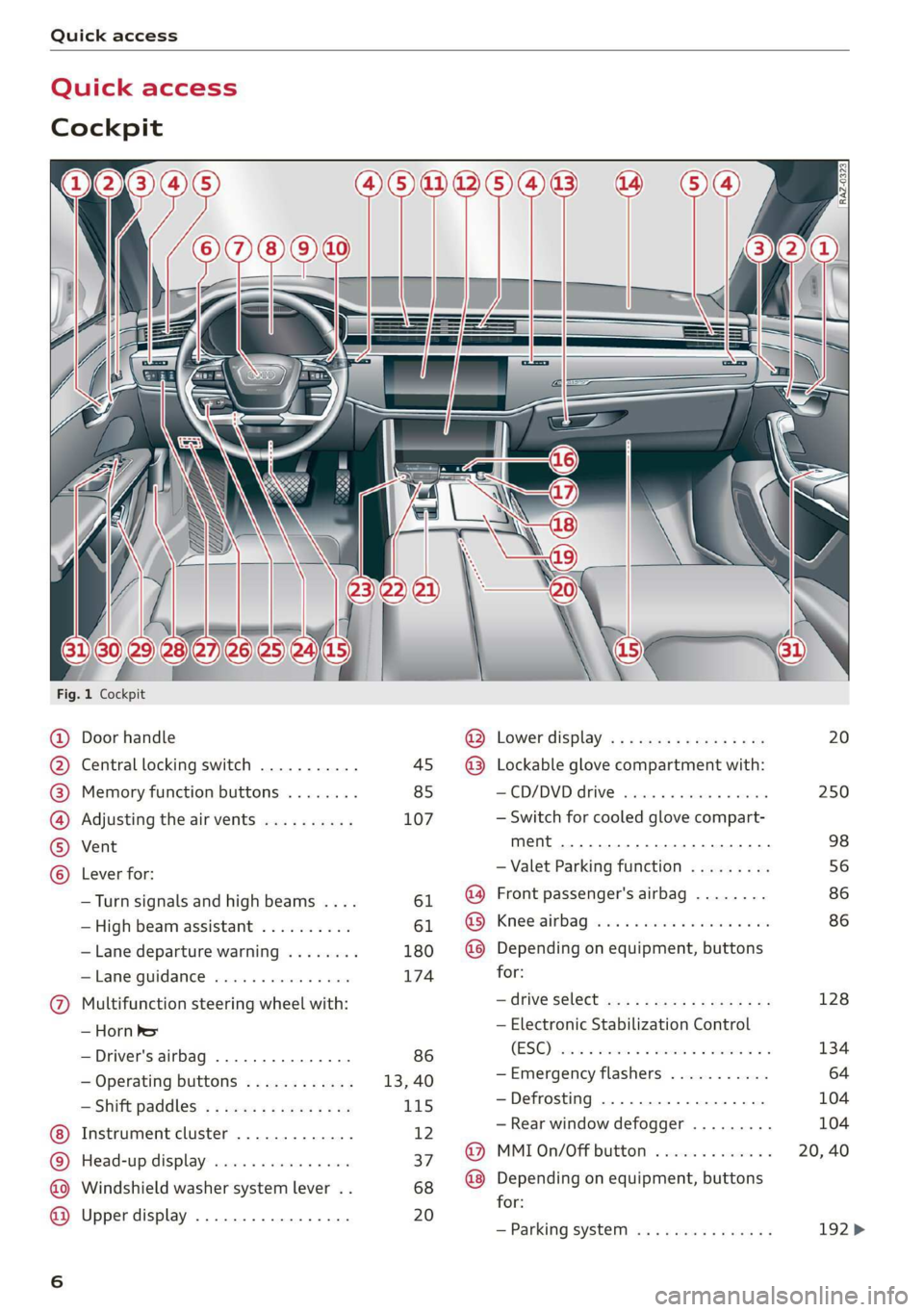
Fig. 1 Cockpit
@ @ @ @ © ©
9
OO©®@
Door handle
Central locking switch ...........
Memory function buttons ........
Adjusting the air vents ..........
Vent
Lever for:
—Turn signals and high beams ....
— High beam assistant ..........
— Lane departure warning ........
Lame Quidamee® ereisiss x + sieves 6 + von
Multifunction steering wheel with:
— Horn Per
— Driver's airbag ...............
— Operating buttons ............
— Shift paddles ................
Instrument cluster .............
Head-up display ...............
Windshield washer system lever ..
Upper display .................
@ Lower display .................
@® Lockable glove compartment with:
-—CD/DVD drive ................
— Switch for cooled glove compart-
ment ........... 0.0.2
— Valet Parking function .........
@ Front passenger's airbag ........
GS, Kneerairbag vaca. 2 ose a eecna + eae
@ Depending on equipment, buttons
for:
— drive Select mex ss meme cv eames oe
— Electronic Stabilization Control
(ESC), vise ce cseinen a cwcwnos ov comme ao
—Emergency flashers ...........
—Defrosting ..................
— Rear window defogger .........
@ MMI On/Off button .............
@ Depending on equipment, buttons
for:
— Parking system ...............
20
250
98
56
86 86
128
134
104
Page 9 of 360
4N0012721BD
Quick access
— Driver assistance systems ......
@ Depending on equipment:
—Cup holders ..............0..
—Socket .........0..0 0.000000.
@0) Depending on equipment:
— Starting the engine when there is
@ MMALFUMGEION: «5 csscice 6 2 soeeane + ane
—
Audi musicinterface ..........
— Audi phone box ...............
—SDcardreader ...............
@) Electromechanical parking brake
button 2.2... 6. cece eee eee eee
@3) Automatic transmission selector
lever... 2... cece ee eee eee eee
@) [START ENGINE STOP] button ....
@4 Steering wheel adjustment ......
@5) Lever for:
— Cruise control system .........
— Adaptive cruise assist ..........
@8 Data link connector for On Board
Diagnostic System (OBD) ........
@) Buttons for:
— LIQHtS sc ss cease se wees ts ee es
—All-weather lights ............
— Rear fog lights ...............
@8 Hood release ................-.
@9) Button for:
— Luggage compartment lid ......
— Fuel filler door release (plug-in
hybrid drive) ..............0.0.
G0 Exterior mirror adjustment ......
@2 Buttons for:
— Power windows .............-
—Child safety lock ..............
G) Tips
157
98 97
L112
254
202
250
124
113 111
80
166
170
332
60 60 60
276
50
271
66
54
53
Some the equipment listed here is only instal-
led in certain models or is available as an op-
tion.
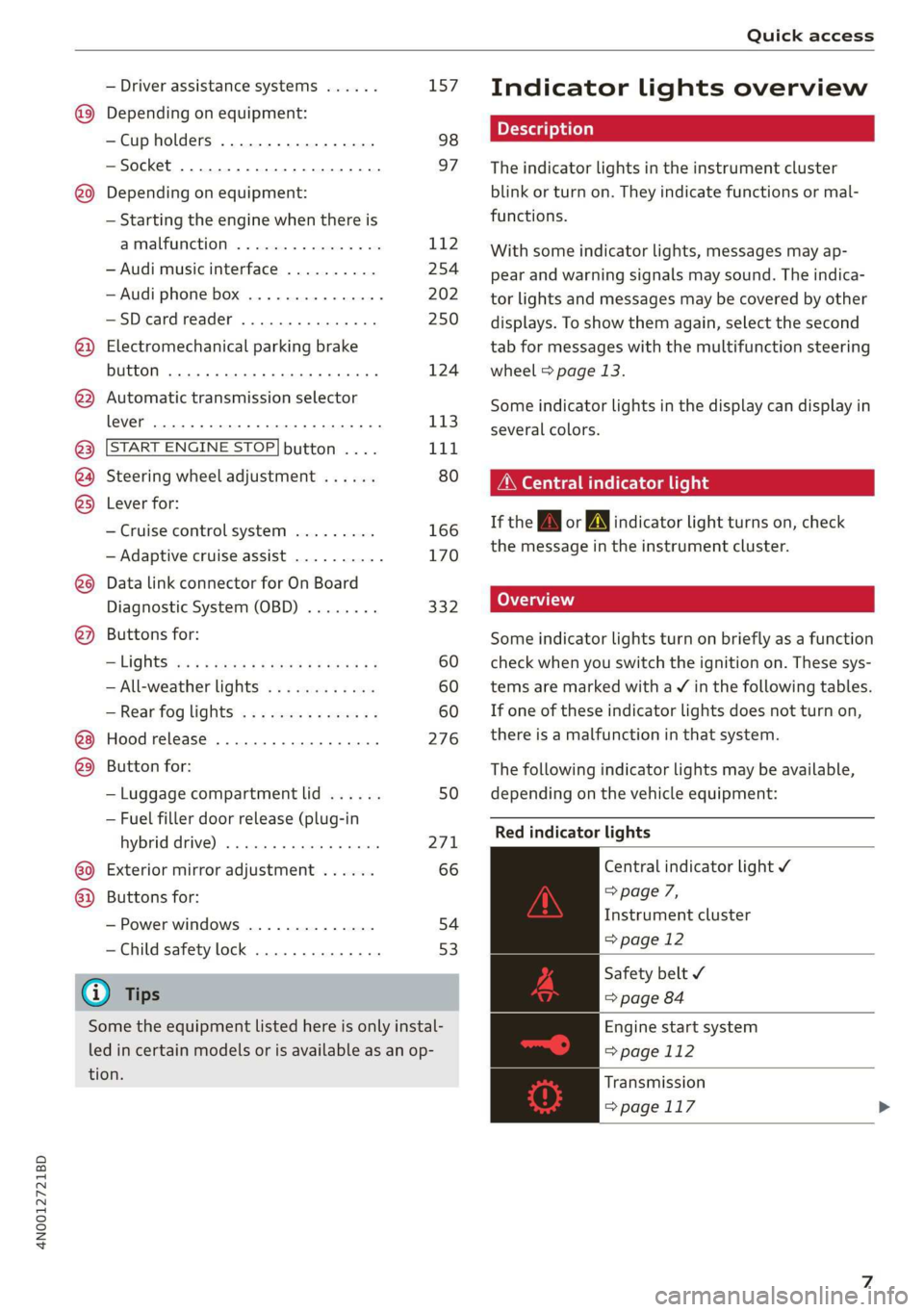
Indicator lights overview
The indicator lights in the instrument cluster
blink or turn on. They indicate functions or mal-
functions.
With some indicator lights, messages may ap-
pear and warning signals may sound. The indica-
tor lights and messages may be covered by other
displays. To show them again, select the second
tab for messages with the multifunction steering
wheel & page 13.
Some indicator lights in the display can display in
several colors.
Oeil ans
If the A or N indicator light turns on, check
the message in the instrument cluster.
Some indicator lights turn on briefly as a function
check
when you switch the ignition on. These sys-
tems are marked with a V in the following tables.
If one of these indicator lights does not turn on,
there is a malfunction in that system.
The following indicator lights may be available,
depending on the vehicle equipment:
Red indicator lights
Central indicator light ¥
=> page 7,
Instrument cluster
=>page 12
Safety belt
=> page 84
Engine start system
=>page 112
Transmission
=>page 117
Page 10 of 360
Quick access
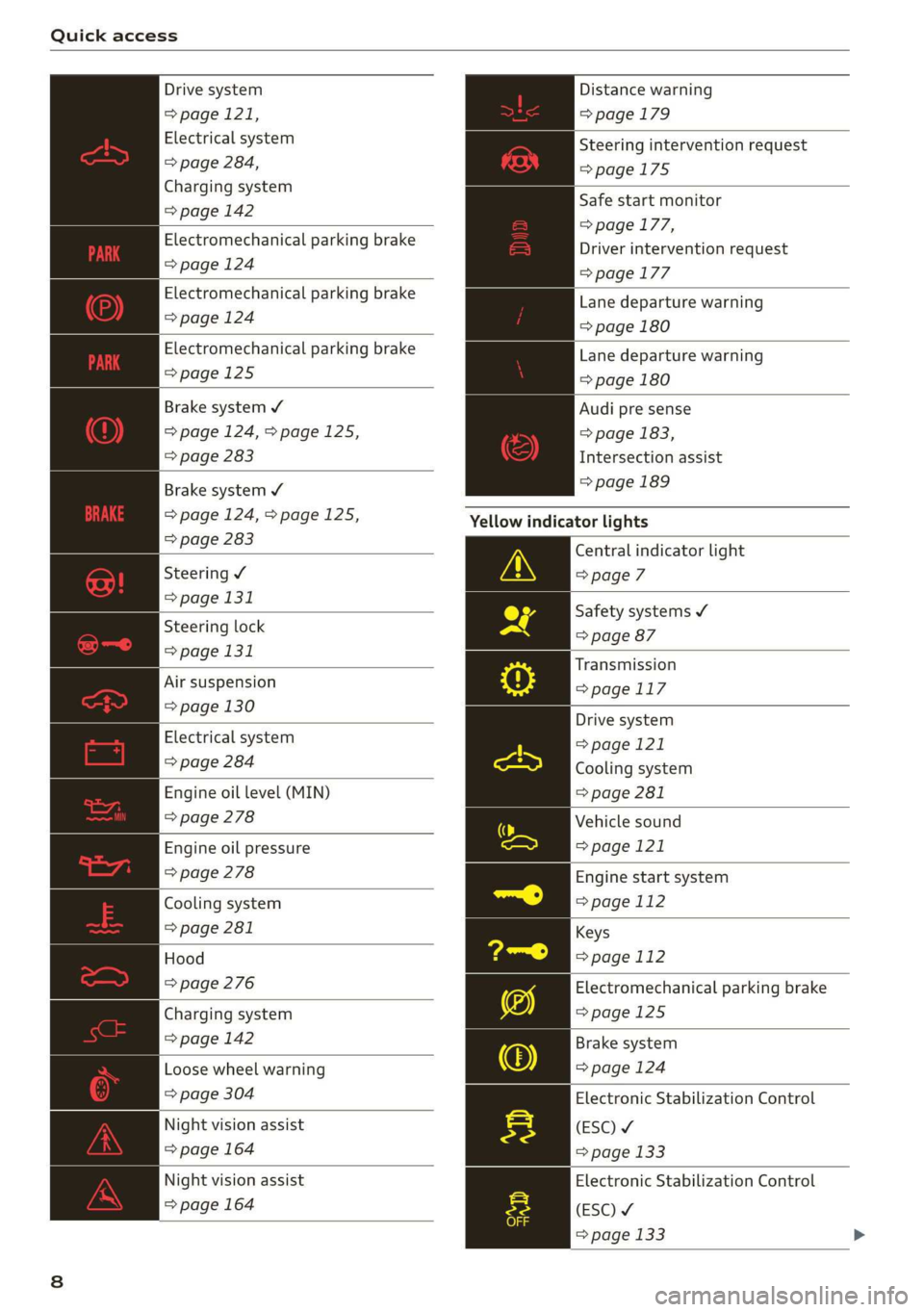
Drive system
=> page 121,
Electrical system
=> page 284,
Charging system
=> page 142
Electromechanical parking brake
=> page 124
Electromechanical parking brake
=>page 124
Electromechanical parking brake
=>page 125
Brake system ¥
=>page 124,>page 125,
=> page 283
Brake system ¥
=>page 124,>page 125,
=> page 283
Steering ¥
= page 131
Steering lock
=> page 131
Air suspension
=> page 130
Electrical system
=> page 284
Engine oil level (MIN)
=> page 278
Engine oil pressure
=> page 278
Cooling system
=> page 281
Hood
=> page 276
Charging system
=>page 142
Loose wheel warning
=> page 304
Night vision assist
=> page 164
Night vision assist
=> page 164
Distance warning
=> page 179
Steering intervention request
=>page 175
Safe start monitor
=> page 177,
Driver intervention request
=>page 177
Lane departure warning
=> page 180
Lane departure warning
=> page 180
Audi pre sense
=> page 183,
Intersection assist
=> page 189
Yellow indicator lights
Central indicator light
=> page 7
Safety systems ¥
=> page 87
Transmission
=>page 117
Drive system
=> page 121
Cooling system
=> page 281
Vehicle sound
>page 121
Engine start system
=>page 112
Keys
=> page 112
Electromechanical parking brake
>page 125
Brake system
=> page 124
Electronic Stabilization Control
(ESC) ¥
=> page 133
Electronic Stabilization Control
(ESC) ¥
=> page 133
Page 11 of 360
4N0012721BD
Quick access
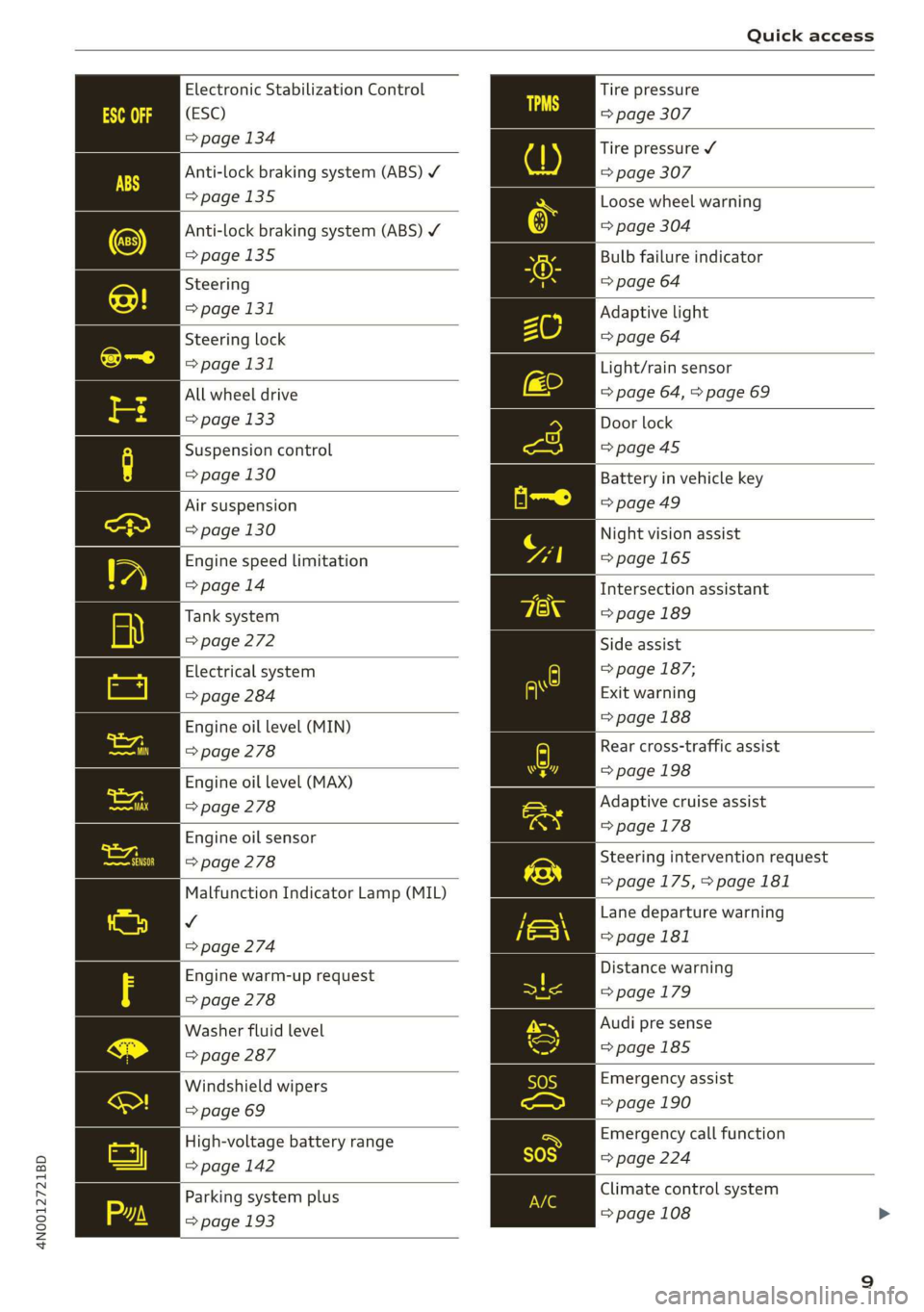
Electronic Stabilization Control
(ESC)
=> page 134
Anti-lock braking system (ABS) ¥
>page 135
Anti-lock braking system (ABS) ¥
=>page 135
Steering
=> page 131
Steering lock
=> page 131
All wheel drive
=> page 133
Suspension control
=> page 130
Air suspension
=> page 130
Engine speed limitation
=> page 14
Tank system
> page 272
Electrical system
=> page 284
Engine oil level (MIN)
> page 278
Engine oil level (MAX)
=> page 278
Engine oil sensor
> page 278
Malfunction Indicator Lamp (MIL)
v
=> page 274
Engine warm-up request
=> page 278
Washer fluid level
=> page 287
Windshield wipers
=> page 69
High-voltage battery range
=>page 142
Parking system plus
=> page 193
Tire pressure
=> page 307
Tire pressure ¥
=> page 307
Loose wheel warning
=> page 304
Bulb failure indicator
=> page 64
Adaptive light
=> page 64
Light/rain sensor
=> page 64, > page 69
Door lock
=>page 45
Battery in vehicle key
=>page 49
Night vision assist
=>page 165
Intersection assistant
=> page 189
Side assist
=> page 187;
Exit warning
=> page 188
Rear cross-traffic assist
=> page 198
Adaptive cruise assist
=> page 178
Steering intervention request
=>page 175,>page 181
Lane departure warning
=>page 181
Distance warning
= page 179
Audi pre sense
=>page 185
Emergency assist
= page 190
Emergency call function
=> page 224
Climate control system
=> page 108
Page 12 of 360
Quick access
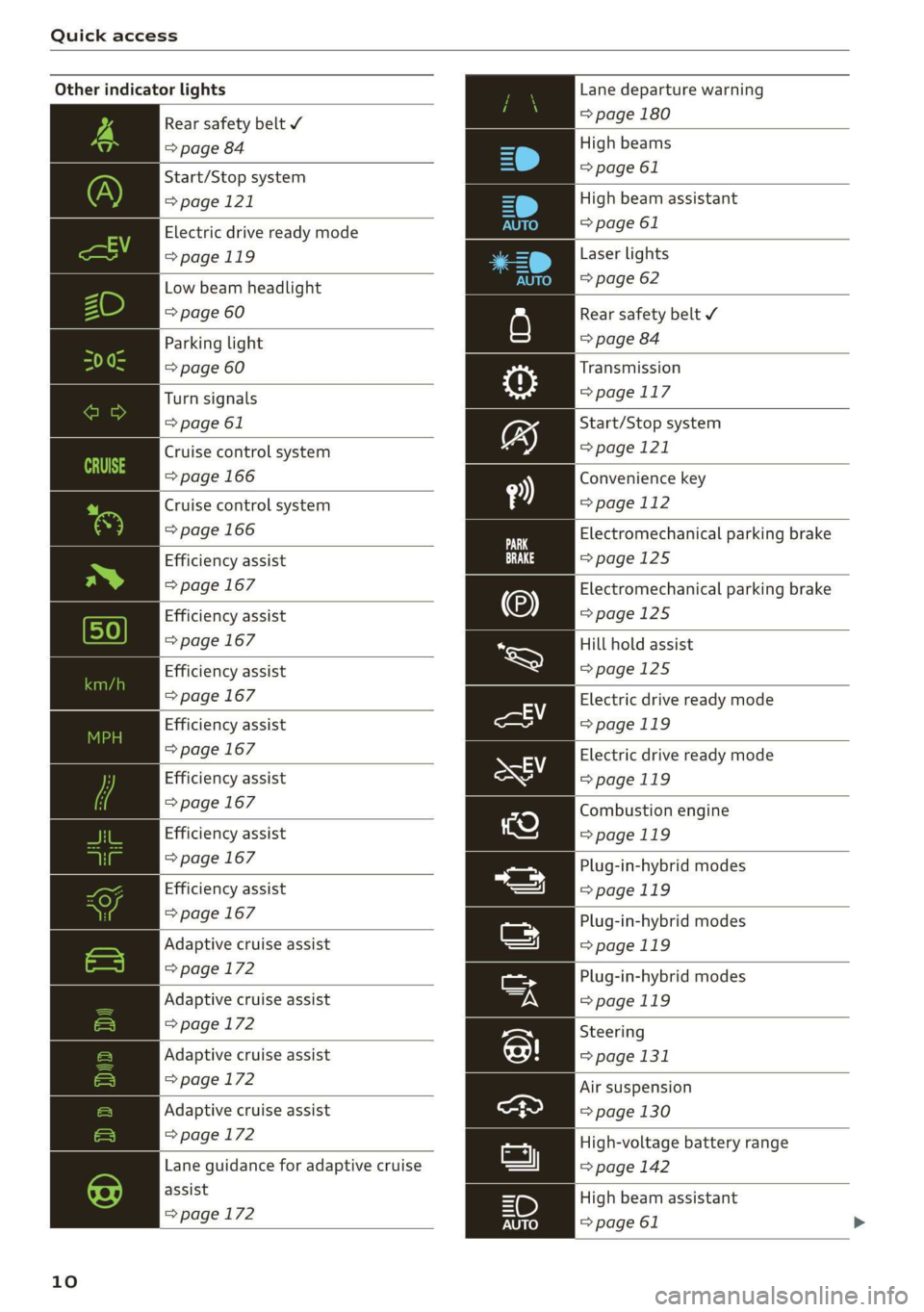
Other indicator lights
Rear safety belt Y
=> page 84
Start/Stop system
>page 121
Electric drive ready mode
>page 119
Low beam headlight
=> page 60
Parking light
=> page 60
Turn signals
=> page 61
Cruise control system
=> page 166
Cruise control system
=> page 166
Efficiency assist
=> page 167
Efficiency assist
=> page 167
Efficiency assist
=> page 167
Efficiency assist
=> page 167
Efficiency assist
> page 167
Efficiency assist
=> page 167
Efficiency assist
=> page 167
|
Adaptive cruise assist
=> page 172
Adaptive cruise assist
=>page 172
Adaptive cruise assist
=> page 172
Adaptive cruise assist
=>page 172
|
Lane guidance for adaptive cruise
assist
=> page 172
10
Lane departure warning
=> page 180
High beams
=> page 61
High beam assistant
=> page 61
Laser lights
=> page 62
Rear safety belt ¥
=> page 84
Transmission
=> page 117
Start/Stop system
=> page 121
Convenience key
=> page 112
Electromechanical parking brake
=>page 125
Electromechanical parking brake
=>page 125
Hill hold assist
=>page 125
Electric drive ready mode
=>page 119
Electric drive ready mode
>page 119
Combustion engine
=>page 119
Plug-in-hybrid modes
>page 119
Plug-in-hybrid modes
=>page 119
Plug-in-hybrid modes
=>page 119
Steering
=> page 131
Air suspension
=> page 130
High-voltage battery range
=> page 142
High beam assistant
=> page 61
Page 62 of 360
Lights and Vision
Lights and Vision
Exterior lighting
Sitar MeL Lats eal
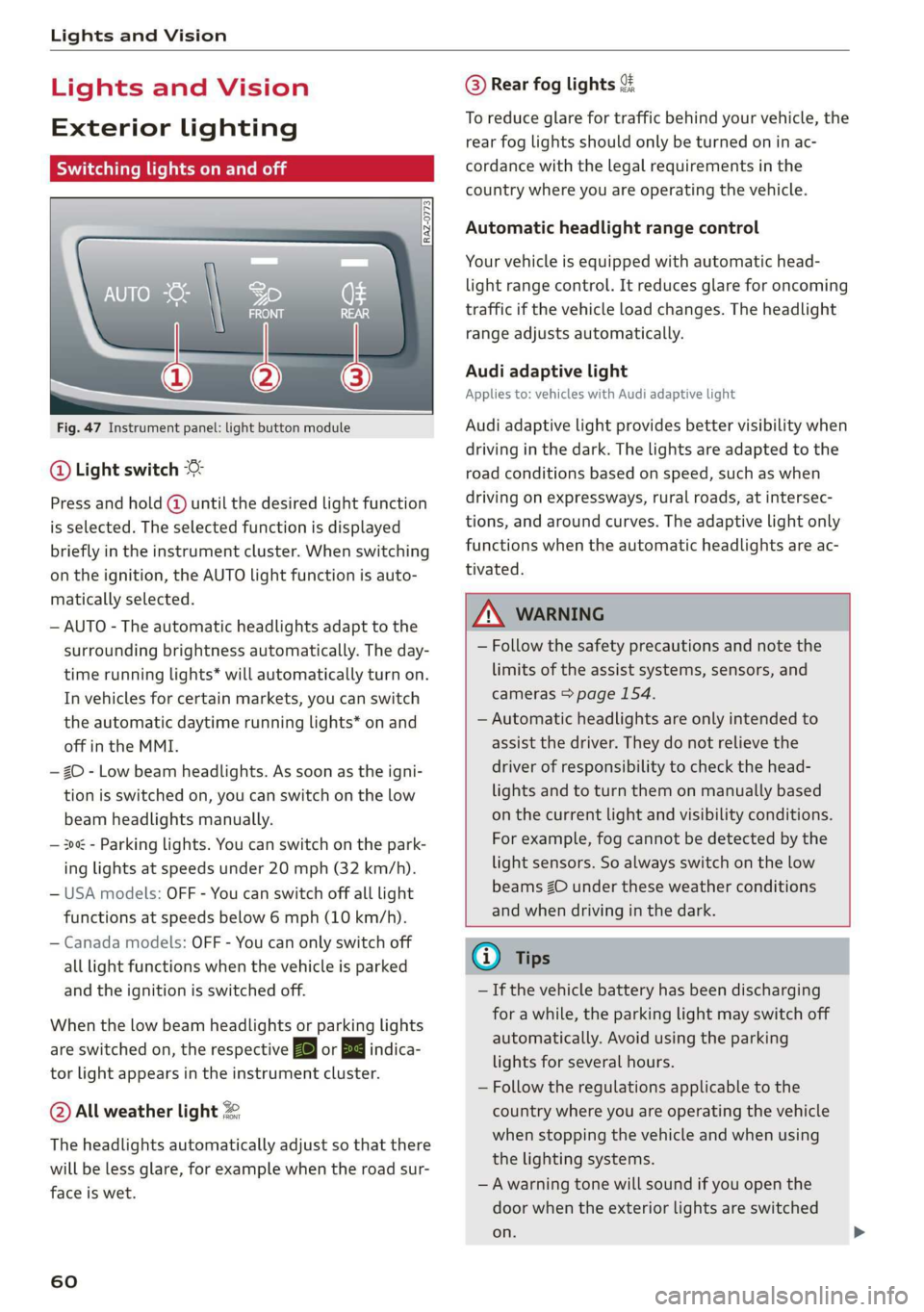
Fig. 47 Instrument panel: light button module
@ Light switch &
Press and hold @ until the desired light function
is selected. The selected function is displayed
briefly in the instrument cluster. When switching
on the ignition, the AUTO light function is auto-
matically selected.
— AUTO - The automatic headlights adapt to the
surrounding brightness automatically. The day-
time running lights* will automatically turn on.
In vehicles for certain markets, you can switch
the automatic daytime running lights* on and
off in the MMI.
— 20 - Low beam headlights. As soon as the igni-
tion is switched on, you can switch on the low
beam headlights manually.
— 30a - Parking lights. You can switch on the park-
ing lights at speeds under 20 mph (32 km/h).
— USA models: OFF - You can switch off all light
functions at speeds below 6 mph (10 km/h).
— Canada models: OFF - You can only switch off
all light functions when the vehicle is parked
and the ignition is switched off.
When the low beam headlights or parking lights
are switched on, the respective Ba or Ea indica-
tor light appears in the instrument cluster.
@ All weather light 2
The headlights automatically adjust so that there
will be less glare, for example when the road sur-
face is wet.
60
@ Rear fog lights %
To reduce glare for traffic behind your vehicle, the
rear fog lights should only be turned on in ac-
cordance with the legal requirements in the
country where you are operating the vehicle.
Automatic headlight range control
Your vehicle is equipped with automatic head-
light range control. It reduces glare for oncoming
traffic if the vehicle load changes. The headlight
range adjusts automatically.
Audi adaptive light
Applies to: vehicles with Audi adaptive light
Audi adaptive light provides better visibility when
driving in the dark. The lights are adapted to the
road conditions based on speed, such as when
driving on expressways, rural roads, at intersec-
tions, and around curves. The adaptive light only
functions when the automatic headlights are ac-
tivated.
ZA WARNING
— Follow the safety precautions and note the
limits of the assist systems, sensors, and
cameras > page 154.
— Automatic headlights are only intended to
assist the driver. They do not relieve the
driver of responsibility to check the head-
lights and to turn them on manually based
on the current light and visibility conditions.
For example, fog cannot be detected by the
light sensors. So always switch on the low
beams ZO under these weather conditions
and when driving in the dark.
@ Tips
— If the vehicle battery has been discharging
for a while, the parking light may switch off
automatically. Avoid using the parking
lights for several hours.
— Follow the regulations applicable to the
country where you are operating the vehicle
when stopping the vehicle and when using
the lighting systems.
—Awarning tone will sound if you open the
door when the exterior lights are switched
on.
Page 63 of 360
4N0012721BD
Lights and Vision
— Only the front headlights turn on when the
daytime running lights are switched on*. In
vehicles in certain markets, the tail lights
will also turn on.
—In cool or damp weather, the inside of the
headlights, turn signals, and tail lights can
fog
over due to the temperature difference
between the inside and outside. They will
clear shortly after switching them on. This
does not affect the service life of the light-
ing.
— When the parking lights are switched on
and the ignition is switched off, the 00-} sym-
bol appears in the light switch module.
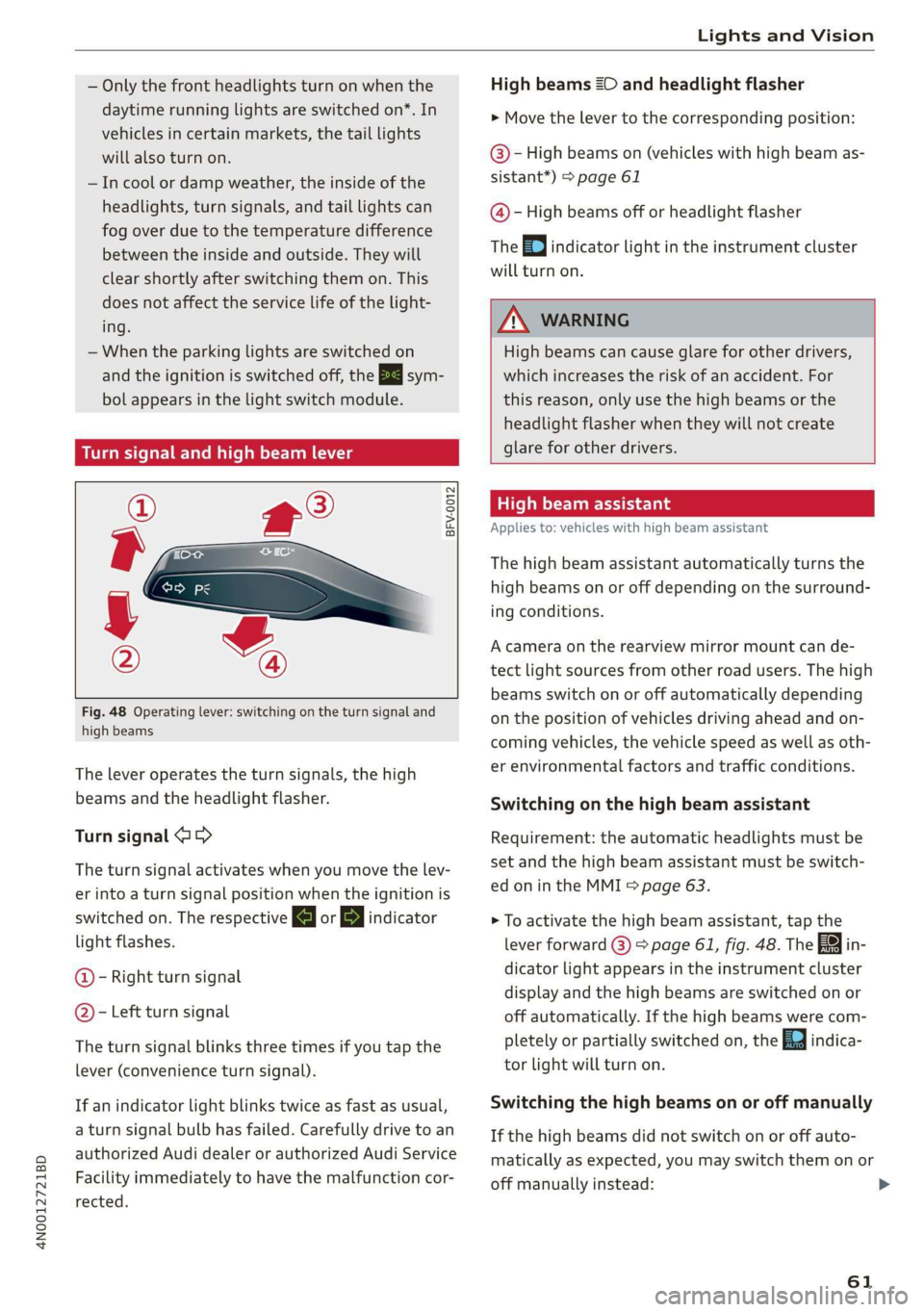
Turn signal and high beam lever
©
%
/
@
Fig. 48 Operating lever: switching on the turn signal and
high beams
The lever operates the turn signals, the high
beams and the headlight flasher.
Turn signal @ >
The turn signal activates when you move the lev-
er into a turn signal position when the ignition is
switched on. The respective a or B indicator
light flashes.
@ - Right turn signal
@ - Left turn signal
The turn signal blinks three times if you tap the
lever (convenience turn signal).
If an indicator light blinks twice as fast as usual,
a turn signal bulb has failed. Carefully drive to an
authorized Audi dealer or authorized Audi Service
Facility immediately to have the malfunction cor-
rected.
High beams 20 and headlight flasher
> Move the Lever to the corresponding position:
@- High beams on (vehicles with high beam as-
sistant*) > page 61
@ - High beams off or headlight flasher
The =o] indicator light in the instrument cluster
will turn on.
Z\ WARNING
High beams can cause glare for other drivers,
which increases the risk of an accident. For
this reason, only use the high beams or the
headlight flasher when they will not create
glare for other drivers.
High beam assistant
Applies to: vehicles with high beam assistant
The high beam assistant automatically turns the
high beams on or off depending on the surround-
ing conditions.
A camera on the rearview mirror mount can de-
tect light sources from other road users. The high
beams switch on or off automatically depending
on the position of vehicles driving ahead and on-
coming vehicles, the vehicle speed as well as oth-
er environmental factors and traffic conditions.
Switching on the high beam assistant
Requirement: the automatic headlights must be
set and the high beam assistant must be switch-
ed on in the MMI = page 63.
> To activate the high beam assistant, tap the
lever forward @) > page 61, fig. 48. The fa in-
dicator light appears in the instrument cluster
display and the high beams are switched on or
off automatically. If the high beams were com-
pletely or partially switched on, the Ea indica-
tor light will turn on.
Switching the high beams on or off manually
If the high beams did not switch on or off auto-
matically as expected, you may switch them on or
off manually instead:
61
Page 115 of 360

4N0012721BD
Driving
prevents too much stress from being placed on
the locking mechanism.
ZA\ WARNING
— Always set the parking brake when leaving
your vehicle, even if for a short period of
time. If the parking brake is not set, the ve-
hicle could roll away, increasing the risk of
an accident.
— Do not leave your vehicle unattended while
the engine is running, because this increases
the risk of an accident.
— If the parking brake is set, it can release au-
tomatically when the accelerator pedal is
pressed. To reduce the risk of an accident,
do not inadvertently press the accelerator
pedal and always shift into “P” when the ve-
hicle is stopped.
— If you leave the vehicle, switch the ignition
off and take the key with you. This is espe-
cially important when leaving persons or an-
imals in the vehicle. Otherwise, the vehicle
could start unintentionally, the parking
brake could release, or electronic equipment
could activate, which increases the risk of an
accident.
— No persons or animals should be left in a
locked vehicle. Locked doors make it more
difficult for emergency workers to enter the
vehicle, which puts lives at risk.
— If you do not begin driving immediately af-
ter releasing the brake pedal, your vehicle
may begin to roll backward. Press the brake
pedal or set the parking brake immediately.
@) Note
If you have to stop on an incline, always press
the brake pedal to hold the vehicle in place to
reduce the risk of the vehicle rolling back-
ward. Do not try to hold the vehicle in place
by pressing and holding the accelerator pedal.
The transmission can overheat, which increas-
es the risk of damage.
Hill hold assist
If you take your foot off of the brake pedal when
driving on hills, the braking force will be held for
several seconds. At that time, you can start driv-
ing without the vehicle rolling backward.
Requirement: the driver's door must be closed,
the engine must be on, and the vehicle must be
traveling uphill.
> To activate hill hold assist, press and hold the
brake pedal for several seconds while the vehi-
cle is stationary.
Z\ WARNING
— If you do not begin driving immediately af-
ter releasing the brake pedal, your vehicle
may begin to roll backward. Press the brake
pedal or set the parking brake immediately.
— The hill hold assist cannot hold the vehicle
on inclines in every scenario (for example,
on slippery or icy ground).
Messages
Take over!
The vehicle cannot be held in place automatically.
Press the brake pedal to secure the vehicle from
rolling away unintentionally.
Gears and driving programs
Oo
@—*
RAZ-0410:
R
N
tt
D/S
7 NEI
Fig. 98 Center console: selector lever
The automatic transmission shifts automatically
depending on the selected gear and the current
driving style. When driving with a moderate driv-
ing style, upshifting early and downshifting late
will help to improve fuel economy. When driving
with a sporty driving style, the transmission per-
mits higher RPMs.
The gears are displayed next to the selector lever. >
113
Page 119 of 360

4N0012721BD
Driving
— Only activate the emergency release while
ona level surface or a slight slope.
—To reduce the risk of an accident, you must
not drive when the emergency release is ac-
tivated.
Messages
i Transmission: malfunction! Safely stop vehi-
cle
Do not continue driving. Stop the vehicle as soon
as possible in a safe location and secure it so it
does not roll. See an authorized Audi dealer or
authorized Audi Service Facility for assistance.
i] Transmission: too hot. Please stop vehicle
Do not continue driving. Select "P" and contact an
authorized Audi dealer or authorized Audi Service
Facility for assistance.
[8] Transmission: too hot. Please adapt driving
style
The transmission temperature has increased sig-
nificantly. Drive very cautiously or take a break
from driving until the temperature returns to the
normal range and the indicator light turns off.
fl Transmission: malfunction! You can contin-
ue driving. See owner's manual
There is a system malfunction in the transmis-
sion. You may continue driving. Drive to an au-
thorized Audi dealer or authorized Audi Service
Facility soon to have the malfunction corrected.
[8] Transmission: malfunction! You can contin-
ue driving with limited function. Please contact
Service
There is a system malfunction in the transmis-
sion. The transmission is switching to emergency
mode. This mode only shifts into certain gears or
may no longer shift at all. The engine may stall.
Drive to an authorized Audi dealer or authorized
Audi Service Facility immediately to have the
malfunction corrected.
[8] Transmission: malfunction! You can contin-
ue driving with limited function. No reverse
gear
There is a system malfunction in the transmis-
sion. The transmission is switching to emergency
mode. This mode only shifts into certain gears or
may no longer shift at all. The engine may stall.
You cannot engage the reverse gear. Drive to an
authorized Audi dealer or authorized Audi Service
Facility immediately to have the malfunction cor-
rected.
[&] Transmission: malfunction! You can contin-
ue driving in D until engine is off
There is a system malfunction in the transmis-
sion. The transmission is switching to emergency
mode. If you turn the engine off, you will not be
able to select any other gears after restarting the
engine. Drive to an authorized Audi dealer or au-
thorized Audi Service Facility immediately to have
the malfunction corrected.
fs Selector lever: malfunction! You can contin-
ue driving. Please contact Service
There is a system malfunction in the selector lev-
er. Drive immediately to an authorized Audi deal-
er or authorized Audi Service Facility to have the
malfunction repaired.
il Selector lever: malfunction! Gear change on-
ly possible if using both shift paddles.
There is a system malfunction in the selector lev-
er. You can continue driving with restricted func-
tion. The selector lever is not working. Gears can
only be selected by tapping both shift paddles at
the same time when the vehicle is stationary. The
“P” gear is automatically engaged when you turn
off the engine. Drive to an authorized Audi dealer
or authorized Audi Service Facility immediately to
have the malfunction corrected.
fs} P button: malfunction! Auto P when engine
off. Please contact Service
There is a malfunction in the "P" button on the
selector lever. The “P” gear is automatically en-
gaged when you turn off the engine. Drive to an
authorized Audi dealer or authorized Audi Service
Facility immediately to have the malfunction cor-
rected.
fs] Danger of rolling away! P not possible.
Please apply parking brake
117