parking brake AUDI A8 2020 Owner's Manual
[x] Cancel search | Manufacturer: AUDI, Model Year: 2020, Model line: A8, Model: AUDI A8 2020Pages: 360, PDF Size: 95.38 MB
Page 201 of 360
4N0012721BD
Parking and maneuvering
— Select |--| > Rear cross-traffic assist in the upper
display when the parking system is active.
Messages
re or > is displayed when there is a mal-
function, the rear cross traffic assist functions
may be unavailable or may be limited.
A message that indicates the cause and possible
solution may appear with some displays. The
weather conditions may be too poor or a sensor
may be covered. Clean the sensor area in the ve-
hicle rear and try to turn the systems on again
later.
If the malfunction remains, drive to an author-
ized Audi dealer or authorized Audi Service Facili-
ty immediately to have the malfunction correct-
ed.
Z\ WARNING
— Follow the safety precautions and note the
limits of the assist systems, sensors, and
cameras > page 154.
— The rear cross-traffic assist will not provide
alerts about people and cannot warn you
about every type of approaching objects,
such as cyclists. Always monitor the traffic
as well as the vehicle's surroundings with di-
rect eye contact.
— The system may not react if objects are ap-
proaching very quickly.
— The rear cross-traffic assist will not provide
alerts if your vehicle is parallel parked or if
your vehicle is pulled too far into the park-
ing space so that it is hidden by adjacent
vehicles.
@) Tips
— Certain settings are stored automatically in
the active personal profile.
— Once an automatic brake activation occurs,
the system cannot initiate another activa-
tion for several seconds.
— System functions may not be available if the
ESC is limited or switched off, or if there is a
malfunction.
— If there is an acoustic warning signal from
the rear cross-traffic assist, then the park-
ing system may not warn you of detected
obstacles under certain circumstances.
— For an explanation on conformity with the
FCC regulations in the United States and the
Industry Canada regulations, see
> page 339.
— The coverage areas of the sensors > fig. 151
are diagrams and do not represent a true-
to-scale image of the sensor ranges.
199
Page 277 of 360
4N0012721BD
Checking and Filling
safety precautions provided in the following in-
formation. The engine compartment is a dan-
gerous area in the vehicle. > A.
ZA WARNING
— Turn the engine off.
— Switch the ignition off.
— Set the parking brake.
— Select the “P” (Park) selector lever position.
— Allow the engine to cool.
— Keep children away from the engine com-
partment.
— Never spill fluids on a hot engine. These flu-
ids (such as the freeze protection contained
in the coolant) can catch fire.
— Avoid short circuits in the electrical system.
— Never reach into the radiator fan. The fan is
temperature-controlled and can turn on
suddenly, even when the ignition is switched
off.
— Never open the hood when there is steam or
coolant escaping from the engine compart-
ment, because there is a risk that you could
be burned. Wait until no steam or coolant is
escaping.
— Plug-in hybrid drive: the coolant expansion
tank cap is equipped with a seal that must
never be removed under any circumstances
= page 277, fig. 183. If the coolant expan-
sion tank for the high-voltage system is not
sealed, please contact an authorized Audi
dealer or authorized Audi Service Facility.
— Plug-in hybrid drive: the sealed cap must on-
ly be opened by an authorized Audi dealer or
authorized Audi Service Facility.
— The cap on the coolant expansion tank must
never be opened when the coolant is hot.
The cooling system is under pressure. There
is a risk of burns
— To protect your face, hands, and arms from
hot steam or coolant, cover the cap with a
thick cloth when opening.
— Do not remove the engine cover under any
circumstances. This increases the risk of
burns.
— Due to the risk of electric shock, never touch
the ignition cable or other components in
the electronic high-voltage ignition system
when the engine is running or is starting.
— Ifa gear is engaged while the vehicle is sta-
tionary and the engine is running, do not
press the accelerator pedal inadvertently.
Pressing the accelerator pedal will cause the
vehicle to move, and this could result in an
accident.
— If inspections or repairs must be performed
while the engine is running, moving compo-
nents (such as the ribbed belt, generator,
and radiator fan) pose an additional risk.
— Set the parking brake first and select the
“P” (Park) selector lever position.
— Always make sure that no parts of the
body, jewelry, ties, loose clothing, and
long hair can be caught in moving engine
components. Before any work, always re-
move any jewelry and/or ties, tie back long
hair, and make sure all clothing fits close
to the body to reduce the risk of anything
becoming caught in engine components.
— Pay attention to the following warnings list-
ed when work on the fuel system or on the
electrical equipment is required.
— Do not smoke.
— Never work near open flames.
— Always have a working fire extinguisher
nearby.
— All work on the battery or electrical system
in your vehicle can result in injuries, chemi-
cal burns, accidents, or burns. Because of
this, all work must be performed only by an
authorized Audi dealer or authorized Audi
Service Facility.
— Limit your exposure to exhaust and chemi-
cals to as short a time as possible.
ZA\ WARNING
California Proposition 65 Warning:
— Engine exhaust, some of its constituents,
and certain vehicle components contain or
emit chemicals known to the State of Cali-
fornia to cause cancer and birth defects and
reproductive harm. In addition, certain flu-
ids contained in vehicles and certain prod-
ucts of component wear contain or emit
275
Page 318 of 360

Emergency assistance
Emergency assistance
General information
> Park the vehicle as far as possible from moving
traffic in the event of a breakdown. In the event
of a flat tire, park the vehicle ona level surface.
If you are ona steep hill, be especially careful.
> Set the parking brake.
> Switch the emergency flashers on.
> Have the passengers exit the vehicle. They
should move to a safe place, for example be-
hind a guard rail.
WARNING
Follow the steps given above. This is for your
protection and the for the safety of others on
the road.
Equipment
Vehicle tool kit, tire mobility kit, and
Wuts BE la4
Applies to: vehicles with the vehicle tool kit, tire mobility kit,
and vehicle jack
Applies to:
Fig. 193 -Vehicles with conventional drive system- Lug-
gage compartment: cargo floor cover
Applies to:
Fig. 194 ---Vehicles with plug-in hybrid drive- Luggage
compartment: cover
316
Conventional drive system: The vehicle tool kit,
vehicle jack”, tire mobility kit*, and compressor*
are stored in the luggage compartment under
the cargo floor cover > fig. 193.
Plug-in hybrid drive: The vehicle tool kit, tire mo-
bility kit and the compressor are located on the
back side of the cover and in the compartment
underneath it > fig. 194.
Conventional drive system
> Lift the cargo floor by the plastic handle
> fig. 193.
> Hook the handle into the luggage compart-
ment weather strip.
> Applies to: vehicles with spare tire: Remove the
handle by turning it counter-clockwise and re-
move the spare tire.
> Unhook the cargo floor cover before closing the
luggage compartment lid.
Plug-in hybrid drive
> Open the cover using the handle > fig. 194.
Conventional drive system: Depending on the
equipment, the vehicle tool kit* may be located
under the spare tire*, under another cover, or in
the tool box.
@ Tips
— The vehicle jack* does not require any main-
tenance.
— Plug-in hybrid drive: The vehicle must not
be operated without the tire repair set.
Tire mobility kit
Applies to: vehicles with tire mobility kit
> Read and follow the important safety precau-
tions > page 316.
> Set the parking brake.
> Select the “P” position.
> Check if a repair with the tire mobility kit is pos-
sible > page 317.
Page 321 of 360
4N0012721BD
Emergency assistance
Replacing wheels
You must complete the preparation before
changing a tire.
> Read and follow the important safety precau-
tions > page 316.
> Set the parking brake.
> Select the “P” position.
> When towing a trailer: disconnect the trailer
from your vehicle.
> Lay out the vehicle tool kit > page 316 and the
spare tire > page 322.
> Applies to: MMI: Select on the home screen:
VEHICLE > Settings & Service > Air suspen-
sion: wheel change.
> Switch the ignition off.
Z\ WARNING
The vehicle must also be secured to prevent it
from rolling when using the vehicle jack”. Use
suitable objects to block the front and back of
the wheel that is diagonal from the wheel
Removing the caps
with the flat tire.
B4L-1337
&
[
Fig. 198 Wheel: wheel bolts with caps
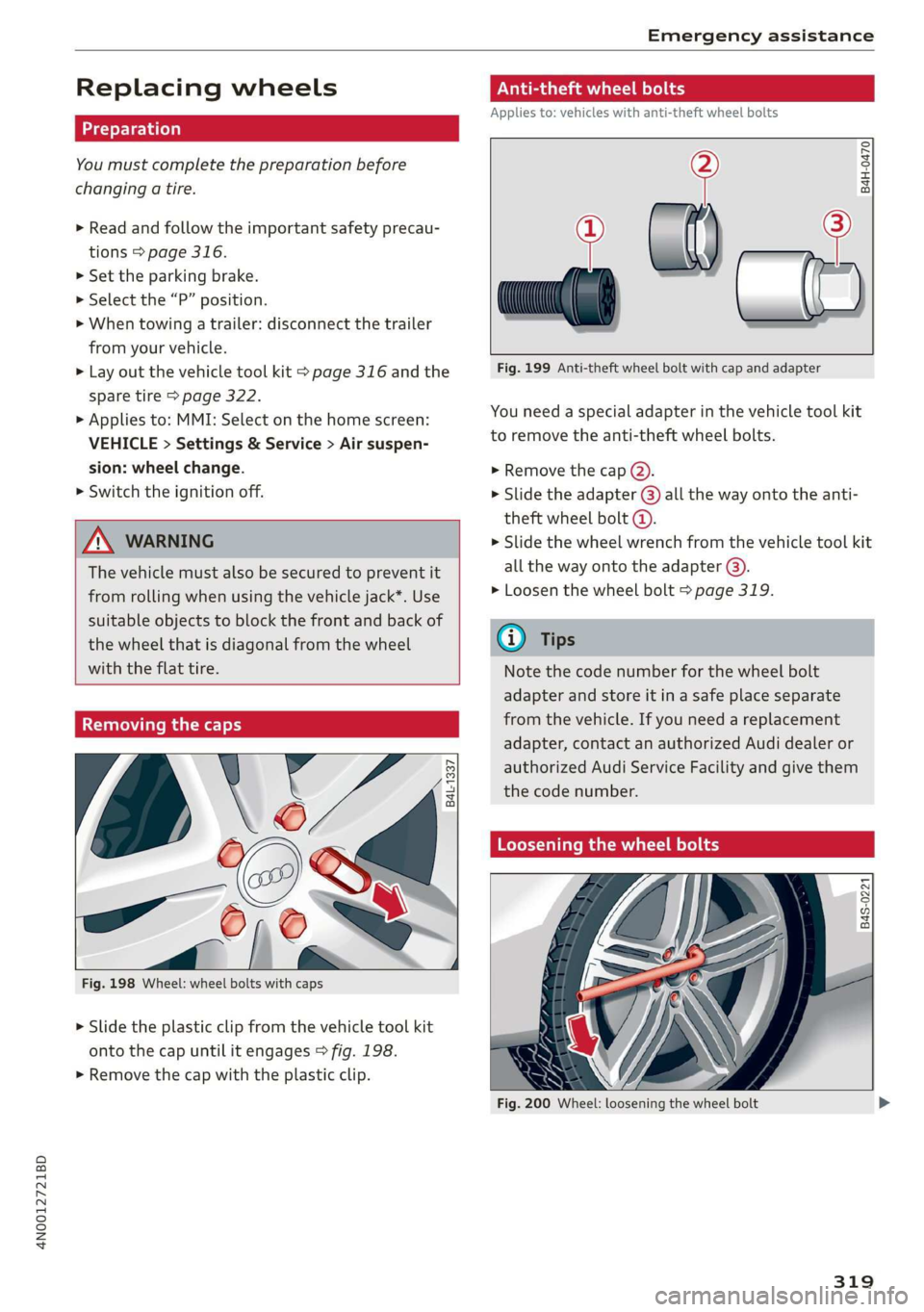
> Slide the plastic clip from the vehicle tool kit
onto the cap until it engages > fig. 198.
> Remove the cap with the plastic clip.
Anti-theft wheel bolts
Applies to: vehicles with anti-theft wheel bolts
i
> all
Fig. 199 Anti-theft wheel bolt with cap and adapter
B4H-0470
v
You need a special adapter in the vehicle tool kit
to remove the anti-theft wheel bolts.
>» Remove the cap @).
> Slide the adapter @) all the way onto the anti-
theft wheel bolt @.
» Slide the wheel wrench from the vehicle tool kit
all the way onto the adapter @).
> Loosen the wheel bolt > page 319.
@) Tips
Note the code number for the wheel bolt
adapter and store it in a safe place separate
from the vehicle. If you need a replacement
adapter, contact an authorized Audi dealer or
authorized Audi Service Facility and give them
the code number.
Loosening the wheel bolts
B4S-0221
Fig. 200 Wheel: loosening the wheel bolt
319
Page 327 of 360

4N0012721BD
Emergency assistance
bar is not available. Use a towing cable made of
synthetic elastic cable similar elastic material.
Z\ WARNING
— Towing highly increases the risk of an acci-
dent, for example from colliding with the
towing vehicle.
— To reduce the risk of an accident, do not al-
low anyone to remain inside the vehicle
when it is being transported by a tow truck
or a special transporter.
@) Note
— If normal towing is not possible, for exam-
ple if the transmission is faulty or if the
towing distance is greater than 30 miles
(50 km), then transport the vehicle on a
special carrier.
— If the vehicle is towed by a tow truck at the
axle that is not permitted, this can cause se-
vere damage to the transmission.
— The vehicle must not be tow started for
technical reasons.
@ Tips
— If the power supply is interrupted, then it
will not be possible to move the selector
lever out of the "P" position. The parking
lock must be released using the emergency
release before towing the vehicle
=> page 116.
— Switch Audi pre sense* off > page 185 when
loading the vehicle onto a vehicle carrier,
train, ship, or other type of transportation,
or when towing the vehicle. This can prevent
an undesired intervention from the pre
sense* system.
— Follow the local legal regulations for tow-
ing.
Read and follow the important information under
=> page 324.
Preparations
> Only secure the towing cable or tow bar at the
designated towing loops > page 325,
=> page 326.
> Make sure the towing cable is not twisted. Oth-
erwise it could disconnect from the towing loop
while towing.
> Switch the emergency flashers on in both
vehicles > page 64. However, do not do this if it
prohibited by law.
Towing vehicle (front)
> Only start to drive when the towing cable is
taut.
> Press the brake pedal very carefully.
> Avoid sudden braking or driving maneuvers.
Vehicle being towed (rear)
> Make sure the ignition is switched on so that
the steering wheel is not locked and so that you
can use the turn signals, the horn, and the
windshield wipers if needed > A\.
> Switching it off before the vehicle has stopped
may impair the function of the brake booster
and power steering. You would then need to
use more force to steer and brake the vehicle.
> Release the parking brake > page 124.
> Select the “N” selector lever position.
> Make sure the towing cable is always taut.
ZA WARNING
Never tow a vehicle using a tow bar or towing
cable if the vehicle does not have electrical
power.
Front towing loop
BFV-0305
Fig. 207 Front bumper: installing the towing loop
325
Page 331 of 360
4N0012721BD
Fuses and bulbs
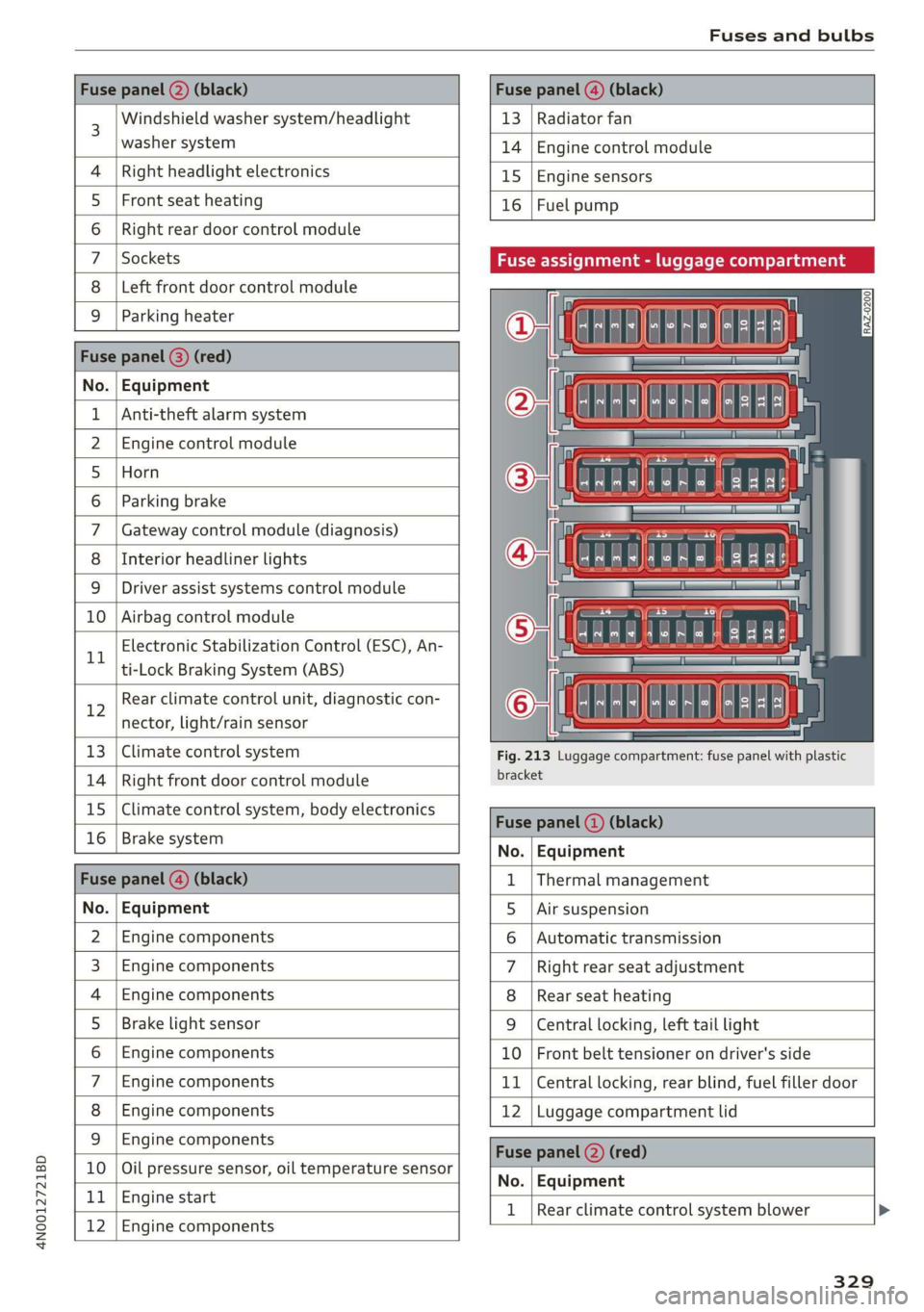
Windshield washer system/headlight
washer system
Right headlight electronics
Front seat heating
Right rear door control module
Sockets
Left front door control module
Parking heater
. | Equipment
Anti-theft alarm system
Engine control module
Horn
Parking brake
Gateway control module (diagnosis)
Interior headliner lights
Driver assist systems control module
Airbag control module
Electronic Stabilization Control (ESC), An-
ti-Lock Braking System (ABS)
12
Rear climate control unit, diagnostic con-
nector,
light/rain sensor
13) Climate control system
14 Right front door control module
15 Climate control system, body electronics
16 Brake system
13 | Radiator fan
14 | Engine control module
15 | Engine sensors
16 | Fuel pump
Fuse assignment - luggage compartment
Fig. 213 Luggage compartment: fuse panel with plastic
bracket
No. Equipment
Fus 1 |Thermal management
No. | Equipment 5 |Air suspension
2 |Engine components 6 |Automatic transmission
3 | Engine components 7 |Right rear seat adjustment
4 | Engine components 8 |Rear seat heating
5 | Brake light sensor 9 |Central locking, left tail light
6 |Engine components 10 | Front belt tensioner on driver's side
7 |Engine components 11 | Central locking, rear blind, fuel filler door
8 | Engine components 12 |Luggage compartment lid
9 | Engine components
10 | Oil pressure sensor, oil temperature sensor
bh BR Engine start
Bb N
Engine components
No. | Equipment
1 | Rear climate control system blower >
329
Page 332 of 360
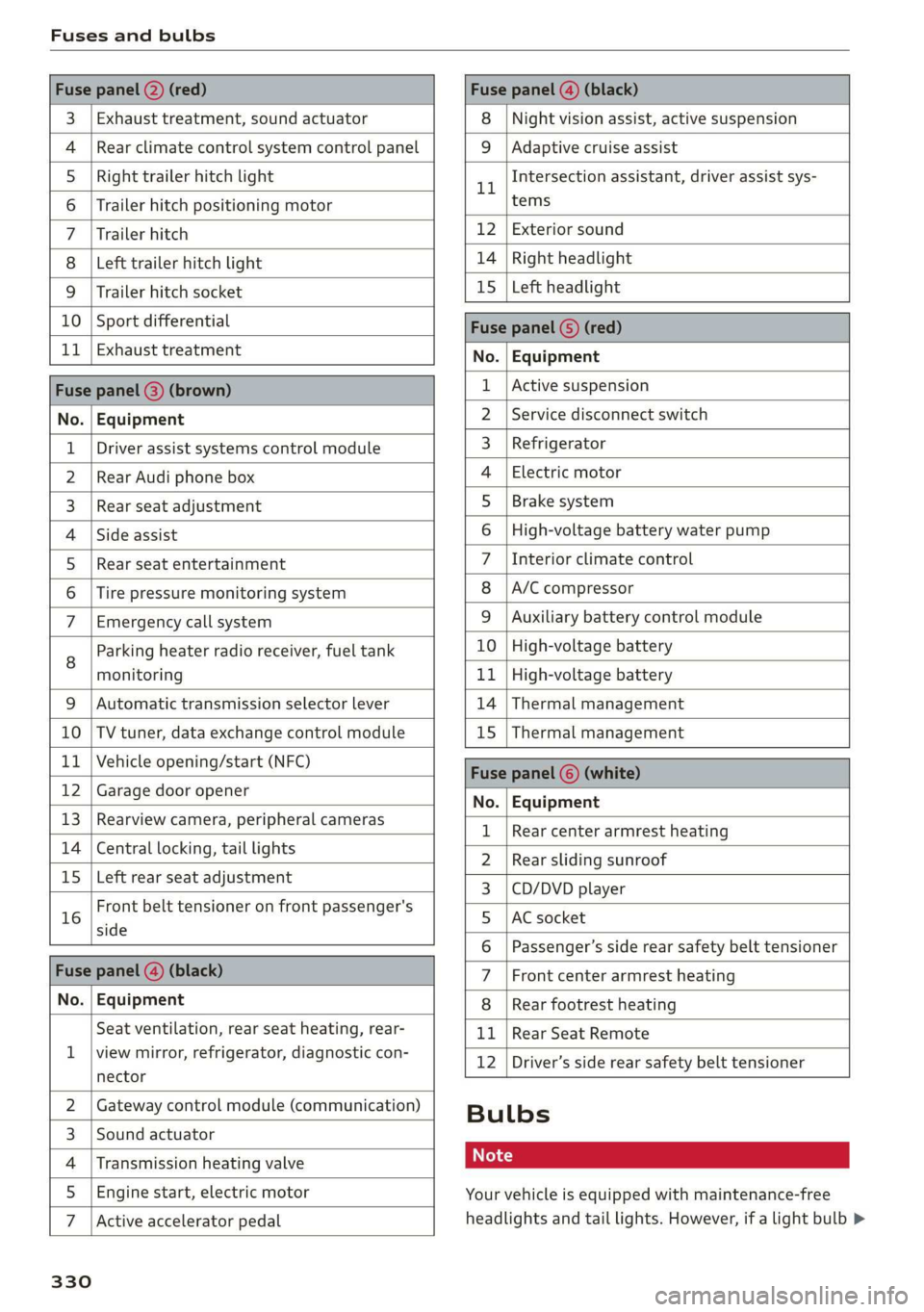
Fuses and bulbs
Fuse panel @) (red) Fuse panel (4) (black)
3 | Exhaust treatment, sound actuator 8 | Night vision assist, active suspension
4 |Rear climate control system control panel 9 | Adaptive cruise assist
5 |Right trailer hitch light ll Intersection assistant, driver assist sys-
6 | Trailer hitch positioning motor tems
7 |Trailer hitch 12 | Exterior sound
8 |Left trailer hitch light 14 | Right headlight
9 |Trailer hitch socket 15 [Left headlight
10 | Sport differential Fuse panel (5) (red)
11 | Exhaust treatment No. | Equipment
Fuse panel (8) (brown) 1 |Active suspension
No. | Equipment 2 |Service disconnect switch
1 | Driver assist systems control module 3_ | Refrigerator
2 |Rear Audi phone box 4 | Electric motor
3 | Rear seat adjustment 5 | Brake system
4 |Side assist 6 |High-voltage battery water pump
5 | Rear seat entertainment 7 |Interior climate control
6 |Tire pressure monitoring system 8 |A/C compressor
7 | Emergency call system 9 | Auxiliary battery control module
g | Parking heater radio receiver, fuel tank 10 |High-voltage battery
monitoring 11 |High-voltage battery
9 |Automatic transmission selector lever 14 | Thermal management
10 |TV tuner, data exchange control module 15 | Thermal management
11 | Vehicle opening/start (NFC) Fuse panel © (white)
12 | Garage door opener No. Equipment
13 | Rearview camera, peripheral cameras 1 | Reamecenter armrest heanng
14 | Central locking, tail lights 2 | Rear sliding sunroof
15 | Left rear seat adjustment 3 | CD/DVD player
16 trent belt tensioner on front passenger's 5 lac socket
6 | Passenger’s side rear safety belt tensioner
Fuse panel (4) (black) 7 |Front center armrest heating
No. | Equipment 8 |Rear footrest heating
Seat ventilation, rear seat heating, rear- 11 |Rear Seat Remote
1 |viewsmirror,.cefrigerator, diagnostic:con- 12 |Driver’s side rear safety belt tensioner
nector
2 |Gateway control module (communication) Bulbs
3 |Sound actuator
4 | Transmission heating valve Cs
5 | Engine start, electric motor Your vehicle is equipped with maintenance-free
7 |Active accelerator pedal headlights and tail lights. However, if a light bulb >
330
Page 348 of 360

Index
Demo mode
refer to Presentation mode............. 239
Destination onthe map................. 230
Details. « ence ox sens © 0 weenwe 0 seme © m omnoes 230
Determining correct load limit........... 303
Digital COMPASS swiss cs veces oo owas eS ee 70
Dime@nSiOnS's « « ssw » s sows x & awe ¥ o awe 3 341
Dimming the exterior mirrors............. 67
Dimming the rearview mirror............. 67
Directory
S@LUINGS cus s seve « & wen © x Bee & o ewe E 2d
also refer to ContactS.............0005 205
Display
Cleaning. .... 2... cee eee eee eee 312
Disposal... 02.0... c cece eee eee eee 336
DiStaMCO bwin
Doors
Child safety lock......... 0.0.0 eee eee 53
Door contact switch. ............0.0000. 64
Mechanically unlocking and locking....... 46
Power closing/closing aid............... 43
Driver information system................ 13
Drives
refer to Media.............000005 250, 255
Drive select
refer to Audi drive select............... 128
Drive systeM.... cece eee ee eee 118, 122
Audi GIVE SELECE’s see 2s came ye een ss 128
Driving down hills.............2--0000- 126
Driving program..............0005 114,178
Driving through water...............005 126
Driving time... .. 2... eee eee eee eee 16
Driving tips
Driving through water................. 126
EMiCienyCrivinig
« ews « « sews 4 x cows oo ew 124,
Uphilland downhill................... 126
Drivingup hills. + & seis 6 sre @ 6 aera & 0 sees 126
Dust filter
refer to Pollutant filter..............0. 108
DVD changer (media drives)............. 251
DVD drive (media drives) ............0.05 251
Dynamic all-wheel steering.............. 131
346
E
E-mail
Message options...........0eee evens 209
SOECIAGS secsses x wssne © ¥ owes +H emcunte 6 a oeeuone 209
SECON MOTO rien & anion a = amuev wo w mnsome 2 2 eI 119
EDL
refer to Electronic Differential Lock...... 133
EDR
Event Data Recorder...............0.. 332
Efficiency assist... 1... eee eee 167
Electricalisystenmiss « snes » seven 2 > eveano «2 284
Electric FAN ge wwe. + sswas + x sone 2 0 arate o seen 236
Electromechanical parking brake......... 124
Electronic Differential Lock.............. 133
Electronic immobilizer 2x: 2 s wes sy ewes 9 es 48
Electronic Stabilization Control........... 133
Embedded SIM card............000000ee 217
Emergency assist...........00-.00 eee ee 190
Emergency assistance..............000. 316
Emergency braking function............. 125
Emergencyi¢allscin oa miwew 6 wamen @ 0 ivacs 207, 223
Emergency flashersii: + woos « 2 wows as ween s 64
Emergency mode.............---0e eee 117
Emergency operation
DOOMSic + wens 2 6 wed 2 same ao wa ao wie Do 46
Fuel filler door............0 000000000 273
Luggage compartment lid............... 52
Panoramic glass roof................... 56
Emissions control system.............05 274
Energy CONSUMETSina + wasewa + neue oy Me eee 17
Energy flow display..............0000ee 119
Energy management................05 121
Energy recovery ..... 0.2... .e eee e eee ee 118
Engine
BréakiniGiins = xsay ¢ > scree % 5 coms 7 e Hees ee 118
GOOLENE «sess 3 a wee ox ese wo seme ¥ eaWoR 281
EMMeNnGeney SEOPLens » 0 wissen « 6 cesnnie s meses a 6 6 TL
Jump starting.....................0. 322
Start/StOpisysteM « ceo « 2 waves x s aus g es 121
Starting/stopping.................04. ary
Engine braking effect
refer to Recuperation..............005 118
Page 353 of 360
4N0012721BD
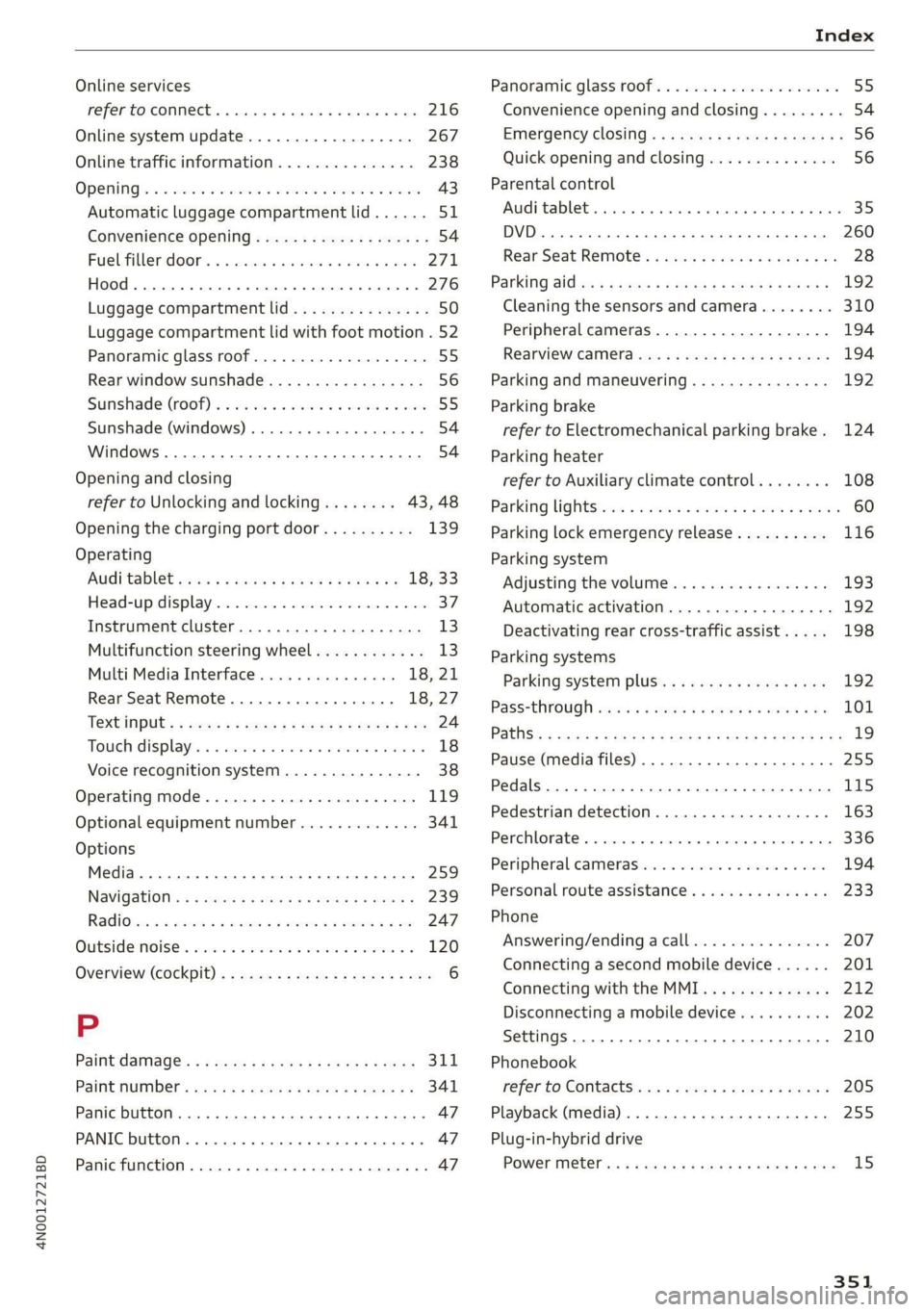
Online services
refer toconnect.........c cece eee eee 216
Online system update.................. 267
Online traffic information............... 238
OPeNiiG se « swesius © o cxouens « eteweas we euseoue ao eemeoe 43
Automatic luggage compartment lid...... 51
Convenience opening..............02005. 54
Fuel-filler:door's « s sis +o wave © wane aes 271
HOOd .. 1... cece eee 276
Luggage compartment lid............... 50
Luggage compartment lid with foot motion . 52
Panoramic glass roof................00. 55
Rear window sunshade...............-. 56
Sunshade (root) « secon oo scone 2 x omens e 2 soc 55
Sunshade (windows) ..............0000- 54
Windows ......... 000s 54
Opening and closing
refer to Unlocking and locking........ 43,48
Opening the charging port door.......... 139
Operating
AUGitaBlet scars a « aren oo mews 4 » eee 2 18, 33
Head-up display................002200. 37
Instrument cluster........-...02-.005- 13
Multifunction steering wheel............ 13
Multi Media Interface............... 18,21
Rear Seat Remote.............00008 18,27
Textinputss « ses ¢ 2 ces « + sews ¢ ee x 8 oe 24
Touch displays. « « scvssne sv carers x sean wna 18
Voice recognition system............... 38
Operating mode................02-000. 119
Optional equipment number............. 341
Options
Media... ... cece eee eee eee 259
Navigation: « = savas 5 2 anes x ¥ eras eo Ree 239
RadiOves. cs scans x awccane w cecteee wv cmeemes
« wc ss wise so arate 4 x oe 120
Overview (Cockpit). » swe: ¢ 2 news s ¢ sees + 2 oes 6
P
Paint damage’ « « sews « ¢ mews 2 wows go pees 311
PAltMUMBER: sees = a wees = x eee Fy eee SY 341
Panic button. ........ 20.0.0... eee ee eee 47
PANIC button....... 0... cee eee eee eee 47
Panic function ............... 0000 cece 47
Panoramic glass roof................200. 55
Convenience opening and closing......... 54
Emergency closing. .........seeeseeeees 56
Quick opening and closing.............. 56
Parental control
AUGitablett « scccozs oo: omeseis a v wee » wiotwas 6 sei 35
DVD... 0... eee eee 260
Rear Seat Remote: «cic ss cies se ncen ses 28
Parking Sides s < eves x x ewes x mes « 2 pee 192
Cleaning the sensors and camera........ 310
Peripheral cameras.................-. 194
RearvieW CaMEraeuy. & ¢ ews 4 s aweas a ew 194
Parking and maneuvering..............- 192
Parking
brake
refer to Electromechanical parking brake. 124
Parking heater
refer to Auxiliary climate control........ 108
Parking lightSici 2s mene + wae os were as eee 60
Parking lock emergency release.......... 116
Parking system
Adjusting the volume................. 193
Automatic activation.................. 192
Deactivating rear cross-traffic assist... . . 198
Parking systems
Parking system plus...............00. 192
PasS=through ses x & news & & eawey xe veiw soa 101
PathSis = eras 2 sees 5 2 eee EE ER ee eR YO Re 19
Pause (media files) ..............200000. 255
Pedals... 0. cee eee eee eee 115
Pedestrian detection................... 163
Perchlorate’. «ices ow aeeiue « « semis « sustonne © a 336
Peripheral cameras............---0000- 194
Personal route assistance. ...........4.. 233
Phone
Answering/endingacall............... 207
Connecting a second mobile device...... 201
Connecting with the MMI.............. 212
Disconnecting a mobile device.......... 202
Settings.......... 0.00. e eee eee eee 210
Phonebook
refer to Contact’ ss < s esa% i sean st roan 205
Playback (media) ............000000000. 255
Plug-in-hybrid drive
POWer Meter es « s sews x o news 3 o cae oe ew 15
351