driver seat adjustment AUDI A8 2020 Owners Manual
[x] Cancel search | Manufacturer: AUDI, Model Year: 2020, Model line: A8, Model: AUDI A8 2020Pages: 360, PDF Size: 95.38 MB
Page 15 of 360
4N0012721BD
Instrument cluster
You can manage personal profiles in the MMI
=> page 41. Before driving, you can select your
personal profile in the instrument cluster and ap-
ply customized vehicle settings, such as the seat
position.
Requirement: the driver's door must have been
opened and the ignition must not be switched
on.
> Confirm the displayed profile @), or
> To load another profile, select and confirm
Switch profile 2).
> Select and confirm the desired profile. The
user-specific settings will load.
> To cancel the seat, mirror, and steering column
adjustment, select Cancel.
G) Tips
For more information and usage options for
personal profiles, see > page 41.
Operating
Heyes
12/05/2017
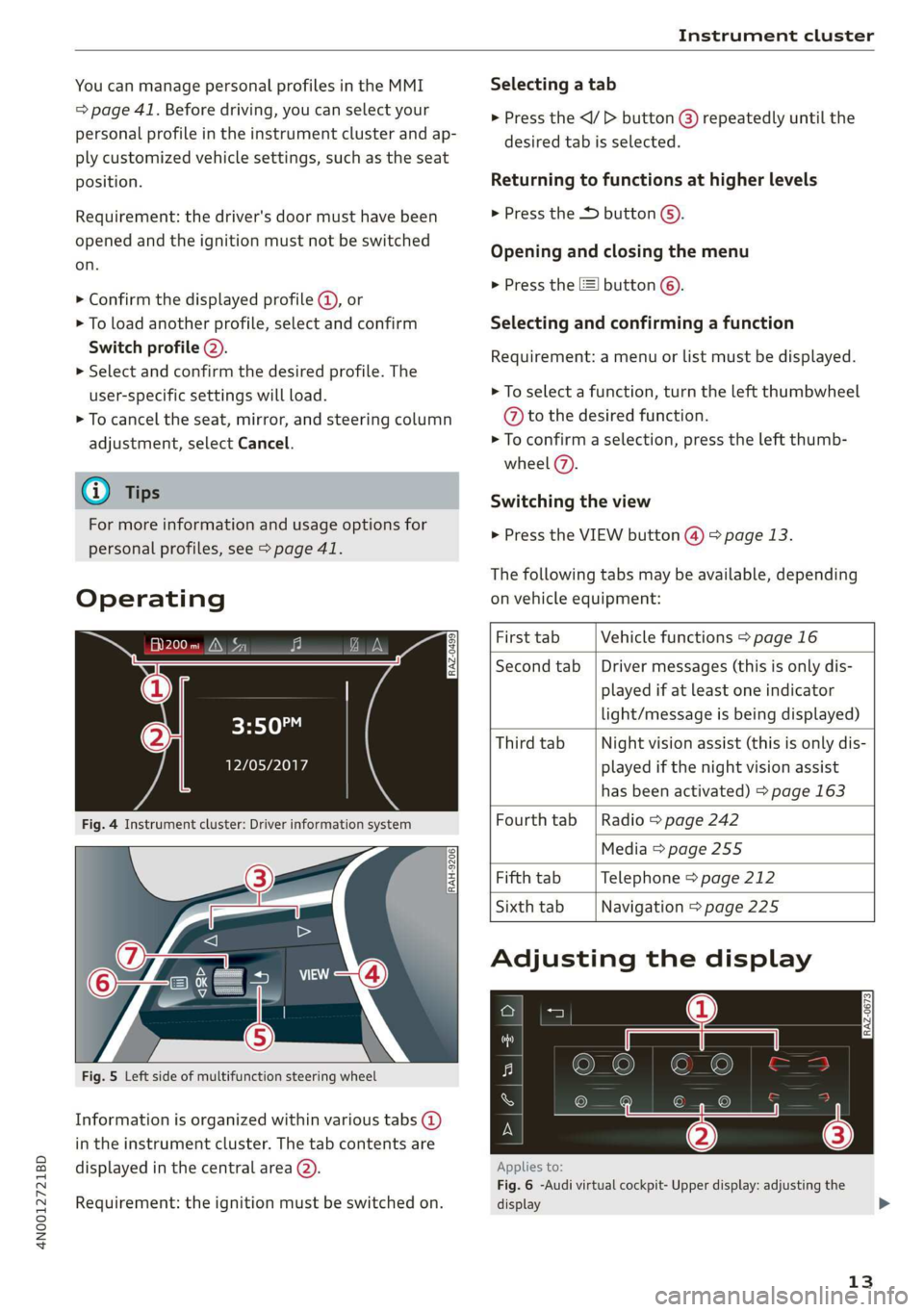
Fig. 4 Instrument cluster: Driver information system
Selecting a tab
> Press the
desired tab is selected.
Returning to functions at higher levels
> Press the D button ©).
Opening and closing the menu
> Press the [=] button ©).
Selecting and confirming a function
Requirement: a menu or list must be displayed.
> To select a function, turn the left thumbwheel
@ to the desired function.
> To confirm a selection, press the left thumb-
wheel (7).
Switching the view
> Press the VIEW button @) > page 13.
The following tabs may be available, depending
on vehicle equipment:
RAH-9206
Fig. 5 Left side of multifunction steering wheel
Information is organized within various tabs @)
in the instrument cluster. The tab contents are
displayed in the central area (2).
Requirement: the ignition must be switched on.
First tab Vehicle functions > page 16
Second tab | Driver messages (this is only dis-
played if at least one indicator
light/message is being displayed)
Third tab Night vision assist (this is only dis-
played if the night vision assist
has been activated) > page 163
Fourth tab | Radio > page 242
Media > page 255
Fifth tab Telephone > page 212
Sixth tab Navigation > page 225
Adjusting the display
RAZ-0673
Applies to:
Fig. 6 -Audi virtual cockpit- Upper display: adjusting the
display
13
>
Page 33 of 360
4N0012721BD
Touch displays
Securing the Audi tablet
Requirement: the two buttons @) ° fig. 24 must
be in the retracted position.
> Hold the Audi tablet in both hands during the
entire process.
» Engage the Audi tablet at the contact strip @
> fig. 25.
> Carefully press the Audi tablet toward the Audi
tablet holder @) > fig. 25 until the Audi tablet
locks into place audibly.
@ Tips
If the Audi tablet is not in its holder and is ex-
posed to extremely high or low temperatures,
it may turn off automatically for safety rea-
sons.
Tilting the holder
Applies to: vehicles with Audi tablet
wy
RAH-8642|
Fig. 26 Rear side of driver's/front passenger's seat: angle
range of the holder
Tilting the holder manually
Applies to: manually adjustable holders
> Hold the Audi tablet in both hands during the
entire process.
> Tilt that holder in the specified area @).
Tilting the holder using the power controls
Applies to: power adjustable holders
> Applies to: Rear Seat Remote: Select on the
home screen: SEATS > Seat setting and touch
the picture of the front passenger seat on the
Audi tablet. Press the left or right arrows until
the desired position is reached.
® Note
To reduce the risk of damage to the holder:
— Applies to: manually adjustable holders Tilt
the holder within the intended range @)
without pressing or pulling it forcefully.
— Applies to: power adjustable holders Only
use the power adjustment to tilt the holder.
Do not tilt it manually with your hands.
Inserting or removing a microSD card
Applies to: vehicles with Audi tablet
RAH-8614 fi
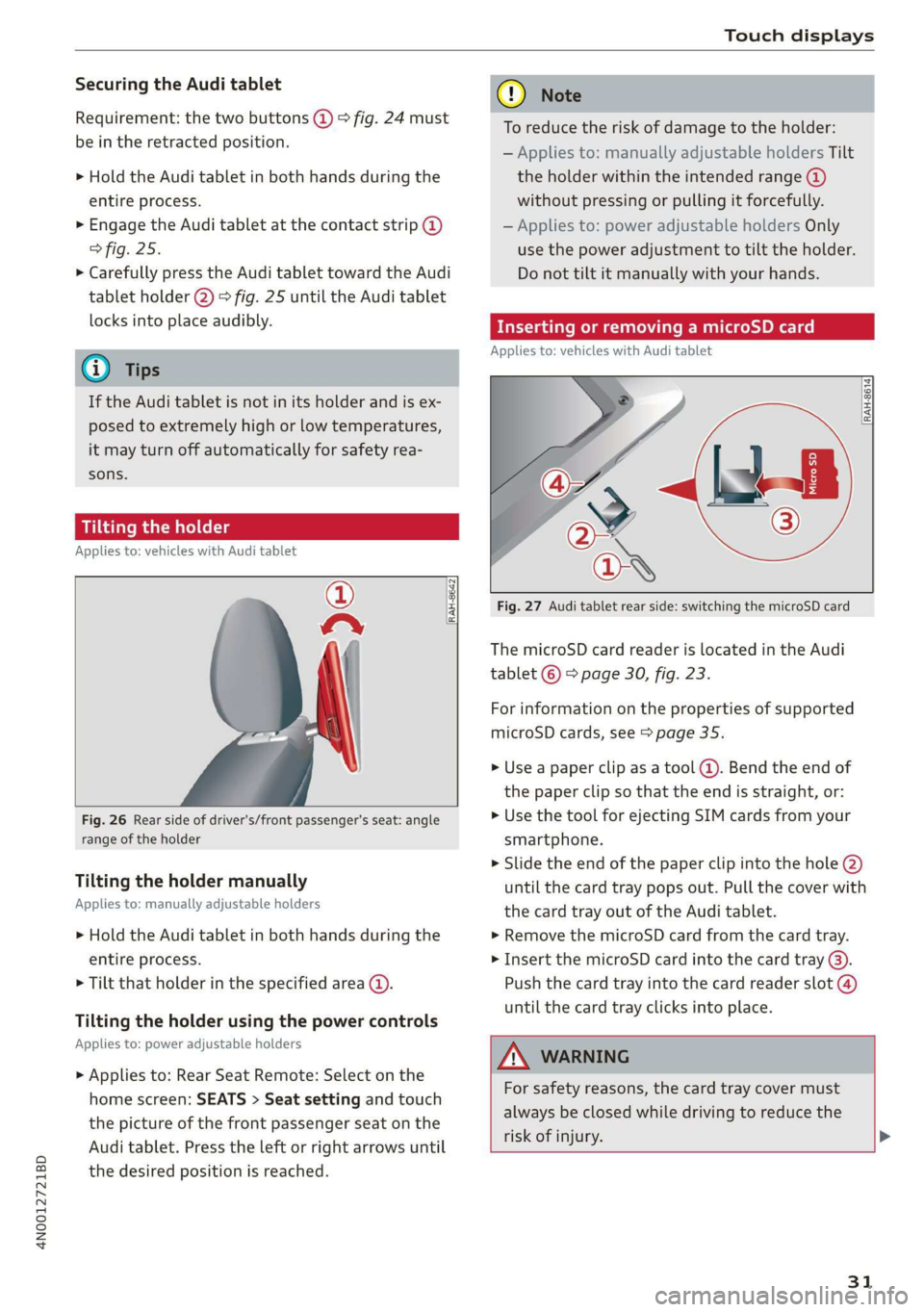
Fig. 27 Audi tablet rear side: switching the microSD card
The microSD card reader is located in the Audi
tablet © > page 30, fig. 23.
For information on the properties of supported
microSD cards, see > page 35.
» Use a paper clip as a tool (@). Bend the end of
the paper clip so that the end is straight, or:
> Use the tool for ejecting SIM cards from your
smartphone.
> Slide the end of the paper clip into the hole @)
until the card tray pops out. Pull the cover with
the card tray out of the Audi tablet.
» Remove the microSD card from the card tray.
> Insert the microSD card into the card tray @).
Push the card tray into the card reader slot @)
until the card tray clicks into place.
AN WARNING
For safety reasons, the card tray cover must
always be closed while driving to reduce the
risk of injury. >
31
Page 39 of 360
4N0012721BD
Head-up display
Head-up display
Description
Applies to: vehicles with head-up display
The head-up display projects certain warnings or
selected information from the assist systems on
the windshield. The display appears within the
driver's field of vision.
Switching on and off
The Y button is located in the function bar on
the lower display > page 21.
> To switch the head-up display on or off, press
and hold the Y button.
Settings in the Infotainment system
> Applies to: MMI: Select on the home screen:
SETTINGS > Display & brightness > Head-up
display, or
> Press the Y button.
Possible settings:
— Picture rotation
— Brightness
— Display height: You can adjust the height of the
display. Sit in the correct seating position
=> page 72 and adjust the head-up display.
— Display contents: You can set which informa-
tion should be displayed. The display of certain
information and some of the red indicator
lights cannot be hidden.
@) Note
To reduce the risk of scratches on the glass
covering the head-up display, do not place any
objects in the projection opening.
@ Tips
— Sunglasses with polarization filters and un-
favorable lighting conditions can impair visi-
bility of the display.
— An optimal display depends on the seat po-
sition and the height adjustment of the
head-up display.
—A special windshield is needed for the head-
up display function.
— For information on cleaning, see > table In-
terior cleaning on page 311.
— Certain settings are stored automatically in
the active personal profile.
37
Page 68 of 360
Lights and Vision
— Cockpit dimming
— Head-up display
—MMI
— Virtual cockpit
Possible settings in the Rear Seat Remote:
— Brightness
— Dim display
Vision
Adjusting exterior mirrors
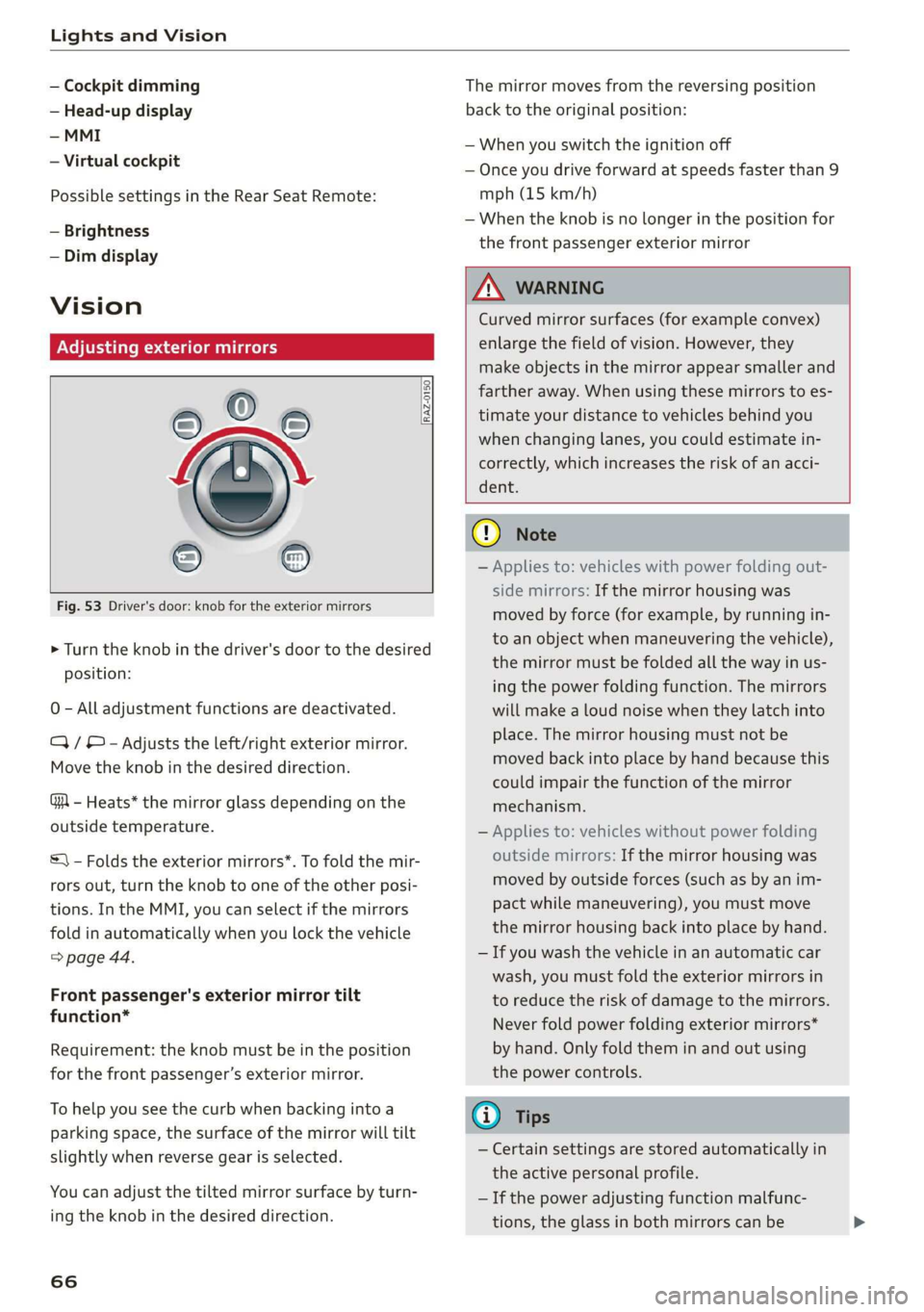
Fig. 53 Driver's door: knob for the exterior mirrors
® ©
O
> Turn the knob in the driver's door to the desired
position:
0 - All adjustment functions are deactivated.
Q/ ® - Adjusts the left/right exterior mirror.
Move the knob in the desired direction.
GA - Heats* the mirror glass depending on the
outside temperature.
©) - Folds the exterior mirrors*. To fold the mir-
rors out, turn the knob to one of the other posi-
tions. In the MMI, you can select if the mirrors
fold in automatically when you lock the vehicle
> page 44.
Front passenger's exterior mirror tilt
function*
Requirement: the knob must be in the position
for the front passenger’s exterior mirror.
To help you see the curb when backing into a
parking space, the surface of the mirror will tilt
slightly when reverse gear is selected.
You can adjust the tilted mirror surface by turn-
ing the knob in the desired direction.
66
The mirror moves from the reversing position
back to the original position:
— When you switch the ignition off
— Once you drive forward at speeds faster than 9
mph (15 km/h)
— When the knob is no longer in the position for
the front passenger exterior mirror
ZX WARNING
Curved mirror surfaces (for example convex)
enlarge the field of vision. However, they
make objects in the mirror appear smaller and
farther away. When using these mirrors to es-
timate your distance to vehicles behind you
when changing lanes, you could estimate in-
correctly, which increases the risk of an acci-
dent.
@) Note
— Applies to: vehicles with power folding out-
side mirrors: If the mirror housing was
moved by force (for example, by running in-
to an object when maneuvering the vehicle),
the mirror must be folded all the way in us-
ing the power folding function. The mirrors
will make a loud noise when they latch into
place. The mirror housing must not be
moved back into place by hand because this
could impair the function of the mirror
mechanism.
— Applies to: vehicles without power folding
outside mirrors: If the mirror housing was
moved by outside forces (such as by an im-
pact while maneuvering), you must move
the mirror housing back into place by hand.
— If you wash the vehicle in an automatic car
wash, you must fold the exterior mirrors in
to reduce the risk of damage to the mirrors.
Never fold power folding exterior mirrors*
by hand. Only fold them in and out using
the power controls.
G) Tips
— Certain settings are stored automatically in
the active personal profile.
— If the power adjusting function malfunc-
tions, the glass in both mirrors can be
Page 75 of 360

4N0012721BD
Sitting correctly and safely
— The distance between your upper body and the
steering wheel or instrument panel is at least
10 inches (25 cm)
— The distance between your knees and the in-
strument panel is at least 4 inches (10 cm)
— Your thighs are lightly supported by the front
surface of the seat
— The backrest is in an upright position and your
back
is resting against it
— You have a sufficient view of the area around
the vehicle
— You have a clear view of the instrument cluster,
indicator lights, and the head-up display*
Seat settings menu: quick access
If you press on the image of the driver's or front
passenger's seat in the climate control system
menu & page 104, fig. 95 @, you will go directly
to the seat settings for that seat.
ZA WARNING
— If you are too close to the steering wheel or
instrument panel, the airbag system cannot
provide the optimal protection, which in-
creases the risk of injury and death.
—To reduce the risk of injury in the event of
sudden braking maneuvers or accidents,
never drive with the backrest reclined very
far. The airbag system and seat belts can on-
ly provide optimal protection when the back-
rest is in an upright position and the driver
is wearing the seat belt correctly. If the
backrest is angled back too far, the safety
belt can shift to soft areas of the body, such
as the stomach, which increases the risk of
injury.
—To reduce the risk of an accident, only adjust
the seats when the vehicle is stationary.
— Be careful when adjusting the seat. Lack of
control or attention when adjusting can re-
sult in injuries due to pinching to vehicle oc-
cupants both in the front seats and rear
seats.
— Never place objects in the driver's footwell.
Objects could shift and enter the area
around the pedals, which could prevent you
from using them. You would then be unable
to use the pedals if sudden driving or brak-
ing maneuvers were needed, which increas-
es the risk of an accident.
— Make sure that the floor mats are always se-
curely attached.
—To reduce the risk of an accident, never place
additional floor mats or other floor covers
over the installed floor mats, because this
reduces the pedal's range of motion and can
impair pedal operation.
—To reduce the risk of injury, never place your
feet on the instrument panel, out of the
window, or on the seat surfaces. This also
applies to passengers in the rear seats.
G) Tips
At the same time, only move the respective
seat using the controls.
Adjusting the front seats with buttons
You can adjust the basic settings using the but-
tons.
RAZ-0172
Fig. 60 Front seat: seat adjustment buttons
The settings depend on the vehicle equipment.
Adjusting the seat position
> To move the seat forward or backward, push
the button @ forward or backward.
> To adjust the seat upward or downward, push
the rear section of the button @ upward or
downward.
> To adjust the seat surface, press the front part
of the button @ upward or downward.
Adjusting the backrests
> To move the backrest forward or backward,
press the button (@) forward or backward.
73
Page 77 of 360
4N0012721BD
Sitting correctly and safely
Xe)
onal settings in the MMI
You can adjust additional settings and switch
functions on or off in the MMI.
> Applies to: MMI: Select on the home screen:
VEHICLE > Seats > Additional seat settings.
Depending on the vehicle equipment, the follow-
ing options may be available.
Reset seat position
You can adjust the position of the front passeng-
er’s seat to match the driver's seat. The rear
seats are set to a pre-defined position.
Driver seat entry assistance/Front passenger
seat entry assistance
Entry assistance makes it easier to enter or exit
the vehicle.
Rear seat entry assistance
If the function is switched on, the rear seat will
automatically move all the way back when the
door next to that seat is opened.
Passenger side rear seat adjustment
If the function is switched on, the front passeng-
er's seat can be adjusted from the rear seat
= page 77.
Rear seat upright/reclining position
You can set the upright/reclining position on the
MMI & A in Adjusting the comfort position on
page 79.
Adjusting the front passenger's seat from
tate lah terete
You can adjust the front passenger's side with the
driver's seat buttons.
Applies to: MMI:
> Select on the home screen: VEHICLE > Seats.
> To display the various seats, press ) or ¢.
> To switch on the function, press the 2/ button.
The lower edge of the button will turn red.
After you have switched on the function, you can
adjust the front passenger's seat using the driv-
er's seat buttons > page 73, fig. 60.
The function switches off automatically when
you exit the menu.
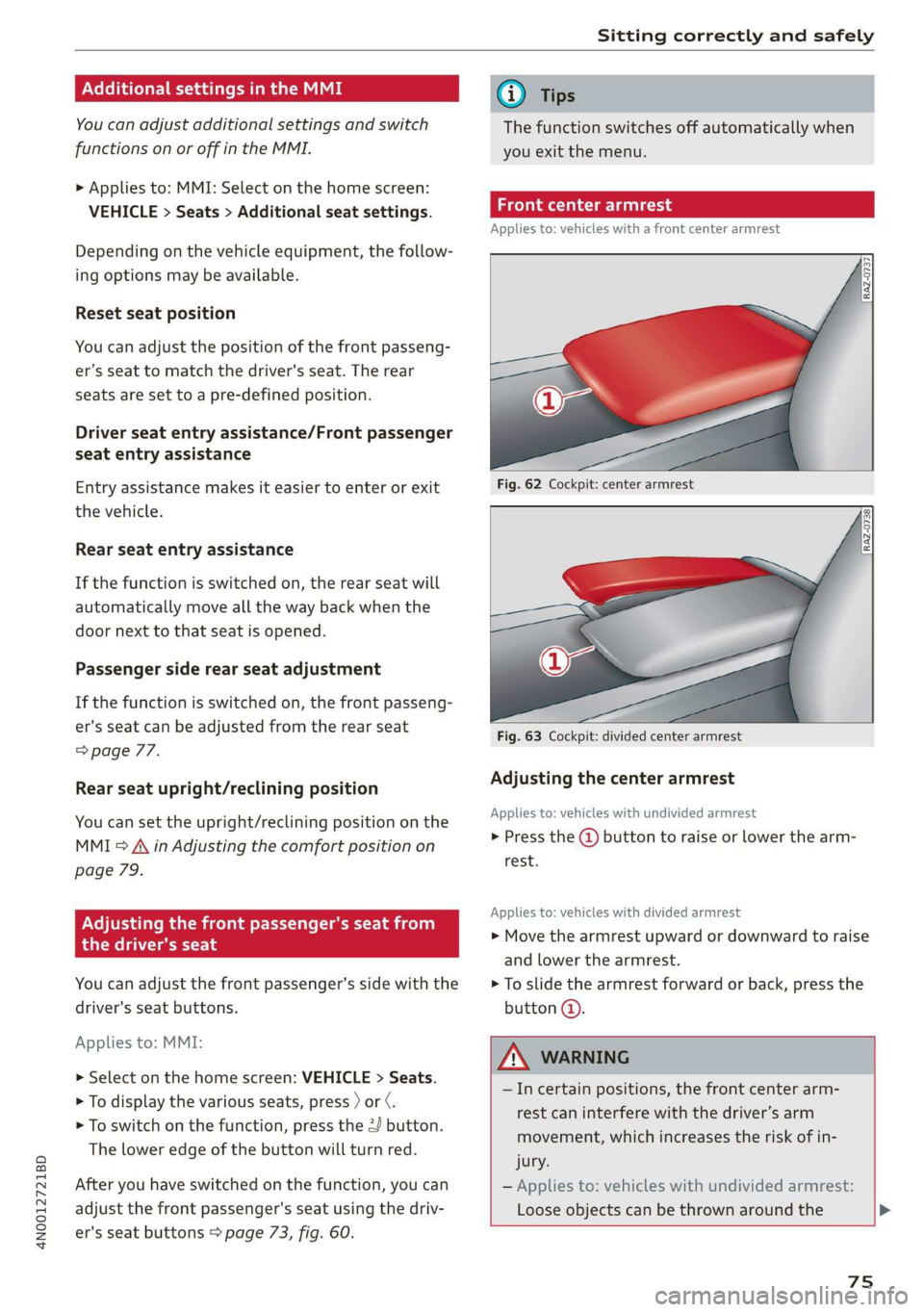
eae Ceri
Applies to: vehicles with a front center armrest
Fig. 62 Cockpit: center armrest
Fig. 63 Cockpit: divided center armrest
Adjusting the center armrest
Applies to: vehicles with undivided armrest
> Press the @ button to raise or lower the arm-
rest.
Applies to: vehicles with divided armrest
> Move the armrest upward or downward to raise
and lower the armrest.
> To slide the armrest forward or back, press the
button @.
ZA\ WARNING
—Incertain positions, the front center arm-
rest can interfere with the driver’s arm
movement, which increases the risk of in-
jury.
— Applies to: vehicles with undivided armrest:
Loose objects can be thrown around the
75
Page 78 of 360

Sitting correctly and safely
vehicle interior during sudden driving or
braking maneuvers, which increases the risk
of an accident. Store objects securely while
driving.
— Applies to: vehicles with front center airbag:
The center armrest must be closed while
driving. Otherwise, the protective function
of the front center airbag could be impaired
because it deploys from the driver's seat
backrest. This increases the risk of injury.
Rear seats
(ee eels)
Z\ WARNING
— The power seats can also be adjusted when
the ignition is switched off. To reduce the
risk of injury, children should never be left
unattended in the vehicle for this reason.
— Be careful when adjusting the seat. Unsu-
pervised or careless seat adjustment could
cause parts of the body to get pinched,
which increases the risk of injury.
C) Note
Before adjusting the seat position, you must
remove the retainers for the LATCH child safe-
ty seat restraint system, if installed.
G) Tips
At the same time, only move the respective
seat using the controls.
76
Adjusting seats with buttons
Applies to: vehicles with power adjustable rear seats
You can adjust the basic settings using the but-
tons.
©
S|
Ss x a
oo
Fig. 64 Rear center armrest/full-length center console:
seat adjustment buttons
The settings depend on the vehicle equipment.
Adjusting the lumbar support
> To adjust the curvature of the lumbar support,
press the left or right button @.
> To adjust the height of the lumbar support,
press the upper or lower button (@).
Adjusting the backrests
> To move the backrest forward or backward,
press the button (2) to the left or right.
Adjusting the head restraints
> See > page 81
Adjusting the seat position
> To adjust the seat forward or backward, press
the button @) to the left or right. The backrest
will automatically adjust with it.
>
To move the seat upward or downward, press
the button @) upward or downward.
Adjusting the front passenger's seat
See > page 77
Adjusting the comfort position
See > page 78
Page 80 of 360
Sitting correctly and safely
Requirements
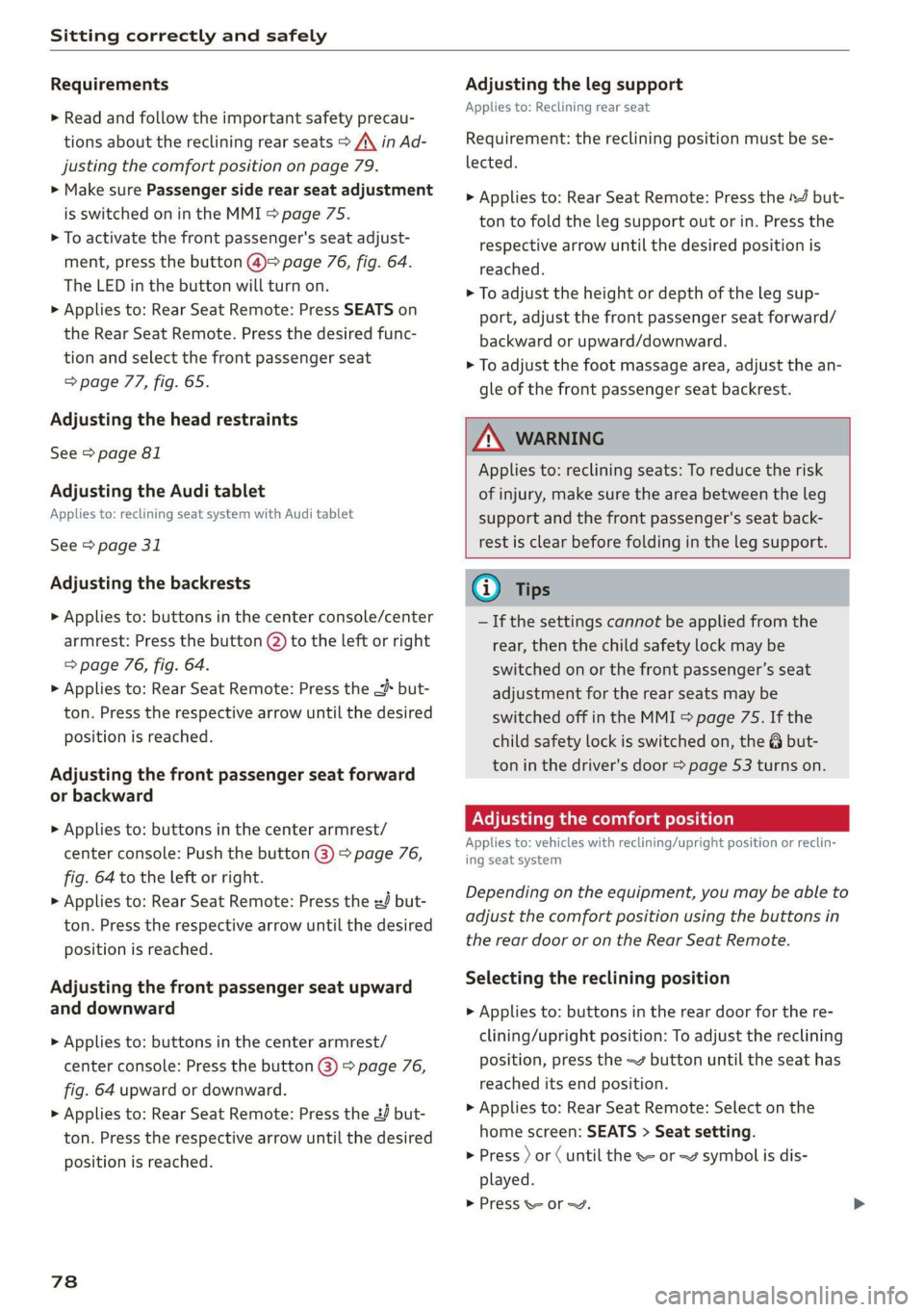
> Read and follow the important safety precau-
tions about the reclining rear seats > /\ in Ad-
justing the comfort position on page 79.
> Make sure Passenger side rear seat adjustment
is switched on in the MMI > page 75.
> To activate the front passenger's seat adjust-
ment, press the button @)= page 76, fig. 64.
The LED in the button will turn on.
> Applies to: Rear Seat Remote: Press SEATS on
the Rear Seat Remote. Press the desired func-
tion and select the front passenger seat
=> page 77, fig. 65.
Adjusting the head restraints
See > page 81
Adjusting the Audi tablet
Applies to: reclining seat system with Audi tablet
See > page 31
Adjusting the backrests
> Applies to: buttons in the center console/center
armrest: Press the button (2) to the left or right
=> page 76, fig. 64.
> Applies to: Rear Seat Remote: Press the < but-
ton. Press the respective arrow until the desired
position is reached.
Adjusting the front passenger seat forward
or backward
> Applies to: buttons in the center armrest/
center console: Push the button @) > page 76,
fig. 64 to the left or right.
> Applies to: Rear Seat Remote: Press the J but-
ton. Press the respective arrow until the desired
position is reached.
Adjusting the front passenger seat upward
and downward
> Applies to: buttons in the center armrest/
center console: Press the button @) > page 76,
fig. 64 upward or downward.
> Applies to: Rear Seat Remote: Press the 2 but-
ton.
Press the respective arrow until the desired
position is reached.
78
Adjusting the leg support
Applies to: Reclining rear seat
Requirement: the reclining position must be se-
lected.
> Applies to: Rear Seat Remote: Press the 4 but-
ton to fold the leg support out or in. Press the
respective arrow until the desired position is
reached.
> To adjust the height or depth of the leg sup-
port, adjust the front passenger seat forward/
backward or upward/downward.
> To adjust the foot massage area, adjust the an-
gle of the front passenger seat backrest.
Z\ WARNING
Applies to: reclining seats: To reduce the risk
of injury, make sure the area between the leg
support and the front passenger's seat back-
rest is clear before folding in the leg support.
Gi) Tips
— If the settings cannot be applied from the
rear, then the child safety lock may be
switched on or the front passenger’s seat
adjustment for the rear seats may be
switched off in the MMI > page 75. If the
child safety lock is switched on, the @ but-
ton in the driver's door > page 53 turns on.
ONS mal -Mehlielam eth ela)
Applies to: vehicles with reclining/upright position or reclin-
ing seat system
Depending on the equipment, you may be able to
adjust the comfort position using the buttons in
the rear door or on the Rear Seat Remote.
Selecting the reclining position
> Applies to: buttons in the rear door for the re-
clining/upright position: To adjust the reclining
position, press the =% button until the seat has
reached its end position.
> Applies to: Rear Seat Remote: Select on the
home screen: SEATS > Seat setting.
> Press ) or ( until the x= or <4 symbol is dis-
played.
> Press &or~.
Page 87 of 360

4N0012721BD
Sitting correctly and safely
Adjusting the height of the safety belt
B4G-0004)
Fig. 77 Belt height adjustment for the front seats - safety
belt relay
> To move the belt higher, slide the safety belt re-
lay @ upward.
> To move the belt lower, press the release but-
ton @ and slide the safety belt relay 2) down-
ward.
> To check if the safety belt relay is securely
locked in place, pull firmly on the belt.
@ Tips
You can also adjust the height of the front
seats to change the position of the safety
belts.
Additional safety belt functions
Belt retractor lock
The safety belts on the rear seats and on the
front passenger seat are equipped with a belt re-
tractor lock.
> If you secure a child safety seat with a safety
belt, the belt retractor lock on the safety belt
may need to be activated. Follow the instruc-
tions from the child safety seat manufacturer.
> When a vehicle passenger has fastened a safety
belt, the belt retractor lock should not be acti-
vated. If the belt retractor lock has been acti-
vated unexpectedly, deactivate it.
Deactivating or activating the belt retractor lock
=> page 94.
Safety belt retractor
The safety belts are equipped with an automatic
belt retractor. This automatic retractor allows the
safety belt to be pulled all the way out when the
belt is pulled slowly. However, the automatic re-
tractor locks during sudden braking maneuvers.
It also locks the belts when accelerating, driving
uphill, and driving around curves.
Belt force limiter
Safety belts with belt force limiters reduce the
force placed on the body by the safety belts dur-
ing a collision.
Safety belt pretensioners
Safety belts may be tightened with reversible
belt tensioners when you start driving and in cer-
tain driving situations. If the safety belt is too
loose, it will be tightened so that the belt will
rest closer to the body.
In some collisions, pyrotechnic belt tensioners
may secure the safety belts so that they cannot
loosen. This reduces forward movement by the
vehicle passengers.
ZA WARNING
The pyrotechnic system can only provide pro-
tection during one collision. If the pyrotechnic
belt tensioners deploy, the pretensioning sys-
tem must be replaced by an authorized Audi
dealer or authorized Audi Service Facility.
G) Tips
Smoke may be released when pyrotechnic belt
tensioners deploy. This is not a sign of a vehi-
cle fire.
Memory function
General information
Applies to: vehicles with memory function
With the memory function, you can save and call
up seat profiles using the memory buttons in the
door trim panel.
Depending on the equipment, it may be possible
to store the following settings:
— Driver's seat: seat, head restraint*, steering
wheel, exterior mirrors
— Front passenger's seat: seat, head restraint
8s
>
Page 88 of 360

Sitting correctly and safely
— Outer rear seats*: seat
Storing and recalling a seat profile
Applies to: vehicles with memory function
The memory function buttons are located in the
door trim panel.
Storing a seat profile
> Press the [SET] button. If the LED in the button
turns on, a seat profile can be stored.
> Push one of the numbered memory buttons. A
tone confirms that the settings were stored.
Accessing a seat profile
> When the a door is open and the ignition is
switched off, press the memory button once
briefly. The seat will be fully adjusted to the
settings in the seat profile.
> If the door is closed or the ignition is switched
on, press and hold the memory button until the
seat is fully adjusted to the settings in the seat
profile.
Z\ WARNING
—To reduce the risk of an accident, the seat
setting can only be recalled when the vehicle
is stationary.
— In an emergency, the recall process can be
canceled by pressing the seat adjustment
button on that seat.
@) Tips
Certain settings are stored automatically in
the active personal profile.
Airbag system
ZA\ WARNING
— If you have not fastened your safety belt,
you are in an incorrect seating position, or
you are too close to the airbag system, the
airbag system will not be able to protect
you. This increases the risk of serious or fa-
tal injuries. Make sure that every vehicle
passenger has his or her safety belt correctly
86
fastened and is sitting in a correct seating
position = page 72. This is necessary regard-
less of whether the seat is equipped with an
airbag or not.
Never place your feet on the instrument
panel, out of the window, or on the seat sur-
faces. To help ensure that the airbag system
can deploy correctly, never bend forward or
lean on the door or the side window. Other-
wise, serious and possibly fatal injuries can
occur if the airbags deploy.
People, animals, or objects between the
passengers and the airbag system can inter-
fere with the correct deployment of the air-
bag or can be thrown through the vehicle in-
terior, increasing the risk of serious or fatal
injuries. Make sure that nothing is located
between the vehicle occupants and the air-
bag system. Do not secure or transport any
objects within the deployment zone of the
airbag systems, especially on the steering
wheel, on the instrument panel, on the
doors, on the windows, in the footwell, or
on the rear shelf.
Never put stickers on the airbag system cov-
ers or cover them with any objects.
Only lightweight clothing should be hung
from the garment hooks in the vehicle. Do
not use clothes hangers to hang clothing.
The pockets of the clothing must not con-
tain any heavy, breakable, or sharp-edged
objects. This could impair the effectiveness
of the side curtain airbags.
You must not use seat or protective covers
that are not specifically approved for use on
Audi seats with side airbags. Since the side
airbags deploy from the seat backrest, such
covers could impair the protective function
of the side airbags.
Applies to: vehicles with front center airbag:
You must not use seat or protective covers
that are not specifically approved for use on
Audi seats with center airbags. The center
armrest must be closed while driving. Since
the front center airbag deploys from the
driver's seat backrest, such covers could im-
pair the protective function of the center air-
bag.