wheel AUDI E-TRON 2019 Owners Manual
[x] Cancel search | Manufacturer: AUDI, Model Year: 2019, Model line: E-TRON, Model: AUDI E-TRON 2019Pages: 310, PDF Size: 81.91 MB
Page 274 of 310
Emergency assistance
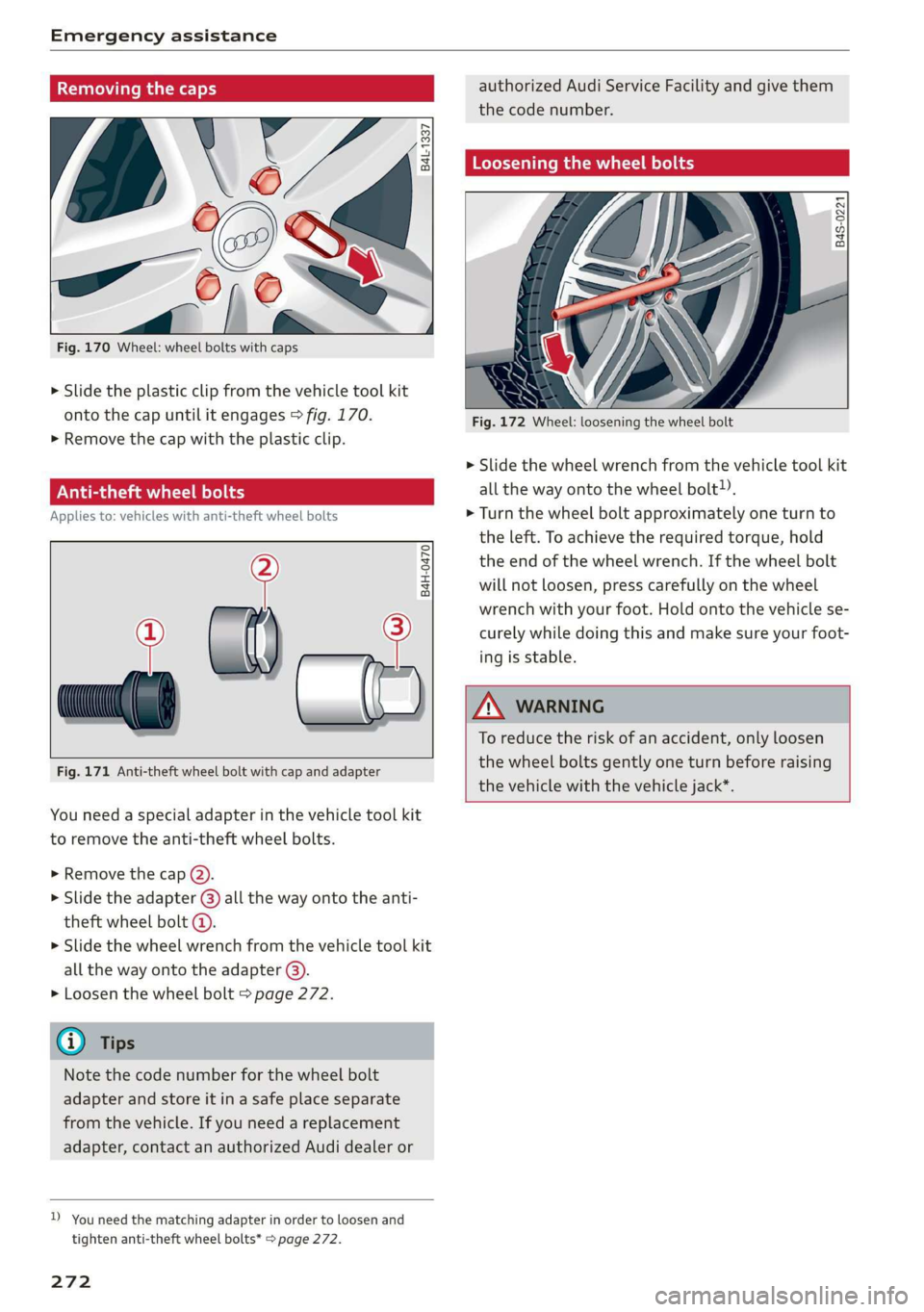
Removing the caps
B4L-1337
Bp .
Fig. 170 Wheel: wheel bolts with caps
> Slide the plastic clip from the vehicle tool kit
onto the cap until it engages > fig. 170.
>» Remove the cap with the plastic clip.
ONT LL An el
Applies to: vehicles with anti-theft wheel bolts
°
® al) — 2
B4H-0470
Fig. 171 Anti-theft wheel bolt with cap and adapter
You need a special adapter in the vehicle tool kit
to remove the anti-theft wheel bolts.
> Remove the cap (2).
> Slide the adapter @) all the way onto the anti-
theft wheel bolt @.
> Slide the wheel wrench from the vehicle tool kit
all the way onto the adapter @).
> Loosen the wheel bolt > page 272.
G) Tips
Note the code number for the wheel bolt
adapter and store it in a safe place separate
from the vehicle. If you need a replacement
adapter, contact an authorized Audi dealer or
D_ You need the matching adapter in order to loosen and
tighten anti-theft wheel bolts* page 272.
272
authorized Audi Service Facility and give them
the code number.
Loosening the wheel bolts
B4S-0221
Fig. 172 Wheel: loosening the wheel bolt
> Slide the wheel wrench from the vehicle tool kit
all the way onto the wheel bolt).
> Turn the wheel bolt approximately one turn to
the left. To achieve the required torque, hold
the end of the wheel wrench. If the wheel bolt
will not loosen, press carefully on the wheel
wrench with your foot. Hold onto the vehicle se-
curely while doing this and make sure your foot-
ing is stable.
ZA WARNING
To reduce the risk of an accident, only loosen
the wheel bolts gently one turn before raising
the vehicle with the vehicle jack*.
Page 275 of 310
4KE012721BB
Emergency assistance
Raising the vehicle
Applies to: vehicles with vehicle jack
RAZ-0258
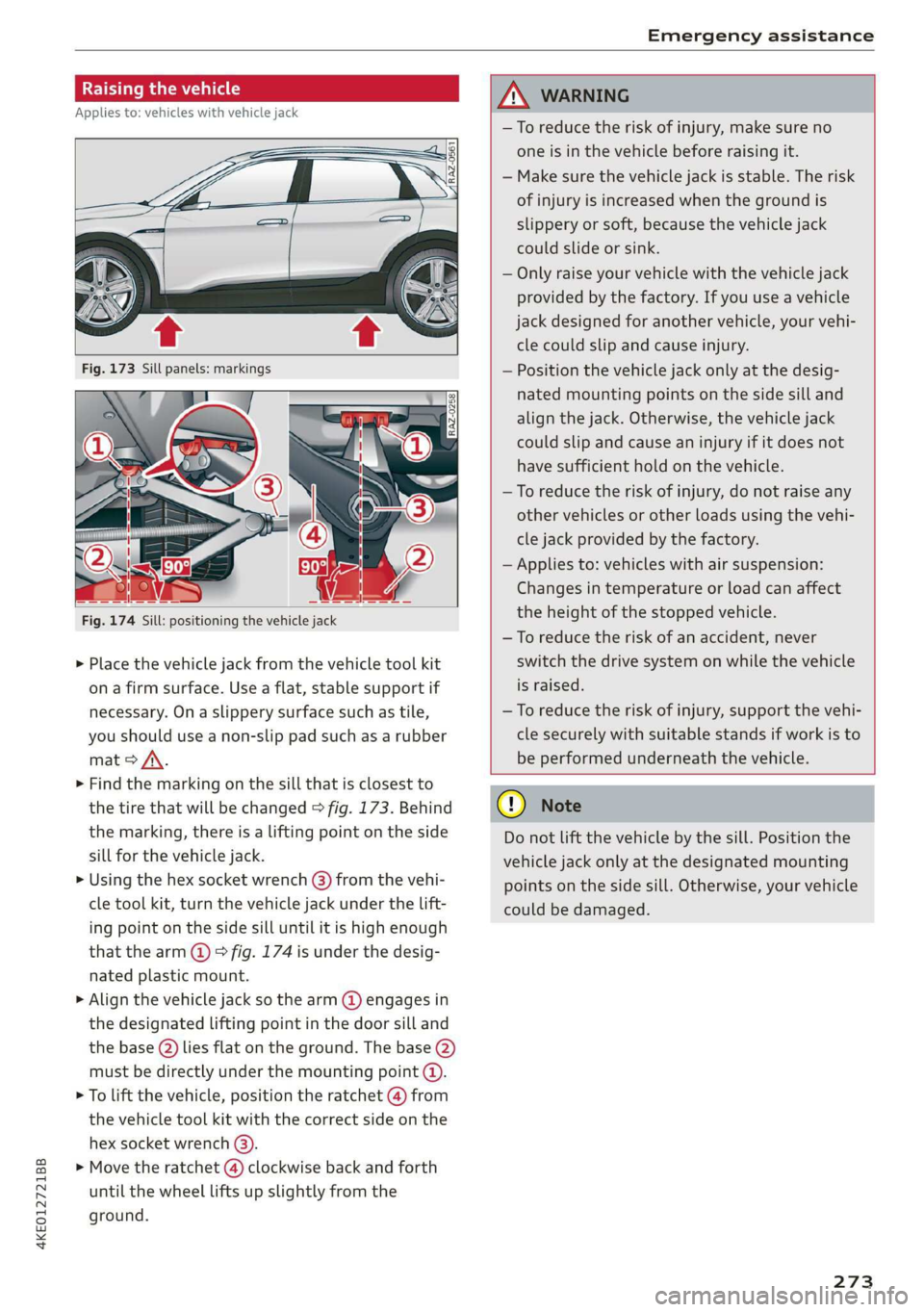
Fig. 174 Sill: positioning the vehicle jack
> Place the vehicle jack from the vehicle tool kit
ona firm surface. Use a flat, stable support if
necessary. On a slippery surface such as tile,
you should use a non-slip pad such as a rubber
mat > /\.
> Find the marking on the sill that is closest to
the tire that will be changed > fig. 173. Behind
the marking, there is a lifting point on the side
sill for the vehicle jack.
» Using the hex socket wrench (3) from the vehi-
cle tool kit, turn the vehicle jack under the lift-
ing point on the side sill until it is high enough
that the arm @ © fig. 174 is under the desig-
nated plastic mount.
> Align the vehicle jack so the arm @ engages in
the designated Lifting point in the door sill and
the base () lies flat on the ground. The base (2)
must be directly under the mounting point (@).
> To lift the vehicle, position the ratchet @ from
the vehicle tool kit with the correct side on the
hex socket wrench (3).
> Move the ratchet (@) clockwise back and forth
until the wheel lifts up slightly from the
ground.
ZX WARNING
—To reduce the risk of injury, make sure no
one is in the vehicle before raising it.
— Make sure the vehicle jack is stable. The risk
of injury is increased when the ground is
slippery or soft, because the vehicle jack
could slide or sink.
— Only raise your vehicle with the vehicle jack
provided by the factory. If you use a vehicle
jack designed for another vehicle, your vehi-
cle could slip and cause injury.
— Position the vehicle jack only at the desig-
nated mounting points on the side sill and
align the jack. Otherwise, the vehicle jack
could slip and cause an injury if it does not
have sufficient hold on the vehicle.
—To reduce the risk of injury, do not raise any
other vehicles or other loads using the vehi-
cle jack provided by the factory.
— Applies to: vehicles with air suspension:
Changes in temperature or load can affect
the height of the stopped vehicle.
—To reduce the risk of an accident, never
switch the drive system on while the vehicle
is raised.
—To reduce the risk of injury, support the vehi-
cle securely with suitable stands if work is to
be performed underneath the vehicle.
@) Note
Do not lift the vehicle by the sill. Position the
vehicle jack only at the designated mounting
points on the side sill. Otherwise, your vehicle
could be damaged.
273,
Page 276 of 310

Emergency assistance
Removing and installing a wheel
@ Rg tT
“% © oO
B8K-1477
Fig. 176 Wheel: alignment pin in the top hole
Removing a wheel
>» Remove the top wheel bolt completely using
the hex socket in the screwdriver handle from
the vehicle tool kit > fig. 175 and place it ona
clean surface.
> Then install the alignment pin from the vehicle
tool kit in the empty wheel bolt hole by hand
> fig. 176.
> Remove the rest of the wheel bolts.
>» Remove the wheel >(). The alignment pin re-
mains in the hole while doing this.
Installing a wheel
Read the directions on > page 274 when instal-
ling unidirectional tires.
> Slide the wheel on over the alignment pin >@.
> Install the wheel bolts and tighten them gently
using the hex socket.
» Remove the alignment pin and tighten the re-
maining wheel bolt.
> Carefully lower the vehicle using the vehicle
jack*.
> Tighten the wheel bolts in a diagonal pattern
using the wheel wrench.
274
The wheel bolts must be clean and loosen and
tighten easily. Check the contact surfaces for the
wheel and hub. Contaminants on these surfaces
must be removed before installing the wheel.
ZA\ WARNING
— Read and follow the important information
and notes under > page 250.
— Never use the hex socket in the screwdriver
handle to tighten the wheel bolts. Using the
hex socket will not achieve the required
tightening torque, which increases the risk
of an accident.
©) Note
When removing or installing the wheel, the
rim
could hit the brake rotor and damage the
rotor. Work carefully and have a second per-
son help you.
Unidirectional tires
A unidirectional tire profile is identified by arrows
on the tire sidewall that point in the running di-
rection. You must always maintain the specified
running direction. This is necessary to ensure the
tire's optimal performance in regard to adhesion,
running noise, and friction, and to reduce the risk
of
hydroplaning.
To benefit fully from the advantages of the uni-
directional tire design, you should replace faulty
tires as soon as possible and restore the correct
running direction on all of the tires.
> Reinstall the caps on the wheel bolts if necessa-
ry.
> Store the vehicle tool kit in its designated
place.
> If the removed wheel does not fit in the spare
wheel well, store it securely in the luggage
compartment > page 77.
> Check the tire pressure on the installed wheel
as soon as possible.
> Correct the tire pressure and store it in the MMI
=> page 262.
Page 277 of 310
4KE012721BB
Emergency assistance
> The wheel bolt tightening specification must be
120 ft lbs (160 Nm). Have it checked as soon as
possible with a torque wrench. Drive carefully
until then.
> Have the faulty wheel replaced as quickly as
possible.
Collapsible spare tire
Applies to: vehicles with collapsible spare tire
The collapsible spare tire is intended for short-
term use only. Have the damaged tire checked
and replaced if necessary by an authorized Audi
dealer or authorized Audi Service Facility as soon
as possible.
There are some restrictions on the use of the col-
lapsible spare tire. The collapsible spare tire has
been designed specifically for your type of vehi-
cle. Do not replace it with the collapsible spare
tire from another type of vehicle.
The collapsible spare tire is located in the lug-
gage compartment under the cargo floor cover.
Requirement: the vehicle tool kit > page 269 and
the compressor must be laid out.
Removing
> Lift the cargo floor using the handle.
> Turn the handwheel counter-clockwise and re-
move it.
> Remove the cover.
> Remove the collapsible spare tire.
You must inflate the collapsible spare tire before-
hand in order to use it.
Inflating
> Remove the valve cap from the collapsible
spare tire.
> Tighten the compressor hose on the collapsible
spare tire valve.
> Connect the compressor hose to a vehicle sock-
et and switch it on.
> Let the compressor run until the specified value
on the tire pressure sticker is reached
> page 253, fig. 165>©.
> Screw the valve cap back onto the valve.
Returning to storage
> Remove the valve cap to drain the air.
» Wait several hours before placing the collapsi-
ble spare tire in the spare wheel well. Only then
will it fold down completely so that you can
store it securely.
> Then screw the valve cap back onto the valve.
> Secure the collapsible spare tire with the cover
and the handwheel.
> Fold the cargo floor cover back into place.
Snow chains
Using snow chains on the collapsible spare tire is
not permitted for technical reasons.
If you have to drive with snow chains and a rear
tire fails, mount the collapsible spare tire in place
of a front tire. Install the snow chains on the
front tire that you removed, and install that in
place of the rear tire that failed.
ZA\ WARNING
— Only use the collapsible spare tire in emer-
gencies and drive very carefully, especially if
it is more than six years old.
— The compressor and the hose can become
very hot during operation which increases
the risk of burn injuries.
— After installing a collapsible spare tire, the
tire pressure must be checked as quickly as
possible to reduce the risk of an accident.
— Do not drive faster than 50 mph (80 km/h)
with the collapsible spare tire. Driving faster
than that increases the risk of an accident.
—To reduce the risk of an accident, avoid hard
acceleration or braking and driving fast
around curves with the collapsible spare
tire.
— Never drive using more than one collapsible
spare tire, because this increases the risk of
an accident.
— Normal tires or winter tires must not be
mounted on the collapsible spare tire rim.
@) Note
The compressor must be switched off after six
minutes at the most to reduce the risk of
275
>
Page 279 of 310
4KE012721BB
Emergency assistance
— The vehicle must not be tow started for
technical reasons.
@ Tips
— Switch Audi pre sense* off > page 153 when
loading the vehicle onto a vehicle carrier,
train, ship,
or other type of transportation,
or when towing the vehicle. This can prevent
an undesired intervention from the pre
sense* system.
— Follow the local legal regulations for tow-
ing.
Read and follow the important information under
=> page 276.
Preparations
> Only secure the towing cable or tow bar at the
designated towing loops > page 277,
=> page 278.
> Make sure the towing cable is not twisted. Oth-
erwise it could disconnect from the towing loop
while towing.
> Switch the emergency flashers on in both vehi-
cles > page 46. However, do not do this if it
prohibited by law.
Towing vehicle (front)
> Only start to drive when the towing cable is
taut.
> Press the brake pedal very carefully.
> Avoid sudden braking or driving maneuvers.
Vehicle being towed (rear)
> Make sure the ignition is switched on so that
the steering wheel is not locked and so that you
can use the turn signals, the horn, and the
windshield wipers if needed > A\.
> The brake booster only operates when the igni-
tion is switched on. Power steering only works
when the ignition is switched on and the vehicle
is rolling ). If the brake booster and power
steering are not functioning, you must press
D_ Requirement: the vehicle battery must have a sufficient
charge level.
the brake pedal much harder and use more
force to steer.
> Release the parking brake > page 93.
> Select the “N” selector lever position.
> Make sure the towing cable is always taut.
ZA\ WARNING
Never tow a vehicle using a tow bar or towing
cable if the vehicle does not have electrical
power.
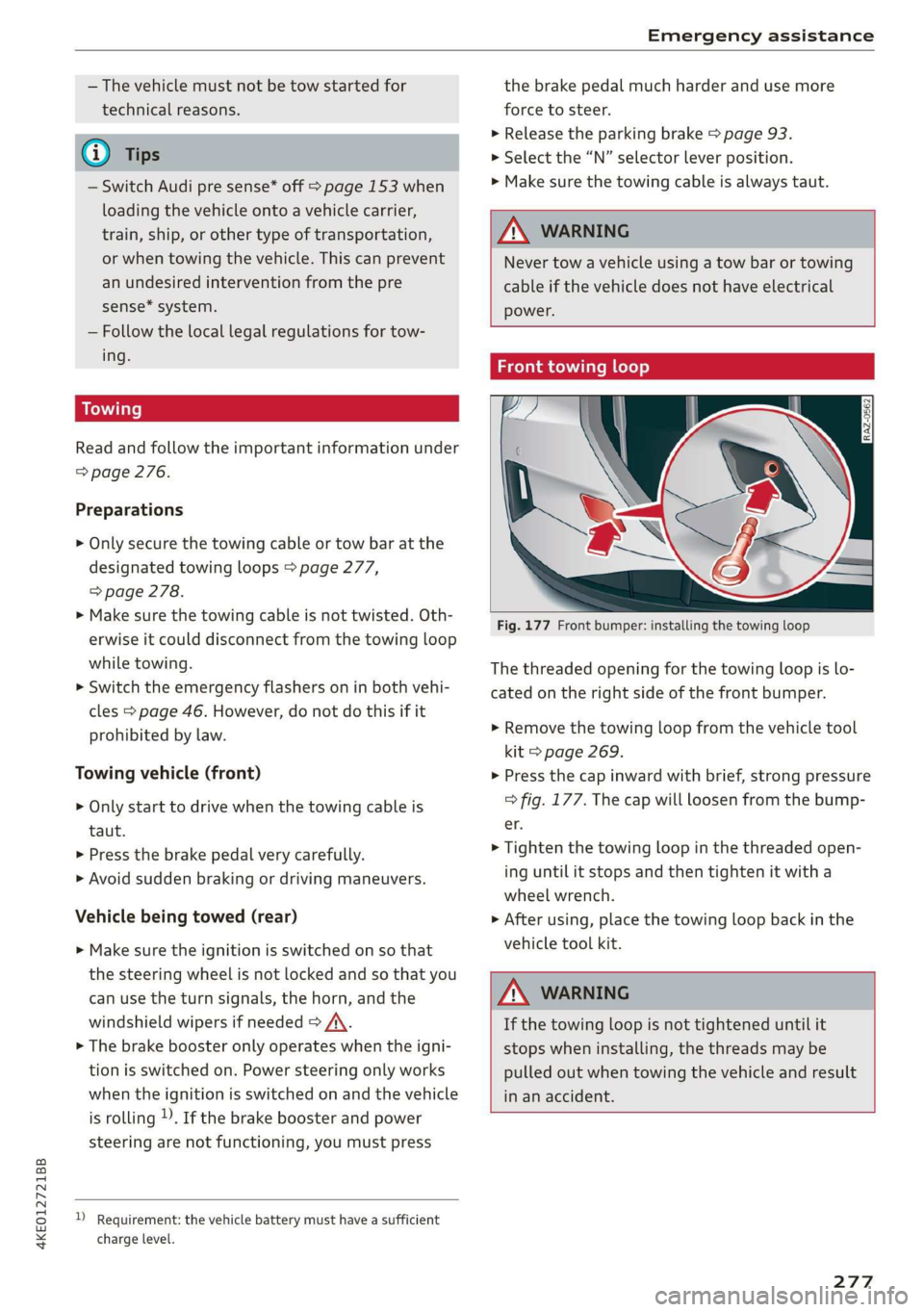
Front towing loop
Fig. 177 Front bumper: installing the towing loop
The threaded opening for the towing loop is lo-
cated on the right side of the front bumper.
> Remove the towing loop from the vehicle tool
kit > page 269.
> Press the cap inward with brief, strong pressure
=> fig. 177. The cap will loosen from the bump-
er.
> Tighten the towing loop in the threaded open-
ing until it stops and then tighten it with a
wheel wrench.
> After using, place the towing loop back in the
vehicle tool kit.
ZA WARNING
If the towing loop is not tightened until it
stops when installing, the threads may be
pulled out when towing the vehicle and result
in an accident.
277
Page 280 of 310
Emergency assistance
Rear towing loop
2 3
eB
ig =
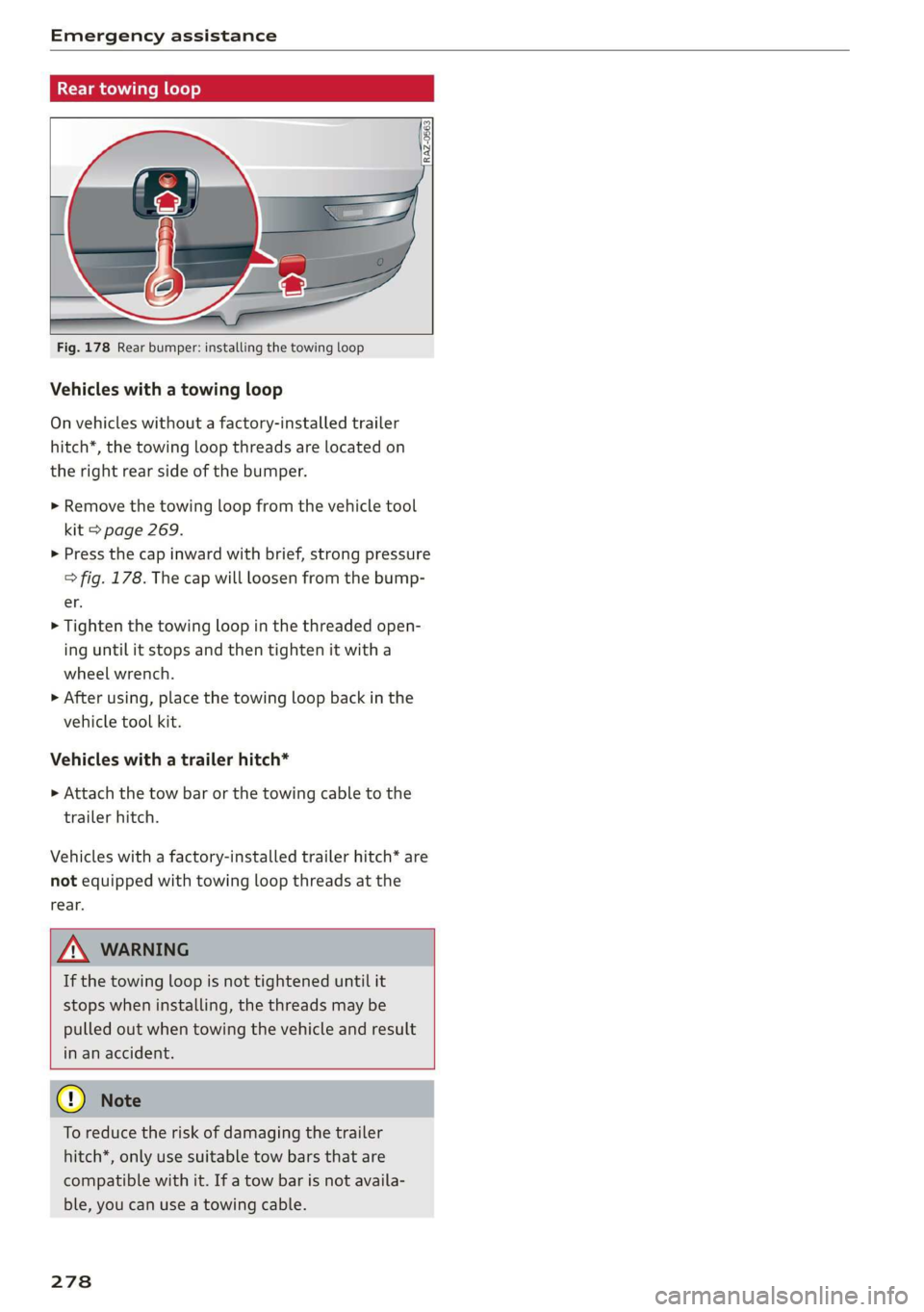
Fig. 178 Rear bumper: installing the towing loop
Vehicles with a towing loop
On vehicles without a factory-installed trailer
hitch*, the towing loop threads are located on
the right rear side of the bumper.
> Remove the towing loop from the vehicle tool
kit > page 269.
> Press the cap inward with brief, strong pressure
=> fig. 178. The cap will loosen from the bump-
er.
> Tighten the towing loop in the threaded open-
ing until it stops and then tighten it with a
wheel wrench.
>» After using, place the towing loop back in the
vehicle tool kit.
Vehicles with a trailer hitch*
>» Attach the tow bar or the towing cable to the
trailer hitch.
Vehicles with a factory-installed trailer hitch* are
not equipped with towing loop threads at the
rear.
If the towing loop is not tightened until it
stops when installing, the threads may be
pulled out when towing the vehicle and result
in an accident.
To reduce the risk of damaging the trailer
hitch*, only use suitable tow bars that are
compatible with it. If a tow bar is not availa-
ble, you can use a towing cable.
278
Page 295 of 310
4KE012721BB
Index
A
A/C cooling mode............. ee eee eee ee 82
Accelerator pedal.............--00000005 89
also refer to Accelerator pedal........... 89
ACCeSSOFICS . 6... eee 288
Active lane assist
refer to Lane departure warning......... 147
refer to Lane guidance................ 147
Adaptive cruise assist..............-000. 139
Cleaning the sensors...........00 ee eee 264
Predictive control.................... 137
Adaptive cruise control
refer to Adaptive cruise assist........... 139
Adaptive darnipers « wax ss eae 2» seme s oe 99
Adjusting the air distribution............. 82
Adjusting the brightness................. 48
Adjusting the sound..............-...0- 231
Adjusting the temperature............... 82
Adjusting the vents ...........0 cece eens 84
Adjusting the volume..............000005 26
Adjusting the volume (announcements) .... 231
Adjusting the welcome sound............ 231
Airbag SySteM « » ene s ews 4 5 Hemme tee Eee 64
Air quality display...............022-.08. 84
Air suspension...........0..0 000. ee eee 99
Airtransport........... 0.0.00 .00200 eee 104
Alarm system
refer to Anti-theft alarm system.......... 32
Alignment pin (changing the wheel)....... 269
All-weather lights.................00000. 44
ALSeaSOMtineSien. is 5: suse 6 samme «0 imevsnee ow we 258
All wheel drive
refer to quattro... . 2... cece eee eee 101
AMI
refer to Audi music interface........... 220
Android Auto
refer to Audi smartphone interface...... 229
Anti-freeze
Windshield washer system............. 241
Anti-lock braking system.............05. 101
Anti-Slip Regulation.................05. 102
Anti-theft alarm system ..........--..00-- 32
Anti-theft wheel bolts.................. 272
Apple CarPlay
refer to Audi smartphone interface...... 229
Aspect ratio (video) ..............0. 223,225
ASR
refer to Anti-Slip Regulation............ 101
Audi adaptive light..................000. 44
Audi connect
refer to connect............ee008 184,185
Audi drive select. .... 0.0... eee e eee eee eee 98
Audi e-tron compact charging system..... 114
Adjusting the charging power level...... 114
Changing or attaching the power cable... 118
SOGUIING*s « & cvsiane wo cranes = wiersie © eireten @ © on 119
Status and malfunction indicators....... 115
Audi music interface...............2.-- 220
AUTOM ESiscns x 5: scaniae 0 0 scones 0 atasene 0 a asouane 221
Audi phone BOX. weiss & scinie ev eerie ve emcene 171
Audi PreISONS@iics 4 + svnns ae maces os oes o 8 150
Messages ...... 00.0.0. cece eee eee eee 153
Audi side assist
refer to Side assist. ........0.. 0000000 154
Audi smartphone interface.............. 229
Legalinformation..........0...eebeee 233
Audi virtual cockpit
refer to Instrument cluster.............. 11
AUTO
Automatic headlights .................. 44
Climate control system..............0-. 82
Auto Lock (central locking) ............... 29
Automatic climate control
refer to Climate control system.......... 81
Automatic luggage compartment lid.... 36,37
Automatic wipe/wash system............. 50
Auxiliary climate control................. 84
AVErAGe CONSUMPTION 4 6 weieure o weceie ae waco 14
Average’Speed ic. i civ 6 x essen so cranes 6 w sre 14
B
BaqehOOKsts « scan
Charge level display.............0005 ee 11
Charging (12 Volt vehicle battery)....... 241
High-voltage batteryiews « ass ss gouy s x as 104
Vehicle battery (12 Volt)............... 240
Winter operation (12 Volt vehicle battery) . 240
Battery (vehicle)
refer to High-voltage battery........... 104
293
Page 299 of 310
4KE012721BB
FraQranGe ices 2s ewes 2 2 comes ¥ 6 ssvoee w & eee 83, 84
Free text search
Media... . 0... cece eee eee eee 225
RodiGven « 3 savon ¢ @ sama se nave 4 2 BeAD 7 ae 212
also refer to Intelligent search.......... 194
Freeze protection
COOLAM Brees 5 x snswas ox seems oo cmseens a 2 mena o 237
Eronticenterarmrest « sce 2 x came 2 0 mes 3 wa 58
Front passenger’s seat adjustment
FRONESs « scomene « ¢ exeseus © #2 aneeem 2 8 manors nw amaze «0 58
Rear... cece eee 58
Fuel
Fuel tank Capacity’: « sas « x gaan x «meme x 2 291
Fueling
Fuel tank capacity...............00005 291
G
Garage door'opener' sss kiss ss eee se veess 41
Garivierit HOOKS: < neues se ees 5 o ou ¥ a 77
GAWR
refer to Gross Axle Weight Rating (GAWR) . 292
Gear's 2 sues « 2 euwa xo eee 7 a geen 2 Keres 4 we 88
Glossary of tire and loading terminology... 246
GLOVE COMPAIMENE asec ss aces s & Hee = bee 77
Gross Axle Weight Rating (GAWR)........ 292
Gross Vehicle Weight Rating (GVWR)...... 292
GVWR
refer to Gross Vehicle Weight
Rating (GVWR) aces 0 2 sues & 2 wai 2 o coum 292
H
Handstree's « sees « 2 gawn « came © neem 4 2 new 169
Head-up display
AGjUSEING ics & & esesees ve soeees en secon wo muons a 23
Adjusting the brightness................ 48
Operating s x semen se ewes s ¥ meee v HEE os es 23.
Headlight range control...............005 44
Headlights
Cleaning « + sess « = sews ¢ e ees ce eee ee 264
Headlight range control..............4. 44
Washer systemM......... 2-0. e eee eee eee 50
Head restraints
ACIUSTING x: « » wees & & ean «eee Be mee ee 60
Removing and installing................ 60
Heated rear Window scies ¢ «mwas x ¢ caw 9 2 ee 83
Heated steering wheel................... 83
H@AGING bins oe somes & amiss 6 erie oon Desa sw He 81
High-voltage battery................005 104
Advanced charging settings............ 111
Audi e-tron compact charging system.... 114
Charging cc : s ewes = = eee = x eee 105, 108
Charging display on the vehicle......... 109
Charging equipment................0. 112
Charging :triethods « sce x «seus & x cease © « 105
Charging ports on the vehicle........... 105
Charging time..............0.020000. 106
Connecting the charging cable.......... 108
Messages while driving................ 112
Not running for long periods of time..... 107
Quick Charging ss ¢ sees +s seen se reese 2? 105
Setting the charging target............ 110
Setting the timer.................005. 111
Transporting charging equipment....... 113
High-voltage system ...... 0... eee eee 104
High beams
High beam assistant................... 45
Highway lights: «sce: ss eees sv eeea s weeees 44
Hill descent assist.............0 00-0 97
Hill hold assist... 0.0... ccc eee eee 95
also refer to Hill hold assist............. 95
HOlG:4SSISts 2 « acas 2 5 sawn 2B ieee 2 aeRA 4 BE 94
also refer to Hold assist................ 94
Hold Assist
refer to Hold assist..............000 005 94
Home
refer to Home address.............04. 202
Hommerad@nessy. «a wise » oxeeonee « stieeaun a wanes 202
HomeLink
refer to Garage door opener............. 41
Home screen... 2... eee eee eee ee 16
ORIN s & cosuves 2 at cesvecs 2 a animes oo emer 2 8 aero © orate 6
Hotspot
refer to Wi-Fi...........0.-. 0c eee eee 189
I
Idle
(eer to. Gals « eaee ss eens sv eens spews es 88
Ignition
Switching on and off...............0-0- 86
Imbalance (Wheels) yi iv isas s neu a sean a 252
297
Page 301 of 310
4KE012721BB
Index
Mechanically unlocking
Opening and closing.................0.
Opening and closing with foot motion..... 37
Power opening and closing.............. 36
Lumbar'support waco: 2s ees ev wees ee eerwe as 56
M
Maintenance « sige a + cewe «2 cee ge ewe a es 286
Maintenance intervals « nw. 6 i gic ae cere a 242
Manually releasing the charging connector. 111
Manually releasing the charging unit cover. 111
Map
Changing the scale...........00.e eee 198
Display cosee + a ssowsoe = semais 2 4 onaesms x aerate & 200
Operating ........ 0... ce eee eee eee 199
Setting the destination................ 198
Map preview.............-.0 2000-0 eee 197
Map update................ 020. e ee eee 204
QNUIME seers « « seers & e eee 5 2 eS & HEE FS 205
SD card/USB connection............... 205
Massage TUNCtiON. « ssa ss esi se owe ¥ 6 orem 56
Front... 2... eee eee eee eee 57
Matrix LED headlights.................-. 45
Mechanical:-key’. « « esscos ss caune oo aware © v cere 33
Medicis: 2 = acess: a © vonses a @ mewn 2 © cose 217,221.
Drives... ee 217
Supported formats...............0005 227
Media
center................ eee eee ee 222
Memory card
SD card reader (MMI) « « ewes sc ees an es 217
Supported types and formats........... 227
Mennory functioniie: « 2 sews x ¢ amen 5 meee eo: 63
Menu language
refer to Setting the language........... 231
Messagesi. « eciis + wean a 6 mans w 6 aaa oo we 178
Mirror cOMpaSS « wes + ¢ esas so sees eo eee vs 53
Mirrors
Adjusting exterior mirrors............0-. 48
Dimming................0 00002 e eee 49
Nanlity MUFROT sxc 2 = mown 2 seers « o eeoes gee 50
MMI
refer to Multi Media Interface........... 17
Mobile device
refer to Telephone...........-.0eee ee 169
Mobile phone network
Connection settings.................. 182
Motor compartment
Opening and closing the hood.......... 236
OVERVIEW eeu 3 2 soupy < @ emiees ¢ esate Go ee 237
Safety precautions: . sicsc. sven 2s wen ae 235
Storage compartment..............-... 76
Mountain passes... 0... ... eee eee eee 96
Mountaininoads:. « « secs « « erence» 2 sestane » 6 soene 96
Multifunction steering wheel
Buttons... ..... cee ee ee 12,26
Operating: < = ssn < : seen es sonnet dome s ee 12
Programming buttons.................. 26
Voice recognition system............... 24
Multi Media Interface................085 17
Menus and symbols.............00+-00- 18
Operating’s « « wss6 s secu = s sees & & wens 2 15,18
Switching the displays on or off.......... 17
Mutting (Mute) secs se ences oe ences oo cena oo eee 26
MYAUGI s « scimvs «6 eens 2s ents 2 & eee 2 weceale 27
myAudi navigation................. 193, 197
N
NarrOW APES s « eewn ss weue swoon as wee ae 146
Natural
leather care and cleaning......... 266
Navigation ....... 66... cee cece eee eee 193
Better rout@scs << sews eo es do eg e cae 206
Calli gprs so meena « i soieasen © o onewowe mraten wo 197
Changing the scale................0-. 197
also:referto Map: « wim + x wows 2 neee se ne 199
Navigation database
Version'information . . . ico ce caren so ens 233
Navigation (instrument cluster).......... 201
NHTSAc: = swiss « = seu = ¢ sous 4 x teats & Sees g 288
Night vision aSsist'; « sean 5 «wean ss ween avi 13)
Cleaning the camera...............00. 264
Notification:center’s ¢ sas 3 ¢ caw 2s gauss wars 19
O
OdOMCters cacy « & cees 5 o exw 5 ¢ eee 7 e ews 13
RESCUING fests 6 & srecine 6 o aiorsus 6 @ nureons wo eaNUEDK 13
Office address
refer to Business address.............. 202
Offroad
refer to Offroad driving...............+- 96
Offroad driving...............e eee e eee 96
OFF (climate control system) .............. 82
299
Page 302 of 310
Index
On-board computer’. . 2 ccc oe eee ee eae es 14
On Board Diagnostic System (OBD)........ 283
Online destination
refer to Point of interest............... 196
Online map
refer to Satellite map................. 204
Online media........ cee eee eee ee 219
Onlimerradio « sero < + sons 1 samen 6 a comms a 213
also refer to Online radio.............. 213
Online roadside assistance.............. 192
Online services
refer toconnect................. 184,185
Online system update................0. 232
Opening........ 2... cee eee eee eee eee 29
Automatic luggage compartment lid...... 36
Convenience opening ............eee eee 40
HOOd .. 0... ee 236
Luggage compartment lid............... 36
Luggage compartment lid with foot motion . 37
Panoramic glass roof................005 40
Sunshade (roof) .................000005 40
WindOWS's « sees = ¢ aewa ¢ ¢ eee +o owes vo we 39
Opening and closing
refer to Unlocking and locking........ 29, 34
Operating
Head-up display.................00000. 23
Instrument cluster............02-.005- 12
Multifunction steering wheel............ 12
Multi Media Interface............... 15,18
TEXUAINBUE:: + = haw ¥ 5 HESS & BROS Es BORE GE Re 21
Touch display 2 cswss ae ome x 2 avesme 2 2 aries 15
Voice recognition system............... 24
Optional equipment number............. 291.
Options
Media... ... 0... eee eee eee 225
NA@VIGAtIGKias < ¢ eeaie so aemx ¢ seme g 2 Reem 207
RadiO sce so sewwess eo cera « 2 ownecm 2 a oe eo 2 215
Outside
NnOise’s « sews sx ewe x a maw oe wad 91,
Overview (COCKpit)'s « « weeny a s saws » s awa a ve 6
P
Paifitidatiage@is « « seus 2 x weau 2 e eee 5 2 nem 265
Paint number................0.0 eee eee 291
Panic button. .............2...0.00 000 33
PANIC button. ..................000 000 33)
Panic Tumetions. « erences « x seers = x enone «a susan = 0 33
300
Panoramic glass roof................2.0. 40
Convenience opening and closing......... 40
Emergenicy closing =. : ¢ eies ss eee es eee 41
Quickopening sec 2 < wwcne ov werna 2 a wae oe 4l
Parental control
DVD scsnce x 2 vnesnis «i sesteie w wtieuens of ements oni 226
Parkiingiaidinas « + nevus « o swiasen © evenenoye « esate s 160
Cleaning the sensors and camera........ 264
Peripheral cameras........ 000.000 eee 162
Rearview Camera sein so cenas so canes wecees 162
Trailer View... 22... 0. cee eee eee 163
Parking aids
AGjUStING axe ¢ 5 waag + Ken G3 Ades Gs Sees 167
Parking and maneuvering..............- 160
Parking brake
refer to Electromechanical parking brake.. 93
Parking heater
refer to Auxiliary climate control......... 84
Parking lightS ccs « » sus sy oem se eee ee ee 44
Parking lock
PEPE TO GOANS « wines oo ceca + eoaseme sv eeRE 88
Parking systems
Parking system plus...............00. 160
Partition M@E cesses aawsse o x cists a 0 caounes 6 W aeesn 79
Passethnough « sccsie « eases v wenn w 6 wenn o 6 ove 79
PathiSt: « = mews su saw o geeu ao eae & see eB e 16
Pause (media files). «us % 5 ceia ds vee es 221
PédallS sec << naen = s Heme 5 2 See se Se & coe 89
Pedestrian detection................... 131
Perchlorate ..... 0.0... cee eee eee eee 286
Peripheral cameras............---000-5 162
Personal route assistance............... 201
Phone
Answering/ending acall............... 176
Connecting acell phone............... 170
Connecting a second mobile device...... 171
Disconnecting a mobile device.......... 171
SEttilGS saws « = newer x E eee e E eee ee ee 180
Phonebook
refer to: Contacts ees ss wees «2 news ae ee 175
Playback (iie@dia) ws «= seis 5 emg & & tem « 221
Point of interest: . : oce. ss sees se eeea sees 196
Point of interest search...............0. 196
also refer to Point of interest........... 196
POLISHING ies = nase s = peme se Heme + 2 HOGS se 265