lane assist AUDI Q2 2021 Owner´s Manual
[x] Cancel search | Manufacturer: AUDI, Model Year: 2021, Model line: Q2, Model: AUDI Q2 2021Pages: 364, PDF Size: 87.77 MB
Page 130 of 364
Driver assist systems
General notes
Applies to: vehicles with Audi side assist
•IB
in—
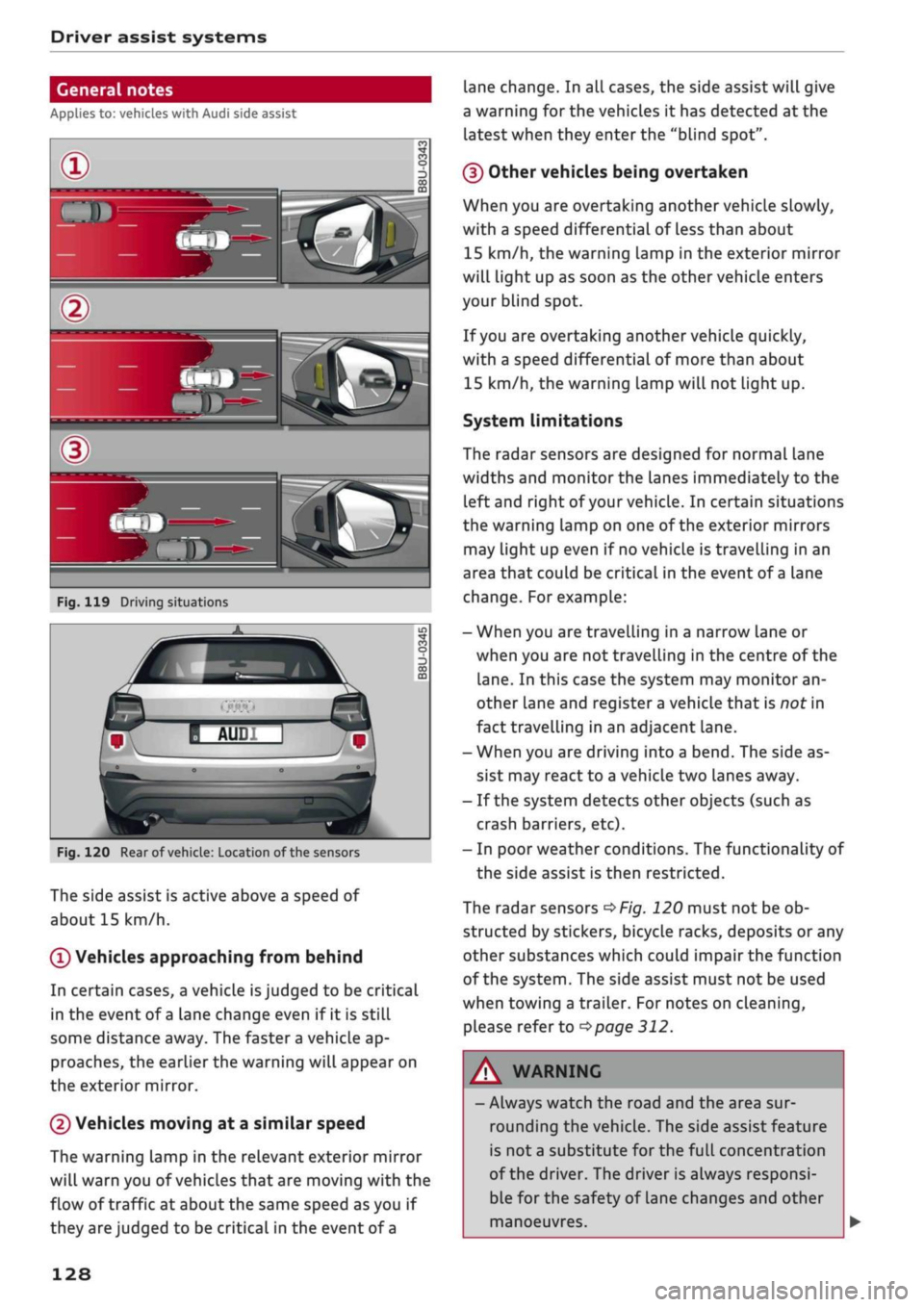
Fig.
119 Driving situations
Fig.
120 Rear of
vehicle:
Location of the sensors
The side assist is active above a speed of
about 15 km/h.
0
Vehicles approaching from behind
In certain cases, a vehicle
is
judged to be critical
in the event of
a
lane change even if it is still
some distance away. The faster a vehicle ap
proaches, the earlier the warning will appear on
the exterior mirror.
(2) Vehicles moving at a similar speed
The warning lamp in the relevant exterior mirror
will warn you of vehicles that are moving with the
flow of traffic at about the same speed as you if
they are judged to be critical in the event of
a
lane change. In all cases, the side assist will give
a warning for the vehicles it has detected at the
latest when they enter the "blind spot".
(§)
Other vehicles being overtaken
When you are overtaking another vehicle slowly,
with a speed differential of Less than about
15 km/h, the warning lamp in the exterior mirror
will light up as soon as the other vehicle enters
your blind spot.
If
you
are overtaking another vehicle quickly,
with a speed differential of more than about
15 km/h, the warning lamp will not light up.
System limitations
The radar sensors are designed for normal lane
widths and monitor the lanes immediately to the
left and right of your vehicle. In certain situations
the warning lamp on one of the exterior mirrors
may light up even if no vehicle is travelling in an
area that could be critical in the event of
a
lane
change. For example:
- When you are travelling in a narrow Lane or
when you are not travelling in the centre of the
lane.
In this case the system may monitor an
other lane and register a vehicle that is nor in
fact travelling in an adjacent lane.
- When you are driving into a bend. The side as
sist may react to a vehicle two lanes away.
- If the system detects other objects (such as
crash barriers, etc).
- In poor weather conditions. The functionality of
the side assist is then restricted.
The radar sensors
^>Fig.
120 must not be ob
structed by stickers, bicycle racks, deposits or any
other substances which could impair the function
of the system. The side assist must not be used
when towing a trailer. For notes on cleaning,
please refer to
^>page
312.
WARNING
- Always watch the road and the area sur
rounding the vehicle. The side assist feature
is not
a
substitute for the full concentration
of the driver. The driver is always responsi
ble for the safety of Lane changes and other
manoeuvres.
128
Page 131 of 364

Driver assist systems
CO
rN
r>
rN
•-i
00
- In certain situations, the system may not
function properly, or the functionality of the
system may be restricted. For example:
- If other vehicles are approaching very
quickly, or if
you
are overtaking other
vehicles quickly. The warning lamp may
not light up
intime.
- In poor weather conditions, such as heavy
rain,
snow or road spray.
- If
you
are travelling in very wide lanes, in
tight bends or over crests. The system
may not detect vehicles in the adjacent
lane because they are outside the area
covered by the sensors.
© CAUTION
Impacts or damage to the bumper, wheel
arches or underbody can cause misalignment
of the sensors. This can impair the functional
ity of the system. Have the systems checked
by
a
qualified workshop.
The warning lamps on the exterior mirrors
may not be properly visible if tinted foil is af
fixed to the side windows on the driver's or
passenger's side.
Switching on/off
Applies to: vehicles with Audi side assist
The
system can be switched on and off
on
the in
fotainment system.
The warning Lamps in the exterior mirrors light
up briefly each time the ignition is switched on to
indicate that the system is activated.
•
Select the following on the infotainment sys
tem:
|MENU|
button > Car
>
left control button
> Driver assist
>
Audi side assist. SeLect off to
switch off the system.
Adjusting brightness of warning lamp
Applies to: vehicles with Audi side assist
The
brightness of the warning lamp can be ad
justed on the infotainment system.
•
Select the following on the infotainment sys
tem:
|MENU|
button > Car
>
left controL button
> Driver assist
>
Audi side assist.
The brightness of the warning lamp in both the
information and warning modes is regulated au
tomatically according to the ambient Light Level.
If
you
are in very dark
or
very Light surroundings
when you adjust the brightness of the warning
lamp,
the automatic brightness control may al
ready have reached the lowest or the brightest
setting.
In such a case it is possible
that
you
won't notice a difference while you are adjusting
the brightness or that you will only notice it once
the light surroundings have changed.
Please adjust the brightness of the warning lamp
for the information mode so that it does not dis
tract you while you are looking at the road in
front. When you change the brightness, the
warning lamp on the exterior mirror will light up
briefly with the intensity set for the information
mode.
The intensity of the lamp in the warning
mode is Linked to the intensity in the information
mode and is adjusted automatically.
© Note
- The side assist is not active while the set
tings are being adjusted.
- Your personal settings are stored automati
cally and assigned to the remote control key
which is being used.
129
Page 349 of 364
Index
A
A/C (automatic air conditioner) 69
A/C (manual air conditioner) 67
ABS
see Anti-lock brake system (ABS) 145
Accelerator pedal 272
Accessories 60
Active Lane assist
see Audi active lane assist 123
Adaptive cruise control
see Audi adaptive cruise control
Ill
Adaptive light
see Audi adaptive light 49
AdBlue 292
Driver messages 292
Refilling 293
Remaining range 292
Additional phone 175, 257
Advanced key
see Convenience key 76
Airbag
Deactivating front passenger's airbag ... 288
Air conditioner (automatic) 66
Adjusting air outlets 71
AUTO (automatic mode) 69
Controls 69
Default settings 66
Description 66
Drive select 131
Key-coded settings 66
Supplementary heater 66
Synchronisation 69
Air conditioner (manual) 66
Adjusting air outlets 71
Controls 67
Default settings 66
Description 66
Key-coded settings 66
Supplementary heater 66
Air distribution, adjusting
Automatic air conditioner 70
Heating/ventilation system and manual air
conditioner 67
CO
rN
IV
rN
i-H
00
Air outlets, adjusting 71
Automatic air conditioner 70
Heating/ventilation system and manual air
conditioner 67
Air recirculation mode
Automatic air conditioner 70
Heating/ventilation system and manual air
conditioner 68
Alarm system
see Anti-theft alarm system 42
All-season tyres
see All-weather tyres 308
All-weather Lights 49
All-weather tyres 308
Alterations to the vehicle 340
AMI
see Audi music interface 240, 241
Android Auto
see Audi smartphone interface 253
Announcements (traffic programme)
Volume 261
Anti-dazzle interior mirror 54
Anti-freeze
Coolant 299
Windscreen washer system 303
Anti-lock brake system (ABS) 145
Anti-theft alarm system 42
Anti-theft wheel bolts 321
Apple CarPlay
see Audi smartphone interface 253
Armrest (front centre) 58
Ashtray 59
ASR
see Traction control system (ASR) 145
Audi active lane assist 123
Cleaning area around camera 313
Driver messages 125
Audi adaptive cruise control
Ill
Cleaning sensor 313
Distance indicator, distance warning .... 118
Driver messages 119
Traffic
jam assist 117
Audi adaptive light 49, 131
Audi connect (infotainment) 191,203
Data protection 205
Overview of services 197
345
Page 355 of 364
Index
CO
< o rN
iv
rN
t-H
o <
•H
00
Instruments
Adjusting brightness 53
Interior lights 52
Interior mirror 54
Interior monitor 42
Intermittent wipe (windscreen wipers) 55
Internet
see Audi connect (infotainment) 191
Internet radio 239
iPod
see Audi music interface 240, 241
ISOFIX (securing child seats) 270
iTunes tagging 228
]
Jack 319,322
Jacking points 322
Jack plug (3.5 mm)
see AUX input 241, 242
Jukebox 236
Jump-starting 326
K
Key-operated switch for front passenger's air-
bag 288
Keys 38
Driver messages 77
Key-coded settings 66
Key not recognised 79
Kick-down (automatic gearbox) 90
L
Lane assist
see Audi active lane assist 123
Lane change assist feature
see Audi side assist 127
Language, setting 255
Launch control programme 91
Left-hand traffic 52
Left control button 16
Letters, entering (using the speller) 159
Licence conditions (MMI) 262
Lights 49
Changing bulbs 334
Exterior 49
Interior 52
Interior/reading Lights 52
Right-hand traffic 52
Light sensor/rain sensor
Automatic headlights 49
Switching rain sensor on/off 55
Load-through hatch 64
Locking/unlocking
see Unlocking/locking 39, 40
Low-profile tyres 309
Luggage compartment 62
Boot Lid 43
Power sources 60
Stowing luggage safely 272
Lumbar support 58
M
Magnetic ride
see Suspension control 131
Mailbox 185
Main beam headlights 50
Main beam assist 50
Maintenance intervals 304
Make-up mirrors 54
Map
Display 225
How to use 219
Settings 221
Update 207
Map scale, changing 16
Map update 223
Matt paintwork, washing
312
Maximum speed 344
Media 234
Drives 235
Media centre 244
Media drives
Formats supported 249
Memory capacity
Directory 187
Jukebox 236
Memory card
Navigation 207
SD card readers (MMI) 235
Types/formats supported 249