display AUDI Q2 2021 Owner´s Manual
[x] Cancel search | Manufacturer: AUDI, Model Year: 2021, Model line: Q2, Model: AUDI Q2 2021Pages: 364, PDF Size: 87.77 MB
Page 124 of 364
Driver assist systems
provided tempt you into taking any risks when
driving - this can cause accidents.
- Please note that pre sense front can give
warnings or apply the brakes unexpectedly.
Always secure your luggage to prevent dam
age and possible injury.
- Due to inherent system limitations, false ac
tivation of the system is possible.
- Please note that the sensor is not always
able to detect all objects which may repre
sent a potential hazard - risk of accident!
- Pre sense front does not react to the follow
ing:
oncoming traffic in the same lane, sta
tionary or stopped persons, pedestrians
crossing the road at an angle, groups of
people, animals, or objects that are hard to
recognise •=>
A in General notes on
page 112.
A WARNING
The pre sense front functions may be restric
ted or unavailable in situations such as the
following:
- If objects such as crash barriers or other
vehicles are reflecting additional light.
- At tunnel entrances.
- In heavy fog,
rain,
road spray or snow.
- If the radar sensor is dirty, frosted, dam
aged or covered.
- When driving through a corner.
-Applies to: front-wheel drive vehicles: If the
ESC system has been partially or fully deac
tivated.
© CAUTION
Impacts or damage to the bumper, wheel
arches or underbody can cause misalignment
of the sensor. This can impair the function of
the pre sense front system. Have the systems
checked by a
quaLified
workshop.
© Note
-The automatic brake application with in
creasing brake force can be cancelled by ap
plying the brakes yourself or by pressing the
accelerator firmly or by taking evasive ac
tion.
- Applies to: front-wheel drive vehicles: Cer
tain pre sense front functions are deactiva
ted when the ESC
offroad
mode is switched
on and when reversing.
- Applies to: front-wheel drive vehicles: The
pre sense is deactivated if you restrict or
switch off the ESC
^>page
146.
Settings on the infotainment system
Applies to: vehicles with Audi pre sense front/Audi adaptive
cruise control
•
Select the following on the infotainment sys
tem:
|MENU|
button > Car > left control button
> Driver assist > Audi pre sense.
System - The pre sense functions can be switched
on/off.
Advance
warning15
- You can switch the advance
warning off or set the warning time for pre sense
front (early/medium/late).
Start by setting the advance warning to early. If
you then find that the system warns you earlier
than desired, you can set the advance warning to
medium.
The advance warning should be set to
late only in exceptional cases, such as during very
dynamic driving.
If a system or the advance warning function is
switched off, it will be automatically activated
again the next time you switch on the
ignition15.
Driver messages
Applies to: vehicles with Audi pre sense
Audi pre sense: fault. Please contact work
shop
This message appears if the functions of the pre
sense system are impaired. An impairment can
occur, for example, if a sensor fails. If the mes
sage remains displayed permanently, drive to a
qualified workshop soon and have the fault
recti
fied.
•
x)
Not available on vehicles for some markets.
122
Page 125 of 364

Driver assist systems
H
Audi pre sense: currently restricted. Sensor
view restricted due to surroundings.
This message appears if the radar sensor vision is
impaired,
e.g. by leaves, snow, heavy road spray
or dirt. If necessary, clean the sensor
*$
page 112, Fig. 101.
[^
Audi pre sense: currently restricted
This message appears in certain situations, e.g.
when the ESC is partially or fully deactivated.
Q
Audi pre sense: currently restricted. See
owner's manual
Applies to: vehicles with Audi side assist
If
you
operate the turn signals while the active
lane assist and side assist are active, the steering
will be corrected just before you cross the lane
demarcation if the side assist detects vehicles ap
proaching quickly or travelling at about the same
speed as your own vehicle and judges the situa
tion to be critical. This intervention is intended to
keep the vehicle in the Lane.
Applies to: vehicles without Audi side assist
The system does not warn you if
you
operate the
turn signal before crossing a Lane marking. In
this case, it assumes that you intend to change
lanes.
Applies to: vehicles with traffic jam assist
The traffic jam assist can be activated at speeds
below approximately 65 km/h if the correspond
ing conditions have been met
^page
117.
•
123
This driver message appears if one or more sub
systems, such as the
ESC,
fails temporarily. If the
message is displayed several times, drive to a
qualified workshop and have the fault rectified.
[g]
Audi pre sense: emergency braking system
off
This message appears if the functions of the pre
sense system are deactivated via the infotain
ment system or if the system is not available.
Audi active Lane assist
Description
Applies to: vehicles with Audi active lane assist
The active lane assist (lane departure warning
feature) uses a camera in the windscreen to de
tect lane markings (subject to general system
limitations). If
you
approach one of the detected
lane markings, the system corrects the steering
to warn you that the vehicle might be about to
cross one of the markings. You can override this
steering input at any time. The steering wheel vi
brates slightly if
you
cross a lane marking. The vi
bration warning must be activated beforehand on
the infotainment system. The active lane assist is
functional when it detects a demarcation line on
at least one side of the lane in which you are driv
ing.
As the system is designed for driving on motor
ways and other major roads, it is only active
§
above a speed of about 65 km/h (may vary in dif-
£
ferent export markets).
r\i
.-H
00
A WARNING
- The system initiates a corrective steering in
put to warn the driver that the vehicle is
about to leave the lane. As the driver you
are always responsible for staying in your
own lane.
- The system can assist you to keep the
vehi
cle in the lane, however it is not capable of
driving on its own. Never take your hands
off the steering wheel.
- In certain situations, e.g. during heavy brak
ing,
the system may not correct the steer
ing.
- In certain circumstances, not all of the lane
markings may be detected by the camera. A
corrective steering input can only be
initi
ated if the system detects a lane marking on
the side in question.
- Variations in the road surface or objects on
the road may be misinterpreted as lane
markings. In this case, the steering may be
corrected unexpectedly or not at all.
- The camera's view might be obstructed, for
example by vehicles travelling in front,
rain,
snow, a lot of water on the
road,
adverse
light
or
dirt on the windscreen. If this hap
pens,
the active lane assist may not detect
Page 126 of 364

Driver assist systems
the lane markings or may respond incorrect-
iy.
- In certain circumstances, for instance if
visi
bility is poor, the setting for the steering in
put may temporarily be switched from "ear
ly"
to "late"
«.
- In certain driving conditions, such as ruts in
the road surface, adverse cambers or side
winds, the assistance provided by the steer
ing correction may be insufficient to keep
the vehicle in the middle of the lane.
- For safety reasons, the active lane assist
must not be used in poor weather or in
diffi
cult or slippery road conditions (such as ice,
fog,
loose grit or gravel, heavy
rain,
snow,
etc.) - risk of accident!
Switching on/off
Applies to: vehicles with Audi active lane assist
Fig.
114 Turn signal lever: Button for active lane assist
--•
In
s^\
l'fV
A
Fig.
115 Wind
sist
SSS1M
screen:
Ca
o
o
o o
5
^Aw ^
mera
window for active lane as-
•
Press the button
^Fig.
114 to switch the sys
tem on/off. The indicator lamp in the instru
ment cluster will light up or go out.
Analogue in
strument clus
ter
Green lines
7
V
-
Yellow lines
•/
V
Audi virtual
cockpit/head-
up display*
Green Line(s)
(left/right)
7
V
Red line
(Left/right)
7 V
Grey Line(s)
(left/right)
7 V
Meaning on
corresponding
side
The active Lane
assist is
switched on
and ready to
warn.
The active lane
assist warns
you before you
cross the Lane
demarcation.
In addition,
the steering
wheel vibrates
slightly.
The active Lane
assist is
switched on
but not ready
to warn.
The system may be switched on but not ready to
warn due to the following reasons:
- There are no Lane markings.
- The system cannot detect the relevant lane
markings (e.g. temporary markings for road
works or markings obscured by snow, dirt, rain
or adverse light).
- The vehicle's speed is below 65 km/h, the
speed at which the lane assist system is activa
ted (the threshold may vary in different export
markets).
- The traffic lane is too narrow or too wide.
- The bend is too tight.
- You have taken your hands off the steering
wheel.
- Make sure that the camera window
^>Fig.
115
is not covered with stickers or
similar objects. Notes on cleaning
^>page
312.
l)
This function is not available on all export versions.
124
Page 127 of 364
Driver assist systems
CO
< o
rN
r>
rN
t-H
o < 00
- On vehicles for some export markets: once
the system is activated, it is "ready" each
time the ignition is switched on.
Instrument cluster display
Applies to: vehicles with Audi active lane assist
Drive to a qualified workshop soon and have the
fault rectified.
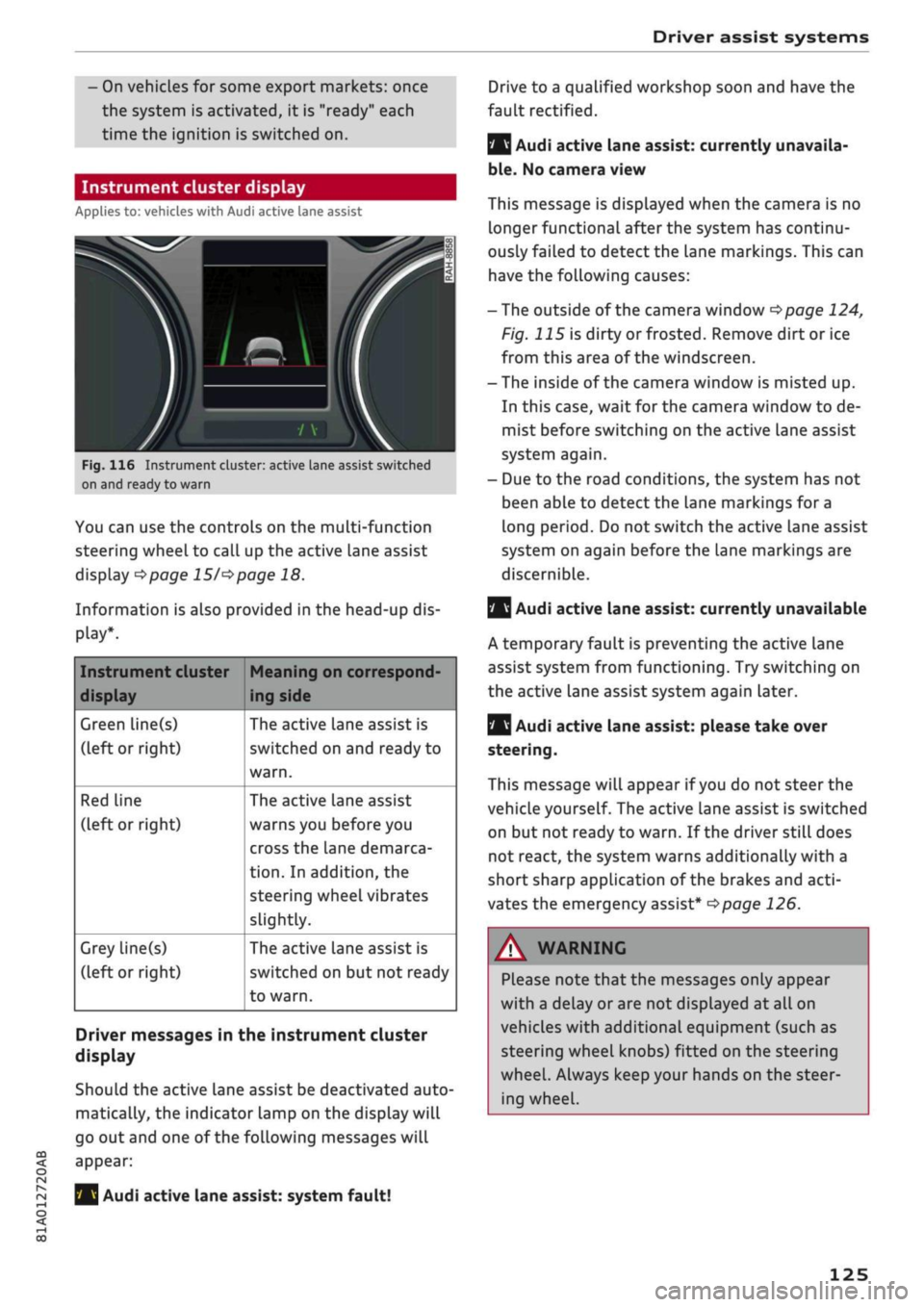
Fig.
116 Instrument cluster: active Lane assist switched
on and ready to warn
You can use the controls on the multi-function
steering wheel to call up the active lane assist
display
^>page 15/^>page
18.
Information is also provided in the head-up dis
play*.
Instrument cluster
display
Green line(s)
(left or right)
Red Line
(left or right)
Grey line(s)
(left or right)
Meaning on correspond
ing side
The active lane assist is
switched on and ready to
warn.
The active lane assist
warns you before you
cross the lane demarca
tion.
In addition, the
steering wheel vibrates
slightly.
The active lane assist is
switched on but not ready
to warn.
Driver messages in the instrument cluster
display
Should the active lane assist be deactivated auto
matically, the indicator lamp on the display will
go out and one of the following messages will
appear:
Audi active lane assist: system fault!
Audi active lane assist: currently unavaila
ble.
No camera view
This message is displayed when the camera is no
longer functional after the system has continu
ously failed to detect the lane markings. This can
have the following causes:
-The outside of the camera window
^page
124,
Fig. 115 is dirty or frosted. Remove dirt or ice
from this area of the windscreen.
- The inside of the camera window is misted up.
In this case, wait for the camera window to de
mist before switching on the active lane assist
system again.
- Due to the road conditions, the system has not
been able to detect the lane markings for a
long period. Do not switch the active Lane assist
system on again before the lane markings are
discernible.
Q
Audi active lane assist: currently unavailable
A temporary fault is preventing the active lane
assist system from functioning. Try switching on
the active lane assist system again later.
|
Audi active lane assist: please take over
steering.
This message will appear if
you
do not steer the
vehicle yourself. The active lane assist is switched
on but not ready to warn. If the driver still does
not react, the system warns additionally with a
short sharp application of the brakes and
acti
vates the emergency assist*
^>page
126.
A WARNING
Please note that the messages only appear
with a delay or are not displayed at all on
vehicles with additional equipment (such as
steering wheel knobs) fitted on the steering
wheel.
Always keep your hands on the steer
ing wheel.
125
Page 128 of 364
Driver assist systems
Setting the steering input time and
vibration warning
Applies to: vehicles with Audi active lane assist
You
can change the Audi active lane assist
set
tings on the infotainment system to
suit
your in
dividual preferences.
•
Select the following on the infotainment sys
tem:
|MENU|
button > Car
>
left control button
> Driver assist
>
Audi active lane assist.
Steering
input1'
early: If this setting is selected, a continuous
steering input assists the driver to keep the
vehi
cle in the middle of the lane.
late:
If this setting is selected, the steering is not
corrected until just before a wheel crosses a de
tected Lane marking.
Vibration warning
You can switch the additional steering wheel vi
bration warning on/off.
A WARNING
When the vibration warning is switched off,
no visual warnings are given in the instrument
cluster display if
you
cross a lane marking.
Your personal settings are stored automati
cally and assigned to the remote control key
which is being used
W.
Emergency assist
Applies to: vehicles with emergency assist
The emergency assist takes over controL of the
vehicle in certain situations and can help to pre
vent accidents. It is an extension of the active
lane assist and can use the functions of the adap
tive cruise control system
<=>^.
The emergency
assist is activated when it detects that the driver
has stopped steering the vehicle.
Functions of the emergency assist
The emergency assist monitors the steering ac
tivity of the driver. It detects if the driver is inac
tive and gives repeated visual and audible warn
ings as well as brake jolts prompting the driver to
take proactive control of the vehicle again. The
hazard warning lights are also switched on when
the first sharp brake jolt is given below
a
speed of
80
km/h15.
If the driver does not take over, the system inter
venes by steering the vehicle (within the limita
tions of the system) to keep it in lane, and by ap
plying the brakes until the vehicle has stopped*.
In addition, the warning lamp || and a message
are displayed.
Requirements for using the emergency assist
- The active lane assist must be switched on and
ready to warn
^>page
124.
-The adaptive cruise controL must be switched
on and activated
^>page
113.
If any of the requirements for the active lane as
sist
^>page
123 or adaptive cruise control
tapage
112 are not met, the functionality of the
system may be restricted or it may be deactiva
ted automatically.
Interrupting the emergency assist
You can interrupt the emergency assist if it reacts
when it shouldn't
•=> A:
- Move the steering wheel. Or:
- Press the brake/accelerator. Or:
- Switch off the active lane assist via the button
<>
page 117, Fig. 110.
WARNING
- As the driver you are always responsible for
controlling the vehicle. Do not let the emer
gency assist tempt you into taking any risks
when driving - this can cause accidents.
l)
This function is not available on all export versions.
126
Page 132 of 364
Driver assist systems
Rear cross-traffic assist
Applies to: vehicles with rear cross-traffic assist
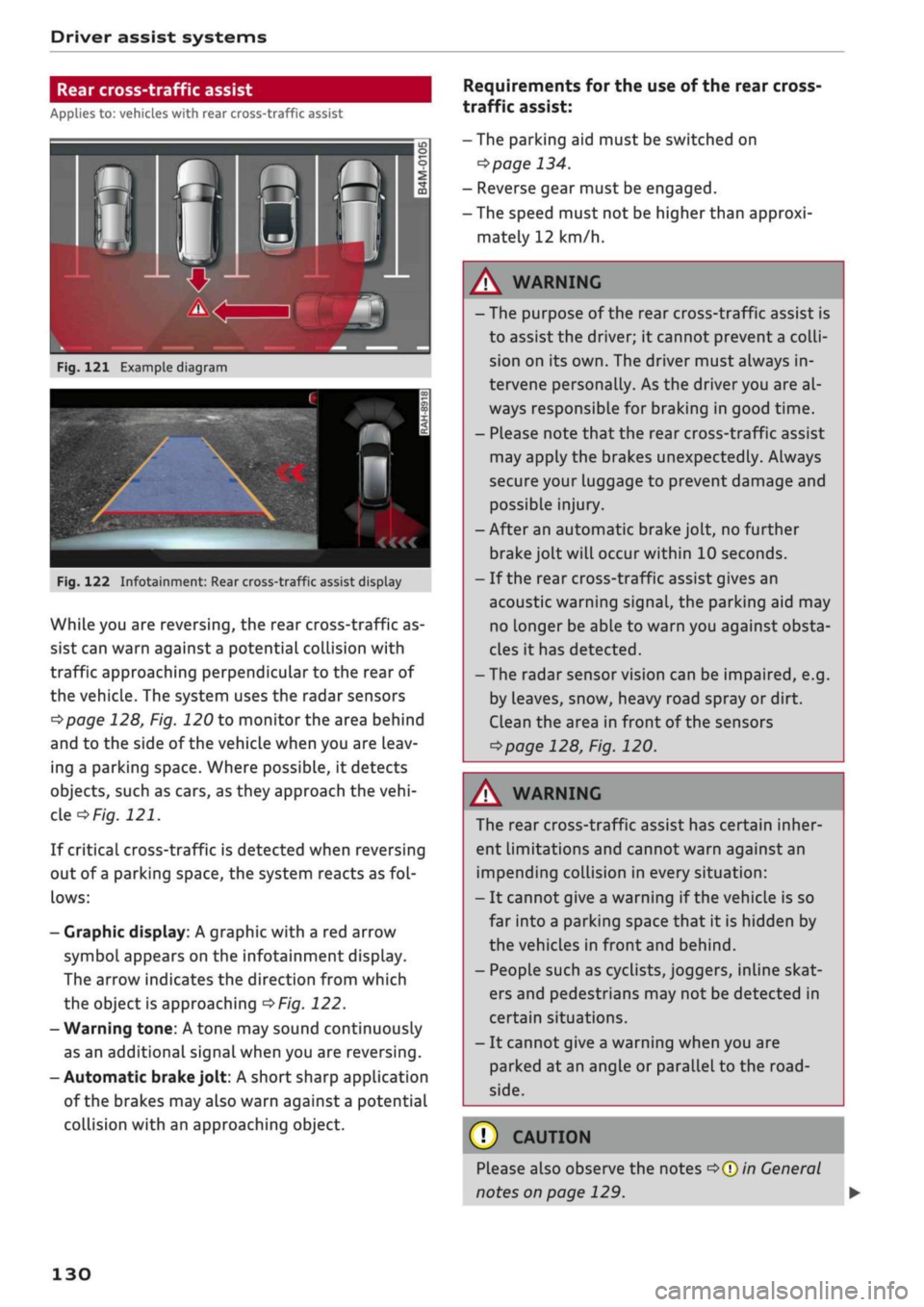
Fig.
121 Example diagram
Fig.
122 Infotainment: Rear cross-traffic assist display
While you are reversing, the rear cross-traffic as
sist can warn against a potential collision with
traffic approaching perpendicular to the rear of
the vehicle. The system uses the radar sensors
^page
128, Fig. 120 to monitor the area behind
and to the side of the vehicle when you are leav
ing a parking space. Where possible, it detects
objects, such as cars, as they approach the
vehi
cle
of/g.
121.
If critical cross-traffic is detected when reversing
out of a parking space, the system reacts as
fol
lows:
- Graphic display: A graphic with a red arrow
symbol appears on the infotainment display.
The arrow indicates the direction from which
the object is approaching
^>Fig.
122.
- Warning tone: A tone may sound continuously
as an additional signal when you are reversing.
-Automatic
brake
jolt: A short sharp application
of the brakes may also warn against a potential
collision with an approaching object.
Requirements for the use of the rear cross-
traffic assist:
-The parking aid must be switched on
^>page
134.
- Reverse gear must be engaged.
- The speed must not be higher than approxi
mately 12 km/h.
A
WARNING
- The purpose of the rear cross-traffic assist is
to assist the driver; it cannot prevent a
colli
sion on its own. The driver must always in
tervene personally. As the driver you are al
ways responsible for braking in good time.
- Please note that the rear cross-traffic assist
may apply the brakes unexpectedly. Always
secure your luggage to prevent damage and
possible injury.
-After an automatic brake jolt, no further
brake jolt will occur within 10 seconds.
- If the rear cross-traffic assist gives an
acoustic warning signal, the parking aid may
no Longer be able to warn you against obsta
cles it has detected.
- The radar sensor vision can be impaired, e.g.
by leaves, snow, heavy road spray or dirt.
Clean the area in front of the sensors
*>page
128, Fig. 120.
A
WARNING
The rear cross-traffic assist has certain inher
ent limitations and cannot warn against an
impending collision in every situation:
- It cannot give a warning if the vehicle is so
far into a parking space that it is hidden by
the vehicles in front and behind.
- People such as cyclists, joggers, inline skat
ers and pedestrians may not be detected in
certain situations.
- It cannot give a warning when you are
parked at an angle or parallel to the
road
side.
(T)
CAUTION
Please also observe the notes
^>©in
General
notes on page 129.
130
Page 133 of 364
Driver assist systems
CO
< o rN
r>
rN
t-H
o < 00
-The automatic brake application with in
creasing brake force can be cancelled by ap
plying the brakes yourself or by pressing the
accelerator firmly.
- In certain situations, a warning may be giv
en by the rear cross-traffic assist even if
there is no traffic in the critical zone, for in
stance when parking or manoeuvring the ve
hicle in reverse.
- The rear cross-traffic assist is deactivated
automatically if you deactivate the
ESC.
-The rear cross-traffic assist is switched on/
off via the parking aid
^>page
134.
-The system is not available in towing mode.
Driver messages
Applies to: vehicles with Audi side assist
Should the side assist be deactivated automati
cally, a driver message will appear in the instru
ment cluster display.
O
Audi side assist: system fault!
The system cannot detect vehicles reliably and
will be deactivated. The sensors are out of align
ment or defective. Have the system checked by a
qualified workshop soon.
O
Audi side assist: currently unavailable. No
sensor vision
O
Audi side assist: currently unavailable.
Sen
sor view restricted due to surroundings. See
owner's manual
The radar sensors are blocked. The area in front
of the sensors must not be obstructed by bicycle
racks,
stickers, deposits or any other substances.
If necessary, clean the area in front of the
sen
sors
^>page
128, Fig. 120.
O
Audi side assist: currently unavailable
The side assist is temporarily inoperative and
cannot be switched on (for instance if the battery
is not sufficiently charged).
O
Audi side assist: unavailable in towing mode
2
Audi side assist: unavailable in towing mode
The side assist function will be switched off auto
matically after a short time when the electrical
connector for the trailer socket is plugged in on
vehicles with a factory-fitted towing bracket. If
the towing bracket is not factory-fitted the side
assist function may not be switched off automat
ically. The side assist must not be used when
towing a trailer.
O Rear
parking aid: obstacle detection limited
The rear cross-traffic assist is not available. Ei
ther the ESC is switched off or the radar sensors
may be obstructed by a bicycle rack, stickers,
leaves, snow or similar objects. Switch on the ESC
or, if necessary, clean the area in front of the
sen
sors
<3page
128, Fig. 120. If this message re
mains displayed, drive to a qualified workshop
soon and have the fault rectified.
Audi drive select
Introduction
Applies to: vehicles with Audi drive select
Audi drive select alLows you to use different set
ups on your vehicle. The modes efficiency*, com
fort, auto and dynamic allow the driver, for ex
ample,
to change from a sporty mode to a more
comfortable one via the
&&
button in the centre
console or via the infotainment system. In
addi
tion,
the individual* mode allows you to adapt
the vehicle set-up to
suit
your personal driving
style.
For example, you might choose to combine
a more dynamic engine set-up with a lighter
steering response.
Description
Applies to: vehicles with Audi drive select
The possible vehicle set-up in each mode de
pends on which equipment is installed on your
vehicle. The engine and steering are basic parts
of your vehicle which are always included in the
set-up.
Engine and automatic gearbox*
The response of the engine and automatic
gear
box* to accelerator pedal movements will be
more spontaneous or balanced, depending on
131
Page 134 of 364

Driver assist systems
which mode you select. In the performance-
oriented dynamic mode, the automatic gearbox
changes gear at higher engine speeds.
By contrast, in efficiency* mode, the automatic
gearbox* selects the next gear at lower engine
speeds and the coasting mode is activated
^>page
91. This helps to reduce fuel consump
tion.
Suspension control (Audi magnetic
ride)*
The suspension control uses sensors to collect in
formation on steering movements, braking and
acceleration input by the driver, road surface
quality, road speed and vehicle Loading. With
Audi drive select you can choose between dynam
ic and comfort-oriented suspension set-ups (dy
namic and comfort modes), or opt for
a
more
balanced set-up (auto mode).
Steering
The degree of power assistance can be varied.
Various modes are possible
^>page
133. The
light, indirect steering response in comfort mode
is particularly suitable on long motorway trips,
for instance. The steering has a tighter, more di
rect feel in dynamic mode.
The steering response is even more agile on
vehicles with progressive steering*.
Audi adaptive light*
The adaptive light system adjusts the light distri
bution according to the mode selected.
Air conditioner*
The air conditioner runs in a particularly econom
ical mode when the efficiency* setting is selec
ted.
When this function is selected, eco* is shown
in the display of the automatic air conditioner.
Cruise control system*
The acceleration response is particularly econom
ical in efficiency* mode.
Audi adaptive cruise control*
The acceleration mode can be varied from com
fort to sport by changing the setting in drive se
lect. The setting also determines whether the re
sponse of the adaptive cruise control to the driv
ing style of the driver in front is more balanced or
spontaneous. The efficiency* mode chooses a set
up for maximum economy.
© Note
- On some models the vehicle's maximum
speed can only be obtained in the auto and
dynamic modes.
- Applies to vehicles with manual gearbox: An
E appears in the gear-change indicator when
efficiency* mode is activated.
- Applies to vehicles with automatic gearbox:
Selector lever position
S
is automatically se
lected when dynamic mode is activated.
E
is
selected in efficiency* mode.
- Applies to vehicles with automatic gearbox:
If
you
select efficiency* mode when the se
lector Lever is in position D,
E
will automati
cally appear in the instrument cluster dis
play.
- Applies to vehicles with manual gearbox: If
you press the accelerator right down past
the point of resistance in efficiency* mode,
the engine power is automatically control
led to give your vehicle maximum accelera
tion.
- Please note that the efficiency* mode is not
available in towing mode.
Selecting the driving mode
Applies to: vehicles with Audi drive select
You
can choose between efficiency*, comfort, au
to,
dynamic and individual*.
Fig.
123 Centre console: Button for drive select
•
Press the
ism
button
^>Fig.
123 repeatedly until
the desired mode appears on the instrument
cluster/infotainment display. Or: •
132
Page 136 of 364
Parking aids
Parking aids
General notes
Applies to: vehicles with rear parking aid/parking system
plus/reversing camera/park assist
Various systems are available to help you when
parking or manoeuvring in tight spaces, depend
ing on the equipment fitted on your vehicLe.
The rear parking aid gives an acoustic warning if
there are any obstacles behind the car
cépage
135.
When you are parking, the parking system plus
warns you acoustically and optically about obsta
cles detected in front of and behind the vehicLe
^page
135.
The reversing camera uses the infotainment sys
tem display to show a picture of the area behind
the vehicle captured by the camera. This picture
helps you to park the vehicle parallel or perpen
dicular to the roadside. In addition, you are assis
ted by the functions of the parking system plus
^>page
137.
The park assist helps you to find suitable parking
spaces, to manoeuvre the vehicLe into spaces par
allel or perpendicular to the roadside and to drive
out of spaces parallel to the kerb
^>page
139. It
also includes the functions of the parking system
plus
^page
135 and additionally monitors the
area at the side of the vehicle
(f) ^page
135,
Fig. 124.
A
WARNING
- Always watch the road and the area sur
rounding the vehicLe. The electronic systems
cannot replace the full concentration of the
driver. The driver is always responsible for
safety during parking and all other manoeu
vres.
- Please note that certain surfaces, such as
clothing fabrics, cannot be detected or dis
played by the system - risk of accident!
- The sensors and cameras have bLind spots in
which neither people nor objects are regis
tered.
It is particularly important to ensure
that there are no small children or animals
near the vehicLe - risk of accident!
- Always keep a close watch on the area
around the vehicLe and make full use of the
rear-view mirrors.
- Impacts or damage to the radiator grille,
bumper, wheel arches or underbody can
cause misalignment of the sensors. This can
impair the effectiveness of the parking aids.
Have the systems checked by a qualified
workshop.
(T)
CAUTION
- The system may not always be able to de
tect objects such as the following:
- Chains, trailer draw bars, posts or fences
- Objects above the sensors, such as wall
protrusions, etc.
- Objects with certain surfaces or struc
tures,
such as wire fences or powder snow
- As your car moves closer to low obstacles,
they may disappear from the sensors' field
of vision. Please note
that
you will no longer
be warned about these obstacles.
- Remember to maintain sufficient clearance
from the kerb to avoid damaging the wheel
rims.
(T)
Note
- In certain situations, a warning may be giv
en by the system even if there is no obstacle
within range of the sensors. This can be
caused by the following, for instance:
- Certain road surfaces or long grass
- External ultrasound sources, e.g. from
street cleaning vehicles
- Heavy rain or snow or dense exhaust
fumes
-To familiarise yourself with the system, we
recommend
that
you practise parking in a
quiet location or a car park. The weather
and light conditions should be good.
- You can change the display and adjust the
volume and pitch of the beeps
^>page
143.
- Please refer to the notes on the use of a
towing bracket
^page
144.
- There is a slight delay in the picture dis
played on the infotainment display. •
134
Page 137 of 364
Parking aids
- To ensure that the acoustic parking aid
works properly, the sensors must be kept
clean and free of snow and ice.
CO
< o rN
iv
rN
•-i
00
Rear parking aid
Description
Applies to: vehicles with rear parking aid
The
rear parking aid is an acoustic parking
sys
tem.
Description
Sensors are located in the rear bumper. When
the sensors detect an obstacLe, you are alerted by
acoustic signals (beeps).
Please ensure that the sensors are kept free of
stickers, deposits and any other substances
which could impair the function of the system.
Notes on cleaning
^>page
312.
The measuring range of the sensors starts at
about:
Rear Side
Centre
0.90 m
1.60 m
The acoustic signals sound with increasing
fre
quency as you approach the obstacle. A warning
tone will sound continuously when the vehicLe is
less than approx. 0.30 m away from the obstacLe.
Stop reversing immediately
•=>
A in General notes
on page 134,
<=>©
in General notes on page 134
The volume of the warning beeps will be reduced
after
a
few seconds until it is muted if the vehicLe
remains at a constant distance from a detected
obstacle (but not if the obstacle is closer than
0.30 m). If the tone is muted and the obstacLe
comes closer than before, the tone will sound
again.
If the tone is muted and the obstacle is
further away than before, no tone will sound.
Please watch the area surrounding the vehicle
when driving off.
Activating
The parking aid is switched on automatically
when reverse gear is engaged. You will hear a
brief acknowledgement tone.
Parking system plus
Description
Applies to: vehicles with parking system plus/park assist
The
parking system plus provides acoustic and
visual assistance when parking.
Fig.
124 Diagram
Sensors are located in the front and rear bump
ers.
When the sensors detect an obstacle, you are
alerted by acoustic signals (beeps) and a graphic
display.
Please ensure that the sensors are kept free of
stickers, deposits and any other substances
which could impair the function of the system.
Notes on cleaning
<3>page
312.
Approximate range for each display zone:
®
®
©
®
©*
1.20 m
0.90 m
1.60 m
0.90 m
0.90
ma)
a'
Applies to vehicles with park assist
The acoustic signals sound with increasing
fre
quency as you approach the obstacle. A warning
tone will sound continuously when the vehicLe is
less than approx. 0.30 m away from the obstacLe
(or less than approx. 0.20 m away in zone (D*).
Stop moving immediately
•=>
A in General notes
on page 134,
•=>©
in General notes on page 134
The volume of the warning beeps will be reduced
after
a
few seconds until it is muted if the vehicLe
remains at
a
constant distance from a detected
obstacLe (but not if the obstacLe is closer than
0.30 m). If the tone is muted and the obstacle
135