display AUDI Q2 2021 Owner´s Manual
[x] Cancel search | Manufacturer: AUDI, Model Year: 2021, Model line: Q2, Model: AUDI Q2 2021Pages: 364, PDF Size: 87.77 MB
Page 28 of 364
Instruments and controls
Height adjustment
The height of the head-up display can be adjus
ted to your individual requirements.
•
Sit in the correct position in your seat
•=>
page 265.
• Turn the
Settings on infotainment system
•
Select the following on the infotainment sys
tem:
IMENU|
button > Car
>
left control button
> Driver assist
>
Head-up display.
Display contents
The settings on the infotainment system allow
you to specify which information is shown in the
display. Possible options include navigation mes
sages*, adaptive cruise control* and camera-
based traffic sign recognition*.
The display of certain information and some of
the red warning lamps cannot be deactivated on
the infotainment system.
Brightness
You can adjust the brightness of the display via
the infotainment system. In addition, the display
brightness is reduced automatically as the
day
light starts to fade. The basic level of brightness
is determined by the instrument lighting setting
•=>
page 53.
© CAUTION
Do not place any objects over the opening for
the head-up display to avoid scratching the
glass cover.
© Note
- The display may be harder to see in unfav
ourable light conditions or if
you
are wear
ing polarised sunglasses.
- To be able to see the display as clearly as
possible, adjust the position of your seat
and the height setting for the head-up dis
play.
- Notes on cleaning
^tab.
Cleaning the inte
rior on page 314.
Warning and indicator
Lamps
Description
The warning and indicator lamps light up or flash
in the instrument cluster to indicate functions or
faults.
Some of the warning and indicator lamps may be
accompanied by a driver message. The warning
display will be accompanied by the corresponding
warning chime. The warning/indicator lamps and
driver messages on the instrument
duster
dis
play can be masked by further displays. You can
have them displayed again on the driver informa
tion system* by calling up the second tab (driver
messages) via the
\<±\
button on the multi-func
tion steering wheel. If several malfunctions have
occurred,
you can use the Left thumbwheel to
scroll through them on the display.
Some of the warning lamps may be displayed in
different colours.
âs
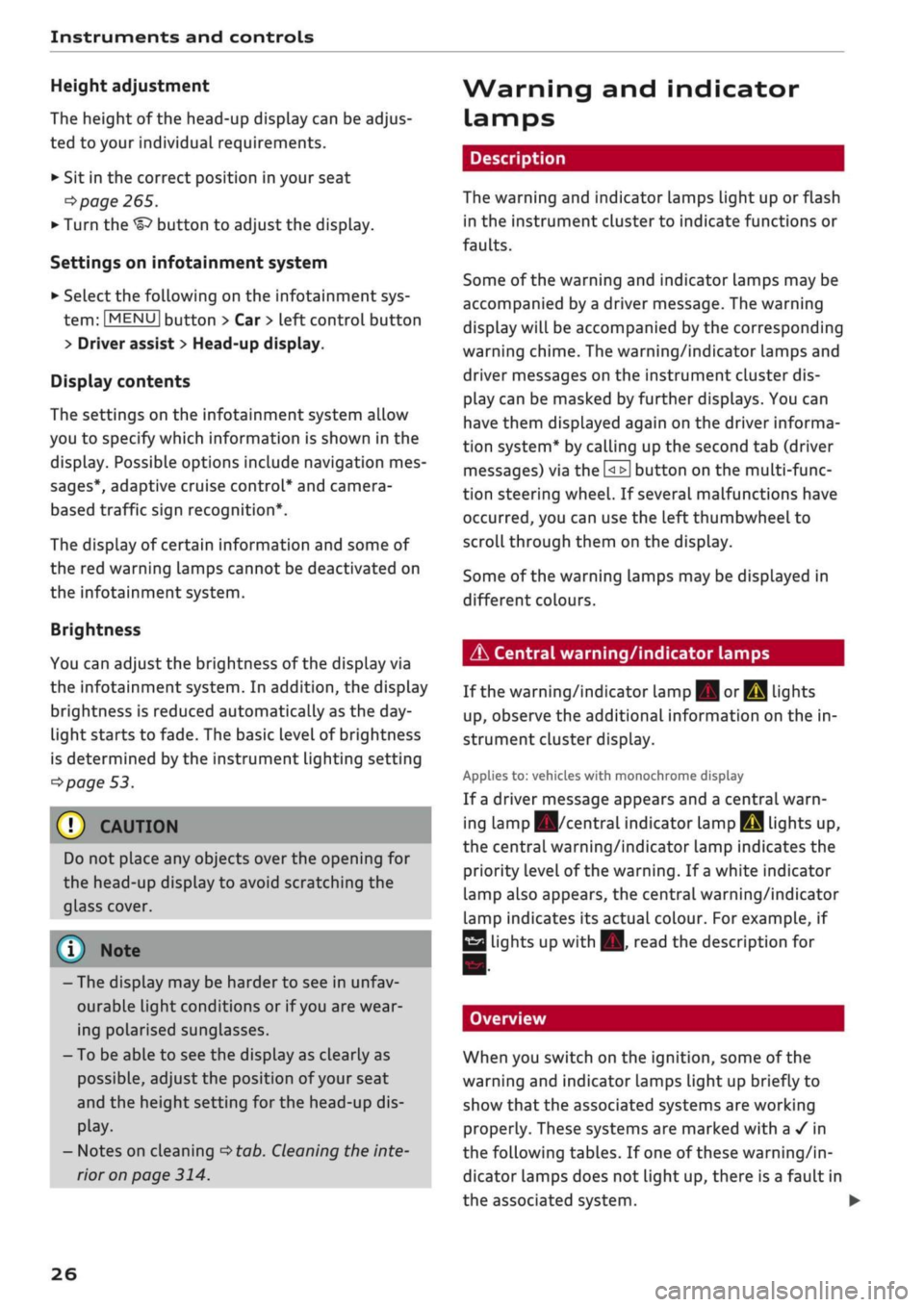
Central warning/indicator lamps
If the warning/indicator lamp
|g or pq
lights
up,
observe the additional information on the in
strument cluster display.
Applies
to: vehicles with monochrome display
If
a
driver message appears and a central warn
ing [amp
Kfl/central
indicator
lamp^S
lights up,
the central warning/indicator lamp indicates the
priority level of the warning. If
a
white indicator
lamp also appears, the central warning/indicator
lamp indicates its actual colour. For example, if
g
lights up with
H.
read the description for
Overview
When you switch on the ignition, some of the
warning and indicator lamps Light up briefly to
show that the associated systems are working
properly. These systems are marked with a
•/
in
the following tables. If one of these warning/in
dicator lamps does not light up, there is a fault in
the associated system. •
26
Page 36 of 364
Instruments and controls
the exhaust gas and damage the catalytic
con
verter.
Drive slowly to a qualified workshop without de
lay and have the fault rectified.
Diesel particulate filter
Applies to: vehicles with diesel particulate filter
|
Particulate filter: system fault. See owner's
manual
The diesel particulate filter requires regenera
tion.
You can assist the self-cleaning function of
the filter by driving as follows:
Drive at a speed of at least 60 km/h for about
15 minutes in 4th or 5th gear (on vehicles with
manual gearbox), or with the selector lever in po
sition S (on vehicles with automatic gearbox).
Keep the engine speed at about 2000
rpm.
As a
result of the increase in temperature, the soot in
the filter will be burned off. The indicator lamp
will go out once the cleaning process has been
completed successfully.
If the indicator lamp does not go out, drive to a
qualified workshop without delay and have the
fault rectified.
A WARNING
It is essential that you adjust your speed to
suit the weather,
road,
terrain and traffic
con
ditions. The recommended driving speed
must never lead to the driver disregarding the
traffic regulations.
(T) Note
For more information about the diesel partic
ulate filter, refer to
^>page
295.
!
»
Engine speed governing
Applies to: vehicles with engine speed governing
[51 Max. engine speed: XXXX rpm
The engine speed will automatically be governed
to the speed displayed in the instrument cluster.
This protects the engine from overheating.
The rev limiter is deactivated as soon as the en
gine temperature is no longer within the critical
range and you have taken
your
foot off the accel
erator.
If the rev limiter has been activated because of a
fault in the engine management system, the in
dicator lamp
Q or[|2g
will also light up. Make
sure that the engine speed does not exceed the
speed displayed in the driver information system,
for example when shifting down a gear. Drive to
a qualified workshop without delay and have the
fault rectified.
Engine oil level
(MIN)
23
Please check oil level
You can continue driving for the time being but
you should check the engine oil level as soon as
possible
<^page
297.
- If the engine oil level is too Low, add more oil
^>page
298, Checking and topping up the en
gine oil level.
- If the engine oil level is normal but the indica
tor lamp stays on, drive to a qualified workshop
without delay and avoid high engine speeds.
ST
Engine oil sensor
3
Oil level sensor: system fault
The sensor for checking the engine oil level has
failed.
Drive to a qualified workshop soon and
have the fault rectified.
3
Oil level sensor: oil change required. Please
contact workshop
The engine oil level is too
high.
Drive to a qualified workshop without delay and
have the fault rectified.
CAUTION
Please observe the procedure described in the
Owner's Manual
^>page
298, Checking and
topping up the engine oil level.
f Engine warm-up
requested
Please warm up engine
34
Page 44 of 364

Doors and windows
Locking the passenger's door/rear doors
The mechanical Locking device is located on the
end face of the front passenger's door and the
rear doors. It is only visible when the door is
open.
•
Pull the cap out of the opening
^>Fig.
27.
•
Insert the key in the slot inside and turn it as
far as the stop to the right (if the door is on the
right side) or to the Left (if the door is on the
leftside).
A WARNING
- Read and follow all the warnings
=>
A in De
scription on page 37.
- Applies to vehicles with anti-theft alarm
system:
Do not leave anyone (especially
chil
dren) in the car if it is locked from the out
side and the
safelock
mechanism* is activa
ted:
the doors and windows cannot then be
opened from the inside
^>page
42. Locked
doors could delay assistance in an emergen
cy, potentially putting Lives at risk.
© CAUTION
Ensure that you only insert the the key in the
lock in the direction illustrated to avoid dam
aging the key and the lock
^>Fig.
26. On right-
hand drive vehicles, the key should be inser
ted the other way around correspondingly.
Anti-theft alarm system
Applies to: vehicles with anti-theft alarm system
Fig.
28 End face of (open) driver's door: Button for interior
monitor/tow-away protection
If the anti-theft alarm system senses interfer
ence with the vehicle it triggers an audible and
visible alarm. The anti-theft alarm system is
acti
vated when you lock the vehicle in the usual way
and is switched off again when you unlock the ve
hicle.
The anti-theft alarm system comprises the
fol
lowing components:
Anti-theft alarm
The alarm is triggered if the bonnet, the boot Lid
or any of the doors are forced open. The alarm
system is armed whenever the vehicle is locked.
If
you
unlock the vehicle by turning the key in the
driver's door lock, you should switch on the
igni
tion within 15 seconds to prevent the alarm from
being triggered. On some export versions, the
alarm is triggered immediately when you open a
door.
To deactivate the alarm, switch on the ignition or
press the
\M
button on the remote control key.
Interior monitor and tow-away protection
When the vehicle is locked, the alarm will be
trig
gered if movements are detected in the interior
(e.g.
by animals) or if the vehicle's inclination is
changed (e.g. during transport). You can prevent
the alarm from being triggered accidentally by
switching off the interior monitor and/or tow-
away protection. To do so, proceed as follows:
•
Press the
B
button
oF/g.
28. The LED in the
button will light up.
•
If
you
now lock the vehicle, the interior monitor
and tow-away protection will remain deactiva
ted until the vehicle is unlocked again.
Safelock1)
The doors can no Longer be opened from the in
side.
This makes it more difficult to break into
the vehicle
,=>^.
The message Be aware of door
safelock. See owner's manual appears on the in
strument cluster display when you switch off the
ignition as a reminder that the safelock mecha
nism*
will be activated. You can switch off the
11
This function is not available on all export versions/equip
ment versions.
42
Page 48 of 364
Doors
and
windows
Child Locks
Applies to: vehicles with electric/mechanical child lock
The
child locks disable
the
rear windows and pre
vent the rear doors from being opened from
the
inside.
Driver message
in the
instrument cluster
display
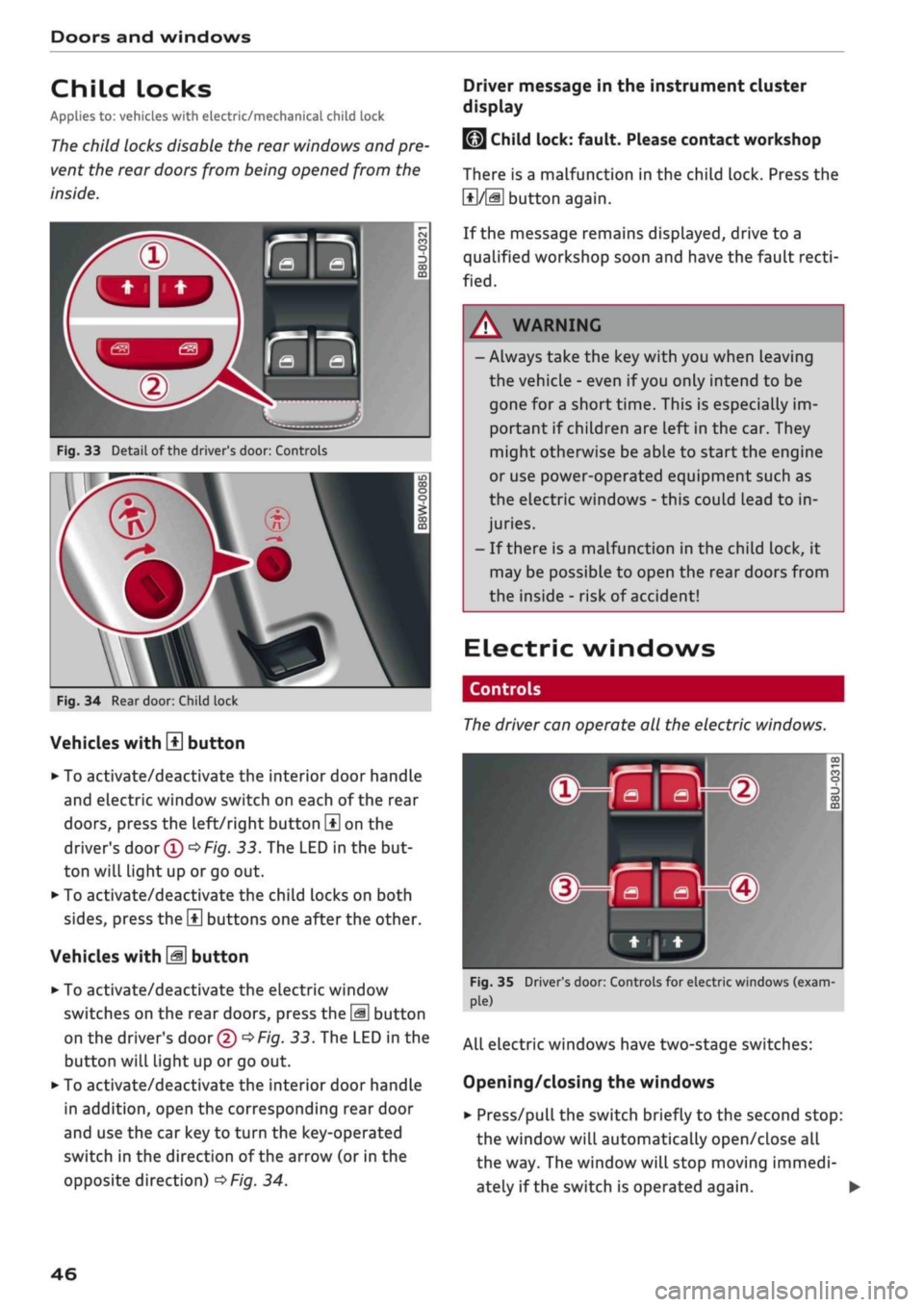
Fig.
33
Detail
of
the driver's door: Controls
Fig.
34
Rear door: Child lock
Vehicles with
H
button
• To activate/deactivate the interior door handle
and electric window switch on each
of
the rear
doors,
press the left/right button
\±\
on
the
driver's
door
(T)^Fig.
33.
The LED
in
the but
ton will light up
or
go out.
• To activate/deactivate the child locks on both
sides,
press the
B
buttons one after the other.
Vehicles with
M
button
•
To activate/deactivate the electric window
switches on the rear doors, press the
\M
button
on the driver's door
© •=>
Fig.
33.
The LED in
the
button will light up
or
go
out.
•
To activate/deactivate the interior door handle
in addition, open the corresponding rear door
and use the car key
to
turn the key-operated
switch
in
the direction
of
the arrow
(or
in
the
opposite direction)
^>Fig.
34.
LMJ
Child lock: fault. Please contact workshop
There
is
a malfunction
in
the child lock. Press
the
1*1/51
button again.
If the message remains displayed, drive
to a
qualified workshop soon and have the fault
recti
fied.
A WARNING
- Always take the key with you when Leaving
the vehicle
-
even
if
you
only intend
to be
gone
for
a short time. This
is
especially im
portant
if
children are left in the car. They
might otherwise be able
to
start the engine
or use power-operated equipment such
as
the electric windows
-
this could lead
to
in
juries.
-
If
there
is
a malfunction
in
the child lock,
it
may be possible
to
open
the
rear doors from
the inside
-
risk
of
accident!
Electric windows
Controls
The
driver can operate
all the
electric windows.
^^S
MB-®
hjHi)
Fig.
35 Driver's door: Controls for electric windows (exam
ple)
All electric windows have two-stage switches:
Opening/closing the windows
•
Press/pull the switch briefly
to
the second stop:
the window will automatically open/close
all
the way. The window will stop moving immedi
ately
if
the switch
is
operated again.
•
46
Page 53 of 364
Lights and vision
CO
<
O
rN rN
•-i
00
• Press the lever forwards (3)
^>page
50,
Fig. 38
to activate the main beam assist. The indicator
lamp
^/fi8
will light up in the instrument
cluster display and the main beams will be
switched on/off automatically. An indicator
lampBS
lights up when the main beams are
switched on.
Switching the main beams on/off manually
If the main beams are not switched on or if the
headlights are not dipped as expected, you can
control the dip function manually:
• To switch on the main beams manually, push
the lever forwards
(3).
The indicator Lamp
g
will
Light
up. To dip the headlights again, pull
the lever towards you 0.
• To dip the headlights manually, pull the lever
towards you
@.
The main beam assist will be
deactivated.
Flashing the headlights
• Pull the lever towards you
@
to flash the
head
lights when the main beam assist is activated
and the main beams are dipped. The main
beam assist will remain activated.
Driver messages in the instrument cluster
display
13
Main beam assist: system fault!
1H
Main beam assist: fault. See owner's manual
Drive to a qualified workshop soon and have the
fault rectified. You can still switch the main
beam headlights on and off manually.
13
Main beam assist: currently unavailable. No
camera view
HI
Main beam assist: currently unavailable.
Camera view restricted due to surroundings.
See owner's manual
The camera vision is impaired, e.g. by stickers or
dirt. Please clean the windscreen.
The sensor is located in the mounting for the in
terior mirror. Do not affix any stickers on this sec
tion of the windscreen.
A WARNING
The main beam assist is only intended to as
sist the driver. The driver must always ensure
that the headlights are used when required,
and may have to switch them on or off
man
ually, e.g. when the Light conditions or visibili
ty are poor. In the following situations
man
ual intervention may be necessary:
- Hazardous weather conditions such as fog,
heavy rain and snow or water splashes
- Roads on which oncoming traffic is partially
concealed (e.g. on motorways)
- Indiscernible road users (e.g. cyclists with
poor lighting)
- Tight corners, steep hill crests or valleys
- Poorly lit towns
- Highly reflective objects, such as road signs
-Windscreen misted up, dirty, frosted or cov
ered by stickers in front of the sensor
Adjusting the settings for the exterior
lighting
You
can change the settings for these functions
on the infotainment system.
• Select the following on the infotainment sys
tem:
IMENUI
button > Car
>
left control button
> Vehicle settings > Exterior lighting.
Automatic headlights*
The following settings are available in the Auto
matic headlights menu:
Activation time* - You can determine how soon
the lights are switched on by using the settings
early*, medium* or late* to adjust the sensitivity
of the light sensor.
Main beam assist* - You can switch the main
beam assist* on/off.
Entry/exit
lights*
You can switch the entry/exit lights* on and off.
They illuminate the area around the vehicle after
dark when you unlock the vehicle or when the ig
nition has been switched off and the driver's door
opened.
•
51
Page 55 of 364
Lights and vision
CO
<
O
rN
iv
rN
i—i
o
< 00
Background lighting
Applies
to: vehicles with background lighting
The
background lighting can be adjusted via the
infotainment system.
• Select the following on the infotainment sys
tem:
|MENU| button > Car
>
left control button
> Vehicle settings > Background lighting.
It may be possible to adjust the brightness of the
individual zones, depending on the equipment
fitted in your vehicle:
• Press the right control button and select one of
the zones displayed.
The background lighting will be switched on
when you switch on the headlights with the
igni
tion on.
Instrument lighting
The
background lighting of the instruments and
displays (including the head-up display*) can be
adjusted as required.
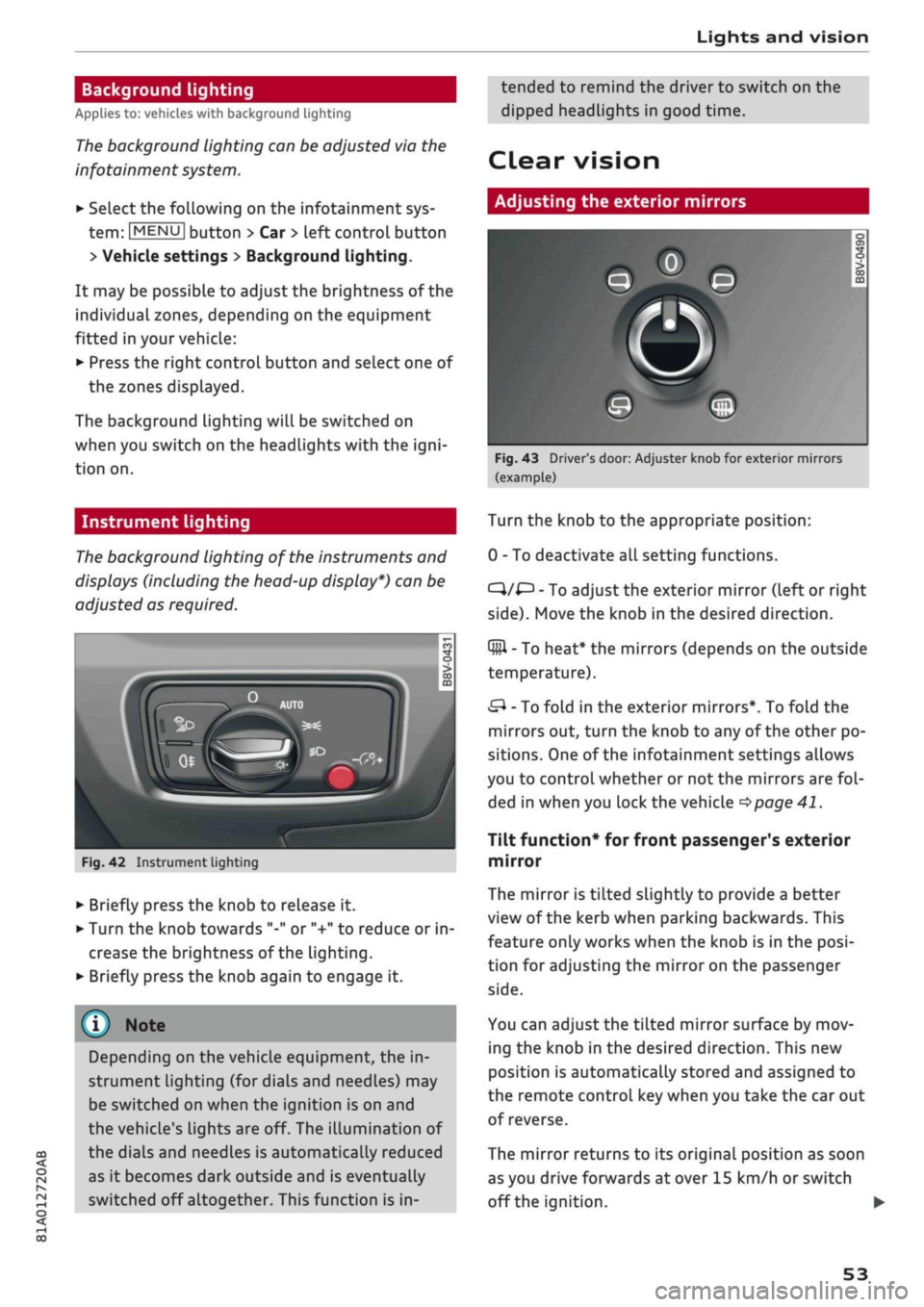
Fig.
42 Instrument lighting
• Briefly press the knob to release it.
• Turn the knob towards "-" or "+" to reduce or in
crease the brightness of the lighting.
• Briefly press the knob again to engage it.
Depending on the vehicle equipment, the in
strument lighting (for dials and needLes) may
be switched on when the ignition is on and
the vehicle's lights are off. The illumination of
the dials and needles is automatically reduced
as it becomes dark outside and is eventually
switched off altogether. This function is in
tended to remind the driver to switch on the
dipped headlights in good time.
dear
vision
Adjusting the exterior mirrors
Fig.
43 Driver's door: Adjuster knob for exterior mirrors
(example)
Turn the knob to the appropriate position:
0 - To deactivate all setting functions.
C}/^
- To adjust the exterior mirror (left or right
side).
Move the knob in the desired direction.
Q#l
- To heat* the mirrors (depends on the outside
temperature).
&
- To fold in the exterior mirrors*. To fold the
mirrors out, turn the knob to any of the other po
sitions. One of the infotainment settings allows
you to control whether or not the mirrors are
fol
ded in when you lock the vehicle
•=>page
41.
Tilt function* for front passenger's exterior
mirror
The mirror is tiLted slightly to provide a better
view of the kerb when parking backwards. This
feature only works when the knob is in the
posi
tion for adjusting the mirror on the passenger
side.
You can adjust the tilted mirror surface by mov
ing the knob in the desired direction. This new
position is automatically stored and assigned to
the remote control key when you take the car out
of reverse.
The mirror returns to its original position as soon
as you drive forwards at over 15 km/h or switch
off the ignition. •
53
Page 68 of 364
Heating and cooling
Heating and cooling
Heating system/air
conditioner
Description
One of the following systems may be fitted, de
pending on the equipment in your vehicle:
- Heating and ventilation system or
- Manual air conditioner* or
- Automatic air conditioner* (deluxe version)
The heating and ventilation system* heats and
ventilates the vehicle interior. The air condition
er* additionally cools and dehumidifies the air in
side the vehicle. It operates most effectively with
the windows and the panorama sun roof* closed.
If the vehicle has been standing in the sun, it may
cool down faster if
you
open the windows briefly
to let the hot air escape.
Pollution filter
The pollution filter removes impurities, such as
dust and pollen, from the air.
Key-coded settings
Various settings are stored and assigned to the
remote control key in use.
Default settings
Default settings for certain functions can be se
lected on the infotainment system.
SeLect the following on the infotainment system:
|MENU|
button
>
Car
>
left control button
>
A/C.
Supplementary heater*
Applies to: vehicles with diesel engine
The vehicle interior warms up more quickly with
the supplementary heater. The system automati
cally switches the supplementary heater on
tem
porarily as required, depending on the setting on
the vehicle heating system.
The supplementary heater function can be
switched on or off as required. SeLect the follow
ing on the infotainment system:
|MENU|
button >
Car
>
left control button
>
A/C
>
Auto supple
mentary heater.
® For the sake of the environment
I
- Switch off the cooling mode on the air
con
ditioner* by pressing the A/C button if you
wish to save
fuel.
This will also reduce emis
sions.
The LED in the button will go out
when the air conditioner is switched off.
- On vehicles with efficiency program*, you
can see how your fuel consumption is being
affected by auxiliary equipment and have
tips for improved fuel economy displayed
•=>
page 21.
- Applies to vehicles with diesel engine: The
automatic supplementary heater function
can be switched off on the infotainment sys
tem
cépage
66, Supplementary
heater*.
©
- Keep the air intake slots in front of the
windscreen clear of snow, ice and Leaves to
ensure unimpaired heating and cooling, and
to prevent the windows misting over.
- Condensation can drip off the air cooling
system*
and form a pool underneath the ve
hicle.
This is normal and does not indicate a
leak.
- If
you
notice, for instance, that the seat* or
rear window heating is not working, it may
have been temporarily switched off by the
power management function. These sys
tems will be available again as soon as
suffi
cient electrical power is available.
l
) Note
The air conditioner contains fluorinated
greenhouse gases. Further information is pro
vided on a sticker in the engine compart
ment1^.
1'
May vary in different countries
66
Page 71 of 364
Heating and cooling
Automatic air conditioner
Applies to: vehicles with automatic air conditioner
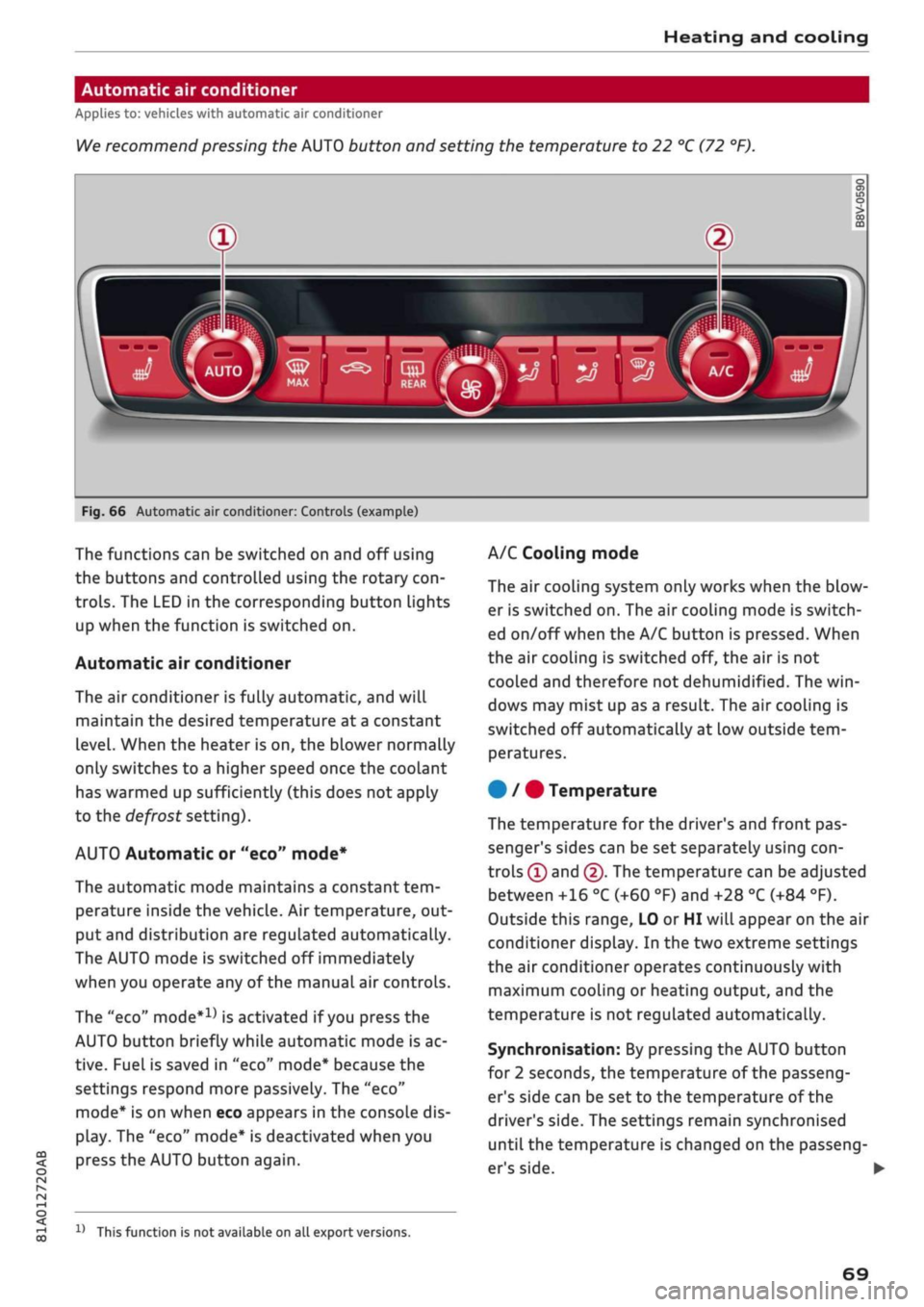
We
recommend pressing the AUTO button and setting the temperature to 22 °C (72 °F).
Fig.
66 Automatic air conditioner: Controls (example)
CO
<
O
rN
IV
rN
t-H
o <
The functions can be switched on and off using
the buttons and controlled using the rotary
con
trols.
The LED in the corresponding button lights
up when the function is switched on.
Automatic air conditioner
The air conditioner is fully automatic, and will
maintain the desired temperature at a constant
level.
When the heater is on, the blower normally
only switches to a higher speed once the coolant
has warmed up sufficiently (this does not apply
to the defrost setting).
AUTO Automatic or "eco" mode*
The automatic mode maintains a constant
tem
perature inside the vehicle. Air temperature, out
put and distribution are regulated automatically.
The AUTO mode is switched off immediately
when you operate any of the manual air controls.
The "eco"
mode*1*
is activated if you press the
AUTO button briefly while automatic mode is ac
tive.
Fuel is saved in "eco" mode* because the
settings respond more passively. The "eco"
mode*
is on when eco appears in the console dis
play. The "eco" mode* is deactivated when you
press the AUTO button again.
1J
This function is not available on all export versions.
A/C Cooling mode
The air cooling system only works when the blow
er is switched on. The air cooling mode is switch
ed on/off when the A/C button is pressed. When
the air cooling is switched off, the air is not
cooled and therefore not dehumidified. The
win
dows may mist up as a result. The air cooling is
switched off automatically at low outside
tem
peratures.
#
/ # Temperature
The temperature for the driver's and front pas
senger's sides can be set separately using
con
trols ® and @. The temperature can be adjusted
between +16 °C (+60 °F) and +28 °C (+84 °F).
Outside this range, LO or HI will appear on the air
conditioner display. In the two extreme settings
the air conditioner operates continuously with
maximum cooling or heating output, and the
temperature is not regulated automatically.
Synchronisation: By pressing the AUTO button
for 2 seconds, the temperature of the passeng
er's side can be set to the temperature of the
driver's side. The settings remain synchronised
until the temperature is changed on the passeng
er's side.
I
69
Page 81 of 364

Driving
CO
<
O
rN
IV
rN
t-H
o <
Starting the engine after
a malfunction
Applies
to: vehicles with convenience key
If the remote control key battery is exhausted or
if radio interference
or
a system malfunction oc
curs, extra steps may be necessary in order to
start the engine.
Fig.
71 Steering column/remote control key: Starting the
engine
after a malfunction
If the message
D
Key not recognised. See
own
er's manual or
|3
Remote control key: hold
back of key against marked area. See owner's
manual is displayed, you can still start the en
gine manually.
•
Manual gearbox: Press the clutch
pedal
• Automatic gearbox: Press the brake pedal.
•
Hold the remote control key against the symbol
fJ)
^>Fig.
71, as shown in the illustration.
• Press the ISTART ENGINE
STOPl
button
^ A in
Starting the engine on page 76. The engine
shouLd start.
•
Drive to a qualified workshop soon and have the
fault rectified.
Note
You can call up the driver message again by
pressing the ISTART ENGINE STOP| button.
Start/stop system
Description
Applies
to: vehicles with start/stop system
The start/stop system can help to save fuel and
reduce
CO2
emissions.
1)
May vary in different countries
In start/stop mode, the engine is switched off
automatically when the vehicle stops, e.g. at
traffic lights. The ignition remains on during this
stop phase. The engine is automatically started
on demand.
The start/stop system is automatically activated
each
time
you switch on the ignition.
Basic conditions for start/stop mode
- The driver's door must be closed.
- The driver's seat belt must be buckled.
- The bonnet must be closed.
- The vehicle must have been moving at over 3
km/h since the Last stop.
CAUTION
Always switch off the start/stop system
^>page
81 before driving through water.
©
The engine is switched
off1)
shortly before the
vehicle comes to a stop. However, the brake
servo and power steering remain fully opera
tional.
Stopping/starting the engine
Applies
to: vehicles with start/stop system
START
(M
STOP
S
Fig.
72 Instrument cluster: Engine switched off (stop
phase)
Applies
to: vehicles with manual gearbox
•
When the vehicle stops, put the gear Lever in
neutral and
take your
foot
off
the clutch pedal.
The engine will switch off. An indicator lamp
I
will light up in the instrument cluster •
79
Page 82 of 364

Driving
display.
The rev
counter needle will also move
to
the
READY position.
•
The engine will start again automatically when
you press
the
clutch pedal.
The
indicator lamp
will
go out.
Applies to: vehicles with automatic gearbox
•
Brake
the
vehicle
to a
stop.
The
engine will
be
switched
off
shortly before
the
vehicle comes
to
a
standstill
or
when
the
vehicle
is
station-
aryx).
Keep your foot
on the
brake pedal.
The
indicator
lamp
@/
@
will appear
on the
dis
play.
The rev
counter needle will also move
to
the READY position.
•
The engine will start again automatically when
you take your foot
off
the brake pedal.
If the
parking brake
is
applied
or
hold assist*
is
switched on,
the
engine will only restart when
you press
the
accelerator pedal1).
The
indicator
lamp
will
go out.
Further information
for
automatic gearboxes
The engine will stop
if
the selector lever
is in po
sition
P, N or D.
The engine will start again
if
you move
the
selec
tor lever
to
R during
a
stop phase.
If you
do not
want
the
engine
to
start when mov
ing
the
selector Lever through
R,
move
the
lever
to P quickly.
You
can
control whether
or not the
engine
is
switched
off by
varying
the
amount
of
pressure
on
the
brake pedal.
For
instance,
if
you brake
gently
in
stop-and-go traffic
or
before turning
off
at a junction,
the
engine will remain
on
while
the
vehicle
is at
a standstill.
As
soon as you press
the
brake pedal harder,
the
engine will
be
switched
off.
be switched
off. The rev
counter needle will
move
to the
OFF position.
- Keep your foot
on the
brake pedal during
a
stop phase
to
prevent
the
vehicle from mov
ing.
-
If you press the
ISTART ENGINE STOP|
but
ton*
during
a
stop phase,
the
ignition will
Note
Applies to: vehicles with manual gearbox
If the engine stalls, you
can
start
it
again
di
rectly
by
pressing
the
clutch pedal immedi
ately.
General notes
Applies to: vehicles with start/stop system
Engine does
not
switch
off
The system checks that certain conditions
are
met before
and
during each stop phase.
If
the
in
dicator lamp
Ey
appears
on the
instrument clus
ter display,
the
engine will
not be
switched
off in
the following situations:
- The engine
has
not
yet
reached
the
minimum
temperature required
for
start/stop mode.
- The interior temperature selected
on the air
conditioner*
has
not
yet
been reached.
- The exterior temperature
is
very high/low.
- The windscreen
is
being defrosted
W.
-The parking
aid*
is
switched
on.
- The vehicle battery charge
is too low.
- The steering wheel
is
close
to
full lock
or the
vehicle
is
being steered.
- Reverse gear has just been selected.
- The vehicle
is on a
steep gradient.
-At high altitudes.
Engine cuts
in
again automatically
The stop phase
is
interrupted
in the
following sit
uations,
for
example.
The
engine cuts
in
auto
matically without intervention from
the
driver.
- The vehicle starts
to
roll (e.g.
on a
hiLl).
- The interior temperature deviates from
the air
conditioner setting.
- The windscreen
is
being defrosted
*$?.
- The brake pedal
is
pressed several times
in
suc
cession.
- The vehicle battery charge drops
to an
insuffi
cient level.
1'
May vary in different countries
80