luggage compartment AUDI Q2 2021 Owner´s Manual
[x] Cancel search | Manufacturer: AUDI, Model Year: 2021, Model line: Q2, Model: AUDI Q2 2021Pages: 364, PDF Size: 87.77 MB
Page 4 of 364
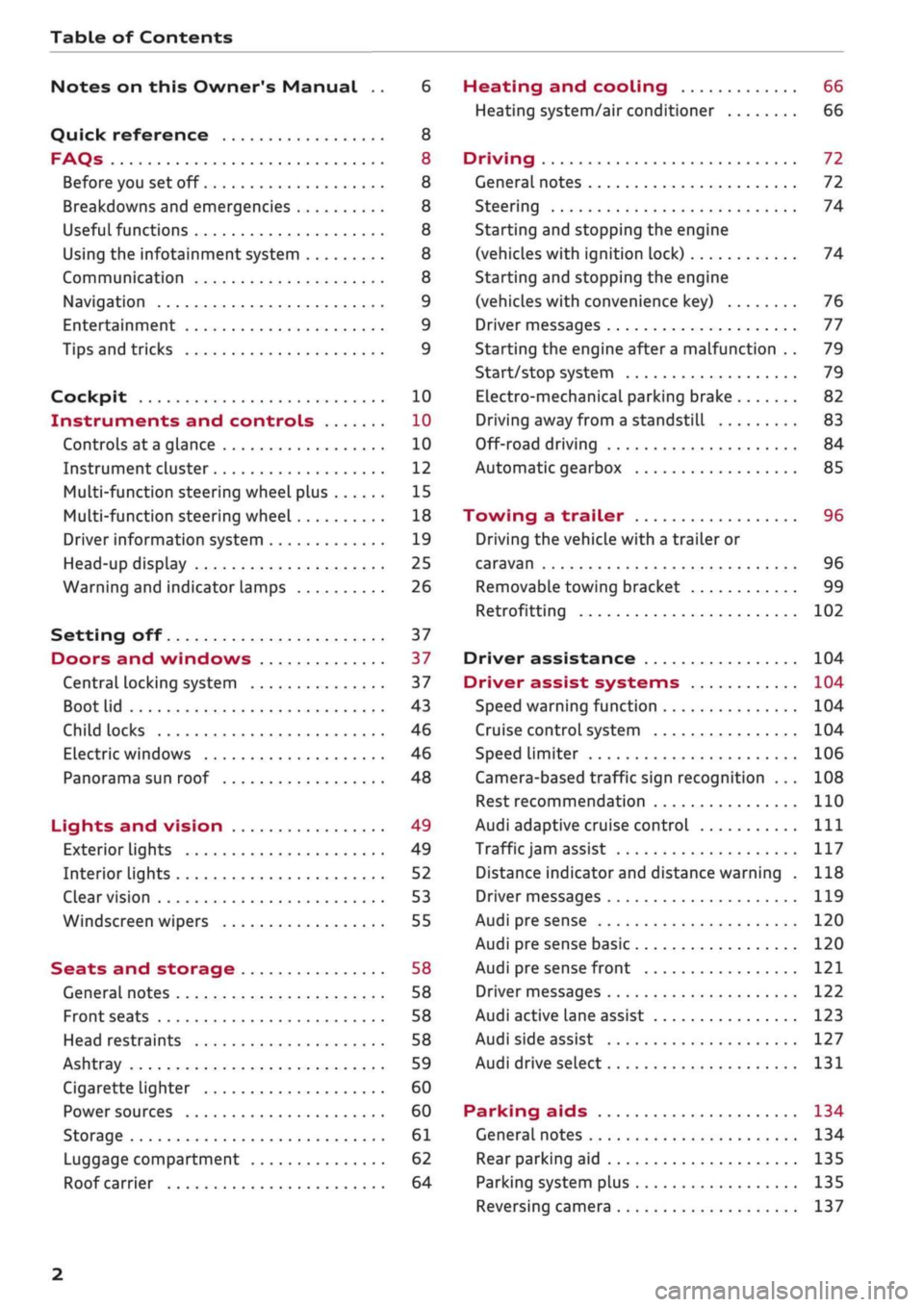
Table of Contents
Notes on this Owner's Manual .. 6
Quick reference 8
FAQs 8
Before you set off 8
Breakdowns and emergencies 8
Useful functions 8
Using the infotainment system 8
Communication 8
Navigation 9
Entertainment 9
Tips and tricks 9
Cockpit 10
Instruments and controls 10
Controls at a glance 10
Instrument cluster 12
Multi-function steering wheel plus 15
Multi-function steering wheel 18
Driver information system 19
Head-up display 25
Warning and indicator lamps 26
Setting off 37
Doors and windows 37
Central locking system 37
Boot lid 43
Child locks 46
Electric windows 46
Panorama sun roof 48
Lights and vision 49
Exterior lights 49
Interior lights 52
Clear vision 53
Windscreen wipers 55
Seats and storage 58
General notes 58
Front seats 58
Head restraints 58
Ashtray 59
Cigarette lighter 60
Power sources 60
Storage 61
Luggage compartment 62
Roof carrier 64
Heating and cooling 66
Heating system/air conditioner 66
Driving 72
General notes 72
Steering 74
Starting and stopping the engine
(vehicles with ignition lock) 74
Starting and stopping the engine
(vehicles with convenience key) 76
Driver messages 77
Starting the engine after a malfunction . . 79
Start/stop system 79
Electro-mechanical parking brake 82
Driving away from a standstill 83
Off-road driving 84
Automatic gearbox 85
Towing a trailer 96
Driving the vehicle with a trailer or
caravan 96
Removable towing bracket 99
Retrofitting 102
Driver assistance 104
Driver assist systems 104
Speed warning function 104
Cruise control system 104
Speed limiter 106
Camera-based traffic sign recognition ... 108
Rest recommendation 110
Audi adaptive cruise control
Ill
Traffic
jam assist 117
Distance indicator and distance warning . 118
Driver messages
119
Audi pre sense 120
Audi pre sense basic 120
Audi pre sense front 121
Driver messages 122
Audi active lane assist 123
Audi side assist 127
Audi drive select 131
Parking aids 134
General notes 134
Rear parking aid
135
Parking system plus 135
Reversing camera 137
2
Page 6 of 364
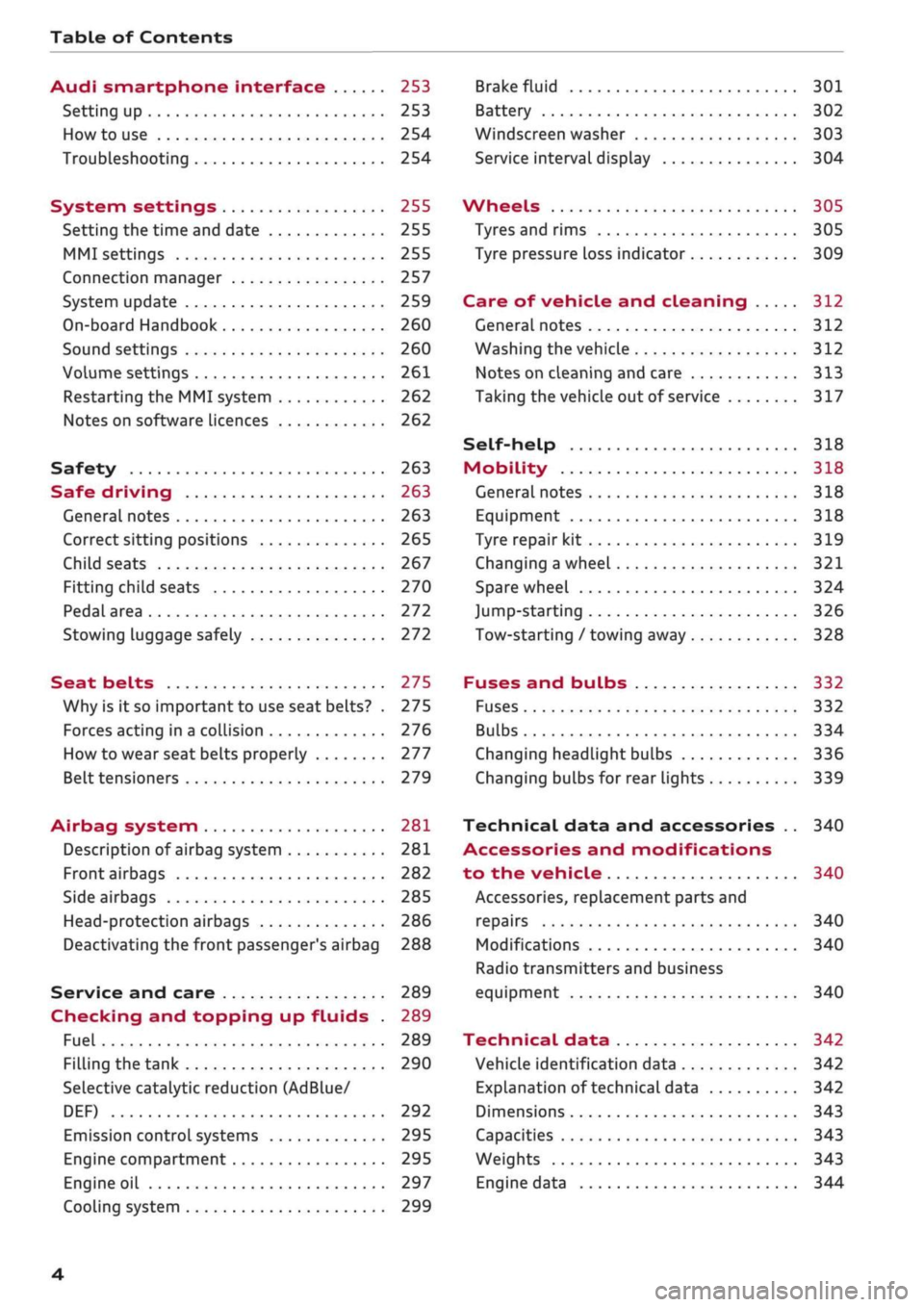
Table of Contents
Audi smartphone interface 253
Setting up
253
How to use 254
Troubleshooting 254
System settings 255
Setting the time and date 255
MMI settings 255
Connection manager 257
System update 259
On-board Handbook 260
Sound settings 260
Volume settings 261
Restarting the MMI system 262
Notes on software licences 262
Safety 263
Safe driving 263
General notes 263
Correct sitting positions 265
Child seats 267
Fitting child seats 270
Pedal area 272
Stowing luggage safely 272
Seat belts 275
Why is it so important to use seat belts? . 275
Forces acting in a collision 276
How to wear seat belts properly 277
Belt tensioners 279
Airbag system 281
Description of airbag system 281
Front airbags 282
Side airbags 285
Head-protection airbags 286
Deactivating the front passenger's airbag 288
Service and care 289
Checking and topping up fluids . 289
Fuel 289
Filling the tank 290
Selective catalytic reduction (AdBlue/
DEF) 292
Emission control systems 295
Engine compartment 295
Engine oil 297
Cooling system 299
Brake fluid 301
Battery 302
Windscreen washer 303
Service interval display 304
Wheels 305
Tyres and rims 305
Tyre pressure loss indicator 309
Care of vehicle and cleaning 312
General notes 312
Washing the vehicle 312
Notes on cleaning and care 313
Taking the vehicle out of service 317
Self-help 318
Mobility 318
General notes
318
Equipment 318
Tyre repair kit 319
Changing a wheel 321
Spare wheel 324
Jump-starting 326
Tow-starting / towing away 328
Fuses and bulbs 332
Fuses 332
Bulbs 334
Changing headlight bulbs 336
Changing bulbs for rear lights 339
Technical data and accessories .. 340
Accessories and modifications
to the vehicle 340
Accessories, replacement parts and
repairs 340
Modifications 340
Radio transmitters and business
equipment 340
Technical data 342
Vehicle identification data 342
Explanation of technical data 342
Dimensions 343
Capacities 343
Weights 343
Engine data 344
4
Page 51 of 364
Lights and vision
Lights and vision
Exterior lights
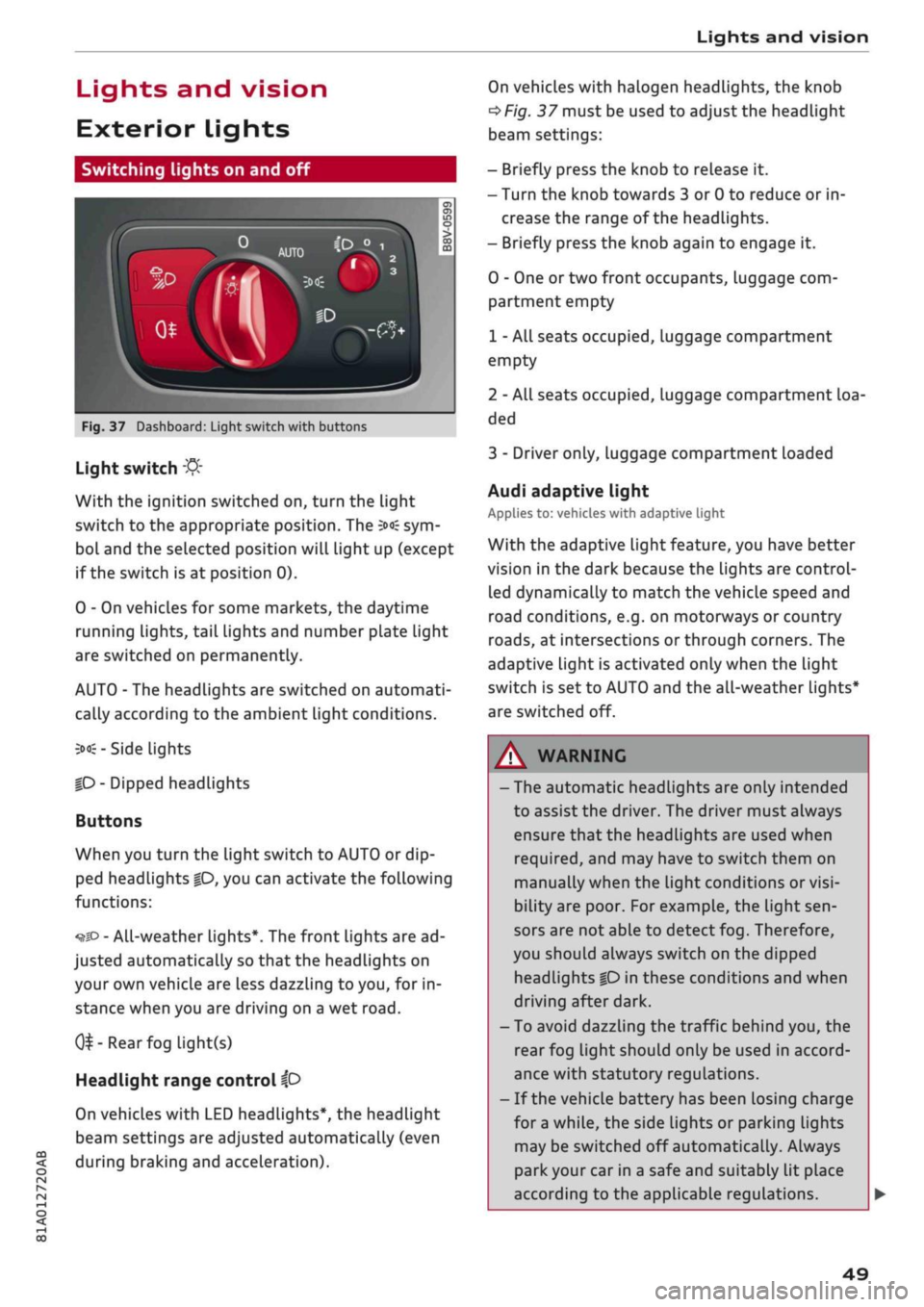
Switching lights on and off
Fig.
37 Dashboard: Light switch with buttons
CO
<
O
rN rN
•-i
00
Light switch
:&
With the ignition switched on, turn the light
switch to the appropriate position. The
3»€
sym
bol and the selected position will light up (except
if the switch is at position 0).
0 - On vehicles for some markets, the daytime
running lights, tail lights and number plate Light
are switched on permanently.
AUTO - The headlights are switched on automati
cally according to the ambient light conditions.
3><£-
Side lights
|D
- Dipped headlights
Buttons
When you turn the light switch to AUTO or dip
ped headlights
|0,
you can activate the following
functions:
•^SD
- All-weather lights*. The front lights are ad
justed automatically so that the headlights on
your own vehicle are less dazzling to
you,
for in
stance when you are driving on a wet
road.
0^-Rear
fog light(s)
Headlight range control
ip
On vehicles with LED headlights*, the headlight
beam settings are adjusted automatically (even
during braking and acceleration).
On vehicles with halogen headlights, the knob
^Fig.
37 must be used to adjust the headlight
beam settings:
- Briefly press the knob to release it.
- Turn the knob towards 3 or 0 to reduce or in
crease the range of the headlights.
- Briefly press the knob again to engage it.
0 - One or two front occupants, luggage com
partment empty
1 - All seats occupied, luggage compartment
empty
2 - All seats occupied, Luggage compartment loa
ded
3 - Driver only, luggage compartment loaded
Audi adaptive light
Applies to: vehicles with adaptive light
With the adaptive light feature, you have better
vision in the dark because the Lights are control
led dynamically to match the vehicle speed and
road conditions, e.g. on motorways or country
roads,
at intersections or through corners. The
adaptive light is activated only when the Light
switch is set to AUTO and the all-weather Lights*
are switched off.
WARNING
- The automatic headlights are only intended
to assist the driver. The driver must always
ensure that the headlights are used when
required,
and may have to switch them on
manually when the light conditions or
visi
bility are poor. For example, the light
sen
sors are not able to detect fog. Therefore,
you should always switch on the dipped
headlights
|0
in these conditions and when
driving after dark.
- To avoid dazzling the traffic behind you, the
rear fog light should only be used in accord
ance with statutory regulations.
- If the vehicle battery has been losing charge
for
a
while, the side lights or parking lights
may be switched off automatically. Always
park your car in a safe and suitably lit place
according to the applicable regulations.
49
Page 61 of 364
Seats and storage
• To lower the head restraint, press the side but
ton and slide the head restraint downwards.
A WARNING
Please observe the safety warnings
^>page
266, Correct adjustment of head re
straints.
r,
IN
:
B
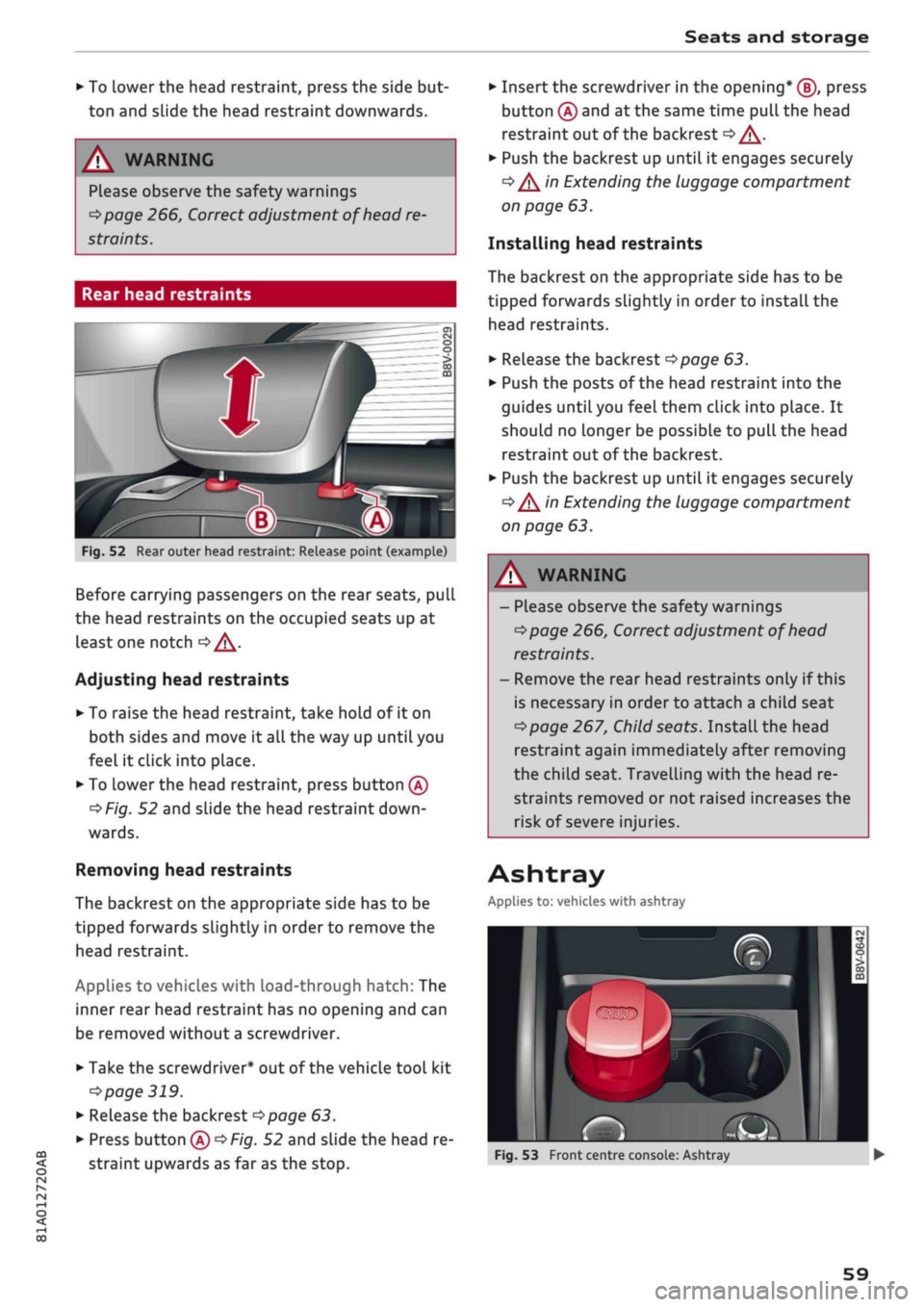
Fig.
52 Rear outer head restraint: Release point (example)
Before carrying passengers on the rear seats, pull
the head restraints on the occupied seats up at
least one notch
oA.
Adjusting head restraints
• To raise the head restraint, take hold of it on
both sides and move it all the way up until you
feel it click into place.
• To Lower the head restraint, press button
(A)
^>Fig.
52 and slide the head restraint
down
wards.
Removing head restraints
The backrest on the appropriate side has to be
tipped forwards slightly in order to remove the
head restraint.
Applies to vehicles with load-through hatch: The
inner rear head restraint has no opening and can
be removed without a screwdriver.
• Take the screwdriver* out of the vehicle tool kit
•=>
page 319.
• Release the backrest
opoge
63.
• Press button
(A)
^>Fig.
52 and slide the head re
straint upwards as far as the stop.
• Insert the screwdriver in the opening* (J), press
button
(A)
and at the same time pull the head
restraint out of the backrest
<=> /\.
• Push the backrest up until it engages securely
•=> /\
in Extending the luggage compartment
on page 63.
Installing head restraints
The backrest on the appropriate side has to be
tipped forwards slightly in order to install the
head restraints.
• Release the backrest
^>page
63.
• Push the posts of the head restraint into the
guides until you feel them click into place. It
should no Longer be possible to pull the head
restraint out of the backrest.
• Push the backrest up until it engages securely
•=> /\
in Extending the luggage compartment
on page 63.
A WARNING
- Please observe the safety warnings
^page
266, Correct adjustment of head
restraints.
- Remove the rear head restraints only if this
is necessary in order to attach a child seat
^>page
267, Child seats. InstaLl the head
restraint again immediately after removing
the child seat. Travelling with the head re
straints removed or not raised increases the
risk of severe injuries.
Ashtray
Applies to: vehicles with ashtray
~
-
a»
rS
Fig.
53 Front centre console: Ashtray
59
Page 63 of 364
Seats and storage
CO
rN
•-i
00
children unsupervised in the vehicle with the
key.
© CAUTION
- To avoid damage, please take care when de
taching connectors from the electrical pow
er sources.
-To avoid damage to the vehicle's electrical
system,
never connect equipment that
gen
erates electrical current, such as a solar
panel or battery charger, to the power sour
ces in order to charge the vehicle's battery.
- Always use the correct type of plugs to
avoid damaging the power sources.
©
USB charging sockets marked "CHARGE ON
LY" cannot transfer data and are intended for
charging only.
Storage
Cup holders
/
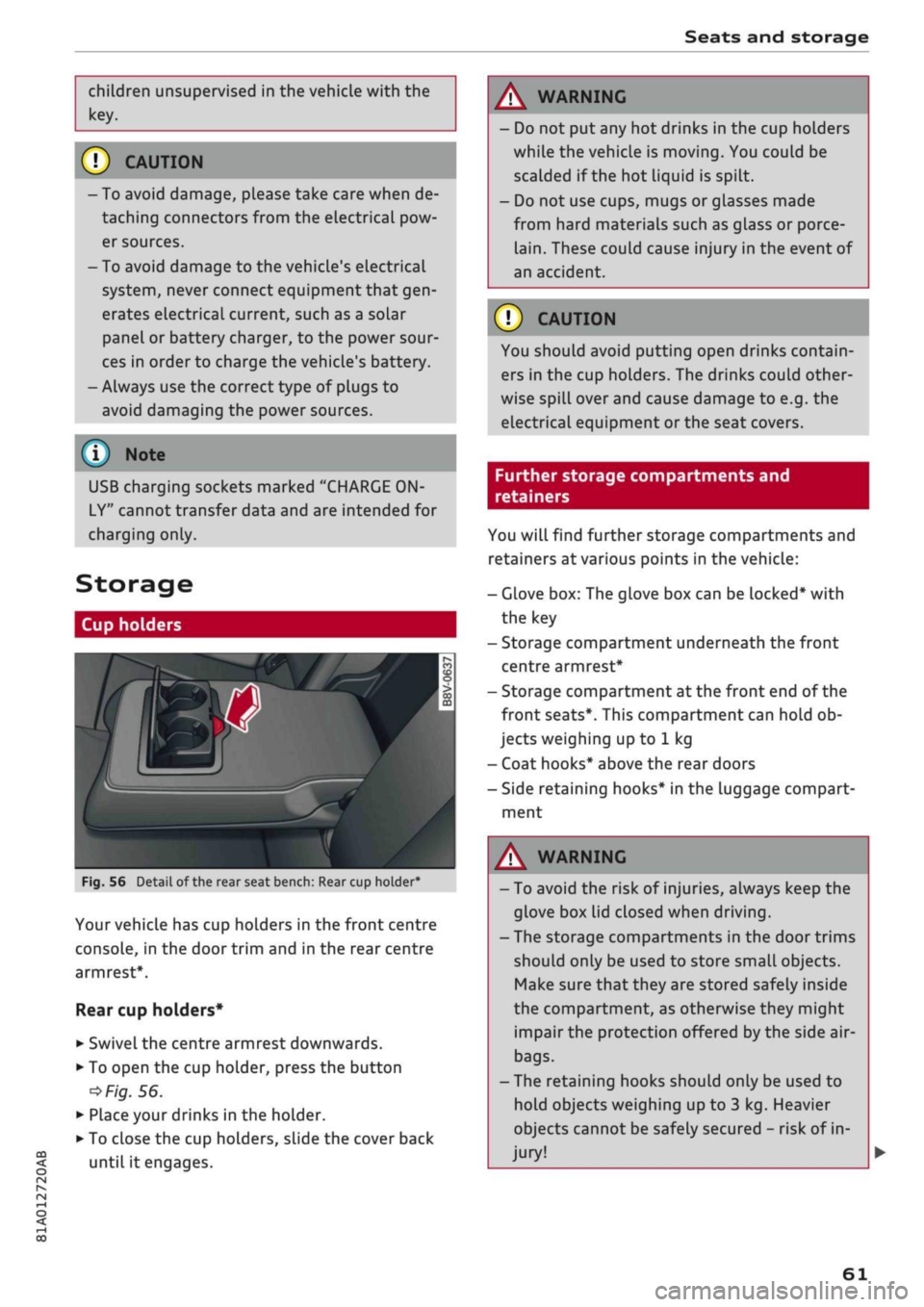
Fig.
56
BfT
^^—- j
^^ m /
Detail of the rear seat bench: Rear cup holder*
r^
n
co
3
>
CO
m
A
Your vehicle has cup holders in the front centre
console, in the door trim and in the rear centre
armrest*.
Rear cup holders*
• Swivel the centre armrest downwards.
• To open the cup holder, press the button
•=>
Fig.
56.
• Place your drinks in the holder.
• To close the cup holders, sLide the cover back
until it engages.
A WARNING
- Do not put any hot drinks in the cup holders
while the vehicle is moving. You could be
scalded if the hot liquid is spilt.
- Do not use cups, mugs or glasses made
from hard materials such as glass or porce
lain.
These could cause injury in the event of
an accident.
© CAUTION
You should avoid putting open drinks contain
ers in the cup holders. The drinks could other
wise spill over and cause damage to e.g. the
electrical equipment or the seat covers.
Further storage compartments and
retainers
You will find further storage compartments and
retainers at various points in the vehicle:
- Glove box: The glove box can be Locked* with
the key
- Storage compartment underneath the front
centre armrest*
- Storage compartment at the front end of the
front seats*. This compartment can hold ob
jects weighing up to 1 kg
- Coat hooks* above the rear doors
- Side retaining hooks* in the luggage compart
ment
A WARNING
- To avoid the risk of injuries, always keep the
glove box Lid closed when driving.
- The storage compartments in the door trims
should only be used to store small objects.
Make sure that they are stored safely inside
the compartment, as otherwise they might
impair the protection offered by the side air-
bags.
- The retaining hooks should only be used to
hold objects weighing up to 3 kg. Heavier
objects cannot be safely secured - risk of in
jury!
61
Page 64 of 364
Seats and storage
A WARNING
Applies to: vehicles with coat hooks
- Make sure
that
any items of clothing hang
ing from the coat hooks do not obstruct
your view to the rear.
- Only use the coat hooks for light items of
clothing and make sure that there are no
heavy or sharp objects in the pockets.
- Do not use clothes hangers to hang up the
clothing,
as this could interfere with the
function of the head-protection airbags.
Luggage compartment
General notes
A
WARNING
Please refer to the important safety notes on
<=>page
272, Stowing luggage safely.
Luggage compartment cover
Applies to: vehicles with luggage compartment cover
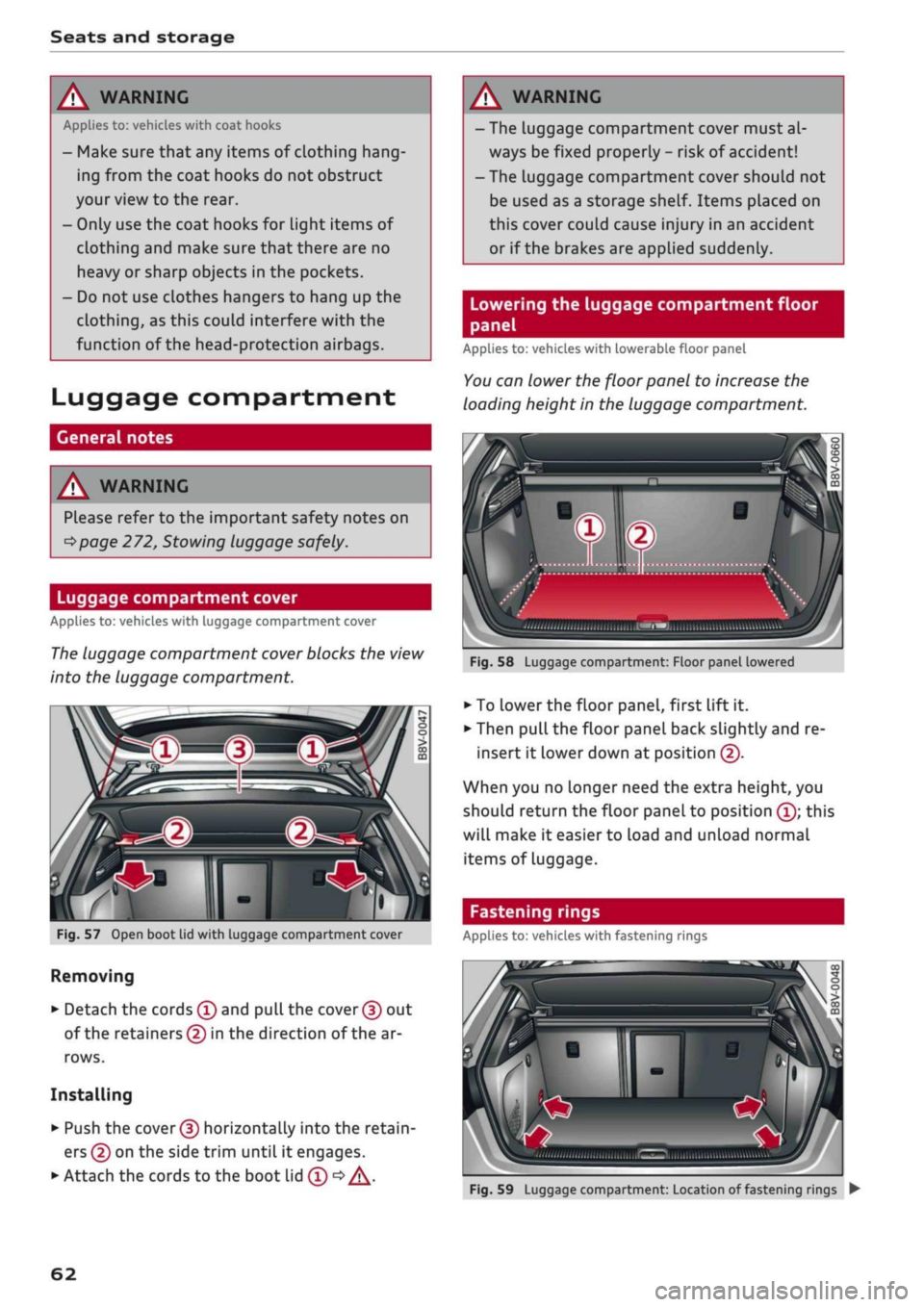
The
luggage compartment cover blocks the view
into the luggage compartment.
c
Fig.
57
Open boot lid with luggage compartment cover
Removing
• Detach the cords
(f)
and
pull
the
cover (f)
out
of the retainers (5) in the direction of the ar
rows.
Installing
• Push the
cover (D
horizontally into the retain
ers
(?)
on the side trim until
it
engages.
• Attach the cords to the boot lid
(T) •=>
A.
A WARNING
- The luggage compartment cover must al
ways be fixed properly
-
risk of accident!
- The luggage compartment cover should not
be used as a storage shelf. Items placed on
this cover couLd cause injury in an accident
or if the brakes are applied suddenly.
Lowering the luggage compartment floor
panel
Applies to: vehicles with lowerable floor panel
You
can lower the floor panel to increase the
loading height in the luggage compartment.
'•iii.nii,,,,
,„„„
„„,,
iilSMBIiimi
ulwu'l
Fig.
58
Luggage compartment: Floor panel lowered
• To
Lower
the floor panel, first lift
it.
• Then pull the floor panel back slightly and re
insert
it
lower down at position
(f).
When you no longer need the extra height, you
should return the floor panel to position
(Î);
this
will make
it
easier to load and unload normal
items of Luggage.
Fastening rings
Applies to: vehicles with fastening rings
Fig.
59
Luggage compartment: Location of fastening rings
•
62
Page 65 of 364
Seats and storage
CO
<
O
rN
rN
•-i
00
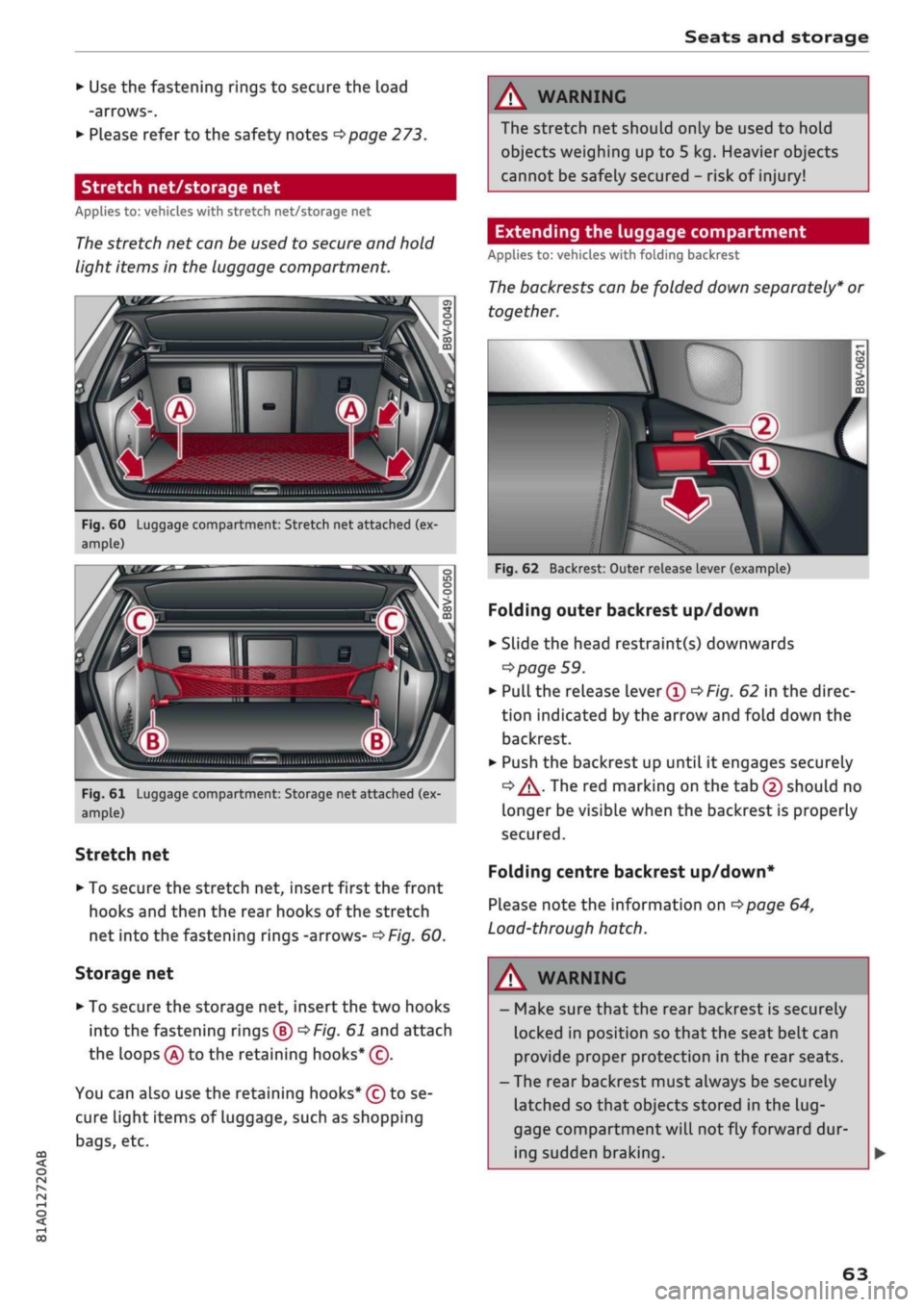
• Use the fastening rings to secure the load
-arrows-.
• Please refer to the safety notes
^page
273.
Stretch net/storage net
Applies to: vehicles with stretch net/storage net
The
stretch net can be used to secure and hold
light items in the luggage compartment.
ri
Fig.
60 Luggage compartment: Stretch net attached (ex
ample)
A
Q
"
Fig.
61 Luggage compartment: Storage net attached (ex
ample)
Stretch net
• To secure the stretch net, insert first the front
hooks and then the rear hooks of the stretch
net into the fastening rings -arrows-
^>Fig.
60.
Storage net
• To secure the storage net, insert the two hooks
into the fastening rings®
^F/g.
61 and attach
the loops
(A)
to the retaining hooks* (c).
You can also use the retaining hooks* (ç) to se
cure light items of luggage, such as shopping
bags,
etc.
A WARNING
The stretch net should only be used to hold
objects weighing up to 5 kg. Heavier objects
cannot be safely secured - risk of injury!
Extending the luggage compartment
Applies to: vehicles with folding backrest
The
backrests can be folded down separately* or
together.
\v
Fig.
62 Backrest: Outer release lever (example)
Folding outer backrest up/down
• Slide the head restraint(s) downwards
=>
page 59.
•
Pull
the release lever®
^Fig.
62 in the direc
tion indicated by the arrow and fold down the
backrest.
• Push the backrest up until it engages securely
<=» A-
The red marking on the tab (2) should no
Longer be visible when the backrest is properly
secured.
Folding centre backrest
up/down*
Please note the information on
^>page
64,
Load-through hatch.
WARNING
- Make sure that the rear backrest is securely
locked in position so that the seat belt can
provide proper protection in the rear seats.
- The rear backrest must always be securely
latched so that objects stored in the
lug
gage compartment will
not
fly forward dur
ing sudden braking.
63
Page 66 of 364
Seats and storage
© CAUTIOI
- If
you
need to adjust the front seats when
either of the rear backrests is folded for
wards, please take care to avoid damaging
the rear head restraints. If necessary, re
move the appropriate head restraints be
fore you slide back the front seats.
- Lower the rear head restraints before you
fold down the backrest
•=>
A in Rear head
restraints on page 59 - risk of damage!
- When returning the backrest to an upright
position,
make sure that the seat belts for
the outer rear seats are not caught up and
damaged in the catches for the backrest.
Load-through hatch
Applies to: vehicles with load-through hatch
ft
•
/ Bsa-1
j^^V^il
n^B
iV^yM
•
in
H o
• CD •
O
• >
CO
CD
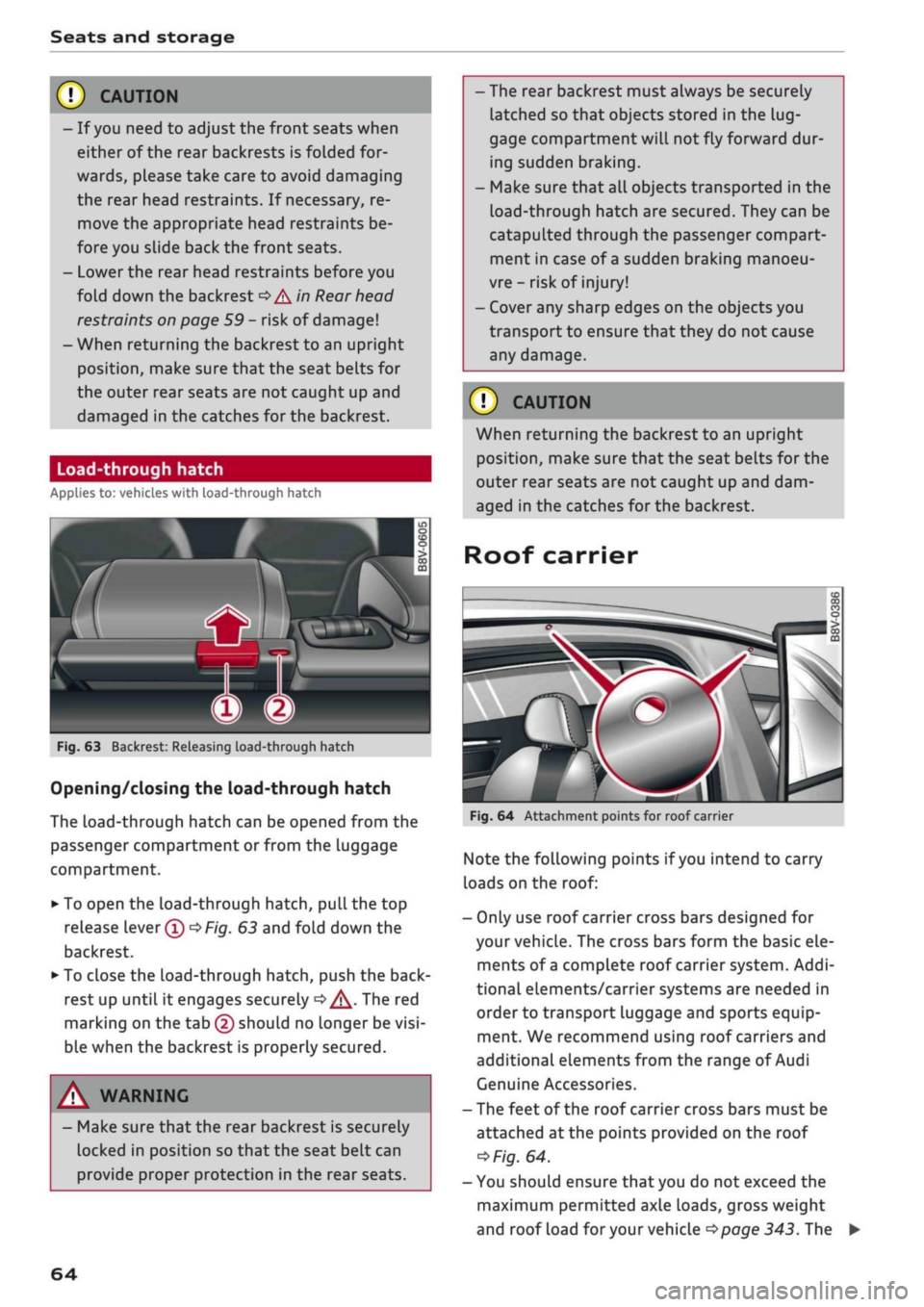
Fig.
63 Backrest: Releasing load-through hatch
Opening/closing the load-through hatch
The
Load-through
hatch can be opened from the
passenger compartment or from the luggage
compartment.
• To open the load-through hatch, pull the top
release lever®
OF/g.
63 and fold down the
backrest.
• To close the load-through hatch, push the
back
rest up until it engages securely
d>^.
The red
marking on the tab (2) should no longer be
visi
ble when the backrest is properly secured.
A WARNING
- Make sure that the rear backrest is securely
locked in position so that the seat belt can
provide proper protection in the rear seats.
- The rear backrest must always be securely
latched so that objects stored in the
lug
gage compartment
wilL
not fly forward dur
ing sudden braking.
- Make sure that all objects transported in the
Load-through
hatch are secured. They can be
catapulted through the passenger compart
ment in case of
a
sudden braking manoeu
vre - risk of injury!
- Cover any sharp edges on the objects you
transport to ensure that they do not cause
any damage.
© CAUTION
When returning the backrest to an upright
position,
make sure that the seat belts for the
outer rear seats are not caught up and dam
aged in the catches for the backrest.
Roof carrier
Fig.
64 Attachment points for roof carrier
Note the folLowing points if
you
intend to carry
loads on the roof:
- Only use roof carrier cross bars designed for
your vehicle. The cross bars form the basic ele
ments of
a
complete roof carrier system. Addi
tional elements/carrier systems are needed in
order to transport luggage and sports equip
ment. We recommend using roof carriers and
additional elements from the range of Audi
Genuine Accessories.
- The feet of the roof carrier cross bars must be
attached at the points provided on the roof
*>Fig.
64.
- You should ensure that you do not exceed the
maximum permitted axle loads, gross weight
and roof load
for
your vehicle
•=>page
343. The
64
Page 75 of 364

Driving
instance when you can see that the next traffic
lights are red. This takes advantage of the engine
braking effect, reducing wear on the brakes and
tyres.
Emissions and fuel consumption will drop
to zero due to the overrun fuel cut-off.
Change gear early to save fuel
An effective way of saving fuel is to change up
quickly through the gears. Running the engine at
high rpm in the lower gears uses an unnecessary
amount of
fuel.
Applies to: vehicles with manual gearbox
Shift up to second gear as soon as possible. If
possible, we recommend shifting up to the next
gear at approx. 2,000 rpm.
Applies to: vehicles with automatic gearbox
Press the accelerator slowly and avoid using the
"kick-down"
feature.
Avoid driving at high speed
Avoid travelling at top speed. Fuel consumption,
exhaust emissions and noise Levels all increase
very rapidly at higher speeds. Driving at moder
ate speeds will help to save
fuel.
Do not let the engine idle for longer than
necessary
Engine idling periods are automatically reduced
on vehicles with start/stop system*. On vehicles
without a start/stop system, it is worthwhile
switching off the engine at level crossings, for in
stance, or at traffic lights with a long red phase.
The fuel saved after about 5 seconds can be
greater than the amount of fuel needed to re
start a warm engine (the exact fuel saving de
pends on the engine version).
The engine takes a very long time to warm up
when it is running at idling speed. Mechanical
wear and pollutant emissions are also especially
high during this initial warm-up phase. It is
therefore best to drive off immediately after
starting the engine. Avoid running the engine at
high speed.
o
Regular servicing
Regular servicing can establish a basis for good
iS
fuel economy before you start driving. A
well-
serviced engine gives you the benefit of im
proved fuel efficiency as well as maximum relia
bility and an enhanced resale value. A poorly
maintained engine can consume up to ten per
cent more fuel than necessary.
Avoid short trips
The engine and emission control system need to
reach their proper working temperature in order
to minimise fuel consumption and emissions.
A cold engine uses disproportionately more
fuel.
The engine only reaches its working temperature
after about four kilometres, when fuel consump
tion will return to a normal level.
Check tyre pressures
Always make sure the tyres are inflated to the
correct pressures
•=>page
306 to save
fuel.
If the
tyre pressures
are
just 0.5
bar
too Low, this can
increase the fuel consumption by as much as 5
%. Due to the greater rolling resistance, under-
inflation also increases tyre wear and impairs
handling.
Do not use winter tyres all through the year; they
will increase fuel consumption by up to 10 %.
Avoid carrying unnecessary loads
Every kilo of extra weight will increase the fuel
consumption, so it is worth checking the Luggage
compartment occasionally to make sure that no
unnecessary loads are being transported.
The roof carrier increases the air resistance of the
vehicle and should be removed when not in use.
This will save about 12 % of fuel at speeds of be
tween 60 and 75
mph.
Save electrical energy
The engine drives the alternator to generate elec
tricity. This means that fuel consumption rises
when more power is required for electrical equip
ment. Switch off electrical equipment when it is
not needed. Electrical equipment which uses a
lot of electricity includes the blower (at a high
setting), the rear window heating and the seat
heating*.
73
Page 95 of 364
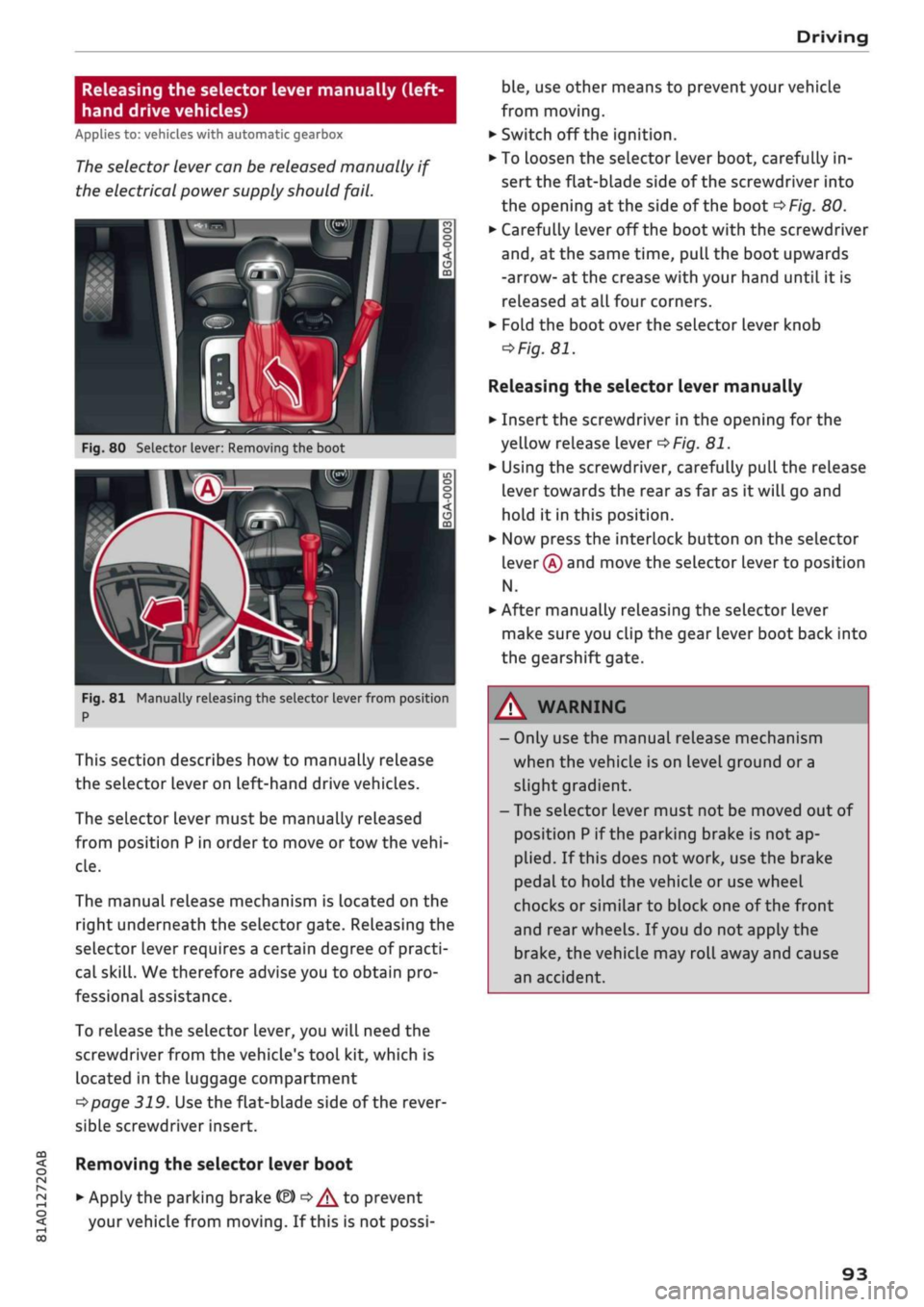
Driving
CO
< o rN
iv
rN
i—i
00
Releasing the selector lever manually (left-
hand drive vehicles)
Applies to: vehicles with automatic gearbox
The
selector lever can be released manually if
the electrical power supply should
fail.
K
Fig.
80 Selector lever: Removing the boot
Fig.
81 Manually releasing the selector lever from position
P
This section describes how to manually release
the selector Lever on Left-hand drive vehicles.
The selector lever must be manually released
from position
P
in order to move or tow the
vehi
cle.
The manual release mechanism is Located on the
right underneath the selector gate. Releasing the
selector lever requires a certain degree of practi
cal
skill.
We therefore advise you to obtain pro
fessional assistance.
To release the selector lever, you
wilL
need the
screwdriver from the vehicle's tool kit, which is
located in the luggage compartment
^>page
319. Use the flat-blade side of the rever
sible screwdriver insert.
Removing the selector lever boot
• Apply the parking brake
& ^/^
to prevent
your vehicle from moving. If this is not possi
ble,
use other means to prevent your vehicle
from moving.
•
Switch off the ignition.
• To loosen the selector lever boot, carefully in
sert the flat-blade side of the screwdriver into
the opening
at
the side of the boot
^>Fig.
80.
•
Carefully lever off the boot with the screwdriver
and,
at the same time, pull the boot upwards
-arrow- at the crease with your hand until it is
released at all four corners.
•
Fold the boot over the selector lever knob
=>
Fig.
81.
Releasing the selector lever manually
•
Insert the screwdriver in the opening for the
yellow release lever
^>Fig.
81.
•
Using the screwdriver, carefully pull the release
lever towards the rear as far as it will go and
hold it in this position.
•
Now press the interlock button on the selector
lever
®
and move the selector lever to position
N.
•
After manually releasing the selector lever
make sure you clip the gear lever boot back into
the gearshift gate.
A WARNING
- Only use the manual release mechanism
when the vehicle is on level ground or a
slight gradient.
- The selector lever must not be moved out of
position
P
if the parking brake is not ap
plied.
If this does not work, use the brake
pedal to hold the vehicle or use wheel
chocks or similar to block one of the front
and rear wheels. If
you
do not apply the
brake,
the vehicle may roll away and cause
an accident.
93