door lock AUDI Q3 2015 User Guide
[x] Cancel search | Manufacturer: AUDI, Model Year: 2015, Model line: Q3, Model: AUDI Q3 2015Pages: 258, PDF Size: 64.9 MB
Page 38 of 258
36 Opening and clo sing
The a utomatic closi ng process begins if you
push down on the rear lid.
.&_ WARNING
- Never close the rear lid inatten tively or
without checking first. Although the closing force of the rear lid is limited,
you can st ill ser iously injure yourself or
others .
- Always ensure that no one is w ith in
range of the rear lid when it is mov ing, in
part icu la r close to the h inges and the up
per and lowe r edges -fingers or hands
can be pin ched.
- To help p revent po isonous exha ust gas
from bei ng drawn into the vehicle, al
ways keep the rear lid closed while driv ing. Never transport objects large r than
those which fit completely into the l ug
gage area, because then the rear lid can
not be fully closed.
- Never leave yo ur vehicle u nattended es
pecially with the rear lid left open . A
child could crawl into the car through the
luggage compa rtment and pull the lid
shut, becom ing trapped and unable to
get out . To reduce the risk of persona l in
jury, never let ch ildren play in or around
yo ur vehicle . A lways keep the rear lid as
we ll as the vehicle doo rs closed when not
in use.
- If there i s a luggage ra ck or b icycle ra ck
mounted on the rear l id, it may not be
able to open comple tely or an opened
rear lid may close by itself beca use of the
added weight. So the ope n rear lid must
be s upported or the weight m ust be re
moved from the luggage rack first .
@ Tips
-When the vehicle is locked, the rear lid
can be un locked sepa rately by pressing
the button
c:s on the master key. W hen
t h e rear lid is closed aga in, it locks auto
matically.
- The following applies to veh icles equip
ped with the conven ience key* feature: if
the remote control key is left in the lug- gage compa
rtment, luggage compart
ment wi ll automatically unlock itself af
ter yo u lock the vehicle. T his prevents
you from unintentionally lock ing your
key in the l uggage compartment.
- If the vehicle battery charge drops be
low a certain level, you can still open or
close the rear lid manua lly, however , you
w ill need to app ly more force to close it .
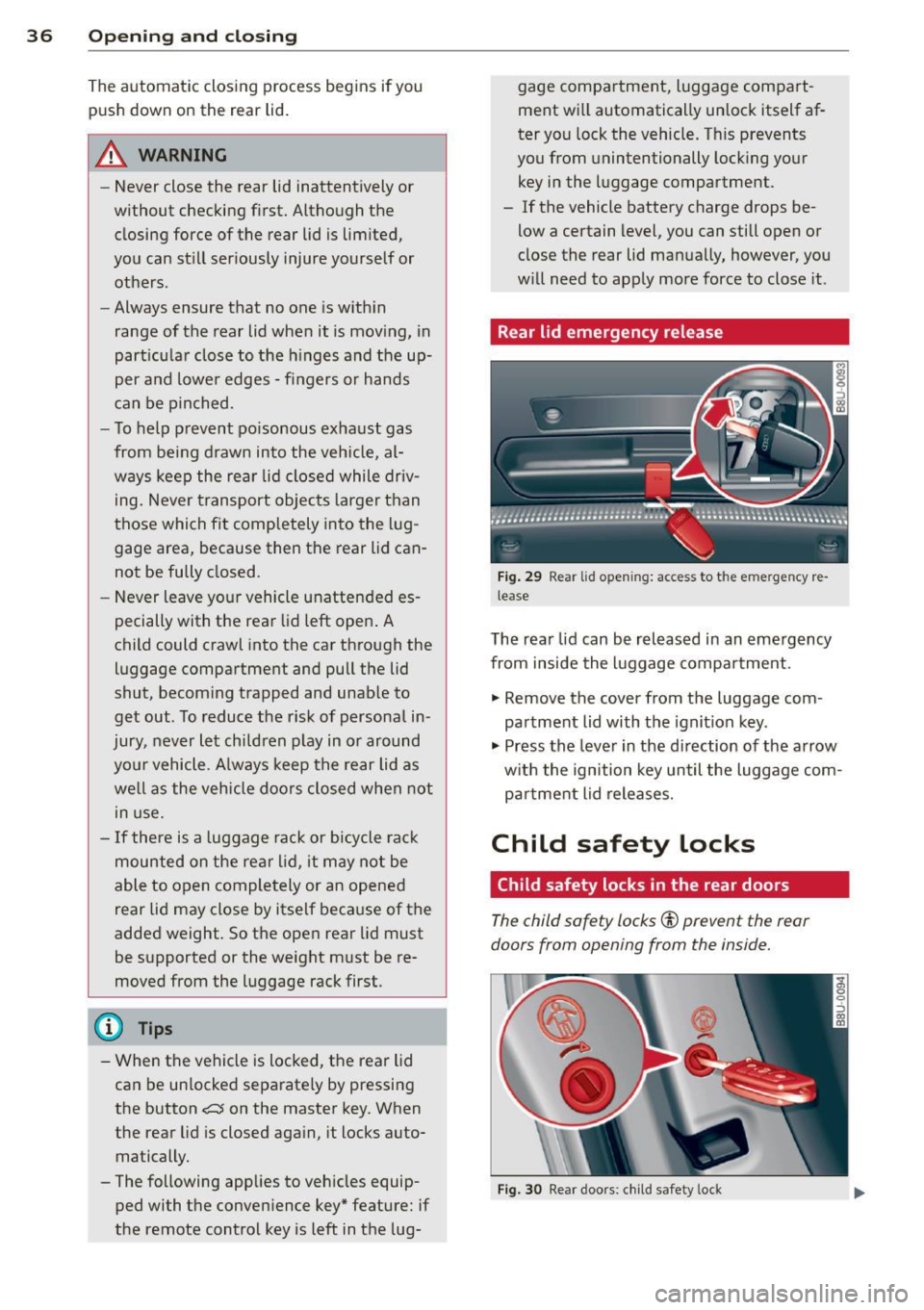
Rear lid emergency release
Fig. 2 9 Rear lid o penin g: a cces s to t he e mergency re
lea se
The rea r lid can be rel eas ed in an emergency
from inside the luggage compa rtment.
., Remove the cover from t he luggage com
pa rtment lid with the ignit ion key .
., Press the leve r in the di rection of the arrow
w ith the ign ition key until the luggage com
pa rtment lid releases.
Child safety Locks
Child safety locks in the rear doors
The child saf ety locks© prevent the rear
doors from opening from the inside.
Fi g. 30 Rear doo rs : chi ld safe ty lo ck
Page 39 of 258
M N M N
0 ::i co
rl I.O
"' rl
"' rl
.. To turn the child safety locks on , turn the ig
nition key in the direction of the arrow .
.. To turn
off , turn the ignition key opposite
the direction of the arrow.
When the child safety locks are activated, the
inside door handles do not work and the doors
can only be opened from the outside.
Power windows
Controls
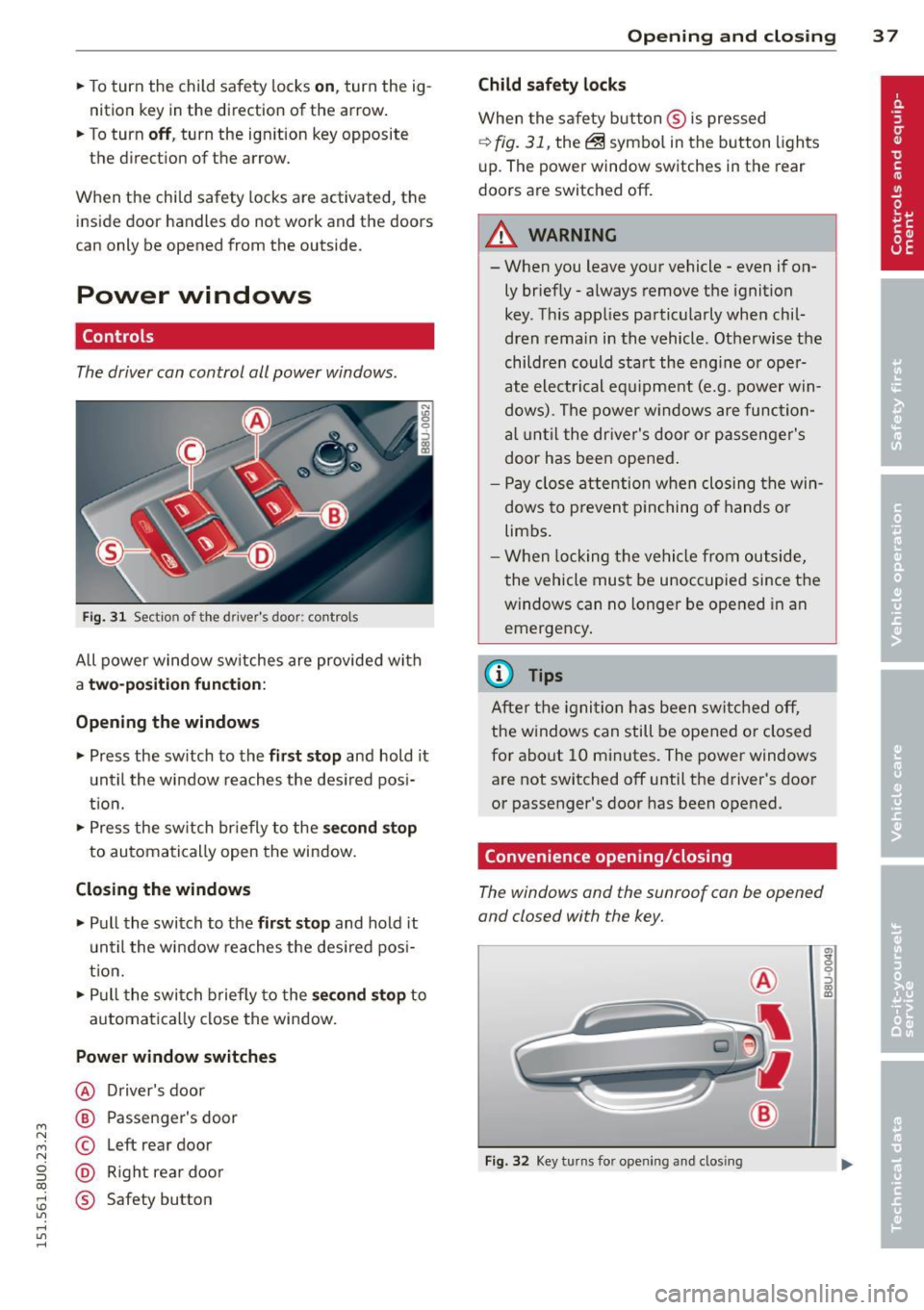
The driver can control all power windows .
Fig. 31 Section of the driver's door: controls
All power window sw itches are provided with
a t w o-posi tion fun cti on:
Opening th e window s
.. Press the sw itch to the fi rs t sto p and hold it
until the window reaches the desired posi
t ion .
.. Press the sw itch br iefly to the
sec ond s top
to automatically open the window.
Closing th e windows
.. Pull the switch to the fir st stop and hold it
un til the window reaches the des ired pos i
tion.
.. Pull the switch briefly to the
se con d stop to
automatically close the window.
Power wind ow switche s
@ Driver's door
@ Passenger's door
© Left rear door
@ Right rea r doo r
® Safety button
Openin g an d clos ing 3 7
Child safety l ock s
When the safety button ® is pressed
¢ fig. 31, the~ symbol in the button lights
u p. The power window switches in the rear
doors are switched off.
&_ WARNING
--When you leave your vehicle -even if on-
ly briefly· always remove the ignition
key . Th is app lies particularly when chil·
dren remain in the vehicle. Otherwise the
children could start the eng ine or oper
ate electrical equ ipment (e.g. power w in
dows). The power windows are function
a l until the dr iver's door or passenger's
door has been opened.
- Pay close attention when closing the win
dows to prevent p inching o f hands o r
limbs.
- When locking the vehicle from outside,
the vehicle must be unoccupied since the
windows can no longer be opened in an
emergency.
(I} Tips
After the igni tion has been switched off,
the w indows can still be opened or closed
for about 10 minutes . The power windows
are not switched off until the driver's door
or passenger's door has been opened.
Convenience opening/closing
The windows and the sunroof can be opened
and closed with the key.
F ig. 32 Key turns for opening and closing
"' z 9 ::::, a, to
Page 40 of 258
38 Opening and closing
Convenience opening feature
.,. Insert the key into the lock of the driver 's
door .
.,. Turn the key to position
c::> fig. 32@ until all
the windows have reached the desired posi
tion and the sunroof is open.
Convenience closing feature
.,. Turn the key in the lock of the driver's doo r
to the lock position @ until the windows
and the power sunroof are closed
c::> A.
For vehicles w ith pano rama sunroof*: When
you open or close the panorama sunroof*, the
power sunshade will also open or close.
~ WARNING
- Never close the windows and the power
sunroof inattentively and without check
ing -there is risk of injury.
- You must always watch when the win
dows are being ra ised so that no one can
be trapped. If you release the key, the
closing action is immed iately canceled .
- Always read and heed WARNING
c::, &. in
General description on page 28 .
Correcting power window malfunctions
After disconnecting the vehicle battery , the
one-touch up and down feature must be acti
vated again.
.,. Pull the power window switch until the win
dow is comp lete ly raised .
.,. Re lease the switch and pull it again for at
least one second.
.,. Press and hold the electric window sw itch
until the window is fully open .
.,. Re lease the switch and then press it again
for at least one second. You shou ld now be
able to close the window in the usual way.
Panorama sunroof
Description
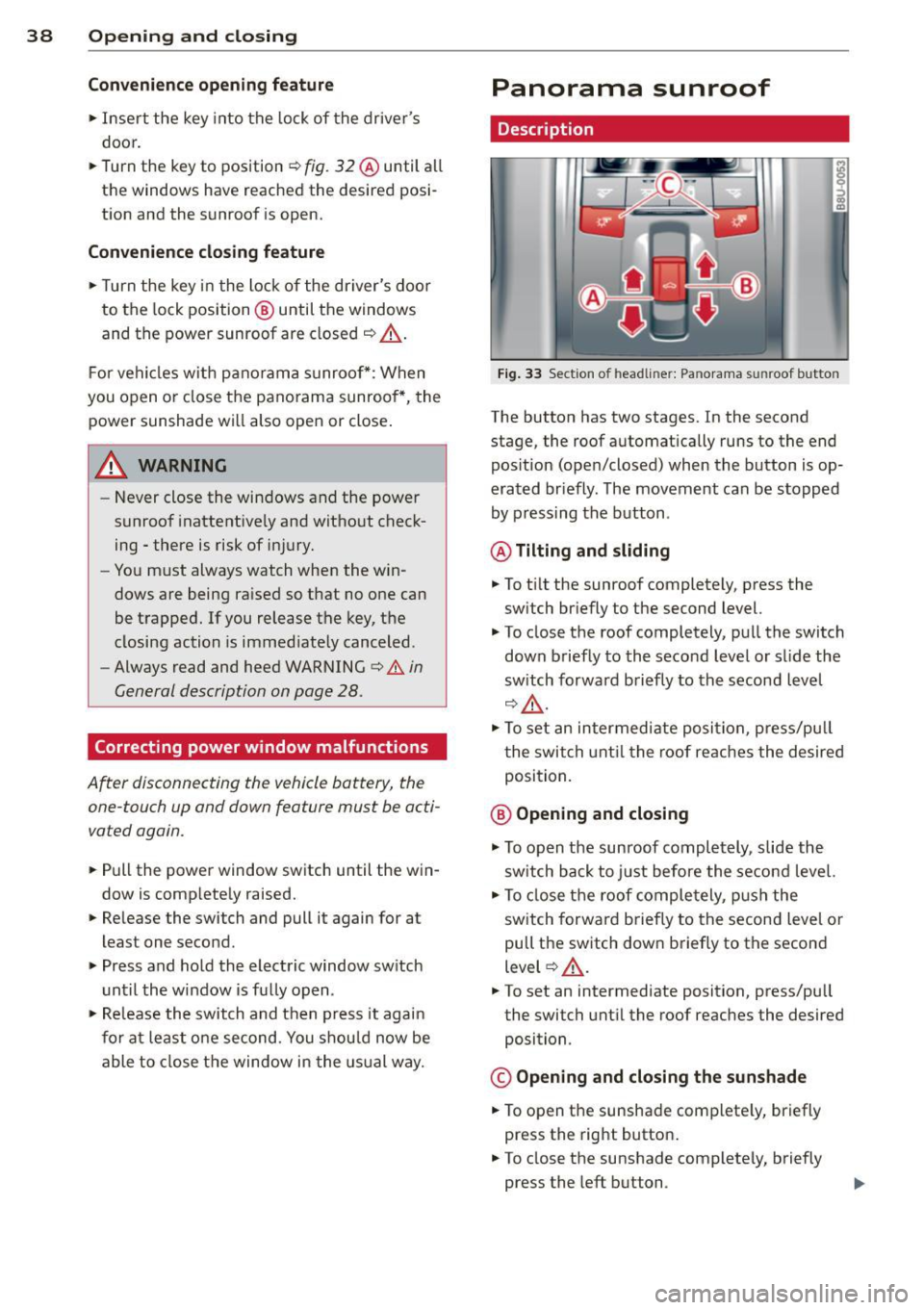
Fig. 33 Section of h eadliner: Pan orama s unroof button
The button has two stages. In the second
stage, the roof automat ically runs to the end
pos ition (open/closed) when the button is op
erated br iefly. The movement can be stopped
by pressing the button .
@ Tilting and sliding
.,. To t ilt the sunroof completely, press the
sw itch briefly to the second level.
.,. To close the roof completely, pull the switch
down briefly to the second level or slide the
switch forward briefly to the second level
c::, A-
.. To set an intermed iate posi tion, press/pu ll
the switch until the roof reaches the desired
position.
@ Opening and closing
.,. To open the sunroof completely, slide the
switch back to just before the second level.
.,. To close the roof completely , push the
switch forward briefly to the second level o r
pull the switch down briefly to the second
level
c::> A .
.,. To set an intermediate position, press/pu ll
the switch until the roof reaches the desired
position .
© Opening and closing the sunshade
.,. To open the sunshade complete ly, briefly
press the right button .
.. To close the sunshade completely, briefly
press the left button .
Page 44 of 258
42 Clear vis ion
Activating high beam a ssi st
Requirement: The light sw itch must be in the
AUTO position, the low beam headlights must
be on.
• Press the lever into pos it ion (D in order to
activate the high beam assist . T he indicator
li gh t
IIJ turns on in the instrument cluster
display and the high b eams switch on or
off
automatica lly . The indicator light Bl turns
on if the high beams were switched on .
Switching the high beams on /off
m anuall y
Requir ement : Hig h beam assist is activated .
I f the h igh beams did not switch on/off auto
matica lly when expected, yo u may instead
switch them on/off manually:
• To switch the high beams on manually, press
the leve r into position (D. The indica tor light
El tu rns on. To switch the high beams off
again, pull the lever into position @.
• To switch the high beams
off manually after
th ey hav e tu rn ed on automatically, p ull the
lever into posi tion @.
Opera ting th e headlight fla sher
• To ope rate the flashers while the h igh beam
assist is active, pull the lever into position
@ . T he high beam assist will remain active.
Messages in the instrum ent cluster
displ ay
He adlight a ssis t: Sy stem f ault!
Drive to your a utho rized Aud i deale r immedi
ate ly to have the mal function corrected. You
can st ill switch the h igh beams on o r
off man
ua lly.
H eadlight a ssis t: Una vail able . N o C amera
v iew
The camera view is blocked, for examp le by a
sticke r or debris .
The sensor is located between the interior
rearv iew mirror and the winds hield . There
fore , do not place any stickers in th is area on
the w indshield .
A WARNING
High beam assist is only intended to assist
the driver. The drive r is still responsib le for
controll ing the headlights and switc hing
the high beams on and
off manually de
pending on t raff ic, lighting and visib ility
conditions. Fa ilu re to intervene manually
may lea d to risk of acc ident.
It may be nec
essary to operate the high beams manual
l y in the following situations, e.g.:
- For adverse weathe r condit ions such as
fog, heavy rain, blowing snow or spraying water.
- On roads where oncoming traff ic may be
partially obscured such as expressways .
- If there are individua ls on the road with
no lighting or poo r light ing, such as cy
clists.
- In tight curves and on steep slopes.
- In poorly lit are as.
- W ith st rong refle cto rs such as signs.
- If t he area of the winds hield near the
sensor is fogged ov er, dirty, icy o r cov
ered wi th a stic ker.
' Adjusting exterior lighting
The functions are selected in the radio or
MM!* .
• Select: !CARI func tion but ton > S ystems or
Car Syst ems contro l button > Ve hicle set
ting s> Exterior lighting .
Coming home (light when lea ving car )*,
Leav ing home (light when unlocking car) *
The coming home function illuminates the
area around the vehicle when the ignition is
switched
off and the dr ive r's door is open ed .
Depend ing on ve hicle equ ipment, the function
can be switched on and
off or the length of
t ime the lights remain on* can be ad justed .
T he
leaving home function illuminates the
area around the vehicle when unloc king it .
T h is func tion ca n be sw itche d on and
off .
The coming hom e and leaving home func
t ions only operate when it is dar k and the
Page 45 of 258
M N M N
0 ::i co
rl I.O
"' rl
"' rl
light switch is in the AUTO position
¢ page 40, fig. 34.
Daytime running lights
USA models : You can switch the dayt ime run
ni ng lights
on an d off .
Canada models:
The function cannot be
turned off .
It is ac tiva ted automat ica lly each
time the ignition is switc hed o n.
Emergency flashers
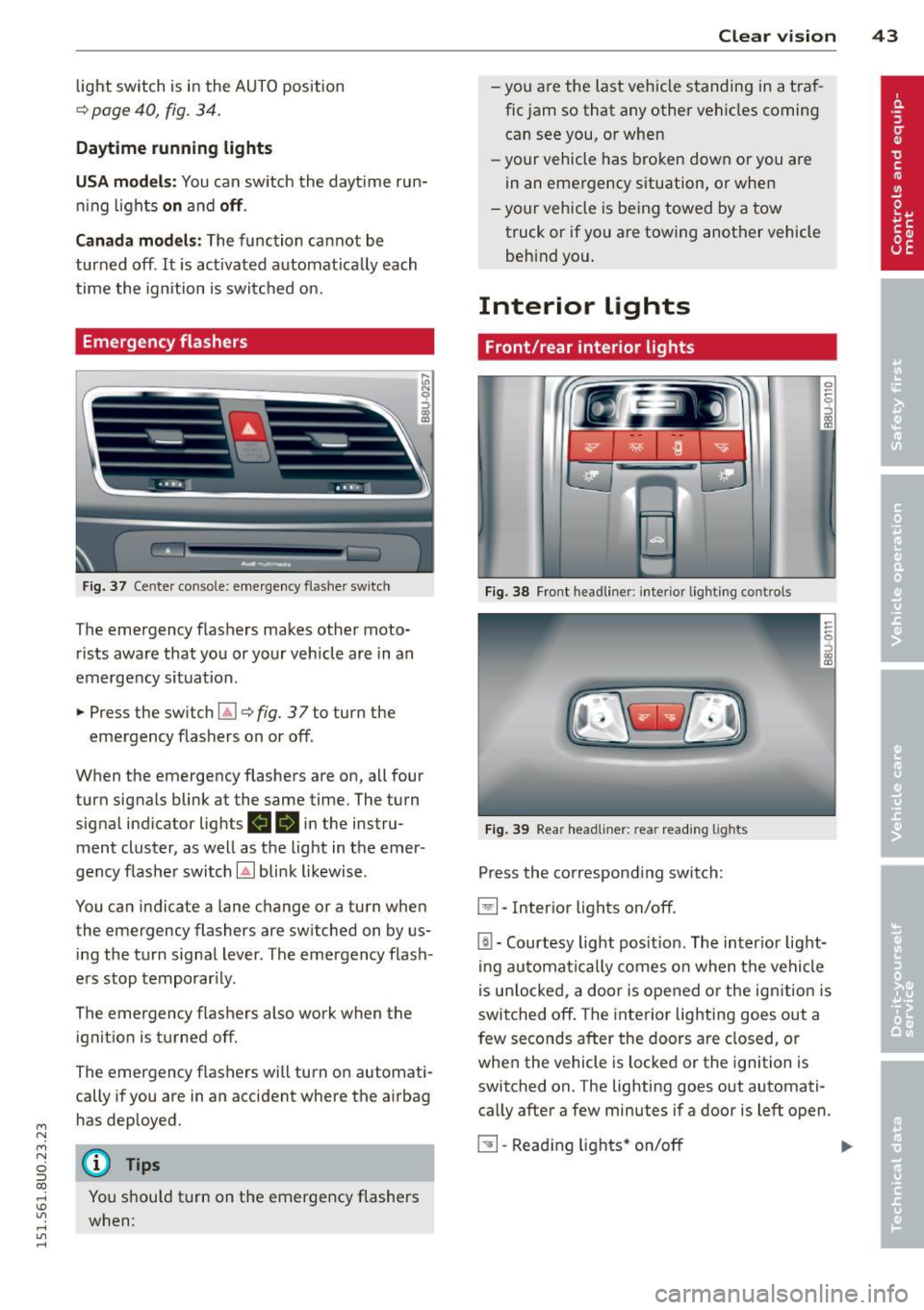
Fig . 3 7 Cente r conso le : emerge ncy flashe r sw itch
The emergency flashers makes other moto
rists aware that you or your vehicle are in an
emergency situation .
.,. Press the sw itch
Gil ¢ fig. 3 7 to turn the
emergency flashers on or off.
When the emergency flashers are on, all four turn signals blink at the same time. The turn
signa l ind icator lig hts
II 18 in the instru
ment cluster, as well as the light in t he emer
gency flashe r switch
[Ai bli nk likewise .
You can indicate a lane change or a turn when
the emergency flashers are switched on by us
ing the tu rn signa l lever . The emergency flash
e rs stop temporar ily.
The emergency f lashers also work when the
ignit io n is turned off.
The emergency flashers will turn o n automati
cally if you are in an accident where the airbag
h as dep loyed.
@ Tips
You shou ld t urn on t he emergency flashers
when:
Clear vi sion 43
- yo u are the la st veh icle standing in a t ra f
fic jam so that any other ve hicles coming
can see you, o r whe n
- yo ur vehicle has bro ken dow n or you are
in an emergency s ituation, o r when
- yo ur vehicle is be ing towed by a tow
truck or if you are towing another vehicle
beh ind you.
Interior Lights
Front/rear interior lights
Fig . 38 Fro nt headl iner: int eri or lig h ting co ntro ls
Fi g. 39 Rear headli ner: rea r read ing lig hts
Press the corresponding switch:
~ -In ter ior lig hts on/off .
[ii-Courtesy light pos it io n. The inter ior lig ht
ing auto mati ca lly comes o n when t he ve hicl e
i s un lo cke d, a door i s ope ned or the ig nitio n is
switched off. The interior lighting goes o ut a
few seconds after the doors a re closed, or
whe n the vehicle is locked or the ignition is
switched on. The lighting goes out automati
ca lly after a few minutes if a door is left open .
~ -Read ing lights * on/o ff ..,.
Page 70 of 258
68 On th e road
up because of intense sunlight or heat
build-up in the engine compartment.
- Always take the key with you whenever
you leave your vehicle . Otherwise, the
engine could be started or electr ica l
equipment such as the power w indows
could be operated . This can lead to seri
ous inju ry.
- Never leave children or persons requiring
ass istance unattended in the vehicle . The
doors can be locked using th e remote
transmitter, preventing people from es caping from the vehicle on their own in
the event of an eme rgency . Depend ing
on the time of year, people inside the ve
hicle can be exposed to very high or very
low temperatures.
(D Note
If the engine has been under heavy load
for an extended period, heat builds up in
the engine compartment after the engine is switched off- there is a risk of damaging
the engine. Allow the engine to r un at idle
for about two minutes before switching it off.
Convenience key
Starting the engine
Appl ies to vehicles: wit h convenience key
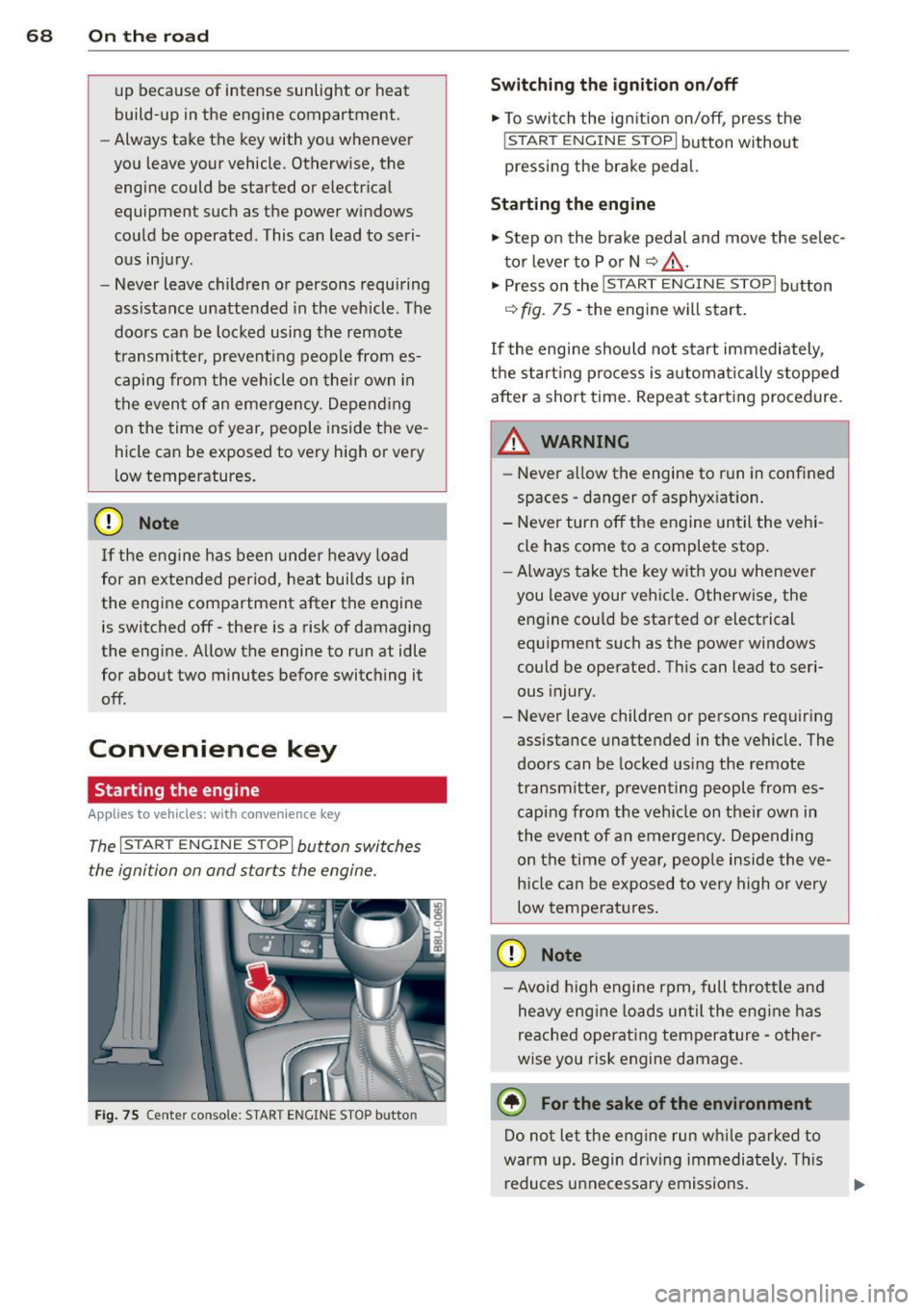
The I STAR T ENG IN E ST OPI button switches
the igni tion on and starts the engine.
Fig . 75 C en te r conso le: STAR T ENGIN E STOP b utto n
Switching the ignition on /off
"' To swi tch the ign ition on/off, press the
! S TART ENGINE STOP I button without
pressing the brake peda l.
Starting the engine
"' Step on the brake pedal and move the se lec
t o r lever to P or N
~ .&_ .
.. Press On the r::1 S::;T ;:-::A -::R :-:;;T :-: E:, N:-7"=: G":'.I N:-:-= E-=s=-= T=-=o =-= p:--i l butt On
~ fig. 75 -the engine will start.
If the engi ne should not start immediately,
t h e start ing process is automat ic all y stopped
after a short time. Repeat starting procedure.
A WARNING
=
- Never a llow the engine to run in confined
spaces -danger of asphy xiat ion .
- Never turn off the engine until the vehi cle has come to a complete stop .
- Always take the key w ith you whenever
you leave your ve hicle . Otherwise, the
engine cou ld be started or electrical
equ ipment such as the power windows
could be operated. This can lead to seri
ous injury.
- Never leave children or persons requiring
assistance unattended in t he vehicle . The
doors can be locked us ing the remote
transmitte r, preventing people from es
caping from the veh icle on their own in
t he event of a n emergency. Depe nding
on the time of yea r, peop le inside the ve
h icle can be exposed to very high or very
low temperatures .
(D Note
-Avo id high engine rpm, full thrott le and
heavy e ng ine lo ads un til the eng ine has
reached operat ing temperature -other
w ise you risk engine damage.
@ For the sake of the environment
Do not let the engine run w hile parked to
warm up. Begin dr iving immediately . Th is
reduces unnecessary emissions .
Page 71 of 258
M N M N
0 ::i co
rl I.O
"' ,....,
"' rl
@ Tips
-After starting a cold engine, there may
be a brief period of increased noise be
cause the oil pressure must first build up
i n the hydraulic valve adjusters . This is
norma l and not a cause for concern .
Switching engine off
Applies to vehicles: with conven ience key
• Bring your veh icle to a complete stop .
• Move the selecto r lever to the P or N posi
t ion.
• Press the
!S TA RT ENGINE S TO PI button
~ pag e 68, fig. 75.
Steering lock
The steering locks when you turn the engine
off us ing the
I START ENGIN E STOP I button
and ope n the dr iver 's door. The locked stee r
i n g helps preven t vehicle theft.
Emergenc y Off functi on
If necessary in an emergency, the engine can
be sw itched off while the vehicle is st ill mov
ing. Press the
I S TAR T ENG IN E ST OPI button
tw ice in quick succession or ho ld it in for lon
ger than two seconds .
_& WARNING
-Never t urn off the engine before the ve
h icle has come to a complete stop . The
full function of the brake booster and the power steering is not guaranteed. You
must use more force to turn or brake if
necessary . Because you cannot steer and
brake as you usually would, this could
lead to crashes and serious injur ies .
- For safety reasons, you should always
park your vehicle with the se lector lever
in P. Otherwise, the ve hicl e co uld inad
vertent ly roll away.
- The rad iator fan can continue to run for
up to 10 min utes even after you have
t urned off the eng ine and removed the
ignition key . The radiator fan can also
turn on again if the engine coolant heats
On th e road 69
up because of intense sunlight or heat
bui ld-up in the engine compartment.
- Always take the key with you whenever
you leave your vehicle. Otherwise, the
engine could be started or electrical
equipment such as the power windows
could be operated . This can lead to seri
ous injury.
(D Note
If the engine has been under heavy load
for an extended period, heat bu ilds up in
the eng ine compartment after the engi ne
i s sw itched off - there is a r isk of damag ing
the engine . A llow the engine to run at idle
for about two minutes before switching it
off .
Starting the engine after a malfunction
Applies to vehicles: wit h convenience key
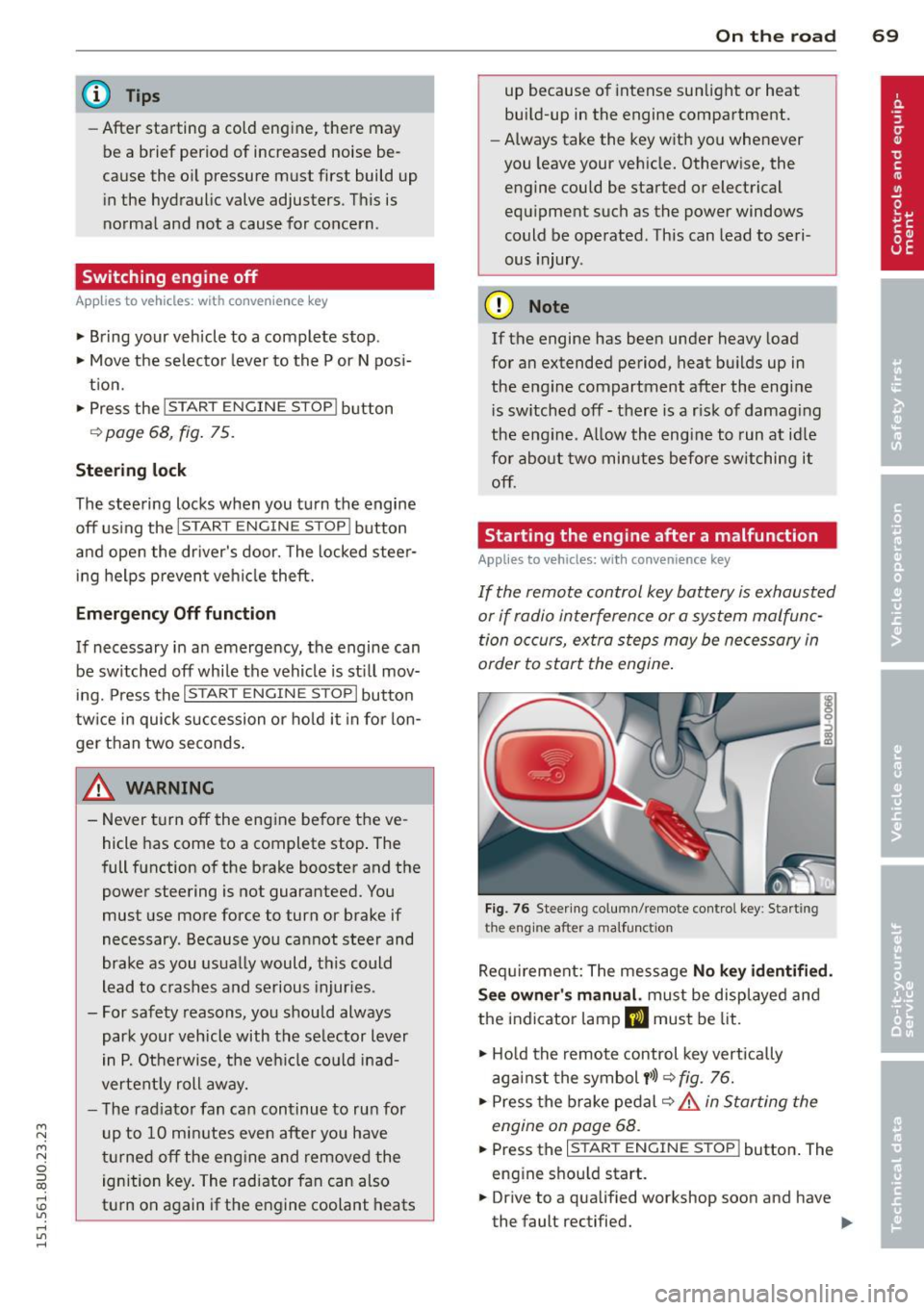
If the remote control key battery is exhausted
or if radio interference or a system malfunc
tion o ccurs, extra steps may be necessary in
order to start the engine .
Fig. 76 Steer ing co lumn/remote contro l key : Start ing
t he en gi ne a fter a m alfu ncti on
Requ irement: The message No k ey identifi ed.
S ee owner' s manu al.
must be displayed and
the indicator lamp
m must be lit .
• Ho ld the remote control key vertically
aga inst the symbol
y >l) ~ fig . 76.
• Press the b rake pedal ~.&.
in Starting the
engin e on page 68 .
• Press the ~ I s =T -A -R =T ~ E= N~ G~IN ~ E-s=T -O ~ P~I button. The
eng ine shou ld start.
• Drive to a qualified workshop soon and h ave
the faul t rectified. .-
Page 72 of 258
70 On the road
@ Tips
You ca n call up the dr iver message aga in
by pressi ng the
!ST ART ENGINE STOPI but
ton.
Driver messages
Turn off ignition. Battery discha rging
T his message appears and a war ning tone
sounds if yo u open the dr iver's door when the
ignit io n is switched on.
Press brakepedal to start engine .
This message appears if you do not press t he
b rake pedal to start the engine in a vehicle
with a n automatic t ransmission .
Please engage N or P .
This message appears if you try to start or
switch off the eng ine when the selector lever
is not i n Nor P. The eng ine can then not be
started or sw itched off.
fll Is key in the vehicle?
If t h e in dicator lamp lights up and the mes
sage appears, the convenience key* was re
moved from the vehicle while the e ngine was
runni ng .
If the convenience key is not in the
ve hicle you will not be able to switch on the
ignit io n or restart the engine after it has been
switched off . You w ill also not be ab le to l ock
the veh icle from the outside .
Shift to P, vehicle can roll away . Doors can
only be locked in P.
F or safety reasons , this messa ge will ap pear
together with a wa rning tone if t he se lector
l eve r is not in position P when you switch off
the ign ition. Put the selector lever in posi
tion P; otherw ise the vehicle can roll away and
cannot be locked .
II No key identified. See owner's manual.
If the indi cator lamp lights up and the mes
sage ap pears, a malfunct ion has occ urred
c:::> poge 69.
Electromechanical
parking brake
Operation
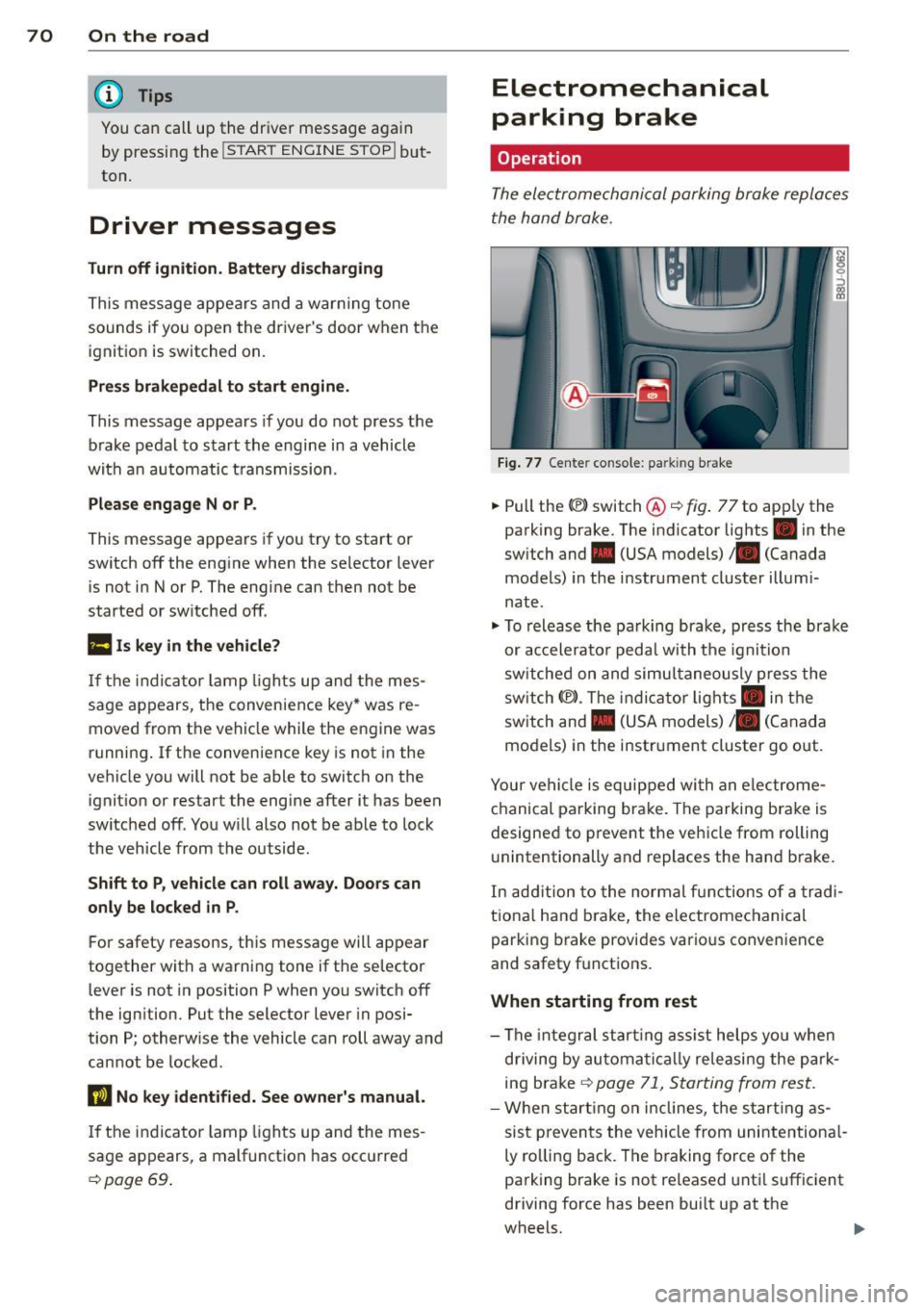
The ele ctrome chani cal parking brake replace s
t he hand broke.
Fi g. 77 Center co nsole: pa rk in g b rake
.,. Pull the(®) switch@ c:::> fig. 77 to app ly the
parking brake. The indicator lights . in the
sw itch and . (USA models)/ . (Canada
models) in the instrument cluster illumi
nate.
.,. To releas e th e pa rking bra ke, pr ess the bra ke
or ac celera to r peda l with t he igni tion
sw itche d on and simu ltaneously p ress the
sw itch (®) . Th e in d ic ator lig hts . in the
sw itch and . (USA models)/ . (Canada
mo dels) in the instr ument cluster go out.
Your ve hicle is equipped wi th a n ele ctro me
ch anical parking brake. The parkin g bra ke is
designe d to prevent the ve hicle from rolling
u nintentionally and replaces the hand b rake.
In ad diti on to the normal fu nctions o f a tra d i
tio na l han d brake, the e lectromechanical
parking brake provi des vario us convenience
and safety f unct ions .
When starting from rest
- The integral s tart ing as sist help s you when
d riving by au toma tically re leasi ng the pa rk
ing brake
c:::> poge 71, S tarting from res t.
- W he n star ting o n incl ines, t he s tar tin g as
sis t p reven ts the vehicle from uni nte ntion al
ly ro lling back . The braking force of the
parking brake is not re leased unt il suffic ient
driving force has been bui lt up at the
wheels .
Page 73 of 258
M N
M N
0 ::i co ,...., \!) ..,.,
,...., ..,., ,....,
Emergency brake function
An emergency brake ensures that the vehicle
can be slowed down even if the
normal brakes
fail c::>
page 72, Emergency broking.
& WARNING
If a drive range is engaged with the vehicle
stat ionary and the engine running, you
must in no instance accelerate care lessly.
Otherw ise the vehicle will start to move
immediately -risk of an accident.
(D Tips
- If the parking brake is applied with the
i gnition switched off, the indicator lights
• in the switch and. (USA models) /
• (Canada models) in the instrument
cluster w ill go out after a certa in period
of time.
- Occasional noises when the park ing
brake is applied and re leased a re norma l
and are not a ca use for concern.
- When the vehicle is parked, the parking
brake goes through a se lf-test cycle at
regular intervals. Any assoc iated noises
are norma l.
Parking
~ Press the brake peda l to stop the vehicle.
~ Pull the switch@c::> page 70, fig . 77 to set
the parking brake.
~ Move the selector lever to P.
~ Turn the engine off c::> _&.
~ When on incl ines or declines, turn the steer
ing wheel so that the vehicle w ill roll i nto
the curb if it begi ns to move.
& WARNING
- When you leave your veh icle - even if on
ly b riefly- a lways remove the ign ition
key . This applies particularly when chil
dren remain in t he vehicle . Otherwise the
children co uld start the engine, release
the parking brake or operate electrical
equipment (e.g. power windows). There is the r isk of an accident .
On th e ro ad 71
-When the veh icle is locked, no one - par
ticularly not children should rema in in
the vehicle. Locked doors make it more
difficult for emergency wo rkers to get in
to the vehicle - putting lives at risk .
Starting from rest
The starting assist function ensures that the
parking broke is released automatically upon starting.
Stopping and applying park ing brak e
~ Pull the sw itch C®l to apply the pa rking
brake.
Starting and automatically releasing the parking brake
~ When you start to drive as usual, the park
ing brake is a utomatically released and your
veh icle begins to move.
When stopping at a traffic signal or stopping in city traff ic on vehicles with an automatic
transmission, the parking brake can be ap
plied. The vehicle does not have to be held
with the footbrake. The parking brake elimi
nates the tende ncy to creep w ith a dr ive range
engaged. As soon as you d rive off as usual,
t he pa rking bra ke is re leased automatically
and the veh icle s tarts to move.
St arting on slopes
When starting on inclines, the starting assist
prevents the vehicle from un intent io nally roll
ing back. The braking force of the parking
brake is no t re leased unt il su ff ic ient d riving
force has been built up a t the wheels.
(D Tips
Fo r safety reasons, the parking bra ke is re
l eased automatically o nly when the d riv
e r's safety belt is eng aged in the buckle.
Page 74 of 258
72 On the road
Starting off with a trailer
To prevent rolling back unintentionally on an
incline, do the follow ing:
.. Keep the switch@¢ page 70, fig. 77 pulled
and depress the accele rator. The park ing
brake stays applied and prevents the vehicle
from roll ing bac kward.
"' You can release the switch @ once you are
sure that you a re develop ing enough dr iv ing
f orce at the wheels by dep ress ing the accel
erator.
Depending on the weight of the r ig (veh icle
and tra iler) and the seve rity of the in cli ne, you
may roll backwards as you start . You can pre
vent rolling backwards by holding the parking
brake switch @ pulled out and accelerating -
just as you would when starting on a hill with a conventional hand brake.
Hill hold
Hill hold makes it easier to start on hills.
Requirement : The driver door must be closed
and the engine must be r unning .
The system is act ivated when the brake pedal
i s pressed wh ile the veh icle is sta tionary .
To prevent the vehicle from rolling back when
start ing , the brake power is held for a br ief
moment after re leas ing the b rake peda l. Dur
i ng th is t ime, yo u can easily begin to move
your ve hicle.
A WARNING
- The inte lligent technology of Hill Hold
cannot overcome the lim itations im
posed by natural phys ica l laws. The in
creased comfort offered by Hill Hold
should not cause you to take safety risks.
- Hi ll Hold cannot hold the veh icle in all
hill start situations (for examp le, if the
ground is slippery or icy).
- If you do not begin moving immediately
after releasing the brake pedal, the veh i
cle could begin to roll backward under
certai n circumstances . Press the b rake
-
pedal or set the parking brake immedi
ately .
- If the engine "stalls", press the brake
pedal or set the parking brake immedi
ately .
- Starting on inclines in stop-and-go traf
f ic: To help prevent the vehicle from roll
ing back when start ing, press and ho ld
the brake pedal for several seconds when
the vehicle is stationary.
Emergency braking
In the event tha t the conventional brake sys
tem fails or locks .
.. In an emergency, pu ll the switch @
¢
page 70, fig. 77 and continue to pull it to
slow your vehicle down with the parking
brake .
.. As soon as you release the switch @ or ac-
celerate, the b rak ing process stops.
If you pull the switch @ and hold it above a
speed of about S mph (8 km/h), the emergen
cy brak ing funct io n is initiated . T he veh icle is
braked at all fou r whee ls by activating the hy
draulic b rake system. The brake pe rfo rmance
is sim ila r to m akin g an emergency stop ¢_&. .
In order not to act ivate the eme rgency brak
ing by mistake, an audib le warning tone (buz
zer) sounds whe n the switch @ is pulled. As
soon as t he sw itch @ is re leased, or the acce l
erator pedal is depressed, eme rgency braking
stops.
A WARNING
=
Emergency braking should only be used in
an emergency, when the norma l foot bra ke
has fa iled or the brake pedal is obstructed.
Using the park ing brake to perform emer
gency braking will s low your veh icle down
as if you had made a full brake application .
The laws of phys ics cannot be suspended
even with ESC and i ts associa ted compo
nents (ABS, ASR, EDS). In corners and
when road or weathe r cond itions are bad
,
a full brake application can ca use the