instrument cluster AUDI Q3 2015 User Guide
[x] Cancel search | Manufacturer: AUDI, Model Year: 2015, Model line: Q3, Model: AUDI Q3 2015Pages: 258, PDF Size: 64.9 MB
Page 73 of 258
M N
M N
0 ::i co ,...., \!) ..,.,
,...., ..,., ,....,
Emergency brake function
An emergency brake ensures that the vehicle
can be slowed down even if the
normal brakes
fail c::>
page 72, Emergency broking.
& WARNING
If a drive range is engaged with the vehicle
stat ionary and the engine running, you
must in no instance accelerate care lessly.
Otherw ise the vehicle will start to move
immediately -risk of an accident.
(D Tips
- If the parking brake is applied with the
i gnition switched off, the indicator lights
• in the switch and. (USA models) /
• (Canada models) in the instrument
cluster w ill go out after a certa in period
of time.
- Occasional noises when the park ing
brake is applied and re leased a re norma l
and are not a ca use for concern.
- When the vehicle is parked, the parking
brake goes through a se lf-test cycle at
regular intervals. Any assoc iated noises
are norma l.
Parking
~ Press the brake peda l to stop the vehicle.
~ Pull the switch@c::> page 70, fig . 77 to set
the parking brake.
~ Move the selector lever to P.
~ Turn the engine off c::> _&.
~ When on incl ines or declines, turn the steer
ing wheel so that the vehicle w ill roll i nto
the curb if it begi ns to move.
& WARNING
- When you leave your veh icle - even if on
ly b riefly- a lways remove the ign ition
key . This applies particularly when chil
dren remain in t he vehicle . Otherwise the
children co uld start the engine, release
the parking brake or operate electrical
equipment (e.g. power windows). There is the r isk of an accident .
On th e ro ad 71
-When the veh icle is locked, no one - par
ticularly not children should rema in in
the vehicle. Locked doors make it more
difficult for emergency wo rkers to get in
to the vehicle - putting lives at risk .
Starting from rest
The starting assist function ensures that the
parking broke is released automatically upon starting.
Stopping and applying park ing brak e
~ Pull the sw itch C®l to apply the pa rking
brake.
Starting and automatically releasing the parking brake
~ When you start to drive as usual, the park
ing brake is a utomatically released and your
veh icle begins to move.
When stopping at a traffic signal or stopping in city traff ic on vehicles with an automatic
transmission, the parking brake can be ap
plied. The vehicle does not have to be held
with the footbrake. The parking brake elimi
nates the tende ncy to creep w ith a dr ive range
engaged. As soon as you d rive off as usual,
t he pa rking bra ke is re leased automatically
and the veh icle s tarts to move.
St arting on slopes
When starting on inclines, the starting assist
prevents the vehicle from un intent io nally roll
ing back. The braking force of the parking
brake is no t re leased unt il su ff ic ient d riving
force has been built up a t the wheels.
(D Tips
Fo r safety reasons, the parking bra ke is re
l eased automatically o nly when the d riv
e r's safety belt is eng aged in the buckle.
Page 75 of 258
M N
M N
0 ::i co ,...., \!) ..,.,
,...., ..,., ,....,
vehicle to skid or the rear end to break away -risk ing an accident.
Speed warning system
Overview
T he speed warning system helps you to keep
your driving speed below a set speed limit.
The speed warning system warns if the driver
exceeds a prev iously stored maximum speed .
A warning tone will sound as soon as the vehi
cle speed exceeds the set speed by about
3 mph (3 km/h). At the same time , an indica
tor lamp
(mj (USA models) / ISJ (Canada mod
e ls) will light up in the instrument cluster dis
p lay and the driver message
Spe ed limit
wa rning exceeded.
wi ll appear. The indicator
l amp
1mj / i•j will go out when the speed
drops below the set speed lim it aga in.
Setting a thresho ld is recommended if you
wou ld like to be reminded when you reach a
certain maximum speed . Situations where yo u
may want to do so include driving in a country
with a general speed limit or if the re is a
specified max imum speed for winter tires .
(D Tips
Even though your vehicle is equipped with
a speed warning system, you should st ill
watch the speedometer to make sure you are not driving faster than the speed lim it.
Setting speed limit
You can set , change and delete the threshold
in the MMI.
.,. Se lect :
I CAR I funct ion button > S ystem s or
Car System s control button > Vehicle set
tings > Speed warning .
You can set any thresho ld between 20 mph
(30 km/h) and 150 mph (240 km/h). Settings
can each be adjusted in increments of 6 mph
(10 km/h) .
On the ro ad 73
Cruise control
Description
The cruise cont ro l system makes it poss ible to
drive at a constant speed start ing at 15 mph
(20 km/h).
The speed is kept constant by modifying en
gine powe r or th rough an active brake inte r
vention.
A WARNING
- Always pay attention to the traffic
around you when the cruise control is in
operation. You are always responsible for
your speed and the distance between
your vehicle and other vehicles.
- For reasons of safety, cr uise control
should not be used in the city, in stop
and-go traffic, on winding roads and
when road cond it ions are poor (such as
ice, fog, gravel, heavy rain and hydro
plan ing) -you could have an accident .
- Sw itch the cruise control off temporar ily
when dr iv ing in turning lanes, h ighway
exits or in constr uction zones.
- Please note that unconsc iously "resting"
your foot on the accelerator pedal pre
vents the cruise control from braking .
This is due to the control system be ing
overridden by the dr iver's acceleration .
- If a b rake system malfunction s uc h as
overheating occurs when the cruise con
trol system is swi tched on, the braking
function in the system may be switched off . The other cruise control functions re
main active as long as the indicator light
II (US models) !l'I (Canada mode ls) is
on .
(D Tips
-The cruise control system is ideal for
stretches w ith speed limits. The driver is
responsib le for adhering to the correct
speed.
- The cru ise control remains act ive when
shift ing gears .
Page 76 of 258
7 4 On the road
-The brake lights turn on when the brakes
are activated .
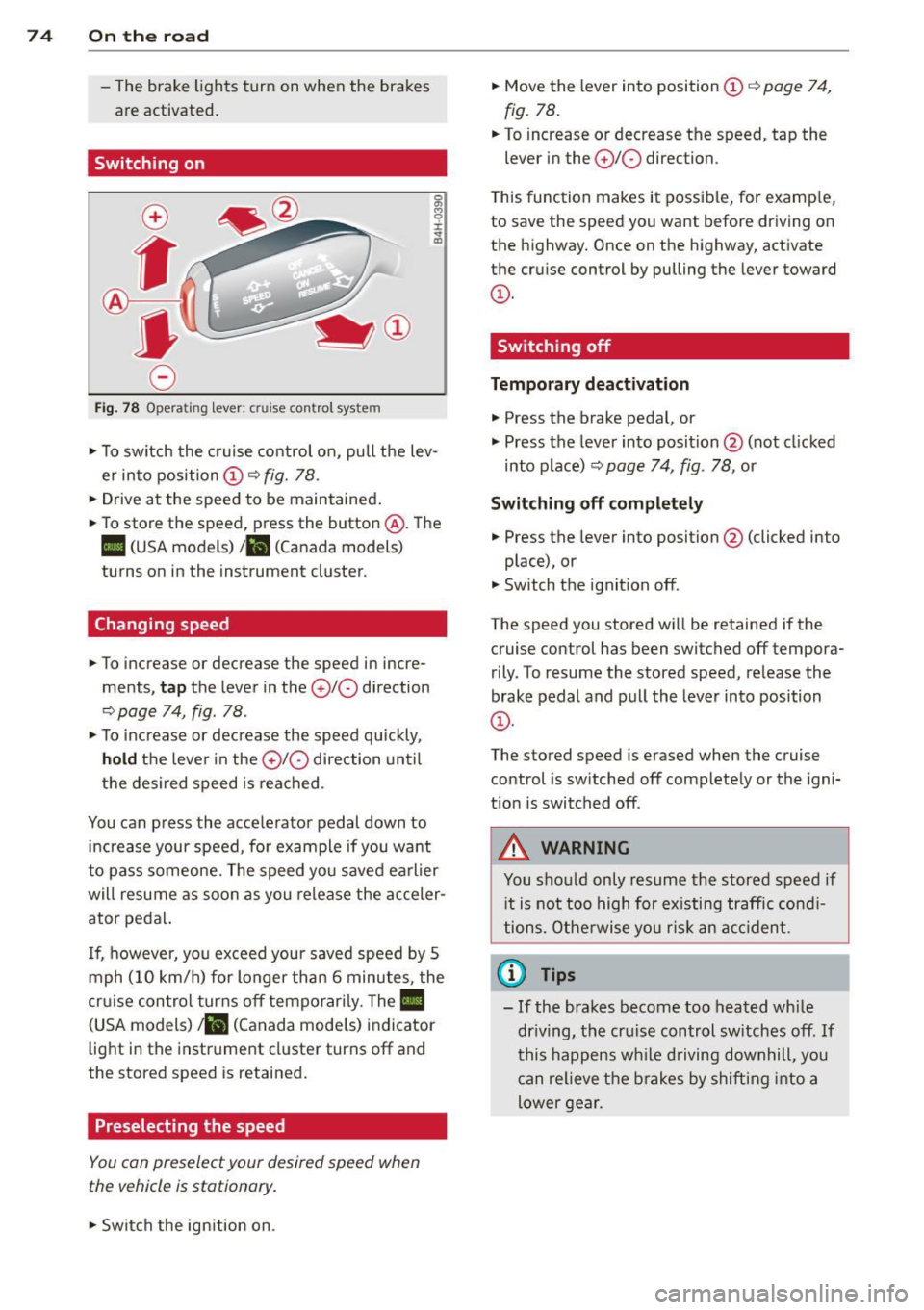
Switching on
0
f
®t
0
Fig. 78 Opera ting lever: crui se co ntro l system
0 O>
8
i
"' m
.,. To sw itch the cruise control on, pull the lev
er into position
CD c::> fig. 78 .
.,. Drive at the speed to be maintained .
.,. To store the speed, press the button @. The
II (USA models) Iii (Canada models)
turns on in the instrument cluster.
Changing speed
.,. To increase or decrease the speed in incre
ments,
tap the lever in the 010 direction
c::> page 74, fig. 78 .
.,. To increase or decrease the speed quickly,
hold the lever in the 0 10 direction until
the desired speed is reached.
You can press the acce lerator pedal down to
increase your speed, for example if you want
to pass someone. The speed you saved earlier
will resume as soon as you release the acceler
ator pedal.
I f, however, you exceed your saved speed by 5
mph (10 km/h) for longer than 6 minutes, the
cr uise contro l turns off temporarily. The
Ill
(USA models) ill (Canada mode ls) indicator
light in the instrument cluster turns off and
the stored speed is retained.
Preselecting the speed
You con preselect your desired speed when
the vehicle is stationary.
.,. Swi tch the ign ition on. .,.
Move the lever into position
CD c::> page 74,
fig. 78.
.,. To increase or decrease the speed, tap the
lever in the
0 10 direction.
T his function makes it possible, for examp le,
to save the speed you want before driving on
the highway. Once on the highway, activate
the cruise control by pulling the lever toward
CD-
Switching off
Temporary deactivation
.,. Press the brake pedal, or
.,. Press the lever into position @ (not cl icked
into p lace)
c::> page 74, fig. 78, or
Switching off completely
.,. Press the lever into position @(clicked into
place), or
.,. Switch the ignition off.
The speed you stored wi ll be retained if the
cruise control has been switched off tempora
rily . To resume the stored speed, release the
brake pedal and pull the lever into position
CD-
The stored speed is erased when the cruise
control is sw itched off complete ly or the igni
t ion is switched off .
A WARNING
-You should only resume the stored speed if
i t is not too high for existing traffic condi
tions. Otherwise you risk an accident.
(D Tips
-If the brakes become too heated while
dr iving, the cruise control switches off.
If
this happens while driving downhill, you
can relieve the brakes by shifting into a
lower gear.
Page 81 of 258
M N M N
0 ::i co
rl I.O
"' rl
"' rl
Audi drive select Driving settings
Introduction
App lies to vehicles: with Audi drive select
Drive select provides the possibility to experi
ence different types of vehicle sett ings in one
vehicle. For instance, using the three
Com
fort , Auto
and Dynamic modes, t he driver can
switch from a sporty to a comfortab le driving
mode with the press of a button.
Description
Applies to vehicles : with Audi drive select
The vehicle setup in each mode depends on
the vehicle's features. However, the engine,
automatic transmission and steering are al
ways involved .
Engine and automatic transmission
Depending on the mode, the engine and the
automatic transmission respond quicker or in
a more balanced manner to accelerator pedal
movements. In the sporty dynamic mode, the
automatic transmission shifts at higher RPMs.
Steering
The steering adapts in terms of steering ef
fort. Indirect steering that moves easily, like
the steering in comfort mode, is best suited
to long drives on a highway . In contrast, dy
namic mode provides sporty, direct steering .
Curve light*
The curve light adapts to driving on curves.
The pivot ing action and the lighting are also
adapted to the mode .
@ Tips
Selecting the Dynamic mode results in
sporty shift ing characteristics. The S gear
position engages automatically.
Audi drive select 79
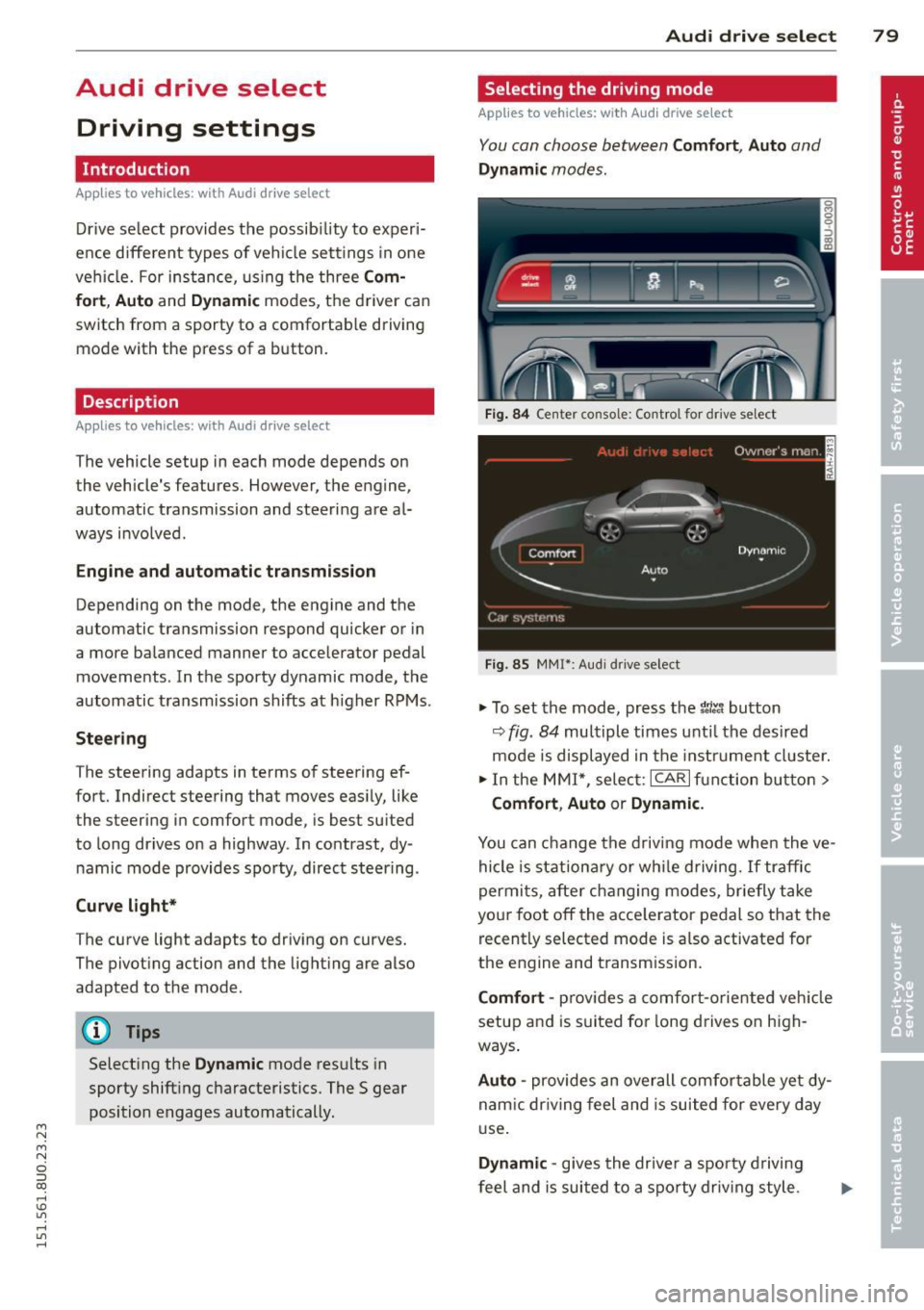
Selecting the driving mode
Applies to vehicles: with Aud i drive se lect
You can choose between Comfort, Auto and
Dynamic modes.
Fig. 84 Center console: Control for drive se lect
Fig . 85 MMI*: Aud i drive select
.,. To set the mode, press the t1ti button
9fig. 84 multiple times unti l the desired
mode is displayed in the instrument cluster.
.,. In the MMI*, select: ICARlfunction button>
Comfort, Auto or Dynamic.
You can change the driving mode when the ve
hicle is stationary or while driving. If traffic
permits, after changing modes, briefly take
your foot off the acce lerator pedal so that the
recently selected mode is a lso activated for
the engine and transm ission.
Comfort -provides a comfort-oriented vehicle
setup and is suited for long drives on high
ways .
Auto -provides an overall comfo rtable yet dy
nam ic dr iving feel and is suited for every day
use.
Dynamic -gives the drive r a sporty driving
feel and is suited to a sporty driving style.
Page 83 of 258
M N
M N
0 ::i co ,...., \!) 1.1'1 ,...., 1.1'1 ,....,
Automatic
transmission
tiptronic
Introduction
The automatic transmission is controlled elec
tronically. The transmission upshifts or down
shifts automatically depending on which drive
program is selected.
When a
moderate driving style is used, the
transmission selects the most economica l
driving mode. It will then change up early and
delay the downshifts to give better fuel econ
omy.
The transmission switches to a sporty mode
after a kick-down or when the driver uses a
sporty driving style characterized by quick ac
celerator pedal movements, heavy accelera
tion, frequent changes in speed and traveling
at the maximum speed.
If desired, the driver can also select the gears
manually
(tiptronic mode) o page 84.
In the tiptronic transmission, power is trans
ferred by a torque converter .
Selector lever positions
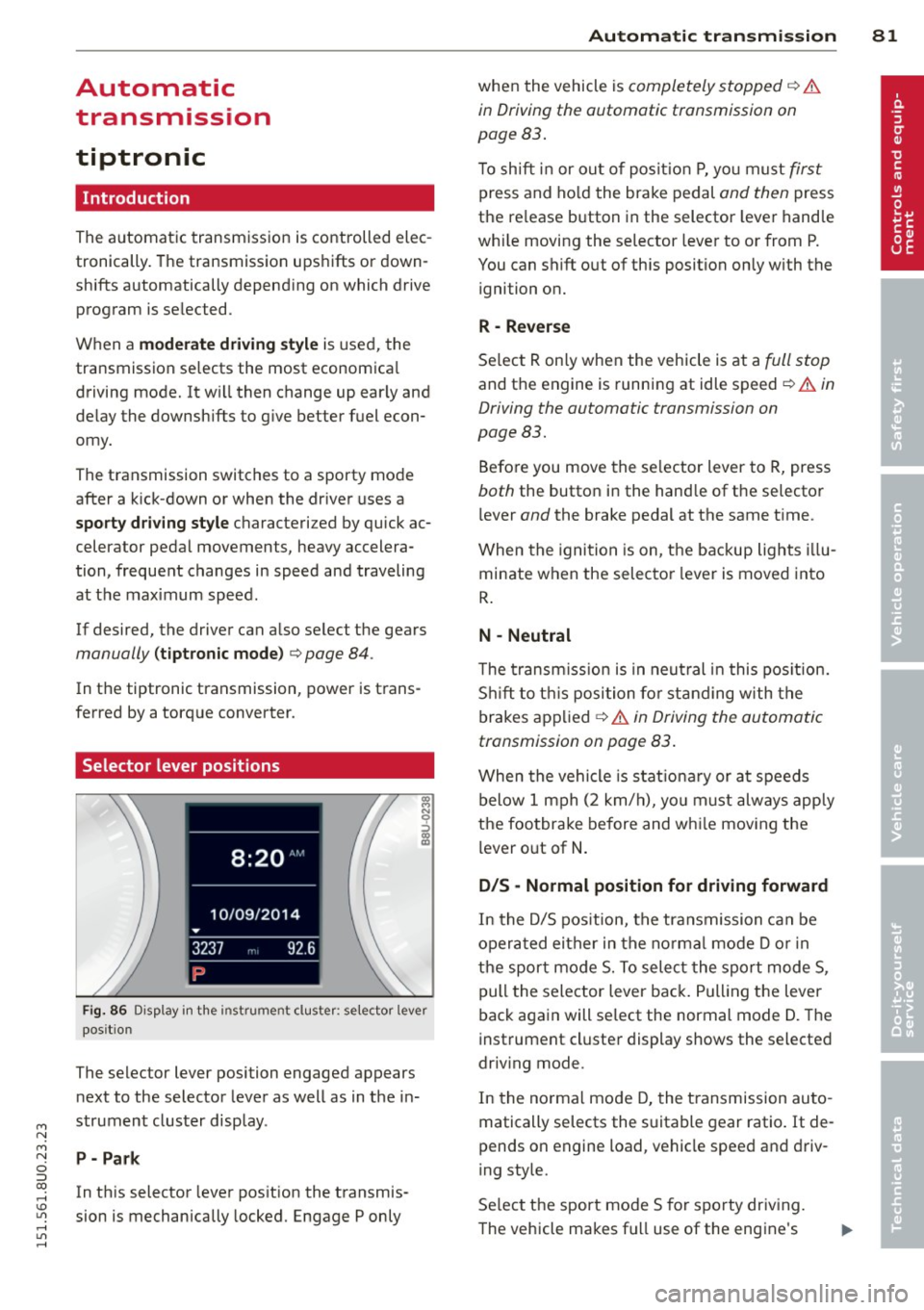
Fig. 86 Disp lay in the instru men t clu ster: se lecto r lever
pos it io n
The selector lever posi tion engaged appears
next to the selector lever as well as in the in
strument cluster display.
P- Park
In this selector lever posit ion the transmis
sion is mechanically locked. Engage P only
Automatic transmission 81
when the vehicle is completely stopped q A
in Driving the automatic transmission on
page 83.
T o shift in or out of position P, yo u must first
press and hold the brake pedal and then press
the re lease button in the selector lever handle
wh ile moving the selector lever to or from P.
You can shift out of th is position only with the
ignition on.
R -Reverse
Select R only when the vehicle is at a full stop
and the engine is running at idle speed¢.&. in
Driving the automatic transmission on
page 83.
Before you move the selector lever to R, press
both the button in the hand le of the selector
l ever
and the brake pedal at the same time .
When the ignition is on, the backup lights illu
minate when the selector lever is moved into
R.
N -Neutral
The transmission is in neutral in this position.
Shift to this position for standing with the
brakes applied
q A in Driving the automatic
transmission on page 83.
When the vehicle is stat ionary or at speeds
below 1 mph (2 km/h), you must always apply
the footbrake before and whi le moving the
lever out of
N.
D/S -Normal position for driving forward
In the D/S position, the transmission can be
operated either in the norma l mode D or in
the sport mode S. To select the sport mode S,
pull the selector lever back. Pulling the lever
back again will select the normal mode D. The
instrument cluster display shows the selected
driv ing mode .
In the normal mode D, the transmission auto
matically selects the suitable gear ratio. It de
pends on engine load, vehicle speed and driv
ing style.
Select the sport mode S for sporty driving.
The vehicle makes fu ll use of the engine's
Page 84 of 258
82 Autom atic tr an smi ssion
power . Shifting may become noticeable when
accelerat ing .
When the veh icle is stationary or at speeds
be low 1 mph (2 km/h), you must always apply
the foot brake before and while moving the lever to D/S out of N .
.&_ WARNING
Read and follow all WARNINGS c::> & in
Driving the automatic transmission on
page 83.
([) Note
Coasting downhi ll with the transmission in
N and the engine not running wi ll result in
damage to the automatic transmiss ion
and possibly the catalytic converter.
(D Tips
- If you accidentally select N while driv ing,
take your foot off the accelerator pedal i mmediately and wait for the engine to
s low down to idle before se lecting D/S.
- If there is a power failure, the selector
l ever will not move out of the P position.
The emergency release can be used if
this happens
c::> page 86 .
Automatic Shift Lock (ASL)
The Automatic Shift Lock safeguards you
against accidentally shifting into a forward or the reverse gear and causing the vehicle to
move unintentionally.
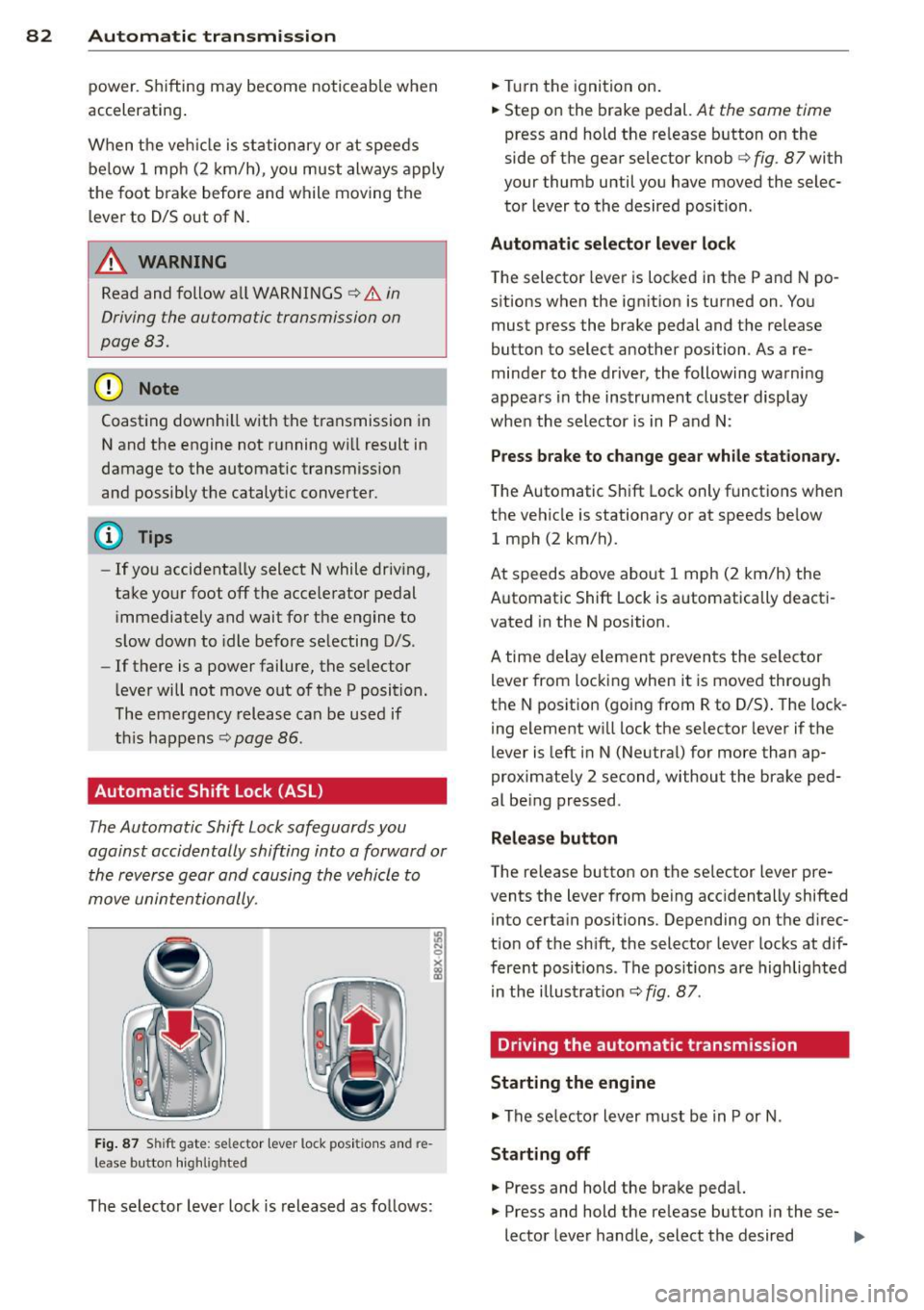
Fi g. 87 Shi ft gat e: selec tor lever lock posi tions and re
l ease button hig h lig hted
The selector lever lock is released as follows: .,.
Turn the ignition on .
.,. Step on the brake pedal.
At the same time
press and hold the re lease button on the
side of the gear selector knob
c::> fig . 87 with
your thumb until you have moved the selec
tor lever to the desired position .
Automatic sele cto r leve r lo ck
The selector lever is locked in the P and N po
sitions when the ignit ion is turned on . You
must press the brake pedal and the re lease
button to select another position . As a re
minder to the driver, the following warni ng
appears in the instrument cluster display
when the selector is in P and N:
Pre ss brake to change gear while stationary.
The Automatic Shift Lock only functions when
the vehicle is stationary or at speeds be low
1 mph (2 km/h).
At speeds above about 1 mph (2 km/h) the
Automat ic Shift Lock is automatically deact i
vated in the N position .
A time delay elemen t prevents the selector
lever from locking when it is moved through
the N posit ion (going from R to D/S) . The lock
i ng element w ill lock the selector lever if the
lever is left in N (Neutra l) for more than ap
proximately 2 second, without the brake ped
al be ing pressed.
Relea se button
T he release button on the se lector lever pre
vents the lever from being acc identally shifted
into certain positions. Depending on the d irec
t ion of t he sh ift, the selector lever locks at dif
fere nt posit ions . The positions are highlig hted
in the illust rat ion
c::> fig . 87.
Driving the automatic transmission
Starting the engine
.,. The se lector lever must be in P or N .
Starting off
.,. Press and hold the brake peda l.
.,. Press and hold the re lease button i n these-
lector lever handle, select the desired ..,_
Page 86 of 258
84 Automatic tr an smis sion
the overload. An indicator lamp mJ illu
minates and a dr iver message appears
Q page 85 when the clutch is overload
ed .
- If the engine must remain running, never
have any driving pos ition engaged whe n
checking under the hood . Make sure the
selector lever has securely engaged and is locked in P with the parking brake set
c!:> page 179. Othe rwise, any inc rease in
eng ine speed m ay set the vehicle in mo
t io n, even wi th the park ing brake ap
plied.
(D Note
- When stopping on an i ncl ine, do not try
to hol d the veh icle in place by pressing
the accelerator peda l whi le a driving gear
is selected. This can cause the transmis
s ion to overheat and can damage it. Acti
vate the park ing brake or press the brake
pedal to prevent the vehicle from ro lling .
- Allow ing t he vehicle to roll when the en
gine is stopped and the selector lever is i n N will damage the transmiss ion be
cause it is not lub ricated under those cir
cumstances.
{DI Tips
For safety reasons, the park ing brake is re
leased automatically only when the dr iv
er 's safety belt is engaged in the buck le.
Hill descent control
The hill descent control system assists the
driver when driving down declines.
Hill descent control is activated when these
lector lever is in D/S and you press the brake
pedal. The transmission automatically se lects
a gea r that is suitable for the incline . Hill de
scent control tries to maintai n the speed ach
i eved at the time of bra king, within physical
an d techn ic al limita tio ns.
If may still be ne c
ess ary to adjust the speed with the bra kes . Hill descent contro
l sw itches off once the de
cline leve ls out or yo u press the acce lerator
peda l.
On vehicles wi th the cru ise contro l system
Q page 73, hill descent control is also activat
ed when the speed is set.
A WARNING
--
Hill descent control cannot overcome
physical lim itations, so it may not be ab le
to maintain a co nstant speed under a ll
conditions. A lways be ready to apply the
b rakes .
Manual shift program
Using the manual shift program you can
manually select gears .
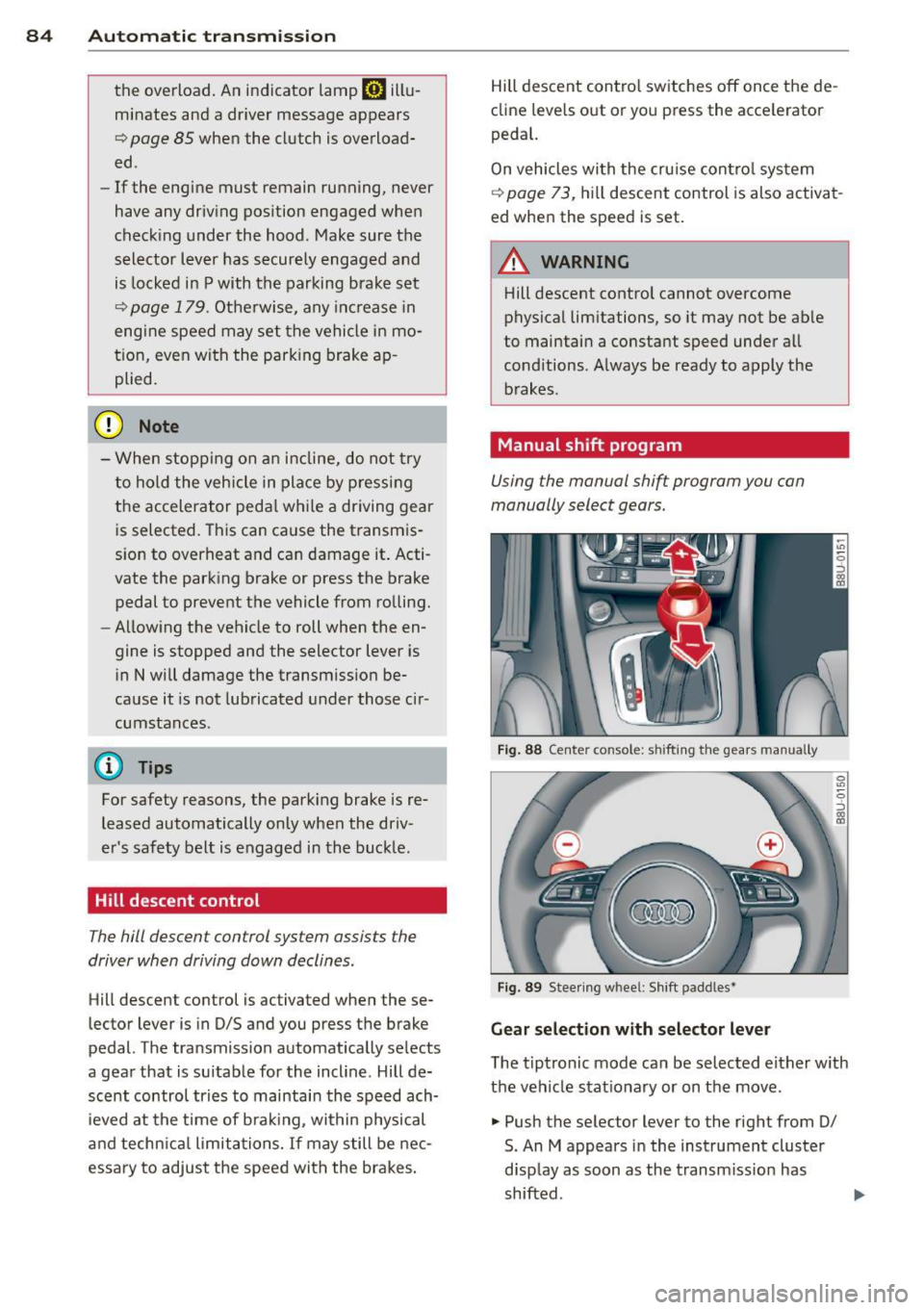
Fig. 88 Center co nsole: s hifti ng t he gears ma nually
Fig . 89 Stee ring w hee l: Shi ft padd les•
Gear selection w ith selector lever
T he t iptronic mode can be selected either w ith
the vehicle stat io nary or on the move .
.,. Push the selector lever to the right from 0/
S. An M appears in the instrument cluster
d isp lay as soon as the transm issio n has
shifted .
Page 116 of 258
114 Airbag sys te m
- Never permit salvaged or recycled air
bags to be installed in your veh icle.
Child restraints on the front seat - some
important things to know
~ Be sure to read the important informat ion
and head the WARNINGS for important de
ta ils about ch ildren and Advanced Airbags
c::>page 133.
Even though your vehicle is equ ipped with an
Advanced Airbag System, make certain that
a ll c hildren, especially those 12 years and
younger, a lways ride in the back sea t properly
restrained for their age and size . The airbag
on the passenger side makes the front seat a
potentially dangerous place for a chi ld to ride.
The front seat is not the safest place for a
child in a forward-facing child safety seat. It
can be a very dangerous place for an infant or
a child in a rea rward-facing seat .
The Advanced Airbag System in your veh icle
has been certified to comply with the Requ ire
ments of United States Federa l Motor Veh icle
Safety Standard 208 as applicable at the time
your veh icle was manufactured .
The Standard requires the front a irbag on the
passenger side to be turned off ("sup
pressed") if a ch ild up to about one yea r of
age restra ined in one of the rear-facing or fo r
ward-facing infan t restra ints listed in Federal
M otor Vehicle Safety Standard 208 w ith w hic h
the Advanced A irbag System in your vehicle
was certified has been installed on the front
passenger seat. Fo r a listing of the child re
straints that were used to certify compliance
with the US Safety Standard
c::> page 135.
The PASSENGER AIR BAG OFF light in the in
strument panel te lls you when the front Ad
vanced A irbag on the passenger side has been
turned off by the e lectronic control unit.
Each time yo u turn on the ignition, the
PAS
SENGER AIR BAG OFF
li ght wi ll come on for a
few seconds and:
- will stay on if the front passenger seat is not
occupied, -
w ill s tay on i f there is a small ch ild or child
restraint on the front passenger seat,
- will go off i f the front passenger sea t is oc
cupied by an adult as registered by the
weight-sensing mat
c::> page 123, Monitor
ing the Advanced Airbag System.
T he PAS SENGER AIR BAG OFF light comes on
whe n the control unit detects a tota l weight
o n the front passenger seat that req uires the
front airbag to be turned off .
If the total weight on the front passenge r
seat is more than that of a typica l 1 year -old
c h ild b ut less than the weight of a small
adult, the front airbag on the passenger side
can deploy (the
PASSENGER AIR BAG OFF
li ght does not come on). If the PASSENGER
AIR BAG OFF
light does not come on, the
front a irbag on the passenger side has not
been turned off by the elect ronic control unit
and can deploy if the cont rol uni t senses an
impact that meets the cond itions s tored i n its
memo ry .
For exampl e, th e ai rbag may deploy if;
- a small ch ild that is heav ier than a typical 1
year-old ch ild is on the front passenger seat
( r egardless of whether the child is in one of
the ch ild safety seats listed
c::> page 135) , or
- a child who has outgrown chi ld restraints is
on t he front passenger seat .
If the front passenger airbag is turned off, the
PASSENGER AIR BAG OFF light comes on in
the instrument cluster a nd stays on .
The front airbag on the passenger side may
not deploy (the PASSENGER AIR BAG OFF
light does not illum inate and stay lit) even if a
small adult o r teenager, or a passenger who is
not sitt ing up rig ht w ith their back against a
non- recl ined ba ck rest w it h their feet on the
vehicle f loor i n front o f the sea t is on t he front
passenge r seat
c::> page 95, Proper seating po
sition for the driver.
If the front passenger airbag dep loys, the
F edera l Standard req uires the airbag to meet
the "low risk" dep loyment criteria to red uce
t h e risk of injury t hro ugh interactio n with the ..,.
Page 127 of 258
M N
M N
0 ::i co ,...., \!) ..,.,
,...., ..,., ,....,
-accessory seat covers or cushions or other
things that may cause an incorrect reading
or impression on the weight-sens ing mat
under the upholstery of the seat have been
removed from the front passenger seat,
- a safety be lt extender has not been left in
the safety belt latch for the front passenger seat.
In addition to the
PASSENGER AIR BAG OFF
light in the center of the instrument panel,
the message
PASS ENGER AIR B AG O FF or
PAS SENGER AIR B AG ON will briefly appear
in the instrument cluster display . Th is is to in
form the driver of the current front passenger
a ir bag status .
Important safety instructions on
monitoring the Advanced Airbag System
A WARNING
An airbag system that is not functioning properly cannot provide supplemental pro
tection in a frontal crash .
- If the airbag indicator l ight
c> page 16
comes when the vehicle is be ing used,
have the system inspected immediately
by you r autho rized Aud i dea ler. It is pos
sible that the a irbag will inflate when it
is not supposed to, or w ill not inflate
when it sho uld .
A WARNING
If the front airbag inflates , a ch ild without
a child restraint, in a rearward-facing child
safety seat or in a forward-facing chi ld re
straint that has not been properly insta lled
w ill be seriously injured and can be k illed.
- Even though your veh icle is equipped
with an Advanced Airbag System, make certain that a ll children, especially 12
years and younge r, always ride o n the
back seat properly restrained fo r their
age and si ze.
- Always install forward or rea r-facing
child safety seats on the rear seat - even
with an Advance d Airbag System. A
irbag
sys tem 125
- If you must install a rearward-facing
child safety seat on the front passenger
seat because of exceptional circumstan
ces and the
PA SS ENG ER AIR BAG OFF
light does not appear and stay on, imme
diate ly install the rear-facing child safety
seat in a rea r seat ing pos ition and have
the airbag system inspe cted by your au
thorized A udi dealer.
- A t ight tether or other strap on a rea r
ward-facing child restraint attached to
the front passenger seat can p ut too
m uch pressure on the weight-sensing
mat in the seat and registe r more weight
than is actually on the seat. The heavier
weight registered can make the system
work as though an adult were on the seat
and deploy the Advanced Airbag when it
must be suppressed causing ser ious or
even fata l injury to the ch ild.
- If, in exceptiona l circumstances, you
must install a forward-fac ing ch ild re
straint on the front passenger seat, al
ways move the seat into its rearmost po
sition in the seat's fore and aft adjust
ment range, as far away from the airbag
as possible . The backrest must be adjust
ed to an upright pos ition. Make sure that
the
PASSENGER AIR BAG OFF light
comes on and stays on all the time when
ever the ignit ion is switched on.
A WARNING
...---
- If the PASSENGER AIR BAG OFF light
does not go out when an adult is sitting
on the front passenger sea t after taking
the steps described above, make su re the
adu lt is properly seated and restra ined at
one o f the rear seat ing pos itions.
- Have the airbag system inspected by
your author ized Audi dealer befo re trans
porting anyone on the front passenger
seat.
(D Tips
If the weight-sensing mat in the front pas
senger seat detects an empty sea t, the
front airbag on the passenger side wi ll be ..,.
•
•
Page 155 of 258
M N
M N
0 ::i co ,...., \!) ..,.,
,...., ..,., ,....,
@ Tips
Your vehicle may be equipped with Audi
connect. Your use of certain Aud i connect
features req uires wireless serv ices that are
provided by a third party wireless telecom
municat ions provider. For details regard
ing how information obtained through
Aud i connect is collected, processed,
transmitted, used, and shared, please see
your contra ct w ith the wire less telecom
municat ions provider and the "About A udi
connect" tab in your vehicle's MMI:
!MENU !
button > Audi connect > About Audi con·
nect .
Electronic Stabilization
Control (ESC)
Description
ESC helps to improve road holding and vehicle
dynamics to help reduce the probability of
skidd ing and loss of veh icle control. It works
only when the eng ine is running. ESC detects
certain difficult driv ing s ituations, including
when the vehicle is beginning to spin (yaw) out of cont ro l and helps you to get the vehicle
back under control by select ively brak ing the
wheels, and/or red ucing engine powe r and
p roviding steering assistance to help hold the
ve hicle on the driver's intended course . The in
dicator light
m in the instrument cluster
blinks when ESC is taking action to help you
control the vehicle.
ESC has limitations.
It is important to remem
ber that ESC cannot overcome the laws of
phys ics. It will not a lways be able to help out
under all conditions you may come up against.
For example, ESC may not always be able to
h elp you master situat ions where there is a
sudden change in the coefficient of fr iction of
the road surface. When there is a sect io n of
d ry road that is s udden ly cove red with water,
slush o r snow, ESC canno t perform the same
way it would on the dry su rface.
If the vehicle
hydroplanes (rides on a c ush ion of wate r in
stead of the road surface), ESC wi ll not be
ab le to he lp you steer the veh icle because con-
Int ellig ent technolog y 153
tact with the pavement has been interrupted
and the vehicle cannot be braked or steered .
D uring fast corner ing, particular ly on wind ing
roads, ESC cannot always deal as effectively
with difficult dr iv ing s ituations than at lower
speeds. When towing a trailer, ESC is not able
to help you regain control as it would if you
were not tow ing a trailer.
Always adjust your speed and driving style to road, traffic and weather conditions . ESC can
not override the vehicle's physical lim its, in
crease the availab le tract ion, or keep a veh icle
o n the road if road departu re is a result of
driver ina ttent io n. Instead , ESC imp roves the
poss ibility of keep ing the vehicle under con
trol and on the road during extreme maneu
vers by using the driver's steering i nputs to
help keep the vehicle go ing in the intended di
rect ion. If you are traveling at a speed that
causes you to run off the road before ESC can
provide any assistance, you may not experi
ence the benefits of ESC.
ESC includes and/or works together with the
anti-lock brake system (ABS), brake ass ist sys
tem, ant i-slip regu lation (ASR), electron ic dif
ferential lock (EDL), electron ic interaxle d iffe r
ential lock*/se lective wheel torque co ntrol*
and hill descent assist. ESC is swit ched on a ll
the time. In ce rtain sit uat io ns when yo u need
less traction, you can sw itch off ASR by press
ing the b utton
[fil ¢ page 155, fig. 13 7. Be
s u re to switch ASR on again when you no lon
ger need less traction .
Anti-lock braking system (ABS )
ABS prevents the whee ls from locki ng up
when b raking. The vehicle can st ill be stee red
even during hard braking . App ly steady pres
su re to the brake peda l. Do not pump the ped
al. A pulsing in the brake pedal indicates that
the system is helping you to brake the vehicle.
Brake a ssis t sy ste m
The brake ass ist system can decrease braking
distance . It increases braking power when the
driver presses the brake peda l quickly in emer
gency s ituations. You must press and hold the
brake pedal unti l the situation is over. .,,.
•
•