instrument cluster AUDI Q3 2015 Owners Manual
[x] Cancel search | Manufacturer: AUDI, Model Year: 2015, Model line: Q3, Model: AUDI Q3 2015Pages: 258, PDF Size: 64.9 MB
Page 12 of 258
10 Instruments and warning/indicator lights
Instruments and warning/indicator Lights
Instruments
Instrument cluster and controls
The instrument cluster is your central source of information.
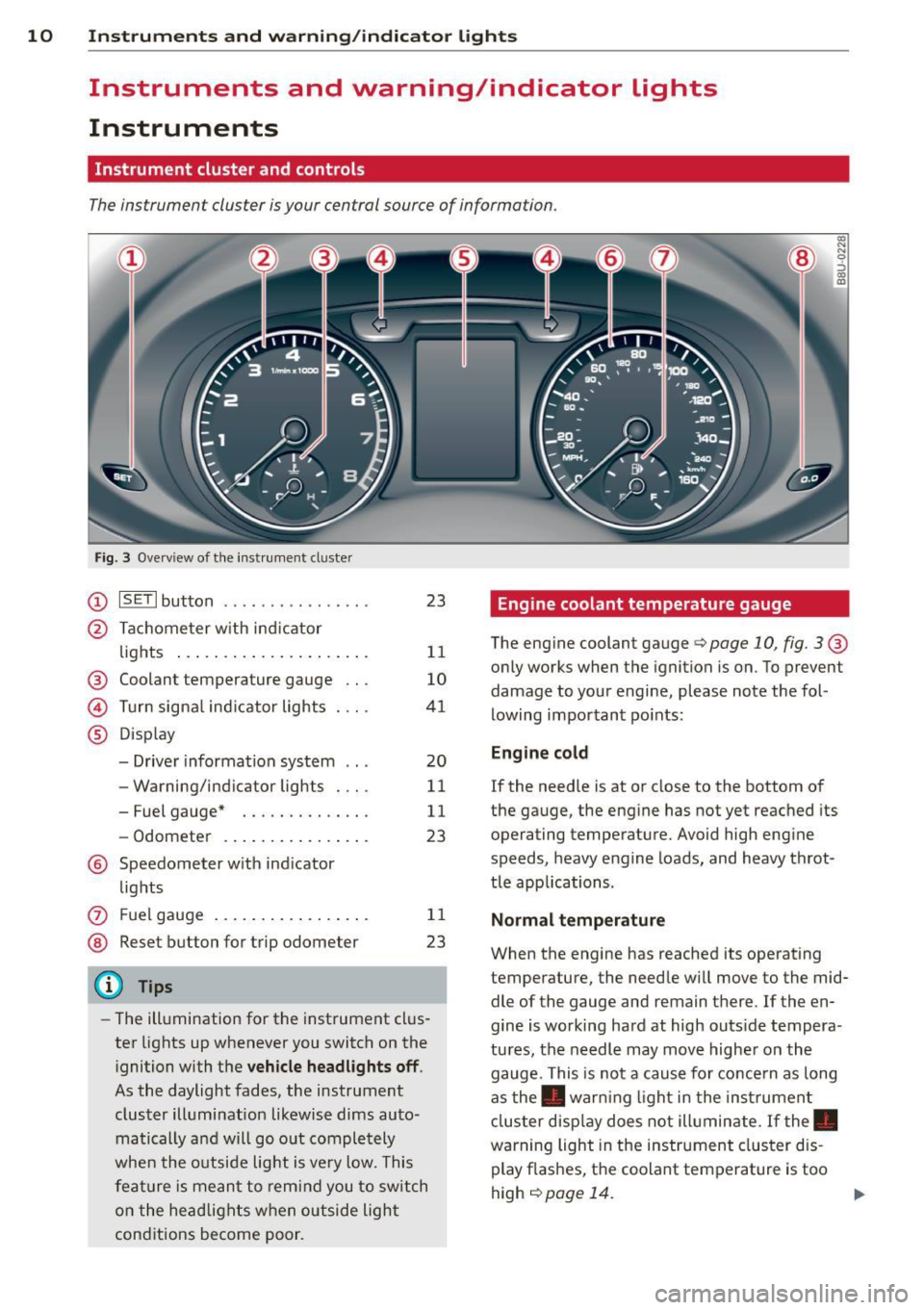
Fig. 3 Ove rv iew of the instrument cluster
(D ISETI button .... .... .. .... . .
@ Tachometer with ind icator
lights .. ............. .... . .
® Coolant temperature gauge .. .
© Turn signal indicator lights . .. .
® Disp lay
- Driver information system .. .
- Warning/indicator lights . .. .
- Fuel gauge* ....... .. .. .. .
- Odometer ........ .... .. . .
® Speedometer with indicator
lights 23
11
10
41
20
11
11
23
(J) Fu el gauge . . . . . . . . . . . . . . . . . 11
® Reset button for trip odometer 23
(D Tips
-The illumination for the instrument clus
ter lights up whenever you switch on the
ignition with the
vehicle headlights off .
As the daylight fades, the instrument
cluster illumination likewise dims auto
matically a nd will go out completely
when the outside light is very low. This
feature is meant to remind you to switch
on the headlights when outside light
conditions become poor .
Engine coolant temperature gauge
CX) N N 0 :'> CX) IX)
The engine coolant gauge q page 10, fig. 3 ®
only works when the ignition is on. To prevent
damage to your engine, please note the fol
lowing important points:
Engine cold
If the needle is at or close to the bottom of
the gauge, the engine has not yet reached its
operating temperature. Avoid high engine
speeds, heavy engine loads, and heavy throt
tle app lications.
Normal temperature
When the engine has reached its operating
temperature, the needle will move to the mid
dle of the gauge and remain there . If the en
gine is working hard at high outs ide tempera
tures, the needle may move higher on the
gauge. This is not a cause for concern as long
as the . warn ing light in the instrument
cluster display does not illuminate. If the.
warning light in the instrument cluster dis
play flashes, the coolant temperature is too
high
¢ page 14. .,.
Page 13 of 258
Instrument s and warnin g/indic ator ligh ts 11
M N
M N
0 ::i co ,...., \!) ..,.,
& WARNING
-Always observe the wa rning in
¢
page 179, before opening the hood
and checking the engine coolant level.
- Never open the engine hood if you see or
hear steam, or if you see engine coolant
dripping from the engine compartment.
You could burn yourself. Let the engine cool off first so that you cannot hear or
see any steam or engine coolant.
(D Note
- Mounting additional lights or accessories
in front of the air inlets reduces the cool
i ng effect of the rad iator. At h igh outside
temperatures or high eng ine load, the
engine could overheat.
- The front spo iler has been designed to
proper ly distr ib ute the cooling air when
the veh icle is moving.
If the spoiler is
damaged, this cou ld redu ce the cooling
effect and the engine co uld then over
heat. Ask yo ur autho rized Aud i de aler f or
assistance.
Tachometer (engine rev counter)
The tachometer indicates the engine RPM
(revolutions per minutes).
If engine R PM drops be low 1,500, you should
downshift to the next lower gear. The red area
at the e nd of the sca le ind icates maximum
permissible engine RPM after the break- in pe
riod. Before reaching this area, move these
l ector lever to position D/S or ease your foot
off the accelerator peda l.
(D Note
The tachometer needle@¢ page 10,
fig. 3 sho uld only briefly be in the red
zone: you could damage your engine! The
beg inning of the red zone varies depend
ing on the engine.
@) For the sake of the environment
Upshift ing early saves fue l and reduces en-
~ gine noise. ,....,
Fuel gauge
T he fuel gauge wo rks only when the ignition is
o n.
When the needle reaches the red a rea, the
warning light
Ii] in the instrume nt cluster
will illuminate
¢ page 18. Time to refuel!
The tota l tank capacity of your ve hicle is listed
i n
¢ page 235.
(1) Note
Never run the ta nk completely dry! An ir
regular supply of f uel can cause engine
misfiring and fuel could enter into the ex
haust system . The catalytic converter
could t hen ove rheat and be damaged.
Warning/indicator
Lights
Description
T he ind icator lights in the instrument cluster
blink or tur n on. They indica te funct io ns or
malfu nctions ¢
.&,..
Messages may appea r with some indicato r
lights. A warning signal may sound at the
same time. The indicato r lights and messages
in the disp lay can be replaced by othe r d is
plays. In the dr iver informa tion system, you
can display the messages aga in
¢ page 21 .
Some indica tors lig hts in the d isplay can turn
on i n severa l colors.
& WARNING ~
- Failure to heed warning ligh ts and other
important vehicle information may res ult
in ser ious personal inj ury or vehicle dam
age.
- Whenever stalled or stoppe d for repair,
move the vehicle a safe d istance off the
road, stop the engine, and turn on the
emergency flasher ¢
page 43.
-The engine compartment o f any motor
ve hicle is a potentially hazardous area.
Before you check anything in the engine
Page 19 of 258
Instrument s and warnin g/indic ator ligh ts 17
M N
M N
0 ::i co ,...., \!) ..,.,
not illuminate when you switch the ignition
on, this also means there is a malfunction .
A WARNING
If you have a malfunction in the safety sys
tems, contact your author ized Audi dealer
immediately. Otherw ise the safety sys
tems may not work properly in an acci
dent .
(0 ) Worn brake pads
Ill Brake pad s!
If the warn ing light illum inates, immediately
contact your authorized Audi dealer or quali
fied workshop to have all brake pads inspect
ed. On USA models the warning light
Ill
comes on together with the warn ing light •.
Both sets of b rake pads on an axle must al
ways be rep laced at the same time.
A WARNING
Dr iv ing with bad brakes can cause a coll i
sion and serious personal injury.
- If the wa rning light Ill and the warning
light
. ll with the message Brake pad s!
comes on in the instrument cluste r dis
play, immediately contact your author
i z ed Audi dealer or qualified workshop to
have all brake pads checked or replaced if
necessary .
EPC Electronic power control
This warning/indicator light monitors the
elec tronic power control .
The [31 warning/indicator light (E lectronic
Power Control) i lluminates when you switch
the ignition on as a function check .
-
If t his warning/indicator light ill uminates
while you are driving, then there is a ma lfunc
tion in the engine electron ics. Have the mal
function corrected as soon as possible by your
,....,
~ 1 ) . : USA models only
authorized Aud i dea le r or a qualified repair fa
cility.
· o Malfunction Indicator Lamp (MIL)
The Ma lfunction Indicator Lamp (MIL) is part
of the On-Board Diagnostic (OBD II) system.
The symbol
('4 lights up when the ignition is
switched on and will turn off after the eng ine
has started and has settled at a constant idle
speed . This i ndicates that the M IL is work ing
properly.
The warning light illuminates when there is a
malfu nction in the e ngine electron ic system .
Co ntact you r aut ho rized Aud i dea le r and have
t h e malfunc tion corrected.
An improperly closed fuel fille r cap may a lso
cause the MIL light to illuminate
q page 177 .
For more information q page 26.
!?; Engine speed limitation
App lies to vehicles: wi th engine speed limi tati on
(fl Do not e xce ed ma x. engin e speed of
XX.XX rpm
The Ill symbol illuminate s when there is an
engine contro l ma lf unct ion. The
(31 indicator
light in the instrument cluster also illumi
nates . The engi ne speed is limited to the
speed displayed in the d river info rmat ion sys
tem. Keep in mind that the engine speed w ill
not exceed the val ue d isplayed in the dr iver in
f ormat ion system, for example when down
shifting .
D rive to your authori zed A udi dealer immed i
ate ly to have the ma lfunction corrected .
!:( .. Engine oil level
1!1;111 Check oil level.
If the indicator light and the message appear,
add engi ne oil immediately
<=> page 181.
Page 27 of 258
M N M N
0 ::i co
rl I.O
"' rl
"' rl
Fuel economy messages
App lies to vehicles: with trip computer w it h eff ic iency
p rogram
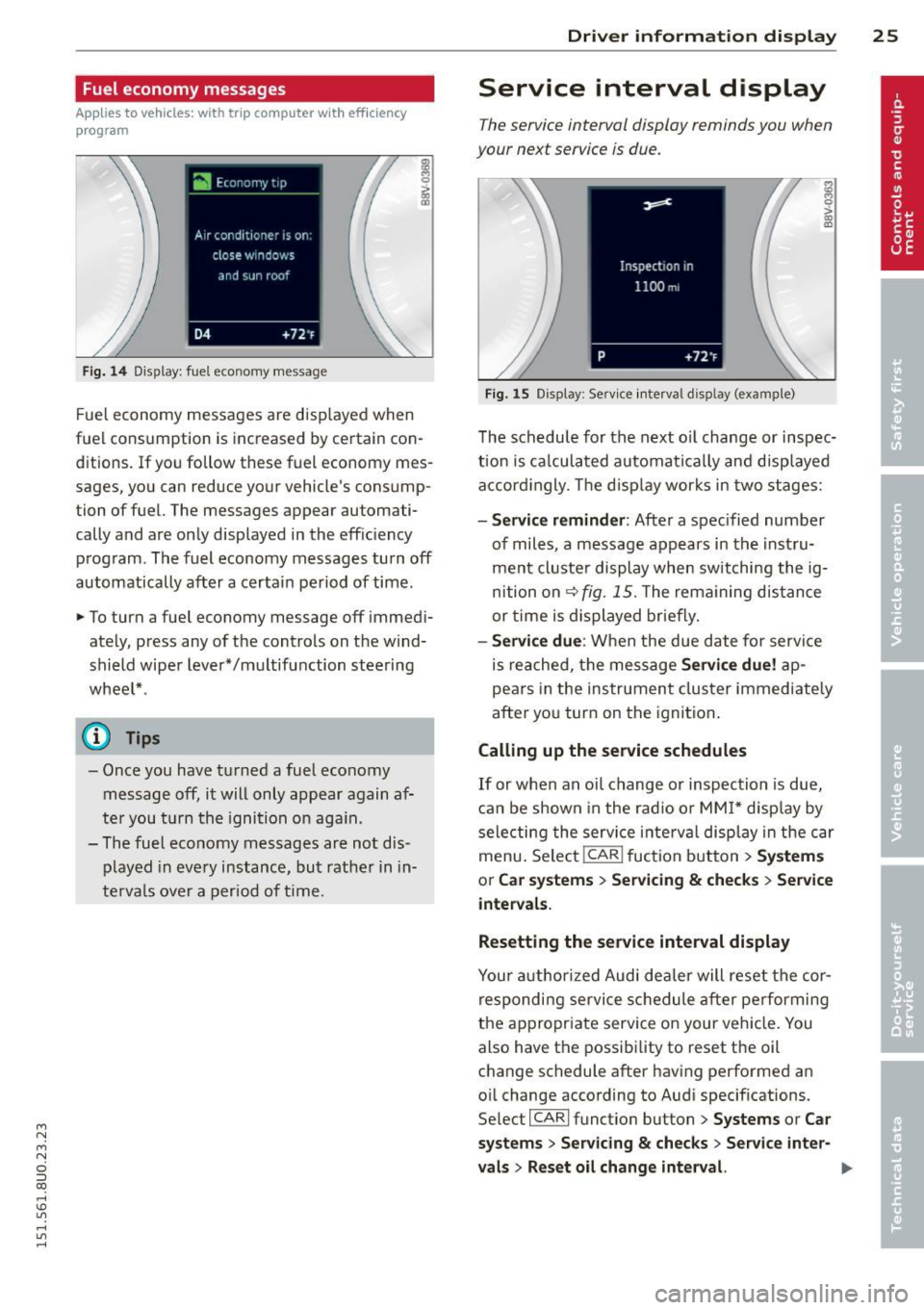
Fig . 14 Display: fuel economy message
Fue l economy messages are disp layed when
fuel consumption is increased by certain con
ditions. If you follow these fuel economy mes
sages, you can reduce your vehicle's consump
tion of fuel. The messages appear automati
cally and are only displayed in the effic iency
program. The fuel economy messages turn off
automatically after a certain period of time.
• To turn a fuel economy message off immedi
ately, press any of the controls on the wind
shield wiper lever*/multifunction steering
whee l* .
(D} Tips
- Once you have turned a fuel economy
message off, it will only appear again af
ter you t urn the ignition on aga in.
- The fuel economy messages are not dis
played in every instance, but rather in in
te rva ls over a period of time.
Dri ver inform ation di spl ay 25
Service interval display
The service interval display reminds you when
your next service is due.
Fig. 15 Display: Service interval display (example)
The schedule for the next o il change or inspec
t ion is ca lculated automatica lly and disp layed
accord ingly. The d isp lay works in two stages:
-Serv ice rem inder: After a spec ified number
of miles, a message appears in the instru
ment cluster display when switching the ig
nition on
¢fig. 15. The rema ining dis tance
or time is displayed br iefly.
- Se rvi ce due : When the due date for serv ice
is reached, the message
Se rvic e due! ap
pears in the instrument cluster immediate ly
after you turn on the ignition .
Calling up the service schedules
If or when an oil change or inspection is due,
can be shown in the rad io or MMI* disp lay by
selecting the service i nte rva l display in the car
menu . Selec t!CAR ! fuction button>
Sy ste m s
or C ar s ystem s > Ser vicing & check s > Service
intervals.
Resetting the service interval displa y
Your author ized Audi dealer will reset the cor
respondi ng service schedule after pe rforming
the appropr iate service on your veh icle. You
also have the possibi lity to reset the oil
change schedule after having performed an
oil change according to Audi specifications.
Se lect !CARI function button>
Sy stem s or Ca r
sy ste ms
> Servicing & checks > Service int er-
val s
> Reset oil cha nge int erval. ""
Page 28 of 258
26 Drive r in form ation d ispl ay
(D Note
-Only reset the oi l change display when
you have completed an o il change .
- If you d isconnect the battery term inals,
no calculatio ns can be made for the serv
ice interval display during this time and
no service rem inder will appear . Remem
ber that observing the proper service in
tervals is vitally important to extending
the life of you r vehicle, particularly the
engine, and maintaining its value. Even if
the mileage dr iven is low, the max imum
period of one year from one serv ice to
the next must not be exceeded.
On-Board Diagnostic
system (OBD)
Malfunction Indicator Lamp (MIL)
The Malfunction Ind icator Lamp (MIL) ¢'4 i n
the instrument cluster is part of the On-Board
Diagnostic (OBD II) system.
The warning/indicator light illuminates when
the ign ition is switched on and goes o ut after
the engine starts and the idle has stabilized.
Th is indicates that the MIL is working proper
l y.
If the light doe s not go out after the eng ine
is started, or illuminates wh ile you are driv
ing, a ma lfunction may exist in the engine sys
tem . If the light illuminates, the catalytic con
verter cou ld be damaged.
Continue driving
w ith reduced pow er (avoid
ing sustained high speeds and/or rapid accel
erations) and have the condition corrected.
Contact your authorized Audi dealer .
If the light ill uminates, the electronic speed
limiter may also be ma lfunctioning . For more
information
¢ page 2 7, Electronic speed
limiter.
An imp roperly clo sed fuel filler c ap m ay als o
c a u se th e M IL l ight to illuminate
¢ page 177.
On-Board Diagnostics
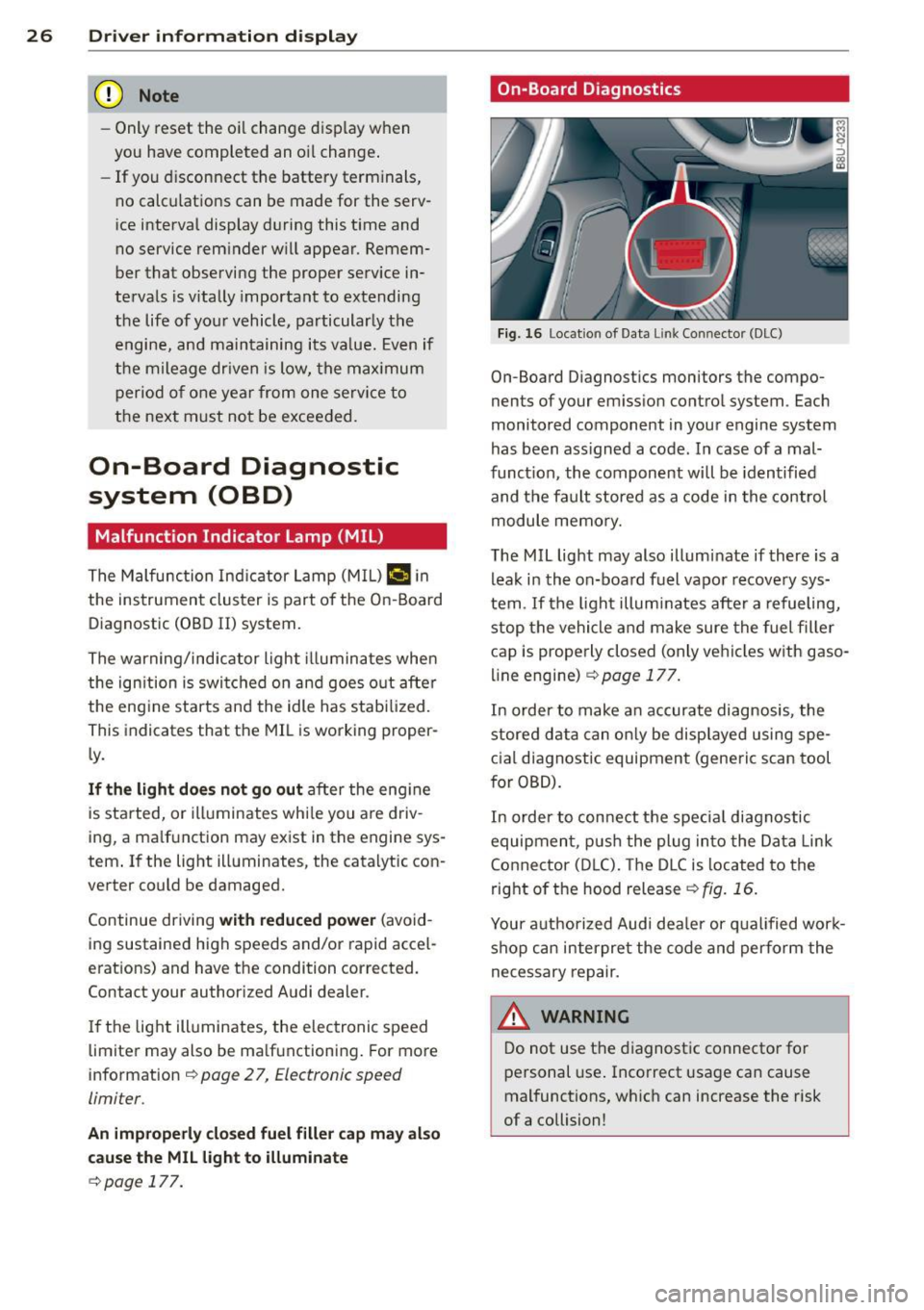
Fig. 16 Locat io n of Data Li nk Conn ector (DLC)
On-Board D iagnostics monitors the compo
nents of your em ission contro l system . Each
monitored component in your engine system
has been ass igned a code . In case of a mal
funct ion, the component will be identified
and the fault stored as a code in the control
module memo ry.
The MIL light may also illuminate if there is a lea k in the on-board fuel vapor recove ry sys
tem . If the ligh t illuminates after a refueling,
stop the vehicle and make sure the fuel fille r
cap is prope rly closed (only vehicles w ith gaso
line engine) ¢
page 177.
In order to make a n accurate diagnosis, the
stored data can on ly be displayed using spe
c ial d iagnostic equipment (generic scan tool
for OBD).
In order to con nect t he special diagnostic
equipment, push the plug in to the Data Link
Connector (D LC). The D LC is located to the
right o f the hood release
<::!;> fig. 16.
Your a uthorized Audi dea le r or qua lified wor k
shop can interpret the code and perform the
necessary repair.
,&_ WARNING ~ -
Do not use t he diagnost ic connecto r fo r
personal use . Incorrect usage can cause
mal functions, wh ich can increase the risk
of a collision!
Page 31 of 258
M N M N
0 ::i co
rl I.O
"' rl
"' rl
-Do not leave children inside the vehicle
unsupervised. In an emergency it would
be impossible to open the doors from
the outside without the key.
(D Tips
- In the event of a crash with airbag de
ployment all locked doors will be auto
matically unlocked to give access to the
vehicle occupants from the outside .
- If the power lock ing system should mal
function, you can lock the driver's door
using the ign it ion key¢
page 33.
-If the power lock ing system should fail,
you can still open the fuel tank flap in an
emergency
c:> page 178.
- You are well advised not to keep valua
bles inside an unattended vehicle, visible
or not . Even a properly locked vehicle
cannot provide the security of a safe.
- If the LED in the upper edge of the driv
er's door panel comes on for about 30
seconds after the vehicle is locked, there
i s a ma lfunction in the power locking or
the anti-theft warning system. Have the
malfunction corrected by an authorized
Audi dealership or qualified repair facili
ty.
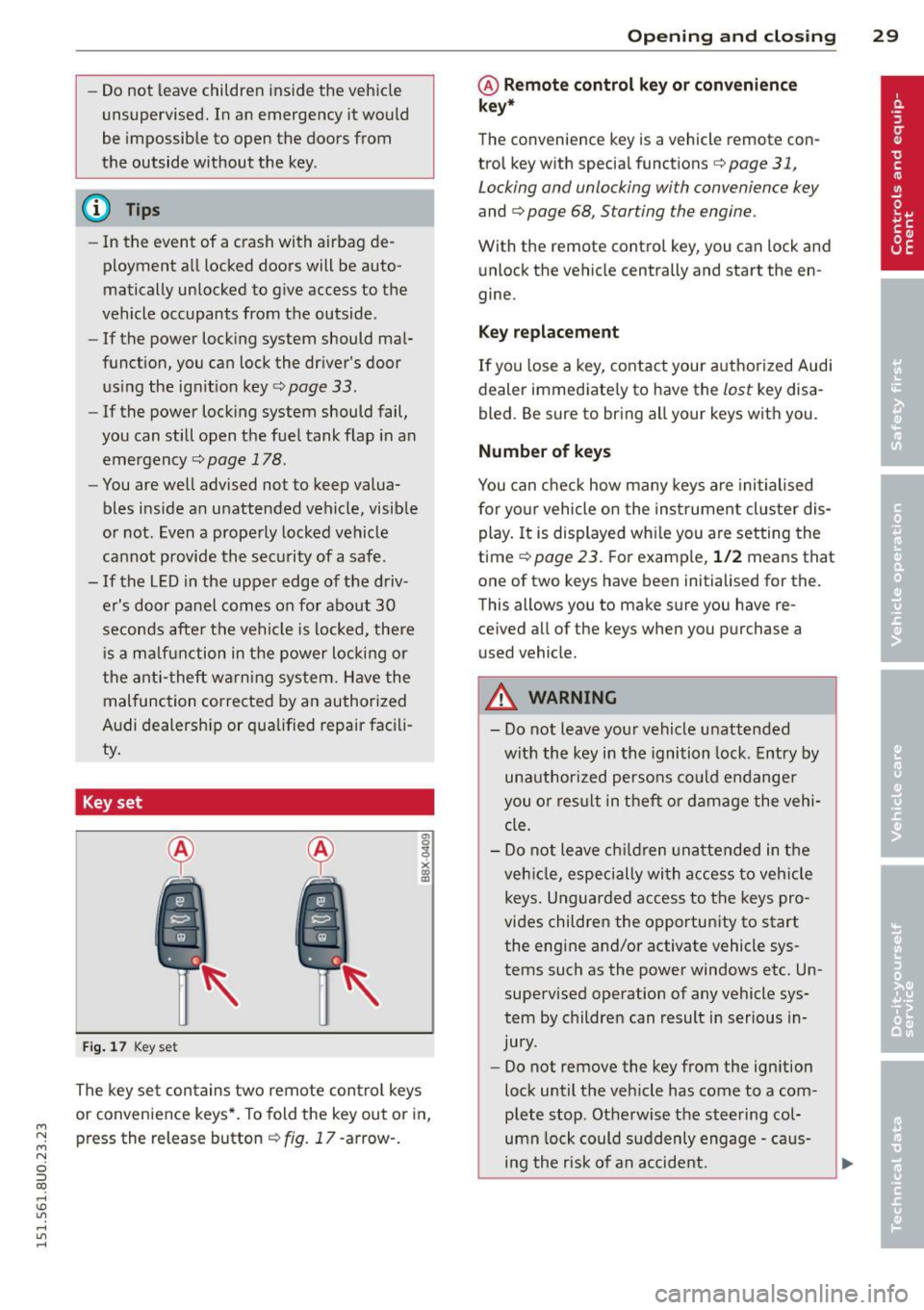
Key set
Fig. 17 Key set
The key set contains two remote control keys
or convenience keys*. To fold the key out or in,
press the release button¢
fig. 17 -arrow-.
Opening and closing 29
@ Remote control key or convenience
key*
The convenience key is a vehicle remote con
trol key with special functions
c> page 31,
Locking and unlocking with convenience key
and c> page 68, Starting the engine.
With the remote contro l key, you can lock and
unlock the vehicle centrally and start the en
gine.
Key replacement
If you lose a key, contact your authorized Audi
dealer immediate ly to have the
lost key disa
bled. Be sure to bring all your keys with you.
Number of keys
You can check how many keys are initialised
for yo ur vehicle on the instrument cluster dis
play. It is displayed wh ile you are setting the
time
c:> page 23. For example, 1/2 means that
one of two keys have been initialised for the.
This allows you to make sure you have re
ce ived all of the keys when you purchase a
u sed vehicle.
A WARNING
--
-Do not leave your vehicle unattended
with the key in the ignition lock. Entry by
unauthorized persons could endanger
you o r result in theft or damage the vehi
cle.
- Do not leave children unattended in the
veh icle, especially with access to vehicle
keys . Unguarded access to the keys pro
vides children the opportunity to start
the engine and/or activate vehicle sys
tems such as the power windows etc. Un
supervised operation of any vehicle sys
tem by children can result in serious in
jury .
- Do not remove the key from the ign ition
lock until the vehicle has come to a com
plete stop. Otherwise the steering col
umn lock could suddenly engage -caus
ing the risk of an accident.
Page 32 of 258
30 Opening and clo sing
@ Tips
- The operation of the remote contro l key
can be temporarily disrupted by interfer
ence from transmitters in the vicinity of
the veh icle work ing in the same frequen
cy range (e.g. a cell phone, radio equip
ment) .
- For security reasons, replacement keys
are on ly available from author ized Audi
dealer .
- For Decla ration of Compliance to United
States FCC a nd Industry Canada regula
t ions
9 page 24 0.
Check light and battery in remote
master key
Fig . 18 Remote co nt rol key : LE D
Fi g. 19 Remote co ntrol key: Open in g the cove r
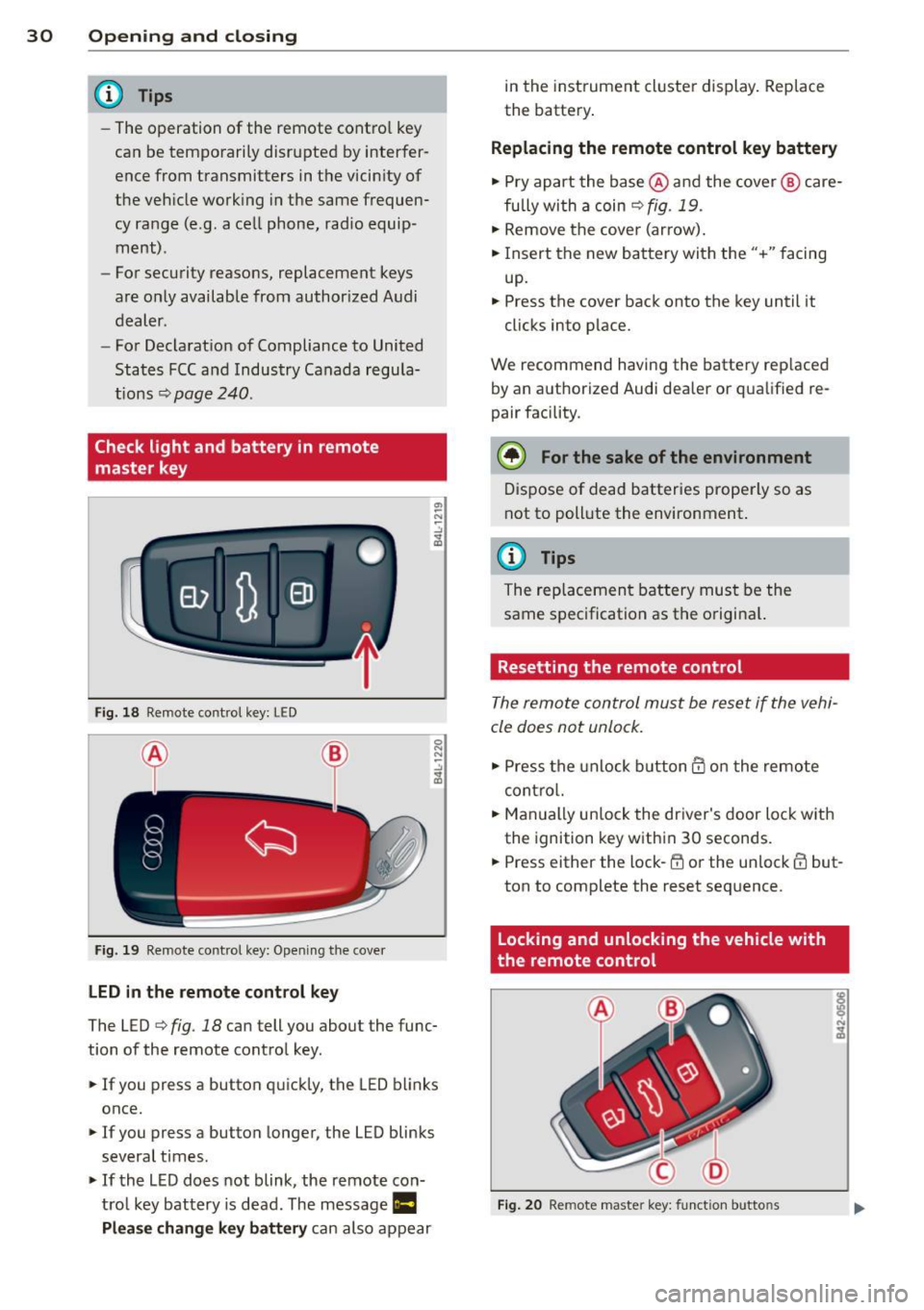
LED in the remote cont rol key
The LED 9 fig . 18 can tell you about the func
tion of the remote contro l key .
.. If you press a button q uickl y, the LED blinks
once.
1> If you press a button longer, the LED blinks
several times .
.. If the L ED does not blink, the remote con
tro l key battery is dead. The message
Ill
Plea se change key battery can also appear in
the instrument cluster display . Rep lace
the batte ry .
Replacing the remote control key battery
.. Pry apart the base @and the cover @ care
fu lly with a coin~
fig. 19.
.,. Remove the cove r (ar row) .
.. Insert the new battery with the" +" facing
up.
.. Press the cove r back onto the key until it
clicks into p lace.
We recommend having the battery rep laced
by an a uthorized Audi dea ler or qua lified re
pair facility .
$ For the sake of the environment
Dispose of dead batteries prope rly so as
not to poll ute the environment.
(D Tips
The rep lacemen t battery mus t be the
same spec ification as the origina l.
Resetting the remote control
The remote control must be reset if the vehi
cle does not unlock .
.. Press the unlock b utton @on the re mote
contro l.
.. Man ually un lock the dr iver's door loc k with
the ignition key w ith in 30 seconds .
.. Press either the lock-~ or the unlock @ but
ton to complete the reset seq uence.
Locking and unlocking the vehicle with
the remote control
Fig . 20 Remote maste r key: funct ion butto ns
Page 43 of 258
M N M N
0 ::i co
rl I.O
"' rl
"' rl
(D Tips
-The light sensor* for headlight control is
located in the rear view mirror mount.
You should therefore not apply any stick
ers to the windshield in this area in order
to prevent malfunctions or failures.
- Some exterior lighting functions can be
ad justed
¢ page 42.
- When you switch off the ignition while
the vehicle's lights are turned on, a buz
zer sounds as long as the driver's door is
open .
- In cool or damp weather, the inside of
the headlights, turn signals and tail
lights can fog over due to the tempera
ture difference between the inside and
outside. They will clear shortly after
switching them on. This does not affect
the service life of the lighting.
- In the event of a light sensor malfunc
tion, the driver is notified in the instru
ment cluster display~
page 19 .
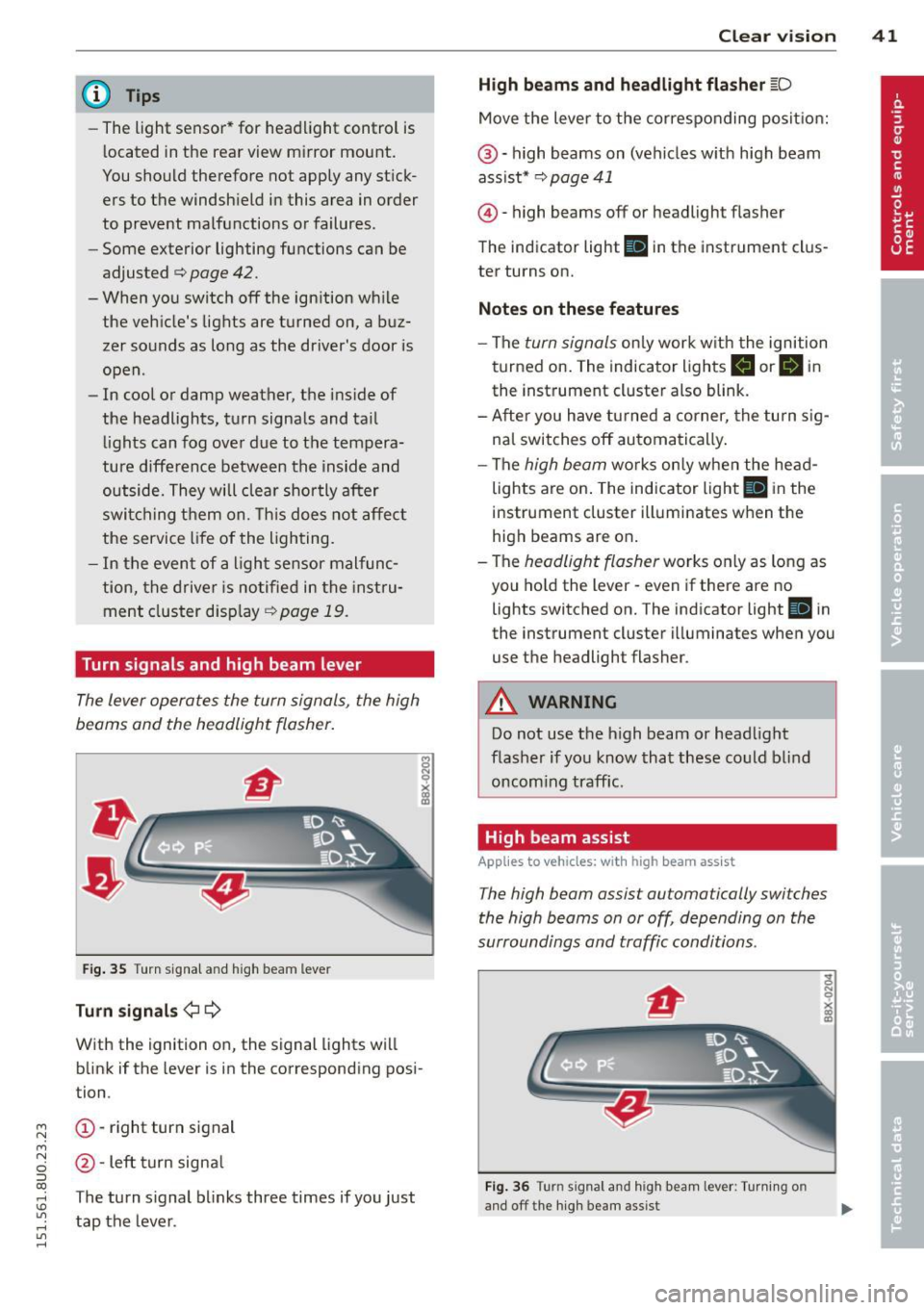
Turn signals and high beam lever
The lever operates the turn signals , the high
b eams and th e headlight flash er.
Fig. 35 Turn signal and high beam leve r
Turn signals ¢i ¢
With the ignition on, the signal lights will
blink if the lever is in the corresponding posi
tion .
(D-right turn signal
@-Left turn signal
T he turn signal blinks three times if you just
tap the lever. Clear
vision 41
High beams
and headlight flasher @:D
Move the lever to the corresponding position:
@-high beams on (vehicles with high beam
assist*
¢ page 41
@ -high be am s off or headligh t fla sher
The indicator light
Ill in the instrument clus
ter turns on.
Notes on these features
-The turn signals only work with the ignition
turned on. The indicator lights
II or Ill in
the instrument cluster also blink.
-After you have turned a corner, the turn sig
nal switches off automatically.
- The
high beam works only when the head
lights are on. The indicator light
El in the
instrument cluster illuminates when the
high beams are on.
- The
headlight flasher works only as long as
you hold the lever -even if there are no
lights switched on. The indicato r light
Iii in
the instrument cluster illuminates when you
use the headligh t flasher .
A WARNING
Do not use the high beam or headlight
flasher if you know that these could blind
oncoming traffic.
High beam assist
Applies to veh icles: w ith high beam assist
-
The high beam assist automatically switches
the high beams on or off, depending on the
surroundings and traffic conditions .
Fig. 36 Turn s ignal an d h igh beam lever : Turning o n
and off the high beam assist
Page 44 of 258
42 Clear vis ion
Activating high beam a ssi st
Requirement: The light sw itch must be in the
AUTO position, the low beam headlights must
be on.
• Press the lever into pos it ion (D in order to
activate the high beam assist . T he indicator
li gh t
IIJ turns on in the instrument cluster
display and the high b eams switch on or
off
automatica lly . The indicator light Bl turns
on if the high beams were switched on .
Switching the high beams on /off
m anuall y
Requir ement : Hig h beam assist is activated .
I f the h igh beams did not switch on/off auto
matica lly when expected, yo u may instead
switch them on/off manually:
• To switch the high beams on manually, press
the leve r into position (D. The indica tor light
El tu rns on. To switch the high beams off
again, pull the lever into position @.
• To switch the high beams
off manually after
th ey hav e tu rn ed on automatically, p ull the
lever into posi tion @.
Opera ting th e headlight fla sher
• To ope rate the flashers while the h igh beam
assist is active, pull the lever into position
@ . T he high beam assist will remain active.
Messages in the instrum ent cluster
displ ay
He adlight a ssis t: Sy stem f ault!
Drive to your a utho rized Aud i deale r immedi
ate ly to have the mal function corrected. You
can st ill switch the h igh beams on o r
off man
ua lly.
H eadlight a ssis t: Una vail able . N o C amera
v iew
The camera view is blocked, for examp le by a
sticke r or debris .
The sensor is located between the interior
rearv iew mirror and the winds hield . There
fore , do not place any stickers in th is area on
the w indshield .
A WARNING
High beam assist is only intended to assist
the driver. The drive r is still responsib le for
controll ing the headlights and switc hing
the high beams on and
off manually de
pending on t raff ic, lighting and visib ility
conditions. Fa ilu re to intervene manually
may lea d to risk of acc ident.
It may be nec
essary to operate the high beams manual
l y in the following situations, e.g.:
- For adverse weathe r condit ions such as
fog, heavy rain, blowing snow or spraying water.
- On roads where oncoming traff ic may be
partially obscured such as expressways .
- If there are individua ls on the road with
no lighting or poo r light ing, such as cy
clists.
- In tight curves and on steep slopes.
- In poorly lit are as.
- W ith st rong refle cto rs such as signs.
- If t he area of the winds hield near the
sensor is fogged ov er, dirty, icy o r cov
ered wi th a stic ker.
' Adjusting exterior lighting
The functions are selected in the radio or
MM!* .
• Select: !CARI func tion but ton > S ystems or
Car Syst ems contro l button > Ve hicle set
ting s> Exterior lighting .
Coming home (light when lea ving car )*,
Leav ing home (light when unlocking car) *
The coming home function illuminates the
area around the vehicle when the ignition is
switched
off and the dr ive r's door is open ed .
Depend ing on ve hicle equ ipment, the function
can be switched on and
off or the length of
t ime the lights remain on* can be ad justed .
T he
leaving home function illuminates the
area around the vehicle when unloc king it .
T h is func tion ca n be sw itche d on and
off .
The coming hom e and leaving home func
t ions only operate when it is dar k and the
Page 72 of 258
70 On the road
@ Tips
You ca n call up the dr iver message aga in
by pressi ng the
!ST ART ENGINE STOPI but
ton.
Driver messages
Turn off ignition. Battery discha rging
T his message appears and a war ning tone
sounds if yo u open the dr iver's door when the
ignit io n is switched on.
Press brakepedal to start engine .
This message appears if you do not press t he
b rake pedal to start the engine in a vehicle
with a n automatic t ransmission .
Please engage N or P .
This message appears if you try to start or
switch off the eng ine when the selector lever
is not i n Nor P. The eng ine can then not be
started or sw itched off.
fll Is key in the vehicle?
If t h e in dicator lamp lights up and the mes
sage appears, the convenience key* was re
moved from the vehicle while the e ngine was
runni ng .
If the convenience key is not in the
ve hicle you will not be able to switch on the
ignit io n or restart the engine after it has been
switched off . You w ill also not be ab le to l ock
the veh icle from the outside .
Shift to P, vehicle can roll away . Doors can
only be locked in P.
F or safety reasons , this messa ge will ap pear
together with a wa rning tone if t he se lector
l eve r is not in position P when you switch off
the ign ition. Put the selector lever in posi
tion P; otherw ise the vehicle can roll away and
cannot be locked .
II No key identified. See owner's manual.
If the indi cator lamp lights up and the mes
sage ap pears, a malfunct ion has occ urred
c:::> poge 69.
Electromechanical
parking brake
Operation
The ele ctrome chani cal parking brake replace s
t he hand broke.
Fi g. 77 Center co nsole: pa rk in g b rake
.,. Pull the(®) switch@ c:::> fig. 77 to app ly the
parking brake. The indicator lights . in the
sw itch and . (USA models)/ . (Canada
models) in the instrument cluster illumi
nate.
.,. To releas e th e pa rking bra ke, pr ess the bra ke
or ac celera to r peda l with t he igni tion
sw itche d on and simu ltaneously p ress the
sw itch (®) . Th e in d ic ator lig hts . in the
sw itch and . (USA models)/ . (Canada
mo dels) in the instr ument cluster go out.
Your ve hicle is equipped wi th a n ele ctro me
ch anical parking brake. The parkin g bra ke is
designe d to prevent the ve hicle from rolling
u nintentionally and replaces the hand b rake.
In ad diti on to the normal fu nctions o f a tra d i
tio na l han d brake, the e lectromechanical
parking brake provi des vario us convenience
and safety f unct ions .
When starting from rest
- The integral s tart ing as sist help s you when
d riving by au toma tically re leasi ng the pa rk
ing brake
c:::> poge 71, S tarting from res t.
- W he n star ting o n incl ines, t he s tar tin g as
sis t p reven ts the vehicle from uni nte ntion al
ly ro lling back . The braking force of the
parking brake is not re leased unt il suffic ient
driving force has been bui lt up at the
wheels .