steering AUDI Q3 2015 User Guide
[x] Cancel search | Manufacturer: AUDI, Model Year: 2015, Model line: Q3, Model: AUDI Q3 2015Pages: 258, PDF Size: 64.9 MB
Page 31 of 258
M N M N
0 ::i co
rl I.O
"' rl
"' rl
-Do not leave children inside the vehicle
unsupervised. In an emergency it would
be impossible to open the doors from
the outside without the key.
(D Tips
- In the event of a crash with airbag de
ployment all locked doors will be auto
matically unlocked to give access to the
vehicle occupants from the outside .
- If the power lock ing system should mal
function, you can lock the driver's door
using the ign it ion key¢
page 33.
-If the power lock ing system should fail,
you can still open the fuel tank flap in an
emergency
c:> page 178.
- You are well advised not to keep valua
bles inside an unattended vehicle, visible
or not . Even a properly locked vehicle
cannot provide the security of a safe.
- If the LED in the upper edge of the driv
er's door panel comes on for about 30
seconds after the vehicle is locked, there
i s a ma lfunction in the power locking or
the anti-theft warning system. Have the
malfunction corrected by an authorized
Audi dealership or qualified repair facili
ty.
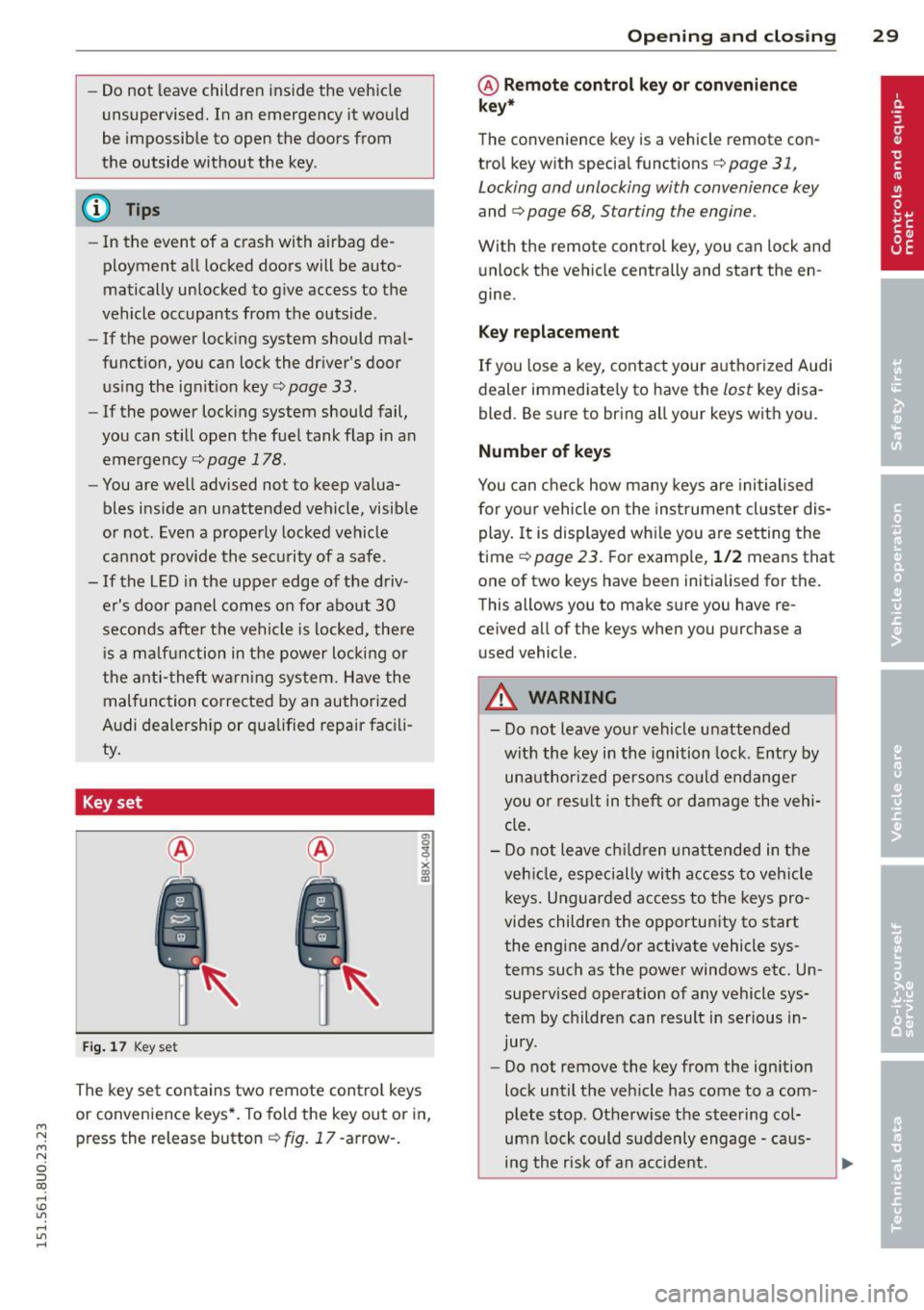
Key set
Fig. 17 Key set
The key set contains two remote control keys
or convenience keys*. To fold the key out or in,
press the release button¢
fig. 17 -arrow-.
Opening and closing 29
@ Remote control key or convenience
key*
The convenience key is a vehicle remote con
trol key with special functions
c> page 31,
Locking and unlocking with convenience key
and c> page 68, Starting the engine.
With the remote contro l key, you can lock and
unlock the vehicle centrally and start the en
gine.
Key replacement
If you lose a key, contact your authorized Audi
dealer immediate ly to have the
lost key disa
bled. Be sure to bring all your keys with you.
Number of keys
You can check how many keys are initialised
for yo ur vehicle on the instrument cluster dis
play. It is displayed wh ile you are setting the
time
c:> page 23. For example, 1/2 means that
one of two keys have been initialised for the.
This allows you to make sure you have re
ce ived all of the keys when you purchase a
u sed vehicle.
A WARNING
--
-Do not leave your vehicle unattended
with the key in the ignition lock. Entry by
unauthorized persons could endanger
you o r result in theft or damage the vehi
cle.
- Do not leave children unattended in the
veh icle, especially with access to vehicle
keys . Unguarded access to the keys pro
vides children the opportunity to start
the engine and/or activate vehicle sys
tems such as the power windows etc. Un
supervised operation of any vehicle sys
tem by children can result in serious in
jury .
- Do not remove the key from the ign ition
lock until the vehicle has come to a com
plete stop. Otherwise the steering col
umn lock could suddenly engage -caus
ing the risk of an accident.
Page 42 of 258
40 Clear vision
Clear vision
Lights
Switching the lights on and off
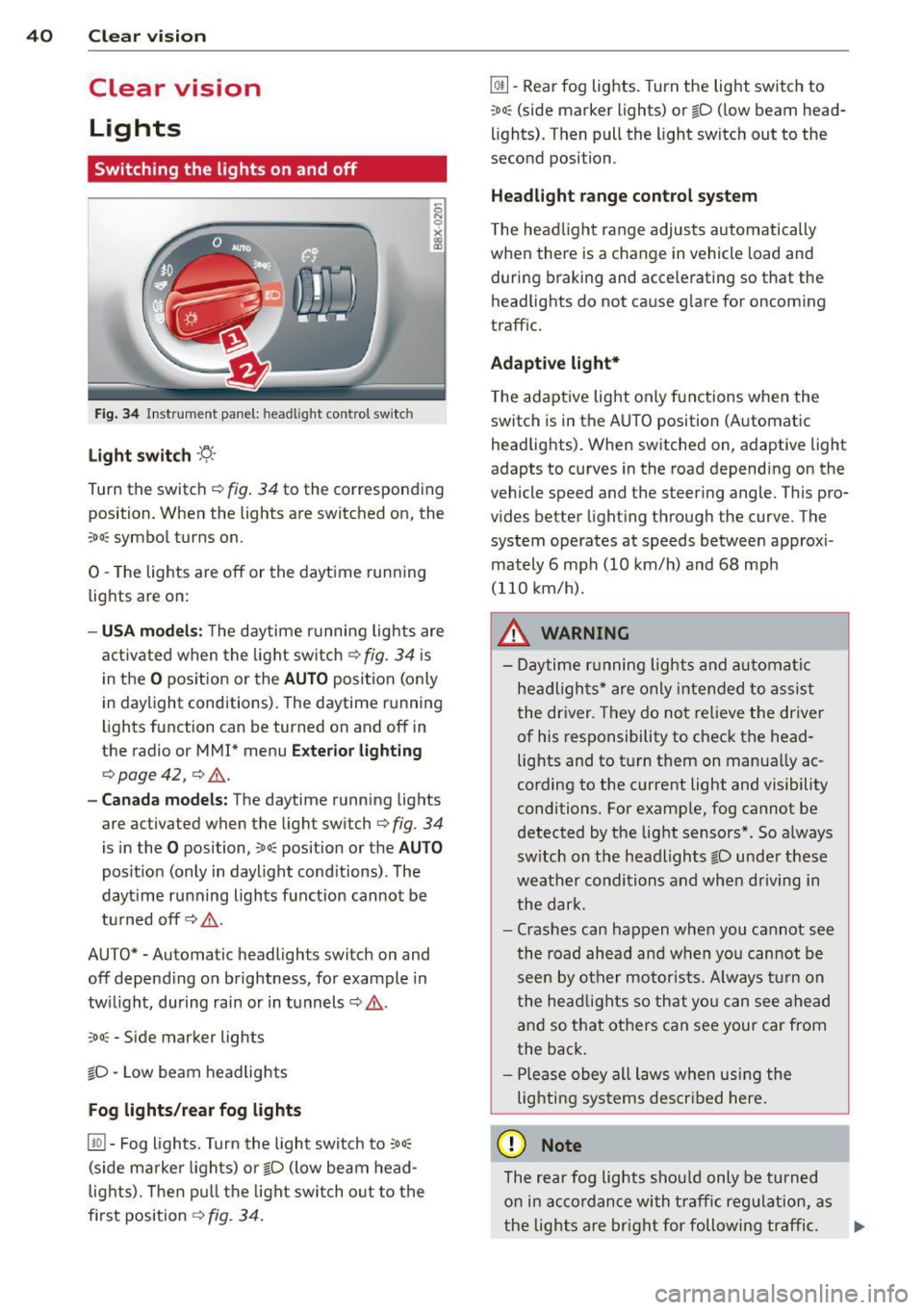
Fig . 34 Instrument panel: headlight control switch
Light switch -'t;. -
Tu rn the switch ¢ fig. 34 to the corresponding
position. When the lights are switched on, the
:oo : symbol turns on.
0 -The lights are off or the daytime running
lights are on:
- USA models: The daytime running lights are
activated when the light switch¢
fig. 34 is
in the
O position or the AUTO position (only
in daylight conditions). The daytime running
lights function can be turned on and off in
the radio or
MMI* menu Exterior lighting
¢ page 42, ¢ ,& .
-Canada models : The daytime running lights
are activated when the light switch¢
fig. 34
is in the O posi tion, co o: position or the AUTO
position (only in daylight conditions). The
dayt ime running lights function cannot be
turned off¢,& .
AUTO* -Automatic headligh ts swi tch on and
off depending on brightness, for example in
twilight, during rain or in tunnels¢,& .
:oo: -Side marker lights
io -Low beam headlights
Fog lights /rear fog lights
[!Q] -Fog lights. Turn the light switch to :oo:
(side marker lights) or io (low beam head
lights). Then pull the light switch out to the
first position ¢
fig. 34.
@I] -Rear fog lights. Turn the light switch to
:oo : (side marker lights) or io (low beam head
lights). Then pull the light switch out to the
second position .
Headlight range control system
The headlight range adjusts automatically
when there is a change in veh icle load and
during braking and accelerating so that the
headlights do not cause glare for oncoming
traffic.
Adaptive light*
The adaptive light only functions when the
switch is in the AUTO position (Automatic
headlights). When switched on, adapt ive light
adapts to curves in the road depending on the
vehicle speed and the steering angle. This pro
vides better lighting through the curve . The
system operates at speeds between approxi
mately 6 mph (10 km/h) and 68 mph
(110 km/h) .
_&. WARNING
- Daytime running lights and automatic
headlights* are only intended to assist
the driver. They do not relieve the driver
of his responsibility to check the head
lights and to turn them on manually ac
cording to the current light and visibility
conditions. For example, fog cannot be
detected by the light sensors*. So always
sw itch on the headlights
io under these
weather conditions and when driving in
the dark.
- Crashes can happen when you cannot see
the road ahead and when you cannot be
seen by other motorists. Always turn on
the headlights so that you can see ahead
and so that others can see your car from
the back.
- Please obey all laws when using the
lighting systems described here.
(D Note
The rear fog lights should only be turned
on in accordance with traffic regulation, as
-
the lights are bright for following traffic. .,._
Page 52 of 258
50 Seat s a nd s tor ag e
Seats and storage
General recommen
dations
Why is your seat adjustment so
important?
The safety belts and the airbag system can
only provide maximum protection if the front
seats are correctly adjusted.
There are various ways of adjust ing the front
seats to provide safe and comfortable support
for the driver and the front passenger . Adjust
you r seat prope rly so that :
- you can easily and quick ly reach all the
switches and controls in the instrument
panel
-your body is prope rly supported thus reduc
ing physical stress and fatigue
- the safety be lts and a irbag system can offer
maximum protection
¢ page 112 .
In the following sec tions, you will see exactly
how you can best adjust you r seats .
There are special regulations and instructions
for insta lling a child safety seat on the front
passenger's seat. Always follow the informa
tion rega rd ing child safety provided in
q page 133, Child Safety.
A WARNING
Incorrect seating position of the driver and
all other passengers can result in serious
personal in jury.
- Always keep your feet on the floor when
the vehicle is in motion -never p ut your
f eet on top of the instrument panel, out
of the w indow or on top of the seat cush
ion . Th is app lies especially to the passen
gers .
If your seating position is incorrect,
yo u increase the r isk of injury in the case
of sudden braking or an acc ident.
If the
airbag infla tes and the seating position
is incorrect, this could result in personal
injury o r even death.
- It is import ant for bo th the driver and
front passenger to keep a distance of at least 10 inches (25 cm) between them
selves and the steering wheel and/or in
strument panel. If you're s itting any
closer than th is, the a irbag system can
not protect you properly . In addition, the
front seats and head restraints must be
adjusted to your body height so that they
can give you max imum protect ion.
- Always try to keep as much distance as
possible between yourself and the steer
ing wheel o r inst rument pane l.
- Do not adjust the driver's o r front pas
senger's seat whi le the vehicle is moving.
Your sea t may move unexpected ly, caus
ing sudden loss of vehicle control and
personal injury . If you adjust yo ur seat
while the veh icle is moving, yo u are out
of posit ion.
Driver's seat '
The correct seat position is important for safe
and relaxed driving.
We recommend tha t you adjus t the dr iver's
seat in the fo llowing manner :
.,. Adjust t he seat in fore and aft direction so
t ha t you can eas ily push the peda ls to the
floor w hile keeping your knees sl igh tly bent
q A in Why is your seat adjustment so im
portant? on page 50.
.. Adjust the seatback so that when you sit
w ith your back against t he seatback, you can
still grasp the top of the steering wheel.
.. Adjust the head restraint so the upper edge
is as even as poss ible with the top of your
head . If that is not poss ible , try to adjust
t he head restraint so that it is as close to
t his pos it ion as possib le
q page 52.
A WARNING
Neve r place any objects in the dr iver's foot
well. An object could get into the pedal
a rea and interfere with pedal function . In
case of sudden braking or an acc ident, you
would not be able to brake or accelerate .
Page 68 of 258
66 On th e road
On the road
Steering
Manually adjustable steering wheel
The steering wheel position is fully adjustable
up and down and forward and bock .
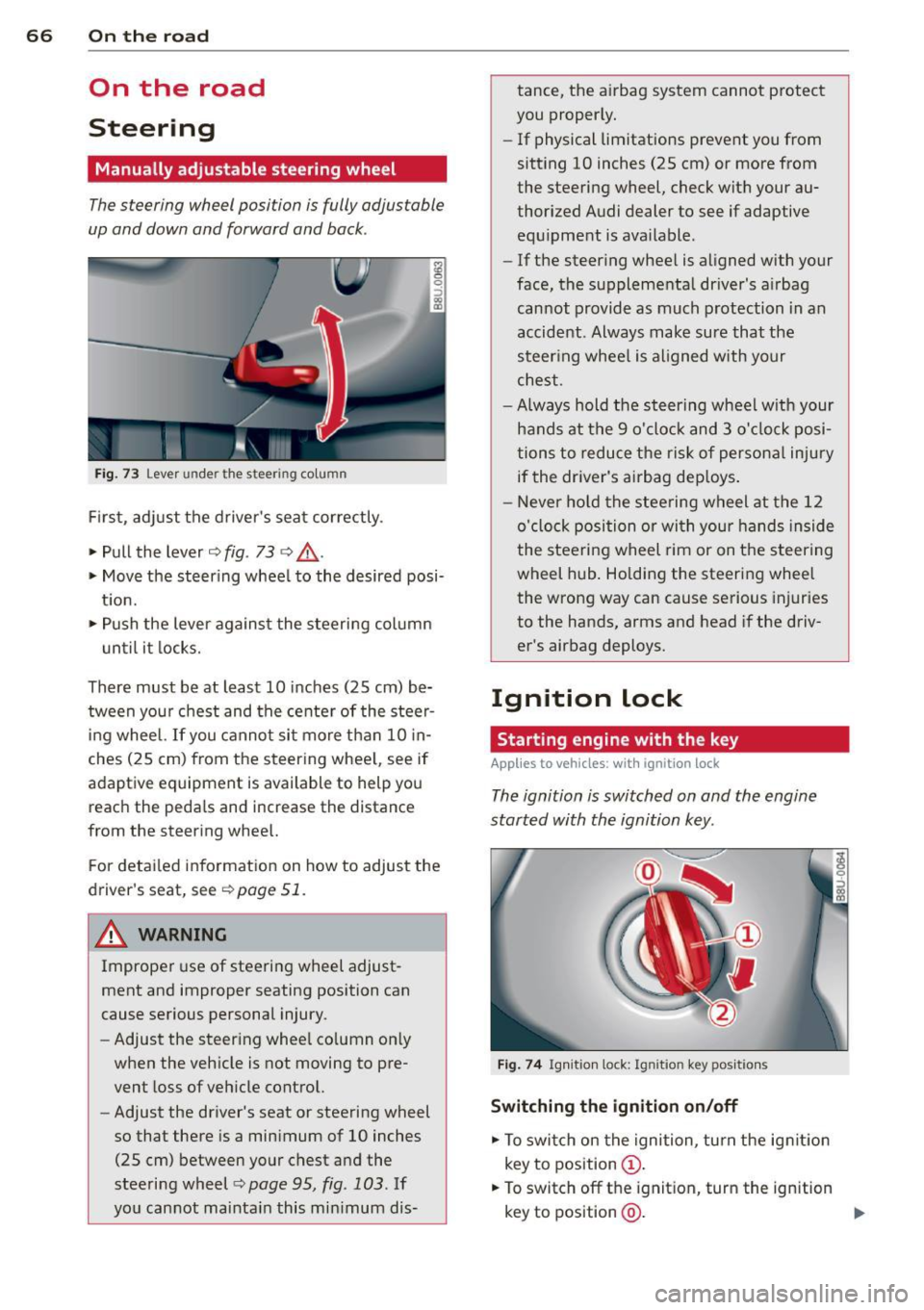
Fig. 73 Lever under the steer ing colu mn
First, adjust the driver's seat correctly .
• Pull the lever
c> fig . 73 <=> &_ .
• Move the steer ing whee l to the desired posi
t ion.
• Push the lever against the steering column
until it locks.
There must be at least 10 inches (25 cm) be tween your chest and the center of the steer
ing wheel. If you cannot sit more than 10 in
ches (25 cm) from the steering whee l, see if
adaptive equipment is available to help you reach the pedals and increase the distance
from the steering wheel.
F or detai led information on how to adjust the
driver's seat, see
c> page 51 .
A WARNING
Improper use of steeri ng wheel adjust
ment and improper seating position can
cause serious personal injury.
- Adjust the steering whee l co lumn on ly
when the veh icle is not moving to pre
vent loss of veh icle control.
- Adjust the driver's seat or steering wheel
so that there is a minimum of 10 inches
(25 cm) between your chest and the
steering wheel
¢ page 95, fig. 103. If
yo u cannot mainta in this min imum dis- tance, the airbag system cannot protect
you proper ly.
- If physical limitations prevent you from
sitting 10 inches (25 cm) or more from
the steering wheel, check with your au
thorized Audi dealer to see if adaptive equ ipment is ava ilable .
- If the steer ing wheel is aligned with your
face, the supplementa l driver's a irbag
cannot provide as much protection in an
accident . Always make sure that the
steer ing wheel is aligned with your
chest.
- Always hold the steering wheel w ith your
hands at the 9 o'clock and 3 o'clock posi
tions to reduce the risk of persona l injury
if the driver's airbag dep loys .
- Never hold the stee ring wheel at the 12
o'clock position or with your hands inside
the steeri ng wheel rim or on the steering
wheel hub . Holding the steering wheel
the wrong way can cause serious injuries
to the hands, arms and head if the driv
er's airbag deploys.
Ignition lock
Starting engine with the key
Applies to vehicles : w ith ign ition lock
The ignition is switched on and the engine
started with the ignition key .
Fig. 74 Igni tion tock : Igni tion key po siti ons
Switching the ignition on /off
• To switch on the ignition , turn the ignit ion
key to position
(D .
• To switch off the ignit ion, turn the ignition
key to position
@ . ..,.
Page 69 of 258
M N
M N
0 ::i co ,...., \!) 1.1'1 ,...., 1.1'1 ,....,
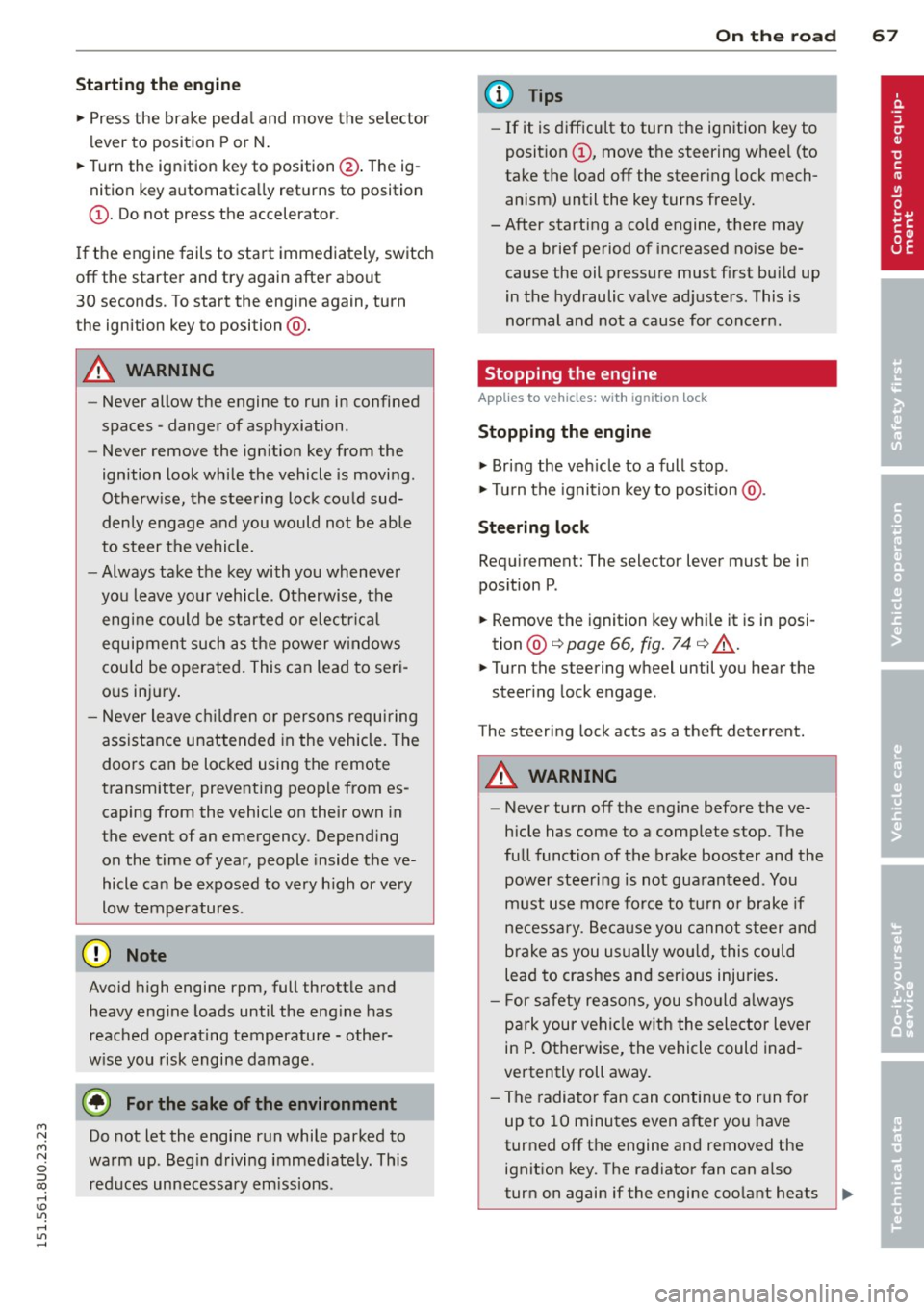
Starting th e engin e
"'Pre ss the brake peda l and move the se lector
lever to position P or N.
"' Turn the ignition key to position @. The ig
nition key automatica lly returns to position
® · Do not press the accelerator.
If the engine fails to start immediately, switch
off the starter and try again after about
30 seconds . To start the engine again, turn
the ignition key to position @.
A WARNING
-Never allow the engine to run in confined
spaces -dange r of asphyxiation.
- Never remove the ign ition key from the
ignition look while the vehicle is moving.
Otherw ise, the stee ring lock could sud
denly engage and you would not be able
to steer the vehicle.
- Always take the key with you whenever
you leave your vehicle . Otherwise, the
engine could be started or e lectr ica l
equipment such as the power w indows
cou ld be operated . This can lead to seri
o us injury .
- Never leave c hildren or persons requi ring
assistance unattended in the vehicle. The
doo rs can be locked using the remote
transmitter, preventing peop le from es
caping from the vehicle on their own in
the event of an emergency. Depend ing
on the time of year, people inside the ve
hicle can be exposed to very h igh or ve ry
low temperatures .
(D Note
Avoid high engine rpm, full throttle and
heavy eng ine loads until the eng ine has
reached operat ing temperature -other
w ise you risk engine damage.
@) For the sake of the environment
Do not let the engine run while parked to
warm up. Beg in driving immediately. This
red uces unnecessary em iss ions.
On th e ro ad 67
(D Tips
-If it is difficult to turn the ignition key to
posit ion ©, move the steering wheel (to
take the load off the steer ing lock mech
anism) until the key turns freely.
-After starting a cold engine, there may be a brief period of increased no ise be
cause the oil pressure must f irst bu ild up
in the hydraulic valve adjusters. This is
normal and not a cause for concern.
Stopping the engine
App lies to vehicles : wit h ignition lock
Stopping the engine
"' Bring the veh icle to a full stop .
"' Tu rn the ignition key to posit ion @.
Steering lock
Req uirement: The selector lever must be in
pos ition P .
"' Remove the ignition key whi le it is in posi
tion @¢
page 66, fig. 74 ¢ &,.
"'Turn the steering wheel until you hear the
steer ing lock engage .
The steering lock acts as a theft deterrent.
A WARNING
- Never turn off the engine before the ve
hicle has come to a comp lete stop. The
fu ll funct ion of the brake booster and the
power steeri ng is not gua ranteed . You
must use more fo rce to tu rn o r brake if
necessa ry. Be ca use you canno t steer and
bra ke as you usually wo uld, this could
lead to crashes and ser ious injuries .
- F or safety re aso ns, you sho uld a lways
pa rk your vehi cle w it h the selector lever
in P. Otherwise, the vehicle could inad
vertently roll away.
- T he radiator fan can continue to run for
up to 10 minutes even after you have
turned off the engine and removed the ignit ion key. The radiator fan can a lso
turn on again if the engine coo lant heats
~
Page 71 of 258
M N M N
0 ::i co
rl I.O
"' ,....,
"' rl
@ Tips
-After starting a cold engine, there may
be a brief period of increased noise be
cause the oil pressure must first build up
i n the hydraulic valve adjusters . This is
norma l and not a cause for concern .
Switching engine off
Applies to vehicles: with conven ience key
• Bring your veh icle to a complete stop .
• Move the selecto r lever to the P or N posi
t ion.
• Press the
!S TA RT ENGINE S TO PI button
~ pag e 68, fig. 75.
Steering lock
The steering locks when you turn the engine
off us ing the
I START ENGIN E STOP I button
and ope n the dr iver 's door. The locked stee r
i n g helps preven t vehicle theft.
Emergenc y Off functi on
If necessary in an emergency, the engine can
be sw itched off while the vehicle is st ill mov
ing. Press the
I S TAR T ENG IN E ST OPI button
tw ice in quick succession or ho ld it in for lon
ger than two seconds .
_& WARNING
-Never t urn off the engine before the ve
h icle has come to a complete stop . The
full function of the brake booster and the power steering is not guaranteed. You
must use more force to turn or brake if
necessary . Because you cannot steer and
brake as you usually would, this could
lead to crashes and serious injur ies .
- For safety reasons, you should always
park your vehicle with the se lector lever
in P. Otherwise, the ve hicl e co uld inad
vertent ly roll away.
- The rad iator fan can continue to run for
up to 10 min utes even after you have
t urned off the eng ine and removed the
ignition key . The radiator fan can also
turn on again if the engine coolant heats
On th e road 69
up because of intense sunlight or heat
bui ld-up in the engine compartment.
- Always take the key with you whenever
you leave your vehicle. Otherwise, the
engine could be started or electrical
equipment such as the power windows
could be operated . This can lead to seri
ous injury.
(D Note
If the engine has been under heavy load
for an extended period, heat bu ilds up in
the eng ine compartment after the engi ne
i s sw itched off - there is a r isk of damag ing
the engine . A llow the engine to run at idle
for about two minutes before switching it
off .
Starting the engine after a malfunction
Applies to vehicles: wit h convenience key
If the remote control key battery is exhausted
or if radio interference or a system malfunc
tion o ccurs, extra steps may be necessary in
order to start the engine .
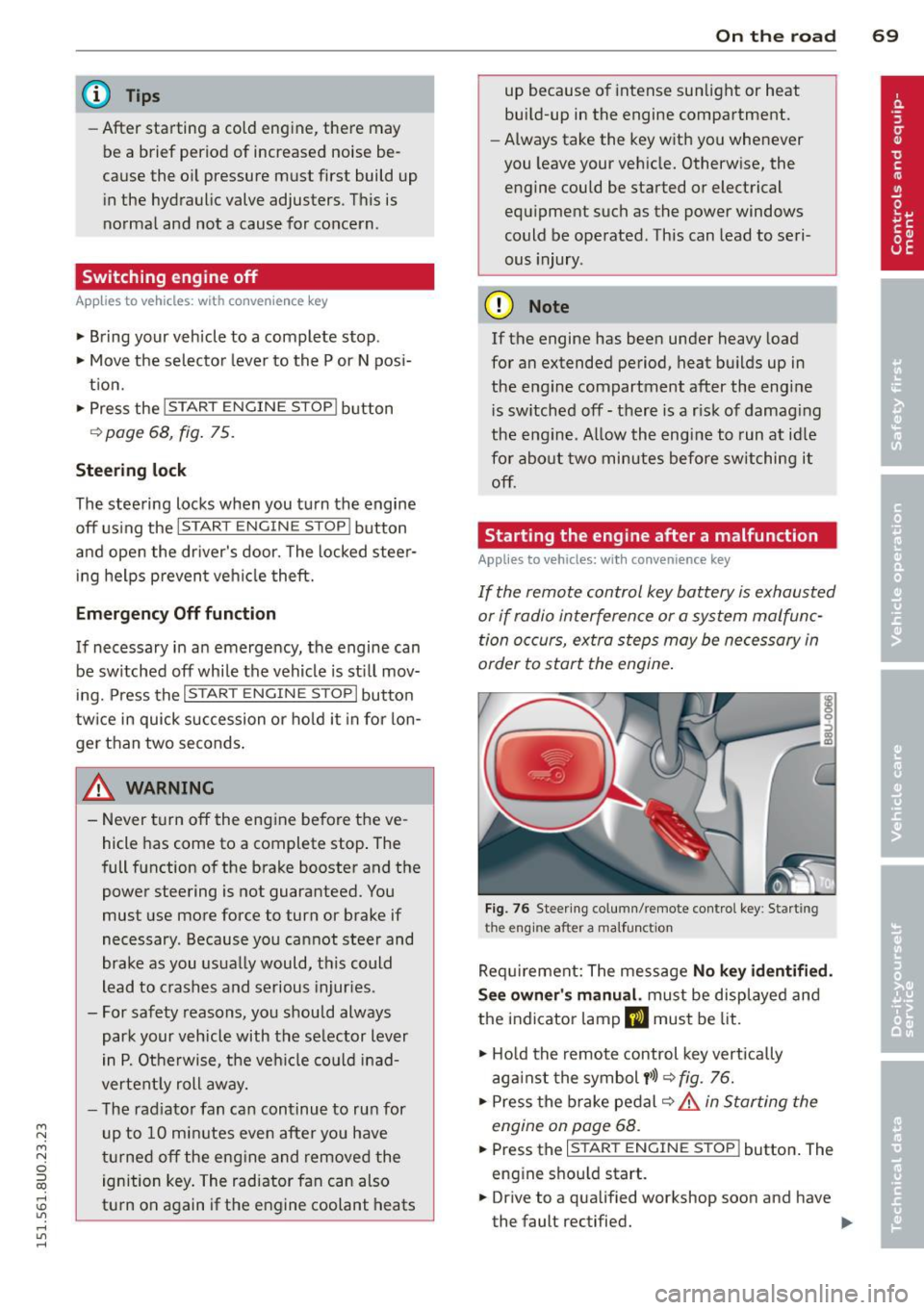
Fig. 76 Steer ing co lumn/remote contro l key : Start ing
t he en gi ne a fter a m alfu ncti on
Requ irement: The message No k ey identifi ed.
S ee owner' s manu al.
must be displayed and
the indicator lamp
m must be lit .
• Ho ld the remote control key vertically
aga inst the symbol
y >l) ~ fig . 76.
• Press the b rake pedal ~.&.
in Starting the
engin e on page 68 .
• Press the ~ I s =T -A -R =T ~ E= N~ G~IN ~ E-s=T -O ~ P~I button. The
eng ine shou ld start.
• Drive to a qualified workshop soon and h ave
the faul t rectified. .-
Page 81 of 258
M N M N
0 ::i co
rl I.O
"' rl
"' rl
Audi drive select Driving settings
Introduction
App lies to vehicles: with Audi drive select
Drive select provides the possibility to experi
ence different types of vehicle sett ings in one
vehicle. For instance, using the three
Com
fort , Auto
and Dynamic modes, t he driver can
switch from a sporty to a comfortab le driving
mode with the press of a button.
Description
Applies to vehicles : with Audi drive select
The vehicle setup in each mode depends on
the vehicle's features. However, the engine,
automatic transmission and steering are al
ways involved .
Engine and automatic transmission
Depending on the mode, the engine and the
automatic transmission respond quicker or in
a more balanced manner to accelerator pedal
movements. In the sporty dynamic mode, the
automatic transmission shifts at higher RPMs.
Steering
The steering adapts in terms of steering ef
fort. Indirect steering that moves easily, like
the steering in comfort mode, is best suited
to long drives on a highway . In contrast, dy
namic mode provides sporty, direct steering .
Curve light*
The curve light adapts to driving on curves.
The pivot ing action and the lighting are also
adapted to the mode .
@ Tips
Selecting the Dynamic mode results in
sporty shift ing characteristics. The S gear
position engages automatically.
Audi drive select 79
Selecting the driving mode
Applies to vehicles: with Aud i drive se lect
You can choose between Comfort, Auto and
Dynamic modes.
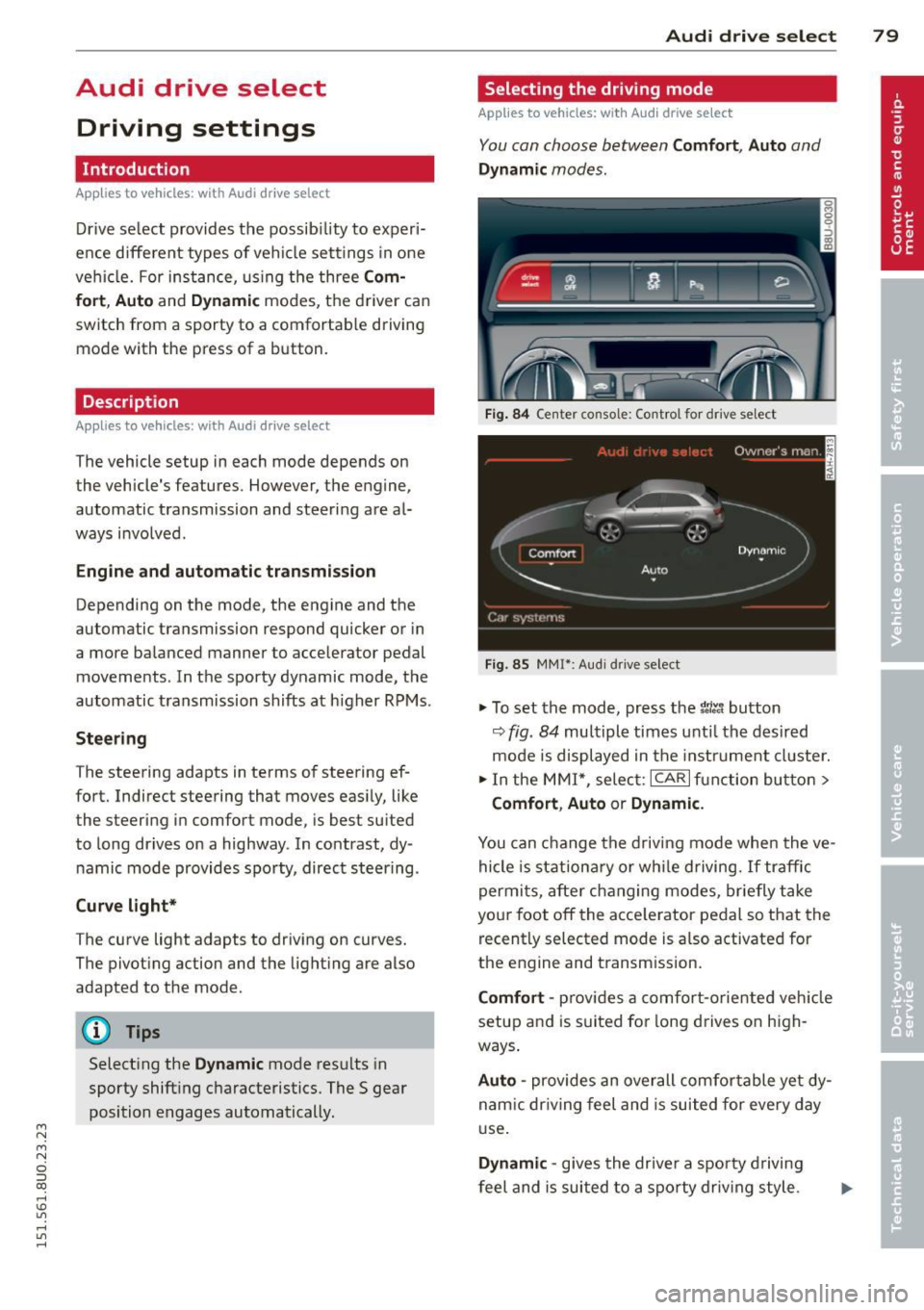
Fig. 84 Center console: Control for drive se lect
Fig . 85 MMI*: Aud i drive select
.,. To set the mode, press the t1ti button
9fig. 84 multiple times unti l the desired
mode is displayed in the instrument cluster.
.,. In the MMI*, select: ICARlfunction button>
Comfort, Auto or Dynamic.
You can change the driving mode when the ve
hicle is stationary or while driving. If traffic
permits, after changing modes, briefly take
your foot off the acce lerator pedal so that the
recently selected mode is a lso activated for
the engine and transm ission.
Comfort -provides a comfort-oriented vehicle
setup and is suited for long drives on high
ways .
Auto -provides an overall comfo rtable yet dy
nam ic dr iving feel and is suited for every day
use.
Dynamic -gives the drive r a sporty driving
feel and is suited to a sporty driving style.
Page 91 of 258
M N M N
0 ::i co
rl I.O
"' rl
"' rl
Switching on/off
Applies to vehicles: with park ing system p lus
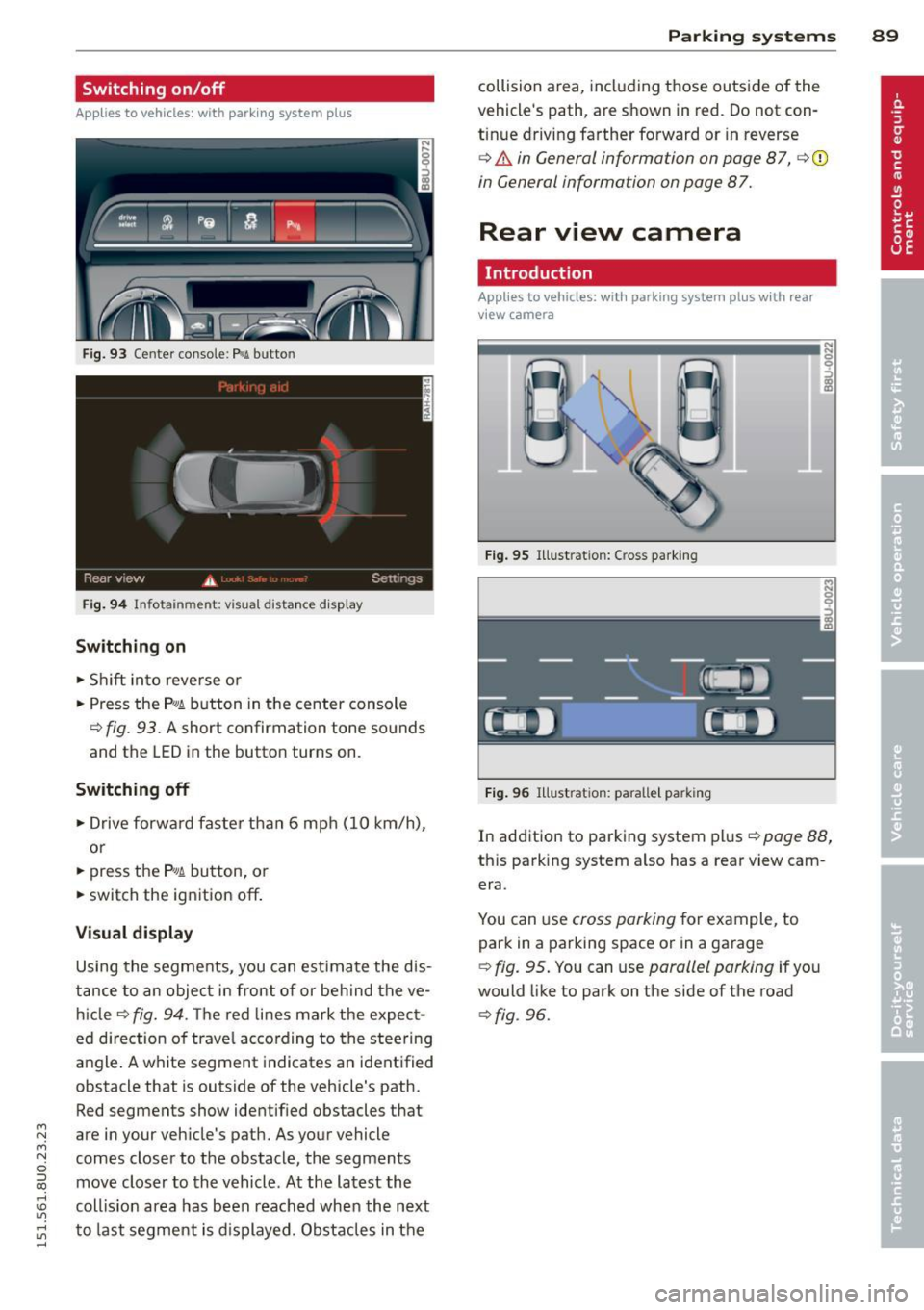
F ig. 93 Ce nter conso le: P.11 butto n
Fig. 94 Info tainmen t: visual distance disp lay
Sw itching on
• Shift into reve rse or
• Press the
P,#A button in the center console
¢ fig. 93. A short confirmation tone so unds
and the LED in the button turns on.
Swit ching off
• Drive forwa rd faster than 6 mph (10 km/h),
or
• press the
P,#A button, or
• switch the ignition
off .
Visual displa y
Using the segme nts, you can estimate the dis
tance to an object in front of or beh ind the ve
hi cle r:1>fig. 94 . T he red lines mark the expect
ed direction o f travel according to the steering
angle. A white segment indicates an ident ified
obstacle that is outside of the vehicle's path. Red segments show identified obstacles that
are in your veh icle's path. As your vehicle
comes closer to the obstacle, the segments move closer to the vehicle. At the latest the
coll is ion area has been reached when the next
to last segment is d isplayed. Obstacles in the
P arking systems 89
collision area, including those outs ide of the
vehicle's path, are shown in red . Do not con
tin ue driving farther forward or in reverse
¢ A in General information on page 87, r:1>Q)
in General information on page 87.
Rear view camera
Introduction
Applies to vehicles: with parking system plus with rea r
view camera
F ig . 95 Illust ration: C ross parking
Fi g. 96 Ill ust rat io n: paralle l pa rking
In addition to parking system plus<=> page 88,
th is parking system a lso has a rear view cam
era.
You can use cross parking for example, to
park in a parking space or in a garage
<=> fig. 95. You can use parallel parking if you
would like to park on the side of the road
c::> fig . 96.
Page 92 of 258
90 Parking systems
General information
Applies to vehicles: with park ing system p lus with rear
view camera
0
~ CX) ID
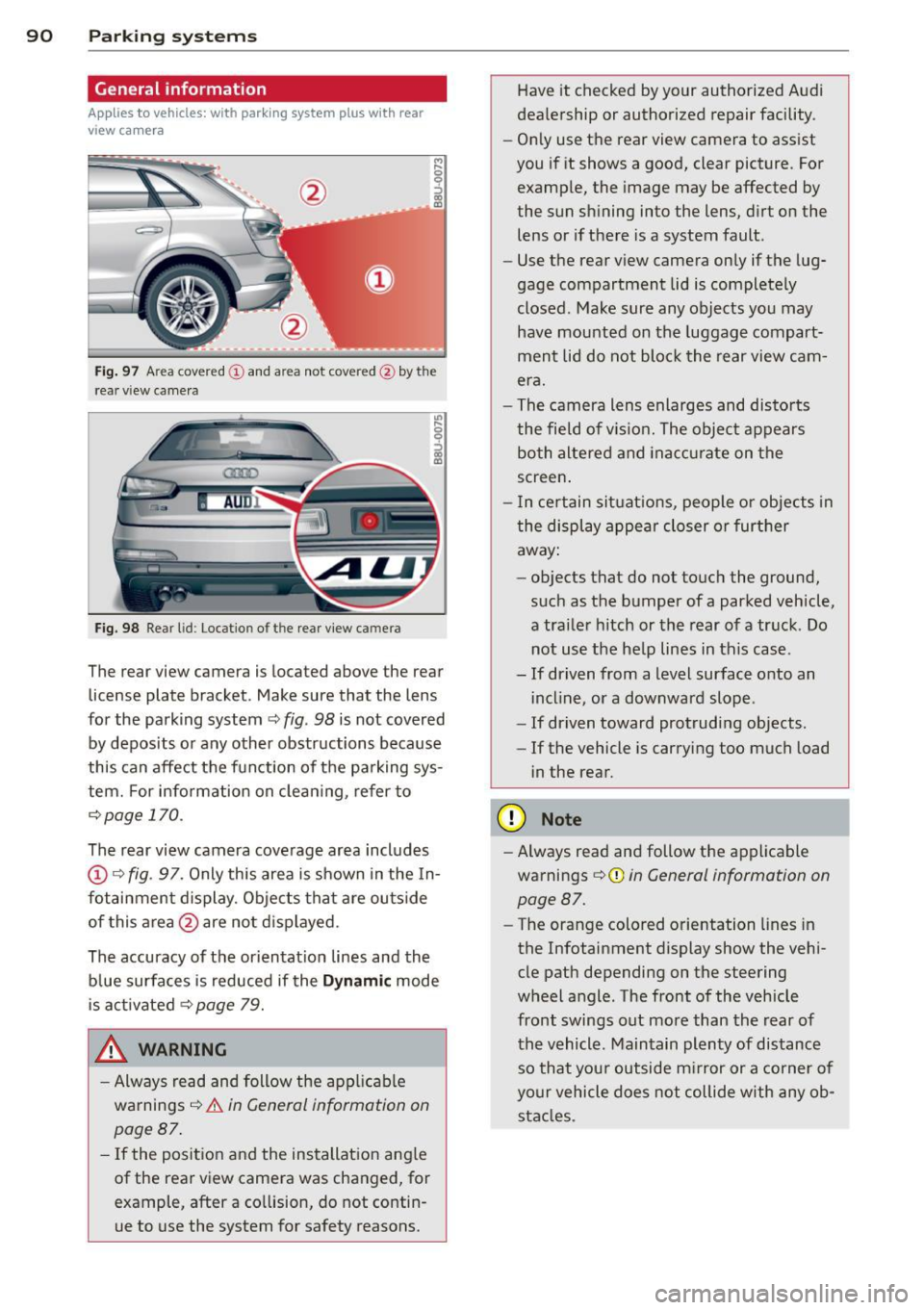
Fig. 97 Area covere d (!) and area not covered @by the
r ea r view came ra
Fig. 98 Re ar lid: Locatio n of the rear view camera
The rear view camera is located above the rear
license plate bracket . Make sure that the lens
for the parking system~
fig. 98 is not covered
by deposits or any other obstructions because
this can affect the function of the parking sys
tem. For info rmation on cleaning, refer to
¢page 170.
The rear view camera coverage area includes
@Q fig. 97. Only this area is shown in the In
fotainment display. Objects that are outside
of this area @are not displayed.
The accuracy of the orientation lines and the blue surfaces is reduced if the
Dynamic mode
is activated
~ page 79.
.&, WARNING
-Always read and follow the applicable
warnings ¢_&.
in General information on
page 87.
- If the position and the installation angle
of the rear view camera was changed, for example, after a collision, do not contin
ue to use the system for safety reasons. Have
it checked by your authorized Audi
dealership or authorized repair facility .
- Only use the rear view camera to assist
you if it shows a good, clear picture . For
example, the image may be affected by
the sun shining into the lens, dirt on the
lens or if there is a system fault.
- Use the rear view camera only if the lug
gage compartment lid is completely
closed . Make sure any objects you may
have mounted on the luggage compart
ment lid do not block the rear view cam
era.
- The camera lens enlarges and distorts
the field of vision. The object appears both altered and inaccurate on the
screen.
- In certain situations, people or objects in
the display appear closer or further
away:
- objects that do not touch the ground,
such as the bumper of a parked vehicle,
a trailer hitch or the rear of a truck . Do
not use the help lines in this case .
- If driven from a level surface onto an incline, or a downward slope .
- If driven toward protruding objects .
- If the vehicle is carrying too much load
in the rear.
(D Note
-Always read and follow the applicable
warnings ¢(I)
in General information on
page 87.
- The orange colored orientation lines in
the Infotainment display show the vehi
cle path depending on the steering
wheel angle . The front of the vehicle
front swings out more than the rear of
the vehicle . Maintain plenty of distance
so that your outside mirror or a corner of
your vehicle does not collide with any ob
stacles .
Page 93 of 258
M N M N
0 ::i co
rl I.O
"' rl
"' rl
Switching on/off
Applies to vehicles: with parking system plus with rea r
view camera
Switching on
• Shift into reverse or
• press the
p,,1, button in the center console
c:> page 89, fig . 93 . A short confirmation
tone sounds and the LED in the button turns
on.
S wi tc hing between the rear v iew came ra
a nd optical di splay
• Press the G raphic control button ®
r::!.> page 91, fig. 99 to see the optical d is
play.
• Press the
Rearvi ew con trol button to see the
rear view camera image.
Switching off
• Drive forward faster than 6 mph (10 km/h),
o r
• Press the
P,qA button, or
• Swi tch the ignition off.
@ Tips
The v isua l disp lay in t he left pa rt of the
disp lay sho uld help you detect the critical
vehicle areas.
Cross parking
Applies to vehicles: with parking system plus with rear
view camera
This view may be used when parking in a ga
rage or in a parking space.
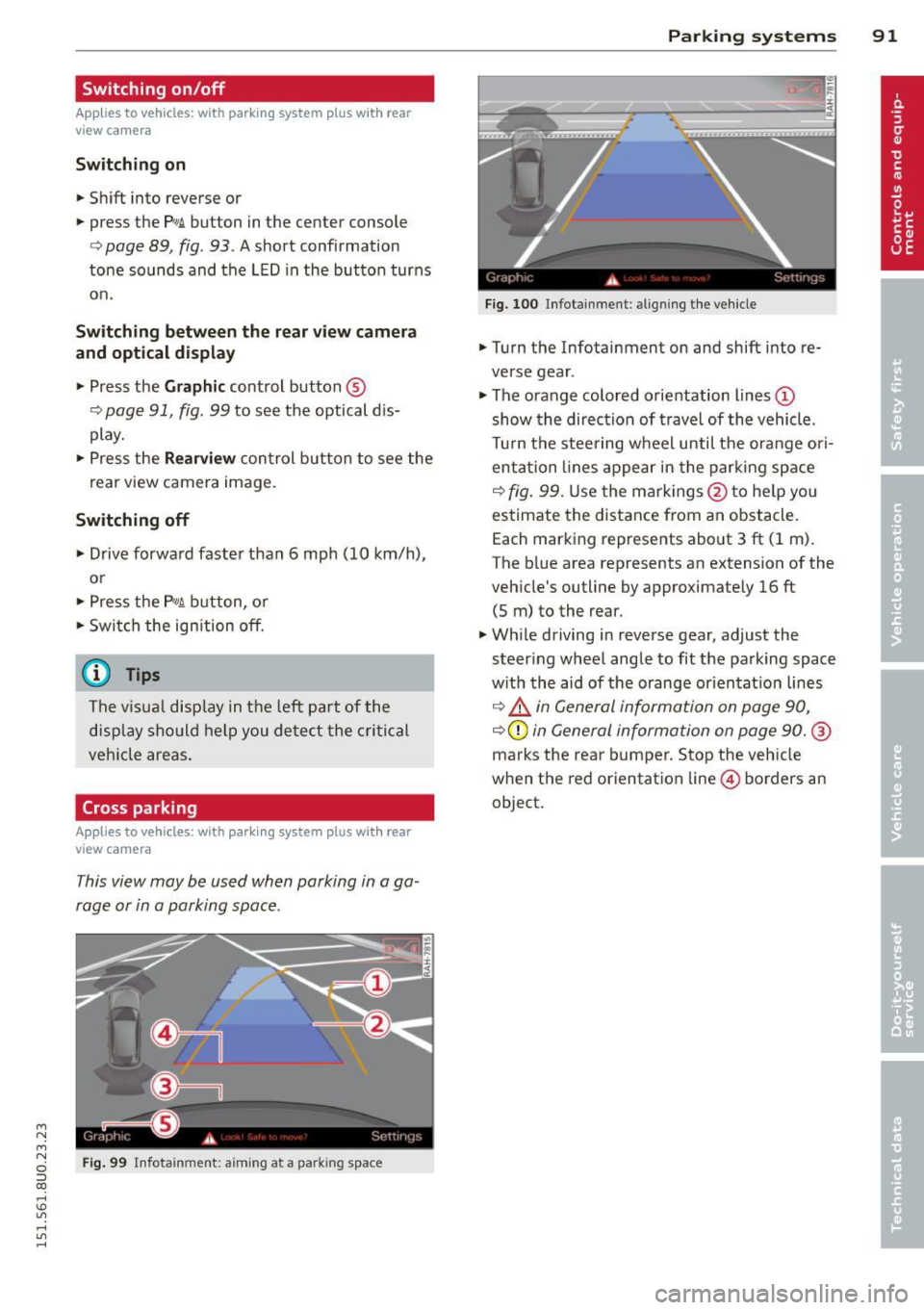
Fig. 99 Infota inment: aiming at a park ing space
P arking systems 91
Fig. 100 Infotainment : aligning th e ve hicle
• Turn the Infotainment on and shift into re
verse gear .
• The orange colored orientation lines
(D
show the direction of travel of the vehicle.
Tu rn the steering wheel until the orange ori
entation lines appear in the parking space
c:> fig. 99. Use the ma rkings @to he lp you
estimate the distance from an obstacle.
Each marking represents about
3 ft (1 m) .
The blue area represents an extension of the
vehicle's outline by approximate ly 16 ft
(5 m) to the rear.
• Wh ile driving in reverse gear, adjust the
steering wheel angle to fit the parking space
w ith the aid of the orange or ientat ion lines
c:> ,& in General information on page 90,
c:>(D in General information on page 90. @
marks the rear bumper. Stop the veh icle
when the red orientation line © borders an
object .